

I 10 migliori software di gestione della forza lavoro mobile recensiti nel 2026

10 Elenco dei migliori software per la gestione della forza lavoro mobile


Hai difficoltà a gestire in modo efficiente i tuoi team da remoto e sul campo? Il software per la gestione della forza lavoro mobile può aiutarti.
Grazie al tracciamento GPS in tempo reale, ai fogli presenze automatizzati e all'assegnazione fluida degli interventi, ridurrai al minimo i processi manuali, eliminerai gli errori nelle buste paga, aumenterai la produttività e resterai conforme alle leggi sul lavoro.
Questi strumenti rappresentano un investimento importante per molte organizzazioni. Usa il mio elenco dei migliori software per la gestione della forza lavoro mobile per confrontare funzionalità, prezzi, casi d'uso e USP.
Perché fidarsi delle nostre recensioni sui software
Il nostro team testa e recensisce software dal 2012. In quanto esperti HR noi stessi, sappiamo quanto sia difficile — e importante — scegliere il software giusto.
Per questa guida, abbiamo valutato gli strumenti attraverso test pratici e ricerche indipendenti, assegnando un punteggio agli strumenti in base ai nostri criteri di selezione. Ci basiamo inoltre sulle competenze di leader di pensiero del settore e di professionisti HR attivi.
Le nostre recensioni riflettono il nostro giudizio editoriale umano, non un discorso di vendita.
Riepilogo dei migliori software per la gestione della forza lavoro mobile
Questa tabella comparativa riassume i dettagli dei prezzi delle mie migliori selezioni di software per la gestione della forza lavoro mobile, per aiutarti a trovare quello più adatto al tuo budget e alle esigenze della tua azienda.
| Tool | Best For | Trial Info | Price | ||
|---|---|---|---|---|---|
| 1 | Ideale per la gestione di team mobili in diversi paesi | Demo gratuita disponibile | Da $5/dipendente/mese | Website | |
| 2 | Ideale per la gestione HR completa e il monitoraggio mobile della forza lavoro | Prova gratuita di 14 giorni OPPURE demo gratuita disponibile | A partire da $8/utente/mese | Website | |
| 3 | Ideale per metodi flessibili di timbratura | Prova gratuita di 21 giorni + dimostrazione gratuita disponibile | A partire da $2.93/utente/mese (fatturato annualmente) | Website | |
| 4 | Ideale per il monitoraggio GPS e la geolocalizzazione | Prova gratuita di 30 giorni + demo disponibile | Da $50/mese | Website | |
| 5 | Ideale per la comunicazione di squadra | Demo gratuita disponibile | Prezzo su richiesta | Website | |
| 6 | Ideale per l'integrazione con l'analisi HR | Demo gratuita + piano gratuito disponibile | A partire da $5/dipendente/mese (fatturazione annuale) | Website | |
| 7 | Ideale per operazioni di staff per eventi potenziate dall’intelligenza artificiale | Demo gratuita disponibile | Da $49/mese | Website | |
| 8 | Ideale per la gestione dei servizi sul campo | Demo gratuita disponibile | Da $59/utente/mese | Website | |
| 9 | Ideale per la previsione della forza lavoro | Demo gratuita disponibile | Prezzo su richiesta | Website | |
| 10 | Ideale per la scalabilità aziendale | Demo gratuita disponibile | Prezzo su richiesta | Website |
Recensione dei migliori software per la gestione della forza lavoro mobile
Di seguito trovi i miei riepiloghi dettagliati dei migliori software per la gestione della forza lavoro mobile inclusi nel mio elenco. Le mie recensioni offrono una panoramica approfondita delle funzionalità principali, dei pro e dei contro, delle integrazioni e dei casi d’uso ideali di ogni strumento, per aiutarti a trovare quello più adatto a te.

Deel HR
Ideale per la gestione di team mobili in diversi paesi
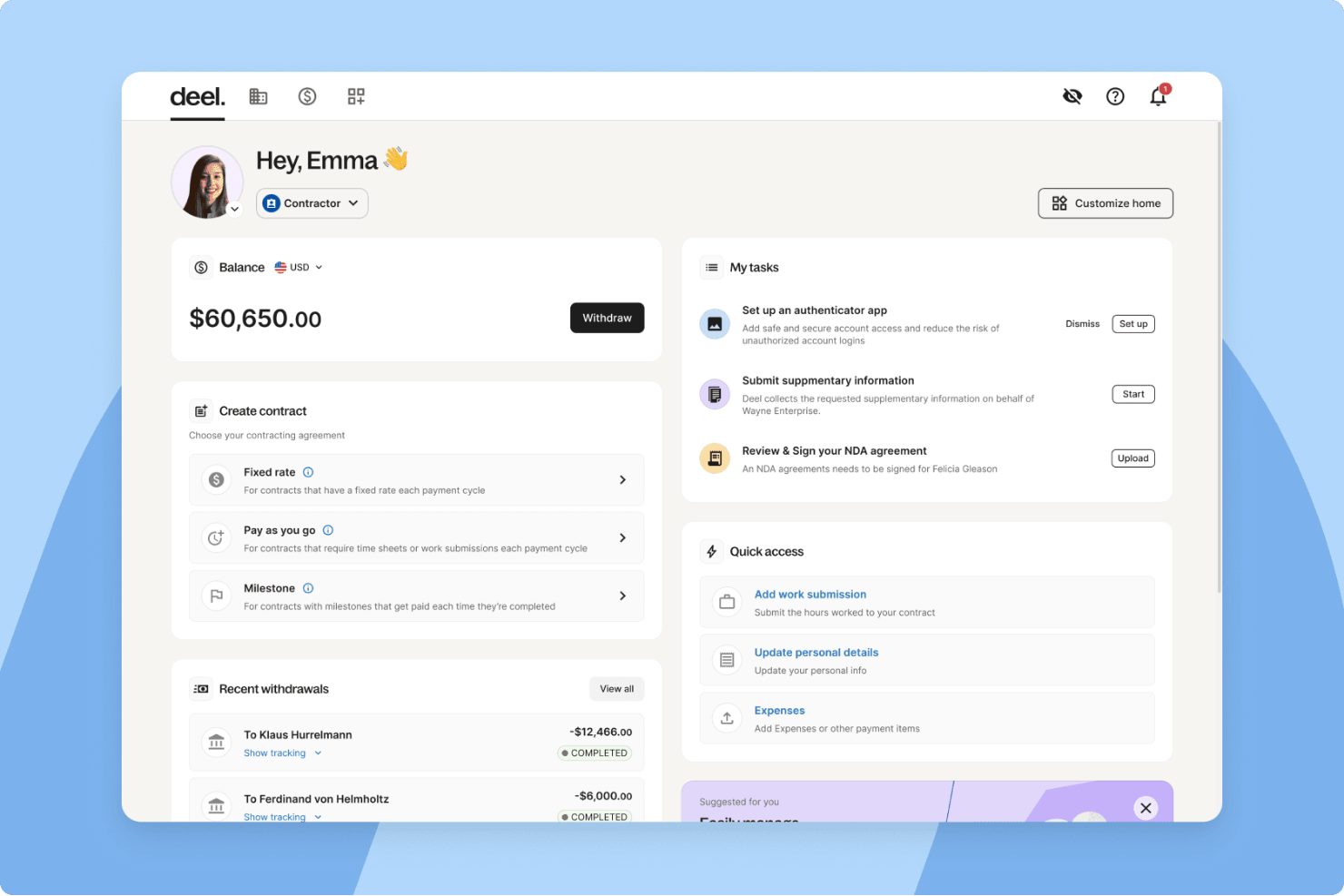
Deel è una piattaforma HR globale progettata per aiutare le aziende a gestire assunzioni internazionali, onboarding e payroll in oltre 150 paesi. Offre soluzioni complete per la gestione di team remoti e mobili—soprattutto di coloro che lavorano come collaboratori esterni o dipendenti al di fuori del paese di origine dell’organizzazione.
Perché ho scelto Deel: Ho scelto Deel per le sue solide funzionalità di conformità globale, fondamentali per le aziende che gestiscono una forza lavoro distribuita o mobile. Semplifica l’onboarding dei collaboratori e la gestione del payroll internazionale, offrendo accesso tramite mobile e supporto ai pagamenti in più valute—caratteristiche vantaggiose per i team HR che supervisionano operazioni globali. Il servizio Employer of Record (EOR) di Deel consente inoltre di assumere talenti legalmente senza dover costituire entità locali, un risparmio di tempo significativo per le aziende in crescita.
Caratteristiche principali e integrazioni:
Caratteristiche includono raccolta automatica dei moduli fiscali, contratti digitali con firma elettronica, tracciamento delle spese e gestione delle assenze.
Inoltre, l'app mobile di Deel rende accessibili ovunque le attività HR come caricamento di documenti e rilevazione delle ore.
Integrazioni includono QuickBooks, Xero, BambooHR, ADP, Workday, Google Workspace, Salesforce e altro ancora. È disponibile un’API per integrazioni personalizzate.
Pros and Cons
Pros:
- Strumento solido per la gestione dei team e il lavoro da remoto
- Funzionalità complete per la gestione di HR, IT e payroll
- Garantisce la conformità globale alle leggi locali sul lavoro
Cons:
- Opzioni di personalizzazione limitate
- Configurazione complessa per piccoli team
New Product Updates from Deel HR

Deel Expands Stablecoin Wallet to 80+ Countries
Deel expands its Stablecoin Wallet to 80+ countries with dollar-backed balances and optional rewards. This gives eligible contractors more ways to hold and manage earnings inside Deel. For more information, visit Deel’s official site.
 .
.
Ideale per la gestione HR completa e il monitoraggio mobile della forza lavoro
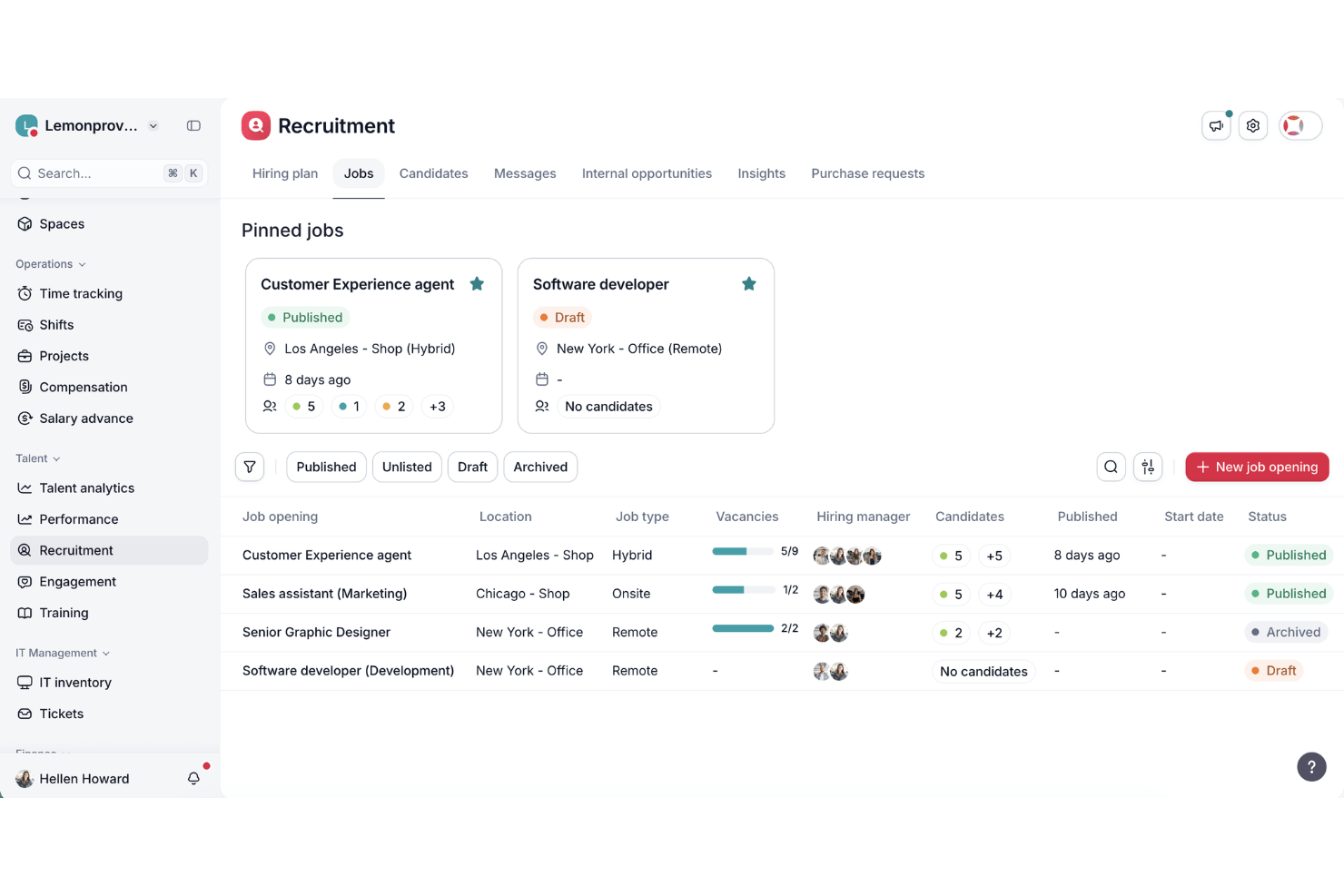
Factorial è una piattaforma HR modulare che copre il monitoraggio delle ore, la pianificazione dei turni, la rilevazione delle presenze basata su GPS, la gestione delle assenze, la preparazione delle buste paga e l'autogestione dei dipendenti su dispositivi mobili e desktop.
Per chi è più adatto Factorial?
Factorial è adatto alle PMI in Europa e LATAM che desiderano un'unica piattaforma per gestire l'amministrazione HR e il monitoraggio mobile delle ore senza dover gestire più strumenti.
Perché ho scelto Factorial
Factorial si è guadagnato un posto nella mia lista ristretta perché gestisce concretamente l'amministrazione HR e il monitoraggio della forza lavoro mobile senza richiedere uno strumento separato per ciascuna attività. Sono particolarmente colpito dalla sua acquisizione delle ore in modalità multiple: i dipendenti possono registrare l'entrata tramite una posizione con geofencing GPS, la scansione di un codice QR o il riconoscimento facciale, mentre la modalità offline consente di registrare comunque le entrate anche in assenza di segnale. La pianificazione assistita dall'IA, che genera automaticamente in pochi minuti i turni di un'intera settimana sulla base dei modelli storici, rappresenta un vantaggio concreto per i responsabili che gestiscono operazioni snelle su più sedi.
Funzionalità principali di Factorial
- Registrazione dell'entrata tramite riconoscimento facciale biometrico: i dipendenti registrano entrata e uscita usando il riconoscimento facciale, mentre i dati biometrici vengono elaborati esclusivamente per la verifica dell'identità, così da prevenire la timbratura per conto di altri.
- Flusso di approvazione dei fogli presenze: i responsabili esaminano, approvano o segnalano i fogli presenze dei dipendenti direttamente sulla piattaforma prima che i dati vengano sincronizzati con il sistema paghe.
- Gestione delle assenze e dei permessi: i dipendenti inviano le richieste di congedo tramite l'app mobile e i responsabili le approvano o rifiutano, con notifiche automatiche inviate a entrambe le parti.
- Integrazione con l'hardware ZKTeco e Suprema: i dati relativi alle ore provenienti dai terminali biometrici fisici vengono sincronizzati direttamente con Factorial, eliminando l'inserimento manuale dei dati per i team che utilizzano orologi marcatempo in sede.
Integrazioni di Factorial
Factorial offre integrazioni nel marketplace con Sage 50 Payroll, DATEV LODAS, Slack, Microsoft Power BI, ZKTeco, Suprema, Okta, Google e Microsoft Azure AD. Supporta inoltre connessioni personalizzate tramite un'API REST pubblica, webhook e Zapier.
Pros and Cons
Pros:
- L'app mobile supporta il monitoraggio offline delle ore
- Il riconoscimento facciale previene la timbratura per conto di altri
- Piattaforma modulare per la gestione HR e della forza lavoro
Cons:
- Nessuna funzionalità di chat di gruppo integrata
- Manca il monitoraggio dei percorsi GPS in tempo reale

Agendrix
Ideale per metodi flessibili di timbratura

Agendrix è un software per la pianificazione dei dipendenti e la gestione della forza lavoro, progettato per supportare le squadre mobili, in particolare nelle piccole e medie imprese organizzate su turni. Semplifica la pianificazione, il monitoraggio delle ore e le attività delle risorse umane, offrendo una piattaforma unificata accessibile da computer e dispositivi mobili.
Perché ho scelto Agendrix: Ho scelto Agendrix per la sua concezione pensata innanzitutto per i dispositivi mobili e per le sue solide funzionalità di pianificazione, che lo rendono ideale per le squadre che lavorano in più sedi o in mobilità. È possibile creare e condividere i turni, monitorare le ore e le presenze e gestire le modifiche ai turni direttamente dallo smartphone. La piattaforma offre inoltre metodi flessibili di timbratura, tra cui opzioni di geolocalizzazione e biometriche, aiutando le aziende con squadre distribuite a garantire un monitoraggio accurato delle ore e una maggiore responsabilità.
Funzionalità e integrazioni principali
Le funzionalità includono la creazione di turni tramite trascinamento, lo scambio dei turni, la timbratura mobile con GPS, il monitoraggio delle ferie e strumenti per le risorse umane come l'inserimento dei nuovi dipendenti e la gestione dei documenti. I dipendenti possono utilizzare le applicazioni mobili per visualizzare i turni, richiedere permessi e comunicare con i membri della squadra tramite gli strumenti di messaggistica integrati. Offrono inoltre assistenza bilingue e un'interfaccia utente in inglese e francese.
Le integrazioni includono EmployerD, Nethris, Sage 50, Acomba, QuickBooks, Ceridian Powerpay, ADP Workforce Now, Payworks, Lightspeed, Azur, Easypay, BeLocum, Hopem e Folks HR.
Pros and Cons
Pros:
- Si integra con i principali sistemi canadesi per la gestione delle paghe
- Supporta la condivisione dei turni in formato stampabile, via e-mail e su dispositivi mobili
- Messaggistica e notifiche integrate
Cons:
- Alcune integrazioni potrebbero richiedere una configurazione manuale
- Opzioni di personalizzazione limitate per rapporti e analisi

TimeTrex
Ideale per il monitoraggio GPS e la geolocalizzazione
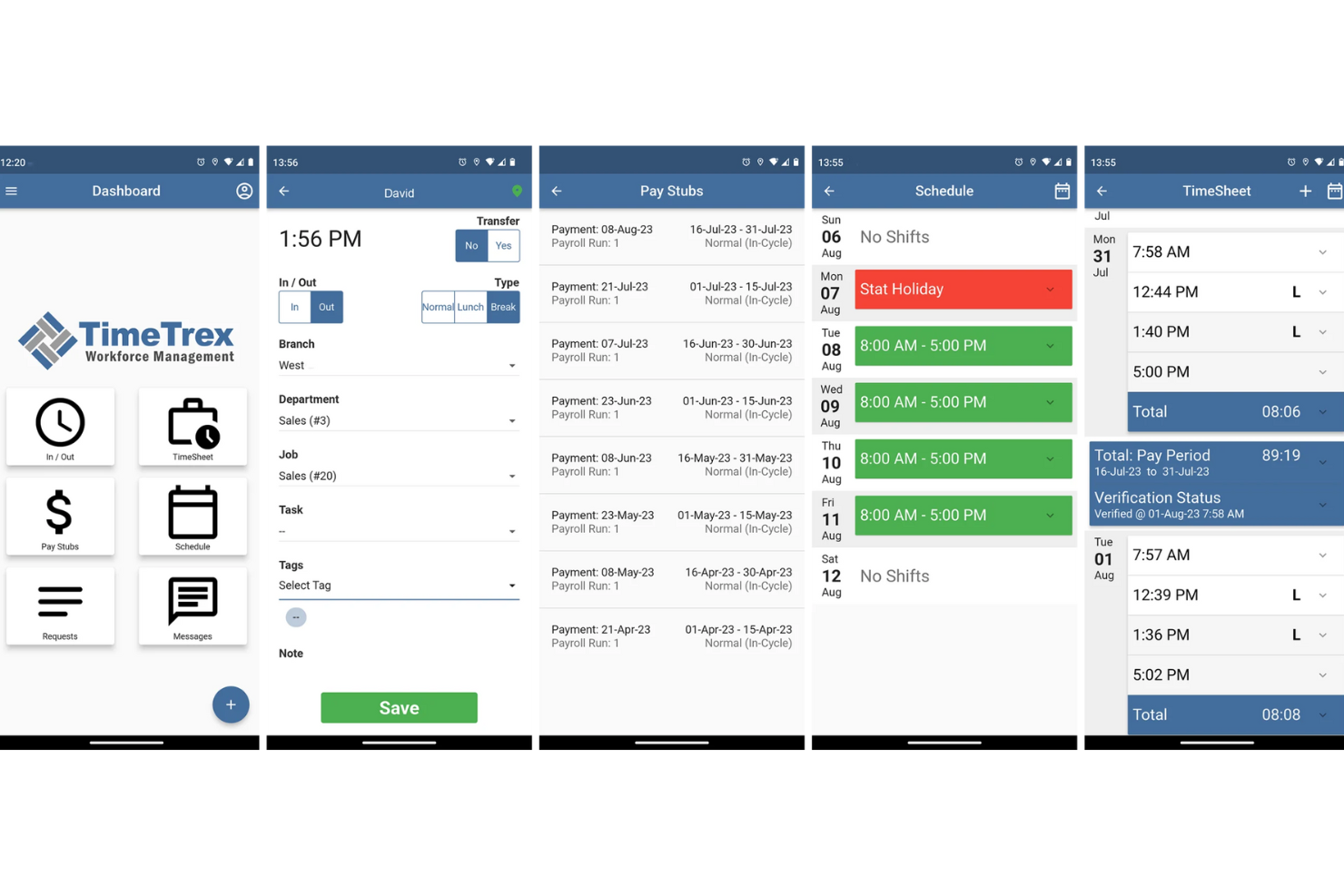
TimeTrex si rivolge direttamente ai team che gestiscono una forza lavoro mobile, su turni o sul campo e che necessitano di strumenti affidabili per la rilevazione delle presenze, la pianificazione dei turni e la gestione delle paghe anche in mobilità. Se gestisci personale in diverse sedi — dai negozi ai cantieri fino a squadre remote o mobili — TimeTrex offre presenze, pianificazione e paghe accessibili da dispositivi mobili in un'unica soluzione.
Perché ho scelto TimeTrex
Mi piace TimeTrex perché le sue funzionalità di rilevazione presenze tramite mobile e di GPS/geofencing offrono piena visibilità su dove e quando avviene il lavoro, ideale se il tuo team opera in sede o su più luoghi. Supporta anche la pianificazione dei turni e l'assegnazione dei turni stessi, che i dipendenti possono visualizzare e gestire direttamente dal loro smartphone — aiutando i team mobili a rimanere organizzati e ad evitare confusione. Infine, l'integrazione integrata con il sistema paghe assicura che le ore rilevate confluiscano direttamente nella gestione degli stipendi, riducendo errori e facendo risparmiare tempo ai responsabili.
Funzionalità principali di TimeTrex
Oltre alle funzionalità menzionate, ho trovato preziosi anche questi aspetti:
- Pianificazione dei turni con gestione delle assenze: Puoi creare e modificare i turni del personale, gestire cambi turno e richieste di ferie e permettere ai dipendenti di visualizzare in tempo reale le proprie assegnazioni.
- Rilevazione dei costi di commessa e fatturazione: Tieni traccia della manodopera e delle spese per progetto o compito e genera fatture in base alle ore effettivamente lavorate — utile se fatturi i clienti per il lavoro svolto o monitori la redditività delle singole attività.
- Gestione HR: Strumenti per il recruiting, l'onboarding, la valutazione delle prestazioni e il monitoraggio della conformità normativa.
- Analisi e reportistica: Report personalizzabili e dashboard in tempo reale per decisioni basate sui dati.
Integrazioni di TimeTrex
La piattaforma mette a disposizione un'API per integrazioni personalizzate, consentendo di collegare TimeTrex ad altri software secondo le necessità.
Pros and Cons
Pros:
- Presenze e paghe gestite in un unico pacchetto
- Supporta la timbratura mobile e biometrica, ideale per team distribuiti
- Consente il self-service dei dipendenti per ferie, turni e cartellini
Cons:
- Il piano gratuito non offre assistenza clienti né accesso all'app mobile.
- Numero limitato di integrazioni native rispetto alle principali piattaforme HR.
New Product Updates from TimeTrex
TimeTrex Adds Quick Punch App With Offline and QR Support
TimeTrex adds a new Quick Punch app, offline punching, QR code scanning, punch images, configurable messages, and punch warnings or lockouts to improve employee clock-ins across browsers and local computers. For more information, visit TimeTrex’s official site.
 .
.
Ideale per la comunicazione di squadra
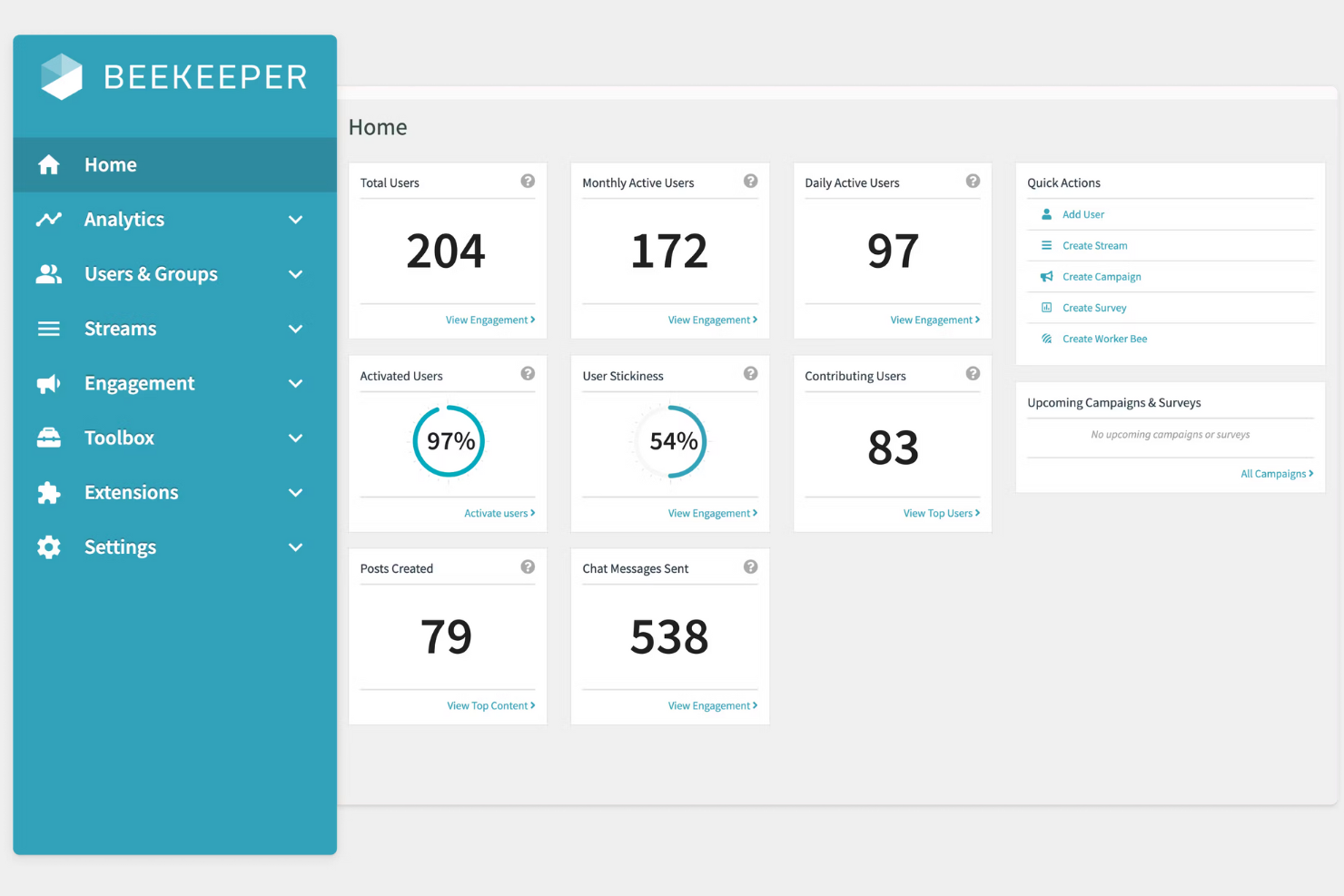
Beekeeper è una piattaforma di comunicazione progettata per i lavoratori in prima linea e per i dipendenti senza postazione fissa. Facilita la messaggistica in tempo reale, la collaborazione e la condivisione di contenuti per mantenere i team connessi e informati.
Ho scelto Beekeeper: Questo strumento eccelle nella comunicazione di squadra, offrendo funzionalità che migliorano la connettività tra team dispersi. Include messaggistica in tempo reale e chat di gruppo, che aiutano a tenere tutti aggiornati.
Puoi anche creare e condividere contenuti tramite stream, garantendo che tutti i dipendenti ricevano gli aggiornamenti importanti. Queste capacità sono essenziali per le organizzazioni con un grande numero di lavoratori senza postazione fissa.
Funzionalità e integrazioni principali:
Funzionalità includono un design mobile-first che assicura l'accessibilità per tutti i membri del team. La piattaforma supporta flussi di comunicazione personalizzabili, consentendo di personalizzare la distribuzione dei contenuti.
Inoltre, Beekeeper offre analisi per monitorare l'efficacia della comunicazione e il coinvolgimento dei dipendenti.
Integrazioni includono Microsoft Azure, Google Workspace, Salesforce, Microsoft Teams, Okta, BambooHR, Workday, ADP, Microsoft SharePoint e Kronos.
Pros and Cons
Pros:
- Forte attenzione ai lavoratori senza postazione fissa
- Capacità di messaggistica in tempo reale
- Flussi di comunicazione personalizzabili
- Design mobile-first
- Supporta il coinvolgimento dei dipendenti
Cons:
- Può essere necessario un aiuto iniziale per la configurazione
- Può risultare complesso per i nuovi utenti
- Funzionalità avanzate limitate
- Necessita di aggiornamenti costanti dei contenuti
- Potrebbe richiedere supporto continuativo
ChartHop
Ideale per l'integrazione con l'analisi HR

ChartHop è una piattaforma People Ops progettata per team HR e leader delle risorse umane, che offre soluzioni in ambito HRIS, gestione delle retribuzioni e valutazione delle prestazioni. Aiuta le organizzazioni a visualizzare i dati HR e a migliorare la pianificazione e il coinvolgimento della forza lavoro.
Perché ho scelto ChartHop: Questa piattaforma si distingue per l'integrazione dell'analisi HR, rendendola ideale per decisioni guidate dai dati. Dispone di dashboard alimentate da intelligenza artificiale e fogli dati personalizzabili che migliorano l'efficienza operativa.
Gli organigrammi e i profili dei dipendenti forniscono una visione chiara della struttura del team. Questi strumenti sono fondamentali per i team HR che vogliono migliorare la pianificazione e il coinvolgimento.
Caratteristiche principali e integrazioni:
Caratteristiche includono la mappatura geografica per visualizzare la posizione dei dipendenti, la pianificazione del numero di risorse per gestire la crescita della forza lavoro e strumenti di gestione delle prestazioni che aiutano a monitorare i progressi dei dipendenti.
La piattaforma offre anche funzioni di revisione delle retribuzioni, garantendo strutture salariali eque e competitive. Inoltre, supporta iniziative di coinvolgimento dei dipendenti, per aumentare morale e produttività.
Integrazioni includono BambooHR, Greenhouse, Lever, Namely, Netsuite, Okta, Slack, Workday, ADP, Google Workspace e Microsoft Azure.
Pros and Cons
Pros:
- Potenti strumenti di visualizzazione dei dati
- Utile per analisi HR dettagliate
- Supporta la pianificazione strategica
- Opzioni di reportistica personalizzabili
- Favorisce la collaborazione tra i team
Cons:
- Curva di apprendimento più ripida
- Capacità mobile limitate
- Processo di configurazione complesso
- Richiede un inserimento costante dei dati
- Può essere necessario personale HR dedicato
New Product Updates from ChartHop
ChartHop Adds Role and Filter Controls for Ask ChartHop
AI Pro customers can now set access controls for Ask ChartHop in AI settings, restricting who can use the assistant by role or filter criteria. For more information, visit ChartHop's official site.
 .
.
Ubeya
Ideale per operazioni di staff per eventi potenziate dall’intelligenza artificiale
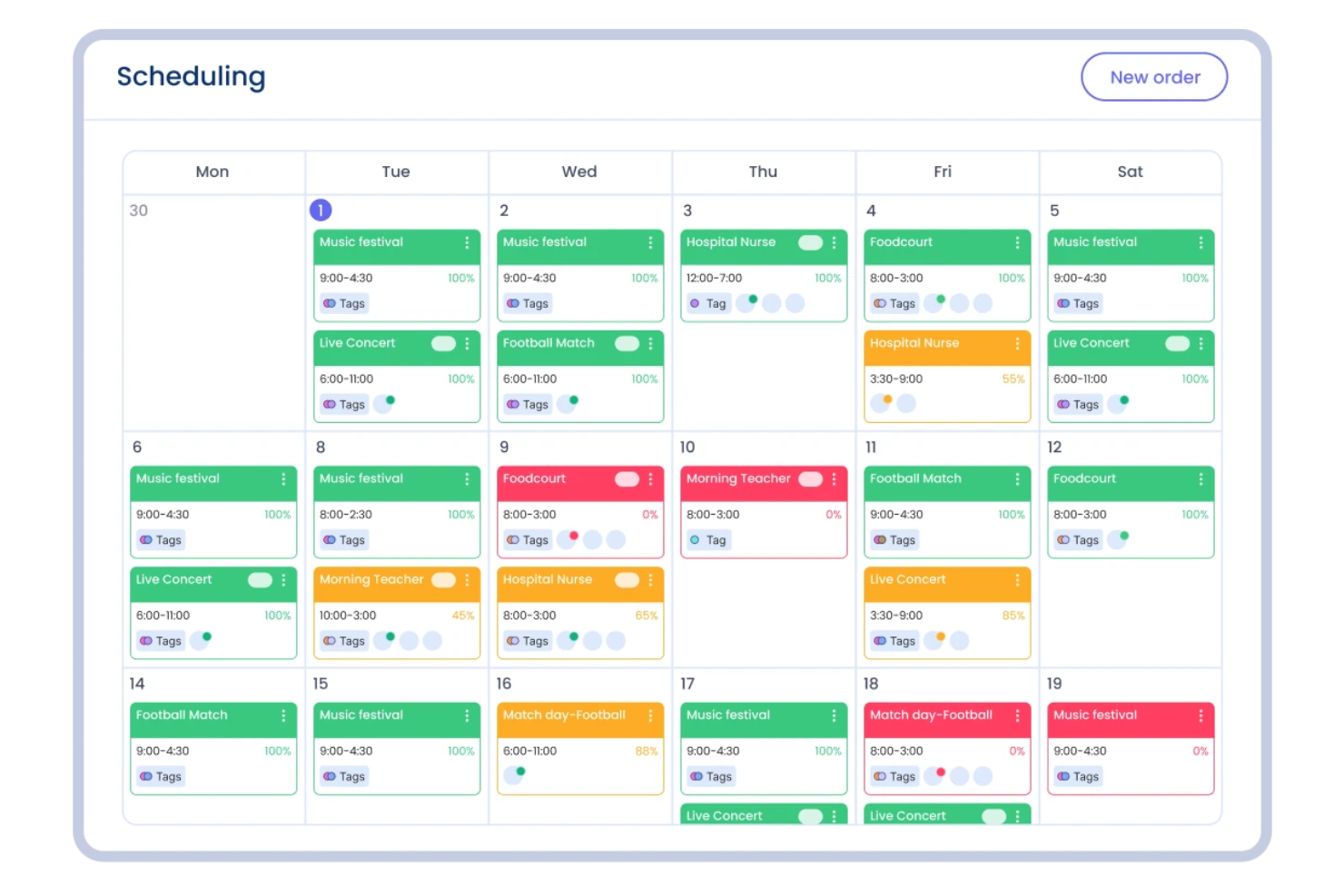
Ubeya è una piattaforma di gestione della forza lavoro mobile pensata per le operazioni di staff per eventi. Aiuta le aziende a gestire lavoratori orari e sul posto tramite strumenti per la pianificazione dei turni, il monitoraggio delle presenze e l'automazione delle paghe. Grazie all'accesso mobile per manager e personale, semplifica le operazioni quotidiane e la comunicazione tra i team.
Perché ho scelto Ubeya: Ho scelto Ubeya per i suoi strumenti avanzati di programmazione e monitoraggio presenze, supportati dall’AI, che facilitano la gestione dei team per eventi che lavorano su turni e sedi diversi. Puoi creare e modificare i calendari dei turni, monitorare la presenza in tempo reale e assicurare l’elaborazione accurata delle buste paga con un intervento manuale minimo.
Mi è piaciuto anche il fatto che la piattaforma includa strumenti di comunicazione integrati e il monitoraggio della conformità normativa, così da mantenere le operazioni in linea con le leggi sul lavoro e garantire la coordinazione del team.
Funzionalità e integrazioni principali:
Funzionalità come la pianificazione dei turni, il monitoraggio di tempo e presenze, l’automazione del payroll, il controllo della conformità e gli strumenti di comunicazione integrati. La reportistica e l’analisi guidate dall’intelligenza artificiale aiutano a tracciare le prestazioni della forza lavoro e identificare eventuali inefficienze.
Integrazioni disponibili con Google Calendar, Microsoft Outlook, Recruit CRM, HubSpot, notifiche WhatsApp, Google Sheets, QuickBooks, Slack, Microsoft Teams, ADP, Bullhorn e Xero.
Pros and Cons
Pros:
- App mobile per personale e manager
- Automazione paghe e reportistica
- Funzionalità avanzate per conformità e auditing
Cons:
- Richiesto un minimo di spesa mensile
- Interfaccia richiede tempo per essere padroneggiata

Skedulo
Ideale per la gestione dei servizi sul campo

Skedulo è una piattaforma di gestione della forza lavoro progettata per aziende con team mobili e sul campo. Ottimizza la programmazione, l'assegnazione e la gestione dei lavori per aumentare l'efficienza operativa.
Perché ho scelto Skedulo: La piattaforma è creata per la gestione dei servizi sul campo e offre funzionalità pensate per le operazioni di forza lavoro mobile. Fornisce pianificazione e assegnazione in tempo reale, garantendo che il tuo team sia sempre nel posto giusto al momento giusto.
L'app mobile consente ai membri del team di accedere ai dettagli dei lavori e aggiornare lo stato mentre sono in movimento. Le sue funzionalità sono essenziali per le aziende che dipendono dalle operazioni sul campo.
Funzionalità principali & integrazioni:
Le funzionalità includono una pianificazione intelligente che ottimizza l'allocazione delle risorse. La piattaforma supporta la comunicazione in tempo reale tra dispatcher e operatori sul campo, migliorando il coordinamento.
Inoltre, Skedulo offre strumenti di analisi per monitorare i parametri di performance e migliorare il processo decisionale.
Le integrazioni includono Salesforce, Zendesk, Microsoft Dynamics, Google Calendar, Okta, ServiceNow, Workday, ADP, QuickBooks e Xero.
Pros and Cons
Pros:
- Grande attenzione per i team mobili
- Supporta la gestione dei lavori sul campo
- Pianificazione efficace in tempo reale
- Migliora la comunicazione del team
- Fornisce analisi delle performance
Cons:
- Configurazione iniziale complessa
- Richiede formazione per i nuovi utenti
- Funzionalità offline limitate
- Potrebbe richiedere supporto per le integrazioni
- Curva di apprendimento più ripida

Legion
Ideale per la previsione della forza lavoro
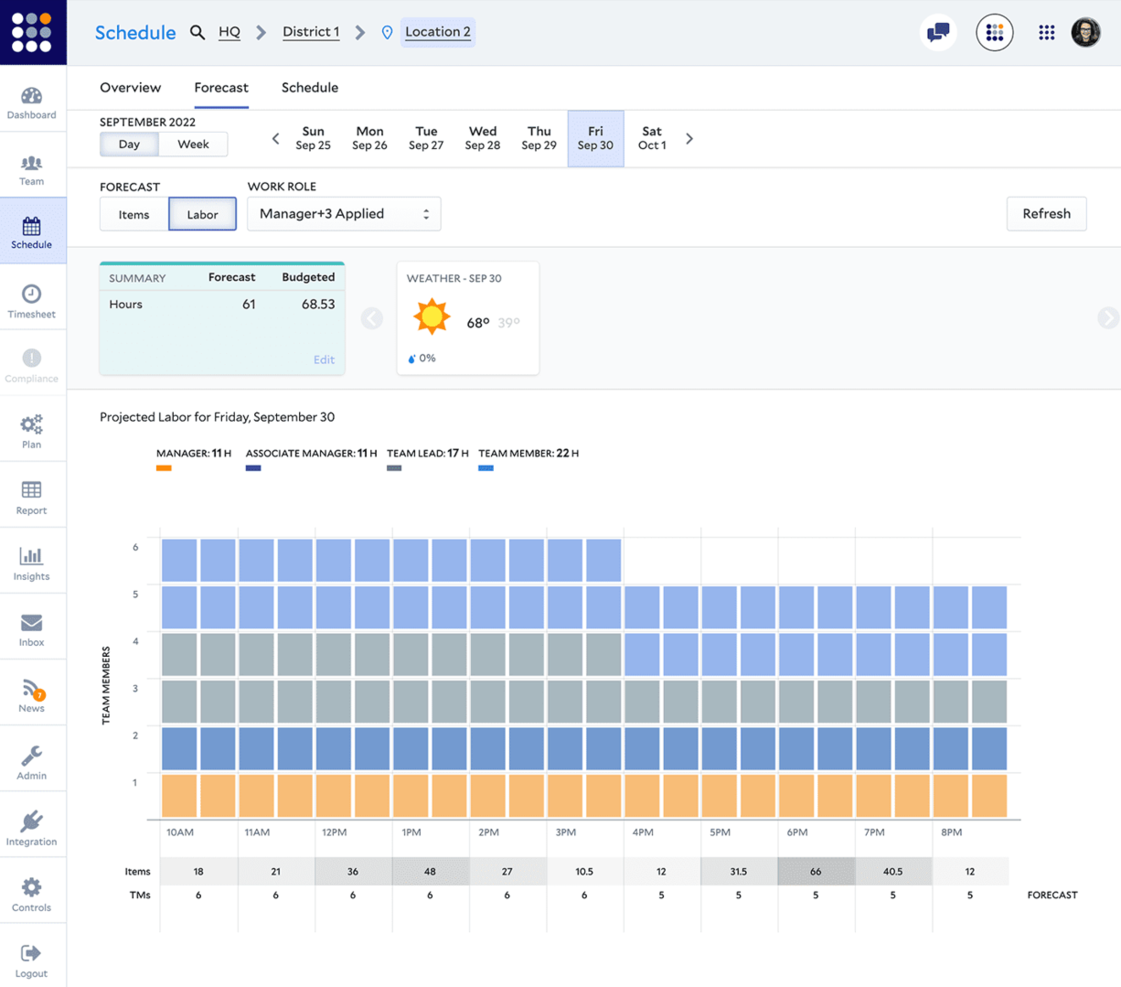
Legion è una piattaforma di gestione della forza lavoro progettata per ottimizzare l'efficienza del personale per aziende nel settore retail, dell’ospitalità e altri settori dei servizi. Si concentra su pianificazione dei turni, previsione del fabbisogno di personale e gestione della conformità per migliorare la produttività della forza lavoro.
Perché ho scelto Legion: La piattaforma si distingue per la capacità di previsione delle esigenze di personale, offrendo strumenti per prevedere con precisione il fabbisogno lavorativo. Propone algoritmi di pianificazione avanzata che si adattano alle esigenze specifiche della tua attività.
Puoi inoltre gestire la conformità in modo semplice con il rispetto delle normative sul lavoro integrato. Queste funzionalità aiutano le aziende a ottimizzare la gestione del personale e a ridurre i costi di manodopera.
Caratteristiche distintive & integrazioni:
Funzionalità includono una pianificazione basata sulla domanda che allinea la disponibilità del personale con le esigenze aziendali. La piattaforma offre analisi in tempo reale per monitorare l'efficienza del personale. Inoltre, Legion mette a disposizione strumenti di self-service per i dipendenti, consentendo al tuo team di gestire autonomamente turni e disponibilità.
Integrazioni includono ADP, Workday, SAP, Oracle, UKG, BambooHR, Salesforce, Kronos, Microsoft Dynamics e QuickBooks.
Pros and Cons
Pros:
- Strumenti efficaci di previsione della forza lavoro
- Supporta la gestione della conformità
- Capacità avanzate di pianificazione
- Fornisce analisi in tempo reale
- Favorisce l’autonomia del dipendente
Cons:
- Processo di configurazione complesso
- Potrebbe necessitare di una formazione iniziale
- Funzionalità offline limitate
- Richiede coerenza nei dati inseriti
- Può richiedere molte risorse

IFS
Ideale per la scalabilità aziendale
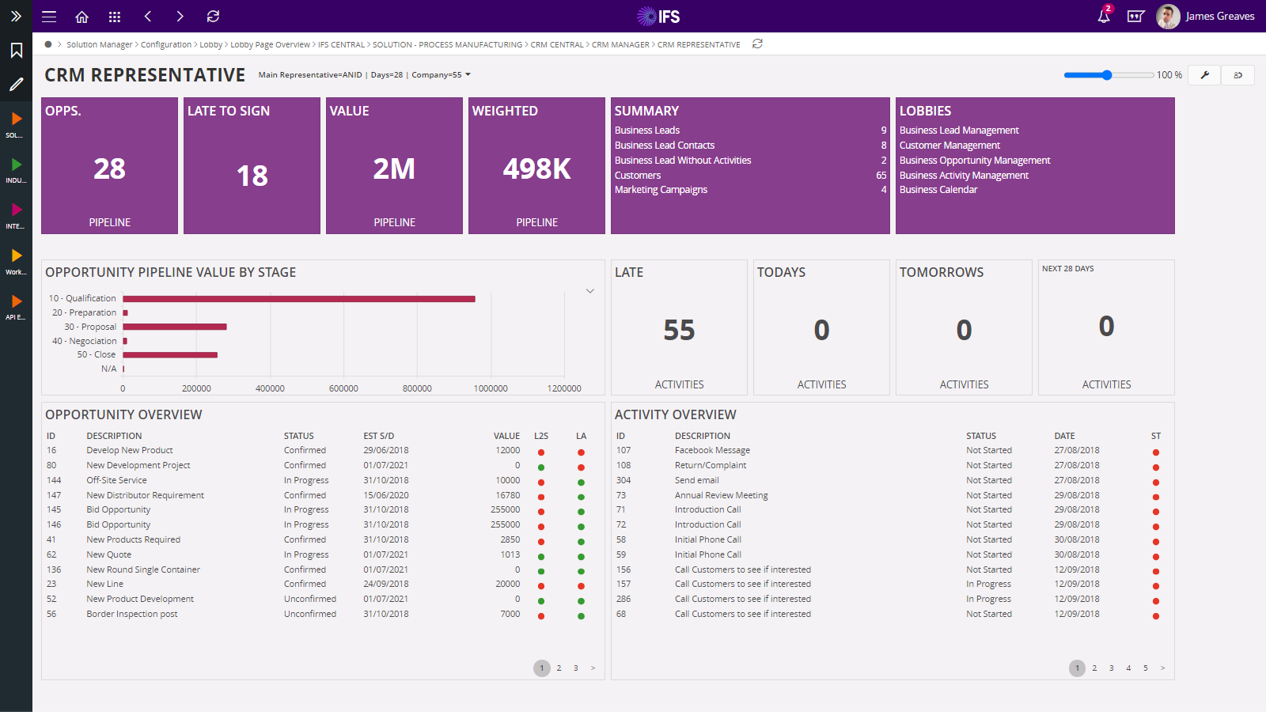
IFS è un fornitore di software aziendali specializzato nella gestione della forza lavoro mobile. Serve i settori aerospaziale, energetico e manifatturiero e svolge funzioni aziendali chiave come la gestione del ciclo di vita degli asset, la pianificazione del personale e la gestione delle relazioni con i clienti.
Perché ho scelto IFS: Il software è progettato per la scalabilità aziendale, rendendolo adatto alle grandi organizzazioni. Offre funzionalità specializzate di gestione degli asset e delle relazioni con i clienti per migliorare l'efficienza operativa.
La sua versatilità lo rende ideale per diversi settori con esigenze specifiche. Gli strumenti di pianificazione del personale ne aumentano ulteriormente il valore per strutture organizzative complesse.
Caratteristiche salienti & integrazioni:
Caratteristiche includono una gestione dettagliata del ciclo di vita degli asset per tracciare e gestire le risorse in modo efficiente. La pianificazione del personale offre flessibilità nella gestione di grandi team e orari complessi. Gli strumenti di gestione delle relazioni con i clienti aiutano a mantenere solide relazioni con i clienti e a migliorare la qualità del servizio offerto.
Integrazioni includono SAP, Oracle, Microsoft Dynamics, IBM Maximo, Salesforce, AWS, Google Cloud, Azure, Infor e Siemens.
Pros and Cons
Pros:
- Efficace in contesti su larga scala
- Personalizzabile per le esigenze di settore
- Supporta iniziative di sostenibilità
- Migliora l'efficienza operativa
- Gestione completa degli asset
Cons:
- Configurazione iniziale complessa
- Necessita formazione per l'utilizzo completo
- Trasparenza limitata sui prezzi
- Richiede molte risorse
- Potrebbe richiedere supporto tecnico continuativo
Altri software per la gestione della forza lavoro mobile
Ecco alcune ulteriori opzioni di software per la gestione della forza lavoro mobile che non sono state incluse nel mio elenco, ma che vale comunque la pena considerare:
- SafetyCulture
Ideale per i controlli di conformità alla sicurezza
- Cognito iQ
Ideale per informazioni in tempo reale
- AllWork
Ideale per lavoratori della gig economy
- Synerion
Ideale per le funzionalità di rilevazione presenze
- MyMobileWorkers
Ideale per le operazioni logistiche
- Connecteam
Ideale per team di piccole imprese
- Hubstaff
Ideale per il monitoraggio del lavoro a distanza
- eduMe
Ideale per contenuti formativi potenziati dall'intelligenza artificiale
- Parim
Ideale per la pianificazione e il monitoraggio automatici


Come Valuto i Software per la Gestione della Forza Lavoro Mobile
Suddivido la mia valutazione in due livelli: se uno strumento può effettivamente servire una squadra di tecnici sul campo che timbrano da vari cantieri, e poi cosa lo distingue dagli altri.
Funzionalità di Base (Requisiti Fondamentali per Questa Lista)
Quando seleziono gli strumenti per la mia lista, valuto ciascuno su una scala da 0 (non offre la funzionalità) a 5 (eccelle in quest'area) per ciascuna delle seguenti funzionalità principali. Successivamente, calcolo il punteggio totale dello strumento in percentuale. Ogni strumento deve raggiungere un punteggio minimo totale del 65% per essere considerato per l'inclusione.
- App Mobile per i Dipendenti: Verifico se l'app nativa iOS/Android consente ai lavoratori di visualizzare i turni, richiedere ferie e timbrare sul campo, e non solo accedere a una versione mobile del browser poco funzionale.
- GPS & Geofencing: Le funzionalità di localizzazione di ciascun strumento sono fondamentali, in particolare i cantieri georeferenziati che segnalano quando un tecnico timbra fuori dall'area di lavoro designata.
- Pianificazione Turni & Invio: Cerco costruttori di turni drag-and-drop, assegnazione di turni aperti e aggiornamenti di invio in tempo reale che raggiungano i lavoratori sui loro telefoni prima che escano di casa.
- Rilevazione Presenze & Orari: Dati di entrata/uscita precisi con rilevazione di pause e straordinari sono essenziali, insieme a flussi di approvazione che alimentano fogli presenze puliti nel sistema paghe.
- Comunicazione con la Forza Lavoro: Gli strumenti dovrebbero offrire messaggistica in-app o notifiche push, così un responsabile magazzino può raggiungere immediatamente il turno di notte, senza affidarsi a messaggi personali.
- Conformità & Integrazione Payroll: Valuto se la piattaforma fa rispettare le regole sul lavoro come i periodi di riposo obbligatori e si collega ai sistemi payroll o HRIS per elaborazioni paghe accurate e puntuali.
Dopo aver individuato gli strumenti che soddisfano questi criteri, considero cosa distingue ogni piattaforma.
Fattori Differenzianti (Cosa Distingue i Fornitori)
Ecco come confronto e metto a contrasto i diversi fornitori:
Funzionalità di Spicco
La modalità offline è fondamentale: le squadre sul campo, nei cantieri remoti o nelle strutture sotterranee, devono registrare le ore anche senza segnale, quindi cerco app che memorizzino i dati localmente per sincronizzarli appena torna la connessione. Anche la verifica biometrica, come la timbratura tramite selfie, è importante perché risolve direttamente il problema del "buddy punching" su team dislocati. Valuto inoltre le funzioni di gestione lavori e attività, dato che assegnare ordini di lavoro con prova fotografica della conclusione trasforma un semplice schedulatore in un vero centro operativo sul campo.
Oltre le Funzionalità
L'ecosistema di integrazione è sempre oggetto di valutazione: una piattaforma che si collega ai sistemi HRIS o paghe già esistenti, come ADP o BambooHR, fa risparmiare ore di inserimento dati duplicati a ogni ciclo di pagamento. Considero anche la compatibilità con settore e tipo di forza lavoro, poiché uno strumento pensato per turnisti in ambito sanitario potrebbe non andare bene per un'azienda di giardinaggio con squadre stagionali. Infine, conformità e sicurezza: verifico la certificazione SOC 2 e i controlli di accesso basati sui ruoli, specialmente se la piattaforma gestisce dati sensibili come GPS e dati dei dipendenti.
Come scegliere il software per la gestione della forza lavoro mobile
È facile perdersi in lunghi elenchi di funzionalità e strutture tariffarie complesse. Per aiutarti a rimanere concentrato mentre affronti il tuo specifico processo di selezione del software, ecco una lista di fattori da tenere presenti:
| Fattore | Cosa considerare |
| Scalabilità | Assicurati che il software possa crescere insieme alla tua azienda. Cerca soluzioni che supportino utenti e funzionalità aggiuntivi man mano che il tuo team si espande. |
| Integrazioni | Verifica se il software si integra con gli strumenti che utilizzi attualmente, come sistemi paghe, CRM e piattaforme di comunicazione, per semplificare le operazioni ed evitare silos di dati. |
| Personalizzazione | Cerca un software che ti consenta di adattare flussi di lavoro e dashboard ai tuoi processi, assicurandoti che soddisfi le esigenze specifiche del tuo team. |
| Facilità d'uso | Scegli un'interfaccia intuitiva che riduca al minimo la curva di apprendimento per il tuo team, consentendogli di iniziare a lavorare rapidamente senza una formazione approfondita. |
| Budget | Considera il costo totale, comprese le commissioni di configurazione e gli abbonamenti continuativi. Assicurati che rientri nel tuo piano finanziario senza costi nascosti. |
| Misure di sicurezza | Verifica che il software offra solide misure di sicurezza, come la crittografia dei dati e aggiornamenti regolari, per proteggere le informazioni sensibili. |
| Assistenza | Valuta la disponibilità e la qualità dell'assistenza clienti. Cerca supporto 24 ore su 24, 7 giorni su 7, e diversi canali di assistenza per risolvere rapidamente eventuali problemi. |
| Accesso mobile | Assicurati che il software offra un'esperienza efficace tramite app mobile, consentendo al tuo team di accedere alle funzionalità essenziali anche in movimento e aumentando la produttività sul campo. |
Tendenze nei software per la gestione della forza lavoro mobile
Nella mia ricerca, ho raccolto innumerevoli aggiornamenti di prodotto, comunicati stampa e registri dei rilasci di diversi fornitori di software per la gestione della forza lavoro mobile. Ecco alcune delle tendenze emergenti che sto tenendo d'occhio:
Analisi basate sull'AI
I fornitori stanno integrando l'AI per offrire analisi predittive e informazioni utili che aiutino i team a prendere decisioni basate sui dati e a ottimizzare l'assegnazione della forza lavoro. Ad esempio, alcune piattaforme offrono ora una pianificazione basata sull'AI per anticipare il fabbisogno di personale.
Funzionalità per il benessere dei dipendenti
Un numero crescente di strumenti aggiunge funzionalità per monitorare il benessere e il coinvolgimento dei dipendenti. Queste includono strumenti per la gestione dello stress e meccanismi di feedback per migliorare la soddisfazione lavorativa e la fidelizzazione. Alcuni fornitori offrono dashboard che monitorano in tempo reale il sentiment dei dipendenti.
Supporto alla realtà aumentata (AR)
La realtà aumentata viene utilizzata per migliorare la formazione e il supporto sul campo, risultando particolarmente utile per le attività complesse in cui le indicazioni visive possono migliorare la precisione e l'efficienza.
Iniziative ecocompatibili
L'attenzione alla sostenibilità è in aumento e le piattaforme offrono funzionalità per monitorare e ridurre l'impronta di carbonio, ad esempio dashboard per controllare il consumo energetico e le emissioni.
Ciò è in linea con la crescente attenzione alle problematiche ambientali e aiuta le aziende a raggiungere obiettivi di ecocompatibilità.
Monitoraggio avanzato della conformità
Con l'evoluzione delle normative, gli strumenti aggiungono funzionalità sempre più sofisticate. Questo garantisce che le aziende siano aggiornate sui requisiti legali ed evitino sanzioni.
Alcuni software aggiornano ora automaticamente i protocolli di conformità in base alle leggi regionali.
Che cos'è il software per la gestione della forza lavoro mobile?
Il software per la gestione della forza lavoro mobile aiuta le aziende a gestire i dipendenti che lavorano sul campo o da remoto.
Professionisti come i responsabili dei servizi sul campo, i coordinatori della logistica e i team leader utilizzano questi strumenti per tenere traccia delle attività, degli orari e delle prestazioni del team.
Funzionalità come il monitoraggio del tempo, la comunicazione in tempo reale e la pianificazione aiutano a ottimizzare l'assegnazione della forza lavoro, migliorare la comunicazione e mantenere la conformità.
Nel complesso, questi strumenti forniscono informazioni preziose e maggiore efficienza nella gestione di una forza lavoro mobile.
Funzionalità
Questi strumenti cercano di affrontare gli stessi problemi in modi leggermente diversi, ma ci sono alcune funzionalità fondamentali a cui prestare attenzione.
Quando scegli un software per la gestione della forza lavoro mobile, presta attenzione alle seguenti funzionalità chiave:
- Monitoraggio del tempo: registra con precisione le ore e le presenze dei dipendenti, aiutando a gestire le buste paga e la produttività.
- Pianificazione: automatizza la creazione e la gestione degli orari dei dipendenti, garantendo un'assegnazione ottimale della forza lavoro.
- Comunicazione in tempo reale: facilita la messaggistica istantanea e gli aggiornamenti tra i membri del team, migliorando il coordinamento e l'efficienza.
- Monitoraggio GPS: controlla la posizione dei dipendenti per garantire la responsabilità e ottimizzare la pianificazione dei percorsi.
- Gestione della conformità: tiene traccia delle leggi e delle normative sul lavoro, aiutando le aziende a evitare sanzioni e a mantenere la conformità.
- Analisi e report: fornisce informazioni basate sui dati riguardo alle prestazioni e alla produttività della forza lavoro.
- Accesso da dispositivi mobili: consente ai dipendenti di accedere agli orari e ai dettagli degli incarichi dai propri dispositivi mobili, migliorando la flessibilità.
- Self-service per i dipendenti: consente ai dipendenti di gestire i propri orari e la propria disponibilità, riducendo il carico di lavoro amministrativo.
- Flussi di lavoro personalizzabili: si adatta a processi aziendali specifici, garantendo che il software soddisfi le esigenze uniche dell'organizzazione.
Vantaggi
Il software giusto per la gestione della forza lavoro mobile renderà la vita più facile a tutti e apporterà un valore reale all'azienda. Ecco alcuni dei vantaggi che puoi aspettarti:
- Produttività migliorata: il monitoraggio del tempo e la pianificazione assicurano che il tuo team lavori in modo efficiente e si concentri sulle attività giuste.
- Comunicazione potenziata: le funzionalità di comunicazione in tempo reale mantengono il tuo team connesso, riducendo incomprensioni e ritardi.
- Conformità migliorata: gli strumenti di gestione della conformità aiutano la tua azienda a rimanere aggiornata sulle leggi del lavoro e a evitare sanzioni costose.
- Maggiore flessibilità: l'accesso da dispositivi mobili consente al tuo team di lavorare da qualsiasi luogo, adattandosi ai cambiamenti degli ambienti di lavoro.
- Maggiore trasparenza: il monitoraggio GPS e l'analisi dei dati forniscono informazioni sulle attività dei dipendenti, promuovendo responsabilità e decisioni consapevoli.
- Riduzione del carico amministrativo: le funzionalità self-service per i dipendenti consentono al tuo team di gestire i propri turni, liberando tempo per i responsabili.
- Soluzioni personalizzabili: i flussi di lavoro personalizzabili assicurano che il software soddisfi le esigenze specifiche della tua azienda, migliorando l'efficienza complessiva.
Costi e prezzi dei software per la gestione della forza lavoro mobile
Come per qualsiasi software, la scelta di un sistema per la gestione della forza lavoro mobile richiede la conoscenza dei diversi modelli e piani tariffari disponibili.
I costi variano in base alle funzionalità, alle dimensioni del team, agli extra e al livello di supporto (importante). La tabella seguente riassume i piani più comuni, i relativi prezzi medi e le funzionalità tipicamente incluse nelle soluzioni software per la gestione della forza lavoro mobile:
Tabella comparativa dei piani per i software di gestione della forza lavoro mobile
| Tipo di piano | Prezzo medio | Funzionalità comuni |
| Piano gratuito | $0/user/month | Pianificazione di base, monitoraggio del tempo e report limitati. |
| Piano personale | $5-$25/user/month | Pianificazione avanzata, accesso da dispositivi mobili e analisi di base. |
| Piano aziendale | $30-$60/user/month | Comunicazione in tempo reale, gestione della conformità e flussi di lavoro personalizzabili. |
| Piano per aziende | $70-$120/user/month | Suite completa di analisi, self-service per i dipendenti e supporto e formazione dedicati. |
Domande frequenti sui software per la gestione della forza lavoro mobile
Ecco alcune risposte alle domande comuni sui software per la gestione della forza lavoro mobile:
Cosa fa un software per la gestione della forza lavoro?
In che modo un software per la gestione della forza lavoro mobile può migliorare la produttività?
Esistono rischi di non conformità per i software di gestione della forza lavoro mobile?
Qual è il prossimo passo?
Per rimanere aggiornato su tutte le novità nella gestione delle persone, iscriviti alla nostra newsletter per leader e responsabili. Riceverai direttamente nella tua casella di posta informazioni e offerte pensate per leader e professionisti delle risorse umane.