

I 10 migliori software per la rilevazione delle presenze del 2026: recensioni

10 Migliore selezione di software per la gestione di presenze e orari


Il miglior software per la gestione di presenze e orari aiuta i professionisti delle risorse umane a eliminare il monitoraggio manuale, ridurre gli errori nelle buste paga e semplificare la gestione di ferie e turni, tutto in un unico sistema centralizzato.
Che tu stia ancora utilizzando fogli di calcolo o sia alle prese con strumenti obsoleti che non si sincronizzano con il tuo sistema paghe, la soluzione giusta può farti risparmiare ore ogni settimana e portare chiarezza in programmi caotici. Tuttavia, con decine di piattaforme che dichiarano di fare tutto, capire quale si adatti davvero alle esigenze del tuo team può sembrare complicato.
Per aiutarti, ho analizzato centinaia di strumenti per le risorse umane e gestito direttamente sistemi di rilevazione di presenze e orari come specialista HR in un ambiente di lavoro dinamico. In questa guida ti aiuterò a fare chiarezza e a trovare una soluzione precisa, facile da usare e progettata per crescere insieme alla tua azienda.
Perché fidarsi delle nostre recensioni sui software
Il nostro team testa e recensisce software dal 2012. In quanto esperti HR noi stessi, sappiamo quanto sia difficile — e importante — scegliere il software giusto.
Per questa guida, abbiamo valutato gli strumenti attraverso test pratici e ricerche indipendenti, assegnando un punteggio agli strumenti in base ai nostri criteri di selezione. Ci basiamo inoltre sulle competenze di leader di pensiero del settore e di professionisti HR attivi.
Le nostre recensioni riflettono il nostro giudizio editoriale umano, non un discorso di vendita.
Revisori esperti:
Migliori software per la gestione di presenze e orari: tabella comparativa
Questa tabella comparativa riassume prezzi, dettagli sulle prove gratuite e sulle demo delle mie migliori selezioni di software per il monitoraggio di presenze e orari, per aiutarti a trovare il sistema più adatto al tuo budget e alle esigenze della tua azienda.
| Tool | Best For | Trial Info | Price | ||
|---|---|---|---|---|---|
| 1 | Ideale con team dedicati al successo dei clienti | Demo gratuita disponibile | Prezzi su richiesta | Website | |
| 2 | Ideale per previsioni di pianificazione tramite IA | Demo gratuita disponibile | Prezzo su richiesta | Website | |
| 3 | Ideale per orologi di rilevazione presenze flessibili con geofencing e modalità chiosco | Demo gratuita + prova gratuita di 14 giorni disponibile | Da $4.49/utente/mese | Website | |
| 4 | Ideale per registri digitali centralizzati delle ore del personale | Demo gratuita disponibile | A partire da $8/utente/mese | Website | |
| 5 | Ideale per il controllo presenze tramite GPS | Prova gratuita di 14 giorni + demo gratuita disponibile | Da $29/mese (fatturato annualmente) | Website | |
| 6 | Ideale per la gestione dei dipendenti orari | Piano gratuito + prova gratuita di 14 giorni disponibile | Da $24/sede/mese (fatturazione annuale) | Website | |
| 7 | Ideale per pianificazioni flessibili in tutto il Canada | Prova gratuita di 21 giorni + demo gratuita disponibile | A partire da $2,93/utente/mese (fatturazione annuale) | Website | |
| 8 | Ideale per i team HR che gestiscono una forza lavoro ibrida | Prova gratuita di 14 giorni | Prezzo su richiesta | Website | |
| 9 | Miglior monitoraggio in tempo reale, screenshot e analisi dei dati | Prova gratuita di 14 giorni disponibile | A partire da $3.99/utente/mese | Website | |
| 10 | La soluzione migliore per il monitoraggio dei costi del lavoro | Prova gratuita di 14 giorni | A partire da $2.50/utente/mese | Website |


Recensioni dei migliori software per la gestione di presenze e orari
Ecco le mie sintesi dettagliate dei migliori software per la gestione di presenze e orari inclusi nella mia lista dei 10 migliori, con note sui motivi per cui li ho scelti. Ogni recensione offre uno sguardo dettagliato sulle funzionalità principali, sui pro e contro, sulle integrations, e sui casi d’uso ideali di ciascun sistema, per aiutarti a trovare lo strumento più adatto a te.

Paycom
Ideale con team dedicati al successo dei clienti
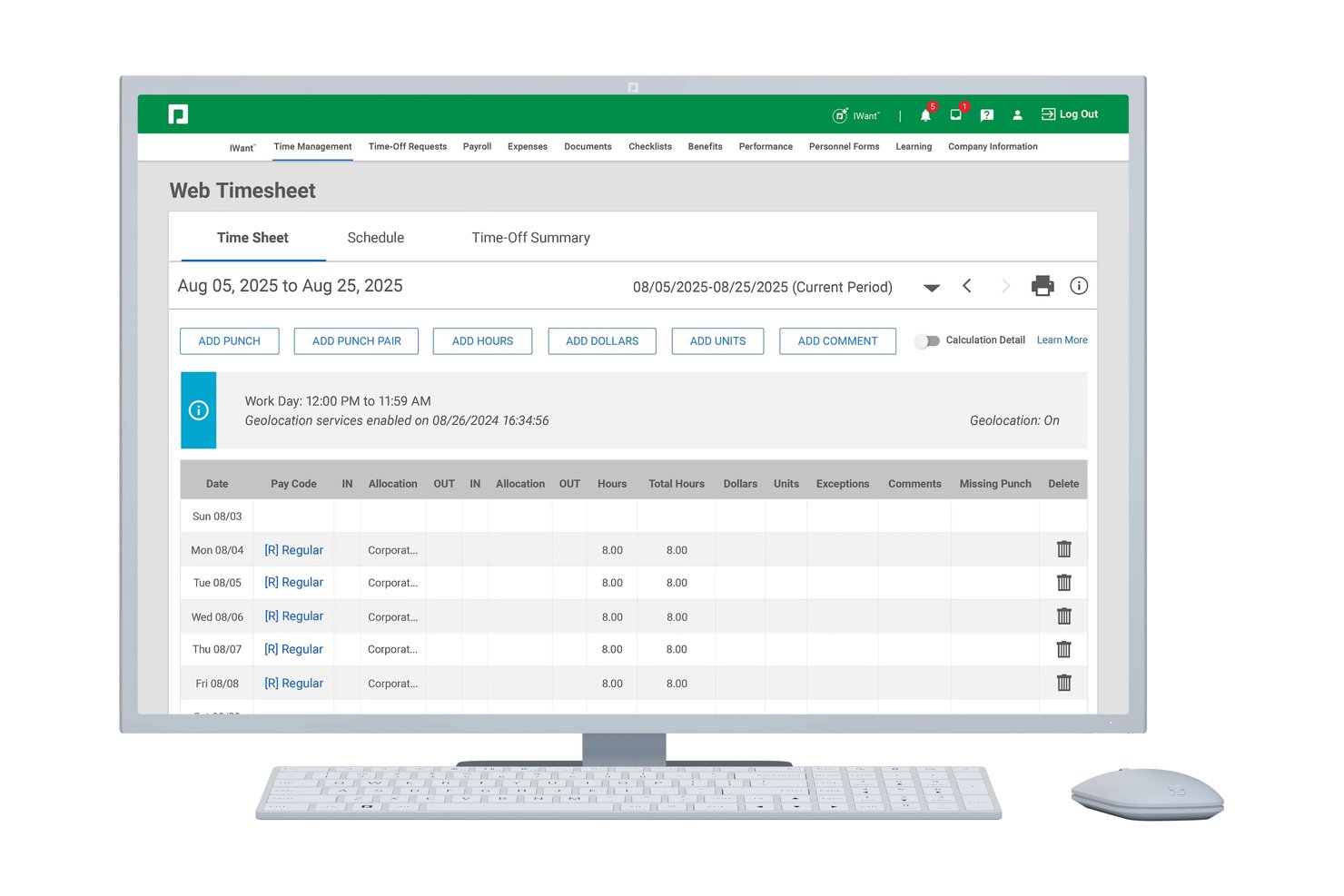
Paycom è una piattaforma HCM con database unico che combina il monitoraggio delle presenze, la timbratura tramite più modalità, i flussi di approvazione dei fogli presenze, la gestione delle ferie, i report sulla conformità del lavoro e l'elaborazione nativa delle paghe in un unico sistema integrato.
Per chi è più adatto Paycom?
Paycom è una soluzione adatta alle organizzazioni di medie dimensioni con 50–5,000 dipendenti che desiderano consolidare paghe, risorse umane e monitoraggio delle presenze in un'unica piattaforma.
Perché ho scelto Paycom
Ho scelto Paycom come una delle soluzioni migliori perché ogni cliente riceve uno specialista dedicato senza costi aggiuntivi, un aspetto particolarmente importante quando si configurano strumenti come il geofencing Microfence® o GONE®, il motore automatizzato di Paycom per l'approvazione delle richieste di ferie. Avere un contatto reale che conosce la propria configurazione significa non dover risolvere da soli i conflitti tra le regole delle timbrature. Apprezzo il fatto che questo supporto sia integrato nella piattaforma e non venduto come componente aggiuntivo premium.
Funzionalità principali di Paycom
- Modifica in batch e personalizzazione delle regole: i responsabili possono modificare più cartellini contemporaneamente e configurare politiche complesse sulle presenze.
- Geofencing e Microfence®: limitano i luoghi di timbratura a sedi, edifici o piani specifici per ottenere dati precisi sulle presenze.
- Manager on-the-Go®: consente di approvare i cartellini, gestire le richieste e occuparsi delle attività di pianificazione tramite un'app mobile.
- Aggiornamenti automatici sulla conformità: Paycom aggiorna regolarmente le regole del sistema per riflettere i cambiamenti nelle leggi federali, statali e locali sul lavoro.
Integrazioni di Paycom
Le integrazioni native non sono documentate chiaramente. Paycom opera secondo un modello con database unico e offre un'esportazione nella contabilità generale per sistemi contabili come QuickBooks. È disponibile un'API per le integrazioni personalizzate.
Pros and Cons
Pros:
- Specialista dedicato assegnato a ogni cliente
- Politiche per presenze e ferie altamente configurabili
- Paghe e risorse umane integrate in un database unico
Cons:
- Nessun marketplace o integrazione pronta all'uso
- Il processo di configurazione può richiedere molto tempo

UKG
Ideale per previsioni di pianificazione tramite IA
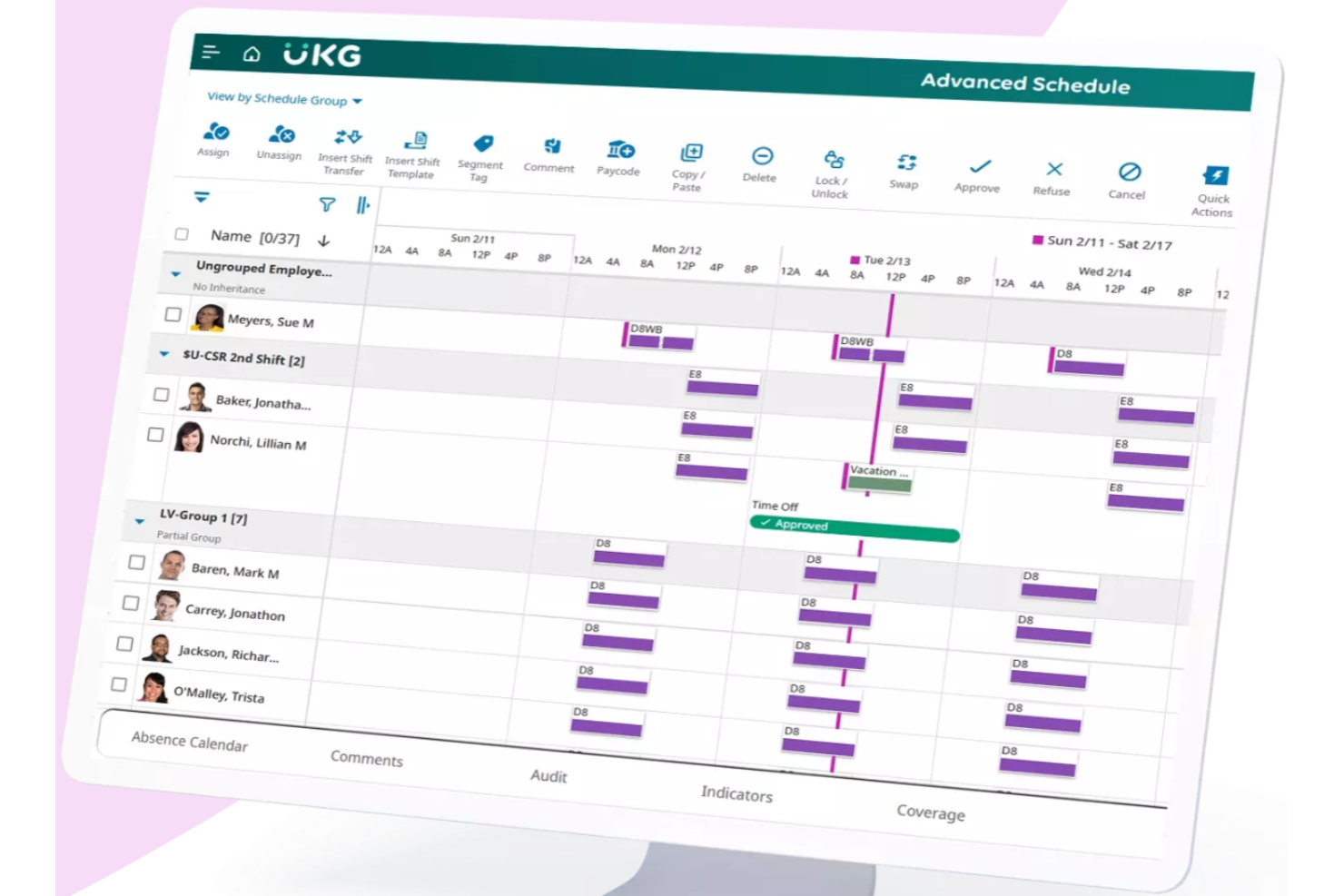
UKG è una piattaforma di gestione della forza lavoro progettata per le organizzazioni che necessitano di strumenti avanzati per il rilevamento delle presenze, la pianificazione dei turni e la conformità normativa, al fine di gestire dipendenti orari e salariati su più sedi.
Per chi è ideale UKG?
UKG è particolarmente adatto a medie e grandi aziende che gestiscono una forza lavoro complessa e multi-sede in settori come sanità, vendita al dettaglio e manifatturiero.
Perché ho scelto UKG
Ho scelto UKG tra i migliori perché la sua pianificazione guidata dall’IA va oltre la semplice automazione. Gli algoritmi di apprendimento automatico di UKG analizzano tendenze storiche dei volumi, eventi speciali e schemi stagionali per prevedere la domanda di lavoro a intervalli di 15 minuti—quindi, se gestisci un ospedale o una catena di negozi, i tuoi turni sono pianificati in base a ciò che succederà realmente, non solo a ciò che è successo la settimana scorsa. L’IA agentica di UKG Bryte può simulare la domanda, prevedere i costi del lavoro e assegnare automaticamente i turni in base a competenze, preferenze e disponibilità dei lavoratori. Il livello di gestione dei turni in tempo reale consente alla mia squadra di rispondere subito alle coperture mancanti, con avvisi per i responsabili che si attivano automaticamente invece di aspettare che qualcuno noti il problema.
Caratteristiche principali di UKG
- Rilevamento automatico delle presenze: I dipendenti possono timbrare l’ingresso e l’uscita tramite mobile, web o terminali fisici, con controlli di geofencing per far rispettare la timbratura legata alla posizione.
- Gestione delle assenze e dei permessi: Tieni traccia e gestisci assenze non pianificate, richieste FMLA e saldi di maturazione da una singola dashboard.
- Monitoraggio della conformità: Regole integrate segnalano in tempo reale violazioni degli straordinari, pause saltate ed eccezioni alle leggi del lavoro, prima che diventino problemi costosi.
- Analisi della forza lavoro e reportistica: Report preconfigurati e personalizzati evidenziano tendenze di presenza, costi del lavoro e ore lavorate tra squadre, sedi e periodi.
Integrazioni di UKG
Le integrazioni includono Boomi, WorkJam, PlanSource, OpenSesame, HireRight, CloudApper, Accenture, KPMG, Sability e Lightcast.
Pros and Cons
Pros:
- Cartellini precisi grazie a calcoli salariali basati su regole
- Avvisi utili per conformità a pause, pasti e straordinari
- Ottima pianificazione per ambienti grandi o a più turni
Cons:
- Nessun tracciamento GPS dal vivo per la timbratura
- Configurare la gestione delle paghe può essere complesso con più gruppi di retribuzione

Ideale per orologi di rilevazione presenze flessibili con geofencing e modalità chiosco

Buddy Punch è una piattaforma cloud per la gestione delle presenze e degli orari progettata per le aziende che necessitano di strumenti flessibili per il monitoraggio dei dipendenti, consapevoli della posizione, e di strumenti semplici per la pianificazione, facilitando la gestione di team in sede, da remoto o in mobilità.
Per chi è Buddy Punch?
Buddy Punch è l’opzione ideale per piccole e medie imprese che gestiscono lavoratori a ore o su turni distribuiti su più sedi.
Perché ho scelto Buddy Punch
Ho scelto Buddy Punch tra i migliori per l’ampia flessibilità che offre sulle modalità di timbratura dei dipendenti. La funzione di geofencing consente di disegnare confini intorno a ciascun luogo di lavoro—da 50 a 1.500 metri—e i dipendenti non possono timbrare dentro o fuori se si trovano fuori da quei limiti. Mi piace anche la possibilità di associare codici progetto direttamente ai geofencing, così le ore vengono assegnate automaticamente al progetto giusto non appena qualcuno timbra l’ingresso. La modalità chiosco trasforma qualsiasi tablet Apple o Android in un orologio condiviso dove i dipendenti utilizzano PIN unici di quattro cifre per timbrare, una soluzione perfetta per i team che non portano dispositivi personali sul lavoro.
Caratteristiche principali di Buddy Punch
- Gestione delle assenze (PTO): I dipendenti possono inviare richieste di permesso direttamente dalla piattaforma e i responsabili possono approvarle o rifiutarle dalla stessa dashboard.
- Monitoraggio degli straordinari: Buddy Punch calcola automaticamente le ore di straordinario giornaliere e settimanali in base alle regole configurate per ogni dipendente o sede.
- Pianificazione drag-and-drop: Crea e pubblica i turni usando un calendario visivo, con opzioni per copiare i turni e assegnare schemi ricorrenti.
- Report per le paghe: Genera fogli presenze esportabili che suddividono le ore per dipendente, reparto o periodo di paga per l’elaborazione degli stipendi.
Integrazioni Buddy Punch
Le integrazioni includono QuickBooks Online, QuickBooks Desktop, ADP Workforce Now, Gusto, Paychex, Paylocity, Paycor, iSolved, Justworks e Rippling.
Pros and Cons
Pros:
- Maturazione dei PTO aggiornata istantaneamente dopo approvazioni o rifiuti
- Supporta molteplici metodi di timbratura sicuri
- Regole di straordinario personalizzabili aiutano a controllare i costi del lavoro imprevisti
Cons:
- Non consente di consultare i periodi di paga precedenti
- Saltuari problemi nelle timbrature di entrata e uscita

Ideale per registri digitali centralizzati delle ore del personale
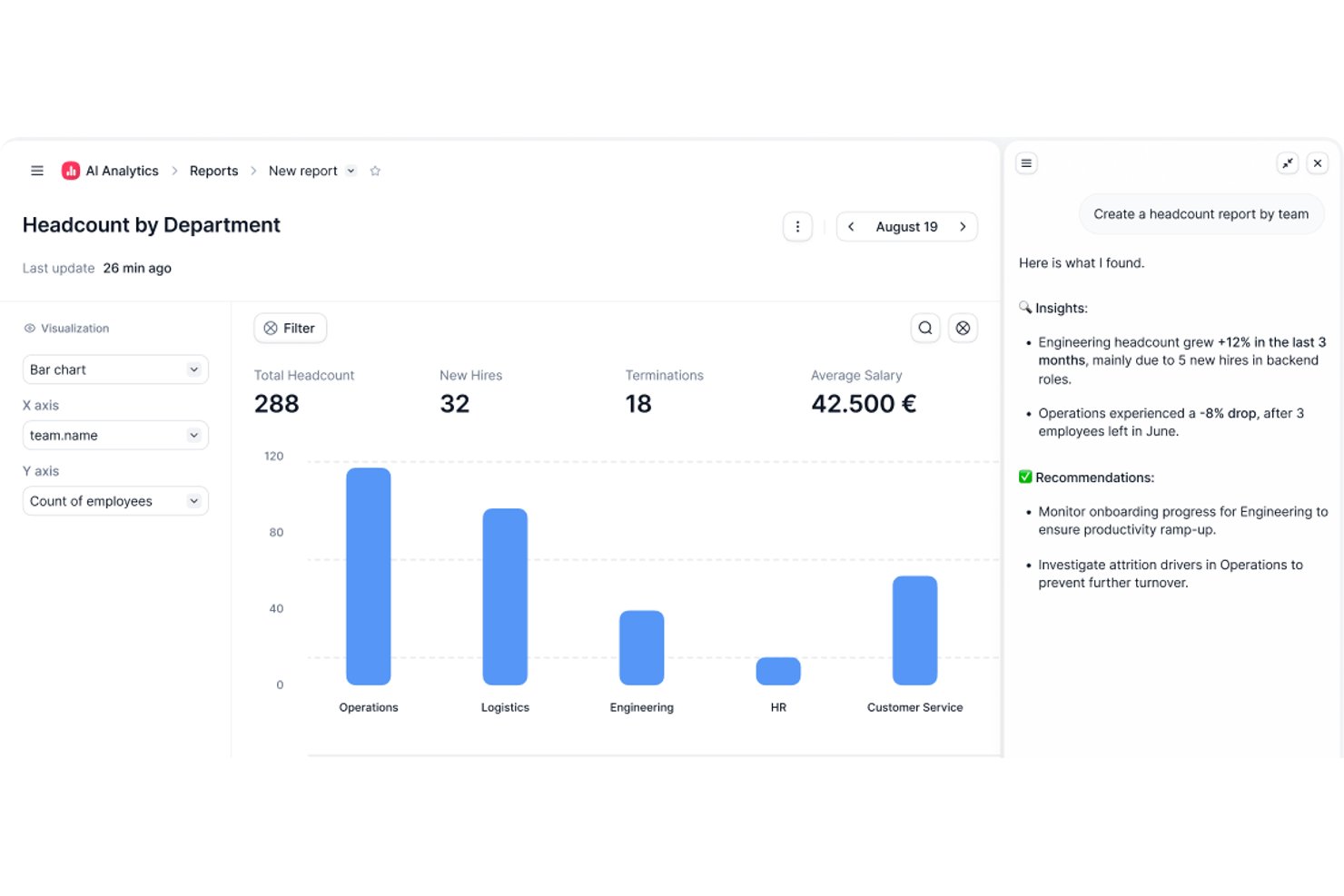
Factorial è una piattaforma per le risorse umane e la rilevazione delle presenze e degli orari che riunisce il monitoraggio delle entrate e delle uscite, la gestione dei turni, la gestione delle assenze e i registri digitali del personale in un unico luogo.
Per chi è più adatto Factorial?
Factorial è una soluzione adatta alle piccole e medie imprese che hanno bisogno di gestire le risorse umane e il monitoraggio degli orari in un'unica piattaforma anziché utilizzare strumenti separati.
Perché ho scelto Factorial
Factorial è una delle mie scelte principali perché apprezzo il modo in cui raccoglie il registro delle ore di ogni dipendente in un unico registro digitale ricercabile. Anziché cercare tra fogli di calcolo o sistemi non collegati tra loro, posso visualizzare in un unico luogo la cronologia delle entrate e delle uscite, le ore lavorate e le assenze di qualsiasi dipendente. La gestione dei registri delle ore di Factorial supporta anche le entrate tramite codice QR e geolocalizzazione, così i registri sono accurati indipendentemente dal luogo in cui lavora il personale.
Funzionalità principali di Factorial
- Pianificazione dei turni: Crea e assegna direttamente in Factorial turni fissi o a rotazione, consentendo ai dipendenti di visualizzare i propri orari dall'app mobile.
- Gestione degli straordinari: Monitora e categorizza automaticamente le ore di straordinario, applicando regole di compensazione configurabili per dipendente o team.
- Gestione delle ferie e delle assenze: Configura tipi di assenza personalizzati e flussi di approvazione, così i responsabili possono esaminare e gestire le richieste senza uscire dalla piattaforma.
- Report su orari e presenze: Genera report dettagliati sulle ore lavorate, le assenze e i modelli dei turni per tutta la forza lavoro.
Integrazioni di Factorial
Factorial offre oltre 90 integrazioni tramite il suo marketplace, tra cui Slack, Google Workspace, Okta, Microsoft Dynamics 365, Jira, monday.com, Suprema e altri. Si collega anche a Zapier e dispone di un'API pubblica per le integrazioni personalizzate.
Pros and Cons
Pros:
- Le regole sugli straordinari assegnano automaticamente le categorie corrette
- Firme elettroniche su schede delle ore e documenti
- Disponibile nativamente in diverse lingue
Cons:
- L'app mobile offre meno funzionalità rispetto alla versione desktop
- I report non sono abbastanza approfonditi per esigenze complesse

Ideale per il controllo presenze tramite GPS
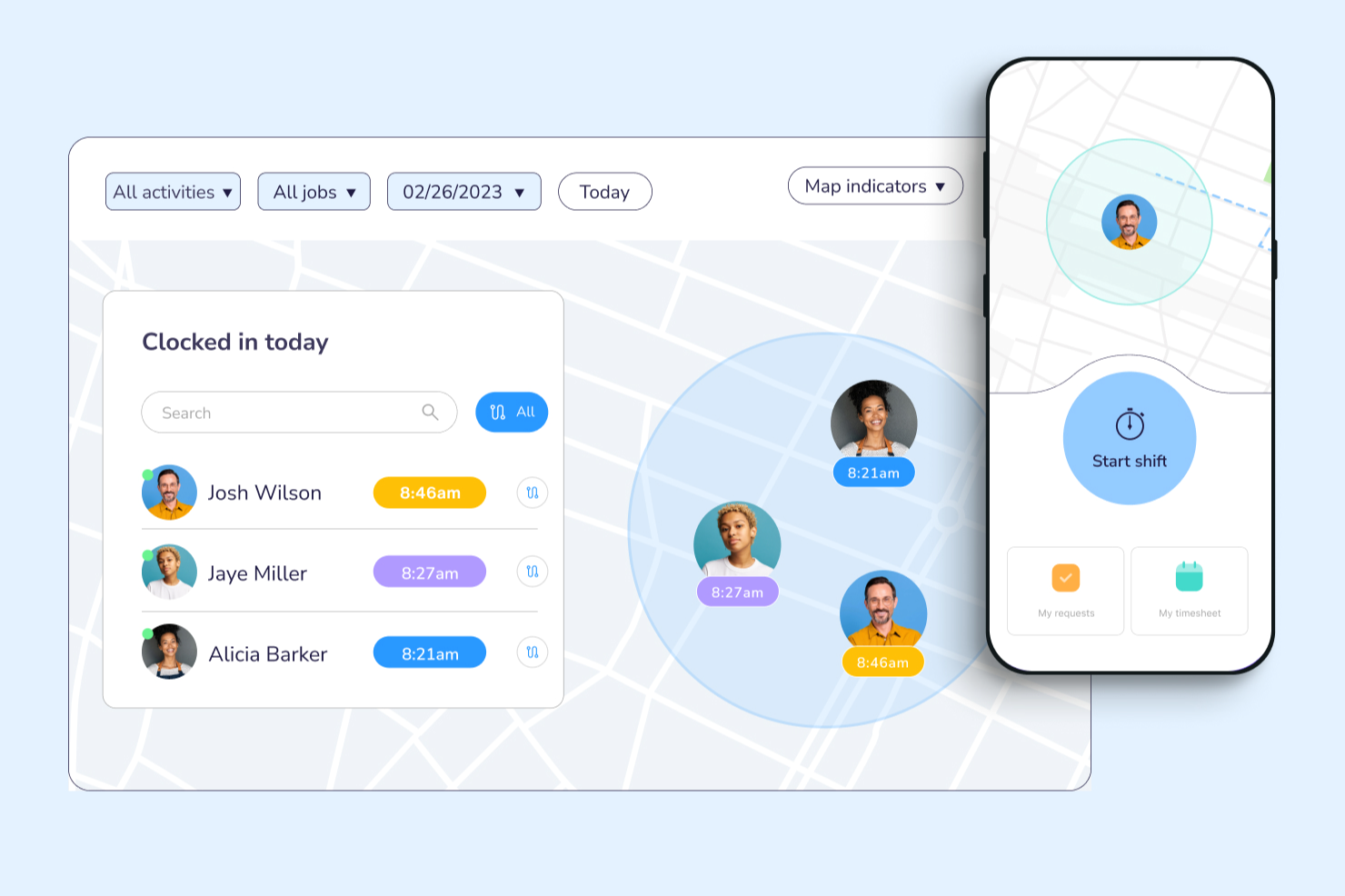
Connecteam è una piattaforma per la gestione di presenze e orari pensata principalmente per dispositivi mobili, ideale per aziende con team senza scrivania o operativi sul campo che devono tracciare le ore lavorate, gestire i turni e semplificare i processi di payroll.
Per chi è migliore Connecteam?
Connecteam è perfetto per piccole e medie imprese in settori come costruzioni, vendita al dettaglio, ospitalità e sanità che si affidano a lavoratori in prima linea o operativi sul campo.
Perché ho scelto Connecteam
Ho scelto Connecteam tra i migliori proprio per l’efficacia del suo sistema di rilevazione oraria basato su GPS, perfetto per i team distribuiti su diversi cantieri. Apprezzo che i dipendenti possano timbrare direttamente dal loro telefono, e che il timbro GPS su ogni registrazione mostri esattamente dove si trovavano in quel momento. Uso anche la funzione di geofencing per impostare limiti geografici, così l’app limita automaticamente le timbrature ai siti approvati. Per chi opera spesso sul campo, questo livello di controllo sul luogo della timbratura è davvero difficile da ottenere con un orologio tradizionale.
Funzionalità principali di Connecteam
- Pianificazione dei turni tramite drag-and-drop: Crea e pubblica visivamente i turni del personale, assegnando turni per ruolo, sede o singolo dipendente.
- Foglio presenze digitale: Genera automaticamente i fogli presenze dai dati di timbratura in entrata e uscita, che i responsabili possono rivedere e approvare prima dell’esportazione per il payroll.
- Monitoraggio di straordinari e pause: Imposta regole personalizzate per pause e soglie di straordinario in modo che il sistema segnali automaticamente ogni violazione.
- Notifiche e avvisi in-app: Invio di notifiche push in tempo reale ai dipendenti per promemoria sui turni, cambi di programma o timbrature mancate.
Integrazioni di Connecteam
Le integrazioni includono QuickBooks, Gusto, Xero, ADP, Zapier, Wix, Lightspeed, PrismHR, Square, BambooHR, Accu-Time Systems, Synel e Clover.
Pros and Cons
Pros:
- Il chiosco con PIN è pratico per le sedi lavorative condivise
- I punti GPS verificano la correttezza della timbratura dei dipendenti
- La chat integrata mantiene il team allineato durante i turni
Cons:
- La struttura dei prezzi può risultare complessa
- Le notifiche non sono sempre precise
New Product Updates from Connecteam

Connecteam Expands Break and Timesheet Controls
Connecteam adds flexible break thresholds, personalized policies, auto-end options, a centralized exceptions report, and improved timesheet issue visibility to help teams manage breaks and timesheets more effectively. For more information, visit Connecteam’s official site.
 .
.
Homebase
Ideale per la gestione dei dipendenti orari
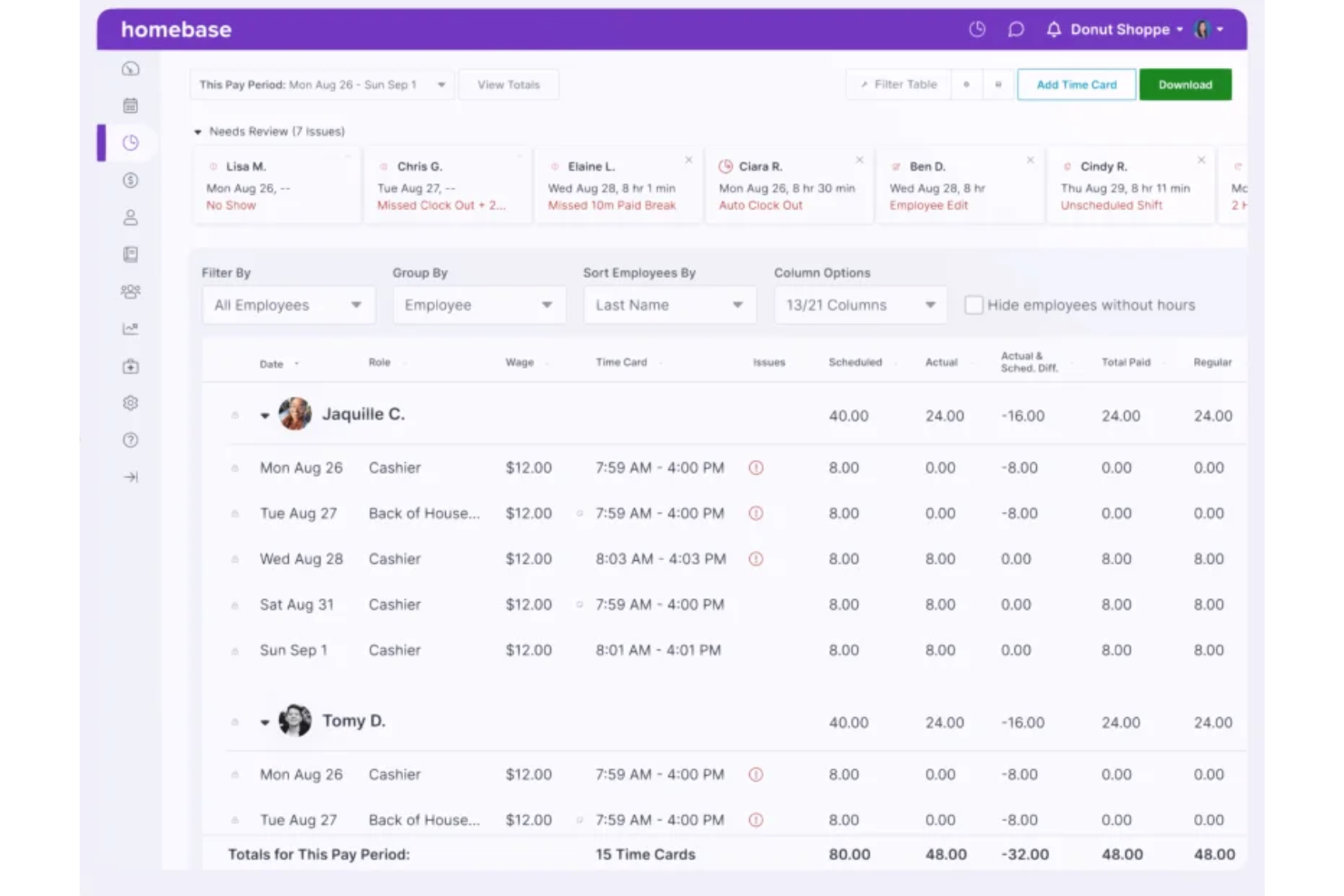
Homebase è una piattaforma di rilevazione presenze e gestione del tempo progettata per le piccole imprese e i team che hanno bisogno di tracciare le ore lavorate, gestire i turni e semplificare le paghe per il personale orario e a turni.
Per Chi è Più Adatto Homebase?
Homebase è perfetto per le piccole imprese nei settori vendita al dettaglio, ospitalità e ristorazione che si affidano a lavoratori orari e necessitano di strumenti semplici per gestire presenze, orari e turni.
Perché Ho Scelto Homebase
Homebase si guadagna un posto nella mia shortlist per l'efficacia con cui affronta le sfide specifiche della gestione dei dipendenti a ore. Mi piace che il timbratore fotografi il lavoratore al momento dell'ingresso e richieda un PIN unico—questa funzione risolve direttamente il fenomeno dello scambio di badge tra colleghi, un problema reale e costoso negli ambienti a turnazione come ristoranti e negozi. Inoltre, mi piace che Homebase registri automaticamente pause, straordinari e molteplici livelli salariali al momento dell'entrata e uscita, convertendo poi tutte queste informazioni in cartellini pronti per la revisione prima di pagare gli stipendi. I controlli sui costi del lavoro—come il blocco degli ingressi anticipati e l'impostazione degli obiettivi tra costo del lavoro e vendite—offrono ai gestori una reale visibilità su come vengono impiegate le ore lavorative.
Caratteristiche Principali di Homebase
- Cartellini orari automatizzati: Homebase trasforma i dati di ingresso/uscita—including pause, straordinari, mance e più livelli retributivi—in cartellini orari pronti per la revisione prima di pagare.
- Timbratore mobile con GPS: I dipendenti che lavorano fuori sede possono timbrare entrata e uscita tramite un dispositivo mobile, con il GPS che conferma la loro posizione al momento della timbratura.
- Strumenti per scambio e copertura dei turni: I dipendenti possono richiedere scambi di turno o coprire turni liberi direttamente dall'app, con l'approvazione del responsabile integrata nel flusso.
- Gestione ferie e permessi: I responsabili possono impostare date di blocco, limiti di richiesta e requisiti di preavviso, mentre i dipendenti possono inviare richieste di permesso e controllare lo stato di approvazione tramite app.
Integrazioni di Homebase
Le integrazioni includono Square, Toast, Clover, Shopify, QuickBooks Online, Gusto, ADP RUN, Paychex, Rippling e Restaurant365.
Pros and Cons
Pros:
- Self-service per i dipendenti su turni e richieste di permesso
- La verifica fotografica riduce i rischi di scambio badge
- Timbratura mobile con GPS ideale per team che lavorano sul campo
Cons:
- Onboarding e conformità HR sono riservati al piano tutto incluso
- Paghe limitate alle aziende con sede negli Stati Uniti

Agendrix
Ideale per pianificazioni flessibili in tutto il Canada

Agendrix è una piattaforma cloud per la rilevazione delle presenze, pensata per le aziende che necessitano di pianificazioni flessibili, gestione dei turni e monitoraggio delle presenze, semplificando la gestione del personale e riducendo l'amministrazione manuale.
Per Chi È Meglio Agendrix?
Agendrix è ideale per le aziende canadesi nei settori del commercio al dettaglio, dell'ospitalità e della sanità che gestiscono personale orario o su turni in una o più sedi.
Perché Ho Scelto Agendrix
Ho incluso Agendrix tra le mie scelte principali perché è uno dei pochi strumenti di rilevazione presenze progettati specificatamente per le aziende canadesi. Quello che apprezzo di più è la funzione dei turni aperti: quando un turno necessita di essere coperto, Agendrix notifica automaticamente i dipendenti idonei, che possono accaparrarselo in base all'ordine di richiesta o all'anzianità. Questo è un vero vantaggio per i manager che devono gestire orari variabili su diverse sedi. Inoltre, mi piace come l'assegnazione automatica dei turni tenga conto della disponibilità dei dipendenti, delle ferie approvate e dei requisiti della posizione, evitando così di dover incrociare manualmente i dati ogni settimana.
Funzionalità Principali di Agendrix
- Timbratura geolocalizzata: I dipendenti timbrano entrata e uscita dal proprio dispositivo mobile, con verifica GPS per confermare la presenza in sede al momento della timbratura.
- Generazione automatica dei cartellini: I cartellini si compilano automaticamente dai dati di entrata e uscita, con straordinari, maggiorazioni e permessi calcolati in base alle regole configurate.
- Gestione richieste di assenza: I dipendenti inviano direttamente le richieste di permesso tramite l'app, e le assenze approvate si sincronizzano subito con il calendario e i contatori.
- Esportazione dati per paghe: I dati dei cartellini approvati si esportano in CSV o vengono inviati direttamente ai sistemi paghe collegati, tra cui ADP Workforce Now®, Ceridian Powerpay e QuickBooks.
Integrazioni di Agendrix
Le integrazioni includono ADP Workforce Now, Ceridian Powerpay, Sage, QuickBooks ed è disponibile un'API per integrazioni personalizzate.
Pros and Cons
Pros:
- Si integra con i principali sistemi paghe canadesi
- Supporta la condivisione degli orari tramite stampa, email e dispositivi mobili
- Messaggistica e notifiche integrate
Cons:
- Alcune integrazioni possono richiedere una configurazione manuale
- Opzioni di personalizzazione limitate per report e analisi

Sloneek
Ideale per i team HR che gestiscono una forza lavoro ibrida
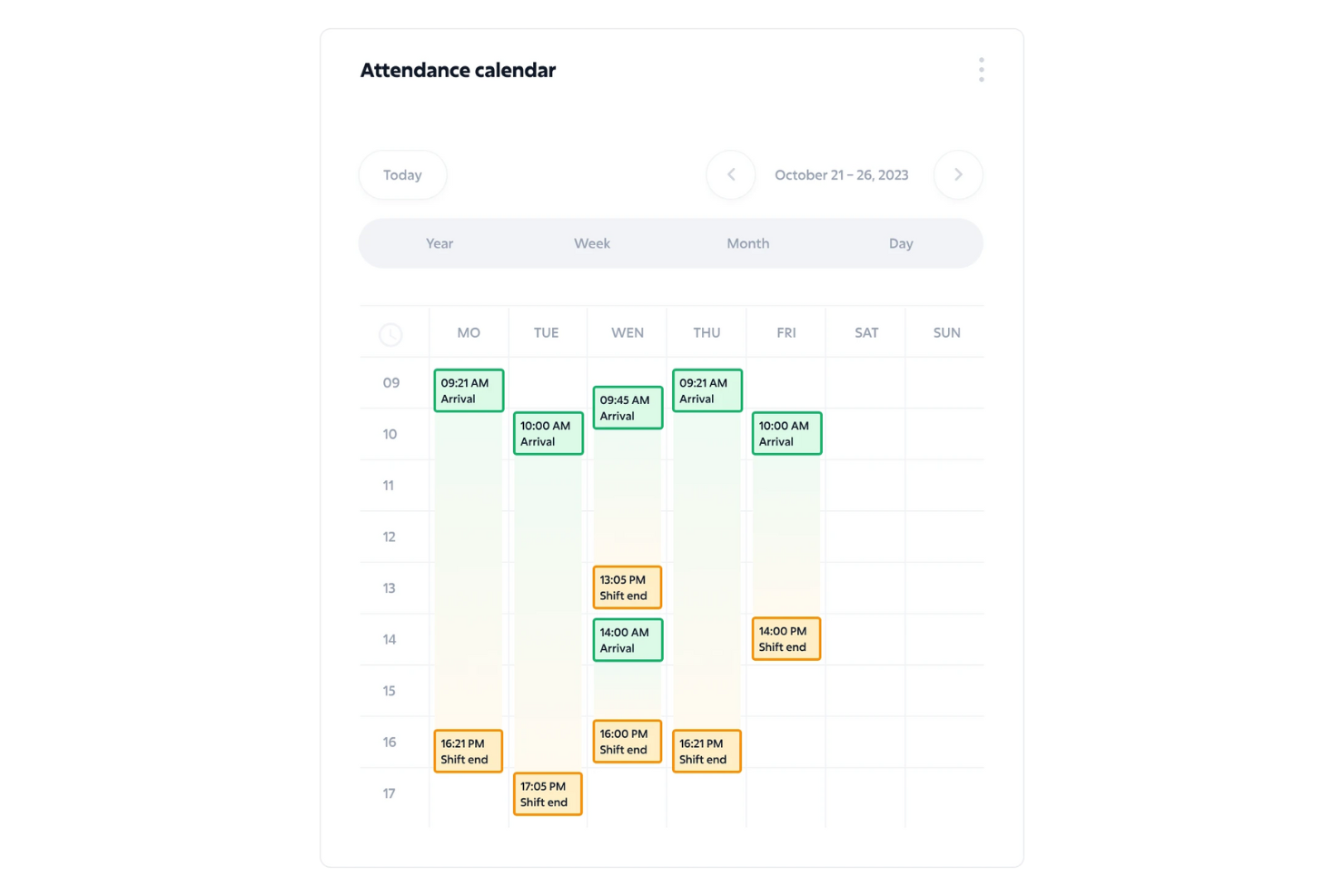
Sloneek è una piattaforma per la gestione di presenze e orari progettata per i team HR che devono gestire le ore dei dipendenti, le assenze e le modalità di lavoro ibride all’interno di team distribuiti.
Per chi è pensato Sloneek?
Sloneek è particolarmente indicato per piccole e medie imprese con team ibridi o remoti che hanno bisogno di un sistema centralizzato per gestire orari, presenze e processi HR.
Perché ho scelto Sloneek
Ho incluso Sloneek tra le mie scelte principali perché gestisce la specifica complessità della gestione della forza lavoro ibrida in modo più avanzato rispetto alla maggior parte degli strumenti per la rilevazione delle presenze. Mi piace il fatto che il modulo di people analytics suddivida i report per tipologia di lavoro e sede, così il mio team può vedere facilmente chi lavora da remoto, chi è in sede e come sono distribuite le ore tra i diversi gruppi. La funzione di monitoraggio del tempo consente inoltre ai dipendenti di registrare le ore sia tramite app mobile che browser web, una caratteristica importante quando il team non è vincolato a una sola sede. Il calendario delle attività offre ai manager una panoramica chiara degli orari del team con suddivisioni giornaliere, settimanali e mensili, facilitando l’individuazione di eventuali lacune di copertura all’interno di configurazioni ibride.
Funzionalità principali di Sloneek
- Report dei timesheet: Registra e visualizza le ore lavorate su progetti e clienti, con viste mensili del calendario e confronti rispetto al monte ore lavorativo.
- Monitoraggio costi e tariffe di fatturazione: Assegna tariffe orarie individuali di costo e fatturazione alle attività, con limiti mensili e annuali del monte ore per ogni utente.
- Flussi di approvazione del manager: I manager possono esaminare, approvare e commentare le registrazioni di ore inviate dai dipendenti direttamente nel calendario delle attività.
- Gestione delle assenze: Tieni traccia e gestisci le richieste di permesso, le assenze e i saldi di ferie dei dipendenti in un unico posto insieme alle registrazioni delle presenze.
Integrazioni di Sloneek
Include Slack, Jira, Microsoft 365 e un’API aperta per connessioni personalizzate.
Pros and Cons
Pros:
- Interfaccia intuitiva e facile da imparare
- Assistenza clienti e onboarding di alto livello
- Ampia gamma di strumenti HR e per la gestione del tempo in un unico sistema
Cons:
- Alcuni utenti segnalano una curva di apprendimento durante la configurazione
- L’app mobile potrebbe includere più funzionalità
Miglior monitoraggio in tempo reale, screenshot e analisi dei dati

WebWork Time Tracker consente a team e aziende di monitorare la presenza, tracciare le ore di lavoro e analizzare la produttività grazie a strumenti integrati di rilevamento del tempo e reportistica progettati per ambienti di lavoro da remoto, ibridi e in presenza.
Per chi è ideale WebWork Time Tracker?
WebWork Time Tracker è particolarmente adatto a piccole e medie imprese che gestiscono team remoti o distribuiti e necessitano di visibilità su come vengono impiegate le ore di lavoro.
Perché ho scelto WebWork Time Tracker
Ho inserito WebWork Time Tracker nella mia lista perché offre una grande visibilità su ciò che il tuo team sta realmente facendo in tempo reale. Il pannello di monitoraggio in tempo reale mostra esattamente su quale progetto o attività sta lavorando ogni membro del team in un dato momento, inclusa l'app o il sito web attualmente utilizzato. La funzione di screenshot acquisisce immagini periodiche degli schermi dei dipendenti a intervalli personalizzabili, così hai una prova visiva dell'attività senza doverti affidare all'autosegnalazione. Apprezzo anche il lato analitico: oltre 15 tipi di report includono livelli di attività, utilizzo delle app, presenza e paghe, e puoi visualizzarli tramite grafici a linea, barre, torta o calendario.
Funzionalità principali di WebWork Time Tracker
- Monitoraggio delle presenze: Registra automaticamente gli orari di entrata e uscita dei dipendenti per costruire uno storico chiaro delle presenze.
- Calcolo delle paghe: Calcola la busta paga sulla base delle ore tracciate, tariffe orarie e regole di straordinario impostate per ciascun membro del team.
- Tracciamento della posizione GPS: Registra la posizione dei membri del team al momento dell'entrata o uscita, utile per lavoratori sul campo o mobili.
- Rilevamento del tempo di inattività: Rileva e segnala i periodi di inattività durante le sessioni di lavoro tracciate, offrendo una visione più accurata delle ore effettivamente attive.
Integrazioni di WebWork Time Tracker
Le integrazioni includono Asana, Bitbucket, Azure DevOps, ClickUp, Deel, GitHub, Google Workspace, Gusto, Jira, Notion e QuickBooks.
Pros and Cons
Pros:
- Rilevamento preciso delle ore lavorate e report dettagliati sulla produttività
- Monitoraggio in tempo reale
- Funzionalità di gestione presenze e assenze
Cons:
- La funzione di bilanciamento delle assenze potrebbe essere migliorata
- Gli strumenti di reportistica potrebbero offrire più opzioni di personalizzazione

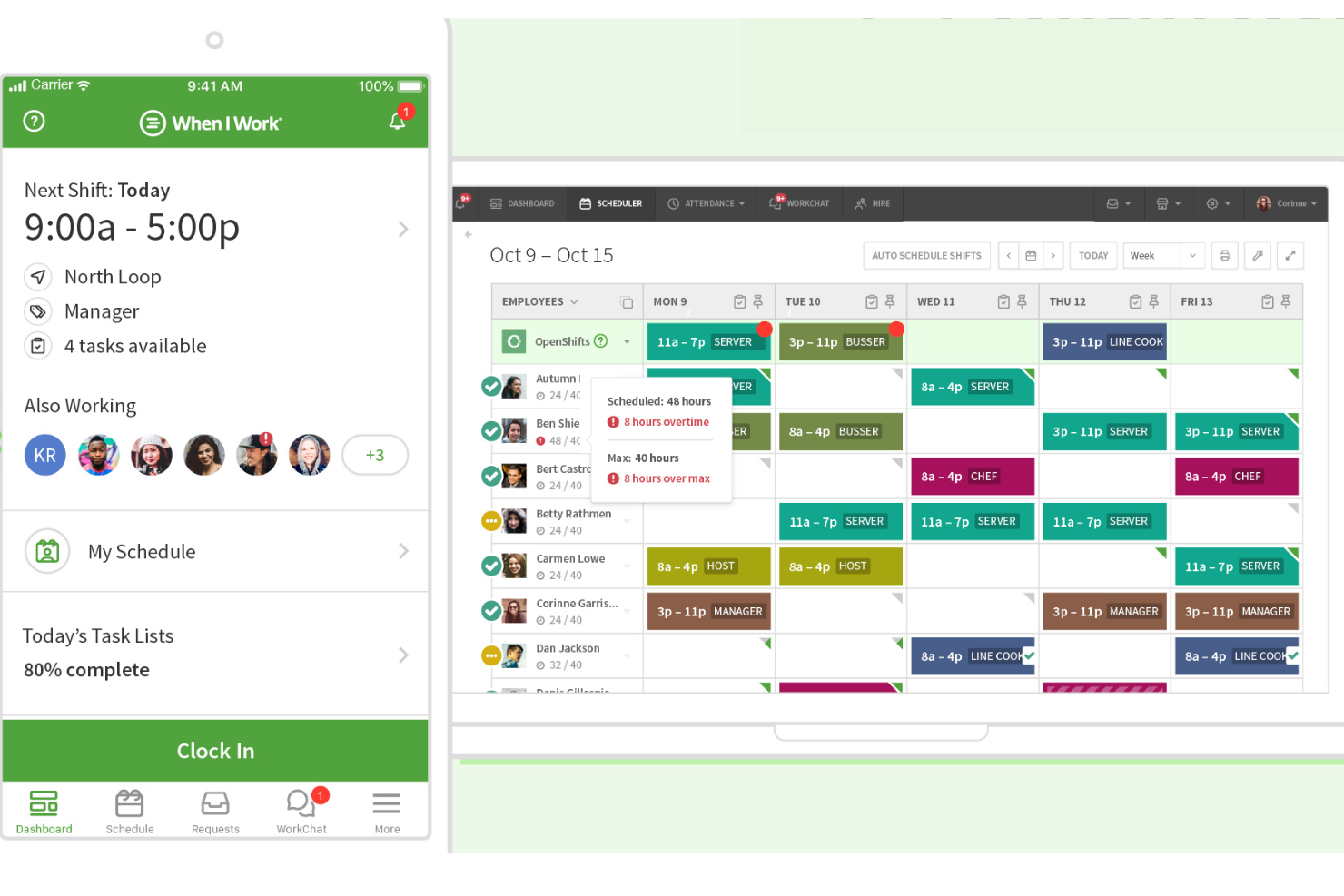
When I Work consente alle aziende organizzate su turni e ai team con lavoratori pagati a ore di gestire la pianificazione dei dipendenti, monitorare le presenze e gestire le richieste di ferie e permessi in un unico posto, riducendo il lavoro manuale e mantenendo visibili i costi del lavoro.
A chi è più adatto When I Work?
When I Work è una soluzione particolarmente adatta alle piccole e medie imprese del commercio al dettaglio, dell'ospitalità e dell'assistenza sanitaria che si affidano a lavoratori pagati a ore e hanno bisogno di strumenti semplici per la pianificazione e il monitoraggio delle presenze.
Perché ho scelto When I Work
Ho scelto When I Work come una delle soluzioni migliori per il modo in cui il monitoraggio dei costi del lavoro è strettamente integrato nell'esperienza di pianificazione e gestione delle timbrature. Quando crei un programma dei turni, i costi del lavoro vengono visualizzati direttamente nella schermata del programma, così puoi vedere l'impatto in dollari di ogni turno prima di pubblicarlo. Apprezzo anche gli avvisi relativi agli straordinari, che segnalano i dipendenti che si stanno avvicinando ai limiti di ore a metà settimana, offrendo ai responsabili una reale possibilità di riassegnare i turni invece di dover semplicemente sostenere il costo a posteriori. Inoltre, il sistema di timbratura collega ogni entrata alla timbratura al turno programmato, consentendo di ottenere report dettagliati sui costi suddivisi per mansione, ruolo o sede senza alcuna riconciliazione manuale.
Funzionalità principali di When I Work
- Pianificazione automatica: Compila i turni disponibili in base alla disponibilità e alle qualifiche di ciascun dipendente con un solo clic.
- Scambi di turni e turni aperti: Consente ai dipendenti di scambiarsi o accettare turni nell'applicazione, con l'approvazione del responsabile necessaria prima che le modifiche diventino effettive.
- Gestione delle richieste di ferie e permessi: I dipendenti inviano le richieste tramite l'applicazione e i responsabili le approvano o le rifiutano, aggiornando di conseguenza il programma.
- Pianificazione su più sedi: Gestisce i programmi di più sedi o reparti da un unico pannello di controllo, con assegnazioni del personale basate sul ruolo e sulla sede.
Integrazioni di When I Work
Le integrazioni includono ADP Workforce Now e Rippling.
Pros and Cons
Pros:
- Agevola la comunicazione del team
- Pianificazione e monitoraggio delle ore integrati
- Opzioni flessibili per la timbratura
Cons:
- Il monitoraggio delle ore e delle presenze è un componente aggiuntivo a pagamento
- Potrebbe offrire più opzioni di pianificazione personalizzabili
Altri software per la gestione di presenze e orari
Ecco alcune altre opzioni di software per la gestione di presenze e orari. Non avevo spazio per una recensione completa di ciascuno di questi strumenti, ma meritano comunque di essere presi in considerazione:
- Clockify
Ideale per le squadre ibride
- Deputy
Ideale per la programmazione online dei turni dei dipendenti
- edays
Ideale per il monitoraggio globale di assenze e congedi
- Ubeya
Ideale per la pianificazione dei turni con intelligenza artificiale
- Deltek Replicon Time
Ideale per la raccolta dei dati dei lavoratori a livello globale
- Dayforce
Ideale per la timbratura mobile
- ADP
Ideale per timbrature digitali e prevenzione del buddy punching
- Workday Workforce Management
Ideale per unificare le fonti e le azioni legate ai dati orari
- EasyClocking
Ideale per il rilevamento presenze biometrico
- Rippling
Ideale per personalizzare i flussi di lavoro di gestione del tempo
- Deel HR
Ideale per gestire i pagamenti di un team globale
- Insightful
Ideale per il monitoraggio e la reportistica delle presenze in tempo reale
- Monitask
Ideale per il monitoraggio preciso del tempo
- Hubstaff
Ideale per il monitoraggio basato su GPS
- Paylocity
Ideale per far rispettare automaticamente le politiche di presenza
- TimeTrex
Ideale per la timbratura biometrica e il controllo accurato delle presenze
- Parim
Ideale per più opzioni di timbratura dei dipendenti
- ADP Workforce Now
Ideale per l'integrazione HR e paghe
- Intelogos
Ideale per insight sulle prestazioni del team guidate dall'IA


Recensioni correlate di software HR
Se non hai ancora trovato ciò che cerchi, dai un'occhiata a questi altri strumenti correlati che abbiamo testato e valutato:
- Software HR
- Software per le buste paga
- Software per il recruiting
- Servizi di datore di lavoro registrato
- Sistemi di tracciamento dei candidati
- Software per la gestione della forza lavoro
Come Valuto il Software di Rilevazione Presenze e Assenze
Valuto gli strumenti di rilevazione presenze su due livelli: gli elementi imprescindibili come la registrazione delle ore, l'approvazione dei timesheet e l'integrazione con il payroll, e i fattori differenzianti che distinguono le migliori opzioni.
Funzionalità di Base (Requisiti Minimi per Questa Lista)
Queste funzionalità principali sono i criteri di accettazione per l'inclusione nella mia lista di software di rilevazione presenze:
- Rilevazione delle Ore & Timbratura: Cerco più metodi di timbratura—web, mobile, chiosco, biometrico—oltre alla geolocalizzazione GPS e alla sincronizzazione offline per squadre sul campo e team distribuiti.
- Gestione dei Timesheet: Timesheet automatizzati con workflow di approvazione multilivello sono fondamentali, specialmente per team in cui i manager supervisionano sia dipendenti a ore che salariati contemporaneamente.
- Gestione di FERIE & Assenze: Valuto come ogni strumento gestisce le regole di maturazione, le richieste self-service e la visibilità dei saldi, così i dipendenti non devono inseguire l'HR per aggiornamenti sulle ferie.
- Straordinari & Regole di Conformità: Le regole configurabili di retribuzione sono essenziali—controllo se le piattaforme supportano straordinari giornalieri, leggi sugli intervalli specifiche per regione e regole sindacali oltre alla semplice conformità FLSA.
- Integrazione con Payroll & HRIS: I connettori nativi verso fornitori di payroll come ADP, Gusto e QuickBooks mi indicano quanto i dati di presenza fluiscano senza problemi nei processi di retribuzione senza immissioni manuali.
- Pianificazione & Report Presenze: Valuto strumenti di creazione turni insieme a dashboard in tempo reale che evidenziano assenteismo, costi del lavoro e ore lavorate per reparto.
Valuto ogni fornitore su una scala da 0 (funzionalità assente) a 5 (eccelle in quest'area) per ciascun criterio.
I fornitori devono raggiungere un punteggio medio minimo per poter essere inclusi nella mia lista. Da lì, considero cosa distingue ciascuna piattaforma.
Fattori Differenzianti (Cosa Distingue i Fornitori)
Una volta selezionata la mia lista, ecco come confronto diversi fornitori nell'ambito dei software per la rilevazione presenze:
Funzionalità Distintive
Geofencing e verifica GPS aiutano a rendere responsabili i team remoti o mobili, collegando la timbratura a una posizione fisica. Attribuisco valore anche all'autenticazione biometrica per prevenire il "buddy punching" in ambienti affollati. Alcuni strumenti si distinguono per l'analisi predittiva che segnala anticipatamente i potenziali costi degli straordinari e i trend di assenteismo. Quando un'app mobile consente ai dipendenti di gestire autonomamente turni, ferie e richieste di assenza ovunque si trovino, diventa un vero vantaggio per i team distribuiti.
Oltre le Funzionalità
Standard di sicurezza e conformità hanno un peso rilevante nella mia valutazione—verifico che una piattaforma supporti la conformità SOC 2, controlli di accesso basati sui ruoli e crittografia dei dati, soprattutto per organizzazioni che gestiscono dati sensibili sui dipendenti. L'integrazione approfondita è inoltre importante, poiché uno strumento che si collega nativamente con il provider payroll e HRIS elimina ore di trasferimenti manuali a ogni ciclo paghe. Considero anche la trasparenza dei prezzi, osservando se i fornitori dichiarano chiaramente i costi per dipendente e le spese hardware in anticipo.
Come scegliere un software per la gestione di presenze e orari
La scelta del software giusto per la gestione di presenze e orari inizia dalla comprensione delle esigenze specifiche del tuo team e dalla ricerca di una soluzione che calzi a pennello. Ecco cinque fattori chiave da considerare:
- Abbina le funzionalità al tuo flusso di lavoro
Inizia identificando le dimensioni della tua forza lavoro, la complessità della pianificazione e i requisiti di conformità. Un team di produzione organizzato per turni ha bisogno di strumenti molto diversi rispetto a una società di consulenza con dipendenti stipendiati. Cerca funzionalità in linea con le tue reali esigenze di pianificazione, monitoraggio delle ore e reporting. - Dai priorità alle integrazioni senza interruzioni
I migliori strumenti si collegano senza difficoltà ai sistemi paghe e HR che già utilizzi. Quando i dati relativi alle ore lavorate confluiscono direttamente nel sistema paghe, elimini la doppia registrazione, riduci gli errori e risparmi preziose ore amministrative a ogni periodo di paga. - Cerca un supporto integrato alla conformità
Rispettare le leggi sul lavoro è imprescindibile. Scegli un software che monitori gli straordinari, gestisca i congedi previsti dalla legge e generi report pronti per gli audit, così da aiutarti a evitare sanzioni e adempiere agli obblighi legali. - Pianifica la crescita
Il software dovrebbe adattarsi alla crescita della tua azienda. Che tu stia aggiungendo dipendenti, sedi o complessità, scegli una piattaforma in grado di evolversi insieme a te, soprattutto se prevedi una crescita rapida o cambiamenti organizzativi. - Non trascurare la facilità d'uso & l'assistenza
L'adozione da parte degli utenti dipende dalla semplicità. Cerca uno strumento che renda facile per i dipendenti registrare l'entrata, richiedere permessi e consultare i turni. Assicurati inoltre che il fornitore offra un'assistenza tempestiva e risorse utili quando ne hai bisogno.
In definitiva, è importante scegliere un software per la rilevazione delle ore e delle presenze che non solo soddisfi le tue esigenze attuali, ma sia anche ben predisposto per aiutarti a gestire la tua forza lavoro in modo efficiente ed efficace nel lungo periodo.
Tendenze nei software per la rilevazione delle ore e delle presenze nel 2025
I recenti aggiornamenti dei prodotti, i comunicati stampa e i registri delle versioni dei principali strumenti per la rilevazione delle ore e delle presenze rivelano diverse tendenze degne di nota, che rispondono alle priorità e alle sfide in evoluzione dei professionisti delle risorse umane. Ecco alcune tendenze che dovresti conoscere:
Funzionalità più importanti e richieste
- Funzionalità di conformità avanzate: Gli aggiornamenti dei software si sono concentrati fortemente sulle funzionalità che garantiscono la conformità alle leggi sul lavoro in evoluzione nelle diverse giurisdizioni, soprattutto per le aziende globali. Ciò include il monitoraggio automatizzato delle ore lavorate, delle pause di riposo e degli straordinari in linea con requisiti legali specifici, riducendo il rischio di sanzioni per non conformità.
- Accesso mobile e geofencing: Le funzionalità di accesso mobile, comprese quelle per la registrazione dell'entrata e dell'uscita e il geofencing, si sono evolute rapidamente. Questa tendenza riflette la crescente necessità di flessibilità e la possibilità di gestire efficacemente i lavoratori da remoto o sul campo, garantendo un monitoraggio accurato delle ore indipendentemente dalla posizione.
- Autenticazione biometrica: L'uso dei dati biometrici per registrare entrate e uscite è diventato più comune, offrendo un metodo sicuro e resistente alle frodi per verificare la presenza dei dipendenti. Questa tecnologia è particolarmente innovativa per la sua capacità di prevenire la timbratura per conto di altri dipendenti e il furto di ore.
- Monitoraggio delle presenze in tempo reale: La domanda di funzionalità per il monitoraggio delle presenze in tempo reale evidenzia la necessità di una visibilità immediata sulla presenza e sulla disponibilità della forza lavoro, elemento fondamentale per una pianificazione dinamica e per prendere decisioni tempestive.
Funzionalità sempre meno importanti
- Orologi marcatempo tradizionali: La dipendenza dagli orologi marcatempo tradizionali e dall'inserimento manuale dei dati nei fogli delle ore sta diminuendo. Il passaggio a soluzioni digitali e mobili indica un allontanamento da questi metodi obsoleti, spinto dalla domanda di sistemi più accurati ed efficienti per il monitoraggio delle ore.
Queste tendenze evidenziano un cambiamento più ampio verso soluzioni basate sulla tecnologia, capaci di rispondere alle esigenze complesse e mutevoli dei luoghi di lavoro moderni. Sfruttando queste innovazioni, i professionisti delle risorse umane possono affrontare meglio le sfide legate alla gestione di una forza lavoro diversificata e dinamica, garantendo conformità, efficienza e una gestione strategica della forza lavoro.
Che cos'è un software per la rilevazione delle ore e delle presenze?
Il software per la rilevazione delle ore e delle presenze è una soluzione digitale che monitora automaticamente le ore lavorate, le presenze, le pause, le assenze e gli straordinari dei dipendenti.
Alcune piattaforme combinano la rilevazione delle ore dei dipendenti e la gestione delle paghe all'interno dello stesso sistema, consentendo alle ore registrate di confluire direttamente nei calcoli degli stipendi.
I professionisti delle risorse umane e i manager lo utilizzano per eliminare i fogli delle ore manuali, ridurre gli errori nelle paghe e rispettare le leggi sul lavoro. Questi strumenti semplificano la gestione della forza lavoro e offrono una visibilità migliore sulla pianificazione e sui costi del lavoro.
Funzionalità dei software per la rilevazione delle ore e delle presenze
Quando scegli un software per la rilevazione delle ore e delle presenze, presta attenzione alle seguenti funzionalità chiave:
- Precisione del monitoraggio delle ore: Questa funzione registra quando il tuo team inizia e termina il lavoro, utilizzando orologi digitali, dispositivi mobili o accessi tramite browser. Un monitoraggio affidabile aiuta a prevenire gli errori e garantisce che ogni minuto lavorato venga conteggiato, senza dover più strizzare gli occhi sui fogli presenze compilati a mano.
- Gestione della programmazione: Organizza i turni, assegna i ruoli e gestisci le pause con pochi clic. Questa funzione ti consente di impostare e modificare senza difficoltà gli orari di lavoro, evitando doppie prenotazioni e mantenendo tutto il team sulla stessa linea.
- Gestione delle ferie e delle assenze: Monitora ferie, giorni di malattia e altre assenze senza complicazioni. Questo strumento automatizza le richieste di assenza, le approvazioni e i saldi maturati, assicurandoti di sapere chi è disponibile e quando.
- Integrazione con il sistema paghe: Collega direttamente i dati sulle ore al tuo sistema paghe per calcolare gli stipendi senza difficoltà. Questa integrazione evita l'inserimento manuale dei dati e ti aiuta a pagare il team in modo preciso e puntuale.
- Monitoraggio della conformità: Mantieniti in linea con le leggi sul lavoro, le regole sugli straordinari e le politiche aziendali. Gli strumenti integrati per la conformità inviano promemoria o avvisi se qualcosa non va, aiutandoti a evitare errori costosi e problemi legali.
- Self-service per i dipendenti: Permetti al tuo team di gestire autonomamente gli ingressi, le richieste di permesso e la consultazione degli orari. Questo responsabilizza i dipendenti, riduce gli scambi amministrativi e ti lascia più tempo per attività importanti.
- Report e analisi: Genera report su presenze, ritardi e costi del lavoro. Queste informazioni ti aiutano a individuare le tendenze e a prendere decisioni più efficaci su personale, budget e produttività.
- Accessibilità mobile: Che i tuoi dipendenti lavorino da remoto o siano in movimento, una piattaforma ottimizzata per dispositivi mobili permette loro di registrare l'ingresso da qualsiasi luogo. Questa flessibilità è essenziale per gli ambienti di lavoro moderni e dinamici.
Funzioni comuni di intelligenza artificiale dei software per la gestione delle ore e delle presenze
Oltre alle funzioni standard dei software per la gestione delle ore e delle presenze elencate sopra, molte di queste soluzioni stanno integrando l'intelligenza artificiale con funzioni come:
- Informazioni sulle prestazioni della forza lavoro: L'intelligenza artificiale identifica gli schemi nelle presenze e nella produttività dei dipendenti, fornendoti suggerimenti pratici per migliorare motivazione, efficienza e fidelizzazione e assicurando che il sistema sia conforme, ma anche adattabile alle esigenze in evoluzione della tua azienda e della sua forza lavoro.
- Programmazione predittiva: L'intelligenza artificiale analizza i tuoi dati storici per consigliare i turni ottimali, riducendo il rischio di carenza o eccesso di personale e attenuando le variazioni del carico di lavoro.
- Rilevamento delle anomalie: L'intelligenza artificiale segnala ingressi insoliti, timbrature mancanti o straordinari sospetti che potrebbero indicare errori o violazioni delle politiche, aiutandoti a risolvere i problemi prima che si aggravino.
- Correzione automatizzata dei fogli presenze: L'intelligenza artificiale esamina le registrazioni nei fogli presenze alla ricerca di errori o incoerenze e suggerisce le correzioni appropriate, così puoi dedicare meno tempo alla correzione manuale degli errori.
- Previsione intelligente delle assenze: Imparando dai dati storici sulle presenze, l'intelligenza artificiale prevede le assenze future o le tendenze, consentendoti di pianificare in anticipo e ridurre le interruzioni.
- Chatbot in linguaggio naturale: I chatbot basati sull'intelligenza artificiale guidano il tuo team in attività come la registrazione dell'ingresso, la verifica dei saldi dei permessi o le domande sulla programmazione, il tutto tramite un'interfaccia conversazionale.
Vantaggi dei software per la gestione delle ore e delle presenze
I software per la gestione delle ore e delle presenze offrono numerosi vantaggi, tra cui operazioni più efficienti, maggiore conformità e un miglioramento complessivo della produttività. Questi sistemi riducono gli errori manuali e forniscono informazioni in tempo reale sui modelli di lavoro dei dipendenti. Ecco alcuni vantaggi che puoi aspettarti implementando un nuovo sistema di rilevazione delle ore:
- Maggiore precisione nell'elaborazione delle paghe: Automatizzando il processo di monitoraggio delle ore, i software per la gestione delle ore e delle presenze riducono significativamente la probabilità di errori nelle paghe, garantendo che i dipendenti vengano retribuiti correttamente per le ore lavorate. Questa precisione porta vantaggi all'azienda riducendo i pagamenti eccessivi e le controversie relative alle paghe.
- Maggiore conformità normativa: Il software aiuta le organizzazioni a rispettare le leggi e le normative sul lavoro applicando automaticamente le regole pertinenti relative a straordinari, pause e assenze. Questa capacità protegge le aziende da potenziali multe e problemi legali associati alla non conformità.
- Maggiore produttività della forza lavoro: Grazie a funzioni come il monitoraggio delle presenze in tempo reale e la gestione delle assenze, il software consente ai responsabili di affrontare rapidamente le carenze di personale e prendere decisioni informate sull'assegnazione del lavoro, ottimizzando così la produttività della forza lavoro.
- Riduzione del carico amministrativo: Automatizzare la raccolta, il calcolo e la reportistica delle ore lavorate riduce le attività amministrative richieste al personale delle risorse umane e delle paghe, lasciandogli più tempo da dedicare a iniziative strategiche all'interno dell'organizzazione.
- Informazioni preziose sui costi e sulle tendenze del lavoro: I software per la gestione delle ore e delle presenze forniscono report dettagliati e analisi sui costi del lavoro e sui modelli di lavoro dei dipendenti, offrendo informazioni preziose che possono orientare la strategia aziendale e aiutare a gestire i budget in modo più efficace.
Per i potenziali acquirenti di software per la gestione delle presenze e degli orari, comprendere questi vantaggi è fondamentale. Il software giusto non solo facilita operazioni più fluide e la conformità alle leggi sul lavoro, ma fornisce anche alla dirigenza gli strumenti necessari per analizzare e ottimizzare la produttività e l'efficienza dei costi della forza lavoro.
Costi e prezzi dei software per la gestione delle presenze e degli orari
La scelta del software giusto per la gestione delle presenze e degli orari può avere un impatto significativo sulle attività aziendali, offrendo soluzioni per monitorare le ore dei dipendenti, gestire i turni e garantire la conformità alle leggi sul lavoro. Comprendere le varie opzioni dei piani e le relative strutture tariffarie è fondamentale per selezionare un sistema che soddisfi le esigenze aziendali rispettando il budget.
Tabella di confronto dei piani per i software di gestione delle presenze e degli orari
Di seguito è riportata una tabella che illustra le strutture dei prezzi e dei piani comunemente presenti nei software per la gestione delle presenze e degli orari, pensata per aiutarti a valutare le diverse opzioni.
| Tipo di piano | Prezzo medio | Funzionalità comuni |
|---|---|---|
| Gratuito | $0 | Monitoraggio di base del tempo, report limitati e accesso per un numero ridotto di utenti |
| Base | $2-10 per utente/mese | Monitoraggio del tempo, pianificazione di base, integrazione con le buste paga e reportistica di base |
| Professionale | $10-20 per utente/mese | Pianificazione avanzata, gestione delle ferie, accesso da dispositivi mobili e reportistica avanzata |
| Aziendale | Prezzo personalizzato | Integrazioni personalizzate, analisi avanzate, assistenza prioritaria e utenti illimitati |
Quando valuti un software per la gestione delle presenze e degli orari, è importante considerare sia il budget sia le esigenze attuali e future della tua organizzazione. Mentre un piano gratuito può essere sufficiente per le aziende molto piccole o appena avviate, le aziende in crescita avranno probabilmente bisogno delle funzionalità più avanzate offerte dai piani professionali o per grandi aziende.
Domande frequenti sul software per la gestione delle presenze e degli orari
Ecco le risposte ad alcune domande frequenti sul software per la gestione delle presenze e degli orari e sul suo funzionamento:
Come scelgo il miglior software per la gestione delle presenze e degli orari per la mia PMI?
Inizia elencando le funzionalità indispensabili, come la registrazione mobile delle entrate, il \u003ca href=\u0022https://peoplemanagingpeople.com/tools/best-pto-tracking-software/\u0022\u003etracciamento delle ferie\u003c/a\u003e e le integrazioni con il sistema paghe o HR. Confronta i software che rientrano nel tuo budget, sono facili da usare e offrono un buon supporto. Consulta le recensioni di aziende di dimensioni simili e approfitta delle prove gratuite per assicurarti che il software soddisfi le esigenze quotidiane del tuo team.
Il software per la gestione delle presenze e degli orari può integrarsi con i sistemi paghe o HR?
Sì, molti strumenti per la gestione delle presenze e degli orari offrono un’integrazione fluida con le piattaforme paghe e HR più diffuse. In questo modo le ore dei dipendenti vengono sincronizzate automaticamente, si riduce l’inserimento manuale dei dati e si velocizza l’elaborazione delle buste paga. Prima di scegliere un software, verifica con quali sistemi si collega e chiedi informazioni sul supporto per la configurazione, così da evitare sorprese.
Come funziona il rilevamento mobile degli orari per i dipendenti da remoto o sul campo?
Il rilevamento mobile degli orari consente al personale di registrare l’entrata o l’uscita tramite un’app sul telefono, ovunque lavori. Le funzionalità spesso includono la verifica GPS, la registrazione tramite foto e il geofencing, rendendo semplice verificare in tempo reale la posizione e le ore lavorate. Queste funzioni sono ideali per le squadre ibride e che lavorano sul campo, liberano le risorse HR dalla documentazione cartacea e contribuiscono a garantire la responsabilità della squadra anche in mobilità.
Che cos'è il geofencing nel software per la gestione delle presenze e degli orari?
Il geofencing consente di limitare i luoghi in cui i dipendenti possono registrare l’entrata o l’uscita, configurando un perimetro virtuale intorno a una posizione fisica. In questo modo si garantisce che i membri della squadra si trovino in sede (o in una posizione remota autorizzata) quando registrano le ore, riducendo le frodi e il furto di tempo. Il geofencing semplifica il monitoraggio del personale mobile o da remoto e consente di mantenere registri delle presenze accurati senza ulteriore lavoro manuale.
Che cos'è la timbratura per conto di un collega e come si può prevenire?
La timbratura per conto di un collega è una pratica moderna sul posto di lavoro, nata inizialmente tra gli operai edili, in cui un dipendente registra l’entrata (o l’uscita) dal luogo di lavoro per conto di un altro. Puoi prevenirla utilizzando funzionalità software come l’autenticazione biometrica, il riconoscimento facciale o il tracciamento GPS (per le forze lavoro ibride e da remoto), che verificano l’identità e la posizione di ogni dipendente.\r\n\r\nPer impedire che pratiche come la timbratura per conto di un collega si diffondano sul posto di lavoro, dovresti inoltre adottare una politica di tolleranza zero nei confronti di questo comportamento e comunicarla chiaramente a tutta la forza lavoro. È anche consigliabile confrontarsi con i responsabili e i dirigenti delle squadre per individuare eventuali problemi di soddisfazione dei dipendenti e svolgere regolarmente sondaggi sul morale.
Quali funzionalità aiutano a prevenire il furto di tempo nel software per la gestione delle presenze e degli orari?
Cerca funzioni come la verifica biometrica, l’acquisizione di foto, il tracciamento GPS e il geofencing. La segnalazione automatica delle registrazioni insolite e la disponibilità di cruscotti in tempo reale scoraggiano ulteriormente il furto di tempo. Queste funzionalità proteggono i budget destinati alle buste paga e promuovono l’equità in tutta la forza lavoro.
Quanto sono sicuri i dati dei dipendenti nei sistemi per la gestione delle presenze e degli orari?
I migliori software per la gestione delle presenze e degli orari utilizzano la crittografia, l’accesso basato sui ruoli e l’archiviazione sicura su cloud per mantenere privati i dati dei dipendenti. Scegli fornitori conformi agli standard pertinenti sulla privacy dei dati e che offrano politiche chiare sulla gestione dei dati. Chiedi sempre come vengono protette le tue informazioni durante l’inserimento iniziale e quando vengono esportate verso altri sistemi.
Cosa si dovrebbe fare con un dipendente che si assenta frequentemente?
Quando affronti l’assenteismo di un dipendente, devi essere chiaro e coerente, mostrando al contempo comprensione. Puoi provare questo approccio in quattro fasi per gestire un dipendente che si assenta frequentemente:\r\n\u003cul\u003e\r\n \t\u003cli\u003eRaccogli le prove della sua assenza prima di confrontarti con il dipendente in questione. Possono includere esempi di date e orari in cui era assente.\u003c/li\u003e\r\n \t\u003cli\u003eAffronta il problema e comunicagli che la sua assenza è stata rilevata. Potresti anche mostrarti preoccupato per il suo benessere. Questo può contribuire ad abbassare le sue difese e a ottenere una risposta sincera.\u003c/li\u003e\r\n \t\u003cli\u003eLasciagli spazio per discutere. Cerca di individuare la causa alla base della sua assenza.\u003c/li\u003e\r\n \t\u003cli\u003eAdotta misure appropriate. Ciò può includere la concessione di un orario flessibile, l’adeguamento del compenso per un’indennità di affitto se vive lontano, modifiche in base a eventuali condizioni di salute fisica o mentale e altro ancora.\u003c/li\u003e\r\n\u003c/ul\u003e\r\nL’assenteismo frequente dei dipendenti è un problema reale nella gestione della forza lavoro. Se noti che i tuoi dipendenti si impegnano poco sul lavoro, un piano di miglioramento del dipendente può essere d’aiuto! Implementando questo piano di miglioramento del dipendente in cinque fasi nella tua organizzazione, potresti riuscire a cambiare la situazione. Inoltre, include anche un modello già pronto!
Altre recensioni di software per la gestione dei dipendenti
Il monitoraggio e la gestione delle ore e delle presenze dei dipendenti sono solo un aspetto di una gestione efficiente della forza lavoro. Ecco altri elenchi di tipologie di software correlati che possono aiutarti a garantire la produttività dei dipendenti nella tua azienda:
- Migliori software per il monitoraggio del tempo
- Migliori app per il monitoraggio del tempo
- Migliori software per il monitoraggio delle presenze
- Migliori software per la pianificazione dei turni dei dipendenti
- Migliori software per la gestione delle ferie
- Migliori software per il monitoraggio della produttività
Considerazioni finali
Il software giusto per la gestione delle ore e delle presenze fa molto più che limitarsi a monitorare le ore: offre al tuo team retribuzioni precise, meno difficoltà nella pianificazione e informazioni più intelligenti sulla forza lavoro. Automatizzando il monitoraggio del tempo e riducendo gli errori manuali, puoi aumentare la produttività, sostenere una retribuzione equa e allineare i turni alla disponibilità dei dipendenti.
Vuoi altri strumenti per semplificare i tuoi processi delle risorse umane? Iscriviti alla newsletter di People Managing People e ricevi direttamente nella tua casella di posta consigli di esperti, recensioni di software e le ultime tendenze nel settore delle risorse umane.