


Recensione di monday.com: Pro, Contro, Funzionalità e Prezzi



monday AI Workspace is a workforce management software that combines AI-assisted planning, task automation, and cross-team workflow building in one flexible platform. It's worth a close look if your team manages multiple projects at once and wants AI tools embedded directly into daily work—not bolted on separately. I'd choose it over Asana if AI-native features matter to you, since monday AI Workspace weaves AI into planning, updates, and automation in ways that Asana's more traditional project tracking approach doesn't match.
monday AI Workspace Evaluation Summary
- From $9/user/month (billed annually)
- Free plan + 14-day free trial available
Perché fidarsi delle nostre recensioni sui software
Il nostro team testa e recensisce software dal 2012. In quanto esperti HR noi stessi, sappiamo quanto sia difficile — e importante — scegliere il software giusto.
Per questa guida, abbiamo valutato gli strumenti attraverso test pratici e ricerche indipendenti, assegnando un punteggio agli strumenti in base ai nostri criteri di selezione. Ci basiamo inoltre sulle competenze di leader di pensiero del settore e di professionisti HR attivi.
Le nostre recensioni riflettono il nostro giudizio editoriale umano, non un discorso di vendita.
Revisori esperti:
monday AI Workspace Overview
In my opinion, monday.com gives you a strong mix of flexibility, speed, and clarity for workforce management, especially if you’re handling shifting workloads across multiple teams. When I compare it to other tools, it stands out with its visual boards and automations that actually reduce daily admin instead of adding more steps. It does fall short if you need extremely advanced scheduling or deep HR-specific modules, but for most teams it’s easy to judge it as a reliable, scalable choice. If you want something that adapts to how your team works—and not the other way around—it’s a solid pick.
pros
-
You can automate routine steps so your daily work runs with fewer manual updates.
-
You get clear visibility into workloads, timelines, and task owners across your team.
-
You can set up workflows fast with simple boards, columns, and drag-and-drop tools.
cons
-
You may run into limits when handling advanced workforce needs like detailed labor rules.
-
You’ll need time to build and maintain boards if your team manages complex processes.
-
You may find the flexible setup overwhelming if you want strict, structured workflows.
Is monday AI Workspace Right For Your Needs?
Who Would be a Good Fit for monday AI Workspace?
monday.com works well for teams that need a flexible workforce management software to organize people, schedules, and daily operations in one place. It’s especially helpful if you run cross-team work, handle shifting priorities, or manage a mix of employees and contractors because its boards and automations adapt quickly. You’ll get the most value if you want clear visibility into workloads and need a simple way to standardize processes across your team.
-
HR Teams
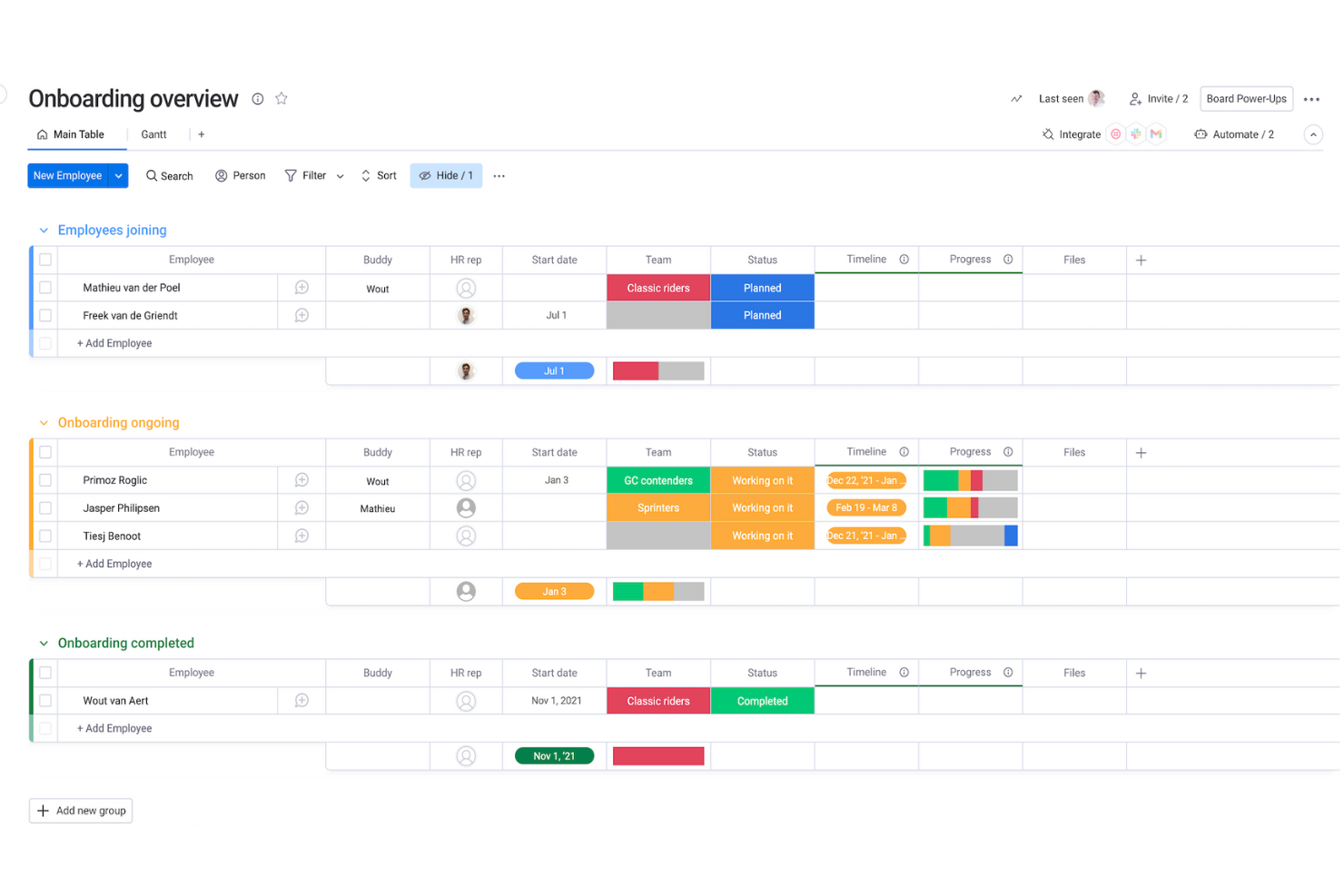
It helps you track onboarding, schedules, and employee requests with customizable boards that match your workflows.
-
Operations Teams
You can map processes, set automations, and keep everyone aligned without messy manual steps.
-
Retail Staff Scheduling
Drag-and-drop scheduling and real-time updates make it easy to plan shifts and avoid coverage gaps.
-
Project Managers
Timelines, owners, and status boards give you clear visibility into progress so your team always knows what’s next.
-
Agencies
It makes it simple to balance workloads, track client deliverables, and keep your team from being overloaded.
-
Small Businesses
You get an easy, visual way to coordinate people and tasks without needing technical setup or heavy processes.
Who Would be a Bad Fit for monday AI Workspace?
monday.com isn’t ideal if your work requires deep, specialized workforce systems like advanced payroll, complex compliance tracking, or industry-specific labor rules. You may struggle if you need highly rigid reporting standards because monday.com is built to be flexible rather than strict. It also won’t be a strong match if your team prefers traditional, spreadsheet-style tools and doesn’t want to maintain visual boards.
-
Unionized Labor
Complex contract rules and auto-enforced scheduling policies aren’t supported natively.
-
Healthcare Staffing
Strict compliance, credentialing, and shift-swap rules require more specialized systems than monday.com provides.
-
Large Call Centers
It lacks the deep forecasting and real-time staffing tools these environments depend on.
-
Manufacturing Plants
Highly detailed labor tracking and machine-level scheduling aren’t built into its core workflows.
-
Heavy Payroll
It doesn’t offer the complex calculations and regulation-specific rules you’d need for payroll-driven teams.
-
Finance Departments
If you need rigid audit-ready structures, monday.com’s flexible boards may feel too loose for your requirements.
Come Testiamo e Valutiamo i Nostri Strumenti
Abbiamo impiegato anni per costruire, perfezionare e migliorare il nostro sistema di test e valutazione dei software. Il modello è progettato per cogliere le sfumature della scelta del software e per evidenziare cosa rende uno strumento efficace, concentrandosi sugli aspetti più critici del processo decisionale. Di seguito puoi vedere esattamente come funziona la nostra valutazione e attribuzione dei punteggi secondo sette criteri. Questo ci consente di fornire una valutazione imparziale del software basandoci su funzionalità principali, caratteristiche distintive, facilità d’uso, onboarding, assistenza clienti, integrazioni, recensioni dei clienti e rapporto qualità/prezzo.
Funzionalità Principali (25% del punteggio finale)
Il punto di partenza della nostra valutazione sono sempre le funzionalità principali dello strumento. Possiede le funzioni di base che l’utente si aspetta? Alcune di queste funzioni sono disponibili solo in piani a prezzi più alti? In sostanza, ci aspettiamo che uno strumento rispecchi almeno le capacità base dei concorrenti.
Caratteristiche Distintive (25% del punteggio finale)
Successivamente valutiamo le funzionalità particolari che superano le funzionalità di base tipiche degli strumenti della sua categoria. Un punteggio alto riflette caratteristiche specializzate o uniche che rendono il prodotto più veloce, efficiente, o che offrono ulteriore valore all’utente. Valutiamo inoltre quanto sia semplice integrare il software con altri strumenti tradizionalmente presenti nel tech stack per espanderne funzionalità e utilizzo. Gli strumenti che offrono numerose integrazioni native, collegamenti di terze parti e accesso API per creare integrazioni personalizzate ricevono i punteggi migliori.
Facilità d’Uso (10% del punteggio finale)
Consideriamo quanto sia veloce e semplice svolgere i compiti definiti dalle funzionalità principali utilizzando lo strumento. I software con punteggi alti sono ben progettati, intuitivi, dispongono di app mobili, offrono modelli preimpostati e rendono semplici anche i compiti più complessi.
Onboarding (10% del punteggio finale)
Sappiamo quanto sia importante una rapida adozione di una nuova piattaforma all’interno di un team, quindi valutiamo quanto sia facile imparare e utilizzare uno strumento con una formazione minima. Valutiamo quanto rapidamente un membro del team possa iniziare a utilizzare lo strumento senza esperienza. Le soluzioni con punteggio alto richiedono poco o nessun supporto.
Assistenza Clienti (10% del punteggio finale)
Esaminiamo quanto sia facile e veloce ricevere supporto o trovare aiuto tramite telefono, chat dal vivo o knowledge base. Gli strumenti e le aziende che forniscono un’assistenza in tempo reale ottengono i punteggi migliori, mentre i chatbot ottengono i risultati peggiori.
Recensioni dei Clienti (10% del punteggio finale)
Oltre ai nostri test e valutazioni, consideriamo il punteggio net promoter dei clienti attuali e passati. Analizziamo la loro propensione, se potessero scegliere, a selezionare di nuovo lo strumento per le sue funzionalità principali. Un software con un punteggio alto riflette un elevato net promoter score da parte dei clienti attuali o passati.
Rapporto Qualità/Prezzo (10% del punteggio finale)
Infine, considerando tutti gli altri criteri, esaminiamo il prezzo medio dei piani base rispetto alle funzionalità principali e teniamo conto del valore degli altri criteri di valutazione. I software che offrono di più, a meno, ottengono un punteggio più alto.
New Product Updates from monday AI Workspace
monday AI Workspace Adds Human Approval Routing
monday AI Workspace adds a human-in-the-loop approval block that sends approval requests and branches AI Workflows based on the response. The update lets teams incorporate human decisions into automated workflows before determining which path the workflow should follow. Highlights include:
- Human Approval Block: Adds a human approval step directly within AI Workflows.
- Approval Requests: Sends requests to users when human input is required.
- Conditional Routing: Routes the workflow to different paths based on the approval response.
Visit monday AI Workspace’s official site for more details.
 for more details.
monday.com Adds Managed Columns Across Boards
monday.com adds Managed Column to help teams create reusable status, dropdown, and label columns with predefined labels across boards. The update helps organizations standardize workflows and sync column updates automatically from one central source. Highlights include:
- Reusable Managed Columns: Teams can reuse standardized status, dropdown, priority, and label columns across multiple boards.
- Centralized Label Syncing: Updates made to Managed Columns automatically sync across connected boards for more consistent workflows.
Visit monday.com's official site for more details.

monday.com Adds Clearer AI Result Feedback in Cells
monday.com adds clearer feedback for AI-generated cell results to help users review and improve AI outputs more easily. The update helps teams adjust prompts and inputs for more accurate and useful results. Highlights include:
- Clearer AI Feedback: Users can better understand AI-generated results directly within cells.
- Prompt Refinement Support: Teams can adjust prompts and inputs more effectively to improve AI outcomes.
Visit monday.com’s official site for more details.
monday.com Enhances List View With Column Mapping
monday.com adds column mapping to List View, allowing users to include board-specific columns for better visibility. This update helps teams view and manage data across multiple boards more efficiently. Highlights include:
- Add Board-Specific Columns: Users can now add unique board-specific columns to the List View, allowing for a more personalized data organization.
- Map Columns Across Boards: This feature enables users to map columns across different boards, ensuring that all data is accurately represented and easily accessible.
- Complete Visibility: By mapping columns, users can achieve complete visibility of their workflow, enhancing decision-making and productivity.
Visit monday.com's official site for more details.
monday AI Workspace Specs
- API
- Batch Permissions & Access
- Budgeting
- Calendar Management
- Collaboration Support
- Contact Management
- Contact Sharing
- Customer Management
- Dashboard
- Dashboards
- Data Export
- Data Import
- Data Visualization
- Dependency Tracking
- Document Sharing
- Expense Tracking
- External Integrations
- File Sharing
- Gantt Charts
- Kanban Boards
- Multi-User
- Notifications
- Project Management
- Resource Management
- Scheduling
- Task Scheduling/Tracking
- Third-Party Plugins/Add-Ons
- Time Management
- Travel Management
- Workflow Management
monday AI Workspace FAQs
Can monday.com support complex HR workflows as my team grows?
How well does monday.com handle sensitive employee data?
Can my team collaborate in real time on HR tasks and updates?
Will monday.com help me keep track of workloads across multiple departments?
Can monday.com support hiring and applicant tracking needs?
Does monday.com support documentation for HR audits or compliance?
Can monday.com help me streamline onboarding for new hires?
Will monday.com work for HR teams that manage remote or hybrid employees?
monday AI Workspace Company Overview & History
monday.com Ltd. is a publicly traded software company headquartered in Tel Aviv, Israel, and has grown to more than 2,500 employees while supporting thousands of teams globally. It began as daPulse in 2012 and changed its name to monday.com in 2017, and now serves clients including over 60% of the Fortune 500. The company went public on Nasdaq in June 2021 and reported revenue of around $730 million in 2023.
monday.com Major Milestones
- 2012: Incorporated as daPulse Labs Ltd. in Israel.
- 2017: Rebranded to monday.com.
- 2019: Raised $150 million in Series D at a valuation of $1.9 billion.
- 2021: Completed an IPO on Nasdaq under ticker MNDY.
- 2023: Achieved positive free cash flow of $212.7 million.
- 2024: Reported revenue of roughly $729.7 million for fiscal year.
Cosa succede dopo?
Per rimanere aggiornato su tutte le novità della gestione delle persone, iscriviti alla nostra newsletter per leader e manager. Riceverai approfondimenti e offerte pensate per leader e professionisti HR direttamente nella tua casella di posta.