


Recensione Approfondita 2026: Pro, Contro, Caratteristiche e Prezzi



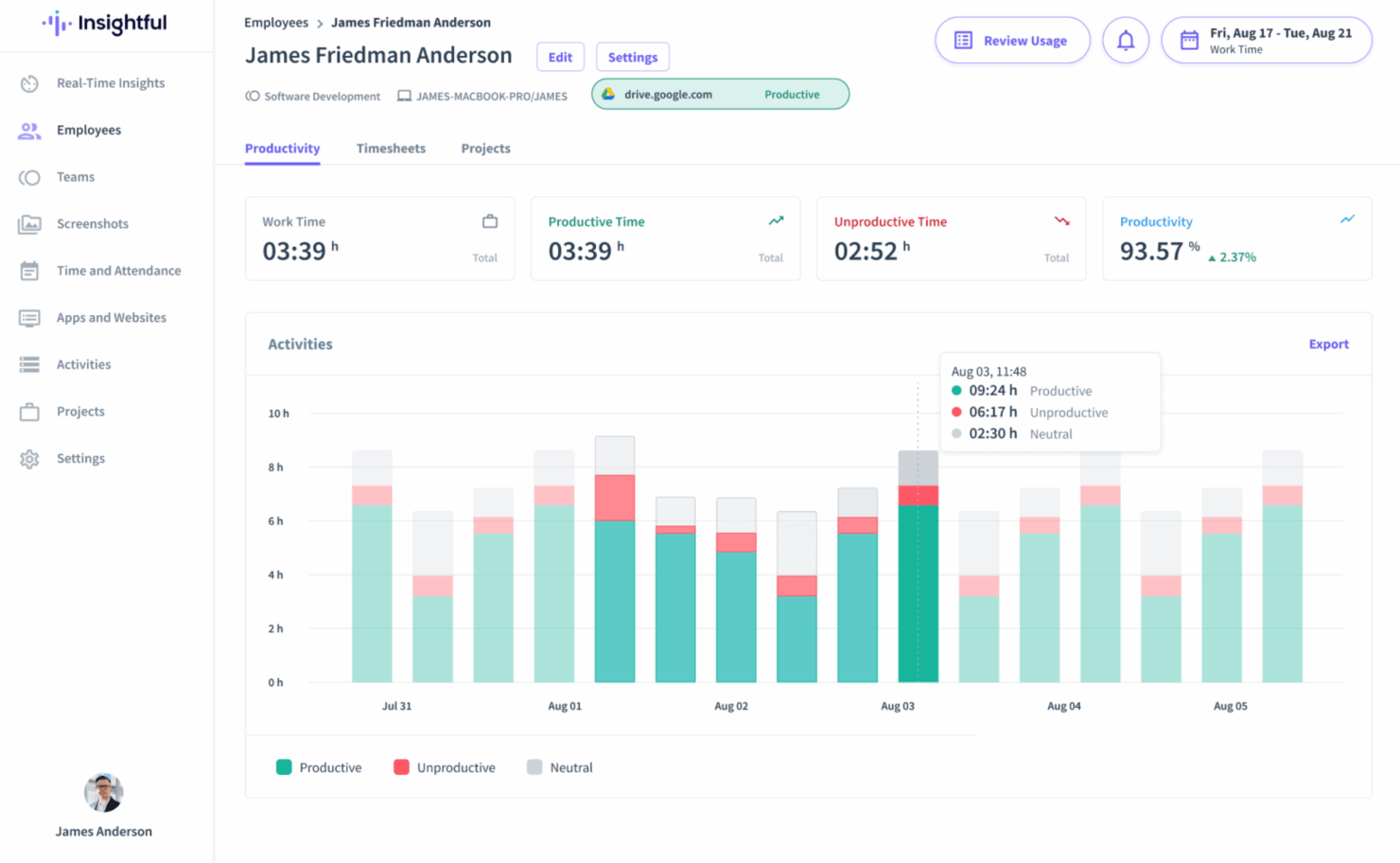
Insightful distinguishes itself in the employee monitoring space through an intuitive interface, smooth onboarding, and powerful productivity analytics. It’s especially beneficial for remote and IT-heavy environments. While it lacks deep integration breadth and traditional project management tools, its usability and strong support make it a compelling choice for companies focused on efficiency.
Insightful Evaluation Summary
- From $8/user/month (billed annually)
- Free demo + 7-day free trial available
Perché fidarsi delle nostre recensioni sui software
Il nostro team testa e recensisce software dal 2012. In quanto esperti HR noi stessi, sappiamo quanto sia difficile — e importante — scegliere il software giusto.
Per questa guida, abbiamo valutato gli strumenti attraverso test pratici e ricerche indipendenti, assegnando un punteggio agli strumenti in base ai nostri criteri di selezione. Ci basiamo inoltre sulle competenze di leader di pensiero del settore e di professionisti HR attivi.
Le nostre recensioni riflettono il nostro giudizio editoriale umano, non un discorso di vendita.
Revisori esperti:
Insightful Overview
Insightful is a productivity and employee monitoring platform designed to help businesses understand how work gets done across distributed teams. It’s particularly useful for remote-first organizations, IT departments, and project managers who need detailed visibility into workflows, time allocation, and team efficiency. The tool supports data-driven decisions while promoting accountability and performance improvement.
This review covers Insightful’s features, pros and cons, use cases, and pricing to help you determine if it fits your organization’s needs.
pros
-
Seamless onboarding with helpful guides and responsive assistance.
-
Intuitive UI that scales easily to manage dozens of users without becoming complex.
-
Actionable reporting for productivity insights across sales, operations, and project teams.
cons
-
Some features may feel excessive for very small teams or solo practitioners.
-
Doesn’t show real-time screen activity without manual setup.
-
Reporting tools can feel limited for deeper analysis.
-

Insightful
Visit WebsiteThis rating combines scores from multiple user review sites to reflect overall customer sentiment about the product.4.8 -
ActivTrak
Visit WebsiteThis rating combines scores from multiple user review sites to reflect overall customer sentiment about the product.4.5 -
Connecteam
Visit WebsiteThis rating combines scores from multiple user review sites to reflect overall customer sentiment about the product.4.6




Come Testiamo e Valutiamo i Nostri Strumenti
Abbiamo impiegato anni per costruire, perfezionare e migliorare il nostro sistema di test e valutazione dei software. Il modello è progettato per cogliere le sfumature della scelta del software e per evidenziare cosa rende uno strumento efficace, concentrandosi sugli aspetti più critici del processo decisionale. Di seguito puoi vedere esattamente come funziona la nostra valutazione e attribuzione dei punteggi secondo sette criteri. Questo ci consente di fornire una valutazione imparziale del software basandoci su funzionalità principali, caratteristiche distintive, facilità d’uso, onboarding, assistenza clienti, integrazioni, recensioni dei clienti e rapporto qualità/prezzo.
Funzionalità Principali (25% del punteggio finale)
Il punto di partenza della nostra valutazione sono sempre le funzionalità principali dello strumento. Possiede le funzioni di base che l’utente si aspetta? Alcune di queste funzioni sono disponibili solo in piani a prezzi più alti? In sostanza, ci aspettiamo che uno strumento rispecchi almeno le capacità base dei concorrenti.
Caratteristiche Distintive (25% del punteggio finale)
Successivamente valutiamo le funzionalità particolari che superano le funzionalità di base tipiche degli strumenti della sua categoria. Un punteggio alto riflette caratteristiche specializzate o uniche che rendono il prodotto più veloce, efficiente, o che offrono ulteriore valore all’utente. Valutiamo inoltre quanto sia semplice integrare il software con altri strumenti tradizionalmente presenti nel tech stack per espanderne funzionalità e utilizzo. Gli strumenti che offrono numerose integrazioni native, collegamenti di terze parti e accesso API per creare integrazioni personalizzate ricevono i punteggi migliori.
Facilità d’Uso (10% del punteggio finale)
Consideriamo quanto sia veloce e semplice svolgere i compiti definiti dalle funzionalità principali utilizzando lo strumento. I software con punteggi alti sono ben progettati, intuitivi, dispongono di app mobili, offrono modelli preimpostati e rendono semplici anche i compiti più complessi.
Onboarding (10% del punteggio finale)
Sappiamo quanto sia importante una rapida adozione di una nuova piattaforma all’interno di un team, quindi valutiamo quanto sia facile imparare e utilizzare uno strumento con una formazione minima. Valutiamo quanto rapidamente un membro del team possa iniziare a utilizzare lo strumento senza esperienza. Le soluzioni con punteggio alto richiedono poco o nessun supporto.
Assistenza Clienti (10% del punteggio finale)
Esaminiamo quanto sia facile e veloce ricevere supporto o trovare aiuto tramite telefono, chat dal vivo o knowledge base. Gli strumenti e le aziende che forniscono un’assistenza in tempo reale ottengono i punteggi migliori, mentre i chatbot ottengono i risultati peggiori.
Recensioni dei Clienti (10% del punteggio finale)
Oltre ai nostri test e valutazioni, consideriamo il punteggio net promoter dei clienti attuali e passati. Analizziamo la loro propensione, se potessero scegliere, a selezionare di nuovo lo strumento per le sue funzionalità principali. Un software con un punteggio alto riflette un elevato net promoter score da parte dei clienti attuali o passati.
Rapporto Qualità/Prezzo (10% del punteggio finale)
Infine, considerando tutti gli altri criteri, esaminiamo il prezzo medio dei piani base rispetto alle funzionalità principali e teniamo conto del valore degli altri criteri di valutazione. I software che offrono di più, a meno, ottengono un punteggio più alto.
New Product Updates from Insightful
Insightful Expands MCP and HRIS Integrations
Insightful MCP Server now lets authorized users query live workforce data from ChatGPT and Copilot Studio using OAuth. HRIS integrations can also sync manager access from reporting hierarchies and keep permissions updated as structures change. Highlights include:
- ChatGPT Connection: Connects ChatGPT to live Insightful data through OAuth.
- Copilot Studio Connection: Adds OAuth access for Microsoft Copilot Studio.
- Read-Only MCP Access: Keeps AI queries within existing Insightful permissions.
- Manager Scope Sync: Aligns manager access with HRIS reporting hierarchies.
- Automatic Permission Updates: Adjusts manager access as organizational structures change.
- HRIS Beta: Manager scope syncing is currently available in Beta.
Visit Insightful’s official site for more details.
 for more details.
Insightful API Adds Alert Management
Insightful has expanded its API capabilities to include alert management, making it easier to automate and centrally administer alerting workflows. This helps teams integrate Insightful alerts into existing tools and reduce manual setup. Highlights include:
- Alert Creation: Creates new alerts through the API.
- Alert Updates: Changes existing alert configurations programmatically.
- Activation Controls: Activates or deactivates alerts through API calls.
- Alert Deletion: Removes alerts without using the UI.
- Permission Controls: Limits actions based on token access and user roles.
Visit Insightful’s official site for more details.
Insightful Redesigns Tracking Settings With Shared Controls
Insightful now centralizes shared tracking settings, employee assignments, and tracking actions in one redesigned experience. Admins can also assign employees during setup and review each setting’s scope more easily. Highlights include:
- Shared Tracking Settings: Centralizes reusable tracking configurations in one place.
- All Tab: Lists every shared tracking setting and its assigned scope.
- Employees Tab: Shows active employees alongside their applied tracking setting.
- Guided Setup: Walks admins through creating settings and assigning employees.
- Manage Actions: Groups employee tracking actions under a single Manage button.
- Team Inheritance: Lets employees inherit their team’s tracking setting when moved.
Visit Insightful’s official site for more details.
Insightful Brings Work Intelligence to AI Assistants
Insightful MCP Server lets Work Intelligence users access saved reports and run discovery conversations from AI assistants such as Claude. Users can start analyses, check progress, answer clarifying questions, and ask follow-ups from the same assistant. Highlights include:
- Saved Reports: Lets users list and read saved Work Intelligence reports.
- Discovery Conversations: Runs Work Intelligence analysis directly from a connected AI assistant.
- Progress Tracking: Lets users check the status of an active analysis.
- Follow-Up Questions: Supports clarifications and continued analysis within the conversation.
- Early Access: Available to organizations with Work Intelligence enabled.
Visit Insightful’s official site for more details.
Integrations
Insightful.io supports a broad range of integrations to streamline HR and productivity workflows. For HR teams, integrations include BambooHR, HiBob, and Gusto, helping sync employee data and automate time tracking. For project management, it connects with tools like Jira, Asana, Trello, and ClickUp to align tracked time with tasks and deliverables. Additional integrations with Slack, Okta, and BigQuery support communication, identity management, and advanced reporting needs.
Insightful Specs
- API
- Batch Permissions & Access
- Behavioral Tracking
- Big Data
- Competency Assessment
- Compliance Tracking
- Dashboard
- Data Export
- Data Import
- Data Visualization
- Database
- Employee Database
- Employee Engagement
- Employee Onboarding
- External Integrations
- Feedback Management
- Multi-User
- Notifications
- Password & Access Management
- Performance Appraisal
- Site Access Management
- Social-Media Integration
- Workflow Management
Alternatives to Insightful




In Primo Piano: Storie da Insightful

Questo Strumento Può Risolvere le Più Grandi Sfide del Lavoro da Remoto per le Risorse Umane?


Come Mercor Usa Insightful.io per Risparmiare Centinaia di Migliaia di Dollari Gestendo Talenti da Remoto
Come Caduceus Health ha ridotto il turnover del personale e aumentato l’engagement del 30% con Insightful.io