Recensione di Recruit CRM 2026: Pro, Contro, Funzionalità e Prezzi



Recruit CRM is a recruiting CRM built for staffing agencies and executive search firms that need to track candidates, manage client relationships, and log placements in one place. I'd consider it if you want the core functionality of a tool like Bullhorn but with a faster setup, a cleaner interface, and pricing that doesn't require an enterprise contract to get started.
Recruit CRM Evaluation Summary
- From $85/user/month (billed annually)
- 30-day free trial + free demo available
Perché fidarsi delle nostre recensioni sui software
Il nostro team testa e recensisce software dal 2012. In quanto esperti HR noi stessi, sappiamo quanto sia difficile — e importante — scegliere il software giusto.
Per questa guida, abbiamo valutato gli strumenti attraverso test pratici e ricerche indipendenti, assegnando un punteggio agli strumenti in base ai nostri criteri di selezione. Ci basiamo inoltre sulle competenze di leader di pensiero del settore e di professionisti HR attivi.
Le nostre recensioni riflettono il nostro giudizio editoriale umano, non un discorso di vendita.
Revisori esperti:
Recruit CRM Overview
When judging Recruit CRM against its competitors, I find the intuitive interface, flexible pipeline customization, and detailed email tracking make it a strong pick, especially for boutique and mid-sized agencies. Pricing is transparent, and onboarding is quick, but while integrations cover popular tools, API-based customizations require more effort.
If you’re choosing a system for collaborative recruiting, global outreach, or candidate management with minimal training headaches, I think Recruit CRM outperforms in ease of use and hands-on support, but may underperform if you need highly complex, enterprise-level workflows and deep reports out of the box.
pros
-
Custom pipeline stages for each recruiting process
-
Chrome sourcing extension automatically adds candidates from LinkedIn
-
Built-in email sequencing and bulk outreach tools
cons
-
Mobile app features are less comprehensive than desktop
-
Reports offer limited filtering and visualization options
-
Mass updating records can feel slow with large databases
-

Justworks
Visit WebsiteThis rating combines scores from multiple user review sites to reflect overall customer sentiment about the product.4.6 -
Small Improvements
Visit WebsiteThis rating combines scores from multiple user review sites to reflect overall customer sentiment about the product.4.3 -
HiBob
Visit WebsiteThis rating combines scores from multiple user review sites to reflect overall customer sentiment about the product.4.5





Come Testiamo e Valutiamo i Nostri Strumenti
Abbiamo impiegato anni per costruire, perfezionare e migliorare il nostro sistema di test e valutazione dei software. Il modello è progettato per cogliere le sfumature della scelta del software e per evidenziare cosa rende uno strumento efficace, concentrandosi sugli aspetti più critici del processo decisionale. Di seguito puoi vedere esattamente come funziona la nostra valutazione e attribuzione dei punteggi secondo sette criteri. Questo ci consente di fornire una valutazione imparziale del software basandoci su funzionalità principali, caratteristiche distintive, facilità d’uso, onboarding, assistenza clienti, integrazioni, recensioni dei clienti e rapporto qualità/prezzo.
Funzionalità Principali (25% del punteggio finale)
Il punto di partenza della nostra valutazione sono sempre le funzionalità principali dello strumento. Possiede le funzioni di base che l’utente si aspetta? Alcune di queste funzioni sono disponibili solo in piani a prezzi più alti? In sostanza, ci aspettiamo che uno strumento rispecchi almeno le capacità base dei concorrenti.
Caratteristiche Distintive (25% del punteggio finale)
Successivamente valutiamo le funzionalità particolari che superano le funzionalità di base tipiche degli strumenti della sua categoria. Un punteggio alto riflette caratteristiche specializzate o uniche che rendono il prodotto più veloce, efficiente, o che offrono ulteriore valore all’utente. Valutiamo inoltre quanto sia semplice integrare il software con altri strumenti tradizionalmente presenti nel tech stack per espanderne funzionalità e utilizzo. Gli strumenti che offrono numerose integrazioni native, collegamenti di terze parti e accesso API per creare integrazioni personalizzate ricevono i punteggi migliori.
Facilità d’Uso (10% del punteggio finale)
Consideriamo quanto sia veloce e semplice svolgere i compiti definiti dalle funzionalità principali utilizzando lo strumento. I software con punteggi alti sono ben progettati, intuitivi, dispongono di app mobili, offrono modelli preimpostati e rendono semplici anche i compiti più complessi.
Onboarding (10% del punteggio finale)
Sappiamo quanto sia importante una rapida adozione di una nuova piattaforma all’interno di un team, quindi valutiamo quanto sia facile imparare e utilizzare uno strumento con una formazione minima. Valutiamo quanto rapidamente un membro del team possa iniziare a utilizzare lo strumento senza esperienza. Le soluzioni con punteggio alto richiedono poco o nessun supporto.
Assistenza Clienti (10% del punteggio finale)
Esaminiamo quanto sia facile e veloce ricevere supporto o trovare aiuto tramite telefono, chat dal vivo o knowledge base. Gli strumenti e le aziende che forniscono un’assistenza in tempo reale ottengono i punteggi migliori, mentre i chatbot ottengono i risultati peggiori.
Recensioni dei Clienti (10% del punteggio finale)
Oltre ai nostri test e valutazioni, consideriamo il punteggio net promoter dei clienti attuali e passati. Analizziamo la loro propensione, se potessero scegliere, a selezionare di nuovo lo strumento per le sue funzionalità principali. Un software con un punteggio alto riflette un elevato net promoter score da parte dei clienti attuali o passati.
Rapporto Qualità/Prezzo (10% del punteggio finale)
Infine, considerando tutti gli altri criteri, esaminiamo il prezzo medio dei piani base rispetto alle funzionalità principali e teniamo conto del valore degli altri criteri di valutazione. I software che offrono di più, a meno, ottengono un punteggio più alto.
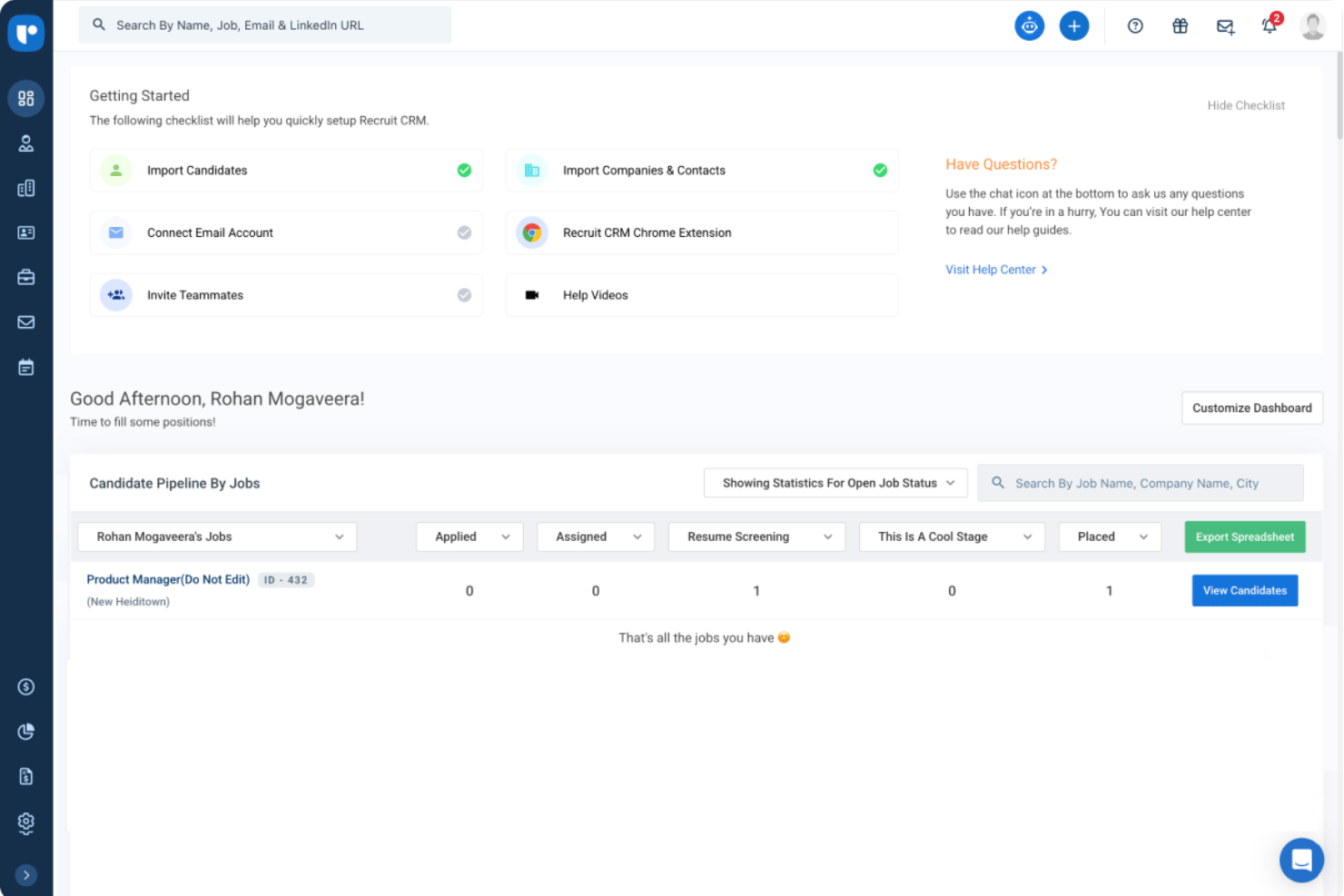
Core Features
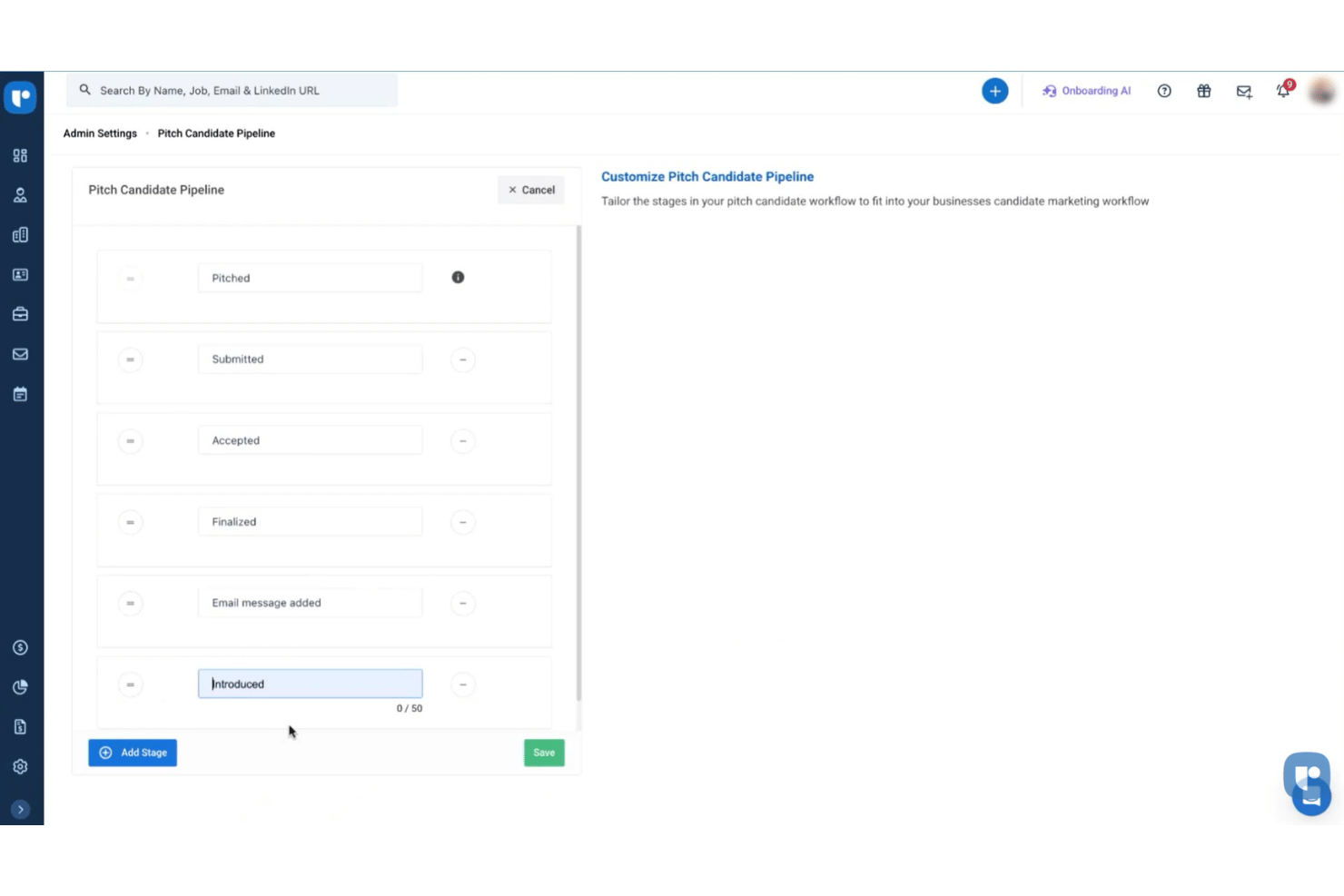
Customizable Recruitment Pipelines
Set unique stages for each job or client and move candidates visually through hiring steps. This makes tracking progress and bottlenecks clear at a glance.
Resume Parsing and Search
Automatically extract candidate data from resumes and store them in searchable profiles. Find qualified talent quickly with advanced keyword and filter tools.
Chrome Sourcing Extension
Add candidates directly from LinkedIn and other sites into your database in one click. This streamlines sourcing and cuts out manual data entry.
Built-in Email Sequencing
Schedule personalized email campaigns and follow-ups to candidates or clients. See who opened, clicked, and replied—all within your dashboard.
Task and Activity Management
Assign, track, and monitor tasks for yourself or team members linked to candidates and jobs. Set reminders to ensure you never miss crucial follow-ups.
Reporting and Analytics Dashboard
View metrics like placement rates, pipeline velocity, and consultant performance. Use dashboards to make data-backed business and hiring decisions.
Ease of Use
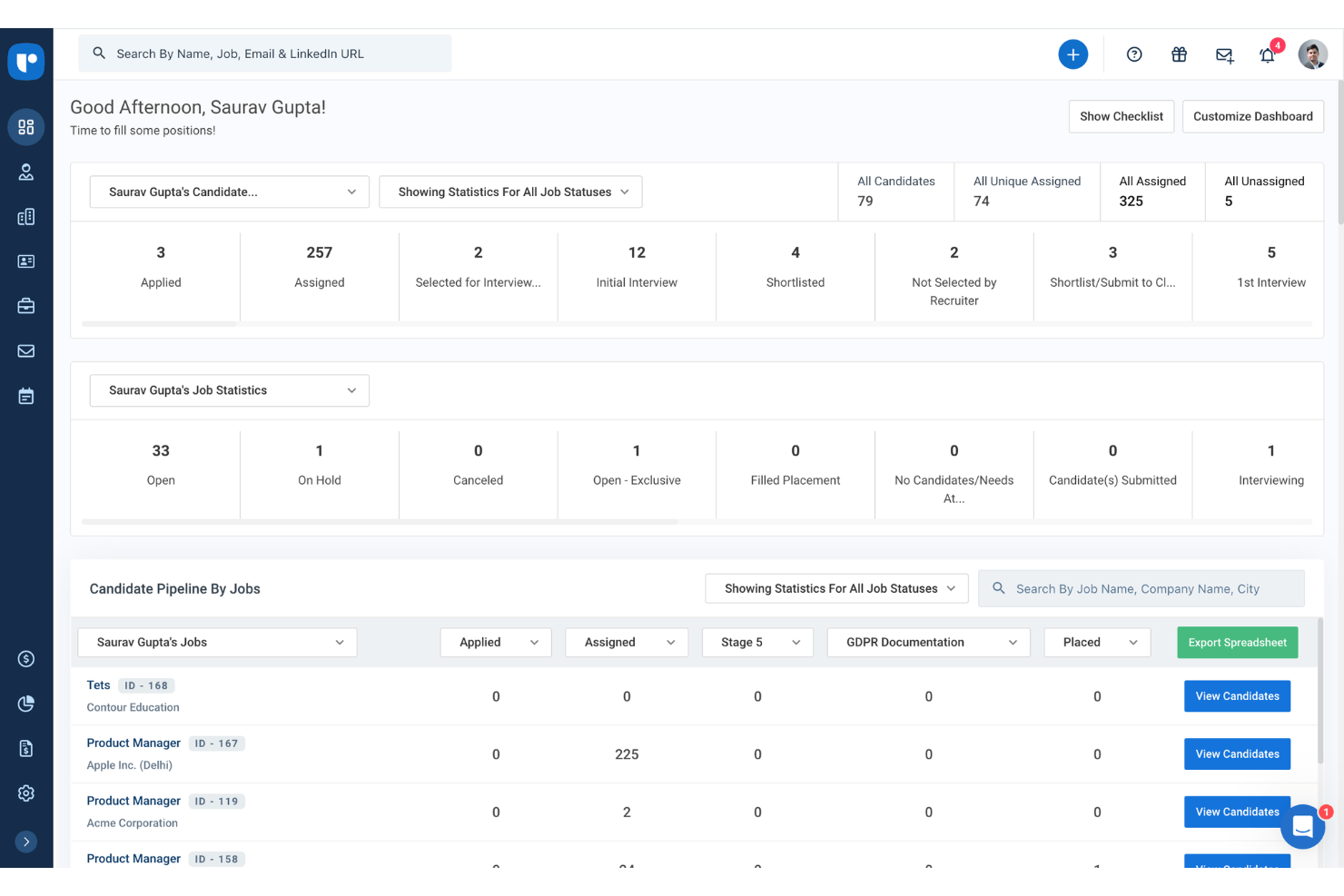
Recruit CRM’s user-friendliness is above average for recruiting CRM software, thanks to clear dashboards, color-coded pipelines, and drag-and-drop candidate management.
Users regularly point out how quick setup, easy access to sourcing tools, and built-in email outreach speed up daily tasks. You might still hit occasional lag with bulk data edits, but day-to-day workflow feels intuitive and smooth.
Integrations
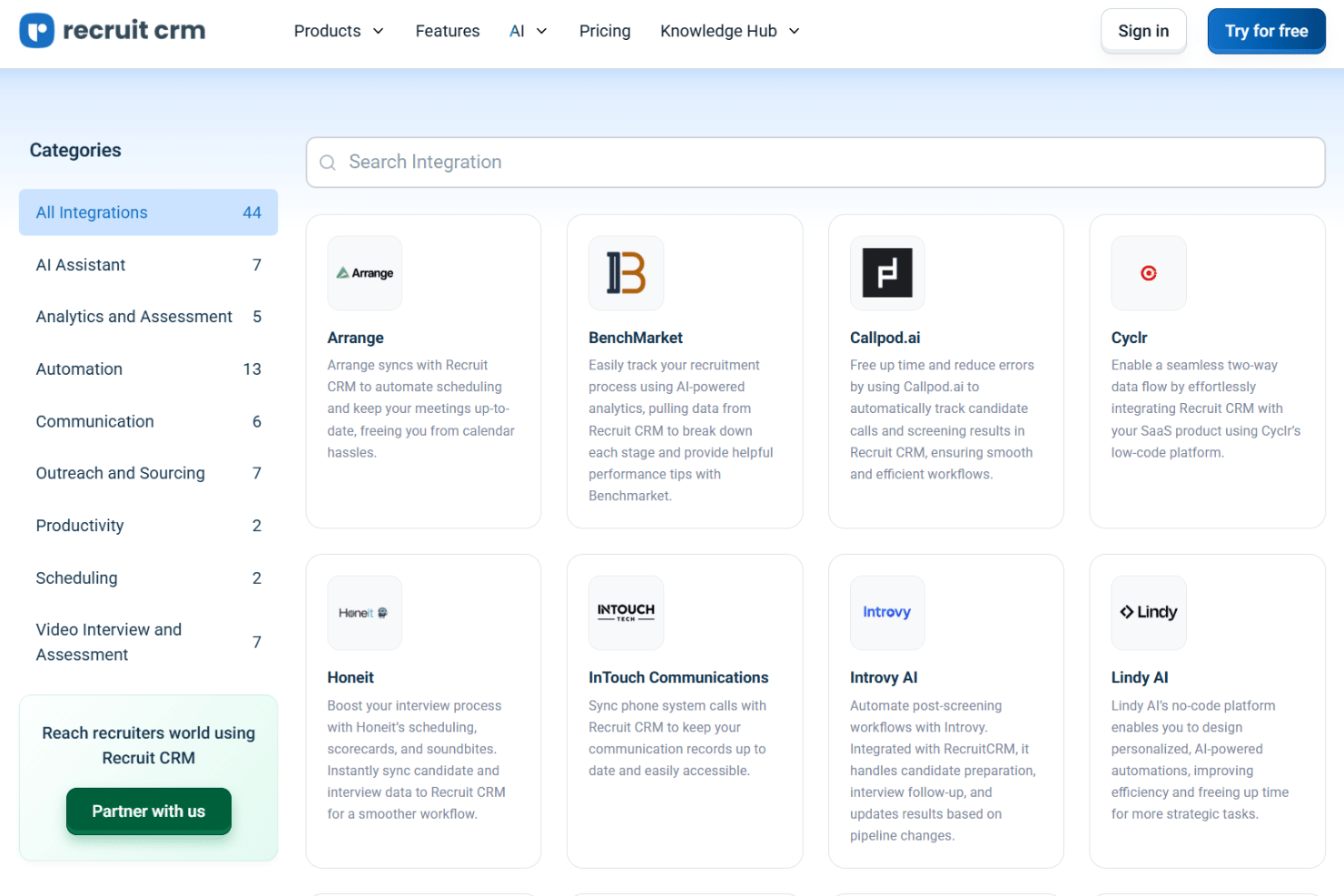
Recruit CRM integrates with LinkedIn, Gmail, Outlook, Mailchimp, Slack, WhatsApp, Zapier, Google Calendar, Microsoft Teams, and Zoom, among others.
Recruit CRM also offers an open API and connects with third-party integration tools like Zapier.
New Product Updates from Recruit CRM

Recruit CRM Adds AI Candidate Matching and Resume Parsing
Recruit CRM introduces AI candidate matching with bimetric scoring and enhanced resume parsing powered by Sovren. These updates improve candidate discovery and streamline screening with more accurate data extraction. Highlights include:
- AI Candidate Matching: Uses bimetric scoring to match candidates based on full profiles.
- Enhanced Resume Parsing: Extracts detailed data from resumes with improved accuracy.
- Multilingual Support: Parses resumes across multiple languages for global hiring.
- Profile Enrichment: Updates candidate records with structured data automatically.
Visit Recruit CRM’s official site for more details.
 for more details.
Recruit CRM Specs
- API
- Application Tracking
- Behavioral Testing
- Budgeting
- Calendar Management
- Candidate Database
- Cognitive Testing
- Contact Management
- Custom Assessments
- Dashboard
- Dashboards
- Data Export
- Data Import
- Data Visualization
- Email Integration
- Employee Database
- Employee Onboarding
- External Integrations
- Feedback Management
- Forecasting
- Interview Scheduling
- Multi-Source Feedback
- Multi-User
- Notifications
- Personality Testing
- Psychometric Testing
- Scheduling
- Status Notifications
- Travel Management