

10 beste KI-verktøy for møtesammendrag i 2026

Beste AI-verktøy for møtesammendrag – kortliste


Et AI-verktøy for møtesammendrag bruker kunstig intelligens til å ta opp, transkribere og organisere hovedpunktene fra møtene dine automatisk. Hvis du ser etter måter å redusere manuell notatskriving på, sørge for at ingenting blir oversett og holde teamet ditt samkjørt, kan disse verktøyene hjelpe deg med å endre hvordan du dokumenterer og følger opp møter.
I denne listen finner du de beste AI-alternativene for møtesammendrag i 2026, der hvert verktøy er valgt ut fra funksjoner som løser reelle utfordringer HR-fagfolk og forretningsteam møter hver dag. Bruk denne veiledningen til å sammenligne løsninger og finne det som passer best for arbeidsflyten din.
Hvorfor du kan stole på våre programvareanbefalinger
Teamet vårt har testet og anmeldt programvare siden 2012. Vi er selv HR-eksperter, så vi vet hvor vanskelig og hvor viktig det er å velge riktig programvare.
I denne guiden har vi vurdert verktøyene gjennom praktisk testing og uavhengig research og gitt dem poeng ut fra våre utvelgelseskriterier. Vi bygger også på innsikt fra ledende eksperter i bransjen og erfarne HR-eksperter.
Anmeldelsene våre bygger på vår egen redaksjonelle vurdering. De er ikke et salgsargument.
Ekspertanmeldere:
Sammenligningstabell for AI-verktøy for møtesammendrag
Tabellen nedenfor sammenligner prisopplysningene for mine beste utvalgte AI-verktøy for møtesammendrag.
| Tool | Best For | Trial Info | Price | ||
|---|---|---|---|---|---|
| 1 | Best with built-in support for Zoom meetings | Free plan available | From $14.16/user/month (billed annually) | Website | |
| 2 | Best for capturing highlights in Google Meet | Free plan available | From $8/user/month (billed annually) | Website | |
| 3 | Best for live transcription with speaker labels | Free plan available | From $8.33/user/month (billed annually) | Website | |
| 4 | Best for noise-free audio note capture | Free plan + trial available | From $8/user/month (billed annually) | Website | |
| 5 | Best for exporting notes in multiple formats | Free plan available | From $8.17/month (billed annually) | Website | |
| 6 | Best for automated action item extraction | Free plan available | From $15/month (billed annually) | Website | |
| 7 | Best for multilingual summary support | Free plan + free demo available | From €39/user/month (billed annually) | Website | |
| 8 | Best for AI-powered follow-up suggestions | Free plan available | From $9/month (billed annually) | Website | |
| 9 | Best for AI data privacy and ISO 27001 compliance | Free demo available | Pricing upon request | Website | |
| 10 | Best for instant summaries after calls | Free trial available | Pricing upon request | Website |
Anmeldelser av de beste AI-verktøyene for møtesammendrag
Nedenfor finner du mine detaljerte sammendrag av AI-verktøyene for møtesammendrag som kom med på kortlisten min. Anmeldelsene mine gir en detaljert gjennomgang av funksjonene, integrasjonene og de beste bruksområdene for hvert verktøy, slik at du kan finne det som passer best for deg.
Zoom
Best with built-in support for Zoom meetings
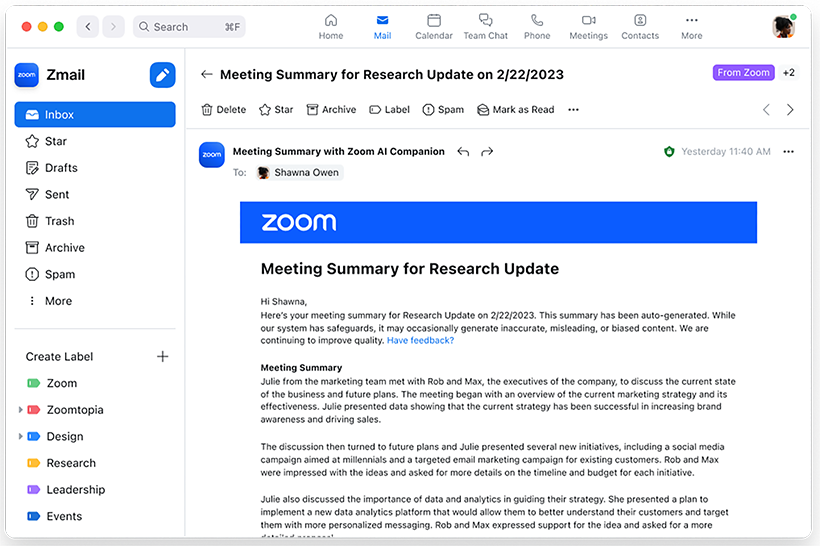
If your team already relies on Zoom for meetings, Zoom’s AI note-taking feature brings meeting summary AI directly into your existing workflow. This feature is designed for organizations that want automated summaries, action items, and insights without leaving the Zoom environment. It’s especially useful for HR, project managers, and business leaders who need instant, in-context meeting recaps right where conversations happen.
Why I Picked Zoom
Because Zoom’s AI note-taker is built directly into the Zoom platform, it’s a natural fit for teams that already use Zoom for their meetings. I picked this tool for its ability to generate real-time meeting summaries and action items without requiring any extra setup or switching between apps. The AI feature can automatically capture key discussion points and decisions as the meeting happens, making it easy to keep everyone aligned. This built-in approach means you get meeting insights right where your conversations take place, which is especially valuable for busy HR teams and business leaders.
Zoom Key Features
Some other features that make Zoom useful for meeting summary AI include:
- Automated smart chapters: The tool divides meeting recordings into labeled sections for quick navigation.
- In-meeting live transcription: Users can view real-time captions and transcripts during calls.
- Post-meeting searchable transcripts: All meeting transcripts are stored and searchable within the Zoom platform.
- AI chat responses: The AI Companion can generate suggested responses in Zoom Team Chat conversations.
Zoom Integrations
Integrations include Google Drive, Microsoft 365, Figma, Confluence, Notion, Coda, Microsoft Teams, Slack, Calendly, and Salesforce.
Pros and Cons
Pros:
- Transcripts are searchable within the Zoom platform
- Smart chapters organize recordings for review
- Action items are auto-generated and highlighted
Cons:
- Occasional transcription errors with accents
- Summaries only available for Zoom meetings

Tactiq
Best for capturing highlights in Google Meet
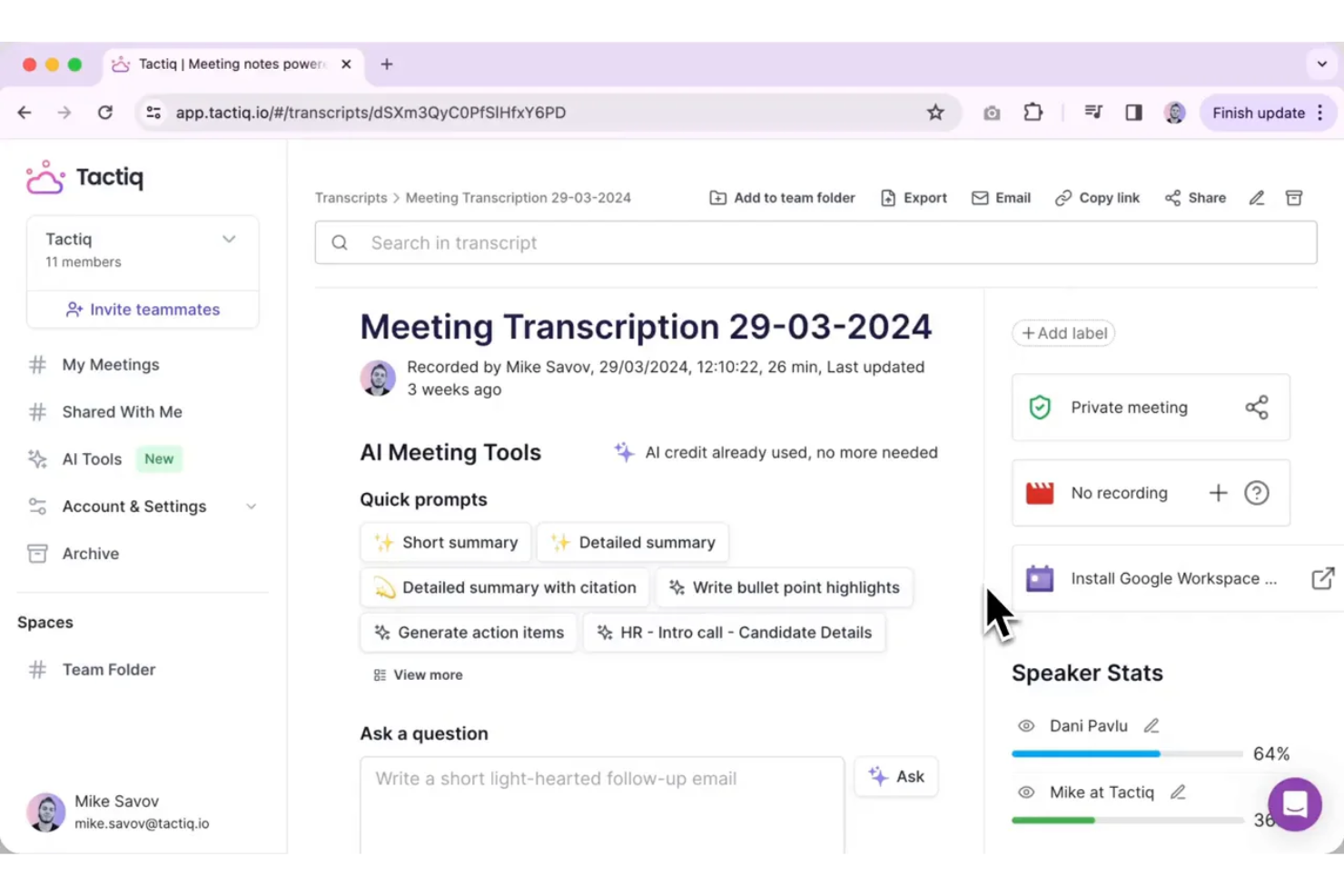
Tactiq is designed for teams and professionals who rely on Google Meet and want to capture key moments during live calls. It lets you highlight important discussion points in real time, making it easy to create actionable AI meeting summaries. This tool is especially useful for HR, project managers, and educators who need to quickly reference or share meeting highlights without sifting through full transcripts.
Why I Picked Tactiq
What sets Tactiq apart is its focus on capturing highlights directly within Google Meet, which is ideal for teams that use Google Workspace as their primary collaboration hub. I picked Tactiq because it allows users to mark important moments during live meetings, so you can quickly generate summaries that focus on what matters most. The tool automatically transcribes conversations and lets you add highlights and comments in real time. This approach helps HR professionals, project leads, and educators save time by surfacing key points without having to review entire transcripts.
Tactiq Key Features
In addition to real-time highlighting, Tactiq offers several other features that support meeting summary AI needs:
- Automatic meeting transcription: Tactiq generates live transcripts for Google Meet sessions.
- Speaker identification: The tool tags each line of the transcript with the speaker’s name.
- Export to Google Docs and Notion: Users can send meeting summaries and transcripts directly to these platforms.
- AI-generated meeting summaries: Tactiq uses AI to create concise summaries from the full transcript.
Tactiq Integrations
Integrations include Google Meet, Zoom, Microsoft Teams, Slack, Notion, Linear, and HubSpot.
Pros and Cons
Pros:
- Speaker labels included in all transcripts
- Exports summaries directly to Google Docs
- Highlights can be added during live meetings
Cons:
- Limited editing options for generated summaries
- Occasional missed highlights in busy meetings

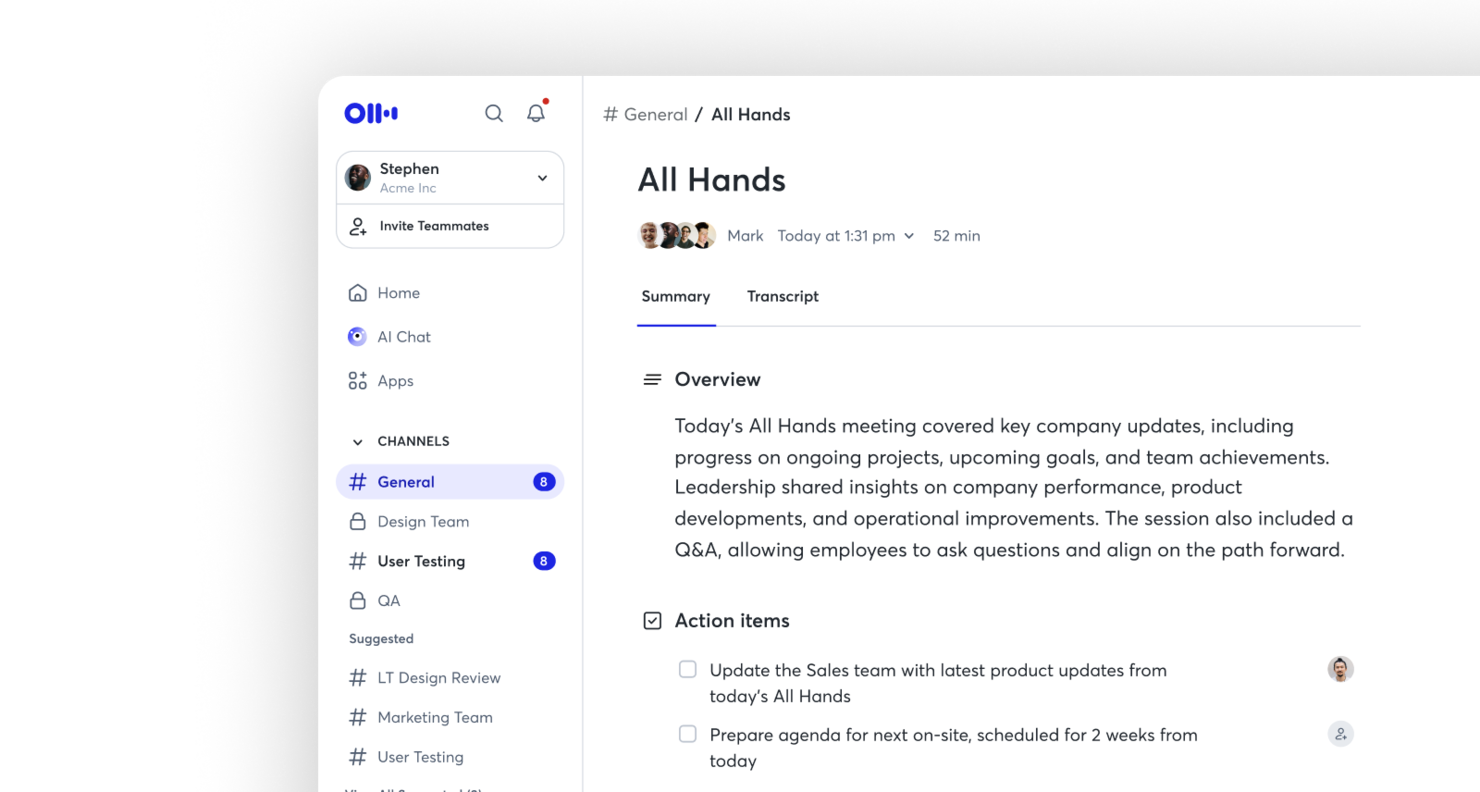
Otter is a meeting summary AI built for teams that need live transcription with clear speaker labels. It’s especially useful for professionals who want to capture conversations in real time and quickly identify who said what. If you’re looking to improve meeting documentation and accountability, Otter.ai’s speaker identification and searchable transcripts can help.
Why I Picked Otter
For teams that need accurate, real-time meeting records, Otter stands out for its live transcription with speaker labels. I picked this tool because it automatically distinguishes and tags each speaker, making it easy to follow conversations and attribute comments. The live transcription feature means you can capture discussions as they happen, without waiting for post-meeting processing. This combination is especially valuable for teams that need clear, actionable records of who said what during meetings.
Otter Key Features
In addition to live transcription and speaker labeling, I also found these features useful for meeting summary AI:
- Automated summary generation: Otter.ai creates concise meeting summaries that highlight key points and decisions.
- Searchable transcript archive: Store and search past meeting transcripts to quickly locate specific topics or statements.
- Shared live notes: Collaborate on meeting notes in real time with other participants.
- Calendar integration: Connect Otter.ai with Google or Microsoft calendars to automatically join and record scheduled meetings.
Otter Integrations
Integrations include Zoom, Google Meet, Microsoft Teams, Slack, Salesforce, HubSpot, Asana, Jira, Notion, and Dropbox.
Pros and Cons
Pros:
- Searchable transcripts for quick reference
- Live transcription updates in real time
- Speaker labels accurately identify participants
Cons:
- Limited formatting options for exported notes
- Occasional transcription errors with accents

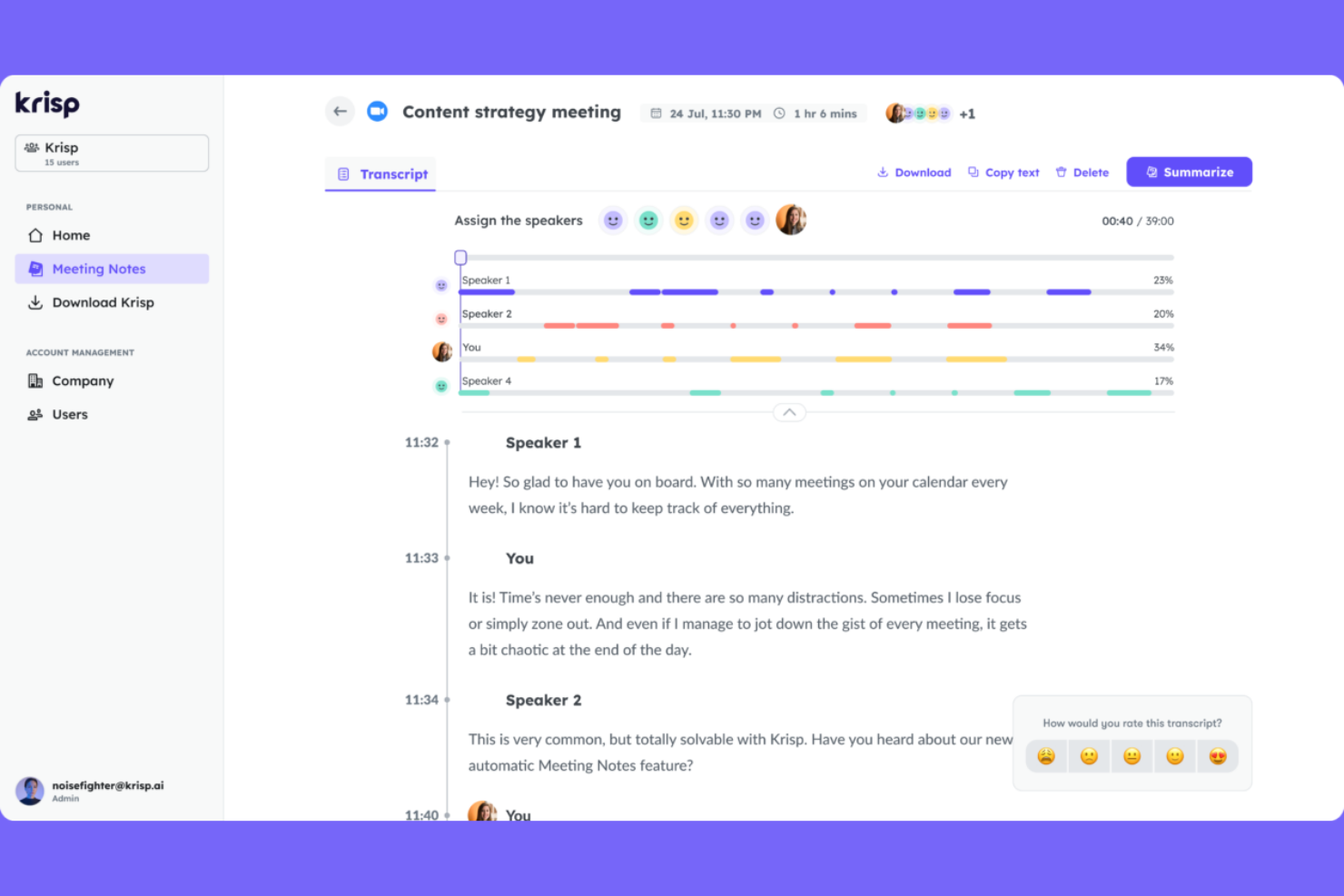
For teams that struggle with background noise during virtual meetings, Krisp offers AI-powered noise cancellation and audio note capture. It’s especially useful for remote professionals, recruiters, and HR teams who need clear, distraction-free recordings for accurate meeting summaries. Krisp helps ensure your meeting notes reflect what was actually said, not what got lost in the noise.
Why I Picked Krisp
When capturing meeting notes, audio quality can make or break the usefulness of your summaries. I picked Krisp because its AI-driven noise cancellation removes background sounds in real time, so you get clean, clear audio for every meeting. The tool also offers voice isolation, which helps ensure that only the speaker’s voice is captured, reducing confusion in transcripts and summaries. For anyone who needs reliable meeting summary AI, Krisp’s focus on noise-free audio gives you a strong foundation for accurate note-taking.
Krisp Key Features
Some other features that make Krisp useful for meeting summary AI include:
- AI Meeting Assistant: Automatically generates meeting notes and summaries from your calls.
- Call Transcription: Provides real-time transcription for meetings across supported platforms.
- Meeting Analytics Dashboard: Offers insights into talk time, meeting participation, and engagement.
- Multi-Platform Compatibility: Works with Zoom, Microsoft Teams, Google Meet, and other major conferencing tools.
Krisp Integrations
Integrations include Zoom, Google Meet, Microsoft Teams, Slack, HubSpot, Salesforce, Google Calendar, Webex, Outlook, and Discord.
Pros and Cons
Pros:
- Supports multiple conferencing platforms
- Tracks talk time and meeting participation
- Removes background noise from recordings
Cons:
- Requires desktop app installation for full features
- Transcription accuracy drops with strong accents
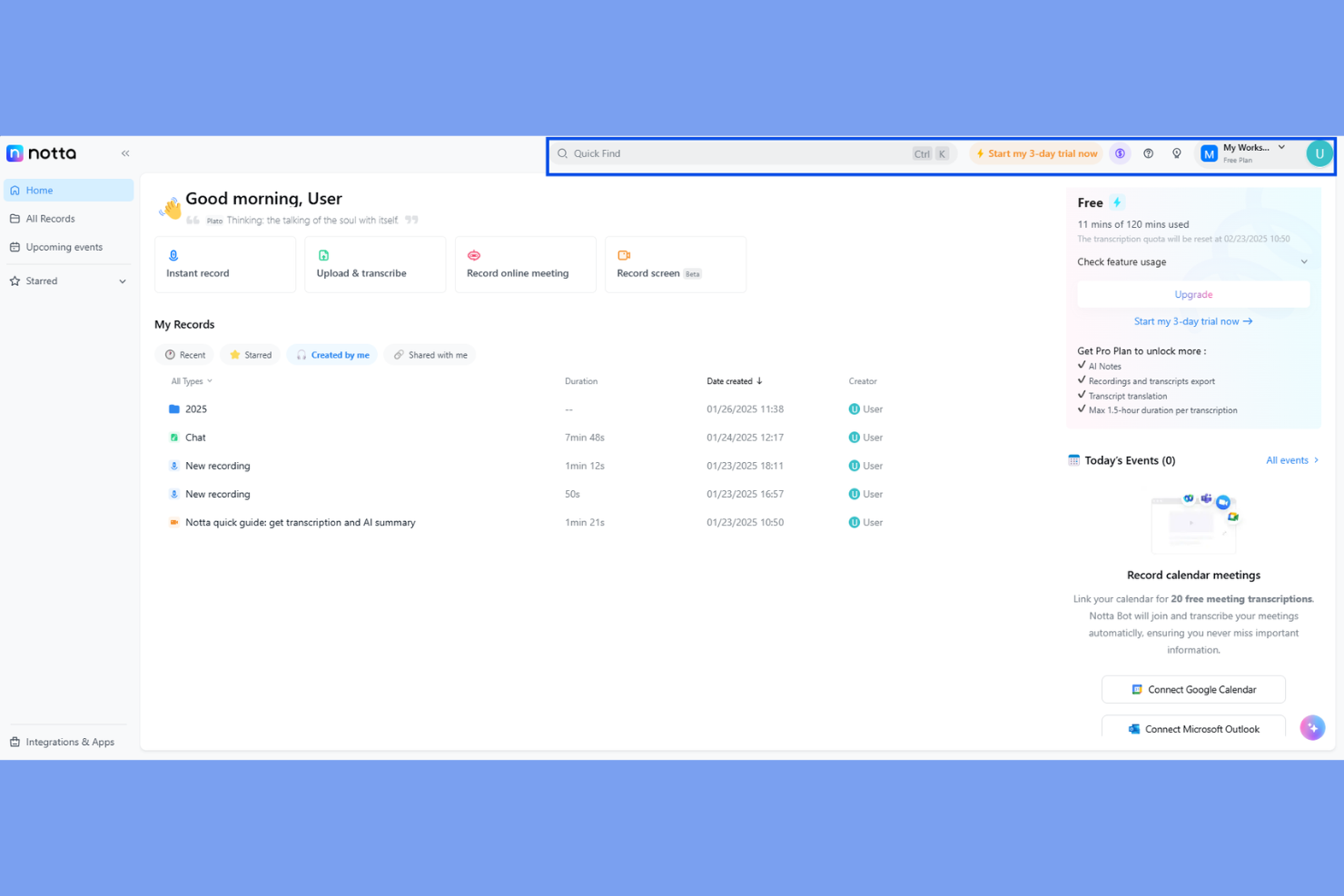
Notta is a meeting summary AI designed for teams and professionals who need flexible options for sharing and storing meeting notes. If you often work with clients, cross-functional teams, or external partners, Notta makes it easy to export transcripts and summaries in a wide range of formats. This helps you keep everyone aligned, no matter what tools or workflows your collaborators use.
Why I Picked Notta
What sets Notta apart for meeting summary AI is its ability to export notes and transcripts in a variety of formats, which is especially useful for teams that need to share information across different platforms. I picked Notta because it lets you download meeting summaries as PDF, TXT, DOCX, SRT, and even shareable links, making it easy to fit into any workflow. This flexibility is valuable for HR professionals, consultants, and project managers who often need to distribute meeting outcomes to different audiences. If you’re looking for a tool that adapts to your documentation and sharing needs, Notta’s export options make it a strong choice.
Notta Key Features
In addition to its flexible export options, Notta offers several other features that support meeting summary needs:
- Real-Time Transcription: Converts spoken words to text as the meeting happens.
- Speaker Identification: Labels who is speaking during multi-person conversations.
- Audio and Video Import: Lets you upload recordings for transcription and summary.
- Mobile App: Allows you to record and access meeting notes on the go.
Notta Integrations
Integrations include Zoom, Google Meet, Microsoft Teams, Slack, Notion, Google Docs, Salesforce, HubSpot, ClickUp, and Dropbox.
Pros and Cons
Pros:
- Speaker labels help clarify meeting transcripts
- Mobile app supports on-the-go recording
- Transcribes uploaded audio and video files
Cons:
- No live human transcription option available
- No built-in calendar scheduling for meetings

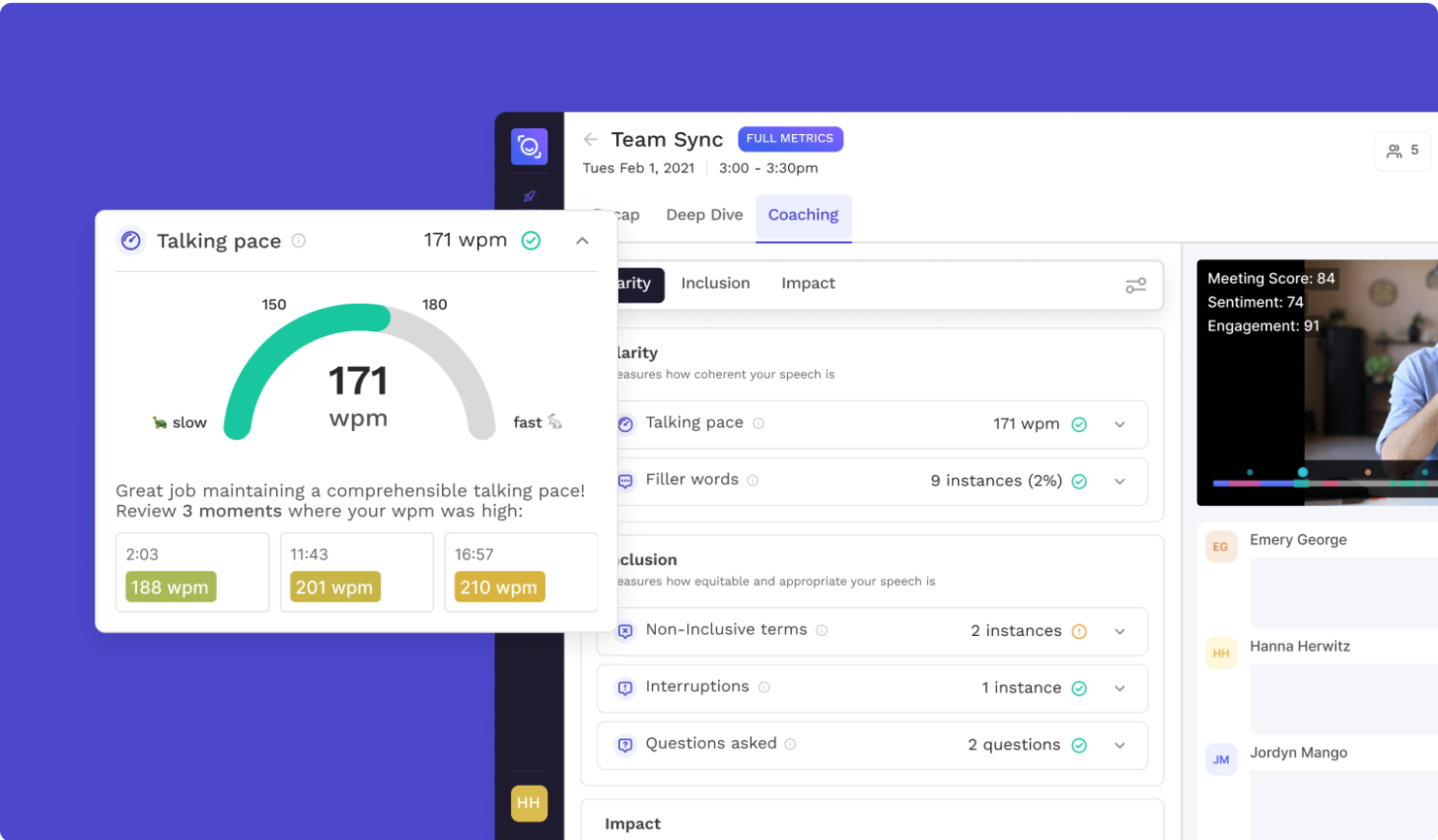
If you need a meeting summary AI that pinpoints and extracts action items automatically, Read AI is worth a look. This tool is designed for teams and professionals who want to capture next steps without sifting through long transcripts. Its focus on actionable outcomes helps you keep meetings productive and follow-ups clear.
Why I Picked Read AI
What sets Read AI apart for meeting summary AI is its focus on automated action item extraction. I picked this tool because it identifies and highlights next steps directly from your meeting conversations, so you don’t have to dig through transcripts. The platform uses AI to tag and organize action items, making it easy to assign tasks and track follow-ups. This targeted approach helps teams stay accountable and ensures that important tasks don’t get lost after meetings.
Read AI Key Features
Some other features of Read AI that stand out for meeting summary AI users include:
- Real-time transcription: Capture spoken content as it happens, making it easy to review or reference discussions immediately after meetings.
- Meeting analytics dashboard: Access visual summaries and engagement metrics to understand participation and meeting effectiveness.
- Customizable summary templates: Choose or design summary formats that fit your team’s workflow and documentation needs.
- Multi-platform support: Use Read AI with popular video conferencing tools like Zoom, Microsoft Teams, and Google Meet.
Read AI Integrations
Integrations include Zoom, Google Meet, Microsoft Teams, Slack, HubSpot, Salesforce, Atlassian, Notion, Asana, and Gmail.
Pros and Cons
Pros:
- Multi-language support for over 20 languages
- Real-time transcription across multiple platforms
- Accurate action item extraction for meetings
Cons:
- Limited analytical depth during live meetings
- Occasional privacy concerns reported

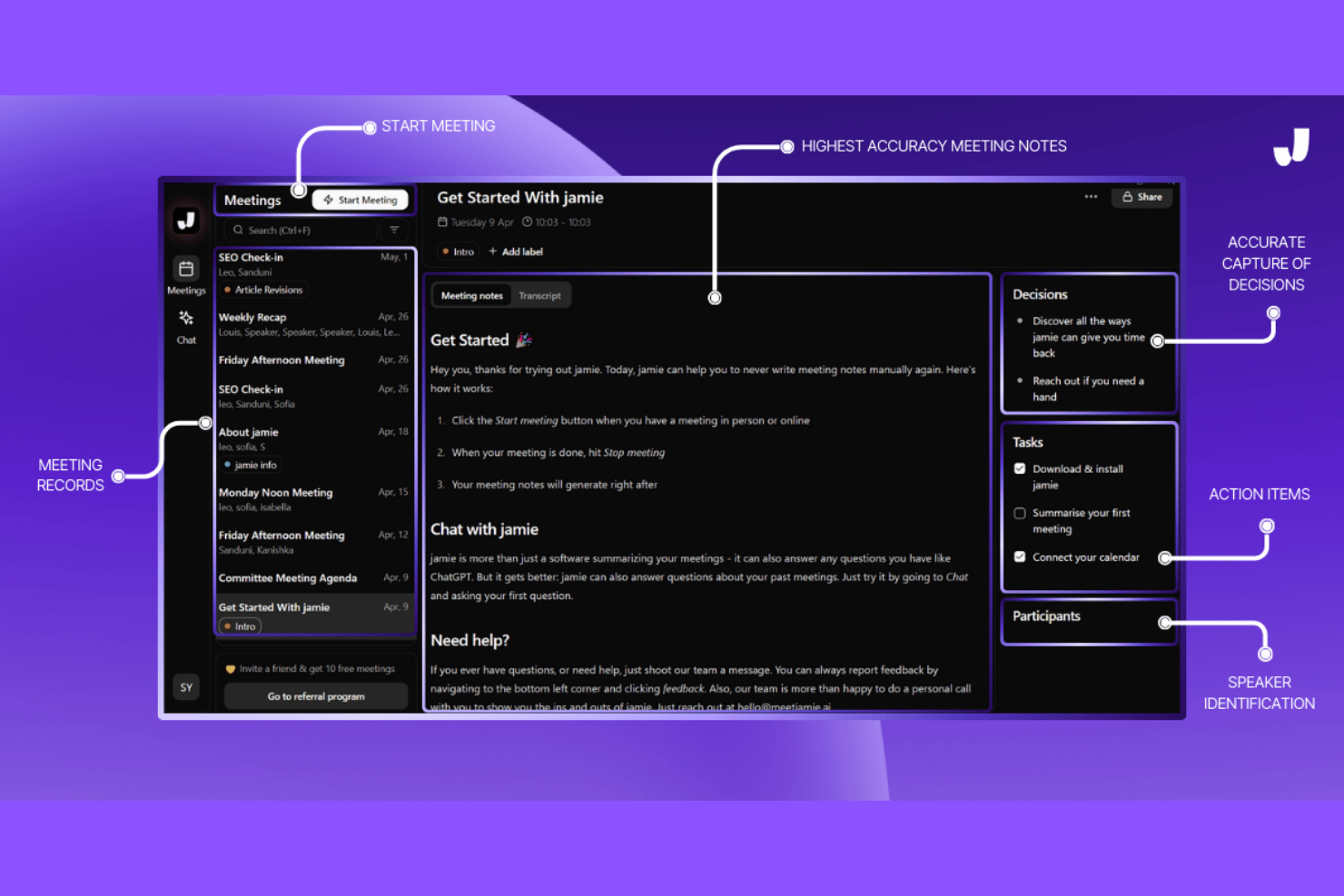
If you need meeting summaries in multiple languages, Jamie is built to support global teams and multilingual workplaces. It automatically transcribes and summarizes meetings in over 15 languages, making it a strong fit for international HR, project managers, and consultants. Jamie helps you bridge language gaps and keep everyone aligned, no matter where your team is based.
Why I Picked Jamie
Jamie stands out for its ability to generate meeting summaries in multiple languages, which is essential for teams working across borders. I picked Jamie because it supports over 15 languages, allowing users to receive accurate transcripts and summaries regardless of the language spoken in the meeting. The tool also detects the spoken language automatically, so you don’t have to set preferences before each call. This makes Jamie a strong choice for HR professionals, consultants, and global teams who need to keep everyone on the same page, no matter where they’re located.
Jamie Key Features
Some other features that make Jamie useful for meeting summary AI include:
- Automated action item extraction: Jamie identifies and lists action items from meeting conversations.
- Custom summary templates: Users can choose or design templates for how meeting summaries are formatted.
- Direct calendar integration: The tool connects with your calendar to automatically join and record scheduled meetings.
- GDPR-compliant data handling: Jamie processes and stores meeting data in accordance with GDPR requirements.
Jamie Integrations
Integrations include Notion, Google Docs, OneNote, and HubSpot.
Pros and Cons
Pros:
- Offers GDPR-compliant data processing
- Automatically detects spoken language in meetings
- Summarizes in over 15 languages
Cons:
- No mobile app for on-the-go access
- Occasional inaccuracies in action item extraction


If you’re looking for meeting summary AI that goes beyond basic note-taking, NoteGPT stands out with its AI-powered follow-up suggestions. This tool is a good fit for sales teams, project managers, and HR professionals who want to turn meeting insights into actionable next steps. NoteGPT helps you capture key points and automatically recommends follow-up actions, so nothing important slips through the cracks.
Why I Picked NoteGPT
Unlike many meeting summary tools that simply transcribe and summarize, NoteGPT actively analyzes conversations to suggest relevant follow-up actions. I picked NoteGPT because its AI doesn’t just capture what was said—it helps you decide what to do next. The tool highlights action items and automatically generates suggested follow-ups based on meeting content, which is especially useful for teams that need to keep projects moving forward. For anyone who wants more than just a record of their meetings, NoteGPT’s focus on actionable insights sets it apart.
NoteGPT Key Features
Some other features that make NoteGPT useful for meeting summary AI include:
- Multi-Language Transcription: Supports transcription in several major languages for global teams.
- Speaker Identification: Distinguishes between different speakers in meeting recordings.
- Meeting Search Function: Lets you search across past meeting notes and transcripts.
- Chrome Extension: Captures and summarizes meetings directly from your browser.
NoteGPT Integrations
Integrations are not publicly listed.
Pros and Cons
Pros:
- Search function finds details in past meetings
- Chrome extension captures browser-based meetings
- AI suggests follow-up actions after meetings
Cons:
- Free plan restricts meeting length and uploads
- No direct integration with Zoom or Teams

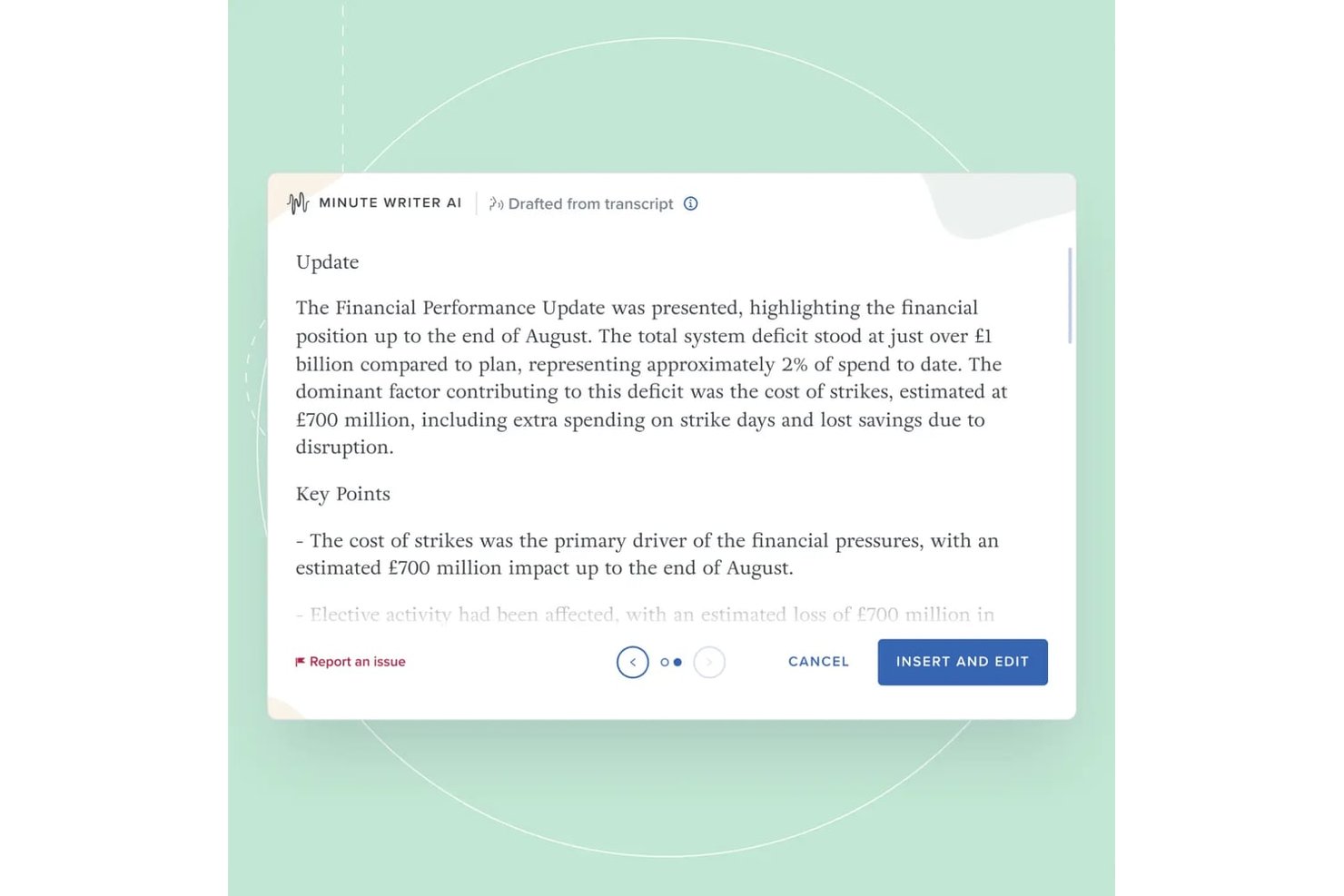
Board Intelligence is a board management platform with purpose-built AI tools for drafting meeting minutes, summarizing board packs, and writing board papers within a secure governance workflow.
Who Is Board Intelligence Best For?
Company secretaries and governance teams at large enterprises will get the most from Board Intelligence's board-specific meeting and minute workflows.
Why I Picked Board Intelligence
Board Intelligence earns its spot on my shortlist because its AI processes board meeting audio and transcripts in temporary memory only, leaving zero retained data once the session ends. I particularly like that this is backed by ISO 27001 certification, not just a policy statement. Its Minute Writer AI also pauses recording on demand, so sensitive discussions stay out of the transcript entirely.
Board Intelligence Key Features
- Agenda builder: Lets you create and manage structured agenda templates tailored for each meeting.
- AI-powered IQ Insights: Surfaces decision points and risks by analyzing board pack content and summarizing what matters.
- Report Writer add-in: Allows users to draft board-ready reports directly within Microsoft Word.
- Action tracker: Helps teams log, assign, and follow up on actions agreed during meetings.
Board Intelligence Integrations
Board Intelligence offers native integrations with Microsoft 365 and Microsoft Word, supports calendar integrations for meeting scheduling, and accepts meeting transcripts from third-party transcription tools.
Pros and Cons
Pros:
- Pause AI capture for sensitive topics
- ISO 27001 compliance for strict security
- AI-generated minutes with no retained data
Cons:
- Limited to Microsoft-based workflow
- No API for custom integrations

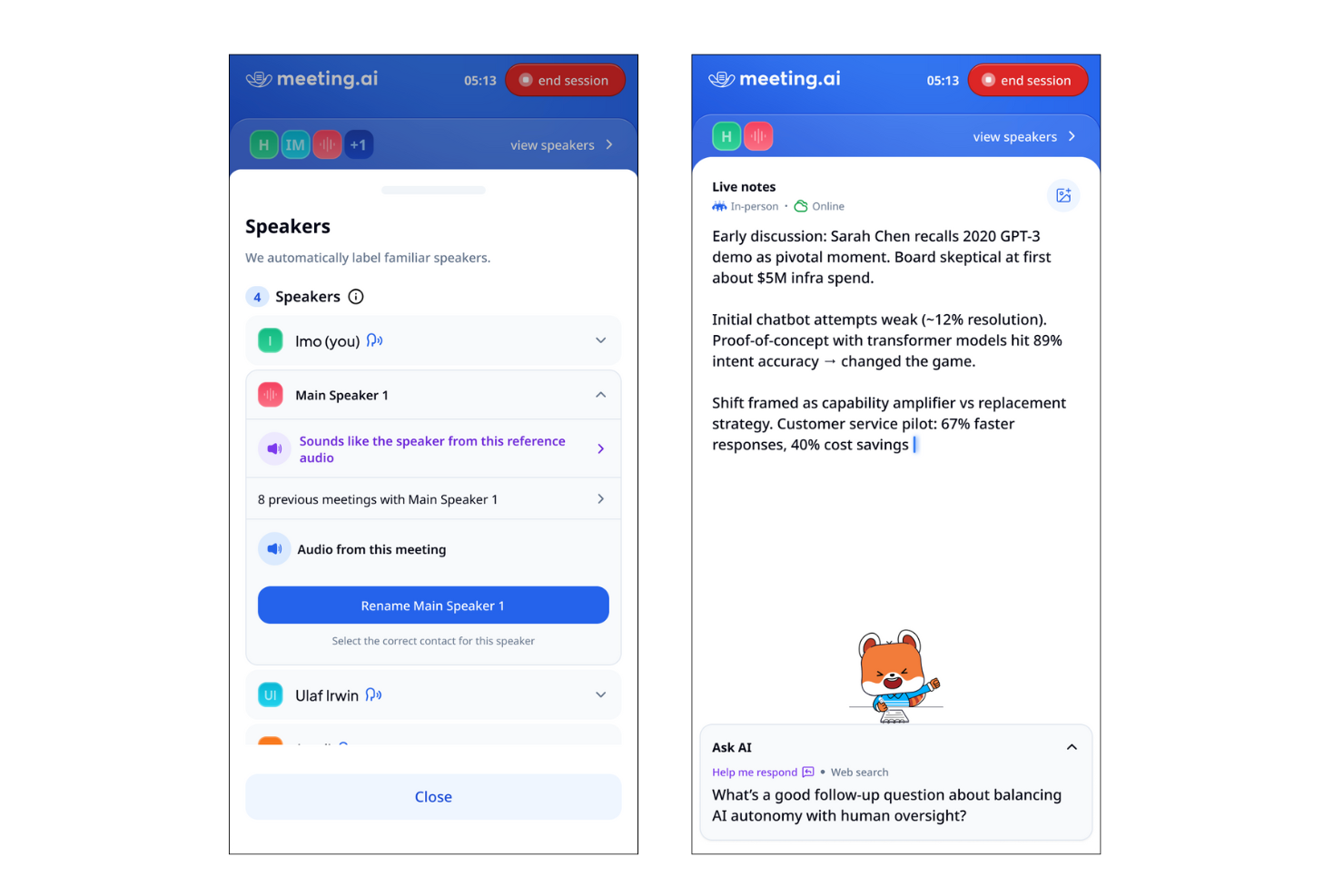
Meeting.ai is designed for teams and professionals who need instant, actionable summaries right after their calls. It’s a strong fit for fast-paced environments where quick follow-up and clear documentation are essential. If you want to capture meeting outcomes without delay, Meeting.ai’s rapid summary delivery sets it apart from other meeting summary AI tools.
Why I Picked Meeting.ai
What drew me to Meeting.ai is its focus on delivering instant summaries right after calls end. For anyone who needs to quickly review meeting outcomes or share action items, this tool’s rapid summary generation is a major advantage. Meeting.ai automatically processes call recordings and produces concise, structured summaries within minutes. I appreciate how this approach helps teams stay aligned and move forward without waiting for manual note-taking or delayed recaps.
Meeting.ai Key Features
Some other features that make Meeting.ai useful for meeting summary AI include:
- Automated action item extraction: The tool identifies and lists action items discussed during meetings.
- Speaker identification: Meeting.ai tags statements with the correct speaker for clarity.
- Searchable meeting archive: Users can search past meeting summaries and transcripts by keyword.
- Customizable summary templates: Teams can adjust the format and structure of summaries to fit their workflow.
Meeting.ai Integrations
Integrations include Zoom, Google Meet, Microsoft Teams, and Google Drive.
Pros and Cons
Pros:
- Speaker identification included in transcripts
- Action items automatically highlighted in summaries
- Summaries delivered within minutes
Cons:
- Occasional missed context in summary sections
- Limited integrations with project management tools
Andre AI-verktøy for møtesammendrag
Her er noen flere AI-verktøy for møtesammendrag som ikke kom med på kortlisten min, men som likevel er verdt å se nærmere på:


How I Evaluate Meeting Summary AI
I split my evaluation into two layers: baseline capabilities a tool must have—like transcription and AI summaries—and differentiators like ATS sync and data privacy that matter to HR teams.
Core Functionality (Table Stakes For This List)
When I'm selecting tools for my list, I rank each one on a scale from 0 (does not offer the functionality) to 5 (excels in this area) for each core functionality listed below. Then, I calculate the tool's total score as a percentage. Each tool needs to achieve a minimum total score of 65% to be considered for inclusion.
- Automated Meeting Transcription: I evaluate transcription accuracy across multiple speakers and accents, plus whether the tool reliably labels who said what during panel interviews or group calibration sessions.
- AI-Generated Summaries: Each tool should produce structured, readable summaries that capture decisions and key themes rather than just condensing the transcript into shorter paragraphs.
- Action Item Extraction: I check whether the tool can automatically pull follow-ups with assigned owners and deadlines, like flagging a hiring manager's commitment to submit scorecard feedback by Friday.
- Video Conferencing Integrations: Native connections to Zoom, Microsoft Teams, and Google Meet matter here, along with auto-join from calendar events so recruiters aren't manually starting recordings between back-to-back screens.
- Searchable Meeting Repository: I look for the ability to search across past meetings by keyword, speaker, or topic, which is especially useful when HR teams need to locate a specific candidate debrief or policy discussion months later.
- Sharing & Collaboration Controls: Permission settings should let you share interview summaries with a hiring panel while restricting access to sensitive employee relations conversations from the same account.
Once I have a list of tools that meet the criteria, I consider what sets each platform apart.
Differentiating Factors (What Sets Vendors Apart)
Here's how I compare and contrast different vendors:
Standout Features
I look for tools that sync summaries and scorecards directly into ATS or HRIS platforms, so recruiters aren't copy-pasting notes between systems after every interview loop. Bias and compliance flagging is another differentiator I evaluate—some tools can surface potentially non-compliant interview questions in real time. Sentiment analysis also adds depth, helping ER specialists review tone shifts during difficult employee conversations beyond what a written summary captures.
Beyond Features
HR conversations often involve sensitive personal data, so I evaluate each vendor's approach to consent management, data retention policies, and encryption standards. Scalability matters too—recruiting teams running dozens of screens per week need a tool that handles concurrent meetings without transcript quality dropping off. I also consider onboarding support, since rolling out a recording tool to hiring managers and interviewers across departments takes clear training resources and change management guidance.
Slik velger du programvare for AI-møtesammendrag
Det er lett å gå seg vill i lange funksjonslister og kompliserte prismodeller. For å hjelpe deg med å holde fokus når du går gjennom den unike prosessen med å velge programvare, får du her en sjekkliste over faktorer du bør ha i bakhodet:
| Faktor | Hva du bør vurdere |
|---|---|
| Skalerbarhet | Vil verktøyet håndtere møtevolumet ditt etter hvert som teamet eller organisasjonen vokser? Sjekk brukergrenser, lagringsgrenser og priser for større team. |
| Integrasjoner | Kan verktøyet kobles direkte til kalenderen, videokonferanseløsningen eller samarbeidsplattformene dine? Manglende integrasjoner kan skape manuelt arbeid. |
| Tilpasningsmuligheter | Kan du tilpasse sammendrag, maler eller arbeidsflyter slik at de samsvarer med organisasjonens dokumentasjonsstandarder eller krav til etterlevelse? |
| Brukervennlighet | Er grensesnittet intuitivt for alle brukere, inkludert de som er mindre teknisk kyndige? Vurder hvor raskt teammedlemmene kan ta i bruk verktøyet. |
| Implementering og innføring | Hvor lang tid tar det å komme i gang? Se etter tydelige ressurser for innføring, støtte ved migrering og minimale forstyrrelser i eksisterende arbeidsflyter. |
| Kostnad | Er prisnivåene transparente og forutsigbare? Vær oppmerksom på skjulte gebyrer, kostnader per bruker eller nødvendige tillegg som kan påvirke budsjettet ditt. |
| Sikkerhetstiltak | Tilbyr verktøyet behandling på enheten, kryptering eller strenge retningslinjer for datahåndtering? Vurder hvordan det beskytter sensitivt møteinnhold. |
| Krav til etterlevelse | Støtter verktøyet bransjens krav til etterlevelse (som GDPR eller HIPAA)? Bekreft sertifiseringer og revisjonsspor hvis du håndterer regulerte data. |
Hva er en AI-plattform for møtesammendrag?
AI-plattform for møtesammendrag er programvare som automatisk tar opp, transkriberer og oppsummerer hovedpunktene fra møter ved hjelp av kunstig intelligens. Disse verktøyene fanger opp muntlig innhold, identifiserer talere og genererer korte skriftlige sammendrag som er enkle å bruke som referanse og dokumentasjon. AI-verktøy for møtesammendrag hjelper team med å spare tid, forbedre nøyaktigheten og opprettholde ensartede referater av diskusjoner uten manuell notatskriving.
Funksjoner i AI-verktøy for møtesammendrag
Når du velger et AI-verktøy for møtesammendrag, bør du se etter følgende viktige funksjoner:
- Automatisk opptak: Tar opp lyd fra møter uten manuell inngripen, slik at alle diskusjoner dokumenteres fra start til slutt.
- Transkripsjon: Gjør muntlige ord om til skriftlig tekst, noe som gjør det enkelt å gjennomgå, søke i og referere til møteinnhold.
- Identifisering av talere: Merker og skiller mellom ulike talere, slik at det blir tydelig hvem som sa hva under møtet.
- Tidsstempling: Markerer bestemte punkter i transkripsjonen med tidskoder, slik at brukere raskt kan gå til viktige øyeblikk.
- Eksportalternativer: Lar brukere laste ned transkripsjoner og sammendrag i ulike formater, for eksempel PDF, DOCX eller TXT, for deling eller arkivering.
- Søkefunksjonalitet: Gjør det mulig for brukere å finne bestemte emner, beslutninger eller oppfølgingspunkter i transkripsjoner eller sammendrag.
- Tilpassbare maler: Tilbyr forhåndsdefinerte eller justerbare formater for møtesammendrag som kan tilpasses organisasjonens standarder eller preferanser.
- Tilgangskontroller: Lar administratorer angi tillatelser for hvem som kan vise, redigere eller dele møtedokumentasjon.
- Støtte for flere språk: Tilbyr transkripsjons- og sammendragsfunksjoner på flere språk for å imøtekomme mangfoldige team.
- Integrasjon med skylagring: Kobler seg til skyplattformer for sikker lagring og organisering av møtefiler, med tilgang fra hvor som helst.
Vanlige AI-funksjoner for møtesammendrag
I tillegg til standardfunksjonene for AI-møtesammendrag som er nevnt ovenfor, innlemmer mange av disse løsningene AI-funksjoner som:
- Automatisk uthenting av oppfølgingspunkter: Bruker AI til å identifisere og liste opp oppgaver eller beslutninger fra møtesamtaler, slik at team kan følge opp ansvarsområder uten manuell gjennomgang.
- Innholdstilpasset oppsummering: Bruker AI til å generere korte og relevante sammendrag som fanger opp hovedpunktene og resultatene, tilpasset møtets spesifikke kontekst og emner.
- Sentimentanalyse: Analyserer tonen og stemningen i diskusjoner ved hjelp av AI, og gir innsikt i teamdynamikk eller mulige bekymringer som tas opp under møtene.
- Emnegjenkjenning: Utnytter AI til automatisk å kategorisere og merke deler av møtet etter emne, slik at det blir enklere å organisere og finne frem til informasjon senere.
- Intelligente høydepunkter: Bruker AI til å markere viktige øyeblikk, for eksempel viktige kunngjøringer eller beslutninger, slik at brukere raskt kan gjennomgå de mest kritiske delene av et møte.
Fordeler med AI-verktøy for møtesammendrag
Implementering av et AI-verktøy for møtesammendrag gir flere fordeler for teamet og virksomheten din. Her er noen av fordelene du kan se frem til:
- Nøyaktig dokumentasjon: Automatisk opptak og transkripsjon sikrer at alle diskusjoner fanges opp uten at detaljer går tapt eller avhenger av hukommelsen.
- Tidsbesparelser: AI-drevet oppsummering og uthenting av oppfølgingspunkter reduserer behovet for manuell notatskriving og oppfølging etter møter.
- Bedre ansvarliggjøring: Identifisering av talere og sporing av oppfølgingspunkter gjør det tydelig hvem som er ansvarlig for hver oppgave eller beslutning.
- Forbedret personvern: Behandling på enheten og tilgangskontroller bidrar til å beskytte sensitivt møteinnhold og begrense dataeksponering.
- Ensartede referater: Tilpassbare maler og eksportalternativer standardiserer møtedokumentasjonen på tvers av team og prosjekter.
- Bedre tilgjengelighet: Støtte for flere språk og søkbare transkripsjoner gjør møteinnhold tilgjengelig for mangfoldige og geografisk spredte team.
- Handlingsrettet innsikt: AI-funksjoner som sentimentanalyse og emnegjenkjenning gir en dypere forståelse av teamdynamikk og møtenes resultater.
Kostnader og priser for AI-verktøy for møtesammendrag
Ved valg av AI-verktøy for møtesammendrag er det nødvendig å forstå de ulike prismodellene og tilgjengelige abonnementene. Kostnadene varierer basert på funksjoner, teamstørrelse, tillegg og mer. Tabellen nedenfor oppsummerer vanlige abonnementer, gjennomsnittsprisene deres og typiske funksjoner som er inkludert i AI-løsninger for møtesammendrag:
Sammenligningstabell for abonnementer på KI-verktøy for møtesammendrag
| Abonnementstype | Gjennomsnittspris | Vanlige funksjoner |
|---|---|---|
| Gratisabonnement | $0 | Grunnleggende opptak, begrenset antall minutter med transkripsjon, enkle sammendrag og grunnleggende eksportalternativer. |
| Personlig abonnement | $5-$15/bruker/måned | Ubegrensede opptak, søkbare transkripsjoner, identifisering av talere og grunnleggende integrasjoner. |
| Bedriftsabonnement | $15-$30/bruker/måned | Teamadministrasjon, avanserte eksportformater, tilpassbare maler, samarbeidsverktøy og prioritert brukerstøtte. |
| Virksomhetsabonnement | $30-$60/bruker/måned | Forbedret sikkerhet, samsvarsfunksjoner, dedikert oppstart, avansert analyse og tilpassede integrasjoner. |
Vanlige spørsmål om KI-verktøy for møtesammendrag
Her er noen svar på vanlige spørsmål om KI-verktøy for møtesammendrag:
Kan et KI-verktøy for møtesammendrag håndtere flere språk?
Ja, mange løsninger kan nå transkribere møter på over 100 språk og dialekter. Dette er spesielt nyttig for globale team som bruker plattformer som Microsoft Teams-møter, der programvaren kan tilby sanntidsoversettelse og KI-drevne sammendrag på språket deltakeren foretrekker. Sjekk alltid hvilke språk som støttes, før du velger en løsning, ettersom noen verktøy også tilbyr direkteoversettelse for en podkast eller en innspilt video.
Hvor sikkert er et KI-verktøy for møtesammendrag for konfidensielle møter?
De fleste profesjonelle KI-løsninger for møter tilbyr sikkerhet på bedriftsnivå, inkludert SOC 2 Type II-sertifisering, kryptering og tilgangskontroller. For svært konfidensielle møter ansikt til ansikt tilbyr noen verktøy behandling på enheten, slik at dataene aldri forlater maskinvaren din. Ved å bekrefte disse retningslinjene for datahåndtering sikrer du at sensitive hovedpunkter og møtereferater forblir beskyttet i henhold til organisasjonens samsvarsstandarder.
Må jeg installere spesialisert programvare for å bruke et KI-verktøy for møtesammendrag?
Nei, mange KI-verktøy for møtesammendrag er skybaserte og fungerer direkte i nettleseren din eller integreres med videokonferanseplattformer. Noen leverandører tilbyr imidlertid skrivebordsapper som lar deg ta opp lyd uten at en “robot” blir med i samtalen, noe som er en vanlig måte å transkribere møter på. Disse appene kan også synkronisere funn direkte med CRM-systemet ditt, slik at kundenotater oppdateres automatisk uten manuell registrering.
Kan et KI-verktøy for møtesammendrag identifisere og merke ulike talere?
Ja, taleridentifisering (eller oppdeling etter taler) er en standardfunksjon. KI-transkripsjonsmotoren skiller mellom deltakerne ved å analysere stemmemønstre og merker bidragene deres i den endelige transkripsjonen. Dette gjør det enkelt å søke etter deltaker og se et bestemt tidsstempel for når en beslutning ble tatt, noe som sikrer ansvarlighet i hele teamet.
Hva skjer hvis et møte har dårlig lydkvalitet?
Dårlig lydkvalitet kan påvirke transkripsjonsnøyaktigheten. Noen KI-verktøy for møtesammendrag bruker KI til å filtrere bort bakgrunnsstøy og gjøre tale tydeligere, men det er best å bruke en god mikrofon og et stille miljø for optimale resultater.