10 beste programvareløsninger for intranett i 2026

10 Liste over de beste intranettprogramvareløsningene


Den beste intranettprogramvaren hjelper organisasjoner med å opprette en sentralisert, digital arbeidsplass som holder team samkjørte, engasjerte og informerte.
Hvis du fortsatt er avhengig av tungvinte regneark, spredte e-posttråder eller utdaterte plattformer for å håndtere intern kommunikasjon, dokumentdeling og bedriftskultur, føler du sannsynligvis presset for å finne en mer moderne og strømlinjeformet løsning.
I denne veiledningen deler jeg mine beste anbefalinger for intranettplattformer som forenkler kommunikasjonen, gjør det enkelt å finne ressurser og forbedrer samarbeidet på tvers av avdelinger – alt basert på egen research, mange års analyse av HR-teknologilandskapet og ni års direkte arbeid innen HR, inkludert håndtering av intranett-dokumenter.
Hvorfor du kan stole på våre programvareanbefalinger
Teamet vårt har testet og anmeldt programvare siden 2012. Vi er selv HR-eksperter, så vi vet hvor vanskelig og hvor viktig det er å velge riktig programvare.
I denne guiden har vi vurdert verktøyene gjennom praktisk testing og uavhengig research og gitt dem poeng ut fra våre utvelgelseskriterier. Vi bygger også på innsikt fra ledende eksperter i bransjen og erfarne HR-eksperter.
Anmeldelsene våre bygger på vår egen redaksjonelle vurdering. De er ikke et salgsargument.
Ekspertanmeldere:
Sammenligningstabell for intranettprogramvareløsninger
\u003cspan style=\u0022font-weight: 400\u0022\u003eDenne sammenligningstabellen oppsummerer \u003c/span\u003e\u003cspan style=\u0022font-weight: 400\u0022\u003epriser, prøveperiode og demonstrasjon\u003c/span\u003e\u003cspan style=\u0022font-weight: 400\u0022\u003e for mine beste utvalg av intranettprogramvare.\u003c/span\u003e
| Tool | Best For | Trial Info | Price | ||
|---|---|---|---|---|---|
| 1 | Best for multi-channel comms across all worker types | Free demo available | Pricing upon request | Website | |
| 2 | Best AI-native employee experience platform | Free demo available | Pricing upon request | Website | |
| 3 | Best for unified knowledge access | Free demo available | Pricing upon request | Website | |
| 4 | Best for a dynamic employee directory and efficient document management | 30-day free trial + free demo available | From $2.77/user/month (billed annually) | Website | |
| 5 | Best for content management features and customizable team Spaces | Free demo available | From $10/user/month | Website | |
| 6 | Best for mobile intranet for frontline teams | Free plan + 14-day free trial + free demo available | From $29/month (billed annually) | Website | |
| 7 | Best for people-first approach | Free trial available | From $1.50/user/month | Website | |
| 8 | Best social intranet with collaborative Spaces for deep employee engagement | Free demo available | Pricing upon request | Website | |
| 9 | Best mobile-first intranet solution for frontline or deskless workforces | Free trial + free demo available | From $3.75/user/month (billed annually) | Website | |
| 10 | Best modern intranet software for prescriptive analytics and a dynamic people directory | Free demo available | Pricing upon request | Website |

Anmeldelser av den beste intranettprogramvaren
Her er en kort beskrivelse av hver løsning for ansattintranett, som viser det beste bruksområdet for hvert verktøy, i tillegg til noen bemerkelsesverdige funksjoner og skjermbilder som gir deg et innblikk i brukergrensesnittet.
Oak
Best for multi-channel comms across all worker types
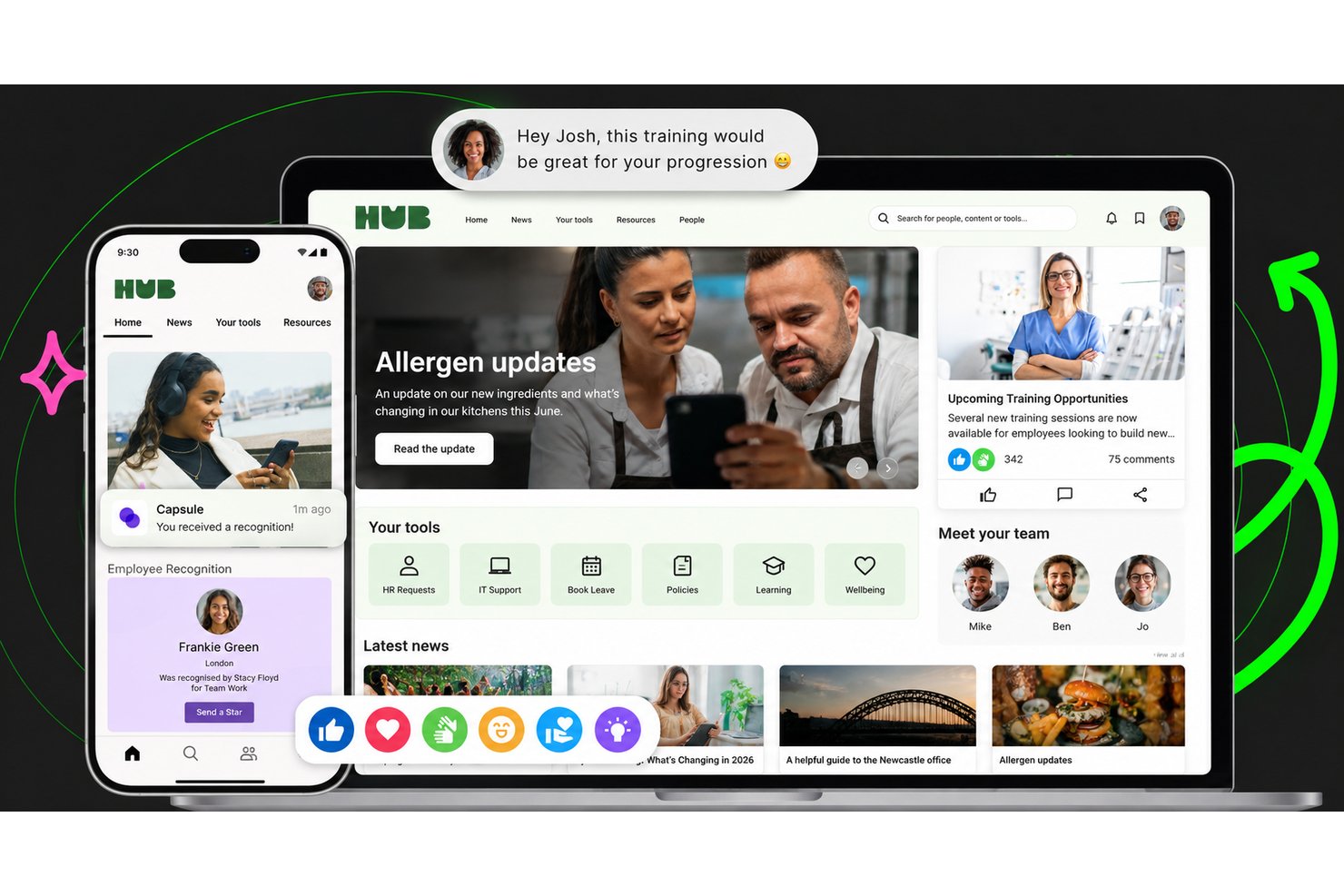
Oak Engage is an all-in-one intranet platform that brings together targeted communications, an employee directory, AI-powered search, mobile access, digital signage, and workplace messaging for desk-based and frontline teams.
Who Is Oak Best For?
Oak Engage suits organizations with a mix of desk-based and frontline workers that need to reach every employee through the right channel, whether that's mobile, digital signage, SMS, or desktop.
Why I Picked Oak
Oak Engage earns its spot on my shortlist because it's genuinely built for organizations where not everyone sits at a desk. I love how it layers communication channels so you can push the same update to a mobile app, a digital signage screen in a warehouse, or directly via SMS for workers without smartphones. Its mandatory-read tracking with automated manager alerts means critical updates don't get lost, and the location-targeted signage lets site-specific teams see content that's actually relevant to them.
Oak Key Features
- AI-powered search: Aria uses natural-language queries and intent recognition to surface answers and concise summaries from policies, documents, and connected systems.
- Employee recognition: Real-time shoutouts, awards, and celebrations can be tied to company values and shared across departments.
- Hubs and communities: Dedicated spaces for projects, social groups, and employee resource groups, each with custom layouts, feeds, and moderation controls.
- Pulse surveys and polls: Surveys and polls embed directly into the intranet homepage and content feeds to collect employee feedback within daily workflows.
Oak Engage Integrations
Oak Engage offers integrations across the Microsoft ecosystem, including Microsoft 365, Teams, SharePoint, Outlook, Power BI, and Microsoft Entra ID, plus Google Workspace, Salesforce, and SAP. Its Developer Centre provides APIs for custom integrations.
Pros and Cons
Pros:
- Location-targeted signage reaches site teams
- Mandatory-read tracking clarifies message reach
- Targeted updates reach desk and frontline teams
Cons:
- Search can feel difficult
- Permission setup can feel clunky

Best AI-native employee experience platform
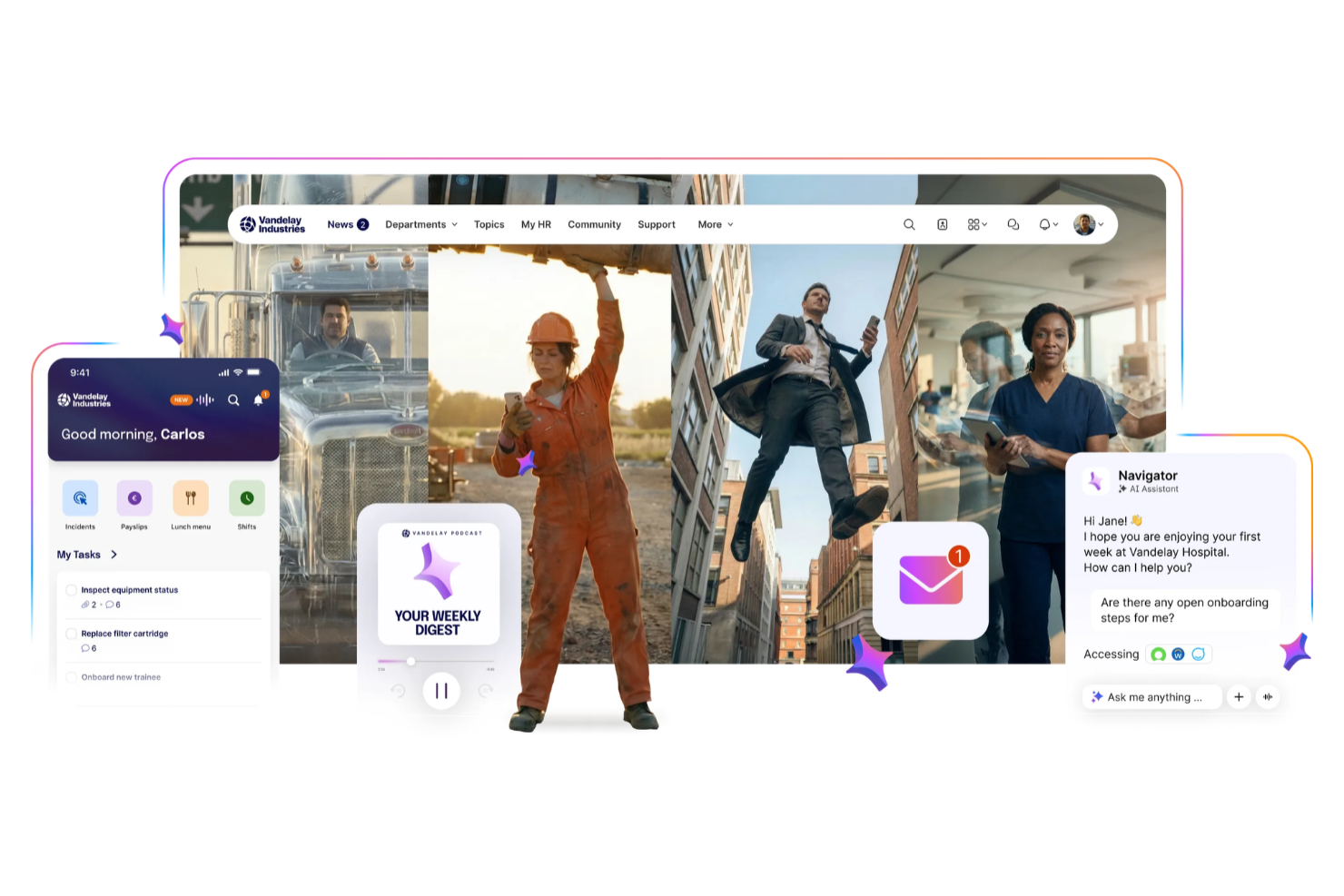
Staffbase is an intranet platform that connects deskless, frontline, and office teams through centralized communication, mobile access, and personalized employee experiences.
Who Is Staffbase Best For?
Staffbase is a strong fit for mid-size to enterprise organizations with large, distributed workforces that need a unified channel for internal communications.
Why I Picked Staffbase
I chose Staffbase as a top pick because AI is deeply integrated into the content creation and communication workflow. I particularly like the AI writing assistant, which helps my team draft, translate, and personalize internal communications without switching tools or spending time on manual editing. Staffbase also uses AI to surface relevant content to each employee based on their role, location, and language, so frontline workers aren't buried under updates that don't apply to them.
Staffbase Key Features
- Employee journeys: Automatically surface personalized content to employees based on milestones like onboarding, role changes, and other key moments.
- Pulse surveys: Collect employee feedback through quick pulse surveys or in-depth questionnaires directly within the platform.
- Live town halls: Broadcast real-time, interactive video to every employee screen, including frontline and deskless workers.
- Employee directory: Maintain customizable user profiles with contact details and other information to keep the workforce connected.
Staffbase Integrations
Integrations include Microsoft 365, Cornerstone, ServiceNow, Google Workspace, SAP, Workday, BambooHR, Salesforce, Confluence, and Box.
Pros and Cons
Pros:
- Provides engagement analytics across multiple channels
- Enables communication across frontline and office teams
- Supports AI-assisted content governance and targeting
Cons:
- Pricing not publicly disclosed
- Primarily designed for large organizations and enterprises

Haystack
Best for unified knowledge access

Haystack is an intranet platform designed for organizations that want to centralize company knowledge, streamline internal communication, and make resources easy to find for distributed or hybrid teams.
Who Is Haystack Best For?
Haystack is a strong fit for mid-sized companies with remote or hybrid teams that need a central place to access company news, documents, and people information.
Why I Picked Haystack
Haystack earns its spot on my shortlist because of how well it handles unified knowledge access across a distributed workforce. I particularly like the enterprise search feature, which pulls results across connected third-party apps like Confluence, Guru, and Google Workspace, so my team isn't jumping between tabs to track down a single document. The Freshness Engine is another feature I rely on—it lets you set expiration dates on content like employee handbooks or compliance materials, so outdated information doesn't quietly linger in the knowledge base. The company glossary is a small but genuinely useful touch that helps new hires get up to speed without having to ask someone what every internal acronym means.
Haystack Key Features
- Must read: Mark posts as mandatory reads and send automated reminders to employees who haven't acknowledged them yet.
- Employee profiles and org chart: Rich profiles display work history, skills, and interests, alongside a visual org chart that maps team structures and reporting lines.
- Verified badges: Flag resources with a verified icon to signal that content has been officially approved by subject-matter owners.
- Group pages: Create dedicated spaces for teams, departments, or interest groups to surface targeted resources and content.
Haystack Integrations
Integrations include Google Workspace, Microsoft Teams, Slack, Atlassian Confluence, Jira, Guru, Zoom, Box, Dropbox, Tableau, and Looker.
Pros and Cons
Pros:
- Supports mobile apps so non-desk or remote workers can engage
- Strong employee directory helps distributed teams stay connected
- Reduces time spent searching by consolidating knowledge and tools
Cons:
- Large organizations with simple needs may find full functionality more than required
- Some users report a slight learning curve for less tech-savvy employees

Jostle
Best for a dynamic employee directory and efficient document management
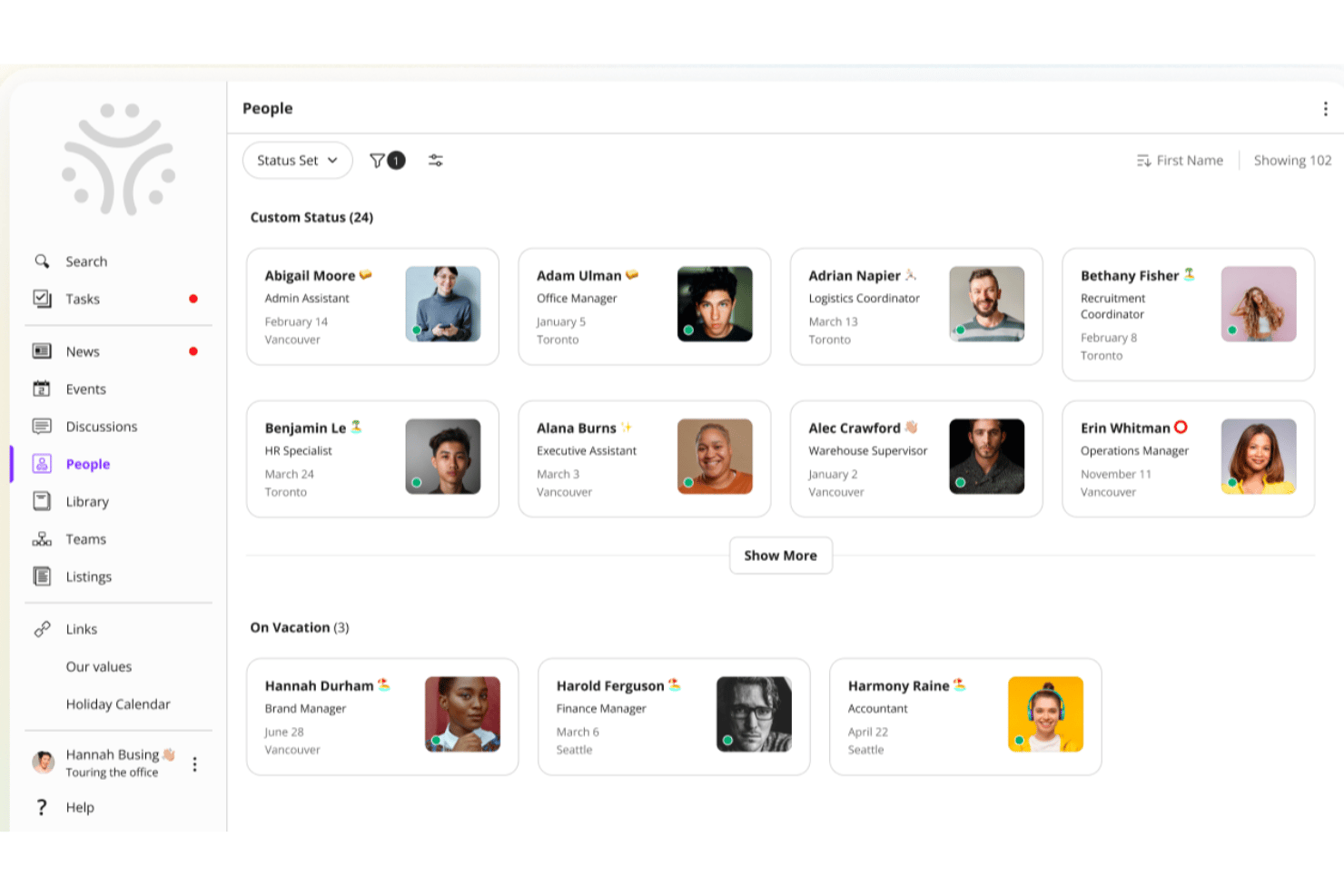
Jostle is an intranet platform designed for organizations that want to boost team connection, simplify internal communication, and make it easy for employees to find people, documents, and updates in one place.
Who Is Jostle Best For?
Jostle is a good fit for mid-sized organizations looking for a straightforward intranet that keeps employees connected without the complexity of enterprise-level platforms.
Why I Picked Jostle
Jostle earns its spot on my shortlist because of how well its People directory and Library work together as a knowledge-finding system. The People section lets employees search by role, location, department, or even a specific skill—so if I need to find someone who handles benefits compliance in a regional office, I can do that in seconds. On the document side, Jostle's Library assigns clear ownership to each volume, meaning subject matter experts manage their own files and everyone always knows which version is current. That combination of "find the right person" and "find the right document" is exactly what distributed teams need from an intranet.
Jostle Key Features
- News feed: Publish company-wide announcements and team updates that employees can react to and comment on.
- Events calendar: Create and share org-wide or team-specific events that employees can RSVP to directly in the platform.
- Shout-outs: Recognize individual employees publicly with peer-to-peer shout-outs visible across the intranet.
- Discussions: Host threaded conversations organized by topic or team to keep internal dialogue focused and searchable.
Jostle Integrations
Integrations include Google Workspace, Microsoft 365, Slack, Salesforce, Zoom, Dropbox, BambooHR, HubSpot, QuickBooks Online, and Zendesk.
Pros and Cons
Pros:
- Clear visual organizational charts
- Simplified file and document organization
- High user adoption rates
Cons:
- Limited third-party app marketplace
- Rigid layout customization options
Axero
Best for content management features and customizable team Spaces

Axero is an intranet platform built for organizations that want to centralize communication, knowledge sharing, and collaboration across teams, making it easier for employees to find resources, connect, and work together in one digital space.
Who Is Axero Best For?
Axero is a good fit for mid-size to large organizations that need a structured intranet to manage internal content, connect distributed teams, and give departments their own dedicated digital workspace.
Why I Picked Axero
Axero earns its spot as one of the best on my shortlist because of how well it handles content management and team Spaces together in one place. I love that content workflows in Axero include version control, expiration dates, and required reading tracking—so when my team publishes a policy update or internal guide, I can set it to auto-notify authors when content ages and confirm that key employees have actually read it. The customizable Spaces are equally impressive: each department or project gets its own dedicated hub with targeted permissions, so HR, IT, and operations aren't wading through each other's content. I also use the page builder to tailor each Space's layout with drag-and-drop widgets, which means every team's hub looks and functions exactly the way they need it to.
Axero Key Features
- Employee directory: Search rich employee profiles with customizable fields that highlight skills, roles, and interests across the organization.
- AI chatbot (Axero Copilot): An AI assistant trained on your intranet's knowledge base that answers employee questions directly within the platform.
- Announcements and broadcasts: Send targeted updates to specific groups or the entire organization, with support for urgent news and top-level communications.
- Cases and tickets: A native help desk tool for managing employee questions, assigning tasks, tracking status, and setting due dates.
Axero Integrations
Integrations include Slack, Microsoft Office 365, Google Workspace, Twilio, Microsoft Teams, Zoom, and SharePoint Online Documents.
Pros and Cons
Pros:
- Spaces/Sub Spaces keep department content organized and easy to navigate
- Content expiration helps your intranet stay clean and up to date
- Required Reading ensures important posts are actually seen by employees
Cons:
- Analytics require initial setup to surface the most useful insights
- Space-permission setup may get complex as your intranet grows
Best for mobile intranet for frontline teams

Connecteam gives organizations with deskless and distributed teams a centralized platform to manage internal communication, share resources, and coordinate daily operations, making it easier to keep everyone connected and informed.
Who Is Connecteam Best For?
Connecteam is a great fit for small to mid-sized businesses in industries like retail, hospitality, construction, and healthcare that rely heavily on frontline or field-based workers.
Why I Picked Connecteam
Connecteam earns its spot as one of the best on my shortlist because it's built from the ground up for teams that don't sit at a desk. I picked it specifically for its mobile-first design—the app puts the company news feed, team chat, and document library right in a worker's pocket, which matters when your staff is on a job site or a shop floor. I also like the employee knowledge base feature, where my team can store and access SOPs, training materials, and HR documents without needing a laptop. The push notification system keeps everyone looped in on updates in real time, so nothing gets missed between shifts.
Connecteam Key Features
- Employee directory: Browse a searchable company directory with contact details and role information for every team member.
- Surveys and polls: Create and send surveys or polls through the app to gather team feedback.
- Task management: Assign, track, and manage tasks for individuals or groups with due dates and status updates.
- Scheduling: Build and share employee schedules, manage shift assignments, and handle shift swaps from within the platform.
Connecteam Integrations
Integrations include QuickBooks, Gusto, Xero, ADP, Wix, Lightspeed, PrismHR, Square, BambooHR, and Shopify.
Pros and Cons
Pros:
- Time-clock + geofencing gives site-based attendance tracking
- Combined communication + task tool avoids multiple separate apps
- Strong mobile app design for non-desk and frontline teams
Cons:
- Customization of forms and permissions may feel limited at scale
- Reporting and analytics features are less advanced than specialist platforms
New Product Updates from Connecteam

Connecteam Expands Break and Timesheet Controls
Connecteam adds flexible break thresholds, personalized policies, auto-end options, a centralized exceptions report, and improved timesheet issue visibility to help teams manage breaks and timesheets more effectively. For more information, visit Connecteam’s official site.
 .
.
Sift
Best for people-first approach

Sift is an intranet platform for organizations that need to connect employees, surface internal knowledge, and help teams find the right people and resources across the company.
Who Is Sift Best For?
Sift is a strong fit for mid-sized to large organizations where HR and internal communications teams need to help employees find colleagues, navigate org structures, and stay connected across departments.
Why I Picked Sift
Sift earns its spot on my shortlist because it puts people at the center of the intranet experience in a way that most platforms don't. I love how employee profiles go beyond basic contact info—team members can showcase their skills, interests, and areas of expertise, which makes it genuinely useful for finding the right person across a large org. I also like the dynamic org chart, which updates automatically and gives my team a clear picture of how the company is structured without anyone having to maintain it manually.
Sift Key Features
- Sift Pages: Create dedicated pages for departments, projects, remote teams, and employee resource groups to give every part of your org a searchable home.
- Certification showcasing: Display employee certifications on profiles so teams can quickly identify who has the expertise needed for specific projects or roles.
- Advanced search and filtering: Search and filter employees by any attribute—role, skills, experience, or location—to find the right person for any task.
- Analytics: Track how employees are engaging with the directory and people data across the organization.
Sift Integrations
Integrations include Azure Active Directory, Google Workspace, LDAP, Slack, and Microsoft Teams, with an API available for custom integrations.
Pros and Cons
Pros:
- Manages internal talent discovery
- Deeply integrates with existing HRIS
- Highly visual and interactive profiles
Cons:
- Requires consistent employee profile updates
- Limited native project management features
Workvivo
Best social intranet with collaborative Spaces for deep employee engagement

Workvivo is a modern intranet platform built for organizations that want to boost employee connection, simplify internal communications, and create a vibrant digital workplace for teams of all sizes.
Who Is Workvivo Best For?
Workvivo is a strong fit for mid-size to enterprise organizations with large, distributed, or frontline workforces that need more than a traditional intranet to keep employees informed and connected.
Why I Picked Workvivo
Workvivo earns its spot as one of the best on my shortlist because it approaches the intranet as a social experience rather than a static content repository. I particularly like the Spaces feature, which lets teams create dedicated hubs for departments, projects, or communities—complete with feeds, documents, and member lists in one place. I also find the social activity feed genuinely useful for surfacing recognition, announcements, and peer interactions in a format that feels more like a social network than a corporate bulletin board. That combination makes it much easier to build the kind of ongoing engagement that most traditional intranets simply don't support.
Workvivo Key Features
- Surveys and polls: Capture employee sentiment with built-in surveys and quick polls you can send to specific teams or the entire organization.
- Auto-translate: Automatically translate content into employees' native languages so global teams can access every update without language barriers.
- Knowledge base and wikis: Store and organize company information, policies, and documents in a searchable, centrally accessible location.
- Employee engagement analytics: Track how employees interact with content across the platform to understand what's resonating and where engagement is dropping off.
Workvivo Integrations
Integrations include Microsoft 365, Google Workspace, Slack, Zoom, BambooHR, Workday, Sage HR, Personio, HiBob, and Trello.
Pros and Cons
Pros:
- Simplified global company-wide broadcasts
- Strong mobile app for accessibility
- Familiar social media-style interface
Cons:
- Lacks advanced document co-authoring tools
- Higher price point for startups
Blink
Best mobile-first intranet solution for frontline or deskless workforces

Blink is a modern intranet platform built for organizations with distributed or deskless teams, connecting employees through mobile communication, document sharing, and real-time updates.
Who Is Blink Best For?
Blink is a strong fit for industries like retail, healthcare, logistics, and hospitality, where large portions of the workforce are on the move and rarely sit at a desk.
Why I Picked Blink
Blink earns its spot on my shortlist because it's purpose-built for the workers most intranets forget—the ones who don't have a company email or a desk. I picked it specifically for its mobile-first feed, which lets managers push targeted announcements directly to frontline staff by location, shift, or role. I also like the built-in digital forms and document hub, which means a warehouse worker or retail associate can pull up a policy or complete an onboarding checklist right from their phone without needing a laptop or a login to a separate system.
Blink Key Features
- Secure chat: Send direct and group messages to individuals or teams within the Blink app.
- Employee recognition: Give personalized recognition to colleagues with Blink Kudos.
- Surveys: Build and distribute single- or multi-question surveys directly to employees inside the app.
- Communities: Create shared virtual spaces where employees can connect around common interests or teams.
Blink Integrations
Integrations include Microsoft 365, Google Workspace, Workday, ADP, Okta, OneLogin, ServiceNow, Salesforce, Slack, and SAP. An API is available for custom integrations.
Pros and Cons
Pros:
- Effective digital forms and checklists
- Secure instant messaging for teams
- Single sign-on for frontline staff
Cons:
- Minimal advanced data visualization options
- Desktop version lacks mobile fluidity

Simpplr
Best modern intranet software for prescriptive analytics and a dynamic people directory

Simpplr is a modern intranet platform built for organizations that want to connect distributed teams, improve internal communication, and create a more engaged workplace with personalized content and collaboration tools.
Who Is Simpplr Best For?
Simpplr is a good fit for mid-size to large organizations with HR and internal communications teams looking to unify a dispersed or hybrid workforce under a single, centralized employee experience platform.
Why I Picked Simpplr
Simpplr earns its spot as one of the best on my shortlist because of how far its analytics go beyond basic engagement tracking. The prescriptive analytics feature doesn't just show you what's happening—it surfaces AI-guided action steps based on peer benchmarks and industry best practices, so when content engagement drops or sentiment shifts, I'm not left guessing what to do next. I also love the people directory, which pulls in rich employee profiles and lets teams search and connect across roles, locations, and departments in a way that actually reflects how the organization is structured. For distributed teams where people rarely cross paths organically, that kind of visibility makes a real difference in breaking down silos.
Simpplr Key Features
- Personalized news feed: Delivers tailored content and AI-based recommendations to each employee based on their role, preferences, and behavior.
- Instant messaging: Lets teams send direct and group messages across the organization within a secure, enterprise-grade messaging environment.
- Employee surveys: Run pulse, ad-hoc, and lifecycle surveys to capture employee sentiment and feedback directly within the platform.
- Newsletter builder: Create and distribute company newsletters from within Simpplr, with built-in insights on content engagement.
Simpplr Integrations
Integrations include Microsoft Teams, Slack, Workday, Google Drive, Box, Dropbox, Salesforce, ServiceNow, Zoom, and Tableau.
Pros and Cons
Pros:
- Clean and modern user interface
- Automated content governance features
- Actionable AI-driven engagement insights
Cons:
- Integrations limited to premium tiers
- Initial setup requires significant time
Annen intranettprogramvare for ansatte
Her er noen flere alternativer for intranettprogramvare for ansatte som ikke kom med på topplisten:
- Xoxoday
Social intranet software for peer-to-peer recognition
- ThoughtFarmer
Intranet solution for interactive engagement
- Happeo
Intranet solution for customized news feeds and engagement tools
- MyHub
Company intranet software for IT, HR, and marketing professionals
- Microsoft SharePoint
For targeted employee communication
- Noodle
Intranet software with SaaS and on-premise offerings
- Igloo
Digital workplace platform with pre-built templates for business challenges
- LumApps
For AI-powered intranet personalization
- Guru
Intranet software solution with AI-driven enterprise search
- Unily
Enterprise-level employee experience platform with communication, knowledge management, and extranet features
- Eleviant Tech
Mobile and web-based intranet for Microsoft 365 users
- IntranetPro
For sharing documents via Microsoft 365 and SharePoint
- Assembly
All-in-one intranet and employee communication platform for your people and tools
- Nectar
For crafting engaging announcements
- Hub
For targeted user content
- Interact Software
For personalized content delivery
- PeopleOne
Modern intranet solution for Microsoft 365 users
- Interact
Intranet platform that merges social features with a mobile intranet and extranet capabilities
- OnSemble
Intranet software for customer-oriented/service-oriented company cultures
- Claromentis
Intranet software with a unique Audit Management module for managing ISO 9001:2015 requirements
- Bitrix24
Intranet platform for collaboration, task management, and unlimited users
- Jive
Intranet software with an embedded machine learning framework for advanced user insights
- MangoApps
Cloud-based intranet solution for team collaboration and enterprise-grade security
- Friday
Intranet platform for organizing meetings, tasks and action items
- HCL Connections
Enterprise-level collaboration platform focused on employee engagement and networking


How I Evaluate Intranet Software
I split my evaluation into two layers: baseline capabilities a tool must offer to qualify—like document management and employee directories—and the differentiators that set the best options apart.
Core Functionality (Table Stakes For This List)
When I'm selecting tools for my list, I rank each one on a scale from 0 (does not offer the functionality) to 5 (excels in this area) for each core functionality listed below. Then, I calculate the tool's total score into a percentage. Each tool needs to achieve a minimum total score of 65% to be considered for inclusion.
- Content & Document Management: I look at how each platform handles HR policy pages, handbooks, and file libraries—especially version control and whether content authors can schedule or approve updates before publishing.
- Employee Directory & Profiles: A good directory goes beyond a contact list. I check for org chart views, custom profile fields like skills and certifications, and whether the directory syncs with an HRIS.
- Internal Communications Tools: I evaluate how each tool delivers company news, from broad announcements to posts targeted by department, location, or role, along with read tracking to confirm messages land.
- Social & Engagement Features: Platforms that support comments, reactions, community groups, and peer recognition give HR teams a way to build culture. I look at how naturally these features fit into daily use.
- Permissions & Access Control: HR teams manage sensitive content like compensation policies and benefits details. I check for role-based permissions, audience segmentation by attribute, and audit visibility.
- Search & Integrations: I evaluate whether the search spans pages, documents, and people in one query, and whether the tool connects with collaboration apps like Slack, Teams, and Microsoft 365 or Google Workspace.
Once I have a list of tools that meet the criteria, I consider what sets each platform apart.
Differentiating Factors (What Sets Vendors Apart)
Here's how I compare and contrast different vendors:
Standout Features
Mobile access matters when your workforce includes frontline or deskless employees who rarely sit at a desktop. I check whether the app delivers full functionality or just a stripped-down feed. Onboarding journeys are another differentiator—platforms with automated checklists and staged content for new hires save HR teams hours of manual follow-up. I also look for built-in pulse surveys and engagement analytics, which help you measure whether employees actually read policy updates and how content is landing across teams.
Beyond Features
HR tech stack integrations are a big deal here. If your intranet can't sync employee data from your HRIS—whether that's Workday, BambooHR, or ADP—you'll end up managing duplicate records. I also evaluate security and compliance posture, checking for SOC 2 Type II certification and data residency options, especially for organizations with employees across multiple regions. Implementation support is worth a close look too. Rolling out an intranet is a change management effort, and vendors that offer launch playbooks and adoption benchmarking tend to drive stronger long-term engagement.
Hva er intranettprogramvare?
Intranettprogramvare er en sikker digital plattform som organisasjoner bruker til å sentralisere intern kommunikasjon, ressurser og samarbeidsverktøy. Den hjelper team med å dele oppdateringer, administrere dokumenter og få tilgang til virksomhetens kunnskap på ett sted.
HR-medarbeidere og teamledere bruker intranettplattformer til å effektivisere kommunikasjonen, redusere informasjonssiloer og forbedre medarbeiderengasjementet – særlig på tvers av eksterne og hybride team.
Viktige funksjoner i intranettprogramvare
Når du velger intranettprogramvare, bør du se etter følgende viktige funksjoner:
- Brukergrensesnitt: Et intuitivt og ryddig design hjelper deg med raskt å finne viktige elementer som medarbeiderkatalogen, kunnskapsbiblioteket eller viktige firmadokumenter. De beste plattformene lar deg også tilpasse hjemmesiden etter egne preferanser, slik at starten på arbeidsdagen føles litt mer som hjemme enn som en endeløs labyrint.
- Brukervennlighet: Enkel navigering gjør en stor forskjell. En godt organisert menystruktur betyr at du kan droppe skattejakten og gå rett til ressursene du trenger – uten endeløs klikking eller mystiske rullegardinmenyer.
- Programvareintegrasjoner: De beste intranettløsningene fungerer sømløst med de andre verktøyene dine – for eksempel dokumenthåndteringssystemer som Google Workspace og Microsoft SharePoint, e-postplattformer eller apper for medarbeiderengasjement. På den måten slipper du å holde styr på en rekke faner eller bytte mellom plattformer bare for å få gjort jobben.
- Innholdshåndtering: Du bør enkelt kunne opprette, organisere og oppdatere innhold. Effektiv innholdshåndtering holder alle oppdatert og sørger for at aktuell informasjon alltid er lett tilgjengelig for teamet ditt.
- Samarbeidsverktøy: Innebygd chat, diskusjonsfora, kunngjøringstavler og funksjoner for fildeling hjelper teamet med å kommunisere og samarbeide uten behov for et dusin forskjellige verktøy. Alt du trenger for å jobbe sammen, på ett sted.
- Tilgangskontroll og tillatelser: Pålitelige innstillinger for tillatelser lar deg bestemme hvem som kan se eller redigere spesifikk informasjon. Dette beskytter sensitivt innhold og sørger for at alle bare får tilgang til det de faktisk trenger.
- Tilgjengelighet på mobil: Den beste intranettprogramvaren fungerer sømløst på smarttelefoner og nettbrett så vel som på datamaskiner, slik at brukerne enkelt kan holde kontakten og være informert uansett hvor de befinner seg.
- Søkefunksjon: En kraftig søkefunksjon lar deg raskt finne personer, dokumenter og firmakunnskap. Glem å rulle i det uendelige – skriv bare inn det du trenger, og finn det på sekunder.
Vanlige AI-funksjoner i intranettprogramvare
I tillegg til standardfunksjonene i intranettprogramvare som er nevnt ovenfor, tar mange av disse løsningene i bruk AI med funksjoner som:
- AI-drevet søk: Avanserte søkeverktøy bruker AI til å forstå forespørsler i naturlig språk og forutse hva du leter etter, slik at du kan finne dokumenter og ressurser – selv om du ikke er sikker på den nøyaktige tittelen eller plasseringen.
- Automatiske innholdsanbefalinger: AI foreslår relevante artikler, firmaoppdateringer eller teamressurser basert på tidligere aktivitet eller interesser, noe som gjør det mye enklere og mer personlig å oppdage innhold.
- Smarte varsler: I stedet for å bombardere deg med varsler lærer AI hvilke oppdateringer som er viktigst for deg, og sender varsler når de faktisk er nyttige. Dermed slipper du å bli overveldet av varsler.
- Automatisk arbeidsflythåndtering: AI kan gjenkjenne repetitive prosesser og foreslå automatisering av godkjenninger, forespørsler eller rutinemessig kommunikasjon. Dette hjelper deg med å spare tid og unngå manuelle feil.
- Analyse av stemning: AI-verktøy kan skanne interne fora eller chatsamtaler for å vurdere teamets trivsel eller oppdage nye problemer, slik at du kan håndtere dem før de utvikler seg til store utfordringer.
Vanlige spørsmål om intranettprogramvare
Her er noen svar på vanlige spørsmål du måtte ha om intranettprogramvare og hvordan det fungerer:
Hvordan velger jeg riktig intranettprogramvare for organisasjonen min?
Begynn med å kartlegge teamets unike behov for kommunikasjon, samarbeid og dokumenthåndtering. Lag en liste over funksjoner dere må ha, for eksempel enkel fildeling, publisering av nyheter eller ansattkataloger. Sammenlign flere intranettplattformer, og legg vekt på brukervennlighet, pålitelig kundestøtte og god integrasjon med systemene dere allerede bruker. Les vurderinger fra andre HR-ledere og fagpersoner innen internkommunikasjon for å få innsikt fra virkeligheten. Be om live-demonstrasjoner eller prøvetilgang, og involver både IT og sluttbrukere i evalueringsprosessen for å se hvilken programvare som føles mest intuitiv og robust for teamet deres.
Hva er de vanligste utfordringene ved implementering av intranettprogramvare?
De største utfordringene omfatter vanligvis lav brukeradopsjon, uklare mål hos interessentene, problemer med datamigrering og vanskeligheter med å tilpasse plattformen til organisasjonskulturen deres.
For å håndtere dette bør dere sette tydelige mål fra starten, sikre støtte fra ledelsen og kommunisere konsekvent med de ansatte om fordelene. Planlegg en omfattende innføring og tilby løpende opplæring. Utnevn interne ambassadører fra ulike avdelinger for å oppmuntre til deltakelse, og innhent tilbakemeldinger slik at dere kan finjustere utrullingen.
Et godt samarbeid mellom IT og HR bidrar til å håndtere både tekniske utfordringer og utfordringer knyttet til endringsledelse.
Hvordan kan intranettprogramvare forbedre medarbeiderengasjement og kommunikasjon?
Intranettprogramvare fungerer som et sentralt knutepunkt for nyheter, virksomhetsoppdateringer og ressurser, og hjelper de ansatte med å føle seg informert og inkludert. Funksjoner som sosiale strømmer, avstemninger, tavler for anerkjennelser og diskusjonsfora gir medarbeiderne mulighet til å dele tilbakemeldinger og knytte kontakt med kolleger. Mange plattformer inkluderer kalendere, programmer for anerkjennelse og verktøy for nettverksbygging mellom kolleger.
For HR- og internkommunikasjonsledere legger disse funksjonene til rette for en levende og transparent dialog og sørger for at alle har tilgang til viktig informasjon, uavhengig av hvor de befinner seg. Over tid vil dere se økt engasjement, bedre arbeidsmoral og bedre samkjøring på tvers av team.
Kan intranettprogramvare integreres med andre arbeidsverktøy som HRIS eller Slack?
Ja, nesten alle moderne intranettplattformer tilbyr omfattende integrasjon med populære arbeidsverktøy. Det inkluderer HR-informasjonssystemer (HRIS), kommunikasjonsapper som Slack eller Microsoft Teams, prosjektstyringsplattformer og tjenester for dokumentlagring som Google Drive eller SharePoint.
Be leverandørene om en liste over innebygde integrasjoner, eller spør om det finnes åpne API-er for tilpassede forbindelser. Sømløs integrasjon gjør det mulig for de ansatte å få tilgang til alt fra én portal, reduserer datasiloer og automatiserer vanlige HR- eller kommunikasjonsoppgaver – noe som gjør det daglige arbeidet enklere for alle.
Hvilke sikkerhetsfunksjoner bør jeg se etter i intranettplattformer?
Prioriter plattformer med solide grunnleggende sikkerhetsfunksjoner: rollebasert tilgangskontroll, flerfaktorautentisering, datakryptering under overføring og i hvile samt støtte for enkel pålogging (SSO). Sørg for at programvareleverandøren følger opp med jevnlige sikkerhetsoppdateringer og oppdateringer som lukker sårbarheter.
For HR- og internkommunikasjonsbruk er detaljerte tilgangsinnstillinger avgjørende for å beskytte sensitive data som personalmapper eller kunngjøringer fra virksomheten. Kontroller også om plattformen følger personvernstandarder som GDPR eller HIPAA, basert på behovene deres, og spør om verktøy for revisjon og rapportering for ekstra trygghet.
Andre vurderinger av kommunikasjonsprogramvare
Når du allerede vurderer intranettprogramvare, kan det hende du også er interessert i å lære mer om andre typer internkommunikasjonsprogramvare. For å spare deg for timevis med søking kan du ta en titt på noen av mine andre lister over spesialisert programvare:
- Programvare for medarbeiderkommunikasjon
- Programvare for medarbeiderengasjement
- Apper for teamkommunikasjon
- Plattformer for medarbeideranerkjennelse
- Programvare for fjernsamarbeid
- Programvare for fjernarbeid