

10 beste OKR-programvarer for oppstartsbedrifter valgt ut for 2026

Beste OKR-programvare for oppstartsbedrifter – kortliste


OKR-programvare for oppstartsbedrifter hjelper teamet ditt med å sette, følge opp og administrere mål og nøkkelresultater, slik at dere kan samordne målene og måle fremdriften etter hvert som dere vokser. Hvis du leter etter det riktige OKR-verktøyet, balanserer du sannsynligvis raske endringer, begrensede ressurser og behovet for tydelig retning.
Med riktig programvare blir det enklere å holde alle fokuserte og ansvarlige, selv når prioriteringene endres. I denne veiledningen finner du ekspertvurderte OKR-plattformer utviklet for oppstartsbedrifter, med informasjon som hjelper deg med å sammenligne funksjoner og velge det beste alternativet for teamets behov.
Why Trust Our Software Recommendations
Our team has been testing and reviewing software since 2012. As HR experts ourselves, we know how difficult—and important—it is to choose the right software.
For this guide, we evaluated tools using hands-on testing and independent research, scoring tools using our selection criteria. We also draw on insights from industry thought leaders and practicing HR experts.
Our reviews reflect our human editorial judgment, not a sales pitch.
Expert reviewers:
Sammenligningstabell: OKR-programvare for oppstartsbedrifter
Denne sammenligningstabellen oppsummerer prisopplysninger for mine beste utvalgte OKR-programmer for oppstartsbedrifter.
| Tool | Best For | Trial Info | Price | ||
|---|---|---|---|---|---|
| 1 | Best for global payroll automation | Free demo available | From $5/user/month | Website | |
| 2 | Best for linking OKRs to performance reviews | 30-day free trial + free demo available | From $3/user/month (billed annually) | Website | |
| 3 | Best for customizable templates | Free demo available | Pricing upon request | Website | |
| 4 | Best for modular workspace design | 14-day free trial available | From $7/user/month (billed annually) | Website | |
| 5 | Best for strategy execution tracking | Free trial + free demo available | Pricing upon request | Website | |
| 6 | Best for goal alignment mapping | Free plan available + free demo available | From $7.20/user/month (billed annually) | Website | |
| 7 | Best for guided onboarding workflows | Free demo available | From $6/user/month | Website | |
| 8 | Best for flexible review cycles | 14-day free trial | From $4/user/month (billed annually) | Website | |
| 9 | Best for continuous feedback options | 7-day free trial | From $2/user/month (billed annually) | Website | |
| 10 | Best for visual progress dashboards | 14-day free trial + free plan available | From $90/month (billed annually) | Website |
Anmeldelser av den beste OKR-programvaren for oppstartsbedrifter
Nedenfor finner du mine detaljerte sammendrag av OKR-programvaren for oppstartsbedrifter som kom med på kortlisten. Anmeldelsene mine gir en grundig gjennomgang av funksjonene, de beste bruksområdene og integrasjonene til hver plattform, slik at du kan finne det beste alternativet for deg.

Deel HR
Best for global payroll automation
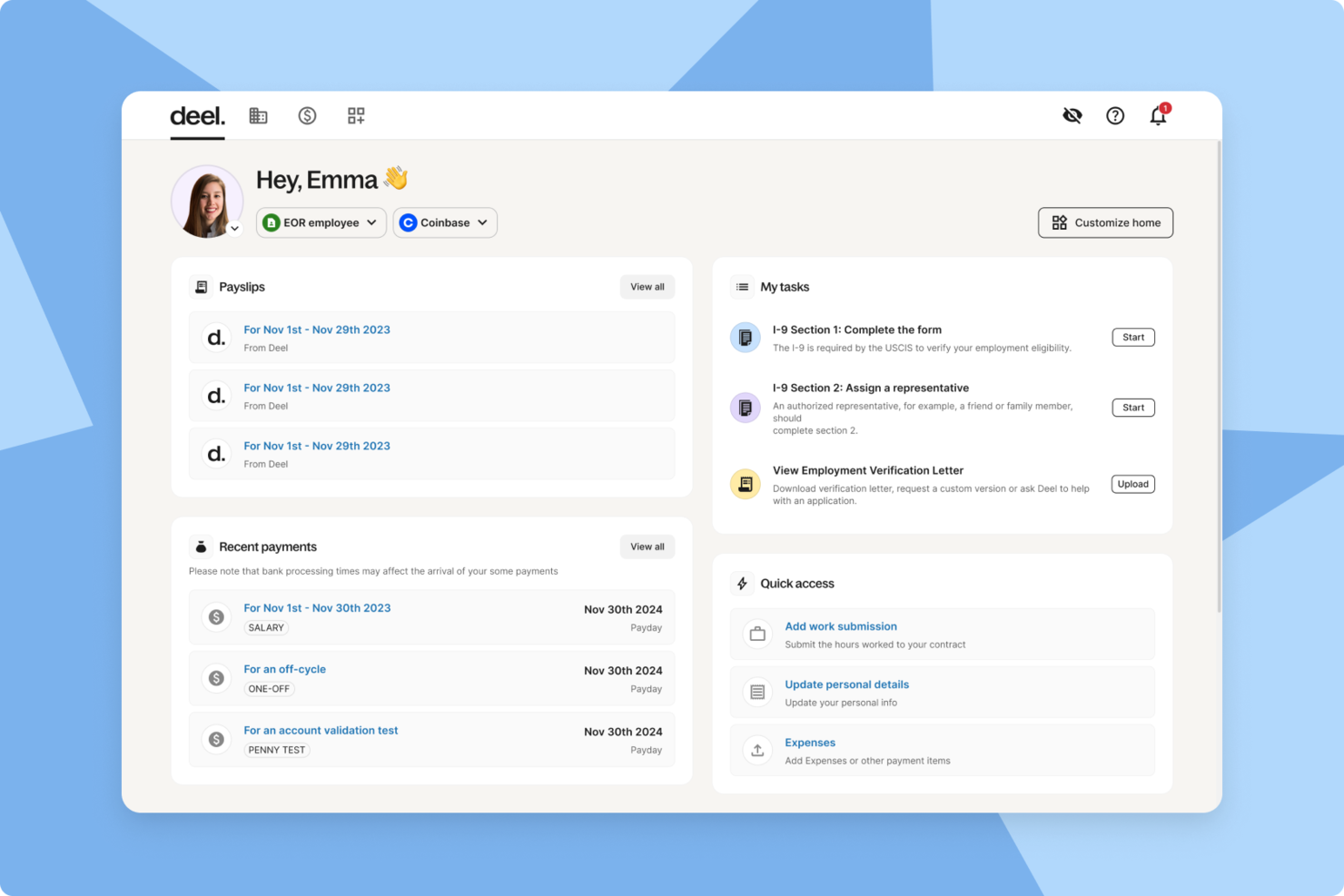
Deel HR is a global HR and payroll platform designed for startups that need to manage international hiring, onboarding, payroll, and compliance from a single system.
Who Is Deel HR Best For?
Startups and small businesses hiring and managing employees or contractors across multiple countries.
Why I Picked Deel HR
I picked Deel HR as one of the best because I can automate payroll for employees and contractors in over 100 countries from a single dashboard. My team uses Deel HR to handle multi-currency payments, local tax calculations, and country-specific payslips. I like that I can manage payroll compliance and reporting without juggling multiple vendors or manual processes.
Deel HR Key Features
- Employee onboarding workflows: Automate document collection, contract generation, and onboarding tasks for new hires.
- Time off management: Track and approve employee leave requests directly within the platform.
- HR document storage: Store and organize contracts, policies, and compliance documents in a secure digital vault.
- Org chart visualization: View and manage your team structure with a dynamic organizational chart.
Deel HR Integrations
Native integrations are not clearly documented. Deel HR offers an API for custom integrations.
Pros and Cons
Pros:
- Bulk contractor payments in multiple currencies
- Centralized document management for HR and legal
- Customizable onboarding workflows for remote teams
Cons:
- Reporting features lack advanced analytics options
- No built-in OKR tracking or alignment tools
New Product Updates from Deel HR

Deel Expands Stablecoin Wallet to 80+ Countries
Deel expands its Stablecoin Wallet to 80+ countries with dollar-backed balances and optional rewards. This gives eligible contractors more ways to hold and manage earnings inside Deel. For more information, visit Deel’s official site.
 .
.
Best for linking OKRs to performance reviews
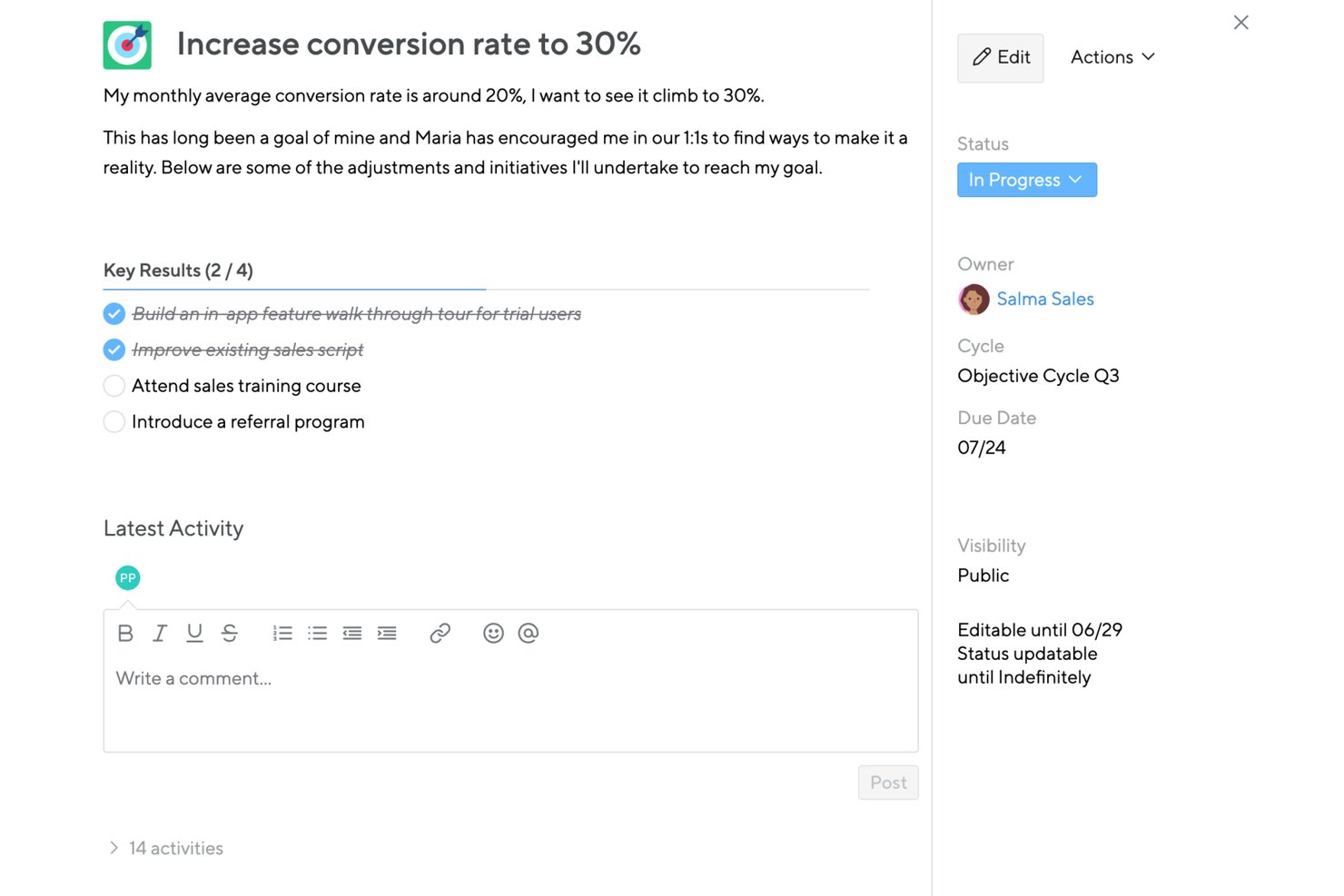
Small Improvements is a performance management platform that bundles OKR goal setting, cascading objectives, 360° feedback, performance reviews, 1:1 meetings, and pulse surveys into one system.
Who Is Small Improvements Best For?
Small Improvements suits HR teams at growing startups that want OKR tracking and performance reviews in a single system, without juggling multiple tools.
Why I Picked Small Improvements
Small Improvements earns its spot on my shortlist because it's the only tool here where OKRs live inside the same system as performance reviews, 360-degree feedback, and 1:1 meetings. I especially like the Feedback-into-Action feature, which reads peer feedback and suggests objectives directly from it. The Objectives Coach then helps refine those goals before they're finalized, so your review cycle and goal-setting cycle actually inform each other.
Small Improvements Key Features
- Cascading objectives: Link individual goals to team, department, or company-wide objectives so everyone can see how their work connects to the bigger picture.
- Pulse surveys with eNPS: Run lightweight employee sentiment surveys, including eNPS, directly within the platform alongside your goal and review cycles.
- Talent Boxes (9-box grid): Assess and visualize employee performance and potential across a calibrated grid to support promotion and development decisions.
- CSV export for objectives: Export company objectives data to CSV, filtered by department, status, or location, for offline analysis or reporting.
Small Improvements Integrations
Small Improvements has documented integrations with Slack, BambooHR, Rippling, Personio, Workday, Google Calendar, and Office 365 calendar. It also supports SSO through Google Workspace, Okta, OneLogin, and Microsoft Entra ID.
Pros and Cons
Pros:
- Team dashboards expose individual priorities
- Feedback suggests actionable employee objectives
- Links objectives with reviews and 1:1s
Cons:
- Missing confidence scores and scheduled check-ins
- Lightweight cascading limits strategic alignment
Best for customizable templates
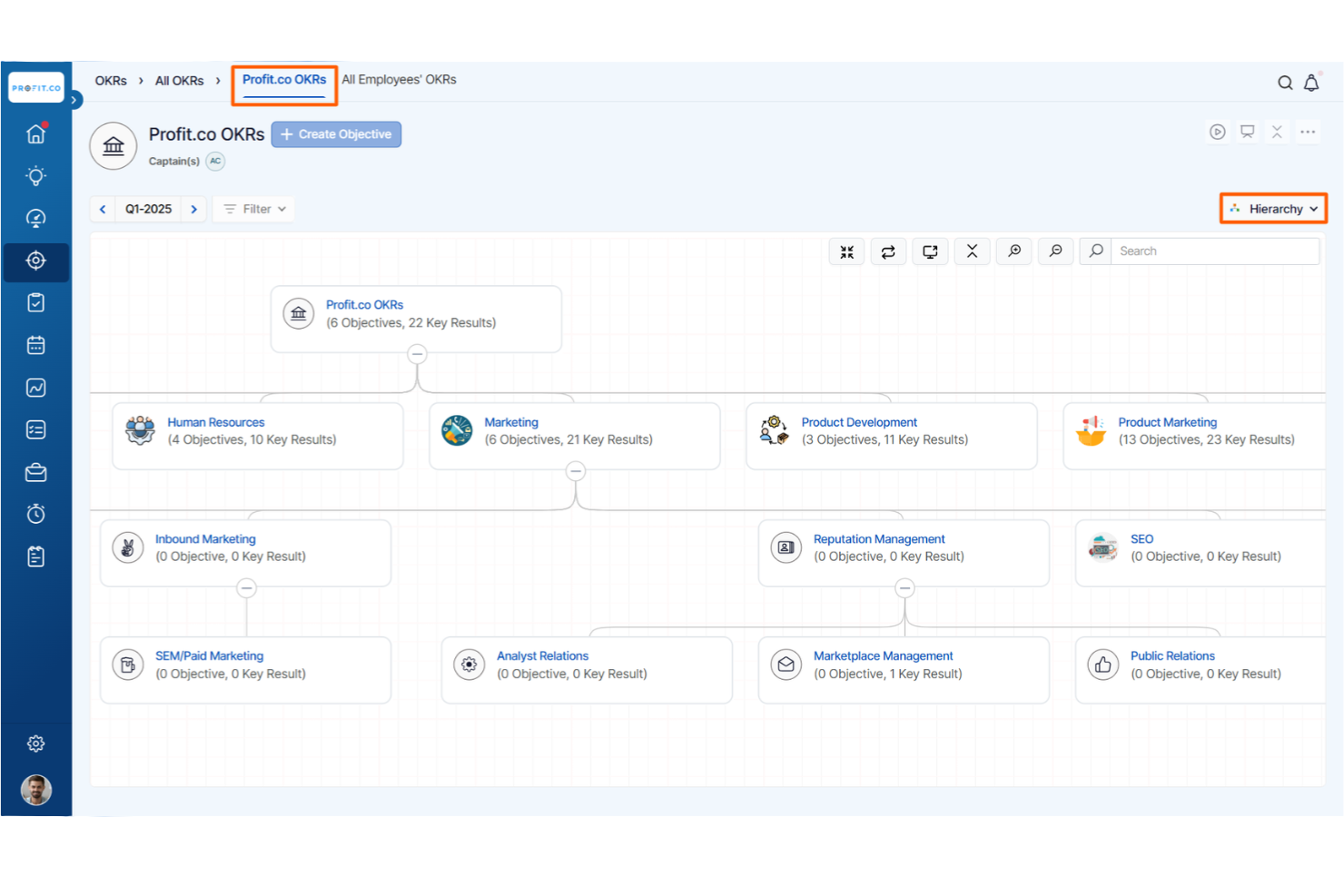
Profit.co stands out for startups that want to tailor their OKR process with customizable templates. This platform is a fit for founders, HR leads, and team managers who need flexibility in designing goal-setting frameworks that match their unique workflows. With Profit.co, you can adapt OKR templates to fit your company’s structure and evolving priorities.
Why I Picked Profit.co
For startups that want to shape their own OKR process, Profit.co’s customizable templates make it a strong choice. I picked Profit.co because it lets you build, modify, and reuse OKR templates to match your team’s structure and goals.
The platform also supports industry-specific templates, so you can start with a framework that fits your business and then adjust as needed. This flexibility helps startups create a goal-setting system that grows with them.
Profit.co Key Features
In addition to its flexible template options, Profit.co offers several other features that support startup teams:
- OKR Progress Dashboards: Track real-time progress on objectives and key results at individual, team, and company levels.
- Task Management Integration: Connect tasks directly to OKRs for better alignment and accountability.
- Automated Weekly Check-Ins: Schedule and automate regular check-ins to keep teams focused on their goals.
- Performance Review Tools: Link OKRs to performance reviews for a more structured evaluation process.
Profit.co Integrations
Integrations include Slack, Microsoft Teams, Jira, Salesforce, HubSpot, BambooHR, Google Sheets, Asana, Trello, and GitHub.
Pros and Cons
Pros:
- Performance reviews integrate with OKRs
- Built-in task management links to OKRs
- Customizable OKR templates for different teams
Cons:
- Some integrations require higher-tier plans
- Reporting exports limited to certain formats

Mooncamp
Best for modular workspace design
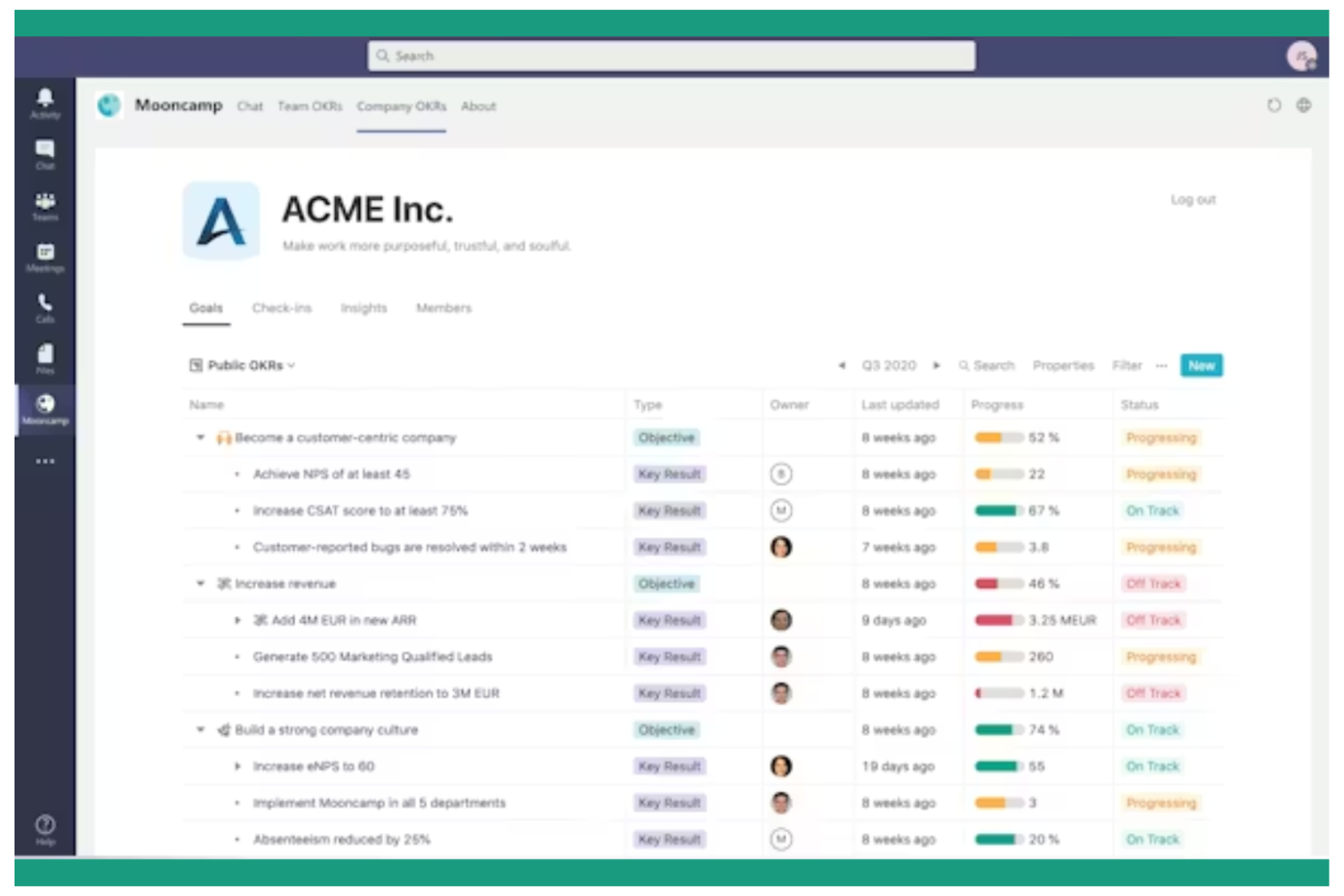
Mooncamp stands out for startups that want to design their own OKR workspace with flexible, modular building blocks. The platform lets you customize dashboards, goal structures, and workflows to fit your team’s unique way of working. If your startup values adaptability and wants to shape its own performance management environment, Mooncamp gives you the tools to do just that.
Why I Picked Mooncamp
What makes Mooncamp a strong choice for startups is its modular workspace design, which lets you build a goal-setting system that matches your team’s workflow. You can create custom dashboards, set up unique goal hierarchies, and design tracking views that fit your processes. I like that Mooncamp gives you the flexibility to adapt as your startup grows or pivots, without being locked into a rigid structure.
For teams that want to experiment and iterate on their OKR approach, Mooncamp offers a toolkit that supports that kind of agility.
Mooncamp Key Features
Some other features that caught my attention include:
- Automated Check-Ins: Schedule recurring check-ins to keep teams accountable and progress visible.
- OKR Templates: Use pre-built templates to quickly launch new OKR cycles.
- Slack Integration: Connect Mooncamp with Slack to update goals and receive notifications directly in your team’s chat.
- Custom Permissions: Set granular access controls for different roles and teams within your workspace.
Mooncamp Integrations
Integrations include Microsoft Teams, Slack, Asana, Azure DevOps, Google Sheets, HubSpot, Jira, Microsoft Planner, and Salesforce.
Pros and Cons
Pros:
- OKR templates speed up new cycle launches
- Slack and Teams integrations for daily workflows
- Let's you build custom OKR flows
Cons:
- Limited performance review features
- Pricing requires annual commitment for best rate

Cascade
Best for strategy execution tracking
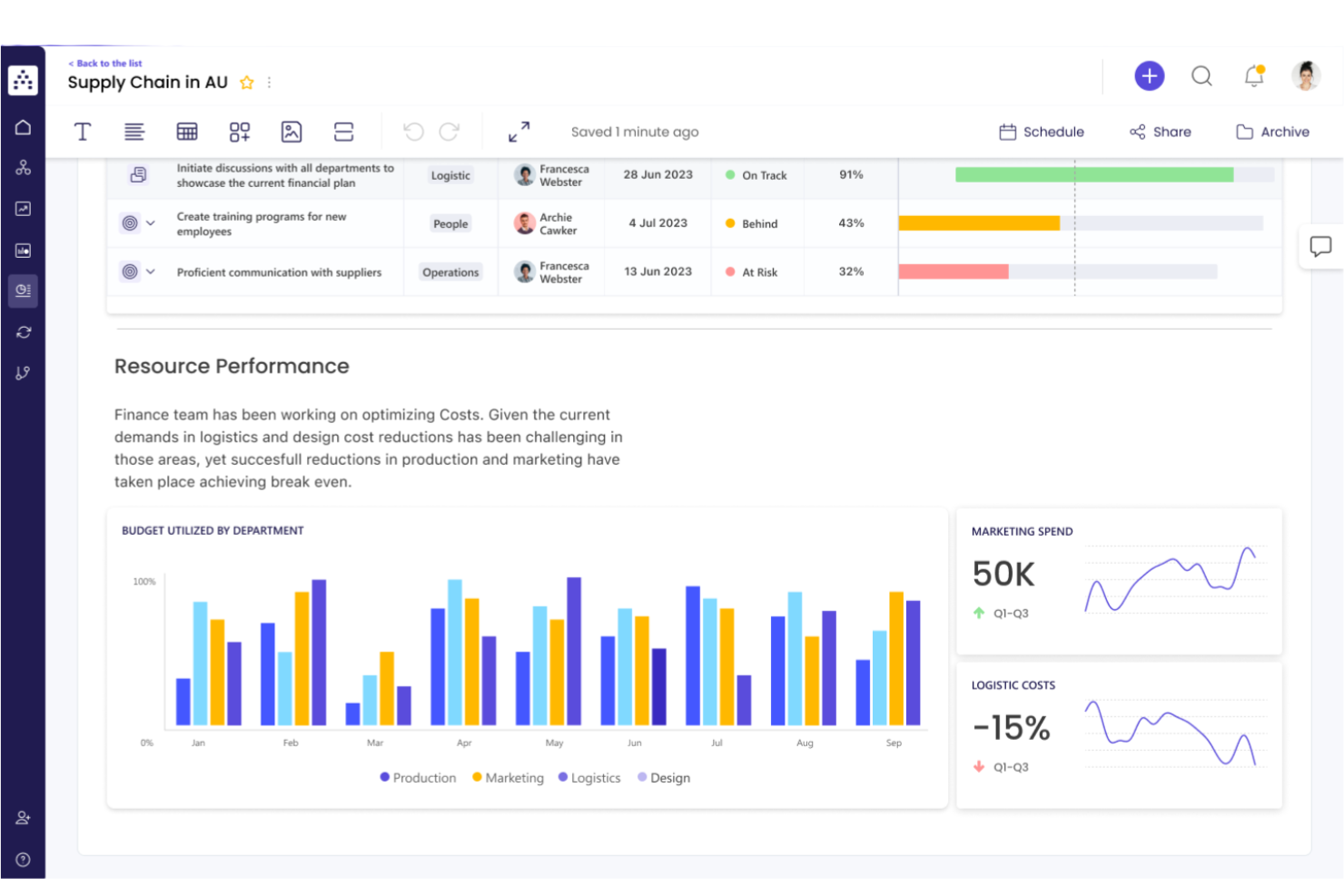
Cascade is built for startups that want to connect high-level strategy with day-to-day execution. The platform helps founders and teams track OKRs, projects, and KPIs in one place, making it easier to see how every initiative supports company goals. If you need a clear line of sight from strategy to results, Cascade offers tools to keep everyone aligned and accountable.
Why I Picked Cascade
What sets Cascade apart for startups is its focus on connecting strategy with execution, which is essential when you need to move quickly and keep everyone aligned. I picked Cascade because it lets you map out your strategic objectives and then break them down into actionable OKRs, projects, and tasks—all in one platform.
The tool’s live dashboards and progress tracking features help you see how every initiative contributes to your overall strategy. For startups looking to ensure that daily work drives long-term goals, Cascade’s approach to strategy execution tracking stands out.
Cascade Key Features
Some other features that make Cascade appealing for startups include:
- Goal Alignment Mapping: Visualize how individual, team, and company goals connect across the organization.
- Automated Progress Updates: Set up automated reminders and notifications for regular status check-ins.
- Customizable Reporting: Build and share custom reports to track performance metrics and OKR progress.
- Collaboration Workspaces: Create dedicated spaces for teams to discuss, plan, and update their goals and projects.
Cascade Integrations
Integrations include Jira, Salesforce, Microsoft Teams, Microsoft Excel, Google Sheets, Xero, Microsoft Outlook, Slack, Google Analytics, and Tableau.
Pros and Cons
Pros:
- Integrates with Jira and Salesforce
- Automated reminders for OKR check-ins
- Visual goal alignment mapping for teams
Cons:
- Occasional delays in dashboard data refresh
- Limited mobile app functionality for updates
Perdoo
Best for goal alignment mapping
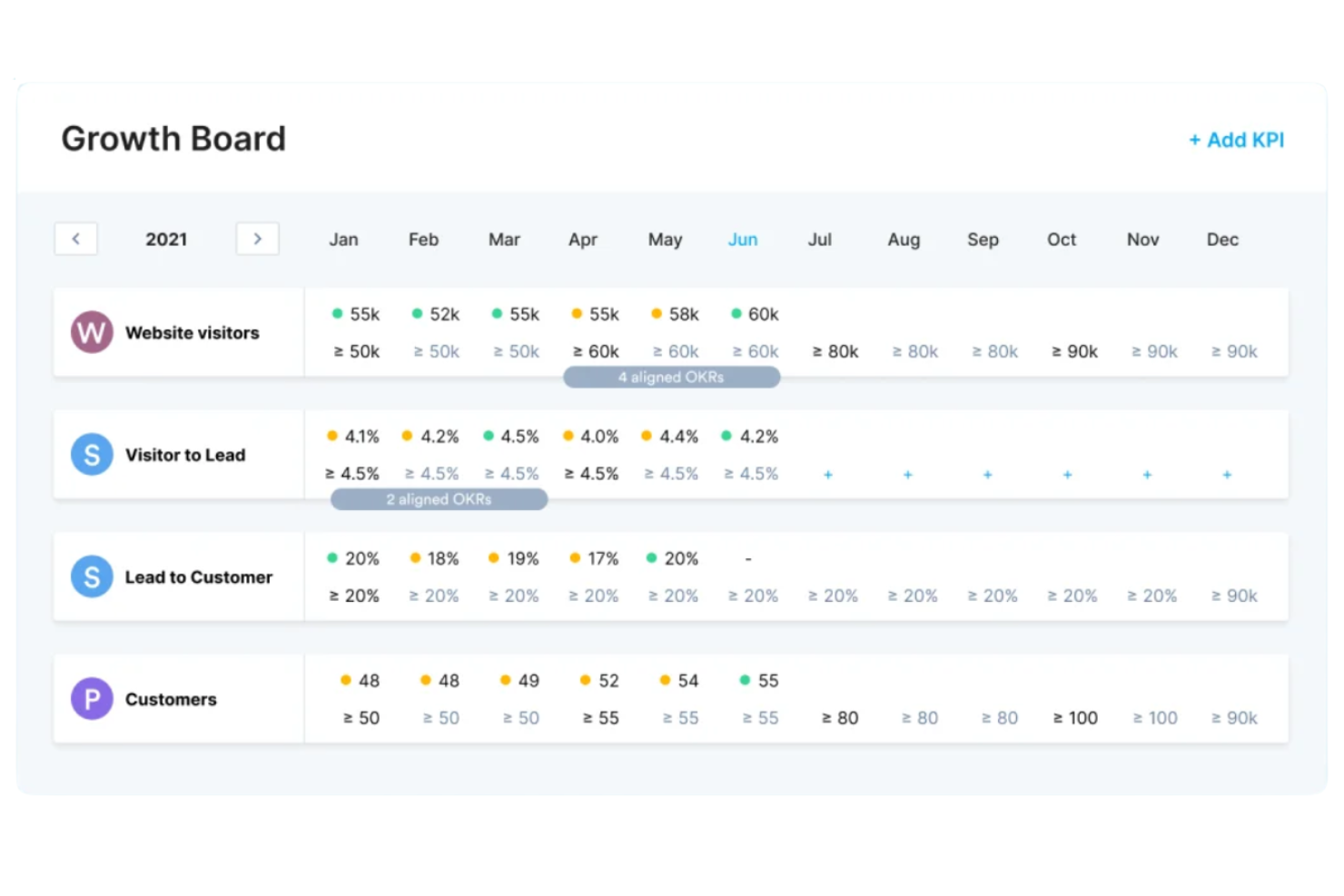
Startups looking to connect company goals with team and individual objectives may find Perdoo especially useful. This platform is designed for founders and HR leads who want to visualize how every goal fits into the bigger picture. Perdoo’s alignment mapping helps you spot gaps, overlaps, and dependencies so your team can stay focused and coordinated.
Why I Picked Perdoo
Perdoo offers a unique approach for startups that want to see exactly how goals connect across the organization. I picked it because its goal alignment mapping lets you visualize the relationships between company, team, and individual OKRs in a single view.
The roadmap feature helps you track dependencies and spot misalignments before they become issues. For founders and HR leads, this makes it easier to keep everyone moving in the same direction and quickly adjust priorities as your business evolves.
Perdoo Key Features
Some other features in Perdoo can help your startup manage OKRs more effectively:
- KPI Tracking: Monitor key performance indicators alongside your OKRs for a complete view of progress.
- Initiatives Management: Break down objectives into actionable initiatives and track their completion.
- Progress Visualization: Use charts and graphs to see real-time updates on goal achievement.
- Automated Reminders: Set up notifications to prompt regular check-ins and updates from your team.
Perdoo Integrations
Integrations include Slack, Microsoft Teams, Jira, Salesforce, Google Analytics, Asana, Power BI, Google Sheets, BambooHR, and Factorial.
Pros and Cons
Pros:
- Initiative tracking links tasks to objectives
- KPI dashboard tracks metrics alongside OKRs
- Alignment map shows real-time goal dependencies
Cons:
- Reporting exports lack advanced formatting options
- Limited offline access for remote teams
JOP
Best for guided onboarding workflows
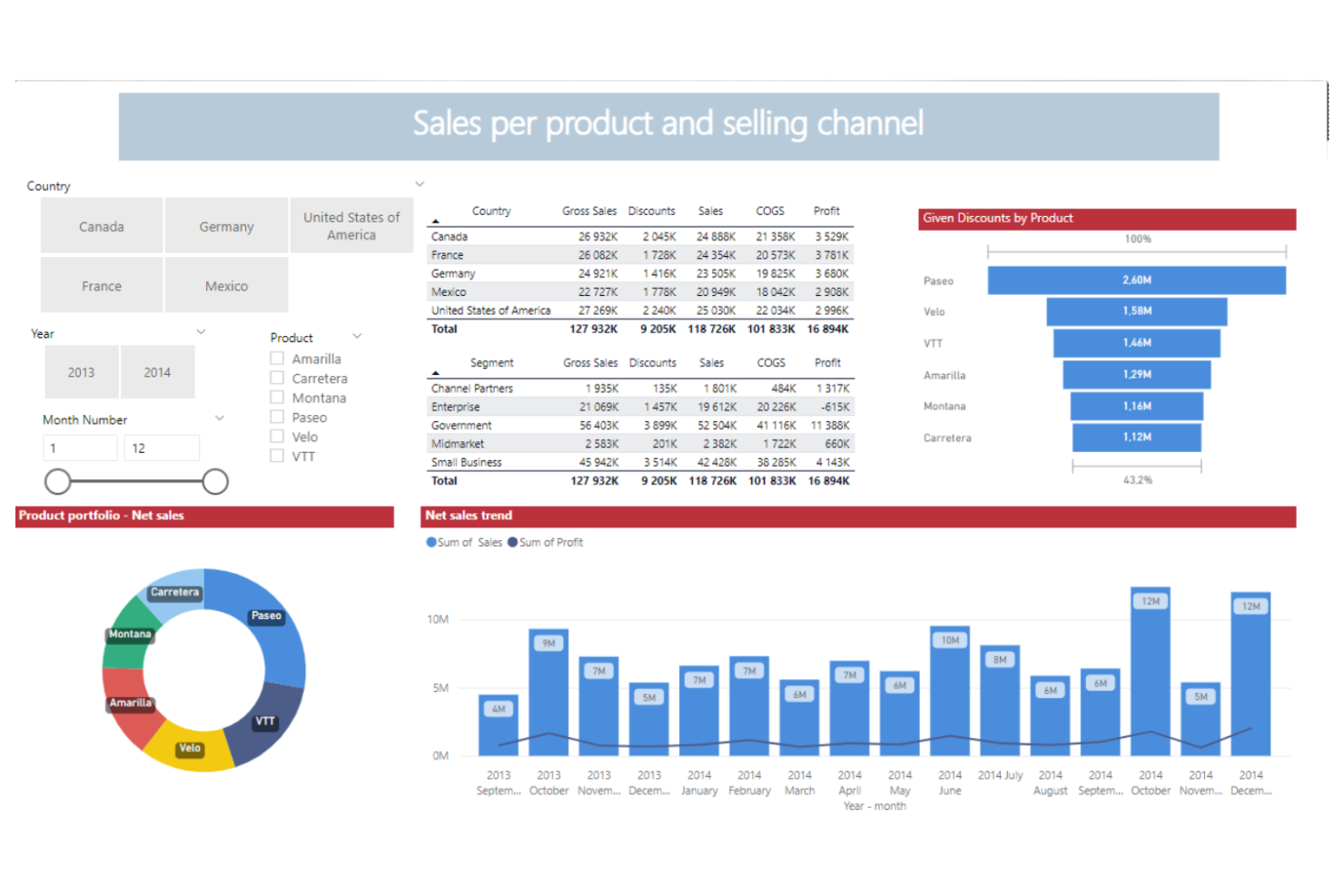
Startups looking for step-by-step OKR adoption often turn to JOP for its guided onboarding workflows. This platform is designed for founders, HR teams, and people managers who want to help teams quickly understand and implement OKRs. JOP’s structured approach helps new users build confidence and consistency as they roll out goal-setting across the company.
Why I Picked JOP
What sets JOP apart for startups is its focus on guided onboarding workflows that help teams adopt OKRs with confidence. I picked JOP because it offers interactive onboarding checklists and in-app tutorials that walk users through each step of the OKR process.
The platform also provides built-in templates and prompts to help teams set meaningful objectives and key results from day one. For startups new to structured goal-setting, JOP’s hands-on approach reduces confusion and accelerates adoption.
JOP Key Features
Some other features in JOP can help your team manage OKRs more smoothly:
- Progress Tracking Dashboard: View real-time updates on OKR progress across teams and individuals.
- Automated Reminders: Set up recurring notifications to prompt regular check-ins and updates.
- Performance Review Module: Link OKRs directly to performance reviews for a more connected evaluation process.
- Role-Based Access Controls: Assign permissions and visibility based on user roles within your organization.
JOP Integrations
Integrations include Slack, Google Sheets, Jira, Microsoft Excel, and Microsoft Teams.
Pros and Cons
Pros:
- Automated reminders for regular check-ins
- Built-in templates simplify initial OKR setup
- Step-by-step onboarding guides new OKR users
Cons:
- Limited analytics compared to advanced platforms
- Few native integrations with HRIS tools

Best for flexible review cycles
If your startup needs to run performance reviews on your own schedule, PeopleGoal by ProProfs gives you that flexibility. The platform is designed for teams that want to customize review cycles, feedback forms, and OKR tracking to fit their unique workflows. It’s a strong fit for founders and HR leads who want to adapt performance management as their company grows and changes.
Why I Picked PeopleGoal
Startups often need to adjust their review processes as teams grow and priorities shift, which is why I picked PeopleGoal for flexible review cycles. The platform lets you set up custom review schedules, so you’re not locked into rigid annual or quarterly cycles.
You can also tailor feedback forms and OKR templates to match your company’s evolving needs. For founders and HR leads who want to experiment with different performance management rhythms, PeopleGoal’s flexibility stands out.
PeopleGoal Key Features
Some other features that make PeopleGoal useful for startups include:
- 360-Degree Feedback: Collect feedback from peers, managers, and direct reports in one place.
- Goal Progress Tracking: Monitor individual and team OKR progress with visual dashboards.
- Template Library: Access a range of pre-built templates for reviews, surveys, and goal-setting.
- Custom Permissions: Set granular access controls for different roles and teams.
PeopleGoal Integrations
Integrations include ADP Workforce, BambooHR, Slack, Microsoft Azure, Workday, OneLogin, Okta, Amazon Web Services, Workable, and Namely.
Pros and Cons
Pros:
- 360-degree feedback built into workflows
- Customizable OKR templates for startups
- Flexible review cycles for dynamic team needs
Cons:
- Mobile experience lacks full feature parity
- No public API for custom integrations
Best for continuous feedback options
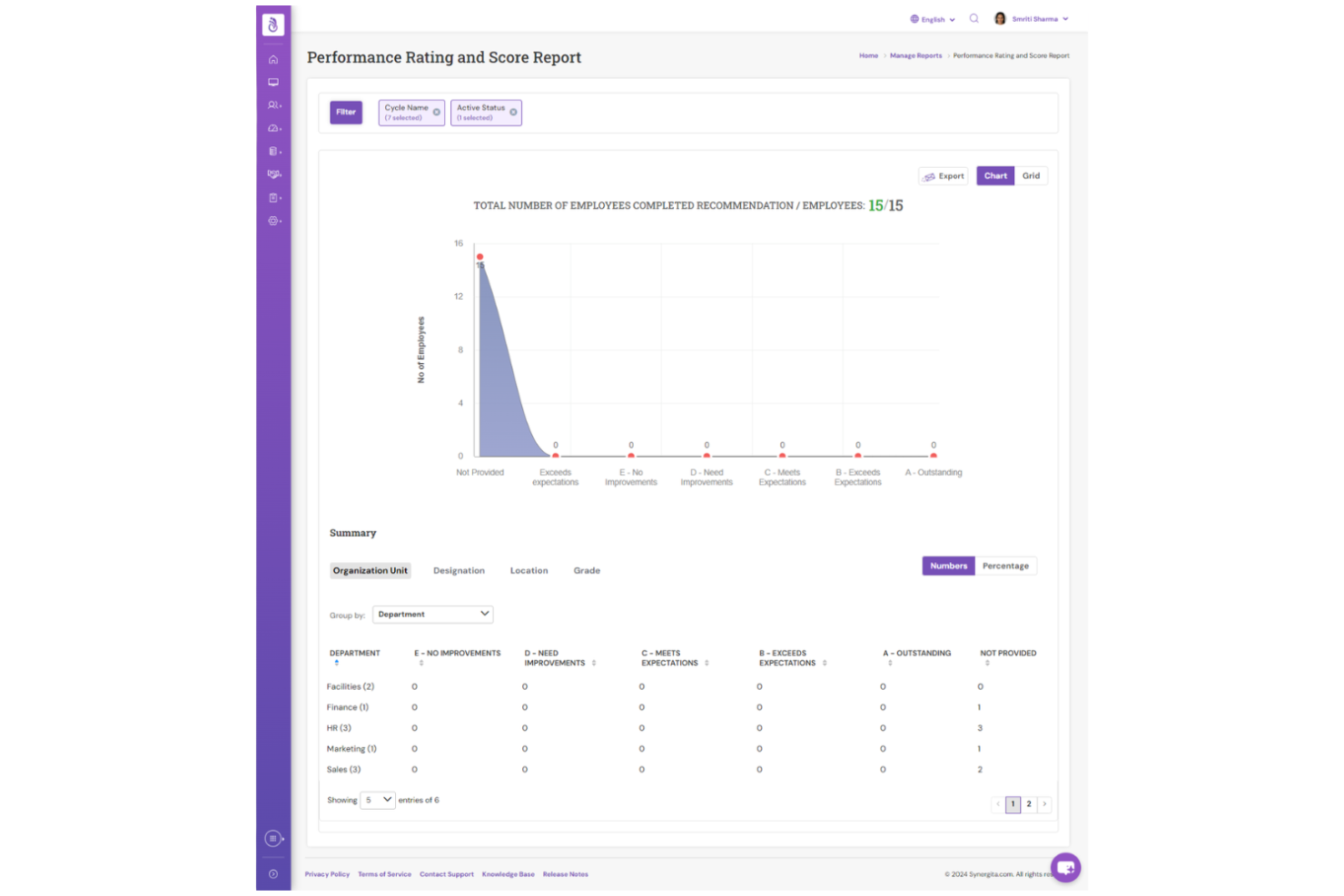
If your startup wants to build a culture of ongoing feedback, Synergita puts continuous conversations at the center of its OKR platform. The tool is especially useful for teams that value regular check-ins, peer recognition, and real-time progress updates. With Synergita, you can connect goals to feedback and development, making it easier to keep everyone engaged and aligned as your business grows.
Why I Picked Synergita
What drew me to Synergita is its strong focus on continuous feedback, which is especially valuable for startups looking to foster a culture of growth and transparency. The platform lets you set up ongoing feedback loops, so team members can share recognition and suggestions in real time—not just during formal reviews.
I appreciate how Synergita connects feedback directly to OKRs, making it easier to track progress and address challenges as they arise. For startups that want to keep conversations flowing and development front and center, Synergita offers a practical approach.
Synergita Key Features
In addition to its feedback-driven approach, Synergita offers several other features worth noting:
- Automated Review Cycles: Schedule and manage recurring performance and OKR review periods.
- Goal Cascading: Align individual, team, and organizational goals through structured goal-setting flows.
- Customizable Analytics Reports: Generate detailed reports on goal progress, engagement, and performance trends.
- Employee Recognition Badges: Enable peer-to-peer recognition with digital badges for achievements and milestones.
Synergita Integrations
Integrations include Jira, ADP Workforce Now, BambooHR, SAP SuccessFactors, Workday, Microsoft Teams, Slack, and API support for custom integrations.
Pros and Cons
Pros:
- Goal cascading supports startup team alignment
- Automated review cycles reduce manual follow-up
- Peer recognition badges for team engagement
Cons:
- Interface design feels dated to some users
- Limited integrations compared to larger platforms

Weekdone
Best for visual progress dashboards
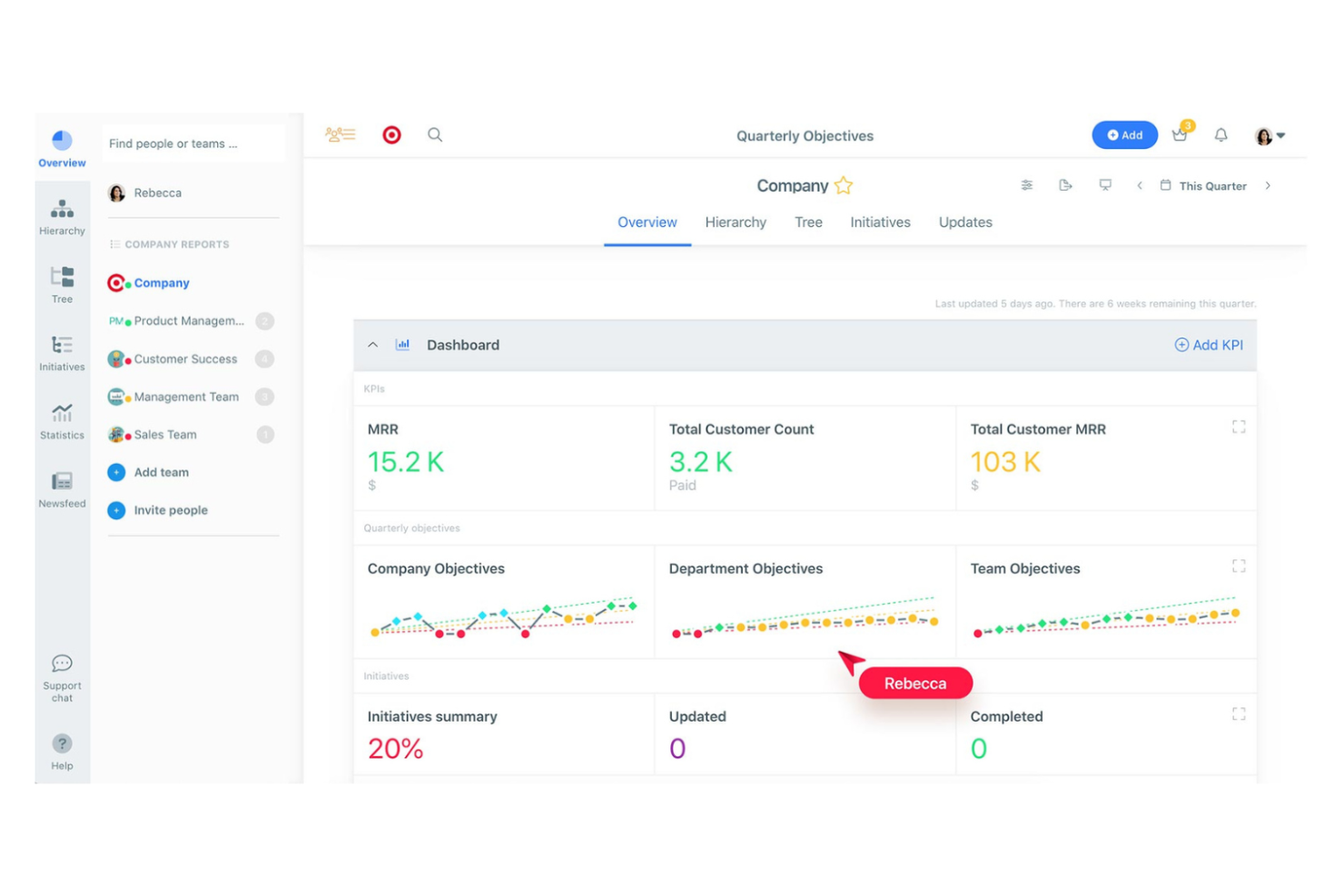
Startups looking to connect company goals with weekly execution may find Weekdone especially useful. This platform is designed for founders, managers, and people leads who want clearer visibility into how team and individual work support broader objectives. Weekdone’s OKR structure and weekly progress reporting make it easier to track priorities, spot blockers, and keep everyone aligned around what matters most.
Why I Picked Weekdone
Weekdone stands out for startups that want to make progress visible and actionable through visual dashboards. I picked it because its dashboard-centric approach lets you quickly spot trends, blockers, and achievements without digging through reports.
The platform’s progress bars and color-coded indicators make it easy to see how objectives and key results are tracking in real time. For early-stage teams that need to keep everyone focused and motivated, these visual cues help drive alignment and accountability.
Weekdone Key Features
Some other features in Weekdone can help your startup manage OKRs more effectively:
- Weekly Check-ins: Team members can submit short weekly updates to keep everyone informed about progress and challenges.
- OKR Hierarchy: Organize objectives and key results by team, department, or company level for better alignment.
- Automated Progress Reports: Generate regular reports that summarize OKR status and recent activity.
- Feedback and Recognition Tools: Give and receive feedback directly within the platform to encourage engagement and celebrate wins.
Weekdone Integrations
Integrations include Microsoft Teams, Slack, Jira, Asana, Basecamp, Google Tasks, Google Sheets, and Zapier.
Pros and Cons
Pros:
- OKR hierarchy supports company-wide alignment
- Built-in feedback tools support team engagement
- Visual dashboards make progress easy to track
Cons:
- No built-in performance review module
- Limited advanced analytics for OKR trends
Annen OKR-programvare for oppstartsbedrifter
Her er noen flere alternativer for OKR-programvare for oppstartsbedrifter som ikke kom med på kortlisten min, men som likevel er verdt å se nærmere på:
- Quantive
With advanced analytics tools
- Elate
For executive reporting features
- Keka HR
With AI-powered OKR recommendations
- Betterworks
For enterprise scalability
- Wrike
With project management integration
- Peoplebox.ai
For performance review linkage
- Lattice
For employee engagement insights
- Teamflect
For Microsoft Teams users
- Tability
For automated progress check-ins
- ClickUp
For workflow customization
- OKRs Tool
For multilingual goal tracking
- Workpath
For enterprise compliance support
- Simple OKR
For quick setup and onboarding
- monday work management
With visual timeline planning
- SugarOKR
For startup-focused templates


How I Evaluate OKR Software for Startups
I look at OKR tools across two layers—baseline capabilities like goal cascading, and differentiators like startup pricing and Slack integration.
Core Functionality (Table Stakes For This List)
When I'm selecting tools for my list, I rank each one on a scale from 0 (does not offer the functionality) to 5 (excels in this area) for each core functionality listed below. Then, I calculate the tool's total score into a percentage. Each tool needs to achieve a minimum total score of 65% to be considered for inclusion.
- OKR Goal Creation & Structure: I look for a dedicated OKR framework where you can write objectives, attach measurable key results, and organize them at company, team, and individual levels.
- Progress Tracking & Check-Ins: Regular check-in workflows matter here—things like weekly confidence scoring, automated reminders, and the ability for managers to comment on key result updates mid-cycle.
- Goal Alignment & Cascading: I evaluate how each tool visualizes connections between OKRs, such as showing how a sales hire's ramp-up goal ladders into a department revenue objective.
- Performance & People Integration: Tools like Lattice and 15Five tie OKRs directly into review cycles—I check whether the platform links goals to 1:1s, feedback, or performance reviews for HR-led workflows.
- Reporting & Dashboards: Founders and people ops leads need a quick read on OKR health, so I look for real-time dashboards that filter by team, status, or cycle without requiring manual exports.
- Startup-Friendly Scalability: Pricing and setup should fit a 10-person team today and a 200-person org next year—I evaluate whether free tiers, startup plans, or self-serve onboarding are available.
Once I have a list of tools that meet the criteria, I consider what sets each platform apart.
Differentiating Factors (What Sets Vendors Apart)
Here's how I compare and contrast different vendors:
Standout Features
AI-powered OKR drafting is a real differentiator for lean HR teams coaching first-time managers through goal-setting. I also evaluate how well a tool integrates with Slack or Microsoft Teams—startups live in chat, so getting check-in reminders and progress updates there keeps adoption high without adding another tab. Flexible cadence options matter too. Some startups run monthly sprints, not quarterly cycles, so I check whether the platform lets you customize OKR periods to match your team's rhythm.
Beyond Features
Pricing transparency is one of the first things I check. Startups need to know exactly what they're paying per seat and whether they can start on a free or discounted plan without committing to an annual contract. Time-to-value matters just as much—if a tool requires a dedicated implementation team or weeks of configuration, most startups will abandon it. I look for self-serve onboarding with prebuilt OKR templates. I also evaluate whether a platform scales gracefully, supporting a 15-person team today and a 200-person org after a Series B without forcing a migration.
Slik velger du OKR-programvare for oppstartsbedrifter
Det er lett å gå seg vill i lange funksjonslister og komplekse prisstrukturer. For å hjelpe deg med å holde fokus mens du går gjennom den unike prosessen med å velge programvare, er her en sjekkliste over faktorer du bør ha i bakhodet:
| Faktor | Hva bør du vurdere? |
|---|---|
| Skalerbarhet | Vil programvaren støtte teamet ditt når dere vokser fra 10 til over 100 ansatte? Sjekk brukerbegrensninger, prishopp og hvor godt verktøyet tilpasser seg nye team eller avdelinger. |
| Integrasjoner | Kan verktøyet kobles til den eksisterende teknologistakken din (Slack, Jira, Google Workspace, HRIS)? Vurder hvor mye manuelt arbeid som kreves for å synkronisere data eller automatisere oppdateringer. |
| Tilpasningsmuligheter | Kan du tilpasse målstrukturer, dashbord og tillatelser slik at de passer til oppstartsbedriftens unike arbeidsflyter? Unngå verktøy som tvinger deg til rigide prosesser eller begrenser fleksibiliteten etter hvert som virksomheten utvikler seg. |
| Brukervennlighet | Kommer teamet ditt faktisk til å bruke det? Se etter tydelig navigasjon, minimalt behov for opplæring og et oppsett som samsvarer med måten teamene allerede jobber på. Test med en liten gruppe før lansering. |
| Implementering og innføring | Hvor raskt kan du komme i gang? Vurder tilgangen på maler, veiledede omvisninger og støtte ved migrering. Spør hvor lang tid det vanligvis tar å lansere løsningen for oppstartsbedrifter på deres størrelse. |
| Kostnad | Er prisnivåene transparente og forutsigbare etter hvert som dere skalerer? Vær oppmerksom på skjulte gebyrer, krav om et minste antall lisenser eller funksjoner som er låst til dyrere abonnementer. Sammenlign årlige og månedlige kostnader. |
| Sikkerhetstiltak | Tilbyr leverandøren SSO, datakryptering og regelmessige sikkerhetsrevisjoner? Sørg for at verktøyet oppfyller personvernstandardene dine, særlig hvis du håndterer sensitive ansatt- eller virksomhetsdata. |
| Tilgjengelig kundestøtte | Hvilke kundestøttekanaler er tilgjengelige (chat, e-post, telefon), og når er de åpne? Vurder om du vil trenge hjelp utenfor vanlig arbeidstid eller under kritiske OKR-sykluser. |
Hva er OKR-programvare for oppstartsbedrifter?
OKR-programvare for oppstartsbedrifter er et digitalt verktøy som hjelper selskaper i tidlig fase med å sette, følge opp og administrere mål og nøkkelresultater på tvers av team. Disse plattformene tilbyr strukturerte rammeverk for målsetting, fremdriftssporing og rapporteringsfunksjoner som er utviklet for å støtte samkjøring og ansvarlighet etter hvert som oppstartsbedrifter vokser.
Ved å samle OKR-prosessene på ett sted kan oppstartsbedrifter tilpasse seg raskt, beholde fokuset og sikre at alle arbeider mot felles forretningsmål.
Funksjoner
Når du velger OKR-programvare for oppstartsbedrifter, bør du se etter følgende viktige funksjoner:
- Sporing av mål og nøkkelresultater: Lar deg sette, tildele og følge fremdriften for spesifikke mål og målbare nøkkelresultater for enkeltpersoner, team eller hele selskapet.
- Visualisering av fremdrift: Tilbyr oversikter, diagrammer eller tidslinjer som gjør det enkelt å se hvordan målene utvikler seg over tid, og hvor det er behov for oppmerksomhet.
- Automatiserte innsjekkinger: Gjør det mulig å sende planlagte påminnelser og oppfordringer til teammedlemmer om å oppdatere OKR-statusen sin, slik at alle holdes ansvarlige og engasjerte.
- Kartlegging av målsamsvar: Viser hvordan individuelle OKR-er og teamets OKR-er henger sammen med selskapets overordnede mål, slik at alle forstår hvilken innvirkning de har på bredere forretningsmål.
- Tilpassbare maler: Tilbyr forhåndsbygde OKR-maler som kan tilpasses behovene til oppstartsbedriften din, slik at det går raskere å starte nye målperioder.
- Rollebaserte tillatelser: Lar deg kontrollere hvem som kan se, redigere eller administrere OKR-er, slik at sensitiv informasjon bare er tilgjengelig for de rette personene.
- Integrasjoner: Kobler seg direkte til verktøy teamet ditt allerede bruker, for eksempel Slack, prosjektstyringsplattformer eller HR-systemer, for å administrere oppdateringer og kommunikasjon.
- Rapportering og analyse: Genererer rapporter om OKR-fremdrift, fullføringsgrad og trender, slik at ledere får handlingsrettet innsikt for beslutningstaking.
- Mobil tilgjengelighet: Lar brukere få tilgang til og oppdatere OKR-er fra mobile enheter, noe som støtter eksterne og distribuerte team.
- Kommentering og samarbeid: Tilbyr områder i appen der teammedlemmer kan diskutere fremdrift, dele tilbakemeldinger og samarbeide om mål i sanntid.
Vanlige AI-funksjoner i OKR-programvare for oppstartsbedrifter
I tillegg til standardfunksjonene i OKR-programvare for oppstartsbedrifter som er nevnt ovenfor, tar mange av disse løsningene i bruk AI med funksjoner som:
- Automatiske målforslag: Bruker AI til å analysere tidligere resultatdata og anbefale relevante mål og nøkkelresultater som er tilpasset prioriteringene til teamet eller selskapet ditt.
- Prediktiv prognostisering av fremdrift: Bruker maskinlæring på nåværende og historiske OKR-data for å forutsi sannsynligheten for å nå bestemte mål, slik at ledere kan identifisere risikoer tidlig.
- Språkbehandling for oppdateringer: Lar brukere skrive inn fremdriftsoppdateringer med naturlig språk, som AI deretter tolker og oversetter til strukturerte OKR-data.
- AI-drevet innsikt og anbefalinger: Gir handlingsrettede forslag for å forbedre måloppnåelsen, for eksempel ved å identifisere mål som har stoppet opp eller anbefale fokusområder basert på teamets aktivitet.
- Sentimentanalyse av innsjekkinger: Analyserer tonen og innholdet i teamets innsjekkinger for å avdekke mulige problemer med engasjement eller arbeidsmoral, noe som støtter proaktive HR-tiltak.
Fordeler
Implementering av OKR-programvare for oppstartsbedrifter gir flere fordeler for teamet og virksomheten din. Her er noen av fordelene du kan se frem til:
- Tydelig samsvar mellom mål: Sikrer at alle forstår hvordan arbeidet deres henger sammen med selskapets mål gjennom visuell kartlegging og strukturerte OKR-rammeverk.
- Raskere beslutningstaking: Tilbyr oversikter og analyser i sanntid som hjelper ledere med raskt å identifisere fremdrift, flaskehalser og områder som trenger oppmerksomhet.
- Forbedret ansvarlighet: Bruker automatiserte innsjekkinger og rollebaserte tillatelser for å holde teamene engasjerte og ansvarlige for målene sine.
- Skalerbar målstyring: Tilpasser seg enkelt etter hvert som oppstartsbedriften vokser, og støtter nye team, endrede prioriteringer og arbeidsprosesser i utvikling uten at fokuset går tapt.
- Forbedret samarbeid: Tilbyr kommentering i appen og integrasjoner med kommunikasjonsverktøy, noe som gjør det enklere for team å diskutere fremdrift og dele tilbakemeldinger.
- Datadrevet innsikt: Leverer handlingsrettede rapporter og i noen tilfeller AI-drevne anbefalinger som hjelper deg med å optimalisere målsetting og måloppnåelse.
- Forenklet introduksjon: Tilbyr maler, veiledede omvisninger og opplæringsressurser som hjelper nye brukere med å komme i gang og raskt få utbytte av løsningen.
Kostnader og priser
Valg av OKR-programvare for oppstartsbedrifter krever en forståelse av de ulike prismodellene og abonnementene som er tilgjengelige. Kostnadene varierer basert på funksjoner, teamstørrelse, tillegg og mer. Tabellen nedenfor oppsummerer vanlige abonnementer, gjennomsnittsprisene deres og typiske funksjoner som inngår i OKR-programvareløsninger for oppstartsbedrifter:
Sammenligningstabell for OKR-programvare for oppstartsbedrifter
| Abonnementstype | Gjennomsnittspris | Vanlige funksjoner |
|---|---|---|
| Gratisabonnement | $0 | Grunnleggende OKR-sporing, begrenset antall brukere, enkle dashbord og brukerstøtte via e-post. |
| Personlig abonnement | $5-$10/bruker/måned | Individuell OKR-administrasjon, visualisering av fremdrift, grunnleggende rapportering og begrensede integrasjoner. |
| Bedriftsabonnement | $10-$25/bruker/måned | OKR-samkjøring for team, automatiserte innsjekkinger, avansert analyse, rollebaserte tillatelser og integrasjoner. |
| Virksomhetsabonnement | $25-$50/bruker/måned | Tilpassede arbeidsflyter, forbedret sikkerhet, dedikert brukerstøtte, avansert rapportering og funksjoner for samsvar. |
Vanlige spørsmål om OKR-programvare for oppstartsbedrifter
Her er noen svar på vanlige spørsmål om OKR-programvare for oppstartsbedrifter:
Hvordan vet jeg om oppstartsbedriften min er klar for OKR-programvare?
Hvis teamet ditt har problemer med å samkjøre seg om mål, følge fremdriften eller opprettholde ansvarlighet mens dere vokser, er dere sannsynligvis klare for en dedikert programvareløsning. Oppstartsbedrifter har ofte nytte av disse verktøyene når de når 10 eller flere ansatte eller begynner å skalere på tvers av flere team. Selv om mange gründere begynner med å følge mål i regneark, sørger overgangen til en plattform som er utviklet for OKR-metodikken for at det høytytende teamet ditt holder fokus på arbeidet som har størst betydning.
Kan OKR-programvare integreres med de eksisterende verktøyene våre?
Ja, de fleste SaaS-plattformer for oppstartsbedrifter tilbyr integrasjoner med populære verktøy som Slack, plattformer for prosjektstyring og HR-systemer. Noen lar deg også visualisere mål sammen med et Kanban-brett eller en arbeidsflate for å se hvordan daglige oppgaver henger sammen med helheten. Sjekk integrasjonslisten til hver leverandør for å sikre kompatibilitet med den nåværende teknologiplattformen deres og en god brukeropplevelse.
Hva bør jeg se etter når det gjelder introduksjon og brukerstøtte?
Se etter brukervennlige plattformer som tilbyr veiledede produktintroduksjoner, opplæringsressurser og responsiv kundestøtte. Disse ressursene hjelper teamet ditt med å komme raskt i gang og løse problemer etter hvert som de oppstår, noe som er spesielt viktig i den innledende fasen av OKR-implementeringen for hurtigvoksende oppstartsbedrifter. Et verktøy som tilbyr OKR-eksempler, kan også være svært nyttig for team som er nye innen rammeverket.
Er OKR-programvare sikker nok for sensitive forretningsdata?
Ja, anerkjente leverandører av OKR-programvare bruker kryptering, SSO og regelmessige sikkerhetsrevisjoner for å beskytte dataene dine. Gå alltid gjennom sikkerhetsdokumentasjonen til hver leverandør og spør om samsvar med relevante standarder før du tar en beslutning. Å velge riktig OKR-programvare innebærer å finne en balanse mellom tilgjengelighet for teamet ditt og sikkerhet på profesjonelt nivå for den proprietære strategien deres.
Hvor mye tilpasning gir disse verktøyene mulighet for?
De fleste OKR-programmer for oppstartsbedrifter lar deg tilpasse målstrukturer, dashbord og tillatelser. Etter hvert som dere skalerer, kan det hende at dere trenger avanserte funksjoner som nestede delmål eller vektet fremdriftssporing. Noen verktøy tilbyr mer fleksibilitet enn andre, så vurder hvordan bruken av OKR-er vil utvikle seg i den spesifikke arbeidsflyten deres når dere vurderer alternativene.