

10 beste programvarer for eiendelsforvaltning i 2026: Anmeldt

10 Kortliste over den beste programvaren for eiendelsadministrasjon


Den beste programvaren for eiendelsadministrasjon hjelper HR-medarbeidere med å få kontroll over virksomhetens eiendeler ved å erstatte rotete regneark og utdaterte systemer med verktøy som automatiserer sporing, effektiviserer inn- og utsjekking, overvåker vedlikeholdsplaner og forhindrer kostbare tap.
Hvis du er frustrert over manglende utstyr, tidkrevende manuelle oppdateringer eller usikkerhet rundt hvilke eiendeler teamet ditt faktisk har, er du ikke alene. Mange HR-ledere møter disse utfordringene, særlig når virksomhetene deres vokser eller innfører hybridarbeid. Med den rette plattformen får du full oversikt over hver bærbare datamaskin, telefon og hvert adgangskort, reduserer manuelle feil og sparer verdifull tid.
Etter å ha gjennomgått dusinvis av løsninger for eiendelsadministrasjon har jeg valgt ut de beste alternativene for HR-drift basert på brukervennlighet, integrasjonsmuligheter, rapportering og samlet effekt. I denne veiledningen går jeg gjennom de beste systemene, slik at du trygt kan velge programvare som dekker teamets behov i dag – og utvikler seg sammen med dere i morgen.
Hvorfor du kan stole på våre programvareanbefalinger
Teamet vårt har testet og anmeldt programvare siden 2012. Vi er selv HR-eksperter, så vi vet hvor vanskelig og hvor viktig det er å velge riktig programvare.
I denne guiden har vi vurdert verktøyene gjennom praktisk testing og uavhengig research og gitt dem poeng ut fra våre utvelgelseskriterier. Vi bygger også på innsikt fra ledende eksperter i bransjen og erfarne HR-eksperter.
Anmeldelsene våre bygger på vår egen redaksjonelle vurdering. De er ikke et salgsargument.
Ekspertanmeldere:
Hva er programvare for eiendelsadministrasjon?
Programvare for eiendelsadministrasjon er et digitalt verktøy som hjelper virksomheter med å spore, administrere og vedlikeholde fysiske eiendeler som bærbare datamaskiner, utstyr og kontorenheter. Den brukes ofte av HR-, IT- og driftsteam for å erstatte manuelle regneark, redusere tap av eiendeler og effektivisere inn- og utsjekking av utstyr, revisjoner og vedlikeholdsoppgaver.
Denne programvaren gir bedre oversikt, automatiserer rutinemessig sporing og hjelper team med å ta smartere beslutninger om innkjøp og vedlikehold – samtidig som den sparer tid og reduserer driftskostnadene.
Sammenligningstabell: Programvare for eiendelsadministrasjon
Denne sammenligningstabellen oppsummerer prisinformasjon, prøveperioder og demodetaljer for mine beste utvalgte programmer for eiendelsadministrasjon.
| Tool | Best For | Trial Info | Price | ||
|---|---|---|---|---|---|
| 1 | Best for IT software that simplifies device and app management | 14-day free trial | From $8/user/month (billed annually) | Website | |
| 2 | Best for tracking software, hardware, SaaS subscriptions, and fixed assets | 14-day free trial | From $19/user/month (billed annually) | Website | |
| 3 | Best for global asset management in 130+ countries | Free demo available | from $5/person/month | Website | |
| 4 | Best for hybrid asset lifecycle tracking | Free demo available | Pricing upon request | Website | |
| 5 | Best for customizable preventive maintenance scheduling | 30-day free trial + free demo available | Single plan at $35 per user/month (billed annually) | Website | |
| 6 | Best for visual search and NPL | 7-day free trial | From $100/month | Website | |
| 7 | Best asset management solution for tracking maintenance requests and work orders | Free plan available | From $20/user/month (billed annually) | Website | |
| 8 | Best scalable asset management platform for automated preventative maintenance | Free demo available | Pricing upon request | Website | |
| 9 | Best for growing teams managing IT assets | 7-day free trial | From $29.99/user/month | Website | |
| 10 | Best for simplifying IT asset onboarding | Free demo + 30-day free trial available | From $1,499/year | Website |


Anmeldelser av den beste programvaren for eiendelsadministrasjon
Her er mine detaljerte sammendrag av den beste programvaren for eiendelsadministrasjon som kom med på topp 10-listen min, inkludert informasjon om de viktigste funksjonene, integrasjonene og et øyeblikksbilde av brukergrensesnittet.

Best for IT software that simplifies device and app management

Rippling is an HR software provider with additional expertise in device and inventory management and app and identity management arenas.
Their IT Cloud works in tandem with their HR Cloud, simplifying the process of designating assets like computer hardware and software to new employees during their onboarding process, or similarly deactivating them if and when employees leave the company.
Rippling simplifies the IT asset management process by allowing you to purchase computer equipment through Rippling and provision the device with all necessary apps. You can also enable single sign-on, enforce security policies, and update all relevant user groups.
Additional features within their platform include a device threat detection function, a remote lock and wipe feature, multi-factor authentication, and a team password management function.
Rippling’s IT Cloud integrates with password management programs like 1Password, LastPass, Dashlane Business, and Keeper, with compliance platforms like Drata, Laika, Secureframe, Tugboat Logic, Vanta, and VGS Control, and with other security platforms.
New Product Updates from Rippling IT

Rippling IT Launches Helpdesk for Agentic Support
Rippling IT launches Helpdesk with automated ticket resolution, contextual troubleshooting, approvals, escalations, and activity logging. These features help IT teams resolve routine employee requests with less manual work. For more information, visit Rippling’s official site.
 .
.
Best for tracking software, hardware, SaaS subscriptions, and fixed assets

Freshservice is an ITAM (IT asset management) platform that was built to help organizations reduce IT costs and improve asset lifespan through proactively scheduled maintenance.
You can manage all phases of the typical asset lifecycle, including procurement, discovery, utilization, maintenance, and retirement. Their analytics also assist with forecasting future IT costs too.
Their software doubles as a configuration management database (CMDB) and can be used to track any sort of IT-related asset, including software, hardware, and software-as-a-service (SaaS) subscriptions. Asset managers will also appreciate the ability to automate common processes to save their IT teams time.
Other useful features that come with Freshservice include inventory and purchase order management modules, relationship mapping tools, and an automated asset discovery tool that catalogs all assets in your network at any given time.
Their mobile app also allows end-users to scan barcodes or QR codes to track non-IT, fixed assets too, making physical inventory management easy on any Android or iOS mobile device.
Integrations include Freshdesk, Freshbooks, Bomgar, CloudWatch, Dropbox, Jira, Google Suite, Microsoft Teams, Slack, Quickbooks, Zapier, Zoom, and other systems.
New Product Updates from Freshservice
 Experience)
Freshservice Introduces a Reimagined IT Asset Management (ITAM) Experience
Freshservice introduces a reimagined IT Asset Management (ITAM) experience with continuous infrastructure discovery, dependency mapping, IPAM, and Software License Management. This update helps teams improve asset visibility and manage connected IT environments more effectively. For more information, visit Freshservice’s official site.
Deel IT
Best for global asset management in 130+ countries

Deel is a comprehensive platform that combines HR, payroll, and global workforce management tools, making it an ideal choice for businesses operating across multiple countries. Its IT suite provides businesses with a unified platform to manage IT operations, enabling them to procure, deploy, track, and support equipment.
Deel IT excels as an asset management software by offering extensive features that cater to the needs of global businesses. It provides end-to-end equipment management, covering everything from sourcing and setup to ongoing maintenance, repairs, replacements, and returns. Furthermore, its centralized device management system gives businesses real-time visibility and control over all IT assets.
What makes Deel IT particularly suited for global asset management in 130+ countries is its ability to automate and standardize IT processes across multiple locations. Companies can set up custom workflows for onboarding and offboarding, with pre-configured devices shipped directly to employees with all necessary apps, software, and security controls.
Deel IT also offers flexible procurement options, rapid deployment of devices, and support for both owned and leased equipment, allowing businesses to manage their IT assets efficiently.
Integrations include Slack, Google Workspace, Microsoft Teams, BambooHR, Greenhouse, SAP SuccessFactors, Okta, and Azure Active Directory.
Best for hybrid asset lifecycle tracking

OfficeSpace is a workplace operations platform built for managing physical assets, from IT hardware to office equipment. It gives you a centralized space to track, assign, and monitor workplace resources, with tools to support maintenance, reporting, and compliance needs.
I chose OfficeSpace because of how it helps IT, facilities, and operations teams maintain control over asset inventory and maintenance cycles.
You can view asset locations, condition, and value in one place and set up automated work orders tied to warranties or preventive schedules. It also supports depreciation tracking and audit prep, which helps finance stay in sync with facilities.
The platform connects teams and data across departments—letting you break down silos and track assets throughout their lifecycle, from procurement to decommissioning. Plus, it works well for hybrid environments where teams split time between remote and in-office work.
Notable features include mobile support for field teams, dashboards for financial and operational reporting, recurring maintenance triggers, and audit logs for compliance. You can also allocate assets to people, teams, or spaces, and monitor total cost of ownership over time.
Integrations include Microsoft Teams, Google Workspace, Slack, Zoom, Workday, Okta, Active Directory, and kiosks or digital signage tools.
New Product Updates from OfficeSpace

OfficeSpace Adds Work Order Status and Cost Reports
OfficeSpace adds Work Order Status and Work Order Cost reports for built-in maintenance reporting. These reports help facilities teams track work order activity and costs without relying on manual spreadsheets. For more information, visit OfficeSpace’s official site.
 .
.
Best for customizable preventive maintenance scheduling
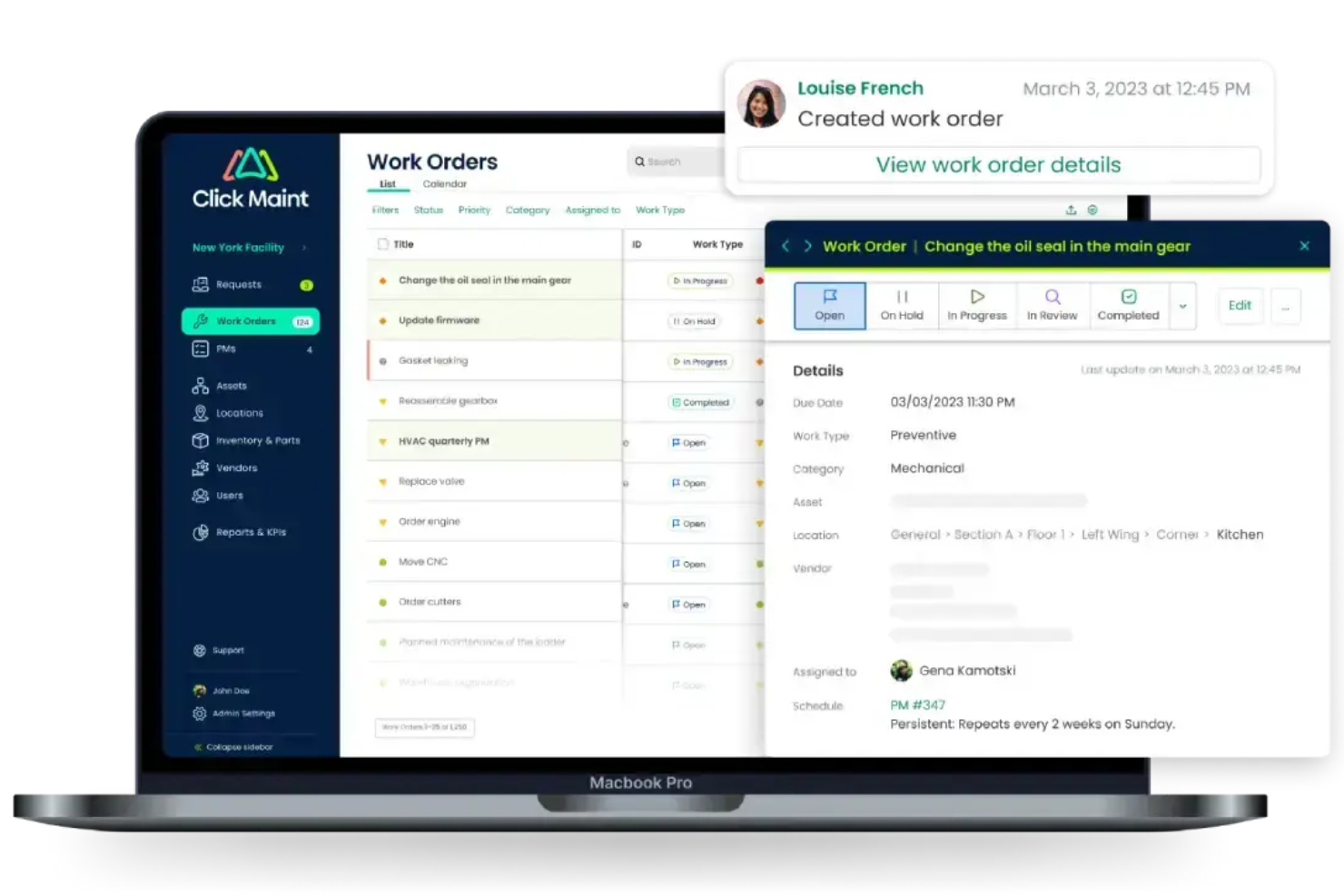
Click Maint CMMS is a maintenance management platform that tracks physical assets by location, manages work orders, schedules preventive maintenance, and controls parts inventory across facilities.
Who Is Click Maint CMMS Best For?
Click Maint CMMS is a good fit for maintenance managers and facility teams in industries like manufacturing, hospitality, and property management who need to manage assets and work orders across multiple locations.
Why I Picked Click Maint CMMS
I've included Click Maint CMMS in my top picks because its preventive maintenance scheduling goes well beyond basic calendar reminders. You can configure PM triggers across hourly, daily, weekly, monthly, and annual intervals, and tie each schedule directly to a specific asset or location. I also like that each PM record can carry its own task checklist, assigned technician or team, priority level, and parts costs—so every scheduled job arrives with full context, not just a due date.
Click Maint CMMS Key Features
- QR code asset tagging: Generate and print QR codes for any asset, then scan them via the mobile app to instantly pull up asset details, history, or open a work order.
- Parts and inventory management: Track parts stock levels across multiple storerooms, set reorder points, and log parts usage directly against work orders and assets.
- Asset maintenance history log: View a complete record of all work orders, costs, and downtime events tied to each individual asset over its lifecycle.
- Work order status tracking: Create, assign, and monitor work orders through their full lifecycle, from open to in-progress to completed, with priority and cost fields on each record.
Click Maint CMMS Integrations
Click Maint's open API makes it easy to integrate with ERP, accounting, and other business systems. The company's engineering team can work directly with your IT staff to set up custom integrations. Native integrations with specific third-party vendors are not clearly documented.
Pros and Cons
Pros:
- Fast setup across multiple site locations
- Tracks asset downtime with logged periods
- QR code scanning for quick asset lookup
Cons:
- Cannot connect with IoT sensors yet
- Mobile app less capable than desktop version

Pics.io
Best for visual search and NPL

Pics.io offers a dynamic solution for businesses and creative teams seeking to efficiently manage and organize their digital content. Tailored for mid-sized to enterprise-level organizations, it addresses the challenges of securely storing, sharing, and retrieving media assets. With its intuitive interface, Pics.io transforms how teams collaborate and maintain their digital libraries, ensuring that your creative workflow remains uninterrupted and organized.
Why I Picked Pics.io
I picked Pics.io for its unique ability to provide advanced search capabilities that are essential for asset management. The software's visual search and natural language processing allow you to find similar images and files quickly, which is invaluable for teams managing large digital libraries. Additionally, its version control ensures that you always have access to the latest file versions, reducing the risk of errors and outdated content. These features make Pics.io a compelling choice for businesses that need to maintain an organized and efficient digital asset workflow.
Pics.io Key Features
In addition to its standout search and version control capabilities, Pics.io offers several other features that enhance its value as an asset management tool.
- AI-Powered Automation: The platform includes features like auto-tagging and facial recognition to organize and retrieve assets.
- Role-Based Access Management: Securely collaborate with your team by setting user permissions based on roles, ensuring that only authorized users access specific content.
- Integration with Google Drive and Amazon S3: Connect your existing storage solutions to Pics.io for a unified digital asset management experience.
- Custom Metadata: Enhance your file organization and searchability by adding custom metadata, making it easier to locate and manage files.
Pics.io Integrations
Integrations include Google Drive, Amazon S3, Salesforce, HubSpot, Adobe Creative Cloud, Zapier, Google Workspace, Monday.com, Trello, Shopify, and WordPress.
Pros and Cons
Pros:
- AI powered auto tagging
- Strong version control tools
- Advanced visual and AI search
Cons:
- Limited built in analytics
- Limited offline access available
New Product Updates from Pics.io
Pics.io Adds AVIF File Support
Pics.io now supports AVIF files, expanding the image formats you can upload and manage in the platform. This gives teams more flexibility when working with modern image assets. For more information, visit Pics.io’s official site.
 .
.
Best asset management solution for tracking maintenance requests and work orders

MaintainX is an equipment and asset management software system with a strong focus on tracking the operating status of physical assets and equipment. You can use their software to determine which equipment is active or inactive, track time between equipment failures, or create work orders for maintenance.
To reduce your overall downtime, they have a preventive maintenance autopilot feature that automatically schedules equipment servicing proactively, before you experience a breakdown. Users will also appreciate MaintainX’s detailed metrics, which cover everything from asset locations to maintenance records, and work history to time vs. cost reports.
MaintainX integrates with enterprise resource planning (ERP) systems like Infor, Microsoft Dynamics 365, Oracle and SAP, with data management programs like MachineMetrics, Tableau and Zapier, and other popular accounting and fleet management tools.
Pricing for MaintainX starts at $8.33/user/month. You can also request a free trial or free demo through their website. In addition, they have a basic freemium plan with limited features for small teams.

Limble
Best scalable asset management platform for automated preventative maintenance

Limble is a CMMS and asset management platform designed to support businesses and industries of all scales, with a focus on reducing downtime, improving productivity, and ensuring compliance with industry regulations.
Its asset management capabilities include functionalities such as preventive maintenance, work orders, advanced reporting, parts inventory, downtime tracking, and workflow automation. I especially like that it allows you to track assets associated with different work orders, vendors, parts, and even preventative maintenance tasks.
Furthermore, it offers the ability to automate preventive maintenance scheduling. Users can create preventive maintenance (PM) templates, add standard operating procedures (SOPs) and checklists, and optimize PM schedules based on asset history. This helps in reducing unexpected breakdowns and extending the life of assets.
Limble offers a free plan with essential features. Paid plans begin at $28/user/month.

Best for growing teams managing IT assets

EZO AssetSonar is an IT Asset Management (ITAM) platform designed to support growing IT teams. It brings hardware, software, and SaaS management together in one system, helping organizations improve visibility, maintain control, and support compliance at scale.
I chose Ezo AssetSonar for its ability to offer real-time monitoring that ensures compliance and security within your IT environment. This feature allows you to stay ahead by identifying vulnerabilities and maintaining the integrity of your assets. Additionally, the software license optimization helps you manage your licenses effectively, ensuring you’re not overpaying for unused licenses and staying compliant with licensing agreements.
Another reason I picked Ezo AssetSonar is its focus on shadow IT management. This feature helps you identify unauthorized software within your network, reducing security risks. The asset dependency visibility feature is also noteworthy, as it aids in faster incident resolution by providing insights into asset relationships and dependencies, enhancing your team's productivity.
Features include a mobile app that allows on-the-go asset tracking, ensuring that you have full visibility and control wherever you are. The platform also offers IT service management, providing a service catalog that enhances the handling of IT requests and incidents. Furthermore, the hardware and software asset management features offer a structured approach to managing your IT assets, minimizing risks and improving operational efficiency.
Integrations include Intune, Jamf, Okta, and Zendesk.

Best for simplifying IT asset onboarding

InvGate Asset Management is a comprehensive IT asset management platform that helps organizations monitor, organize, and maintain control over their hardware, software, and cloud-based assets. It provides a centralized dashboard that offers complete visibility into your asset inventory, supporting smarter decisions and improved asset governance.
This platform stands out for its flexible onboarding options, which include agent-based setups, agentless network scans, manual asset entry, and integration with external systems like Lansweeper and FileWave.
It streamlines the entire asset lifecycle, from acquisition through disposal, while leveraging automation to apply asset policies and organize items. You can also customize asset records with fields tailored to your business needs, such as tracking usage, procurement data, or compliance statuses.
Other features include a configuration management database (CMDB) that visually represents asset relationships, helping teams understand how systems interact and depend on one another.
InvGate also automates recurring asset management tasks through customizable rules, reducing time spent on manual work. Furthermore, its inventory creation methods—from agent installations to third-party syncs—ensure compatibility with different organizational workflows.
Integrations with tools like Lansweeper, FileWave, Microsoft Active Directory, and Okta streamline onboarding by automatically importing existing asset data.
Andre systemer for eiendelsadministrasjon
Her er noen flere alternativer som ikke kom med på listen over den beste programvaren for eiendelsadministrasjon:
- Issuetrak
For omnichannel support management
- Asset Panda
Versatile asset tracking software with a wide range of use cases
- HxGN EAM
Enterprise asset management tool designed to improve productivity and extend asset lifecycles through prescriptive maintenance
- ManageEngine Mobile Device Manager Plus
For managing your corporate mobile devices at scale
- AssetCloud
Flexible asset management software with efficient tools for managing identical items
- AssetTiger
User-friendly asset management system with a mobile app for inventory scanning and check in/out
- Asset Infinity
Fixed asset management software that tracks the full asset lifecycle from purchase to disposal
- MediaValet
With AI-powered categorization and search tools
- Papirfly
For centralized brand asset management
- 4ALLPORTAL
Enterprise asset management with advanced search capabilities, including OCR text recognition


How I Evaluate Asset Management Software
I evaluate asset management tools in two layers: the baseline requirements—like tracking assigned devices and supporting onboarding/offboarding—and the differentiators that determine the right fit.
Core Functionality (Table Stakes For This List)
When I'm selecting tools for my list, I rank each one on a scale from 0 (does not offer the functionality) to 5 (excels in this area) for each core functionality listed below. Then, I calculate the tool's total score into a percentage. Each tool needs to achieve a minimum total score of 65% to be considered for inclusion.
- Employee-Asset Assignment: I look for clear, traceable links between each asset and its assigned employee—like seeing which laptop a new hire received, who had it before, and when it changed hands.
- Onboarding/Offboarding Workflows: Each tool should support automated provisioning when someone joins and structured retrieval steps when they leave, rather than relying on manual checklists or email threads.
- Centralized Asset Inventory: I check whether the platform maintains a searchable, real-time database where you can filter by asset type, status, or location—especially useful when managing devices across multiple offices or remote teams.
- HRIS/HR Tool Integrations: Strong platforms sync employee records from tools like BambooHR, Workday, or Rippling so asset assignments update automatically as roles, departments, or employment statuses change.
- Asset Lifecycle Tracking: I evaluate how well the tool follows an asset from procurement through deployment, maintenance, and eventual retirement—covering the full journey rather than just a snapshot.
- Reporting & Audit Trails: The platform should offer activity logs and reporting that help you answer questions during audits, like who approved a device assignment or when an asset was marked as decommissioned.
Once I have a list of tools that meet this criteria, I consider what sets each platform apart.
Differentiating Factors (What Sets Vendors Apart)
Here's how I compare and contrast different vendors:
Standout Features
Remote device shipping is a major differentiator—I look for platforms that handle logistics end-to-end, from sending a laptop to a new hire's home to coordinating return shipments at offboarding. MDM integration matters too, since syncing with tools like Jamf or Intune means device data stays current without manual updates. I also evaluate whether the platform offers a self-service employee portal where staff can request equipment or report issues on their own, which reduces the back-and-forth that typically lands on HR's plate.
Beyond Features
Security and compliance certifications like SOC 2 Type II and GDPR readiness matter when the platform holds employee data alongside asset records—I check for role-based access controls and audit-ready reporting. Pricing transparency is another factor I evaluate closely, since some vendors charge per employee while others charge per asset, and hidden fees for shipping or storage can shift costs quickly. I also consider how well the platform supports global teams, especially around multi-country logistics and regional warehousing for distributed workforces.
Programvare for eiendelsadministrasjon: Viktige funksjoner
Her er en oppsummering av de viktigste funksjonene du kan forvente å finne i den beste programvaren for eiendelsadministrasjon:
- Merking og sporing av aktiva: Merking av individuelle artikler ved hjelp av en kombinasjon av sporingsmetoder, inkludert strekkoder, QR-koder, Bluetooth-sporing, RFID (radiofrekvensidentifikasjon) og NFC (nærfeltskommunikasjon). Hvert aktivum tildeles en unik identifikator ved hjelp av én av disse metodene og har en tilsvarende oppføring i lagerdatabasen din.
- Aktivets livssyklushistorikk: En omfattende oversikt over et aktivums levetid, som omfatter anskaffelse, installasjon, løpende bruk og vedlikehold, flytting mellom lokasjoner, informasjon om leie eller garanti og til slutt avvikling og kassering.
- Sanntids lagerrapportering: Når du har lagt inn alle lagerbeholdningene og aktivaene dine i systemet, kan du lene deg tilbake og la systemet oppsummere oppdateringer av aktivadata for deg etter hvert som artiklene flyttes mellom medarbeiderne dine.
- Vedlikeholdsmodul: En integrert løsning for sporing og planlegging av vedlikeholdsaktiviteter og arbeidsordrer, ofte proaktivt eller forebyggende, i stedet for først når noe går i stykker. Noen systemer kan automatisk planlegge vedlikehold basert på tidligere historikk for aktivets ytelse.
- Rollebaserte tillatelser: Muligheten til å angi tillatelser for individuelle brukere eller brukergrupper og reservere systemfunksjoner på høyt nivå for utvalgte medlemmer, slik at du beholder kontrollen over hvem som får tilgang til sensitiv informasjon eller kan kjøre økonomirapporter.
- Varsler og meldinger: Dette er tilpassbare systemflagg som du kan konfigurere etter behov for å varsle viktige interessenter om bestemte handlinger, for eksempel vedlikeholdsforespørsler, lave lagernivåer eller artikler som skal erstattes.
- Mobilvennlige funksjoner: Siden nesten alle eier en smarttelefon i dag, er det avgjørende at programvare for aktivaforvaltning er tilgjengelig på mobil. De fleste programvaresystemer har mobilapper som gjør mobile enheter om til digitale skannere, slik at du enkelt kan registrere inn- og utsjekking av aktivaene dine hvor som helst. Dette er en svært viktig funksjon, siden du ikke ønsker å bli bundet til et system som bare fungerer med proprietær skanningsteknologi, noe som bare vil føre til høyere implementeringskostnader.
- Verktøy for økonomirapportering: Verdifall er en normal del av aktivets livssyklus og må tas i betraktning for å legge til rette for gode prognoser. De beste systemene inkluderer fleksible moduler for avskrivning og andre økonomiske verktøy som hjelper deg med å avgjøre når det lønner seg å reparere utstyr, eller når det bør erstattes helt.
Finnes det ulike typer programvare for aktivaforvaltning?
Alle organisasjoner har sine egne unike behov når det gjelder sporing av virksomhetens aktiva. Den beste programvaren for aktivaforvaltning er fleksibel nok til å håndtere flere metoder for aktivitetssporing. Avhengig av bransjen eller virksomhetens oppsett kan du imidlertid ha nytte av en bestemt type programvare for aktivaforvaltning.
Her er noen vanlige nisjer når det gjelder programvare for aktivitetssporing:
- Fysiske aktiva (også kjent som anleggsmidler): Dette er langsiktige, materielle aktiva som ikke forbrukes umiddelbart (f.eks. bedriftsutstyr, møbler osv.).
- IT-aktiva: Dette omfatter både fysisk datautstyr (f.eks. maskinvare som datamaskiner, skrivere og skannere) og andre mindre håndgripelige aktiva (f.eks. programvarelisenser og abonnementer). Noen ganger omtales denne typen spesialiserte aktivitetssporere som programvare for IT-aktivaforvaltning eller ITAM-programvare.
- Digitale aktiva: Digitale aktiva kan betraktes som en undertype av IT-aktiva, men kan også være knyttet til digital beholdning, for eksempel digitale filer, bilder, skrifttyper eller andre elementer som bare finnes i det digitale landskapet. Denne typen spesialprogramvare beskrives ofte som programvare for digital aktivaforvaltning eller DAM-programvare.
- Aktiva på virksomhetsnivå: Dette innebærer aktivaforvaltning i større skala, inkludert anleggsmidler som industriutstyr, kjøretøy- eller båtflåter, anlegg eller driftsfasiliteter og annen infrastruktur. Programvare som er utviklet for dette spesifikke formålet, omtales ofte som programvare for virksomhetsomfattende aktivaforvaltning eller EAM-programvare.
Hva er de viktigste fordelene med programvare for aktivaforvaltning?
Det skader aldri å utstyre seg med informasjon. Programvare for aktivaforvaltning samler lager-, vedlikeholds- og andre data på ett sted, noe som gjør det enklere å analysere og spore dem over tid.
Her er noen av de viktigste fordelene du kan forvente ved å bruke denne typen programvare for aktivitetssporing:
- Du får data som kan brukes til effektive beslutninger. Samlede data gjør det enklere å oppdage eventuelle trender.
- Du kan følge kostnadene ved å eie eiendeler over tid og avgjøre om det er bedre å lease, sette ut eller reparere og erstatte gjenstander.
- Du kan opprettholde samsvar med regelverk gjennom korrekt dokumentasjon for skatteformål.
- Du vil spare teamene dine for mye manuell dataregistrering, redusere den administrative belastningen og spare virksomheten for tid og penger.
- Over tid vil du kunne optimalisere vedlikeholdsprogrammene dine for å minimere reparasjonskostnadene og maksimere eiendelens levetid.
- Med data lett tilgjengelig sikrer du smidige interne og eksterne revisjoner av eiendelsrelatert informasjon.
Vanlige spørsmål om programvare for eiendelsforvaltning
Her er noen svar på vanlige spørsmål du kanskje fortsatt har om programvare for eiendelsforvaltning og hvordan den fungerer:
Hvordan velger jeg riktig programvare for eiendelsforvaltning for virksomhetens behov?
Begynn med å identifisere hvilke typer eiendeler du må holde oversikt over, for eksempel kontorutstyr, maskinvare, programvare og digitale eiendeler. Se etter en plattform som støtter disse kategoriene, har et intuitivt grensesnitt og passer inn i arbeidsflyten til teamet ditt. Vurder integrasjon med de nåværende systemene dine, og se etter brukervennlig rapportering, funksjoner for regelverksetterlevelse og tilpasningsmuligheter. Det kan bli enklere å ta et valg ved å lese anmeldelser og prøve ut demonstrasjoner.
Kan programvare for eiendelsforvaltning integreres med eksisterende regnskaps- eller ERP-systemer?
Ja, mange verktøy for eiendelsforvaltning tilbyr integrasjoner med populære regnskapsplattformer og ERP-systemer. Dette effektiviserer dataflyten, reduserer manuell registrering og bidrar til å holde eiendelsregistrene samordnet på tvers av avdelinger. Kontroller alltid om programvaren du vurderer, tilbyr ferdige koblinger eller fleksible API-er, slik at du får en sømløs integrasjon med den eksisterende teknologiplattformen din.
Hva er den typiske implementeringstiden for programvare for eiendelsforvaltning?
Implementeringstiden varierer vanligvis fra noen dager til flere uker. Dette avhenger av hvor komplekse eiendelsdataene dine er, hvor mange brukere som trenger tilgang, og hvilke integrasjonskrav som gjelder. Skybaserte løsninger kan ofte tas i bruk raskere enn lokale systemer. Du kan fremskynde oppsettet ved å klargjøre eiendelsdataene dine og involvere viktige teammedlemmer tidlig i prosessen.
Hvordan kan programvare for eiendelsforvaltning bidra til å følge opp avskrivning og regelverksetterlevelse?
Programvare for eiendelsforvaltning automatiserer vanligvis beregninger av avskrivninger og genererer rapporter som støtter økonomiske revisjoner. Du kan opprette eiendelsklasser, bruke avskrivningsmetoder og oppbevare dokumentasjon på ett sted. Dette forenkler etterlevelsen av regnskapsstandarder og sikrer at registrene dine alltid er oppdaterte, slik at risikoen for feil under revisjoner reduseres.
Hva bør jeg vurdere når jeg beregner avkastning på investeringen (ROI) for programvare for eiendelsforvaltning?
Fokuser på tiden du sparer ved å automatisere manuell sporing, færre tapte eller uregistrerte eiendeler og redusert administrativ arbeidsmengde. Sammenlign kostnadene med fordeler som bedre beslutninger gjennom rapportering, redusert risiko for manglende regelverksetterlevelse og lengre levetid for eiendelene gjennom forbedret vedlikehold. Start med en prøveperiode eller et pilotprosjekt for å måle konkrete prosessforbedringer før full utrulling.