

10 beste programvarer for opplæringsplanlegging i 2026

Beste programvare for opplæringsplanlegging – utvalgte alternativer


Programvare for opplæringsplanlegging hjelper teamet ditt med å organisere, tildele og følge opp opplæringsøkter, ressurser og deltakere på ett sted. Hvis du ser etter måter å redusere manuell planlegging, unngå dobbeltbookinger og sørge for at opplæringsprogrammene går smidig, kan det riktige verktøyet utgjøre en stor forskjell.
Denne listen hjelper deg med å sammenligne ledende alternativer innen bestillingsprogramvare, slik at du kan finne programvare som passer organisasjonens behov – enten du administrerer fysiske økter, virtuelle kurs eller blandet læring.
Why Trust Our Software Recommendations
Our team has been testing and reviewing software since 2012. As HR experts ourselves, we know how difficult—and important—it is to choose the right software.
For this guide, we evaluated tools using hands-on testing and independent research, scoring tools using our selection criteria. We also draw on insights from industry thought leaders and practicing HR experts.
Our reviews reflect our human editorial judgment, not a sales pitch.
Expert reviewers:
Sammenligningstabell for programvare for opplæringsplanlegging
Denne sammenligningstabellen oppsummerer prisopplysningene for mine beste utvalgte alternativer innen programvare for opplæringsplanlegging.
| Tool | Best For | Trial Info | Price | ||
|---|---|---|---|---|---|
| 1 | Best for automating recurring sessions | Free plan + free demo available | From $119/month (billed annually) | Website | |
| 2 | Best for automated training enrollment workflows | Free demo + 30-day free trial available | From $3.97/user/month (billed annually) | Website | |
| 3 | Best for blended learning session coordination | Free demo available | Pricing upon request | Website | |
| 4 | Best for real-time calendar synchronization | Free plan available | From €25.00/month/location | Website | |
| 5 | Best for managing complex multi-resource bookings | Free trial available | From $16/user/month (minimum 3 users) | Website | |
| 6 | Best for self-service participant registration | 30-day free trial available | From $14.95/month | Website | |
| 7 | Best for customizable scheduling templates | 30-day free trial available | From $5.38/resource/month (billed annually) | Website | |
| 8 | Best for automating instructor-led session logistics | Free trial available | From $121/month (billed annually) | Website | |
| 9 | Best for integrating with existing HR systems | Free demo available | Pricing upon request | Website | |
| 10 | Best for large-scale enterprise training operations | Free demo available | Pricing upon request | Website |


Anmeldelser av den beste programvaren for opplæringsplanlegging
Nedenfor finner du mine detaljerte sammendrag av programvaren for opplæringsplanlegging som kom med på listen over utvalgte alternativer. Anmeldelsene mine gir en grundig gjennomgang av funksjonene, de beste bruksområdene og integrasjonene for hver plattform, slik at du kan finne den som passer best for deg.

Best for automating recurring sessions
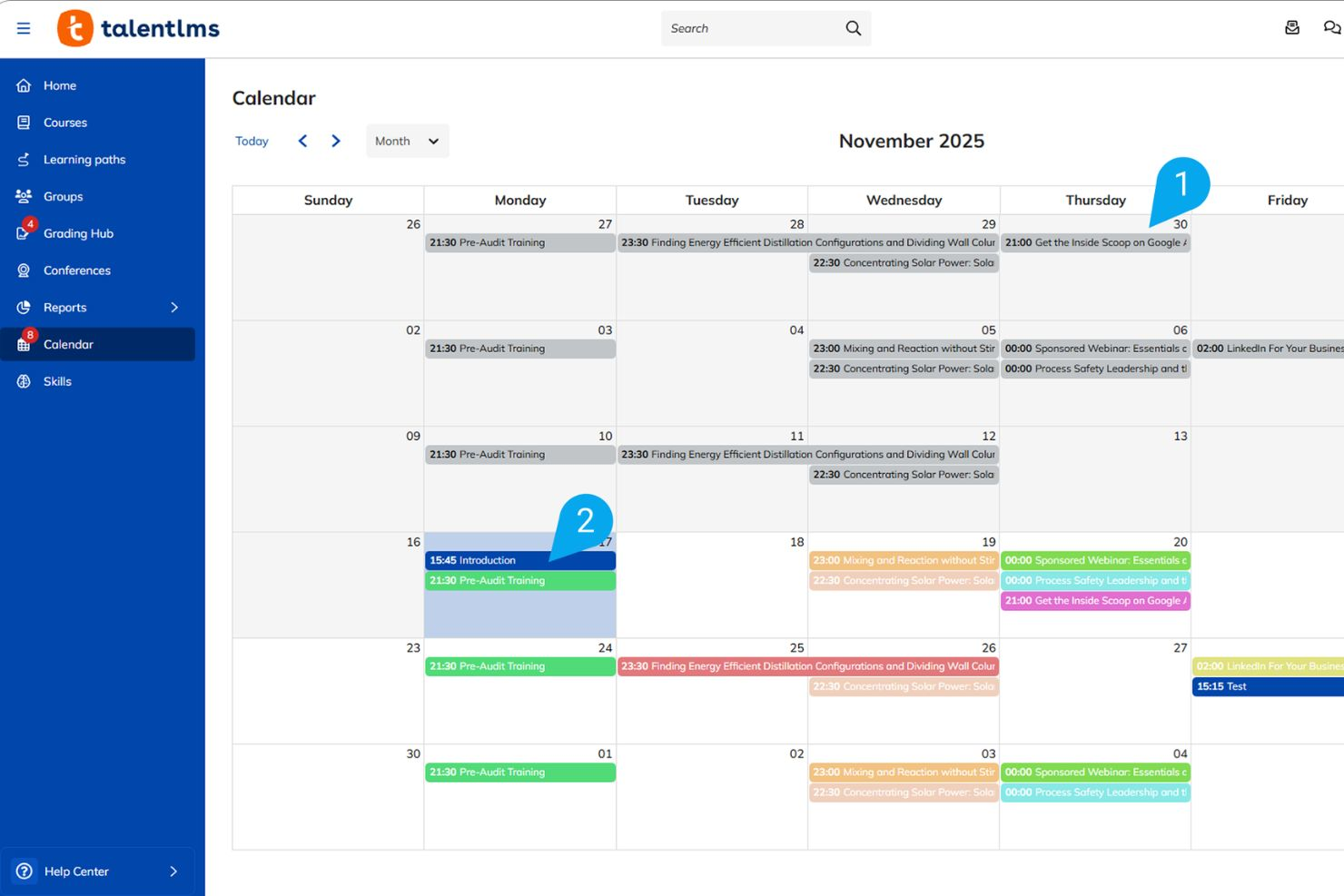
TalentLMS is a cloud-based LMS built for scheduling and delivering instructor-led, blended, and self-paced training, with tools for course creation, learner management, automated recurring ILT sessions, and AI-powered course translation.
Who Is TalentLMS Best For?
TalentLMS is a strong fit for HR and L&D teams in mid-sized organizations that need to automate, manage, and track repetitive training schedules and complex instructor-led training (ILT) programs.
Why I Picked TalentLMS
TalentLMS is one of my top picks because I love how it handles recurring ILT sessions at scale. It allows me to set up multiple session dates automatically within a single course unit, so my team isn't manually creating new events every week. I also rely on the automated notifications feature to keep learners informed about upcoming live sessions, which syncs perfectly with their personal calendars. Together, these two features make coordinating blended learning programs across global teams far less of a logistical lift than managing separate entries.
TalentLMS Key Features
- ILT session scheduling: Schedule instructor-led training sessions with date, time, and location settings, and let learners self-register directly within the platform.
- Blended learning: Combine self-paced online courses with live, scheduled instructor-led sessions in a single training program.
- Automated notifications: Trigger email reminders and alerts based on key events like upcoming sessions, course completions, or inactivity.
- Learning paths: Sequence courses into structured paths that unlock in a set order, guiding learners through multi-step training programs.
TalentLMS Integrations
Integrations include BambooHR, Salesforce, Zoom, Microsoft Teams, Okta, Google Calendar, PayPal, Shopify, and Slack.
Pros and Cons
Pros:
- Create isolated branded training portals
- Access ready-made soft skills courses
- Automate recurring compliance certification tasks
Cons:
- Basic reporting lacks predictive analytics
- Native course builder lacks interactivity
New Product Updates from TalentLMS
TalentLMS Adds Learning Paths, AI Video, and Learner Experience Updates
TalentLMS introduced updates across learning management, content creation, and learner experience, including Learning Paths for Groups, AI video generation in TalentCraft, video bookmarking, and expanded administration tools. For more information, visit TalentLMS’s official site.

Best for automated training enrollment workflows
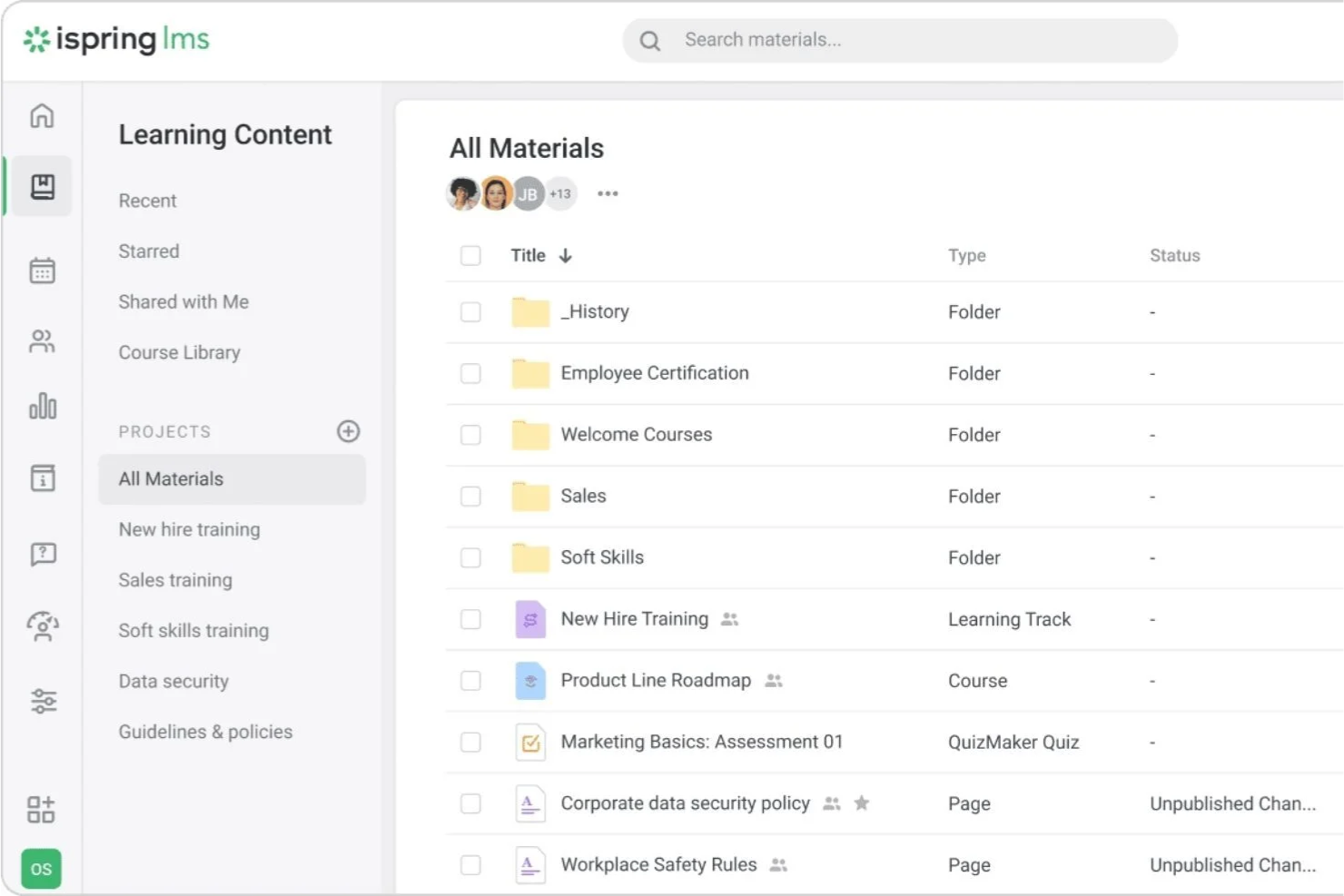
If you need to quickly assign and track training modules, iSpring LMS is designed for organizations that require structured training delivery and scheduling. It supports automated course enrollment and enables teams to monitor learner progress through centralized reporting tools. The platform also includes notification and reminder functionality to help track deadlines and completion.
Why I Picked iSpring LMS
This platform supports course assignment and tracking through automated enrollment rules and structured learning paths. Administrators can automatically enroll learners based on user roles, groups, or onboarding requirements and monitor completion through real-time reporting tools. Notification features help keep learners informed about assigned courses and deadlines. The platform also includes a Newsfeed feature for training announcements and company updates, as well as Development Plans for role-based learning programs.
iSpring LMS Key Features
Some other features that make iSpring useful for training scheduling include:
- Built-In Authoring Tool: Create interactive courses, quizzes, and assessments directly within the platform.
- Learning Tracks: Organize multiple courses into structured learning paths for different roles or departments.
- Mobile App Access: Allow learners to complete training and receive notifications on iOS and Android devices.
- Automated notifications: Send reminders and alerts for course assignments and deadlines.
iSpring LMS Integrations
Integrations include Zoom, Microsoft Teams, Salesforce, LinkedIn Learning, and other third-party platforms. The system also supports API access and integration via connectors like Zapier.
Pros and Cons
Pros:
- Bulk import for scheduling large learner groups
- Real-time tracking of overdue training deadlines
- Automated course assignment by group or role
Cons:
- Cannot schedule instructor-led sessions natively
- No built-in calendar view for sessions
New Product Updates from iSpring LMS

iSpring LMS Adds Multiple Observations to OJT Sessions
iSpring LMS now lets managers log multiple observations within one OJT session, grouping visits and auto-generating summary stats like averages, criterion results, and comparisons. For more information, visit iSpring LMS's official site.

Best for blended learning session coordination
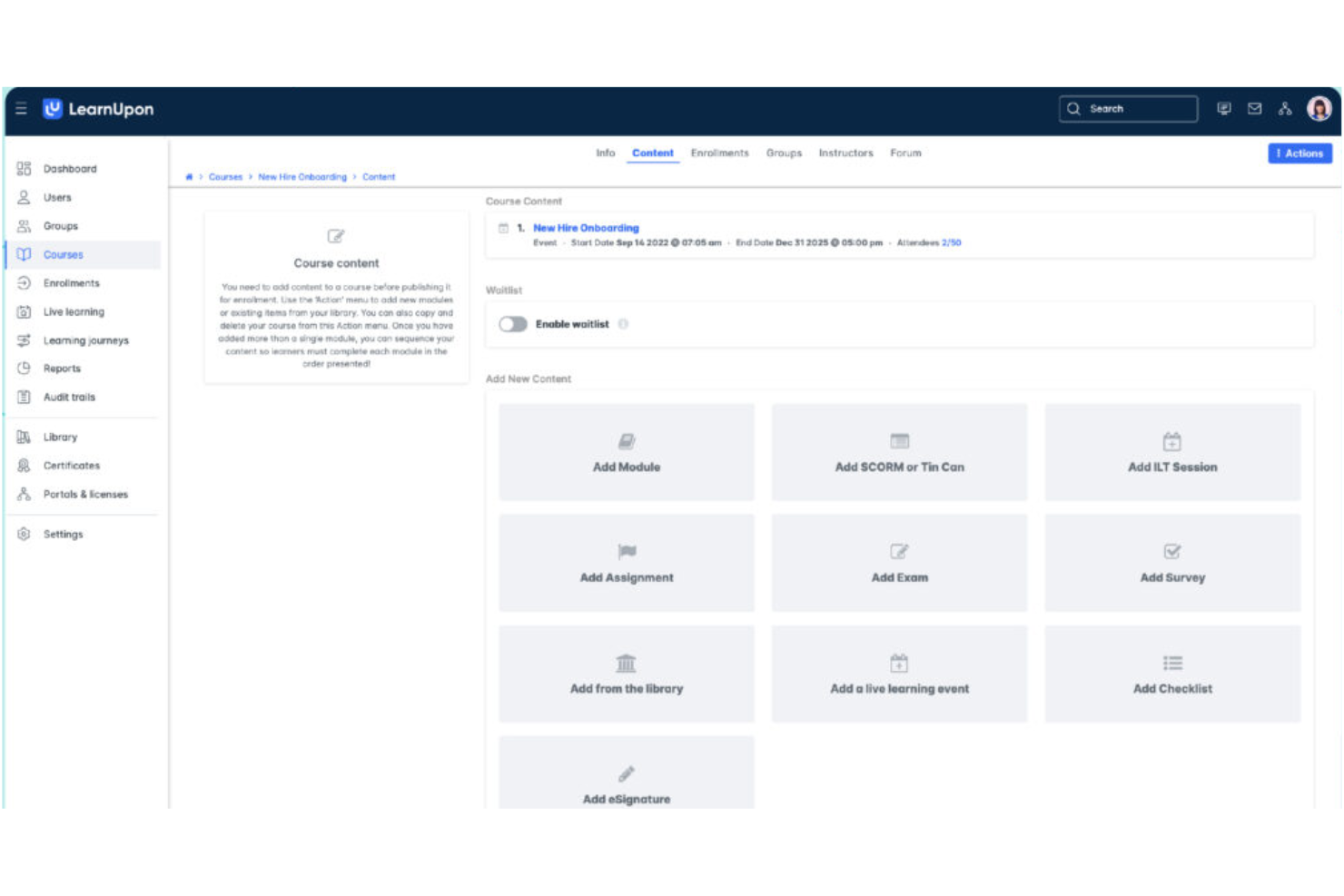
If you’re looking to coordinate both in-person and online training sessions, LearnUpon is built for blended learning environments. It’s a strong fit for HR teams and L&D professionals who need to manage instructor-led sessions, self-paced courses, and virtual classrooms in one place. LearnUpon helps you centralize scheduling, track attendance, and automate reminders for every type of training format.
Why I Picked LearnUpon
Coordinating blended learning sessions can be complex, and LearnUpon is designed to simplify that process for HR and L&D teams. The platform lets you schedule, manage, and track both instructor-led and self-paced training from a single dashboard. I like that you can automate invitations and reminders for live sessions, while also tracking attendance and completion for every training type. This makes LearnUpon a strong choice if you need to bring together virtual, in-person, and on-demand learning in one place.
LearnUpon Key Features
Some other features that make LearnUpon useful for training scheduling include:
- Course Catalog Management: Organize and publish a searchable library of training courses for learners.
- Custom Learning Paths: Build structured sequences of courses to guide learners through required training.
- Assessment and Quiz Builder: Create quizzes and assessments to measure knowledge retention after sessions.
- SCORM and xAPI Support: Upload and deliver interactive e-learning content using industry-standard formats.
LearnUpon Integrations
Integrations include HubSpot, BambooHR, Salesforce, Zoom, Microsoft Teams, LinkedIn Learning, Go1, Okta, Slack, and PayPal.
Pros and Cons
Pros:
- Integrates with Zoom for live training delivery
- Tracks attendance for instructor-led training events
- Supports both virtual and in-person session scheduling
Cons:
- Cannot assign multiple trainers to one session
- No built-in calendar sync with Outlook

TIMIFY
Best for real-time calendar synchronization
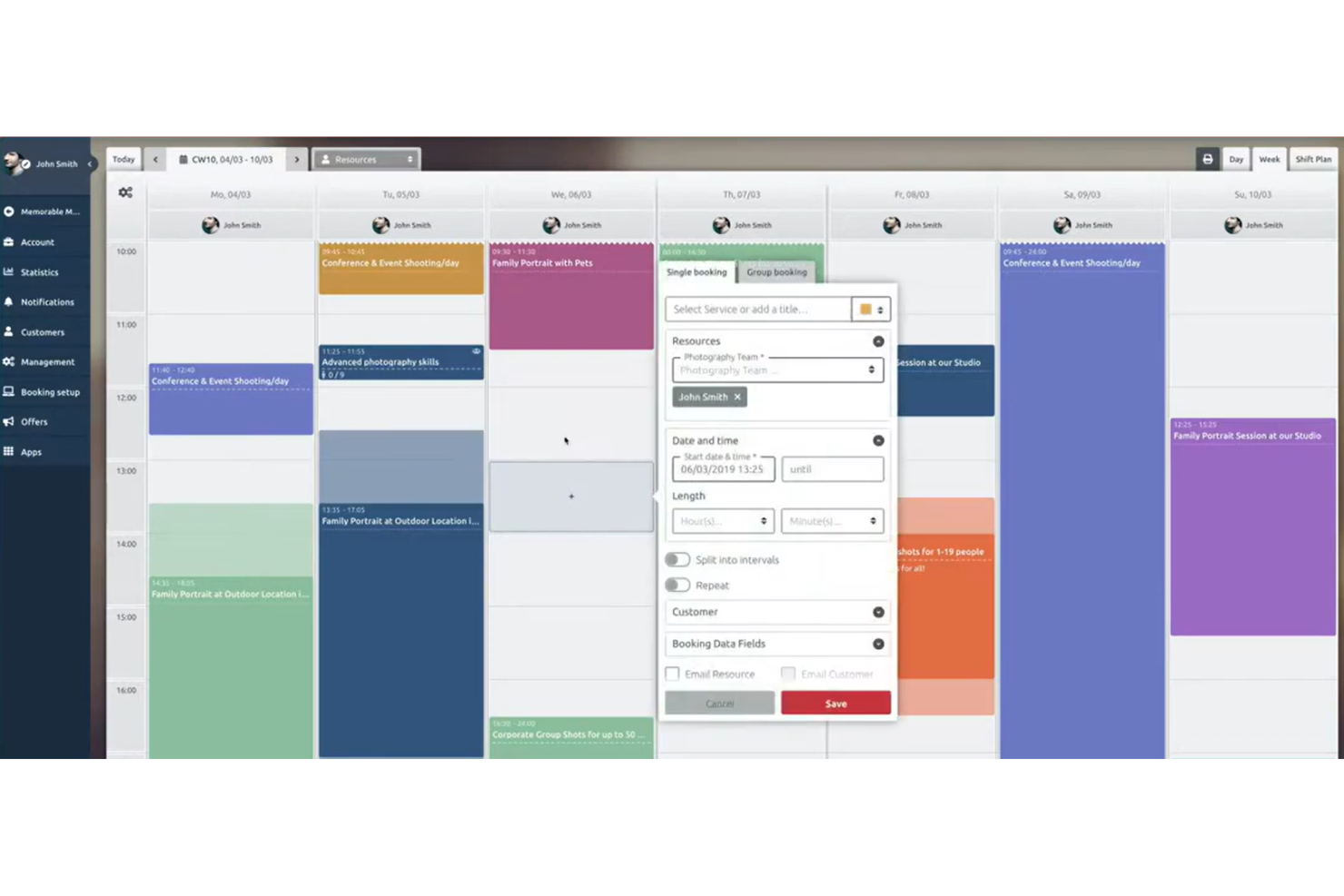
If you need course scheduling software that keeps calendars perfectly in sync, TIMIFY is worth a look. It’s built for teams and organizations that rely on real-time updates across multiple calendars, making it a strong fit for HR departments, training coordinators, and distributed teams. TIMIFY helps you avoid double bookings and missed sessions by connecting directly with popular calendar platforms and updating schedules instantly.
Why I Picked TIMIFY
For organizations where real-time calendar synchronization is essential, TIMIFY stands out as a practical choice for training scheduling. The platform’s two-way sync with Google Calendar, Microsoft Outlook, and other major calendar tools means that any changes to training sessions are instantly reflected across all connected calendars. I appreciate how TIMIFY’s live updates help prevent double bookings and scheduling conflicts, which is especially important for teams managing multiple trainers or locations. This focus on real-time accuracy makes it a strong fit for HR teams and training coordinators who need to keep everyone on the same page.
TIMIFY Key Features
Some other features that make TIMIFY useful for training scheduling include:
- Booking Widget: Add a customizable booking widget to your website for direct session sign-ups.
- Resource Management: Assign rooms, trainers, and equipment to each training event.
- Automated Reminders: Send email and SMS reminders to participants before sessions.
- Group Booking Support: Schedule and manage group training sessions with multiple attendees.
TIMIFY Integrations
Integrations include Google Calendar, Microsoft Office 365, Microsoft Exchange, Zoom, HubSpot, Intercom, and Meta.
Pros and Cons
Pros:
- Customizable booking widget for websites
- Automated SMS and email reminders for sessions
- Real-time sync with Google and Outlook calendars
Cons:
- Lacks native certificate management
- No built-in attendance tracking feature

Best for managing complex multi-resource bookings
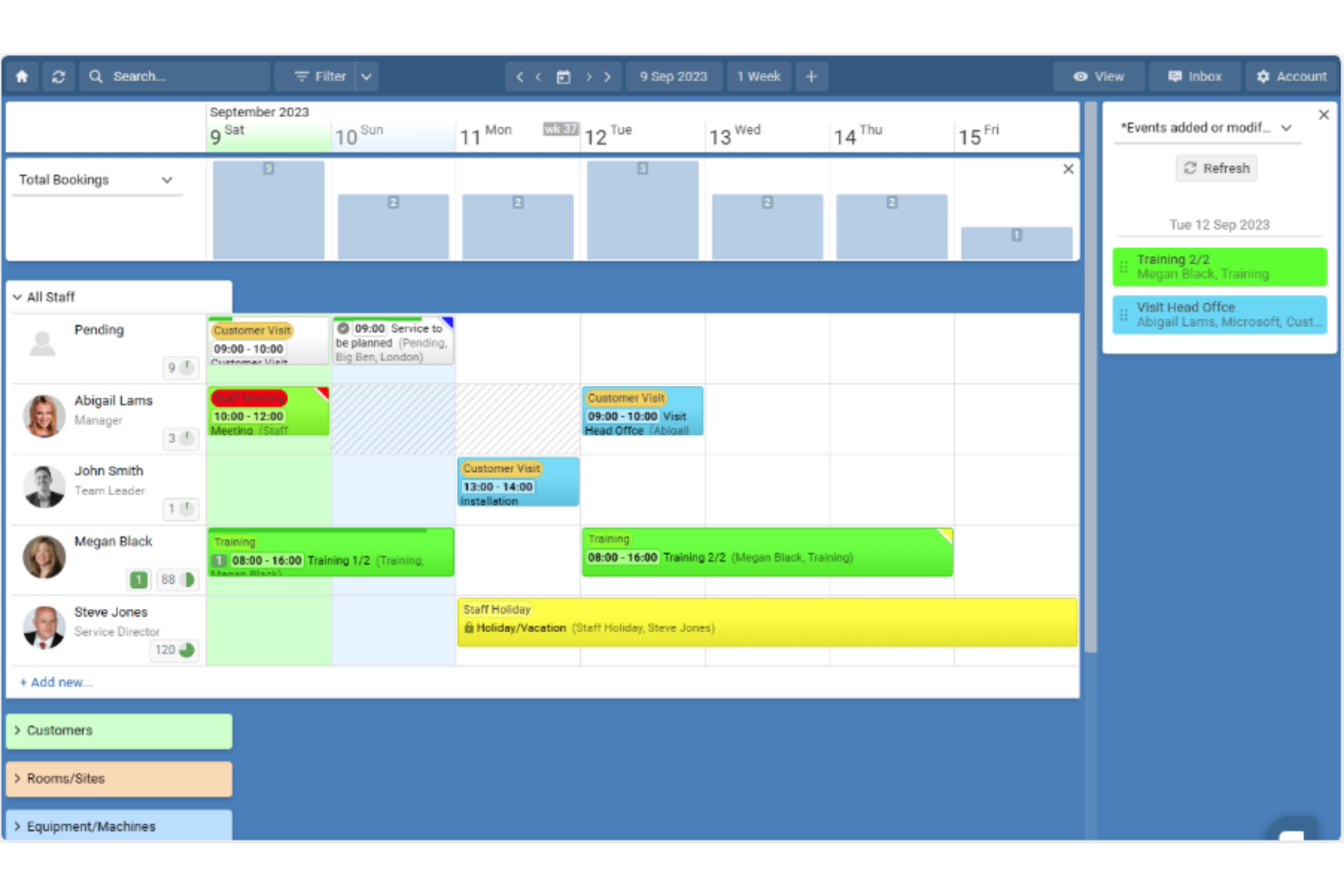
Schedule it is designed for organizations that need to coordinate multiple trainers, rooms, and resources across complex training schedules. This tool suits training managers in larger businesses or educational institutions who juggle overlapping sessions and shared assets. Its resource-centric approach helps prevent double-bookings and keeps every detail organized.
Why I Picked Schedule it
I chose Schedule it because it handles the challenge of managing multiple trainers, rooms, and equipment in one unified view. Its drag-and-drop scheduling board lets you assign resources to sessions without overlap, which is essential for organizations with complex training logistics. I also like that you can set rules for resource availability, so you avoid double-booking trainers or spaces. The visual calendar and conflict alerts make it easier to keep every training session on track.
Schedule it Key Features
Some other features that make Schedule it useful for training scheduling include:
- Automated Reminders: Send automatic email or SMS reminders to trainers and participants to reduce no-shows before each session.
- Resource Utilization Reports: Generate reports that show how often each trainer, room, or asset is booked.
- Customizable Booking Forms: Create tailored booking forms to capture specific information for each training session.
- Access Permissions: Set different access levels for team members, so only authorized users can edit or view certain schedules.
Schedule it Integrations
Integrations include Outlook, Office 365, Google Calendar, Salesforce, Slack, Gmail, MailChimp, Trello, Asana, and Google Sheets.
Pros and Cons
Pros:
- Supports customizable booking forms
- Provides detailed resource utilization reporting
- Handles multi-resource and multi-location bookings
Cons:
- Lacks built-in video conferencing integration
- Mobile experience is limited

Bookeo
Best for self-service participant registration
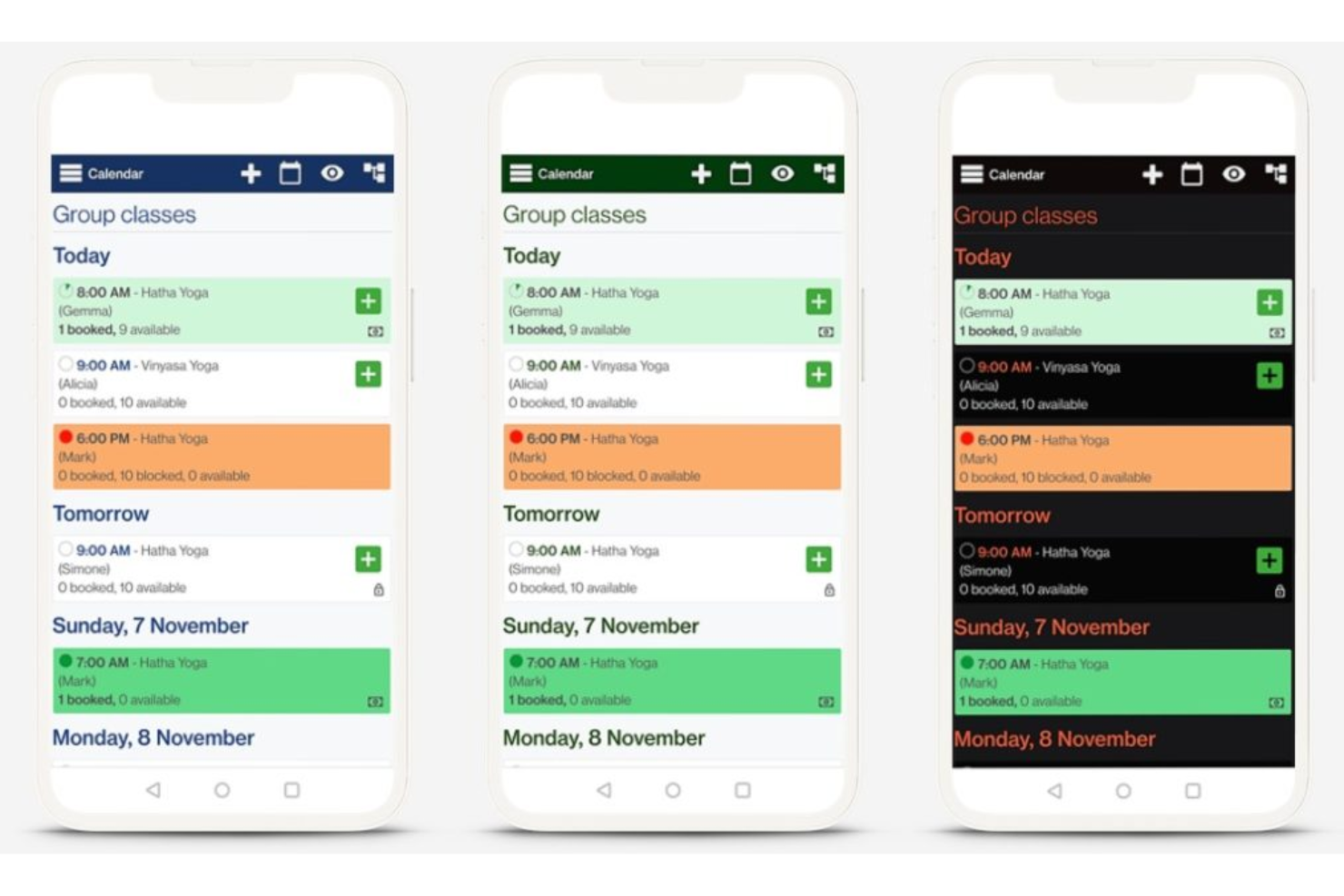
Bookeo gives training providers and organizations a way to let participants handle their own registrations through a dedicated booking page. It’s a strong fit for teams that want to reduce manual admin and offer flexible, self-service scheduling for classes, workshops, or courses. With automated confirmations and real-time availability, Bookeo helps you keep participant management simple and efficient.
Why I Picked Bookeo
Bookeo stands out for its focus on letting participants register themselves for training sessions, which is a key need for many training teams. The platform allows you to publish real-time class availability and automate confirmations, so participants can book and manage their own spots without back-and-forth emails. I appreciate that Bookeo also supports waitlists and group bookings, which helps you handle fluctuating demand and larger cohorts. These features make it a practical choice if you want to minimize manual scheduling and give participants more control over their registration experience.
Bookeo Key Features
Some other features that make Bookeo useful for training scheduling include:
- Customizable Booking Widgets: Add branded booking forms directly to your website.
- Automated Reminders: Send scheduled email or SMS reminders to participants.
- Online Payment Processing: Accept online credit card payments through integrated gateways like Stripe and PayPal.
- Resource Allocation: Assign instructors, rooms, or equipment to each session automatically.
Bookeo Integrations
Integrations include PayPal, Square, Stripe, Xero, WordPress, Wix, Shopify, Google Calendar, Zoom, and Mailchimp. Bookeo also offers an API for custom integrations.
Pros and Cons
Pros:
- Enables group and individual participant bookings
- Offers waitlist management for sessions
- Allows branded booking forms on your website
Cons:
- Cannot bulk import participant lists for sessions
- No built-in certificate or credential tracking

Best for customizable scheduling templates
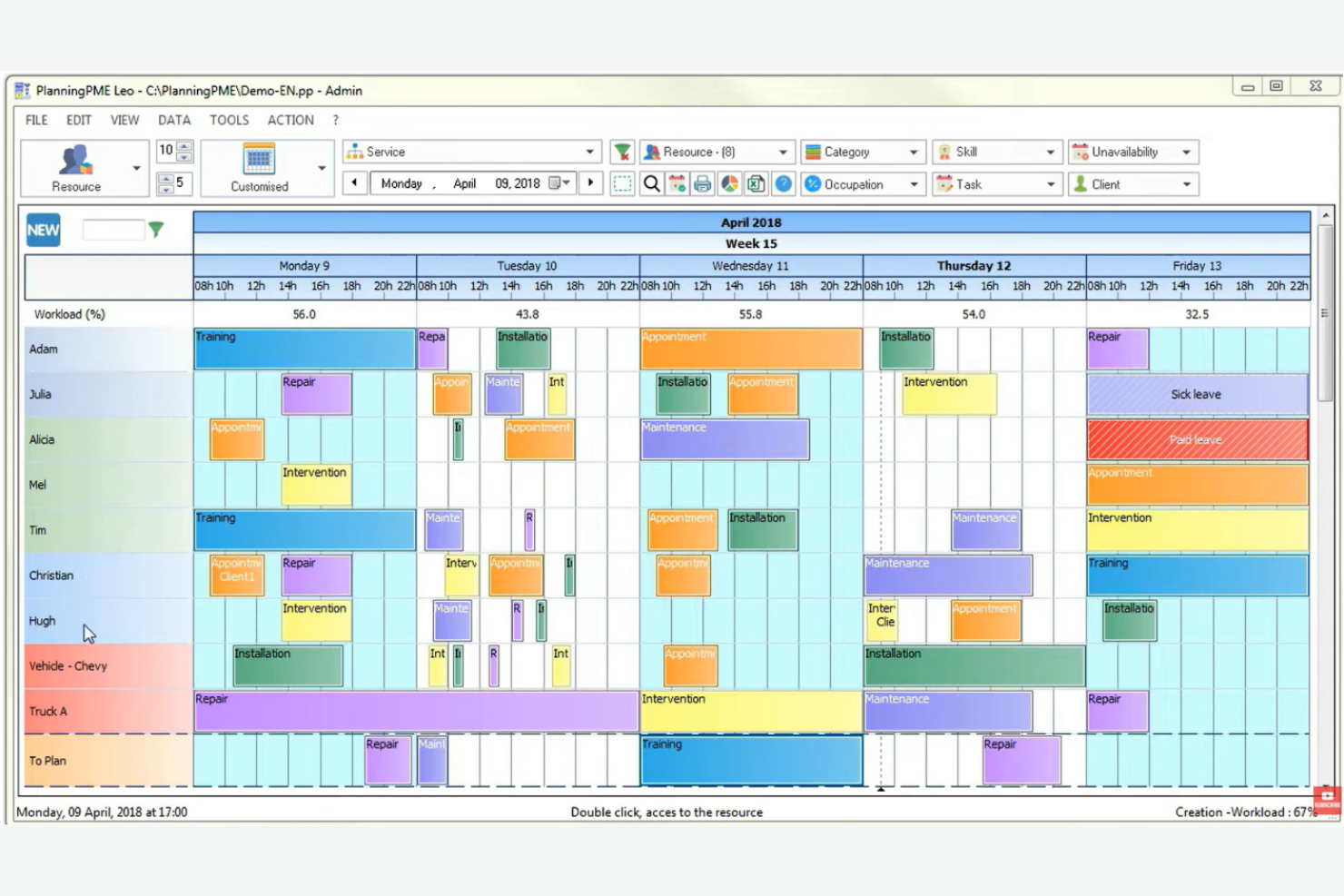
PlanningPME is designed for organizations that need flexible, customizable scheduling templates for managing training sessions. It’s especially useful for HR teams, training managers, and coordinators who want to tailor schedules to fit unique workflows or complex resource needs. With PlanningPME, you can adapt templates to match your training formats, making it easier to organize sessions, trainers, and resources in one place.
Why I Picked PlanningPME
What sets PlanningPME apart is its focus on customizable scheduling templates, which are especially valuable for training teams with unique or evolving requirements. You can build and modify templates to match different training formats, session types, or resource allocations, making it easy to adapt as your programs change. I like that you can set up recurring sessions, assign trainers, and manage room bookings all within these templates. This flexibility helps HR professionals and training coordinators keep their scheduling process organized and tailored to their specific needs.
PlanningPME Key Features
Some other features that make PlanningPME useful for training scheduling include:
- Multi-User Access: Multiple team members can view and update schedules simultaneously.
- Absence and Leave Management: Track trainer and participant absences directly within the platform.
- Color-Coded Calendar Views: Use color coding to quickly distinguish between different training types or resources.
- Email Notifications: Automatically send schedule updates and reminders to trainers and participants.
PlanningPME Integrations
Integrations include Outlook Exchange, Power BI, Microsoft Excel, Google Calendar, PlanningConnect, Lucca, Microsoft Dynamics NAV, Sage, and Arxivar.
Pros and Cons
Pros:
- Native integration with Power BI for reporting
- Color-coded calendar for quick visual reference
- Custom templates for different training formats
Cons:
- Interface can feel dated
- No built-in online payment processing
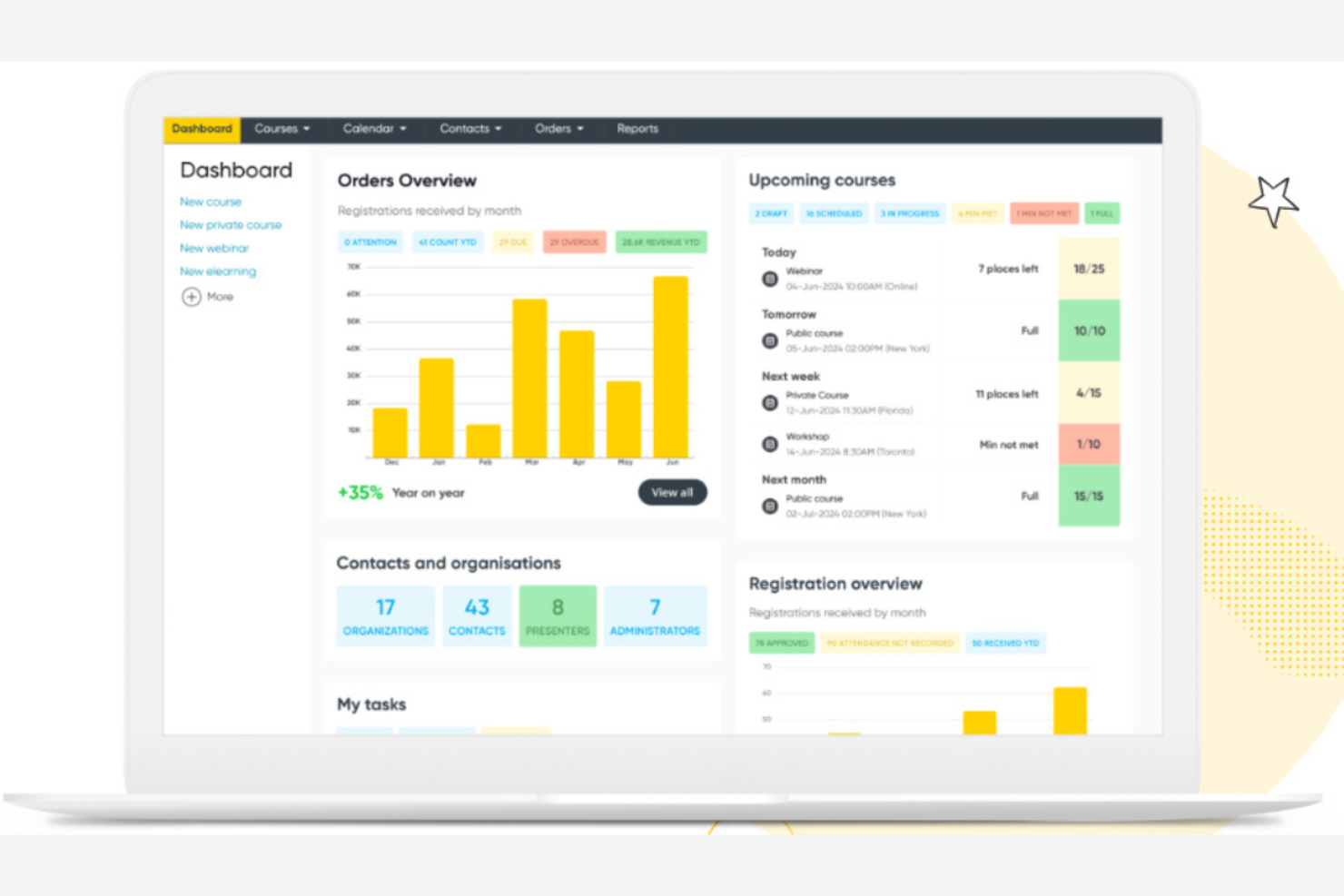
Arlo is designed for training providers and organizations that need to automate the logistics of instructor-led sessions, both in-person and online. It’s especially useful for teams managing recurring courses, complex schedules, and high volumes of registrations. With features for automated communication, resource allocation, and attendee management, Arlo helps reduce manual administrative tasks and keeps training operations organized.
Why I Picked Arlo
What makes Arlo a strong choice is its focus on automating the logistics behind instructor-led training sessions. The platform handles scheduling, venue management, and automated communications, which helps reduce manual coordination for training teams. I like that Arlo also supports recurring courses and complex session structures, making it easier to manage multi-session programs. These features are especially valuable for organizations that run frequent or large-scale instructor-led training and want to minimize administrative overhead.
Arlo Key Features
In addition to its automation of session logistics, Arlo offers several other features worth noting:
- Customizable Registration Forms: Collect specific attendee information with tailored registration fields.
- Payment Processing: Accept online payments for courses directly through the platform.
- Marketing Tools: Promote courses with built-in email and social media campaigns.
- Reporting Dashboard: Access real-time data on registrations, attendance, and revenue.
Arlo Integrations
Integrations include Zoom, WordPress, Salesforce, Xero, PayPal, Stripe, GoToWebinar, Moodle, and CourseCheck.
Pros and Cons
Pros:
- Provides real-time reporting on course performance
- Supports branded registration and event pages
- Automates recurring course and session scheduling
Cons:
- Limited options for automated emails
- No built-in content authoring or LMS features
Best for integrating with existing HR systems
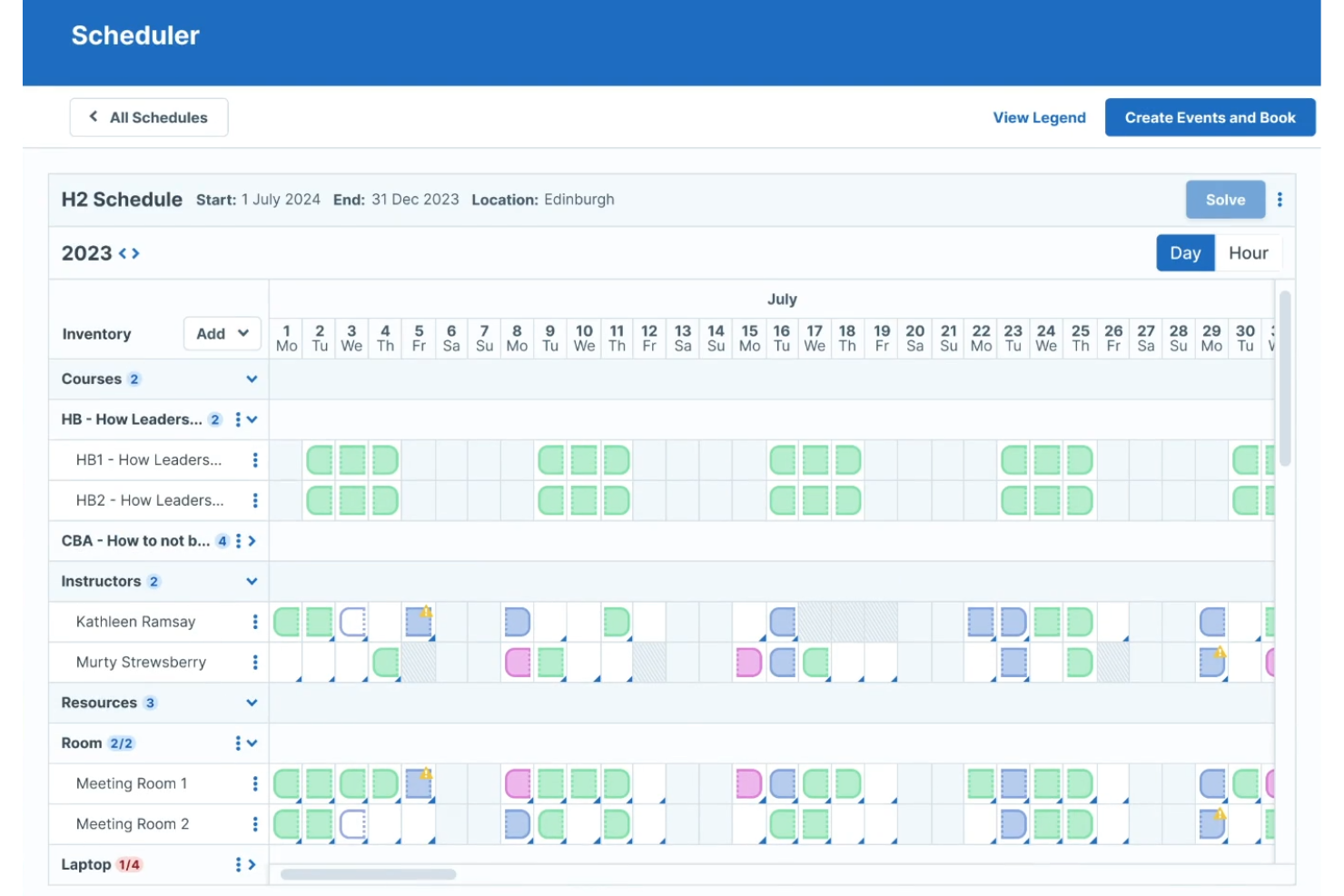
Administrate is designed for organizations that need their training operations to connect with existing HR systems and business tools. It’s especially useful for HR teams and learning departments managing complex, multi-location training programs. With its focus on integration and data flow, Administrate helps you centralize scheduling, automate reporting, and keep training aligned with broader HR processes.
Why I Picked Administrate
What sets Administrate apart is its ability to connect training scheduling directly with your existing HR systems and business platforms. The platform offers a flexible API and pre-built connectors, so you can sync training data with HRIS, payroll, or performance management tools. I like that Administrate also supports automated data flows, which helps reduce manual entry and keeps your records consistent across systems. This makes it a strong choice if you need your training operations to fit tightly within your broader HR and business processes.
Administrate Key Features
Some other features that make Administrate valuable for training scheduling include:
- Course Template Library: Build and reuse templates for recurring training sessions.
- Resource Management: Assign instructors, rooms, and equipment to each event.
- Automated Communication Tools: Send scheduled emails and notifications to learners and trainers.
- Customizable Reporting Dashboards: Create and share real-time reports on attendance, completion, and scheduling.
Administrate Integrations
Integrations include Docebo, Salesforce, SAP SuccessFactors, Cornerstone, Workday, Google Suite, and Microsoft Office.
Pros and Cons
Pros:
- Includes resource allocation for trainers and rooms
- Offers granular permission controls for user roles
- Supports multi-location and multi-currency scheduling
Cons:
- Limited self-service options for learners
- No built-in mobile app for scheduling
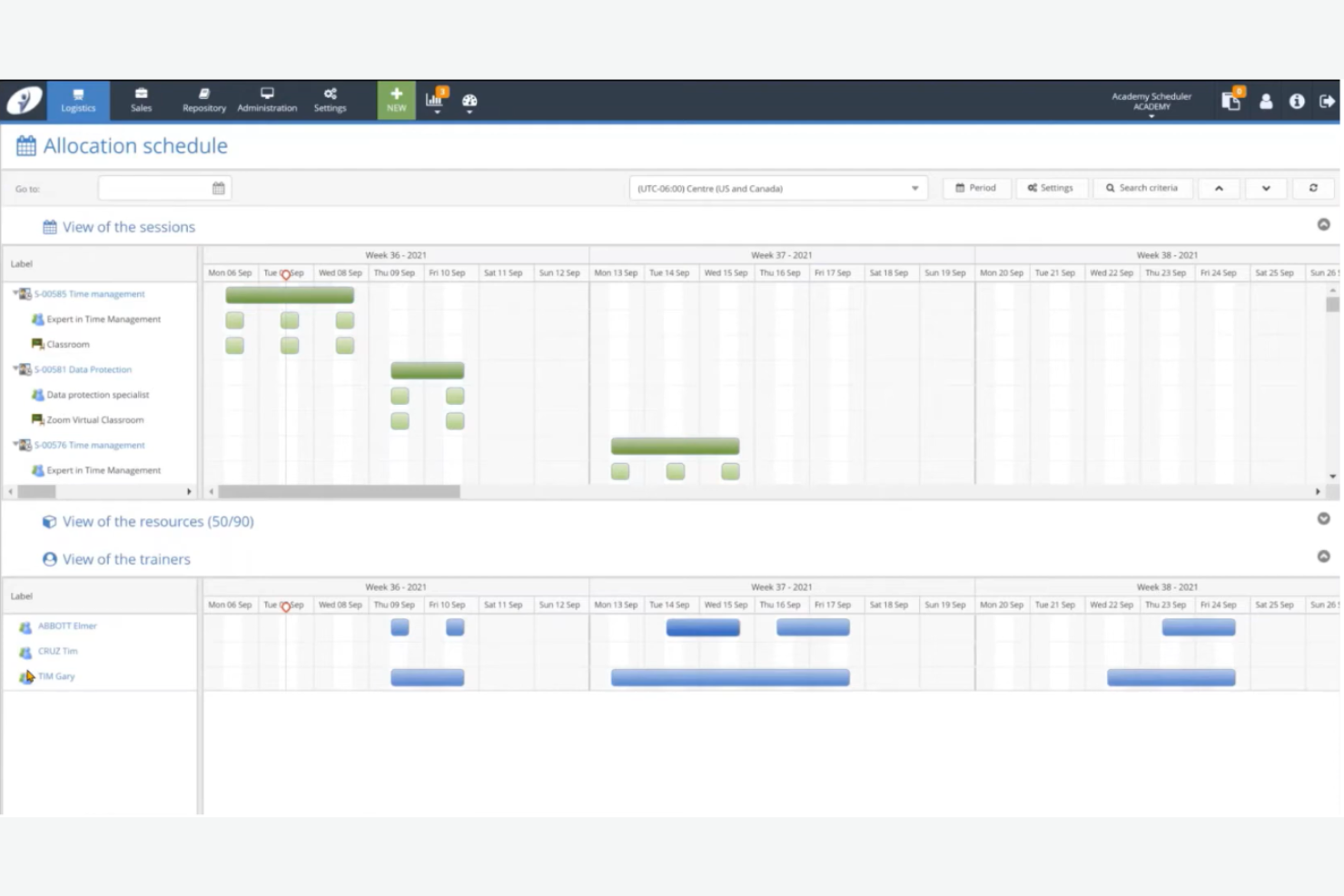
Training Orchestra is built for organizations that need to coordinate large-scale, instructor-led training across multiple locations and business units. This platform is a strong fit for enterprise L&D teams and training departments managing high volumes of face-to-face sessions, resources, and compliance requirements. Its centralized scheduling and resource management help reduce administrative overhead and keep complex training operations running smoothly.
Why I Picked Training Orchestra
What sets Training Orchestra apart is its ability to handle the scale and complexity of enterprise training operations. The platform supports centralized scheduling for thousands of sessions, trainers, and locations, which is essential for large organizations with distributed teams. I appreciate how it automates resource allocation and compliance tracking, helping L&D teams avoid scheduling conflicts and regulatory gaps. Its focus on optimizing instructor-led training logistics makes it a strong choice for enterprises managing high training volumes.
Training Orchestra Key Features
Some other features that make Training Orchestra valuable for training scheduling include:
- Budget and Cost Tracking: Monitor training budgets and track costs for each session or program.
- Waitlist Management: Automatically manage cancellations and notify participants when spots become available.
- Trainer Portal: Give trainers access to schedules, materials, and session details through a dedicated portal.
- Multi-Language Support: Offer scheduling and communications in multiple languages for global teams.
Training Orchestra Integrations
Integrations include Docebo, Rise Up, Workday, and Brightspace. An API is available for custom integrations.
Pros and Cons
Pros:
- Includes a dedicated portal for trainers
- Tracks training budgets and session costs
- Centralizes scheduling for global training teams
Cons:
- No built-in virtual classroom functionality
- Reporting customization options are limited
Annen programvare for opplæringsplanlegging
Her er noen flere alternativer innen programvare for opplæringsplanlegging som ikke kom med på listen over utvalgte alternativer, men som likevel er verdt å se nærmere på:
- Connecteam
For mobile-first staff scheduling
- Saviom
For resource optimization in training delivery
- 360Learning
For collaborative session planning
- Employee Training Manager
For managing employee certification renewals


How I Evaluate Training Scheduling Software
I split my evaluation into baseline criteria—like session recurrence, enrollment workflows, and automated reminders—and differentiators that separate the tools worth recommending from the rest.
Core Functionality (Table Stakes For This List)
When I'm selecting tools for my list, I rank each one on a scale from 0 (does not offer the functionality) to 5 (excels in this area) for each core functionality listed below. Then, I calculate the tool's total score into a percentage. Each tool needs to achieve a minimum total score of 65% to be considered for inclusion.
- Training Session Scheduling: I check whether a tool handles recurring sessions, multi-day programs, and virtual or in-person formats without needing workarounds for each.
- Instructor & Resource Assignment: Each tool should let you assign trainers, rooms, and equipment to sessions while flagging conflicts like double-booked facilitators.
- Enrollment & Registration Management: I look for self-enrollment, capacity limits, waitlists, and approval workflows so admins aren't manually building rosters in spreadsheets.
- Automated Notifications & Reminders: The tool should send confirmation emails, calendar invites, and reminder sequences to learners and instructors when sessions are created or changed.
- Attendance & Completion Tracking: I evaluate how each platform logs attendance, marks completions, and ties records to compliance requirements like safety certifications or annual refreshers.
- Calendar & Systems Integration: Native syncing with tools like Outlook, Google Calendar, and your HRIS or LMS matters—manual imports via CSV don't cut it here.
Once I have a list of tools that meet the criteria, I consider what sets each platform apart.
Differentiating Factors (What Sets Vendors Apart)
Here's how I compare and contrast different vendors:
Standout Features
AI-powered scheduling is a big differentiator. Tools that auto-suggest session times based on learner and instructor availability save L&D teams hours of back-and-forth coordination. For organizations with offices or field teams across multiple regions, I also evaluate multi-location and time zone support, since scheduling a safety training across three continents shouldn't require separate manual setups. Custom reporting dashboards round things out by letting training administrators track completion trends, capacity utilization, and budget spend without exporting data to a spreadsheet.
Beyond Features
I pay close attention to each tool's integration ecosystem—specifically whether it connects natively with HRIS platforms like Workday or BambooHR and video conferencing tools like Zoom or Teams. Industry and compliance fit also matters. A platform built for a tech startup looks very different from one designed for healthcare teams managing mandatory clinical certifications. Finally, I evaluate pricing transparency, because hidden costs for add-on modules or premium integrations can quickly inflate what looked like a reasonable investment.
Slik velger du programvare for opplæringsplanlegging
Det er lett å gå seg vill i lange funksjonslister og komplekse prisstrukturer. For å holde fokus mens du arbeider deg gjennom den unike prosessen med å velge programvare, får du her en sjekkliste over faktorer du bør ha i mente:
| Faktor | Hva du bør vurdere |
| Skalerbarhet | Vil programvaren håndtere dagens og fremtidens antall ansatte, lokasjoner og opplæringsvolum? Se etter begrensninger på antall brukere eller kurs. |
| Integrasjoner | Kan den kobles direkte til HRIS, lønnssystemet eller leverandører av læringsinnhold? Bekreft at den er kompatibel med den eksisterende teknologiplattformen din. |
| Tilpasningsmuligheter | Kan du tilpasse arbeidsflyter, varsler og rapportering slik at de samsvarer med organisasjonens prosesser og merkevare? |
| Brukervennlighet | Vil administratorer og deltakere oppleve grensesnittet som intuitivt? Test med en liten gruppe for å avdekke friksjonspunkter før lansering. |
| Implementering og innføring | Hvor lang tid vil oppsettet ta, og hvilke ressurser kreves? Spør om støtte til datamigrering, opplæring og vanlige tidsrammer for produksjonssetting. |
| Kostnad | Er prisnivåene tydelige og forutsigbare når du skalerer? Vær oppmerksom på ekstra kostnader for brukere, integrasjoner eller kundestøtte. |
| Sikkerhetstiltak | Oppfyller leverandøren behovene dine for personvern, tilgangskontroll og samsvar med regelverk? Be om dokumentasjon på sertifiseringer og revisjonsspor. |
| Tilgjengelig kundestøtte | Hvilke støttekanaler og svartider tilbys? Vurder om du trenger hjelp døgnet rundt eller en egen kundeansvarlig. |
Hva er programvare for opplæringsplanlegging?
Programvare for opplæringsplanlegging er et digitalt verktøy som hjelper organisasjoner med å planlegge, tildele og følge opp opplæringsøkter og kurs for ansatte. Den samler planleggingen på ett sted, automatiserer påminnelser og overvåker fullføringsstatus for både fysisk og nettbasert læring. HR-team og ledere bruker den til å sikre at opplæringskrav oppfylles, frister følges opp og samsvar med regelverk opprettholdes i hele arbeidsstyrken.
Funksjoner i programvare for planlegging av opplæring
Når du velger programvare for planlegging av opplæring, bør du se etter følgende viktige funksjoner:
- Kurstildeling: Tildel bestemte opplæringsøkter eller kurs til enkeltpersoner, team eller avdelinger basert på roller eller behov.
- Automatiske påminnelser: Send planlagte varsler til deltakere og ledere om kommende økter, frister eller utgått opplæring.
- Oppmøtesporing: Registrer og overvåk deltakelse i både fysiske og virtuelle opplæringsøkter for å ivareta samsvar og rapportering.
- Kalenderintegrasjon: Synkroniser opplæringsplaner med eksterne kalendere for å hjelpe deltakere og ledere med å unngå konflikter og holde oversikten.
- Læringsstier: Strukturer flere kurs i sekvenserte læringsløp tilpasset ulike jobbroller eller utviklingsmål.
- Rapportering og analyse: Generer detaljerte rapporter om fullføring av opplæring, oppmøte og fremdrift for å støtte revisjoner og beslutningstaking.
- Sertifikatadministrasjon: Utsted, spor og administrer digitale sertifikater for fullførte kurs eller krav til samsvar.
- Masseplanlegging: Planlegg økter eller tildel kurs til store grupper samtidig for å spare tid for HR og opplæringskoordinatorer.
- Mobil tilgang: La deltakere og ledere se planer, fullføre opplæring og motta varsler fra hvilken som helst enhet.
- Brukertillatelser: Kontroller tilgangen til planlegging, rapportering og administrative funksjoner basert på brukerroller i organisasjonen.
Fordeler med programvare for planlegging av opplæring
Implementering av programvare for planlegging av opplæring gir flere fordeler for teamet og virksomheten din. Her er noen av fordelene du kan se frem til:
- Sentralisert opplæringsadministrasjon: Administrer alle opplæringsøkter, tildelinger og oppføringer fra én enkelt plattform, slik at manuell sporing og administrativ belastning reduseres.
- Forbedret samsvar: Spor fullføring og oppmøte for påkrevd opplæring, slik at det blir enklere å oppfylle regulatoriske og interne samsvarsstandarder.
- Automatiske varsler: Reduser antallet uteblitte økter og utgått opplæring ved å sende tidsriktige påminnelser og varsler til deltakere og ledere.
- Datadrevet innsikt: Bruk innebygd rapportering og analyse til å identifisere opplæringsbehov, overvåke fremdrift og støtte strategisk bemanningsplanlegging.
- Fleksibel planlegging: Tildel kurs og økter til enkeltpersoner eller grupper, og tilpass planer etter hvert som virksomhetens behov eller teamstrukturer endres.
- Forbedret deltakeropplevelse: Gi ansatte tydelige læringsstier, mobil tilgang og digitale sertifikater, slik at opplæringen blir mer tilgjengelig og engasjerende.
- Skalerbare prosesser: Håndter enkelt vekst ved å planlegge og spore opplæring for nyansatte, eksterne team eller flere lokasjoner uten ekstra manuelt arbeid.
Kostnader og priser for programvare for planlegging av opplæring
Valg av programvare for planlegging av opplæring krever en forståelse av de ulike prismodellene og abonnementene som er tilgjengelige. Kostnadene varierer basert på funksjoner, teamstørrelse, tillegg og mer. Tabellen nedenfor oppsummerer vanlige abonnementer, gjennomsnittsprisene deres og typiske funksjoner som er inkludert i løsninger for programvare for planlegging av opplæring:
Sammenligningstabell for abonnementer for programvare for planlegging av opplæring
| Abonnementstype | Gjennomsnittspris | Vanlige funksjoner |
| Gratisabonnement | $0 | Grunnleggende kurstildeling, begrenset antall brukerplasser, enkel rapportering og e-postvarsler. |
| Personlig abonnement | $5-$15/bruker/måned | Individuell planlegging, oppmøtesporing, kalenderintegrasjon og grunnleggende analyse. |
| Bedriftsabonnement | $20-$40/bruker/måned | Gruppeplanlegging, automatiske påminnelser, avansert rapportering, sertifikatadministrasjon og integrasjoner. |
| Virksomhetsabonnement | $40-$80/bruker/måned | Tilpassede arbeidsflyter, masseplanlegging, API-tilgang, dedikert kundestøtte og avanserte sikkerhetskontroller. |
Vanlige spørsmål om programvare for opplæringsplanlegging
Her er noen svar på vanlige spørsmål om programvare for opplæringsplanlegging:
Kan programvare for opplæringsplanlegging håndtere både fysiske og nettbaserte økter?
Ja, det meste av programvaren for opplæringsplanlegging støtter både fysiske og nettbaserte økter. Du kan tilordne lokasjoner, legge til lenker til virtuelle møter og registrere deltakelse for hver type, noe som gjør det enklere å administrere opplæringsprogrammer som kombinerer fysiske og nettbaserte aktiviteter.
Hvordan bidrar programvare for opplæringsplanlegging til oppfølging av samsvar?
Programvare for opplæringsplanlegging registrerer fullføring av kurs, deltakelse og sertifiseringsstatus. Dette hjelper HR-team med å følge opp samsvar med lovpålagte eller interne opplæringskrav og generere rapporter for revisjoner eller inspeksjoner.
Hvilke integrasjoner bør jeg se etter i programvare for opplæringsplanlegging?
Se etter integrasjoner med HRIS, lønnssystemet, læringsstyringssystemet og kalenderverktøyene dine. Disse koblingene bidrar til å automatisere klargjøring av brukere, synkronisere opplæringsdata og holde timeplaner samordnet på tvers av plattformer.
Er det mulig å automatisere påminnelser og varsler for opplæringsøkter?
Ja, de fleste løsninger lar deg konfigurere automatiske påminnelser og varsler for kommende økter, forfalt opplæring eller sertifiseringer som utløper. Dette reduserer behovet for manuell oppfølging og bidrar til å holde deltakerne på rett spor.
Hvordan vurderer jeg brukervennligheten til et verktøy for opplæringsplanlegging?
Test programvaren med en liten gruppe administratorer og deltakere. Se etter intuitiv navigering, tydelige arbeidsflyter for planlegging og lett tilgjengelige hjelpressurser. Tilbakemeldinger fra brukerne under en prøveperiode kan avdekke potensielle utfordringer før en full utrulling.