

10 beste programvarer for oppstart av oppdragstakere, vurdert i 2026

Beste programvare for introduksjon av oppdragstakere – kortliste


Det kan være tidkrevende å administrere oppdragstakere. Du møter utfordringer som etterlevelse av regelverk, papirarbeid og oppfølging av flere prosjekter. Programvare for introduksjon av oppdragstakere kan gjøre disse oppgavene enklere og hjelpe deg med å fokusere på det som virkelig betyr noe – teamet og prosjektene dine.
Jeg har testet og gjennomgått ulike programvarealternativer på egen hånd og valgt ut dem som faktisk fungerer. Etter min erfaring er det uvurderlig å finne riktig verktøy. Her finner du objektiv og grundig undersøkt informasjon.
I denne artikkelen guider jeg deg gjennom de beste tilgjengelige løsningene for introduksjon av ansatte. Du får en tydelig oversikt over leveranser, fordeler og de særpregede funksjonene til hvert verktøy. Gjør deg klar til å ta en informert beslutning som forbedrer effektiviteten din og støtter teamet ditt.
Why Trust Our Software Recommendations
Our team has been testing and reviewing software since 2012. As HR experts ourselves, we know how difficult—and important—it is to choose the right software.
For this guide, we evaluated tools using hands-on testing and independent research, scoring tools using our selection criteria. We also draw on insights from industry thought leaders and practicing HR experts.
Our reviews reflect our human editorial judgment, not a sales pitch.
Expert reviewers:
Sammenligningstabell for programvare for introduksjon av oppdragstakere
Denne sammenligningstabellen oppsummerer prisopplysningene for mine beste utvalgte programmer for introduksjon av oppdragstakere:
| Tool | Best For | Trial Info | Price | ||
|---|---|---|---|---|---|
| 1 | Best for compliant global onboarding | Free demo available | From $199/employee/month | Website | |
| 2 | Best for centralized onboarding flow | Free demo available | From $599/employee/month | Website | |
| 3 | Best for freelance management | Free demo available | Pricing upon request | Website | |
| 4 | Best for modular HR solutions | Free trial available | Pricing upon request | Website | |
| 5 | Best for small businesses | Free demo available | From $49/month + $6/user/month | Website | |
| 6 | Best for construction site tracking | Free demo available | Pricing upon request | Website | |
| 7 | Best for construction onboarding | Free demo available | Pricing upon request | Website | |
| 8 | Best for gig economy management | Free demo available | Pricing upon request | Website | |
| 9 | Best for digital onboarding | Free plan available | From $150/month | Website | |
| 10 | Best for user onboarding tours | 14-day free trial | From $174/month (billed annually) | Website |

Vurdering av den beste programvaren for introduksjon av oppdragstakere
Nedenfor finner du mine detaljerte sammendrag av den beste programvaren for introduksjon av oppdragstakere som kom med på kortlisten. Vurderingene mine gir en detaljert gjennomgang av de viktigste funksjonene, fordelene og ulempene, integrasjonene og de ideelle bruksområdene for hvert verktøy, slik at du kan finne det beste alternativet for deg.

Best for compliant global onboarding
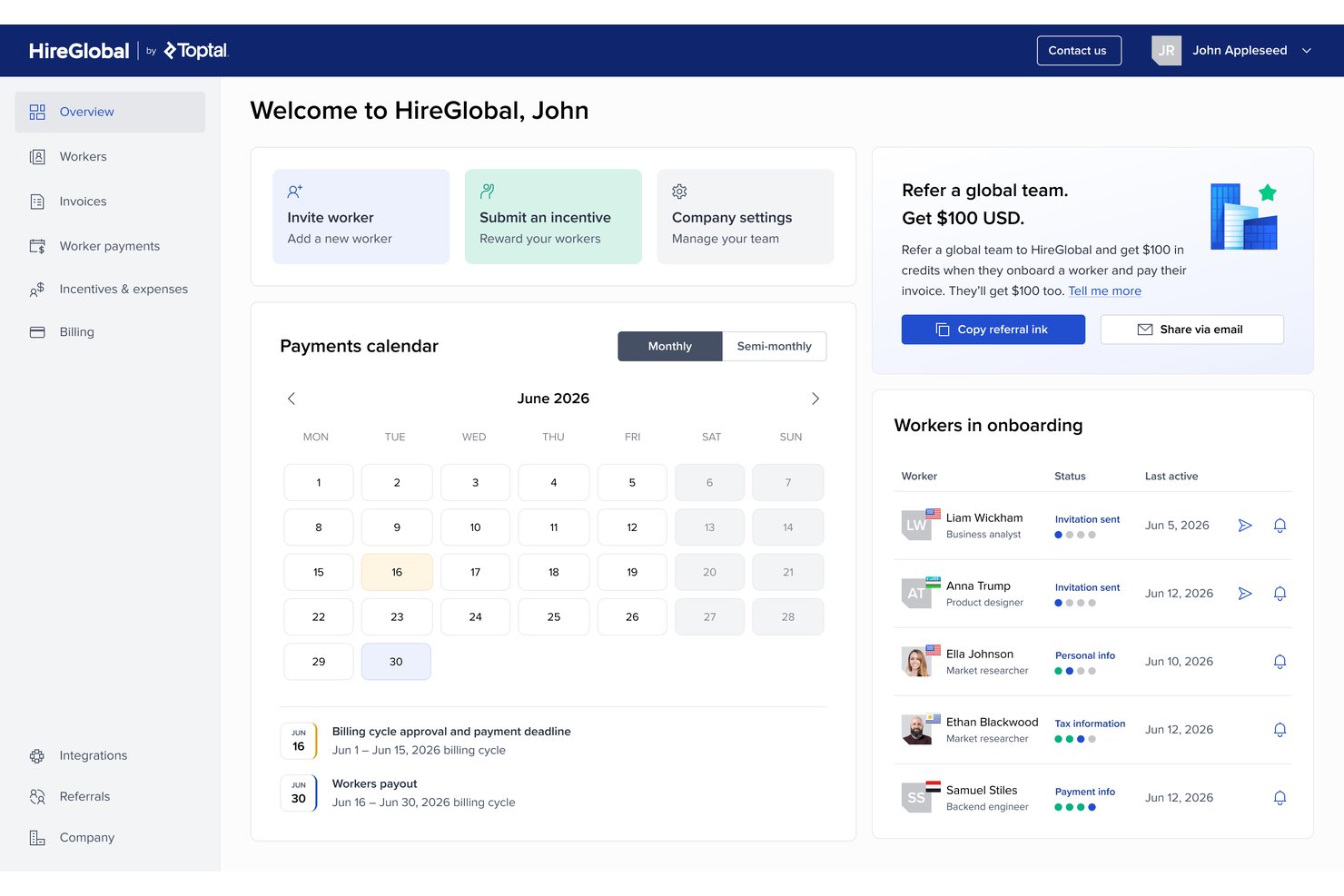
HireGlobal is a global contractor onboarding and workforce compliance platform by Toptal that handles contractor payments, worker classification, Agent of Record agreements, and employer of record services across 180+ countries.
Who Is HireGlobal Best For?
HireGlobal is a strong fit for contingent workforce managers who need to onboard contractors across multiple countries while minimizing misclassification risk.
Why I Picked HireGlobal
HireGlobal earns its spot on my shortlist because its Virtual EOR model does something I haven't seen elsewhere: it pairs compliant AOR contracts with $1M of per-worker financial indemnification against misclassification. I also like that the platform guides each worker into the right engagement tier, whether that's basic contractor management, AOR, or full EOR, without requiring a platform switch. That built-in contractor-to-EOR conversion path, backed by 40+ in-house lawyers across 180+ countries, is what makes it my pick for compliant global onboarding.
HireGlobal Key Features
- Consolidated invoicing: Clients pay one invoice, and HireGlobal distributes individual payments to each contractor across 180+ countries.
- TopTracker integration: Contractors log time, generate invoices, and receive payment within 48 hours through a native connection to Toptal's free time-tracking tool.
- Four-tier engagement model: Workers can be engaged under contractor management, AOR, Virtual EOR, or traditional EOR, with the ability to move between tiers without switching platforms.
- SOC 2-compliant data isolation: Each client gets an isolated virtual environment with end-to-end encryption and client-specific data separation.
HireGlobal Integrations
HireGlobal has one documented native integration, TopTracker, for time tracking, timesheets, invoicing, and payments. It also uses Hyperwallet for payment processing and KYC, but no native HRIS, accounting, API, or Zapier integrations are publicly documented.
Pros and Cons
Pros:
- Covers 180+ countries with in-house legal expertise
- Built-in upgrade path from contractor to EOR
- Unique $1M indemnification against misclassification risk
Cons:
- Lacks customizable, self-service contract templates
- No native integrations with HR systems
Best for centralized onboarding flow

Deel is a global payroll and compliance platform designed for businesses managing international contractors and remote employees. Its main users are companies looking to simplify hiring and payroll across different countries while ensuring compliance with local regulations.
Why I picked Deel: It excels in global compliance, offering tools to navigate complex international hiring laws. Deel provides localized contract templates, making it easy to manage legal agreements in various jurisdictions. With automated tax calculations, you can ensure your team complies with local tax requirements. Additionally, Deel facilitates multicurrency payments, allowing you to pay contractors in their preferred currency without hassle.
Standout features and integrations:
Features include automated document management that helps you keep track of contracts and legal documents efficiently. The platform provides a centralized dashboard for tracking payments, making it easy to manage finances across multiple countries. Deel also offers compliance support, giving you access to legal experts for guidance on international hiring laws.
Integrations include QuickBooks, BambooHR, Workday, SAP SuccessFactors, Lever, and more.
Pros and Cons
Pros:
- Supports multi-currency payments
- Localized contract templates available
- Handles international tax calculations
Cons:
- Limited HR capabilities
- Complex for small businesses

Best for freelance management

TalentDesk is a freelance management platform designed to streamline the hiring and management of freelancers and contractors. Its main users are companies that rely on a flexible workforce and need efficient tools for payment processing, project management, and compliance.
Why I picked TalentDesk: It simplifies freelance management with features tailored to hiring and paying contractors. You can handle payments in multiple currencies, making international transactions straightforward. TalentDesk offers project management tools that help you track progress and collaborate with freelancers effectively. Additionally, its compliance features ensure that all legal requirements are met when managing a diverse workforce.
Standout features & integrations:
Features include automated invoicing that reduces the administrative burden on your team. The platform provides a centralized dashboard for managing all freelance contracts, making it easy to keep track of documents and deadlines. TalentDesk also offers time tracking tools that help you monitor work hours and ensure accurate billing.
Integrations include QuickBooks, Xero, Microsoft Dynamics, Oracle, and more.
Pros and Cons
Pros:
- Ensures compliance with regulations
- Offers project management tools
- Centralizes contract management
Cons:
- Exclusively for freelance/project-based work
- Too project-focused for onboarding needs

Arcoro
Best for modular HR solutions

Arcoro is a modular HR software solution designed for construction and field service industries that improves workforce management and compliance. Its main users are HR teams and managers who need flexible tools for talent management, onboarding, and compliance tracking.
Why I picked Arcoro: It offers modular HR solutions, allowing you to choose and integrate only the features you need. This flexibility is ideal for businesses with specific HR requirements. Arcoro includes compliance management tools, helping you maintain industry standards and compliance requirements. Additionally, its talent management features streamline recruitment and onboarding processes, making it easier to manage your workforce effectively.
Standout features and integrations:
Features include performance management that helps you track and improve employee productivity. The platform offers learning management tools, enabling you to deliver training programs efficiently. Arcoro also provides reporting and analytics, giving you insights into workforce trends and metrics.
Integrations include Sage, Viewpoint Vista, Procore, Foundation, and more.
Pros and Cons
Pros:
- Supports performance management
- Supports recruitment processes
- Customizable modular approach
Cons:
- Limited customer support
- Complex user interface

Gusto is a payroll and human resources (HR) software solution designed for small businesses, offering payroll processing, benefits management, and HR tools. Its main users are small business owners and HR teams seeking efficient payroll and HR management.
Why I picked Gusto: It caters specifically to small businesses with features that simplify payroll and benefits management. Gusto offers automated payroll processing, making it easy to manage pay schedules and tax forms. The platform includes employee benefits administration, allowing you to offer health insurance and retirement plans. Additionally, Gusto provides tools for managing HR tasks, including onboarding and meeting compliance requirements, ensuring your business stays organized.
Standout features and integrations:
Features include automated tax filing, which ensures your business remains compliant with tax regulations. The software offers employee self-service, allowing your team to access their pay and benefits information easily. Gusto also includes time tracking tools, helping you manage employee hours efficiently.
Integrations include QuickBooks Online, Xero, FreshBooks, Clover, Deputy, When I Work, Trainual, ZipBooks, and more.
Pros and Cons
Pros:
- Includes HR management tools
- Automated tax filing
- Offers employee benefits administration
Cons:
- Learning curve for new users
- Not ideal for large companies


SmartBarrel is a biometric time tracking and attendance solution tailored for the construction industry that provides accurate time tracking and efficient payroll management. Its main users are construction managers and contractors who need to manage labor costs and ensure precise attendance records.
Why I picked SmartBarrel: It specializes in construction site tracking with features, such as facial verification, that eliminate time theft and buddy punching. The system operates with cellular connectivity, providing real-time visibility of on-site personnel without relying on Wi-Fi. SmartBarrel's portable time clock and automatic data flow to payroll systems ensure efficiency in managing labor costs. Additionally, its quick setup and easy-to-use project management tools make it ideal for construction projects that demand precision and reliability.
Standout features and integrations:
Features include a portable time clock that provides flexibility in tracking attendance across various sites. The system also offers expense management, helping you keep track of project costs efficiently. SmartBarrel's productivity tracking tools give you insights into contractor performance and workforce efficiency, aiding in better project planning.
Integrations include Procore, Sage, Foundation, Viewpoint, CMiC, and more.
Pros and Cons
Pros:
- Provides real-time visibility
- Operates without Wi-Fi
- Eliminates time theft
Cons:
- Occasional updates needed
- Requires stable cellular connectivity


GoContractor is a construction onboarding software designed for the construction industry that simplifies worker onboarding and subcontractor safety training. Its main user base includes construction managers and established and new contractors looking to enhance safety and productivity on job sites.
Why I picked GoContractor: It offers a unique approach to construction onboarding, with features such as self-registration that allow subcontractors to easily register and upload necessary documents. The software provides customizable training options, ensuring workers receive role-specific and language-appropriate onboarding. Document monitoring alerts you when qualifications or training are about to expire, keeping compliance in check. Additionally, its user-friendly design caters to construction workers who might not be tech-savvy.
Standout features and integrations:
Features include self-registration for subcontractors, allowing them to upload documents with ease. The system also offers training management, enabling you to update requirements and generate compliance reports efficiently. Access control ensures only compliant workers gain site access, enhancing safety and compliance.
Integrations include Procore, Triax, Trimble, Field Control Analytics, and more.
Pros and Cons
Pros:
- User-friendly for non-tech users
- Customizable training options
- Saves time on onboarding
Cons:
- Initial setup can be complex
- Prone to app crashes


Openforce is a contractor management software tailored for the gig economy, helping businesses manage their independent contractor workforce efficiently. Its main users include companies that rely heavily on gig workers, providing solutions for compliance risks, payment processing, and onboarding.
Why I picked Openforce: It specializes in managing gig economy workers, offering features designed to simplify the contractor onboarding process and compliance. The platform automates payment processing, making it easy to manage multiple contractors and pay schedules. With compliance monitoring, you can ensure your contractors meet all necessary legal requirements. Additionally, it offers customizable contractor onboarding processes, allowing you to tailor the experience to your specific business needs.
Standout features and integrations:
Features include automated payment processing that helps you handle contractor payments efficiently. The platform offers compliance tracking, ensuring your contractors meet all legal obligations. Openforce also provides customizable onboarding workflows, allowing you to create a tailored experience for each contractor.
Integrations are not publicly listed.
Pros and Cons
Pros:
- Customizable onboarding workflows
- Automates compliance tracking
- Tailored for the gig economy
Cons:
- Limited offline capabilities
- Can be complex to set up


Online Onboarding is a web-based onboarding system that lets you set up online workflows for new starters before they arrive at work. It handles tax forms, training, and required documentation in one place to help your organization get employees, contractors, and other workers job-ready, safe, and compliant.
Why I picked Online Onboarding: If you want to move your onboarding into a single online flow, Online Onboarding enables you to build custom workflows that cover tasks before day one and through the probation period. You can upload your existing orientation content, turn it into online courses, and deliver it through an onboarding portal or mobile app so people can work at their own pace.
Standout features and integrations:
Features include ready-to-go onboarding courses you can edit and personalize so you don’t have to build every course from scratch. Your team can use templates and an onboarding library to set up different journeys, including new hire onboarding, new product onboarding, and new client onboarding from the same place.
Integrations are not publicly listed.
Pros and Cons
Pros:
- Keeps your onboarding records in one place
- Covers both prestart tasks and probation workflows
- Supports layered safety and compliance onboarding content
Cons:
- Workflows may be complex
- Configuration options might feel overwhelming at first
UserGuiding
Best for user onboarding tours

UserGuiding is a digital adoption platform designed for creating user onboarding experiences that guide users through software applications. Its main users are product managers and customer success teams looking to improve user engagement and product adoption.
Why I picked UserGuiding: It offers intuitive user onboarding tours that help guide new users through software applications, reducing the learning curve. The platform provides tools to create interactive guides and tooltips without needing coding skills. With UserGuiding, you can segment users and tailor onboarding experiences to different user groups. Additionally, its analytics features allow you to track user interactions and optimize onboarding processes effectively.
Standout features and integrations:
Features include the ability to create interactive guides that enhance user understanding of your software. The platform offers tooltips that provide additional context and support to users as they navigate your application. UserGuiding also includes user segmentation, enabling you to customize onboarding experiences based on user profiles.
Integrations include Google Analytics, Segment, Mixpanel, Intercom, HubSpot, Slack, Salesforce, and more.
Pros and Cons
Pros:
- Supports user segmentation
- No coding skills required
- Easy creation of interactive guides
Cons:
- High cost
- Limited to digital product onboarding
Annen programvare for introduksjon av oppdragstakere
Her er noen flere alternativer for programvare for introduksjon av oppdragstakere som ikke kom med på kortlisten min, men som likevel er verdt å se nærmere på:
- Remote
For hiring remote teams
- Oyster HR
For international compliance
- Workday
For enterprise HR management
- Venn Software
For secure remote work
- Focus People
For disability recruitment


How I Evaluate Contractor Onboarding Software
I look at these tools in two layers: the baseline functionality a platform must cover, and the differentiators that matter when you're scaling across countries or managing classification risk.
Core Functionality (Table Stakes For This List)
When I'm selecting tools for my list, I rank each one on a scale from 0 (does not offer the functionality) to 5 (excels in this area) for each core functionality listed below. Then, I calculate the tool's total score into a percentage. Each tool needs to achieve a minimum total score of 65% to be considered for inclusion.
- Contractor Classification Compliance: I check whether the platform helps you assess worker status before a contract goes out, especially when you're engaging the same role across multiple jurisdictions.
- Tax & Legal Document Collection: Each tool should automate the collection and validation of tax forms and legal agreements rather than relying on manual email chains and shared folders.
- Digital Contracts & E-Signature: I evaluate whether contract templates adapt to the contractor's location and whether e-signature is native or requires a separate tool like DocuSign or Adobe Sign.
- Identity & Background Verification: Verifying a contractor's identity and right-to-work status should happen inside the onboarding flow, not as a disconnected step handed off to a third party.
- Self-Service Contractor Portal: I look for a dedicated portal where contractors complete tasks, upload documents, and track progress on their own without back-and-forth messages.
- Multi-Country Onboarding Support: The platform should handle localized contracts, currencies, and compliance requirements so you can onboard a contractor in one country using the same workflow as another.
Once I have a list of tools that meet this criteria, I consider what sets each platform apart.
Differentiating Factors (What Sets Vendors Apart)
Here's how I compare and contrast different vendors:
Standout Features
Integrated payments matter a lot here. When a platform handles multi-currency payouts and invoicing natively, your finance team doesn't need to reconcile contractor payments through a separate AP tool. I also evaluate whether a vendor offers an EOR or AOR conversion path. If a contractor engagement triggers classification concerns, the ability to shift that worker into a compliant employment structure without switching platforms saves real headaches. Misclassification risk scoring is another differentiator I look for, especially tools that flag high-risk engagements before the contract is signed.
Beyond Features
Integrations are a big one. If your HRIS and accounting tools don't sync with the onboarding platform, you end up maintaining duplicate contractor records across systems. I check for native connectors to tools like BambooHR, Workday, QuickBooks, and NetSuite. Compliance posture also carries weight—SOC 2 Type II and GDPR readiness tell me the vendor takes contractor PII seriously. Pricing transparency matters too. Some platforms charge per contractor per month, while others bundle fees in ways that get expensive when you scale up seasonal or project-based workers.
Slik velger du programvare for introduksjon av oppdragstakere
Det er lett å gå seg vill i lange funksjonslister og komplekse prisstrukturer. For å hjelpe deg med å holde fokus når du går gjennom den unike prosessen med å velge programvare, får du her en sjekkliste over faktorer du bør ha i tankene:
| Faktor | Hva du bør vurdere |
|---|---|
| Skalerbarhet | Kan programvaren vokse sammen med bedriften din? Vurder om den kan håndtere et økende antall oppdragstakere uten ytelsesproblemer. Ta hensyn til fremtidig vekst, og unngå verktøy som kan begrense ekspansjonen din. |
| Integrasjoner | Fungerer den sammen med de eksisterende systemene dine? Kontroller kompatibiliteten med HR-, lønns- og annen viktig programvare du allerede bruker. Manglende integrasjon kan føre til datasiloer og mer manuelt arbeid. |
| Tilpasningsmuligheter | Kan du tilpasse den til prosessene dine? Se etter muligheter for å justere arbeidsflyter, merkevareprofilering og felt slik at de passer til dine spesifikke behov. Unngå stive systemer som tvinger deg til å endre etablerte prosesser. |
| Brukervennlighet | Er den enkel å bruke? Sørg for at både teamet og oppdragstakerne dine enkelt kan navigere i den. Et komplekst grensesnitt kan forsinke introduksjonen og føre til frustrasjon. |
| Implementering og introduksjon | Hvor raskt kan du få den på plass og i drift? Vurder hvor mye tid og hvilke ressurser som trengs til oppsettet. Se etter verktøy som tilbyr omfattende støtte og opplæring under overgangen. |
| Kostnad | Er den innenfor budsjettet ditt? Sammenlign prisstrukturer, inkludert skjulte gebyrer. Se etter fleksible prismodeller som samsvarer med bruken og omfanget ditt. |
| Sikkerhetstiltak | Hvordan beskytter den dataene dine? Sørg for at programvaren overholder personvernregler og tilbyr kryptering, tilgangskontroller og regelmessige sikkerhetsrevisjoner. |
| Krav til etterlevelse | Oppfyller den juridiske standarder? Sørg for at programvaren hjelper deg med å overholde bransjespesifikke og lokale regler. Det å oppfylle kravene kan bidra til å redusere bøter og juridiske problemer. |
Hva er programvare for introduksjon av oppdragstakere?
Programvare for onboarding av kontraktører er et verktøy utviklet for å håndtere prosessen med å ta kontraktører inn i en virksomhet på en effektiv måte. HR-medarbeidere, prosjektledere og ansettelsesansvarlige bruker vanligvis disse verktøyene for å sikre etterlevelse og forbedre onboardingopplevelsen. Automatiserte arbeidsflyter, sporing av etterlevelse og dokumenthåndtering bidrar til å organisere informasjon, redusere feil og fremskynde onboardingprosessen. Alt i alt sparer disse verktøyene tid og gjør det mer effektivt å håndtere relasjoner med kontraktører.
Funksjoner
Når du velger programvare for onboarding av kontraktører, bør du se etter følgende viktige funksjoner:
- Automatiserte arbeidsflyter: Automatiser repetitive oppgaver for å effektivisere onboardingprosessen, redusere manuelle feil og spare tid.
- Sporing av etterlevelse: Overvåk sertifiseringer og juridiske krav automatisk, slik at du sikrer at alle kontraktører oppfyller juridiske krav og virksomhetens standarder.
- Dokumenthåndtering: Lagre, organiser og hent enkelt frem kontraktørdokumenter, slik at alt nødvendig papirarbeid er oppdatert og tilgjengelig.
- Tilpassbare maler: Tilpass onboardingdokumenter og skjemaer etter virksomhetens spesifikke behov, slik at du sikrer konsistens og profesjonalitet.
- Rapportering i sanntid: Få tilgang til oppdaterte data og innsikt i kontraktørstatus og fremdrift i onboardingprosessen, noe som bidrar til informerte beslutninger.
- Mobiltilgang: La kontraktører fullføre onboardingoppgaver på mobilenhetene sine, noe som gir større bekvemmelighet og fleksibilitet.
- Flerspråklig støtte: Tilby onboardingmateriell på flere språk til en mangfoldig arbeidsstyrke, slik at kommunikasjon og forståelse blir bedre.
- Integrasjonsmuligheter: Koble til eksisterende HR-, lønns- og prosjektstyringssystemer for å sikre en helhetlig arbeidsflyt.
- Sikkerhetsfunksjoner: Beskytt sensitiv kontraktørinformasjon med kryptering, tilgangskontroller og regelmessige sikkerhetsrevisjoner.
- Opplæringsmoduler: Tilby rollebasert opplæring til kontraktører, slik at de er forberedt og har nødvendig kunnskap før de begynner arbeidet.
Fordeler
Implementering av programvare for onboarding av kontraktører gir flere fordeler for teamet og virksomheten din. Her er noen av fordelene du kan se frem til:
- Tidsbesparelser: Automatiser repetitive oppgaver og reduser manuell dataregistrering, slik at teamet ditt får mer tid til strategisk arbeid.
- Bedre etterlevelse: Spor sertifiseringer og juridiske krav automatisk, slik at du unngår sanksjoner og sikrer at kontraktørene oppfyller bransjestandardene.
- Bedre organisering: Lagre og håndter dokumenter på ett sted, slik at det blir enkelt å få tilgang til og oppdatere kontraktørinformasjon etter behov.
- Bedre kommunikasjon: Bruk tilpassbare maler og flerspråklig støtte for å sikre tydelig og effektiv kommunikasjon med kontraktører.
- Økt fleksibilitet: Mobiltilgang gjør det mulig for kontraktører å fullføre onboardingoppgaver når som helst og hvor som helst, tilpasset ulike tidsplaner og steder.
- Informerte beslutninger: Rapportering i sanntid gir innsikt i fremdriften i onboardingprosessen og kontraktørstatus, slik at du kan ta datadrevne beslutninger.
- En forberedt arbeidsstyrke: Opplæringsmoduler gir kontraktørene nødvendig kunnskap og ferdigheter før de begynner, noe som øker produktiviteten fra første dag.
Kostnader og priser
Å velge programvare for onboarding av kontraktører krever en forståelse av de ulike prismodellene og abonnementene som er tilgjengelige. Kostnadene varierer basert på funksjoner, teamstørrelse, tillegg og mer. Tabellen nedenfor oppsummerer vanlige abonnementer, gjennomsnittsprisene deres og typiske funksjoner som er inkludert i programvareløsninger for onboarding av kontraktører:
Sammenligningstabell for abonnementer for programvare for onboarding av kontraktører
| Abonnementstype | Gjennomsnittspris | Vanlige funksjoner |
|---|---|---|
| Gratisabonnement | $0 | Grunnleggende dokumenthåndtering, begrenset brukertilgang og grunnleggende rapportering. |
| Personlig abonnement | $5-$25/user/month | Dokumenthåndtering, sporing av etterlevelse, automatiserte arbeidsflyter og mobiltilgang. |
| Forretningsabonnement | $30-$60/user/month | Avansert rapportering, integrasjonsmuligheter, tilpassbare maler og sikkerhetsfunksjoner. |
| Enterprise-abonnement | $65-$100/user/month | Full integrasjonsstøtte, sanntidsanalyse, personlige onboardingforløp og dedikert kundestøtte. |
Vanlige spørsmål om programvare for innføring av kontraktører
Her er noen svar på vanlige spørsmål om programvare for innføring av kontraktører:
Hvordan håndteres datamigrering fra eksisterende kontraktørsystemer?
Datamigrering importerer kontraktørregistre, dokumenter og samsvarsdata til den nye plattformen fra regneark eller eldre systemer under implementeringen. Leverandører kan tilby importmaler, hjelp med oppsett eller betalte implementeringstjenester. Avklar hvem som har ansvaret for datarensing, hvilke felt som skal dekkes, og hvor lang tid migreringen vil ta.
Hvordan kan jeg oppmuntre kontraktører til å ta i bruk et nytt system for innføring?
Kontraktørenes bruk av systemet øker når du forklarer fordelene tydelig, sørger for at løsningen er mobilvennlig og begrenser dobbeltregistrering av data. Del enkle trinnvise instruksjoner, tilby støttekanaler og gjennomfør et lite pilotprosjekt for å samle inn tilbakemeldinger. Tilpass fristene til prosjektmilepæler, og la sentrale arbeidsledere eller leverandørkontakter være pådrivere for den nye prosessen på arbeidsplassen.
Hvilke interne interessenter bør involveres i implementeringen?
En vellykket implementering involverer HR, juridiske og IT-ansvarlige samt driftsledere som er avhengige av kontraktører i det daglige. HR definerer arbeidsflyter og retningslinjer, juridisk avdeling gjennomgår kontrakter og samsvarsformuleringer, og IT håndterer integrasjoner og sikkerhet. Prosjekt- eller anleggsledere gir praktiske krav, tester reelle scenarier og sørger for at teamene følger opp de nye prosessene.
Hvordan kan jeg måle avkastningen på investeringen i programvare for innføring av kontraktører?
For å måle avkastningen på investeringen bør du følge med på tidsbruk for innføring, feilrater og tiden som brukes på manuell dataregistrering før og etter implementeringen. Overvåk mangler i samsvar, omarbeid som skyldes manglende dokumenter, samt problemer med lønn eller tilgang. Tildel sparte timer og unngåtte risikoer pengeverdi, og sammenlign deretter dette årlig med kostnadene for abonnement og implementering.