

De 10 beste appene for bedriftskommunikasjon vurdert i 2026

Kortliste over de beste appene for forretningskommunikasjon


I den hektiske HR-verdenen er det viktig å holde teamet tilkoblet og informert. Det kan føles overveldende å måtte håndtere e-poster, møter, korte teammøter og direktemeldinger. Apper for forretningskommunikasjon forenkler kaoset og gjør det enklere for deg og teamet ditt å samarbeide og holde orden.
Jeg har brukt flere år på å teste og vurdere disse verktøyene, med fokus på hvordan de kan løse dine spesifikke utfordringer. I denne artikkelen deler jeg mine beste anbefalinger og fremhever hva som gjør hver av dem unik. Du finner ulike perspektiver som hjelper deg med å velge de beste appene for teamet ditt, slik at du kan ta en velbegrunnet beslutning. La oss utforske verdenen av apper for forretningskommunikasjon og finne den perfekte løsningen for deg.
Hvorfor du kan stole på våre programvareanbefalinger
Teamet vårt har testet og anmeldt programvare siden 2012. Vi er selv HR-eksperter, så vi vet hvor vanskelig og hvor viktig det er å velge riktig programvare.
I denne guiden har vi vurdert verktøyene gjennom praktisk testing og uavhengig research og gitt dem poeng ut fra våre utvelgelseskriterier. Vi bygger også på innsikt fra ledende eksperter i bransjen og erfarne HR-eksperter.
Anmeldelsene våre bygger på vår egen redaksjonelle vurdering. De er ikke et salgsargument.
Ekspertanmeldere:
Sammenligningstabell for apper for forretningskommunikasjon
Denne sammenligningstabellen oppsummerer prisopplysningene for mine beste utvalgte apper for forretningskommunikasjon:
| Tool | Best For | Trial Info | Price | ||
|---|---|---|---|---|---|
| 1 | Best for mobile workforce management | Free plan available | From $29/month (billed annually) | Website | |
| 2 | Best for secure team chats | 30-day free trial + free demo available | From $2.50/user/month | Website | |
| 3 | Best for small team collaboration | 30-day free trial + free plan available | From $4.50/user/month (billed annually) | Website | |
| 4 | Best for Microsoft 365 users | Free plan + 1-month free trial available | From $4/user/month (billed annually) | Website | |
| 5 | Best for organizing emails and chats | 5 free licenses available | From $29/user/month | Website | |
| 6 | Best for task tracking | Free plan available | From $10.99/user/month (billed annually) | Website | |
| 7 | Best for shift scheduling | Free trial + free plan available | From $1.70/user/month (billed annually) | Website | |
| 8 | Best for community building | Free plan available | From $2.99/user/month | Website | |
| 9 | Best for Google Workspace users | 14-day free trial available | From $4.60/month (billed annually) | Website | |
| 10 | Best for VoIP services | Free demo | From $19.99/month/line (billed annually) | Website |
Anmeldelser av de beste appene for forretningskommunikasjon
Nedenfor finner du mine detaljerte sammendrag av de beste appene for forretningskommunikasjon som kom med på kortlisten. Anmeldelsene mine gir et detaljert innblikk i de viktigste funksjonene, fordelene og ulempene, integrasjonene og ideelle bruksområdene for hvert verktøy, slik at du kan finne de beste appene for bedriften din.
Best for mobile workforce management
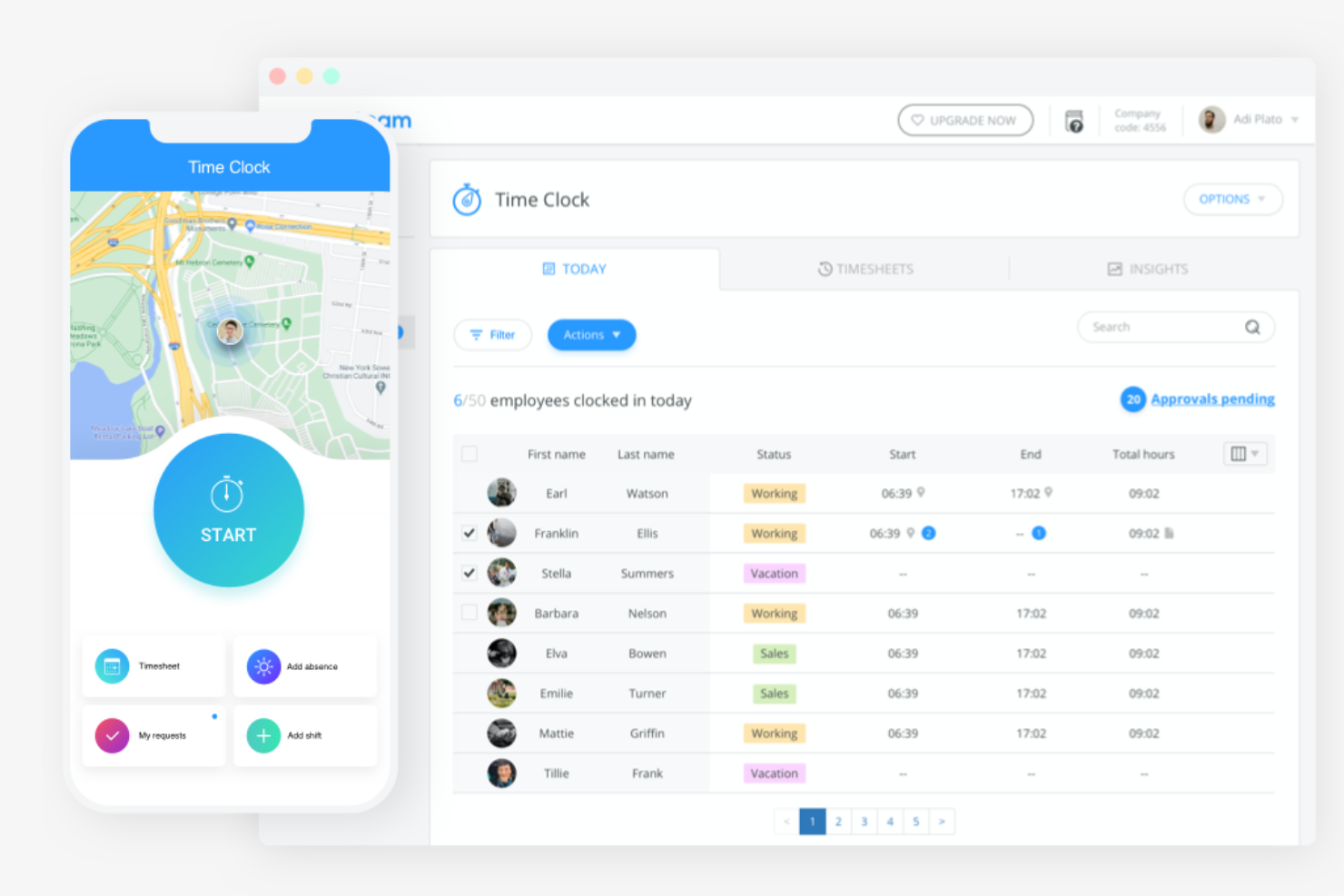
Connecteam is an all-in-one employee management app designed for deskless teams. It's tailored for various industries, including construction, healthcare, and retail, serving both medium and small businesses.
Why I picked Connecteam: It stands out for mobile workforce management, essential for deskless teams. With scheduling and time tracking in one app, your team stays organized on the go. Task management features help assign and monitor tasks efficiently. Communication tools ensure everyone stays informed, enhancing team collaboration.
Standout features and integrations:
Features include time tracking, which lets you monitor hours. Task management allows you to assign and track tasks with ease. Scheduling tools help you plan shifts effectively.
Integrations include Gusto, Paychex, QuickBooks, Zapier, and more.
Pros and Cons
Pros:
- Suitable for small to midsize businesses
- Customizable task management
- Mobile-friendly for deskless teams
Cons:
- Can feel pricey for small teams
- Fewer third-party integrations
New Product Updates from Connecteam

Connecteam Expands Break and Timesheet Controls
Connecteam adds flexible break thresholds, personalized policies, auto-end options, a centralized exceptions report, and improved timesheet issue visibility to help teams manage breaks and timesheets more effectively. For more information, visit Connecteam’s official site.
 .
.
Best for secure team chats

Troop Messenger is a team communication tool designed for businesses prioritizing security. It's popular among industries requiring secure and private messaging, such as government and defense.
Why I picked Troop Messenger: Security is a top priority for Troop Messenger, making it ideal for sensitive communications. End-to-end encryption ensures your messages stay private, and admins can control which contact information users see, such as the CEO's phone number. Self-destructing messages add another layer of confidentiality. Multi-factor authentication protects your team's access, keeping your data safe.
Standout features and integrations:
Features include read receipts, which let you know when messages are read. Group messaging and calling allow for easy team discussions, while remote screen sharing helps you collaborate effectively.
Integrations include Google Drive, Dropbox, LDAP, Zapier, and more.
Pros and Cons
Pros:
- Multi-factor authentication available
- Self-destructing message feature
- Strong encryption for messages
Cons:
- Occasional connectivity issues
- May require technical knowledge

Flock
Best for small team collaboration

Flock is a team chat app and collaboration tool designed for small businesses to improve productivity and employee communication. It helps teams manage conversations, tasks, and projects within one platform, promoting efficient collaboration.
Why I picked Flock: It's ideal for small team collaboration, offering features that foster communication and task management. Channels allow your team to organize discussions by topic or project. The built-in task manager lets you assign and track tasks. Video conferencing helps your team connect without leaving the app.
Standout features and integrations:
Features include shared notes, which allow your team to collaborate on documents in real time. Polls and surveys help collect team feedback quickly. The reminder feature ensures your team never misses important deadlines.
Integrations include Google Drive, Dropbox, Trello, Asana, GitHub, Twitter, Mailchimp, Todoist, Zapier, Zendesk, and more.
Pros and Cons
Pros:
- Supports video conferencing
- Built-in task management
- User-friendly for small teams
Cons:
- Occasional functionality issues
- No message threads

Best for Microsoft 365 users

Microsoft Teams is an all-in-one collaboration platform that integrates with Microsoft 365, providing tools for chat, video conferencing, and file sharing. It's widely used by businesses that rely on Microsoft products, offering a centralized hub for communication and teamwork.
Why I picked Microsoft Teams: Integration with Microsoft 365 is a key benefit, making it ideal for users of Microsoft products. You can schedule huddles directly from Outlook and access shared files through OneDrive. The platform supports large video conferences, ensuring your team stays connected. Customizable channels help organize team discussions effectively.
Standout features and integrations:
Features include virtual backgrounds for video calls, which add professionalism to your meetings. The whiteboard feature allows for real-time brainstorming sessions. Built-in polls help you gather team opinions quickly.
Integrations include Microsoft Outlook, OneDrive, SharePoint, Power BI, Trello, Asana, GitHub, Salesforce, Slack, Zoom, and more.
Pros and Cons
Pros:
- Built-in real-time collaboration tools
- Supports large video meetings
- Easy integration with Microsoft products
Cons:
- Challenging for a deskless workforce
- Overwhelming for new users

Clariti
Best for organizing emails and chats

Clariti is a business productivity app designed to improve team collaboration by consolidating emails, chats, calls, to-dos, and documents into a single platform. It's primarily used by small to midsize businesses and startups to improve productivity and communication.
Why I picked Clariti: Organizing emails and chats is key, and Clariti excels in this area. Workspaces link related items, reducing the time you spend searching for information. This structure helps eliminate silos, making your communication more efficient. It's a strong alternative to traditional messaging apps, offering a unified approach to team collaboration.
Standout features and integrations:
Features include context-based messaging, which keeps your conversations organized by topic. The ability to link emails and chats in one view helps you track communications efficiently. Task management tools let you create and assign to-dos, ensuring your team stays on track.
Integrations include Google Drive, Dropbox, OneDrive, Box, Slack, Trello, Asana, GitHub, Zoom, Microsoft Teams, and more.
Pros and Cons
Pros:
- Reduces information silos
- Offers task management features
- Consolidates multiple communication tools
Cons:
- Basic features limited than rivals
- Can feel slow or laggy sometimes


Asana is a project management tool designed to help teams organize and track their work efficiently. It's used by businesses of all sizes to manage tasks, projects, and workflows within a single platform.
Why I picked Asana: Task tracking is a core feature, allowing you to manage tasks with ease. You can create tasks, set deadlines, and assign them to team members, ensuring everyone knows their responsibilities. The timeline view helps you visualize project progress, making it easier to stay on track. Customizable project templates save you time by standardizing workflows.
Standout features and integrations:
Features include milestones, which let you mark key project achievements and keep your team motivated. The workload feature helps you balance team capacity by showing who is available for more tasks. Automation rules reduce manual work by automating repetitive tasks.
Integrations include Slack, Microsoft Teams, Google Drive, Dropbox, Salesforce, Zoom, GitHub, Trello, Jira, Zapier, and more.
Pros and Cons
Pros:
- Balances team workload efficiently
- Visual timeline for project tracking
- Effective for task management
Cons:
- Complexity in managing large projects
- Limited native time-tracking features

Sling is a scheduling and communication tool designed for businesses that need to manage employee shifts. It's widely used by industries with variable work schedules, such as restaurants and retail, to simplify scheduling and improve team communication.
Why I picked Sling: Shift scheduling is a key feature, making it ideal for businesses with dynamic schedules. It allows you to create and manage shifts, reducing scheduling conflicts. The clock feature helps track employee hours accurately. Messaging capabilities ensure your team stays informed about schedule changes and announcements.
Standout features and integrations:
Features include task management, which helps you assign and oversee tasks efficiently. The newsfeed feature keeps your team updated with company announcements. Reporting tools provide insights into labor costs and employee hours.
Integrations include Toast, Shopify, Gusto, Harbortouch, and more.
Pros and Cons
Pros:
- Supports task management
- Accurate time tracking
- Effective shift management
Cons:
- Mobile UI feels clunky
- Not ideal for large enterprises


Discord is a communication platform designed for creating communities through text, voice, and video channels. It's popular among gamers, creators, and groups looking to build interactive and engaging community spaces.
Why I picked Discord: Community building is a strong suit, offering a platform where users can create and manage their own servers. Voice channels allow for real-time communication, making it easy to host discussions and events. Custom roles and permissions help you manage your community effectively. Bots and automation tools improve interaction and engagement within your server.
Standout features and integrations:
Features include screen sharing, which lets your team present and collaborate visually. The push-to-talk feature reduces background noise during voice chats. Server templates allow you to set up new servers quickly and efficiently.
Integrations include Spotify, Twitch, YouTube, Reddit, Facebook, Twitter, Steam, PayPal, GitHub, Zapier, and more.
Pros and Cons
Pros:
- Provides screen sharing capabilities
- Offers real-time voice communication
- Supports large communities
Cons:
- Not ideal for formal business use
- Can be resource-intensive


Google Chat is an employee communication tool designed for teams using Google Workspace, offering instant messaging and collaboration features. It enables users to engage in direct conversations and group chats to manage projects efficiently.
Why I picked Google Chat: As part of the broader Google ecosystem, this team chat app integrates seamlessly with Google Workspace, making it an ideal choice for teams already invested in Google tools. You can initiate chats directly from Gmail, improving workflow efficiency. The platform supports threaded conversations, helping you keep discussions organized. Real-time collaboration features ensure your team stays connected and productive.
Standout features and integrations:
Features include smart replies, which offer quick response suggestions, saving time in conversations. The search functionality lets you find past messages and files. Custom notifications help you manage your attention and stay focused on priorities.
Integrations include Google Drive, Google Meet, Gmail, Google Calendar, Google Docs, Google Sheets, Google Slides, Google Keep, Google Tasks, Google Forms, and more.
Pros and Cons
Pros:
- Customizable notifications
- Strong search functionality
- Smooth integration with Google Workspace
Cons:
- Restricted file upload size
- Limited third-party integration options
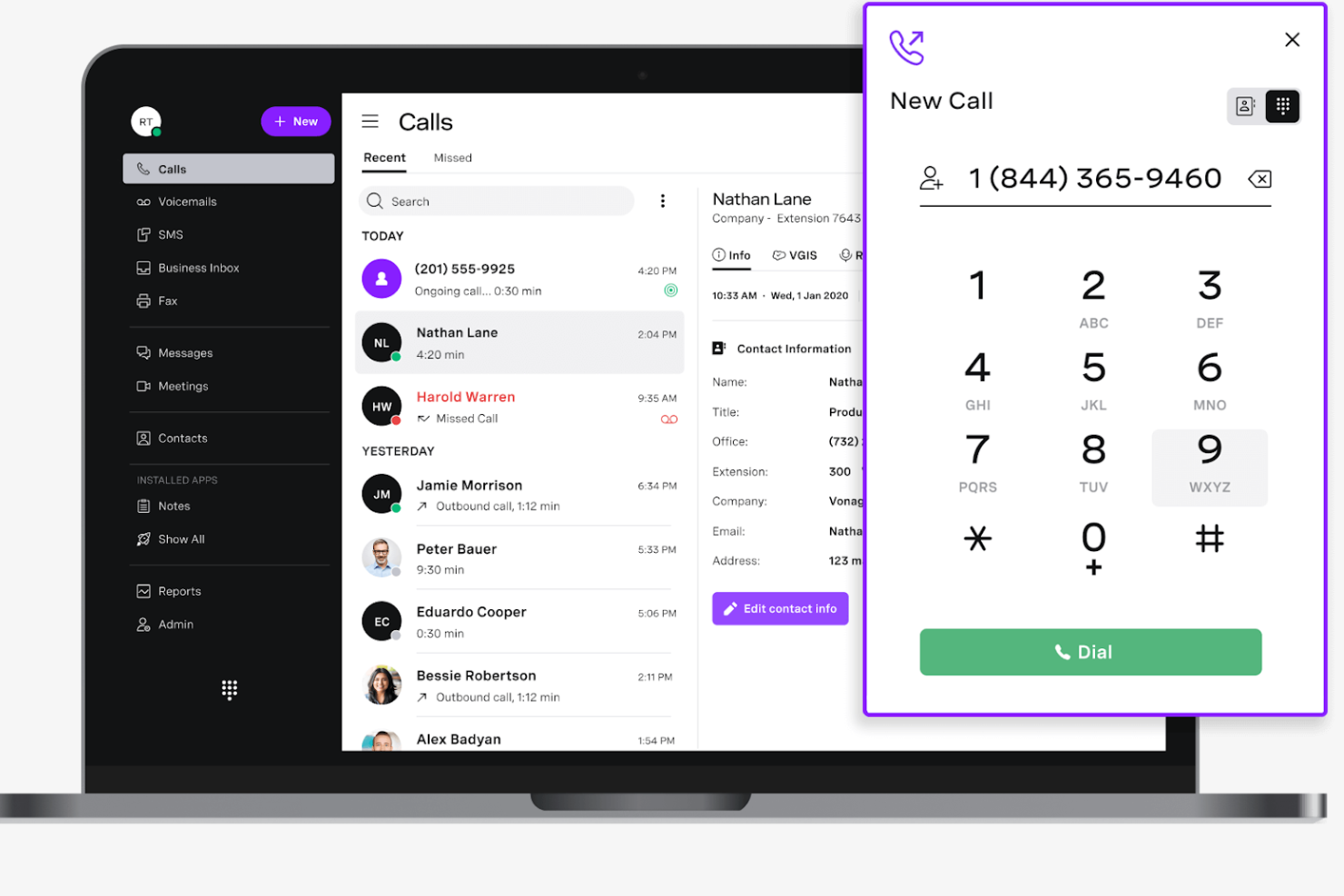
Vonage Business Communications is a cloud-based phone system designed for businesses seeking reliable VoIP services. It's widely used by companies that need flexible communication solutions, offering voice, messaging, and video conferencing capabilities.
Why I picked Vonage Business Communications: VoIP services are a key feature, providing high-quality voice calls over the internet. You can manage calls from any device, ensuring your team stays connected on the go. The platform offers call routing and virtual receptionist features, enhancing your team's professionalism. Video conferencing and messaging keep your team engaged and collaborating.
Standout features and integrations:
Features include call recording, which allows you to capture and review calls for quality assurance. The mobile app ensures your team can access the system from anywhere. Advanced analytics provide insights into call performance and usage.
Integrations include Salesforce, Microsoft Teams, Zoho CRM, HubSpot, Slack, Zapier, G Suite, Office 365, Bullhorn, Zendesk, and more.
Pros and Cons
Pros:
- Call recording capabilities
- High-quality voice calls
- Flexible call management options
Cons:
- Complex pricing structure for add-ons
- Limited customer support
Andre apper for forretningskommunikasjon
Her er noen flere alternativer for apper for forretningskommunikasjon som ikke kom med på kortlisten min, men som likevel er verdt å se nærmere på:
- Slack
For integrating third-party tools
- Staffbase
For employee engagement
- Hub
For targeted comms & knowledge sharing
- Basecamp
For remote team collaboration
- ProofHub
For project management integration
- Chanty
For AI-powered task management
- Pumble
For unlimited message history
- Zoom
For video conferencing quality


How I Evaluate Business Communication Apps
I evaluate in two layers: core functionality a tool must have—like persistent chat and video for interviews—and differentiators like HRIS integrations and compliance controls that set the best apart.
Core Functionality (Table Stakes For This List)
When I'm selecting tools for my list, I rank each one on a scale from 0 (does not offer the functionality) to 5 (excels in this area) for each core functionality listed below. Then, I calculate the tool's total score into a percentage. Each tool needs to achieve a minimum total score of 65% to be considered for inclusion.
- Real-Time Messaging: I check for persistent one-on-one and group chat with threading and search, since HR teams need to revisit past conversations around things like benefits questions.
- Voice & Video Conferencing: Tools should include integrated video and voice calling so teams can run remote interviews, onboarding walkthroughs, and employee check-ins without a separate app.
- Channels & Group Spaces: I look for organized public and private channels that let HR segment discussions by topic—like a dedicated space for hiring managers or a private channel for employee relations.
- File Sharing & Collaboration: The ability to share offer letters, handbooks, or training materials directly in a conversation matters, so I evaluate attachment support, previews, and storage integrations.
- Mobile & Desktop Access: Frontline and remote employees often rely on their phones, so I evaluate whether mobile apps maintain full feature parity with the desktop experience.
- Security & Access Controls: I look at encryption standards, role-based permissions, and admin audit trails to confirm the tool can handle sensitive HR conversations and protect employee data.
Once I have a list of tools that meet this criteria, I consider what sets each platform apart.
Differentiating Factors (What Sets Vendors Apart)
Here's how I compare and contrast different vendors:
Standout Features
Broadcast announcements with read receipts and mandatory acknowledgments matter when you're rolling out a new PTO policy and need confirmation every employee saw it. I also evaluate workflow automation bots that can trigger onboarding sequences—like welcome messages, checklist reminders, and intro prompts—without manual effort from your HR team. For organizations with a global workforce, built-in message translation helps HR communicate across languages without relying on external tools.
Beyond Features
HR tech stack integrations are a big differentiator—I check whether a platform connects natively with HRIS and ATS tools like BambooHR or Greenhouse so employee data flows into the communication layer without manual syncing. Compliance and data governance also carry real weight, especially for HR teams handling sensitive conversations around performance issues or accommodations. I look for configurable retention policies, legal hold, and audit logs. Frontline reach is another factor I evaluate: whether warehouse or retail staff can onboard via QR code or SMS without needing a company email.
Slik velger du apper for forretningskommunikasjon
Lange funksjonslister og komplekse prismodeller kan virke overveldende. For å hjelpe deg med å holde fokus mens du går gjennom den unike prosessen med å velge programvare, har vi satt sammen en sjekkliste over faktorer du bør ta hensyn til:
| Faktor | Hva du bør vurdere |
|---|---|
| Skalerbarhet | Vil appen vokse sammen med teamet ditt? Vurder om den kan håndtere flere brukere eller større datamengder. Unngå verktøy som kan begrense den fremtidige veksten din. |
| Integrasjoner | Kan den kobles til verktøyene du allerede bruker, for eksempel CRM- eller prosjektstyringsprogramvare? Sørg for smidig integrasjon med arbeidsflyten for å unngå avbrudd. |
| Tilpasningsmuligheter | Kan du tilpasse appen til dine spesifikke behov? Se etter tilpassbare dashbord og arbeidsflyter som samsvarer med prosessene dine. |
| Brukervennlighet | Er grensesnittet intuitivt nok til at det tas raskt i bruk? En bratt læringskurve kan redusere produktiviteten. Velg brukervennlige løsninger. |
| Implementering og introduksjon | Hvor lang tid tar det å komme i gang? Sjekk om leverandøren tilbyr ressurser som veiledninger og kundestøtte for å gjøre overgangen enklere. |
| Kostnad | Passer prisen budsjettet ditt? Sammenlign funksjonene med prisen for å sikre at du får god verdi. Vær oppmerksom på skjulte gebyrer eller kostnader for flere brukere. |
| Sikkerhetstiltak | Er det iverksatt tiltak for å beskytte dataene? Se etter kryptering og samsvar med standarder som GDPR. Sikkerhetsbrudd kan føre til datalekkasjer. |
| Tilgjengelig kundestøtte | Får du hjelp når du trenger det? Vurder leverandørens åpningstider og kanaler, for eksempel chat eller telefon, slik at du raskt kan få hjelp. |
Hva er apper for forretningskommunikasjon?
Apper for bedriftskommunikasjon er verktøy som er utviklet for å legge til rette for og forbedre kommunikasjonen i organisasjoner. Fagpersoner innen HR, prosjektledelse og fjernarbeid bruker vanligvis disse verktøyene for å forbedre samarbeid og produktivitet. Funksjoner for direktemeldinger, videokonferanser og fildeling bidrar til å holde team tilkoblet, slik at de kan administrere oppgaver og dele informasjon effektivt. Alt i alt forenkler disse verktøyene kommunikasjon og koordinering, noe som fører til mer effektivt teamarbeid.
Funksjoner
Når du velger apper for bedriftskommunikasjon, bør du se etter følgende viktige funksjoner:
- Meldinger: Muliggjør tekstkommunikasjon i sanntid, slik at team kan holde kontakten og dele informasjon raskt.
- Videokonferanser: Gir virtuelle møter ansikt til ansikt, fremmer samarbeid og reduserer behovet for fysiske møter.
- Fildeling: Gjør det mulig for brukere å utveksle dokumenter og filer, slik at alle har tilgang til nødvendige ressurser.
- Oppgavehåndtering: Bidrar til å organisere og tildele oppgaver, slik at teammedlemmene kjenner ansvarsområdene og fristene sine.
- Kalenderintegrasjon: Administrerer tiden effektivt ved å synkronisere med kalendere for å planlegge møter.
- Ende-til-ende-kryptering: Beskytter sensitiv informasjon ved å sikre kommunikasjonen mot uautorisert tilgang.
- Tilpassbare varsler: Lar brukere tilpasse varsler etter egne preferanser, noe som minimerer distraksjoner og gjør det mulig å fokusere på prioriteringer.
- Analyse og rapportering: Kartlegger kommunikasjonsmønstre og bruk, slik at team kan forbedre effektiviteten.
- Mobiltilgang: Sikrer at brukere kan koble seg til og samarbeide fra hvor som helst, og støtter fjernarbeid og fleksibilitet.
Fordeler
Implementering av apper for bedriftskommunikasjon gir flere fordeler for teamet og virksomheten din. Her er noen av fordelene du kan se frem til:
- Bedre samarbeid: Funksjoner for direktemeldinger og videokonferanser hjelper teamet med å samarbeide mer effektivt, uavhengig av hvor medlemmene befinner seg.
- Økt produktivitet: Oppgavehåndtering og kalenderintegrasjon sørger for at alle kjenner ansvarsområdene og fristene sine, noe som reduserer tiden som går tapt på koordinering.
- Bedre sikkerhet: Ende-til-ende-kryptering beskytter sensitiv kommunikasjon, slik at du kan være trygg på datasikkerheten.
- Større fleksibilitet: Mobiltilgang gjør det mulig for teamet å holde kontakten og være produktivt fra hvor som helst, og støtter modeller for fjernarbeid og hybridarbeid.
- Bedre organisering: Fildeling og tilpassbare varsler hjelper teamet med å holde oversikt over viktig informasjon og redusere distraksjoner.
- Nyttig analyse: Rapporteringsfunksjoner gir innsikt i kommunikasjonsmønstre, slik at du kan identifisere områder som kan forbedres.
- Kostnadseffektivitet: Ved å samle kommunikasjonsverktøy reduserer du utgiftene og forenkler teknologistakken.
Kostnader og priser
Valg av apper for bedriftskommunikasjon krever en forståelse av de ulike prismodellene og abonnementene som er tilgjengelige. Kostnadene varierer basert på funksjoner, teamstørrelse, tillegg og mer. Tabellen nedenfor oppsummerer vanlige abonnementer, gjennomsnittsprisene deres og typiske funksjoner som er inkludert i løsninger for apper for bedriftskommunikasjon:
Sammenligningstabell for abonnementer for apper for bedriftskommunikasjon
| Abonnementstype | Gjennomsnittspris | Vanlige funksjoner |
|---|---|---|
| Gratisabonnement | $0 | Grunnleggende meldinger, begrenset fildeling og grunnleggende oppgavehåndtering. |
| Personlig abonnement | $1.70-$29/bruker/måned | Forbedrede meldinger, videosamtaler, økt lagringsplass og grunnleggende integrasjoner. |
| Bedriftsabonnement | $3.40-$40/bruker/måned | Avanserte samarbeidsverktøy, omfattende integrasjoner, tilpassede varsler og analyse. |
| Virksomhetsabonnement | $8.55+/bruker/måned | Fullt funksjonssett, dedikert kundestøtte, avansert sikkerhet og tilpasningsmuligheter. |
Vanlige spørsmål om apper for forretningskommunikasjon
Her er noen svar på vanlige spørsmål om apper for forretningskommunikasjon:
Hva er systemkravene for apper for forretningskommunikasjon?
De fleste apper for forretningskommunikasjon fungerer på flere operativsystemer, inkludert Windows, macOS, iOS og Android. Du trenger en pålitelig internettilkobling og en oppdatert nettleser eller appversjon. Se nettstedet til den aktuelle appen for detaljerte systemkrav. Noen apper kan kreve spesifikk maskinvare for optimal ytelse, for eksempel et webkamera for videosamtaler.
Kan apper for forretningskommunikasjon integreres med annen programvare?
Ja, de fleste apper for forretningskommunikasjon tilbyr integrasjon med annen programvare for å øke produktiviteten. Du kan koble dem til verktøy som CRM-systemer, prosjektstyringsapper og skylagringstjenester. Se etter apper som støtter integrasjoner med verktøyene teamet ditt vanligvis bruker, for å sikre en smidig arbeidsflyt.
Er apper for forretningskommunikasjon sikre?
Ja, sikkerhet er en prioritet for de fleste apper for forretningskommunikasjon. De har ofte funksjoner som ende-til-ende-kryptering, tofaktorautentisering og samsvar med standarder for databeskyttelse. Gå alltid gjennom sikkerhetstiltakene til en app før du tar den i bruk, for å sikre at den oppfyller organisasjonens behov.
Hvordan velger jeg riktig app for forretningskommunikasjon for teamet mitt?
Begynn med å vurdere teamets behov, for eksempel teamets størrelse, hvilke funksjoner dere trenger, og budsjettet deres. Vurder brukervennlighet, integrasjonsmuligheter og alternativer for kundestøtte. Prøveperioder og demonstrasjoner kan hjelpe deg med å velge den beste appen for arbeidsflyten din før du bestemmer deg.