

De 10 beste programvarene for oppgavehåndtering i 2026

Kortliste over den beste programvaren for oppgavehåndtering


Programvare for oppgavehåndtering gir teamet ditt et sentralt sted der dere kan organisere, prioritere og følge opp alle deler av arbeidsflyten. Med tettpakkede prosjektplaner, skiftende prioriteringer og overlappende leveranser trenger du verktøy som gir tydelig oversikt og fleksibel kontroll over oppgaver og tidsfrister. Å velge riktig plattform legger grunnlaget for bedre samarbeid, færre flaskehalser og mer forutsigbare prosjektresultater.
Denne veiledningen hjelper deg med å sammenligne den beste programvaren for oppgavehåndtering raskt, slik at du kan finne det mest praktiske alternativet for teamets arbeidsmåte.
Why Trust Our Software Recommendations
Our team has been testing and reviewing software since 2012. As HR experts ourselves, we know how difficult—and important—it is to choose the right software.
For this guide, we evaluated tools using hands-on testing and independent research, scoring tools using our selection criteria. We also draw on insights from industry thought leaders and practicing HR experts.
Our reviews reflect our human editorial judgment, not a sales pitch.
Expert reviewers:
Sammenligningstabell for programvare for oppgavehåndtering
Tabellen nedenfor sammenligner prisdetaljer for mine beste utvalg av programvare for oppgavehåndtering.
| Tool | Best For | Trial Info | Price | ||
|---|---|---|---|---|---|
| 1 | Best for tracking priorities with flexible views | Free plan available | From $7/user/month (billed annually) | Website | |
| 2 | Best for linking tasks to databases | Free plan available; 14-day free trial | From $20/user/month (billed annually) | Website | |
| 3 | Best for uniting documents and tasks | Free plan + free demo available | From $10/user/month (billed annually) | Website | |
| 4 | Best for spreadsheet-style task tracking | 30-day free trial | From $12/user/month | Website | |
| 5 | Best for collaborating on project timelines | 14-day free trial | From $10/user/month (billed annually) | Website | |
| 6 | Best for combining database and task features | 14-day free trial | From $15/user/month (billed annually) | Website | |
| 7 | Best for simple card-based organization | 14-day free trial | From $5/user/month (billed annually) | Website | |
| 8 | Best for setting automated recurring tasks | Free plan available | From $10.99/user/month (billed annually) | Website | |
| 9 | Best for managing client-facing projects | Free plan available; 14-day free trial | From $9.99/user/month (billed annually) | Website | |
| 10 | Best for software development tracking | Free plan available | From $8.48/user/month | Website |


Anmeldelser av den beste programvaren for oppgavehåndtering
Nedenfor finner du mine detaljerte sammendrag av den beste programvaren for oppgavehåndtering som kom med på kortlisten. Anmeldelsene mine gir en grundig gjennomgang av funksjonene, de beste bruksområdene og integrasjonene for hvert verktøy, slik at du kan finne det beste alternativet for deg.

ClickUp
Best for tracking priorities with flexible views
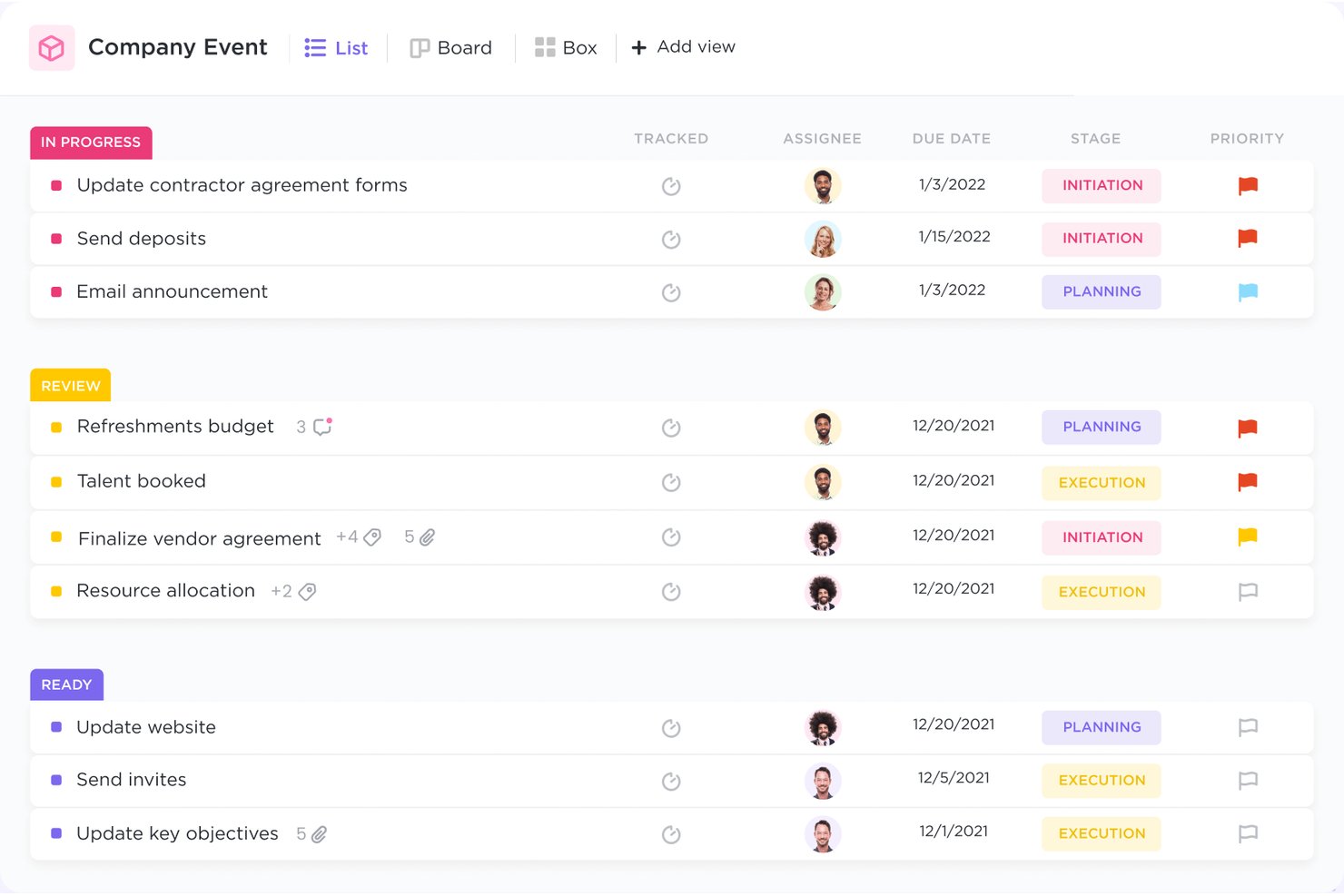
ClickUp is a task and project management platform that combines multi-view task tracking, custom workflows, workload management, native time tracking, and built-in docs and collaboration tools in a single workspace.
Who Is ClickUp Best For?
ClickUp suits mid-size to large cross-functional teams that need to manage multiple concurrent projects across departments from a single, highly configurable workspace.
Why I Picked ClickUp
ClickUp earns its spot on my shortlist because of how much control it gives you over how you see your work. I can switch the same task data between List, Kanban, Gantt, Timeline, and Calendar views without duplicating anything, which is genuinely useful when tracking a multi-phase project across teams. Custom Fields let me surface priority, status, and owner at a glance, and I can filter or group by any of those fields across every view.
ClickUp Key Features
- Automations: Create automatic actions based on triggers like status changes, task creation, or date reached.
- Docs and wikis: Draft, organize, and collaborate on project documentation all within the workspace.
- Workload view: See team capacity and task allocation in real time to balance assignments.
- Native time tracking: Track time spent on tasks directly inside each project without external add-ons.
ClickUp Integrations
ClickUp offers over 100 native integrations, including Slack, Microsoft Teams, Google Drive, OneDrive, Dropbox, GitHub, GitLab, Figma, Zoom, Outlook, and HubSpot. It connects with Zapier and Make, and provides an API for custom integrations.
Pros and Cons
Pros:
- Advanced workload and capacity tracking
- Automations optimize repetitive task processes
- Multiple project views instantly switchable
Cons:
- Time tracking and reporting can be rigid
- Initial board setup feels overwhelming
New Product Updates from ClickUp
ClickUp Adds Meetings Hub, Super Agent Templates, and ZoomInfo Integration
ClickUp adds a searchable Meetings Hub, new ways to clone and template Super Agents, and a ZoomInfo integration through the App Center. These updates improve meeting retrieval, agent reuse, and access to sales intelligence. For more information, visit ClickUp’s official site.
Airtable
Best for linking tasks to databases
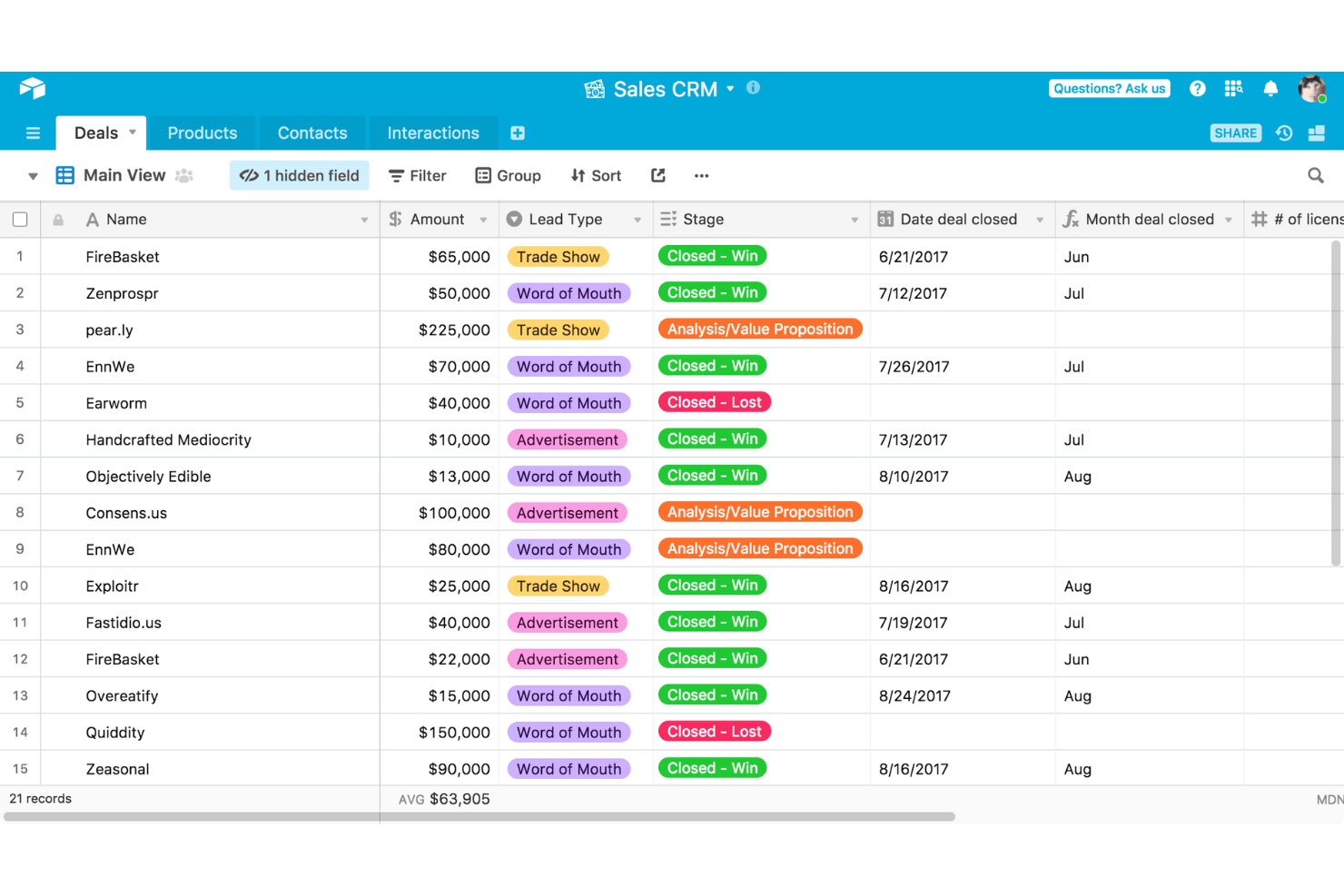
Airtable is a relational-database-driven project management platform that combines task tracking, multi-view project planning, resource management, and workflow automation in a single, highly customizable workspace.
Who Is Airtable Best For?
Airtable is a strong fit for cross-functional operations and program teams that need to manage structured data records alongside tasks and projects.
Why I Picked Airtable
I picked Airtable as one of the best because no other tool on this list handles the connection between tasks and structured records as naturally. When my team runs an onboarding program, we link each task directly to the employee record, pulling in role, start date, and department through lookup fields automatically. The custom Interfaces feature then lets us surface a clean, role-specific view of those linked tasks for each stakeholder, without exposing the underlying database.
Airtable Key Features
- AI-powered resource recommendations: Airtable suggests staffing based on workload, skills, and project timelines.
- Multiple project views: Switch between grid, calendar, Kanban, Gantt, and gallery layouts for flexible task visualization.
- Automation builder: Automate project updates, notifications, and handoffs with built-in automation tools.
- Pre-built HR templates: Access ready-made templates for onboarding, recruiting, and employee records management.
Airtable Integrations
Airtable offers over 100 native integrations, including Jira, Box, Miro, Jotform, Salesforce, Tableau, Twilio, Zendesk, and Typeform. An API is available for custom integrations.
Pros and Cons
Pros:
- Triggers emails and new entries easily
- Interface designer creates tailored views
- Links tasks to relational databases
Cons:
- Lacks deep auto-scheduling Gantt tools
- Comments stay tied strictly to records

Notion
Best for uniting documents and tasks
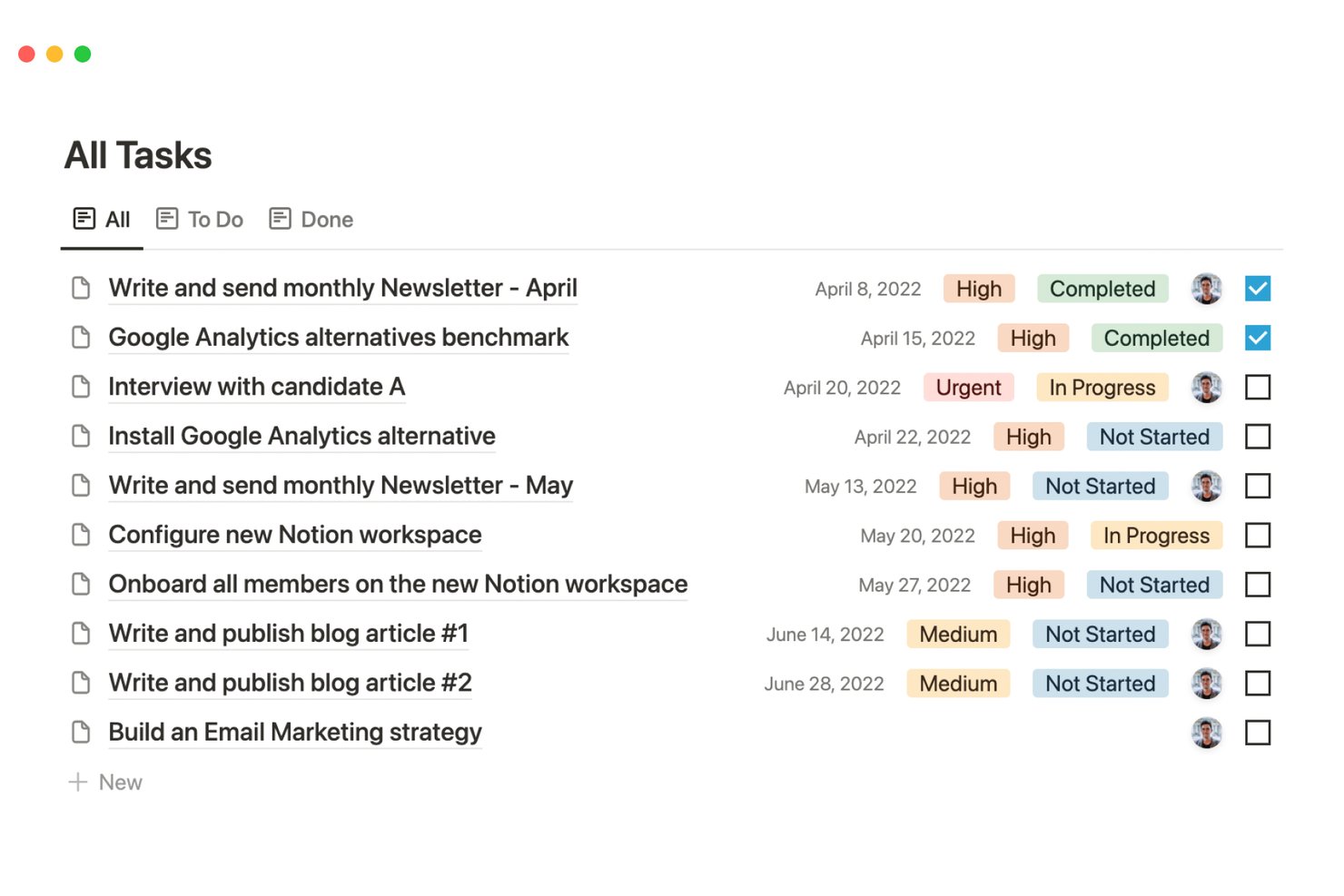
Notion is an all-in-one workspace that blends task management, project databases, and collaborative documentation into a single, highly customizable platform.
Who Is Notion Best For?
Notion is a strong fit for small-to-mid-sized teams that manage a high volume of documentation alongside their day-to-day project work.
Why I Picked Notion
Notion earns its spot on my shortlist because no other task management tool ties live documents directly to project databases the way it does. I can link a task to the meeting notes, brief, or SOP that created it, all within the same page. Its relational database system means my team's project tracker and knowledge base are one connected system, not two separate tools.
Notion Key Features
- Multiple project views: Switch between Kanban boards, timeline, calendar, table, or gallery formats for any project database.
- Database automations: Set up custom workflow rules using buttons or database triggers to automate repetitive project actions.
- Granular permissions: Control access at the workspace, teamspace, database, or page level for nuanced team collaboration.
- AI meeting notes: Use built-in AI to record and generate summaries and action items from meetings linked directly to projects.
Notion Integrations
Notion offers native integrations with Slack, Google Drive, GitHub, Figma, Asana, Loom, Canva, Splunk, Jira, and more. Native connectors for Microsoft Teams and Linear are also available. An API supports custom integrations.
Pros and Cons
Pros:
- Embeds collaborative wikis and SOPs for HR
- Offers flexible database views for projects
- Links documents directly to tasks and projects
Cons:
- Recurring task options are limited compared to peers
- Lacks true capacity or workload management

Best for spreadsheet-style task tracking
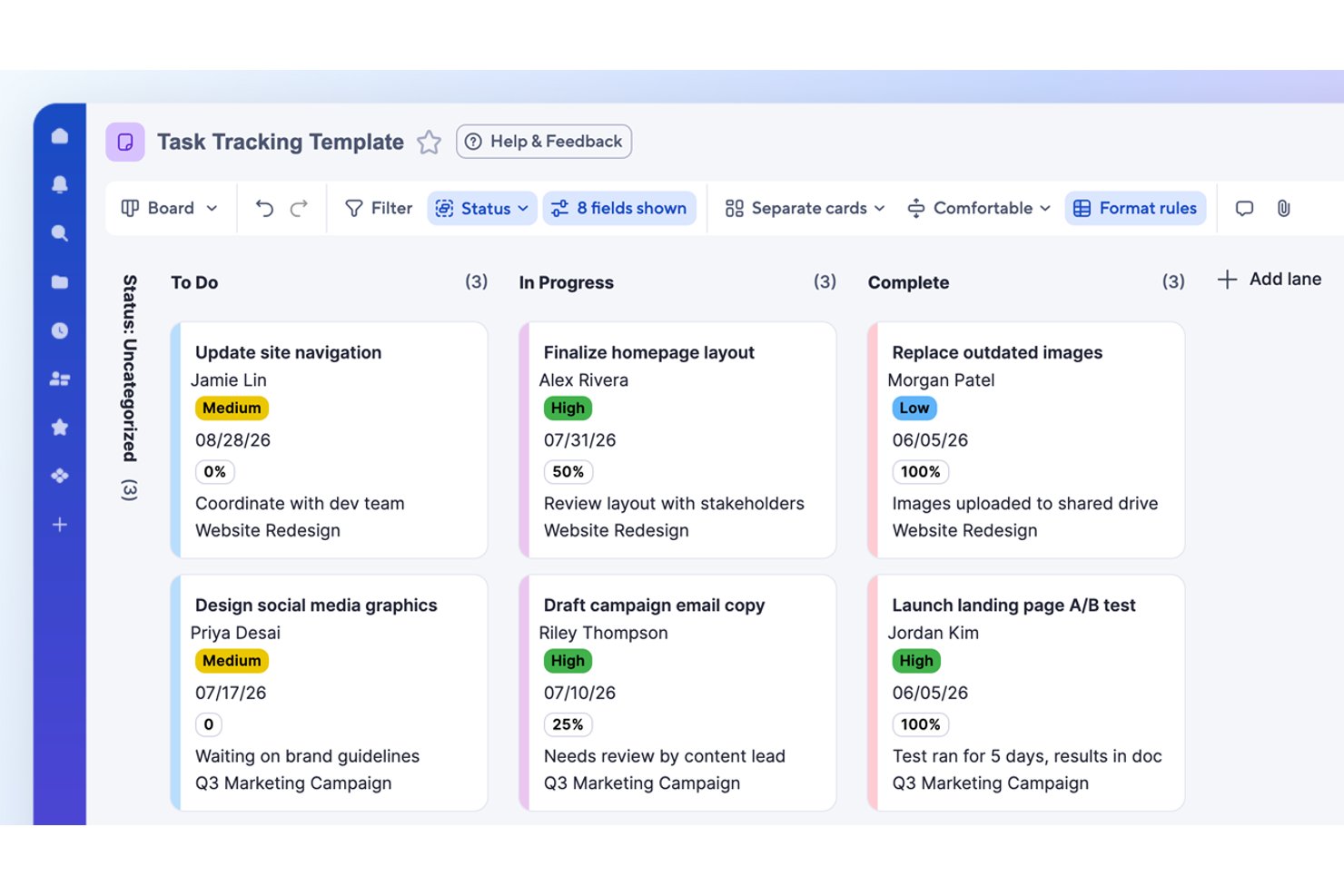
Smartsheet is a grid-based project and task management platform that combines spreadsheet-style data entry with Gantt charts, Kanban boards, workflow automation, and real-time dashboards.
Who Is Smartsheet Best For?
It's a strong fit for cross-functional teams in mid-size to large organizations that already rely on spreadsheets and need to scale their project management.
Why I Picked Smartsheet
I picked Smartsheet as one of the best because its grid view feels immediately familiar to anyone who's managed tasks in Excel, but adds task dependencies and automated timeline adjustments that spreadsheets can't do. I particularly like the critical path highlighting in Gantt view, which makes it easy to spot which tasks will delay a project if they slip. No-code automation handles things like auto-assigning tasks and triggering deadline reminders directly from that same grid.
Smartsheet Key Features
- Multi-view dashboards: View and track project data in grid, board, timeline, and calendar formats.
- Built-in forms for task intake: Collect and capture project requests or updates from any user directly into sheets.
- Unlimited conditional automation: Set up rules to trigger alerts, approvals, or updates based on changing task data.
- Resource management add-on: Monitor team workload and balance assignments across multiple projects.
Smartsheet Integrations
Smartsheet has native integrations with Google Workspace, Microsoft 365, Slack, Microsoft Teams, Box, Dropbox, DocuSign, Jira, Power BI, Adobe Creative Cloud, and Tableau. It also connects with Zapier, and an API is available for custom integrations.
Pros and Cons
Pros:
- Critical path and dependencies in Gantt view
- Automates task assignment and recurring workflows
- Spreadsheet-like interface with project management features
Cons:
- Workload allocation sold as separate product
- No built-in time tracking feature
New Product Updates from Smartsheet

Smartsheet Adds Non-Plan User Management in Admin Center
Smartsheet adds a Non plan users tab to the Seat types and true-up page in Admin Center. This lets system admins review non-plan users and add them to the plan or remove them from the organization in one place. For more information, visit Smartsheet’s official site.
Wrike
Best for collaborating on project timelines
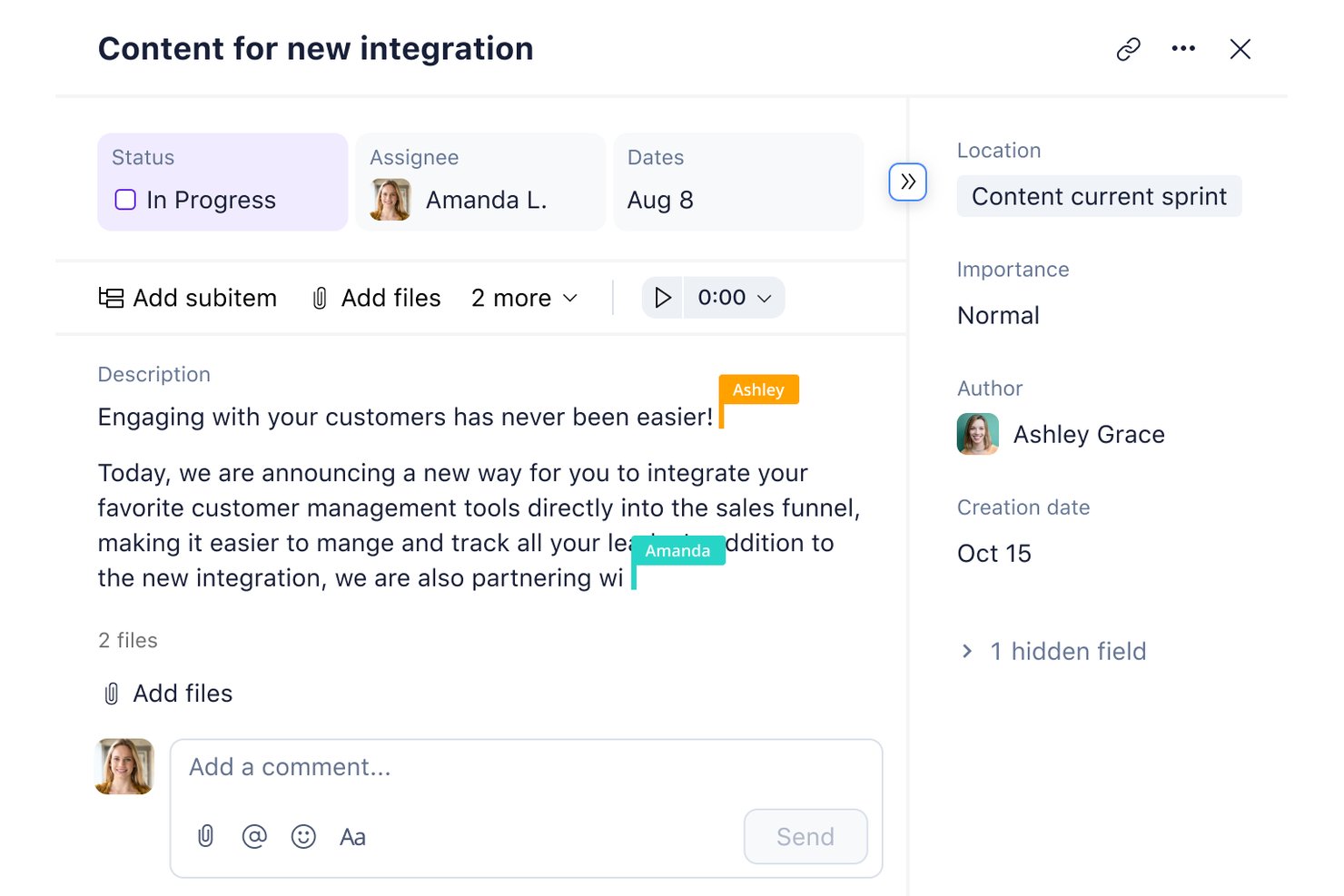
Wrike is a work management platform that combines task tracking, multi-view project planning, workflow automation, resource management, and real-time collaboration tools in a single, highly customizable workspace.
Who Is Wrike Best For?
Wrike is a strong fit for mid-size to enterprise teams managing complex, multi-project operations across departments.
Why I Picked Wrike
Wrike earns its spot as one of the best on my shortlist because its interactive Gantt charts let my team set dependencies, adjust timelines, and see how one task shift cascades across an entire project. I also rely heavily on the cross-tagging feature, which lets us share tasks across multiple project folders without duplication. When review cycles overlap with delivery timelines, built-in proofing and approvals keep sign-offs moving without pulling work out of context.
Wrike Key Features
- AI-powered automation: Generate content, summarize comments, and set up workflow automation using Wrike Copilot and generative AI tools.
- Custom item types: Create tailored task structures that fit unique team or project requirements across your workspace.
- Request forms: Optimize task intake and automate workflow triggers with customizable, user-facing forms.
- Resource management dashboards: Visualize team capacity, allocations, and time tracking with interactive charts and reports.
Wrike Integrations
Wrike offers hundreds of native integrations, including Google Workspace, Microsoft 365, Salesforce, Slack, Adobe, Zoom, Jira, HubSpot, GitHub, and Tableau. It also provides an API for custom integrations.
Pros and Cons
Pros:
- Advanced resource planning for large teams
- Recurring task workflows with custom statuses
- Task dependencies update across all views instantly
Cons:
- Default alert settings clog up inboxes
- Resource planning only in highest tier
New Product Updates from Wrike
Wrike Adds Klaxoon MCP Integration
Wrike’s Klaxoon MCP integration is now generally available, enabling AI agents to navigate between Wrike tasks and attached whiteboards, read task context, and manage whiteboard attachments via API. For more information, visit Wrike's official site.
Best for combining database and task features
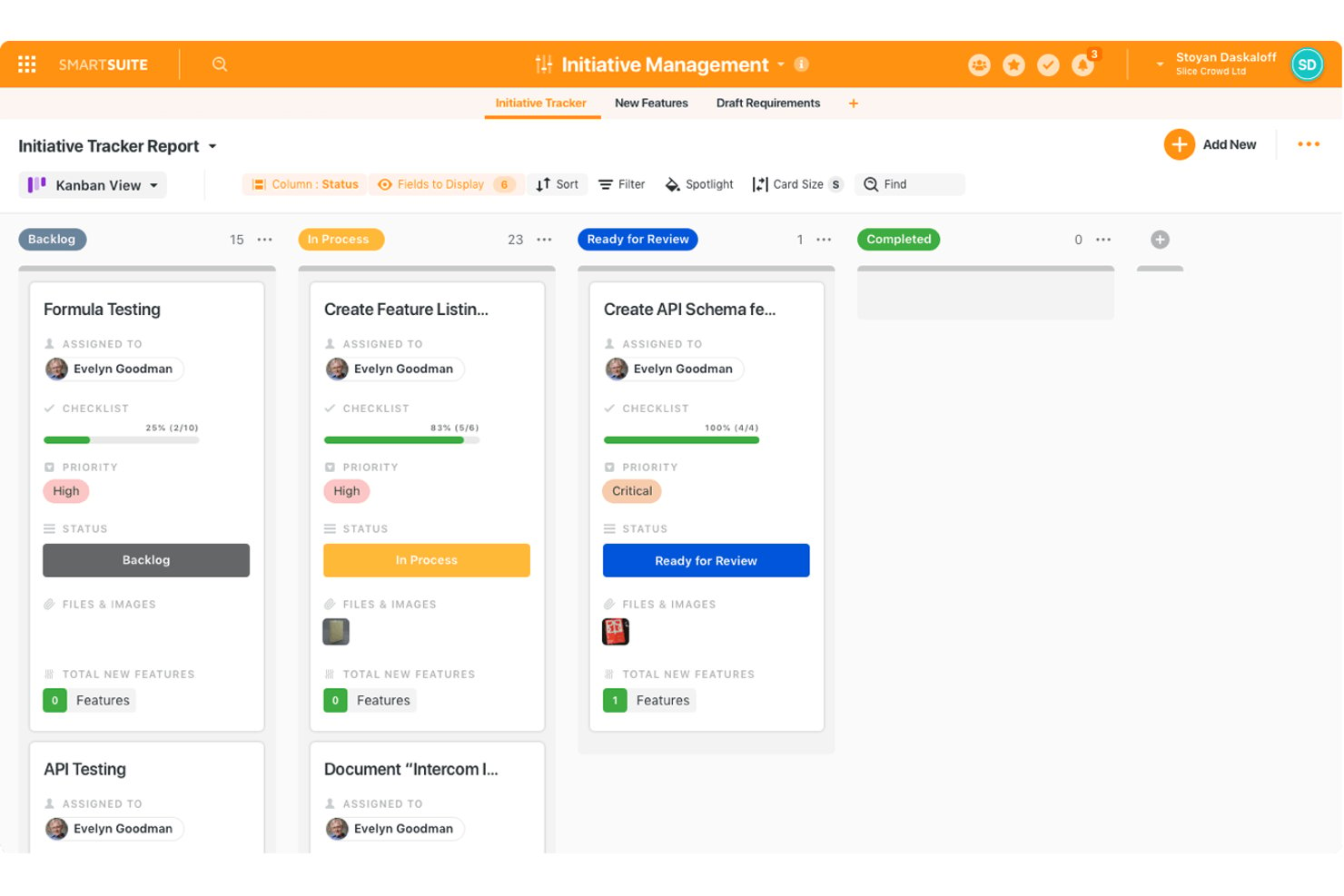
SmartSuite is a work management platform that combines structured database records with task tracking, multiple project views, workflow automation, and team collaboration tools.
Who Is SmartSuite Best For?
SmartSuite suits operations and project teams that need to manage structured data records and active task workflows without switching between a spreadsheet tool and a separate project management platform.
Why I Picked SmartSuite
I picked SmartSuite because it genuinely bridges the gap between a database tool and a task manager in a way most task platforms don't attempt. Each record carries 40+ field types, including assignees, due dates, percent complete, and checklists, turning structured data entries into fully trackable tasks. My team can link program records directly to individual deliverables, so every task sits inside a real information layer rather than existing as a standalone to-do.
SmartSuite Key Features
- Gantt chart view: Visualize project timelines, milestones, and dependencies to track progress.
- Automation builder: Set up no-code automation to optimize task handoffs and updates.
- Resource allocation tools: Monitor workload and capacity for each team member within project dashboards.
- In-app commenting with mentions: Communicate directly on tasks and ping teammates for input or status updates.
SmartSuite Integrations
SmartSuite offers native integrations with Box, HubSpot, Twilio, Slack, Jira Cloud, Salesforce, Unsplash, Intercom, and more. It also connects with Zapier and Make, and an API is available for custom integrations.
Pros and Cons
Pros:
- Offers extensive built-in automation options
- Includes Gantt, timeline, and kanban views
- Combines relational database and task workflows
Cons:
- Lacks dedicated enterprise workload balancing
- Mobile app lacks full desktop functionality
Trello
Best for simple card-based organization
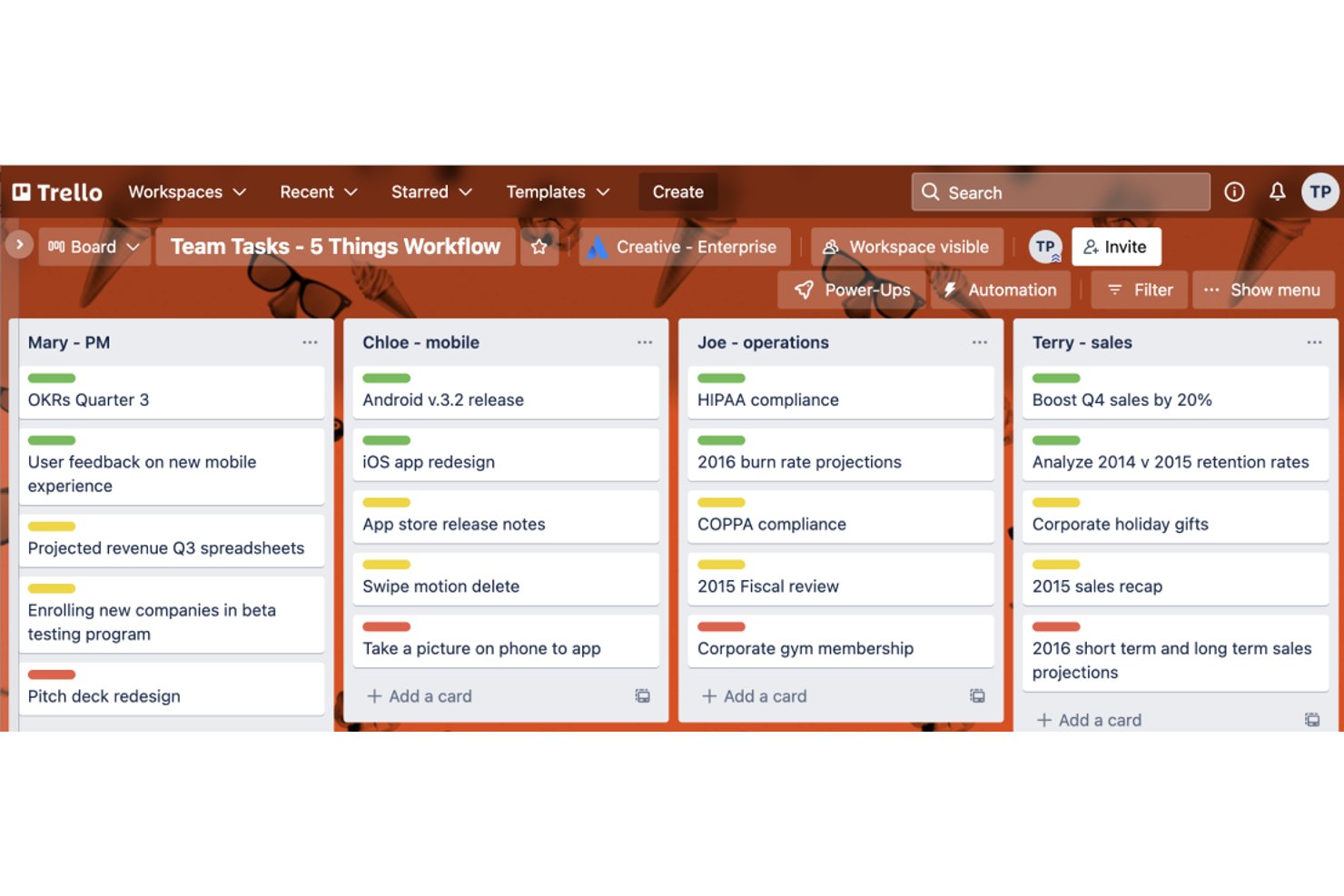
Trello is a visual task management tool built around a card-and-board system, offering Kanban boards, timeline views, calendar views, and no-code automation to help teams organize and track work across projects.
Who Is Trello Best For?
Trello suits small teams and early-stage organizations that need a lightweight, visual way to manage tasks without a steep setup process.
Why I Picked Trello
Trello earns its spot as one of the best on my shortlist because the card-and-board system is the clearest way I've found to visualize task status across a project at a glance. I particularly like card mirroring, which lets me surface the same task across multiple boards without duplicating entries. Butler automation then handles repetitive card movements, so my team isn't manually dragging cards through lists all day.
Trello Key Features
- Multiple view options: Switch between calendar, timeline, table, map, and dashboard views for different project perspectives.
- Custom fields: Add unique data points to cards beyond default Trello labels and descriptions.
- Advanced checklists: Break tasks into detailed subtasks with individual due dates on each checklist item.
- Workspace templates: Use and share board templates across your workspace for consistent HR or project workflows.
Trello Integrations
Trello offers over 230 native integrations, including Slack, Microsoft Teams, Jira Cloud, Confluence, Google Drive, Dropbox, Salesforce, Miro, Gmail, and more. It also connects with Zapier and Make, and an API is available for custom integrations.
Pros and Cons
Pros:
- Butler tool automates common card movements
- Community templates simplify project startup
- Intuitive visual dragging for project steps
Cons:
- Multi-board view features require paid upgrades
- Dependent card links require third-party Power-Ups

Asana
Best for setting automated recurring tasks
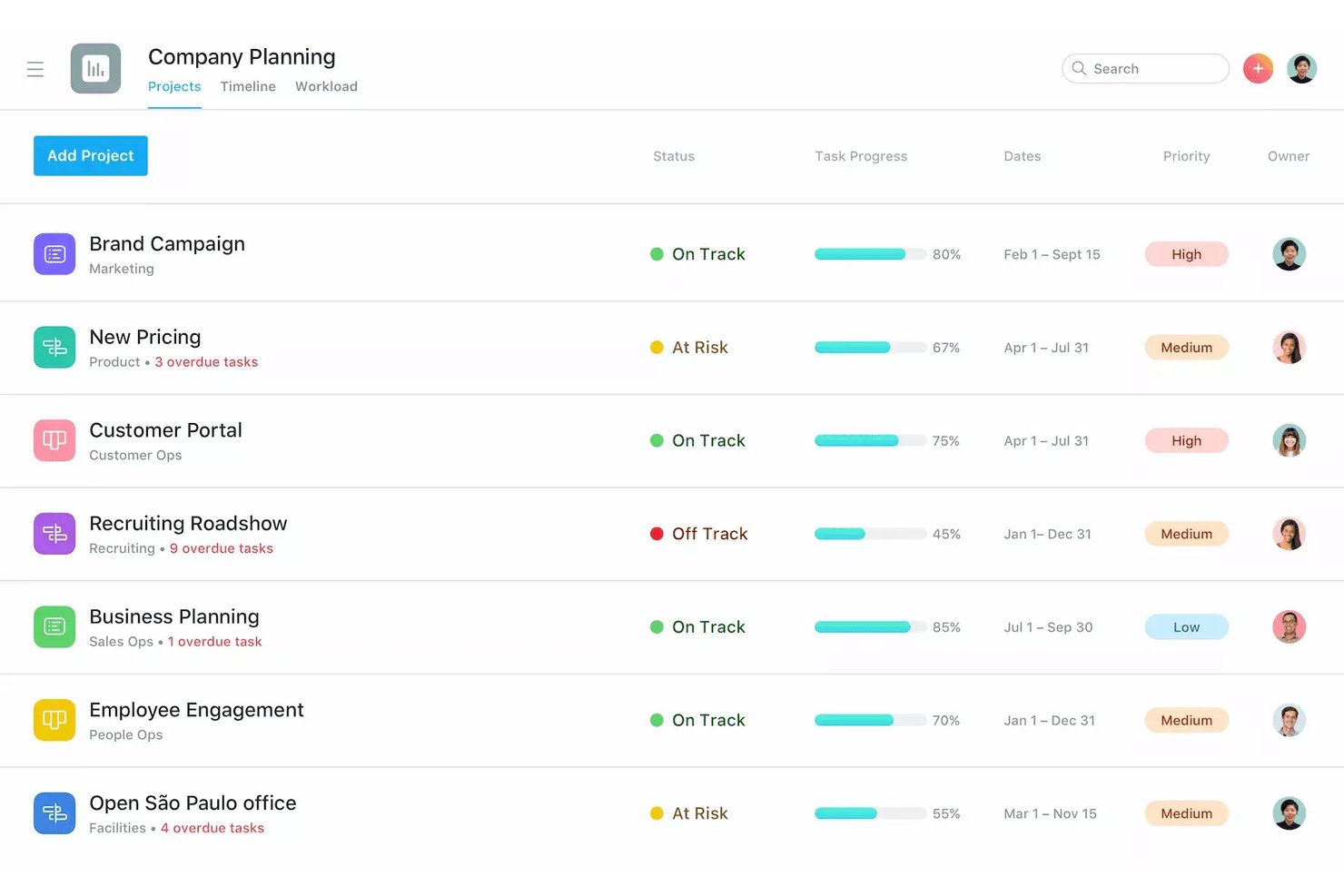
Asana is a work management platform that combines task assignment, project tracking, workflow automation, and cross-functional collaboration across multiple project views including list, board, timeline, and calendar.
Who Is Asana Best For?
Asana fits growing mid-sized teams that manage multiple concurrent projects across departments and need a structured way to coordinate work at scale.
Why I Picked Asana
Asana earns its spot on my shortlist because its recurring task automation works at both the task and workflow level. I use the Workflow Builder to build no-code rules that automatically generate the next task instance, reassign it, and update the due date the moment a trigger fires. I also like that recurring tasks aren't locked behind a paid plan, so my team can set up repeating checklists for compliance reviews or onboarding cycles without upgrading.
Asana Key Features
- Multi-homing tasks: Track and manage a single task across multiple projects with real-time sync.
- Portfolio workload: Visualize and balance team capacity using built-in workload views.
- Native time tracking: Estimate and log time spent on tasks for more accurate project reporting.
- Gantt and timeline views: Organize projects visually with horizontal bar charts that show task order and dependencies.
Asana Integrations
Asana offers 200+ native integrations, including Slack, Microsoft Teams, Figma, Loom, Trello, Dropbox, Microsoft 365, Salesforce, Tableau, Jira, and more. It also connects with Zapier and Make, and an API is also available for custom integrations.
Pros and Cons
Pros:
- Multi-homing tasks across several projects
- Multiple project views support diverse workflows
- Advanced recurring task automation built in
Cons:
- Lacks built-in collaborative document editing
- Native time tracking is paywalled

Best for managing client-facing projects
Teamwork.com is a project management platform built around client work, combining task tracking, Gantt charts, time logging, workload planning, and built-in billing and invoicing tools.
Who Is Teamwork.com Best For?
Teamwork.com is a natural fit for agencies, consultancies, and professional services teams that manage multiple client projects simultaneously.
Why I Picked Teamwork.com
I picked Teamwork.com as one of the best because of how deliberately it handles the line between your internal team and your clients. I can give clients access to specific projects only, so they can track progress and leave feedback directly through Proofs without seeing anything they shouldn't. What I really like is that the billable time my team logs converts straight into invoices inside the same platform, keeping the entire client project lifecycle in one place.
Teamwork.com Key Features
- Workload planner: Visualize team capacity and allocate tasks based on availability.
- Multiple project views: Switch between Gantt, board, table, and list layouts for every project.
- Subtasks and dependencies: Break down work into manageable units with dependencies to control sequencing.
- Integrated time tracking: Log tracked hours directly on tasks and projects for accurate reporting.
Teamwork.com Integrations
Teamwork.com offers 150+ native integrations, including HubSpot, Salesforce, QuickBooks, Xero, Google Drive, Microsoft 365, Slack, Dropbox, Box.com, and Harvest. It also integrates with Zapier and Make, and an API is available for custom integrations.
Pros and Cons
Pros:
- Customizable project templates for repeat work
- Built-in tools for tracking billable hours
- Client-specific permissions for project collaboration
Cons:
- Advanced workload planner requires higher tiers
- Requires external document management for co-editing
Jira
Best for software development tracking
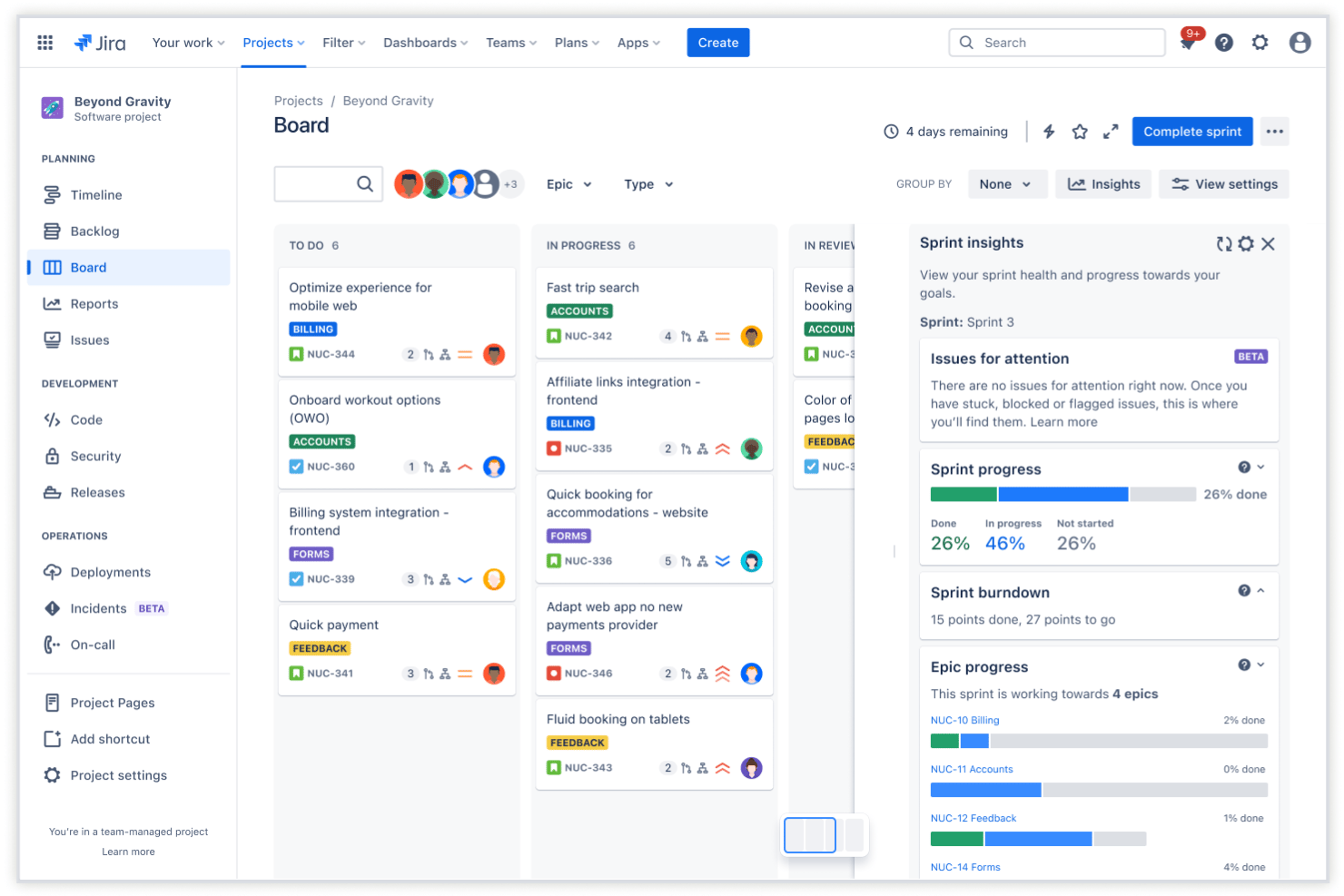
Jira is a task and project management platform built around agile workflows, offering issue tracking, sprint planning, customizable workflows, and cross-team roadmapping for software and technical teams.
Who Is Jira Best For?
Jira is a strong fit for software development and IT teams that run agile or scrum workflows and need structured issue tracking at scale.
Why I Picked Jira
I picked Jira as one of the best because it links development activity directly to tasks in a way most project management tools don't attempt. When my team pushes a commit or triggers a build in Bitbucket, that activity surfaces inside the Jira issue automatically. Sprint backlog management and configurable workflow transitions let me define exactly how work moves through engineering, from triage to deployment.
Jira Key Features
- Kanban and backlog views: Visualize work in progress and prioritize upcoming tasks using flexible Kanban boards and backlogs.
- Advanced roadmaps: Plan cross-team work with multi-project timelines, capacity planning, and dependency tracking.
- Automation rules: Set custom triggers and actions for recurring tasks, status changes, and notifications.
- Time tracking: Monitor time spent on individual tasks with built-in tracking fields and reporting.
Jira Integrations
Jira offers native integrations with Confluence, Bitbucket, Trello, Slack, Microsoft Teams, GitHub, and Google Calendar. An API is available for custom integrations, and thousands of additional apps are accessible through the Atlassian Marketplace.
Pros and Cons
Pros:
- Highly customizable issue types and fields
- Granular permissions for project roles
- Advanced workflow automation and triggers
Cons:
- Overwhelming options for small departments
- Steep setup for non-technical teams
Annen programvare for oppgavehåndtering
Her er noen flere alternativer for programvare for oppgavehåndtering som ikke kom med på kortlisten min, men som likevel er verdt å undersøke:
- monday.com
For customizable visual workflows
- Paymo
For combining time tracking with task lists
- Adobe Workfront
For enterprise-grade workflow automation
- MeisterTask
For intuitive Kanban-style boards
- Quickbase
For low-code workflow customization
- Microsoft Project
For advanced timeline and Gantt features
- GoodDay
For built-in goal and OKR tracking
- Hive
For integrating email with project tasks


How I Evaluate Task Management Software
My evaluation splits into two layers: the core functionality every tool must cover and the differentiators—like capacity planning and automation—that matter when managing complex HR project loads.
Core Functionality (Table Stakes for This List)
When I'm selecting tools for my list, I rank each one on a scale from 0 (does not offer the functionality) to 5 (excels in this area) for each core functionality listed below. Then, I calculate the tool's total score into a percentage. Each tool needs to achieve a minimum total score of 75% to be considered for inclusion.
- Task Assignment & Ownership: I check whether you can assign tasks to specific HR team members and track who's responsible for each step in processes like benefits enrollment or policy rollouts.
- Project & Workflow Views: Multiple views matter here. I look for options like Kanban, Gantt, list, and calendar so your team can visualize onboarding pipelines or review cycles the way that works best.
- Deadlines & Dependencies: Setting due dates is table stakes, but I also evaluate how each tool handles task dependencies and milestones for sequential HR workflows like multi-stage interview loops.
- Team Collaboration: I consider built-in commenting, mentions, file sharing, and notifications. Your HR team should be able to discuss a compliance update or share a revised handbook draft without leaving the platform.
- Recurring Tasks & Templates: HR runs on repeatable processes. I look for tools that let you set up recurring tasks for things like monthly payroll checklists and save reusable templates for new hire onboarding.
- Resource & Workload Management: I evaluate whether the tool gives you visibility into who's overloaded and who has capacity, especially during high-volume periods like open enrollment or annual performance reviews.
Once I have a list of tools that meet the criteria, I consider what sets each platform apart.
Differentiating Factors (What Sets Vendors Apart)
Here's how I compare and contrast different vendors:
Standout Features
Custom workflow automation is a big differentiator. I look for no-code rules that auto-assign tasks or route approvals when a project hits a specific stage—like notifying a hiring manager once an offer letter is drafted. Resource capacity planning matters just as much, especially during peak periods like open enrollment when HR teams juggle multiple initiatives at once. Portfolio-level dashboards round things out by giving leadership real-time views of status, risks, and milestones across all active projects.
Beyond Features
Integrations are one of the first things I check. Your task management tool needs to connect with the platforms your team already uses—Slack for communication, QuickBooks or Xero for invoicing, and CRMs like HubSpot or Salesforce for pipeline visibility. Scalability also plays a role. I evaluate whether a tool's permission structures and pricing tiers can grow with your team, from a small HR department to a multi-department operation. Strong onboarding support—like migration help and template libraries—can make or break adoption.
Slik velger du programvare for oppgavehåndtering
Det er lett å gå seg vill i lange funksjonslister og komplekse prismodeller. For å hjelpe deg med å holde fokus mens du går gjennom din unike prosess for valg av programvare, får du her en sjekkliste over faktorer du bør ha i tankene:
| Faktor | Hva bør du vurdere? |
|---|---|
| Skalerbarhet | Vil verktøyet fortsatt fungere når teamet vokser eller prosessene blir mer komplekse? Vurder støtte for flere avdelinger, roller og samarbeid på tvers av team. |
| Integrasjoner | Kan det enkelt kobles til plattformene dere allerede bruker – HRIS, lønn, meldinger og dokumentverktøy? Se etter innebygde integrasjoner eller åpne API-alternativer for å redusere siloer. |
| Tilpasningsmuligheter | Kan du tilpasse arbeidsflyter, felt og tillatelser slik at de passer til HR-prosjektene dine? Sørg for at du ikke blir låst til rigide maler som gjør prosessene tregere. |
| Brukervennlighet | Hvor raskt kan teamet ditt ta verktøyet i bruk? Se etter tydelig navigasjon og færre klikk for daglige HR-prosesser som onboarding eller oppfølging av etterlevelse. |
| Implementering og onboarding | Hva slags hjelp med oppsett er tilgjengelig? Vurder hjelp med migrering, opplæringsressurser og tilgang til HR-fokuserte maler for raskere innføring. |
| Kostnad | Se utover listeprisen og kontroller om det finnes betalte tillegg, avgifter per bruker eller kostnader for integrasjoner. Bekreft at fremtidig vekst passer inn i budsjettet. |
| Sikkerhetstiltak | Tilbyr leverandøren datakryptering, detaljerte tillatelser og revisjonslogger for å beskytte konfidensiell medarbeiderinformasjon og oppfylle interne retningslinjer? |
| Tilgjengelig kundestøtte | Hvor mye hjelp får du hvis du støter på et problem? Kontroller svartider, åpningstider for kundestøtte og kontaktkanaler – særlig hvis dere gjennomfører HR-prosesser utenom vanlig arbeidstid. |
Hva er programvare for oppgavehåndtering?
Programvare for oppgavehåndtering er en digital plattform som hjelper HR-team med å organisere, tildele og følge opp hvert trinn i tverrfunksjonelle prosjekter og prosesser. Den samler oppgaveansvar, tidsfrister og samarbeid på ett sted, slik at du kan overvåke fremdriften, håndtere arbeidsbelastningen og sikre at ingenting faller mellom stolene under komplekse HR-initiativer eller tilbakevendende operasjonelle arbeidsflyter.
Funksjoner i programvare for oppgavehåndtering
Når du velger programvare for oppgavehåndtering, bør du se etter følgende viktige funksjoner:
- Oppgavetildeling og -ansvar: Tildel oppgaver til bestemte HR-medarbeidere, angi prioriteringer og sørg for ansvarlighet når prosjekter går fra planlegging til ferdigstillelse.
- Flere visninger av arbeidsflyten: Visualiser prosjekter i Kanban-, Gantt-, liste- eller kalendervisning for å tilpasse deg arbeidsstilen HR-teamet foretrekker og tydeliggjøre fremdriften med et øyekast.
- Tidsfrister og avhengigheter: Opprett forfallsdatoer og koble sammen relaterte oppgaver, slik at trinn som introduksjon av nyansatte, opplæring i etterlevelse eller gjennomgang av retningslinjer skjer i riktig rekkefølge.
- Samarbeidsverktøy: Samle fildeling, diskusjoner, omtaler og varsler i oppgavene, slik at alle holder seg samkjørte uten lange e-posttråder.
- Tilbakevendende oppgaver: Automatiser gjentakende HR-prosesser, fra månedlige lønnsoppgaver til årlige sjekklister for etterlevelse, og reduser behovet for manuelt oppsett og risikoen for at trinn blir glemt.
- Tilpassbare maler: Opprett og gjenbruk maler for standardiserte HR-prosjekter som introduksjon av nyansatte, registrering av personalgoder eller avslutning av arbeidsforhold.
- Ressurs- og arbeidsbelastningsstyring: Følg med på teamets arbeidsbelastning, identifiser flaskehalser og fordel oppgaver basert på tilgjengelig kapasitet. Dette bidrar til å forebygge utbrenthet og overskredne tidsfrister.
- Rollebaserte tillatelser: Kontroller hvem som kan se, redigere eller administrere prosjekter og konfidensiell informasjon, slik at HR-krav til personvern og etterlevelse oppfylles.
- Statussporing og rapportering: Følg med på oppgavestatus, generer rapporter og visualiser prosjektets tilstand for å holde ledelsen informert og identifisere risikoer tidlig.
Vanlige AI-funksjoner i programvare for oppgavehåndtering
I tillegg til standardfunksjonene i programvare for oppgavehåndtering som er nevnt ovenfor, inkluderer mange av disse løsningene AI-funksjoner som:
- Automatisert prioritering av oppgaver: AI analyserer tidsfrister, avhengigheter og arbeidsbelastning for å foreslå hvilke oppgaver som bør håndteres først, slik at HR-team kan fokusere på det viktigste.
- Smart balansering av arbeidsbelastning: AI vurderer teamets kapasitet og omfordeler automatisk oppgaver for å forhindre overbelastning og sikre en jevn fordeling mellom HR-medarbeiderne.
- Varsler om forventet risiko for overskredne tidsfrister: AI overvåker prosjektets tidslinjer og markerer oppgaver som står i fare for å bli forsinket, slik at du kan håndtere flaskehalser før de påvirker HR-initiativer.
- Oppretting av oppgaver med naturlig språk: AI omgjør forespørsler formulert i vanlig språk eller møtenotater til konkrete oppgaver, noe som reduserer manuell registrering og fanger opp viktige detaljer underveis.
- Automatiserte møtesammendrag: AI genererer korte sammendrag og handlingspunkter fra HR-prosjektmøter, slik at det blir enklere å følge opp videre arbeid og neste trinn.
Fordeler med programvare for oppgavehåndtering
Implementering av programvare for oppgavehåndtering gir flere fordeler for teamet og virksomheten. Her er noen av fordelene du kan se frem til:
- Sentralisert prosjektoversikt: Følg med på alle HR-prosjekter, oppgaver, tidsfrister og statusoppdateringer i ett organisert arbeidsområde.
- Bedre ansvarlighet: Tildel et tydelig oppgaveansvar, slik at ansvarsfordelingen er synlig for alle teammedlemmer og ingenting faller mellom stolene.
- Ensartede HR-prosesser: Standardiser arbeidsflyter og bruk maler for gjentakende initiativer som introduksjon av nyansatte, etterlevelse og årlige vurderinger.
- Bedre samarbeid: Hold all kommunikasjon, dokumentasjon og tilbakemeldinger samlet i riktig kontekst i hver oppgave for å redusere misforståelser.
- Optimalisering av ressurser: Balanser arbeidsbelastningen, oppdag kapasitetsproblemer og forebygg utbrenthet blant HR-medarbeidere ved å visualisere teamets tilgjengelighet.
- Risikostyring og håndtering av tidsfrister: Dra nytte av innebygde oppgaveavhengigheter og automatiserte varsler for å håndtere flaskehalser før de fører til forsinkelser.
- Raskere introduksjon og bruk: Gjør det enklere for nye teammedlemmer å komme raskt i gang med veiledet oppsett, maler og intuitive arbeidsflyter.
Kostnader og priser for programvare for oppgavehåndtering
Valg av programvare for oppgavehåndtering krever en forståelse av de ulike prismodellene og abonnementene som er tilgjengelige. Kostnadene varierer basert på funksjoner, teamstørrelse, tillegg og mer. Tabellen nedenfor oppsummerer vanlige abonnementer, gjennomsnittsprisene deres og typiske funksjoner som er inkludert i løsninger for oppgavehåndtering:
Sammenligningstabell for programvare for oppgavehåndtering
| Plantype | Gjennomsnittspris | Vanlige funksjoner |
|---|---|---|
| Gratisabonnement | $0 | Grunnleggende oppgavetildeling, begrenset lagring, enkle arbeidsflytvisninger og grunnleggende samarbeidsverktøy. |
| Personlig abonnement | $5–$15/bruker/måned | Individuelle arbeidsområder, tilpassede oppgavevisninger, mobiltilgang og begrensede integrasjoner. |
| Bedriftsabonnement | $20–$35/bruker/måned | Avansert tilpasning av arbeidsflyter, rapportering, arbeidsbelastningsstyring, malbiblioteker og integrasjoner. |
| Virksomhetsabonnement | $40–$60/bruker/måned | SSO og avansert sikkerhet, prioritert brukerstøtte, revisjonslogger, egendefinerte tillatelser og hjelp med implementering. |
Vanlige spørsmål om programvare for oppgavehåndtering
Her er noen svar på vanlige spørsmål om programvare for oppgavehåndtering: