

De 10 beste verktøyene for AI-strategi vurdert i 2026

Kortliste over de beste AI-strategiverktøyene


Strategiledere forventes å handle raskt, ta tydelige beslutninger og lede team gjennom en hel syklus som omfatter idéutvikling, utvikling, kommunikasjon og gjennomføring. Å holde denne prosessen skarp krever verktøy som kan synliggjøre innsikt, støtte analyse og hjelpe team med å holde seg samkjørte på tvers av funksjoner. AI-strategiverktøy er utviklet nettopp for denne typen arbeid og gir strukturert input, intelligente anbefalinger og praktisk støtte i alle faser.
Med utgangspunkt i mange års erfaring med programvaretesting og innsikt i strategiske arbeidsflyter innen HR og drift har jeg gått gjennom AI-verktøyene som faktisk styrker strategisk planlegging og gjennomføring. I denne artikkelen finner du alternativene som hjelper med idéutvikling, scenarioplanlegging, målmodellering, innholdsproduksjon og oppfølging av tiltak.
Mot slutten vil du ha en tydelig oversikt over verktøyene som kan hjelpe ledere med å utforme strategier og lede team med større klarhet og trygghet. La oss se nærmere på hva som kan støtte din neste planleggingssyklus.
Why Trust Our Software Recommendations
Our team has been testing and reviewing software since 2012. As HR experts ourselves, we know how difficult—and important—it is to choose the right software.
For this guide, we evaluated tools using hands-on testing and independent research, scoring tools using our selection criteria. We also draw on insights from industry thought leaders and practicing HR experts.
Our reviews reflect our human editorial judgment, not a sales pitch.
Expert reviewers:
Sammenligningstabell for AI-strategiverktøy
Denne sammenligningstabellen oppsummerer prisdetaljer for mine beste utvalgte AI-strategiverktøy:
| Tool | Best For | Trial Info | Price | ||
|---|---|---|---|---|---|
| 1 | Best for global workforce strategies | Free demo available | From $5/user/month | Website | |
| 2 | Best for AI content generation | 7-day free trial + free demo available | From $59/month (billed annually) | Website | |
| 3 | Best for design with AI tools | Free trial + free plan available | From $144/user/year (billed annually) | Website | |
| 4 | Best for workflow automation | Free plan available; 14-day free trial | From $19.99/month (billed annually) | Website | |
| 5 | Best for business planning tools | Free demo available | From $14/month (billed annually) | Website | |
| 6 | Best for an integrated AI workspace | Free plan available | From $20/user/month | Website | |
| 7 | Best for natural language processing | Free plan available | From $8/month | Website | |
| 8 | Best for product roadmaps with AI | 30-day free trial + free demo available | From $9/user/month | Website | |
| 9 | Best for AI-driven presentations | 14-day free trial + free demo available | From $12/month (billed annually) | Website | |
| 10 | Best for data-driven decisions | Free demo available | Pricing upon request | Website |

Anmeldelser av de beste AI-strategiverktøyene
Nedenfor finner du mine detaljerte sammendrag av de beste AI-strategiverktøyene som kom med på kortlisten. Anmeldelsene mine gir en detaljert gjennomgang av de viktigste funksjonene, fordelene & ulempene, integrasjonene og de ideelle bruksområdene for hvert verktøy, slik at du kan finne det beste alternativet for deg.

Deel HR
Best for global workforce strategies
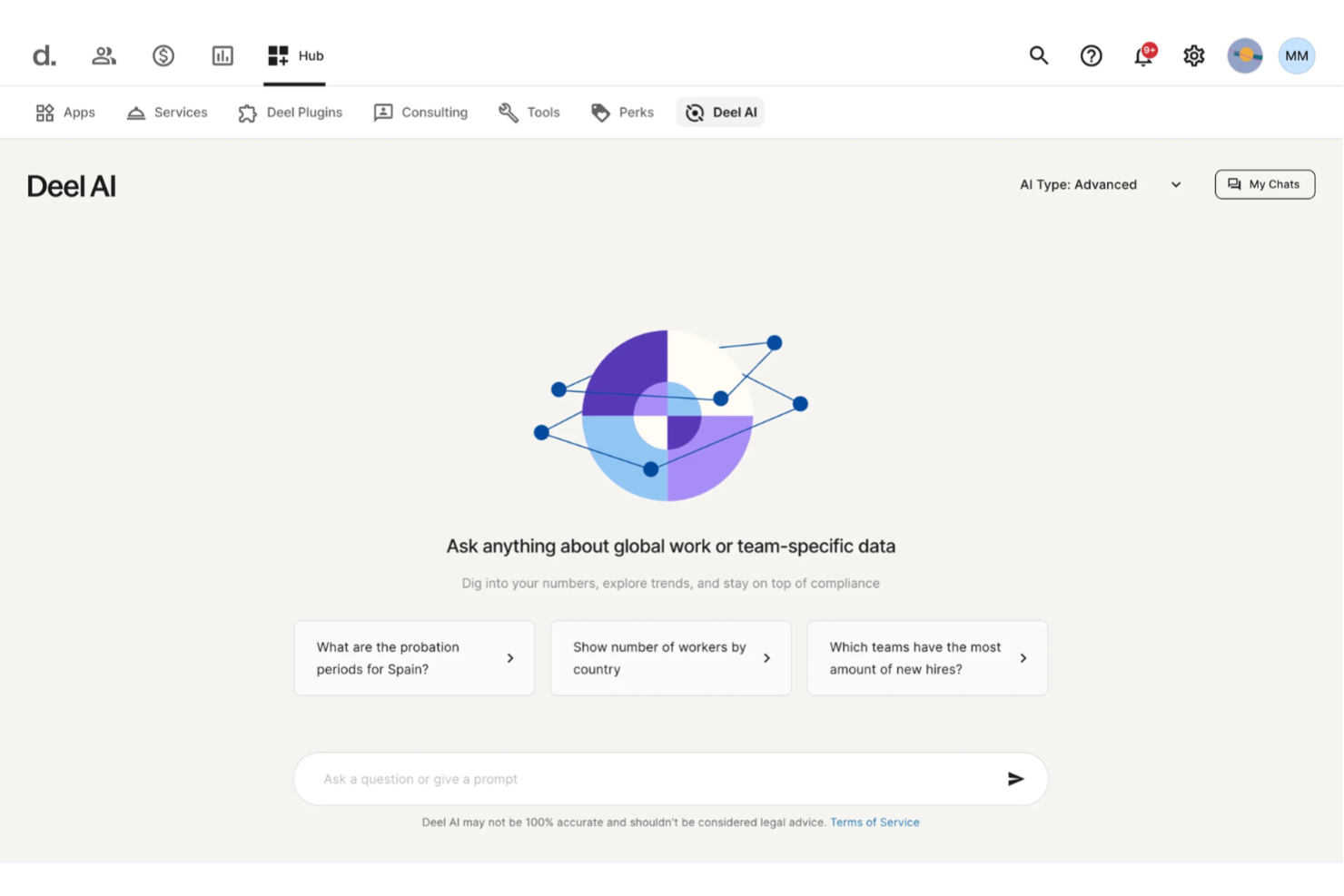
Deel AI gives you a way to make smarter workforce decisions by turning your people data, global compliance knowledge, and HR workflows into actionable insights. If you’re shaping an AI strategy for a distributed or scaling team, the platform helps you cut through complexity with instant, context-aware guidance on hiring, compensation, compliance, and internal operations.
Why I Picked Deel
I picked Deel because it extends beyond everyday HR automation and functions as a strategic intelligence layer built directly into your workforce data. Its page-aware insights, compliance interpretation, and AI-generated org reporting offer the kind of real-time context you need when shaping your hiring, compensation, or expansion strategy. I appreciate that it’s trained by HR and legal experts across 150+ countries, giving you jurisdiction-specific clarity when making decisions that carry business risk. This makes Deel AI a strong fit for teams building an AI strategy around global operations, compliance guidance, and data-driven workforce planning.
Deel Key Features
Aside from its compliance intelligence and contextual insights, you’ll find these useful:
- Compensation Benchmarking Insights: Surfaces salary ranges and market medians for roles across regions, supporting strategic workforce planning.
- Localized Contract Generation: Automatically creates contracts that adhere to local labor laws, reducing legal risks and ensuring compliance.
- AI-Powered Compliance Monitoring: Continuously tracks changes in local employment laws, providing alerts and updates to keep your operations compliant.
- 24/7 AI Support: Offers round-the-clock assistance for HR and payroll inquiries, minimizing the need for manual intervention and support tickets.
Deel Integrations
Integrations include BambooHR, Workday, Xero, QuickBooks, Expensify, Netsuite, Greenhouse, Okta, Slack, and Microsoft 365. An API is available for custom integrations.
Pros and Cons
Pros:
- Salary benchmarking supports global workforce planning decisions
- Page-aware summaries help teams interpret data in real time
- Offers strategic insights by combining internal data with expert compliance knowledge
Cons:
- Not designed for enterprise-wide AI planning outside HR, payroll, and compliance
- Compliance outputs still need human review for high-risk decisions
New Product Updates from Deel HR

Deel Expands Stablecoin Wallet to 80+ Countries
Deel expands its Stablecoin Wallet to 80+ countries with dollar-backed balances and optional rewards. This gives eligible contractors more ways to hold and manage earnings inside Deel. For more information, visit Deel’s official site.
 .
.
Best for AI content generation
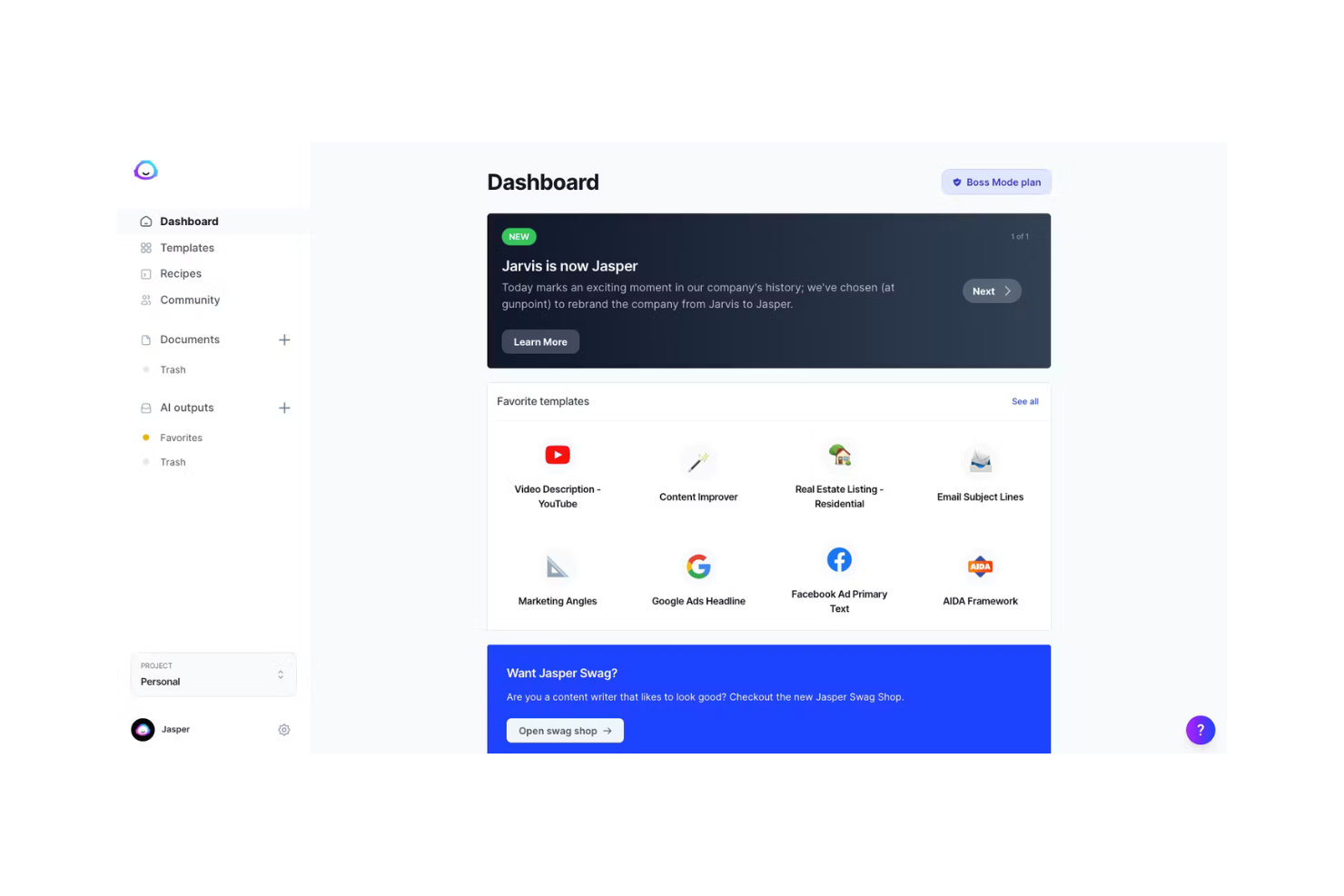
Jasper is an AI writing tool designed for marketers, content creators, and businesses that need to generate high-quality written content quickly. It helps create blogs, social media posts, emails, and more with its AI-driven text generation capabilities.
Why I picked Jasper: Your team will benefit from its ability to generate diverse content efficiently. The AI model offers various tones, making it suitable for different copywriting styles and marketing strategies. Its user-friendly interface ensures you can start creating content with minimal setup. These features make Jasper a versatile choice for content-driven teams.
Standout Features & Integrations:
Features include brand voice customization, consistent tone, and high-quality outputs for both long-form document support as well as blogs and campaigns. Jasper also provides prebuilt templates for ads, emails, and social captions
Integrations include HubSpot, Shopify, WordPress, Google Docs, SurferSEO, Grammarly, Copyscape, SEMrush, Facebook, and Instagram.
Pros and Cons
Pros:
- Works well for marketing and SEO teams
- Supports multiple tones and formats
- Generates diverse, on-brand content fast
Cons:
- Can repeat phrases in long drafts
- Needs edits for factual checks

Canva
Best for design with AI tools

Canva is a graphic design platform used by individuals and businesses for creating visual content. It's popular among marketers, educators, and small business owners for its easy-to-use design tools and templates, enhanced by AI capabilities like automatic layout suggestions and image editing.
Why I picked Canva: Canva functions as a design copilot, suggesting layouts and generating visuals automatically. Canva’s AI features let you create polished designs and images in minutes. You can use Text to Image to generate original visuals, Magic Write to craft text content, and Magic Design to instantly build layouts from ideas or existing files. These capabilities make Canva ideal for non-designers who want professional results without creative bottlenecks.
Standout Features & Integrations:
Features include AI image generation, smart layout design, Magic Write for text creation, brand kits, and real-time collaboration. Canva offers an extensive template library, stock assets, and built-in editing tools to fine-tune visuals.
Integrations include Google Drive, Dropbox, HubSpot, Mailchimp, Slack, Microsoft Teams, Instagram, Facebook, LinkedIn, Pinterest, and YouTube.
Pros and Cons
Pros:
- Helps you keep brand designs steady
- Offers smart layout suggestions
- Speeds up visual content creation
Cons:
- Can lag with large image files
- Limited control for custom elements

Zapier
Best for workflow automation

Zapier is an automation tool designed for businesses and teams looking to connect different apps and automate workflows. It helps users automate repetitive tasks by creating custom workflows called "Zaps," which execute actions across various platforms.
Why I picked Zapier: You can automate your workflow processes without needing extensive technical skills. The platform's intuitive interface allows you to set up triggers and actions that save time and reduce manual effort. It connects tools through secure API integrations, enabling automation across 7,000+ apps. These features make it ideal for enhancing productivity and efficiency in your operations.
Standout Features & Integrations:
Features include AI-powered workflow creation, multi-step Zaps, conditional logic, and custom AI agents that automate tasks like customer support, lead routing, and reporting.
Integrations include Google Sheets, Gmail, Slack, Trello, Dropbox, Mailchimp, HubSpot, Salesforce, Asana, and QuickBooks.
Pros and Cons
Pros:
- Handles data transfers automatically
- Reduces manual work in daily tasks
- Lets you connect many work tools
Cons:
- Some zaps break after app updates
- Complex flows need frequent testing

Best for business planning tools

Upmetrics is a business planning software designed for entrepreneurs, startups, and business strategists who need to create detailed business plans and pitches. It simplifies the planning process with AI-driven templates and financial forecasting tools.
Why I picked Upmetrics: You can quickly generate business plans using its AI Business Plan Generator, which analyzes datasets from your financial inputs to generate forecasts. The software offers financial forecasting features that help you visualize potential business outcomes. Its intuitive interface ensures that you can focus on strategy without getting bogged down in technical details. These capabilities make Upmetrics a valuable tool for anyone needing to craft detailed business strategies quickly and effectively.
Standout Features & Integrations:
Features include financial forecasting, customizable business templates, and pitch deck creation. These tools help you present your business ideas clearly and effectively, making it easier to communicate your vision to stakeholders.
Integrations include QuickBooks, Xero, Google Drive, Dropbox, Slack, Microsoft Excel, Trello, Asana, Evernote, and Zoho.
Pros and Cons
Pros:
- Useful for investor presentations
- Helps you forecast outcomes easily
- Lets you plan finances visually
Cons:
- Hard to link multiple plans together
- Needs practice for accurate forecasting

Best for an integrated AI workspace

Notion AI is a productivity tool designed for teams and individuals who need a flexible workspace for notes, tasks, and collaboration. It enhances productivity by offering AI-driven suggestions and helps teams improve organization, communication, and overall customer experience through intelligent task automation.
Why I picked Notion AI: It can handle everything from copywriting to project management without switching tools. Its built-in AI agents automate repetitive work, generate meeting notes, and assist with research and organization. The platform’s flexibility makes it ideal for teams that want to unify documents, tasks, and collaboration in one place.
Standout Features & Integrations:
Features include a range of AI products for writing and editing, custom agents for task automation, AI meeting notes, and enterprise search across your workspace. Notion also integrates with a wide range of apps to extend its functionality.
Integrations include Slack, Google Drive, Trello, Asana, GitHub, Microsoft Teams, Zapier, Typeform, Figma, and Evernote.
Pros and Cons
Pros:
- Suggests ideas as you write notes
- Helps organize scattered project info
- Combines writing and planning in one
Cons:
- Heavy AI tone in text
- Can slow down with large databases

ChatGPT
Best for natural language processing

Built on OpenAI’s GPT architecture, ChatGPT is an AI language model with a wide range of users, from developers to businesses looking to automate customer interactions. It excels in generating human-like text, providing users with a tool for content creation, customer support, and more.
Why I picked ChatGPT: You can leverage its natural language processing capabilities to create engaging and coherent text. Its ability to understand context and deliver accurate responses makes it ideal for chatbots and virtual assistants. The model, developed by OpenAI, comes with safety approaches similar to Anthropic’s model alignment standards. These capabilities ensure it meets diverse communication needs effectively.
Standout Features & Integrations:
Features include context-aware text generation, multi-turn conversation handling, and prompt-based customization. ChatGPT integrates with many business tools for extended functionality
Integrations include Microsoft Teams, Slack, Zendesk, HubSpot, Salesforce, WordPress, Shopify, Discord, Intercom, and Google Workspace.
Pros and Cons
Pros:
- Handles varied prompts from your users
- Works well for team brainstorming
- Writes natural text in seconds
Cons:
- Needs human review for accuracy
- May misread vague context

Aha!
Best for product roadmaps with AI

Aha! is a product development tool primarily used by product managers and development teams to create visual roadmaps and manage product strategies. Its AI capabilities include an AI assistant that aids in productivity by organizing customer feedback and centralizing product information.
Why I picked Aha!: Aha! stands out for its ability to connect strategy with execution through visual roadmaps and integrated feedback loops. The Aha! AI assistants use proprietary algorithms to organize customer feedback and prioritize product ideas, and turn ideas into actionable product plans. It stands out with its ability to centralize product data, ensuring all team members have access to essential information, making it the best for product roadmaps with AI.
Standout Features & Integrations:
Features include tools for visual roadmapping, idea tracking, and customer feedback management. You can also benefit from centralized product information, which keeps your team aligned. Aha! provides templates and training resources to help you make the most of its features.
Integrations include Jira, Slack, Salesforce, Azure DevOps, Google Analytics, Microsoft Teams, GitHub, Confluence, Trello, and Zendesk.
Pros and Cons
Pros:
- Tracks customer feedback effectively
- Lets you plan product launches visually
- Connects strategy with daily work
Cons:
- Takes time to master the full setup
- Can slow down with big portfolios


Beautiful.ai is a presentation tool designed for professionals and teams who need to create visually appealing slideshows quickly. It leverages AI to automate design tasks, ensuring your presentations are both professional and engaging.
Why I picked Beautiful.ai: You can create stunning presentations without the need for design skills, thanks to its AI-driven features. The tool automatically adjusts layouts and design elements, saving you time and effort. Its smart templates adapt to your content, maintaining consistency and visual appeal. These features make it perfect for anyone looking to enhance their presentation quality efficiently for email marketing or any type of ecommerce initiatives.
Standout Features & Integrations:
Features include smart templates, automatic layout adjustments, and design consistency. You can focus on your content while the tool handles the design, providing a polished final product effortlessly.
Integrations include PowerPoint, Google Slides, Slack, Dropbox, Box, Microsoft Teams, Zoom, Trello, Asana, and Canva.
Pros and Cons
Pros:
- Saves significant design time
- Keeps decks consistent and on brand
- Generates slides automatically from text prompts
Cons:
- Can’t tweak templates deeply
- Few advanced animation options


Hightouch AI Decisioning is an AI-driven platform designed for businesses aiming to enhance marketing strategies across various industries like retail, finance, and healthcare. It automates decision-making processes, allowing teams to shift from manual campaigns to adaptive, personalized customer interactions.
Why I picked Hightouch AI Decisioning: Your team can benefit from its ability to automate marketing workflows and strategies using machine learning and reinforcement to personalize customer interactions. This feature is what sets it apart, enabling data-driven decisions that optimize messaging, offers, and channels. The platform’s integration with over 250 tools ensures real-time insights and effective communication. It's ideal for companies looking to scale personalized marketing solutions efficiently.
Standout Features & Integrations:
Features include reinforcement learning-based decisioning agents, real-time optimization of messages and offers, and automated personalization across channels. It also supports transparent guardrails, allowing teams to define boundaries for AI actions.
Integrations include Salesforce, Google Ads, Facebook Ads, Marketo, HubSpot, Shopify, Snowflake, Segment, Redshift, and BigQuery.
Pros and Cons
Pros:
- Keeps customer data secure in your own warehouse
- Learns continuously from real-time data
- Automates complex, multi-channel decisions
Cons:
- Harder to track hidden model logic
- Setup takes technical know-how
Andre AI-strategiverktøy
Her er noen flere AI-strategiverktøy som ikke kom med på kortlisten min, men som likevel er verdt å ta en titt på:
- Quantive StrategyAI
For continuous strategy alignment
- Julius (Julius Works)
For influencer marketing insights
- Tability
For rapid strategy creation
- Grammarly
For AI-driven writing feedback
- WorkBoard
For strategy and OKR alignment
- Perplexity AI
For AI-powered question answering
- IBM Watson Studio
For AI model deployment
- Google DeepMind
For advanced AI research
- Miro AI
For visual collaboration enhancements
- Snowflake Cortex AI
For data platform integration


How I Evaluate AI Strategy Tools
I only include tools that deliver genuine AI value—like forecasting attrition risks or generating actionable workforce strategy, not just repackaging basic reports. I break my evaluation into core functionality every tool must have to qualify and differentiating factors that separate one vendor from another.
Core Functionality (Table Stakes For This List)
When I'm selecting tools for my list, I rank each one on a scale from 0 (does not offer the functionality) to 5 (excels in this area) for each core functionality listed below. Then, I calculate the tool's total score into a percentage. Each tool needs to achieve a minimum total score of 65% to be considered for inclusion.
- AI Strategy Generation: I look for tools that go beyond dashboards to produce actual strategy recommendations—think AI-drafted retention plans or hiring roadmaps tailored to your org's data.
- Predictive Workforce Analytics: Each tool should use ML to forecast real workforce risks like attrition spikes, skills shortages, or hiring demand shifts across departments.
- Scenario Modeling & Simulation: I evaluate whether the platform lets HR leaders run what-if analyses, such as modeling the cost and talent impact of a restructure before committing.
- HR Data Integration: Strong tools pull from your HRIS, ATS, payroll, and performance systems. I check for native connectors with platforms like Workday, SAP SuccessFactors, and BambooHR.
- Strategic KPI Benchmarking: I look at how well the tool benchmarks metrics like time-to-fill or engagement scores against industry peers and internal targets using AI-driven analysis.
- Goal & Initiative Alignment: The platform should connect HR strategy outputs to business OKRs—linking a DEI initiative to measurable outcomes, for example, with AI-assisted tracking.
Once I have a list of tools that meet the criteria, I consider what sets each platform apart.
Differentiating Factors (What Sets Vendors Apart)
Here's how I compare and contrast different vendors:
Standout Features
A skills intelligence engine is a big differentiator—it lets HR leaders map current workforce capabilities and spot gaps before they become hiring emergencies. I also look at whether a tool offers explainable AI outputs, showing the reasoning and confidence levels behind its recommendations. That transparency matters when you're presenting a workforce strategy to your C-suite. Sentiment and engagement AI adds another layer, pulling insights from surveys and feedback signals to flag culture or retention risks early.
Beyond Features
AI governance is a major consideration—I check whether a vendor offers bias auditing, model documentation, and human-in-the-loop controls for overriding recommendations. Data security matters just as much, especially SOC 2 Type II certification and role-based access for sensitive compensation and performance data. I also evaluate implementation support closely. These tools require careful data mapping and model calibration, so vendors that pair onboarding with HR-specific strategic advisory tend to drive faster adoption across leadership teams.
Slik velger du et AI-strategiverktøy
Det er lett å gå seg vill i lange funksjonslister og kompliserte prismodeller. For å hjelpe deg med å holde fokus mens du går gjennom den unike prosessen din for valg av programvare, får du her en sjekkliste over faktorer du bør ha i bakhodet:
| Faktor | Hva bør du vurdere? |
|---|---|
| Skalerbarhet | Kan verktøyet vokse med virksomheten din? Vurder om det håndterer økte datamengder og flere brukere uten ytelsesproblemer. |
| Integrasjoner | Fungerer det med de eksisterende systemene dine? Kontroller kompatibilitet med verktøy som CRM, ERP eller plattformer for dataanalyse. |
| Tilpasningsmuligheter | Kan du tilpasse det til behovene dine? Se etter muligheter for å endre arbeidsflyter, dashbord og rapporter slik at de passer prosessene dine. |
| Brukervennlighet | Er det enkelt å bruke? Vurder om teamet ditt kan lære det raskt uten omfattende opplæring eller støtte. |
| Implementering og introduksjon | Hvor lang tid vil oppsettet ta? Vurder ressursene og tiden som kreves for en smidig overgang og full innføring. |
| Kostnad | Passer det inn i budsjettet ditt? Sammenlign prisplaner og vurder de totale eierkostnadene, inkludert skjulte gebyrer. |
| Sikkerhetstiltak | Er databeskyttelsen god nok? Se etter funksjoner som kryptering, tilgangskontroller og samsvar med regelverk som GDPR. |
| Tilgjengelig kundestøtte | Er det enkelt å få hjelp? Kontroller om leverandøren tilbyr døgnåpen støtte, flere kontaktalternativer og et omfattende hjelpesenter. |
Hva er AI-strategiverktøy?
AI-strategiverktøy er programvareløsninger som bruker kunstig intelligens til å forbedre strategisk planlegging og beslutningsprosesser. Disse verktøyene brukes vanligvis av bedriftsledere, strateger og ledere som ønsker å optimalisere driften og ta datadrevne beslutninger.
Funksjoner som prediktiv analyse, automatisert rapportering og sanntidsinnsikt i data bidrar til å samordne mål, forbedre effektiviteten og ta velinformerte beslutninger. Alt i alt gir disse verktøyene verdifull innsikt og automatisering som støtter strategisk forretningsvekst.
Funksjoner
Når du velger AI-strategiverktøy, bør du se etter følgende viktige funksjoner:
- Prediktiv analyse: Bruker AI til å forutsi trender og resultater, noe som bidrar til proaktive beslutninger.
- Automatisert rapportering: Genererer rapporter automatisk for å spare tid og sikre nøyaktighet i dataanalysen.
- Sanntidsinnsikt i data: Gir oppdatert informasjon som støtter rettidige strategiske beslutninger.
- Tilpassbare dashbord: Lar brukerne tilpasse visninger og rapporter etter spesifikke forretningsbehov.
- Verktøy for målsamordning: Bidrar til å sikre at teamets innsats er rettet mot strategiske mål gjennom AI-drevet innsikt.
- Integrasjonsmuligheter: Kobler seg til eksisterende systemer for å gi en helhetlig arbeidsflyt og sikre konsistente data.
- AI-drevne anbefalinger: Gir forslag basert på datamønstre for å forbedre beslutningsprosessene.
- Sikkerhetstiltak: Beskytter sensitive data med kryptering og funksjoner for etterlevelse.
- Brukervennlig grensesnitt: Sikrer enkel bruk, slik at team raskt kan ta i bruk verktøyet og dra nytte av det.
- Skalerbarhet: Støtter forretningsvekst ved å håndtere økende datamengder og flere brukere.
Fordeler
Implementering av AI-strategiverktøy gir flere fordeler for teamet og virksomheten din. Her er noen av fordelene du kan se frem til:
- Bedre beslutningstaking: AI-drevet innsikt og anbefalinger fører til mer velinformerte forretningsvalg.
- Økt effektivitet: Automatisert rapportering og databehandling frigjør tid til strategiske oppgaver.
- Bedre målsamordning: AI-verktøy bidrar til å sikre at teamets innsats er i tråd med virksomhetens mål.
- Forbedret prognostisering: Prediktiv analyse gir et tydeligere bilde av fremtidige trender og mulige resultater.
- Kostnadsbesparelser: Ved å optimalisere prosesser og redusere manuelle oppgaver kan AI-verktøy senke driftskostnadene.
- Datadrevne strategier: Sanntidsinnsikt gjør det mulig å utvikle strategier basert på aktuelle og relevante data.
- Støtte for skalerbarhet: AI-verktøy kan vokse med virksomheten din og håndtere økte datamengder og brukerbehov.
Kostnader og priser
Valg av AI-strategiverktøy krever en forståelse av de ulike prismodellene og abonnementene som er tilgjengelige. Kostnadene varierer basert på funksjoner, teamstørrelse, tillegg og mer. Tabellen nedenfor oppsummerer vanlige abonnementer, gjennomsnittsprisene deres og typiske funksjoner som er inkludert i AI-strategiverktøyløsninger:
Sammenligningstabell for AI-strategiverktøy
| Abonnementstype | Gjennomsnittspris | Vanlige funksjoner |
|---|---|---|
| Gratisabonnement | $0 | Begrenset tilgang til grunnleggende funksjoner, brukerstøtte fra fellesskapet og en begrenset prøveperiode for premiumfunksjoner. |
| Personlig abonnement | $5-$25/user/month | Tilgang til kjernefunksjoner, grunnleggende analyse og brukerstøtte via e-post. |
| Bedriftsabonnement | $30-$75/user/month | Avansert analyse, verktøy for teamsamarbeid, prioritert brukerstøtte og integrasjonsmuligheter. |
| Virksomhetsabonnement | $100+/user/month | Tilpassbare løsninger, egen kundeansvarlig, forbedret sikkerhet og full integrasjonsstøtte. |
Vanlige spørsmål om verktøy for AI-strategi
Her er noen svar på vanlige spørsmål om verktøy for AI-strategi:
Hvordan kan du vite om et verktøy for AI-strategi er verdt kostnaden?
Begynn med å se på hvor mye tid eller innsats teamet sparer etter å ha brukt det i noen uker. Følg med på enkle ting, som hvor raskt dere kan ta beslutninger eller fullføre rapporter. Hvis teamet bruker mindre tid på manuelt arbeid og oppnår bedre resultater, er det et godt tegn på at verktøyet lønner seg. Ta notater, slik at du tydelig kan vise effekten.
Hva bør du vite om hvor dataene dine havner?
Spør leverandøren hvor opplysningene dine lagres, og hvem som har tilgang til dem. Hvis selskapet ditt har regler om at data må oppbevares i bestemte regioner, må du kontrollere at verktøyet følger disse reglene. Det er også lurt å undersøke hvordan sikkerhetskopier håndteres, og om du senere kan be om å få dataene dine slettet.
Hvordan kan du unngå å bli sittende fast med feil verktøy?
Før du kjøper, bør du undersøke om du enkelt kan laste ned dataene dine eller bytte til et annet system senere. Unngå verktøy som gjør det vanskelig å eksportere arbeidet ditt, eller som krever ekstra betaling for å avslutte. Start i det små med en kort prøveperiode før du binder deg på lang sikt. På den måten vet du om verktøyet faktisk dekker behovene dine.
Hvordan sørger du for at folk fortsatt er involvert når dere bruker AI-verktøy?
Selv med god AI trenger du fortsatt menneskelig vurdering. Bestem hvilke oppgaver som må gjennomgås av en person før AI-arbeidet deles eller tas i bruk. Gi teamet enkle trinn for å kontrollere nøyaktighet og tone. Sørg for at reglene er enkle å følge, slik at alle er samkjørte.
Hvordan sørger du for at AI-en gir pålitelige svar?
Gi verktøyet nøyaktig og oppdatert informasjon når du kan. Oppmuntre teamet til å dobbeltsjekke fakta før de bruker AI-generert innhold. Hvis noe ser feil ut, bør dere rapportere det og rette det raskt. Regelmessige gjennomganger bidrar til å holde resultatene pålitelige over tid
Hva bør du spørre om når det gjelder kundestøtte, før du kjøper?
Finn ut hvor raskt leverandøren svarer når det oppstår et problem. Spør om de garanterer oppetid eller lover hjelp innen bestemte tidsrom. Det er også verdt å undersøke hva som skjer hvis du bestemmer deg for å avslutte, for eksempel hvordan de returnerer eller sletter dataene dine. Når du vet dette på forhånd, unngår du problemer senere.