


QuickBooks Online mot Zoho Books: Sammenligning og anmeldelser for 2026


When HR and finance live in separate corners, even simple tasks can start to feel messy fast. The right platform brings payroll, accounting, and daily admin into one smoother workflow before the small headaches turn into bigger problems.
Trying to choose between QuickBooks Online and Zoho Books? If you’re juggling HR and finance tasks, picking the right HR and accounting software can make or break your workflow. You want reliable payroll, benefits, and accounting tools without endless setup or missing features.
In this article, you’ll get a side-by-side look at both platforms. I’ll cover how each one stacks up for HR and accounting, share the pros and cons, highlight use cases, compare pricing, dig into security, and talk through ease of use—so you can decide which is best for your team.
QuickBooks Online vs. Zoho Books: An Overview
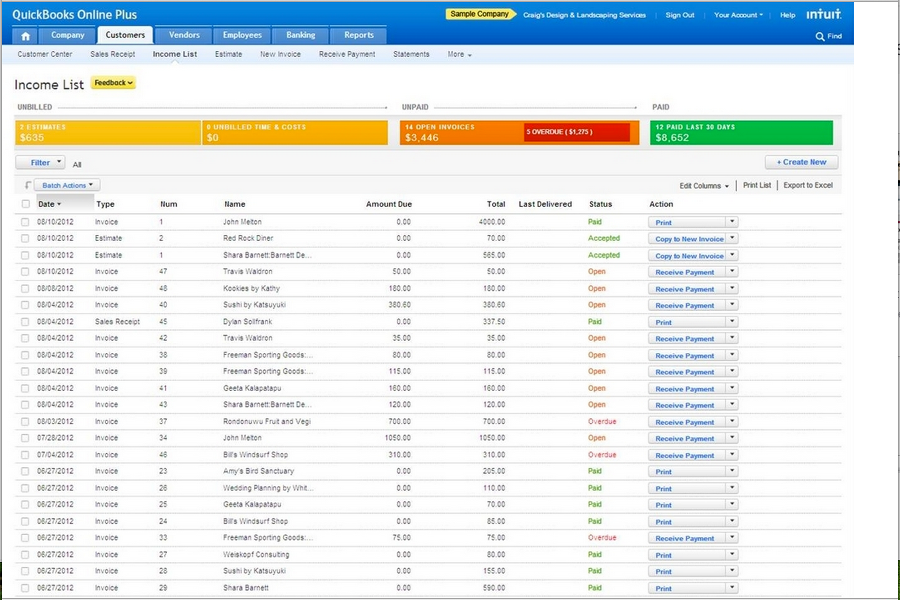
QuickBooks Online
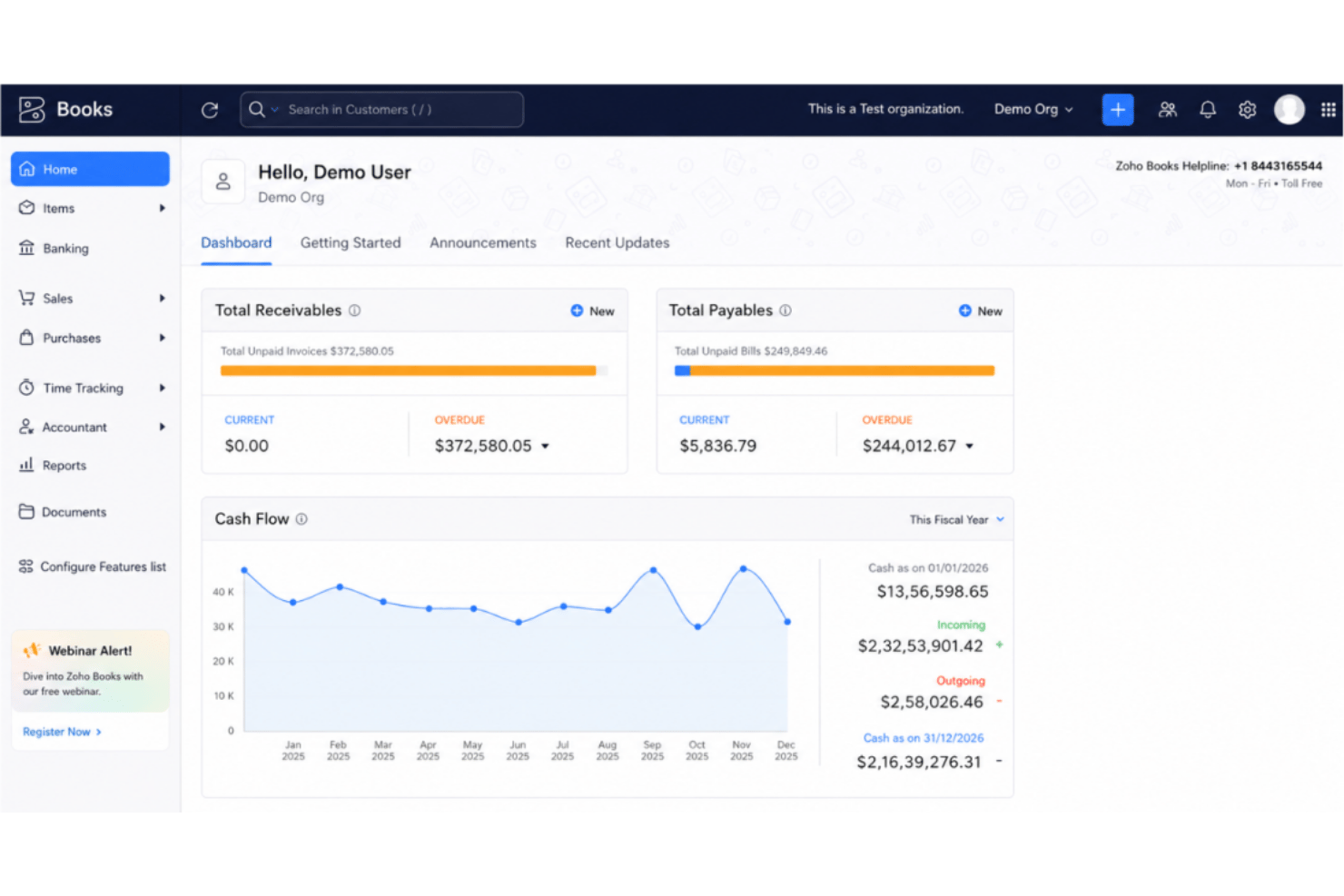
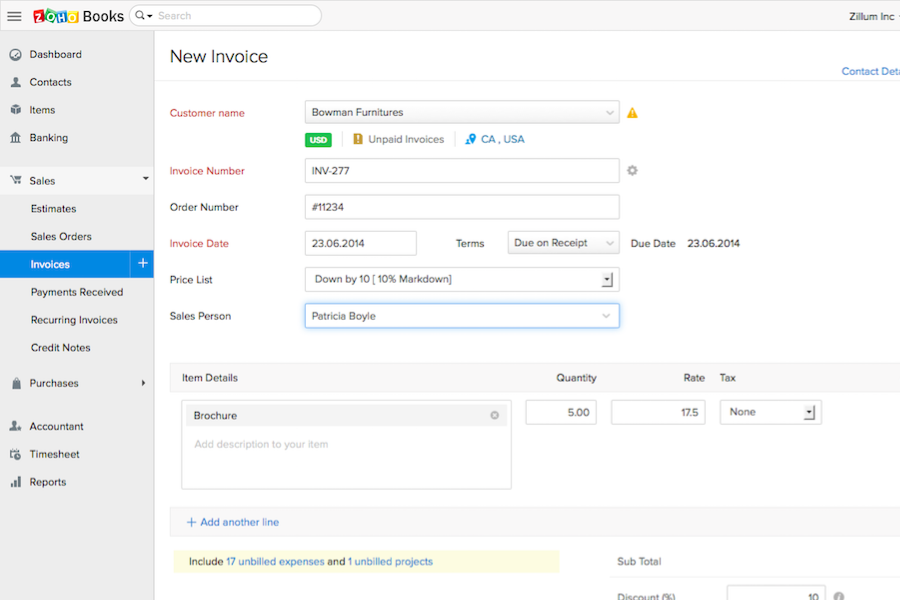
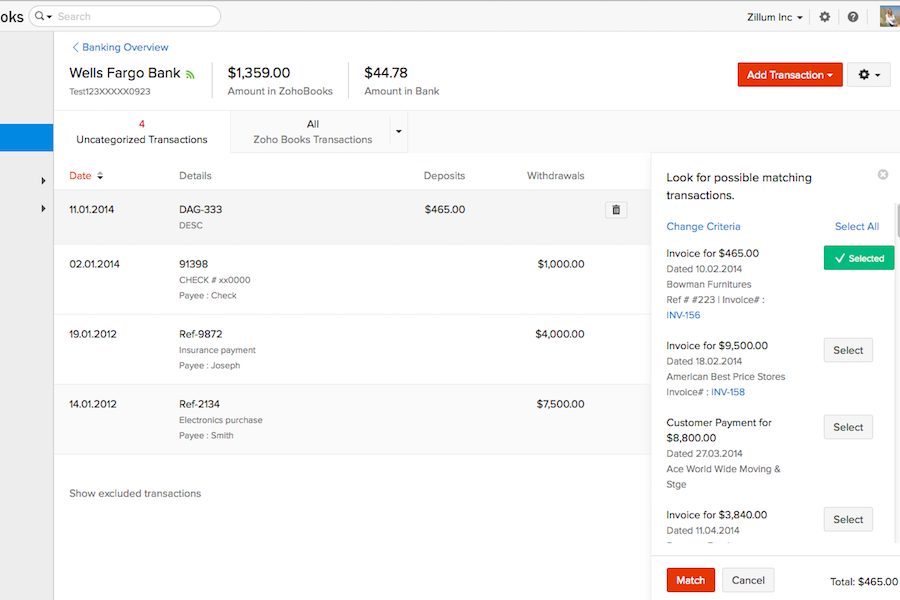
Zoho Books



Why Trust Our Software Recommendations
Our team has been testing and reviewing software since 2012. As HR experts ourselves, we know how difficult—and important—it is to choose the right software.
For this guide, we evaluated tools using hands-on testing and independent research, scoring tools using our selection criteria. We also draw on insights from industry thought leaders and practicing HR experts.
Our reviews reflect our human editorial judgment, not a sales pitch.
Expert reviewers:
QuickBooks Online vs. Zoho Books Pricing Comparison
| QuickBooks Online | Zoho Books | |
|---|---|---|
| Free Trial | Free plan + 30-day free trial available | Free plan + free demo available |
| Pricing | From $38/month | From $15/month (billed annually) |
QuickBooks Online versus Zoho Books-priser og skjulte kostnader
QuickBooks Online bruker en trinnvis abonnementsmodell der hver plan låser opp flere funksjoner for team i vekst, men enkelte HR-relaterte funksjoner og avanserte integrasjoner kan medføre ekstra kostnader. Zoho Books tilbyr også flere prisnivåer, hovedsakelig basert på antall brukere og automatiseringsfunksjoner, med tillegg for lønnsintegrasjon eller avansert analyse som kan øke de månedlige utgiftene. Begge verktøyene kan ta betalt for flere brukere, integrasjoner eller førsteklasses kundestøtte, så det er lett å undervurdere den faktiske kostnaden hvis du ikke undersøker nøye.
For å velge riktig prismodell bør du se nærmere på hva du faktisk trenger innen HR og regnskap. Lag en liste over kjernefunksjonene og brukerplassene du trenger, og spør leverandørene om vanlige tillegg eller fremtidige oppgraderinger etter hvert som teamet vokser. Vær spesielt oppmerksom på om integrasjonene og modulene du forventer – som lønn, frynsegoder eller rapportering – allerede er inkludert, eller om de medfører ekstra kostnader senere. På den måten kan du unngå uventede gebyrer og velge verktøyet som passer til den faktiske arbeidsflyten din, ikke bare grunnplanen.
QuickBooks Online vs. Zoho Books Feature Comparison
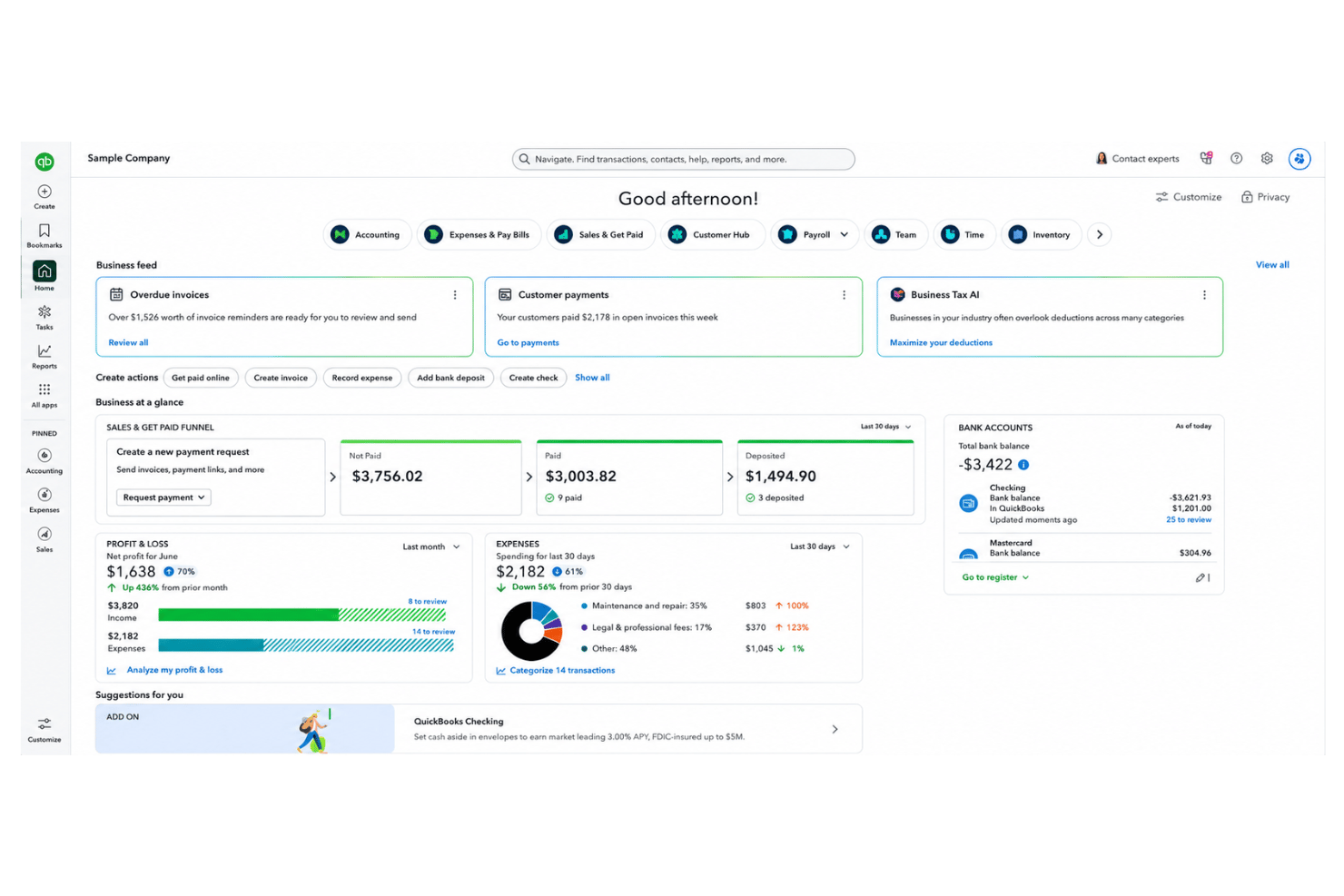
\u003cdiv class=\u0022slate-p slate-selectable\u0022 data-slate-node=\u0022element\u0022 data-block-id=\u0022sned5QWHlY\u0022\u003e\u003cspan data-slate-node=\u0022text\u0022\u003eBåde QuickBooks Online og Zoho Books dekker viktige arbeidsflyter innen HR og regnskap – blant annet fakturering, utgiftssporing, tidsregistrering, lønnsfunksjoner og grunnleggende verktøy for medarbeideradministrasjon. Begge plattformene tilbyr automatisering av repetitive oppgaver, tilpassbare rapporter og en mobilapp for å håndtere arbeidet på farten.\u003c/span\u003e\u003c/div\u003e\r\n\u003cdiv class=\u0022slate-p slate-selectable\u0022 data-slate-node=\u0022element\u0022 data-block-id=\u0022SfwkmmlnK0\u0022 data-slate-fragment=\u0022JTVCJTdCJTIyY2hpbGRyZW4lMjIlM0ElNUIlN0IlMjJ0ZXh0JTIyJTNBJTIyQm90aCUyMFF1aWNrQm9va3MlMjBPbmxpbmUlMjBhbmQlMjBab2hvJTIwQm9va3MlMjBjb3ZlciUyMGVzc2VudGlhbCUyMEhSJTIwYW5kJTIwYWNjb3VudGluZyUyMHdvcmtmbG93cyVFMiU4MCU5NHRoaW5rJTIwaW52b2ljaW5nJTJDJTIwZXhwZW5zZSUyMHRyYWNraW5nJTJDJTIwdGltZSUyMHRyYWNraW5nJTJDJTIwcGF5cm9sbCUyMGZlYXR1cmVzJTJDJTIwYW5kJTIwYmFzaWMlMjBlbXBsb3llZSUyMG1hbmFnZW1lbnQlMjB0b29scy4lMjBFYWNoJTIwcGxhdGZvcm0lMjBvZmZlcnMlMjBhdXRvbWF0aW9uJTIwZm9yJTIwcmVwZXRpdGl2ZSUyMHRhc2tzJTJDJTIwY3VzdG9taXphYmxlJTIwcmVwb3J0cyUyQyUyMGFuZCUyMGElMjBtb2JpbGUlMjBhcHAlMjB0byUyMGhhbmRsZSUyMHdvcmslMjBvbiUyMHRoZSUyMGdvLiUyMiU3RCU1RCUyQyUyMnR5cGUlMjIlM0ElMjJwJTIyJTJDJTIyaWQlMjIlM0ElMjJzbmVkNVFXSGxZJTIyJTdEJTJDJTdCJTIyY2hpbGRyZW4lMjIlM0ElNUIlN0IlMjJ0ZXh0JTIyJTNBJTIyUXVpY2tCb29rcyUyME9ubGluZSUyMHNldHMlMjBpdHNlbGYlMjBhcGFydCUyMHdpdGglMjByb2J1c3QlMjB0aGlyZC1wYXJ0eSUyMGludGVncmF0aW9ucyUyMGFuZCUyMGElMjBwYXlyb2xsJTIwbW9kdWxlJTIwdGhhdCUyMGNvbm5lY3RzJTIwZGlyZWN0bHklMjB0byUyMGl0cyUyMGFjY291bnRpbmclMjBzdWl0ZSUyQyUyMG1ha2luZyUyMGl0JTIwYSUyMGZhdm9yaXRlJTIwZm9yJTIwdGVhbXMlMjB3aXRoJTIwVS5TLi1jZW50cmljJTIwbmVlZHMuJTIwWm9obyUyMEJvb2tzJTIwc3RhbmRzJTIwb3V0JTIwZm9yJTIwaXRzJTIwYXV0b21hdGlvbiUyMHN0dWRpbyUyQyUyMGRlZXAlMjBjdXN0b21pemF0aW9uJTJDJTIwYW5kJTIwbmF0aXZlJTIwY29ubmVjdGlvbnMlMjB0byUyMFpvaG8lRTIlODAlOTlzJTIwd2lkZXIlMjBlY29zeXN0ZW0lMjBvZiUyMGJ1c2luZXNzJTIwdG9vbHMlMkMlMjB3aGljaCUyMGNhbiUyMGJlJTIwYSUyMGdhbWUtY2hhbmdlciUyMGlmJTIweW91JUUyJTgwJTk5cmUlMjBhbHJlYWR5JTIwdXNpbmclMjBab2hvJTIwZm9yJTIwb3RoZXIlMjBidXNpbmVzcyUyMHByb2Nlc3Nlcy4lMjIlN0QlNUQlMkMlMjJ0eXBlJTIyJTNBJTIycCUyMiUyQyUyMmlkJTIyJTNBJTIyU2Z3a21tbG5LMCUyMiU3RCU1RA==\u0022\u003e\u003cspan data-slate-node=\u0022text\u0022\u003eQuickBooks Online skiller seg ut med robuste integrasjoner fra tredjeparter og en lønnsmodul som kobles direkte til regnskapspakken, noe som gjør den populær blant team med behov rettet mot USA. Zoho Books utmerker seg med sitt automatiseringsstudio, omfattende tilpasningsmuligheter og innebygde koblinger til Zoho-økosystemet av forretningsverktøy, noe som kan være en stor fordel hvis du allerede bruker Zoho til andre forretningsprosesser.\u003c/span\u003e\u003c/div\u003e
| QuickBooks Online | Zoho Books | |
|---|---|---|
| 2-Factor Authentication | ||
| API | ||
| Accounts Payable | ||
| Accounts Receivable | ||
| Balance Sheet | ||
| Billing/Invoicing | ||
| BitCoin | ||
| Budgeting | ||
| CRM Integration | ||
| Calendar Management | ||
| Contact Management | ||
| Customer Management | ||
| Dashboard | ||
| Data Export | ||
| Data Import | ||
| Data Visualization | ||
| Expense Tracking | ||
| External Integrations | ||
| Forecasting | ||
| General Account Ledger | ||
| Inventory Tracking | ||
| Multi-Currency | ||
| Multi-User | ||
| Notifications | ||
| P&L | ||
| PayPal | ||
| Payroll | ||
| SAP Integration | ||
| Stripe | ||
| Supplier Management | ||
| Tax Management |
QuickBooks Online versus Zoho Books-integrasjoner
| Integrasjon | QuickBooks Online | Zoho Books |
|---|---|---|
| Gusto | ✅ | ❌ |
| Avalara | ✅ | ✅ |
| PayPal | ✅ | ✅ |
| Dropbox | ❌ | ✅ |
| Stripe | ✅ | ✅ |
| Square | ✅ | ❌ |
| Slack | ❌ | ✅ |
| Zoho Analytics | ✅ | ✅ |
| API | ✅ | ✅ |
| Zapier | ✅ | ✅ |
Begge plattformene tilbyr de mest populære integrasjonene for betalingsbehandling, netthandel og automatisering, men QuickBooks Online leder når det gjelder lønns- og detaljhandelsmoduler, mens Zoho Books har en dyp integrasjon med Zoho CRM. Med API-tilgang og støtte for Zapier i begge løsningene vil du vanligvis finne de viktigste integrasjonene du trenger – selv om den beste løsningen avhenger av den øvrige teknologistakken din.
QuickBooks Online vs. Zoho Books sikkerhet, samsvar & pålitelighet
| Faktor | QuickBooks Online | Zoho Books |
|---|---|---|
| Datakryptering | Bruker AES256- og TLS-kryptering for alle lagrede data, samt RSA-kryptering for data under overføring. | Bruker 256-biters SSL-kryptering og regelmessige sårbarhetsvurderinger. |
| Overholdelse av regelverk | Oppfyller PCI DSS, gjennomgår SOC-revisjoner og rapportering, og er ISO 27001-sertifisert. | Er GDPR-kompatibel og støtter lokal skatteoverholdelse i en rekke land. |
| Sikkerhetskopiering av data | Automatiske sikkerhetskopier hver natt med redundant lagring for katastrofegjenoppretting. | Automatiske daglige sikkerhetskopier med geografisk redundant lagring. |
| Tilgangskontroller | Detaljerte brukertillatelser og tofaktorautentisering for alle kontoer. | Tilpassede brukerroller, flerfaktorautentisering og detaljerte revisjonslogger. |
| Oppetidsgaranti | 99,9 % oppetid og kontinuerlig ytelsesovervåking. | 99,9 % månedlig oppetid i henhold til SLA, med døgnkontinuerlig overvåking av infrastrukturen. |
Både QuickBooks Online og Zoho Books utmerker seg innen grunnleggende sikkerhet og samsvar, men Zoho Books tilbyr bredere internasjonalt samsvar, mens QuickBooks Online legger vekt på beskyttelse med fokus på Canada og USA. Jeg stoler på påliteligheten til QuickBooks Online for virksomheter som følger nordamerikanske standarder, og på Zoho Books for team som trenger fleksibilitet på tvers av regioner og sterke globale personvernfunksjoner.
QuickBooks Online vs. Zoho Books brukervennlighet
| Faktor | QuickBooks Online | Zoho Books |
|---|---|---|
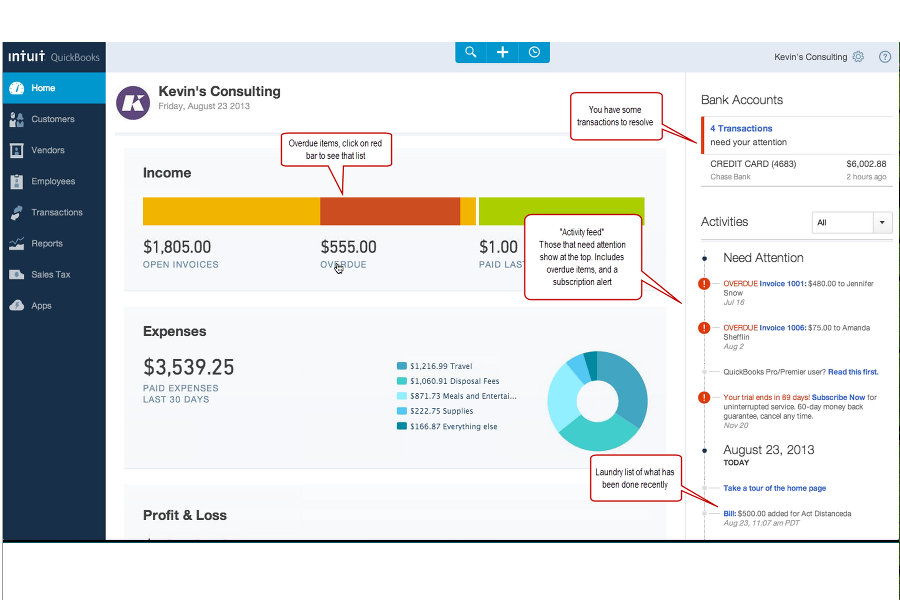
| Brukergrensesnitt | Oversiktlig og velkjent kontrollpanel med veiledede menyer for nybegynnere. | Intuitivt og tilpassbart oppsett med dra-og-slipp-moduler. |
| Introduksjon | Trinnvis oppsettsveiviser og veiledninger i appen. | Situasjonsbaserte tips, videoguider og praktiske veiledninger. |
| Mobilopplevelse | Funksjonsrik mobilapp med enkel navigasjon og varsler. | Strømlinjeformet mobilapp med automatisering og hurtighandlinger. |
| Kundestøtte | Telefon-, chat- og fellesskapsstøtte døgnet rundt, samt omfattende hjelpedokumentasjon. | E-post, direktechat og direkte tilgang til Zoho-støtteteamet. |
| Læringskurve | Minimal for grunnleggende bruk, noe brattere for avanserte funksjoner. | Rask å lære for de fleste funksjoner, med mer avanserte tilpassingsverktøy. |
Både QuickBooks Online og Zoho Books gjør det enkelt å komme i gang, men QuickBooks Online føles mer velkjent, mens Zoho Books vinner på tilpasningsmuligheter og fleksibel introduksjon. Jeg opplever QuickBooks Online som raskere for rutinemessige HR- og regnskapsoppgaver, mens Zoho Books passer brukere som ønsker å finjustere arbeidsområdet sitt.
QuickBooks Online vs Zoho Books: Pros & Cons
QuickBooks Online
- Payroll runs and tax filings are automated and accurate
- Dashboards and reports give real-time insight into expenses and payroll
- Employee self-service portal reduces HR admin workload
- Some advanced reporting features are only available with higher-tier plans
- Not ideal for advanced ERP or global organizations
- May require time to learn for new users
Zoho Books
- Automated expense categorization saves time on payroll prep
- Strong audit trails support HR compliance and reporting
- Payroll module supports multi-level approval workflows
- Employee performance tracking is not included
- Time-off management features are basic and limited
- No built-in applicant tracking or recruiting tools
Best Use Cases for QuickBooks Online and Zoho Books
QuickBooks Online
- Retail Stores Easy inventory tracking and sales management make it simple to keep up with daily operations.
- Professional Services Automated payroll and project profitability tools help agencies and consultancies track client costs and pay staff on time.
- Startups Startups love the fast onboarding, mobile app, and all-in-one dashboards for managing payroll, expenses, and taxes.
- Nonprofit Organizations QuickBooks Online supports grant management and basic fund tracking to simplify nonprofit bookkeeping and reporting.
- Remote Teams The cloud-based platform and mobile access let remote or distributed teams handle payroll and HR tasks from anywhere.
- Bookkeepers Bookkeepers appreciate the straightforward workflows, reporting, and role-based access in QuickBooks Online.
Zoho Books
- Small Businesses Affordable pricing, quick setup, and features tailored for small, fast-growing companies.
- Startups Easy expense tracking, online payments, and scalable payroll tools that grow with minimal upfront costs.
- Remote HR Teams Multi-user support and portals enable simplified collaboration and payroll management for distributed or freelance teams.
- Professional Services Timesheet management, invoicing templates, and expense tracking tools help firms manage billable work and payroll.
- Finance Departments Automated reporting, compliance workflows, and integrations offer a unified platform for all transactions.
- Nonprofits Streamlined expense approvals and donor reporting enable transparent fund and payroll management.
Hvem bør bruke QuickBooks Online, og hvem bør bruke Zoho Books?
QuickBooks Online er det opplagte valget for team basert i Nord-Amerika som trenger gode lønnsfunksjoner, omfattende integrasjoner med tredjepartsløsninger og et velkjent grensesnitt – for eksempel virksomheter i vekst med standardiserte HR- og regnskapsbehov. Zoho Books passer godt for globale team, oppstartsbedrifter eller grupper som allerede bruker andre Zoho-produkter og trenger fleksible arbeidsflyter eller internasjonalt samsvar. QuickBooks Online fungerer best for virksomheter som ønsker funksjonalitet rett ut av boksen, mens Zoho Books utmerker seg for dem som setter pris på tilpasningsmuligheter og kostnadseffektiv skalering. Til syvende og sist bør teamets teknologistakk, region og vilje til å tilpasse løsningen avgjøre valget.
Differences Between QuickBooks Online and Zoho Books
| QuickBooks Online | Zoho Books | |
|---|---|---|
| Customization | Limited reporting and workflow customization. | Highly customizable workflows, fields, and automations. |
| Ecosystem Support | Integrates mainly with third-party platforms outside Intuit. | Connects natively with Zoho’s suite for CRM, HR, and more. |
| Payroll Integration | Built-in payroll available for U.S. users. | Payroll integration as an add-on, more global coverage. |
| Pricing Flexibility | Fixed pricing tiers with costs for add-ons and extra users. | Modular pricing based on user needs and region. |
| User Experience | Streamlined, easy navigation for accounting beginners. | More options to tailor dashboards and user roles. |
| Visit QuickBooks OnlineOpens new window | Read Zoho Books ReviewOpens new window |
Similarities Between QuickBooks Online and Zoho Books
| Automation Features | Both automate repetitive tasks like billing, reminders, and reporting to free up HR and finance teams. |
|---|---|
| Cloud-Based Access | Both solutions are fully cloud-based, letting users manage HR and accounting from any device, anywhere. |
| Core Accounting Tools | Each platform provides invoicing, expense management, recurring billing, and reconciliation features out of the box. |
| Integration Support | Each offers a strong set of APIs and works with Zapier, so you can connect them to many other business tools. |
| Role-Based Permissions | QuickBooks Online and Zoho Books let admins set role-based access, protecting sensitive financial and employee data. |
| Visit QuickBooks OnlineOpens new window Read Zoho Books ReviewOpens new window | |