

10 beste boekhoudsoftware met salarisfuncties in 2026

Beste boekhoudsoftware met salarisfuncties: shortlist


Boekhoudsoftware met salarisfuncties combineert essentiële financiële beheertools met geïntegreerde salarisverwerking voor werknemers. Daardoor kunt u uw boekhouding beheren, de salarisadministratie uitvoeren en salarisuitgaven en -verplichtingen in één systeem vastleggen. Als u zoekt naar manieren om cijfers accuraat te houden, tijd te besparen en aan regelgeving te blijven voldoen, is het essentieel om de juiste oplossing te vinden.
In deze gids vergelijk ik boekhoudsoftware met salarisfuncties voor bedrijven die variëren van kleine teams tot complexe ondernemingen. U ziet welke opties het beste werken voor geïntegreerde salarisadministratie en boekhouding, automatisering van salarisadministratie naar het grootboek, fiscale ondersteuning en verschillende bedrijfsgroottes.
Waarom u onze softwarebeoordelingen kunt vertrouwen
Ons team test en beoordeelt software sinds 2012. Als HR-experts weten we zelf hoe moeilijk — en belangrijk — het is om de juiste software te kiezen.
Voor deze gids hebben we tools geëvalueerd met behulp van praktijktests en onafhankelijk onderzoek, waarbij we tools beoordeelden aan de hand van onze selectiecriteria. We putten ook uit inzichten van vooraanstaande experts uit de branche en van praktiserende HR-professionals.
Onze reviews weerspiegelen ons menselijke redactionele oordeel, geen verkooppraatje.
Deskundige beoordelaars:
Vergelijkingstabel van boekhoudsoftware met salarisfuncties
| Tool | Best For | Trial Info | Price | ||
|---|---|---|---|---|---|
| 1 | Het beste voor projectgebaseerde registratie van loonkosten | Gratis demo beschikbaar | Prijs op aanvraag | Website | |
| 2 | Het beste voor financiën op ondernemingsniveau en wereldwijde salarisverwerking | Gratis demo beschikbaar | Prijs op aanvraag | Website | |
| 3 | Beste keuze voor opensourceboekhouding en salarisadministratie | 14 dagen gratis proefversie | Vanaf $5/maand | Website | |
| 4 | Het meest geschikt voor modulaire boekhoud- en salarisapps | Gratis abonnement beschikbaar | Vanaf $31.10/gebruiker/maand | Website | |
| 5 | Het meest geschikt voor loonboekingen naar grootboeken van ondernemingen | Gratis demo beschikbaar | Prijzen op aanvraag | Website | |
| 6 | Het beste voor realtime financiële gegevens over de loonadministratie | Gratis demo beschikbaar | Prijs op aanvraag | Website | |
| 7 | Het beste voor automatische journaalposten voor de loonadministratie | Gratis proefperiode van 30 dagen | Vanaf $40/maand | Website | |
| 8 | Het beste voor boekhouding en salarisadministratie onder één login | Gratis proefperiode van 30 dagen | Vanaf $20/maand | Website | |
| 9 | Het beste voor boekhouding op desktop met loonadministratie | Gratis proefperiode van 30 dagen | Vanaf $124.42/maand | Website | |
| 10 | Beste keuze voor desktoploonadministratie met belastingtabellen | Gratis proefperiode van 30 dagen | Vanaf $40/maand met loonadministratie | Website |
Beoordelingen van boekhoudsoftware met salarisfuncties
Hieronder vindt u mijn uitgebreide samenvattingen van de beste boekhoudsoftware met salarisfuncties die op mijn shortlist zijn beland. In mijn beoordelingen bekijk ik de functies, prijzen en beste gebruikssituaties van elke software uitgebreid, zodat u de beste optie voor u kunt vinden.

Het beste voor projectgebaseerde registratie van loonkosten
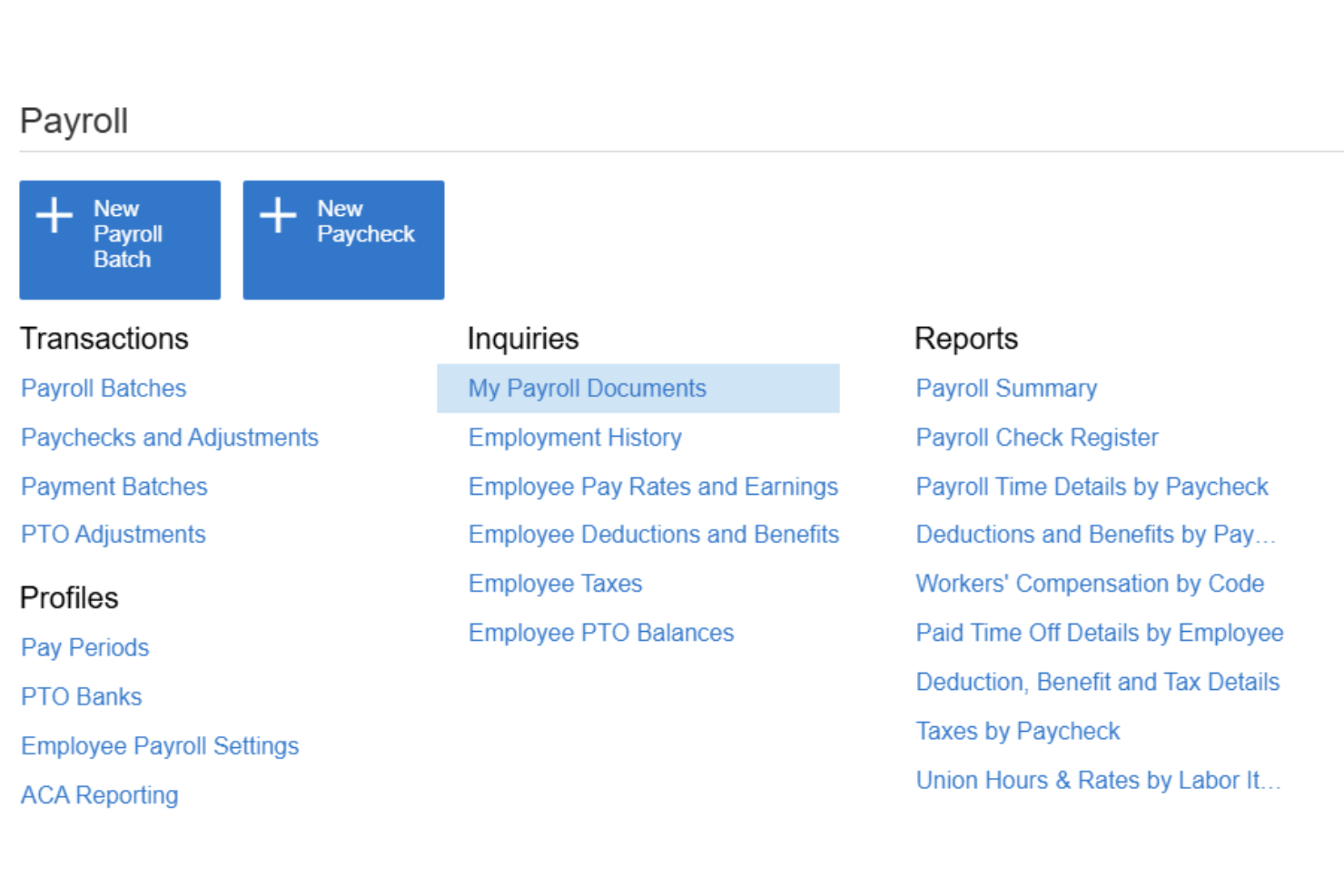
Acumatica is een cloud-ERP-platform voor middelgrote bedrijven dat volledige loonverwerking, grootboekboekhouding, projectkostenregistratie en tijdbeheer in één systeem integreert.
Voor wie is Acumatica het meest geschikt?
Acumatica is zeer geschikt voor middelgrote bedrijven in de bouw, productie en zakelijke dienstverlening die loonkosten rechtstreeks aan projecten en werkcodes moeten koppelen.
Waarom ik voor Acumatica heb gekozen
Ik heb Acumatica gekozen als een van de beste oplossingen, omdat geen enkel ander boekhoudplatform dat ik heb gebruikt het mogelijk maakt om loonkosten tegelijkertijd uit te splitsen naar project, taak, kostencode, vakbond en ploegendienst. Wanneer mijn team de lonen verwerkt, worden die kosten automatisch naar het grootboek geboekt met een toewijzing die de structuur van het project weerspiegelt, in plaats van alleen naar een algemene loonrekening. Ik maak ook gebruik van de rapportage voor gecertificeerde loonadministratie, die onmisbaar is voor bouwprojecten met vereisten voor gangbare lonen.
Belangrijkste functies van Acumatica
- Portaal voor zelfbediening door werknemers: Werknemers kunnen loonstroken, belastingformulieren, gegevens over rechtstreekse stortingen en verlofaanvragen online of vanaf een mobiel apparaat bekijken.
- Belasting- en nalevingsbeheer voor de loonadministratie: Ondersteunt actuele federale, FICA-, staats- en lokale belastinggegevens, elektronische loonbelastingaangiften, dashboards voor naleving en controlesporen voor de loonadministratie.
- Boekhouding voor meerdere entiteiten: Beheer de loonadministratie en boekhouding voor meerdere bedrijven of locaties vanuit één centraal platform.
- Native integratie voor tijdregistratie: Tijdgegevens worden rechtstreeks in loonverwerkingen geïmporteerd, met goedkeuringsworkflows en herinneringen voor ontbrekende tijdregistraties.
Integraties van Acumatica
Acumatica biedt native integraties met Microsoft 365, DocuSign, Avalara, ADP en Tableau. Er is een API beschikbaar voor aangepaste integraties.
Pros and Cons
Pros:
- Ingebouwde toewijzing van loonkosten op projectniveau
- Ondersteunt loonadministratie voor meerdere entiteiten tegelijk
- Gecertificeerde loonrapportage voor projecten met gangbare lonen
Cons:
- Complexe configuratie voor kleinere loonadministratieteams
- Geen implementatie zonder partner via zelfbediening

Workday
Het beste voor financiën op ondernemingsniveau en wereldwijde salarisverwerking
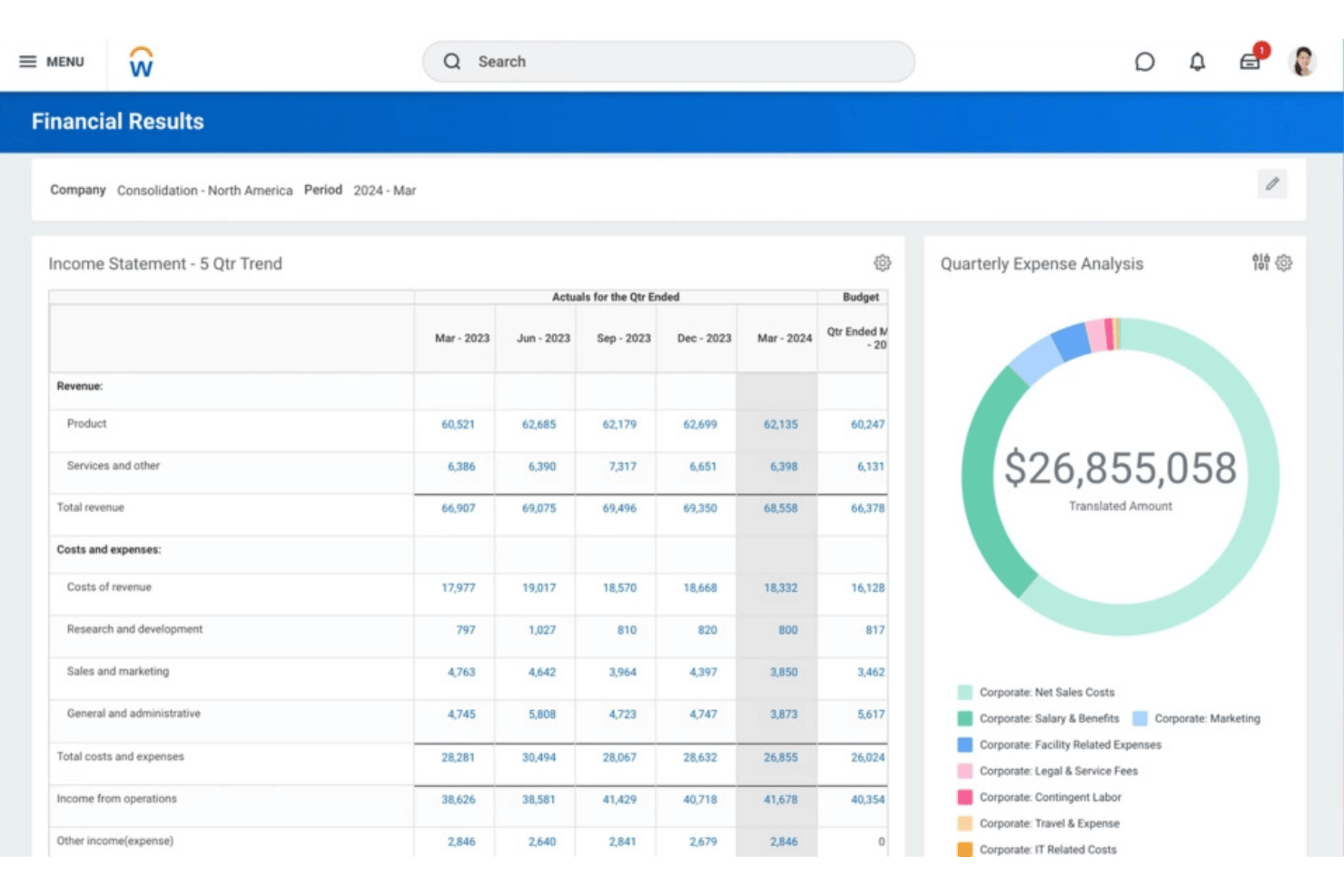
Workday is een platform op ondernemingsniveau dat salarisverwerking, financieel beheer en HCM verenigt in één systeem, met een ingebouwd grootboek, doorlopende salarisberekening en mogelijkheden voor wereldwijde salarisverwerking, ondersteund door Workday en zijn partnernetwerk.
Voor wie is Workday het meest geschikt?
Workday is ontwikkeld voor grote organisaties en ondernemingen die complexe financiële activiteiten en salarisverwerking voor meerdere entiteiten in verschillende landen vanuit één platform moeten beheren.
Waarom ik Workday heb gekozen
Ik heb Workday gekozen omdat het salarisverwerking voor ondernemingen rechtstreeks koppelt aan financieel beheer. Salarisresultaten kunnen boekingen genereren en arbeidskosten aan het grootboek toevoegen, terwijl Workday Financial Management essentiële boekhoudfuncties verzorgt, zoals het grootboek, crediteuren en debiteuren, vaste activa en consolidatie.
Belangrijkste functies van Workday
- Boekhouding van de salarisadministratie: Workday genereert automatisch boekingen op basis van salarisresultaten en ondersteunt de toewijzing van arbeidskosten.
- Grootboekintegratie: Salarisresultaten kunnen via boekingsregels voor rekeningen, fiscale schema's, grootboektypen en andere boekhoudkundige configuraties naar Workday Financial Management worden doorgestuurd.
- Doorlopende salarisverwerking: Workday ondersteunt doorlopende salarisverwerking in plaats van salarisverwerking uitsluitend als een afzonderlijk proces aan het einde van een periode te behandelen.
- Wereldwijde salarisverwerking: Ingebouwde en rechtstreekse dekking voor salarisverwerking wordt aangevuld door het wereldwijde partnernetwerk van Workday en bidirectionele integraties.
- Zelfbediening voor werknemers: Werknemers hebben via de mobielgerichte ervaring van Workday toegang tot salarisinformatie; de documentatie van Workday ondersteunt specifiek de toegang van werknemers tot loonstroken op mobiele apparaten.
- Van tijdregistratie naar salarisverwerking: Goedgekeurde tijd kan salarisberekeningen aansturen door tijdsberekeningstags te koppelen aan inkomsten of inhoudingen.
Integraties van Workday
Workday biedt ingebouwde integraties met ADP, Kronos, Salesforce, Microsoft 365, SAP, ServiceNow en Oracle, en biedt een API voor aangepaste integraties.
Pros and Cons
Pros:
- Salarisverwerking en financiën bevinden zich in één systeem
- Ingebouwde dekking voor salarisverwerking in meer dan 180 landen
- Zelfbediening voor werknemers vermindert de administratieve werklast van HR
Cons:
- Te uitgebreid voor bedrijven met minder dan 500 werknemers
- Bij de installatie is aanzienlijke betrokkenheid van IT vereist

ERPNext
Beste keuze voor opensourceboekhouding en salarisadministratie
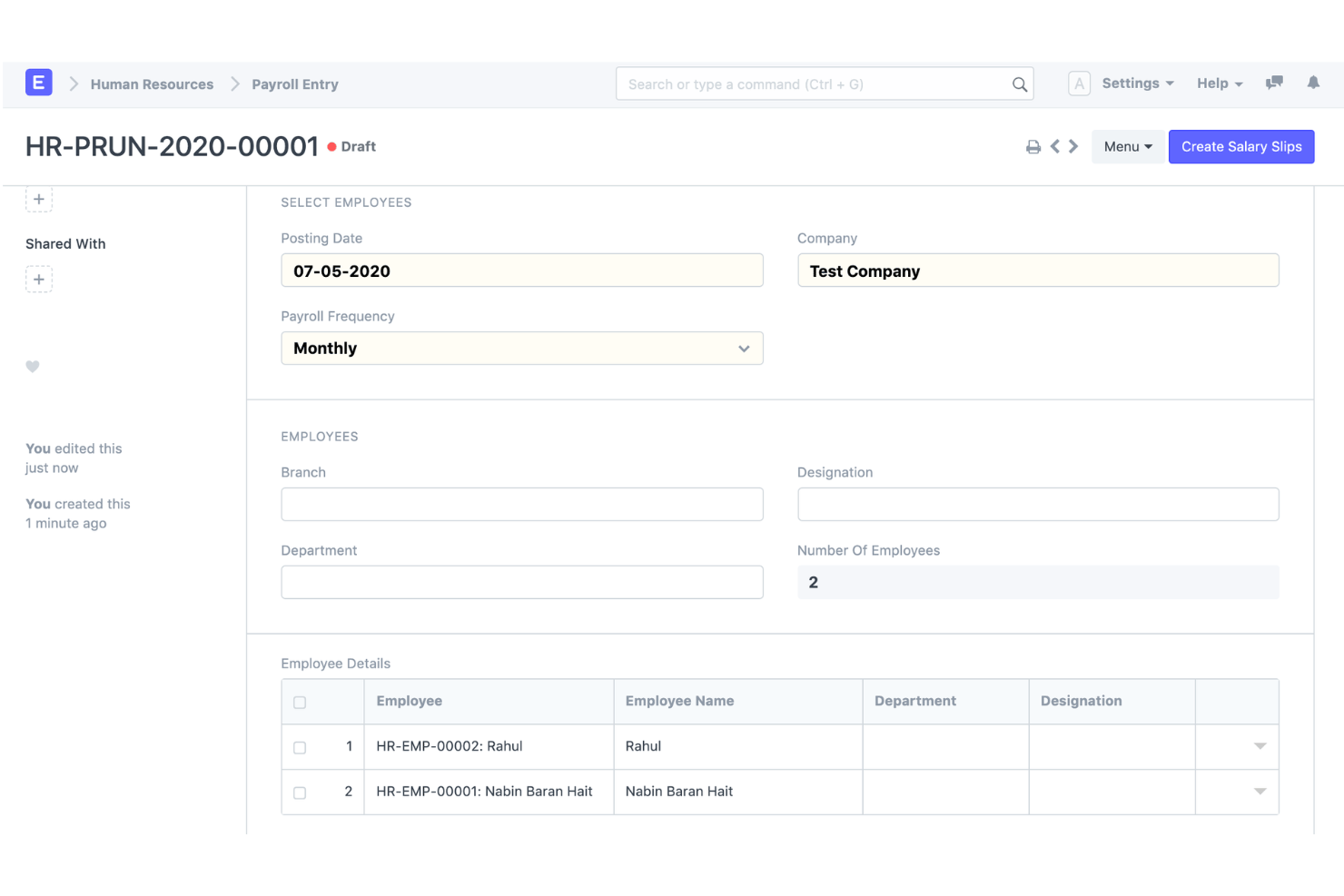
ERPNext is een opensource-ERP-platform dat dubbele boekhouding, ingebouwde salarisverwerking, HR-beheer en voorraadbeheer combineert in één zelfgehost of in de cloud geïmplementeerd systeem.
Voor wie is ERPNext het meest geschikt?
ERPNext is geschikt voor technisch vaardige mkb-bedrijven en groeiende middelgrote ondernemingen die een volwaardig ERP-systeem nodig hebben zonder licentiekosten per gebruiker.
Waarom ik voor ERPNext heb gekozen
ERPNext staat op mijn selectielijst omdat de salarisadministratiemodule rechtstreeks naar het grootboek boekt met hetzelfde rekeningschema en dezelfde kostenplaatsen die je voor de rest van je boekhouding configureert. Dat vind ik prettig, omdat je vanuit één codebasis werkt en er geen tussenlaag nodig is om salarisgegevens met een afzonderlijk boekhoudsysteem te synchroniseren. De opensourcelicentie betekent bovendien dat ik salariscomponenten of grootboekrekeningkoppelingen kan aanpassen aan een specifieke structuur, zonder te wachten op de productplanning van een leverancier.
Belangrijkste functies van ERPNext
- Geïntegreerde salarisadministratie: Salarisstructuren, inkomsten en inhoudingen, salarisperioden, loonstroken en bulkverwerking van salarissen.
- Salarisadministratie en boekhouding: Salariskosten en -betalingen kunnen worden gekoppeld aan het boekhoudsysteem in plaats van te worden beheerd in een volledig afzonderlijk salarisproduct.
- Grootboek: ERPNext biedt een volledig grootboek op basis van dubbele boekhouding en genereert automatisch grootboekposten uit ingediende boekhoudkundige transacties.
- Kostenplaatsen en projecten: Salarissen kunnen aan projecten worden gekoppeld, terwijl de boekhouding van ERPNext kostenplaatsen, projecten en andere boekhoudkundige dimensies ondersteunt.
- Boekhouding voor meerdere bedrijven en valuta: ERPNext ondersteunt meerdere bedrijven, dochterondernemingen, filialen en valuta's met geconsolideerde rapportage.
- Aanpassing: ERPNext is opensourcesoftware en gebouwd op het Frappe-framework, met aanpassingsmogelijkheden zonder code of met weinig code.
Integraties van ERPNext
ERPNext biedt native integraties met PayPal, Razorpay, Amazon S3, Slack, Dropbox, Shopify en WooCommerce. Er is een API beschikbaar voor aangepaste integraties.
Pros and Cons
Pros:
- Uitgebreide ERP-functionaliteit naast financiën
- Opensourceboekhouding en salarisadministratie
- Sterke koppeling tussen salarisadministratie en boekhouding
Cons:
- Meer installatie en configuratie dan kant-en-klare boekhoud- en salarisproducten voor het mkb
- Naleving van salarisregels en lokalisatie verschillen per land

Odoo
Het meest geschikt voor modulaire boekhoud- en salarisapps
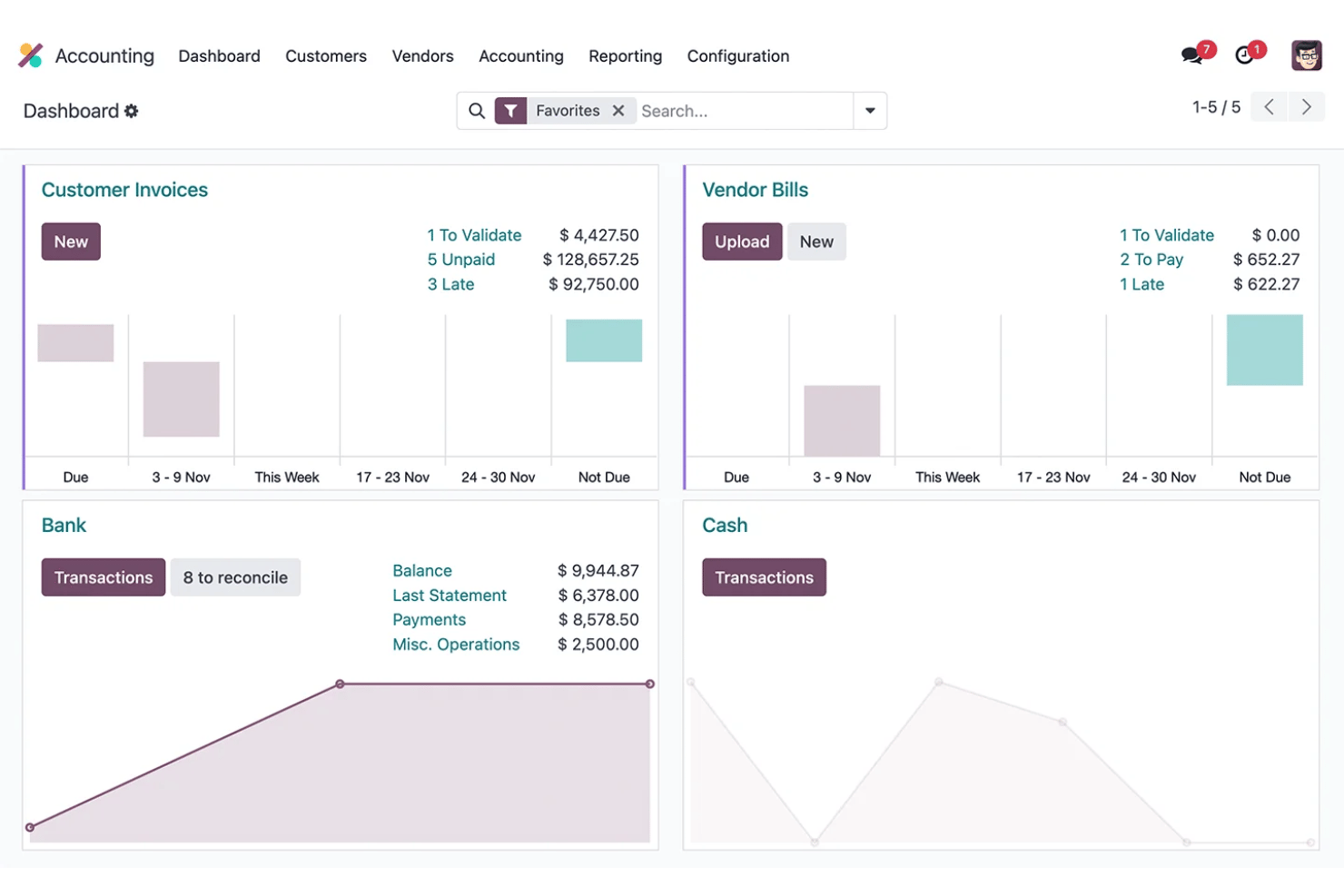
Odoo is een open-source ERP-platform dat modulaire boekhouding, salarisadministratie, HR en onkostenbeheer combineert in één gedeelde database.
Voor wie is Odoo het meest geschikt?
Odoo is een goede keuze voor groeiende mkb-bedrijven met 6–250 medewerkers die boekhouding, salarisadministratie en HR willen samenbrengen in één platform zonder meerdere losstaande tools te hoeven beheren.
Waarom ik voor Odoo heb gekozen
Ik heb voor Odoo gekozen omdat bedrijven de volledige boekhoudapplicatie kunnen combineren met salarisadministratie en andere bedrijfsapps in één modulair platform. Wanneer Boekhouding en Salarisadministratie samen worden gebruikt, kunnen salarisregels worden gekoppeld aan debet- en creditrekeningen. Zo wordt het loon van werknemers verbonden met het grootboek zonder afhankelijk te zijn van een volledig afzonderlijk boekhoudsysteem.
Belangrijkste functies van Odoo
- Boekhouding: Volledige boekhouding volgens het dubbelboekhoudsysteem met crediteuren- en debiteurenadministratie, reconciliatie, financiële rapportage, activa en budgetten.
- Salarisadministratie in de boekhouding: Salarisregels kunnen worden gekoppeld aan debet- en creditrekeningen, waardoor salarisberekeningen worden verbonden met boekhoudkundige dagboeken.
- Salarisverwerkingen: Bedrijven kunnen meerdere loonstroken tegelijk genereren en verwerken, waaronder het groeperen van de salarisadministratie op basis van salarisstructuur, afdeling of functie.
- Tijd tot salarisadministratie: De salarisadministratie gebruikt gewerkte uren van werknemers om de gewerkte tijd te berekenen voordat salarisstructuren en -regels worden toegepast.
- Salarislokalisatie: Land-specifieke salarisconfiguraties houden rekening met lokale belastingen, kosten, vergoedingen en wettelijke vereisten waar dit wordt ondersteund.
- Boekhouding voor meerdere bedrijven: Odoo ondersteunt meerdere bedrijven, met verschillende fiscale lokalisaties waar dat van toepassing is.
Integraties van Odoo
Odoo biedt ingebouwde integraties met Stripe, Plaid, PayPal, Authorize.Net en Shopify, met een API voor aangepaste integraties.
Pros and Cons
Pros:
- Modulaire apps groeien mee met de behoeften van je bedrijf
- Salarisboekingen worden automatisch in het grootboek geplaatst
- De open-sourcecodebasis maakt diepgaande aanpassingen mogelijk
Cons:
- Voor het indienen van salarisbelastingaangiften is ondersteuning van derden vereist
- De initiële installatie vereist aanzienlijke technische configuratie
Het meest geschikt voor loonboekingen naar grootboeken van ondernemingen
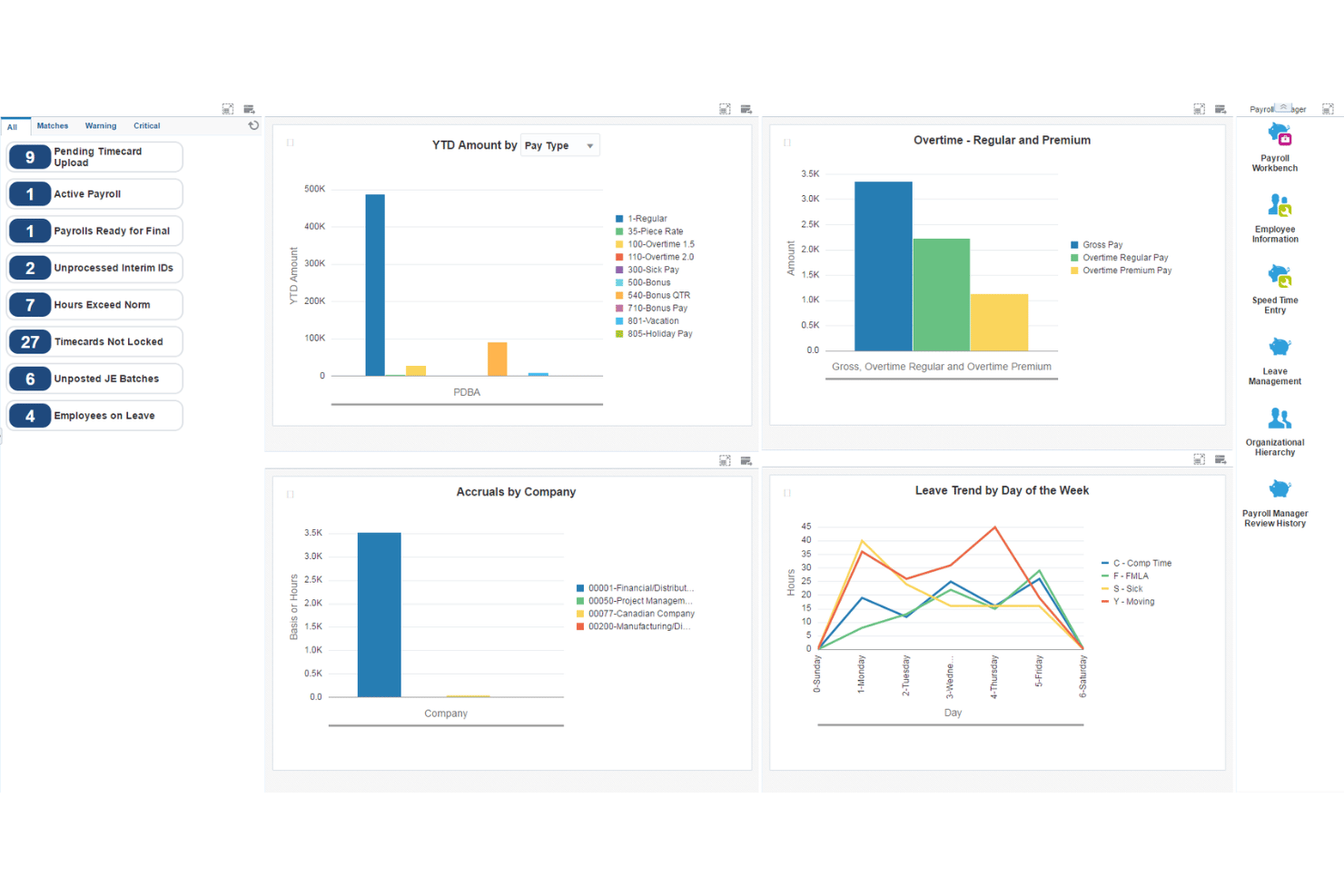
JD Edwards EnterpriseOne is een ERP-suite voor ondernemingen van Oracle die volledige loonadministratie, grootboekboekhouding, crediteuren- en debiteurenadministratie, vaste activa en human capital management combineert voor lokale, cloud- en hybride implementaties.
Voor wie is JD Edwards EnterpriseOne het meest geschikt?
JD Edwards EnterpriseOne is ontwikkeld voor grote ondernemingen in de productie, distributie en kapitaalintensieve sectoren die geïntegreerde loon- en financieel beheer op schaal nodig hebben.
Waarom ik voor JD Edwards EnterpriseOne heb gekozen
Ik heb voor JD Edwards EnterpriseOne gekozen omdat het loonsysteem diepgaand is geïntegreerd met financieel beheer voor ondernemingen. De loonadministratie kan journaalposten genereren en naar het grootboek boeken met behulp van configureerbare automatische boekhoudinstructies, terwijl loonverplichtingen zoals belastingen en verzekeringen naar de crediteurenadministratie kunnen doorstromen.
Belangrijkste functies van JD Edwards EnterpriseOne
- Integratie van loonadministratie met het grootboek: De loonadministratie kan journaalposten genereren en het EnterpriseOne-grootboek bijwerken, met opties voor automatisch of handmatig boeken.
- Automatische boekhoudinstructies: AAI's bepalen hoe gegenereerde boekingen over grootboekrekeningen worden verdeeld, waardoor grotere organisaties aanzienlijke controle hebben over de loonboekhouding.
- Loonverplichtingen en crediteurenadministratie: EnterpriseOne kan via de integratie met de crediteurenadministratie automatisch betalingsdocumenten aanmaken voor loonbelastingen, verzekeringspremies en andere loonverplichtingen aan derden.
- Arbeidskostenberekening: De loonadministratie ondersteunt verdelingen van arbeidskosten en bijkomende arbeidslasten, waaronder lonen, belastingen, verzekeringen, uren en rekeninginformatie. Deze transacties kunnen naar het rekeninggrootboek doorstromen.
- Amerikaanse loonadministratie: EnterpriseOne ondersteunt federale, staats- en lokale vereisten voor inhoudingen en rapportage, waarbij Vertex wordt gebruikt voor berekeningen van belastinginhoudingen.
- Canadese loonadministratie: Er is ook specifieke functionaliteit voor de Canadese loonadministratie, waaronder inkomsten, inhoudingen, belastingen, bruto-naar-netto-/netto-naar-brutoberekeningen, verlofopbouw en door de overheid gereguleerde belastinginformatie.
Integraties van JD Edwards EnterpriseOne
JD Edwards EnterpriseOne biedt native integraties met Oracle Cloud Infrastructure, Oracle Analytics Cloud en Oracle Database, en beschikt over een API voor aangepaste integraties.
Pros and Cons
Pros:
- Gedetailleerde boeking van arbeidskosten per afdeling
- Verwerkt loonadministratie en boekhouding voor meerdere entiteiten standaard
- Configureerbare toewijzing van grootboekrekeningen voor loonruns
Cons:
- Voor de implementatie zijn aanzienlijke IT- en adviesmiddelen nodig
- Niet geschikt voor kleine of middelgrote bedrijven
NetSuite
Het beste voor realtime financiële gegevens over de loonadministratie
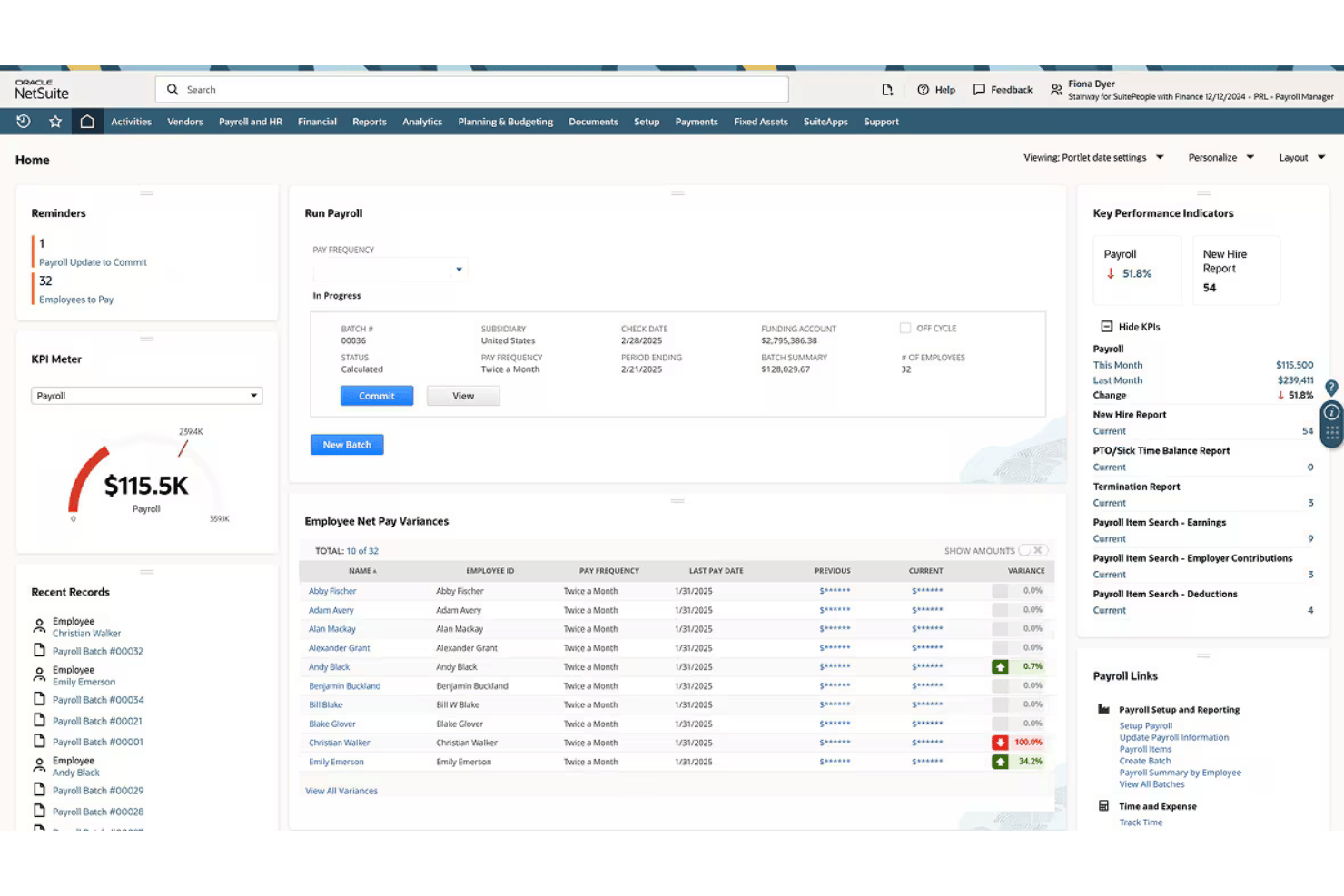
NetSuite is een cloudgebaseerd ERP-platform dat volledige Amerikaanse loonverwerking combineert met een compleet grootboek, waarbij elke loonrun in realtime rechtstreeks naar de financiële rekeningen wordt geboekt.
Voor wie is NetSuite het meest geschikt?
NetSuite is zeer geschikt voor middelgrote bedrijven die loonadministratie, boekhouding en HR binnen één ERP-systeem willen beheren in plaats van met niet-verbonden tools.
Waarom ik voor NetSuite heb gekozen
Ik heb NetSuite gekozen als een van de beste oplossingen, omdat elk loon, elke belasting en elke inhouding automatisch naar het grootboek wordt geboekt zodra een loonrun is voltooid. Ik vind het geweldig dat ik vanuit een proefbalans rechtstreeks kan doorklikken naar een individueel loonstrookje, waardoor looncontroles veel minder omslachtig worden. De dashboards splitsen loonkosten ook uit per afdeling, locatie of dochteronderneming, zodat financiën en HR een gedeeld overzicht van arbeidskosten hebben zonder handmatige afstemming.
Belangrijkste functies van NetSuite
- Loonadministratie voor meerdere dochterondernemingen: Verwerk de lonen van meerdere bedrijfseenheden met geconsolideerde rapportage of rapportage per dochteronderneming, afhankelijk van de rapportagebehoeften.
- Portaal voor zelfbediening door werknemers: Laat werknemers loonstrookjes en belastingformulieren bekijken en hun eigen persoonlijke en bankgegevens bijwerken.
- Geautomatiseerde naleving van de Amerikaanse wet inzake betaalbare zorg: Bereid formulieren (1095-C/1094-C) voor, dien ze in en beheer ze binnen het platform.
- Aangepaste loondashboards: Krijg toegang tot meer dan 100 standaardrapporten en interactieve dashboards voor loonanalyses.
Integraties van NetSuite
NetSuite biedt ingebouwde integraties met SuitePeople HR, SuiteTime en andere modules voor bedrijfsbeheer van NetSuite. Er is een API beschikbaar voor aangepaste integraties.
Pros and Cons
Pros:
- Lonen worden rechtstreeks naar het grootboek geboekt
- Ondersteunt loonadministratie voor meerdere entiteiten en dochterondernemingen
- Ingebouwde HR, tijdregistratie en loonadministratie
Cons:
- De implementatie duurt voor de meeste bedrijven maanden
- Uitsluitend op de VS gerichte loonadministratie beperkt wereldwijd personeelsbeheer

Wave
Het beste voor automatische journaalposten voor de loonadministratie
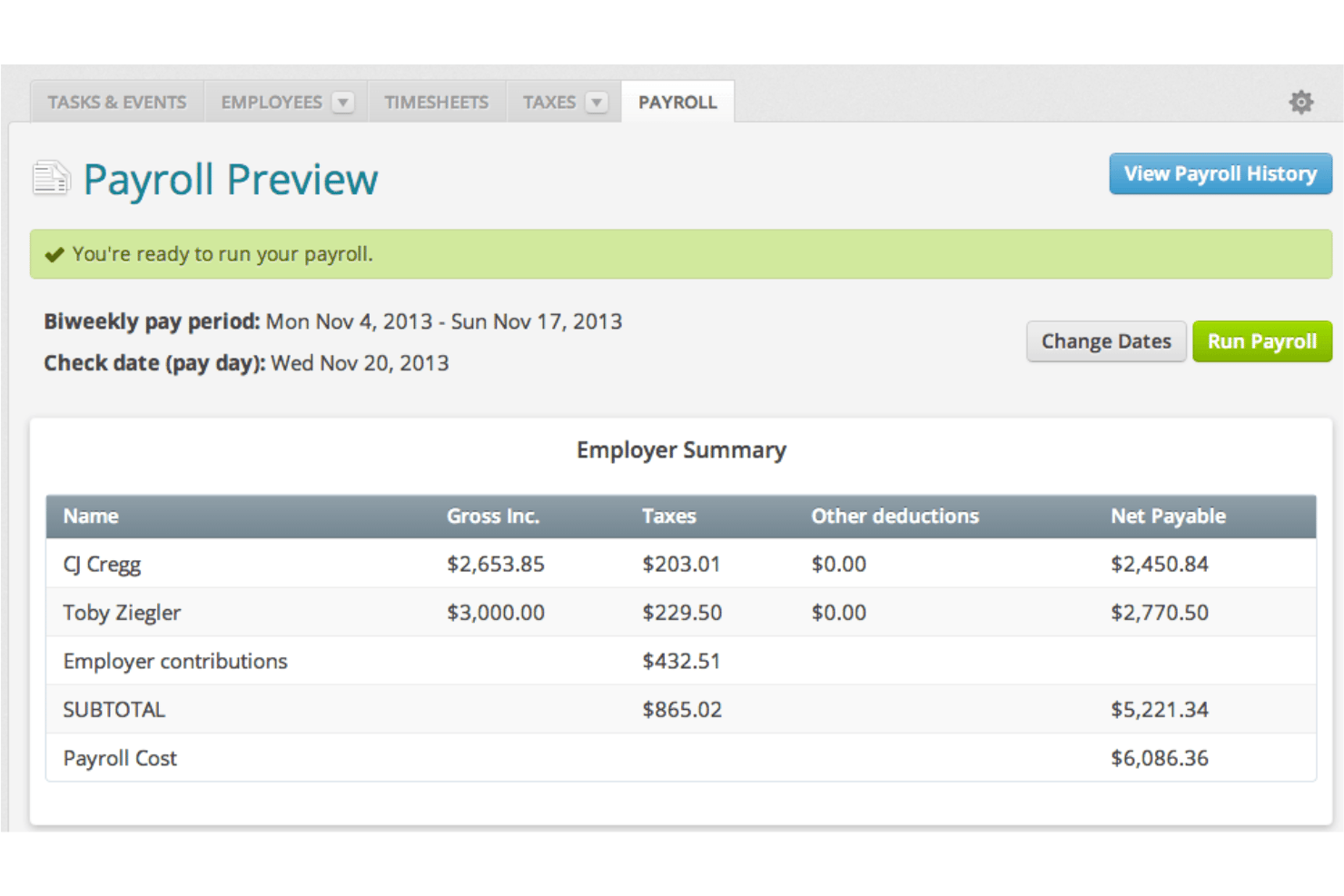
Wave is een platform voor boekhouding en loonadministratie voor kleine bedrijven, dat boekhouden volgens het systeem van dubbele boekhouding, facturatie en volledige loonverwerking combineert in één systeem.
Voor wie is Wave het meest geschikt?
Wave is ontwikkeld voor ondernemers die hun bedrijf zelf runnen en kleine bedrijven die loonadministratie en boekhouding op één plek nodig hebben zonder te betalen voor functies die ze niet zullen gebruiken.
Waarom ik voor Wave koos
Ik koos Wave als een van de beste opties omdat elke loonverwerking automatisch als journaalposten in het boekhoudkundige grootboek wordt geboekt, waarbij lonen, belastingen en inhoudingen in realtime aan de juiste rekeningen worden gekoppeld. Omdat loonadministratie en boekhouding hetzelfde gegevensmodel delen, zijn handmatige export of afstemming niet nodig. Ik vind het ook prettig dat W-2-formulieren, 1099-NEC-formulieren en loonrapporten allemaal vanuit datzelfde systeem worden gegenereerd.
Belangrijkste functies van Wave
- Betalingen via directe storting: Stuur loonbetalingen rechtstreeks naar bankrekeningen van werknemers en opdrachtnemers zonder extra kosten.
- Zelfbedieningsportaal voor werknemers: Geef teamleden de mogelijkheid om loonstroken veilig online te bekijken en persoonlijke gegevens te beheren.
- Automatische aangifte van loonheffingen: Bereken, houd in en dien federale en nationale loonheffingen in voor bedrijven in de VS.
- Genereren van belastingformulieren aan het einde van het jaar: Maak W-2- en 1099-NEC-formulieren voor werknemers en opdrachtnemers binnen het systeem en lever deze af.
Integraties van Wave
Ingebouwde integraties zijn niet duidelijk gedocumenteerd. Er is een API beschikbaar voor aangepaste integraties.
Pros and Cons
Pros:
- Loonadministratie en boekhouding delen hetzelfde gegevensmodel
- Automatische journaalposten na elke loonverwerking
- W-2- en 1099-NEC-formulieren worden binnen het platform gegenereerd
Cons:
- Loonadministratie alleen beschikbaar in de VS en Canada, met uitzondering van Quebec
- Beperkte ondersteuning voor groeiende teams met meer dan 10 werknemers

Het beste voor boekhouding en salarisadministratie onder één login
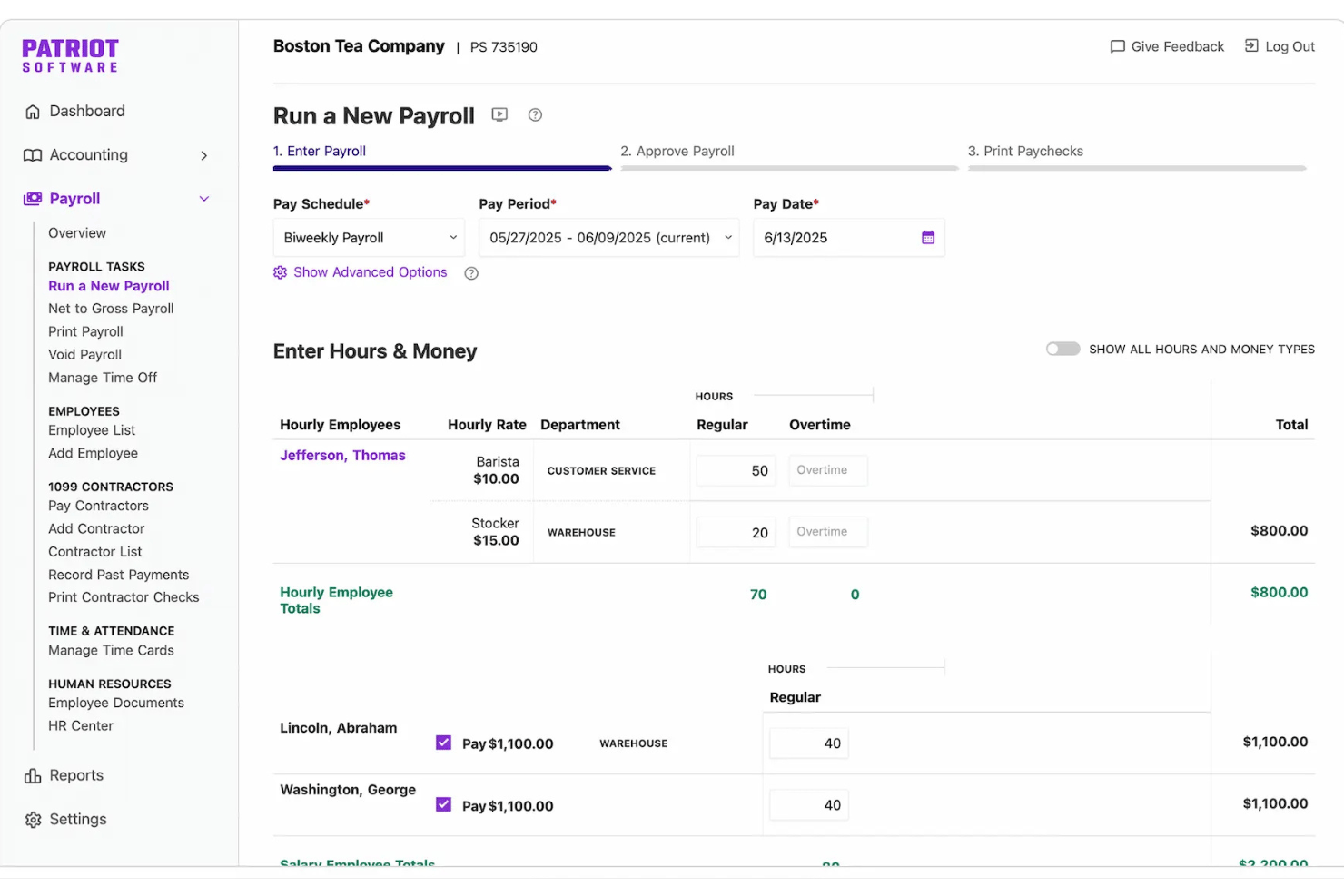
Patriot Software is een boekhoud- en salarisadministratieplatform voor kleine bedrijven dat boekhouding op basis van dubbel boekhouden, facturering, automatische loonbetaling en salarisverwerking combineert in één enkele login. Het indienen van loonbelastingaangiften is beschikbaar via het abonnement Salarisadministratie met volledige service.
Voor wie is Patriot Software het meest geschikt?
Patriot Software is zeer geschikt voor eigenaren van kleine bedrijven die hun onderneming zelf runnen en voor salarisadministrateurs die hun boekhouding willen beheren en de salarisadministratie willen uitvoeren zonder twee afzonderlijke systemen te hoeven gebruiken.
Waarom ik voor Patriot Software heb gekozen
Ik heb Patriot Software gekozen als een van de beste opties, omdat zowel de salarisadministratie als de boekhouding onder één login vallen en de verbinding ertussen automatisch is. Elke keer dat ik de salarisadministratie uitvoer, boekt Patriot rechtstreeks een journaalpost in het grootboek, waarbij lonen, ingehouden belastingen en aftrekposten zonder handmatig werk aan de juiste rekeningen worden gekoppeld. Ik waardeer ook het systeem met twee grootboeken, waarmee ik kan schakelen tussen kas- en toerekeningsboekhouding zonder van hulpmiddel te wisselen of gegevens te dupliceren.
Belangrijkste functies van Patriot Software
- Indienen van loonbelastingaangiften in meerdere staten: Salarisadministratie met volledige service berekent, dient in en draagt namens u federale, staats- en lokale loonbelastingen af.
- Portaal voor zelfbediening van werknemers: Werknemers kunnen online loonstroken en belastingdocumenten bekijken en hun gegevens voor automatische loonbetaling bijwerken.
- Module voor tijdregistratie en aanwezigheid: Registreer gewerkte uren en opgebouwde verlofrechten, die met een speciale module rechtstreeks met de salarisadministratie worden gesynchroniseerd.
- Verwerking van opdrachtnemers en 1099-formulieren: Doe betalingen aan opdrachtnemers en genereer 1099-formulieren binnen hetzelfde platform als de salarisadministratie voor werknemers.
Integraties van Patriot Software
Patriot Software biedt standaardintegraties met Vestwell voor 401(k)-regelingen, SimplyInsured voor zorgverzekeringen en ERGO NEXT voor werknemerscompensatie. Er is een API beschikbaar voor aangepaste integraties. Standaardintegraties met andere boekhoud- of salarisadministratietools zijn niet duidelijk gedocumenteerd.
Pros and Cons
Pros:
- De salarisadministratie boekt automatisch in het grootboek
- Ondersteunt zowel kas- als toerekeningsboekhouding
- Salarisadministratie met volledige service automatiseert het indienen van loonbelastingaangiften
Cons:
- De rapportagetools bieden ervaren gebruikers onvoldoende diepgang
- Geen standaardfuncties voor HR- of arbeidsvoorwaardenbeheer

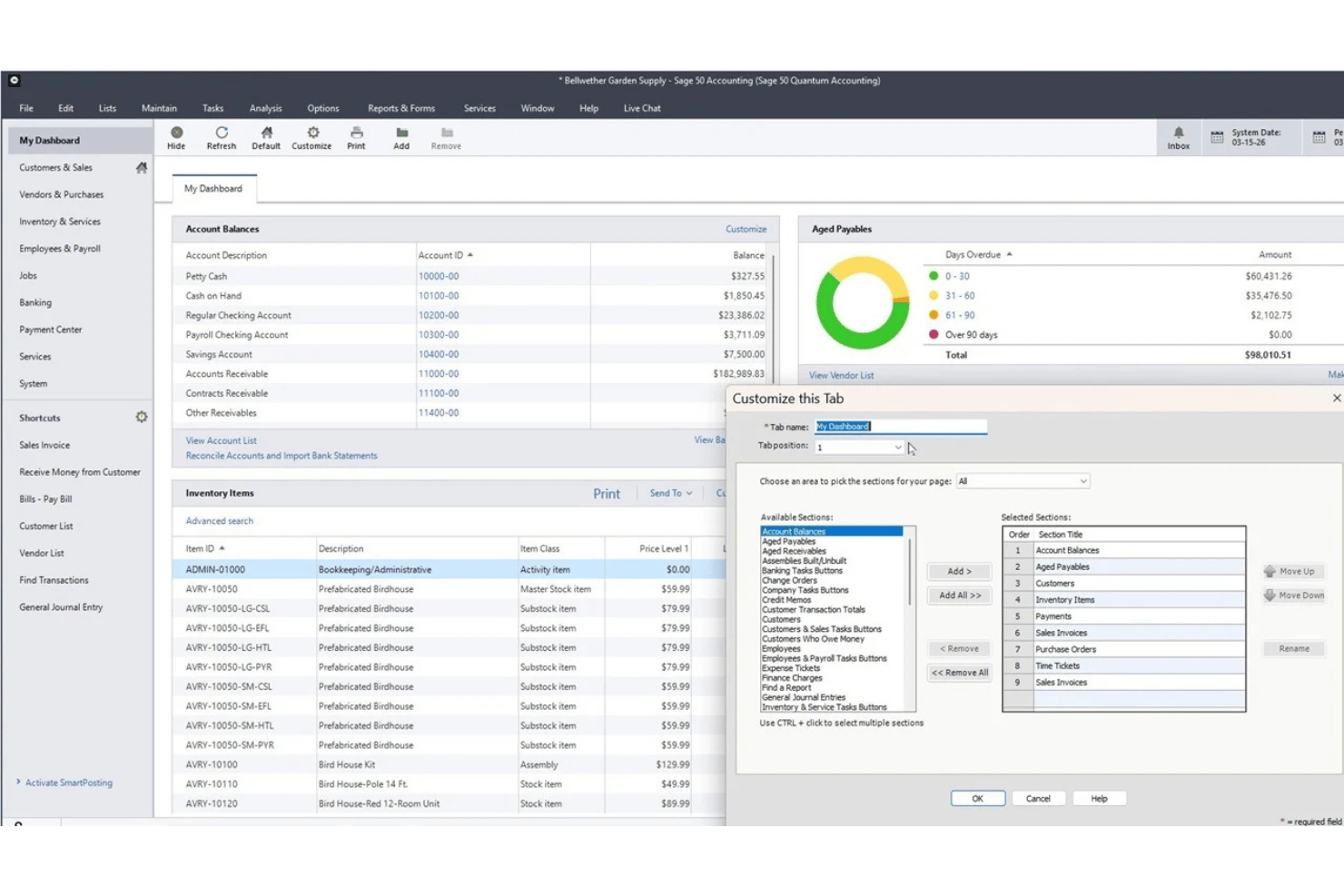
Sage 50 Accounting is een boekhoudplatform voor kleine bedrijven dat beschikbaar is in cloud- en desktopversies en financieel beheer, voorraadbeheer, projectkostenberekening en een geïntegreerde loonmodule combineert.
Voor wie is Sage 50 Accounting het meest geschikt?
Sage 50 is zeer geschikt voor kleine bedrijven en interne boekhouders die gedetailleerde boekhouding, projectkostenberekening en loonfunctionaliteit in één systeem nodig hebben.
Waarom ik voor Sage 50 Accounting heb gekozen
Ik heb Sage 50 Accounting opgenomen in mijn beste keuzes omdat de loonmodule rechtstreeks in het boekhoudsysteem is ingebouwd en niet als een integratie van een externe partij is toegevoegd. Ik vind het handig dat loonruns automatisch als journaalposten in het grootboek worden geboekt, waarbij lonen, belastingen en inhoudingen worden toegewezen zonder handmatige afstemming. De combinatie van projectkostenberekening en loonadministratie in één desktopomgeving is waar Sage 50 zich echt onderscheidt, omdat je zo kunt zien of een project winst heeft opgeleverd nadat de arbeidskosten volledig zijn verwerkt.
Belangrijkste functies van Sage 50 Accounting
- Module voor projectkostenberekening: Volg arbeidskosten, materialen en overhead per opdracht of project voor een volledig overzicht van de winstgevendheid per opdracht.
- Beheer van meerdere bedrijven: Beheer transacties en rapportages voor meerdere bedrijfseenheden in één systeem.
- Voorraadbeheer: Houd voorraadniveaus, serienummers, leveranciers en samenstellingen rechtstreeks binnen het boekhoudplatform bij.
- Geavanceerde rapportagetools: Krijg toegang tot meer dan 150 rapporten over onder andere te betalen posten, te ontvangen posten, uitgaven, winst, voorraad, loonadministratie en opdrachten, met opties om rapporten aan te passen en transacties verder uit te splitsen.
Integraties van Sage 50 Accounting
Sage 50 Accounting biedt ingebouwde integraties met Microsoft 365, AutoEntry en Sage Payroll. Er is een API beschikbaar voor aangepaste integraties.
Pros and Cons
Pros:
- Loonboekingen worden rechtstreeks in het grootboek verwerkt
- Uitgebreide projectkostenberekening ingebouwd in de boekhouding
- Uitgebreid controlespoor voor loontransacties
Cons:
- Voor loonadministratie is een extra abonnement vereist
- Voor loonadministratie en elektronische aangifte zijn afzonderlijke abonnementen vereist

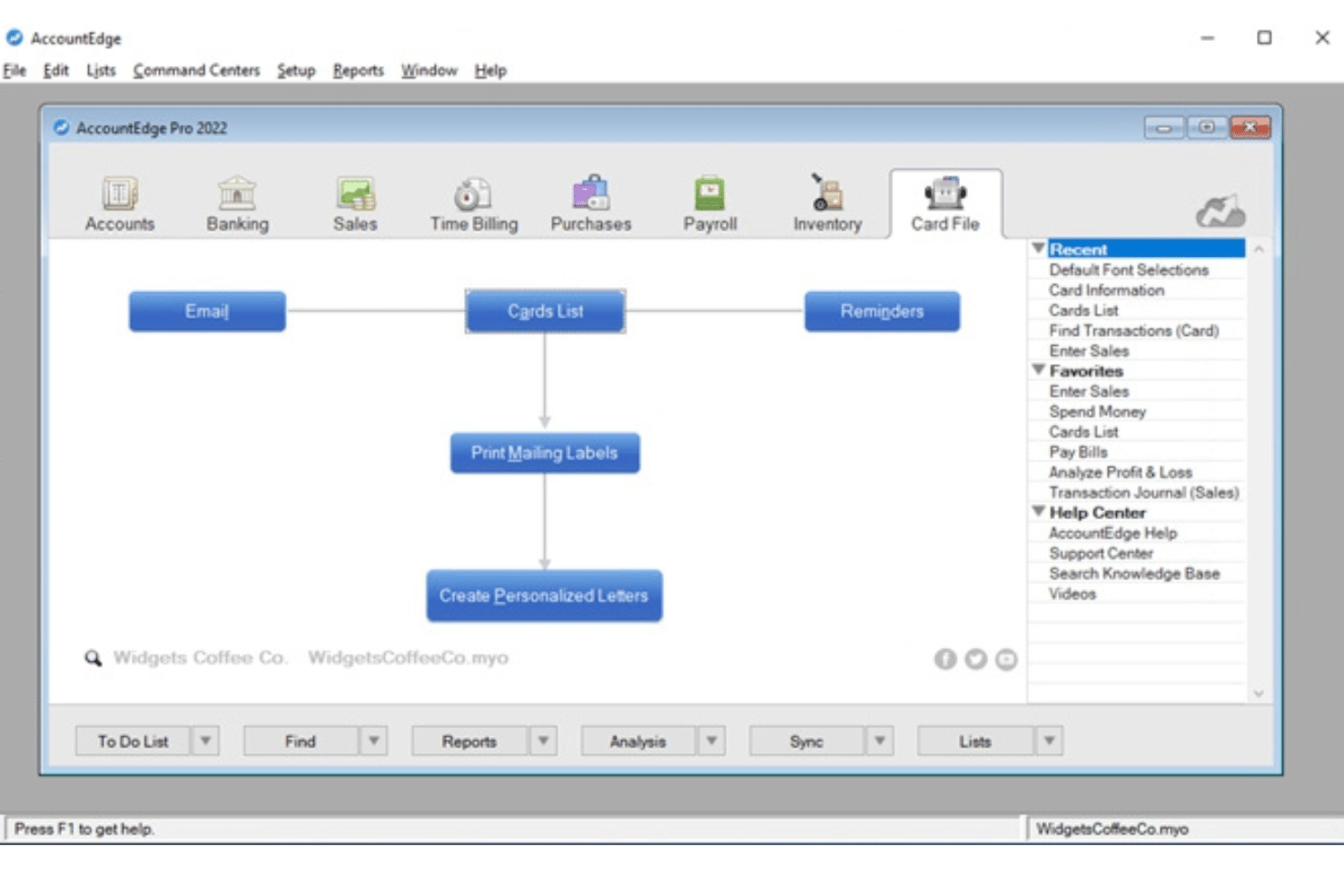
AccountEdge is een desktopgebaseerd boekhoudplatform voor kleine bedrijven dat boekhouden met dubbele boekingen, voorraadbeheer en facturering combineert met een optionele loonlijstmodule voor een onbeperkt aantal werknemers en toegang tot actuele federale, staats-/provinciale en lokale loonbelastingtarieven.
Voor wie is AccountEdge het meest geschikt?
Het is zeer geschikt voor eigenaar-exploitanten en beheerders van loonlijsten bij kleine bedrijven die de voorkeur geven aan desktopboekhoudsoftware en loonlijsten willen verwerken voor een onbeperkt aantal werknemers zonder kosten per werknemer.
Waarom ik AccountEdge heb gekozen
AccountEdge staat op mijn shortlist vanwege de manier waarop het loonbelastingtabellen verwerkt. In plaats van afhankelijk te zijn van een clouddienst voor belastingupdates, kunt u met AccountEdge federale, staats- en lokale belastingtabellen rechtstreeks in de desktopsoftware downloaden en toepassen. Ik vind het ook prettig dat loonruns automatisch als journaalposten naar het grootboek worden geboekt. Lonen, belastingen en inhoudingen worden aan de juiste rekeningen gekoppeld zonder handmatige invoer achteraf.
Belangrijkste functies van AccountEdge
- Algemeen grootboek met dubbele boekingen: Biedt een volledige boekhoudsuite met een rekeningschema, journaalposten, crediteuren-/debiteurenadministratie en financiële rapporten.
- Voorraad- en artikeltracking: Houdt voorraadartikelen en niet-voorraadartikelen, assemblages en meerdere locaties bij en beheert aangepaste varianten.
- Aanpasbare rapportages: Biedt honderden standaardrapporten voor financiën, loonadministratie en naleving, plus geavanceerde analyses via exports naar Power BI.
- Geïntegreerde urenfacturering: Maakt het mogelijk urenstaten in te voeren, aangepaste factureringstarieven per werknemer of project toe te passen en uren rechtstreeks aan de loonadministratie te koppelen.
Integraties van AccountEdge
AccountEdge biedt uitbreidingen voor bankfeeds, directe stortingen, loonformulieren en elektronische aangifte, AccountEdge Connect, Web Pay en betalingsverwerking. AccountEdge Connect voegt browsergebaseerde toegang toe voor verkopen, inkopen, urenfacturering en urenstaten van werknemers, die terug synchroniseren met de desktopsoftware.
Pros and Cons
Pros:
- Downloadbare belastingtabellen werken de loonberekeningen bij
- Loonboekingen worden automatisch naar het grootboek geboekt
- Verwerkt loonruns voor een onbeperkt aantal werknemers
Cons:
- Directe stortingen en elektronische loonaangifte kosten extra
- Belastingaangifte wordt niet automatisch door de leverancier verzorgd
Andere boekhoudsoftware met salarisfuncties
Hier zijn enkele aanvullende opties voor boekhoudsoftware met salarisfuncties die mijn shortlist niet hebben gehaald, maar die nog steeds de moeite waard zijn om te bekijken:
- Striven
E voor salarisadministratie in operationele werkstromen
- QuickBooks Workforce
Het beste voor gekoppelde salarisadministratie, HR en boekhouding
- Microsoft Dynamics GP
Ideaal voor geavanceerde salarisinhoudingen en arbeidsvoorwaarden
- SAP S/4HANA
Ideaal voor wereldwijde salarisadministratie met SAP-financiële administratie


Hoe ik boekhoudsoftware met functies voor loonadministratie beoordeel
Wanneer een loonverwerking niet automatisch in het grootboek wordt geboekt, weet ik dat de tool niet aan de basisvereisten voldoet. Daarom maak ik onderscheid tussen onmisbare functies en functies waarmee platforms zich echt onderscheiden.
Kernfunctionaliteit (basisvereisten voor deze lijst)
Bij het selecteren van tools voor mijn lijst beoordeel ik elke tool op een schaal van 0 (biedt de functionaliteit niet) tot 5 (blink uit op dit gebied) voor elke hieronder vermelde kernfunctionaliteit. Vervolgens zet ik de totaalscore van de tool om in een percentage, waarbij ik 65% als referentiepunt gebruik om de algehele geschiktheid voor de lijst te beoordelen.
- Geïntegreerde loonverwerking: Ik zoek naar ingebouwde loonverwerking met directe storting en flexibele schema's, zodat tweewekelijkse salarisbetalingen en betalingen aan opdrachtnemers op één plek kunnen plaatsvinden.
- Grootboekadministratie: Ik beoordeel of het grootboek crediteuren, debiteuren, journaalposten en aanpasbare rapporten ondersteunt, zoals het opvragen van een winst-en-verliesrekening uitgesplitst per afdeling.
- Automatisering van loonbelastingen: Belastingtabellen veranderen vaak, dus ik controleer of de tool inhoudingen automatisch berekent, aangiften indient en eindejaarsformulieren zoals W-2's genereert.
- Werknemersgegevens en inhoudingen: Elk profiel moet loontarieven, inhoudingen, arbeidsvoorwaarden en loonbeslagen kunnen opslaan: gegevens die je anders in een apart systeem zou bijhouden.
- Synchronisatie tussen loonadministratie en grootboek: Na elke loonverwerking moeten lonen en belastingverplichtingen automatisch op de juiste grootboekrekeningen worden geboekt, met een auditspoor voor controle aan het einde van het kwartaal.
- Uren- en verlofregistratie: Ingebouwde urenstaten en beleidsregels voor de opbouw van verlof die rechtstreeks naar de loonadministratie doorstromen, voorkomen dat je de uren elke loonperiode opnieuw moet invoeren.
Nadat ik een lijst heb samengesteld met tools die aan de criteria voldoen, bekijk ik wat elk platform onderscheidt.
Onderscheidende factoren (waarmee leveranciers zich onderscheiden)
Zo vergelijk ik verschillende leveranciers met elkaar:
Opvallende functies
Een zelfbedieningsportaal voor werknemers vermindert het aantal HR-verzoeken: medewerkers kunnen zelf hun loonstroken ophalen, gegevens voor directe storting bijwerken en verlofaanvragen indienen zonder heen-en-weercommunicatie. Ik beoordeel ook het beheer van opdrachtnemers en 1099-formulieren, vooral als je team bestaat uit zowel W-2-werknemers als freelancers die aan het einde van het jaar 1099-NEC-formulieren nodig hebben. Belastingaangiften in meerdere staten zijn ook belangrijk, vooral voor verspreid werkende teams waarbij elke nieuwe medewerker extra vereisten voor rechtsgebieden kan opleveren.
Meer dan functies alleen
Transparantie over prijzen is een belangrijk punt. Ik controleer of de kosten voor de loonadministratie zijn inbegrepen bij het boekhoudabonnement of als toeslag per werknemer in rekening worden gebracht, aangezien die kosten snel oplopen naarmate je team groeit. Ondersteuning bij migratie is ook belangrijk, vooral als je halverwege het jaar overstapt en de lonen en belastinginhoudingen tot nu toe nauwkeurig moet importeren. Ik kijk ook naar functies voor samenwerking met accountants, zoals op rollen gebaseerde machtigingen waarmee je boekhouder toegang krijgt tot het grootboek zonder goedkeuringen voor de loonadministratie te kunnen wijzigen.
Hoe kiest u boekhoudsoftware met salarisfuncties?
De juiste boekhoudsoftware met salarisfuncties hangt af van de manier waarop elk platform omgaat met uw unieke combinatie van naleving van regelgeving, automatisering en HR-taken. Bepaal voordat u een platform kiest hoe nauw u de salarisadministratie en boekhouding met elkaar wilt verbinden. Een alles-in-éénsysteem kan het afstemmingswerk verminderen, terwijl boekhoudsoftware met een salarisadd-on meer flexibiliteit kan bieden. Als u al een salarisdienstverlener hebt, kan een betrouwbare integratie voldoende zijn — zolang salarisuitgaven en -verplichtingen nauwkeurig naar uw grootboek worden doorgevoerd.
| Als uw prioriteit ligt bij... | Zoek dan naar... |
|---|---|
| Accurate aangiften van loonbelasting | Geautomatiseerde belastingberekeningen, ondersteuning bij aangiften en updates over naleving |
| Naadloze synchronisatie tussen salarisadministratie en boekhouding | Ingebouwde, geautomatiseerde toewijzing van journaalposten naar het grootboek |
| Het beheren van werknemers per uur en in loondienst | Flexibele tijdregistratie en gecombineerde salarisverwerkingen |
| Het verwerken van salarisadministratie in meerdere rechtsgebieden | Fiscale ondersteuning voor elke staat en plaats waar u werknemers hebt |
| Een eenvoudige overstap vanaf uw oude systeem | Begeleide migratie van salarisgegevens en import van cumulatieve jaargegevens |
Je shortlist beoordelen
- Controleer de ondersteuning voor eindejaarsbelastingen: Controleer welke W-2- en 1099-formulieren de software genereert of indient. Controleer ook welke rechtsgebieden worden ondersteund en of de kosten voor de eindejaarsindiening extra zijn.
- Voer een gesimuleerde proeflooncyclus uit: Stel een testloonrun in met je gebruikelijke betalingsschema's, inkomsten, inhoudingen en opdrachtnemers. Controleer vervolgens hoe de resulterende kosten en verplichtingen in het grootboek worden geboekt.
- Dien een supportticket in voor een migratiescenario: Beschrijf dat je de loonadministratiegegevens vanaf het begin van het jaar halverwege het jaar moet importeren en houd de grondigheid en doorlooptijd van de reactie bij.
- Verduidelijk de verantwoordelijkheid voor belastingaangiften: Bevestig of de leverancier namens jou loonbelastingen berekent, indient en betaalt. Controleer daarnaast welke rechtsgebieden door de leverancier worden gedekt en wie fouten of te late indieningen afhandelt.
- Weeg controle af tegen gemak: Bepaal of je zeer aanpasbare boekhoudtools met gekoppelde loonadministratie wilt, of een systeem dat primair op loonadministratie is gericht met basisboekhouding.
Wat is boekhoudsoftware met functies voor loonadministratie?
Boekhoudsoftware met functies voor loonadministratie combineert essentiële financiële tools met ingebouwde of geïntegreerde loonverwerking. Deze tools kunnen bijvoorbeeld bestaan uit boekhouding van het grootboek, crediteuren- en debiteurenadministratie, facturering en financiële rapportage. Met deze platforms kun je werknemerslonen berekenen, inhoudingen en belastingen beheren en loonkosten en verplichtingen in je boekhoudsysteem vastleggen zonder gegevens handmatig tussen afzonderlijke tools over te dragen.
In tegenstelling tot zelfstandige loonsoftware koppelen deze platforms loonactiviteiten rechtstreeks aan je financiële administratie. Afhankelijk van de software kunnen voltooide loonruns automatisch journaalposten genereren, kosten- en verplichtingenrekeningen bijwerken, arbeidskosten aan afdelingen of projecten toewijzen en loonadministratiegegevens aan financiële rapporten doorgeven.
Functies
Let bij het selecteren van boekhoudsoftware met functies voor loonadministratie op de volgende belangrijke functies:
- Geïntegreerde loonverwerking: Verwerk lonen, bereken het brutoloon tot nettoloon en koppel werknemerslonen, inhoudingen en loonverplichtingen aan je boekhoudgegevens.
- Beheer van loonbelastingen: Bereken en houd toepasselijke loonbelastingen in, met opties voor belastingbetalingen, aangiften en eindejaarsformulieren zoals W-2's en 1099's, afhankelijk van het platform en abonnement.
- Synchronisatie met het grootboek: Wijs loontransacties automatisch toe aan het juiste rekeningschema, zodat loonkosten en belastingverplichtingen altijd actueel zijn.
- Beheer van werknemersgegevens: Sla loontarieven, belastinginhoudingen, inhoudingen voor arbeidsvoorwaarden en arbeidsgegevens op in individuele werknemersprofielen.
- Betalingen aan opdrachtnemers en 1099-betalingen: Betaal opdrachtnemers naast werknemers en stroomlijn de indiening van 1099-NEC-formulieren aan het einde van het jaar binnen hetzelfde systeem.
- Registratie van tijd en betaald verlof: Leg gewerkte uren en betaald verlof vast en voer die gegevens rechtstreeks door naar loonruns voor correcte loonbetalingen.
- Directe storting en betalingsopties: Bied werknemers en opdrachtnemers flexibele betalingsopties, zoals directe storting, betaalkaarten of geprinte cheques.
- Zelfbedieningsportalen voor werknemers: Geef werknemers toegang tot loonstroken, belastingformulieren en aanvragen voor verlof en laat hen hun persoonlijke gegevens beheren zonder tussenkomst van HR.
- Aangepaste rapportage en analyses: Maak loon- en financiële rapporten die arbeidskosten, overuren en het gebruik van arbeidsvoorwaarden uitlichten voor betere zakelijke beslissingen.
- Beveiligings- en machtigingsbeheer: Stel toegangsniveaus voor gebruikers in, verplicht goedkeuringen en maak audittrails om loon- en financiële gegevens te beschermen.
Voordelen
Het implementeren van boekhoudsoftware met functies voor loonadministratie biedt verschillende voordelen voor je team en je bedrijf. Hier zijn enkele voordelen waar je naar kunt uitkijken:
- Minder handmatige gegevensinvoer: Automatische synchronisatie tussen de loonadministratie en het grootboek voorkomt dubbele invoer en helpt kostbare fouten te voorkomen.
- Verbeterde naleving van loonbelastingregels: Geautomatiseerde berekeningen en nalevingstools kunnen helpen om loonbelastingen en rapportage aan het einde van het jaar af te stemmen op de toepasselijke federale, staats- en lokale vereisten.
- Snellere loonverwerkingscycli: Geïntegreerde urenregistratie en functies voor directe stortingen versnellen elke salarisverwerking, van loonberekening tot bezorging van het salaris.
- Meer transparantie voor werknemers: Zelfbedieningsportalen stellen werknemers in staat loonstroken, belastingformulieren en verlofsaldi te bekijken zonder vertragingen door HR.
- Nauwkeurigere financiële rapportage: Het in realtime boeken van loonadministratie naar het grootboek zorgt ervoor dat loon-, belasting- en arbeidsvoorwaardengegevens altijd in bedrijfsrapportages worden weergegeven.
- Eenvoudigere loonverwerking voor contractanten en meerdere staten: Platforms die contractanten en meerdere belastingjurisdicties ondersteunen, kunnen het handmatige werk verminderen dat nodig is om verschillende soorten werknemers op verschillende locaties te betalen. Bedrijven die internationaal uitbreiden, kunnen ook onze gids over internationale loonadministratie in Mexico raadplegen.
- Verbeterde beveiliging en controle: Op rollen gebaseerde machtigingen en auditlogboeken beschermen gevoelige loon- en financiële gegevens tegen onbevoegde toegang.
Kosten & prijzen
Bij het selecteren van boekhoudsoftware met loonadministratiefuncties is inzicht in de verschillende beschikbare prijsmodellen en abonnementen noodzakelijk. De kosten variëren sterk afhankelijk van de vraag of loonadministratie is inbegrepen, als uitbreiding wordt verkocht of onderdeel is van een groter ERP-pakket. Producten voor kleine bedrijven combineren vaak een maandelijks boekhoudabonnement met een basisbedrag voor de loonadministratie en kosten per werknemer, terwijl bedrijfsplatforms doorgaans aangepaste prijzen hanteren op basis van modules, gebruikers, bedrijfsgrootte en implementatiebehoeften. De onderstaande tabel geeft een overzicht van de meest voorkomende prijsmodellen:
Veelvoorkomende prijsmodellen voor boekhoudsoftware met loonadministratiefuncties
| Type abonnement | Gemiddelde prijs | Veelvoorkomende functies |
|---|---|---|
| Gratis boekhouding | $0 basisabonnement; loonadministratie kost meestal extra | Basisboekhouding, facturatie, financiële rapporten en optionele betaalde loonadministratie |
| Boekhouding + uitbreiding voor loonadministratie | Maandelijkse boekhoudkosten + basisbedrag voor loonadministratie en/of kosten per werknemer | Geïntegreerde boekhouding, loonverwerking, directe stortingen en boekingen van loonadministratie naar het grootboek |
| Software per gebruiker of modulair | Maandelijkse of jaarlijkse kosten op basis van het aantal gebruikers en geselecteerde modules | Boekhoud- en loonadministratiemodules met aanvullende HR-, voorraad-, project- of operationele tools |
| ERP voor bedrijven | Aangepaste offerte | Geavanceerd financieel beheer, loonadministratie, ondersteuning voor meerdere entiteiten, machtigingen, integraties en implementatiediensten |
Veelgestelde vragen over boekhoudsoftware met salarisfuncties
Hier vindt u antwoorden op veelgestelde vragen over boekhoudsoftware met salarisfuncties:
Kan ik zowel werknemers als opdrachtnemers betalen met boekhoudsoftware waarin salarisadministratie is opgenomen?
Veel boekhoudplatforms met salarisfuncties ondersteunen zowel W-2-werknemers als 1099-opdrachtnemers, maar de mogelijkheden voor betalingen aan opdrachtnemers en belastingformulieren verschillen per product en abonnement. Als u beide typen werknemers gebruikt, controleer dan of de software betalingen aan opdrachtnemers ondersteunt en de vereiste W-2- en 1099-NEC-formulieren genereert of indient.
Hoe werkt de aangifte van loonbelasting in deze systemen?
De ondersteuning voor loonbelasting verschilt per platform en abonnement. Sommige systemen berekenen inhoudingen, maar laten het indienen van aangiften en de betalingen aan u over, terwijl volledig verzorgde salarisproducten federale, provinciale en lokale loonbelasting namens u kunnen berekenen, aangeven en betalen. Controleer voordat u een systeem kiest welke rechtsgebieden en eindejaarsformulieren worden ondersteund.
Welke ondersteuning is beschikbaar bij het migreren van salarisgegevens van een vorige aanbieder?
De meeste aanbieders bieden hulp bij de ingebruikname. Sommige stellen speciale migratiespecialisten beschikbaar om te helpen bij het importeren van salarisgegevens van het lopende jaar en een soepele overgang te garanderen.
Kunnen werknemers zelf loonstroken en belastingformulieren bekijken?
Ja, zelfbedieningsportalen voor werknemers zijn gebruikelijk. Werknemers kunnen er loonstroken ophalen, belastingdocumenten bekijken en persoonlijke gegevens bijwerken zonder de HR-afdeling erbij te betrekken.
Is geavanceerde urenregistratie inbegrepen of heb ik hulpmiddelen van derden nodig?
Sommige oplossingen hebben ingebouwde urenregistratie, terwijl andere naadloze integraties met prikklokapplicaties bieden. In beide gevallen zorgen ze ervoor dat de uren voor salarisverwerking nauwkeurig worden bijgehouden.