

If your company already pays for ServiceNow, someone has probably asked why you can't use it for everything in the office too. Fair. You already have the platform, and you can set it up to cover desk bookings and facilities requests.
A lot of companies try it. And at first, it's fine.
Then people start finding workarounds, and that's often when we hear from them. Most of them aren't looking to replace ServiceNow. They're happy with it for IT. They just want a better way to deal with everything happening around the office, without making IT give up the system it already uses.
Here's how that works with elia.
If elia's new to you, it's a workplace operations platform for desk and room booking, office requests, mailroom management, visitors and occupancy data, all in one place.
TL;DR
- Keep ServiceNow for IT. elia covers desk bookings and office requests, starting right from the floor plan.
- Send IT requests straight to ServiceNow. elia turns requests tagged as IT into ServiceNow tickets. Facilities requests stay with your workplace team.
- Keep desk assignments up to date. New hires get a desk near their team, and when someone leaves, their desk becomes available again.
- See which desks people actually use. Add occupancy sensors to compare bookings with what's happening in the office.
Why do office requests get messy inside ServiceNow?
ServiceNow is great with IT tickets. Office requests are a different story because they usually involve a specific place.
Take a projector that stops working 5 minutes before a client presentation. The person reporting it has to pick a category from a dropdown someone probably designed with laptops and software issues in mind. Finding the right option isn't always easy.
So people start looking elsewhere. Maybe someone creates a Microsoft Form for catering. Events move to Power Apps, rooms stay in Outlook, and before long employees have 4 (!) different places to ask for things. ServiceNow is still there, but it's no longer where everyone goes.
And then there's what nobody reports. We hear this one quite often. Outside of IT, people don't always want to deal with the ServiceNow portal. A broken kitchen tap might not seem like a good enough reason to log in. Nobody reports it, and facilities has no idea there's a problem.
Want to learn more about elia?
How does a request get from elia's floor plan to ServiceNow?
In elia, employees see an interactive floor plan of their office. They can click on a desk or room to book it, or report a problem.
Say the projector in a meeting room stops working. The employee clicks on that room, chooses the issue from your service catalogue and submits the request. Facilities or IT can see exactly where the problem is, without having to ask which room or floor they're talking about.
Once the request comes in, elia's automation engine routes it to the right team. You set up the rules beforehand. Employees never have to think about which team owns what.
Catering and furniture requests stay in elia as work orders for your facilities team. Something like a monitor replacement or a docking station for a new desk goes to ServiceNow through the API and webhooks. For IT, it looks like any other ticket.
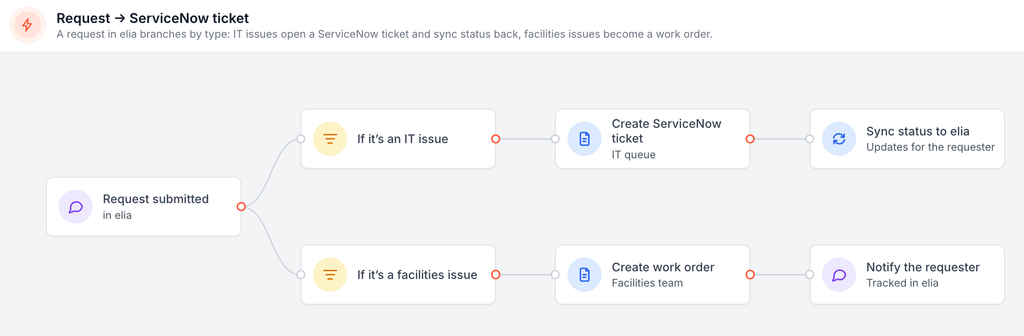
Here's what that looks like with a few everyday requests:
| Request | Where it starts | Who works it |
| Projector stops working | Meeting room on the floor plan | IT, as a ServiceNow ticket |
| Monitor swap for a desk move | Desk on the floor plan | IT, as a ServiceNow ticket |
| Catering for a client meeting | Room booking | Facilities, as a work order in elia |
| Leaking kitchen sink | Kitchen on the floor plan | Facilities, as a work order in elia |
Employees don't have to know which team is responsible for what. They just report the problem in elia.
IT still gets its tickets in ServiceNow, with the workflows and SLAs it's already using. And when someone updates a ticket, the status comes back into elia. The employee can check on their request without emailing IT to ask what's happening.
It works in the other direction, too. If IT keeps getting requests about room setups or furniture that really belong with facilities, elia can bring those into its own work order system. One less thing for IT to deal with.
Can your HR system keep desk assignments up to date?
It can, and teams that hire a lot tend to love this part. elia connects to HR systems like Workday through the same automation engine. When HR adds someone new, elia can create their profile and give them a desk near their team before their first day. When someone leaves, their desk becomes available again without anyone having to remember to update it.
At a company with a few thousand employees, that can save a lot of manual work. Especially when dozens of people join or leave every week. Any IT requests for a new hire's setup, like a laptop or docking station, go straight to ServiceNow too.
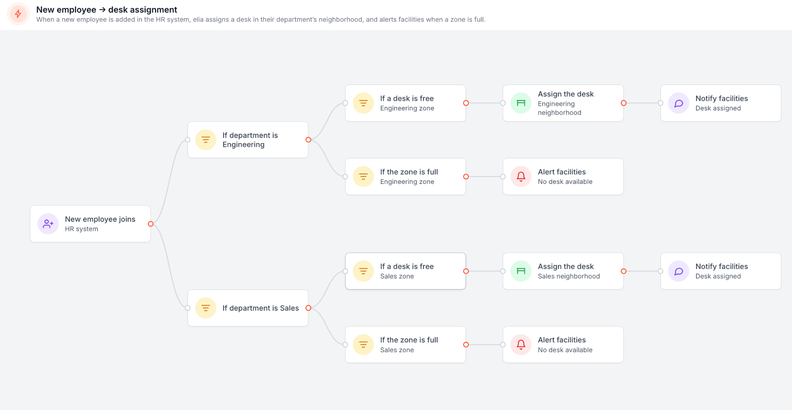
Every setup is a little different, though, and that goes for the ServiceNow connection too. The elia team can tell you what's possible with yours.
What does elia add that a ticketing tool doesn't have?
ServiceNow can't tell you how many people actually sat on the 4th floor last Wednesday.
It knows about tickets and assets. Tracking how people use office space is a different job.
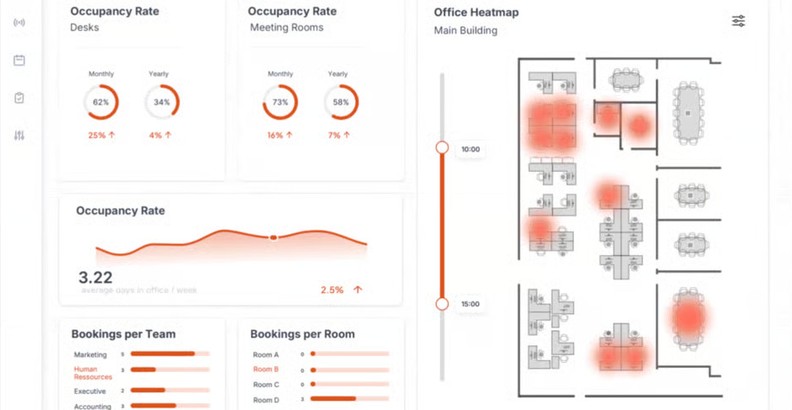
elia makes its own desk and room occupancy sensors, and the data goes into the same platform employees use to book their spaces.
You can compare booked desks with desks people used, and see how that changes throughout the week. The difference can be pretty surprising. Booking numbers often make an office look much busier than it really is.
That's useful information to have when you're deciding whether you still need that extra floor.
How do you set it up?
You don't have to move everything over at once. I'd start small and build from there.
- Take stock of where office requests go today. Look at desk and room bookings, catering, facilities issues and visitor management. Which ones are already in ServiceNow? Which ones have ended up in Forms or spreadsheets?
- Start with the requests causing the most headaches. For many teams, that's facilities. People stop reporting small issues because the process is too much trouble. Set up your request catalogue in elia, with the right forms and people responsible for each type.
- Decide what IT needs to receive. Go through the request types with your ServiceNow admins. Agree on which ones should become tickets and what information IT needs to get them moving. elia then configures the connection around your existing setup.
- Connect your HR system when you're ready. Once requests are flowing properly, you can add the HR sync so desk assignments keep up with new hires and departures.
So, do you need both?
You don't have to choose between ServiceNow and a workplace platform. IT keeps the system it already knows, while employees get one place to book desks and report office problems.
If you want to see how that setup works in practice, explore elia.io.
Frequently asked questions
Does elia replace ServiceNow?
No. ServiceNow stays your IT service desk, and elia takes care of the office side, from bookings to facilities requests. Anything that needs IT goes to ServiceNow as a ticket.
Do employees need to open ServiceNow to report an IT issue?
No. They report the issue in elia, where they already book desks and rooms. elia creates the ServiceNow ticket in the background. Employees don't need to log into the ServiceNow portal themselves.
What about ServiceNow's own Workplace Service Delivery (WSD) module?
It's a solid option, especially if your workplace team is happy working inside ServiceNow. Teams that pick elia instead often care about two things. One is having a tool built just for the workplace, where the workplace team can change booking rules and neighborhoods themselves. The other is sensors. elia makes its own, while WSD connects to third-party sensors through its Workplace Connectors.
Is it a big lift for IT?
Usually not. Most of the work on IT's side is agreeing on which requests become tickets and what info they need. elia sets up the connection from there. elia is ISO 27001 certified and hosts its data in Canada, which can help with security reviews. It also works with Microsoft 365 and Google Workspace and connects to the tools IT already uses.