

Most recruitment agencies lose placements they've already earned
Not to competitors. Not because the client changed their mind. Because a contractor finished a placement and nobody followed up in time. Because a candidate sat at the offer stage for ten days while the client waited on a decision, no one thought to chase. Because a new job order got a great kickoff call and then silence.
The placements that slip through aren't usually the result of bad recruiting. They're the result of no system to catch the moments when human memory runs out.
Automation in recruitment gets talked about a lot in the context of AI sourcing and candidate matching. But the workflows that protect revenue are simpler than that. They're triggers, tasks, and timely nudges that mean the right person gets contacted at the right moment, without someone having to remember to do it. Tracker's automation engine runs all of this natively, no separate tool required, so the platform is doing the work whether the desk is busy or not.
Here are five workflows every agency should have running. For each one, there's also a copy-paste AI prompt so you can build out the actual messages and sequences without starting from scratch. Replace anything in [brackets] with your agency's specifics before submitting.
1. Contractor end-date reactivation
The economics here are straightforward. Redeploying a contractor you've already placed costs a fraction of sourcing someone new. You've done the compliance checks. You know how they work. The client relationship is already warm. If the contractor is available and you reach them first, the placement is almost yours.
The problem is timing. Contractor end dates slip off the radar. A consultant who's working five live roles doesn't have a system for checking placement calendars every morning. By the time they think to call, the contractor has already accepted something else.
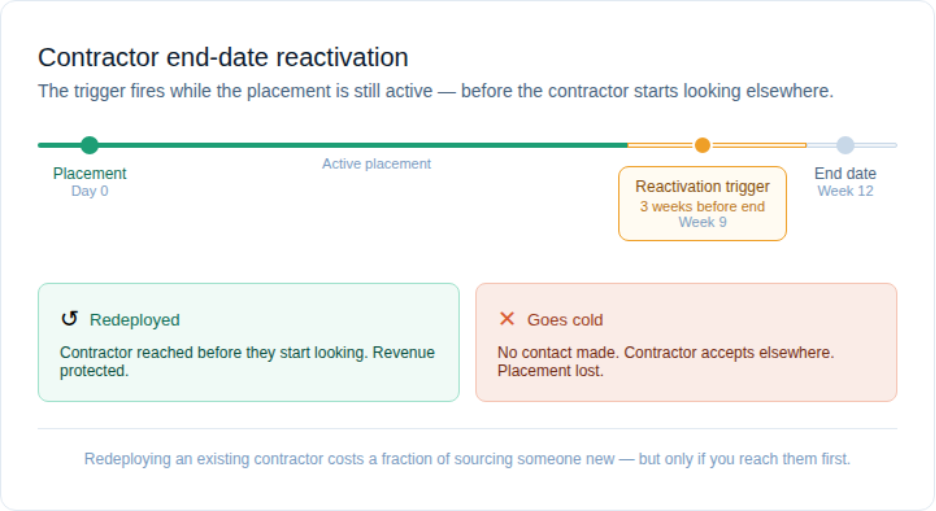
An end-date reactivation workflow fixes this by removing the need to remember. In Tracker, you'd set this up by creating an automation rule that fires when a placement end date falls within your chosen window, typically 2-4 weeks out. From there, Tracker assigns a task to the recruiter to reach out, or triggers an email directly to the contractor to check availability. Tag them or update their status to 'available soon' so they surface in upcoming searches before they go back on the open market.
Try this prompt
Copy the prompt below into Claude or any AI assistant. Replace everything in [brackets] with your agency's details before submitting.
Fields to update:
- [YOUR AGENCY NAME]
- [INDUSTRY OR VERTICAL] — e.g. IT, healthcare, light industrial, legal
- [REACTIVATION WINDOW] — e.g. 3 weeks, 30 days
- [CONTRACT TYPE] — e.g. temporary, contract-to-hire, fixed-term
- [TONE] — e.g. warm and conversational, professional, casual
- [AVERAGE PLACEMENT LENGTH] (optional) — e.g. 3 months, 6 months
— begin prompt —
You are writing a contractor reactivation email for [YOUR AGENCY NAME], a recruitment agency specializing in [INDUSTRY OR VERTICAL] placements.
Write a short, warm email to a contractor whose placement ends in [REACTIVATION WINDOW]. The email should:
- Check in on how the placement went
- Open a conversation about what they're looking for next
- Avoid sounding automated or salesy
- Be written in a [TONE] voice
- Be no longer than 150 words
The contractor is on a [CONTRACT TYPE] arrangement. [OPTIONAL: Their average placement length with us is [AVERAGE PLACEMENT LENGTH].]
Do not mention specific job roles or push for an immediate commitment. The goal is to reopen the relationship before they start looking elsewhere.
— end prompt —
Want to learn more about Tracker?
2. Stale pipeline follow-up
Every recruiter has a version of this: a candidate submitted to a client two weeks ago, no response, and the consultant has been assuming the client is just slow. Meanwhile, the candidate has had two interviews elsewhere and is weighing an offer.
A pipeline that looks busy isn't the same as a pipeline that's moving. Deals stall for all kinds of reasons, and a lot of the time nobody picks up the phone to find out why. A stale pipeline alert doesn't fix the underlying issue, but it makes sure it doesn't go unnoticed.
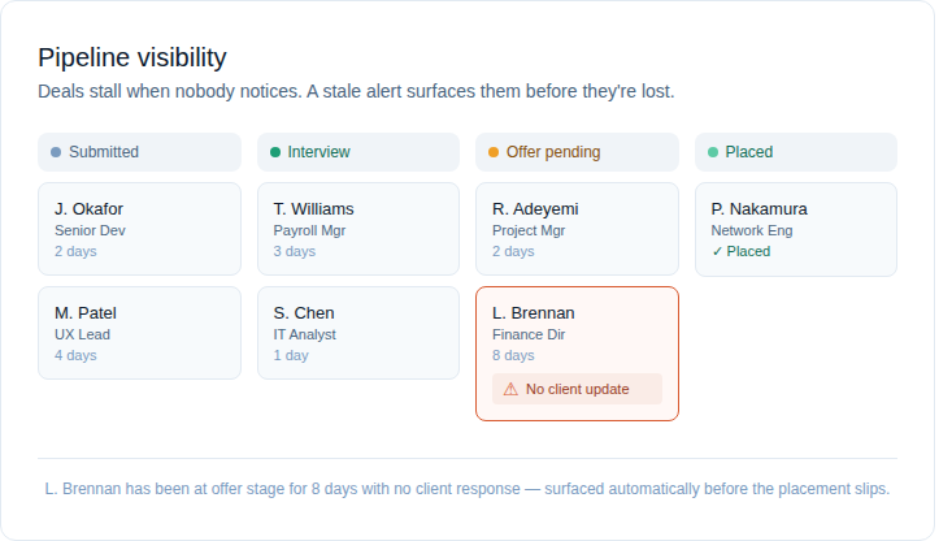
The value here isn't just the chase. It's visibility. Knowing that a candidate has been sitting at offer stage for eight days with no movement is information a team lead needs. It surfaces in a workflow before it surfaces in an exit conversation.
In Tracker, you'd set this up by defining what 'stale' means at each pipeline stage: submitted to a client for more than 5 days, interview feedback overdue by a week. Build automation rules against those thresholds and Tracker fires a task to chase when the trigger is met. Keep thresholds tight enough to be useful without creating constant noise for deals that are moving at a normal pace.
Try this prompt
Copy the prompt below into Claude or any AI assistant. Replace everything in [brackets] with your agency's details before submitting.
Fields to update:
- [AGENCY NAME]
- [ROLE TYPE] — e.g. software developer, registered nurse, accounts payable
- [PIPELINE STAGE] — e.g. submitted to client, awaiting interview, offer pending
- [NUMBER OF DAYS] — e.g. 5, 7, 10
- [CLIENT OR HIRING CONTACT] — e.g. the hiring manager, the procurement lead
- [REASON FOR DELAY IF KNOWN] (optional) — e.g. client on leave, budget approval pending
— begin prompt —
You are a recruitment consultant at [AGENCY NAME]. A candidate for a [ROLE TYPE] role has been sitting at the "[PIPELINE STAGE]" stage for [NUMBER OF DAYS] days with no update from [CLIENT OR HIRING CONTACT].
Write a short, professional follow-up message to send to the client to get a status update. The message should:
- Reference that the candidate is still available and engaged
- Politely ask for a timeline or next step
- Be direct without being pushy
- Be no longer than 100 words
[OPTIONAL: There may be a delay because [REASON FOR DELAY IF KNOWN]. Acknowledge this briefly if appropriate.]
Do not cc the candidate. This message is to the client only.
— end prompt —
3. New job order client check-in sequence
Clients rarely tell you they're frustrated. They just stop sending roles.
A new job order gets a good brief call, the consultant goes off to source, and then the client hears nothing for ten days. They don't know if their role is being worked. They're not sure whether to call and ask. By the time the consultant comes back with a shortlist, the client's confidence in the process is already dented.
The fix is simple and most agencies know it: communicate proactively throughout the search, not just at the start and end. The reason it doesn't happen consistently is that it depends on individual consultants remembering to do it across every role they're running simultaneously.
In Tracker, you'd anchor this sequence to the job order creation date. The moment a new job order is created, Tracker fires a same-day acknowledgment to the client, a progress update at day 5-7, and a check-in at day 10-14 to discuss next steps or extend the timeline. The consultant sets up the job order and the sequence runs. Nothing elaborate, just the thing that keeps the client feeling looked after.
Try this prompt
Copy the prompt below into Claude or any AI assistant. Replace everything in [brackets] with your agency's details before submitting.
Fields to update:
- [AGENCY NAME]
- [ROLE TITLE] — e.g. Senior Network Engineer, Payroll Administrator
- [CLIENT COMPANY NAME] — e.g. Meridian Financial, City of Austin
- [HIRING CONTACT NAME] — e.g. James, Sarah
- [SEARCH WINDOW IN DAYS] — e.g. 14 days, 21 days
- [TONE] — e.g. formal and professional, friendly and direct
- [KNOWN URGENCY LEVEL] (optional) — e.g. urgent backfill, standard pipeline hire
— begin prompt —
You are writing a 3-part client check-in sequence for [AGENCY NAME] following the opening of a new job order.
Details:
- Role: [ROLE TITLE]
- Client: [CLIENT COMPANY NAME]
- Hiring contact: [HIRING CONTACT NAME]
- Search window: [SEARCH WINDOW IN DAYS]
- Tone: [TONE] [OPTIONAL: - Urgency: [KNOWN URGENCY LEVEL] — e.g. urgent backfill, standard pipeline hire]
Write three short messages:
- Day 1 — confirm you've received the brief and set expectations for next steps
- Day 5-7 — share progress without overpromising, keep the client confident
- Day 10-14 — ask for any changes to the brief, confirm timeline, propose a call if no decision yet
Each message should be under 120 words. Do not use filler phrases like "I hope this finds you well." Get to the point quickly.
— end prompt —
4. Candidate record completeness
A database is only useful if it's searchable. And a record with half the fields blank doesn't surface when you need it.
This is a volume problem as much as a quality one. Consultants add candidates quickly, often mid-conversation, and come back to fill in the details later. Sometimes later doesn't happen. Skills tags get skipped. Availability dates never get entered. Right-to-work documentation sits in an email thread instead of attached to the record. Then three months later someone does a search for available candidates with a specific skill set and half the database is invisible.
A record completeness workflow doesn't prevent the issue at the point of entry. It catches it within 48 hours and creates a task to fix it before the gap compounds.
In Tracker, you'd define your minimum viable record (the fields that must be populated for a candidate to appear in relevant searches) and build a rule that fires when those fields are still empty 48 hours after the record is created. Tracker assigns a completion task to whoever added the record, so nothing slips through without someone being accountable for it.
Try this prompt
Copy the prompt below into Claude or any AI assistant. Replace everything in [brackets] with your agency's details before submitting.
Fields to update:
- [AGENCY NAME]
- [ROLE OF RECIPIENT] — e.g. recruitment consultant, resource, team lead
- [PLATFORM NAME] — e.g. Tracker, your ATS
- [REQUIRED FIELDS] — e.g. right-to-work status, skills tags, availability date, salary expectation
- [TONE] — e.g. direct and practical, light and friendly
- [CONSEQUENCE] (optional) — e.g. candidates excluded from bulk send, won't surface in searches
— begin prompt —
You are writing an internal message for [AGENCY NAME] to prompt [ROLE OF RECIPIENT]s to complete candidate records in [PLATFORM NAME].
The fields that must be filled before a record is considered complete are: [REQUIRED FIELDS].
Write a short internal message (Slack message or email, your choice) that:
- Explains why complete records matter
- Lists the required fields clearly
- Gives a simple action step
- Uses a [TONE] voice — this is an internal message, not a policy document
[OPTIONAL: Mention that incomplete records mean [CONSEQUENCE] — e.g. candidates won't surface in keyword searches.]
Keep it under 150 words. No bullet walls. Make it feel human, not like a compliance notice.
— end prompt —
5. Placement anniversary check-in
The moment a placement is made, most agencies move on. The consultant is onto the next role. The candidate is now someone else's employee. The client relationship gets picked back up the next time a vacancy opens.
What gets missed in that model is that a placed candidate at 90 days is one of the highest-value touchpoints in your entire business. They know your agency delivered. They're inside a company that has hiring needs. If things are going well, they'll tell people. If things aren't going well, this is your window to know about it before they quietly update their LinkedIn.
A 12-month check-in extends that further. One call, timed well, has generated more referrals and repeat business for the agencies that do it consistently than most outbound campaigns.
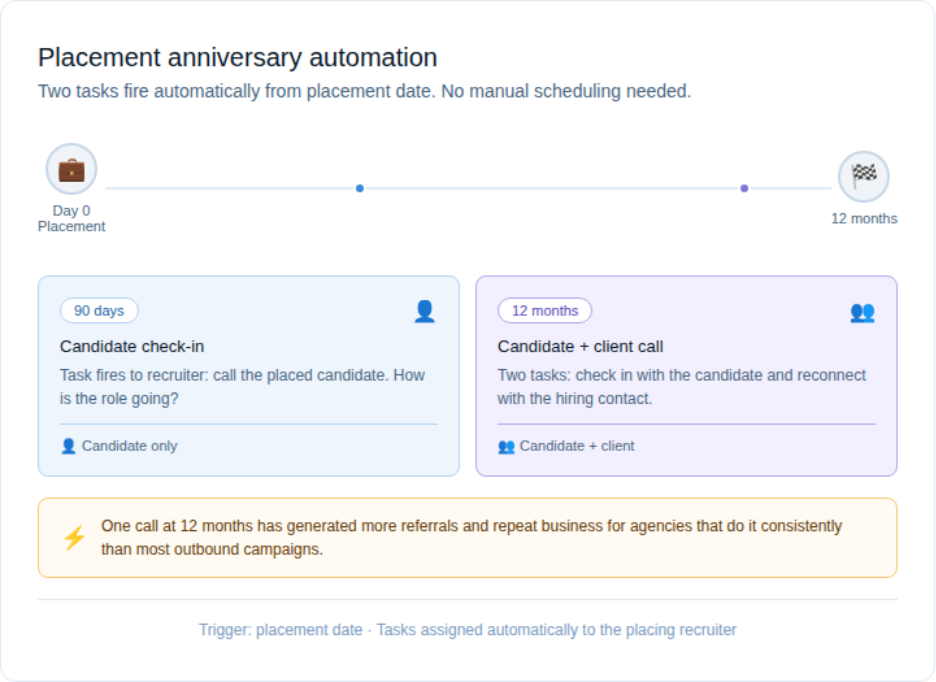
In Tracker, you'd set this up with a date-based automation from the placement date. At 90 days, Tracker tasks the consultant to check in with the placed candidate. At 12 months, it prompts both a candidate check-in and a touchpoint with the hiring contact at the client. The workflow fires whether the consultant is working that role actively or not. The relationship stays warm regardless.
Try this prompt
Copy the prompt below into Claude or any AI assistant. Replace everything in [brackets] with your agency's details before submitting.
Fields to update:
- [ANNIVERSARY MILESTONE] — e.g. 90 days, 12 months
- [CONSULTANT FIRST NAME] — e.g. Tom, Rachel
- [AGENCY NAME] — e.g. Apex Staffing
- [CANDIDATE FIRST NAME] — e.g. Marcus, Priya
- [ROLE THEY WERE PLACED IN] — e.g. IT Project Manager, Senior Nurse
- [CLIENT COMPANY] — e.g. City Hospital, DataCore Solutions
- [TONE] — e.g. warm and personal, professional but friendly
- [ANYTHING NOTABLE ABOUT THE PLACEMENT] (optional) — e.g. stretch role, relocation, long search
— begin prompt —
You are writing a [ANNIVERSARY MILESTONE] check-in message from [CONSULTANT FIRST NAME] at [AGENCY NAME] to a placed candidate.
Details:
- Candidate name: [CANDIDATE FIRST NAME]
- Role: [ROLE THEY WERE PLACED IN]
- Employer: [CLIENT COMPANY]
- Tone: [TONE] [OPTIONAL: Context: [ANYTHING NOTABLE ABOUT THE PLACEMENT] — e.g. stretch role, relocation, long search]
Write a short, genuine message that:
- Acknowledges the milestone without feeling like a form letter
- Asks how they're getting on in the role
- Keeps the door open for a conversation if anything changes
- Does NOT pitch new roles or ask for referrals directly
The message should feel like it came from someone who actually remembers placing them. Under 120 words.
— end prompt —
The compounding effect
None of these workflows is complicated individually. What makes them powerful is running all five together. Contractors get reactivated before they go cold. The pipeline stays honest. Clients feel attended to throughout the search. The database stays searchable. And placed candidates stay connected to your brand long after the placement closes.
The agencies that run this kind of foundational automation consistently outplace the ones that don't. Not because their recruiters work harder. Because fewer opportunities quietly expire before anyone noticed them.
Every agency already has a manual version of these five workflows. The question is whether your platform is running them for you, or whether that's still sitting on your consultants' to-do lists. If you're ready to move it off the list, Tracker is built to run all of it, natively, without the bolt-ons.