

As ferramentas de comunicação interna são plataformas de software que ajudam a sua equipa a partilhar informações, coordenar o trabalho e manter-se ligada em toda a organização. Se está à procura das melhores ferramentas de comunicação interna, é provável que pretenda melhorar a colaboração, reduzir os mal-entendidos e manter todos alinhados — quer a sua força de trabalho seja remota, híbrida ou presencial.
Com tantas opções disponíveis, é essencial encontrar ferramentas que se adaptem às necessidades da sua equipa, apoiem os seus fluxos de trabalho e acompanhem o crescimento da sua organização. Nesta lista, encontrará soluções de confiança que respondem a desafios reais do local de trabalho e ajudam a criar uma equipa mais ligada, informada e empenhada.
Porque pode confiar nas nossas recomendações de software
6,700+
Reviews
20
Industry experts
16+
Evaluation factors
14
Years reviewing software
A nossa equipa testa e analisa software desde 2012. Como especialistas em RH, sabemos o quão difícil — e importante — é escolher o software certo.
Para este guia, avaliámos as ferramentas através de testes práticos e pesquisa independente, pontuando-as de acordo com os nossos critérios de seleção. Recorremos também a contributos de líderes de opinião do setor e de especialistas em RH no ativo.
As nossas análises refletem o juízo da nossa equipa editorial, e não um discurso de vendas.
Revisores especialistas:
- Phil GrayCOO
 Kim BehnkeHR Tech Editor & Analyst
 Josh BarkerPeople Ops Manager

Tabela comparativa de ferramentas de comunicação interna
Esta tabela comparativa resume os detalhes de preços das minhas principais escolhas de ferramentas de comunicação interna:
Sorted by: Default
| Tool | Starting Price | Website | |
|---|---|---|---|
Best for HR-triggered lifecycle emails | 4.7 out of 5 | Pricing upon request 14-day free trial + free demo available | Website |
Best for reaching frontline employees | 4.7 out of 5 | Pricing upon request Free demo available | Website |
Best for AI-planned comms with human approval | 4.5 out of 5 | Pricing upon request Free demo available | Website |
Best for fostering company culture | 4.8 out of 5 | Pricing upon request Free demo available | Website |
Best self-destructing messaging for secure data | 4.8 out of 5 | $2.50/user/month 30-day free trial + free demo available | Website |
Best AI-powered suggestions for task management | 4.6 out of 5 | $3/user/month Free plan + free demo available | Website |
Best for Microsoft 365 collaboration | 4.3 out of 5 | $4/user/month Free plan + 1-month free trial available | Website |
Best threaded messaging to reduce clutter | 4.2 out of 5 | $6/user/month Free plan available | Website |
Best for mobile-first communication | 4.6 out of 5 | $3.75/user/month Free trial + demo available | Website |
Best for global workforce engagement | Not rated | Pricing upon request Free demo available | Website |


Avaliações de ferramentas de comunicação interna
Seguem-se os meus resumos detalhados das ferramentas de comunicação interna que entraram na minha lista restrita. As minhas avaliações apresentam uma análise detalhada das funcionalidades, dos melhores casos de utilização e das integrações de cada plataforma, para o ajudar a encontrar a melhor opção para si.
 Best for HR-triggered lifecycle emails
- 14-day free trial + free demo available
- Pricing upon request
Visit WebsiteCustomer Rating:4.7/5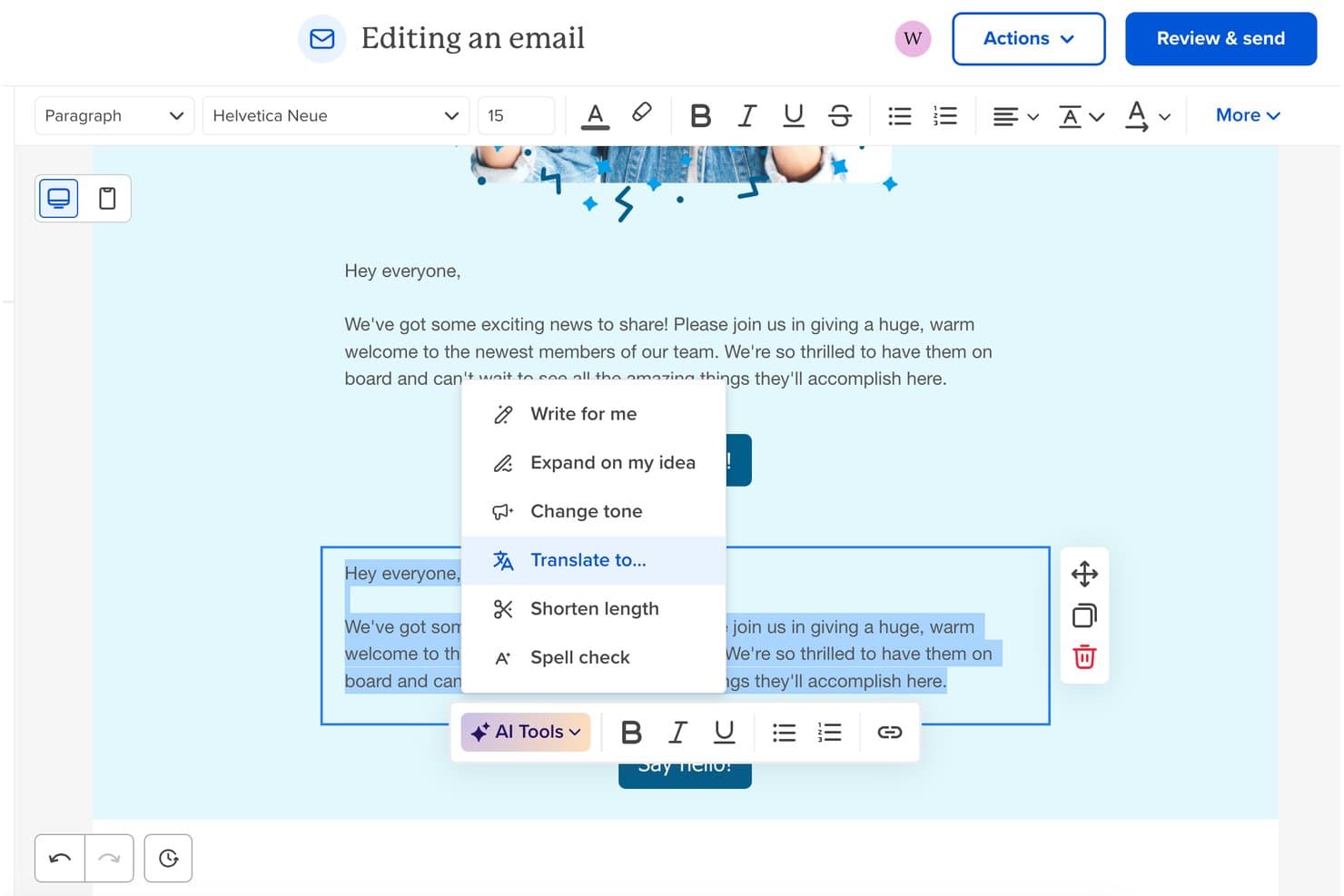
Workshop lets users translate email content using built-in AI tools. Workshop is an employee email platform built for internal communications teams, with tools for designing branded emails, automating lifecycle message sequences, targeting audiences by employee data, and tracking engagement across email, SMS, and cross-posted channels.
Who Is Workshop Best For?
Workshop is a strong fit for internal communications teams and HR professionals who run employee email campaigns and need lifecycle automation tied to HRIS data.
Why I Picked Workshop
Workshop earns its spot on my shortlist because of how well it handles HR-triggered lifecycle emails, which is something most internal comms tools treat as an afterthought. I love that Journeys lets you build automated email sequences that fire based on HRIS field changes, so a new hire's onboarding sequence or a benefits reminder can kick off automatically without manual intervention. Cici, Workshop's AI agent, drafts the emails in those sequences for review, which cuts down the production lift significantly.
Workshop Key Features
- Drag-and-drop email editor: Build and format branded emails visually without writing any HTML.
- Audience segmentation: Target employees by attributes like department, location, or role to send relevant messages to the right groups.
- Cross-channel posting: Automatically share email updates to Slack, Microsoft Teams, and SharePoint from within Workshop.
- Campaign analytics: Track opens, clicks, read time, and device data at the individual recipient and campaign level.
Workshop Integrations
Workshop has 18 native integrations, including Workday, ADP Workforce Now, UKG Pro, SAP SuccessFactors, Oracle HCM, Okta, Google Workspace, Slack, Microsoft Teams, and SharePoint. It also offers an API for extracting Workshop data to data warehouses and connecting BI tools.
Pros and Cons
Pros:
- Tracks opens, clicks, and read time
- Cici drafts branded employee emails for review
- Automates HR-triggered onboarding email journeys
Cons:
- No directory search or confirmed mobile app
- Email cross-posting isn’t native channel messaging
Learn more about Workshop: Best for reaching frontline employees
- Free demo available
- Pricing upon request
Visit WebsiteCustomer Rating:4.7/5
Staffbase enhances internal communication and employee engagement. Staffbase is designed for organizations that need to connect with employees who aren’t always at a desk. The platform helps you reach frontline and mobile workers through targeted news, updates, and resources on any device. It’s especially useful in industries like healthcare, retail, and manufacturing, where keeping everyone informed can be a challenge.
Why I Picked Staffbase
Reaching employees who aren’t always at a computer is a real challenge, and that’s where Staffbase stands out. The platform offers a mobile-first employee app for knowledge management that delivers news and resources to frontline workers.
I like that you can segment communications by location, department, or role, so messages reach the right people without getting lost. This focus on targeted, accessible internal comms makes Staffbase a strong choice for organizations with a large frontline workforce.
Staffbase Key Features
Some other features in Staffbase help organizations manage communication and engagement at scale:
- Customizable News Channels: Create and manage multiple news streams for different teams or topics.
- Employee Surveys: Collect feedback from staff with built-in survey tools.
- Content Scheduling: Plan and schedule announcements or updates to go live at specific times.
- Document Management: Store and share important files, policies, and resources within the platform.
Staffbase Integrations
Integrations include Microsoft 365, SharePoint, Slack, Salesforce, and more.
Pros and Cons
Pros:
- Supports branded employee apps
- Content scheduling options
- Built-in survey tools
Cons:
- Restricted integrations with external HR systems
- Limited real-time chat functionality
Learn more about Staffbase: Best for AI-planned comms with human approval
- Free demo available
- Pricing upon request
Visit WebsiteCustomer Rating:4.5/5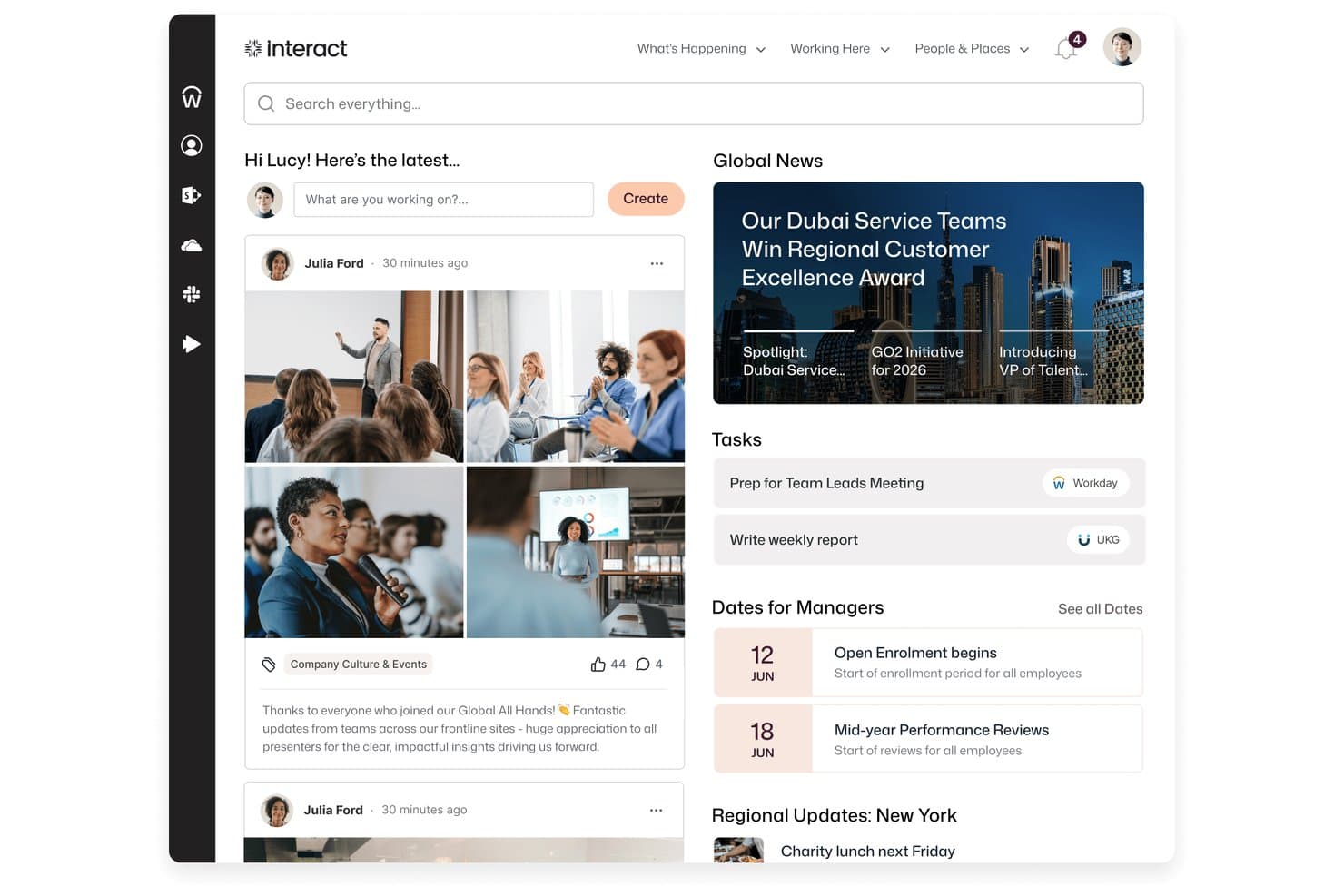
Interact Software centralizes news, tasks, and social updates in one intranet home screen. Interact is an AI-native intranet and internal communications platform that combines multi-channel broadcasting, campaign management, pulse surveys, employee directories, and frontline mobile access in a single hub.
Who Is Interact Software Best For?
Interact is a strong fit for enterprise internal communications and HR teams that need AI-assisted campaign planning with built-in approval workflows before anything goes out.
Why I Picked Interact Software
I picked Interact Software as one of the best because its Conductor AI module does something I find genuinely useful: it turns a communications goal into a fully sequenced campaign, complete with audiences, channels, timing, and reminders, but holds every action in a staged queue until a human approves it. That approval-first design is what earns it the best spot for AI-planned comms with human approval. I also like that Conductor can draft mandatory-read messages and pulse surveys grounded in your existing house style, so the content feels consistent without requiring a communications manager to start from scratch every time.
Interact Software Key Features
- Pulse surveys: Run targeted, recurring surveys with configurable anonymity to track eNPS and gather employee sentiment across teams and locations.
- Employee directory and org chart: Browse searchable employee profiles, reporting lines, and skill badges to help staff find and connect with colleagues.
- Multi-channel publishing: Distribute communications simultaneously across the intranet app, Microsoft Teams, Slack, employee email, and digital signage from a single editorial calendar.
- Mandatory-read tracking: Mark content as required reading, automatically log who has acknowledged it, and send reminders to employees who haven't.
Interact Software Integrations
Interact supports over 100 integrations, including Microsoft 365 services such as Teams, SharePoint Online, OneDrive, Outlook, Power BI, and Calendar, plus Workday, ServiceNow, Slack, Google Workspace, UKG, and SAP SuccessFactors. It offers an open API framework and Application Developer Kit for custom integrations.
Pros and Cons
Pros:
- Targeted broadcasts reduce scattergun updates
- Frontline app mirrors desktop content
- Campaign plans wait for human approval
Cons:
- Page editing can feel unintuitive
- Engagement data can be hard to retrieve
Learn more about Interact Software: Best for fostering company culture
- Free demo available
- Pricing upon request
Visit WebsiteCustomer Rating:4.8/5
Workvivo fosters workplace culture through engagement and employee recognition. Workvivo takes a social approach to internal communication, making it easier for organizations to build a sense of belonging. It’s a strong fit for HR teams and leaders who want to boost engagement and connect employees to company values, especially in distributed or hybrid workplaces. The platform brings together news, recognition, and interactive features that help reinforce culture beyond just sharing updates.
Why I Picked Workvivo
What sets Workvivo apart is its focus on building a vibrant company culture through communication. The platform offers a social feed where employees can share updates, celebrate achievements, and recognize each other’s contributions.
I appreciate how Workvivo lets you tie posts and recognition directly to company values, making culture visible and actionable every day. These features make it a strong choice for organizations that want to go beyond basic messaging and foster real engagement.
Workvivo Key Features
Some other features in Workvivo help organizations connect and inform employees in meaningful ways:
- Event Management: Manage various types of internal communication by organizing and tracking attendance for company events.
- Podcast and Video Sharing: Upload and share multimedia content to support your culture initiatives and engage employees with different communication styles.
- Pulse Surveys: Gather quick feedback from employees with short, targeted surveys.
- Knowledge Base: Centralize important documents, policies, and resources for easy access.
Workvivo Integrations
Integrations include Zoom, Slack, Microsoft Teams, SharePoint, Google Drive, and more.
Pros and Cons
Pros:
- Offers event management tools
- Social media-style activity feed
- Peer-to-peer recognition badges
Cons:
- Basic text formatting tools
- No built-in editorial calendar
 Best self-destructing messaging for secure data
- 30-day free trial + free demo available
- From $2.50/user/month
Visit WebsiteCustomer Rating:4.8/5
Troop Messenger secures business communication with encrypted collaboration tools. Troop Messenger is built for organizations that need secure, private team messaging without sacrificing usability. It’s a strong fit for industries like government, defense, or healthcare, where data protection and compliance are top priorities. With features like end-to-end encryption and on-premise deployment, Troop Messenger helps teams keep sensitive conversations and files protected.
Why I Picked Troop Messenger
Security is a top concern for many organizations, and that’s why I picked Troop Messenger for this list. The platform offers end-to-end encryption for messages and files, which helps protect sensitive information from unauthorized access.
I also like that Troop Messenger supports on-premise deployment, giving businesses full control over their data and compliance needs. For teams that handle confidential communications or operate in regulated industries, these security-focused features make Troop Messenger a strong choice.
Troop Messenger Key Features
Some other features in Troop Messenger help teams collaborate and manage communication more effectively:
- Burnout Chat: Send self-destructing messages that disappear after a set time.
- Forkout: Broadcast a message to multiple users or groups at once.
- Remote Screen Sharing: Share your screen with team members for real-time collaboration.
- Respond Later: Mark messages to reply to at a more convenient time.
Troop Messenger Integrations
Integrations include Google Drive, Dropbox, and Zapier.
Pros and Cons
Pros:
- Unique burnout self-destructing messages
- Advanced file search filters
- Self-hosted on-premise deployment option
Cons:
- Outdated user interface design
- Small video call participant limit
Learn more about Troop Messenger: Best AI-powered suggestions for task management
- Free plan + free demo available
- From $3/user/month (billed annually)
Visit WebsiteCustomer Rating:4.6/5
Chanty organizes team communication with messaging and task management. Chanty is designed for teams that want a straightforward chat solution without unnecessary complexity. It’s especially useful for small businesses or groups looking to get started with team messaging quickly and with minimal setup. With its simple interface and built-in task management, Chanty helps teams keep conversations and action items in one place.
Why I Picked Chanty
For teams that want to get up and running with minimal hassle, Chanty stands out for its simple team chat setup. You can create channels, start direct messages, and organize conversations without a complicated onboarding process.
I appreciate that Chanty includes built-in task management, so you can turn messages into actionable items right from the chat. This makes it a practical choice for small teams or businesses that want to keep communication and collaboration straightforward.
Chanty Key Features
Some other features in Chanty help teams communicate and collaborate more efficiently:
- Voice Messaging: Record and send voice messages directly within any chat or channel.
- Pinned Messages: Pin important messages in channels or conversations for quick reference.
- Teambook: Access a centralized hub for all your messages, tasks, and shared files.
- Built-in Audio and Video Calls: Start audio or video calls with team members from within the app.
Chanty Integrations
Integrations include Trello, GitHub, Google Drive, Dropbox, and more.
Pros and Cons
Pros:
- Voice message snippet recording
- Unlimited searchable message history
- Built-in Kanban task board
Cons:
- No native built-in calendar
- Glitchy large group video calls
Learn more about Chanty: Best for Microsoft 365 collaboration
- Free plan + 1-month free trial available
- From $4/user/month (billed annually)
Visit WebsiteCustomer Rating:4.3/5
Microsoft Teams facilitates workplace communication and Office 365 synergy. Microsoft Teams brings chat, meetings, and document collaboration into a single workspace for organizations already using Microsoft 365. It’s a strong fit for groups that want to connect communication with tools like Outlook, SharePoint, and OneDrive. The platform helps teams coordinate projects, share files, and keep conversations tied to the documents and calendars they use every day.
Why I Picked Microsoft Teams
What sets Microsoft Teams apart is how deeply it connects with the Microsoft 365 suite, making it a natural choice for organizations already invested in those tools. Teams lets you co-author documents in Word, Excel, or PowerPoint right inside a chat or meeting, so collaboration happens in real time without switching apps.
I appreciate how calendar events, emails, and files from Outlook and SharePoint are accessible directly within Teams, keeping everything in context. This tight integration helps teams keep communication, scheduling, and document management all in one place.
Microsoft Teams Key Features
Some other features in Microsoft Teams help round out its capabilities for internal communication:
- Private and Group Chats: Use the internal communication software to start one-on-one or group conversations for quick discussions.
- Meeting Recording and Transcription: Record meetings and automatically generate searchable transcripts for later reference.
- Customizable Tabs: Align your internal communication strategy by adding apps, files, or websites as tabs within channels.
- Breakout Rooms: Split larger meetings into smaller groups for focused discussions or activities.
Microsoft Teams Integrations
Integrations include Microsoft Word, Excel, PowerPoint, OneNote, SharePoint, Planner, Trello, GitHub, Zoom, and more.
Pros and Cons
Pros:
- Lets teams add apps and resources to channels
- Features meeting recording and transcription
- Built-in video meetings
Cons:
- Confusing guest access setup
- Search function may miss older messages
Learn more about Microsoft Teams: Best threaded messaging to reduce clutter
- Free plan available
- From $6/user/month (billed annually)
Visit WebsiteCustomer Rating:4.2/5
Twist promotes focused teamwork for remote teams through async communication and structured threads. Twist takes a different approach to team messaging by focusing on asynchronous communication and organized threads. It’s a strong fit for distributed teams, remote-first companies, or any group that wants to reduce notification overload and keep conversations easy to follow. With its thread-based structure, Twist helps you avoid the chaos of real-time chat and makes it easier to find important discussions later.
Why I Picked Twist
What sets Twist apart is its commitment to asynchronous team messaging, which is especially valuable for teams working across different time zones or with flexible schedules. Instead of relying on real-time chat, Twist organizes conversations into threads, making it easier to keep discussions focused and searchable.
I like that you can catch up on important topics without sifting through endless chat history or missing key updates. This approach helps teams reduce distractions and maintain clarity in their internal communications.
Twist Key Features
Some other features in Twist help teams manage communication and collaboration more intentionally:
- Inbox View: See all your new messages and thread updates in one organized place.
- Integrations with Tools: Connect Twist with apps like GitHub, Zapier, and Todoist for workflow automation.
- Advanced Search: Find past conversations, files, and threads quickly using keyword and filter options.
- Guest Access: Invite external collaborators to specific channels without giving them full workspace access.
Twist Integrations
Integrations include Asana, Google Calendar, Box, Calendly, Jira, and more.
Pros and Cons
Pros:
- Thread-based email archive feel
- Reduced notification fatigue alerts
- Structured asynchronous thread design
Cons:
- Minimal third-party integration catalog
- No real-time presence indicators
Learn more about Twist: Best for mobile-first communication
- Free trial + demo available
- From $3.75/user/month (billed annually)
Visit WebsiteCustomer Rating:4.6/5
Blink connects frontline workers to the company intranet with real-time team communication. Blink puts mobile communication at the center, making it a strong choice for organizations with frontline or deskless workers. It’s designed for teams in industries like retail, healthcare, and transportation that need to reach employees who aren’t always at a desk.
With features built for quick updates, resource sharing, and secure messaging, Blink helps keep everyone connected no matter where they work.
Why I Picked Blink
Blink stands out for its mobile-first approach, which is especially important for organizations with a large frontline or remote workforce. The app offers a unified feed for company news, policy updates, and urgent alerts, all optimized for mobile devices.
I like that Blink includes secure direct messaging and group chats, making it easy for employees to connect and collaborate on the go. These features make Blink a strong fit for teams that need to reach people who aren’t tied to a desk or computer.
Blink Key Features
Some other features in Blink help teams manage communication and resources more efficiently:
- Document Hub: Store and share important documents so employees can access them from their mobile devices.
- Micro-apps: Add custom tools and workflows directly into the Blink platform to support unique business needs.
- Surveys and Polls: Collect feedback from employees quickly with built-in survey and polling tools.
- Single Sign-On (SSO): Allow users to access Blink securely using their existing company credentials.
Blink Integrations
Integrations include Microsoft 365, Google Workspace, Jira, ServiceNow, and more.
Pros and Cons
Pros:
- Digital forms for mobile workers
- Secure single sign-on access
- Frontline-first employee news feed
Cons:
- Limited structured engagement modules
- Tricky large-scale group management
Learn more about Blink:

Unily supports enterprise-wide communication and global employee engagement. Unily is designed for organizations with a global workforce that need to connect employees across locations, languages, and devices. It’s especially useful for large enterprises and multinational teams that want to deliver targeted communications and foster engagement at scale. With features for multilingual content, personalized news feeds, and mobile access, Unily helps you reach every employee, wherever they work.
Why I Picked Unily
Unily stands out for organizations that need to engage a dispersed, global workforce. Its multilingual content management lets you deliver communications in multiple languages, so every employee can access information in their preferred language.
I appreciate how Unily’s personalized news feeds ensure that relevant updates reach the right people, no matter where they’re located. These features make Unily a strong choice for companies focused on building a global employee experience across borders.
Unily Key Features
Some other features in Unily help teams communicate and collaborate more effectively:
- Drag-and-Drop Page Builder: Create and customize intranet pages without coding or IT support with the user-friendly interface.
- Video Center: Share, organize, and stream video content for company-wide communications.
- Mobile App: Give employees access to internal communications and resources from any device.
- Social Networking Tools: Enable commenting, liking, and sharing to encourage engagement and feedback.
Unily Integrations
Integrations include Microsoft 365, ServiceNow, Zoom, Salesforce, Google Workspace, and more.
Pros and Cons
Pros:
- Multi-layered analytics and engagement metrics
- Enterprise-grade security protocols
- AI-powered content translation
Cons:
- Complex multi-step approval workflows
- High total cost of ownership
Learn more about Unily:
Outras ferramentas de comunicação interna
Eis algumas opções adicionais de ferramentas de comunicação interna que não entraram na minha lista restrita, mas que vale a pena conhecer:
- 11Google ChatBest for Google Workspace users
- 12Zoom Team ChatBest with video meeting integration
- 13SlackBest for integrating with enterprise workflows
- 14AxeroBest for customizable intranet solutions
- 15HubBest for tracking policy acknowledgments
- 16BonuslyBest for peer recognition messaging
- 17FlockBest built-in shared to-do lists and reminders
- 18ConnecteamBest for managing deskless teams
- 19Teams.ccBest for private team channels
- 20LoomBest for video message sharing
- 21JiveBest for enterprise social networking
- 22ContactMonkeyBest for Outlook email tracking
- 23ThriveBest for employee feedback collection
- 24DiscordBest for real-time voice chat
How I Evaluate Internal Communication Tools
When HR teams need to reach a warehouse worker without a company email, the tool either handles it or it doesn't—I split my evaluation into baseline must-haves and what makes one stand out.
Core Functionality (Table Stakes For This List)
When I'm selecting tools for my list, I rank each one on a scale from 0 (does not offer the functionality) to 5 (excels in this area) for each core functionality listed below. Then, I calculate the tool's total score into a percentage. Each tool needs to achieve a minimum total score of 65% to be considered for inclusion.
- Multi-Channel Messaging: I check whether the platform supports DMs, group chats, and broadcast channels so HR can post a benefits update and a team chat in one place.
- Mobile Accessibility: A native mobile app matters because frontline workers in retail or healthcare often rely on personal phones to stay connected with HR.
- Targeted Audience Segmentation: I look for the ability to send messages by department, location, or role—like targeting a safety update only to warehouse staff.
- Engagement Analytics: Read rates and reach metrics tell you if anyone actually saw that open enrollment reminder, so I evaluate what reporting each tool offers.
- Content & File Sharing: Teams need to share policy PDFs, training videos, and event photos inside the platform rather than linking out to separate storage tools.
- Employee Directory & Profiles: A searchable directory with roles and departments helps new hires find the right contact fast, especially across multiple office locations.
Once I have a list of tools that meet this criteria, I consider what sets each platform apart.
Differentiating Factors (What Sets Vendors Apart)
Here's how I compare and contrast different vendors:
Standout Features
Pulse surveys and feedback tools let HR teams gauge morale inside the same platform where daily conversations happen, which drives higher response rates than routing people to a separate survey tool. Crisis and emergency alerts matter for organizations with frontline staff—I evaluate whether the platform supports mandatory read confirmations for safety or compliance incidents. AI content assistance is also worth considering, especially for global teams where HR needs to draft and translate announcements across multiple languages.
Beyond Features
HRIS integrations are a big one—I check whether employee records from platforms like Workday or BambooHR sync automatically so HR doesn't manually add and remove users as people join or leave. Deskless workforce fit also matters, particularly whether the tool supports shared device login or phone-number-based accounts for workers without corporate email. For organizations in regulated industries like healthcare or finance, I evaluate compliance certifications such as SOC 2 Type II and HIPAA alongside role-based access controls and audit logs.
Como escolher ferramentas de comunicação interna
É fácil ficar preso a longas listas de funcionalidades de diferentes aplicações de mensagens e a estruturas de preços complexas. Para o ajudar a manter o foco enquanto percorre o seu processo específico de seleção de software, apresentamos uma lista de verificação com os fatores a ter em conta:
| Fator | O que considerar |
|---|---|
| FatorEscalabilidade | O que considerarA ferramenta suportará o tamanho da sua equipa à medida que esta cresce? Verifique os limites de utilizadores, os escalões de preços e o desempenho com grupos grandes. |
| FatorIntegrações | O que considerarA ferramenta liga-se aos seus sistemas de gestão de recursos humanos, gestão de projetos ou armazenamento de ficheiros? Confirme as integrações nativas e as opções de API. |
| FatorPersonalização | O que considerarPode adaptar os canais, as permissões e as notificações à estrutura e aos fluxos de trabalho da sua organização? Evite ferramentas com configurações rígidas. |
| FatorFacilidade de utilização | O que considerarOs colaboradores adotarão rapidamente a ferramenta? Procure uma navegação clara, necessidades mínimas de formação e feedback positivo de organizações semelhantes. |
| FatorImplementação e integração | O que considerarQuanto tempo demorará a implementação? Avalie o apoio à migração, os recursos de formação e se será necessária a intervenção das TI para a configuração. |
| FatorCusto | O que considerarOs planos de preços são transparentes e previsíveis? Tenha em conta os preços por utilizador, os custos adicionais e os compromissos contratuais. |
| FatorMedidas de segurança | O que considerarA ferramenta cumpre as suas normas de proteção de dados? Procure encriptação, controlos de acesso e registos de auditoria, sobretudo se tratar informações sensíveis. |
| FatorRequisitos de conformidade | O que considerarA ferramenta é compatível com as necessidades legais ou regulamentares do seu setor, como o GDPR ou a HIPAA? Confirme as certificações e as opções de residência dos dados. |
O que são ferramentas de comunicação interna?
As ferramentas de comunicação interna são plataformas de software que ajudam as equipas e as organizações a partilhar mensagens, ficheiros e atualizações no local de trabalho. Estas ferramentas suportam a comunicação em tempo real e assíncrona, facilitando a colaboração entre os funcionários, a coordenação de projetos e o acesso às informações.
Incluem frequentemente funcionalidades como conversas de grupo, mensagens diretas, partilha de ficheiros e históricos de conversas pesquisáveis, todas concebidas para manter as informações internas organizadas e acessíveis.
Funcionalidades
Ao selecionar ferramentas de comunicação interna, procure as seguintes funcionalidades principais:
- Mensagens diretas: Permitem conversas privadas, individuais, entre funcionários para perguntas rápidas ou discussões confidenciais.
- Canais de conversas de grupo: Permitem que as equipas ou os departamentos comuniquem em espaços dedicados, organizados por tema, projeto ou função.
- Partilha de ficheiros: Permite aos utilizadores carregar, enviar e aceder a documentos, imagens e outros ficheiros diretamente nas conversas.
- Histórico de mensagens pesquisável: Permite pesquisar mensagens e ficheiros anteriores, facilitando a recuperação de informações importantes quando necessário.
- Gestão de permissões dos utilizadores: Controla quem pode aceder, publicar ou moderar nos canais, ajudando a manter a segurança e a organização.
- Notificações de mensagens: Alertam os utilizadores para novas mensagens ou menções, garantindo que as atualizações importantes são vistas atempadamente.
- Partilha de ecrã: Permite aos utilizadores partilhar os seus ecrãs durante reuniões ou conversas para demonstrações, resolução de problemas ou colaboração.
- Chamadas de vídeo e voz: Suportam áudio em tempo real e reuniões virtuais para pontos de situação ou discussões urgentes.
- Fixação de mensagens: Permite aos utilizadores destacar e guardar mensagens importantes no topo de um canal ou conversa para facilitar a consulta.
- Aplicações para dispositivos móveis e computadores: Permitem aceder às ferramentas de comunicação em diferentes dispositivos, apoiando o trabalho remoto e em mobilidade.
Benefícios
A implementação de ferramentas de comunicação interna proporciona vários benefícios à sua equipa e à sua empresa. Eis alguns dos benefícios que pode esperar:
- Partilha mais rápida de informações: As mensagens e notificações em tempo real ajudam as equipas a distribuir rapidamente atualizações e decisões.
- Colaboração melhorada: Os canais de conversas de grupo, a partilha de ficheiros e a partilha de ecrã facilitam a colaboração dos funcionários em projetos.
- Melhor retenção de conhecimentos: Os históricos de mensagens pesquisáveis e as mensagens fixadas garantem que as informações importantes estão sempre acessíveis.
- Segurança reforçada: A gestão de permissões dos utilizadores e as salvaguardas de segurança protegem as conversas sensíveis e os dados da empresa.
- Maior flexibilidade: As aplicações para dispositivos móveis e computadores apoiam a comunicação de funcionários remotos, em regime híbrido e em mobilidade.
- Responsabilização mais clara: As mensagens diretas e o histórico de mensagens fornecem um registo das conversas e decisões para consulta futura.
- Redução da sobrecarga de e-mails internos: As conversas centralizadas e a partilha de ficheiros reduzem a necessidade de longas cadeias de e-mails e de comunicações dispersas.
Custos e preços
A seleção de ferramentas de comunicação interna exige uma compreensão dos vários modelos de preços e planos disponíveis. Os custos variam consoante as funcionalidades, a dimensão da equipa, os complementos, entre outros fatores. A tabela abaixo resume os planos comuns, os respetivos preços médios e as funcionalidades habitualmente incluídas nas soluções de ferramentas de comunicação interna:
Tabela comparativa de planos para ferramentas de comunicação interna
| Tipo de plano | Preço médio | Funcionalidades comuns |
|---|---|---|
| Tipo de planoPlano gratuito | Preço médio$0 | Funcionalidades comunsMensagens básicas, canais de grupo limitados, partilha de ficheiros, pesquisa básica e armazenamento limitado. |
| Tipo de planoPlano pessoal | Preço médio$4–$8/utilizador/mês | Funcionalidades comunsMensagens diretas, conversas de grupo, partilha de ficheiros, histórico pesquisável e suporte básico. |
| Tipo de planoPlano empresarial | Preço médio$8–$15/utilizador/mês | Funcionalidades comunsPermissões avançadas, chamadas de vídeo e voz, integrações, maior capacidade de armazenamento e suporte prioritário. |
| Tipo de planoPlano empresarial de grande dimensão | Preço médio$15–$25/utilizador/mês | Funcionalidades comunsSegurança personalizada, ferramentas de conformidade, opções no local, gestão de conta dedicada e análises avançadas. |
Perguntas frequentes sobre ferramentas de comunicação interna
Eis algumas respostas a perguntas comuns sobre ferramentas de comunicação interna:
De que forma as ferramentas de comunicação interna apoiam as equipas remotas e híbridas?
As ferramentas de comunicação interna apoiam as equipas remotas e híbridas através de mensagens em tempo real, chamadas de vídeo e partilha de ficheiros entre dispositivos. Isto ajuda os colaboradores a manterem-se ligados, a colaborarem em projetos e a acederem a atualizações importantes, independentemente do local onde trabalham.
As ferramentas de comunicação interna podem integrar-se com outros softwares de trabalho?
Sim, a maioria das ferramentas de comunicação interna oferece integrações com sistemas de gestão de recursos humanos (HRIS), gestão de projetos e armazenamento de ficheiros. As integrações ajudam a centralizar os fluxos de trabalho, a reduzir a alternância entre contextos e a garantir que a informação circula facilmente entre as plataformas que a sua equipa já utiliza.
Que funcionalidades de segurança devo procurar nas ferramentas de comunicação interna?
Procure funcionalidades como encriptação de ponta a ponta, controlos de acesso dos utilizadores, registos de auditoria e certificações de conformidade. Estas medidas de proteção ajudam a proteger os dados sensíveis da empresa e a garantir que as suas comunicações cumprem os requisitos legais ou do setor.
Como posso incentivar a adoção de uma nova ferramenta de comunicação interna?
Comece por disponibilizar recursos de formação claros, visitas guiadas ao produto e apoio durante a integração. Envolva os líderes das equipas como promotores, defina expectativas de utilização e recolha feedback para resolver preocupações desde cedo. Uma comunicação consistente sobre o valor da ferramenta também ajuda a promover a adoção.
Existem ferramentas de comunicação interna adequadas para pequenas empresas?
Sim, muitas ferramentas de comunicação interna oferecem planos gratuitos ou de baixo custo concebidos para pequenas equipas. Estes planos incluem normalmente funcionalidades essenciais, como mensagens, conversas de grupo e partilha de ficheiros, tornando-os acessíveis a organizações com orçamentos limitados.