

As melhores alternativas à TriNet vão ajudá-lo a gerir os recursos humanos, a folha de pagamentos e a conformidade com a mesma eficácia, oferecendo simultaneamente diferentes níveis de flexibilidade ao nível dos preços, da personalização ou das funcionalidades, para responder às necessidades da sua organização.
A TriNet é um fornecedor de serviços de recursos humanos e uma PEO conceituado, especialmente para empresas em crescimento que pretendem subcontratar tarefas complexas de recursos humanos. No entanto, dependendo da dimensão da sua empresa, do seu setor ou do nível de controlo pretendido, outro fornecedor poderá oferecer uma escalabilidade superior, um apoio mais próximo ou ferramentas mais alinhadas com os seus processos internos.
Com base na minha experiência na utilização e avaliação de soluções de recursos humanos, elaborei uma lista dos principais concorrentes da TriNet que oferecem um desempenho sólido, preços transparentes e uma variedade de funcionalidades adequadas a diferentes tipos de empresas. Neste guia, encontrará alternativas de confiança que o ajudarão a tomar uma decisão segura e informada para a sua equipa.
O que é a TriNet?
Comecemos por uma breve recapitulação. A TriNet é uma solução combinada de software e consultoria de recursos humanos, concebida para ajudar as empresas a gerir as suas tarefas de recursos humanos de forma mais eficiente.
O seu mercado-alvo são as pequenas e médias empresas (PME) de vários setores, especialmente as que necessitam de apoio externo na área dos recursos humanos.
Funcionalidades como o processamento de salários, a gestão de benefícios e o autosserviço dos colaboradores ajudam a simplificar as tarefas de recursos humanos e a melhorar a produtividade das equipas.
Why Trust Our Software Recommendations
6,700+
Reviews
20
Industry experts
16+
Evaluation factors
14
Years
Our team has been testing and reviewing software since 2012. As HR experts ourselves, we know how difficult—and important—it is to choose the right software.
For this guide, we evaluated tools using hands-on testing and independent research, scoring tools using our selection criteria. We also draw on insights from industry thought leaders and practicing HR experts.
Our reviews reflect our human editorial judgment, not a sales pitch.
Expert reviewers:
- Phil GrayCOO
 Kim BehnkeHR Tech Editor & Analyst
 Josh BarkerPeople Ops Manager

Tabela comparativa das alternativas à TriNet
Esta tabela comparativa resume os detalhes dos preços das minhas principais alternativas à TriNet:
| Tool | Best For | Trial Info | Price | ||
|---|---|---|---|---|---|
| 1 | Best for integration-friendly PEO workflows | Free demo available | From $8/user/month | Website | |
| 2 | Best for global coverage beyond US PEO | Free demo available | From $599/employee/month | Website | |
| 3 | Best for easy payroll processing | Free demo available | From $49/month | Website | |
| 4 | Best for user-friendly HR management | Free demo available | From $9/user/month | Website | |
| 5 | Best for scalable HR solutions | Free demo available | Pricing upon request | Website | |
| 6 | Best for simplifying HR processes | Free demo available | Pricing upon request | Website | |
| 7 | Best for scalable payroll solutions | Free demo available | Pricing upon request | Website | |
| 8 | Best for full-service HR | Not available | Pricing upon request | Website | |
| 9 | Best for multistate payroll compliance | Not available | Pricing upon request | Website | |
| 10 | Best for global compliance support | Not available | Pricing upon request | Website |


Avaliações dos melhores concorrentes e alternativas à TriNet &
Apresentamos abaixo os meus resumos detalhados dos melhores concorrentes da TriNet que entraram na minha lista selecionada. As minhas avaliações analisam detalhadamente as principais funcionalidades, vantagens & desvantagens, integrações e casos de utilização ideais de cada ferramenta, para o ajudar a encontrar a melhor opção para si.
 Best for integration-friendly PEO workflows
- Free demo available
- From $8/user/month
Visit WebsiteCustomer Rating:4.6/5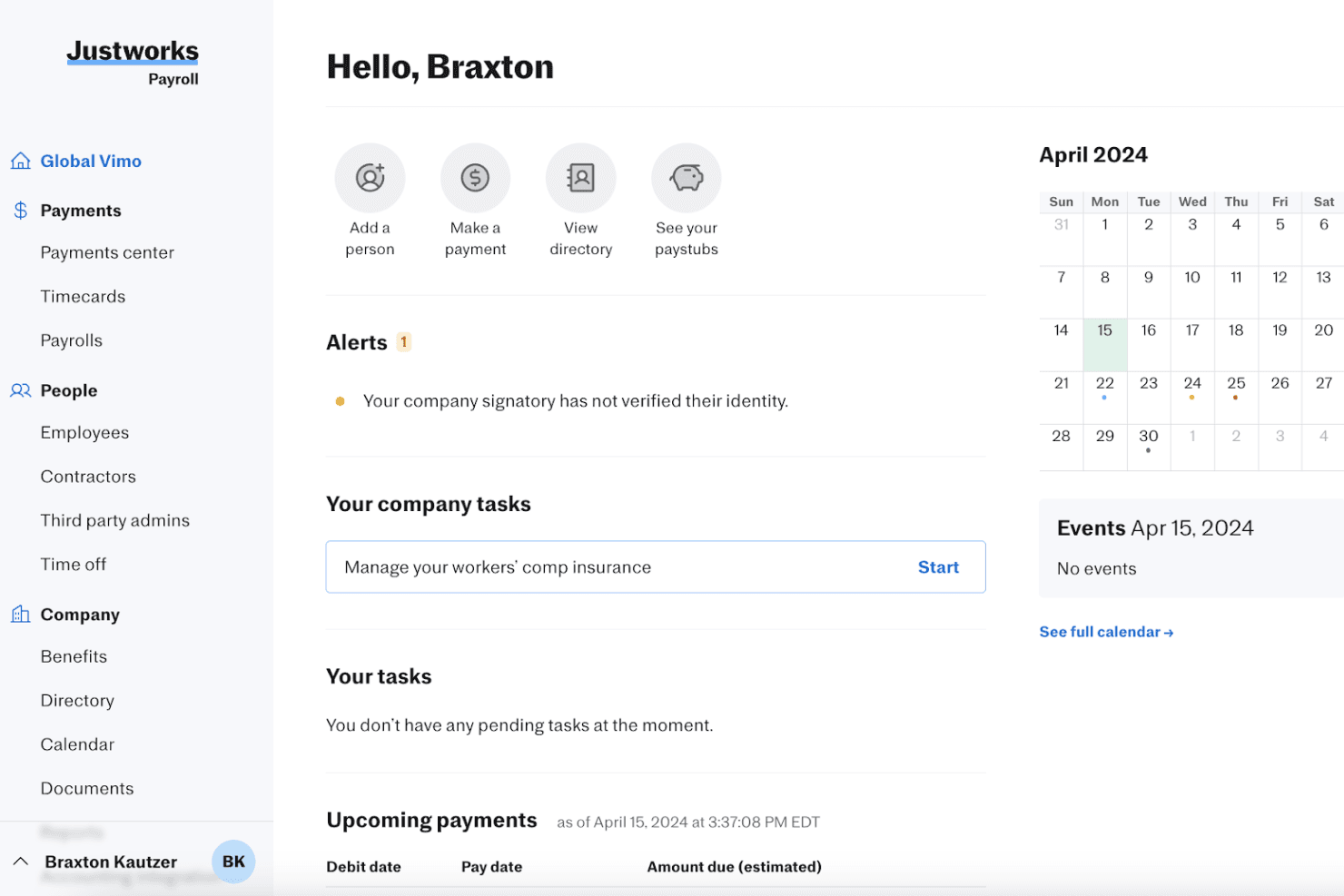
Justworks Payroll gives admins a clear dashboard to manage payments and tasks. Justworks is a professional employer organization (PEO) platform for growing businesses that need help managing payroll, employee benefits, and HR compliance without adding administrative work for their people teams.
Who Is Justworks Best For?
Justworks suits HR teams at growing companies that want a PEO that connects with their existing business tools.
Why I Picked Justworks
I picked Justworks as a TriNet alternative because it fits “Best for integration-friendly PEO workflows”: its ATS integrations include Greenhouse, Lever, and JazzHR, while its accounting integrations include QuickBooks and Xero. I like that teams can move candidates from the ATS into Justworks onboarding, reducing handoffs as they hire.
Justworks Key Features
- Multi-state payroll: Run payroll and manage tax filings for employees across states.
- Benefits administration: Manage health insurance, retirement plans, and related employee benefits.
- Time tracking: Record employee hours and review timecards.
- PTO management: Set time-off policies and track employee leave.
Justworks Integrations
Justworks integrations include Greenhouse, Lever, and JazzHR for applicant tracking, plus QuickBooks and Xero for accounting. These connections can help move candidates into onboarding and connect HR workflows with accounting tools.
Pros and Cons
Pros:
- PEO plans include HR guidance and compliance support
- Employee self-service simplifies enrollment and PTO
- Payroll and benefits share one employee portal
Cons:
- Smaller teams may lack a dedicated HR contact
- Workforce reporting and dashboards are limited
Learn more about Justworks: Best for global coverage beyond US PEO
- Free demo available
- From $599/employee/month
Visit WebsiteCustomer Rating:4.9/5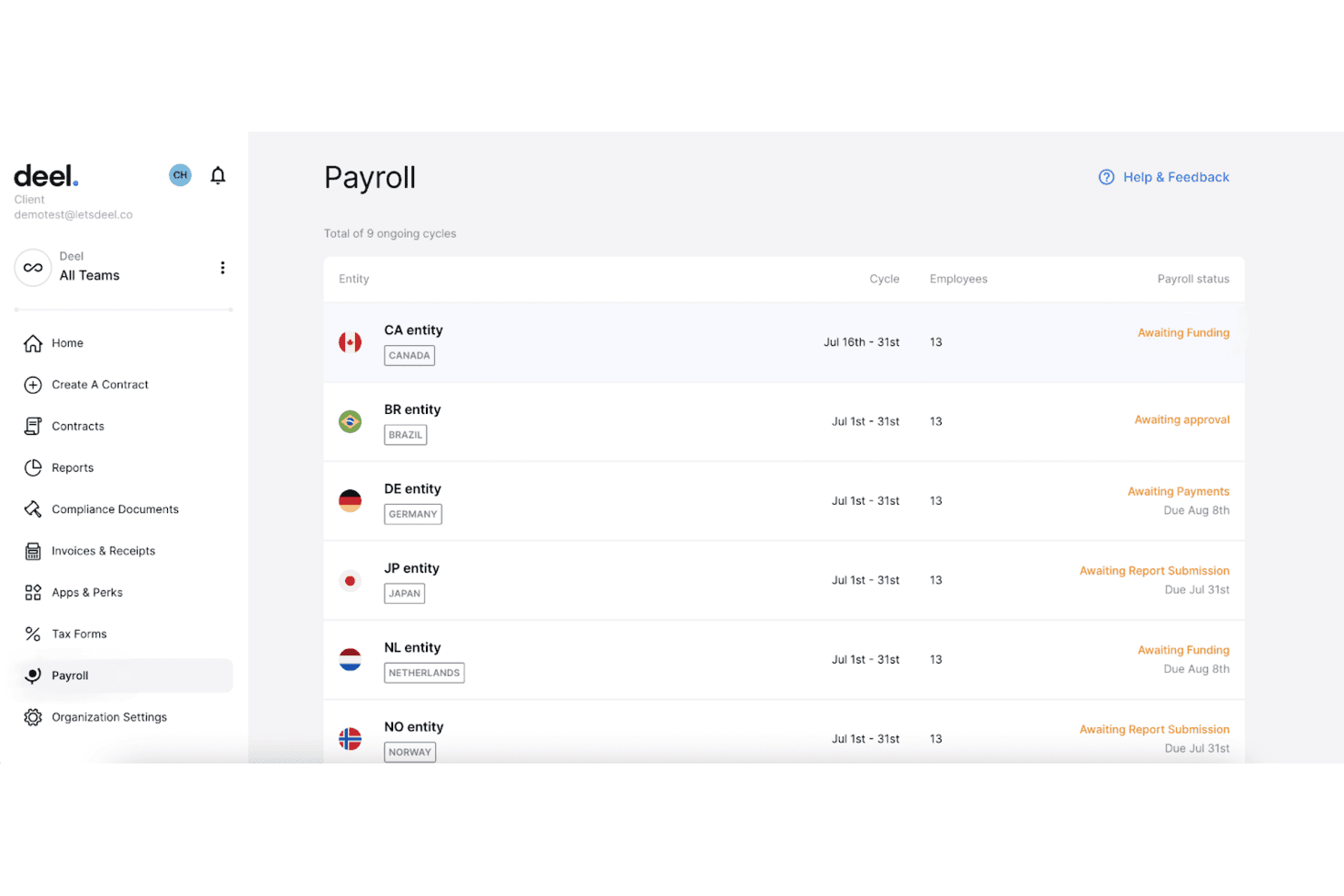
Deel centralizes multi-country payroll cycles and statuses in one dashboard. Deel Hire is an applicant tracking and recruiting platform for HR teams at growing, distributed businesses, helping them organize candidate pipelines and connect hiring with broader workforce operations.
Who Is Deel Hire Best For?
Recruiters and HR teams at distributed businesses can use Deel Hire to manage candidate pipelines across international hiring markets.
Why I Picked Deel Hire
I rate Deel Hire for “Best for global coverage beyond US PEO” because it connects candidate pipelines with Deel’s international hiring workflow. Teams can classify hires as employees or contractors, arrange locally compliant contracts, and coordinate onboarding documents and tasks. I see that as a practical fit when recruiting needs extend beyond US PEO coverage.
Deel Hire Key Features
- Job posting: Publish roles to 1,000+ connected job boards in one click.
- AI job creation: Generate job descriptions and compensation ranges with AI assistance.
- AI interview assistant: Record interviews with candidate consent, then create transcripts and summaries.
- Hiring analytics: Track configurable recruiting metrics and sourcing performance.
Deel Hire Integrations
Deel supports six native ATS integrations with Ashby, Greenhouse, Lever, Personio, Workday, and Workable to sync candidate details into Deel for onboarding. Its ATS API is also available for custom integrations.
Pros and Cons
Pros:
- AI screening and interview summaries cut admin
- Connects candidate records directly to onboarding
- Coordinates compliant hiring across 130+ countries
Cons:
- Reviewers request clearer reporting and setup guidance
- ATS requires Deel HRIS as its foundation
Learn more about Deel Hire:
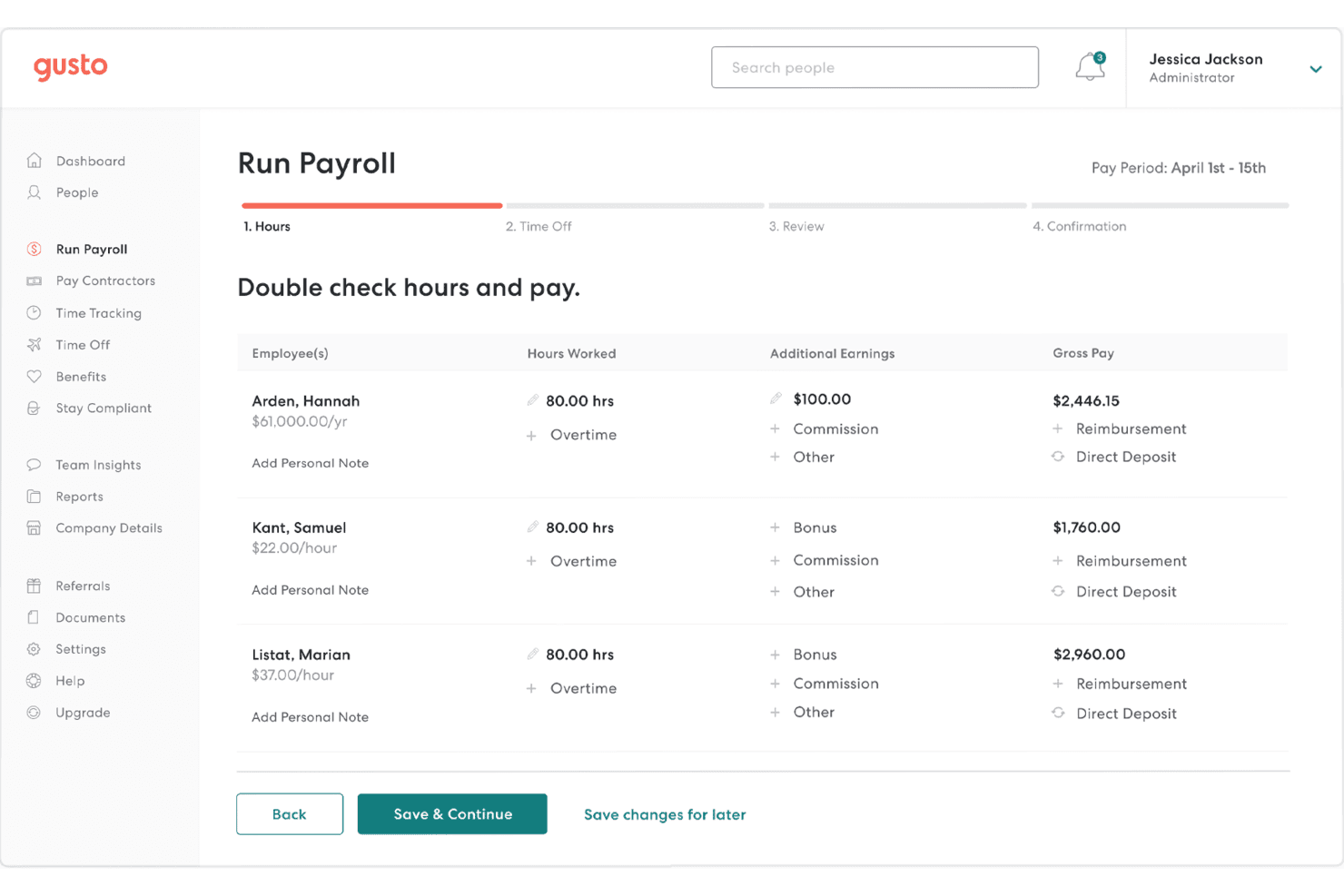
Gusto lets users review employee hours and gross pay before processing payroll. Gusto is an HR platform for small businesses that brings payroll, benefits, and employee administration together to reduce the time spent managing routine people operations.
Who Is Gusto Best For?
Gusto suits small-business owners and HR teams that want to run payroll and manage employee administration in one platform.
Why I Picked Gusto
I picked Gusto as a TriNet alternative for its “Best for easy payroll processing” focus. It calculates wages and deductions, automates payroll tax filings, and supports direct deposit, helping HR handle routine pay runs with fewer manual steps.
Gusto Key Features
- Benefits administration: Manage health insurance, retirement plans, and other employee benefits.
- Employee onboarding: Send offer letters and collect new-hire forms online.
- Time tracking: Record employee hours and review timesheets.
- Employee self-service: Let employees view pay stubs and update personal details.
Gusto Integrations
Gusto’s app directory lists 153 integrations, including QuickBooks Online, QuickBooks Desktop, Xero, Homebase, Deputy, QuickBooks Time, 15Five, Teamtailor, Google Workspace, and Slack. Gusto provides an API for software partners to build integrations, but customers can’t use it to connect their own systems directly.
Pros and Cons
Pros:
- Onboarding, benefits, and payroll share one platform
- Employees access pay stubs through self-service
- Payroll runs and tax filings are automated
Cons:
- Advanced reporting offers limited customization
- Support can drag out tax corrections
 Best for user-friendly HR management
- Free demo available
- From $9/user/month
Visit WebsiteCustomer Rating:4.1/5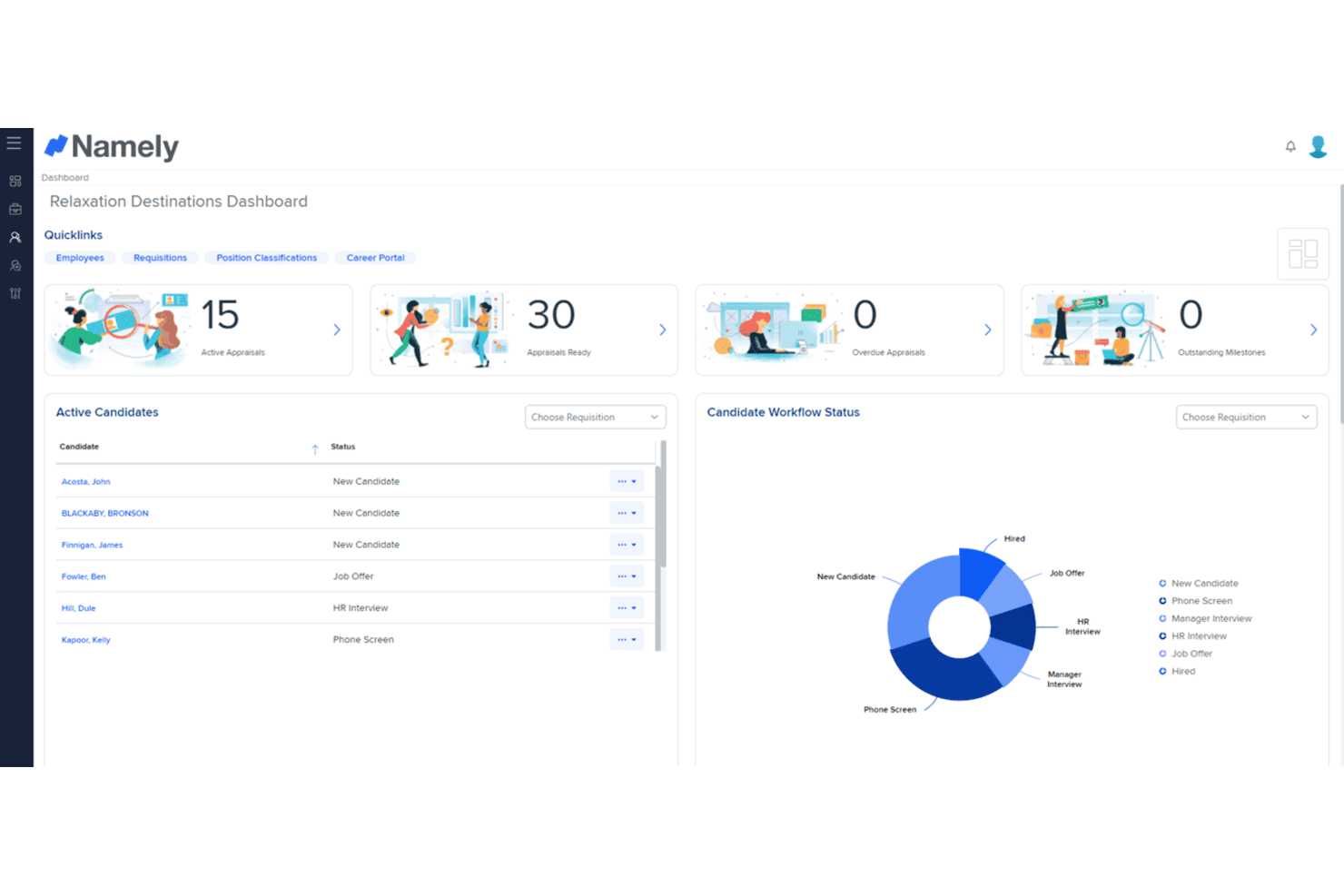
Namely centralizes recruiting and performance tracking in one dashboard. Namely is an HR platform for growing businesses that brings employee records, payroll, benefits, and talent processes together to reduce administrative work across the employee lifecycle.
Who Is Namely Best For?
Namely fits HR teams at growing businesses that want an intuitive platform employees and managers can use for everyday people tasks.
Why I Picked Namely
I picked Namely as a TriNet competitor for user-friendly HR management that connects employee records, payroll, benefits, and talent processes. I like that HR can manage a new hire’s information alongside ongoing people tasks in one platform, while employees and managers can handle everyday HR needs directly.
Namely Key Features
- Time and attendance: Track clock-ins, breaks, overtime, and attendance across web, mobile, or physical clocks.
- Shift scheduling: View team schedules and manage shift swaps, drops, and coverage.
- HR analytics: Build custom reports and view dashboards for metrics like attrition and time off.
- Document e-signatures: Store documents digitally and collect electronic signatures.
Namely Integrations
Namely lists partner integrations with Greenhouse, Lever, JazzHR, Jobvite, Okta, OneLogin, Adobe, Slack, Litmos, and Human Interest. It also offers an open API for custom integrations.
Pros and Cons
Pros:
- Onboarding e-signatures reduce paperwork
- Custom employee profiles support tailored HR records
- Paystubs, PTO, and benefits share one portal
Cons:
- Performance reviews offer limited depth
- Namely Time reports can be cumbersome
Learn more about Namely: Best for scalable HR solutions
- Free demo available
- Pricing upon request
Visit WebsiteCustomer Rating:4.2/5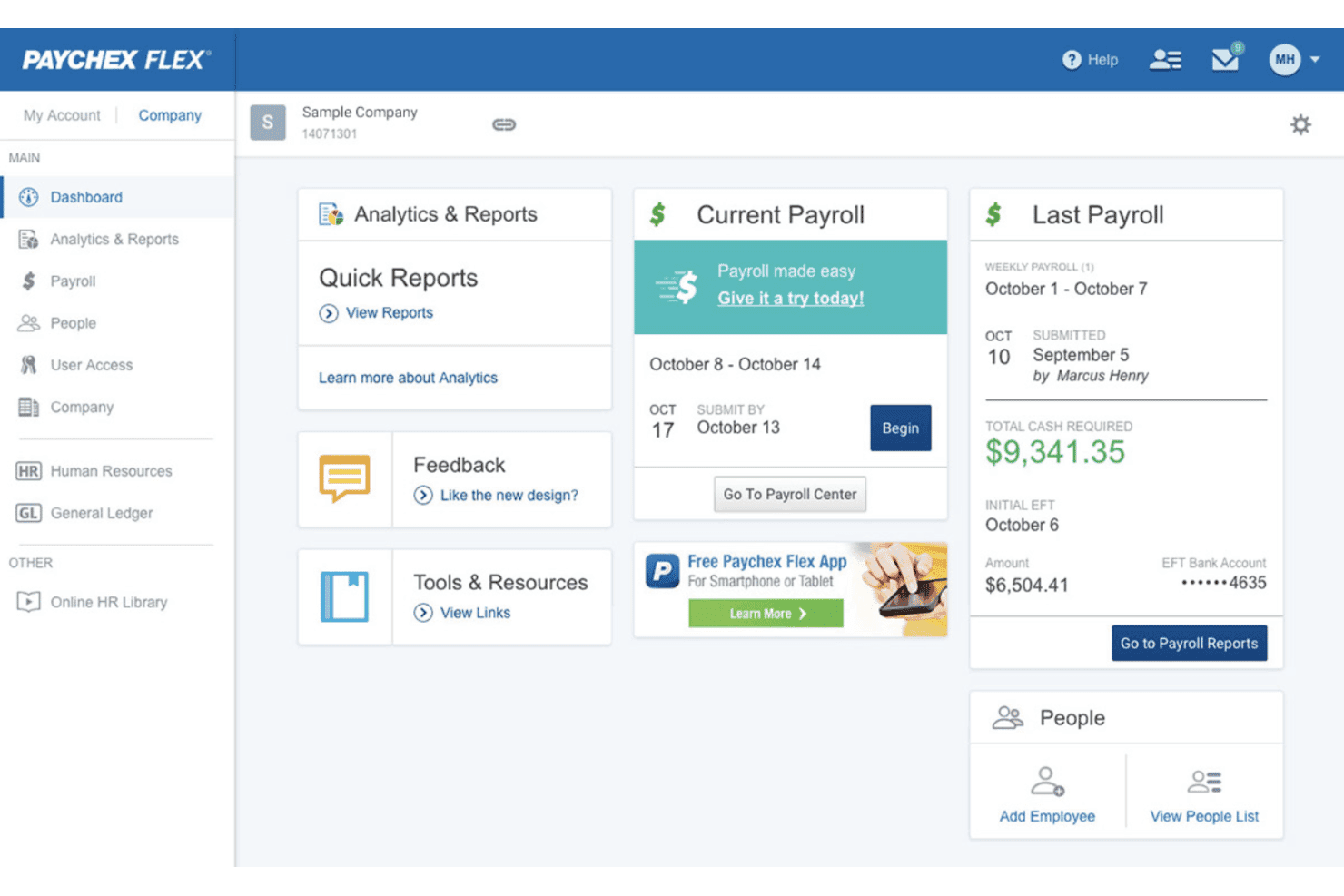
Paychex Flex centralizes payroll, reports, and HR on one dashboard. Paychex combines payroll, benefits, and HR services for employers that need help managing employee administration, hiring, and compliance as their teams grow.
Who Is Paychex Best For?
Paychex suits business owners and lean HR teams that want outside support for routine people operations.
Why I Picked Paychex
I picked Paychex as a TriNet alternative because it fits “Best for scalable HR solutions.” I like that it combines payroll, benefits, hiring support, and compliance services, giving HR teams a way to manage employee administration as headcount grows.
Paychex Key Features
- Time and attendance: Record employee hours and manage timekeeping.
- Learning management: Assign and track employee training courses.
- Performance reviews: Set goals and manage review cycles.
- Employee self-service: Let employees access and update HR information.
Paychex Integrations
Paychex Flex lists integrations with QuickBooks Online, Sage Intacct, Xero, Oracle NetSuite, Connecteam, When I Work, 7shifts, Employee Navigator, BambooHR, and Clover, with options available through the Paychex Marketplace. Paychex also provides APIs for custom integrations.
Pros and Cons
Pros:
- Employee self-service covers pay, benefits, and records
- Tax filing supports multiple state jurisdictions
- Payroll and HR functions share one platform
Cons:
- Reporting navigation can complicate routine analysis
- Account representative changes disrupt continuity
 Best for simplifying HR processes
- Free demo available
- Pricing upon request
Visit WebsiteCustomer Rating:4.1/5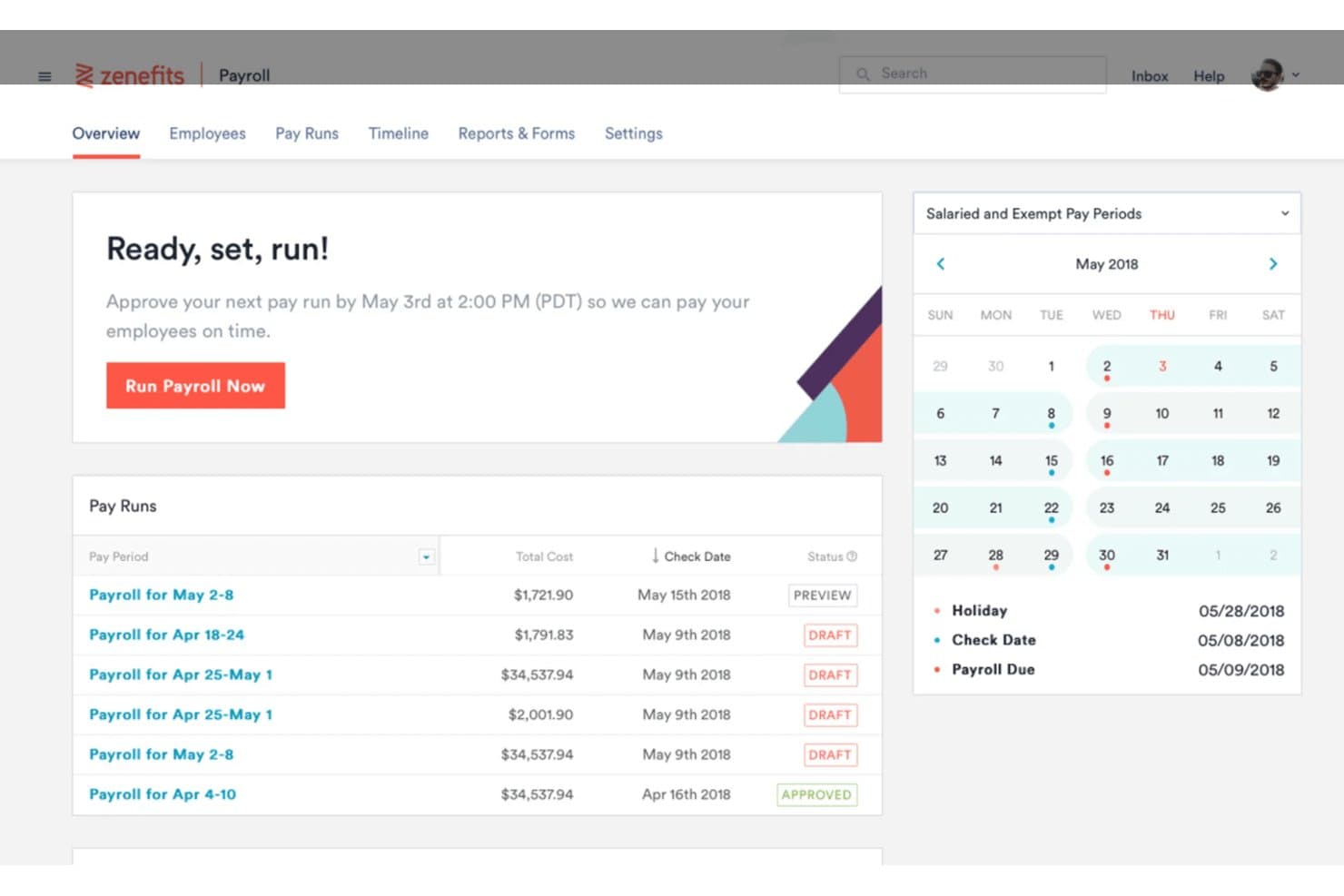
Zenefits streamlines payroll runs and scheduling for HR teams. TriNet HR Plus is an HR platform for small and midsize businesses that need support managing payroll, benefits, employee records, and compliance tasks.
Who Is TriNet HR Plus Best For?
TriNet HR Plus suits HR generalists at small and midsize businesses who need a central place to manage routine people operations.
Why I Picked TriNet HR Plus
I picked TriNet HR Plus as a TriNet competitor because it brings payroll, benefits, employee records, and compliance tasks into one HR platform. I like how an HR generalist can manage these routine responsibilities in a central place instead of tracking them across separate systems.
TriNet HR Plus Key Features
- Recruiting: Manage recruiting activity within the HR platform.
- Onboarding: Handle onboarding through the platform.
- Time tracking: Record employee time in the platform.
- Performance management: Manage performance processes through the platform.
TriNet HR Plus Integrations
TriNet HR Plus offers prebuilt marketplace integrations with Salesforce, Slack, Zoom, Vestwell, Voya, Lattice, and Ramp, plus an integration with Employee Navigator for benefits administration. TriNet also provides APIs for custom integrations.
Pros and Cons
Pros:
- HR advisors add guidance beyond software
- Onboarding and PTO tools simplify routine administration
- Payroll, benefits, and HR share one system
Cons:
- Customer support response times vary
- Advanced reporting options are limited
Learn more about TriNet HR Plus: 7Best for scalable payroll solutions
ADP
- Free demo available
- Pricing upon request
Visit WebsiteCustomer Rating:4.1/5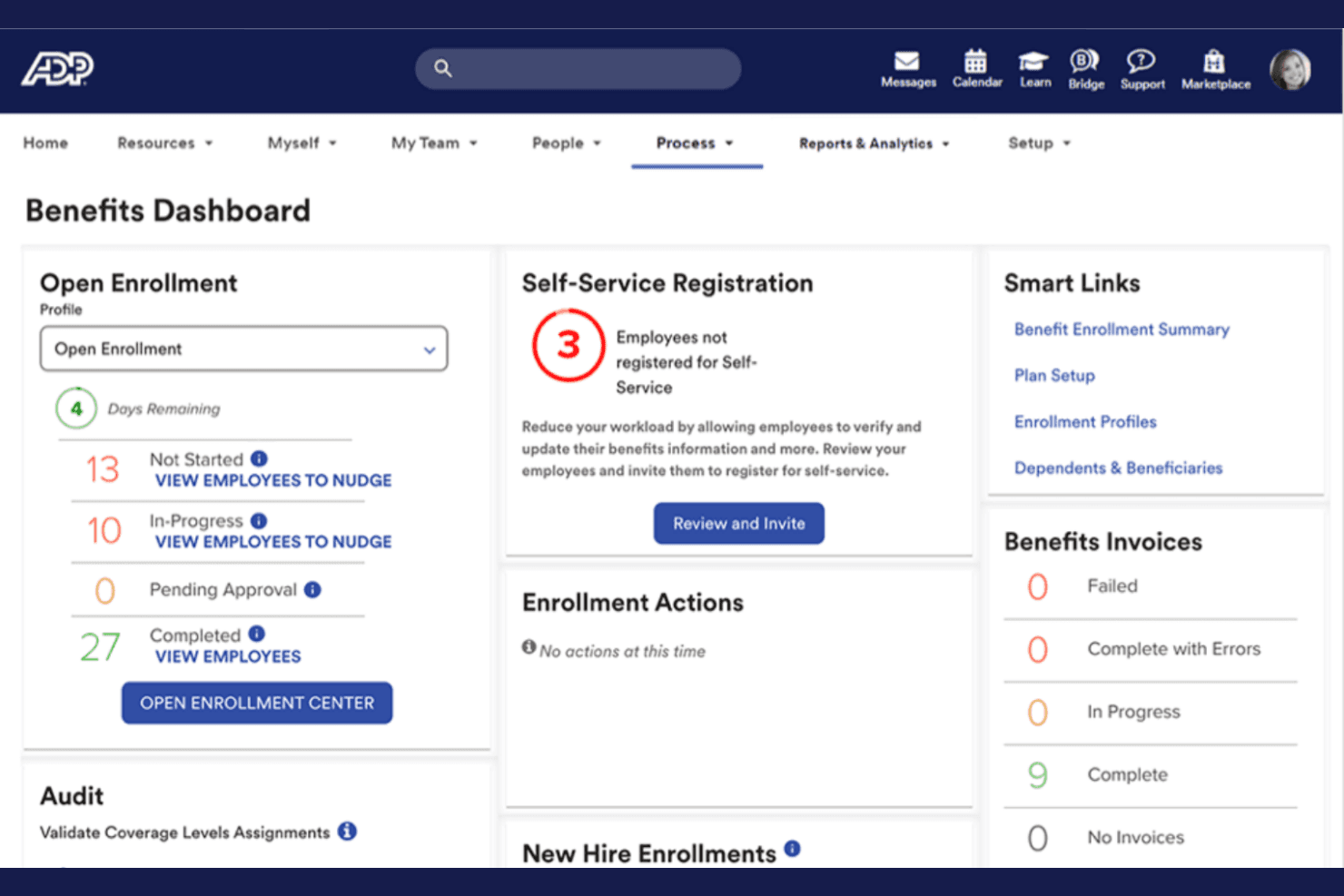
ADP centralizes benefits enrollment tracking and invoicing in one dashboard. ADP combines recruiting and hiring tools with broader HR and payroll capabilities, helping growing organizations coordinate candidate workflows and people operations.
Who Is ADP Best For?
ADP suits HR teams at expanding organizations that need recruiting workflows within a broader payroll and workforce-management setup.
Why I Picked ADP
I picked ADP as a Best TriNet Competitor because it brings recruiting and hiring workflows into a broader HR and payroll setup. Its “Best for scalable payroll solutions” fit matters when growing organizations need candidate workflows coordinated with ongoing people operations.
ADP Key Features
- Custom career sites: Create branded career sites with a tailored application experience.
- Job posting automation: Automate job descriptions, job postings, and candidate communications.
- Applicant tracking: Track applicants with documentation designed for Canadian compliance requirements.
- Digital onboarding: Provide structured onboarding and share company culture before a new hire’s first day.
ADP Integrations
ADP Marketplace offers recruiting-related integrations, including ClearCo Recruiting and the VidCruiter New Hire Connector for ADP Workforce Now. ADP Recruiting Management APIs support job requisitions, job applications, and recruiting document uploads; custom integrations require a developer agreement and middleware.
Pros and Cons
Pros:
- Digital onboarding reduces prehire paperwork
- Automated job postings and candidate communications
- Recruiting connects with broader payroll workflows
Cons:
- Support responses can be slow or inconsistent
- Recruitment tools feel basic beside dedicated ATSs
Learn more about ADP:
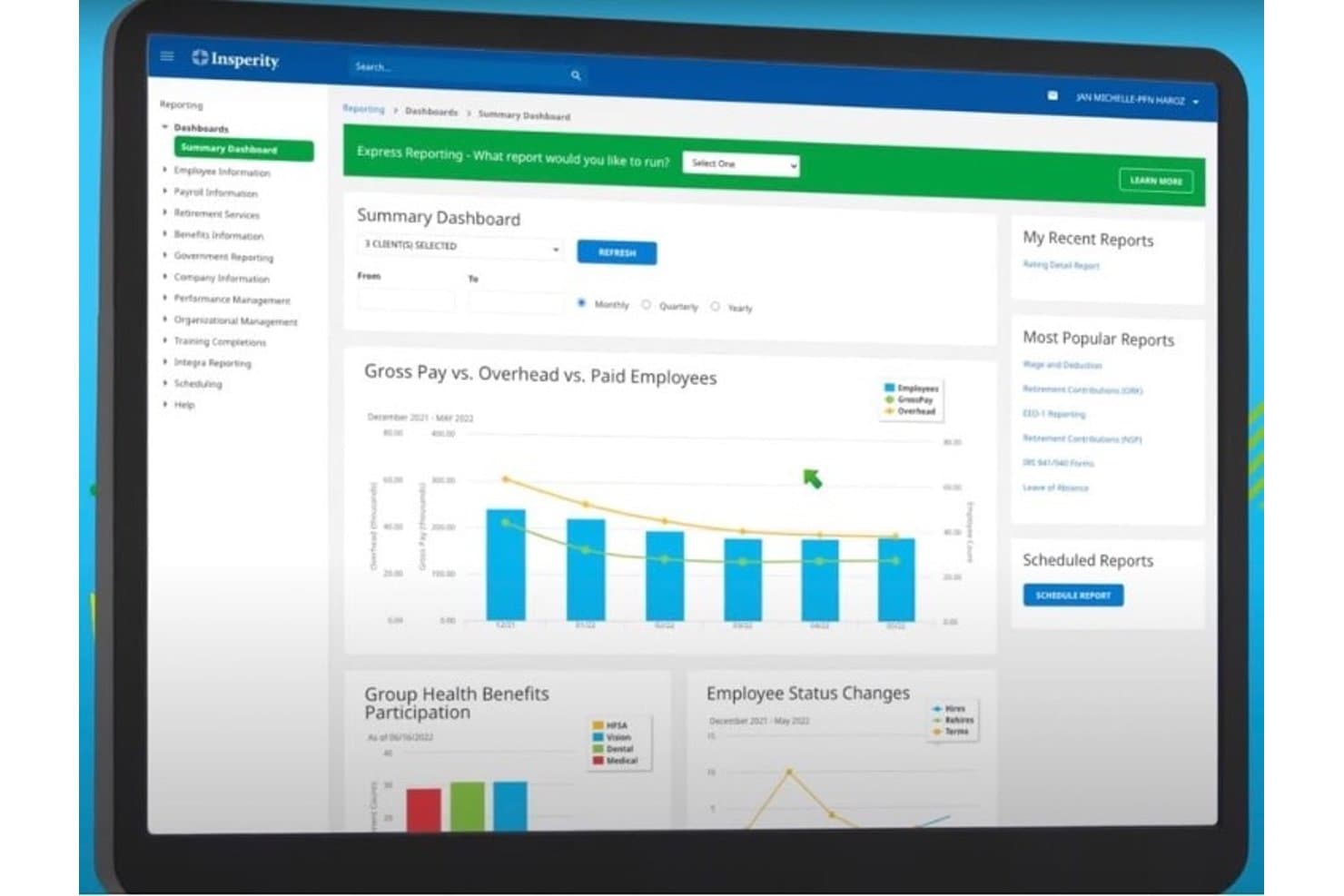
Insperity HCM centralizes payroll and workforce reporting in one dashboard. Insperity HCM brings payroll, benefits administration, and HR tools together for businesses that need help managing employee records, workforce processes, and day-to-day people operations.
Who Is Insperity HCM Best For?
Insperity HCM suits businesses that want hands-on HR support alongside payroll and employee administration.
Why I Picked Insperity HCM
I picked Insperity HCM as a TriNet competitor for its “Best for full-service HR” fit. It brings payroll, benefits administration, and HR tools together, with hands-on support for employee records and day-to-day workforce processes.
Insperity HCM Key Features
- Time tracking: Tracks employee time and attendance.
- HR compliance tools: Monitor employment requirements and regulatory changes.
- Workforce reporting: Provides workforce reports and performance analytics.
- Employee self-service: Lets employees view paystubs, benefits information, and time details.
Insperity HCM Integrations
Insperity HCM’s native third-party integrations aren’t clearly documented. Insperity offers REST APIs for custom connections, including onboarding, payroll and tax, and HRIS data exchange.
Pros and Cons
Pros:
- Payroll and benefits managed under one provider
- Helpful guidance on local employment requirements
- Knowledgeable specialists answer payroll and HR questions
Cons:
- Support response times vary by representative
- Payroll and benefits enrollment can run slowly
Learn more about Insperity HCM:
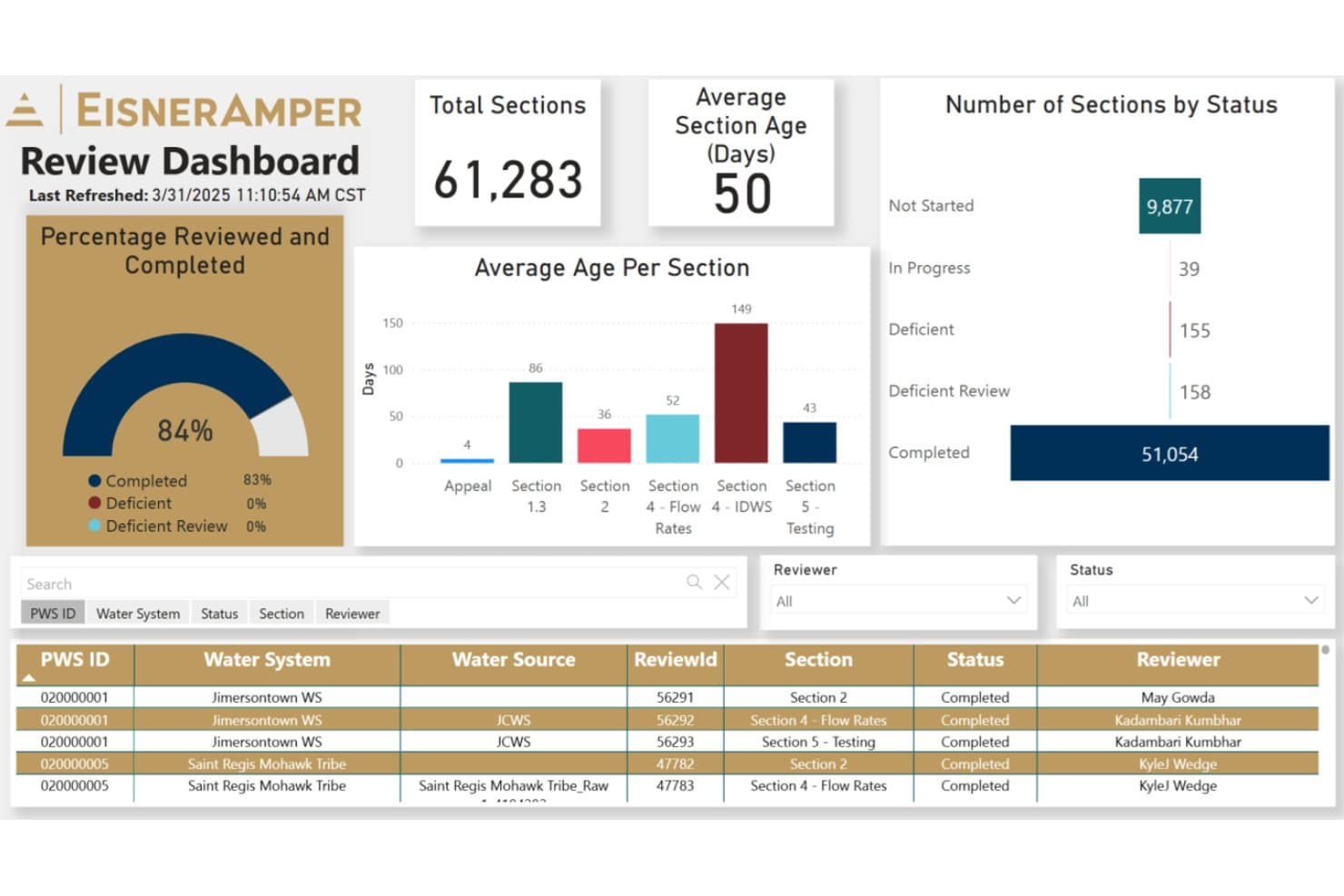
EisnerAmper's Review Dashboard tracks section review progress and status. EisnerAmper provides outsourced HR support for organizations that need help managing payroll, benefits, and employee administration without building every HR capability in-house.
Who Is EisnerAmper Best For?
EisnerAmper is a good fit for HR teams at organizations operating across multiple states that need support with payroll compliance.
Why I Picked EisnerAmper
I picked EisnerAmper as a TriNet competitor because it combines multistate payroll execution with ongoing employment-law guidance. It earns the label Best for multistate payroll compliance through services such as policy alignment, handbook creation, labor-law audits, and policy updates. These services can help your team address compliance needs as you hire across state lines.
EisnerAmper Key Features
- Workforce planning: Supports workforce design and organizational restructuring.
- HR technology assessments: Reviews HR processes, systems data, and costs.
- Leadership development: Provides leadership training and culture-focused learning.
- Benefits benchmarking: Uses benchmark data to inform employee benefits.
EisnerAmper Integrations
EisnerAmper’s HR services page doesn’t clearly document native integrations or API access.
Pros and Cons
Pros:
- Clients praise professional, thorough advisory support
- Audits and policy updates support changing requirements
- Combines multistate payroll with employment-law guidance
Cons:
- HR service workflows aren’t outlined in detail
- Less suited to teams needing a PEO
Learn more about EisnerAmper:
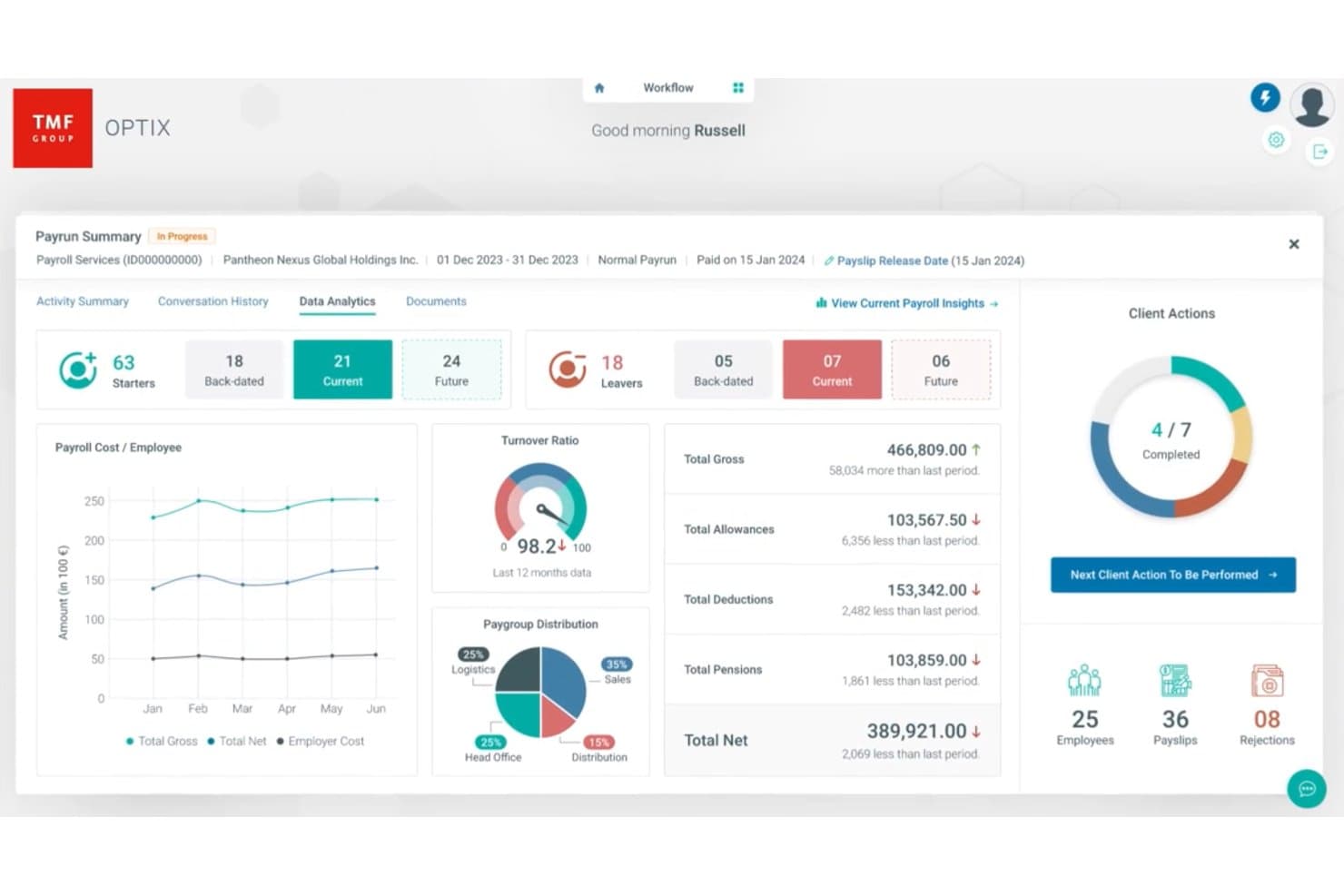
TMF Group centralizes payroll analytics and workforce data in one dashboard. TMF Group provides outsourced HR, payroll, and employment administration for businesses with international teams, helping HR leaders manage local requirements and cross-border workforce operations.
Who Is TMF Group Best For?
TMF Group suits HR and finance teams at multinational businesses that need local expertise to manage employment obligations across jurisdictions.
Why I Picked TMF Group
I picked TMF Group as a TriNet competitor because it’s best for global compliance support. I like its local HR administration, which covers employee registrations, statutory documents, and required reporting, alongside multi-country payroll processing with local experts. That combination helps manage employment obligations and payroll across jurisdictions.
TMF Group Key Features
- Benefit scheme administration: TMF Group manages employee registrations, changes, and provider coordination for non-statutory benefit schemes.
- HRIS data management: Teams can request employee data entry, updates, cleansing, and quality checks in supported HRIS platforms.
- Digital employee files: TMF Group creates and maintains digital employee files with documents for supported HR processes.
- Tier II help desk: The service handles HR queries that a client’s Tier I support team hasn’t resolved.
TMF Group Integrations
TMF Group offers a Workday Global Payroll Connector through Workday Marketplace, with preconfigured, country-specific connectors that transfer worker payroll data to TMF. TMF Optix also supports payroll data submission through API and file transfer.
Pros and Cons
Pros:
- Payroll visibility across jurisdictions
- Handles complex multinational payroll structures
- Strong local payroll and compliance expertise
Cons:
- Interface controls can frustrate routine updates
- Onboarding can lag modern EOR platforms
Learn more about TMF Group:
Outras alternativas à TriNet
Eis algumas alternativas adicionais à TriNet que não entraram na minha lista selecionada, mas que ainda vale a pena conhecer:
- 11Group Management ServicesBest for personalized HR support
- 12BPionBest for CEE market expertise
- 13The Human Resource Consulting GroupBest for industry-specific HR services
- 14RipplingBest for integrated workforce management
- 15RemotePeopleBest for flexible global hiring
- 16MultiplierBest for localized HR solutions
- 17Papaya GlobalBest for international workforce management
- 18RemoFirstBest for global workforce expansion
- 19UKGBest for HR process automation
- 20BambooHRBest for user-friendly HR software
- 21BambeeBest for affordable HR management
- 22PaycorBest for integrated HR solutions
- 23WorkdayBest for enterprise HR solutions
- 24HomebaseBest for hourly workforce management
- 25Employment HeroBest for employee benefits management
- 26factoHRBest for payroll and attendance tracking
- 27PlaneBest for remote team operations
- 28RemoteBest for hiring international talent
- 29OnPayBest for small business payroll
How I Evaluate TriNet Competitors
I split my evaluation into two layers: the baseline every PEO must offer to legally co-employ your staff and run payroll, and the differentiators that separate the right fit from a costly mismatch.
Core Functionality (Table Stakes For This List)
When I'm selecting tools for my list, I rank each one on a scale from 0 (does not offer the functionality) to 5 (excels in this area) for each core functionality listed below. Then, I calculate the tool's total score into a percentage. Each tool needs to achieve a minimum total score of 65% to be considered for inclusion.
- PEO Co-Employment Model: I check whether the vendor actually enters a co-employment relationship with your employees or simply resells HR software without assuming employer responsibilities.
- Full-Service Payroll Processing: Multi-state tax filing, garnishment handling, and year-end reporting all matter here, especially for teams hiring across multiple jurisdictions.
- Group Benefits Administration: I evaluate the breadth and quality of available health plans, retirement options, and ancillary coverage, plus how enrollment and plan changes work day-to-day.
- HR Compliance & Risk Support: From workers' comp and employment practices liability to ACA reporting, I look for active compliance guidance rather than a static document library.
- Employee Onboarding & Records: A solid digital onboarding flow with e-forms, document storage, and a central employee database keeps HR teams from juggling spreadsheets and email chains.
- Time & Workforce Management: I look at how well the platform handles time tracking, PTO requests, and workforce reporting, since these feed directly into payroll accuracy and compliance.
Once I have a list of tools that meet this criteria, I consider what sets each platform apart.
Differentiating Factors (What Sets Vendors Apart)
Here's how I compare and contrast different vendors:
Standout Features
A dedicated HR advisor makes a real difference when you're navigating tricky employee relations issues or building out a handbook from scratch. I also evaluate whether a vendor brings industry-specific expertise, since a tech startup and a nonprofit face very different compliance and benefits priorities. An employee self-service app matters too—your team should be able to pull up pay stubs, swap benefits, or request PTO without pinging HR every time.
Beyond Features
CPEO certification is one of the first things I check—it tells you the vendor meets IRS standards for financial stability and tax liability protection. Pricing structure matters just as much, since a percentage-of-payroll model can quietly balloon costs as salaries rise compared to a flat per-employee fee. I also look at how well the platform connects to your existing accounting and ATS tools, because a PEO that forces manual data re-entry between systems creates exactly the kind of busywork you're paying to eliminate.
Por que razão procurar uma alternativa à TriNet?
Embora a TriNet seja uma boa escolha de software de recursos humanos, existem várias razões pelas quais alguns utilizadores procuram soluções alternativas. Poderá estar à procura de uma alternativa à TriNet porque…
- Precisa de opções de preços mais flexíveis
- A sua equipa necessita de funcionalidades específicas do setor
- Pretende apoio para operações internacionais
- A sua empresa está a crescer rapidamente
- Precisa de ferramentas avançadas de análise
Se alguma destas situações lhe parece familiar, veio ao lugar certo. A minha lista inclui várias opções de software de recursos humanos mais adequadas a equipas que enfrentam estes desafios com a TriNet e procuram soluções alternativas.
Principais funcionalidades da TriNet
Eis algumas das principais funcionalidades da TriNet, para o ajudar a comparar as ofertas das soluções alternativas:
- Processamento de salários: Automatiza as tarefas de processamento de salários para garantir pagamentos atempados e precisos à sua equipa.
- Gestão de benefícios: Gere os programas de benefícios dos funcionários, facilitando a oferta de pacotes competitivos.
- Conformidade: Ajuda a sua equipa a cumprir as leis e os regulamentos laborais, reduzindo os riscos.
- Registo de horas: Monitoriza as horas e a assiduidade dos funcionários para simplificar o processamento de salários e melhorar a precisão.
- Integração de funcionários: Simplifica o processo de integração com fluxos de trabalho automatizados e gestão de documentos.
- Análise e relatórios: Fornece informações sobre as métricas de RH, ajudando-o a tomar decisões fundamentadas.
- Gestão de documentos: Organiza e armazena os registos dos funcionários de forma segura, para facilitar o acesso e garantir a conformidade.
- Acesso móvel: Aceda às funções de RH em qualquer lugar através das aplicações para Apple e Android.
- Gestão do desempenho: Monitoriza e avalia o desempenho dos funcionários para apoiar o crescimento e o desenvolvimento.
- Serviços de consultoria: Oferece orientação especializada em RH para o ajudar a enfrentar desafios complexos nesta área.