

Na área dos recursos humanos, pode ser difícil acompanhar o estado de espírito da sua equipa. É provável que enfrente desafios relacionados com o envolvimento, a rotatividade e a compreensão do que os seus colaboradores pensam realmente. As ferramentas de inquéritos rápidos de opinião dos colaboradores podem ajudar, fornecendo-lhe informações em tempo real sobre o estado de espírito e as preocupações da sua equipa.
Testei e analisei estas ferramentas de inquéritos a colaboradores de forma independente, baseando-me na minha vasta experiência no mercado de software de recursos humanos para lhe dar uma perspetiva imparcial das melhores soluções disponíveis.
Neste artigo, encontrará uma lista bem estudada das melhores ferramentas de inquéritos rápidos de opinião dos colaboradores, que podem ajudá-lo a enfrentar os seus desafios de recursos humanos. Vejamos como estas ferramentas podem tornar a sua vida profissional mais fácil e eficaz.
Why Trust Our Software Recommendations
6,700+
Reviews
20
Industry experts
16+
Evaluation factors
14
Years
Our team has been testing and reviewing software since 2012. As HR experts ourselves, we know how difficult—and important—it is to choose the right software.
For this guide, we evaluated tools using hands-on testing and independent research, scoring tools using our selection criteria. We also draw on insights from industry thought leaders and practicing HR experts.
Our reviews reflect our human editorial judgment, not a sales pitch.
Expert reviewers:
- Phil GrayCOO
 Kim BehnkeHR Tech Editor & Analyst
 Josh BarkerPeople Ops Manager

Tabela comparativa: ferramentas de inquéritos rápidos de opinião dos colaboradores
Esta tabela comparativa resume os detalhes de preços das minhas principais escolhas de ferramentas de inquéritos rápidos de opinião dos colaboradores.
| Tool | Best For | Trial Info | Price | ||
|---|---|---|---|---|---|
| 1 | Best for real-time analytics | Free demo available | Pricing upon request | Website | |
| 2 | Best with AI-powered sentiment analysis | Free demo available | From $5/user/month (billed annually) | Website | |
| 3 | Best for anonymous suggestion boxes | Free plan + free trial + free demo available | From $4/user/month (billed annually) | Website | |
| 4 | Best for recognition-integrated pulse surveys | Not available | Pricing upon request | Website | |
| 5 | Best for linking pulse scores to performance data | 30-day free trial | From $3/user/month (billed annually) | Website | |
| 6 | Best for survey design | Free trial available | From $2/user/month (billed annually) | Website | |
| 7 | Best for turning survey insights into action | 21-day free trial available | From $6/user/month (billed annually) | Website | |
| 8 | Best for small teams | Free demo available | From $4/user/month (billed annually) | Website | |
| 9 | Best for rewards integration | Free demo available | Pricing upon request | Website | |
| 10 | Best for large enterprises | Free demo available | Pricing upon request | Website |


Análises das melhores ferramentas de inquéritos rápidos de opinião dos colaboradores
Seguem-se os meus resumos detalhados das melhores ferramentas de inquéritos rápidos de opinião dos colaboradores que entraram na minha lista. As minhas análises apresentam uma visão detalhada das principais funcionalidades, vantagens e desvantagens, integrações e casos de utilização ideais de cada ferramenta, para o ajudar a encontrar a melhor opção para si.
 Best for real-time analytics
- Free demo available
- Pricing upon request
Visit WebsiteCustomer Rating:4.6/5
Eletive delivers real-time analytics and tailored surveys. Eletive is an employee engagement platform for organizations that want to leverage real-time analytics and improve workplace culture. It serves managers and HR teams by providing tools to gather and analyze employee feedback effectively.
Why I picked Eletive: The platform's real-time analytics provide instant insights into employee engagement. It features customizable surveys, enabling you to tailor questions to your specific needs, and a dashboard that displays data in an easy-to-understand format, helping you identify trends quickly. These capabilities make it a strong choice for those who want immediate feedback and actionable insights.
Standout features and integrations:
Features include pulse surveys that allow for frequent check-ins with your team, heatmaps that provide a visual representation of engagement levels across different departments, and sentiment analysis that helps you understand the underlying mood of your team.
Integrations include Slack, Microsoft Teams, BambooHR, Workday, ADP, Google Workspace, SAP SuccessFactors, and more.
Pros and Cons
Pros:
- Intuitive dashboards aid non-technical managers
- Real-time analytics highlight engagement trends
- Frequent pulse surveys support continuous feedback
Cons:
- Limited survey customization options
- Navigation can feel confusing at first
Learn more about Eletive: Best with AI-powered sentiment analysis
- Free demo available
- From $5/user/month (billed annually)
Visit WebsiteCustomer Rating:4.3/5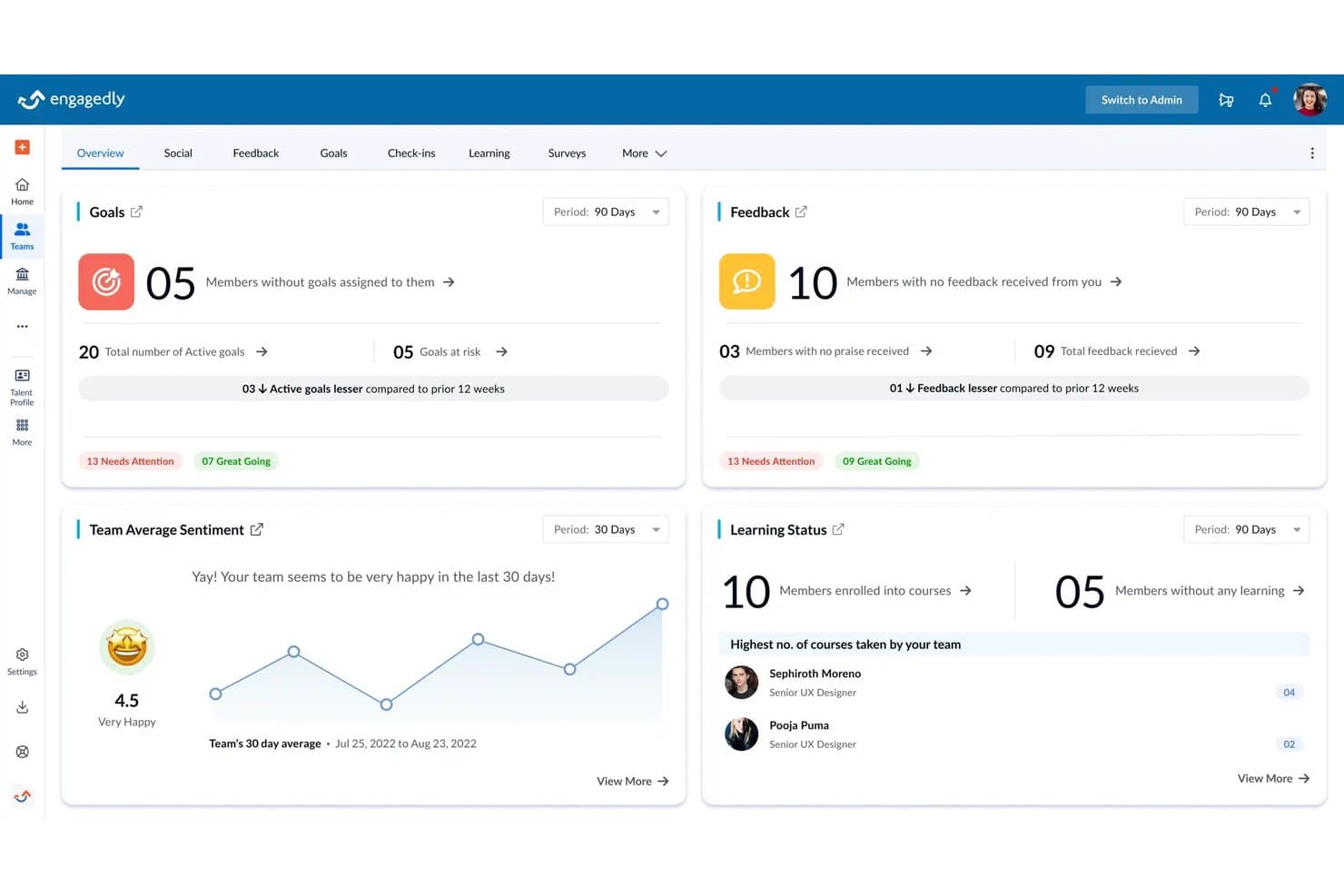
Engagedly offers a talent analytics overview dashboard displaying team goals, feedback, sentiment, and learning status metrics in one unified view. Engagedly is an AI-powered talent management platform that combines employee pulse surveys, engagement surveys, performance reviews, and recognition tools into a single HR suite.
Who Is Engagedly Best For?
Engagedly suits mid-market to enterprise HR teams that want performance management, engagement listening, and recognition handled in one platform.
Why I Picked Engagedly
I picked Engagedly as one of the best because of how Marissa, its AI SuperAgent, processes pulse responses in real time. Rather than leaving managers to manually sift through open-ended comments, Marissa generates sentiment summaries that surface key themes and mood shifts automatically. I also like that Smart Pulse Customization adjusts question frequency based on those sentiment trends, so teams aren't asking redundant questions when signals are stable.
Engagedly Key Features
- e10 engagement survey template: Offers a validated engagement survey format with live results and participation analytics.
- Department and team heatmaps: Visualizes sentiment and engagement trends across multiple employee segments.
- Employee social wall: Creates a centralized hub for recognition, announcements, and group communication.
- Workflow automation: Enables recurring surveys, notifications, and reporting tasks to be scheduled and managed automatically.
Engagedly Integrations
Engagedly has over 30 native integrations, including BambooHR, Gusto, Namely, Okta, Microsoft Teams, Outlook, Gmail, Google Sheets, Jira, and LinkedIn Learning. An API is available for custom integrations.
Pros and Cons
Pros:
- Interface supports 17 languages
- Engagement heatmaps for teams and departments
- AI generates automated sentiment summaries
Cons:
- Interface can feel cluttered for new users
- Basic action planning features
Learn more about Engagedly: Best for anonymous suggestion boxes
- Free plan + free trial + free demo available
- From $4/user/month (billed annually)

FeedbackPulse is an employee engagement and performance management platform that combines pulse surveys, 360° feedback, and performance reviews. FeedbackPulse is an employee pulse survey platform built around recurring feedback cycles, covering eNPS, anonymous surveys, sentiment trend tracking, performance reviews, and AI-powered response analysis.
Who Is FeedbackPulse Best For?
FeedbackPulse is a good fit for HR teams and chiefs of staff at small to mid-sized companies who want a lightweight, repeatable feedback rhythm without enterprise-level complexity.
Why I Picked FeedbackPulse
FeedbackPulse is a top pick due to its serious approach to the mechanics of anonymous feedback. Rather than leaving privacy up to admin policy, the platform enforces a minimum three-response threshold before results are ever visible, so no one can accidentally expose a respondent through a low-count summary. I also appreciate that it blocks anonymous survey launches outright if the recipient list is too small, catching that risk before data is collected, not after. For HR teams running sensitive pulse topics like manager feedback or culture change, that kind of built-in guardrail builds real employee trust in the process.
FeedbackPulse Key Features
- eNPS tracking: Measures employee net promoter scores and segments responses into promoter, passive, and detractor categories over time.
- AI-powered theme extraction: Scans open-text survey responses and surfaces recurring themes and sentiment patterns automatically.
- Lifecycle survey triggers: Sends surveys automatically at key employment stages, including onboarding, probation milestones, and exit.
- Automated reminders: Delivers scheduled follow-up nudges via email or Slack to improve survey response rates without manual outreach.
FeedbackPulse Integrations
FeedbackPulse offers a native integration with Slack for survey notifications, reminders, and interactive actions. It also provides API access via the Model Context Protocol (MCP), which allows compatible AI clients and assistants to query feedback data, create surveys, and send reminders.
Pros and Cons
Pros:
- Automated recurring survey scheduling with custom cadence
- Built-in anonymity thresholds protect small teams
- AI theme extraction from open-text responses
Cons:
- No reviews yet on major software sites
- Limited native third-party integrations available
Learn more about FeedbackPulse: Best for recognition-integrated pulse surveys
- Not available
- Pricing upon request
Visit WebsiteCustomer Rating:4.7/5
Nectar lets users review eNPS survey responses filtered by date range. Nectar is an employee engagement platform that combines pulse surveys, eNPS, lifecycle surveys, AI sentiment analysis, recognition, and internal comms into a single connected suite.
Who Is Nectar Best For?
Nectar is a strong fit for people and culture teams that already use—or plan to use—a recognition platform and want pulse surveys built into the same system.
Why I Picked Nectar
I picked Nectar because it's the only pulse survey tool I've seen that natively ties recognition data into engagement scores. Nectar Signals pulls from recognition activity, survey responses, and comms to generate a live 0–100 health score per employee and team, so you're not waiting on a quarterly survey to spot a disengaged group. I also like SafeTalk, which lets leaders follow up anonymously on open-ended responses without ever seeing who wrote them.
Nectar Key Features
- Multi-channel survey delivery: Surveys reach employees via email, SMS, Slack, Microsoft Teams, and the Nectar mobile app.
- Nectar Flows automation: A no-code builder that triggers lifecycle surveys automatically based on hire date, work anniversaries, or list membership.
- AI-generated open-text summaries: ClaraAI analyzes free-text survey responses and surfaces recurring themes in plain language.
- Points-based survey incentives: Employees earn Nectar points for completing surveys, including anonymous ones, to encourage participation.
Nectar Integrations
Nectar supports integrations with ADP, BambooHR, Workday, UKG, Slack, Microsoft Teams, Google Chat, Outlook, and Google Sheets. It also offers an open API, external API triggers through Flows, and Zapier.
Pros and Cons
Pros:
- AI sentiment surfaces live risk trends
- SafeTalk enables anonymous follow-up
- Recognition data informs health scores
Cons:
- Action planning lacks task tracking
- No documented weekly pulse cadence
Learn more about Nectar: Best for linking pulse scores to performance data
- 30-day free trial
- From $3/user/month (billed annually)
Visit WebsiteCustomer Rating:4.3/5
Small Improvements tracks pulse survey scores across teams over time. Small Improvements is a performance management suite that includes pulse surveys alongside reviews, 360 feedback, 1:1s, goals, and recognition—letting you run recurring, short-form check-ins and view results segmented by department, location, manager, and performance rating.
Who Is Small Improvements Best For?
Small Improvements suits HR business partners and people teams that already run performance reviews and want pulse data in the same platform.
Why I Picked Small Improvements
Small Improvements earns its spot on my shortlist because it does something no standalone pulse tool can: it lets you cross-reference engagement scores against performance review ratings. I picked it specifically for that heatmap view, which lets you filter pulse results by a chosen review cycle and see how your high performers are feeling versus everyone else. That's how you catch a disengaged top performer before they hand in their notice.
Small Improvements Key Features
- Flexible survey cadence: Set surveys to run weekly, biweekly, monthly, or at a custom interval, with automated reminders sent before each deadline.
- Slack delivery and response: Send pulse surveys directly through Slack, letting employees respond without leaving the platform.
- Multi-attribute segmentation: Filter results by department, location, manager, tenure, gender, or employment type to compare engagement across groups.
- Period picker for trend comparison: Select any two survey rounds to compare results over time and pinpoint when scores shifted.
Small Improvements Integrations
Small Improvements has documented integrations with BambooHR, Workday, Personio, Rippling, Namely, Kallidus (Sapling), Workable, Slack, Okta, OneLogin, and Google Workspace. It also supports Google Calendar and Office 365 calendar sync for 1:1 meetings.
Pros and Cons
Pros:
- Compares live results across survey periods
- Supports flexible recurring survey schedules
- Links engagement scores to performance ratings
Cons:
- Uses a fixed anonymity threshold of three
- Offers no pulse-specific action planning
Learn more about Small Improvements: Best for survey design
- Free trial available
- From $2/user/month (billed annually)
Visit WebsiteCustomer Rating:4.5/5
ThriveSparrow offers multilingual surveys, feedback, and recognition tools. ThriveSparrow is an AI-powered performance management platform tailored for organizations looking to boost employee engagement and performance. It provides tools for 360-degree performance reviews, goal tracking, and employee engagement surveys, focusing on enhancing team dynamics and alignment.
Why I picked ThriveSparrow: This platform excels in offering custom surveys, making it ideal for organizations needing tailored feedback solutions. It includes multilingual surveys, allowing you to reach a global workforce effectively, while the 360-degree feedback feature supports comprehensive performance evaluations. Automated recognition tools help boost morale and acknowledge achievements.
Standout features and integrations:
Features include automated recognition with a wide range of global gift cards, AI-driven sentiment analysis to gauge employee mood, and QR code sharing for surveys to facilitate easy distribution and participation.
Integrations include BambooHR, ADP, Google, Slack, Workday, SAP SuccessFactors, Freshteam, Namely, and more.
Pros and Cons
Pros:
- Clean interface
- Built-in peer recognition via Kudos
- Quick pulse surveys with useful analytics
Cons:
- Limited language support
- Advanced features need training
Learn more about ThriveSparrow: Best for turning survey insights into action
- 21-day free trial available
- From $6/user/month (billed annually)

Pulse Feedback survey setup dashboard showing team and peer feedback options, along with ready-made templates for collaboration, leadership, psychological safety, and transformation surveys. Pulse Feedback is an employee pulse survey platform that runs short, recurring surveys and delivers real-time results through AI-powered analysis, trend tracking, and team-level reporting dashboards. Consulting support is also available for areas such as questionnaire design and results workshops.
Who Is Pulse Feedback Best For?
Pulse Feedback is a good fit for HR teams in mid-sized companies who want structured, recurring feedback loops across departments and organizational levels.
Why I Picked Pulse Feedback
I picked Pulse Feedback as one of the best because it gives HR teams real control over survey cadence without locking you into a fixed schedule. You can run quarterly surveys for ongoing monitoring, shift to monthly check-ins during a transformation, or trigger a one-off survey around a specific event. That flexibility matters when your organization's needs change throughout the year. I also like that the bottom-up survey feature lets teams and individuals initiate their own surveys between cycles, so feedback doesn't always have to flow top-down.
Pulse Feedback Key Features
- AI comment analysis: Automatically groups and categorizes open-text responses so you can identify themes across large volumes of feedback.
- Trend tracking: Compares results across survey cycles to show how engagement scores shift over time.
- Benchmark comparison: Measures your organization's scores against external benchmarks to provide context for results.
- Guided Results Discussion: A built-in facilitation tool that helps managers turn survey findings into structured team conversations.
Pulse Feedback Integrations
Pulse Feedback doesn't have any clearly documented native integrations or an API for custom connections.
Pros and Cons
Pros:
- Participants see results immediately after submitting
- Built-in "I like" and "I wish" prompts
- AI-guided team discussion moderator sessions
Cons:
- Large data volumes are hard to analyze
- No native HRIS integrations
Learn more about Pulse Feedback: Best for small teams
- Free demo available
- From $4/user/month (billed annually)
Visit WebsiteCustomer Rating:4.6/5
15five provides pulse scores with response visuals and check-in tracking. 15five is an employee engagement and performance management tool tailored for small teams. It helps organizations boost productivity by facilitating regular check-ins, feedback, and performance reviews.
Why I picked 15five: It's designed with small teams in mind, offering features that foster communication and growth. Weekly check-ins allow your team to share updates and challenges, while performance reviews help align individual goals with company objectives. Its simplicity makes it easy for smaller teams to adopt and integrate into their daily workflows.
Standout features and integrations:
Features include goal tracking to help your team stay focused on employee performance priorities, one-on-one meeting templates to facilitate meaningful conversations, and a recognition feature that lets team members acknowledge each other's efforts.
Integrations include Slack, BambooHR, Google Calendar, ADP, Salesforce, Jira, and more.
Pros and Cons
Pros:
- Helps structure one-on-one conversations
- Built-in tools for goals and OKRs
- Weekly check-ins encourage continuous feedback
Cons:
- Survey customization options feel limited
- Deeper analytics require higher-tier plans
 Best for rewards integration
- Free demo available
- Pricing upon request
Visit WebsiteCustomer Rating:4.6/5
Vantage Circle details engagement scores and trends. Vantage Circle is a workplace engagement platform designed to enhance employee recognition and wellness. It mainly serves organizations looking to boost employee morale through recognition, wellness solutions, and corporate discounts.
Why I picked Vantage Circle: The platform excels in integrating rewards with employee engagement, letting you acknowledge employee contributions in different ways. Vantage Fit supports corporate wellness, encouraging healthy habits, and the Vantage Perks program provides discounts, adding value to your team's benefits package.
Standout features and integrations:
Features include vantage recognition for rewarding employees with diverse options. Vantage Fit promotes employee wellness through fitness challenges, while Vantage Perks offers corporate discounts to enhance employee benefits.
Integrations include Microsoft Teams, Slack, BambooHR, Workday, ADP, Google Workspace, Oracle, Salesforce, and more.
Pros and Cons
Pros:
- Supports global rewards and gift cards
- Easy interface for everyday recognition
- Strong peer recognition and rewards tools
Cons:
- Some users note inconsistent reward fairness
- Limited engagement analytics versus competitors
Learn more about Vantage Circle:

Workday Peakon shows engagement and pulse survey analytics. Workday Peakon is an employee engagement platform tailored for large enterprises seeking to gain insights into employee sentiment. It provides tools for collecting feedback and measuring engagement across different departments and locations.
Why I picked Workday Peakon: With its ability to handle complex organizational structures, the platform excels in serving large enterprises. It offers customizable surveys that can be tailored to specific teams or departments and an analytics dashboard that delivers insights into employee engagement, helping you identify trends.
Standout features and integrations:
Features include sentiment analysis to understand employee feelings, multilingual surveys, making it accessible to global teams, and real-time reporting to track engagement metrics.
Integrations include Microsoft Teams, Slack, BambooHR, Workday, Personio, HiBob, and more.
Pros and Cons
Pros:
- Integrates tightly with Workday HR data
- Powerful dashboards for engagement insights
- Continuous listening with frequent pulse surveys
Cons:
- Pricing is higher than that of some competitor survey tools
- Configuration can feel complex for admins
Learn more about Workday Peakon:
Outras ferramentas de inquéritos rápidos de opinião dos colaboradores
Eis algumas opções adicionais de ferramentas de inquéritos rápidos de opinião dos colaboradores que não entraram na minha lista, mas que vale a pena conhecer:
- 11Culture AmpBest for engagement insights
- 12CultureMonkeyBest for continuous feedback
- 13PaycorBest for payroll integration
- 14The Assessment CompanyBest for compliance focus
- 15OfficevibeBest for team engagement
- 16Great Place to WorkBest for culture benchmarks
- 17ProProfs Survey MakerBest for quiz features
- 18SurveySparrowBest for conversational surveys
- 19LatticeBest for goal management
- 20ConnecteamBest for mobile teams
- 21MotivosityBest for peer recognition
- 22PaycomBest for HR integration
- 23QualtricsBest for advanced analytics
How I Evaluate Employee Pulse Survey Tools
I look at these tools in two layers: baseline criteria every vendor must meet and differentiators that matter when HR needs to track morale shifts post-reorg or flag burnout across distributed teams.
Core Functionality (Table Stakes For This List)
When I'm selecting tools for my list, I rank each one on a scale from 0 (does not offer the functionality) to 5 (excels in this area) for each core functionality listed below. Then, I calculate the tool's total score into a percentage. Each tool needs to achieve a minimum total score of 65% to be considered for inclusion.
- Short-Form Recurring Surveys: I check whether each tool supports automated pulse cadences—weekly check-ins or bi-weekly morale snapshots—rather than only offering traditional long-form annual surveys.
- Anonymous Response Collection: Honest feedback depends on trust, so I evaluate anonymity safeguards like minimum response thresholds that prevent managers from identifying individuals in small teams.
- Pre-Built Engagement Templates: A strong question library saves HR teams from starting from scratch. I look for validated templates spanning eNPS, wellbeing, DEI, and manager effectiveness topics.
- Real-Time Analytics & Dashboards: I evaluate how quickly results populate and whether dashboards track participation rates and sentiment trends over time, especially after events like restructures.
- Segmentation & Heatmaps: Breaking results down by department, tenure, or location reveals where problems hide. I look for heatmap views that let you compare teams side by side at a glance.
- Action Planning & Follow-Up: Collecting feedback without acting on it erodes trust fast. I check for built-in tools that help managers create action plans, tag themes, and trigger follow-up questions.
Once I have a list of tools that meet this criteria, I consider what sets each platform apart.
Differentiating Factors (What Sets Vendors Apart)
Here's how I compare and contrast different vendors:
Standout Features
AI-powered sentiment analysis is a major differentiator—it saves people teams from manually reading hundreds of open-ended comments by surfacing recurring themes and emotional patterns. I also look for external benchmarking, which lets you put your engagement scores in context against similar-sized organizations. Manager enablement tools matter here too, especially dashboards that give team leads coaching prompts tied to their specific results. Conversational survey delivery through Slack or Microsoft Teams tends to drive higher response rates than email-only distribution.
Beyond Features
HRIS integrations matter a lot here. When employee data syncs automatically from platforms like BambooHR or Workday, you avoid manual roster updates that lead to stale org structures and missed survey recipients. I also evaluate data security and compliance posture—pulse data is sensitive, so I check for SOC 2 Type II certification and role-based access controls that prevent managers from viewing results outside their reporting lines. Scalability is worth considering too, particularly multi-language survey support for teams spread across regions and time zones.
Como escolher ferramentas de inquéritos rápidos de opinião dos colaboradores
É fácil ficar perdido entre longas listas de funcionalidades e estruturas de preços complexas. Para o ajudar a manter o foco enquanto percorre o seu processo único de seleção de software, eis uma lista de fatores a ter em conta:
| Fator | O que considerar |
|---|---|
| FatorEscalabilidade | O que considerarA ferramenta pode crescer com a sua equipa? Certifique-se de que suporta a sua dimensão atual e que consegue acompanhar o crescimento futuro sem custos ou complexidade adicionais. |
| FatorIntegrações | O que considerarÉ compatível com os seus sistemas atuais? Verifique se se integra com o software de RH, as ferramentas de comunicação e outras plataformas que já utiliza. |
| FatorPersonalização | O que considerarPode adaptá-la às suas necessidades? Procure funcionalidades que lhe permitam personalizar inquéritos e relatórios para corresponder aos seus requisitos específicos. |
| FatorFacilidade de utilização | O que considerarÉ fácil de utilizar? Certifique-se de que os membros da equipa conseguem utilizar a ferramenta facilmente, sem necessitarem de formação ou apoio extensivos. |
| FatorImplementação e integração inicial | O que considerarCom que rapidez pode começar? Avalie o tempo e os recursos necessários para implementar a ferramenta e integrar eficazmente a sua equipa. |
| FatorCusto | O que considerarEnquadra-se no seu orçamento? Considere o custo total, incluindo quaisquer taxas ocultas, e se o preço está alinhado com o valor que espera obter. |
| FatorMedidas de segurança | O que considerarOs seus dados estão seguros? Verifique se a ferramenta oferece medidas de segurança robustas, como encriptação, controlos de acesso e conformidade com os regulamentos de proteção de dados. |
| FatorDisponibilidade do apoio | O que considerarQue opções de apoio são disponibilizadas? Verifique se existe apoio 24 horas por dia, 7 dias por semana, gestores de conta dedicados e vários canais de contacto, como chat ou telefone. |
O que são as ferramentas de inquéritos rápidos aos colaboradores?
As ferramentas de inquéritos rápidos aos colaboradores são aplicações de software concebidas para recolher opiniões rápidas e regulares dos colaboradores, de modo a avaliar o sentimento e o envolvimento no local de trabalho. Os profissionais de RH, os gestores e os líderes de equipa utilizam geralmente estas ferramentas para compreender o estado de espírito dos colaboradores e identificar áreas de melhoria. As opiniões em tempo real, os inquéritos personalizáveis e as capacidades analíticas ajudam a acompanhar as tendências de envolvimento ao longo do ciclo de vida do colaborador, a responder a preocupações e a tomar decisões baseadas em dados. Estas ferramentas são valiosas porque melhoram a comunicação, geram informações úteis e promovem um ambiente de trabalho positivo.
Funcionalidades
Ao selecionar ferramentas de inquéritos rápidos aos colaboradores, procure as seguintes funcionalidades essenciais:
- Opiniões em tempo real: Permite recolher e analisar instantaneamente as respostas aos inquéritos e as opiniões dos colaboradores, ajudando-o a resolver os problemas atempadamente.
- Opção de inquéritos personalizáveis: Permite adaptar as perguntas às necessidades específicas da sua organização, garantindo informações relevantes e práticas.
- Painel de análise: Apresenta representações visuais das tendências dos dados nos resultados dos inquéritos, facilitando o acompanhamento do envolvimento e a identificação de áreas de melhoria.
- Análise de sentimentos: Analisa as opiniões dos colaboradores para avaliar o estado de espírito e o moral gerais, ajudando a compreender a dinâmica no local de trabalho.
- Funcionalidade de relatórios de referência: Compara as métricas de envolvimento da sua organização com os padrões do setor, ajudando-o a identificar pontos fortes e fracos em diferentes grupos demográficos.
- Suporte multilingue: Disponibiliza inquéritos em vários idiomas, garantindo a acessibilidade a uma força de trabalho diversificada.
- Relatórios automatizados: Gera relatórios automaticamente, poupando tempo e garantindo uma apresentação consistente dos dados.
- Integração: Liga-se aos sistemas de RH e de comunicação existentes, simplificando o fluxo de dados e melhorando a funcionalidade.
- Acessibilidade móvel: Permite que os colaboradores participem nos inquéritos a partir de qualquer dispositivo, aumentando as taxas de resposta e a conveniência.
- Proteção da segurança: Garante a proteção dos dados através de encriptação e conformidade com os regulamentos de privacidade dos dados, protegendo os dados sensíveis dos inquéritos e as informações dos colaboradores.
Benefícios
A implementação de ferramentas de inquéritos rápidos aos colaboradores proporciona vários benefícios à sua equipa e à sua empresa. Eis alguns dos benefícios que pode esperar:
- Melhoria da comunicação: Facilitar o diálogo aberto entre os colaboradores e a gestão promove um local de trabalho mais transparente.
- Maior envolvimento: Receber opiniões regulares ajuda a identificar problemas de envolvimento, permitindo intervenções atempadas e iniciativas de envolvimento para aumentar o moral.
- Decisões baseadas em dados: Os relatórios e as análises fornecem informações que orientam a tomada de decisões estratégicas e os ajustes às políticas.
- Maior produtividade: Compreender as necessidades e preocupações dos colaboradores resulta numa força de trabalho mais motivada e eficiente.
- Melhor retenção: Identificar e resolver atempadamente a insatisfação pode reduzir a rotatividade e melhorar a satisfação dos colaboradores.
- Informações sobre a cultura: A comparação com os padrões do setor ajuda-o a compreender a cultura do seu local de trabalho no seu contexto e a implementar as melhorias necessárias.
Custos e preços
Selecionar ferramentas de inquéritos rápidos aos colaboradores exige compreender os vários modelos de preços e planos disponíveis. Os custos variam consoante as funcionalidades, a dimensão da equipa, os extras e outros fatores. A tabela abaixo resume os planos comuns, os respetivos preços médios e as funcionalidades normalmente incluídas nas soluções de ferramentas de inquéritos rápidos aos colaboradores:
Tabela de comparação de planos para ferramentas de inquéritos rápidos aos colaboradores
| Tipo de plano | Preço médio | Funcionalidades comuns |
|---|---|---|
| Tipo de planoPlano gratuito | Preço médio$0 | Funcionalidades comunsInquéritos básicos, análises limitadas e apoio da comunidade. |
| Tipo de planoPlano pessoal | Preço médio$5-$25/utilizador/mês | Funcionalidades comunsInquéritos personalizáveis, relatórios básicos e apoio por e-mail. |
| Tipo de planoPlano empresarial | Preço médio$30-$60/utilizador/mês | Funcionalidades comunsAnálises avançadas, capacidades de integração e apoio prioritário ao cliente. |
| Tipo de planoPlano empresarial personalizado | Preço médio$70-$100/utilizador/mês | Funcionalidades comunsPersonalização completa, gestão de conta dedicada e medidas de segurança abrangentes. |
Perguntas frequentes sobre ferramentas de inquéritos rápidos aos colaboradores
Eis algumas respostas a perguntas comuns sobre ferramentas de inquéritos rápidos aos colaboradores:
Com que frequência devo realizar inquéritos rápidos aos colaboradores?
Realizar inquéritos rápidos aos colaboradores regularmente, por exemplo, mensalmente, trimestralmente ou até anualmente, é uma boa prática. Isto ajuda a acompanhar as alterações nos níveis de satisfação e envolvimento dos colaboradores ao longo do tempo. A frequência pode depender da dimensão e das necessidades específicas da sua organização. As equipas mais pequenas podem beneficiar de inquéritos mais frequentes, enquanto as organizações maiores podem optar por uma periodicidade trimestral. A consistência é fundamental, pois estabelece uma rotina e deixa os colaboradores mais à vontade para partilharem o seu feedback.
Os inquéritos rápidos aos colaboradores podem ser anónimos?
Sim, a maioria das ferramentas de inquéritos rápidos aos colaboradores permite respostas anónimas. O anonimato incentiva um feedback honesto, pois os colaboradores sentem-se mais seguros para partilhar os seus verdadeiros pensamentos sem receio de consequências. Ao configurar os inquéritos, certifique-se de que a funcionalidade de anonimato está ativada. Isto cria confiança e conduz a informações mais precisas sobre o estado de espírito e as preocupações da sua equipa.
Como posso aumentar a participação dos colaboradores nos inquéritos rápidos?
Comunique claramente o objetivo do inquérito, mantenha os inquéritos breves e partilhe os resultados e as ações de acompanhamento com a sua equipa. Informe os colaboradores de que os seus contributos conduzem a mudanças concretas. Os lembretes e uma interface fácil de utilizar também aumentam as taxas de resposta.
Que tipos de perguntas devo incluir num inquérito rápido?
Inclua perguntas centradas no envolvimento, na satisfação e no bem-estar dos colaboradores. Pergunte sobre a carga de trabalho, a dinâmica da equipa e a satisfação geral com o trabalho. Utilize uma combinação de perguntas abertas e de escolha múltipla para recolher dados quantitativos e qualitativos. Adapte as perguntas aos objetivos e desafios específicos da sua empresa. Atualizar regularmente as perguntas mantém-nas relevantes e interessantes.
Que tipos de informações posso obter através das análises dos inquéritos rápidos?
Obterá dados em tempo real sobre o envolvimento dos colaboradores, o estado de espírito, as áreas de preocupação e as tendências ao longo do tempo. Muitas plataformas disponibilizam painéis que destacam os principais problemas, mapas de calor por departamento e sugestões automatizadas de melhoria. Utilize estas informações para tomar decisões baseadas em dados.
Como devo agir com base no feedback dos inquéritos rápidos?
Agir com base no feedback implica analisar os dados para identificar tendências e áreas de melhoria. Partilhe os resultados com a sua equipa e debata possíveis planos de ação. Dê prioridade aos problemas que podem ter um impacto significativo no estado de espírito dos colaboradores, implemente alterações e acompanhe a sua eficácia nos inquéritos seguintes. Mostrar à sua equipa que o feedback conduz a melhorias concretas cria confiança e incentiva a participação contínua.