

O software de comunicação empresarial refere-se a plataformas digitais que ajudam as organizações a gerir mensagens internas, reuniões, partilha de ficheiros e colaboração entre equipas e localizações. Se está à procura do melhor software de comunicação empresarial, é provável que procure ferramentas capazes de proporcionar uma comunicação segura, eficiente e escalável à medida que a sua força de trabalho cresce ou se torna mais distribuída.
Esta lista ajudá-lo-á a comparar as principais opções, compreender que funcionalidades são mais importantes para diferentes setores e escolher soluções que se adequem às necessidades de conformidade, integração e fluxos de trabalho da sua organização.
Porque pode confiar nas nossas recomendações de software
6,700+
Reviews
20
Industry experts
16+
Evaluation factors
14
Years reviewing software
A nossa equipa testa e analisa software desde 2012. Como especialistas em RH, sabemos o quão difícil — e importante — é escolher o software certo.
Para este guia, avaliámos as ferramentas através de testes práticos e pesquisa independente, pontuando-as de acordo com os nossos critérios de seleção. Recorremos também a contributos de líderes de opinião do setor e de especialistas em RH no ativo.
As nossas análises refletem o juízo da nossa equipa editorial, e não um discurso de vendas.
Revisores especialistas:
- Phil GrayCOO
 Kim BehnkeHR Tech Editor & Analyst
 Josh BarkerPeople Ops Manager

Tabela comparativa de software de comunicação empresarial
Utilize esta tabela comparativa para consultar os detalhes de preços das minhas principais escolhas de software de comunicação empresarial.
Sorted by: Default
| Tool | Starting Price | Website | |
|---|---|---|---|
Best for HR-triggered employee communications | 4.7 out of 5 | Pricing upon request 14-day free trial + free demo available | Website |
Best for frontline employee engagement | 4.7 out of 5 | Pricing upon request Free demo available | Website |
Best for targeted internal news delivery | 4.5 out of 5 | Pricing upon request Free demo available | Website |
Best for enterprise-wide intranet communications | Not rated | Pricing upon request Free demo available | Website |
Best for fostering company culture | 4.8 out of 5 | Pricing upon request Free demo available | Website |
Best for large-scale video meetings | 4.5 out of 5 | $14.16/user/month Free plan available | Website |
Best with integrated productivity apps | 4.6 out of 5 | $7/user/month 14-day free trial available | Website |
Best for end-to-end encrypted messaging | 4.4 out of 5 | €7.45/user/month Free plan available | Website |
Best with Microsoft 365 integration | 4.3 out of 5 | $4/user/month Free plan + 1-month free trial available | Website |
Best for AI-powered voice transcription | 4.3 out of 5 | $15/user/month 14-day free trial + demo available | Website |


Avaliações do melhor software de comunicação empresarial
Apresentam-se abaixo os meus resumos detalhados do software de comunicação empresarial que integrou a minha seleção. As minhas avaliações analisam detalhadamente as funcionalidades, os melhores casos de utilização e as integrações de cada plataforma, para o ajudar a encontrar a melhor opção para si.
 Best for HR-triggered employee communications
- 14-day free trial + free demo available
- Pricing upon request
Visit WebsiteCustomer Rating:4.7/5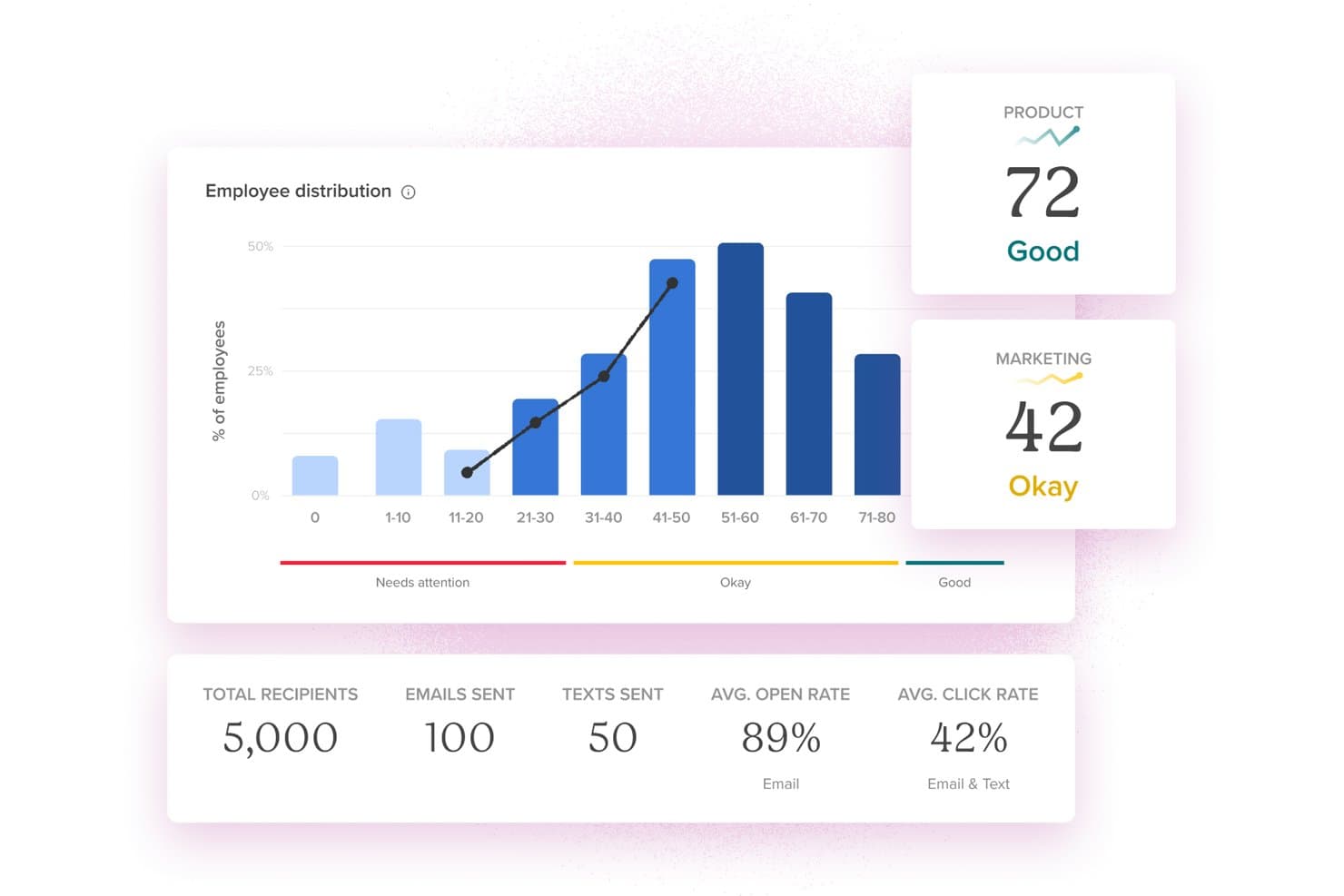
Workshop tracks employee engagement scores and communication metrics. Workshop is an internal communications email platform that lets you create, send, automate, and measure employee email campaigns—with HRIS integrations, audience segmentation, and AI-assisted content tools built in.
Who Is Workshop Best For?
Workshop fits internal communications teams and HR professionals who rely on email as their primary channel for reaching employees across the organization.
Why I Picked Workshop
I picked Workshop as one of the best because it's purpose-built for HR-triggered employee communications, connecting directly to HRIS platforms like Workday, ADP, and SAP SuccessFactors to keep distribution lists automatically updated. I love that you can build automated Journeys that fire based on HRIS field changes, so onboarding sequences, benefits enrollment reminders, and work anniversary emails go out without manual intervention. The audience segmentation tools let you target by department, role, or location using live employee data.
Workshop Key Features
- Drag-and-drop email editor: Build polished, branded employee emails without any coding or design skills using a visual editor with reusable templates.
- A/B testing: Test different versions of an email to compare engagement and identify what resonates best with your workforce.
- Communications calendar: View all past, current, and scheduled communications in one shared calendar to coordinate your team's send schedule.
- Analytics exports: Download email engagement data as a PDF or CSV, or connect results directly to your BI tools via the analytics API.
Workshop Integrations
Workshop offers 18 native integrations, including Workday, ADP Workforce Now, UKG Pro, SAP SuccessFactors, Slack, and Microsoft Teams. It also connects with Okta and Microsoft Entra ID for SSO and provides an analytics API for custom connections.
Pros and Cons
Pros:
- Automated journeys reduce repetitive employee communications
- Engagement analytics help assess campaign performance
- Branded employee emails are quick to create
Cons:
- No voice or video conferencing capabilities
- No native chat or threaded messaging
Learn more about Workshop: Best for frontline employee engagement
- Free demo available
- Pricing upon request
Visit WebsiteCustomer Rating:4.7/5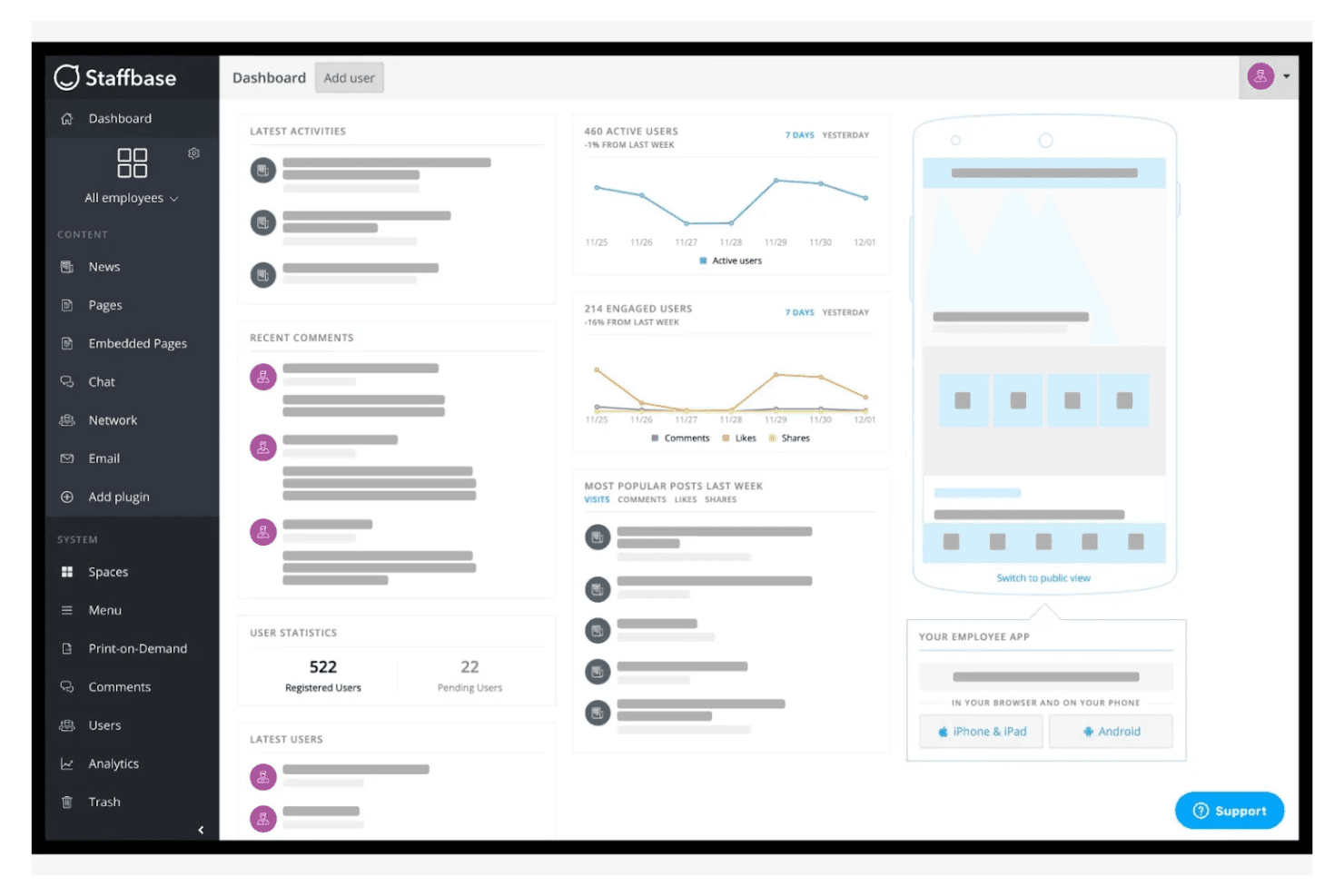
Staffbase provides a central dashboard for tracking internal communications, employee activity, engagement, and content performance. When you need to reach frontline and deskless employees who aren’t always at a computer, Staffbase offers a mobile-first approach to internal communication. It’s designed for organizations in industries like healthcare, retail, and manufacturing that need to engage workers across locations and shifts. Staffbase helps HR and communications teams deliver targeted updates, surveys, and resources directly to employees’ devices.
Why I Picked Staffbase
Frontline engagement is often overlooked in enterprise communication software, which is why I picked Staffbase for this list. Staffbase stands out with its mobile app that delivers company news, updates, and resources directly to employees’ smartphones, making it easy to reach those who aren’t at desks. I appreciate how the platform supports targeted messaging and feedback tools, so HR and communications teams can tailor content to specific groups or locations. This focus on mobile-first communication helps organizations keep every employee informed and connected, no matter where or when they work.
Staffbase Key Features
Some other features that make Staffbase useful for enterprise communication include:
- Employee directory: Searchable profiles help employees find and connect with colleagues across locations.
- Content scheduling: Plan and automate the release of news, updates, and announcements.
- Custom branding: Tailor the look and feel of the platform to match your organization’s identity.
- Analytics dashboard: Track engagement metrics and content performance in real time.
Staffbase Integrations
Integrations include Microsoft 365, ServiceNow, Google Workspace, Cornerstone, and APIs for custom integrations.
Pros and Cons
Pros:
- Branded employee app for company identity
- Push notifications reach non-desk employees
- Mobile app supports offline content access
Cons:
- Content approval workflows can be rigid
- No built-in video conferencing feature
Learn more about Staffbase: 3Best for targeted internal news delivery
Hub
- Free demo available
- Pricing upon request
Visit WebsiteCustomer Rating:4.5/5
Hub lets you discover company news and announcements by channel and tags. Hub is an enterprise intranet platform that centralizes internal communications across news feeds, employee directories, document libraries, messaging tools, and multi-site management.
Who Is Hub Best For?
Hub is a strong fit for mid-size to large organizations with distributed or deskless workforces that need a centralized place to manage internal communications across multiple teams, locations, or brands.
Why I Picked Hub
I've included Hub in my top picks because of how much control it gives you over the employee homepage experience. Each user sees a homepage built around their role, department, or location, thanks to Hub's smart content tagging and personalization engine. I particularly like the custom quick links and widget layout options, which let comms teams configure what each employee group sees without any IT involvement. That kind of role-based homepage design is genuinely hard to find in an intranet platform that's also this straightforward to manage.
Hub Key Features
- Must Reads: Flag specific posts or announcements as mandatory, requiring employees to confirm they've read them before moving on.
- InMail: Send direct messages between employees within the intranet, without leaving the platform.
- Group forums: Create public, private, or hidden discussion spaces for teams, departments, or project groups.
- Push notifications: Send instant alerts to employees via the Hub progressive web app to surface urgent content.
Hub Integrations
Hub offers native integrations with Microsoft 365 (including SharePoint and Teams), Google Workspace, Slack, Confluence, and BambooHR. It also connects to SharePoint, OneDrive, Google Drive, and Box for embedded cloud drive access. For SSO, Hub supports Microsoft Entra ID, Google, Office 365, OneLogin, and Okta. You can also connect your Eventbrite account to display external events alongside the Hub's internal calendar. An API is available for custom integrations.
Pros and Cons
Pros:
- Peer recognition through built-in Kudos nominations
- "Must Reads" feature tracks policy acknowledgment
- Over 80 granular permission settings available
Cons:
- Google Translate requires manual page-by-page setup
- Search functionality has reported limitations
Learn more about Hub: Best for enterprise-wide intranet communications
- Free demo available
- Pricing upon request
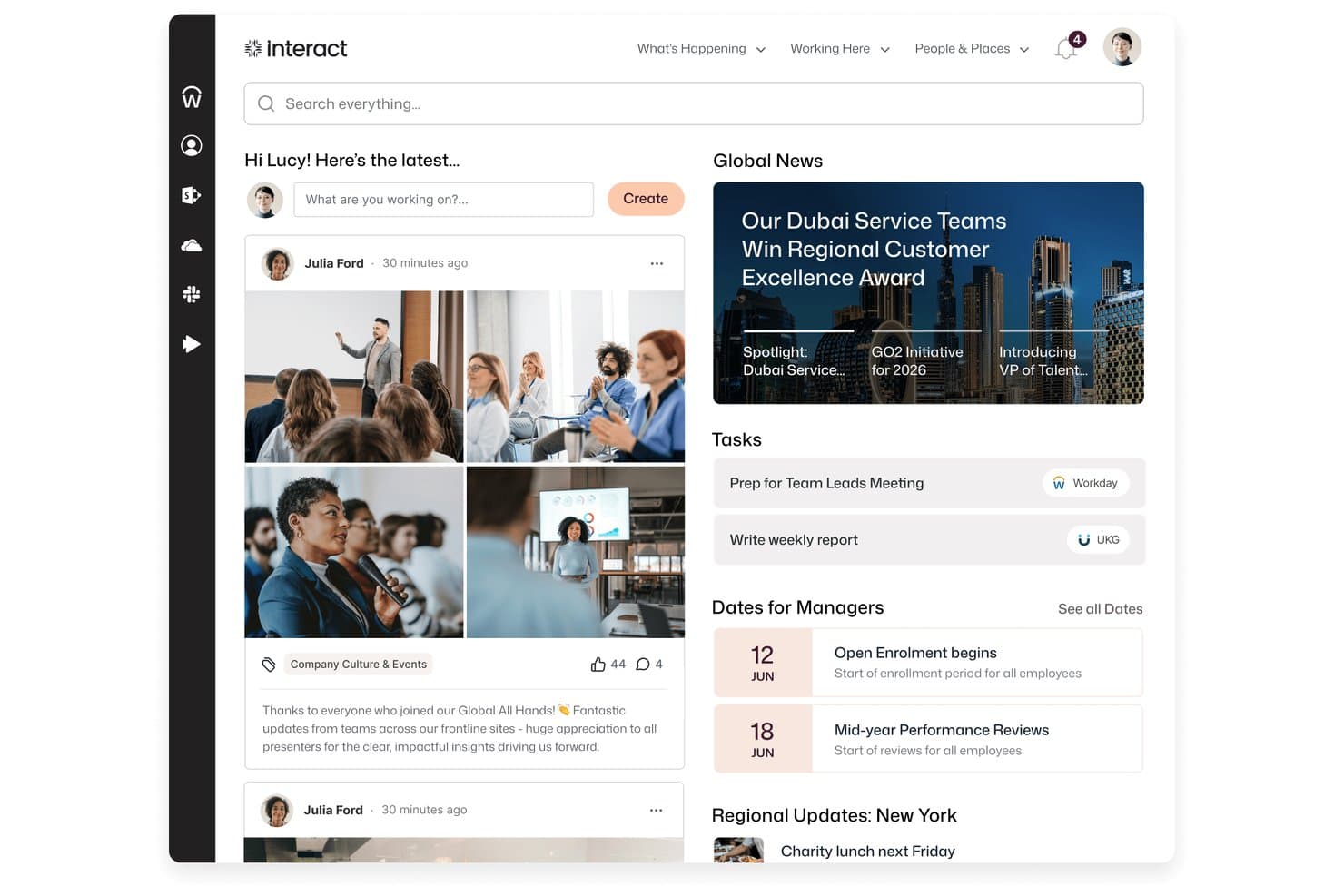
Interact Software centralizes news, tasks, and social updates in one intranet home screen. Interact Software is an AI-native enterprise intranet platform that brings together targeted employee communications, personalized content, knowledge management, pulse surveys, and frontline mobile access in one place.
Who Is Interact Software Best For?
Interact Software is a strong fit for large enterprises with distributed or frontline workforces that need a centralized intranet for targeted communications, knowledge sharing, and employee engagement.
Why I Picked Interact Software
I've included Interact Software in my top picks because it's one of the few platforms built specifically around enterprise-wide intranet communications, with targeted broadcasts that reach employees across desktop, mobile, email, SMS, and digital signage from a single publish. I particularly like the mandatory-read feature, which flags content as required and tracks who's actually read it—useful when you need accountability across 200 offices. Persona-based targeting lets you push the right message to trustees, frontline workers, or regional managers without managing separate distribution lists.
Interact Software Key Features
- Pulse surveys and polls: Run custom surveys or quick polls to collect employee sentiment and feedback directly through the intranet.
- People directory and org chart: Browse employee profiles, view reporting lines, and search for colleagues by name, skill, or location.
- Workplace Search: Search across the intranet and connected third-party systems like SharePoint and Google Drive from a single search bar.
- Onboarding homepages: Build tailored intranet homepages for new starters that surface relevant resources, tools, and content from day one.
Interact Software Integrations
Interact Software claims over 100 integrations, including native integrations with Microsoft 365, SharePoint, Microsoft Teams, Google Workspace, ServiceNow, Workday, UKG, and SAP SuccessFactors. It also provides a REST API, webhooks, and a custom connector framework.
Pros and Cons
Pros:
- Search helps employees find internal answers
- Nontechnical staff can publish intranet updates
- Targeted broadcasts reach dispersed employee groups
Cons:
- Messaging lacks threads and searchable history
- No native voice or video meetings
Learn more about Interact Software: Best for fostering company culture
- Free demo available
- Pricing upon request
Visit WebsiteCustomer Rating:4.8/5
Workvivo analytics dashboard shows activation, performance, and engagement. If you’re looking to build a stronger sense of community and recognition across your organization, Workvivo is designed with company culture at its core. This platform appeals to HR leaders and internal communications teams who want to connect employees through social feeds, shout-outs, and interactive spaces. Workvivo helps organizations foster belonging and engagement, especially in distributed or hybrid workplaces.
Why I Picked Workvivo
Fostering company culture takes more than just sharing updates, which is why I picked Workvivo for this list. Workvivo centers its platform around social interaction, letting employees post updates, celebrate achievements, and recognize peers in a public space. I appreciate how the platform includes community spaces and interest groups, so people can connect beyond their day-to-day roles. These features help organizations create a sense of belonging and shared purpose, even when teams are spread out or working remotely.
Workvivo Key Features
Some other features that make Workvivo stand out for enterprise communication include:
- Pulse surveys: Collect real-time feedback from employees on engagement and sentiment.
- Event management: Organize, promote, and track attendance for company events and activities.
- Document sharing: Upload and distribute important files and resources within the platform.
- Mobile app: Give employees access to all features and updates from their smartphones.
Workvivo Integrations
Integrations include Microsoft 365, Google Workspace, Slack, Zoom, Workday, BambooHR, and Microsoft Teams.
Pros and Cons
Pros:
- Event management tools for company-wide activities
- Pulse surveys gather real-time employee feedback
- Social feed encourages peer-to-peer recognition
Cons:
- Integrations require setup by IT administrators
- Limited formatting options for long-form posts
 6Best for large-scale video meetings
Zoom
- Free plan available
- From $14.16/user/month (billed annually)
Visit WebsiteCustomer Rating:4.5/5
Zoom Workplace Hub’s dashboard centralizes files, AI Ask, docs, whiteboards, and clips. When your organization needs to host large-scale video meetings or webinars, Zoom offers a platform built for reliability and scale. It’s especially useful for enterprises that require high-capacity virtual events, interactive training, or company-wide broadcasts. Zoom’s features help teams manage participant engagement and technical quality, even with thousands of attendees.
Why I Picked Zoom
For organizations that need to connect large groups in real time, Zoom stands out for its ability to support high-capacity video meetings and webinars. I picked Zoom because it allows up to thousands of participants in a single session, with features like breakout rooms and live polling to keep engagement high. Its webinar mode offers controls for managing attendee participation and Q&A, which is essential for company-wide meetings or external events. These capabilities make Zoom a strong choice for enterprises that prioritize reliable, large-scale virtual communication.
Zoom Key Features
Some other features that make Zoom appealing for enterprise teams include:
- Cloud recording and transcription: Automatically save and transcribe meetings for later review or compliance needs.
- Virtual backgrounds and branding: Customize meeting visuals with company logos or professional backdrops.
- End-to-end encryption: Protect sensitive conversations with advanced security for video, audio, and chat.
- Integration with calendar platforms: Schedule and join meetings directly from Google Calendar, Outlook, or other calendar tools.
Zoom Integrations
Integrations include Microsoft Teams, Slack, Google Workspace, Salesforce, HubSpot, Dropbox, Box, Okta, Zendesk, and Trello.
Pros and Cons
Pros:
- Breakout rooms allow for group collaboration
- Webinar mode includes attendee registration tools
- Supports up to 1,000 interactive meeting participants
Cons:
- Lacks advanced moderation controls
- Limited in-meeting file sharing options
Learn more about Zoom: Best with integrated productivity apps
- 14-day free trial available
- From $7/user/month (billed annually)
Visit WebsiteCustomer Rating:4.6/5
Google Workspace has an email view with Gmail and integrated Docs, Drive, and tools. If your team relies on real-time collaboration across documents, spreadsheets, and chat, Google Workspace brings all these tools together in one platform. It’s a strong fit for organizations that want integrated productivity apps with secure communication and file sharing. Google Workspace helps distributed teams stay connected and work together without switching between multiple software tools.
Why I Picked Google Workspace
What sets Google Workspace apart is how it combines communication and productivity tools in a single, unified environment. I picked Google Workspace because it lets teams move between Gmail, Google Chat, and Google Meet while collaborating on Docs, Sheets, and Slides in real time. Shared calendars and Drive storage keep everyone organized and ensure files are always accessible. This level of integration helps enterprise teams communicate, share, and create without barriers or silos.
Google Workspace Key Features
Some other features that make Google Workspace valuable for enterprise teams include:
- Admin console: Manage users, devices, and security settings from a centralized dashboard.
- Data loss prevention (DLP): Set rules to prevent sensitive information from being shared outside your organization.
- AppSheet integration: Build custom business apps without coding, directly from your Workspace data.
- Vault for eDiscovery: Archive, retain, and search emails and chats for compliance and legal needs.
Google Workspace Integrations
Integrations include Tableau, SAP, Figma, Miro, Box, Salesforce, HubSpot, and Okta.
Pros and Cons
Pros:
- Strong spam filtering for business email
- Integrated video meetings within calendar events
- Real-time document editing with team chat
Cons:
- Offline access setup can be inconsistent
- External sharing controls require admin configuration
Learn more about Google Workspace: 8Best for end-to-end encrypted messaging
Wire
- Free plan available
- From €7.45/user/month (billed annually)
Visit WebsiteCustomer Rating:4.4/5
Wire’s dashboard has organized chats, location folders, and a quick message composer. Wire offers end-to-end encrypted messaging designed for organizations that need to protect sensitive conversations and data. It’s a strong fit for security-conscious teams in sectors like government, legal, and finance, where privacy and compliance are non-negotiable. Wire helps you keep internal communications confidential while supporting secure file sharing and group collaboration.
Why I Picked Wire
For teams that need to prioritize privacy, Wire delivers true end-to-end encrypted messaging across all conversations. The platform encrypts messages, calls, and shared files by default, so sensitive business information stays protected at every stage. I like that Wire offers secure group chats and guest rooms, which let you collaborate with external partners without compromising security. These features make Wire a strong choice for organizations where confidential communication is essential.
Wire Key Features
Some other features that make Wire useful for enterprise teams include:
- Multi-device synchronization: Access your messages and calls across desktop, mobile, and web.
- Self-hosting option: Deploy Wire on your own infrastructure for maximum data control.
- Compliance reporting tools: Generate reports to support GDPR and other regulatory requirements.
- User management dashboard: Manage team members, permissions, and access from a centralized admin panel.
Wire Integrations
Native integrations are not currently listed.
Pros and Cons
Pros:
- GDPR compliance features are built-in
- Self-hosting option supports strict data residency
- End-to-end encryption for all communications
Cons:
- Limited admin controls for large organizations
- No native integrations with third-party tools
Learn more about Wire: Best with Microsoft 365 integration
- Free plan + 1-month free trial available
- From $4/user/month (billed annually)
Visit WebsiteCustomer Rating:4.3/5
Microsoft Teams has a channel view with threaded posts, tabs, and a rich text editor. If your organization relies on Microsoft 365, Microsoft Teams offers a unified space for chat, meetings, and collaboration that’s tightly woven into the Microsoft ecosystem. It’s especially useful for enterprises that want to connect communication with document management, scheduling, and productivity tools already in use. Teams helps reduce context switching by letting users access files, calendars, and workflows directly within the same platform they use to communicate.
Why I Picked Microsoft Teams
For organizations already invested in Microsoft 365, Teams stands out because it brings communication and collaboration directly into the tools employees use every day. I picked Microsoft Teams for its deep integration with apps like Outlook, SharePoint, and OneDrive, which lets users schedule meetings, share files, and co-author documents without leaving the platform. Teams also supports threaded conversations and persistent chat within channels, making it easier to keep project discussions organized alongside related files and tasks. This level of integration helps enterprises create a more connected and efficient digital workspace.
Microsoft Teams Key Features
Some other features in Microsoft Teams that support enterprise communication include:
- Live event broadcasting: Host webinars and large-scale virtual events for up to 20,000 attendees.
- Customizable tabs: Add third-party apps, dashboards, or websites directly into team channels for quick access.
- Breakout rooms: Split meeting participants into smaller groups for focused discussions or workshops.
- Direct guest access: Invite external partners or clients to join meetings and collaborate securely.
Microsoft Teams Integrations
Integrations include Outlook, SharePoint, OneDrive, Trello, Asana, ServiceNow, Salesforce, Adobe Creative Cloud, GitHub, and Zoom.
Pros and Cons
Pros:
- Offers live event and webinar hosting
- Allows external guest access for collaboration
- Deep integration with Microsoft 365 applications
Cons:
- Video quality varies with participant bandwidth
- Channel organization can become cluttered
Learn more about Microsoft Teams: 10Best for AI-powered voice transcription
Dialpad
- 14-day free trial + demo available
- From $15/user/month (billed annually)
Visit WebsiteCustomer Rating:4.3/5
Dialpad supervisor dashboard helps with real-time call metrics, AI scores, and agents. Dialpad offers enterprise communication software with built-in AI voice transcription, making it a strong choice for teams that rely on accurate call records and searchable conversations. It’s especially useful for organizations in sales, support, or compliance-heavy industries that need real-time insights from calls and meetings. If your business values integrated calling, messaging, and AI-driven analytics, Dialpad is designed to meet those needs.
Why I Picked Dialpad
I chose Dialpad for this list because its AI-powered voice transcription stands out in the enterprise communication software space. The platform automatically transcribes calls and meetings in real time, making it easy for teams to capture and search conversations without manual note-taking. I also like that Dialpad’s AI can highlight action items and key topics, which helps organizations stay organized and compliant. These features are especially valuable for businesses that need accurate records for training, quality assurance, or regulatory purposes.
Dialpad Key Features
Some other features in Dialpad that support enterprise communication include:
- Multi-device support: Access calls, messages, and meetings from desktop, mobile, or web apps to stay connected wherever you work.
- Team messaging: Send direct messages or create group chats for quick, organized communication within your organization.
- Integrated video conferencing: Host video meetings directly from the platform without needing a separate tool.
- Call routing and IVR: Set up custom call flows and interactive voice response menus to direct callers to the right department or team member.
Dialpad Integrations
Integrations include Google Workspace, Microsoft Teams, Salesforce, HubSpot, Gmail, Google Calendar, Zendesk, Okta, Slack, and Front.
Pros and Cons
Pros:
- Multi-device access for remote and hybrid teams
- Built-in team messaging and video conferencing
- Real-time AI transcription for calls and meetings
Cons:
- Limited advanced analytics in lower-tier plans
- Occasional transcription inaccuracies with accents
Learn more about Dialpad:
Outro software de comunicação empresarial
Eis algumas opções adicionais de software de comunicação empresarial que não integraram a minha seleção, mas que vale a pena conhecer:
- 11OpenTextBest for regulated document collaboration
- 12AscomBest for healthcare communication compliance
- 13SymphonyBest for secure financial sector messaging
- 14SlackBest for customizable workflow automation
- 15RingCentralBest for multi-location team collaboration
- 16ChantyBest for simple team chat interface
- 17Rocket.ChatBest for on-premise deployment option
- 18ConnecteamBest for mobile workforce coordinatio
- 19Bitrix24Best with built-in CRM integration
- 20SharePointBest for document management workflows
- 21TextUsBest for SMS-based team communication
How I Evaluate Enterprise Communication Software
I evaluate tools in two layers: baseline capabilities for broadcasting HR updates to a global workforce, and the differentiators that make one option a better fit.
Core Functionality (Table Stakes For This List)
When I'm selecting tools for my list, I rank each one on a scale from 0 (does not offer the functionality) to 5 (excels in this area) for each core functionality listed below. Then, I calculate the tool's total score into a percentage. Each tool needs to achieve a minimum total score of 65% to be considered for inclusion.
- Multi-Channel Messaging: I check whether the platform supports DMs, group channels, and threaded conversations across desktop and mobile, so HR can handle sensitive 1:1s and team-wide updates in one place.
- Company-Wide Broadcasts: The ability to target announcements by department, location, or role matters here, especially when HR needs to push benefits enrollment reminders to specific employee segments.
- Video & Voice Conferencing: I look for integrated video meetings with screen sharing and recording, which covers everything from new-hire orientation sessions to company town halls.
- Enterprise-Grade Security: Each tool's compliance certifications, SSO/SAML support, encryption standards, and role-based permissions get evaluated since HR communications often contain sensitive personnel data.
- HRIS & Directory Integrations: Prebuilt connectors to platforms like Workday, BambooHR, or SAP SuccessFactors help keep org charts and user provisioning current without manual data entry.
- File Sharing & Collaboration: I evaluate how each tool handles document sharing, previews, and version control, particularly for distributing updated handbooks, policy documents, and onboarding packets within conversation threads.
Once I have a list of tools that meet the criteria, I consider what sets each platform apart.
Differentiating Factors (What Sets Vendors Apart)
Here's how I compare and contrast different vendors:
Standout Features
Frontline worker access is a major differentiator. I look for SMS fallback, kiosk modes, or mobile-first experiences that reach warehouse, retail, and field employees who don't have corporate email. Built-in pulse surveys and polls also matter because they let HR capture real-time sentiment after policy changes or open enrollment without adding a separate tool. I evaluate AI-powered assistants too, which can summarize long threads or draft announcements and save HR teams hours of writing time each week.
Beyond Features
Compliance and data governance weigh heavily in my evaluation. HR teams share sensitive employee data daily, so I check for data residency options, message retention policies, and eDiscovery support. The integration ecosystem also matters—tools that connect with your existing HRIS and SSO providers reduce manual provisioning headaches when onboarding hundreds of new hires. I also evaluate total cost of ownership, including how vendors handle add-on pricing for storage, compliance modules, and seasonal workforce fluctuations.
Como escolher software de comunicação empresarial
É fácil perder-se em longas listas de funcionalidades e estruturas de preços complexas. Para o ajudar a manter o foco enquanto analisa o seu processo específico de seleção de software, eis uma lista de verificação dos fatores a ter em conta:
| Fator | O que considerar |
| Escalabilidade | O software suportará a sua organização à medida que esta cresce? Verifique os limites de utilizadores, os aumentos de preço e a facilidade com que pode adicionar ou remover utilizadores. |
| Integrações | Permite a ligação às suas ferramentas de HRIS, gestão de projetos ou armazenamento de documentos? Confirme as integrações nativas e quaisquer custos adicionais. |
| Personalização | Pode adaptar canais, permissões e notificações à estrutura e aos fluxos de trabalho da sua equipa? Evite ferramentas que imponham configurações rígidas. |
| Facilidade de utilização | Os colaboradores adotarão a ferramenta rapidamente? Procure uma navegação clara, necessidades mínimas de formação e opiniões positivas de organizações semelhantes. |
| Implementação e integração | Quanto tempo demorará a implementação? Informe-se sobre o apoio à migração, os recursos de formação e a necessidade de intervenção do departamento de TI. |
| Custo | Todos os custos são claros desde o início? Tenha em conta as tarifas por utilizador, os custos adicionais e os termos do contrato. Compare o custo total de propriedade, não apenas o preço anunciado. |
| Medidas de segurança | A ferramenta cumpre as suas normas de proteção de dados? Procure encriptação de ponta a ponta, controlos de acesso e registos de auditoria. |
| Requisitos de conformidade | O software ajudá-lo-á a cumprir regulamentações do setor ou regionais, como o RGPD ou a HIPAA? Solicite documentação e apoio à auditoria. |
O que é software de comunicação empresarial?
O software de comunicação empresarial é uma plataforma digital que permite aos funcionários trocar mensagens, partilhar ficheiros e colaborar em tempo real em toda a organização. Estas ferramentas permitem uma comunicação segura e centralizada através de conversação, voz, vídeo e partilha de documentos. Ajudam as equipas a coordenar o trabalho, manter registos das conversas e garantir que a informação circula de forma eficiente, quer os funcionários estejam no escritório, a trabalhar remotamente ou distribuídos globalmente.
Funcionalidades do software de comunicação empresarial
Ao selecionar um software de comunicação empresarial, tenha em atenção as seguintes funcionalidades principais:
- Mensagens diretas: Permitem conversas privadas, individuais, entre funcionários para perguntas rápidas, atualizações ou discussões confidenciais.
- Canais de conversação em grupo: Permitem que as equipas ou os departamentos comuniquem em espaços dedicados, mantendo as conversas organizadas por tópico ou projeto.
- Partilha de ficheiros: Permite aos utilizadores carregar, enviar e aceder a documentos, imagens e outros ficheiros diretamente na plataforma, reduzindo a dependência do correio eletrónico.
- Chamadas de voz e vídeo: Permitem a comunicação de áudio e vídeo em tempo real para reuniões, pontos de situação ou discussões urgentes sem sair do software.
- Histórico de mensagens pesquisável: Permite pesquisar conversas e ficheiros anteriores, facilitando a recuperação de informações importantes quando necessário.
- Gestão de utilizadores e permissões: Dá aos administradores controlo sobre quem pode aceder a canais, ficheiros ou funcionalidades específicas, apoiando a segurança e a conformidade.
- Notificações e alertas: Mantêm os utilizadores informados sobre novas mensagens, menções ou atualizações importantes, com definições personalizáveis para reduzir distrações.
- Acesso a vários dispositivos: Permite aos funcionários utilizar o software em computadores de secretária, portáteis, tablets e smartphones, garantindo que a comunicação é possível a partir de qualquer lugar.
- Integração com outras ferramentas: Liga-se a calendários, sistemas de gestão de projetos ou sistemas de RH para centralizar os fluxos de trabalho e reduzir a alternância entre contextos.
Benefícios do software de comunicação empresarial
A implementação de um software de comunicação empresarial proporciona vários benefícios à sua equipa e à sua empresa. Eis alguns dos benefícios que pode esperar:
- Tomada de decisões mais rápida: As mensagens, chamadas e partilha de ficheiros em tempo real ajudam as equipas a resolver problemas e a tomar decisões sem atrasos.
- Maior segurança da informação: A encriptação de ponta a ponta e os controlos de permissões protegem conversas e documentos sensíveis contra acessos não autorizados.
- Melhor alinhamento da equipa: Os canais de grupo e o histórico de mensagens pesquisável mantêm todos informados, reduzindo falhas de comunicação e trabalho duplicado.
- Colaboração remota melhorada: O acesso a vários dispositivos e a videoconferência apoiam as equipas distribuídas que trabalham a partir de diferentes locais ou fusos horários.
- Gestão simplificada da conformidade: Os registos de auditoria integrados e as políticas de retenção de dados ajudam as organizações a cumprir os requisitos regulamentares e a manter registos.
- Redução da sobrecarga de correio eletrónico: A conversação e a partilha de ficheiros centralizadas reduzem a dependência do correio eletrónico, tornando a comunicação mais focada e gerível.
- Integração mais fácil de novos funcionários: Os canais organizados e os arquivos pesquisáveis ajudam os novos funcionários a aceder rapidamente a informações essenciais e a integrar-se na equipa.
Custos e preços do software de comunicação empresarial
A seleção de um software de comunicação empresarial exige uma compreensão dos vários modelos de preços e planos disponíveis. Os custos variam consoante as funcionalidades, a dimensão da equipa, os complementos e outros fatores. A tabela abaixo resume os planos mais comuns, os respetivos preços médios e as funcionalidades normalmente incluídas nas soluções de software de comunicação empresarial:
Tabela de comparação de planos de software de comunicação empresarial
| Tipo de plano | Preço médio | Funcionalidades comuns |
| Plano gratuito | $0 | Mensagens básicas, chamadas de vídeo limitadas e armazenamento mínimo. |
| Plano pessoal | $5-$15/utilizador/mês | Mensagens, videoconferência, partilha de ficheiros e integrações básicas. |
| Plano empresarial | $20-$35/utilizador/mês | Mensagens avançadas, videoconferência de elevada qualidade, segurança reforçada e integrações com aplicações de terceiros. |
| Plano empresarial avançado | $40-$60/utilizador/mês | Funcionalidades personalizáveis, ferramentas de conformidade, análise avançada, suporte prioritário e armazenamento ilimitado. |
Perguntas frequentes sobre software de comunicação empresarial
Eis algumas respostas a perguntas comuns sobre software de comunicação empresarial:
Como é que o software de comunicação empresarial apoia as equipas remotas e híbridas?
O software de comunicação empresarial permite que as equipas remotas e híbridas colaborem em tempo real através de mensagens instantâneas, videochamadas e partilha de ecrã. Estas ferramentas de colaboração mantêm todos ligados, independentemente da localização, e ajudam a assegurar uma comunicação empresarial consistente e o acesso à informação em equipas distribuídas. Ao disponibilizar um centro completo para o trabalho remoto, este sistema de comunicação garante que o ambiente de trabalho se mantém produtivo e coeso.
O software de comunicação empresarial pode integrar-se com ferramentas de RH e de gestão de projetos?
Sim, a maioria das ferramentas de comunicação empresarial oferece integrações com sistemas de RH, plataformas de gestão de projetos e outras ferramentas de comunicação. Estas integrações ajudam a otimizar e centralizar os fluxos de trabalho, a reduzir a introdução manual de dados e a garantir que a informação circula sem problemas entre vários canais de comunicação. Esta conectividade melhora a experiência geral dos colaboradores, facilitando o acesso dos elementos certos aos dados de que necessitam.
Que funcionalidades de segurança devo procurar num software de comunicação empresarial?
Procure encriptação de ponta a ponta, autenticação de utilizadores, controlos de acesso e registos de auditoria. Estas funcionalidades ajudam a proteger dados empresariais sensíveis, garantem que apenas os utilizadores autorizados podem aceder à plataforma de comunicação e apoiam o cumprimento dos regulamentos de privacidade de dados. A implementação destes protocolos é fundamental para uma comunicação eficaz, garantindo que as comunicações internas permanecem privadas e seguras contra ameaças externas.
Quanto tempo demora a implementação de um software de comunicação empresarial?
O tempo de implementação varia consoante a dimensão e a complexidade da organização. As equipas pequenas podem estar operacionais num dia, enquanto as organizações maiores podem precisar de várias semanas para passar de uma intranet antiga ou de um sistema legado. O sucesso depende de estratégias de comunicação bem planeadas que incluam a migração, a formação e a integração com os sistemas existentes, de modo a promover um melhor trabalho em equipa.
Quais são os desafios comuns ao adotar um software de comunicação empresarial?
Entre os desafios comuns incluem-se a resistência dos utilizadores à mudança, problemas na migração de dados e as distrações frequentemente presentes em interfaces semelhantes às das redes sociais. Para melhorar a comunicação com os colaboradores, as organizações devem concentrar-se na segmentação da informação, de modo a evitar a fadiga provocada pelas notificações. Planear a formação e implementações faseadas pode ajudar a resolver estes desafios e a melhorar as taxas de adoção em toda a organização.