

As melhores alternativas ao Kadence vão ajudá-lo a gerir o trabalho híbrido, otimizar a utilização do espaço e simplificar a reserva de secretárias — oferecendo simultaneamente funcionalidades ou estruturas de preços diferentes, mais adequadas às necessidades da sua organização.
O Kadence é uma plataforma conceituada de gestão de equipas e espaços, mas pode não ser a opção mais adequada para todas as equipas.
Com base na minha experiência a testar software de RH e de gestão do local de trabalho, selecionei uma lista das principais alternativas ao Kadence que oferecem agendamento inteligente, reserva fácil de secretárias e informações baseadas em dados. Neste guia, encontrará soluções fiáveis para tornar o trabalho híbrido mais eficiente e adaptado às necessidades dos trabalhadores.
O que é o Kadence?
O Kadence é um software de gestão do local de trabalho concebido para ajudar as equipas a organizarem os seus ambientes de trabalho de forma eficiente.
É frequentemente utilizado por profissionais de RH e gestores de instalações que precisam de gerir espaços de escritório, coordenar horários de trabalho híbrido e melhorar a colaboração entre equipas. A reserva de secretárias, a atribuição de recursos e a análise em tempo real ajudam a sua equipa a otimizar a utilização do espaço e a aumentar a produtividade. De um modo geral, o Kadence oferece uma solução valiosa para melhorar a gestão do local de trabalho e criar um ambiente de trabalho mais organizado.
Tabela comparativa das alternativas ao Kadence
Esta tabela comparativa apresenta os preços e os detalhes dos períodos de teste gratuitos das minhas principais alternativas ao Kadence, para o ajudar a encontrar uma solução adequada ao seu orçamento e às necessidades da sua empresa.
Score legend (out of 5)
- Excellent4.5–5
- Good4–4.4
- Average3–3.9
- Below average2–2.9
- Poor1–1.9
Sorted by: Default
| Tool | Starting Price | Website | |||||||
|---|---|---|---|---|---|---|---|---|---|
Best for team collaboration | 3.3 out of 5 | 3 | 3 | 4 | 2 | 4 | 4 | $159/month Free trial available | Website |
Best for integrated hardware support | 3.2 out of 5 | 4 | 3 | 3 | 3 | 3 | 3 | $500/month Free demo available | Book Demo |
Best for quick bookings | Not rated | 3 | Not rated | 3 | Not rated | Not rated | 2 | Pricing upon request Not available | Website |
Best for multi-site occupancy analytics | 3.7 out of 5 | 4 | 4 | 4 | 2 | 4 | 4 | Pricing upon request Free demo available | Website |
Best for coworking spaces | 3.3 out of 5 | 3 | 4 | 4 | 3 | 3 | 3 | Pricing upon request Free demo available | Website |
Best for camera-free occupancy analytics | 3.7 out of 5 | 4 | 3 | 4 | 3 | 4 | 4 | $3.75/user/month Free plan + free trial + free demo available | Book Demo |
Best for real-time tracking | 3.7 out of 5 | 4 | 4 | 4 | 4 | 3 | 3 | $50/month Free demo available | Website |
Best for employee engagement | 3.2 out of 5 | 4 | 4 | 3 | 4 | 2 | 2 | £1.50/user/month Free trial + free demo available | Website |
Best for enforcing desk booking rules | 3.5 out of 5 | 4 | 4 | 4 | 3 | 2 | 4 | $99/month 14-day free trial + free demo available | Website |
Best for deskless teams | Not rated | Not rated | Not rated | Not rated | Not rated | 1 | 2 | $29/month Free plan + 14-day free trial + free demo available | Website |


Porque pode confiar nas nossas recomendações de software
6,700+
Reviews
20
Industry experts
16+
Evaluation factors
14
Years reviewing software
A nossa equipa testa e analisa software desde 2012. Como especialistas em RH, sabemos o quão difícil — e importante — é escolher o software certo.
Para este guia, avaliámos as ferramentas através de testes práticos e pesquisa independente, pontuando-as de acordo com os nossos critérios de seleção. Recorremos também a contributos de líderes de opinião do setor e de especialistas em RH no ativo.
As nossas análises refletem o juízo da nossa equipa editorial, e não um discurso de vendas.
Revisores especialistas:
- Phil GrayCOO
 Kim BehnkeHR Tech Editor & Analyst
 Josh BarkerPeople Ops Manager

Análises das melhores alternativas ao Kadence
Seguem-se os meus resumos detalhados das melhores alternativas ao Kadence que entraram na minha lista final. As minhas análises apresentam uma visão detalhada das principais funcionalidades, vantagens e desvantagens, integrações e casos de utilização ideais de cada ferramenta, para o ajudar a encontrar a melhor opção para si.


Archie enhances workspace efficiency with booking, visitor, and coworking tools. Archie is a desk booking and hybrid workplace platform built for teams navigating flexible work, helping employees find colleagues, reserve desks, and coordinate in-office schedules without the back-and-forth.
Who Is Archie Best For?
Archie is a strong fit for hybrid teams where coordinating who's coming into the office—and finding colleagues when they do—is just as important as booking a desk.
Why I Picked Archie
I've included Archie in my top picks because it genuinely solves the coordination problem that hybrid teams deal with every day: figuring out who's actually coming in. I love how the colleague visibility feature lets my team see not just that someone will be in the office, but exactly where they're sitting, so we can plan office days around each other rather than showing up and playing desk roulette. The workweek schedule view and work-from status updates give the whole team a live picture of attendance without any back-and-forth messaging.
Archie Key Features
- No-show auto-release: Admins can set a grace period after which an unchecked-in desk is automatically released back to the available pool.
- Desk neighborhoods: Admins can designate desk zones restricted to specific teams, keeping groups seated together without manual coordination.
- Multi-channel check-in: Employees can check in via the Archie mobile app, QR code, Slack, or Microsoft Teams.
- CSV occupancy export: Admins can export desk usage, peak days, and office occupancy data as CSV reports for space planning.
Archie Integrations
Archie lists 30+ integrations, including native Microsoft Teams, Microsoft Outlook, Slack, Google Calendar, Zoom, SSO/SAML, and SCIM integrations. It also offers an open API, webhooks, and Zapier.
Pros and Cons
Pros:
- Automation features
- Flexible workspace options
- Real-time data insights
Cons:
- Limited mobile features
- Initial setup complexity
Learn more about Archie:
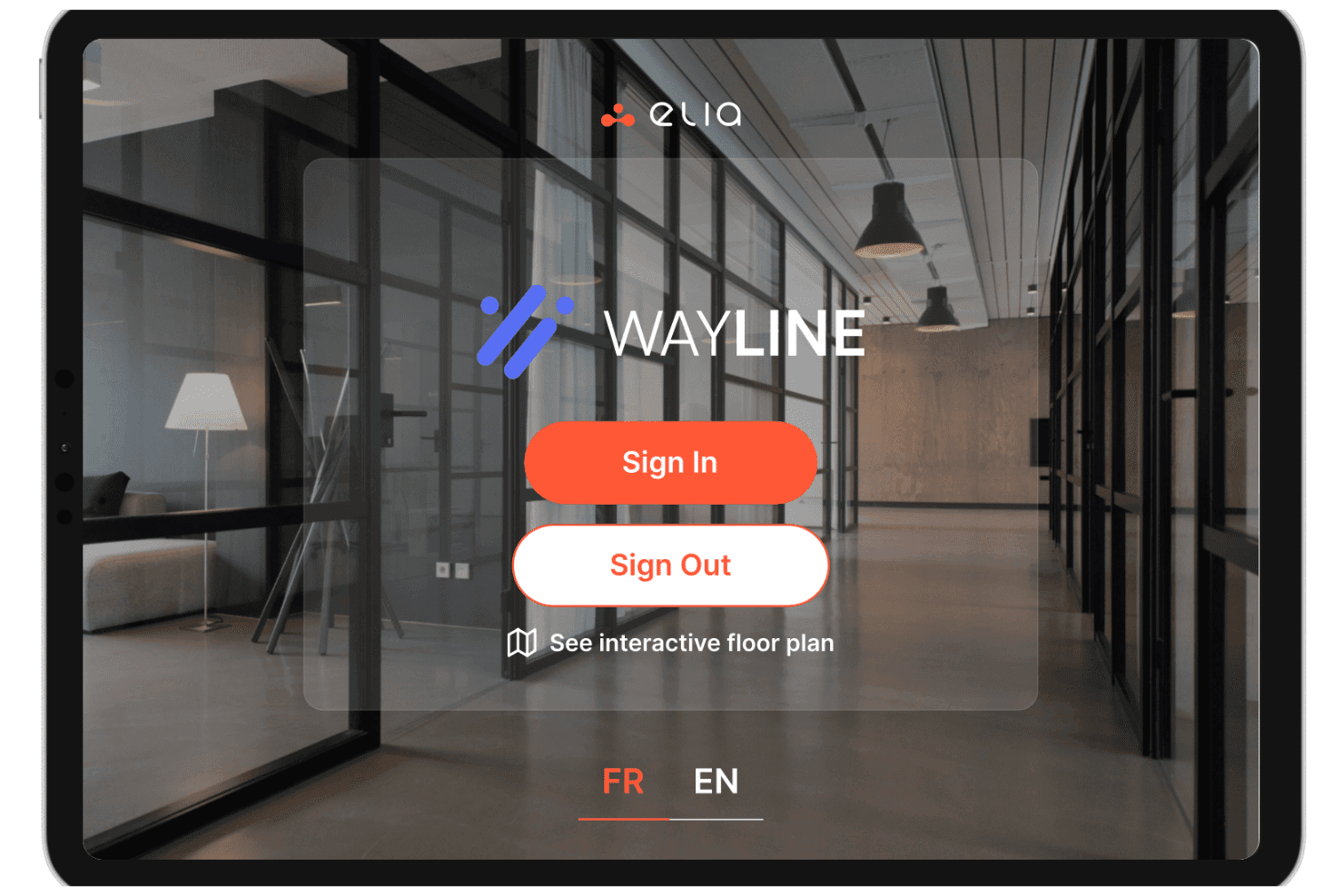
elia offers a visitor management kiosk interface called Wayline, allowing guests to sign in, sign out, or view an interactive floor plan. elia is a workplace operations platform built for offices that want desk booking, room reservations, hybrid scheduling, and occupancy analytics managed in one place—with the option to add physical hardware like sensors, kiosks, and smart locks directly through the platform.
Who Is elia Best For?
elia is a strong fit for facilities and office managers who want to pair workplace software with physical hardware—sensors, kiosks, and smart locks—without sourcing devices from a separate vendor.
Why I Picked elia
I picked elia because it's the only platform on this list where you can source sensors, kiosks, room displays, and smart locks directly alongside the software. That matters in practice: when a desk sensor detects no-show activity, that data feeds straight into elia's occupancy heatmaps without any third-party hardware configuration in between. I also appreciate that the touchscreen kiosk handles wayfinding, check-in, and on-the-spot bookings from a single device your team already walks past every day.
elia Key Features
- Collaboration dashboard: Employees can view teammates' in-office schedules to coordinate which days they come in together.
- Visitor management: Visitors can self-check-in at a tablet kiosk or by scanning a QR code on their own phone, with host notifications sent via email, Slack, or Teams.
- Workplace automation builder: Admins can create custom workflows using configurable triggers, conditions, and actions to automate processes like room releases and task assignments.
- Request management: Employees can submit workplace requests—IT support, catering, maintenance—directly from the floor plan, linked to their desk or room booking.
elia Integrations
elia offers native integrations with Microsoft 365, Google Workspace, Google Calendar, Microsoft Outlook, Microsoft Teams, and Slack. An Enterprise API and custom integration builder support additional connections.
Pros and Cons
Pros:
- Colleague visibility helps teams coordinate office days
- Reviewers praise clear, interactive booking maps
- Hardware connects occupancy data to bookings
Cons:
- Hybrid status and calendar presence fall short
- Reviewers report inconsistent occupancy counts
Learn more about elia:
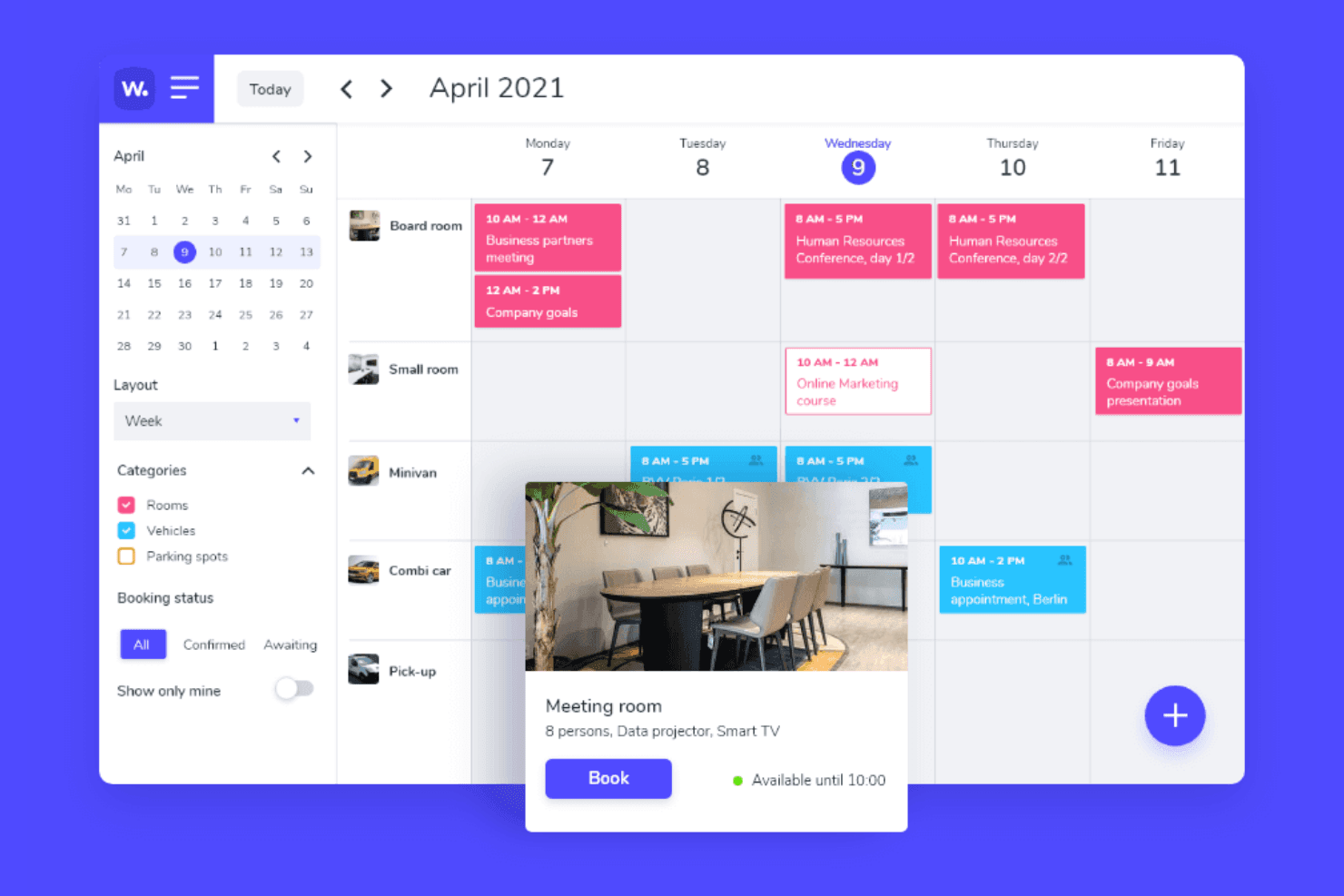
Whatspot's weekly calendar lets teams book meeting rooms, vehicles and parking spots in one view. Whatspot is a resource booking tool built for office managers who need a no-fuss way to let employees reserve desks, meeting rooms, and shared spaces without double bookings or scheduling conflicts.
Who Is Whatspot Best For?
Whatspot is a good fit for office managers at small to mid-sized companies who need a quick, no-fuss way to let employees book desks, rooms, and shared spaces without scheduling conflicts.
Why I Picked Whatspot
I picked Whatspot for its ability to get a booking system running in minutes, which is exactly what office managers need when scheduling conflicts are already happening. I love how employees can claim a desk or meeting room using QR codes or a visual floor plan, with real-time availability that prevents double bookings before they start. In practice, that means my team can walk up to a space, scan a code, and confirm a reservation on the spot without any back-and-forth.
Whatspot Key Features
- QR code booking: Employees scan a QR code on any space to instantly reserve it without opening a separate app or browser.
- Visual floor plan view: A clickable map of your office lets you see which desks and rooms are available before making a reservation.
- Multi-resource booking: You can book desks, meeting rooms, and parking spots all within the same system.
- Google and Outlook calendar sync: Confirmed reservations can connect to your existing calendar so bookings appear alongside your other scheduled events.
Whatspot Integrations
Whatspot supports Google Calendar and Outlook calendar sync, helping desk and room reservations appear alongside scheduled events.
Pros and Cons
Pros:
- Books desks, rooms, and parking together
- Live availability helps prevent booking conflicts
- QR bookings reserve shared spaces on-site
Cons:
- No WordPress theme-building features documented
- Does not replace Kadence website design
Learn more about Whatspot: Best for multi-site occupancy analytics
- Free demo available
- Pricing upon request
Visit WebsiteCustomer Rating:4.3/5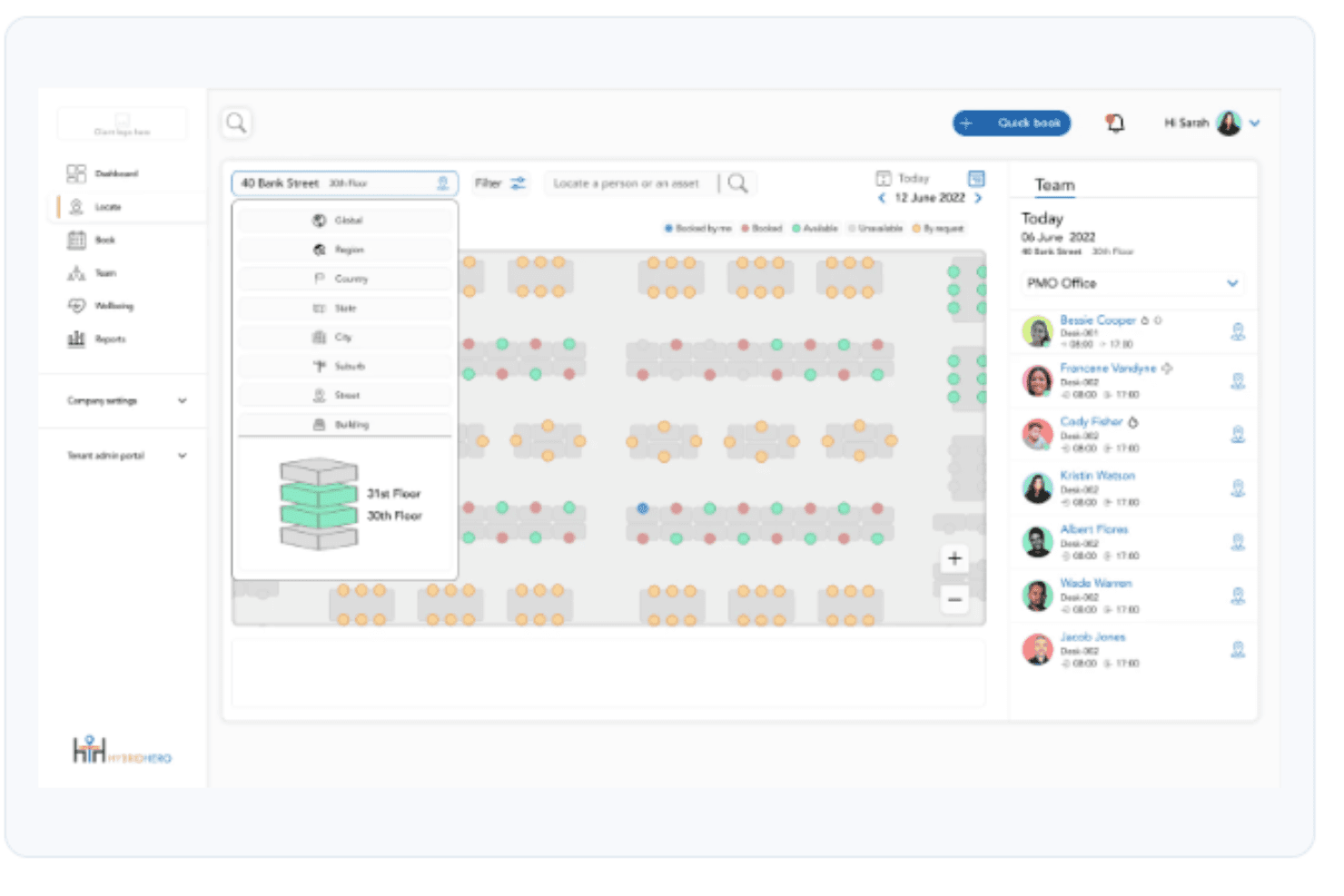
Hybrid Hero's Locate view shows live desk availability on a floor plan and where your team is working. HybridHero is a workplace management platform built for multi-site organizations that need to coordinate hybrid schedules, manage desk and room bookings, and track how their office space is actually being used.
Who Is HybridHero Best For?
HybridHero is a strong fit for facilities and workplace managers at multi-site organizations who need granular occupancy data across buildings, floors, and teams.
Why I Picked HybridHero
I picked HybridHero because it gives workplace teams genuinely granular occupancy data across every building, floor, and team in one view. I particularly like how utilisation reports can be filtered at the global, continent, building, and floor levels, so spotting underused zones across a multi-site estate is straightforward. Heat maps and no-show tracking at the Professional tier mean I can see not just whether a space was booked, but whether it was actually used, which is exactly the kind of insight that informs real estate decisions.
HybridHero Key Features
- Hybrid schedule declarations: Employees log their working status—office, remote, client site, or leave—in advance, giving managers a team-level attendance view.
- No-show auto-release: Desks and rooms are automatically returned to inventory when users don't check in within a configurable window.
- Apple and Google Wallet tap-in: Employees save a digital pass to their phone wallet and check in by tapping a scanner at the desk or room.
- Power BI and Tableau export: Utilisation data can be pushed directly to Power BI or Tableau for custom reporting and dashboards.
HybridHero Integrations
HybridHero offers native integrations across the Microsoft ecosystem, including Microsoft 365, Outlook, Teams, and Azure AD, plus Google Workspace, Google Calendar, Okta, and Active Directory. It also provides REST API and webhook access for custom integrations.
Pros and Cons
Pros:
- Team schedules clarify who’s onsite
- Multi-site occupancy reports support space planning
- Fast desk booking with visible availability
Cons:
- Slow loading and repeated logins frustrate users
- Forgotten check-ins can forfeit desk bookings
Learn more about Hybrid Hero:
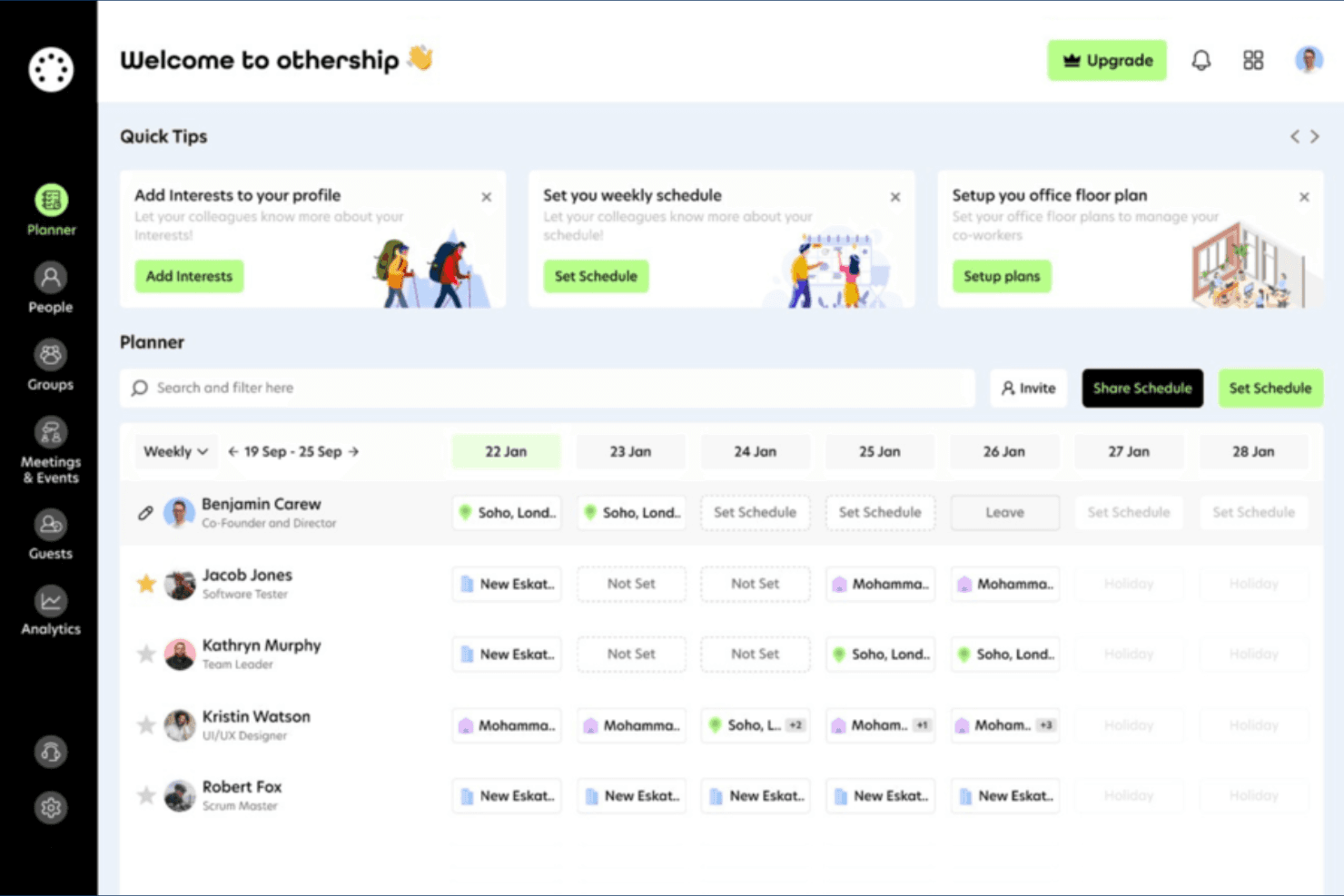
Othership's planner shows weekly schedules, office locations and leave for each team member. Othership Workplace Manager is a desk booking and hybrid scheduling platform that gives facilities and office managers real-time occupancy heatmaps, interactive floor plans, and visitor management tools to help teams coordinate in-office work and make smarter use of their space.
Who Is Othership Best For?
Othership Workplace Manager is a strong fit for facilities and office managers in flex-heavy or coworking-adjacent environments who need real-time occupancy data and interactive floor plans to coordinate hybrid teams.
Why I Picked Othership
I picked Othership as one of the best because it's purpose-built for environments where the line between a private office and a shared coworking space blurs. Its real-time occupancy heatmaps let you see exactly which desks and amenities are in use across your floor plan at any given moment, which is especially useful when you're managing a mix of dedicated staff and flex workers. I also appreciate that visitor management is built directly into the same interface, so you can schedule a guest, assign parking, and set up kiosk check-in without switching tools.
Othership Key Features
- Team schedule planner: Employees can view and join teammates' in-office schedules in a shared weekly planner to coordinate workdays.
- Configurable booking policies: Admins can toggle desk and meeting-room policies on or off per building and set preferred booking times.
- Utilization trend tracking: Workplace Manager tracks space usage over time to support decisions around office rightsizing and lease planning.
- Google Calendar resource sync: Admins can connect Google Calendar to synchronize room and desk resources directly with employee calendars.
Othership Integrations
Othership lists more than 8,000 integrations, including Microsoft 365, Google Workspace, Microsoft Teams, Slack, and Zoom. Workplace Manager also supports Google Calendar resource synchronization, Okta SAML SSO, and Microsoft Entra SCIM provisioning; API availability isn’t stated.
Pros and Cons
Pros:
- Reviewers praise clear floorplan and booking flow
- Teammate schedules support hybrid coordination
- Real-time heatmaps inform space planning
Cons:
- Booking-switch bugs affect desk-to-room reservations
- Initial floorplan customization can take time
Learn more about Othership: Best for camera-free occupancy analytics
- Free plan + free trial + free demo available
- From $3.75/user/month (billed annually)
Customer Rating:4.6/5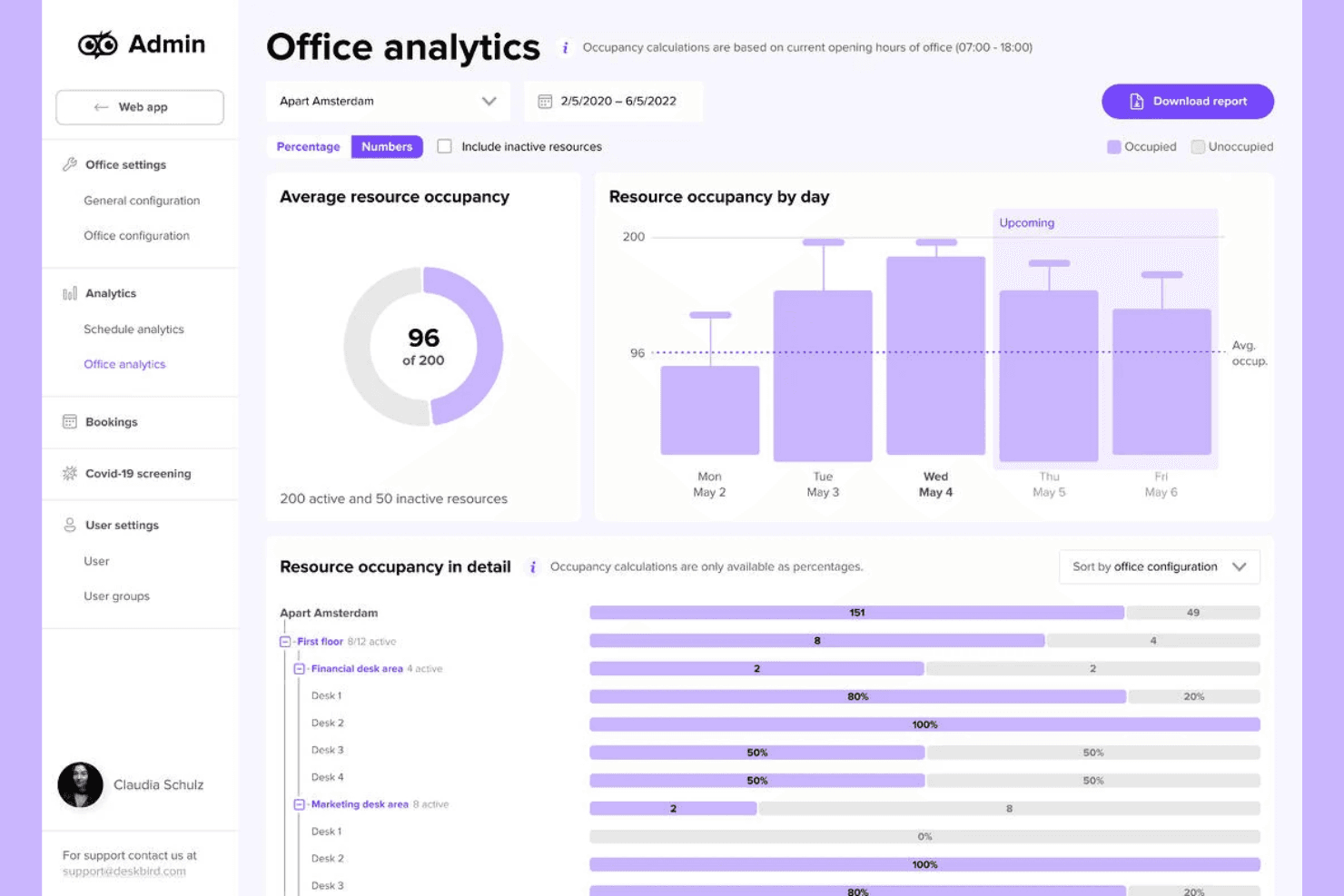
deskbird's Office analytics dashboard showing average desk occupancy and daily resource usage by floor. deskbird is a hybrid workplace management platform that lets teams coordinate office schedules, book desks and meeting rooms, and track space utilization—making it a practical fit for HR, facilities, and office managers navigating the demands of flexible work.
Who Is deskbird Best For?
deskbird is a strong fit for hybrid teams that need a simple way to coordinate who's in the office, book desks and rooms, and keep everyone on the same page.
Why I Picked deskbird
deskbird earns its spot on my shortlist because team coordination is genuinely built into the booking experience, not bolted on. I love that employees can see exactly who's coming in before booking a desk, so they can sit near the right colleagues without any back-and-forth. The colleague finder and AI-powered desk recommendations make it easy to plan office days around your actual team, which is where deskbird pulls ahead for hybrid collaboration.
deskbird Key Features
- Hybrid work policy configuration: Admins can set minimum on-site days, maximum remote days, or combined attendance rules on weekly, monthly, or yearly cycles.
- Automatic booking check-in and release: Unclaimed desk, room, and parking bookings are automatically released after a configurable grace period, freeing up space for other employees.
- Workplace ticketing: Employees can report office issues directly from the floor plan, a QR code, or a recent booking, with tickets routable to Jira or ServiceNow.
- Occupancy and utilization analytics: Teams can view desk, room, parking, and attendance data by location, department, or day to inform space and real estate decisions.
deskbird Integrations
deskbird offers 100+ native integrations, including Google Calendar, Microsoft 365 Calendar, Google Workspace, Microsoft Teams, Slack, Workday, BambooHR, Okta, Jira, and ServiceNow. Its RESTful API supports custom workplace, facilities, analytics, and access-control connections.
Pros and Cons
Pros:
- Interactive maps show desks and teammates
- Automatic release frees desks after no-shows
- Colleague visibility helps teams plan office days
Cons:
- Mobile app reports slow loading and crashes
- Analytics can obscure average attendance trends
 Best for real-time tracking
- Free demo available
- From $50/month (billed annually)
Visit WebsiteCustomer Rating:5/5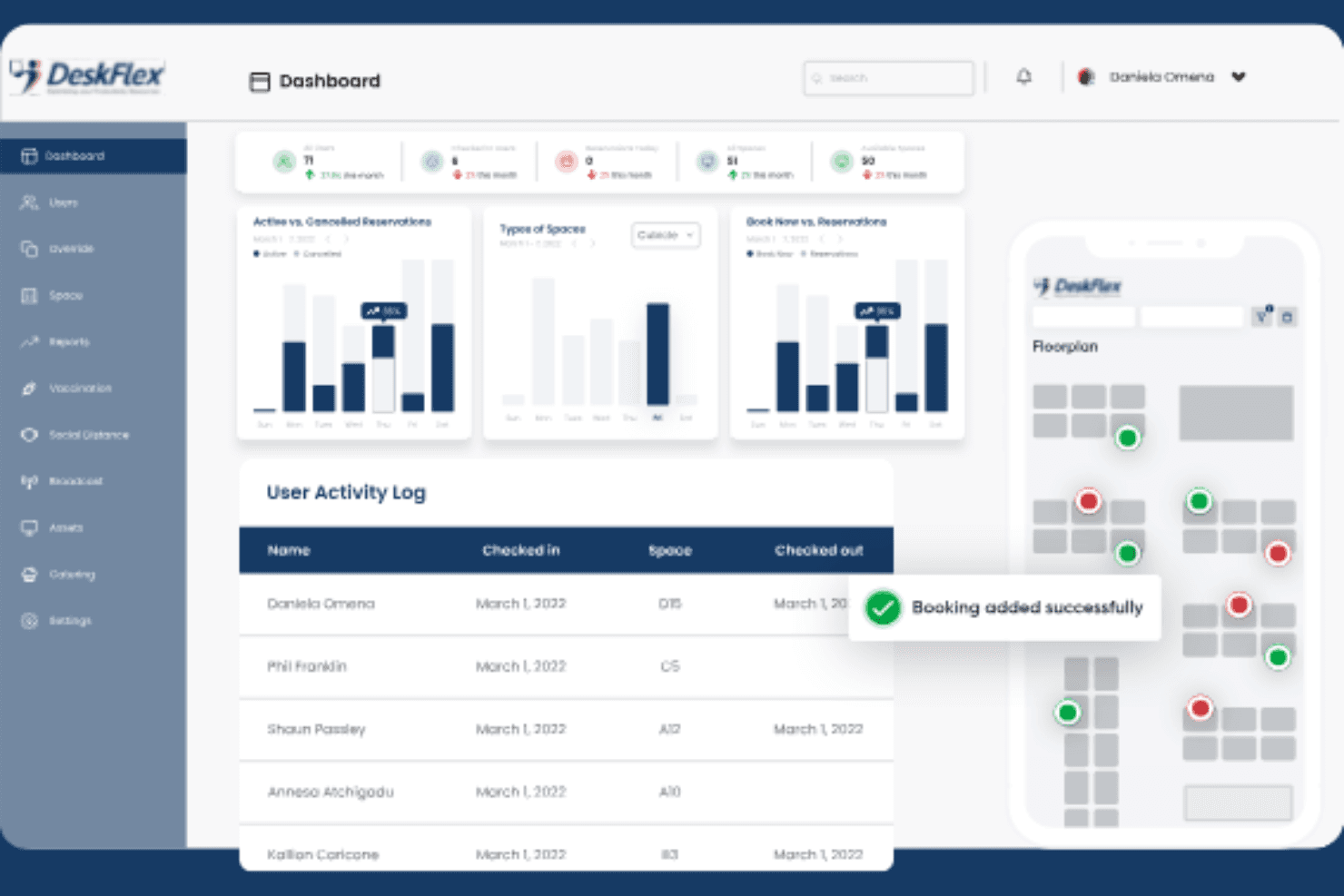
The DeskFlex dashboard tracks reservations, space usage and user check-ins alongside a mobile floorplan view. DeskFlex is a workplace management platform for office managers and hybrid teams who need to coordinate desk and room bookings, track real-time occupancy, and manage visitors across one or more office locations.
Who Is DeskFlex Best For?
DeskFlex is a strong fit for office managers running hybrid teams across multiple locations who need real-time visibility into desk availability, occupancy, and visitor activity.
Why I Picked DeskFlex
I picked DeskFlex as one of the best because real-time occupancy visibility is where it genuinely excels. I love that the 3D floor plans update live, so I can see at a glance which desks are taken, where teammates are sitting, and which rooms are free, without refreshing or guessing. The auto-release feature is a standout practical win: if someone books a desk but doesn't check in within the configured window, DeskFlex frees it up automatically.
DeskFlex Key Features
- Visitor management: Register visitors in advance, manage approvals, and automatically notify hosts when guests arrive.
- Recurring desk and room bookings: Employees can set up repeating reservations for desks or meeting rooms without rebooking each time.
- Multi-location administration: Manage booking policies, space inventories, and occupancy data across multiple office locations from one platform.
- Workplace analytics dashboard: Track reservations, check-ins, no-shows, and occupancy trends by building, floor, department, or space type with scheduled reporting.
DeskFlex Integrations
DeskFlex offers native integrations across the Microsoft ecosystem, including Microsoft 365, Outlook, Teams, and Microsoft Entra ID, plus Google Workspace and Okta. Its API isn’t documented, but the vendor can explore custom integrations.
Pros and Cons
Pros:
- Recurring desk and room reservations
- Auto-release frees unchecked bookings
- Live 3D occupancy maps
Cons:
- Floor-plan setup can take time
- Mobile app trails desktop functionality
Learn more about DeskFlex: Best for employee engagement
- Free trial + free demo available
- From £1.50/user/month (billed annually)
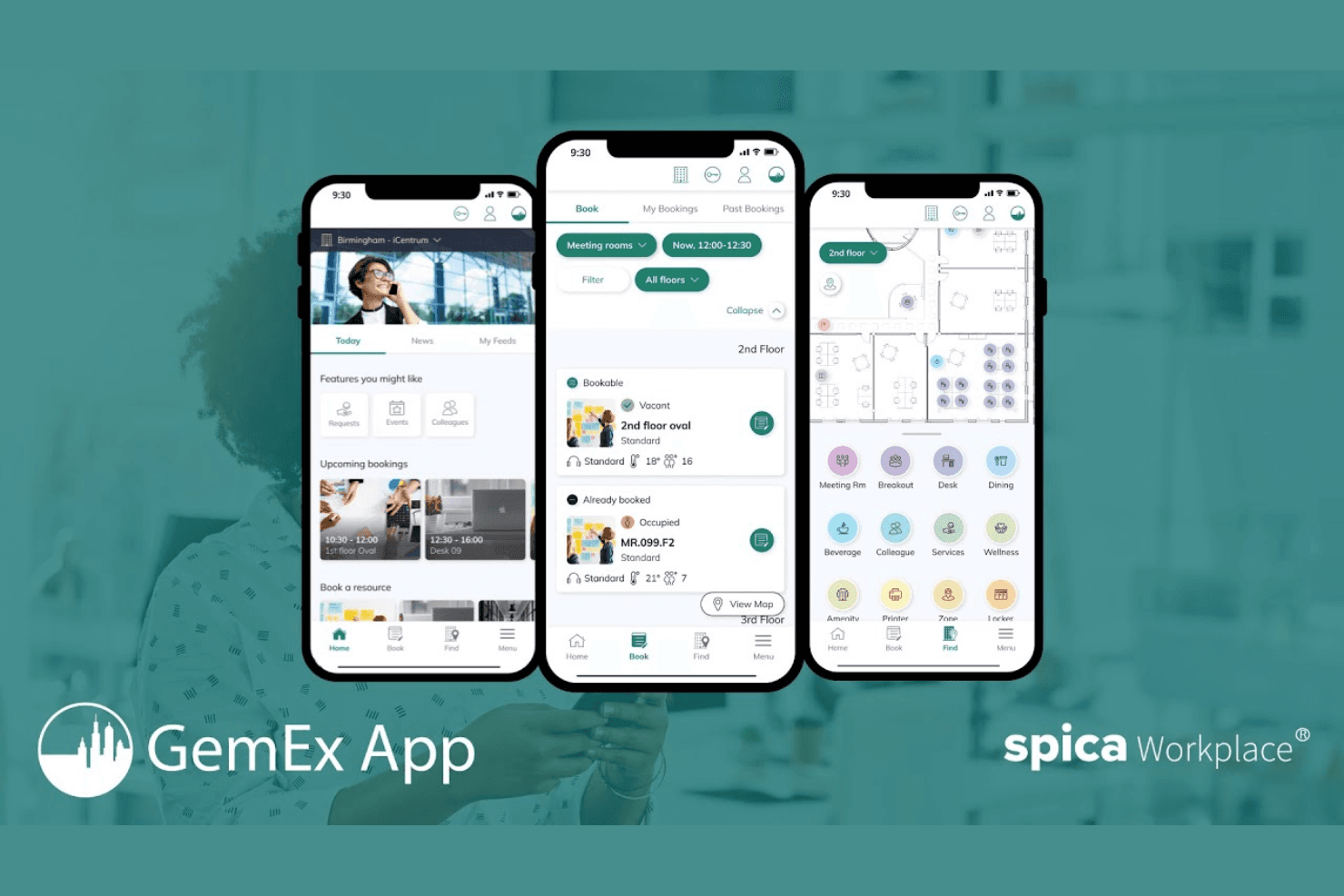
The GemEx App home, booking and floor-plan screens for finding and reserving workplace resources. GemEx App is a workplace experience platform from Spica Technologies that helps facilities teams, office managers, and employees handle desk and room booking, visitor management, occupancy analytics, and workplace engagement in one place.
Who Is GemEx App Best For?
GemEx App is a strong fit for facilities and office managers who want to combine desk and room booking with employee engagement tools in a single workplace app.
Why I Picked GemEx App
I picked GemEx App as one of the best because it goes beyond desk booking to actively bring employees into the workplace experience. I love how the Pro plan layers in news feeds, event listings, and a feedback module, so employees aren't just reserving a desk but staying connected to what's happening in the office. The colleague finder lets people book near specific teammates, which makes coordinating in-person days feel intentional rather than accidental.
GemEx App Key Features
- Automated check-in and auto-release: Unclaimed desk bookings are automatically released after a configurable period, with notifications sent to the employee.
- Visitor management: Hosts can pre-register visitors, set visit durations, reserve parking or meeting rooms, and receive real-time arrival notifications.
- FM service requests: Employees can raise facilities requests, attach photos, and tag a location, while administrators manage requests with SLA and cost-centre settings.
- Occupancy analytics with heatmaps: The platform surfaces real-time and historical occupancy data through charts, heatmaps, and custom taxonomy filters across an entire estate.
GemEx App Integrations
GemEx App lists 15+ integrations, including Microsoft Outlook, Microsoft 365, Google Workspace, Microsoft Teams, Power BI, Tableau, Jira, Slack, and access-control and occupancy platforms. It also provides an API for custom integrations.
Pros and Cons
Pros:
- Feedback tools invite employee participation
- Resource reservations consolidate workplace tasks
- Live desk availability aids space planning
Cons:
- Hybrid scheduling lacks approval and sync
- Occupancy reports can be hard to navigate
Learn more about GemEx App: Best for enforcing desk booking rules
- 14-day free trial + free demo available
- From $99/month (billed annually)
Visit WebsiteCustomer Rating:4.8/5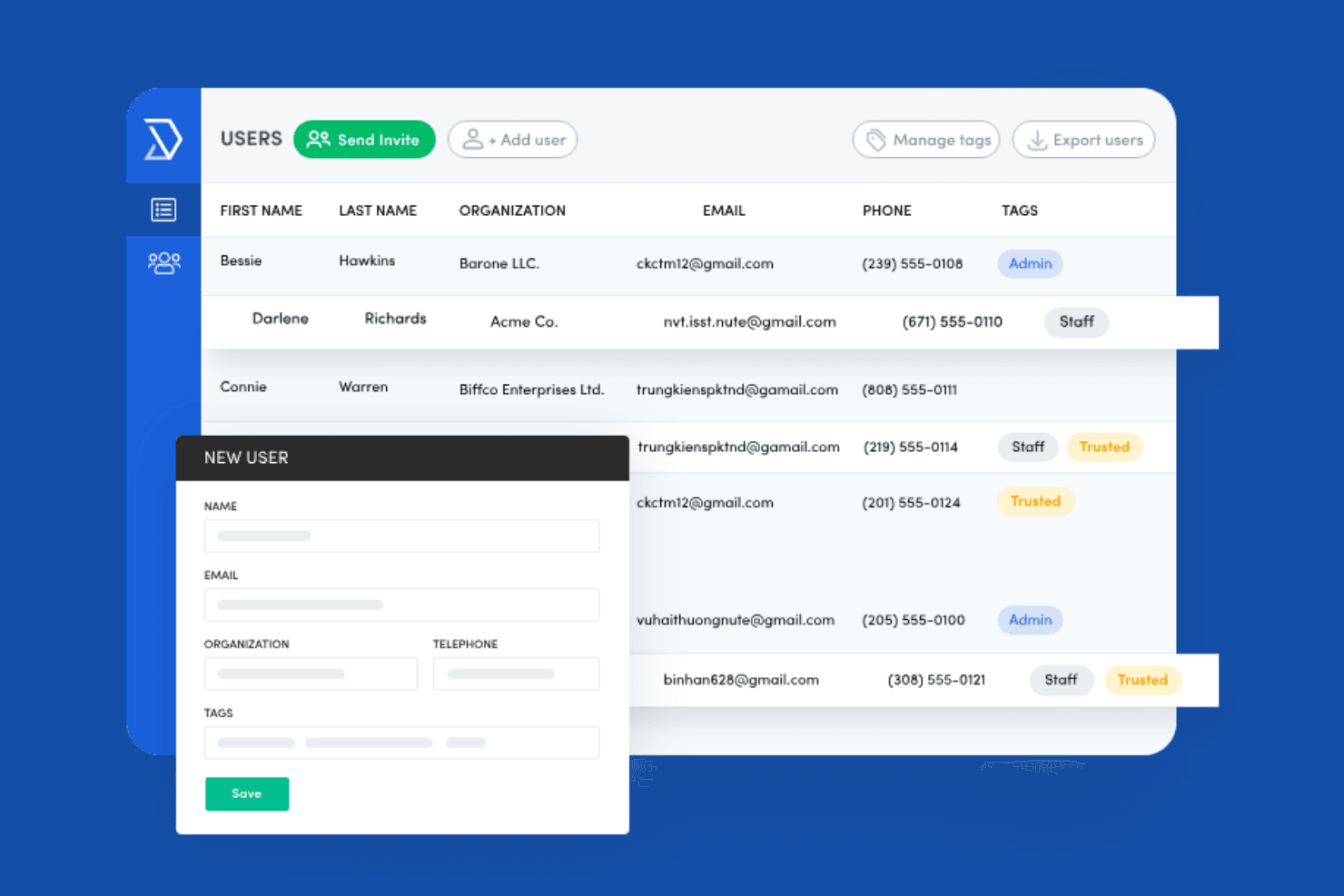
User management screen with invitations, tags and exportable user lists. Skedda is a desk and room booking platform built for office managers, facilities teams, and HR professionals who need to control space access, track attendance, and give employees a visual, self-service way to reserve workspaces.
Who Is Skedda Best For?
Skedda is a strong fit for office managers and facilities teams who need granular control over how desks, rooms, and visitor access are managed across one or more locations.
Why I Picked Skedda
I picked Skedda as one of the best because visitor management is genuinely built into how the platform works, not bolted on as an afterthought. I can schedule visits with specific hosts, import up to 500 visitors via CSV, and let guests check in on a reception tablet using their phone's QR scanner. Hosts get an email the moment their visitor arrives, and I can pull Breakdown exports that include exact check-in and check-out timestamps for every guest.
Skedda Key Features
- Interactive floor plans: Users can view live desk and room availability directly on a custom office map and book spaces from it in real time.
- Booking rules engine: Administrators can set eligibility conditions, quotas, booking windows, approval workflows, and buffer times to control who can reserve which spaces and when.
- Two-way calendar sync: Bookings sync with Microsoft 365 and Google Workspace, keeping calendar events and space reservations aligned across both platforms.
- Check-in and auto-release: Employees confirm attendance via QR code, Wi-Fi detection, or the mobile app, and unclaimed bookings are automatically released back to the pool.
Skedda Integrations
Skedda lists 22 integrations, including native integrations with Microsoft 365, Google Workspace, Microsoft Teams, Slack, Zoom, Webex, Okta, and Microsoft Entra ID. It offers a beta REST API and webhooks, plus Zapier.
Pros and Cons
Pros:
- Visitor exports include check-in and check-out times
- Check-in rules help reclaim no-show desks
- Interactive maps show live desk availability
Cons:
- Reporting depth can fall short for teams
- Colleague visibility requires individual mobile searches
 Best for deskless teams
- Free plan + 14-day free trial + free demo available
- From $29/month (billed annually)
Visit WebsiteCustomer Rating:4.6/5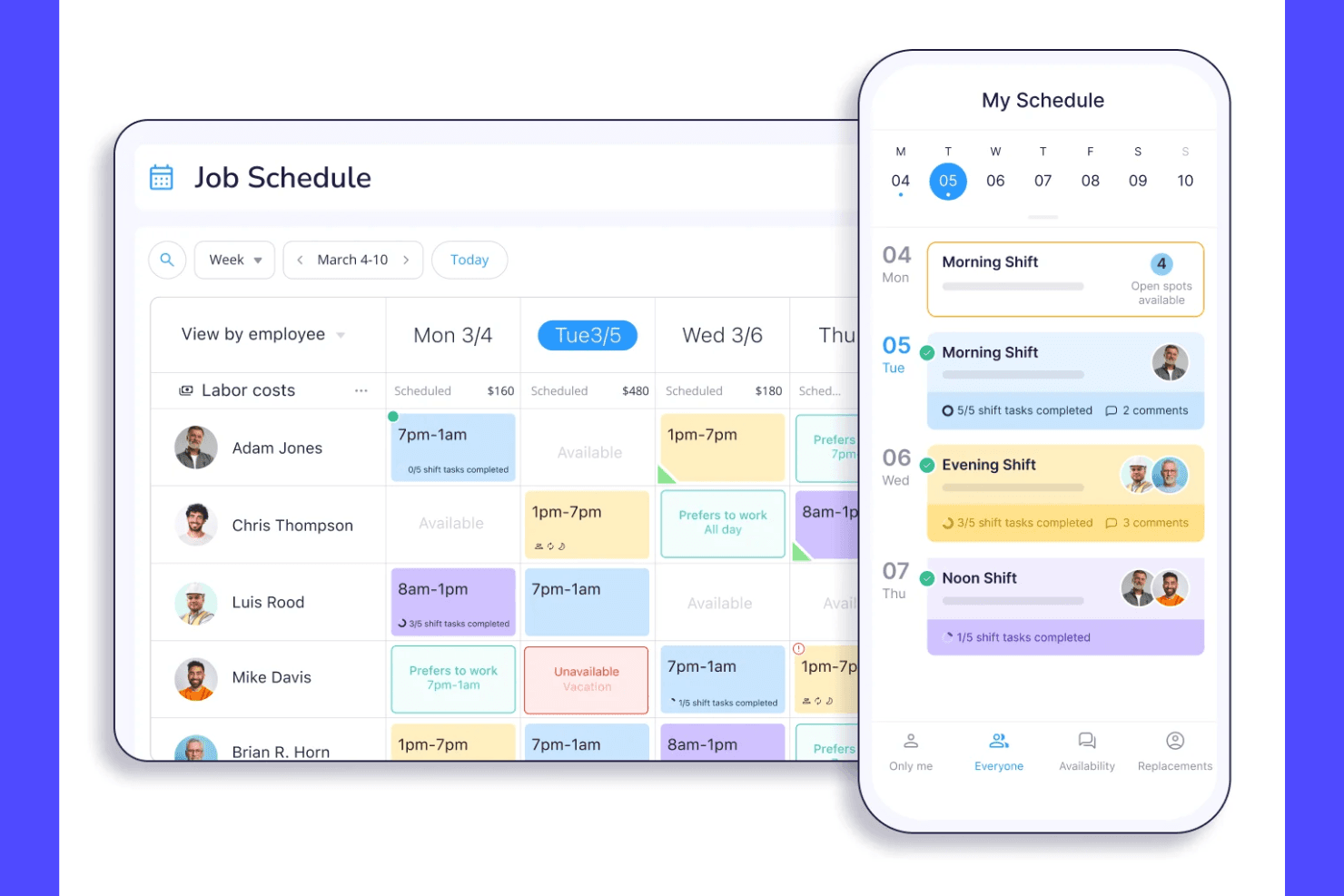
Connecteam's scheduling views: weekly shift grids on desktop and a mobile My Schedule view. Connecteam is a workforce management app built for frontline and deskless teams that brings scheduling, time tracking, and team communication together in one mobile-first platform.
Who Is Connecteam Best For?
Connecteam suits frontline and deskless teams that need mobile-first scheduling, time tracking, and communication in one place.
Why I Picked Connecteam
I picked Connecteam as one of the best because it's purpose-built for frontline and deskless teams that rarely sit at a desk. Its mobile-first scheduling lets managers publish shifts and have them sync directly to each worker's phone calendar, while the digital time clock captures clock-in and clock-out with location tracking. For teams managing field crews, retail staff, or distributed service workers, that combination replaces a lot of manual coordination.
Connecteam Key Features
- In-app team chat: A built-in messaging channel lets managers and workers send direct messages or group announcements without leaving the app.
- Digital forms and checklists: Teams can complete inspection reports, safety checklists, and task sign-offs directly from their phones.
- Employee task management: Managers can assign, track, and follow up on individual tasks with due dates and status updates in real time.
- Training and onboarding courses: Admins can build and assign step-by-step training modules to new hires or existing staff from within the platform.
Connecteam Integrations
Connecteam offers calendar integrations with Google Calendar, Microsoft Outlook, and Apple Calendar for individual published shifts. Native integrations beyond calendar syncing, API availability, and a total integration count aren’t clearly documented.
Pros and Cons
Pros:
- Team chat keeps frontline workers connected
- Shift scheduling supports deskless teams
- Mobile clock-ins give attendance visibility
Cons:
- No workplace occupancy or space analytics
- No desk or room booking
Outras alternativas ao Kadence
Eis algumas alternativas adicionais ao Kadence que não entraram na minha lista final, mas que ainda vale a pena conhecer:
- 11EdenBest for internal ticketing
- 12TacticBest for hybrid models
- 13OfficelyBest for staged Kadence WorkOps migrations
- 14OfficeSpaceBest for AI-driven insights
- 15RobinBest for office coordination
- 16SpaceIQBest for space optimization
- 17EnvoyBest for visitor management
- 18TeemTeem
- 19WorkplaceBest for social collaboration
How I Evaluate Kadence Alternatives
I split my evaluation into two layers: baseline features every tool must have—like desk booking and team scheduling—and the differentiators that matter most for HR and workplace teams.
Core Functionality (Table Stakes For This List)
When I'm selecting tools for my list, I rank each one on a scale from 0 (does not offer the functionality) to 5 (excels in this area) for each core functionality listed below. Then, I calculate the tool's total score into a percentage. Each tool needs to achieve a minimum total score of 65% to be considered for inclusion.
- Desk & Room Booking: I evaluate whether employees can reserve desks, hot desks, and meeting rooms with real-time availability—including recurring reservations and check-in workflows.
- Hybrid Schedule Coordination: Teams need a way to set and share weekly in-office or remote days, so I look for schedule-setting tools that help align collaboration days.
- Team Visibility & Directory: I check for a searchable view that shows where colleagues are working on a given day, making it easy to plan in-person time with specific people.
- Workplace Analytics & Reporting: Good space utilization data matters, so I look for dashboards covering occupancy rates, no-show trends, and booking patterns across sites.
- Interactive Floor Plans: Visual maps that let employees browse available desks by floor, zone, or neighborhood make a real difference in adoption, so I evaluate map quality closely.
- HR & Collaboration Integrations: I look for native connections to tools like Slack, Microsoft Teams, Google Calendar, and Outlook, plus SSO and HRIS sync for automated provisioning.
Once I have a list of tools that meet this criteria, I consider what sets each platform apart.
Differentiating Factors (What Sets Vendors Apart)
Here's how I compare and contrast different vendors:
Standout Features
I pay close attention to meeting room intelligence—features like ghost meeting detection and auto-release of unused rooms save real capacity in busy offices. Neighborhoods and zoning capabilities also matter, especially for HR teams assigning departments to specific floors or areas to keep collaboration organic. Visitor management is another differentiator I evaluate, since many workplace teams handle guest check-ins, host notifications, and compliance workflows alongside daily space coordination.
Beyond Features
Pricing model matters here—I look at whether vendors charge per user, per desk, or per resource, since the right structure depends on your headcount-to-desk ratio. Implementation support is another key factor; rolling out a hybrid workplace tool often requires floor plan digitization and change management help, so I evaluate onboarding resources closely. Security and compliance posture also carries weight, especially for HR-owned deployments where employee data flows through the platform daily.
Porquê procurar uma alternativa ao Kadence?
Embora o Kadence seja uma boa opção de software de gestão do local de trabalho, existem várias razões pelas quais alguns utilizadores procuram soluções alternativas. Poderá estar à procura de uma alternativa ao Kadence porque…
- Precisa de mais opções de personalização
- A sua equipa precisa de acesso móvel
- Quer uma melhor integração com as ferramentas existentes
- Precisa de uma solução para uma organização de maior dimensão
- A sua equipa trabalha em vários locais
- Procura funcionalidades avançadas de análise
Se alguma destas situações lhe parece familiar, veio ao lugar certo. A minha lista inclui várias opções de software de gestão do local de trabalho mais adequadas para equipas que enfrentam estes desafios com o Kadence e procuram soluções alternativas.
Funcionalidades
Eis algumas das principais funcionalidades do Kadence, para o ajudar a comparar as ofertas das soluções alternativas:
- Gestão do local de trabalho: Fornece ferramentas para a gestão do espaço, o acompanhamento da ocupação e a gestão de visitantes, para manter o seu escritório a funcionar sem problemas.
- Envolvimento dos colaboradores: Reforça a colaboração com assistentes de IA e ajuda a organizar eventos no local de trabalho, mantendo a sua equipa ligada.
- Soluções de trabalho híbrido: Disponibiliza sistemas de reserva de secretárias e salas, bem como gestão de horários de trabalho, para acomodar modelos de trabalho flexíveis.
- Otimização imobiliária: Fornece informações que melhoram a utilização do espaço e ajudam a maximizar os seus investimentos imobiliários.
- Ferramentas de coordenação: Utiliza agendamento inteligente e conformidade com as políticas para melhorar a colaboração e a cultura do local de trabalho.
- Integrações perfeitas: Compatível com plataformas como o Microsoft Teams e o Slack, garantindo operações fluidas em toda a sua infraestrutura tecnológica.
- Sucesso do cliente: Utilizado por mais de 300 000 pessoas, com poupanças imobiliárias comunicadas e experiências de trabalho melhoradas.