

Manter a sua equipa empenhada e satisfeita é um desafio. As ferramentas de IA para retenção de colaboradores podem ajudá-lo a enfrentá-lo, utilizando a IA para compreender e responder às necessidades da sua equipa.
Estas ferramentas oferecem funcionalidades como análise preditiva e feedback personalizado, ajudando-o a identificar potenciais problemas antes de se tornarem grandes dificuldades. Também podem fornecer informações sobre a satisfação dos colaboradores e as oportunidades de progressão na carreira.
Enquanto pessoa que testou e analisou software de forma independente, procuro oferecer-lhe uma perspetiva imparcial sobre as melhores ferramentas disponíveis. Neste artigo, encontrará uma seleção das melhores ferramentas de IA para retenção de colaboradores, que podem ajudar a aumentar a motivação e a produtividade da sua equipa.
Porque pode confiar nas nossas recomendações de software
6,700+
Reviews
20
Industry experts
16+
Evaluation factors
14
Years reviewing software
A nossa equipa testa e analisa software desde 2012. Como especialistas em RH, sabemos o quão difícil — e importante — é escolher o software certo.
Para este guia, avaliámos as ferramentas através de testes práticos e pesquisa independente, pontuando-as de acordo com os nossos critérios de seleção. Recorremos também a contributos de líderes de opinião do setor e de especialistas em RH no ativo.
As nossas análises refletem o juízo da nossa equipa editorial, e não um discurso de vendas.
Revisores especialistas:
- Phil GrayCOO
 Kim BehnkeHR Tech Editor & Analyst
 Josh BarkerPeople Ops Manager

Tabela de comparação das ferramentas de IA para retenção de colaboradores
Esta tabela de comparação resume os detalhes de preços das minhas principais escolhas de ferramentas de IA para retenção de colaboradores:
Score legend (out of 5)
- Excellent4.5–5
- Good4–4.4
- Average3–3.9
- Below average2–2.9
- Poor1–1.9
Sorted by: Default
| Tool | Starting Price | Website | |||||||
|---|---|---|---|---|---|---|---|---|---|
Best for predicting retention across global teams | Not rated | 4 | Not rated | Not rated | 2 | 1 | Not rated | $5/user/month Free demo available | Website |
Best for linking turnover to pay and hiring | 3.2 out of 5 | 5 | 4 | 2 | 4 | 3 | 1 | Pricing upon request Free demo available | Website |
Best for survey-informed manager follow-up | 3.5 out of 5 | 4 | 3 | 3 | 4 | 4 | 3 | Pricing upon request Free demo available | Website |
Best for manager-led follow-up on exit risk | 3.5 out of 5 | 4 | 3 | 3 | 4 | 4 | 3 | Pricing upon request Not available | Website |
Best for turning pulse insights into action | 3.2 out of 5 | 5 | 3 | 2 | 3 | 4 | 2 | Pricing upon request Free demo available | Website |
Best for Workday-linked turnover forecasting | 4.0 out of 5 | 4 | 4 | 4 | 4 | 5 | 3 | Pricing upon request Free demo available | Website |
Best for linking listening, action and learning | 4.3 out of 5 | 4 | 4 | 4 | 4 | 5 | 5 | Pricing upon request Free demo available | Website |
Best for linking lifecycle stages to retention | 3.5 out of 5 | 3 | 4 | 3 | 4 | 4 | 3 | Pricing upon request Free demo available | Website |
Best for putting attrition risk in context | Not rated | 5 | 4 | 4 | 4 | Not rated | 2 | Pricing upon request Free demo available | Website |
Best for people data in external AI tools | 3.3 out of 5 | 4 | 4 | 3 | 4 | 3 | 2 | Pricing upon request Free demo available | Website |


Análises das melhores ferramentas de IA para retenção de colaboradores
Seguem-se os meus resumos detalhados das melhores ferramentas de IA para retenção de colaboradores que entraram na minha lista. As minhas análises apresentam uma perspetiva detalhada sobre as principais funcionalidades, vantagens e desvantagens, integrações e casos de utilização ideais de cada ferramenta, para o ajudar a encontrar a melhor opção para si.
 Best for predicting retention across global teams
- Free demo available
- From $5/user/month
Visit WebsiteCustomer Rating:4.8/5
Deel’s 360° performance review dashboard summarizing goals, competencies, and multi-source feedback to inform retention strategies. Your efforts to retain great people get a real boost when AI helps you understand what your teams need, where they may be struggling, and how to support their long-term growth. Deel’s AI-powered HR and talent tools give you instant insights into performance, development, compensation, and day-to-day questions that shape the employee experience for your internationally distributed team.
Why I Picked Deel
I picked Deel because it brings AI directly into the core drivers of retention—performance feedback, development, compensation clarity, and everyday support. With tools that draft career paths, training plans, and review cycles for you, your team can focus more on actual coaching rather than administrative work. I also like how the AI surfaces insights from your people data to highlight patterns that influence engagement and satisfaction, especially for global teams. Together, these capabilities help you build a global work environment where employees feel recognized, supported, and fairly compensated.
Deel Key Features
In addition to the retention-focused capabilities I highlighted above, you’ll find these useful when evaluating AI employee retention tools:
- AI-generated career paths and training programs: Quickly produces personalized development materials that help employees see clear opportunities for growth.
- 360° feedback and custom performance cycles: Supports fair, structured reviews that reduce bias and strengthen trust in evaluations.
- Compensation insights tied to performance data: Connects pay decisions with review results to promote transparency and reward top performers.
- Global salary intelligence: Uses data from 150+ countries to help you maintain competitive, equitable pay ranges that support long-term retention.
Deel Integrations
Integrations include Workday, BambooHR, Greenhouse, Lever, Xero, QuickBooks, Slack, Microsoft Teams, Google Workspace, and SAP SuccessFactors.
Pros and Cons
Pros:
- Links compensation and performance to increase pay transparency
- 360° reviews strengthen fairness in performance evaluations
- AI drafts career paths and training plans to support growth
Cons:
- Global insights may feel excessive for single-country teams
- AI cannot replace meaningful manager-employee conversations
 Best for linking turnover to pay and hiring
- Free demo available
- Pricing upon request
Visit WebsiteCustomer Rating:4.9/5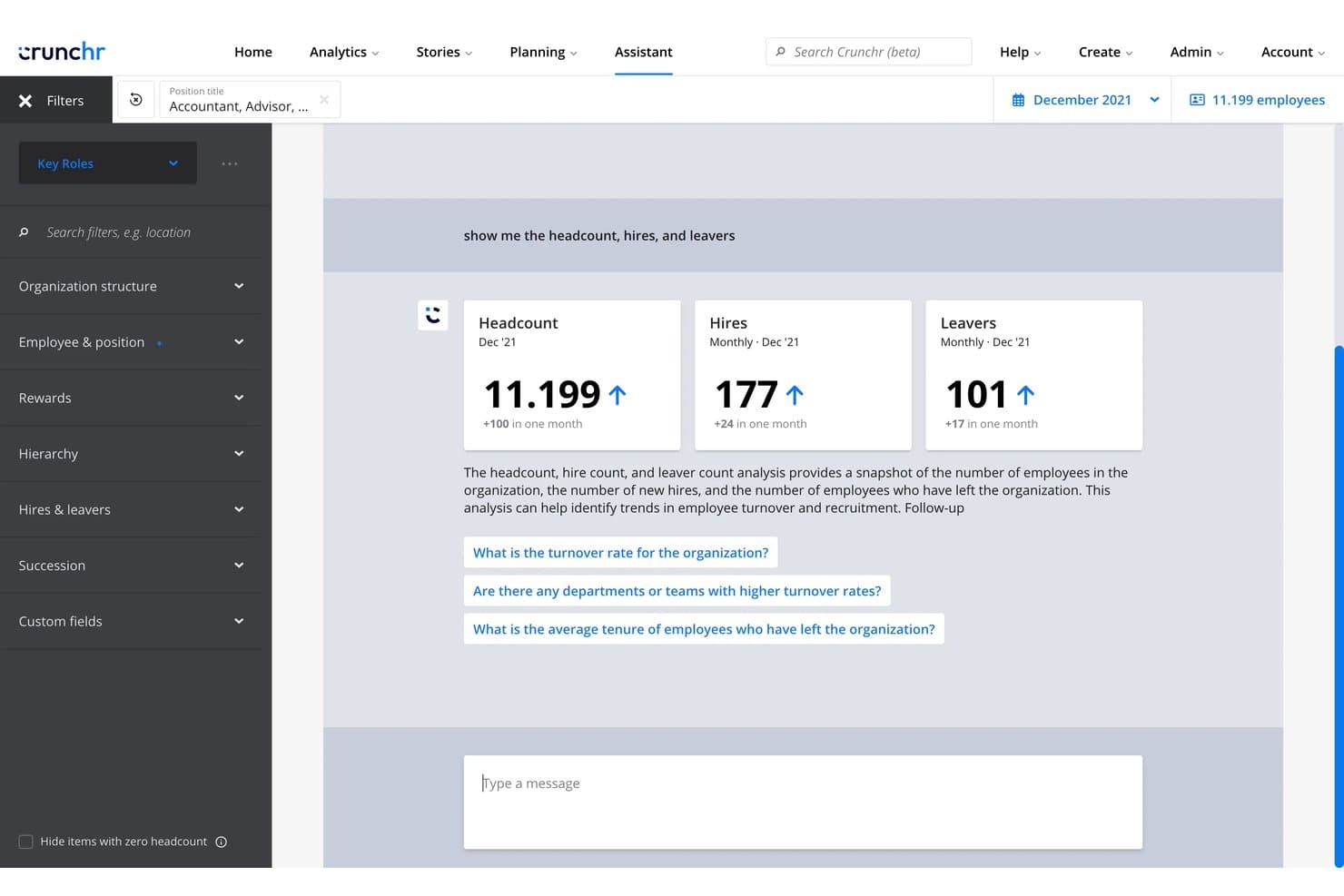
Crunchr's assistant reports headcount, hires and leavers, with follow-up questions on turnover and tenure. Crunchr is a people analytics platform that connects HRIS, payroll, and survey data to surface turnover drivers, engagement trends, and workforce cost insights through AI-assisted analysis and interactive dashboards.
Who Is Crunchr Best For?
Crunchr is a strong fit for HR analytics managers and CHROs at mid-market and enterprise organizations who need to connect HRIS, payroll, and engagement data to understand what's driving turnover.
Why I Picked Crunchr
I picked Crunchr as one of the best because it's the only tool on my shortlist that explicitly connects turnover data to pay and hiring outcomes in one view. The turnover drivers feature surfaces which workforce segments, by pay band, tenure, or hiring channel, are contributing to higher attrition, so you're not guessing where to focus. I also like that Ask Crunchr lets you interrogate those patterns in natural language, pulling sourced answers that follow your existing data permissions.
Crunchr Key Features
- Engagement and retention analysis: Compares engagement scores with voluntary turnover data, examining leavers and stayers across measures like relative pay and time in role.
- Ask Crunchr: Lets you ask natural-language questions about workforce data and returns sourced answers that respect your existing access permissions.
- Hiring channel analysis: Compares recruitment sources on outcomes including first-year turnover and time to productivity.
- Privacy-aware survey reporting: Suppresses small groups and applies complementary suppression to reduce the risk of identifying individual employees from survey results.
Crunchr Integrations
Crunchr has 150+ native integrations, including Workday, SAP SuccessFactors, Oracle Fusion HCM, Greenhouse, Qualtrics, CultureAmp, ADP, and Cornerstone, connecting HRIS, payroll, recruiting, survey, and learning data for retention analysis.
Pros and Cons
Pros:
- Lets people teams explore workforce trends
- Links engagement patterns to voluntary turnover
- Connects turnover with pay and hiring outcomes
Cons:
- No proactive alerts for managers
- No individual employee attrition risk scores
Learn more about Crunchr: Best for survey-informed manager follow-up
- Free demo available
- Pricing upon request
Visit WebsiteCustomer Rating:4.5/5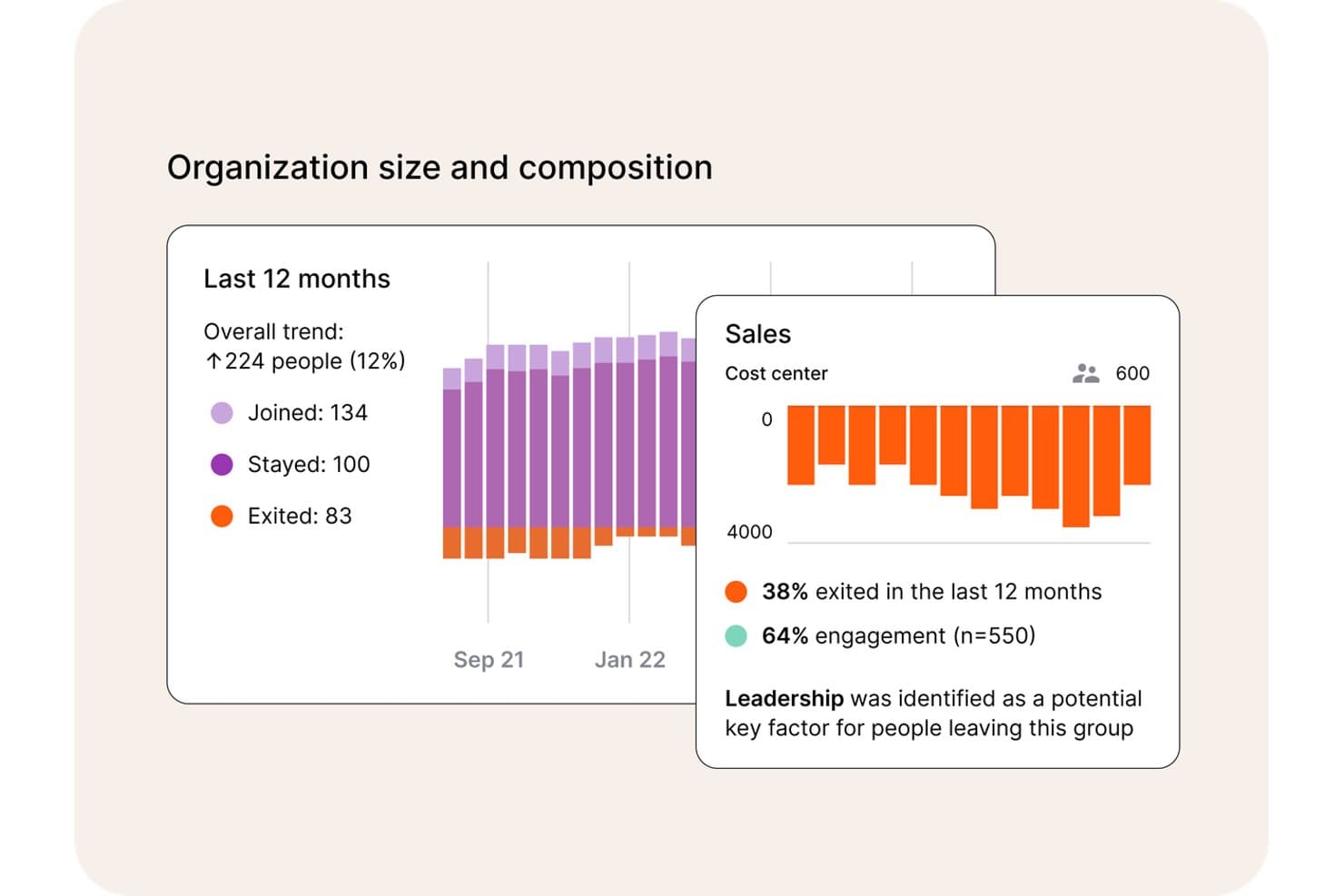
Culture Amp's Engage retention insights track joiners, stayers, and leavers, and flag factors linked to exits. Culture Amp is an employee experience platform that uses AI and engagement survey data to surface turnover risk, identify at-risk employee groups, and give managers AI-driven coaching and action plans to improve retention.
Who Is Culture Amp Best For?
Culture Amp is a strong fit for mid-size to enterprise HR teams that run regular engagement surveys and want managers to act on the results, not just read them.
Why I Picked Culture Amp
I picked Culture Amp as one of the best because it closes the gap between survey data and manager action better than most tools in this space. When a survey closes, AI Coach surfaces the results directly to managers and generates coaching prompts and action plans based on what their team actually said. I also like that Turnover Risk ties forward-looking risk signals to those same survey insights, so managers aren't just reading scores—they're getting context on which groups are at risk and why.
Culture Amp Key Features
- Retention Insights dashboard: A daily-updated dashboard that combines HRIS and survey data to surface turnover and retention metrics filtered by demographic group.
- Significant Turnover testing: Uses a statistical test to identify groups with significantly higher turnover than a reference group, based on 12 months of exit data.
- Pulse surveys: Recurring, science-backed surveys that track how organizational changes affect engagement, retention, and productivity over time.
- Industry benchmarks: Compares your survey results against regional and industry peers to show how your team's engagement stacks up against external norms.
Culture Amp Integrations
Culture Amp offers integrations with Workday, BambooHR, Gusto, Slack, and Microsoft Teams for employee and survey data workflows. It also provides an API for custom integrations.
Pros and Cons
Pros:
- Peer benchmarks contextualize engagement trends
- Manager coaching turns survey findings into action
- AI summarizes survey comments into themes
Cons:
- Small cohorts miss turnover-risk analysis
- Risk insights refresh nightly, not continuously
Learn more about Culture Amp: Best for manager-led follow-up on exit risk
- Not available
- Pricing upon request
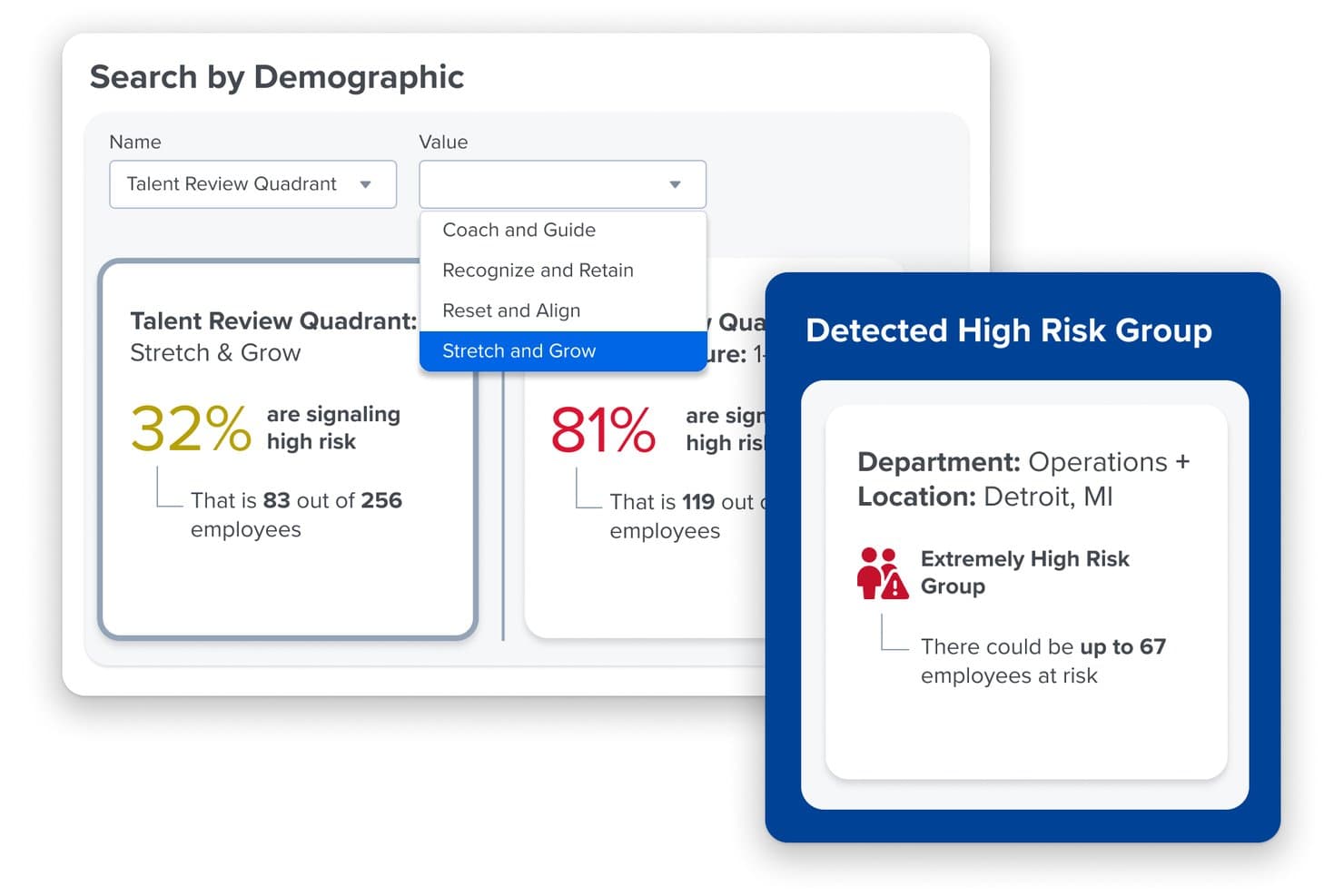
Quantum Workplace Retention Radar flagging a high-risk employee group in Detroit operations. Quantum Workplace is an AI-powered employee engagement and retention platform that connects surveys, flight-risk predictions, performance tracking, and people analytics to help HR teams identify and act on turnover risk.
Who Is Quantum Workplace Best For?
Quantum Workplace is a strong fit for HR teams that want managers actively involved in acting on retention risk, not just viewing it.
Why I Picked Quantum Workplace
I picked Quantum Workplace as one of the best because of how directly it puts retention risk in managers' hands. Retention Radar flags at-risk groups using flight-risk predictions built from engagement survey responses and tenure data, then surfaces Topics of Concern alongside AI-generated Suggested Actions so managers know exactly what to do next. I especially like the Group Owner feature, which lets HR delegate retention visibility to specific managers without opening up the full platform.
Quantum Workplace Key Features
- Retention Radar turnover view: Tracks termination data across the last four complete quarters plus the current quarter to date, giving HR teams a rolling picture of turnover trends by demographic group.
- People Analytics dashboard: Combines turnover rate reporting, text analytics, and customizable filters so HR teams can drill into which employee segments are most at risk.
- Lifecycle surveys: Collects feedback at key milestones—new hire, stay, and exit—so you can spot retention signals at each stage of the employee journey.
- HRIS integrations: Syncs employee and demographic data from platforms like Workday, BambooHR, ADP, and UKG to keep group-level flight-risk analysis current.
Quantum Workplace Integrations
Quantum Workplace lists integrations with Workday, ADP, UKG, BambooHR, SAP, Oracle HCM Cloud, Dayforce, and Paylocity. It also supports single sign-on through Okta and OneLogin; API availability isn't stated.
Pros and Cons
Pros:
- Engagement and performance workflows share context
- Manager actions connect directly to risk drivers
- AI comment summaries surface retention themes
Cons:
- Exit-survey setup can involve many steps
- Flight-risk predictions lack published validation metrics
Learn more about Quantum Workplace: Best for turning pulse insights into action
- Free demo available
- Pricing upon request
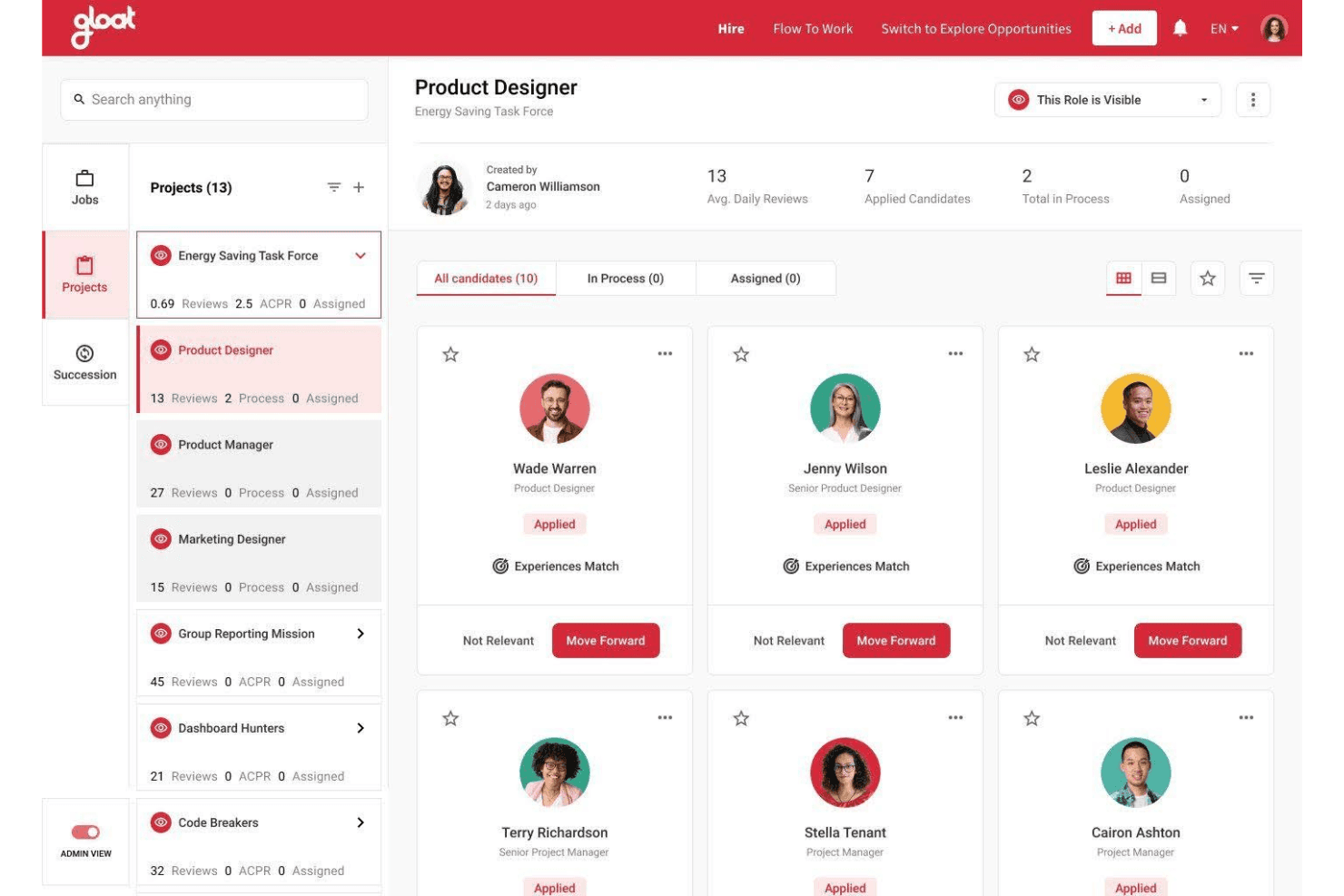
Gloat uses AI to match employees with internal career opportunities. Synq (formerly Gloat) is an AI-native HCM platform that combines pulse surveys, engagement-driver analysis, attrition-risk signals, and internal mobility tools to help HR teams monitor workforce sentiment and act on retention data.
Who Is Gloat Best For?
Gloat is a strong fit for people operations teams at mid-to-large enterprises that already run pulse surveys but struggle to translate employee feedback into concrete follow-up actions.
Why I Picked Gloat
I've included Gloat in my top picks because it's one of the few tools that actually closes the loop between hearing from employees and doing something about it. I love that its engagement-driver analysis doesn't just surface themes but ranks them, so you know which levers matter most before assigning follow-up actions. Synq (formerly Gloat) can then draft those actions, route them to managers, and track them to completion directly from engagement findings.
Gloat Key Features
- Pulse survey follow-up automation: Synq sends pulse surveys through Slack, Teams, or Copilot and automatically follows up with employees who haven't responded.
- Attrition-risk signals: Synq identifies employees showing early signs of potential departure and alerts their managers with the likely drivers.
- Natural-language people-data queries: HR teams can ask plain-language questions about turnover, headcount, or engagement and get sourced charts from live data.
- Skills-based internal mobility matching: Synq matches employees to open roles, projects, and mentors using a skills graph that includes adjacent skill capabilities.
Gloat Integrations
Gloat offers 51 native integrations, including Workday, ADP, SAP SuccessFactors, UKG, BambooHR, HiBob, Slack, Microsoft Teams, and Okta. It also supports API, MCP, and A2A connections for custom integrations.
Pros and Cons
Pros:
- Matches adjacent skills to internal roles
- Ranks engagement drivers and tracks follow-up actions
- Surfaces overlooked internal career opportunities
Cons:
- No industry retention benchmarks or dedicated dashboards
- Attrition signals lack documented scoring validation
Learn more about Gloat: Best for Workday-linked turnover forecasting
- Free demo available
- Pricing upon request
Visit WebsiteCustomer Rating:4.5/5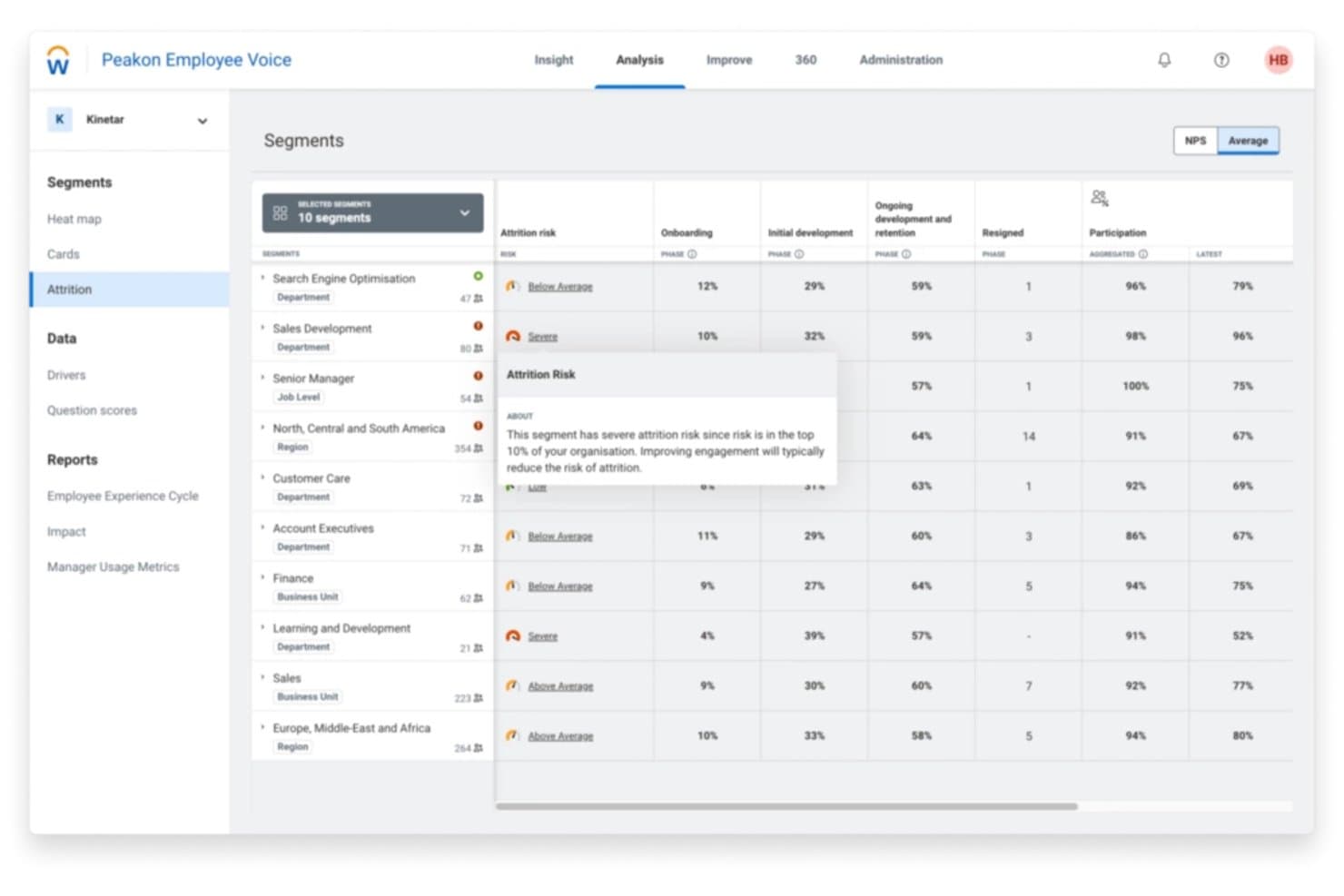
Peakon's Attrition view flags segments at severe or above-average risk, helping HR target retention efforts. Workday Peakon Employee Voice is an AI-powered employee listening platform that combines continuous sentiment analysis, attrition risk forecasting, and engagement benchmarking with direct integration into Workday's HR data.
Who Is Workday Peakon Employee Voice Best For?
It's a strong fit for enterprise HR teams already running Workday HCM who want turnover forecasting and engagement data in one connected system.
Why I Picked Workday Peakon Employee Voice
Workday Peakon Employee Voice earns its spot on my shortlist because it's the only tool I've seen that connects live sentiment data directly to Workday HCM records, so attrition risk forecasting isn't working off stale data. I particularly like how the AI surfaces turnover risk by department and location in real time, letting HR teams act before a resignation lands. The True Benchmark feature also adjusts for demographic factors like age and geography, so you're comparing engagement against a fair baseline rather than a misleading average.
Workday Peakon Employee Voice Key Features
- Semantic Intelligence NLP: Natural language processing extracts meaning, sentiment, and themes from open-text employee feedback across 60+ languages.
- Always-on listening: Continuous feedback monitoring surfaces shifts in disengagement and burnout drivers as they happen, rather than at set survey intervals.
- Confidential two-way conversations: Managers and leaders can hold private, direct conversations with employees to follow up on feedback in a secure channel.
- Workday Prism Analytics integration: Employee feedback data feeds directly into Workday Prism Analytics as a delivered data source for broader workforce reporting.
Workday Peakon Employee Voice Integrations
Workday Peakon Employee Voice offers native integrations with Workday HCM, Workday Prism Analytics, Microsoft Teams, Slack, and Chrome. A RESTful API supports custom integrations.
Pros and Cons
Pros:
- Benchmarks engagement against demographic peers
- Turns feedback into manager action plans
- Surfaces engagement issues before resignations
Cons:
- Retention gains depend on leadership follow-through
- Small-team anonymity can feel uncertain
Learn more about Workday Peakon: Best for linking listening, action and learning
- Free demo available
- Pricing upon request
Visit WebsiteCustomer Rating:4.5/5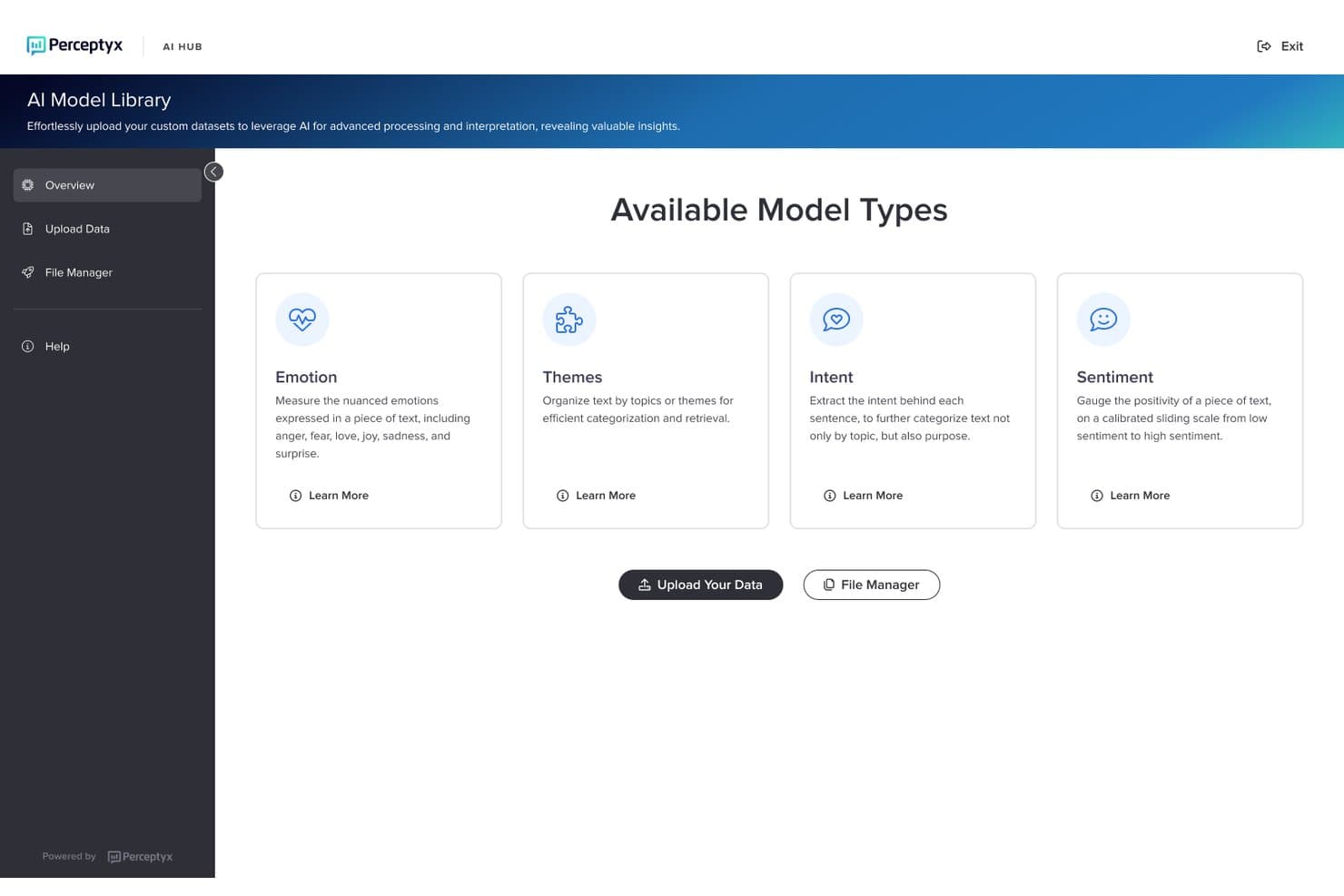
Perceptyx AI Hub's Model Library offers Emotion, Themes, Intent, and Sentiment analysis models for uploaded employee text data. Perceptyx is an AI-driven employee listening and people activation platform that connects continuous multi-channel surveys, lifecycle feedback, 360 reviews, AI-powered nudges, and conversational learning to surface retention risk and drive manager action.
Who Is Perceptyx Best For?
Perceptyx is a strong fit for large organizations with dedicated people analytics functions that need to connect employee listening, manager coaching, and workforce learning in one place.
Why I Picked Perceptyx
Perceptyx earns its spot on my shortlist because it's one of the few platforms that genuinely closes the loop between hearing what employees say and doing something about it. I particularly like how the Nudge Agent takes signals from listening data and pushes targeted behavioral prompts to managers through Slack or Teams, so retention risk doesn't just sit in a dashboard. The AI Coaching Agent then builds on that by turning 360 feedback and engagement signals into structured coaching conversations, connecting insight to capability-building in one native system.
Perceptyx Key Features
- Narrative Analysis Agent: Scans open-text survey responses at scale to surface recurring themes, sentiment patterns, and emerging concerns across your workforce.
- Lifecycle surveys: Automatically triggers listening at key employee milestones—onboarding, promotion, and exit—using HRIS data to schedule and distribute surveys.
- 360 feedback: Collects structured input from peers, direct reports, and supervisors using configurable competency frameworks and participant-nominated raters.
- Perceptyx MCP: Connects employee listening results and action plans directly to AI assistants like Microsoft Copilot, ChatGPT, and Claude, with permission-aware access controls.
Perceptyx Integrations
Perceptyx offers native integrations with Workday, SAP SuccessFactors, and Oracle HCM, plus integrations with UKG, Slack, and Microsoft Teams. Its API and webhooks connect with Power BI, Tableau, and Snowflake for custom retention analytics.
Pros and Cons
Pros:
- Connects coaching with listening and learning
- Surfaces retention drivers in employee comments
- Turns feedback into targeted manager action
Cons:
- Reporting drill-downs can feel limited or slow
- Survey setup can require extra steps
Learn more about Perceptyx: Best for linking lifecycle stages to retention
- Free demo available
- Pricing upon request
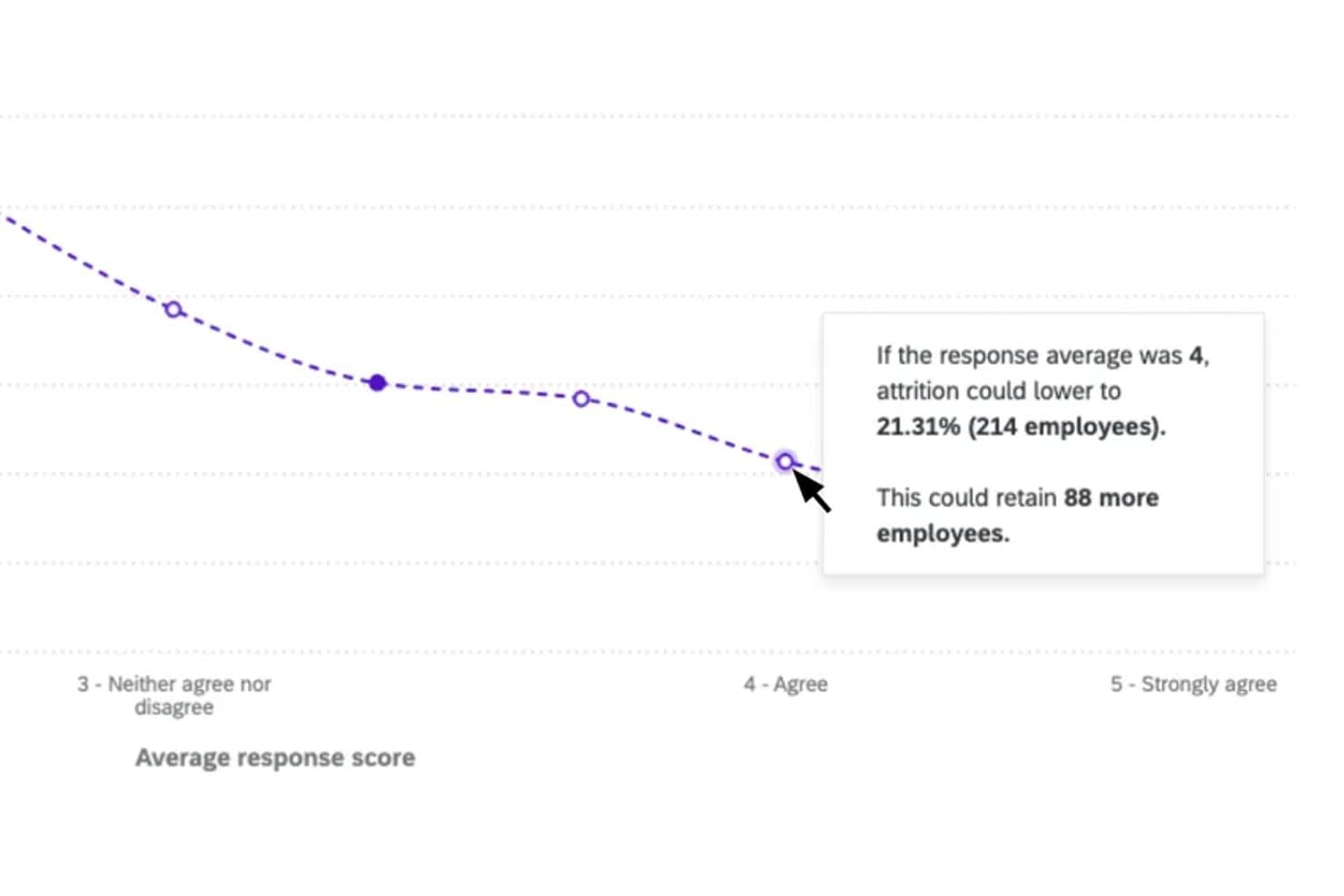
Qualtrics EmployeeXM attrition simulator projecting how higher engagement scores could retain more employees. Qualtrics EmployeeXM is an employee experience platform that uses AI-driven analytics, continuous listening, predictive flight-risk scoring, and lifecycle feedback to surface attrition drivers and retention insights across the employee journey.
Who Is Qualtrics EmployeeXM Best For?
Qualtrics EmployeeXM is a strong fit for enterprise HR teams and people analytics leaders who need to connect data across every stage of the employee journey to understand what's driving attrition.
Why I Picked Qualtrics EmployeeXM
I picked Qualtrics EmployeeXM because it's one of the few tools that connects what happens at every stage of the employee journey to actual attrition risk. I love how the Drivers of Attrition widget uses logistic regression to rank what's actually pushing people out, not just surface-level sentiment. Pair that with milestone listening at Day 1, 30, 60, and 90 days, and you can trace a retention problem back to its origin in onboarding.
Qualtrics EmployeeXM Key Features
- Pulse surveys: Runs frequent, science-backed surveys using 290+ pre-built questions to continuously capture employee sentiment between annual engagement cycles.
- Exit feedback collection: Automatically gathers exit interview data at the end of the employee lifecycle to surface root causes of departures.
- Attrition simulation widget: Models how changes to specific engagement drivers could shift attrition rates, using fields generated by the Drivers of Attrition analysis.
- HRIS integrations: Connects with Workday, SAP SuccessFactors, and ADP to unify workforce data with employee experience signals in a single view.
Qualtrics EmployeeXM Integrations
Qualtrics EmployeeXM integrates with Workday, SAP SuccessFactors, and ADP to connect HRIS and employee experience data. Public APIs and an SDK support custom integrations.
Pros and Cons
Pros:
- Flexible surveys support tailored employee listening
- Ranks statistically significant attrition drivers
- Connects onboarding, engagement, and exit signals
Cons:
- Employee data setup may require manual work
- Dashboard limits can constrain detailed analysis
Learn more about Qualtrics EmployeeXM: Best for putting attrition risk in context
- Free demo available
- Pricing upon request
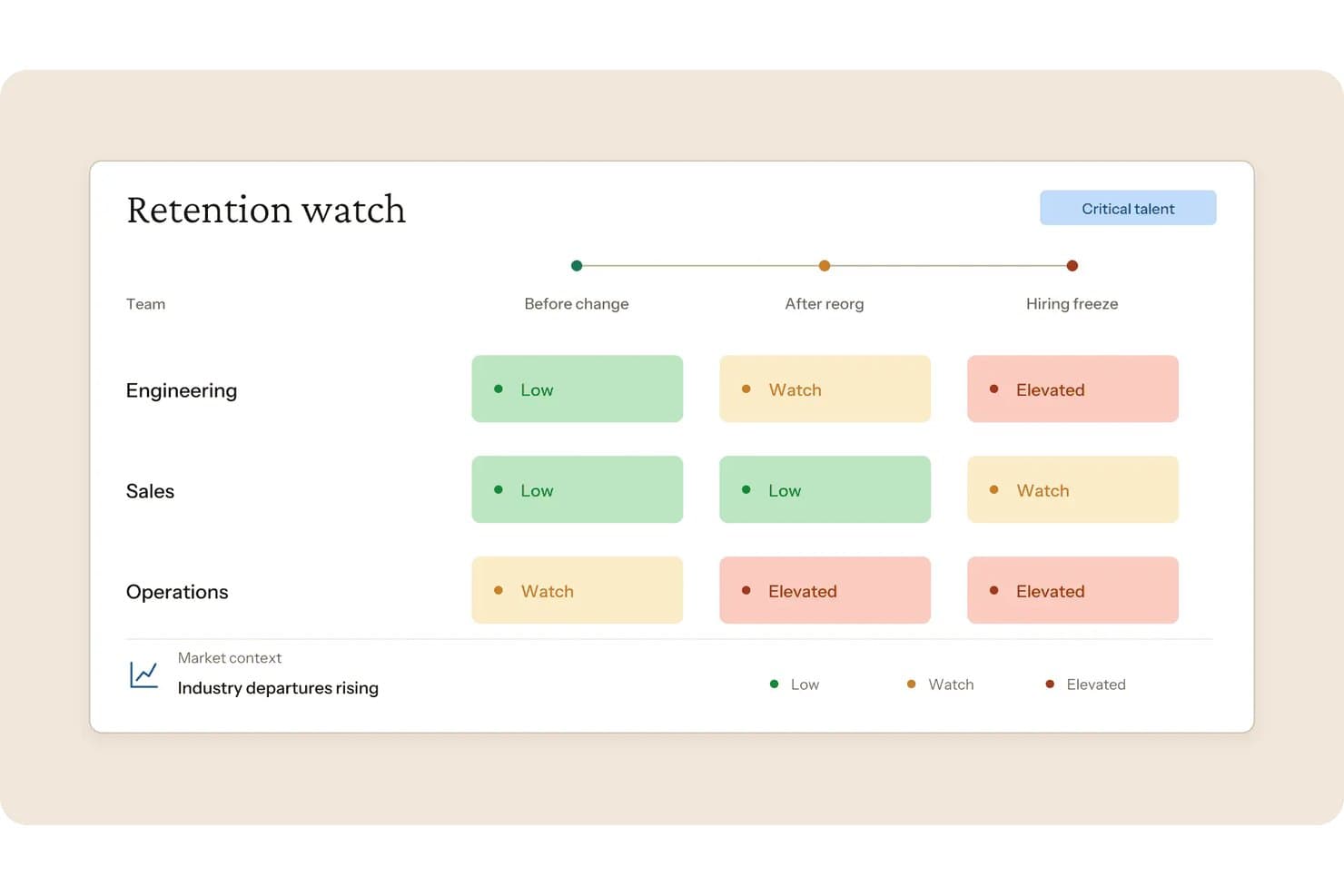
Visier's Retention watch view flags attrition risk by team across organizational changes and hiring freezes. Visier Workforce Insights is a people analytics platform that consolidates workforce data from across your HR systems and uses AI to surface flight-risk signals, attrition drivers, and retention insights benchmarked against a large enterprise dataset.
Who Is Visier People Best For?
Visier People is a strong fit for HR analytics managers and CHROs at large enterprises who need to contextualize attrition risk against benchmarks drawn from a wide dataset.
Why I Picked Visier People
Visier People earns its spot on my shortlist because it doesn't just flag who's at risk of leaving—it shows you why, and whether that rate is actually alarming given your industry and size. I find the benchmarking against 85,000+ enterprises genuinely useful here: if your attrition is 18%, Visier tells you whether that's a crisis or the norm for your sector. The AI-driven flight-risk signals tie specific factors like pay gaps and manager history to individual risk scores, so your retention investment goes to the people who matter most.
Visier People Key Features
- Bi-temporal workforce data model: Maps data from your HRIS, payroll, ATS, and other systems into a single governed model that preserves organizational history and structure.
- Plain-language workforce questions: Lets users ask questions in natural language and receive governed, source-cited answers without manual analysis.
- Retention program tracking: Supports running targeted retention programs for at-risk employee populations with manager guidance and outcome tracking.
- Governed intelligence distribution: Pushes workforce insights to managers and leaders across your org while enforcing role-based access controls.
Visier People Integrations
Visier People offers 20+ native integrations, including Workday, SAP SuccessFactors, Oracle Fusion, UKG Pro, Dayforce, BambooHR, Qualtrics, Medallia, and Microsoft Viva Glint. APIs, MCP, webhooks, and a Python SDK support custom connectivity.
Pros and Cons
Pros:
- Surface pay and manager-related flight risks
- Trace turnover by department and timing
- Benchmark attrition against enterprise workforce norms
Cons:
- Complex data setup can burden smaller teams
- No documented survey sentiment analysis
Learn more about Visier People: 10Best for people data in external AI tools
HiBob
- Free demo available
- Pricing upon request
Visit WebsiteCustomer Rating:4.5/5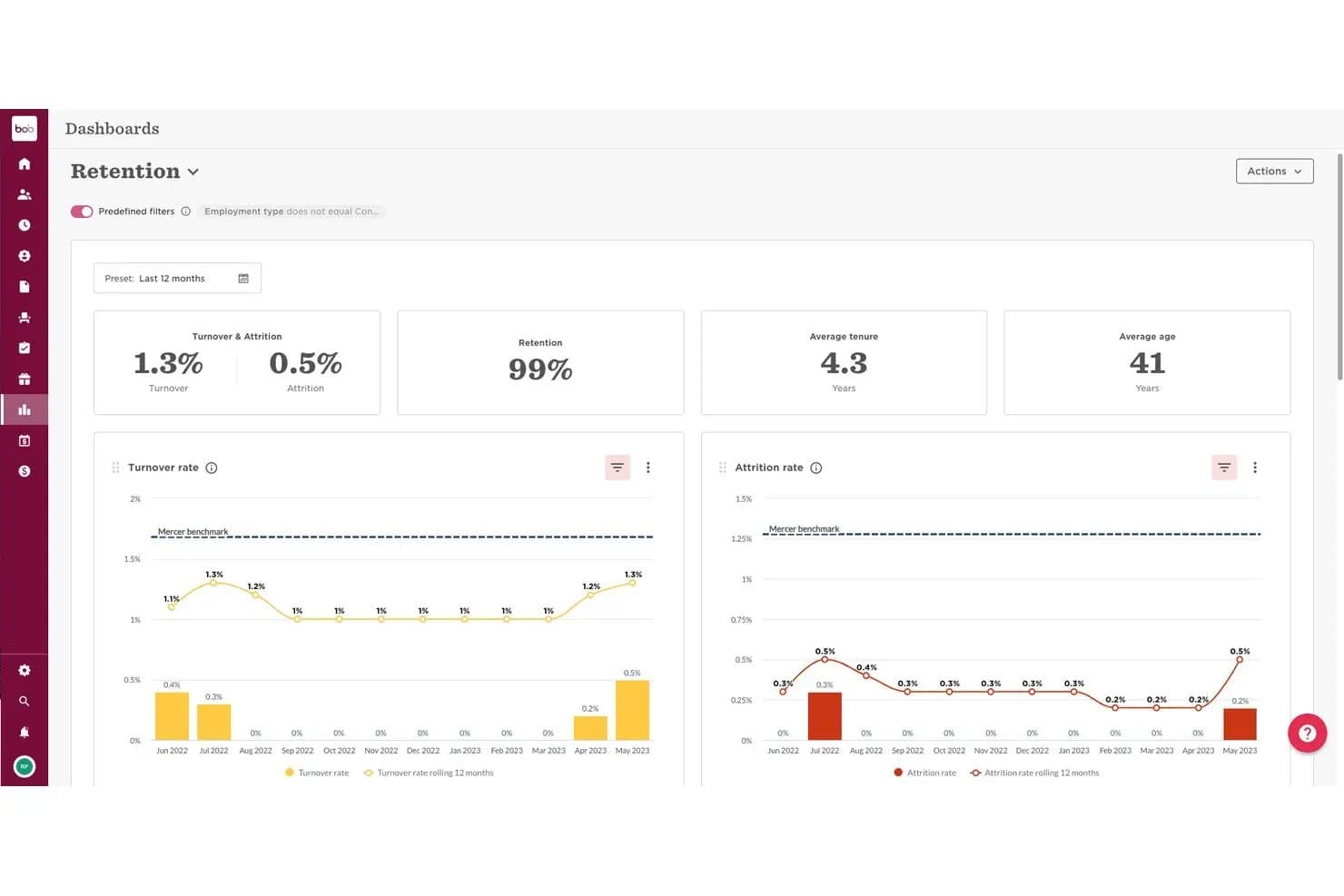
HiBob's Retention dashboard tracks turnover, attrition, and retention rates against industry benchmarks over time. Bob is an HCM platform that centralizes people data, workforce analytics, and AI-driven retention signals—including attrition risk scoring, engagement surveys, and succession planning—in a single system of record.
Who Is HiBob Best For?
HiBob is a strong fit for HR analytics teams that want to surface retention signals and people data inside the AI tools they're already working in.
Why I Picked HiBob
HiBob earns its spot on my shortlist because its MCP connector puts live Bob people data directly inside AI tools like ChatGPT and Claude, which is where a lot of HR teams are already doing their thinking. I particularly like that the Attrition Indicator tracks 13 named risk signals, including time since a salary increase and recent manager changes, so when I'm reviewing a flag in an AI chat, I'm looking at real, explainable context rather than a black-box score. That combination of structured retention signals and external AI accessibility is what sets Bob apart here.
HiBob Key Features
- Employee engagement surveys: Run DIY or pre-built surveys with anonymous responses, real-time analytics, and AI-powered theme and sentiment analysis.
- Succession planning: Map successors for critical roles and track readiness alongside retention risk indicators.
- Compensation cycle management: Set pay bands, run compensation cycles, and use AI to flag pay gaps and model equity scenarios.
- MCP connector for external AI tools: Links live Bob people data to supported tools like ChatGPT and Claude so you can query workforce context directly in those environments.
HiBob Integrations
HiBob offers native integrations with ADP, Paylocity, TriNet, and Xero through Payroll Hub, plus marketplace integrations such as Eletive and Slackbot HCM. Its Public HR API and webhooks support custom connections.
Pros and Cons
Pros:
- Adds survey sentiment to retention reviews
- Shows risk counts in exportable reports
- Explains risk with named employee signals
Cons:
- Risk labels need human context
- No documented proactive manager alerts
Outras ferramentas de IA para retenção de colaboradores
Eis algumas opções adicionais de ferramentas de IA para retenção de colaboradores que não entraram na minha lista, mas que vale a pena conhecer:
- 1115FiveBest for manager-led retention efforts
- 12WorkhumanBest for recognition-based retention insight
- 13EletiveBest for reaching deskless workers
- 14UKGBest for workforce insights in shift work
- 15One ModelBest for risk models across unified HR data
- 16OfficevibeBest for manager follow-through on engagement
Related Reviews
How I Evaluate AI Employee Retention Tools
To make this list, AI needs to handle real retention work, like scoring employees’ flight risk and analyzing feedback for dissatisfaction. From there, I evaluate three things. Core functionality carries the most weight, like integrating people data and tracking turnover trends. Then I look at standout features, like flight-risk benchmarking, and factors beyond features, like employee-data privacy and consent practices.
Core Functionality (Table Stakes For This List)
When I'm selecting tools for my list, I score each one on a scale from 0 (does not offer the functionality) to 5 (excels in this area) for each core functionality listed below. I then convert the total into a percentage to help assess each tool's overall fit, with extra weight on any functionalities I’ve deemed essential.
- Predictive Attrition Scoring (Essential): I look for AI-based scores drawing on multiple workforce signals, with views by team, role, or tenure to flag emerging flight risk.
- Sentiment & Engagement (Essential): I check whether AI surfaces themes in survey comments or pulse feedback, helping HR spot workload or manager concerns early.
- Risk Driver Identification: I assess whether tools show contributing patterns, such as workload or manager changes, by cohort rather than showing risk alone.
- Alerts & Recommendations: I look for contextual alerts and suggested follow-ups managers can use, such as a check-in after an engagement drop.
- People Data Integration: I check how HRIS, payroll, performance, and survey data connect, since fragmented records can distort retention analysis.
- Retention Analytics Dashboards: I evaluate filters for team, tenure, or role and whether dashboards track turnover trends and retention measures.
Once I have a list of tools that meet the criteria, I consider what sets each platform apart.
Differentiating Factors (What Sets Vendors Apart)
Here's how I compare and contrast different vendors:
Standout Features
I look for scenario simulation modeling, where HR leaders can test "what-if" adjustments like pay changes or workload shifts and see projected retention impact before committing resources. Bias and fairness monitoring matters just as much—I check whether vendors audit their models for demographic bias, since inequitable scoring creates legal and ethical risk. I also evaluate intervention outcome tracking, which closes the loop by measuring whether actions taken actually moved risk scores or turnover rates down.
Beyond Features
I evaluate how vendors handle employee data privacy—especially whether risk scores are anonymized at the team level and whether consent workflows meet GDPR and regional requirements. Model transparency matters just as much; I check if a vendor explains why someone is flagged high-risk, since opaque scores erode manager trust and create legal exposure. I also look at manager enablement resources like training guides and check-in templates, because even accurate predictions fail if frontline leaders don't act on them.
Como escolher ferramentas de IA para retenção de colaboradores
É fácil perder-se em listas extensas de funcionalidades e estruturas de preços complexas. Para o ajudar a manter-se concentrado enquanto avança no seu processo específico de seleção de software, apresentamos uma lista de verificação dos fatores a ter em conta:
| Fator | O que deve considerar |
|---|---|
| FatorEscalabilidade | O que deve considerarA ferramenta consegue acompanhar o crescimento da sua empresa? Considere se consegue suportar um aumento do número de utilizadores ou de dados sem perder desempenho. Procure sinais de escalabilidade contínua, como a ausência de períodos de inatividade durante o crescimento. |
| FatorIntegrações | O que deve considerarFunciona com os seus sistemas atuais? Verifique a compatibilidade com as suas ferramentas e plataformas de RH atuais. A falta de integrações pode levar ao isolamento dos dados e a ineficiências. |
| FatorPersonalização | O que deve considerarPode adaptá-la às suas necessidades? Determine se a ferramenta lhe permite ajustar definições e fluxos de trabalho para se adequarem aos seus processos específicos. Sistemas rígidos podem não satisfazer requisitos empresariais específicos. |
| FatorFacilidade de utilização | O que deve considerarÉ fácil de utilizar pela sua equipa? Avalie se a interface é intuitiva e fácil de navegar. Uma curva de aprendizagem acentuada pode atrasar a adoção e reduzir a eficácia. |
| FatorImplementação e integração inicial | O que deve considerarCom que rapidez pode começar? Avalie o tempo e os recursos necessários para implementar a ferramenta e integrar os utilizadores. Procure ferramentas com guias claros, apoio e um processo de configuração rápido. |
| FatorCusto | O que deve considerarEstá dentro do seu orçamento? Compare a estrutura de preços com o seu orçamento. Certifique-se de que não existem taxas ocultas e de que o custo corresponde ao valor fornecido. |
| FatorMedidas de segurança | O que deve considerarProtege os seus dados? Verifique as medidas de segurança da ferramenta, como a encriptação e os controlos de acesso, para proteger informações sensíveis dos colaboradores. |
| FatorDisponibilidade do apoio | O que deve considerarPode obter ajuda quando necessário? Verifique se o fornecedor oferece apoio 24 horas por dia, 7 dias por semana, e vários canais de assistência. Opções de apoio limitadas podem levar a períodos de inatividade prolongados ou a problemas por resolver. |
O que são ferramentas de IA para retenção de colaboradores?
As ferramentas de IA para a retenção de colaboradores são soluções de software que utilizam inteligência artificial para ajudar as empresas a compreender e melhorar a satisfação dos colaboradores e reduzir a rotatividade. Os profissionais de recursos humanos e os gestores utilizam normalmente estas ferramentas para obter informações sobre estratégias de retenção de colaboradores e avaliar o nível de envolvimento. As capacidades de análise preditiva, análise de sentimentos e feedback personalizado ajudam a identificar potenciais riscos de rotatividade e a melhorar o envolvimento dos colaboradores. De um modo geral, estas ferramentas fornecem informações e estratégias valiosas para manter uma força de trabalho estável e motivada.
Funcionalidades
Ao selecionar ferramentas de IA para a retenção de colaboradores, procure as seguintes funcionalidades principais:
- Análise preditiva: Utiliza a IA para prever a possível rotatividade de colaboradores, as tendências de desempenho e a preparação para promoções.
- Análise de sentimentos: Analisa o feedback dos colaboradores para avaliar o moral e a satisfação, fornecendo informações sobre a dinâmica das equipas.
- Feedback personalizado: Fornece feedback adaptado, baseado no desempenho, aos colaboradores para melhorar os seus planos de desenvolvimento.
- Análise das lacunas de competências: Identifica áreas em que os colaboradores podem melhorar, orientando os esforços de formação e desenvolvimento.
- Acompanhamento do envolvimento: Monitoriza os níveis de envolvimento ao longo do tempo para acompanhar as iniciativas de retenção.
- Planeamento de percursos profissionais: Traça possíveis percursos profissionais para os colaboradores, motivando-os com oportunidades claras de crescimento.
- Inquéritos automatizados: Envia inquéritos regulares para recolher o feedback dos colaboradores sem intervenção manual.
- Relatórios de informações em tempo real: Fornece dados atualizados ao minuto sobre as métricas de retenção, os níveis de envolvimento e o desempenho da força de trabalho, permitindo uma tomada de decisões e ajustes rápidos.
- Recomendações baseadas em IA: Sugere ações e estratégias com base na análise de dados para melhorar a retenção e a satisfação dos colaboradores.
Benefícios
A implementação de ferramentas de IA para a retenção de colaboradores proporciona vários benefícios à sua equipa e à sua empresa. Eis alguns dos que pode esperar:
- Redução da rotatividade: A análise preditiva permite identificar os colaboradores em risco e implementar estratégias proativas para os reter.
- Maior envolvimento: A análise de sentimentos fornece informações sobre o moral dos colaboradores, permitindo-lhe abordar preocupações e aumentar o envolvimento.
- Desenvolvimento direcionado de competências: O feedback personalizado apoia planos de crescimento adaptados para promover o desenvolvimento e a satisfação dos colaboradores.
- Alocação eficiente de recursos: A análise das lacunas de competências garante que os esforços de formação são direcionados para onde são mais necessários, maximizando a utilização dos recursos.
- Tomada de decisões estratégicas: Os relatórios em tempo real fornecem informações atualizadas, ajudando a tomar decisões rápidas e fundamentadas.
- Força de trabalho motivada: Um planeamento claro dos percursos profissionais ajuda os colaboradores a imaginar o seu futuro na empresa.
- Poupança de tempo: Os inquéritos automatizados e as recomendações baseadas em IA libertam a sua equipa para tarefas estratégicas.
Custos e preços
A seleção de ferramentas de IA para a retenção de colaboradores exige uma compreensão dos vários modelos de preços e planos disponíveis. Os custos variam consoante as funcionalidades, a dimensão da equipa, os complementos e outros fatores. A tabela abaixo resume os planos comuns, os seus preços médios e as funcionalidades normalmente incluídas nas soluções de ferramentas de IA para a retenção de colaboradores:
Tabela de comparação de planos para ferramentas de IA para a retenção de colaboradores
| Tipo de plano | Preço médio | Funcionalidades comuns |
|---|---|---|
| Tipo de planoPlano gratuito | Preço médio$0 | Funcionalidades comunsAcesso a análises básicas, contas de utilizador limitadas e relatórios básicos. |
| Tipo de planoPlano pessoal | Preço médio$5-$25/utilizador/mês | Funcionalidades comunsAnálises melhoradas, funcionalidades de feedback personalizado e análise das lacunas de competências. |
| Tipo de planoPlano empresarial | Preço médio$30-$60/utilizador/mês | Funcionalidades comunsAnálises avançadas, informações preditivas, integração com sistemas de RH e inquéritos automatizados. |
| Tipo de planoPlano empresarial de grande escala | Preço médio$65-$100/utilizador/mês | Funcionalidades comunsRelatórios abrangentes, opções completas de personalização, recomendações baseadas em IA e suporte dedicado. |
Perguntas frequentes sobre ferramentas de IA para retenção de colaboradores
Eis algumas respostas a perguntas comuns sobre ferramentas de IA para retenção de colaboradores:
Como meço o ROI das ferramentas de IA para retenção de colaboradores?
Para medir o ROI, compare os custos de implementação da ferramenta com as poupanças resultantes da redução da rotatividade e do aumento da produtividade. Acompanhe métricas como a taxa de rotatividade e o envolvimento dos colaboradores antes e depois de utilizar a ferramenta. Considere fatores como a redução dos custos de recrutamento e a melhoria do desempenho dos colaboradores. Poderá também associar diretamente melhorias específicas na dinâmica e na satisfação da equipa aos conhecimentos obtidos através da ferramenta de IA.
As ferramentas de IA para retenção de colaboradores podem integrar-se com os sistemas de RH existentes?
Sim, a maioria das ferramentas de IA para retenção de colaboradores disponibiliza capacidades de integração com sistemas de RH comuns. Verifique se a ferramenta é compatível com APIs ou se possui conectores integrados para sistemas como o Workday ou o BambooHR. Certifique-se de que a sua equipa ou o departamento de TI tem capacidade técnica para configurar e manter estas integrações. Considere consultar o departamento de TI para garantir um processo de integração sem problemas e assegurar que todos os sistemas funcionam harmoniosamente em conjunto.
Como garanto a privacidade dos dados com ferramentas de IA para retenção de colaboradores?
Para garantir a privacidade dos dados, escolha ferramentas com medidas de segurança robustas, como encriptação e controlos de acesso. Confirme se o fornecedor cumpre os regulamentos relevantes, como o RGPD ou a CCPA. Deve também estabelecer políticas internas para o acesso e o tratamento dos dados. Audite regularmente as práticas de segurança de dados da ferramenta e atualize-as conforme necessário. Comunique com o fornecedor para compreender as respetivas políticas de privacidade e garantir que estão alinhadas com as normas da sua organização.