

10 Best Workplace AI Tools Reviewed in 2026

Best Workplace AI Tools Shortlist


Working in HR means constantly balancing people, performance, and productivity while trying to make smarter and faster decisions. That’s why AI tools are changing the way teams work. They handle repetitive tasks, uncover insights from data, and improve communication so you can focus on what really matters—your people.
After years of testing and reviewing HR software, I’ve seen how the right AI tools can make your workload lighter and your results stronger. In this article, I’ll share the top workplace AI tools worth exploring, what makes them stand out, and how they can help your team work more efficiently.
Why Trust Our Software Reviews
Our team has been testing and reviewing software since 2012. As HR experts ourselves, we know how difficult—and important—it is to choose the right software.
For this guide, we evaluated tools using hands-on testing and independent research, scoring tools using our selection criteria. We also draw on insights from industry thought leaders and practicing HR experts.
Our reviews reflect our human editorial judgment, not a sales pitch.
Expert reviewers:
Workplace AI Tools Comparison Table
This comparison table summarizes pricing details for my top workplace AI tool selections:
| Tool | Best For | Trial Info | Price | ||
|---|---|---|---|---|---|
| 1 | Best for AI content generation | Free trial + free demo available | From $79/month (billed annually) | Website | |
| 2 | Best for customer support chat | 14-day free trial + free plan available | From $45/month | Website | |
| 3 | Best for document editing | Free plan available | From $21/user/month (billed annually) | Website | |
| 4 | Best for complex problem solving | Free plan + free demo available | From $20/month | Website | |
| 5 | Best for conversational AI | Free plan available | From $8/month | Website | |
| 6 | Otter.ai | Free plan available | From $16.99/user/month | Website | |
| 7 | Best for AI art creation | Not available | From $10/month | Website | |
| 8 | Best for AI-driven insights | Free plan available | From $20/user/month | Website | |
| 9 | Best for call note-taking | Free plan + free demo available | From $10/user/month (billed annually) | Website | |
| 10 | Best for workflow automation | 14-day free trial | From $37/month | Website |
Best Workplace AI Tools Reviews
Below are my detailed summaries of the best workplace AI tools that made it onto my shortlist. My reviews offer a detailed look at the key features, pros & cons, integrations, and ideal use cases of each tool to help you find the best one for you.

Best for AI content generation

WriteSonic is an AI content generation tool aimed at marketers, writers, and businesses looking to create high-quality written content efficiently. It offers value by providing AI-driven writing assistance for various content types, from blog posts to social media captions.
Why I picked WriteSonic: This tool is perfect for AI content generation, offering features like automated article writing and custom content generation. Its AI capabilities allow your team to generate engaging and relevant content quickly. With functionalities like content optimization and language support, WriteSonic caters to diverse writing needs. These features make it a great choice for teams looking to enhance their content creation process.
Standout Features & Integrations:
Features include AI-driven article writing, customizable content templates, and language translation. You’ll find it helpful for scaling content production and maintaining consistency across various platforms. The translation feature broadens your reach by allowing content to be accessible in multiple languages.
Integrations include WordPress, Zapier, HubSpot, Shopify, Google Docs, Trello, Slack, Mailchimp, Asana, and Buffer.
Pros and Cons
Pros:
- Supports multiple languages
- Offers content optimization features
- Generates high-quality content quickly
Cons:
- Overreliance on specific prompts for quality output
- May require learning for customization

Crisp
Best for customer support chat

Crisp is a customer support chat platform aimed at businesses seeking to enhance their customer communication through live chat and automated messaging. It provides value by offering AI-driven chatbots that help manage customer inquiries and support processes.
Why I picked Crisp: Crisp is tailored for customer support chat, offering features like live chat and AI-driven chatbots that can handle customer queries efficiently. Its ability to automate responses and provide real-time support makes it a valuable tool for improving customer satisfaction.
With AI features like sentiment analysis and chat routing, your team can ensure customers receive the right assistance quickly. These capabilities make Crisp a strong choice for businesses focused on enhancing their customer support operations.
Standout Features & Integrations:
Features include live chat, automated messaging, and co-browsing capabilities. Your team can engage with customers directly on your website, providing instant support and increasing engagement. The ability to co-browse allows your support staff to guide users in real-time, enhancing the support experience.
Integrations include Slack, WordPress, Shopify, Mailchimp, HubSpot, Google Analytics, Facebook Messenger, Telegram, WhatsApp, and Twilio.
Pros and Cons
Pros:
- Includes sentiment analysis
- Offers AI-driven chatbots
- Provides real-time customer support
Cons:
- Limited advanced features
- May require technical setup

Best for document editing

Microsoft Copilot is an AI-powered tool designed to assist with document editing and content creation, primarily catering to business professionals and teams. It enhances productivity by integrating generative AI capabilities into Microsoft Office applications, helping users with tasks like drafting, editing, and summarizing documents.
Why I picked Microsoft Copilot: This tool handles document editing with ease by leveraging AI to offer smart suggestions and automate repetitive tasks. With features like AI-driven grammar and style checks, your team can produce polished content efficiently. Its ability to generate summaries and insights from data sets it apart for those focused on content accuracy and quality. These functionalities make it an essential tool for teams aiming to improve document management.
Standout Features & Integrations:
Features include grammar and style suggestions, automated content summarization, and real-time collaboration. Your team can benefit from its ability to simplify document workflows and enhance the quality of written content.
Integrations include Microsoft Word, Excel, PowerPoint, Outlook, OneNote, SharePoint, Teams, OneDrive, Azure, and Dynamics 365.
Pros and Cons
Pros:
- Integrates with the Microsoft Office suite
- Offers smart content suggestions
- Enhances document quality
Cons:
- Requires learning for advanced features
- Limited to the Microsoft ecosystem

Best for complex problem solving

Perplexity AI is a search engine-style tool that uses artificial intelligence to answer your questions in natural language and pull in live web data. It’s built for people who need to research, find facts, or dig into topics by uploading documents and asking follow-ups.
Why I picked Perplexity AI: Perplexity AI helps you handle complex questions by combining AI reasoning with live web searches. It lets you upload files like PDFs or images and analyze them alongside real-time data. Your team can also upload spreadsheets or documents to draw insights faster. With its Labs mode, you can explore deeper topics and test different models. This makes it helpful when you need more detailed, thoughtful answers.
Standout Features & Integrations:
Features include the ability to upload and analyse documents like PDFs or images. It offers Perplexity Labs mode, where you can experiment with advanced queries and different AI models. It offers real-time web search results with citations, so you get answers that link back to sources.
Integrations include API access via Sonar and native support for web, iOS, Android apps, and enterprise tools (via Enterprise Pro).
Pros and Cons
Pros:
- Gives you source-linked answers so you can verify
- Lets your team choose advanced models for deeper reasoning
- Handles both your files and web search together
Cons:
- May offer more than you need if you’re just doing basic queries
- Higher tiers get costly for many users

ChatGPT
Best for conversational AI

ChatGPT is an AI-driven conversational tool primarily used by businesses and individuals for generating human-like text responses. It serves users looking to enhance communication, automate customer service interactions, and support creative tasks with its advanced language processing capabilities.
Why I picked ChatGPT: ChatGPT is particularly effective in providing conversational AI, ideal for automating customer support and enhancing user engagement. Its natural language understanding allows your team to create engaging and context-aware dialogues. You can leverage its ability to generate creative content and assist in brainstorming sessions. This tool's AI-driven insights make it a standout choice for teams focused on communication and creativity.
Standout Features & Integrations:
Features include the ability to generate text based on prompts, support for multiple languages, and customization options for tone and style. You’ll find it useful for creating content, answering queries, and even drafting emails, which can save your team time and effort.
Integrations include Microsoft Teams, Slack, Zapier, Salesforce, Zendesk, Trello, Asana, HubSpot, Zoom, and Google Workspace.
Pros and Cons
Pros:
- Ideal for creative content generation
- Customizable tone and style
- Supports multiple languages
Cons:
- Requires an internet connection for access
- Limited to speech and text-based interactions

Otter.ai
Otter.ai
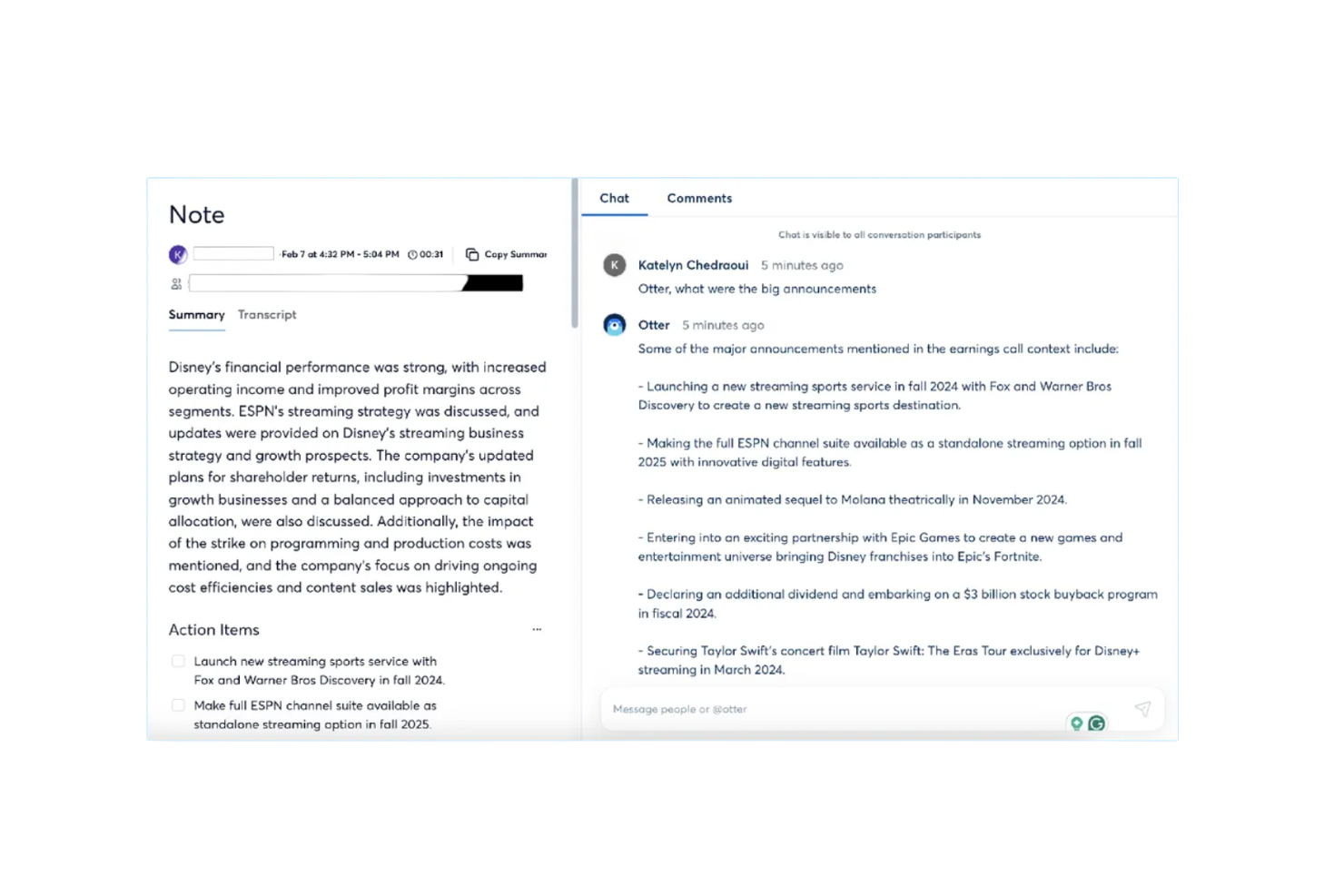
Otter.ai is an AI-powered meeting assistant that provides live transcription, automated summaries, and action item tracking. It primarily serves business professionals and teams looking to enhance productivity and improve meeting management through its AI capabilities.
Why I picked Otter.ai: This tool stands out in providing accurate meeting transcriptions and summaries, making it ideal for teams needing detailed records. With features like live transcription and action item tracking, your team can easily capture key insights and tasks. Its ability to integrate with platforms like Zoom enhances its utility for virtual meetings. These functionalities make it a valuable tool for improving communication and project management.
Standout Features & Integrations:
Features include automated meeting summaries, action item tracking, and specialized agents for different sectors like sales and education. Your team will benefit from its ability to save time by automating note-taking and summarizing discussions.
Integrations include Google Meet, Zoom, Dropbox, Google Calendar, Google Docs, HubSpot, Jira, Notion, Salesforce, Slack, and Asana.
Pros and Cons
Pros:
- Enhances virtual meeting productivity
- Automated meeting summaries
- Accurate live transcriptions
Cons:
- Poor speaker recognition in complex meetings
- Inconsistent accuracy in transcription with accents

Best for AI art creation

Midjourney is an AI art generation tool designed for artists, designers, and creative professionals looking to explore new visual possibilities. It offers value by providing advanced AI capabilities to create unique and imaginative artwork with ease.
Why I picked Midjourney: Midjourney shines in AI art creation, allowing your team to generate stunning visual content effortlessly. Its AI-driven algorithms help in producing intricate designs and art pieces that cater to various creative needs. You can experiment with different styles and techniques, making it perfect for artistic exploration. These features make it a standout choice for those seeking innovative ways to enhance their creative projects.
Standout Features & Integrations:
Features include customizable art styles, the ability to generate high-resolution images, and a user-friendly interface. Your team will appreciate the flexibility to adjust styles and experiment with different artistic expressions. High-resolution output ensures that your creations are suitable for various applications, from digital displays to print media.
Integrations include Adobe Photoshop, Adobe Illustrator, CorelDRAW, Canva, Procreate, Sketch, Figma, Blender, GIMP, and Krita.
Pros and Cons
Pros:
- Supports high-resolution output
- Offers customizable art styles
- Generates high-quality art
Cons:
- Challenges in generating precise details
- May have a learning curve

Claude
Best for AI-driven insights

Claude is a conversational AI platform developed by Anthropic that lets you upload documents, images, or text to generate insights, summaries, or responses in natural language. It’s used by professionals across roles who need to work with large amounts of text, data, or files and make sense of them quickly.
Why I picked Claude: Claude gives you deeper insight capabilities than typical tools. It offers features like file understanding, long-context document analysis, and multiple AI models (Haiku, Sonnet, Opus) that adapt to different workloads. You can feed in a PDF or set custom prompts, then Claude will pull out patterns, connections, or summaries you might miss. Because of this focus on advanced reasoning, your team gets more than just basic chat—it gets AI that helps interpret complex content.
Standout Features & Integrations:
Features include the ability to upload and analyze documents and images. It handles very large text contexts, so you don’t need to split things manually. It lets you choose between different models depending on task complexity and speed.
Integrations include Google Workspace, Microsoft 365, Slack, GitHub, Notion, Zoom, Figma, Dropbox, and Asana.
Pros and Cons
Pros:
- Strong insight output beyond simple replies
- Flexible model selection for different complexities
- High capacity for analyzing long documents
Cons:
- Usage limits can become a constraint at higher volume
- Some features may require advanced setup by your team

Best for call note-taking

Fireflies.ai is an AI-driven tool designed to transcribe and analyze meetings, catering to businesses and teams that need efficient note-taking and meeting analysis. It helps users by automating the transcription process and providing insights from recorded calls, enhancing productivity and collaboration.
Why I picked Fireflies.ai: Fireflies.ai is built for efficient call note-taking, offering automated transcription and keyword extraction to capture every detail accurately. Its AI features help you record, organize, and summarize meetings without manual effort. The platform also includes a sentiment analysis dashboard and key point highlights, making it easier for your team to review discussions and take action quickly. These capabilities make it a practical solution for improving how you manage and follow up on meetings.
Standout Features & Integrations:
Features include voice recognition, the ability to search and filter transcripts, and customizable meeting templates. You’ll find it helpful to quickly locate important information within transcripts, saving time and improving efficiency.
Integrations include Zoom, Microsoft Teams, Google Meet, Slack, Salesforce, HubSpot, Asana, Trello, Zapier, and Dropbox.
Pros and Cons
Pros:
- Highlights key meeting points
- Provides sentiment analysis
- Automates meeting transcriptions
Cons:
- Potentially slow processing for transcriptions
- Limited real-time collaboration features


Gumloop is an AI automation platform designed for a diverse range of business functions, including marketing, sales, operations, engineering, and support. It offers a drag-and-drop interface that allows users to automate workflows by integrating data, applications, and AI capabilities to enhance time management.
Why I picked Gumloop: Gumloop proves highly capable in workflow automation, providing a user-friendly interface for creating complex workflows without coding. Its ability to integrate with over 110 applications makes it versatile for various business needs. The platform's AI features, such as data extraction and decision-making, help make work processes efficient and consistent. These capabilities make it an ideal tool for teams looking to automate manual tasks (like to-do lists) and improve operational efficiency.
Standout Features & Integrations:
Features include a drag-and-drop interface, AI-driven decision-making, and data management tools. Your team can automate repetitive tasks and focus on more strategic work. The platform's ability to integrate with numerous applications allows for improved workflow automation.
Integrations include Google Sheets, Salesforce, HubSpot, Slack, Microsoft Teams, Dropbox, Trello, Asana, Zapier, and Mailchimp.
Pros and Cons
Pros:
- Enhances workflow automation
- User-friendly drag-and-drop interface
- Supports a wide range of applications
Cons:
- Smaller integration ecosystem
- May require initial setup time
Other Workplace AI Tools
Here are some additional workplace AI tools options that didn’t make it onto my shortlist, but are still worth checking out:
- Zoom AI Companion
For virtual meetings
- AI on Google Search
For search enhancement
- SaneBox
For email inbox filtering
- Tableau
For interactive data visualization
- ClickUp
For customizable project views
- UiPath
For robotic process automation
- Connecteam
For mobile workforce management
- Motion
For automated scheduling
- Make
For visual workflow creation
- Jasper AI
For AI content writing
- Reclaim
For smart calendar management
- Notion AI
For AI-enhanced note-taking
- Descript
For audio and video editing
- Microsoft Power BI
For business intelligence reports
- ThoughtSpot
For AI-driven data insights
- Asana
For team task tracking
- Trello
For visual task management
- Zapier
For app integration automation
- Coral AI
For edge AI applications
- Dall-E
For AI-generated images
- IBM Watson Discovery
For AI-powered data analysis
- Superhuman
For fast email management
- Inc Magazine
For business growth insights
- Pilot AI
For AI-powered video analytics
- Slackbot
For workplace chat automation
- EmailTree AI
For AI email automation


How I Evaluate Workplace AI Tools
Every tool on this list needs to deliver genuine AI value—not just a chatbot bolted onto a legacy platform, but capabilities that actually reduce HR workload and surface insights you'd otherwise miss. I split my evaluation into two layers: the core functionality a tool must have to qualify (like AI-driven automation, predictive analytics, and smart search) and the differentiating factors that separate good options from great ones.
Core Functionality (Table Stakes For This List)
When I'm selecting tools for my list, I rank each one on a scale from 0 (does not offer the functionality) to 5 (excels in this area) for each core functionality listed below. Then, I calculate the tool's total score into a percentage. Each tool needs to achieve a minimum total score of 65% to be considered for inclusion.
- Generative AI Assistant: I evaluate whether the tool offers a real GenAI copilot that can draft job descriptions, summarize feedback cycles, or answer policy questions—not just a scripted chatbot.
- AI Workflow Automation: The tool should automate multi-step HR processes like onboarding sequences or leave approvals using AI logic, going well beyond simple if-then rules.
- Predictive Analytics & Insights: I look for ML-driven predictions on metrics like flight risk, hiring bottlenecks, or engagement trends—dashboards with historical charts alone aren't enough.
- Intelligent Search & Knowledge Retrieval: I check whether employees and HR staff can ask natural-language questions and get accurate, source-cited answers pulled from policies, handbooks, or benefits docs.
- HR System Integrations: Each tool should connect to the HRIS, ATS, and payroll platforms teams already use—tools like Workday, BambooHR, Greenhouse, or ADP—so AI runs on real workforce data.
- Enterprise-Grade AI Governance: I look for role-based access, audit logging, data residency options, and clear AI data handling policies that meet the bar for managing sensitive employee information.
Once I have a list of tools that meet this criteria, I consider what sets each platform apart.
Differentiating Factors (What Sets Vendors Apart)
Here's how I compare and contrast different vendors:
Standout Features
Agentic AI is a major differentiator—I look for tools where AI can autonomously complete multi-step tasks like scheduling an entire interview loop or generating a shortlist of internal candidates for an open role. Sentiment and engagement analysis also carries weight. Some platforms parse pulse survey responses and communication patterns to flag burnout risks before they surface in exit interviews. I also evaluate whether a tool includes a skills intelligence engine that maps employee competencies to open roles and learning paths, which adds real value for teams focused on internal mobility.
Beyond Features
Data privacy and AI compliance carry significant weight in this space. I evaluate whether vendors provide biased auditing for hiring models and transparent policies on how employee data is handled during AI training. Implementation speed matters too—some platforms ship pre-built HR use cases that get teams live in weeks, while others require months of custom configuration. I also check pricing clarity, particularly whether a vendor charges per employee, per seat, or by AI usage volume, since unclear models can make costs unpredictable as your workforce scales.
How to Choose Workplace AI Tools
It’s easy to get bogged down in long feature lists and complex pricing structures. To help you stay focused as you work through your unique software selection process, here’s a checklist of factors to keep in mind:
| Factor | What to Consider |
|---|---|
| Scalability | Does the tool grow with your team? Look for solutions that can handle increased data and user load without performance dips. |
| Integrations | Does it connect with your current systems? Check for compatibility with your existing software to avoid workflow disruptions. |
| Customizability | Can you tailor the tool to fit your needs? Ensure it allows you to adjust settings and workflows to match your processes. |
| Ease of Use | Is it user-friendly for your team? Consider the learning curve and whether your team can easily adopt the tool without extensive training. |
| Implementation and Onboarding | How quickly can you get started? Evaluate the time and resources needed for setup and training, and whether the vendor offers support during this phase. |
| Cost | Does it fit your budget? Compare pricing models and look for hidden fees. Consider the value it brings versus the cost. |
| Security Safeguards | Are your data protected? Ensure the tool complies with security standards and offers features like encryption and access controls. |
| Support Availability | Will you have help when needed? Check the vendor's support hours and channels, and consider the quality and responsiveness of their customer service. |
What Are Workplace AI Tools?
Workplace AI tools are software solutions that use artificial intelligence to enhance productivity and efficiency in business environments. These tools are commonly used by HR professionals, managers, and team leaders to automate tasks, improve decision-making, and facilitate communication.
Features like natural language processing, data analysis, and predictive capabilities help with automating repetitive tasks, providing insights, and enhancing collaboration. Overall, these tools offer significant value by saving time, reducing errors, and improving workplace efficiency.
Features
When selecting workplace AI tools, keep an eye out for the following key features:
- Natural language processing: Enables the tool to understand and respond to human language, making communication with users more effective.
- Predictive analytics: Analyzes data to forecast trends and outcomes, aiding in better decision-making and planning.
- Automated transcription: Converts spoken language into text, saving time and improving accuracy in meeting notes and documentation.
- Data integration: Allows the tool to connect with other systems and databases, ensuring seamless data flow and access across platforms.
- Sentiment analysis: Evaluates text to determine the sentiment behind it, helping users understand customer or employee emotions.
- Task automation: Automates repetitive tasks, freeing up time for users to focus on more strategic activities.
- Real-time insights: Provides up-to-date information and analytics, enabling quick responses to changes and opportunities.
- Customizable workflows: Lets users tailor processes to fit their specific needs, enhancing efficiency and productivity.
- AI-driven chatbots: Offers automated support and interaction, improving customer service and engagement.
- Security features: Ensures data protection and compliance with industry standards, safeguarding sensitive information.
Benefits
Implementing workplace AI tools provides several benefits for your team and your business. Here are a few you can look forward to:
- Increased productivity: Automating repetitive tasks allows your team to focus on more strategic work, boosting overall productivity.
- Improved decision-making: Predictive analytics and real-time insights provide valuable data, helping your team make informed decisions quickly.
- Enhanced communication: Natural language processing and AI-driven chatbots facilitate effective communication, both internally and with customers.
- Time savings: Automated transcription and task automation save time on manual tasks, allowing your team to allocate their time more efficiently.
- Better customer engagement: Sentiment analysis and AI-driven chatbots enhance customer interactions, leading to improved satisfaction and loyalty.
- Customization flexibility: Customizable workflows ensure that the tools fit your specific business needs, enhancing operational efficiency.
- Data security: Built-in security features protect sensitive information, ensuring compliance with industry standards.
Costs and Pricing
Selecting workplace AI tools requires an understanding of the various pricing models and plans available. Costs vary based on features, team size, add-ons, and more. The table below summarizes common plans, their average prices, and typical features included in workplace AI tools solutions:
Plan Comparison Table for Workplace AI Tools
| Plan Type | Average Price | Common Features |
|---|---|---|
| Free Plan | $0 | Basic task automation, limited data storage, and standard support. |
| Personal Plan | $5-$25/user/month | Advanced task automation, predictive analytics, and email support. |
| Business Plan | $30-$75/user/month | Custom workflows, integrations with third-party apps, and priority support. |
| Enterprise Plan | $100-$200/user/month | Full customization, dedicated account manager, and premium security features. |
Workplace AI Tools FAQs
Here are some answers to common questions about workplace AI tools:
Can multiple departments use the same AI tool under one account?
Yes, most workplace AI platforms let multiple departments operate under one organization account. Each team can have its own workspace to manage projects and data separately. Role-based permissions help control who can view, edit, or share specific information.
Can workplace AI tools improve team productivity?
Yes, workplace AI tools can significantly improve team productivity. They automate repetitive tasks, provide data-driven insights, and facilitate better communication. By reducing manual effort, your team can focus on strategic activities and decision-making. Look for tools with features like task automation, predictive analytics, and real-time collaboration to maximize productivity gains.
What security measures should I look for in a workplace AI tool?
Ensure the tool complies with industry security standards and offers features like encryption, access controls, and regular security updates. Check if the vendor provides data protection policies and adheres to regulations like GDPR. It’s essential to protect sensitive information, so choose a tool that prioritizes security and offers transparent security practices.
How do workplace AI tools integrate with other software?
Most workplace AI tools offer integration capabilities with popular software like CRM systems, communication platforms, and project management tools. Check the tool’s integration options and compatibility with your existing systems. Seamless integration ensures data flows smoothly across platforms, reducing manual data entry and enhancing overall efficiency.
What kind of support can I expect from workplace AI tool vendors?
Support varies by vendor, but you can typically expect options like email, chat, or phone support. Some vendors offer 24/7 assistance, while others have limited hours. Look for vendors that provide comprehensive documentation, training resources, and a responsive support team. Good support can make a significant difference in your team’s experience with the tool.