

Officevibe Pricing Tiers & Costs (Updated for 2026)

Officevibe is a performance engagement software designed to boost team morale and productivity. It offers multiple pricing tiers, providing flexibility through a subscription-based model that fits various team sizes and needs.
Officevibe helps you track employee satisfaction, gather feedback, and promote a positive work environment.
Like many performance engagement tools, its pricing reflects the value it brings to enhancing team dynamics, fitting neatly into the typical subscription models you might expect in this category.
How Much Does Officevibe Cost?
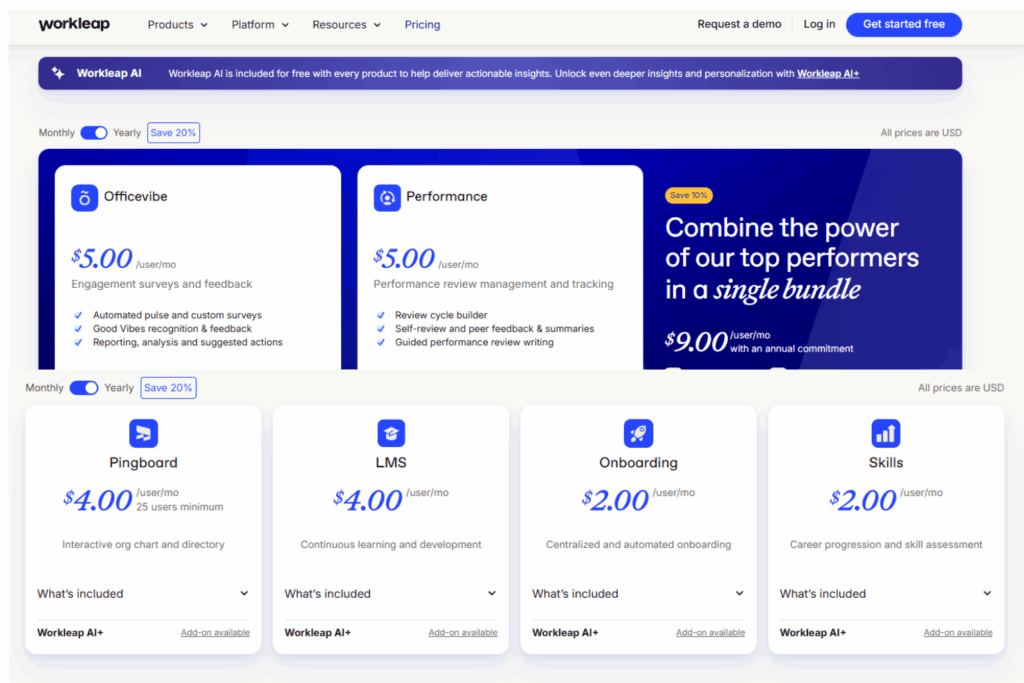
Officevibe's pricing starts at $5 per employee per month for the basic engagement surveys and feedback package with the option to add more features for additional cost.
Each plan is structured to offer different features, with add-ons enhancing functionality.
Pricing is publicly available, and each tier offers different features like automated surveys and integration capabilities. A free trial is available, allowing you to explore the platform before committing.
Here's a breakdown of the plans:
| Plan Name | Pricing (Monthly/Annual) | Key Features Included | Best For |
| Officevibe | $6.25/month ($5.00/year) | Automated surveys, peer recognition, platform integrations, Workleap AI | Small to medium teams |
| Performance | $6.25/month ($5.00/year) | Performance reviews, feedback management, integrations, Workleap AI | Growing businesses |
| Bundle (Officevibe + Performance) | $9.00/month ($9.00/year) | All features from Officevibe and Performance, enhanced insights, bundled savings | Scaling startups |
How to Choose The Right Officevibe Plan
Navigating Officevibe’s pricing requires more than just comparing features. Consider factors like integrations, compliance, and real-world needs when deciding on a performance engagement software. This guide will help you pick a plan that truly fits your team:
When selecting performance engagement software, consider evaluating feature or integration requirements and security, compliance, and scalability:
Evaluate Feature or Integration Requirements
- What integrations do we need with our existing tools? Ensure Officevibe can connect with your current systems to avoid data silos.
- Are there specific features we can't do without? Check if essential features are available only in higher plans, impacting your budget.
- Do we need real-time analytics or reporting? This affects decision-making speed and accuracy, especially for data-driven teams.
- Will Officevibe support our growth plans? If your team is scaling, ensure the software can handle increased user numbers and data.
- Is customizability a priority for us? Some plans may offer more flexibility in dashboards and reports, which can be crucial for specific needs.
- Do we require mobile access? If your team is remote or on-the-go, mobile-friendly features are vital for staying connected.
- How important is user training and support? Some plans might offer better support, which can be crucial during onboarding or troubleshooting.
- Can we integrate Officevibe with our HR system? This ensures seamless data flow between platforms, reducing manual data entry and errors.
Evaluate Security, Compliance & Scalability
- Does Officevibe comply with industry regulations we must follow? Compliance ensures you avoid legal issues and maintain trust with your stakeholders.
- What security measures does Officevibe have in place? Protecting sensitive employee data is vital, especially for HR-related tools.
- Can the software scale with our business needs? As your company grows, Officevibe should accommodate more users and data without performance issues.
- Are there data residency options available? For global companies, this can be important for adhering to local data protection laws.
- How does Officevibe handle data backups and recovery? Knowing this can prevent data loss in case of technical failures.
- Is there multi-factor authentication available? This adds an extra layer of security, crucial for protecting sensitive information.
- What level of customer support is offered for security issues? Quick response times are essential for resolving potential security breaches.
- Does Officevibe provide audit logs? Audit logs help track user actions, important for compliance and security monitoring.
Officevibe Pricing Compared to Alternatives
Officevibe is positioned as a mid-range option compared to typical performance engagement software costs. It's not the cheapest, but it offers a strong balance of features and value.
Officevibe tends to be more feature-rich than cheaper alternatives, yet more affordable than premium options with advanced capabilities.
Key features like integrations may require higher-tier plans. Small to medium-sized teams often find the most value, particularly those seeking comprehensive engagement tools without breaking the bank.
Clicks on the links below may earn a commission, which supports our independent testing and review of software and services. Learn more about how we stay transparent.
| Tool | Best For | Trial Info | Price | ||
|---|---|---|---|---|---|
| 1 | Best for easy-to-use interface | Free demo available | Pricing upon request | Website | |
| 2 | Best for basic HR functionalities | Free plan available | From $12/month | Website | |
| 3 | Best for unlimited users | Free plan available | Free to use | Website | |
| 4 | Best for skill tracking | Free plan + free demo available | From $2.25/user/month (billed annually) | Website | |
| 5 | Best for visual-first users | Not available | Website | ||
| 6 | Best for small team collaboration | Free plan + 15-day free trial + free demo available | From $49/month (billed annually) | Website | |
| 7 | Best for simple onboarding | 15-day free trial + free demo available | From $79/month (billed annually) | Website | |
| 8 | Best for mobile-first design | 14-day free trial | From $29/month (billed annually) | Website | |
| 9 | Best for multilingual support | 15-day free trial + free plan + free demo available | From $25/user/month (billed annually) | Website | |
| 10 | Best for team collaboration tools | Not available | Website |









What Affects Officevibe Pricing?
Pricing for Officevibe varies based on your team's size, needs, and how you plan to use the software:
- Number of users: More users mean higher costs, as pricing is per employee, so budget accordingly as your team grows.
- Feature tier: Different plans offer different features, and more advanced features might require a more expensive tier.
- Usage volume: If your team uses Officevibe heavily, it could impact pricing, especially if additional data storage is needed.
- Support requirements: Needing more support or training can increase costs, so consider your team's expertise level.
- Customizations: Tailoring Officevibe to fit your unique needs might incur extra charges, so clarify with the vendor.
Additional Costs to Watch Out For
Many performance engagement software vendors, including Officevibe, don’t always disclose their full cost structure upfront, leading to surprise fees later. Understanding what may not be included in the base price helps your team avoid budget overruns or limited access.
Consider drafting a performance engagement software RFP to ensure all potential costs are addressed:
Setup Fees or Onboarding Costs
Setup fees often cover initial configuration and training to get your team started. These costs might apply if your team requires extensive support to implement Officevibe. Ask about these fees upfront, as they can sometimes be bundled into higher-tier plans or billed separately. Ensure you get a full cost breakdown to avoid unexpected charges.
Premium Support Tiers
If your team needs more than basic support, premium support tiers might add to your costs. These tiers can offer faster response times and dedicated account managers. Check if this support is included in your plan or if it's an additional cost. Clarifying these details ensures you won’t face unexpected fees for necessary support.
Custom Integrations or API Usage
Custom integrations allow Officevibe to work seamlessly with your existing tools, but they can incur extra fees. These charges apply if you need specific API access or custom development. Confirm if these integrations are covered in your plan or require additional payment. Get a detailed list of potential costs to accurately budget for these needs.
Usage Overages
Usage overages occur when your team exceeds the agreed-upon limits for data or features. This can happen if your team grows or uses Officevibe more intensively than planned. Check if your plan includes any buffer for overages or if they’re billed separately. Understanding your usage limits helps prevent unplanned expenses.
Regulatory or Compliance Costs
If your industry has specific compliance needs, additional costs may arise to meet these requirements with Officevibe. These costs ensure data handling aligns with legal standards. Verify if these compliance features are included in your plan or if they come at an extra cost. Knowing these details helps you maintain compliance without overspending.
Is Officevibe Worth the Cost?
In my opinion, Officevibe delivers strong value, especially for small to medium teams looking to boost engagement and morale. Teams in tech and creative industries often see great ROI with its intuitive feedback tools.
I think Officevibe excels with its seamless onboarding and robust support, making it easier for teams to get started quickly. Its integrations are a standout, allowing smooth transitions and data flow between systems.
- Clear pricing plans and easy access to trials or demos.
- Fairly tailored quotes by sales reps.
- Highly rated for user experience and implementation ease.
These strengths make Officevibe a compelling choice for teams focused on real-world results.
Officevibe Pricing FAQs
Here are answers to a few common questions about Officevibe pricing:
Does Officevibe offer a free trial or pilot?
Yes, Officevibe offers a free trial for new users. This lets your team explore features and see if it fits your needs before committing to a purchase. You can sign up directly on their website to get started.
Are discounts available for nonprofits or multi-year contracts?
Officevibe provides discounts for nonprofits and offers promotions for multi-year contracts. Nonprofits can contact sales to discuss eligibility, and multi-year contracts often come with reduced rates. It's best to reach out to their team for specific details.
What’s the average onboarding time?
The average onboarding time for Officevibe is typically a few days to a week. This depends on your team's size and specific needs. The process is straightforward, with support available to help your team get up and running quickly.
Is the pricing likely to increase after the first year?
Pricing for Officevibe is relatively stable, but it can change based on plan adjustments or added features. It’s wise to check with sales for any potential changes after the first year to plan your budget accordingly.
How can I access Officevibe’s customer support?
Officevibe provides customer support through various channels, including email and chat. Premium support options are available with certain plans, offering faster response times. It’s a good idea to explore these options based on your team's needs.
What payment methods does Officevibe accept?
Officevibe accepts major credit cards for payment. For larger teams or specific needs, alternative payment methods might be arranged by contacting their sales team. This flexibility helps accommodate different billing preferences.
What’s Next:
If you're in the process of researching performance engagement software, connect with a SoftwareSelect advisor for free recommendations.
You fill out a form and have a quick chat where they get into the specifics of your needs. Then you'll get a shortlist of software to review. They'll even support you through the entire buying process, including price negotiations.

From $5/user/month (billed annually)
Free trial + free demo available



