

Pinpoint Review 2026: Pros, Cons, Features & Pricing



You've already got an applicant tracking system. It worked when you needed it to. But your hiring has grown more complex, and now the platform isn't keeping up: missing features, rigid workflows, or support that doesn't match what you're paying for.
If you're weighing up whether Pinpoint is the right switch, this review breaks down what the platform does well, where it has limitations, and who it's genuinely built for, so you can make a faster, more confident call.
Pinpoint Evaluation Summary
- Pricing upon request
- Free demo available
Why Trust Our Software Recommendations
Our team has been testing and reviewing software since 2012. As HR experts ourselves, we know how difficult—and important—it is to choose the right software.
For this guide, we evaluated tools using hands-on testing and independent research, scoring tools using our selection criteria. We also draw on insights from industry thought leaders and practicing HR experts.
Our reviews reflect our human editorial judgment, not a sales pitch.
Expert reviewers:
Pinpoint Overview
Pinpoint is an applicant tracking system built for multi-stream hiring: the type of hiring that runs across multiple roles, teams, brands, or regions simultaneously, where having a consistent process matters as much as having a flexible one.
It's designed for in-house talent acquisition teams who need to manage the full recruiting workflow in one place, from building career sites and posting roles through to reviewing candidates, scheduling interviews, managing offers, and onboarding new hires.
pros
-
Flexible, AI-powered ATS that's easy to navigate for recruiters, hiring managers, and candidates, even when multiple hiring streams are running in parallel.
-
AI is built into your hiring workflow to help your team screen faster, evaluate more consistently, and keep candidates engaged.
-
Hands-on Customer Success support from day one, plus a comprehensive Help Center with guides, videos, and walkthroughs.
cons
-
Because of the platform's depth, you'll only get the most of it if you have a clear sense of how you want to hire.
-
Payroll, benefits, or performance management requires a separate HRIS since Pinpoint is a focused ATS.
-
Pricing isn't listed publicly, so you'll need to request a quote to get a number for your specific situation.
Is Pinpoint Right For Your Needs?
Who Would be a Good Fit for Pinpoint?
Pinpoint is a strong fit when your hiring has real complexity, such as multiple roles running at once, different processes for different teams or brands, or application volumes high enough that you need structure to stay in control. It's built for teams that want visibility and consistency without sacrificing the flexibility to hire differently across different parts of the business.
-
Mid-Size and Enterprise Teams
You're past the point of managing hiring in spreadsheets and email, and you need a platform that can keep pace with a growing, structured talent acquisition function and scaling team.
-
Contingent and Contract Hiring
You hire contractors or contingent workers and need workflows that support different compliance and classification needs.
-
Dedicated In-House TA Teams
You have a proper talent acquisition function in place and need a platform that supports the whole team, from recruiters and hiring managers through to HR leads and department heads, across every open role at once.
-
Hiring Across Multiple Brands
You manage multiple employer brands and want separate career experiences while keeping hiring connected under one system.
-
Global Hiring
You recruit across countries or time zones and need consistent coordination with room for regional flexibility.
-
High Volume Hiring
You need to process lots of applicants quickly using workflows, filtering, and automation to keep the pipeline moving
Who Would be a Bad Fit for Pinpoint?
Pinpoint may be a poor fit if your hiring is very light, informal, or you mainly need a simple job posting tool, since the value here shows up most when you actually need structure across volume, regions, brands, or multiple hiring streams.
-
Very Small Startup Businesses
If you're just getting started, you likely haven't decided how you want to structure your hiring, and you lack a mature talent acquisition workflow. Pinpoint is designed for more complex situations, from hiring for multiple roles and brands to high-volume use cases.
-
Minimal Collaboration Requirements
You don’t rely on shared feedback, interview panels, or multi-stakeholder decision-making, so the structured workflow may feel unnecessary.
-
No Time or Buy-In to Set Up a Process
You need to hire fast and don’t have the bandwidth to configure stages, templates, and a consistent hiring workflow upfront.
-
Founder-Led or Hiring-Manager-Only Recruiting
You just want to post a role and email candidates without structured workflows, scorecards, approvals, or automation.
-
Deep HR Needs Beyond ATS
You need a full HR platform for payroll, benefits, time tracking, and performance management, not just an ATS.
-
Low Volume Hiring
You hire only a few people a year and don’t need formal workflows, approvals, or reporting.
How We Test & Score Our Tools
We’ve spent years building, refining, and improving our software testing and scoring system. The rubric is designed to capture the nuances of software selection and what makes a tool effective, focusing on critical aspects of the decision-making process.
Below, you can see exactly how our testing and scoring works across seven criteria. It allows us to provide an unbiased evaluation of the software based on core functionality, standout features, ease of use, onboarding, customer support, integrations, customer reviews, and value for money.
Core Functionality (25% of final score)
The starting point of our evaluation is always the core functionality of the tool. Does it have the basic features and functions that a user would expect to see? Are any of those core features locked to higher-tiered pricing plans? At its core, we expect a tool to stand up against the baseline capabilities of its competitors.
Standout Features (25% of final score)
Next, we evaluate uncommon standout features that go above and beyond the core functionality typically found in tools of its kind. A high score reflects specialized or unique features that make the product faster, more efficient, or offer additional value to the user.
We also evaluate how easy it is to integrate with other tools typically found in the tech stack to expand the functionality and utility of the software. Tools offering plentiful native integrations, 3rd party connections, and API access to build custom integrations score best.
Ease of Use (10% of final score)
We consider how quick and easy it is to execute the tasks defined in the core functionality using the tool. High scoring software is well designed, intuitive to use, offers mobile apps, provides templates, and makes relatively complex tasks seem simple.
Onboarding (10% of final score)
We know how important rapid team adoption is for a new platform, so we evaluate how easy it is to learn and use a tool with minimal training. We evaluate how quickly a team member can get set up and start using the tool with no experience. High scoring solutions indicate little or no support is required.
Customer Support (10% of final score)
We review how quick and easy it is to get unstuck and find help by phone, live chat, or knowledge base. Tools and companies that provide real-time support score best, while chatbots score worst.
Customer Reviews (10% of final score)
Beyond our own testing and evaluation, we consider the net promoter score from current and past customers. We review their likelihood, given the option, to choose the tool again for the core functionality. A high scoring software reflects a high net promoter score from current or past customers.
Value for Money (10% of final score)
Lastly, in consideration of all the other criteria, we review the average price of entry level plans against the core features and consider the value of the other evaluation criteria. Software that delivers more, for less, will score higher.
Core Features
Recruitment Workflow Management
You can build a structured hiring pipeline with clear stages, so your team follows the same process for every role.
Candidate Profiles
Each candidate gets a centralized profile with their details, resume, history, and activity, so you’re not digging through scattered notes.
Candidate Communication Management
You can manage candidate messaging in one place, helping you keep conversations organized and reduce missed follow-ups.
Interview Scheduling
Interview scheduling is streamlined so you spend less time coordinating calendars and more time moving candidates forward.
Candidate Scorecards
Scorecards help your hiring team evaluate candidates consistently, making feedback easier to compare and less opinion-based.
Employee Onboarding
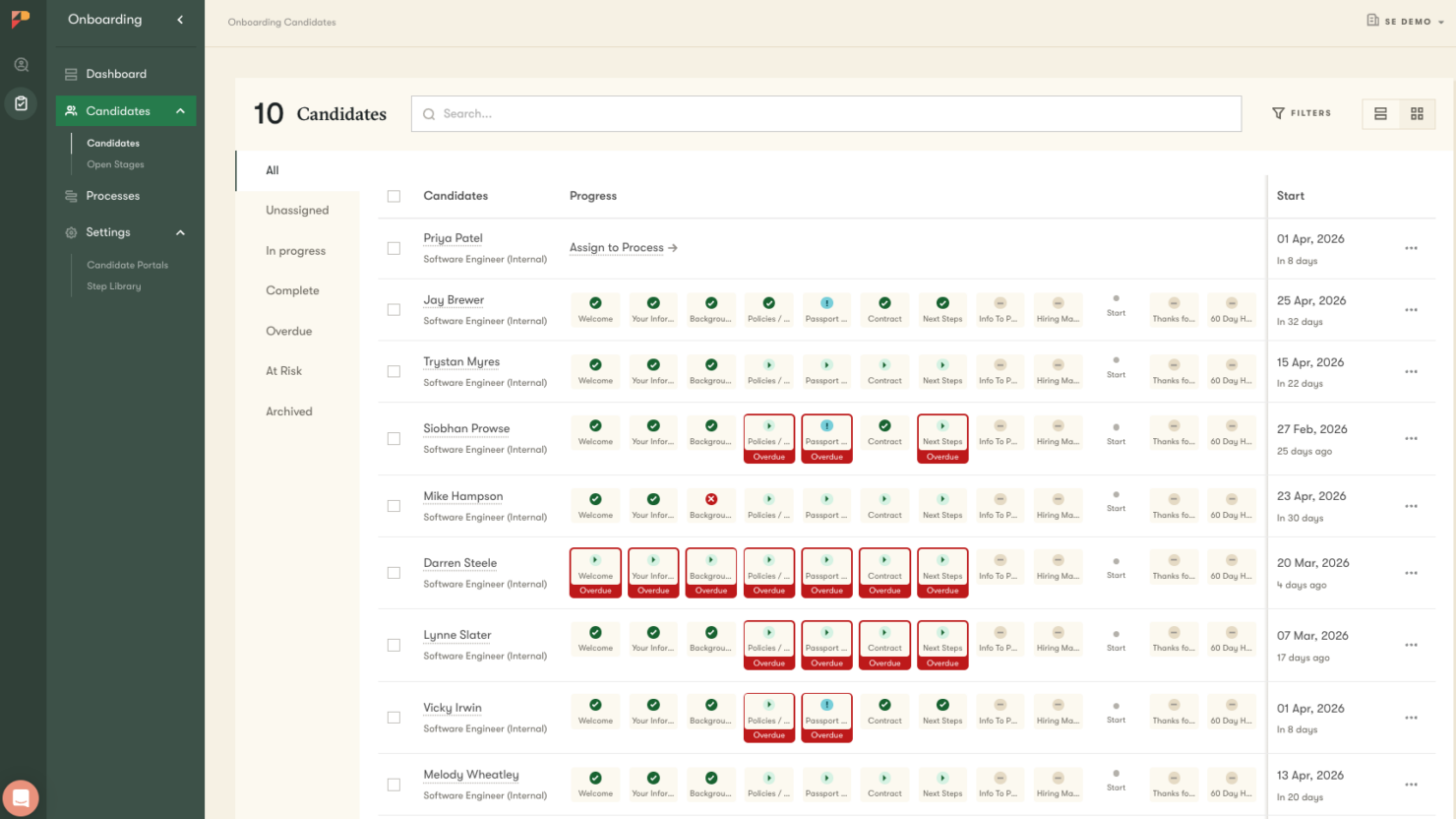
Pinpoint automates onboarding workflows, ensuring compliance, reducing admin, and delivering personalized, engaging new hire experiences.
Reporting & Analytics
You can track hiring performance through reports so you can spot bottlenecks and improve how fast and how well you hire.

Standout Features
AI Candidate Companion
This careers-site chatbot helps convert more visitors into applicants by answering questions, guiding candidates through applications, and keeping them engaged 24/7. It creates a smooth, conversational experience that reduces drop-off and helps more candidates complete the process.
AI Candidate Match Score
AI Candidate Match Score evaluates candidates against role-specific criteria, helping teams quickly prioritize the strongest applicants. The scoring is transparent and explainable, so recruiters can understand why candidates rank the way they do—and adjust criteria as needed.
AI Candidate Filters
AI Candidate Filters turn resumes and applications into structured, searchable data. Recruiters can define exactly what to look for—such as skills or experience—and automatically filter and evaluate candidates at scale, improving shortlist quality and speed.
AI Hiring Copilot
An embedded assistant within every candidate record that brings together resumes, feedback, scorecards, and communication history into a single, actionable view. It helps teams prepare interviews, generate consistent communications, and take the right next step—while always keeping recruiters in control of final decisions.
MCP (Model Context Protocol)
Pinpoint’s MCP server connects your hiring system to the AI tools your team already uses, making it easy to work with recruitment data without leaving your preferred environment. It keeps Pinpoint as the single source of truth while enabling flexible, AI-powered workflows across your stack.
Advanced Automation
Pinpoint’s automation engine lets teams build flexible, multi-step workflows with triggers, conditions, and branching logic. From moving candidates between stages to sending personalized communications, automation keeps hiring processes consistent, compliant, and running efficiently across roles and regions.

Ease of Use
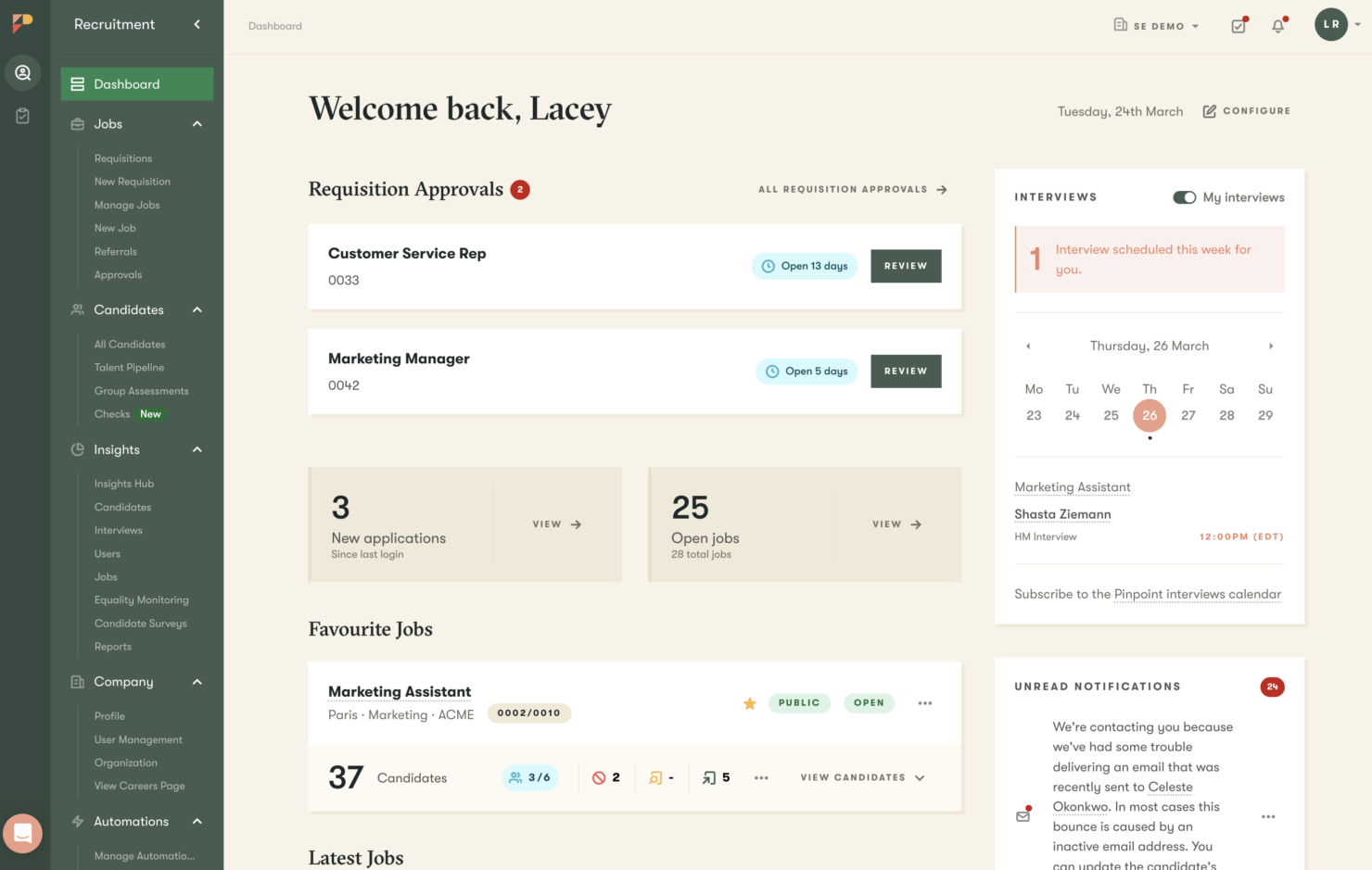
Pinpoint feels clean and straightforward because its workflows are laid out clearly, letting you move from job setup to candidate tracking and feedback without having to dig through complicated menus.
Also, users tend to describe the experience as smooth and easy to follow, especially compared to ATS platforms that feel cluttered or harder to customize.
Onboarding
Pinpoint supports a guided onboarding experience through its Customer Success support and self-serve learning resources, including practical guides, videos, and walkthroughs your team can use anytime.
You also work with their implementation team to set up Pinpoint around your hiring process while learning the system as you go.

Customer Support
Pinpoint’s contact page gives you clear ways to reach out for help when you need it, including options for demos and customer support.
I also like how organized the Help Center is, so you can quickly find step-by-step guides for managing candidates, interviews, reporting, integrations, and onboarding without slowing your hiring process down.
Pinpoint also emphasizes fast, human support through in-app live chat with real product experts, plus phone and email options so you can get help in the way you prefer.

Integrations
Pinpoint offers hundreds of native integration options, including for popular tools like Slack, LinkedIn, Indeed, BambooHR, Rippling, Checkr, JotForm, myInterview, DocuSign, and Microsoft Teams, so your hiring updates, sourcing, and collaboration stay connected. They also have an Open API for custom connections.

Value for Money
You won’t see fixed pricing listed upfront since Pinpoint uses a quote-based model. You request pricing through a short form, then they’ll walk you through the product on a call and give you a quote based on your hiring needs and company size.
While some might prefer seeing pricing upfront, this quote-based approach can ensure what you pay truly matches your actual hiring setup.

New Product Updates from Pinpoint

Pinpoint Adds Copilot, Hire Surveys, and LinkedIn Apply Connect
Pinpoint adds AI Copilot in Teams, Quality of hire surveys, LinkedIn Apply Connect integration, and updates to onboarding. These releases broaden the tools available across recruiting, hiring insights, and employee onboarding. Highlights include:
- Copilot in Teams: Bring Pinpoint’s AI Copilot into Microsoft Teams.
- Quality of Hire Surveys: Add surveys focused on quality of hire insights.
- LinkedIn Apply Connect: Connect Pinpoint with LinkedIn Apply Connect as part of the hiring workflow.
- Onboarding Updates: Introduce additional improvements to Pinpoint’s onboarding experience.
Visit Pinpoint’s official site for more details.
 for more details.
Pinpoint Expands AI Copilot Across the Hiring Workflow
Pinpoint adds a platform-wide AI Hiring Copilot, AI Candidate Companion, and access to underlying Insights Hub widget data. These updates provide broader AI assistance across hiring and make reporting data easier to access. Highlights include:
- AI Hiring Copilot: Provides AI assistance across the hiring workflow.
- AI Candidate Companion: Adds AI-powered support for candidates during the hiring process.
- Insights Hub Data: Lets users access the data behind Insights Hub widgets for further analysis.
Visit Pinpoint’s official site for more details.

Pinpoint Adds Hiring Copilot, MCP Integration, and Hiring Intake Notes
Pinpoint expands its hiring platform with AI-powered job generation via Hiring Copilot, a new space for capturing hiring context, MCP support to connect AI assistants to hiring data, and an onboarding activity feed that highlights pending tasks. Together, these features improve collaboration and help hiring teams work more efficiently throughout the recruitment process. Highlights include:
- Hiring Copilot Job Generation: Generate job descriptions and complete job drafts from a short prompt using AI.
- Hiring Intake Notes: Capture hiring context, priorities, and role requirements in one shared workspace.
- Pinpoint MCP Integration: Connect AI assistants to Pinpoint through the Model Context Protocol (MCP).
- Onboarding Activity Feed: Track onboarding tasks and pending actions from a customizable activity feed.
Visit Pinpoint's official site for more details.

Pinpoint Adds One-Way Video Interviews and AI Match Score
Pinpoint adds One-Way Video Interviews and AI Match Score to improve candidate evaluation during the hiring process. These updates help recruiters standardize interviews, review applicants faster, and prioritize candidates based on defined criteria. Highlights include:
- One-Way Video Interviews: Run structured early-stage interviews that candidates can complete on their own schedule.
- AI Match Score: Automatically evaluate applicants against hiring criteria and rank stronger candidate matches.
Visit Pinpoint’s official site for more details.
Pinpoint Specs
- API
- Application Tracking
- Behavioral Testing
- Budgeting
- Calendar Management
- Candidate Database
- Cognitive Testing
- Contact Management
- Custom Assessments
- Dashboard
- Dashboards
- Data Export
- Data Import
- Data Visualization
- Email Integration
- Employee Database
- Employee Onboarding
- External Integrations
- Feedback Management
- Forecasting
- Interview Scheduling
- Multi-Source Feedback
- Multi-User
- Notifications
- Personality Testing
- Psychometric Testing
- Scheduling
- Status Notifications
- Travel Management
Pinpoint FAQs
How customizable is the Pinpoint interface?
What kind of customer support can I expect with Pinpoint?
Does Pinpoint offer training resources for new users?
How does Pinpoint improve the candidate's experience?
Can Pinpoint handle high-volume recruitment?
Is Pinpoint suitable for global recruitment?
How does Pinpoint handle data security and compliance?
Can Pinpoint support remote recruitment processes?
Pinpoint Company Overview & History
Pinpoint is an applicant tracking system headquartered in Saint Helier, United Kingdom, built to streamline hiring across industries by unifying recruitment workflows and improving the candidate experience.
Their target audience is usually HR teams, talent acquisition teams, and hiring managers.
Pinpoint Major Milestones
- 2018: Pinpoint was founded in Saint Helier by Tom Hacquoil, Tom Luce, and Bill Rogers.
- 2022: Pinpoint’s ARR “more than doubled” (as stated in Expedition’s announcement).
- 2023: Pinpoint secured a €21M growth investment from Expedition Growth Capital.
- 2026: Pinpoint reports operating in 50+ countries, managing 8.5M candidate experiences monthly, and growing 60% YoY.