


Pinpoint vs. Workable: Comparison & Expert Reviews For 2026



Your inbox is full, candidates are sitting in different stages, and hiring updates are scattered across chats, emails, and spreadsheets.
At this point, choosing the right applicant tracking system is about keeping everything organized and moving faster without added stress.
This Pinpoint vs. Workable guide breaks down what each platform offers so you can move forward with a clearer, more confident choice.
Pinpoint vs. Workable: An Overview
Pinpoint
Workable


Why Trust Our Software Reviews
Our team has been testing and reviewing software since 2012. As HR experts ourselves, we know how difficult—and important—it is to choose the right software.
For this guide, we evaluated tools using hands-on testing and independent research, scoring tools using our selection criteria. We also draw on insights from industry thought leaders and practicing HR experts.
Our reviews reflect our human editorial judgment, not a sales pitch.
Expert reviewers:
Pinpoint vs. Workable Pricing Comparison
| Pinpoint | Workable | |
|---|---|---|
| Free Trial | Free demo available | 15-day free trial |
| Pricing | Pricing upon request | From $299/month (billed annually) |
Pinpoint vs. Workable Pricing & Hidden Costs
Pinpoint uses custom pricing, meaning you need to request pricing and speak with their team to get an accurate quote based on your company’s needs and hiring complexity.
Workable uses transparent, plan-based pricing, with published monthly and annual rates based on your team size. Their pricing page shows tiers like Standard and Premier, and you can also start a free trial without needing to request a quote.
Pinpoint vs. Workable Feature Comparison
In terms of core features, Pinpoint stands out for its custom recruitment workflows, which let you tailor hiring stages to match how your team actually recruits, and it also supports essentials like interview scheduling and reporting tools to help you manage candidates and track hiring activity in one place.
Workable, on the other hand, highlights its AI candidate sourcing as a standout feature to help you find potential hires faster, alongside core tools like AI job description writing to help you publish roles and move candidates through your pipeline more efficiently.
To me, both platforms offer strong features that can make hiring feel more organized and easier to manage day to day. Since they both cover the essentials well, it really comes down to which one fits your workflow and team habits better.
| Pinpoint | Workable | |
|---|---|---|
| API | ||
| Application Tracking | ||
| Behavioral Testing | ||
| Budgeting | ||
| Calendar Management | ||
| Candidate Database | ||
| Cognitive Testing | ||
| Contact Management | ||
| Custom Assessments | ||
| Dashboard | ||
| Dashboards | ||
| Data Export | ||
| Data Import | ||
| Data Visualization | ||
| Email Integration | ||
| Employee Database | ||
| Employee Onboarding | ||
| External Integrations | ||
| Feedback Management | ||
| Forecasting | ||
| Interview Scheduling | ||
| Multi-Source Feedback | ||
| Multi-User | ||
| Notifications | ||
| Personality Testing | ||
| Psychometric Testing | ||
| Scheduling | ||
| Status Notifications | ||
| Travel Management |
Pinpoint vs. Workable Integrations
| Integration | Pinpoint | Workable |
| Slack | ✅ | ✅ |
| ✅ | ✅ | |
| Google Workspace | ✅ | ✅ |
| Microsoft Teams | ✅ | ✅ |
| Salesforce | ✅ | ✅ |
| HubSpot | ✅ | ✅ |
| BambooHR | ✅ | ✅ |
| Greenhouse | ✅ | ✅ |
| API | ✅ | ✅ |
| Zapier | ✅ | ✅ |
Both Pinpoint and Workable support a range of integrations, so if your hiring workflow depends on tools like Slack, LinkedIn, Google Workspace, Microsoft Teams, Salesforce, HubSpot, or BambooHR, you won’t be missing out with either option.
Pinpoint vs. Workable Security, Compliance & Reliability
| Factor | Pinpoint | Workable |
| Data Privacy | Pinpoint supports GDPR-aligned privacy practices and is certified under ISO 27001 and SOC 2 Type II for data security. | Workable is Data Privacy Framework–certified for EU, UK, and Swiss data transfers. |
| Encryption | Pinpoint encrypts data in transit with TLS 1.2/1.3 and secures stored data using LUKS and AES-256. | Workable uses hardened TLS with strong encryption and hashing algorithms (via Cloudflare) to secure data transmission. |
| Regulatory Compliance | Pinpoint supports compliance with key regulations such as GDPR and CCPA. | Workable supports compliance with ISO certifications, SOC 2 Type II, GDPR, and CCPA/CPRA. |
Pinpoint supports GDPR-aligned privacy practices and is certified under ISO 27001 and SOC 2 Type II for data security. Workable is Data Privacy Framework–certified and uses hardened TLS for secure data transmission. It also supports compliance through ISO certifications, SOC 2 Type II, GDPR, and CCPA/CPRA.
For you, this makes it easier to confirm what each platform covers on the security and compliance side, especially if you handle sensitive candidate data or need to meet internal or legal requirements.
Pinpoint vs. Workable Ease of Use
| Factor | Pinpoint | Workable |
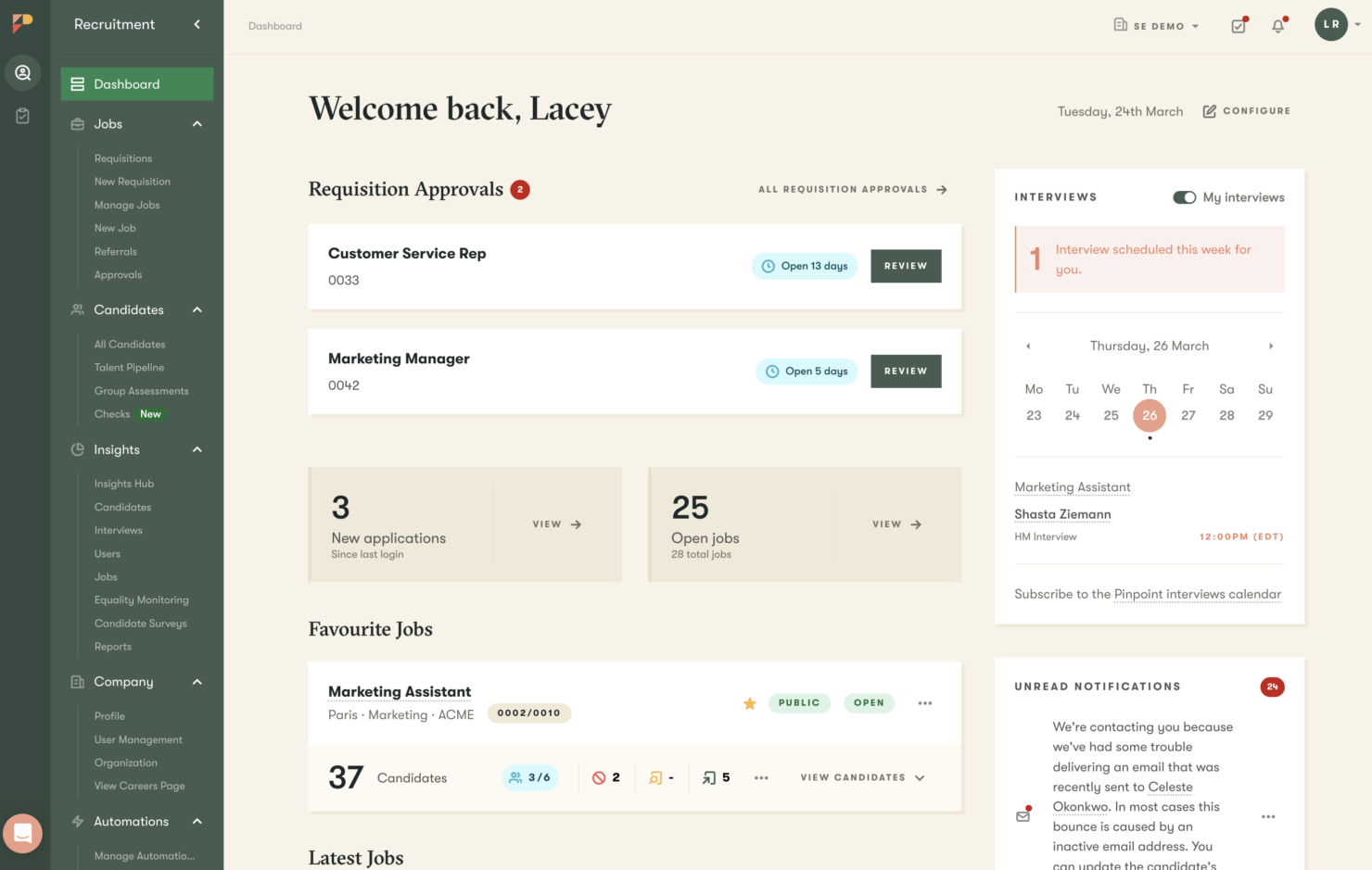
| User Interface | Pinpoint uses a clean interface that makes it simple to go from job setup to tracking candidates and collecting feedback. | Workable provides a straightforward UI with easy navigation and clear layout. |
| Onboarding Experience | Pinpoint provides step-by-step onboarding with guided tutorials and live support. | Workable supports quick setup with guided onboarding workflows and a built-in video library. |
| Support | Pinpoint offers straightforward support channels and an easy-to-navigate Help Center. | Workable provides email and phone support (when available) plus a help center with FAQs and guides. |
Both platforms aim to make the hiring process easy to navigate, from setting up jobs and tracking candidates to using guided onboarding resources and getting support when needed.
Pinpoint vs Workable: Pros & Cons
Pinpoint
- Flexible, AI-powered ATS that's easy to navigate for recruiters, hiring managers, and candidates, even when multiple hiring streams are running in parallel.
- AI is built into your hiring workflow to help your team screen faster, evaluate more consistently, and keep candidates engaged.
- Hands-on Customer Success support from day one, plus a comprehensive Help Center with guides, videos, and walkthroughs.
- Because of the platform's depth, you'll only get the most of it if you have a clear sense of how you want to hire.
- Payroll, benefits, or performance management requires a separate HRIS since Pinpoint is a focused ATS.
- Pricing isn't listed publicly, so you'll need to request a quote to get a number for your specific situation.
Workable
- Tracks candidates across each hiring stage so strong applicants don’t slip through the cracks.
- Supports team collaboration through shared feedback and scorecards for consistent hiring decisions.
- Organizes job postings and candidate pipelines in a clear workflow that keeps hiring structured.
- May lack functions for highly complex or enterprise hiring workflows.
- Visual customization is limited for fully tailored dashboards or pipeline views.
- Reporting feels basic for teams that need deeper analytics and custom insights.
Best Use Cases for Pinpoint and Workable
Pinpoint
- Mid-Size and Enterprise Teams You're past the point of managing hiring in spreadsheets and email, and you need a platform that can keep pace with a growing, structured talent acquisition function and scaling team.
- Contingent and Contract Hiring You hire contractors or contingent workers and need workflows that support different compliance and classification needs.
- Dedicated In-House TA Teams You have a proper talent acquisition function in place and need a platform that supports the whole team, from recruiters and hiring managers through to HR leads and department heads, across every open role at once.
- Hiring Across Multiple Brands You manage multiple employer brands and want separate career experiences while keeping hiring connected under one system.
- Global Hiring You recruit across countries or time zones and need consistent coordination with room for regional flexibility.
- High Volume Hiring You need to process lots of applicants quickly using workflows, filtering, and automation to keep the pipeline moving
Workable
- High-Volume Hiring Teams Best for teams that need to manage many candidates at once with structured pipelines, bulk actions, and clear stage tracking.
- Fast-Growing SMBs and Startups Works well for scaling teams that need consistent hiring processes, quick job posting, and easy collaboration without heavy setup.
- Decentralized Hiring Teams Supports distributed hiring managers with shared pipelines, standardized scorecards, and centralized candidate visibility.
- Multi-Tool Environments Fits teams that use different hiring and business tools and need a flexible system to keep recruiting workflows organized.
- Candidate-Focused Companies Helps teams deliver a smooth candidate experience with structured communication, scheduling, and consistent hiring workflows.
- Remote Hiring Teams Enables distributed teams to collaborate, review candidates, and move hiring forward using shared feedback and centralized tracking.
Who Should Use Pinpoint, and Who Should Use Workable?
Pinpoint is a great choice if you want an applicant tracking system you can shape around your hiring process, since its customizable workflows, scheduling tools, and reporting help you keep hiring structured across different roles.
Workable, on the other hand, is a perfect choice if you want an applicant tracking system that’s quick to adopt and easy to run day to day, since its straightforward setup, ready-to-use features, and AI tools help you keep hiring moving with less friction.
Differences Between Pinpoint and Workable
| Pinpoint | Workable | |
|---|---|---|
| AI Tools | Pinpoint leans more into workflow structure and hiring process management than AI-led recruiting tools. | Workable highlights AI-powered tools like candidate sourcing and job description writing to speed up recruiting tasks. |
| Hiring Model | Pinpoint focuses on customizable recruitment workflows that let you tailor hiring stages to match how your team recruits. | Workable focuses on a straightforward ATS workflow that’s easier to adopt and run day to day. |
| Implementation Style | Pinpoint supports teams that want a hiring setup shaped around their internal process, especially when roles and workflows vary across departments. | Workable supports teams that want to get hiring up and running quickly with a more ready-to-use setup that works well for day-to-day recruiting. |
| Platform Scope | Pinpoint is positioned primarily as an applicant tracking system focused on running and managing your hiring process from application to offer. | Workable is positioned as a broader hiring and HR platform, combining recruiting tools with additional HR features beyond just applicant tracking. |
| Pricing Model | Pinpoint uses quote-based pricing, so you’ll need to request pricing to get a plan built around your hiring needs. | Workable uses plan-based pricing with published tiers you can review upfront. |
| Visit PinpointOpens new window | Visit WorkableOpens new window |
Similarities Between Pinpoint and Workable
| Applicant Tracking (ATS) | Both platforms work as an applicant tracking system that helps you organize candidates, manage stages, and track hiring progress in one place. |
|---|---|
| Compliance & Security | Both include security and compliance coverage designed to support teams handling sensitive hiring data. |
| Integrations | Both support integrations with common hiring and workplace tools so you can connect your ATS with the systems your team already uses. |
| Interview Assistance | Both support interview scheduling so you can coordinate interviews without relying on separate tools or messy back-and-forth communication. |
| Reporting | Both offer reporting features that help you monitor hiring activity and better understand what’s happening across your pipeline. |
| Visit PinpointOpens new window Visit WorkableOpens new window | |