

Koçluk yazılımı, İK ekiplerinin çalışanları koçlar veya mentorlarla eşleştirmesine, gelişim programlarını yönetmesine ve sonuçları ölçmesine yardımcı olur. Doğru platform, koçluğu İKYS verileri, liderlik gelişimi, çalışan performansı ve çalışanları elde tutma hedefleriyle ilişkilendirebilir.
Kuruluşunuz için bir platform seçmeden önce eşleştirme, yönetişim, gizlilik, entegrasyonlar ve yatırım getirisi ölçümünü karşılaştırmanıza yardımcı olmak için 20 aracı değerlendirdim.
Why Trust Our Software Recommendations
6,700+
Reviews
20
Industry experts
16+
Evaluation factors
14
Years
Our team has been testing and reviewing software since 2012. As HR experts ourselves, we know how difficult—and important—it is to choose the right software.
For this guide, we evaluated tools using hands-on testing and independent research, scoring tools using our selection criteria. We also draw on insights from industry thought leaders and practicing HR experts.
Our reviews reflect our human editorial judgment, not a sales pitch.
Expert reviewers:
- Phil GrayCOO
 Kim BehnkeHR Tech Editor & Analyst
 Josh BarkerPeople Ops Manager

Koçluk Yazılımları Karşılaştırma Tablosu
Kısa listeme giren en iyi platformların fiyatlarını ve teknik özelliklerini yan yana karşılaştırın.
Score legend (out of 5)
- Excellent4.5–5
- Good4–4.4
- Average3–3.9
- Below average2–2.9
- Poor1–1.9
Sorted by: Default
| Tool | Starting Price | Website | |||||||
|---|---|---|---|---|---|---|---|---|---|
Best for enterprise-wide expert-to-employee matching | 4.0 out of 5 | 5 | 3 | 3 | 4 | 5 | 4 | Pricing upon request Free demo available | Website |
Best for bulk coaching program deployment | 3.8 out of 5 | 4 | 4 | 4 | 3 | 4 | 4 | $12/year Free demo + 14-day free trial available | Website |
Best for enterprise coaching ROI measurement | 3.8 out of 5 | 3 | 4 | 4 | 4 | 4 | 4 | Pricing upon request Free demo available | Website |
Best for mentoring program matching | 4.0 out of 5 | 5 | 4 | 2 | 4 | 5 | 4 | Pricing upon request Free demo available | Website |
Best for white-label coaching program delivery | 3.8 out of 5 | 4 | 4 | 3 | 4 | 4 | 4 | Pricing upon request Free demo available | Website |
Best for org-wide coaching with 4,000+ coaches | 4.7 out of 5 | 5 | 5 | 4 | 5 | 5 | 4 | Pricing upon request Free demo available | Website |
Best for coaching programs tied to HRIS data | 4.0 out of 5 | 5 | 4 | 3 | 4 | 4 | 4 | Pricing upon request Free demo available | Website |
Best for human and AI-led coaching with 360 feedback | 4.0 out of 5 | 5 | 3 | 4 | 4 | 4 | 4 | Pricing upon request Free demo available | Website |
Best for AI-backed 1:1 coaching | 4.2 out of 5 | 5 | 4 | 4 | 4 | 4 | 4 | Pricing upon request Free demo available | Website |
Best for AI-matched coaching via Teams or Slack | 4.2 out of 5 | 5 | 4 | 2 | 4 | 5 | 5 | Pricing upon request Free demo available | Website |


Koçluk Yazılımı İncelemeleri
Aşağıda, ekibiniz için doğru seçeneği belirlemenize yardımcı olmak üzere her aracın temel özelliklerini, kullanım alanlarını ve fiyatlandırmasını kapsayan ayrıntılı bir döküm yer almaktadır.
 Best for enterprise-wide expert-to-employee matching
- Free demo available
- Pricing upon request
Visit WebsiteCustomer Rating:4.8/5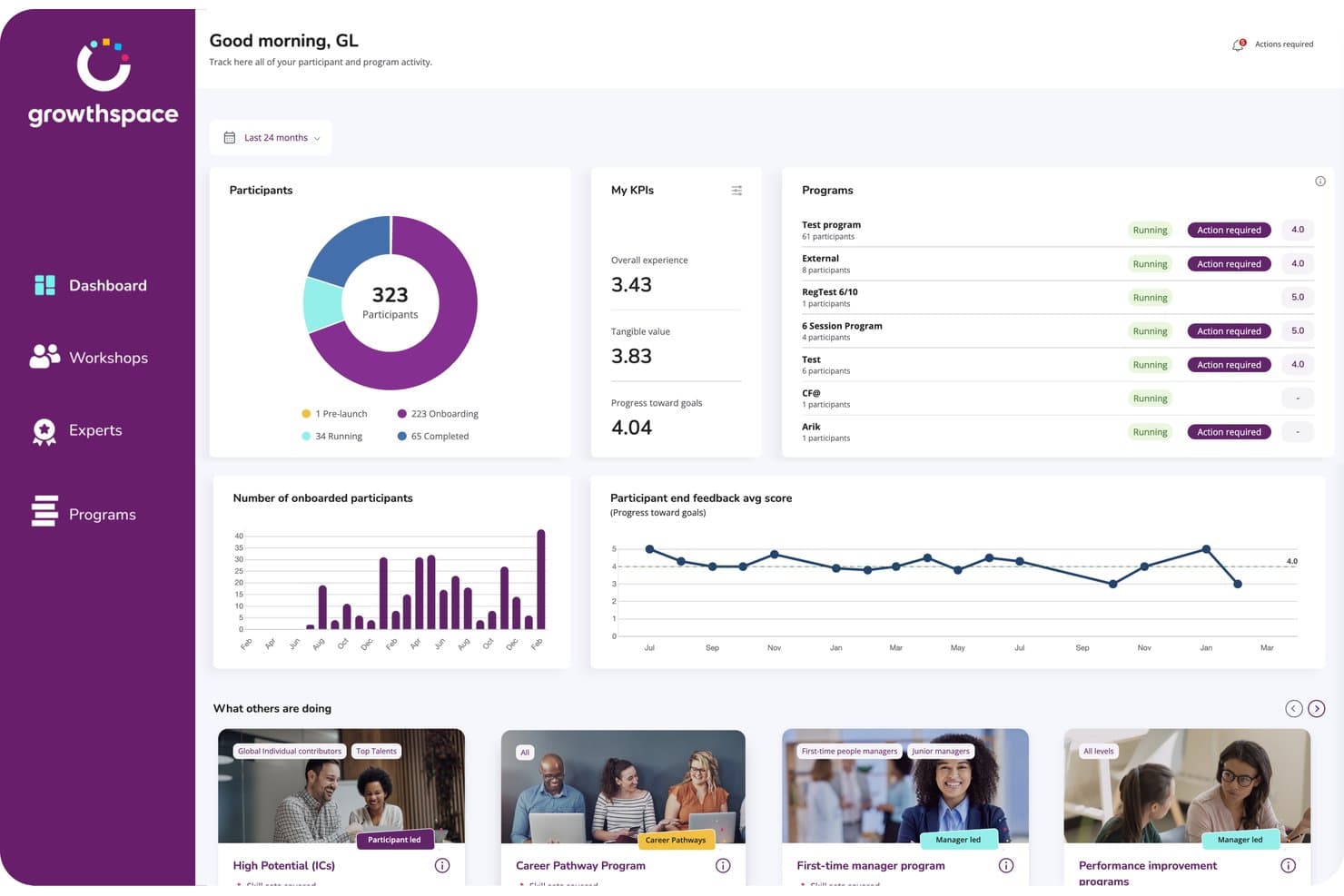
GrowthSpace tracks participant progress and program KPIs in one dashboard. GrowthSpace is an enterprise coaching platform that matches employees with external domain experts for skill development.
Who Is GrowthSpace Best For?
L&D teams at global enterprises that run skill-by-skill development programs across several languages and time zones.
Why I Picked GrowthSpace
GrowthSpace earns its spot on my shortlist because of how it matches employees with domain experts: functional expertise, seniority, language, time zone, and skill goals all feed the pairing. I'm talking about a network of 2,800+ vetted experts across 65+ countries. The sprint format, five sessions over 6–8 weeks on one named skill, gives each development goal a defined scope and end date.
GrowthSpace Key Features
- Multiple program formats: Choose from 1:1 sprints, group cohorts, workshops, or internal mentoring programs.
- 360° manager feedback: Manager input feeds into impact assessments, connecting program outcomes to performance reviews and engagement data.
- White-label branding: Apply your organization's branding, custom metrics, and communication templates across the platform.
- ExpertX AI agent suite: Turn internal knowledge into on-demand training using agents for role-play practice, presentations, coaching feedback, and knowledge Q&A.
GrowthSpace Integrations
GrowthSpace offers integrations with Microsoft Viva Learning, Slack, Zoom, Microsoft Teams, and HRIS systems. It also offers an API for custom connections
Pros and Cons
Pros:
- Enterprise cohorts support large-scale delivery
- Structured sprints make goals measurable
- AI matching spans multiple experts
Cons:
- Scheduling might cause friction among some participants
- Five-session sprints can feel limiting
Learn more about GrowthSpace: Best for bulk coaching program deployment
- Free demo + 14-day free trial available
- From $12/year
Visit WebsiteCustomer Rating:4.5/5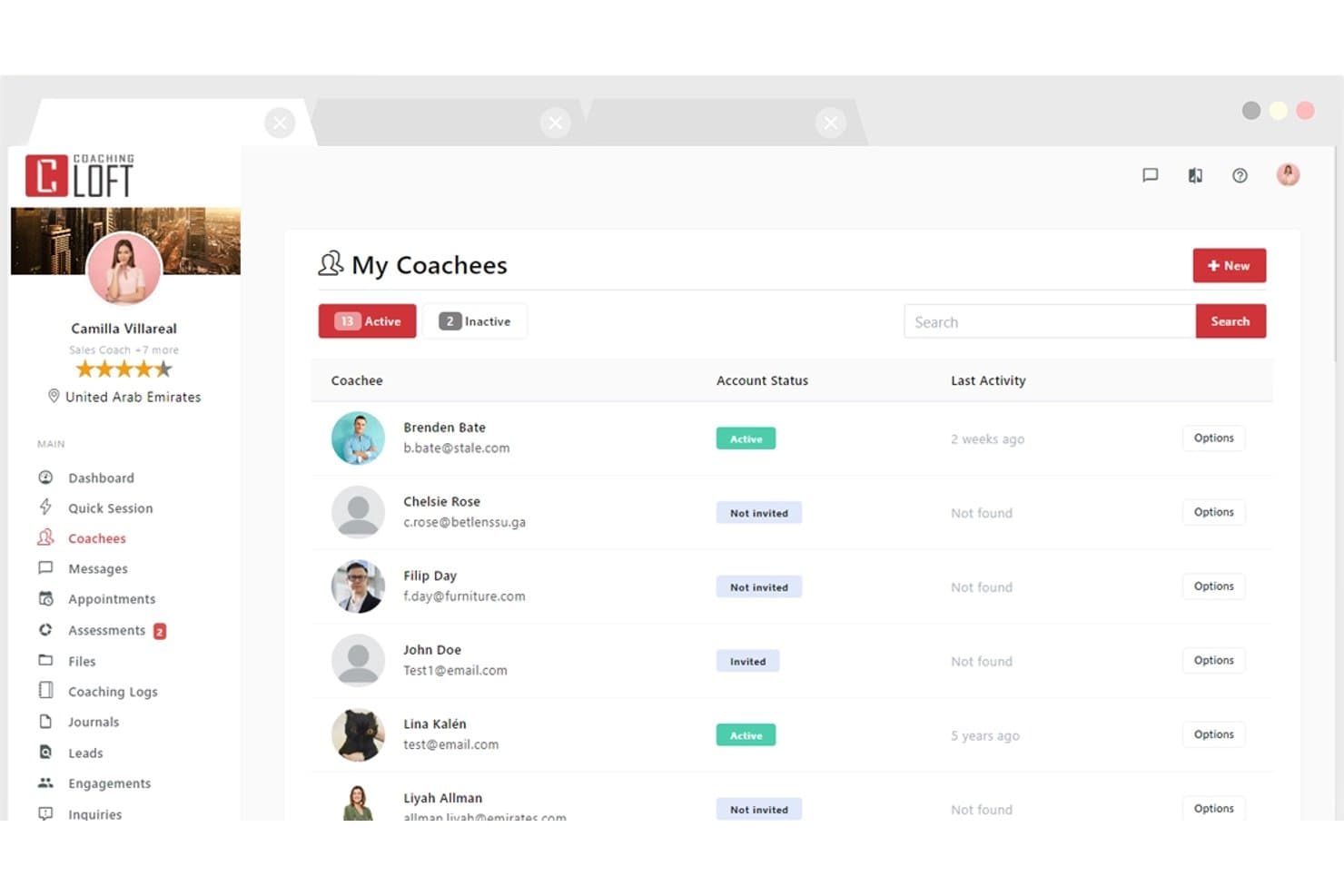
Coaching Loft lets users manage and track all active coachees in one place. Coaching Loft is a coaching management platform that handles scheduling, client portals, and progress tracking for coaches and program administrators.
Who Is Coaching Loft Best For?
Coaching Loft is a strong fit for HR leaders and program administrators rolling coaching out to a large employee base.
Why I Picked Coaching Loft
Coaching Loft earns its spot on my shortlist for how it handles bulk rollouts. I've used its bulk engagement assignment tool to push up to 1,000 engagements in a single upload, which makes rolling out a company-wide coaching initiative far less painful than doing it coach by coach. Pair that with reusable engagement templates and AI-powered coach matching, and you've got a setup that scales without sacrificing structure.
Coaching Loft Key Features
- 360° multi-rater feedback: Collect structured feedback on coachees from peers, managers, and direct reports using built-in or custom assessment templates.
- Native video conferencing: Run coaching sessions directly in the platform without switching tools.
- Client portal: Every coachee gets a free portal to manage scheduling, goals, session history, tasks, and shared files.
- Enterprise Panel dashboards: Admins get visibility into coach and coachee activity, session volume, feedback, and ROI reporting across the organization.
Coaching Loft Integrations
Coaching Loft offers integrations with Leadfeeder, Mailchimp, HubSpot, PayPal, Microsoft Teams, Zoom, and Zapier. It also supports an open API for custom integrations.
Pros and Cons
Pros:
- Supports multi-rater assessments
- Free client portals support
- Bulk program deployment supports 1,000 engagements
Cons:
- No native session recording
- Limited storage restricts video-heavy coaching practices
Learn more about Coaching Loft: 3Best for enterprise coaching ROI measurement
Ezra
- Free demo available
- Pricing upon request
Visit WebsiteCustomer Rating:4/5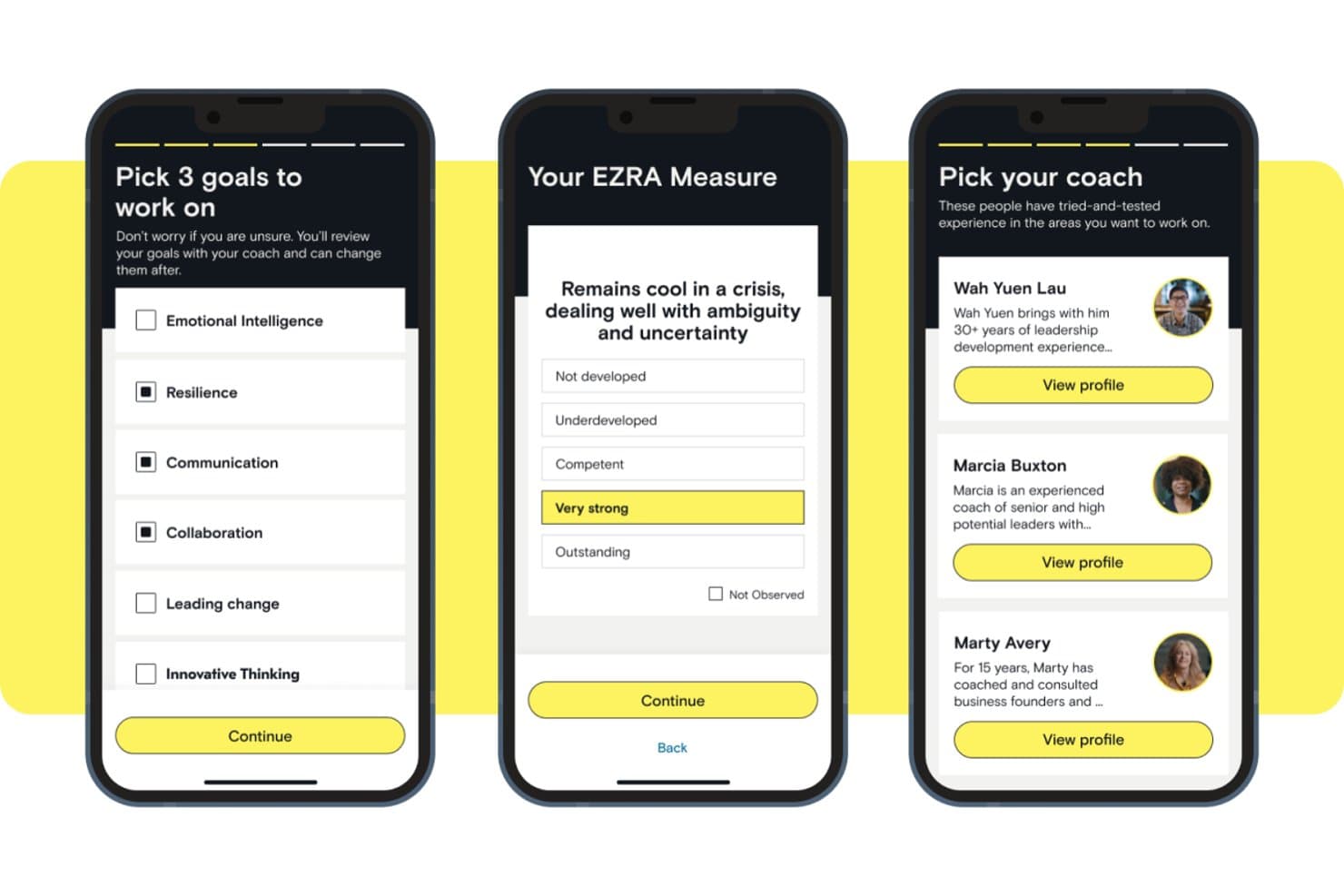
Ezra lets users set goals, self-assess, and pick a coach. Ezra is a managed coaching platform that connects employees with a network of ICF-certified coaches for 1:1 and executive coaching.
Who Is Ezra Best For?
Ezra is a strong fit for enterprise HR and L&D leaders accountable for reporting coaching results to executive sponsors.
Why I Picked Ezra
I included Ezra because it builds reporting for program sponsors into the product. EZRA Measure pulls session ratings, manager feedback, and progress tracking into sponsor-facing reports, giving HR and L&D leaders figures for budget reviews. A booking gate requires a session rating before the next booking, and Ezra reports near-100% feedback capture as a result.
Ezra Key Features
- Cai AI assistant: Gives participants a space to practice scenarios and receive real-time feedback between live coaching sessions.
- Multi-tier program library: Choose from EZRA Edge, EZRAx, or Focus, plus 20 pre-built Focus curricula covering topics like resilience, change navigation, and goal setting.
- Native in-app video: Coaching sessions run through Ezra's own video tool inside the mobile app, so participants don't need a separate conferencing platform.
- Lifecycle-triggered coaching: Connect coaching programs to HR suite to start coaching at key employee lifecycle moments.
Ezra Integrations
Ezra has integrations with SAP SuccessFactors and Microsoft Entra ID for single sign-on and user provisioning. No public API or broader integrations directory is documented.
Pros and Cons
Pros:
- Participants choose coaches and schedules
- Structured programs span career levels
- Near-100% session feedback capture
Cons:
- Lacks specific niche integrations
- Independent coaches cannot license the platform
Learn more about Ezra:
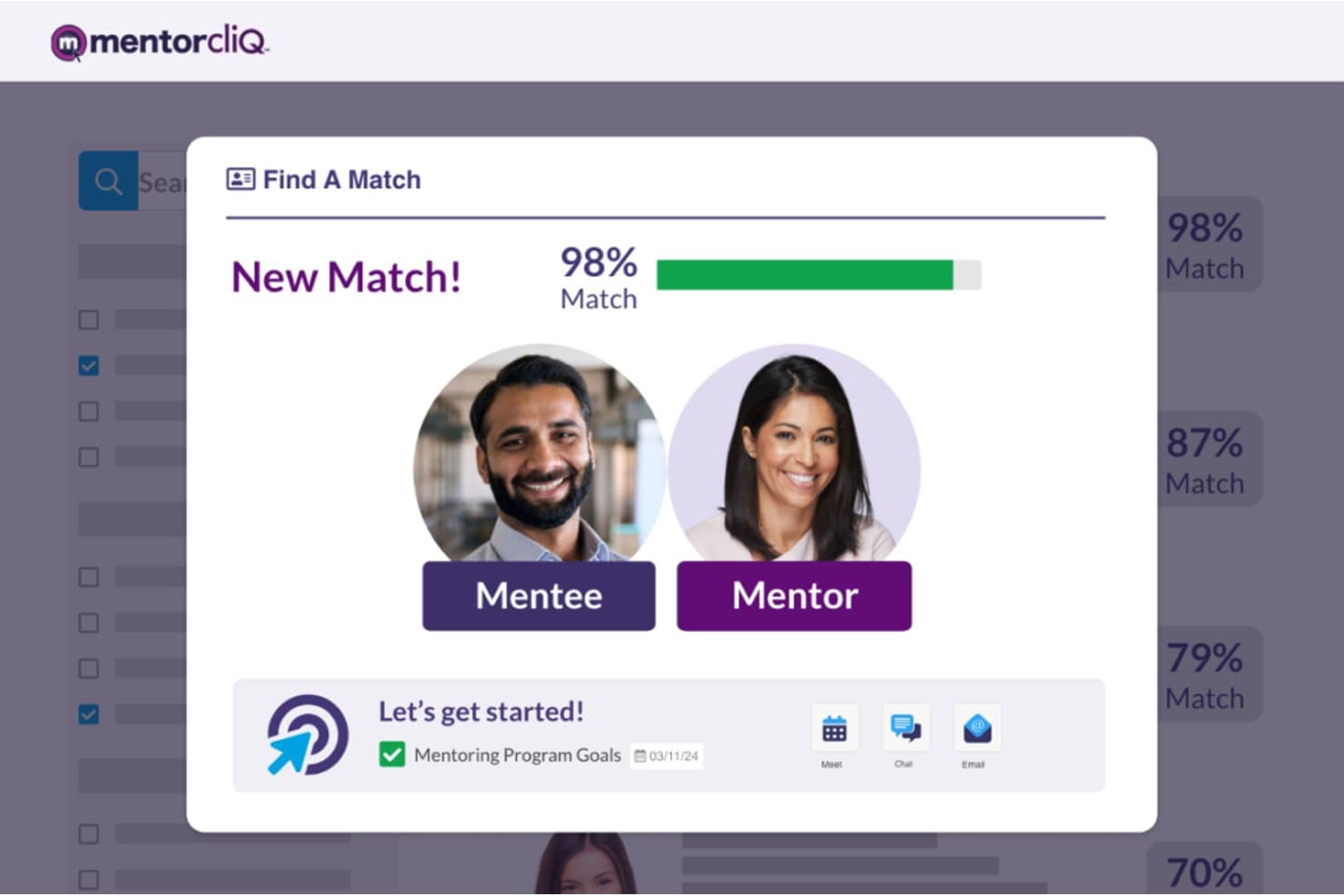
MentorcliQ matches mentors and mentees with a 98% compatibility score. MentorcliQ is an enterprise online coaching platform that supports structured mentoring programs through AI-powered participant matching, goal tracking, program curriculum management, and reporting analytics.
Who Is MentorcliQ Best For?
MentorcliQ is a strong fit for L&D teams at mid-to-large enterprises running several mentoring tracks at once.
Why I Picked MentorcliQ
MentorcliQ is on my list for the control it gives admins over matching. Its Smart Matching engine analyzes skills, goals, and engagement potential, and admins can override or approve matches before they're confirmed. It also supports peer, reverse, and cross-functional relationships, so matching logic follows the program design.
MentorcliQ Key Features
- Micro-surveys: Short monthly check-ins emailed to participants capture progress data and mentoring hours to feed program analytics.
- Program curriculum templates: Pre-built program templates support mentoring types like onboarding, peer, and leadership development.
- Real-time analytics dashboard: Tracks participation, engagement, satisfaction, retention, and internal mobility across all active programs.
MentorcliQ Integrations
MentorcliQ integrates with Microsoft 365, Google Calendar, Outlook, Slack, and Zoom. It also supports HRIS and employee database connections, SSO, and an open API for custom integrations.
Pros and Cons
Pros:
- Structured curricula support multi-track coaching
- Goal and milestone tracking spans programs
- AI matching supports organizational coaching cohorts
Cons:
- No independent coach practice management
- No native video session recording
Learn more about MentorcliQ: Best for white-label coaching program delivery
- Free demo available
- Pricing upon request
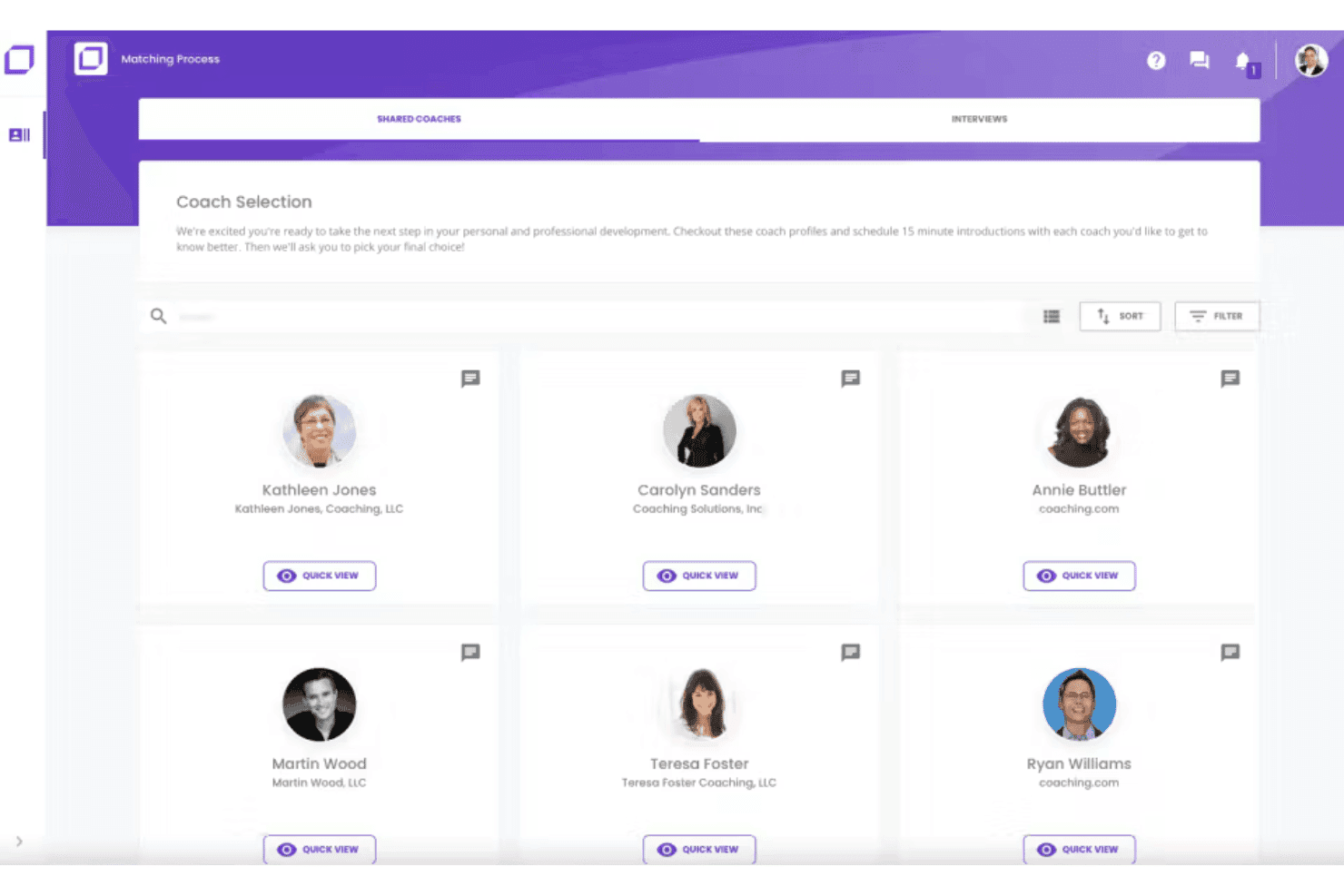
Coaching.com matches users with coaches via a visual selection interface. Coaching.com is a coaching management platform that combines session scheduling, goal tracking, program templates, and group coaching in an all-in-one system.
Who Is Coaching.com Best For?
Coaching.com is a good fit for coaching business firms and program administrators that deliver coaching under their own brand, including HR and L&D teams running multi-coach programs.
Why I Picked Coaching.com
I chose Coaching.com for its white-label tooling. The branded client portal supports custom colors, logos, and branded email notifications, so coaching clients never see the brand name. A white-label marketplace lets coaching firms list their own coaches, packages, and pricing, with automated commission handling.
Coaching.com Key Features
- Goal planning and milestone tracking: Set personalized client goals, build out action plans with milestones, and collect stakeholder feedback tied to each engagement.
- Hogan Assessments integration: Assign and manage Hogan personality assessments, schedule debriefs, and translate results into tracked action plans.
- Group coaching module: Build and run multiple group engagements that blend group and 1:1 sessions, with group-level analytics and integrated video conferencing.
- AI-supported reporting dashboards: View visual dashboards covering engagement themes, completion rates, coach capacity, financials, and client satisfaction across your entire program.
Coaching.com Integrations
Coaching.com documents integrations with Google Calendar, Slack, Google Meet, Stripe, Hogan, TruSource, Okta, and Zoom. It also supports API integrations for custom connections.
Pros and Cons
Pros:
- Program templates support sequenced cohort delivery
- Goal tracking connects milestones with stakeholder feedback
- White-label portals support a polished client experience
Cons:
- Basic session notes only
- Setup can feel cumbersome for solo business coaches
Learn more about Coaching.com: Best for org-wide coaching with 4,000+ coaches
- Free demo available
- Pricing upon request
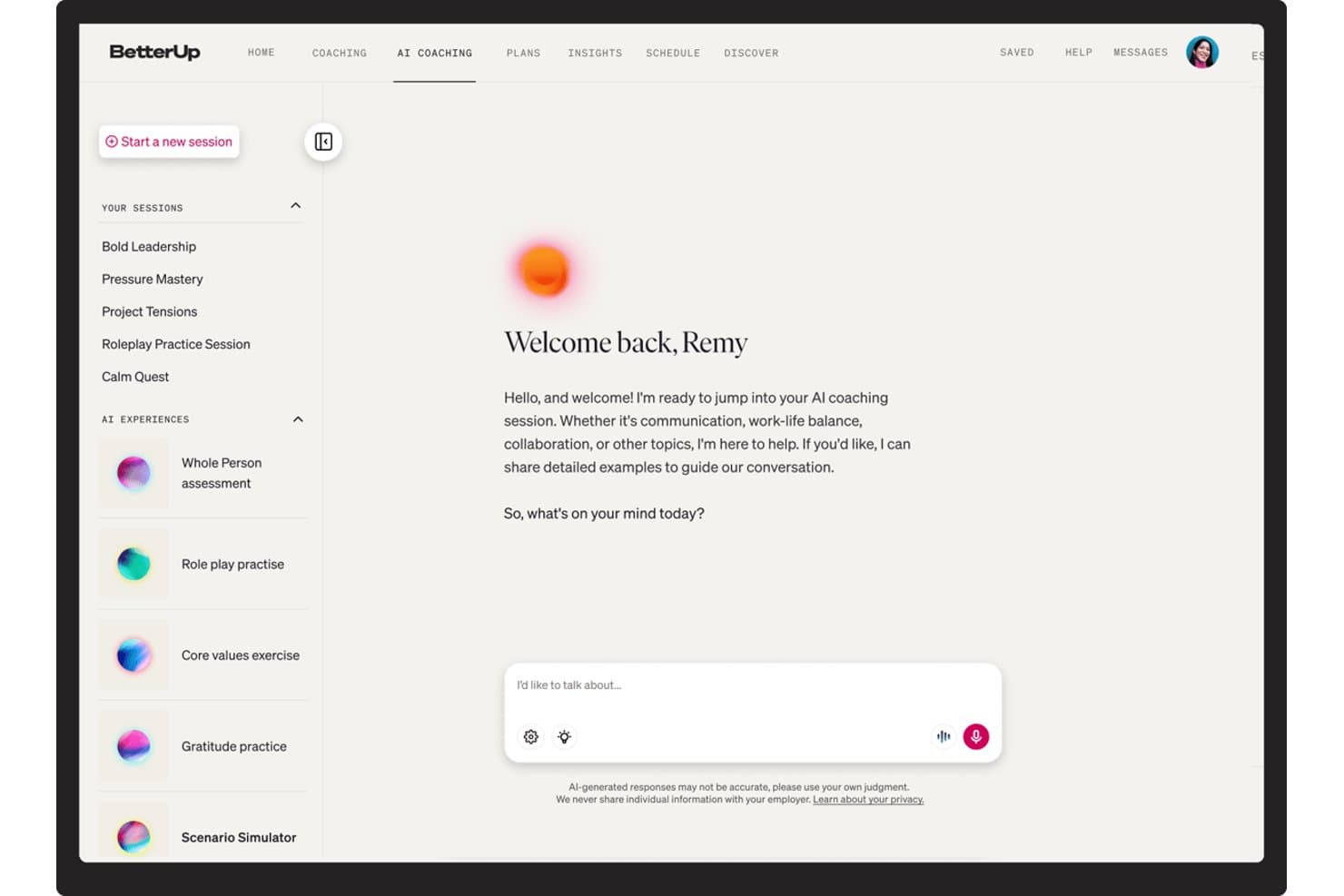
BetterUp offers AI coaching sessions on communication and work-life balance. BetterUp is an enterprise coaching platform that delivers 1:1 coaching, group coaching, and AI-powered coaching across your workforce through a network of ICF-certified coaches.
Who Is BetterUp Best For?
BetterUp is a strong fit for enterprise teams that roll coaching out to hundreds of employees at once, including companies with EU or US data-residency requirements.
Why I Picked BetterUp
BetterUp is my pick for rolling coaching out at scale. A network of 4,000+ ICF-certified coaches and AI-assisted matching let HR teams assign coaches to hundreds of employees without pairing people by hand. BetterUp reports 98% first-match accuracy. I also like the Whole Person assessment tracks dimensions such as emotional regulation and cognitive agility, giving coaches and admins a record of progress across sessions.
BetterUp Key Features
- Multi-modal coaching delivery: BetterUp supports 1:1 video sessions, group coaching circles, AI roleplay, and always-on AI chat coaching embedded in Slack and Microsoft Teams.
- Milestone Moments triggers: Coaching starts automatically at career transitions such as a first-time manager appointment, return from leave, or a reorg..
- Performance intelligence dashboards: Admins get aggregated, de-identified reporting across activation, utilization, skill adoption, retention risk, and goal achievement, all tied to business metrics in Quarterly Business Reviews.
- Enterprise-grade security controls: BetterUp holds SOC 2 Type II and ISO 27001 certifications, supports US or EU data residency, and maintains a strict confidentiality boundary.
BetterUp Integrations
BetterUp integrates with Workday, Salesforce, Slack, Microsoft Teams, SAP SuccessFactors, and Degreed. It also offers an API for custom connections.
Pros and Cons
Pros:
- Programs span one-to-one, group, and AI coaching
- Keeps coaching data secure and private
- Coaching triggered at career transitions
Cons:
- Coach quality can vary across the network
- No tools for independent coach practices
Learn more about BetterUp: Best for coaching programs tied to HRIS data
- Free demo available
- Pricing upon request
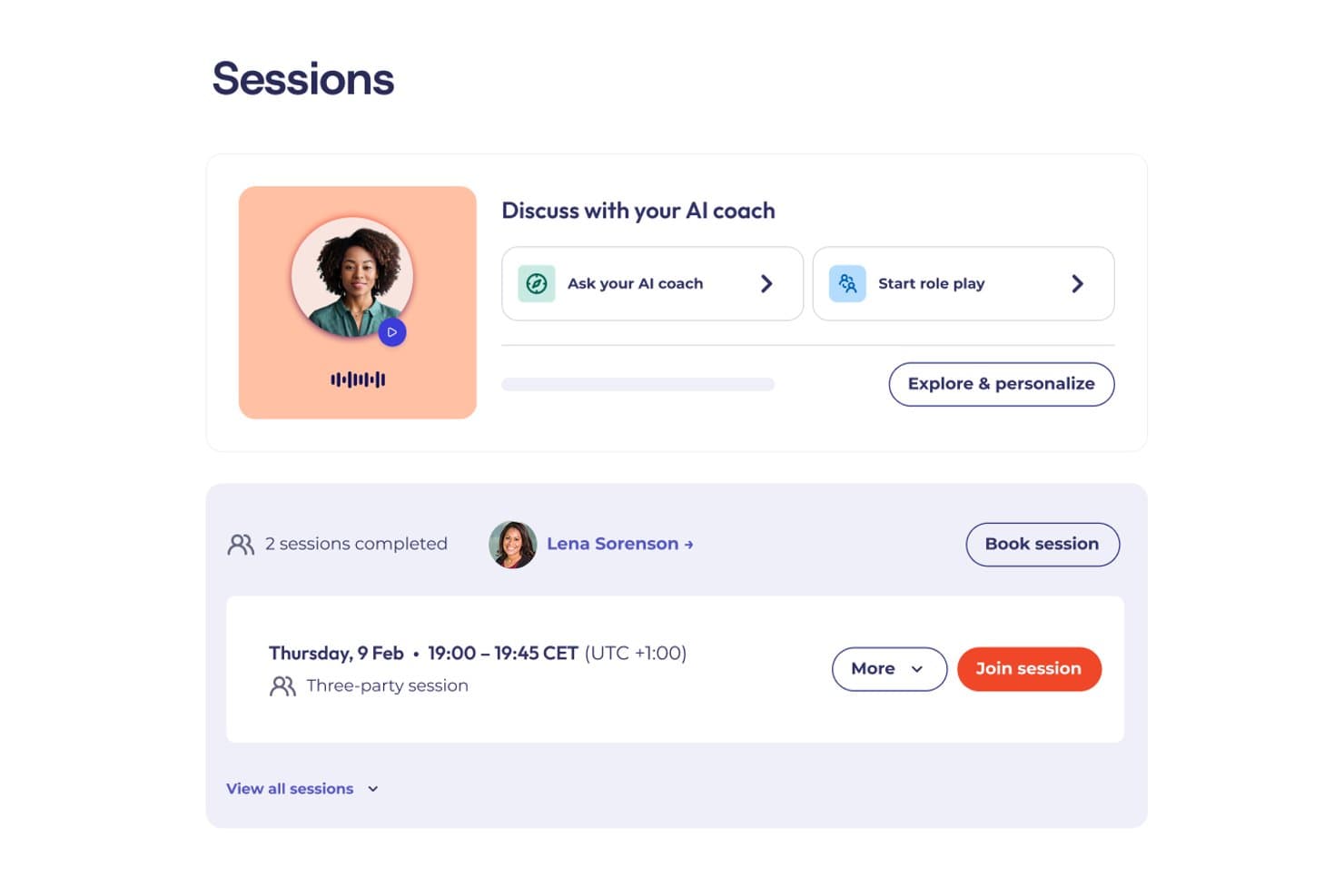
CoachHub lets users book sessions and chat with an AI coach. CoachHub is an enterprise digital coaching platform that connects employees with ICF-certified coaches through a global network.
Who Is CoachHub Best For?
CoachHub is a strong fit for enterprise HR teams that want coaching programs connected to their HRIS records.
Why I Picked CoachHub
I picked CoachHub for its HRIS connection. Native Workday and SAP integrations let HR teams pull employee data into the platform to nominate, activate, and track coachees without manual entry. The Insights dashboard links session engagement, goal attainment, and behavioral progress to business outcomes tracked in the HRIS, and the (im)PACT measurement model connects coaching activity to retention and OKR data.
CoachHub Key Features
- AI coach-coachee matching: Pairs employees with coaches based on goals, personality, learning style, language, and leadership level.
- CoachHub Academy content library: Access 8,000+ micro-learning activities—videos, articles, and exercises—organized into curated learning paths.
- 360° feedback and self-assessments: Collect structured input from peers, managers, and direct reports, with re-assessments built into the program timeline.
- AIMY: A standalone conversational AI coaching tool available 24/7 to all employees, with goal-oriented prompts, video role-plays, and self-assessments.
CoachHub Integrations
CoachHub offers native integrations with Microsoft Teams and Workday. Its open API supports custom HRIS integration.
Pros and Cons
Pros:
- Re-assessments built into programs
- 24/7 AI coach for all employees
- High-quality ICF-accredited coach access
Cons:
- Human sessions cannot be recorded or transcribed
- Built for employers, not independent coaches
Learn more about CoachHub: Best for human and AI-led coaching with 360 feedback
- Free demo available
- Pricing upon request
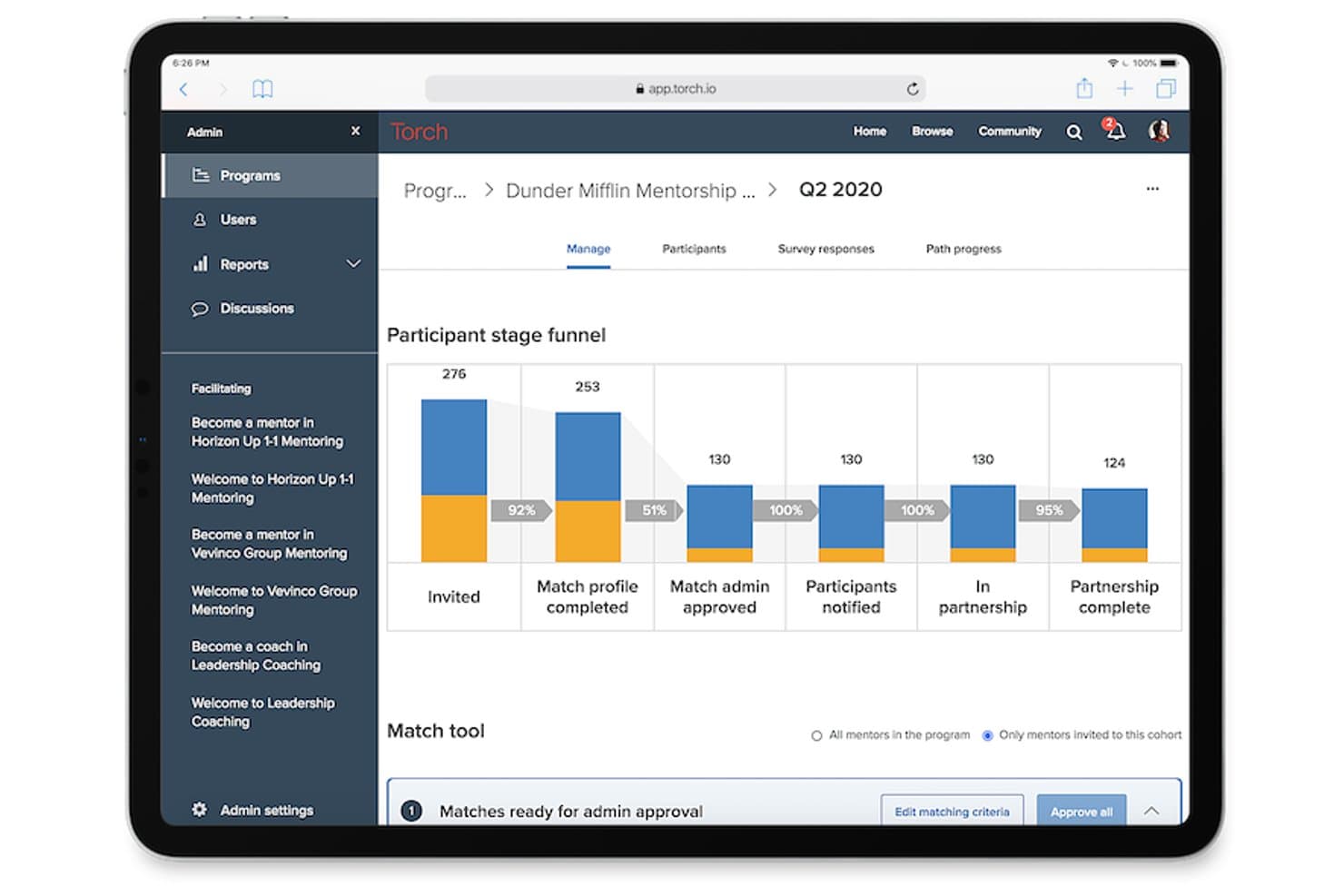
Torch tracks mentorship participant stages from invite to partnership complete. Torch is a leadership coaching platform that connects employees with a curated network of human coaches.
Who Is Torch Best For?
Torch works best for mid-market and enterprise HR teams that want an external, vetted coach network for leadership programs.
Why I Picked Torch
Torch earns its spot on my shortlist because it genuinely combines human coaching with AI in a way that goes beyond a chatbot add-on. I'm particularly impressed by Spark, Torch's AI agent, which runs adaptive role-play simulations for real scenarios like delivering difficult feedback or managing change resistance. Paired with Torch 360, which captures multi-stakeholder feedback at program start and close, you get a measurable arc of leadership behavior change that most standalone coaching tools can't match.
Torch Key Features
- Coach shortlisting: Sends each participant a curated list of three vetted coaches to review and select from, with the option to rematch if the fit isn't right.
- Group coaching cohorts: Run structured group programs for 6–9 participants over 3–6 months using pre-built or co-created curricula.
- Org Intelligence dashboards: Aggregate anonymized coaching signals across the organization to surface leadership capability gaps, burnout indicators, and talent risk at a program level.
Torch Integrations
Torch offers native integrations with Zoom and Slack, plus SAML SSO for identity-provider access.
Pros and Cons
Pros:
- Anonymized talent-risk signals by program
- Pre-built or co-created group curricula
- Curated coach matching with rematching
Cons:
- Engagement prompts between sessions can feel sparse
- User interface is not intuitive
Learn more about Torch:
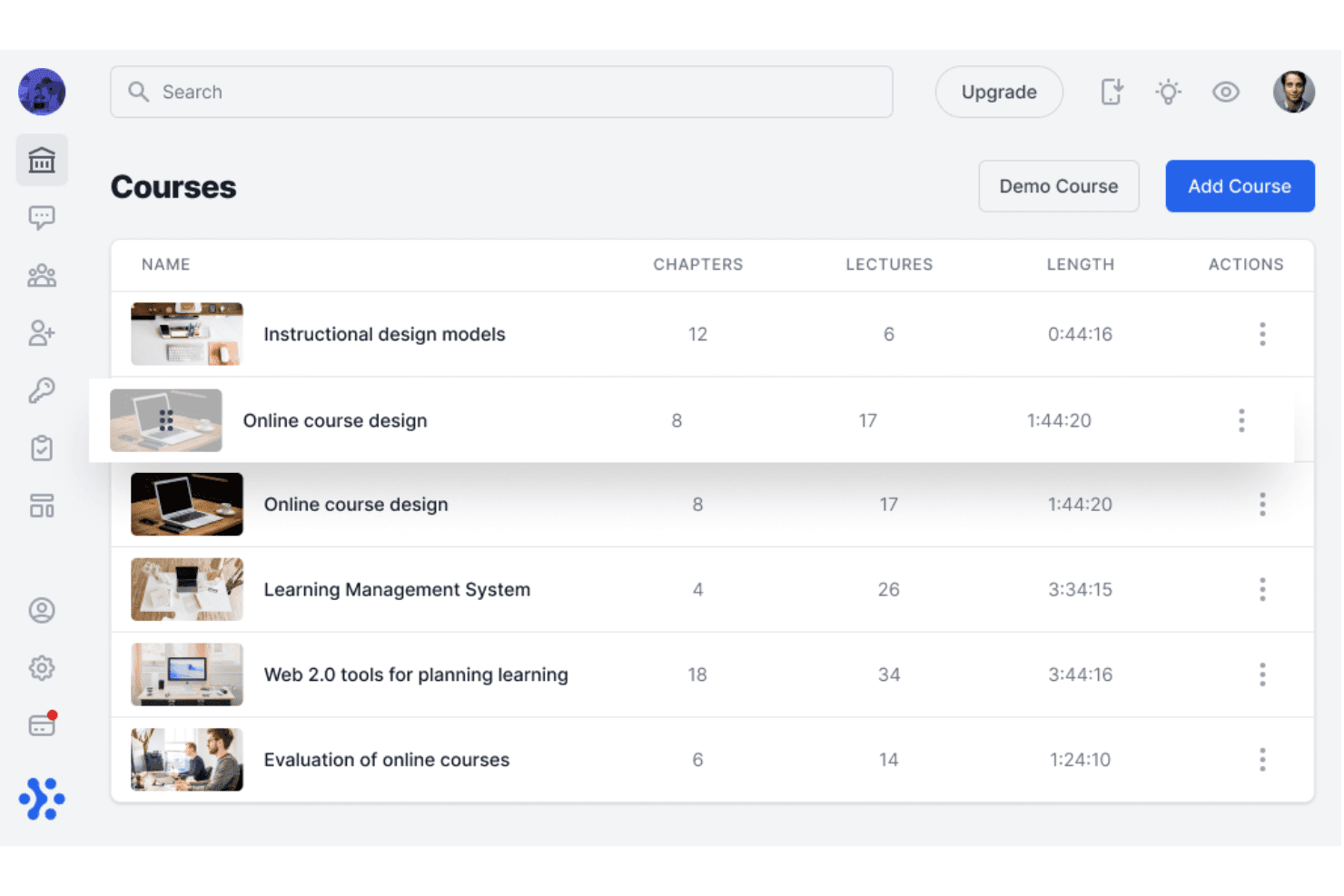
Sharpist organizes coaching courses by chapters, lectures, and length. Sharpist is an enterprise digital coaching platform that pairs employees with human coaches and an AI Coach.
Who Is Sharpist Best For?
Sharpist is well suited to European enterprises and multinational organizations that need to run structured leadership coaching programs at scale while maintaining strict data privacy standards.
Why I Picked Sharpist
I chose Sharpist for how its AI Coach picks up where each human session ends. After a 1:1 session, it reads the human coach's summary and keeps working with the employee through chat or voice. Pair that with a matching engine backed by both a proprietary algorithm and a team of psychologists, which claims a 97% match success rate, and you get a platform where AI and human coaching reinforce each other in a way I haven't seen elsewhere.
Sharpist Key Features
- Flexible credit pool: HR allocates a shared credit budget that learners can spend across 1:1 sessions, group coaching, and different session lengths.
- 2,000+ micro-task library: Coaches assign curated tasks, including articles, self-reflection exercises, and journals, from a library mapped to 32 leadership focus areas to reinforce learning between sessions.
- Real-time L&D dashboard: Get a live view of registration, credit usage, engagement, goal progress, and benchmarking data across the coaching program.
- Group coaching sessions: Live cohort sessions run for 60–90 minutes with 4–8 participants, letting you extend coaching access across teams.
Sharpist Integrations
Sharpist has no public API, and no named HRIS, LMS, or calendar integrations are documented.
Pros and Cons
Pros:
- Transferable credits support mixed coaching formats
- Large library of micro-tasks between sessions
- Live dashboard with CSV export
Cons:
- No standalone tools for independent coach practices
- Limited platform languages
Learn more about Sharpist: Best for AI-matched coaching via Teams or Slack
- Free demo available
- Pricing upon request
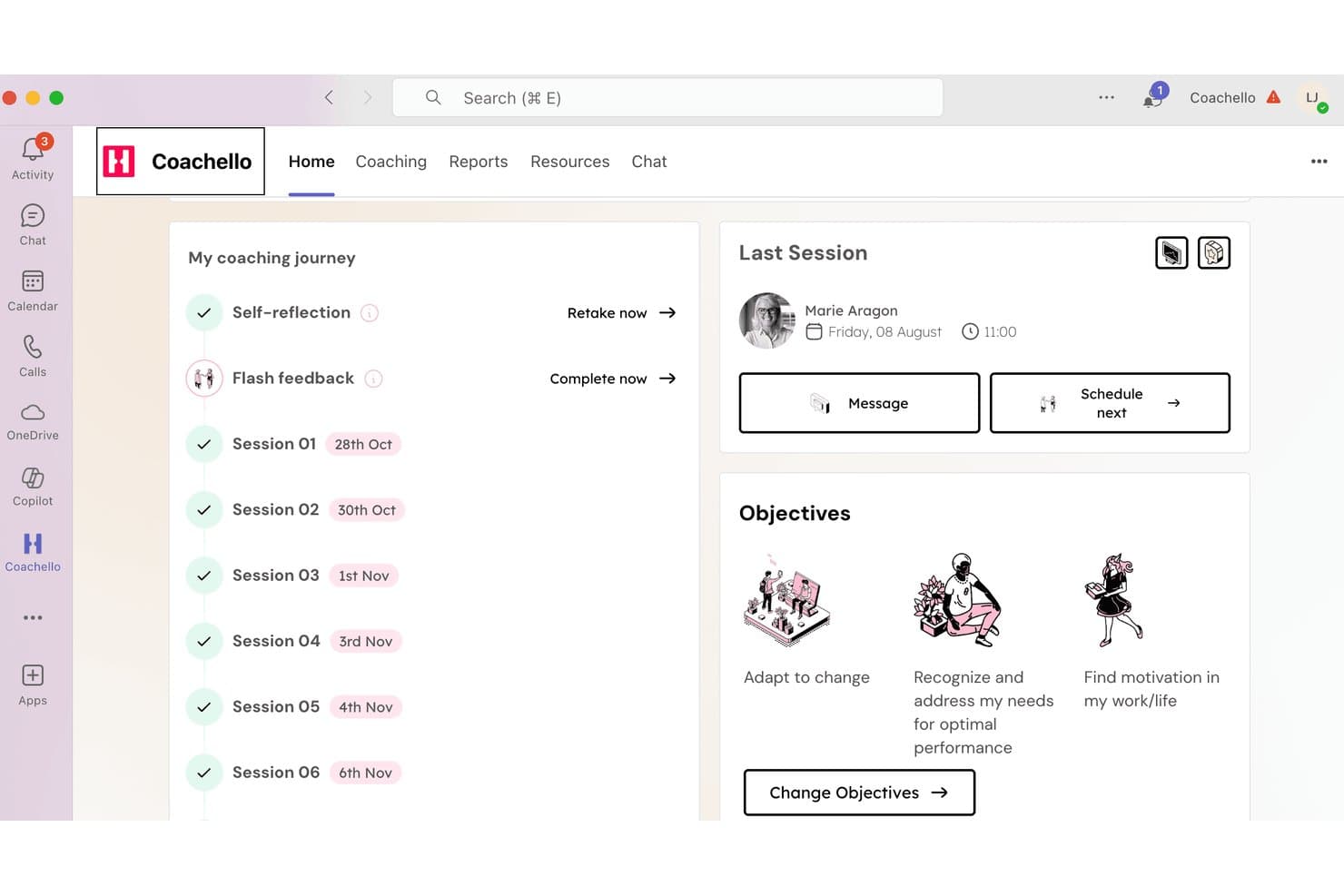
Coachello tracks coaching sessions, objectives, and progress in one dashboard. Coachello is an enterprise coaching platform that brings together human 1:1 coaching, AI coaching, AI roleplays, group workshops, and an internal coach hub, delivered natively inside Microsoft Teams or Slack.
Who Is Coachello Best For?
Coachello is a strong fit for teams that rely on Microsoft Teams or Slack to deliver coaching programs.
Why I Picked Coachello
I picked Coachello as one of the best because its AI matching engine lives natively inside Microsoft Teams and Slack, so coachees get coach recommendations, book sessions, and complete their entire coaching journey. The matching itself weighs expertise, language, time zone, and goals, then surfaces three vetted ICF PCC/MCC coaches with intro videos for review before a chemistry call. I also like that AI role-plays let employees practice real conversations, like giving feedback or navigating conflict, scored against custom rubrics directly in the platform.
Coachello Key Features
- AI assessment debriefs: Walks coachees through any psychometric assessment—personality, 360, or competency—and co-creates an exportable individual development plan.
- Drag-and-drop program builder: Assemble 1:1 sessions, group coaching, and workshops into cohorts, set enrollment rules, and attach custom KPIs in one interface.
- Multi-stakeholder 360 flash feedback: Coachees request pulse feedback from peers and managers directly inside Teams, feeding results into the coaching journey.
- Power BI and Tableau export: HR dashboards with utilization, NPS, and skill-gap heat maps can be pushed to your existing BI tools for broader workforce reporting.
Coachello Integrations
Coachello integrates with Microsoft Teams and Slack. No public API has been clearly documented.
Pros and Cons
Pros:
- Skill-gap heat maps in HR dashboards
- Program Builder supports cohort-based coaching
- AI helps match coachees with the right coach
Cons:
- Mobile access remains limited for users
- Roleplay avatars can lag or repeat questions
Learn more about Coachello:
Diğer Koçluk Yazılımları
Kısa listeme girmeyen ancak yine de incelemeye değer bazı ek platformlar şunlardır:
- 11Sounding BoardBest for multi-stakeholder coaching program governance
- 12SkillsoftBest for coaching tied to a global skills platform
- 13TogetherBest for criteria-based employee coaching
- 14Simply.CoachBest for solo coaches managing multiple clients
- 15QooperBest for scaling internal coaching programs
- 16ChronusBest for multi-program mentoring and coaching
- 17DelentaBest for coaching ops with ICF-aligned logs
- 18CoachAccountableBest for client progress tracking between sessions
- 19AceUpBest for coaching scaled across teams and org levels
How I Evaluate Coaching Software
I split my evaluation into three parts: core functionality (booking sessions and tracking goals over time) carries the most weight; standout features like AI-powered session insights set vendors apart; and beyond features, I consider privacy controls, HRIS integrations, and pricing flexibility.
Core Functionality (Table Stakes For This List)
When I'm selecting tools for my list, I score each one on a scale from 0 (does not offer the functionality) to 5 (excels in this area) for each core functionality listed below. I then convert the total into a percentage to help assess each tool's overall fit, with extra weight on any functionalities I've deemed essential.
- Session Scheduling (Essential): I check for calendar sync, automated reminders, rescheduling flows, and whether the platform handles bulk session booking across multiple coaches.
- Client Progress Tracking (Essential): I look for structured goal frameworks with session-by-session history, not just free-text notes, plus dashboards that give both coach and coachee visibility into milestones.
- Secure Communication Tools: I evaluate whether messaging and video are built in with encryption and access controls, or if the platform just links out to a third-party tool with no security layer.
- Coach-Coachee Matching: Matching criteria matter here. I look at whether the platform supports skills, goals, and availability filters, and whether admins can override automated suggestions.
- Program & Curriculum Management: I check how flexibly admins can build multi-session tracks, reuse templates across cohorts, and adapt sequencing for different development paths.
- Reporting on Coaching Outcomes: I look for dashboards that go beyond session counts to show engagement trends, completion rates, and progress metrics aggregated across the organization.
Once I have a list of tools that meet the criteria, I consider what sets each platform apart.
Differentiating Factors (What Sets Vendors Apart)
Here's how I compare and contrast different vendors:
Standout Features
AI-powered session insights are a big differentiator. I look for platforms that auto-transcribe and summarize coaching conversations, surfacing recurring themes so coaches spend less time on notes and more time on development. Multi-stakeholder feedback tools also matter—when managers and peers can contribute 360-degree input, the coachee's development picture gets richer and coaching stays aligned with team goals. I also evaluate white-label branding options, especially for internal L&D teams that need a consistent, organization-specific experience across global offices.
Beyond Features
Data privacy tops my list. Coaching surfaces sensitive personal and performance information, so I check whether vendors offer configurable visibility controls—for example, keeping coach session notes visible only to the coachee while giving HR aggregated, anonymized outcome data. I also evaluate HRIS and talent system integrations, since pulling employee skills and role data into coach-coachee matching cuts manual work for program administrators and keeps development aligned with performance cycles. Flexible pricing matters too, especially for organizations piloting a coaching program in one department before scaling organization-wide.
Koçluk Yazılımı Nasıl Seçilir?
Hassas görüşmeleri koruyup korumadığını, program tasarımınızı destekleyip desteklemediğini ve iş gücü kararlarında kullanabileceğiniz kanıtlar üretip üretmediğini test ederek doğru yazılımı seçin.
| Önceliğiniz... | Şunları arayın... |
|---|---|
| Önceliğiniz...Gizli koçluk | Şunları arayın...Özel notları toplu İK raporlamasından ayıran yazılı kurallar |
| Önceliğiniz...Daha iyi koç eşleştirme | Şunları arayın...Belgelendirilmiş eşleştirme kriterleri ve yöneticinin geçersiz kılma süreci |
| Önceliğiniz...İKYS bağlantılı programlar | Şunları arayın...Çalışan veri alanlarını ve senkronizasyon zamanlamasını gösteren güncel bir entegrasyon kılavuzu |
| Önceliğiniz...Ölçülebilir gelişim | Şunları arayın...Etkileşimi, tamamlanma oranını ve hedef ilerlemesini gösteren örnek sonuç raporları |
| Önceliğiniz...Esnek kullanıma alma | Şunları arayın...Daha geniş bir kullanıma sunumdan önce pilot uygulamayı destekleyen fiyatlandırma ve sözleşme koşulları |
Kısa Listeniz Nasıl Değerlendirilir?
- Gizliliği test edin: Satıcının veri görünürlüğü matrisini isteyin ve notlara, hedeflere, mesajlara ve raporlara kimlerin erişebileceğini yazılı olarak doğrulayın.
- Veri işleme süreçlerini test edin: Çalışan bilgilerini paylaşmadan önce güncel bir veri akış şeması, saklama planı ve silme süreci isteyin.
- Tanımlı bir deneme yürütün: 14 günlük değerlendirme sırasında bir koçluk süreci oluşturun, örnek bir oturumu tamamlayın ve ortaya çıkan katılımcı kaydını dışa aktarın.
- Destek iddialarını doğrulayın: Satış öncesi aşamada eşleştirme veya raporlama hakkında bir soru içeren destek talebi oluşturun, ardından yanıt süresini ve üst kademeye aktarma yolunu kaydedin.
- Ödünleşiminizi seçin: Önceliğinizin geniş bir harici koçluk ağı mı yoksa daha sıkı bir dahili program denetimi mi olduğuna karar verin; çünkü platformlar nadiren her ikisini de en üst düzeye çıkarır.
Koçluk Yazılımı Nedir?
Koçluk yazılımı, kuruluşların çalışanlarını koçlarla eşleştirmesine, gelişim programlarını yönetmesine, oturumları planlamasına ve ilerlemeyi takip etmesine yardımcı olan bir platformdur. Özel iletişimi, hedef belirlemeyi, geri bildirimi, raporlamayı ve İK sistemleriyle entegrasyonları destekler. İK ekipleri, gizli oturum bilgilerini korurken koçluğu geniş ölçekte koordine etmek ve katılımı, tamamlanma durumunu ve gelişim sonuçlarını ölçmek için bu yazılımı kullanır.
Koçluk Yazılımının Özellikleri
Ekibinize koçluk yapmak için doğru yazılımı seçerken aşağıdaki temel özelliklere dikkat edin:
- Koç eşleştirme: Çalışanları hedefleri, becerileri, zamanları ve tercihleri doğrultusunda uygun koçlarla eşleştirir. İK, eşleşmeleri istediği zaman ayarlayabilir.
- Oturum planlama: Koçların ve çalışanların paylaşılan takvimleri ve otomatik hatırlatıcıları kullanarak toplantıları planlamasına, yeniden planlamasına veya tekrarlamasına olanak tanır.
- Hedef takibi: Kullanıcıların hedefler belirlemesine ve ilerlemeyi takip etmesine yardımcı olur. Koçlar, oturum notlarını doğrudan bu ana hedeflere bağlayabilir.
- Güvenli iletişim: Mesajları, dosyaları ve video bağlantılarını gizli tutar. Açık izinler, hassas sohbetleri yönetici görünümlerinden ayrı tutar.
- Program yönetimi: İK'nın koçluk programları oluşturmasına, grupları yönetmesine ve tutarlı öğrenme yolları için kullanıma hazır şablonlardan yararlanmasına yardımcı olur.
- Geri bildirim ve değerlendirmeler: Güçlü yönleri ve gelişim alanlarını göstermek için çalışma arkadaşlarından ve yöneticilerden basit anketler ve değerlendirmeler toplar.
- Raporlama ve analiz: İK'nın başarıyı ölçebilmesi için oturumların tamamlanma durumunu, ilerlemeyi ve genel etkinliği anlaşılır panolarda gösterir.
- Sistem entegrasyonları: Bilgileri otomatik olarak güncel tutmak için koçluk yazılımını İK araçlarınıza ve iş takvimlerinize bağlar.
- Gizlilik ve kontroller: Belirli ayrıntıları kimin görebileceğini, genel ekip verilerini kimin görebileceğinden ayırarak özel notları ve sonuçları korur.
Yaygın Koçluk Yazılımı Yapay Zekâ Özellikleri
Yukarıda listelenen standart özelliklerin yanı sıra birçok platform artık aşağıdaki gibi özelliklerle yapay zekâyı da kullanıma sunuyor:
- Kişiselleştirilmiş eylem planı oluşturma: Koçluk alan kişinin hedeflerini, değerlendirmelerini ve değerlendirme sonuçlarını önerilen gelişim etkinliklerine dönüştürür. Koçlar bu önerileri oturumlar arasında inceleyebilir, düzenleyebilir ve atayabilir.
- Koçluk sorusu önerileri: Koçluk alan kişinin belirttiği zorluklara, hedeflere veya önceki yanıtlarına göre takip soruları önerir. Bu özellik, koçların bir konuyu daha derinlemesine incelemeleri gerektiğinde ek soru yönlendirmelerine sahip olmasını sağlar.
- Uygulama senaryosu simülasyonları: Zor konuşmalar, yetki devri veya mülakat hazırlığı gibi durumlar için etkileşimli rol yapma alıştırmaları oluşturur. Koçluk alan kişiler farklı yanıtları deneyebilir ve bunları işte uygulamadan önce geri bildirim alabilir.
- Etkileşim riskinin tespiti: Olası kopuklukları belirlemek için katılım modellerini, kaçırılan oturumları, yanıt sürelerini ve etkinlik düzeylerini analiz eder. Program yöneticileri, bir katılımcının ne zaman iletişime ihtiyaç duyabileceğine karar vermek için bu sinyalleri kullanabilir.
- Kaynak önerileri: Koçluk konularını platformun içerik kütüphanesindeki ilgili alıştırmalar, makaleler, videolar veya öğrenme materyalleriyle eşleştirir. Öneriler, koçluk alan kişinin hedefleri ve gelişim ihtiyaçları değiştikçe güncellenebilir.
- Doğal dille koçluk araması: Kullanıcıların koçluk kayıtlarında, kaynaklarda veya program verilerinde günlük dili kullanarak arama yapmasına olanak tanır. Örneğin bir yönetici, bir katılımcı grubunda en sık hangi gelişim temalarının görüldüğünü sorabilir.
Koçluk Yazılımının Faydaları
Bir çalışan koçluğu platformu çeşitli faydalar sağlar. Yararlanabileceğiniz birkaç fayda şunlardır:
- Koordineli program yönetimi: Program şablonları, kayıt kuralları, katılımcı grubu yönetimi ve planlama araçları, İK ekiplerinin koçluk girişimlerini düzenlemesine yardımcı olur.
- Ölçülebilir gelişim: Hedef çerçeveleri, oturum geçmişleri, kilometre taşı panoları ve sonuç raporları zaman içindeki katılımı ve ilerlemeyi gösterir.
- Daha iyi koç eşleştirme: Hedeflere, becerilere, deneyime, tercihlere ve uygunluk durumuna dayalı eşleştirme ölçütleri, katılımcıların uygun koçlarla bağlantı kurmasına yardımcı olur.
- Korunan görüşmeler: İzin ayarları, özel mesajlaşma, kontrollü notlar ve görünürlük kuralları, gizli koçluk bilgilerini toplu İK raporlarından ayırmaya yardımcı olur.
- Daha faydalı oturum içgörüleri: Yapay zekâ destekli transkripsiyon, özetler, tekrarlanan temalar, eylem planları ve önerilen sorular, koçlara takip için yapılandırılmış bilgiler sunar.
- Daha güçlü iş gücü kararları: Geri bildirim araçları, etkileşim verileri, tamamlama oranları ve anonimleştirilmiş raporlar, İK ekiplerinin koçluk programlarını değerlendirmesine yardımcı olur.
Koçluk Yazılımının Maliyetleri ve Fiyatlandırması
Doğru platformu seçmek, mevcut çeşitli fiyatlandırma modellerini ve planları anlamayı gerektirir. Maliyetler özelliklere, ekip büyüklüğüne, eklentilere ve daha fazlasına göre değişir. Aşağıdaki tablo yaygın planları, ortalama fiyatları ve genellikle sunulan özellikleri özetlemektedir.
Koçluk Yazılımı İçin Plan Karşılaştırma Tablosu
| Plan Türü | Ortalama Fiyat | Yaygın Özellikler |
|---|---|---|
| Plan TürüÜcretsiz Plan | Ortalama Fiyat$0/kullanıcı/ay | Yaygın ÖzelliklerTemel koç eşleştirme, sınırlı planlama, hedef takibi ve katılımcı profilleri. |
| Plan TürüKişisel Plan | Ortalama Fiyat$5-$25/kullanıcı/ay | Yaygın ÖzelliklerOturum planlama, ilerleme takibi, mesajlaşma, takvim entegrasyonu ve temel raporlama. |
| Plan Türüİşletme Planı | Ortalama Fiyat$25-$75/kullanıcı/ay | Yaygın ÖzelliklerGelişmiş eşleştirme, program yönetimi, geri bildirim araçları, analizler ve HRIS entegrasyonları. |
| Plan TürüKurumsal Plan | Ortalama Fiyat$75-$200/kullanıcı/ay | Yaygın ÖzelliklerÖzel iş akışları, gelişmiş gizlilik denetimleri, özel destek, beyaz etiketli markalama ve kuruluş genelinde raporlama. |
Koçluk Yazılımı SSS
Yaygın soruların bazı yanıtlarını burada bulabilirsiniz:
Koçluk yazılımı gizli oturum bilgilerini nasıl korur?
Koçluk ve öğrenme platformları, rol tabanlı izinler ve ayrı görünürlük ayarları aracılığıyla gizli bilgileri korur. Kullanıma sunmadan önce notları, hedefleri, mesajları, değerlendirmeleri ve raporları kimlerin görüntüleyebileceğini sorun. Politikanız, özel oturum notlarını koç ile danışan arasında tutmalıdır. Bunun yerine İK’ya anonimleştirilmiş katılım veya sonuç verileri gönderilebilir. Bir veri akışı şeması, saklama takvimi ve silme süreci talep edin. Deneme sırasında bu denetimleri test edin. Örnek bir katılımcı kaydını dışa aktarın ve kısıtlanmış içeriğin yöneticilerden gizli kaldığını doğrulayın.
Koçluk yazılımı bir HRIS'e bağlanabilir mi?
Evet, bazı platformlar HRIS ve yetenek sistemlerine bağlanır. Sözleşme imzalamadan önce mevcut entegrasyonu doğrulayın. Departman, rol, konum ve yönetici gibi hangi çalışan alanlarının aktarıldığını kontrol edin. Sistemlerin ne sıklıkta senkronize edildiğini ve bir çalışan rol değiştirdikten sonra ne olduğunu sorun. Ayrıca bağlantının tek yönlü veya çift yönlü güncellemeleri destekleyip desteklemediğini doğrulamalısınız. Yerel bir entegrasyon yoksa desteklenen API’leri, dosya içe aktarmalarını ve yönetici inceleme adımlarını sorun.
İK, satın almadan önce koçluk yazılımını nasıl test etmelidir?
İK, gerçekçi bir koçluk iş akışıyla tanımlanmış bir deneme yürütmelidir. Bir program oluşturun, örnek katılımcıları kaydedin, bir oturum planlayın, bir hedef kaydedin ve katılımcı kaydını dışa aktarın. Eşleştirme kurallarını, hatırlatıcıları, yeniden planlamayı, izinleri, raporlamayı ve veri silmeyi test edin. Belirsiz sonuçları açıklamasını sağlayıcıdan isteyin. Deneme sona ermeden önce bir destek sorusu gönderin. Yanıt süresini, yanıt kalitesini ve üst birime iletme yolunu kaydedin. Bu süreç, ürün tanıtımlarının çoğu zaman gizlediği eksiklikleri ortaya çıkarır.
Koçluk yazılımı insan koçun yerini alır mı?
Hayır, bu platformlar insan muhakemesinin yerini almak yerine program yönetimini ve koçluk çalışmalarını destekler. Bir platform sorular önerebilir, oturumları özetleyebilir, kaynaklar tavsiye edebilir veya katılım değişikliklerini işaretleyebilir. Koçların yine de bağlamı yorumlaması, hassas açıklamaları ele alması ve uygun müdahaleleri seçmesi gerekir. Sağlayıcının yapay zekâ tarafından oluşturulan içeriği nasıl ele aldığını ve koçların önerileri düzenleyip reddedip reddedemediğini inceleyin. Ayrıca yapay zekâ oturum bilgilerini işlediğinde katılımcıların bilgilendirilip bilgilendirilmediğini doğrulayın. Çalışan gelişimiyle ilgili her kararda insan incelemesini koruyun.