

Eğitim ve gelişim programlarını etkili tutmak giderek daha zorlu hâle geliyor. Ekiplerin farklı öğrenme stilleri, sınırlı zamanları ve sürekli yeni beceriler geliştirme baskısı var. Yapay zekâ araçları; içerik oluşturmayı, öğrenenlere özel deneyimler sunmayı, becerileri takip etmeyi ve programları daha hızlı geliştirmeyi destekleyerek yardımcı olabilir.
Eğitim ve gelişim için özel olarak tasarlanmış çeşitli yapay zekâ araçlarını test edip inceledim ve gerçek öğrenme iş akışlarını ne kadar iyi desteklediklerine odaklandım. Amacım, öğrenme sonuçlarını gerçekten iyileştiren ve manuel çalışmayı azaltan seçeneklere net ve tarafsız bir bakış sunmak.
Bu makalede, temel özellikleri, avantajları ve sınırlamalarıyla birlikte en iyi seçimlerimi bulacaksınız. Yazının sonunda, hangi araçların eğitim programlarınızı geliştirebileceği ve ekibinizin büyümesini destekleyebileceği konusunda güçlü bir fikre sahip olacaksınız.
Why Trust Our Software Recommendations
6,700+
Reviews
20
Industry experts
16+
Evaluation factors
14
Years
Our team has been testing and reviewing software since 2012. As HR experts ourselves, we know how difficult—and important—it is to choose the right software.
For this guide, we evaluated tools using hands-on testing and independent research, scoring tools using our selection criteria. We also draw on insights from industry thought leaders and practicing HR experts.
Our reviews reflect our human editorial judgment, not a sales pitch.
Expert reviewers:
- Phil GrayCOO
 Kim BehnkeHR Tech Editor & Analyst
 Josh BarkerPeople Ops Manager

Karşılaştırma Tablosu: Eğitim ve Gelişim İçin Yapay Zekâ Araçları
Bu karşılaştırma tablosu, eğitim ve gelişim için en iyi yapay zekâ araçları seçimlerimin fiyatlandırma ayrıntılarını özetlemektedir:
Score legend (out of 5)
- Excellent4.5–5
- Good4–4.4
- Average3–3.9
- Below average2–2.9
- Poor1–1.9
Sorted by: Default
| Tool | Starting Price | Website | ||||||
|---|---|---|---|---|---|---|---|---|
Best for AI-powered training videos | Not rated | Not rated | 4 | 4 | 2 | 1 | $40/month 10-day free trial + free demo available | Website |
Best for structured employee training paths | 4.0 out of 5 | 4 | 4 | 4 | 4 | 4 | $3.97/user/month Free trial available | Book Demo |
Best for AI-assisted course creation | 3.6 out of 5 | 3 | 4 | 4 | 4 | 3 | $119/month Free plan + free demo available | Book Demo |
Best for AI content creation | 3.8 out of 5 | 3 | 4 | 4 | 4 | 4 | Pricing upon request 14-day free trial + demo available | Website |
Best intuitive interface | 3.8 out of 5 | 3 | 4 | 4 | 4 | 4 | Pricing upon request Free trial available | Website |
Best for interactive courses | 3.4 out of 5 | 2 | 4 | 4 | 4 | 3 | $970/author Free trial available | Website |
Best for AI-generated training paths | 3.4 out of 5 | 3 | 4 | 4 | 3 | 3 | $5/user/month Free demo available | Website |
Best for AI roleplay coach | 3.6 out of 5 | 3 | 4 | 4 | 3 | 4 | Pricing upon request Free demo available | Website |
Best for real-world AI simulations | 4.2 out of 5 | 4 | 5 | 4 | 4 | 4 | $20/user/month Free plan + free trial + free demo available | Website |
Best for healthcare AI roleplay practice | 3.6 out of 5 | 3 | 4 | 3 | 4 | 4 | $50/seat/month 14-day free trial | Website |


Eğitim ve Gelişim İçin En İyi Yapay Zekâ Araçları İncelemesi
Aşağıda, kısa listeme giren eğitim ve gelişim için en iyi yapay zekâ araçlarına ilişkin ayrıntılı özetlerimi bulabilirsiniz. İncelemelerim; size en uygun aracı bulmanıza yardımcı olmak için her aracın temel özelliklerine, avantajlarına ve dezavantajlarına, entegrasyonlarına ve ideal kullanım alanlarına ayrıntılı bir bakış sunuyor. Sağlanan kaynaklardan ayrıntılı bilgilere erişirken sorunlarla karşılaştım. Ancak elimdeki bilgileri kullanarak görevi mümkün olan en iyi şekilde tamamlayacağım.
 Best for AI-powered training videos
- 10-day free trial + free demo available
- From $40/month (billed annually)

The TruPeer editor interface showing script-based video creation, timeline controls, and a live preview for building guided product walkthroughs. TruPeer helps HR teams and learning professionals create engaging training content using AI-driven video tools that simplify and scale employee development programs.
Who Is TruPeer Best For?
TruPeer is a strong fit for L&D teams and HR professionals who need to produce training videos at scale without relying on dedicated video production resources.
Why I Picked TruPeer
TruPeer earns its spot on my shortlist because of how it handles AI-powered training video creation without requiring any video production background. I like that you can turn written content into polished training videos using AI avatars and automated voiceovers, which means my team can build onboarding or compliance modules without booking studio time. The script-to-video workflow is particularly useful when we need to update training content shortly after a policy change.
TruPeer Key Features
- Customizable video templates: Choose from pre-built templates to structure training videos for different topics, roles, or departments.
- Learner progress tracking: Monitor how employees engage with training videos, including completion rates and viewing activity.
- Multi-language support: Generate training videos in multiple languages to support diverse or globally distributed teams.
- Content library management: Organize and store all training videos in a centralized library for easy access and reuse.
TruPeer Integrations
Integrations include Monday.com, Make, Medium, Google Analytics, Repurpose.ai, Bigtincan, Cal.com, SurveyMonkey, Pipedrive, and Mintlify.
Pros and Cons
Pros:
- Multilingual support for global teams
- Interactive videos with avatars
- AI-generated training from scripts
Cons:
- Native integrations not clearly listed
- Limited advanced video editing
Learn more about Trupeer: Best for structured employee training paths
- Free trial available
- From $3.97/user/month (billed annually)
Visit WebsiteCustomer Rating:4.6/5
iSpring LMS helps you manage individualized onboarding plans through structured learning paths. iSpring LMS is a cloud-based learning management system designed for HR teams and training managers who need to deliver, track, and manage employee development programs with built-in course authoring and detailed analytics.
Who Is iSpring LMS Best For?
iSpring LMS is a strong fit for mid-sized businesses and enterprises that need a dedicated platform for structured, scalable employee training programs.
Why I Picked iSpring LMS
iSpring LMS earns its spot on my shortlist because of how well it handles structured learning paths for employee training. I like that you can sequence courses, assign them by role or department, and set completion rules so learners move through content in a defined order. My team uses the built-in course authoring tool to build training directly in the platform, which keeps everything in one place rather than juggling separate tools. The auto-enrollment rules are especially useful—new hires get assigned the right training tracks automatically based on their job profile.
iSpring LMS Key Features
- AI-powered course authoring: Use a built-in AI assistant to generate course text, quiz questions, images, and course translations directly inside the platform.
- 360-degree review: Collect structured performance feedback from peers, managers, and direct reports to assess employee competencies and identify skill gaps.
- Gamification: Award learners points and badges and display progress on leaderboards to encourage course completion.
- Mobile app with offline access: Learners can complete training on iOS or Android without an internet connection, with progress syncing automatically when they reconnect.
iSpring LMS Integrations
Integrations include Salesforce, MS Azure, MS Exchange, BambooHR, Udemy, Go1, LinkedIn Learning, and other popular course libraries.
Pros and Cons
Pros:
- Strong compliance and progress reporting
- Automated enrollment reduces admin effort
- Clear role-based learning paths
Cons:
- No real-time skills benchmarking
- Limited advanced workflow customization
Learn more about iSpring LMS: Best for AI-assisted course creation
- Free plan + free demo available
- From $119/month (billed annually)
Visit WebsiteCustomer Rating:4.6/5
TalentLMS uses AI to help teams create structured onboarding courses. TalentLMS is a cloud-based learning management system for HR teams, trainers, and organizations that want to deliver engaging, scalable training programs with built-in automation and AI-driven features for content creation and learner management.
Who Is TalentLMS Best For?
TalentLMS is a strong fit for small to mid-sized businesses that need a straightforward platform to build, deliver, and manage employee training programs at scale.
Why I Picked TalentLMS
TalentLMS earns its spot as one of the best on my shortlist because of how useful its AI course creation tools are. I particularly like TalentCraft, the built-in AI content creator that turns a topic or idea into a full course—complete with flashcards, summaries, and visuals. The Content Companion feature also lets me refine existing material with AI suggestions to rewrite, shorten, or improve clarity without rebuilding from scratch. On top of that, the AI Test Creator generates assessments directly from course content, which reduces manual work when building out a full training program.
TalentLMS Key Features
- Branching learning paths: Build adaptive training sequences that route learners to different content based on their quiz results or progress.
- Automation rules: Set triggers to auto-enroll users, send reminders, or assign certifications based on specific learner actions or milestones.
- Built-in reporting and analytics: Track learner progress, course completion rates, and assessment scores from a centralized dashboard.
- Blended learning support: Combine self-paced online modules with instructor-led training sessions in a single course structure.
TalentLMS Integrations
Integrations include BambooHR, Salesforce, TalentHR, Sage People, ADP Workforce Now, Intercom, Zendesk Chat, Zoom, Microsoft Teams, and GoTo.
Pros and Cons
Pros:
- AI-assisted content suggestions help build courses faster
- Onboarding and training templates reduce setup time
- Gamification features increase learner engagement
Cons:
- Customization options might not meet all specific needs
- Advanced interactive course creation may require additional tools
Learn more about TalentLMS: Best for AI content creation
- 14-day free trial + demo available
- Pricing upon request
Visit WebsiteCustomer Rating:4.7/5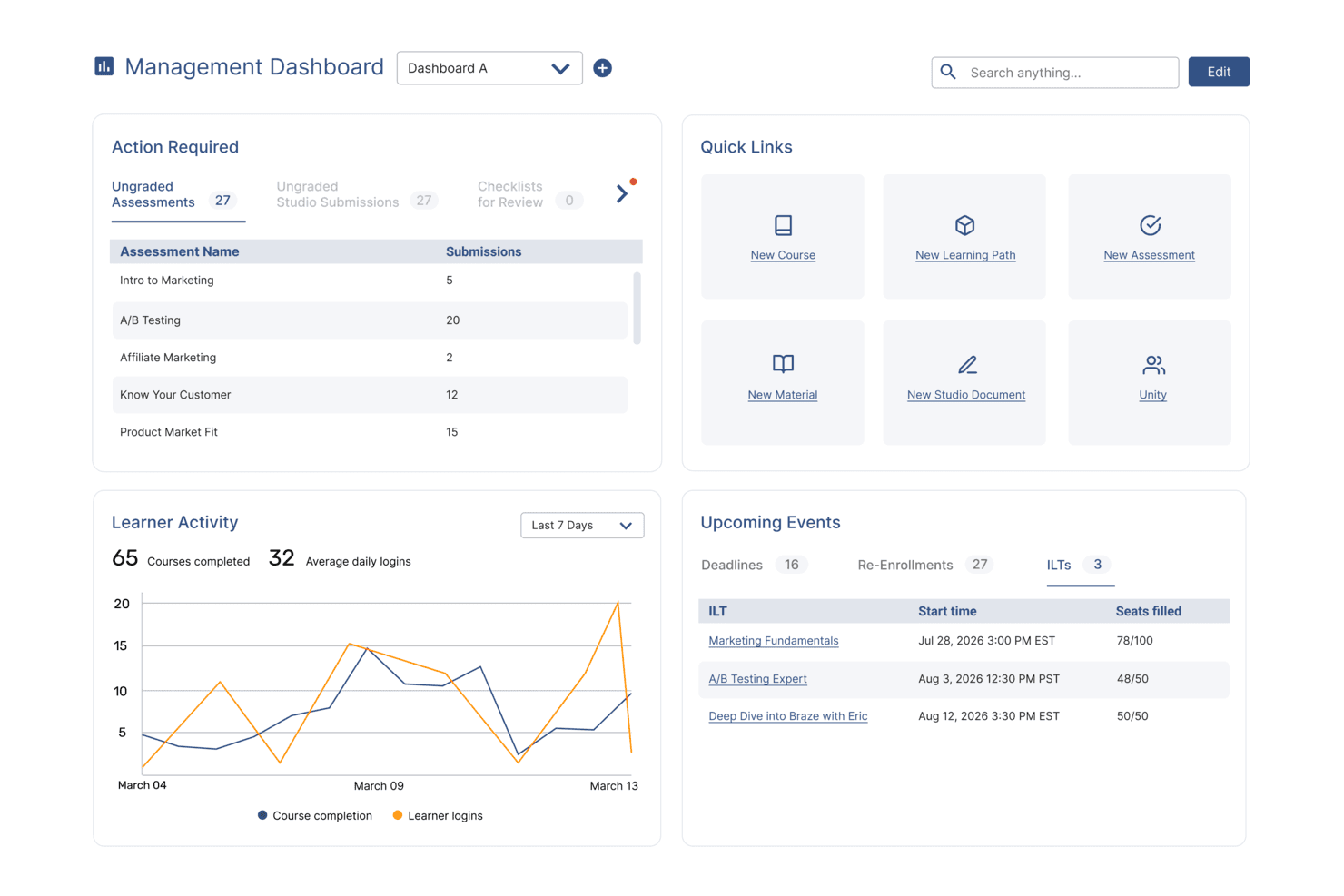
SkyPrep's management dashboard displays learner activity, upcoming events, and quick links. SkyPrep is a learning management platform designed for HR teams and training professionals who want to automate course creation, deliver engaging learning experiences, and track employee development with AI-powered tools.
Who Is SkyPrep Best For?
SkyPrep is a strong fit for mid-sized businesses and growing organizations that need a straightforward way to build, deliver, and manage employee training programs at scale.
Why I Picked SkyPrep
I picked SkyPrep as one of the best for AI content creation because it takes a genuinely different approach to course building. Instead of starting from a blank page, my team can upload existing materials and let SkyPrep's AI generate a full course outline with structured content blocks. From there, the Smart Convert feature lets us turn those content blocks into quizzes or flashcards without rebuilding anything from scratch. I also like the AI voiceover generation, which converts written course content into natural-sounding audio—useful when rolling out training to learners who absorb information better through listening than reading.
SkyPrep Key Features
- Gamification: Add points, badges, and leaderboards to courses to increase learner engagement and motivation.
- Automated course enrollment: Automatically assign courses to users based on roles, groups, or onboarding triggers.
- Custom reporting and analytics: Generate out-of-the-box reports on learner progress, course completion, and training impact.
- Multi-tenant LMS: Run separate training portals for different clients, departments, or brands from a single account.
SkyPrep Integrations
Integrations include ADP, Workday, BambooHR, Salesforce, HubSpot, Zoom, Microsoft Teams, Stripe, PayPal, and Okta.
Pros and Cons
Pros:
- Gamification increases learner participation
- AI content generation boosts engagement
- AI assessment builder saves time
Cons:
- Some integrations require manual setup
- Reporting depth limited for analytics
Learn more about SkyPrep:

Absorb offers a platform that is intuitive, with dashboards that are clean, organized, and easy to navigate Absorb is a cloud-based learning management system designed for HR teams and organizations that want to deliver personalized, AI-powered training and development programs to employees at scale.
Who Is Absorb Best For?
Absorb is a good fit for mid-size to enterprise organizations with dedicated L&D or HR teams managing structured employee training programs.
Why I Picked Absorb
Absorb earns a spot on my shortlist thanks to one of the cleanest interfaces I've used in an LMS. The learner-facing experience is designed so that employees can find and launch courses without any hand-holding—search results are ranked by AI based on past behavior, so the most relevant content surfaces first. I also like Intelligent Assist, which lets admins type natural-language requests like "show me all users who didn't complete compliance training" and instantly pulls up a pre-populated report. For L&D teams managing large learner populations, this frictionless navigation on both sides of the platform makes a real operational difference.
Absorb Key Features
- AI-powered course recommendations: Automatically suggests relevant learning content to each learner based on their role, history, and development goals.
- Automated enrollment rules: Assigns courses to learners automatically based on criteria like job title, department, or onboarding status.
- Built-in content authoring: Create and edit training content directly within the platform without needing a separate authoring tool.
- Customizable learner portal: Brand and configure the learner-facing interface to match your organization's identity and training structure.
Absorb Integrations
Integrations include Salesforce, Zoom, Google Workspace, Microsoft Teams, Adobe Connect, Shopify, Stripe, PayPal, and Okta.
Pros and Cons
Pros:
- E-commerce capabilities
- Automated course enrollment
- Customizable branding options
Cons:
- Pricing not transparent
- Higher cost for small teams
Learn more about Absorb: Best for interactive courses
- Free trial available
- From $970/author (billed annually)
Visit WebsiteCustomer Rating:4.6/5
iSpring Suite helps create interactive eLearning courses with quizzes and videos iSpring Suite is an e-learning authoring toolkit for HR teams, L&D professionals, and educators who want to create engaging training content, quizzes, and simulations that work across devices and integrate with most learning management systems.
Who Is iSpring Suite Best For?
iSpring Suite is a great fit for L&D teams and instructional designers at mid-sized to large organizations who need to build and deploy structured training programs at scale.
Why I Picked iSpring Suite
iSpring Suite is one of my top picks because I love how it turns existing PowerPoint slides into fully interactive training courses without requiring any e-learning development experience. The branched dialogue simulations are a standout for me—my team uses them to build realistic role-play scenarios for sales and compliance training, where learners navigate different conversation paths based on their choices. I also rely heavily on the QuizMaker tool, which supports 14 question types, including drag-and-drop and hotspot questions that go well beyond basic multiple-choice. The built-in AI Assistant generates outlines, quiz questions, and text edits directly inside the authoring environment.
iSpring Suite Key Features
- Screen recording and video editor: Capture on-screen workflows and edit training videos directly within the iSpring Suite environment.
- Content library: Access a built-in library of pre-built templates, characters, backgrounds, and icons to speed up course design.
- SCORM and xAPI publishing: Export finished courses in SCORM, xAPI, or AICC formats for compatibility with any major LMS.
- Narration and text-to-speech: Add voiceover narration to slides or generate AI-powered audio from written text without recording equipment.
iSpring Suite Integrations
Integrations include Moodle, Blackboard, Canvas, Brightspace, TalentLMS, LearnDash, Docebo, SAP Litmos, and Cornerstone OnDemand.
Pros and Cons
Pros:
- Includes dialogue simulations
- Supports multimedia content creation
- Converts PowerPoint to eLearning
Cons:
- Requires technical skills for complex tasks
- Limited customization options
Learn more about iSpring Suite : Best for AI-generated training paths
- Free demo available
- From $5/user/month
Visit WebsiteCustomer Rating:4.8/5
Deel enables interactive onboarding with quizzes that reinforce company knowledge. Deel HR gives HR teams and people leaders a platform to manage global talent, automate onboarding, and deliver personalized employee development using AI-driven tools that address modern training and upskilling needs.
Who Is Deel HR Best For?
Deel HR is a strong fit for mid-size to enterprise HR teams managing distributed or global workforces who need to centralize people operations and employee development in one place.
Why I Picked Deel HR
I picked Deel HR as one of the best because I love how its AI doesn't just sit in the background—it actively shapes how learning and development gets built. Through Deel Engage, the platform's built-in AI drafts competency libraries, training content, and feedback frameworks in minutes, so my team isn't starting from scratch every time we need to build a development path. I use this to generate role-specific learning content that reflects what our org needs, rather than relying on generic templates. The AI also ties directly into career progression frameworks, so when I'm building a training path for a specific role, it's informed by the job architecture already defined in the system.
Deel HR Key Features
- 360° performance review cycles: Run configurable review cycles that collect both anonymous and open feedback using quantitative and qualitative methods across your entire workforce.
- OKR and goal tracking: Define company, team, and individual OKRs with customizable cycles, real-time progress tracking, and the ability to adjust goals as priorities shift.
- Employee pulse surveys: Build and launch eNPS and pulse surveys to collect recurring feedback on development, career growth, and satisfaction, with results feeding into centralized analytics dashboards.
- Career progression frameworks: Define role expectations and advancement criteria that connect directly to employee development plans and inform how learning content gets assigned.
Deel HR Integrations
Integrations include FaceUp, Snowflake, DefensX, Microsoft Finance, Kintsugi, ReFresh OS, Revo.ai, Keeper, Human Interest, and Everyminute.
Pros and Cons
Pros:
- Supports ongoing learning through auto-assigned feedback surveys
- Links competencies to reviews for targeted development planning
- AI drafts training courses and career paths in minutes
Cons:
- Not built for external certification tracking or compliance training logs
- Lacks advanced LMS features for structured course delivery


EducateMe LMS dashboard showing course completion rates, learner progress tracking, and training activity insights. EducateMe LMS is a learning management platform designed for HR teams and training professionals who want to deliver interactive, AI-driven training experiences that adapt to each learner’s needs.
Who Is EducateMe LMS Best For?
EducateMe LMS is a strong fit for mid-sized companies and growing teams that need a structured, scalable way to run employee training and development programs.
Why I Picked EducateMe LMS
EducateMe LMS earns its spot on my shortlist because of how well its AI roleplay coach handles scenario-based practice at scale. I like that you can generate a full roleplay scenario from a single prompt—whether that's a sales call, a difficult performance conversation, or a compliance scenario—and then layer in branching logic and guardrails to keep the AI on topic. In practice, that means my team can run through realistic, high-stakes conversations without needing a live facilitator every time. The rubric-based feedback is also a real differentiator: learners get consistent, specific coaching after each session rather than vague impressions.
EducateMe LMS Key Features
- AI course creation assistant: Generate full course outlines, modules, and quiz questions from a prompt, with the AI available throughout the build process.
- Learning paths: Sequence courses into structured journeys that guide learners through topics in a set order.
- Automation: Set up automatic enrollments, reminders, and course assignments to reduce manual admin work.
- Live event hosting: Run live training sessions with Zoom integration, including automatic session recording and participant management.
EducateMe LMS Integrations
Integrations include Zoom, Stripe, Slack, IBM, and Zapier; an API is available for custom connections.
Pros and Cons
Pros:
- Strong performance analytics dashboard
- Automated AI content creation
- Built-in AI roleplay coaching
Cons:
- AI tools require onboarding
- Advanced features require setup
Learn more about EducateMe LMS: 9Best for real-world AI simulations
Exec
- Free plan + free trial + free demo available
- From $20/user/month (billed annually)
Visit WebsiteCustomer Rating:4.3/5
Exec offers AI-driven roleplay sessions that let users practice live conversations in a simulated video call environment. Exec uses AI to create immersive training simulations for organizations that want to help employees build practical skills through hands-on, scenario-based learning.
Who Is Exec Best For?
Exec is a good fit for L&D teams at mid-size to enterprise organizations that need to train employees on complex, real-world situations through practice-based learning.
Why I Picked Exec
I picked Exec as one of the best because of how closely its AI simulations mirror real-world conditions. The voice-based AI roleplay engine doesn't just run through scripted prompts—it responds naturally, raises objections, and adapts based on how the conversation unfolds. I especially like that you can configure AI characters with specific traits, industry context, and your company's actual product details, so practice sessions feel like the real thing rather than a generic exercise. The screen share feature also lets reps practice live product demos in front of an interactive AI audience that responds like actual stakeholders.
Exec Key Features
- AI scorecard: Automatically evaluates simulation performance against custom criteria and surfaces coaching insights for managers to review.
- Custom learning paths: Build structured training programs that sequence simulations and content modules based on role or skill level.
- Analytics dashboard: Track individual and team progress across simulations with data on completion rates and performance trends.
- Content library: Access a collection of pre-built simulation templates that teams can adapt for their specific training needs.
Exec Integrations
Integrations are available via an API.
Pros and Cons
Pros:
- Customizable scenarios align with specific business objectives.
- Provides instant feedback to reinforce learning and skill retention.
- Realistic AI roleplays enhance communication skills in high-pressure situations.
Cons:
- Initial setup and scenario design can be complex and time-consuming.
- Primarily optimized for English-speaking organizations, limiting global reach.
Learn more about Exec:

Trainio lets users sequence role-play scenarios for new hire onboarding. Trainio is a voice-first AI roleplay platform purpose-built for healthcare, offering a library of 1,000+ communication scenarios, custom scenario creation from SOPs, rubric-based session scoring, and a built-in knowledge hub for staff reference.
Who Is Trainio Best For?
Trainio is a strong fit for healthcare organizations that need scalable, voice-based communication practice for patient-facing staff across clinical and care settings.
Why I Picked Trainio
Trainio earns its spot on my list because it's the only AI training tool I've found purpose-built specifically for healthcare communication practice. I love that its voice-first roleplay simulates real patient and family interactions, with AI personas that actually escalate when a staff member responds poorly and de-escalate when they get it right. Its 1,000+ ready-made scenarios span settings like behavioral health, hospice, and dental, so a memory care team can practice de-escalation on day one without custom setup.
Trainio Key Features
- Knowledge Hub: A built-in repository where staff can store and search SOPs, protocols, call scripts, and PDFs, or query an AI assistant grounded exclusively in your uploaded documents.
- Rubric-based session scoring: Every roleplay session is evaluated against a consistent rubric, producing a pass/fail score, full transcript, and itemized AI feedback delivered instantly after each session.
- Manager readiness dashboard: Tracks scores, session history, and progress by individual, team, and site, with exportable reports designed to meet CARF and Joint Commission audit requirements.
- Role-based scenario assignment: Administrators assign scenario sets by role, team, or location, with automated enrollment and reminders so staff are practice-ready from day one.
Trainio Integrations
Trainio documents integrations with Slack, Zoom, Google Calendar, and Zapier. Enterprise adds SSO, HRIS integration, and API/MCP access for custom connections; SCORM import is also supported.
Pros and Cons
Pros:
- Scenario library tailored for healthcare communication
- Rubric-based feedback ensures consistent session scoring
- Voice-based AI roleplay simulates real interactions
Cons:
- No multimedia or video content creation
- Does not generate traditional eLearning courses
Learn more about Trainio:
Eğitim ve Gelişim İçin Diğer Yapay Zekâ Araçları
İşte kısa listeme giremeyen ancak yine de göz atmaya değer bazı ek eğitim ve gelişim yapay zekâ aracı seçenekleri:
- 11ContinuBest for dedicated L&D teams
- 12FactorialBest for integrating with HR analytics and automation
- 13ValamisBest for workforce development
- 14DoceboBest for enterprise scalability
- 15Cornerstone OnDemandBest for enterprise learning needs
- 16Paradiso LMSBest for multilingual support
- 17Coursebox AIBest for course management
- 18Fuse UniversalBest for continuous learning
- 19VirtiBest for VR training
- 205Mins.aiBest for microlearning
How I Evaluate AI Tools for Training Development
I only include tools that use AI to meaningfully speed up course creation or personalize learning—not platforms that slap an AI label on basic authoring features. I split my evaluation into core functionality every tool must deliver to qualify and differentiating factors that separate the best fit from the rest.
Core Functionality (Table Stakes For This List)
When I'm selecting tools for my list, I rank each one on a scale from 0 (does not offer the functionality) to 5 (excels in this area) for each core functionality listed below. Then, I calculate the tool's total score into a percentage. Each tool needs to achieve a minimum total score of 65% to be considered for inclusion.
- AI-Powered Content Generation: I evaluate whether a tool can turn source materials—like policy PDFs, onboarding docs, or SME recordings—into structured courses without heavy manual rework.
- AI Assessment Creation: Good tools auto-generate quizzes and knowledge checks from course content, so I look at question variety, difficulty options, and answer key accuracy.
- Personalized Learning Paths: I check whether the AI adapts recommendations based on a learner's role, skill level, or progress rather than just serving static, one-size-fits-all sequences.
- AI Media Conversion: Converting a written SOP into a video walkthrough with AI voiceover or avatars saves L&D teams hours, so I look at output quality and format options.
- Skill Gap Analytics: The AI should surface meaningful patterns—like which teams are falling behind on compliance modules—instead of just showing completion percentages.
- LMS and HRIS Integration: I check for native connectors with platforms like Workday, SAP SuccessFactors, Cornerstone, or Docebo, plus SCORM/xAPI export support.
Once I have a list of tools that meet the criteria, I consider what sets each platform apart.
Differentiating Factors (What Sets Vendors Apart)
Here's how I compare and contrast different vendors:
Standout Features
Multilingual AI translation is a major differentiator for distributed teams—I evaluate whether a tool can localize compliance training across regions without manual re-authoring. AI roleplay simulations also stand out, especially for manager development or customer-facing roles where learners practice real conversations with AI characters. I look at content refresh capabilities too, since the best platforms flag outdated material and suggest updates automatically instead of forcing L&D teams into quarterly manual audits.
Beyond Features
Data privacy matters more here than in typical L&D tools because AI platforms process employee performance data through third-party LLMs. I check whether vendors disclose their AI providers and offer controls over data retention. Speed-to-value is another priority—I evaluate how quickly an L&D team can go from uploading a policy document to deploying a finished course. For regulated industries like healthcare or finance, I also look at audit trail depth, version control, and approval workflows for AI-generated content.
Eğitim ve Gelişim İçin Yapay Zekâ Araçları Nasıl Seçilir?
Uzun özellik listeleri ve karmaşık fiyatlandırma yapılarına takılıp kalmak kolaydır. Kendinize özgü yazılım seçme sürecinizi yürütürken odağınızı korumanıza yardımcı olmak için göz önünde bulundurmanız gereken faktörleri içeren bir kontrol listesi hazırladık:
| Faktör | Dikkat Edilmesi Gerekenler |
| Ölçeklenebilirlik | Araç kuruluşunuzla birlikte büyüyecek mi? Destekleyebileceği kullanıcı sayısını ve eğitim ihtiyaçlarınız genişledikçe artan veri hacmini işleyip işleyemeyeceğini değerlendirin. |
| Entegrasyonlar | Araç mevcut sistemlerinizle çalışıyor mu? Sorunsuz iş akışları sağlamak için İK yazılımınız, iletişim araçlarınız ve diğer platformlarınızla uyumluluğunu kontrol edin. |
| Özelleştirilebilirlik | Aracı özel ihtiyaçlarınıza uyacak şekilde düzenleyebilir misiniz? Kapsamlı teknik bilgiye ihtiyaç duymadan marka görünümünü, kurs içeriğini ve kullanıcı rollerini ayarlama seçeneklerini arayın. |
| Kullanım kolaylığı | Arayüz kullanıcı dostu mu? Ekibinizin sürekli desteğe ihtiyaç duymadan aracı kolayca kullanabilmesini sağlayın; bu, zamandan tasarruf sağlayabilir ve hayal kırıklığını azaltabilir. |
| Uygulama ve işe alıştırma | Başlamak ne kadar sürüyor? Sorunsuz bir benimseme süreci sağlamak için kurulum sürecini, eğitim kaynaklarının bulunabilirliğini ve geçiş sırasında sunulan desteği değerlendirin. |
| Maliyet | Toplam sahip olma maliyeti nedir? Abonelik ücretlerini, gizli maliyetleri ve beklediğiniz yatırım getirisini göz önünde bulundurun. Bütçenize uygun olanı bulmak için fiyatlandırma planlarını karşılaştırın. |
| Güvenlik önlemleri | Araç verilerinizi nasıl koruyor? Bilgilerinizi güvende tutmak için şifreleme, erişim denetimleri ve veri koruma düzenlemelerine uyumluluk gibi özellikleri arayın. |
| Destek bulunabilirliği | Hangi destek seçenekleri mevcut? İhtiyaç duyduğunuzda yardım alabilmenizi sağlamak için 7/24 desteği, yanıt sürelerini ve sunulan yardımın kalitesini kontrol edin. |
Yapay Zekâ Eğitim ve Gelişim Araçları Nedir?
Yapay zekâ eğitim ve geliştirme araçları, öğrenme ve beceri geliştirme süreçlerini iyileştirmek için yapay zekâ kullanan yazılım çözümleridir. Bu araçlar genellikle İK profesyonelleri, eğitmenler ve eğitimciler tarafından kişiselleştirilmiş ve verimli eğitim programları sunmak amacıyla kullanılır. Otomatik içerik sunumu, uyarlanabilir öğrenme yolları ve gerçek zamanlı analizler, eğitimin bireysel ihtiyaçlara göre uyarlanmasına ve ilerlemenin izlenmesine yardımcı olur. Genel olarak bu araçlar, eğitimi kullanıcılar için daha etkili ve ilgi çekici hâle getirir.
Yapay Zekâ Eğitim ve Geliştirme Araçlarının Özellikleri
Yapay zekâ destekli eğitim ve geliştirme araçlarını seçerken aşağıdaki temel özelliklere dikkat edin:
- Uyarlanabilir öğrenme yolları: İçeriği her öğrencinin ihtiyaçlarına uyacak şekilde ayarlayarak kişiselleştirilmiş eğitim deneyimleri sunar.
- Otomatik içerik sunumu: Eğitim materyallerini otomatik olarak planlar ve sunar; zamandan tasarruf sağlar ve manuel iş yükünü azaltır.
- Gerçek zamanlı analizler: Öğrencilerin ilerlemesi ve etkileşimi hakkında içgörüler sunarak veri odaklı kararlar almanıza yardımcı olur.
- Oyunlaştırma ögeleri: Öğrencileri motive etmek ve etkileşimi artırmak için puanlar ve rozetler kullanır.
- Çoklu ortam desteği: Öğrenme içeriğini zenginleştirmek için videoların, görsellerin ve ses dosyalarının eklenmesine olanak tanır.
- Sanal gerçeklik modülleri: Gerçek dünyadaki senaryoları simüle ederek sürükleyici öğrenme deneyimleri sunar.
- Özelleştirilebilir kurs şablonları: İhtiyaçlarınıza göre uyarlanabilen hazır yapılar sunarak kurs oluşturma sürecini hızlandırır.
- Çeviri yönetimi: Çok dilli kurs seçeneklerini kolaylaştırarak eğitimi küresel iş gücü için erişilebilir hâle getirir.
- Entegrasyon özellikleri: Mevcut sistemlerle uyumluluğu sağlayarak veri akışını ve iş akışı verimliliğini mümkün kılar.
- Güvenlik önlemleri: Şifreleme ve erişim denetimleri aracılığıyla hassas verileri korur ve gizlilik düzenlemelerine uyumu sağlar.
Eğitim ve Geliştirme Araçlarında Yapay Zekânın Faydaları
Eğitim ve geliştirme için yapay zekâ araçlarının uygulanması, ekibiniz ve işletmeniz için çeşitli faydalar sağlar. Yararlanabileceğiniz birkaç fayda şunlardır:
- Kişiselleştirilmiş öğrenme deneyimleri: Yapay zekâ, eğitimi her öğrencinin ihtiyaçlarına göre uyarlar ve etkileşimi ile kalıcılığı artırır.
- Zaman verimliliği: Otomatik içerik sunumu, eğitmenlerin iş yükünü azaltarak daha stratejik görevlere odaklanmalarını sağlar.
- Artan etkileşim: Oyunlaştırma ögeleri ve çoklu ortam desteği, öğrenmeyi etkileşimli ve keyifli hâle getirir.
- Geliştirilmiş karar alma: Gerçek zamanlı analizler, daha iyi sonuçlar elde etmek için eğitim programlarını iyileştirmenize yardımcı olan içgörüler sunar.
- Küresel erişilebilirlik: Çeviri yönetimi, eğitim materyallerini birden fazla dilde erişilebilir hâle getirerek daha geniş bir kitleye ulaşır.
- Maliyet etkinliği: Eğitim süreçlerini ve sonuçlarını optimize eden yapay zekâ araçları, zaman içinde maliyet tasarrufu sağlayabilir.
- Geliştirilmiş güvenlik: Güvenlik önlemleri sayesinde verileriniz korunur ve düzenlemelere uygun kalır.
Eğitim ve Geliştirme için Yapay Zekâ Araçlarının Maliyetleri ve Fiyatlandırması
Eğitim ve geliştirme için yapay zekâ araçlarını seçmek, mevcut çeşitli fiyatlandırma modellerinin ve planların anlaşılmasını gerektirir. Maliyetler özelliklere, ekip büyüklüğüne, eklentilere ve diğer unsurlara bağlı olarak değişir. Aşağıdaki tablo, eğitim ve geliştirme çözümlerindeki yapay zekâ araçlarında bulunan yaygın planları, ortalama fiyatlarını ve tipik özelliklerini özetlemektedir:
Eğitim ve Geliştirme için Yapay Zekâ Araçlarının Plan Karşılaştırma Tablosu
| Plan Türü | Ortalama Fiyat | Yaygın Özellikler |
| Ücretsiz Plan | $0 | Temel kurs oluşturma, sınırlı kullanıcı erişimi ve topluluk desteği. |
| Kişisel Plan | $10-$100/user/month | Standart kurs oluşturma, temel raporlama ve e-posta desteği. |
| İşletme Planı | $75-$720/user/month | Gelişmiş analizler, diğer araçlarla entegrasyonlar ve öncelikli destek. |
| Kurumsal Plan | $100-$1290/user/month | Özelleştirilebilir özellikler, özel hesap yöneticisi ve tam API erişimi. |
Eğitim ve Gelişim için AI Araçları SSS
Eğitim ve gelişim için AI araçları hakkında sık sorulan bazı soruların yanıtları:
AI eğitim ve gelişimde nasıl kullanılabilir?
AI, öğrenenlerin ilerlemesini takip edebilir ve eğitim stratejilerinin geliştirilmesine yardımcı olan içgörüler sağlayabilir. AI tarafından oluşturulan verilerden yararlanarak performans eğilimlerini belirleyebilir ve gerekli eğitim iyileştirmelerini önerebilirsiniz. Bu, ekibinizin becerilerini geliştirmesi için ilgili ve zamanında eğitim almasını sağlar.
AI için %30 kuralı nedir?
%30 kuralı, AI ile insan katkısı arasında denge kurulmasını önerir; buna göre bir görevin yaklaşık %70’ini AI üstlenirken kalan %30’unu insanlar yönetir. Bu yaklaşım, özellikle eğitim ve gelişim ortamlarında görevlerde insan gözetimi ve yaratıcılığını korurken verimliliği sağlar.
Eğitim kurslarında AI nasıl kullanılır?
AI, tahmine dayalı analitiği kullanarak beceri açıklarını ve eğitim ihtiyaçlarını öngörebilir. Performansı ve öğrenme alışkanlıklarını analiz ederek AI, ilgili eğitim programlarını önerir. Bu proaktif yaklaşım, kuruluşunuzun iş gücünün becerilerini geliştirmesine ve sektörde rekabetçi kalmasına yardımcı olur.
Gelişim için AI araçları nasıl kullanılır?
Çözdüğünüz sorunları ve AI’ın bunları nasıl daha verimli hâle getirebileceğini değerlendirin. AI, tekrarlayan görevleri otomatikleştirebilir, büyük veri kümelerini analiz edebilir ve tahminlerde bulunabilir. Gelişim ihtiyaçlarınıza ve iş akışınıza en uygun olanları bulmak için farklı AI araçlarını deneyin.
Eğitimde AI kullanmanın faydaları nelerdir?
AI, öğrenme deneyimlerini kişiselleştirerek onları daha ilgi çekici ve etkili hâle getirir. İdari görevleri otomatikleştirerek eğitmenlere zaman kazandırır. AI ayrıca gerçek zamanlı analizler sunarak eğitimin etkililiği hakkında içgörüler sağlar ve sonuçları iyileştirmek için verilere dayalı kararlar almanıza yardımcı olur.
AI araçları öğrenenlerin katılımını nasıl artırır?
AI araçları, katılımı artırmak için oyunlaştırma, çoklu ortam desteği ve uyarlanabilir öğrenme yolları gibi özellikleri kullanır. Bu unsurlar, öğrenenleri motive ve eğitim süreçlerine bağlı tutan etkileşimli ve kişiselleştirilmiş öğrenme deneyimleri oluşturur.