

Günlük İK işlerini yürütmek, özellikle ekibiniz farklı yönlere çekildiğinde yorucu olabilir. Çalışan bilgilerini güncellemek, aynı soruları tekrar tekrar yanıtlamak ve rutin talepleri yönetmek gibi görevler gününüzün büyük bölümünü kolayca alabilir. Bu nedenle çalışanların kendi bilgilerini yönetmesine olanak tanıyan araçlar büyük bir fark yaratabilir; zamandan tasarruf etmenizi sağlar ve işlerin daha sorunsuz ilerlemesine yardımcı olur.
Bağımsız bir yazılım incelemecisi olarak edindiğim deneyimde, bu araçların günlük İK görevlerini ele alma biçiminizi nasıl dönüştürebildiğini gördüm. Çalışanların kendi bilgilerine erişmesini ve bu bilgileri yönetmesini sağlayarak İK profesyonellerinin iş yükünü azaltırlar.
Bu makalede, piyasadaki en iyi çalışan self servis yazılımları için öne çıkan seçimlerimi paylaşacağım. Ekibinizin kendine özgü ihtiyaçlarına hangi çözümün uygun olduğuna karar vermenize yardımcı olabilecek tarafsız ve kapsamlı incelemeler bulacaksınız. İK süreçlerinizi kolaylaştıracak doğru aracı bulmak için başlayalım.
Why Trust Our Software Recommendations
6,700+
Reviews
20
Industry experts
16+
Evaluation factors
14
Years
Our team has been testing and reviewing software since 2012. As HR experts ourselves, we know how difficult—and important—it is to choose the right software.
For this guide, we evaluated tools using hands-on testing and independent research, scoring tools using our selection criteria. We also draw on insights from industry thought leaders and practicing HR experts.
Our reviews reflect our human editorial judgment, not a sales pitch.
Expert reviewers:
- Phil GrayCOO
 Kim BehnkeHR Tech Editor & Analyst
 Josh BarkerPeople Ops Manager

Çalışan Self Servis Yazılımları Karşılaştırma Tablosu
Bu karşılaştırma tablosu, çalışan self servis yazılımı için öne çıkan seçimlerimin fiyatlandırma ayrıntılarını özetlemektedir:
Sorted by: Default
| Tool | Starting Price | Website | |
|---|---|---|---|
Best for payroll integration | 4.3 out of 5 | Pricing upon request Free demo available | Book Demo |
Best for global workforce onboarding | 4.8 out of 5 | $5/user/month Free demo available | Website |
Best for ICHRA health benefits self-service | 5.0 out of 5 | $45/user/month Not available | Website |
Best for unified time and payroll accuracy | 4.5 out of 5 | $50/user/month 30-day free trial + free demo available | Website |
Best for team collaboration | 4.7 out of 5 | Pricing upon request Free demo available | Website |
Best for small businesses | Not rated | $10.25/user/month Free demo available | Website |
Best for AI-driven helpdesk | Not rated | Pricing upon request Free demo | Website |
Best for simple HR task handling | Not rated | Pricing upon request Free plan + 30-day trial available | Website |
Best for payroll-focused employee self service | Not rated | Pricing upon request Free demo available | Website |
Best for workflow customization | Not rated | $2.8/user/month 14-day free trial | Website |


En İyi Çalışan Self Servis Yazılımı İncelemesi
Aşağıda, kısa listeme giren en iyi çalışan self servis yazılımlarına ilişkin ayrıntılı özetlerimi bulabilirsiniz. İncelemelerim, size en uygun aracı bulmanıza yardımcı olmak için her aracın temel özelliklerine, artılarına & eksilerine, entegrasyonlarına ve ideal kullanım alanlarına ayrıntılı bir bakış sunmaktadır.
 Best for payroll integration
- Free demo available
- Pricing upon request
Visit WebsiteCustomer Rating:4.3/5
Paycom simplifies payroll and boosts data access for HR and finance teams Paycom is an all-inclusive HR management tool designed for businesses of all sizes, focusing on payroll and employee self-service functions. It serves HR teams and finance executives by simplifying payroll processes and enhancing data accessibility. Its tools emphasize employee-managed payroll, time tracking, and benefits administration.
Why I picked Paycom: Paycom excels in payroll integration, offering an automated payroll system called Beti® that empowers employees to manage their own payroll. The single database design eliminates multiple logins, making data flow smoothly between functions. Its AI-powered IWant® engine also supports quick navigation and data retrieval inside the platform. The dedicated support team ensures personalized assistance whenever needed.
Standout Features & Integrations:
Features include automated time-off decisions through GONE®, real-time ROI tracking via Direct Data Exchange®, and robust data security measures. Paycom also offers mobile self-service tools, benefits administration, time and attendance, and secure document management.
Integrations are primarily delivered through Paycom's native HR and payroll suite, which includes built-in tools for talent management, time tracking, benefits administration, and employee self-service within a single database.
Pros and Cons
Pros:
- Quick data access with AI
- Employee managed payroll management
- Single database system
Cons:
- Cumbersome interface and unintuitive navigation
- Limited third-party integration options
 Best for global workforce onboarding
- Free demo available
- From $5/user/month
Visit WebsiteCustomer Rating:4.8/5
Deel’s dashboard centralizes global onboarding, payroll, and role management, giving distributed teams visibility into permissions, compensation, and time off across international workforces. Deel is built for companies managing global teams that need a reliable way to hire, onboard, and pay employees and contractors across borders. It supports organizations with remote or international workforces by helping them navigate local labor laws, contracts, and payroll requirements. With built-in compliance tools and localized payment capabilities, Deel can reduce the administrative complexity of global employment.
Why I Picked Deel
I picked Deel for its ability to simplify global onboarding and payroll while keeping compliance front and center. If you are hiring across multiple countries, Deel allows you to bring on new team members in over 150 jurisdictions with locally compliant contracts and guided workflows. I also like that it supports multi-currency payroll and flexible payment methods, which can make managing international compensation more practical. For companies building distributed teams, these features help you stay compliant without adding unnecessary operational overhead.
Deel Key Features
In addition to its onboarding and payroll management capabilities, I also found several other features that enhance Deel's functionality:
- Built-in Compliance Tools: Deel provides automatic compliance checks to ensure all employment contracts adhere to local labor laws.
- Global Contractor Management: Manage your international contractors with ease, including contract generation and payment processing.
- Employer of Record Services: Deel acts as the legal employer, handling all HR responsibilities for your global team.
- Multi-Currency Support: Pay your employees in their local currency, reducing the complexities of international payroll.
Deel Integrations
Integrations include Stripe, QuickBooks, Xero, NetSuite, BambooHR, Greenhouse, Workable, Lever, Gusto, and Deel API for custom integrations.
Pros and Cons
Pros:
- Integrates with major HR systems
- Built-in compliance and contract management
- Global payroll across 150 countries
Cons:
- Limited directory customization options
- Reporting features lack advanced filtering
 Best for ICHRA health benefits self-service
- Not available
- From $45/user/month
Visit WebsiteCustomer Rating:5/5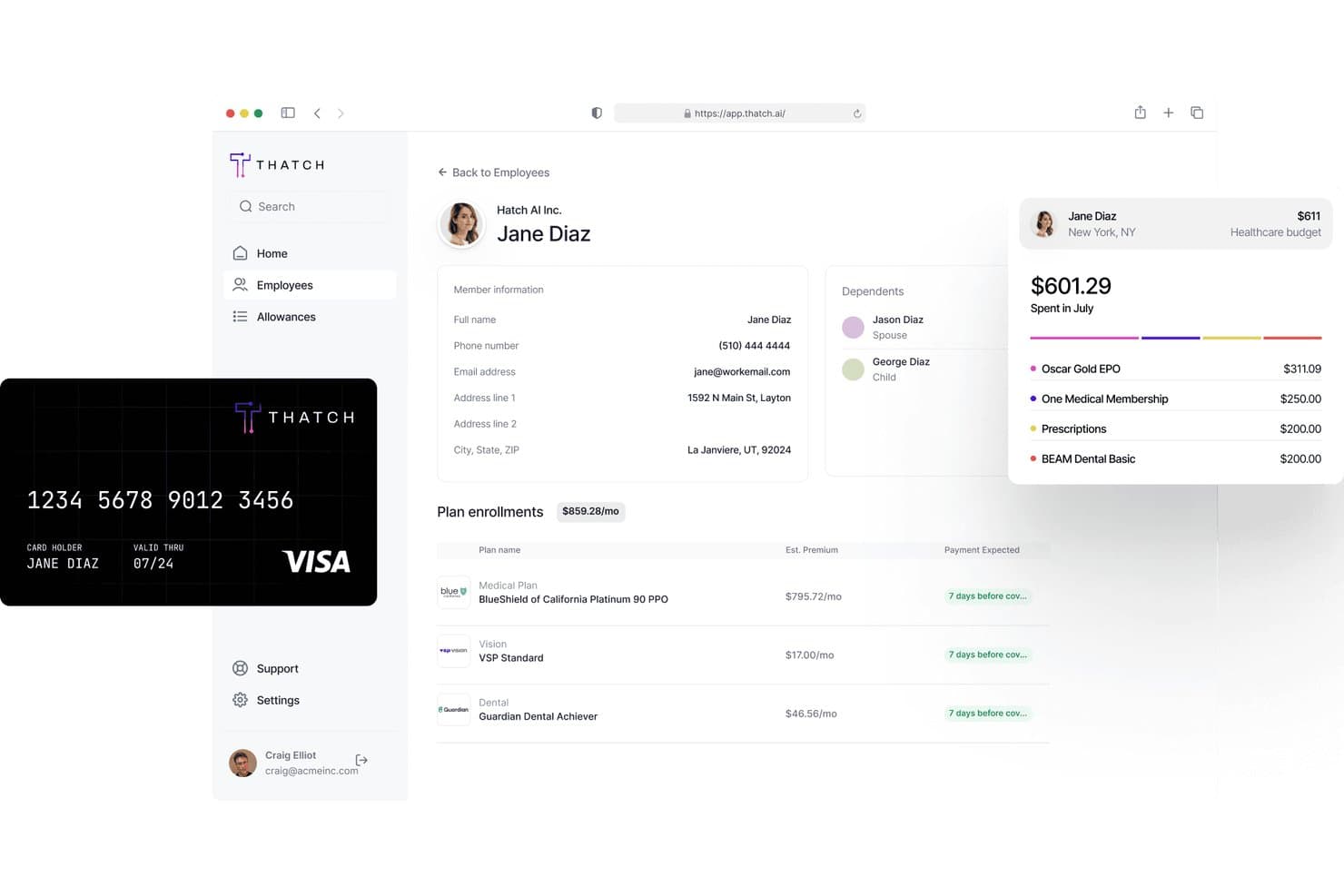
Thatch lets employers view employee benefits, spending, and plan enrollments. Thatch is an ICHRA administration platform that lets employees shop for and manage their own individual health insurance plans using employer-allocated allowances.
Who Is Thatch Best For?
Thatch is a strong fit for small to mid-sized employers who want to offer health benefits through an ICHRA model without managing individual plan enrollment on behalf of employees.
Why I Picked Thatch
Thatch earns its spot on my shortlist because it's purpose-built for ICHRA administration, which is a niche that most general ESS platforms don't handle well. I love how employees can browse and select their own individual health insurance plans directly through the platform, using their employer-set allowance without HR involvement. Thatch also handles reimbursement tracking automatically, so there's no manual reconciliation on the back end.
Thatch Key Features
- Allowance balance dashboard: Employees can view their remaining ICHRA allowance in real time, without contacting HR.
- Plan comparison tool: Employees can compare individual health insurance plans side by side based on premiums, deductibles, and coverage details.
- Eligibility verification: The platform automatically checks and confirms employee eligibility for ICHRA participation before enrollment begins.
- Reimbursement request submission: Employees can submit out-of-pocket expense claims directly through the platform for review and processing.
Thatch Integrations
Thatch offers native integrations with ADP RUN, QuickBooks Payroll, and Deel, and it's designed to work with all major payroll providers and insurance carriers out of the box. An API is also available for partners to embed ICHRA quoting, onboarding, and payroll deductions into their own platforms.
Pros and Cons
Pros:
- Real-time ICHRA allowance balance dashboard
- Reimbursement tracking is fully automated
- Employees can pick plans using allowance
Cons:
- Requires ICHRA-specific health benefits structure
- No free trial available to test
Learn more about Thatch: Best for unified time and payroll accuracy
- 30-day free trial + free demo available
- From $50/user/month
Visit WebsiteCustomer Rating:4.5/5
TimeTrex’s pay stub view lets employees access detailed earnings, deductions, and year-to-date totals directly through the self-service portal. TimeTrex gives you a unified workforce management experience where your team can handle time tracking, scheduling, payroll, and HR tasks from one place, making it easier to manage daily operations without bouncing between systems. If you’re responsible for HR or payroll and want employees to take ownership of their information—from viewing pay stubs to submitting leave requests—TimeTrex lets them do that through a self-service portal that ties directly into core administrative functions.
Why I Picked TimeTrex
I picked TimeTrex because its native link between employee self-service and payroll ensures that hours tracked and verified by your team flow directly into pay calculations without manual exports or synchronization issues. You can let employees submit and review their own timesheets and access pay stubs or tax forms through the portal, which helps reduce follow-ups and administrative queries. The integration of scheduling and leave requests into the same system also means less work reconciling who’s working when before payroll runs.
TimeTrex Key Features
Aside from the self-service and payroll connection, TimeTrex offers:
- Biometric Time Clocks: Enhance security and accuracy in time tracking by using biometric data for employee clock-ins and clock-outs.
- Mobile Access: Your workforce can view schedules, track time, and request time off from iOS and Android devices.
- Expense Tracking: Keep track of business expenses with an integrated tracking system that simplifies reimbursement processes.
- Job Costing: Allocate time with clear views of costs to maximize efficiency.
TimeTrex Integrations
TimeTrex offers a custom API integration for connecting with other systems.
Pros and Cons
Pros:
- Includes detailed time tracking with GPS and mobile support.
- Centralized employee data simplifies HR tasks.
- Supports biometric clock-ins to reduce time fraud.
Cons:
- User interface may feel dated or cluttered.
- Limited native integrations may require custom API solutions.
Learn more about TimeTrex: Best for team collaboration
- Free demo available
- Pricing upon request
Visit WebsiteCustomer Rating:4.7/5
HR Cloud boosts engagement with tools for onboarding, recognition, and communication HR Cloud is a human resources software designed for businesses seeking to improve team collaboration and employee engagement. It serves HR teams by offering features like onboarding, employee recognition, and internal communication tools.
Why I picked HR Cloud: HR Cloud excels in facilitating team collaboration through its social intranet feature, Workmates, which enhances communication and engagement. This tool includes employee recognition features that boost morale and encourage a positive work environment. The onboarding module helps new hires integrate quickly, while customizable workflows allow HR teams to adapt processes to their organization. These capabilities make HR Cloud especially useful for teams that rely on ongoing communication and cultural engagement.
Standout Features & Integrations:
Features include an employee directory that makes it easy to find and connect with colleagues. HR Cloud also includes recognition programs, task assignments for onboarding, and communication feeds to support daily team interaction. Additionally, HR Cloud provides a mobile app, ensuring access to HR tools on the go.
Integrations include G Suite, Microsoft Office 365, Slack, Zoom, ADP, QuickBooks, BambooHR, Salesforce, Okta, and Xero.
Pros and Cons
Pros:
- Mobile app availability
- Customizable workflows
- Offers employee recognition tools
Cons:
- The onboarding process is somewhat disorganized and time-consuming
- Timesheets and Recognition require an add-on
Learn more about HR Cloud:

BambooHR simplifies HR tasks and improves employee experience with key tools BambooHR is an HR management software designed primarily for small to medium-sized businesses, focusing on simplifying HR tasks and improving employee experience. It offers functionalities like employee data management, time tracking, and performance evaluations.
Why I picked BambooHR: BambooHR is tailored for small businesses, providing an intuitive interface that makes HR tasks manageable without needing extensive technical knowledge. It features customizable workflows that let you tailor processes to fit your team's needs, enhancing efficiency. The software's performance management tools facilitate employee growth by tracking goals and feedback. Reporting dashboards provide visibility into workforce trends, allowing small teams to make informed decisions without complex setup.
Standout Features & Integrations:
Features include customizable employee self-service portals, which empower your team to manage their information. The applicant tracking system simplifies recruitment processes, allowing you to quickly identify top talent. BambooHR also includes onboarding tools, document storage, and optional payroll capabilities (U.S. only).
Integrations include QuickBooks, Xero, Slack, G Suite, Microsoft Office 365, Okta, Zapier, Expensify, Greenhouse, and Indeed.
Pros and Cons
Pros:
- E-signature functionality
- Insightful reporting features
- Strong performance management tools
Cons:
- Limited scalability for large enterprises
- Payroll tools are limited without upgrades
Learn more about BambooHR:

Moveworks automates HR support with AI and multilingual assistance Moveworks is an AI-driven HR helpdesk solution tailored for businesses aiming to enhance employee engagement and operational efficiency. It serves HR teams by automating routine tasks and providing multilingual support to simplify processes.
Why I picked Moveworks: Moveworks excels in providing AI-driven assistance, which automates HR processes and supports employees in over 100 languages. Its AI Assistant facilitates quick onboarding and self-service tasks like PTO requests, making it a valuable tool for global teams. Moveworks also provides workflow automation for HR and IT, helping teams standardize processes while maintaining security and compliance controls.
Standout Features & Integrations:
Features include employee engagement tools for booking time off and joining Employee Resource Groups, compliance automation for routine HR tasks, and enterprise security to protect sensitive data. The platform also supports knowledge retrieval and automated ticket resolution across HR and IT systems. The platform also supports knowledge retrieval and automated ticket resolution across HR and IT systems.
Integrations include Microsoft Teams, Slack, ServiceNow, Workday, Microsoft Office 365, Okta, Salesforce, Zoom, Google Workspace, and SAP.
Pros and Cons
Pros:
- Strong compliance features
- Automates routine HR processes
- Multilingual support available
Cons:
- Dependence on integration platforms
- Requires system configuration before deployment
Learn more about Moveworks: Best for simple HR task handling
- Free plan + 30-day trial available
- Pricing upon request

Zoho People manages HR data, time off, and attendance in one platform Zoho People is a cloud-based HR platform built for small and mid-sized organisations, helping HR teams manage employee data, time-off, and attendance tracking in one place. It serves HR professionals by providing essential tools for onboarding, leave management, and basic performance tracking.
Why I picked Zoho People: You can set up employee profiles, run automatic leave approvals, and track time and attendance with minimal training. It offers mobile apps so your team can access records and submit requests on the go. Custom workflows allow teams to automate routine processes, while Zia, Zoho’s AI assistant, supports employees with quick answers and simple task handling.
Standout Features & Integrations:
Features include employee self-service portals where your staff update their own details and request time off, attendance recording using web or mobile check-in, and basic performance review templates you can tailor. The platform also provides onboarding tasks, document management, and built-in shift scheduling.
Integrations include Zoho CRM, Zoho Books, QuickBooks, Slack, Zapier, G Suite, Microsoft Office 365, Adobe Sign, Docusign, and Mailchimp.
Pros and Cons
Pros:
- Strong performance evaluation tools
- Centralized employee database
- Extensive integration options
Cons:
- Setup requires a complex data import process
- Extra features require add-ons
Learn more about Zoho People: Best for payroll-focused employee self service
- Free demo available
- Pricing upon request

AAB Payroll allows employees to view pay and schedules on their own devices AAB Payroll’s employee self service offering is part of a broader payroll and workforce platform that allows employees to access and manage work-related data on their own devices including viewing pay details and checking schedules from a phone or computer which helps reduce routine questions for the team
Why I picked AAB Payroll: AAB Payroll provides a self service tool that sits within its payroll and attendance system, so teams handle pay and time tasks in one place. Employees can view pay stubs, access W-2s, check schedules, and update personal records without switching tools, which cuts down routine requests. The same portal supports punch in and punch out and time off tracking, keeping daily tasks in one workflow. Mobile access allows employees to use it on their own devices wherever they work.
Standout Features & Integrations:
Features include detailed payroll reports that provide insights into your financial operations. The software offers customizable payslip templates, allowing you to tailor them to your company's branding. AAB Payroll also provides support for multiple pay schedules, catering to diverse workforce needs.
Integrations include Xero, QuickBooks, Sage, Microsoft Dynamics, Oracle, SAP, NetSuite, Workday, BambooHR, and Salesforce.
Pros and Cons
Pros:
- Real-time payroll updates
- Automated tax calculations
- Strong UK compliance focus
Cons:
- Limited flexibility for specific or atypical business payroll functions
- Reduced manual control over sensitive data and precise timing of payroll runs
Learn more about AAB Payroll:

Tixio HR automates tasks and customizes workflows for modern HR teams Tixio HR is a human resource management platform designed for modern teams, focusing on automating HR tasks and enhancing workflow customization. It serves HR professionals by providing tools for employee data management, attendance tracking, and contract management.
Why I picked Tixio HR: Tixio HR offers extensive workflow customization, allowing your team to tailor processes to fit specific needs. The Employee Self Service (ESS) portal empowers employees to manage their own information, significantly reducing administrative burdens. Features like attendance tracking and leave management are designed to manage operations efficiently. Tixio’s incorporation of AI-driven automation further improves process efficiency and adaptability.
Standout Features & Integrations:
Features include tools for visual collaboration and project management, which help your team stay organized and productive. Tixio HR also offers a knowledge base feature, allowing for easy documentation and information sharing. The platform also includes contract storage and customizable approval flows to streamline HR tasks.
Integrations include other Tixio products, AI automation, and additional resources for various teams and industries.
Pros and Cons
Pros:
- Supports global compliance
- Visual collaboration tools
- AI-driven workflow automation
Cons:
- Limited advanced HR features
- API access limited to Enterprise-tier
Learn more about Tixio HR:
Diğer Çalışan Self Servis Yazılımları
İşte kısa listeme girmeyen ancak yine de göz atmaya değer bazı ek çalışan self servis yazılımı seçenekleri:
- 11GustoBest for small businesses
- 12HiBobBest for growing companies
- 13ADP Workforce NowBest for payroll expertise
- 14RipplingBest for IT and HR automation
- 15TriNet HR PlusBest for benefits management
- 16PaylocityBest for mid-sized companies
- 17SysAidBest for IT service management
- 18WorkdayBest for enterprise solutions
- 19BerniePortalBest for benefits enrollment
- 20factoHRBest for Indian payroll compliance
- 21GoCoBest for document management
- 22WorkvivoBest for employee communication
- 23ManageEngine ServiceDesk PlusBest for IT helpdesk features
- 24RiseBest for Canadian businesses
- 25Workforce.comBest for shift scheduling
- 26Day OffBest for leave management
- 27Cezanne HRBest for mid-sized European businesses
- 28Criterion HCMBest for customizable HR solutions
- 29APSBest for payroll and tax compliance
- 30SP Employee HubBest for SharePoint integration
How I Evaluate Employee Self-Service Software
I evaluate tools across two layers: the core self-service capabilities every platform must cover—PTO, pay docs, benefits enrollment—and the differentiators that set the best options apart.
Core Functionality (Table Stakes For This List)
When I'm selecting tools for my list, I rank each one on a scale from 0 (does not offer the functionality) to 5 (excels in this area) for each core functionality listed below. Then, I calculate the tool's total score into a percentage. Each tool needs to achieve a minimum total score of 75% to be considered for inclusion.
- Personal Data Management: I check whether employees can update their own address, banking details, emergency contacts, and tax withholdings—or if those changes still require an HR admin to step in.
- Pay & Tax Document Access: Employees expect to pull up a pay stub or download a tax form on their own schedule, so I look for platforms with searchable pay history and secure document downloads.
- Time-Off & PTO Self-Service: I evaluate how well each tool handles the full leave request cycle—submitting, tracking, viewing balances, and syncing approvals—without forcing managers into email threads.
- Benefits Self-Enrollment: Open enrollment is the real stress test, so I look at whether employees can compare plans, add dependents, and handle qualifying life events directly in the platform.
- Document & Policy Repository: A solid tool gives employees one place to find the handbook, sign off on updated policies, and access onboarding forms—with tracking so HR knows who's acknowledged what.
- Mobile Self-Service Access: I evaluate whether the mobile experience covers real tasks like approving a PTO request or updating direct deposit, not just a stripped-down view of the desktop version.
Once I have a list of tools that meet this criteria, I consider what sets each platform apart.
Differentiating Factors (What Sets Vendors Apart)
Here's how I compare and contrast different vendors:
Standout Features
Manager self-service is a major differentiator. I look for platforms where managers can approve leave requests, view team headcount, and pull reports from their own dashboard without looping in HR. An AI HR assistant also matters when it can answer routine questions like "how much PTO do I have left?" and point employees to the right policy without generating a ticket. I pay close attention to personalized notifications, too—automated reminders for open enrollment deadlines or unsigned documents directly drive adoption and keep compliance tasks on track.
Beyond Features
Integration depth matters a lot here—I check whether a platform connects natively to your existing payroll provider and benefits carriers, or if you'll need middleware to keep data in sync. Security is another area I evaluate closely, especially role-based access controls that limit who can view sensitive fields like salary or banking details. I also consider how well a tool fits your company size, since a platform built for enterprise-scale organizations can overwhelm a 50-person team with unnecessary complexity and cost.
Çalışan Self Servis Yazılımı Nasıl Seçilir?
Uzun özellik listeleri ve karmaşık fiyatlandırma yapılarına takılıp kalmak kolaydır. Kendinize özgü yazılım seçim sürecinizi yürütürken odaklanmanıza yardımcı olmak için göz önünde bulundurmanız gereken faktörleri içeren bir kontrol listesi hazırladım:
| Faktör | Dikkat Edilmesi Gerekenler |
|---|---|
| FaktörÖlçeklenebilirlik | Dikkat Edilmesi GerekenlerYazılım işletmenizle birlikte büyüyebiliyor mu? Ekibiniz genişledikçe artan sayıda kullanıcıyı veya ek özellikleri destekleyip destekleyemeyeceğini değerlendirin. |
| FaktörEntegrasyonlar | Dikkat Edilmesi GerekenlerYazılımın bordro veya İK araçları gibi mevcut sistemlerinizle entegre olup olmadığını kontrol edin. Hâlihazırda kullandığınız araçlarla uyumluluk, zamandan tasarruf etmenizi ve hataları azaltmanızı sağlayabilir. |
| FaktörÖzelleştirilebilirlik | Dikkat Edilmesi GerekenlerYazılımı özel iş akışlarınıza uyacak şekilde uyarlayabiliyor musunuz? Ayarları süreçlerinize ve tercihlerinize göre düzenlemenize olanak tanıyan seçenekleri arayın. |
| FaktörKullanım Kolaylığı | Dikkat Edilmesi GerekenlerYazılım ekibiniz için ne kadar sezgisel? Kullanıcı arayüzünü değerlendirin ve kapsamlı bir eğitim olmadan ekibinizin sistemde gezinmeyi ne kadar hızlı öğrenebileceğini göz önünde bulundurun. |
| FaktörMaliyet | Dikkat Edilmesi GerekenlerKurulum ücretleri, aylık ücretler ve ek özellikler veya destek için olası ilave ücretler dahil olmak üzere toplam maliyeti anlayın. Bütçe kısıtlarınıza uygun olduğundan emin olun. |
| FaktörGüvenlik Önlemleri | Dikkat Edilmesi GerekenlerYazılımın sektör güvenlik standartlarını karşıladığını doğrulayın. Hassas çalışan bilgilerini korumak için veri şifreleme ve erişim kontrollerinin bulunup bulunmadığını kontrol edin. |
| FaktörUyumluluk Gereklilikleri | Dikkat Edilmesi GerekenlerYazılım, yerel düzenlemelere ve sektör standartlarına uyumluluğu destekliyor mu? Yasal yükümlülüklere uymanıza yardımcı olduğundan ve uyumluluk risklerini azalttığından emin olun. |
Çalışanların Kendi Kendine Hizmet Yazılımı Nedir?
Çalışanların kendi kendine hizmet yazılımı, çalışanların kişisel bilgilerini güncelleme ve bordro ayrıntılarına erişme gibi İK ile ilgili görevlerini kendilerinin yönetmesine olanak tanıyan bir araçtır. İK profesyonelleri ve yöneticiler, idari yükleri azaltmak ve veri doğruluğunu artırmak için genellikle bu araçları kullanır.
Zaman takibi, yan hak yönetimi ve belgelere erişim gibi özellikler verimliliğe, doğruluğa ve çalışanların güçlendirilmesine katkıda bulunur. Genel olarak bu araçlar, İK süreçlerini basitleştirerek üretkenliği ve çalışan memnuniyetini artırır.
Özellikler
Çalışanların kendi kendine hizmet yazılımını seçerken aşağıdaki temel özelliklere dikkat edin:
- Çalışan verilerinin yönetimi: Çalışanların kişisel bilgilerini güncellemesine olanak tanıyarak kayıtların doğru ve güncel olmasını sağlar.
- Bordro işlemleri: Bordro hesaplamalarını ve vergi bildirimlerini otomatikleştirerek hataları azaltır ve zamandan tasarruf sağlar.
- Zaman takibi: Çalışanların çalışma saatlerini ve devam durumunu izleyerek bordro doğruluğuna ve iş gücü yönetimine yardımcı olur.
- Yan hak yönetimi: Çalışan yan haklarının yönetimini ve bunlara kaydı kolaylaştırarak memnuniyeti ve uyumluluğu artırır.
- Belgelere erişim: Çalışanların maaş bordroları ve vergi formları gibi önemli belgelere erişebileceği merkezi bir konum sunar.
- Özelleştirilebilir iş akışları: İK süreçlerinin belirli işletme ihtiyaçlarına uyacak şekilde özelleştirilmesine olanak tanıyarak verimliliği artırır.
- Mobil erişim: Çalışanların İK görevlerini mobil cihazlarından yönetmesini sağlayarak kolaylık ve esneklik sunar.
- Uyumluluk izleme: Yasal düzenlemelere ve standartlara uyulmasını sağlamaya yardımcı olarak uyumluluk risklerini en aza indirir.
- Kendi kendine hizmet portalları: Çalışanların İK ile ilgili görevlerini bağımsız olarak yönetmesini sağlayarak idari iş yükünü azaltır.
Avantajlar
Çalışanların kendi kendine hizmet yazılımını uygulamak, ekibiniz ve işletmeniz için çeşitli avantajlar sağlar. Yararlanabileceğiniz avantajlardan bazıları şunlardır:
- Azalan idari iş yükü: Çalışanların kendi İK görevlerini yerine getirmesine olanak tanıyarak ekibinizin daha stratejik faaliyetlere odaklanmasını sağlar.
- Gelişmiş veri doğruluğu: Çalışanların kendi bilgilerini güncellemesi, kayıtların güncel kalmasını sağlar ve hataları en aza indirir.
- Artan çalışan memnuniyeti: Bordro ve yan hak bilgilerine kolay erişim, çalışanları güçlendirir ve motivasyonu artırır.
- Artan verimlilik: Bordro ve zaman takibi gibi otomatikleştirilmiş süreçler zamandan tasarruf sağlar ve manuel görevleri azaltır.
- Daha iyi uyumluluk: Yasal düzenlemeleri izleyen özellikler, işletmenizin sektör standartlarına uygun kalmasına yardımcı olur.
- Daha fazla esneklik: Mobil erişim, çalışanların İK görevlerini istedikleri zaman ve yerde yönetmesine olanak tanır.
- Maliyet tasarrufu: Kolaylaştırılmış İK operasyonları, genel giderlerin ve işletme maliyetlerinin azalmasını sağlayabilir.
Maliyetler & Fiyatlandırma
Çalışanların kendi kendine hizmet yazılımını seçmek, mevcut çeşitli fiyatlandırma modellerinin ve planların anlaşılmasını gerektirir. Maliyetler özelliklere, ekip büyüklüğüne, eklentilere ve diğer unsurlara göre değişir. Aşağıdaki tabloda yaygın planlar, ortalama fiyatları ve çalışanların kendi kendine hizmet yazılımı çözümlerinde genellikle bulunan özellikler özetlenmiştir:
Çalışanların Kendi Kendine Hizmet Yazılımı İçin Plan Karşılaştırma Tablosu
| Plan Türü | Ortalama Fiyat | Yaygın Özellikler |
|---|---|---|
| Plan TürüÜcretsiz Plan | Ortalama Fiyat$0 | Yaygın ÖzelliklerTemel çalışan verilerinin yönetimi, sınırlı self servis erişimi ve basit raporlama. |
| Plan TürüBireysel Plan | Ortalama Fiyat$1-$6/kullanıcı/ay | Yaygın ÖzelliklerÇalışan self servis portalları, temel bordro işlemleri ve zaman takibi. |
| Plan Türüİşletme Planı | Ortalama Fiyat$3-$12/kullanıcı/ay | Yaygın ÖzelliklerGelişmiş yan hak yönetimi, uyumluluk izleme ve mobil erişim. |
| Plan TürüKurumsal Plan | Ortalama Fiyat$4.50-$22/kullanıcı/ay | Yaygın ÖzelliklerÖzelleştirilebilir iş akışları, kapsamlı analizler, özel destek ve diğer araçlarla entegrasyon. |
Çalışanların Kendi İşlemlerini Yapabildiği Yazılımla İlgili SSS
Çalışanların kendi işlemlerini yapabildiği yazılımla ilgili sık sorulan soruların bazı yanıtları:
Çalışanların teknoloji deneyimi düzeyleri farklı olduğunda sistem ne kadar iyi çalışır?
Çoğu araç basit bir gezinme deneyimi sunacak şekilde tasarlanmıştır; bu nedenle teknoloji konusunda bilgili olmayan çalışanlar bile bunları kullanabilir. Kısa bir tanıtım genellikle herkesin sistemi rahatça kullanmaya başlaması için yeterlidir.
Çalışanların kendi işlemlerini yapabildiği yazılım mevcut sistemlerle entegre olabilir mi?
Evet, çalışanların kendi işlemlerini yapabildiği yazılımların çoğu bordro, İK ve muhasebe araçları gibi mevcut sistemlerle entegre olabilir. Entegrasyonlar, sistemler arasındaki veri akışını basitleştirerek manuel veri girişini ve hataları azaltır. Yazılım seçerken sorunsuz bir geçiş ve gelişmiş işlevsellik sağlamak için ekibinizin hâlihazırda kullandığı sistemlerle uyumluluğunu kontrol edin.
Çalışanların kendi işlemlerini yapabildiği yazılım ne kadar güvenlidir?
Güvenlik, sağlayıcıya göre değişir; ancak çalışanların kendi işlemlerini yapabildiği yazılımların çoğunda veri şifreleme, erişim denetimleri ve düzenli güvenlik güncellemeleri gibi özellikler bulunur. Seçenekleri değerlendirirken sektör güvenlik standartlarına uyan ve hassas çalışan verilerini koruyan özellikler sunan yazılımları arayın. Sağlayıcının veri gizliliğini ve güvenliğini koruma konusunda sağlam bir itibara sahip olduğundan emin olun.
Çalışanların kendi işlemlerini yapabildiği yazılım küçük işletmeler için uygun mudur?
Evet, çalışanların kendi işlemlerini yapabildiği yazılım küçük işletmeler için oldukça faydalı olabilir. Rutin İK görevlerinin otomatikleştirilmesine yardımcı olarak küçük ekiplerin büyümeye ve stratejik girişimlere odaklanmasını sağlar. İşletmenizin büyüklüğüne ve ihtiyaçlarına uygun özelliklere ve ölçeklenebilir fiyatlandırma planlarına sahip yazılımları arayın. Birçok sağlayıcı, küçük işletmelere göre uyarlanmış paketler sunarak yazılımı uygun fiyatlı ve erişilebilir hâle getirir.