

Bir ekip genelinde bilgileri yönetmek göründüğünden daha zordur. Belgeler birikir, süreçler ve kurum içi bilgiler farklı yerlerde bulunur ve insanların işlerini yapabilmek için ihtiyaç duydukları yanıtları bulmaları zorlaşır. Yapay zekâ bilgi bankası araçları, bilgileri düzenleyerek, arama doğruluğunu artırarak ve ekiplerin önemli bilgilere erişmesini kolaylaştırarak bu sorunun çözümüne yardımcı olur.
Bu araçlar, ilgili içerikleri öne çıkarmak, sorulara kendi kendine hizmet esasına dayalı yanıtlar sağlamak ve belgeleri güncel tutmak için yapay zekâ kullanır; bu da manuel çalışmayı önemli ölçüde azaltabilir. Bu platformları test etme deneyimime göre, doğru yapay zekâ özellikleri zamandan tasarruf sağlayabilir, netliği artırabilir ve ekiplerin daha etkili bir şekilde iş birliği yapmasına yardımcı olabilir.
Bu makalede, öne çıkan özellikleri ve avantajlarına ilişkin değerlendirmelerle birlikte yapay zekâ bilgi bankası araçları için en iyi seçimlerimi paylaşacağım. İster ilk bilgi merkezini oluşturuyor ister mevcut bir merkezi geliştiriyor olun, daha hızlı ve daha akıllı bilgi yönetimini destekleyen seçenekleri burada bulabilirsiniz.
Why Trust Our Software Recommendations
6,700+
Reviews
20
Industry experts
16+
Evaluation factors
14
Years
Our team has been testing and reviewing software since 2012. As HR experts ourselves, we know how difficult—and important—it is to choose the right software.
For this guide, we evaluated tools using hands-on testing and independent research, scoring tools using our selection criteria. We also draw on insights from industry thought leaders and practicing HR experts.
Our reviews reflect our human editorial judgment, not a sales pitch.
Expert reviewers:
- Phil GrayCOO
 Kim BehnkeHR Tech Editor & Analyst
 Josh BarkerPeople Ops Manager

Yapay Zekâ Bilgi Bankası Araçları Karşılaştırma Tablosu
Bu karşılaştırma tablosu, en iyi yapay zekâ bilgi bankası aracı seçimlerimin fiyatlandırma ayrıntılarını özetlemektedir:
Sorted by: Default
| Tool | Starting Price | Website | |
|---|---|---|---|
Best for custom documentation workflows | 4.7 out of 5 | Pricing upon request 14-day free trial + free demo available | Website |
Best for expert-created knowledge hubs | 4.8 out of 5 | $5/user/month Free demo available | Website |
Best for AI self-service support | 4.4 out of 5 | $29/user/month 14-day free trial available | Book Demo |
Best for rapid content creation | Not rated | $40/month 10-day free trial + free demo available | Website |
Best for cross-team knowledge workflows | 4.6 out of 5 | $9/user/month Free plan + 14-day trial available | Book Demo |
Best for AI-driven knowledge health monitoring | 4.8 out of 5 | Pricing upon request Free demo + 14-day free trial available | Website |
Best for remote team document sharing | 4.7 out of 5 | $10/user/month 14-day free trial + free demo available | Website |
Best for HR team knowledge management | 4.7 out of 5 | Pricing upon request Free demo available | Website |
Best for automated content upkeep | 4.6 out of 5 | Pricing upon request Free demo available | Website |
Best for workflow integrations | 4.4 out of 5 | $8/user/month 30-day free trial | Website |


En İyi Yapay Zekâ Bilgi Bankası Aracı İncelemeleri
Aşağıda, kısa listeme giren en iyi yapay zekâ bilgi bankası araçlarının ayrıntılı özetlerini bulabilirsiniz. İncelemelerim, size en uygun aracı bulmanıza yardımcı olmak için her aracın temel özelliklerine, artılarına & eksilerine, entegrasyonlarına ve ideal kullanım alanlarına ayrıntılı bir bakış sunuyor.
 Best for custom documentation workflows
- 14-day free trial + free demo available
- Pricing upon request
Visit WebsiteCustomer Rating:4.7/5
Document360’s AI assistive search helps users quickly locate relevant knowledge base content. In the ever-evolving landscape of AI knowledge base tools, Document360 stands out as a versatile solution tailored for businesses seeking to enhance their documentation strategies. This tool is particularly appealing to industries such as SaaS, IT, finance, healthcare, and education, where efficient information management is crucial. Document360 addresses challenges in customer support, technical writing, and product management by offering AI-driven features that streamline documentation and improve user engagement.
Why I Picked Document360
I picked Document360 for its unique integration of AI capabilities that are essential for modern knowledge base tools. The platform's AI Premium Suite, which includes AI search and an AI chatbot, directly addresses the need for efficient information retrieval and automated customer support. Additionally, the article summarization feature helps teams quickly distill complex information, making it accessible and actionable. These features make Document360 a compelling choice for organizations looking to optimize their knowledge management processes.
Document360 Key Features
In addition to its AI-driven functionalities, I also found several other features that enhance Document360's utility:
- Advanced Analytics: Tracks user engagement and documentation performance, providing insights to improve content strategy.
- Custom Workflows: Allows you to tailor documentation processes to fit your team's specific needs and operational structure.
- Support Ticket Deflection: Reduces the volume of support inquiries by providing users with instant answers through an intuitive knowledge base.
- Generative AI Integration: Leverages Eddy AI to enhance knowledge management with automated content creation and updates.
Document360 Integrations
Integrations include Freshdesk, Salesforce, Zendesk, Intercom, Microsoft Teams, Slack, Google Analytics, Disqus, Hotjar, and Segment.
Pros and Cons
Pros:
- Custom documentation workflow builder
- Article summarization can save time
- Built-in AI chatbot support
Cons:
- Native integrations somewhat limited
- Advanced features require learning
Learn more about Document360: Best for expert-created knowledge hubs
- Free demo available
- From $5/user/month
Visit WebsiteCustomer Rating:4.8/5
Deel AI delivers real-time salary benchmarking insights and other expert-curated data. Managing HR and compliance questions across a growing team becomes far easier when you have an intelligent knowledge layer that understands your people data and the rules that apply to them. Deel AI gives you that advantage by acting like an always-on expert that interprets your policies, surfaces answers instantly, and connects insights directly to what you’re viewing in the platform.
Why I Picked Deel
I picked Deel because it functions as a dynamic AI knowledge base built specifically for HR, payroll, and global compliance, not just a general-purpose chatbot. It pulls from Deel’s expert-created Knowledge Hub and merges that with your own workforce data to deliver contextual, real-time answers tailored to your organization. I also appreciate how it understands where you are in the platform and provides summaries, key data, and compliance cues, which sets it apart from static knowledge repositories. For teams that need immediate, data-informed guidance across multiple countries and policies, this level of AI support is hard to replicate.
Deel Key Features
In addition to the contextual AI insights I highlighted above, you’ll find these features valuable if you’re evaluating AI knowledge base tools:
- HR insights from your people data: The system combines your existing data with Deel’s Knowledge Hub to deliver insights tailored to your workforce.
- AI-generated reports and org insights: Lets you create organization summaries, view key data, and receive compliance suggestions using your internal context.
- 24/7 AI support: Provides always-available guidance on HR tasks and product questions, helping you keep work moving in any time zone.
- Self-Service Employee Access: Empower your team with access to their payroll, contracts, and compliance information through a user-friendly interface.
Deel Integrations
Integrations include QuickBooks, Xero, NetSuite, BambooHR, Greenhouse, Slack, Workday, SAP SuccessFactors, Oracle, and Gusto.
Pros and Cons
Pros:
- AI offers instant answers on local labor laws in 150+ countries
- Context-aware insights summarize HR pages as you view them
- Employees can self-serve HR questions without manager involvement
Cons:
- AI guidance may require human review for complex legal scenarios
- Heavy dependence on proprietary Knowledge Hub for accuracy
 Best for AI self-service support
- 14-day free trial available
- From $29/user/month (billed annually)
Visit WebsiteCustomer Rating:4.4/5
Freshdesk organizes knowledge base articles into clear categories and folders. Freshdesk is an AI-driven customer service platform designed to streamline support processes and improve how teams handle customer inquiries. It helps businesses manage customer interactions and resolve issues efficiently through tools like Vertical AI Agents and AI Copilot. Its support portal and knowledge base enable AI self-service support, allowing customers to find answers quickly without contacting a support agent.
Why I Picked Freshdesk
I picked Freshdesk for its AI self-service support, which helps customers find answers without contacting an agent. Its knowledge base and support portal allow businesses to provide helpful articles and resources that customers can search and access on their own. Freshdesk also includes AI Copilot, which assists agents with reply suggestions and ticket summaries to reduce response times. In addition, its Vertical AI Agents can autonomously resolve certain customer issues, helping support teams handle requests more efficiently.
Freshdesk Key Features
In addition to AI self-service support, Freshdesk offers:
- Centralized Workspace: Freshdesk provides a unified platform for managing all customer interactions, ensuring seamless communication across teams.
- Automation Tools: The platform includes automation capabilities for ticket routing and workflow management, reducing manual tasks and increasing efficiency.
- AI Insights: Freshdesk offers AI-driven insights to give leadership visibility into customer service trends and performance metrics.
- Multilingual Support: With support for multiple languages, Freshdesk enables businesses to cater to a diverse customer base.
Freshdesk Integrations
Integrations include Slack, MS Teams, Shopify, Google Calendar, Freshsales Suite, Google Analytics, Atlassian Jira, Mailchimp, HubSpot CRM, and Zoho CRM. Freshdesk also offers a low-code interface that allows users to create custom integrations when needed.
Pros and Cons
Pros:
- AI Copilot suggests replies and summarizes tickets to save agent time
- Organized ticketing system with multiple views for tracking and collaboration
- Self-service portal connects knowledge base with ticketing for faster support
Cons:
- No built-in asset management compared to other Freshworks products
- Slow loading times when handling large ticket volumes
Learn more about Freshdesk: Best for rapid content creation
- 10-day free trial + free demo available
- From $40/month (billed annually)

TruPeer enables rapid content creation for AI-powered knowledge bases. TruPeer is designed to meet the needs of businesses and educational institutions that require swift and professional content creation and effective knowledge transfer. With its AI-driven platform, your team can transform basic screen recordings into polished video guides, enhancing both training and documentation processes. This tool is particularly appealing if you are looking to streamline operations with features like automated script enhancements and multi-language support, addressing your need for efficiency and scalability.
Why I Picked TruPeer
I picked TruPeer for its unique ability to rapidly generate high-quality videos and documentation, making it a standout choice for AI knowledge base tools. One of its key features is automated script enhancement, which refines content effortlessly, saving you time and ensuring clarity. Additionally, its support for over 65 languages makes it suitable for global teams, allowing you to create inclusive and accessible resources. The seamless integration with popular platforms further enhances your ability to embed and share knowledge across various channels.
TruPeer Key Features
Aside from rapid content creation, TruPeer offers:
- AI-Assisted Search: This feature lets you quickly locate specific information in your knowledge base, improving the efficiency of information retrieval.
- Customizable Branding: You can personalize content to align with your brand’s identity, ensuring consistency and professionalism in all documents and videos.
- Engagement Tracking: Monitor how your content is being utilized with built-in analytics, helping you understand user interaction and content effectiveness.
- Security and Compliance: With certifications such as ISO 27001 and SOC 2, TruPeer ensures your data is secure, providing peace of mind for businesses focused on data protection.
TruPeer Integrations
Integrations include Google Workspace, Notion, Slack, Trello, and an API for custom integrations.
Pros and Cons
Pros:
- Saves significant time in content creation
- Multilingual support broadens the tool's usability across global teams
- Transforms screen recordings into polished videos quickly
Cons:
- Customization options may not meet all branding needs
- Performance depends on system specifications
Learn more about Trupeer: Best for cross-team knowledge workflows
- Free plan + 14-day trial available
- From $9/user/month (billed annually)
Visit WebsiteCustomer Rating:4.6/5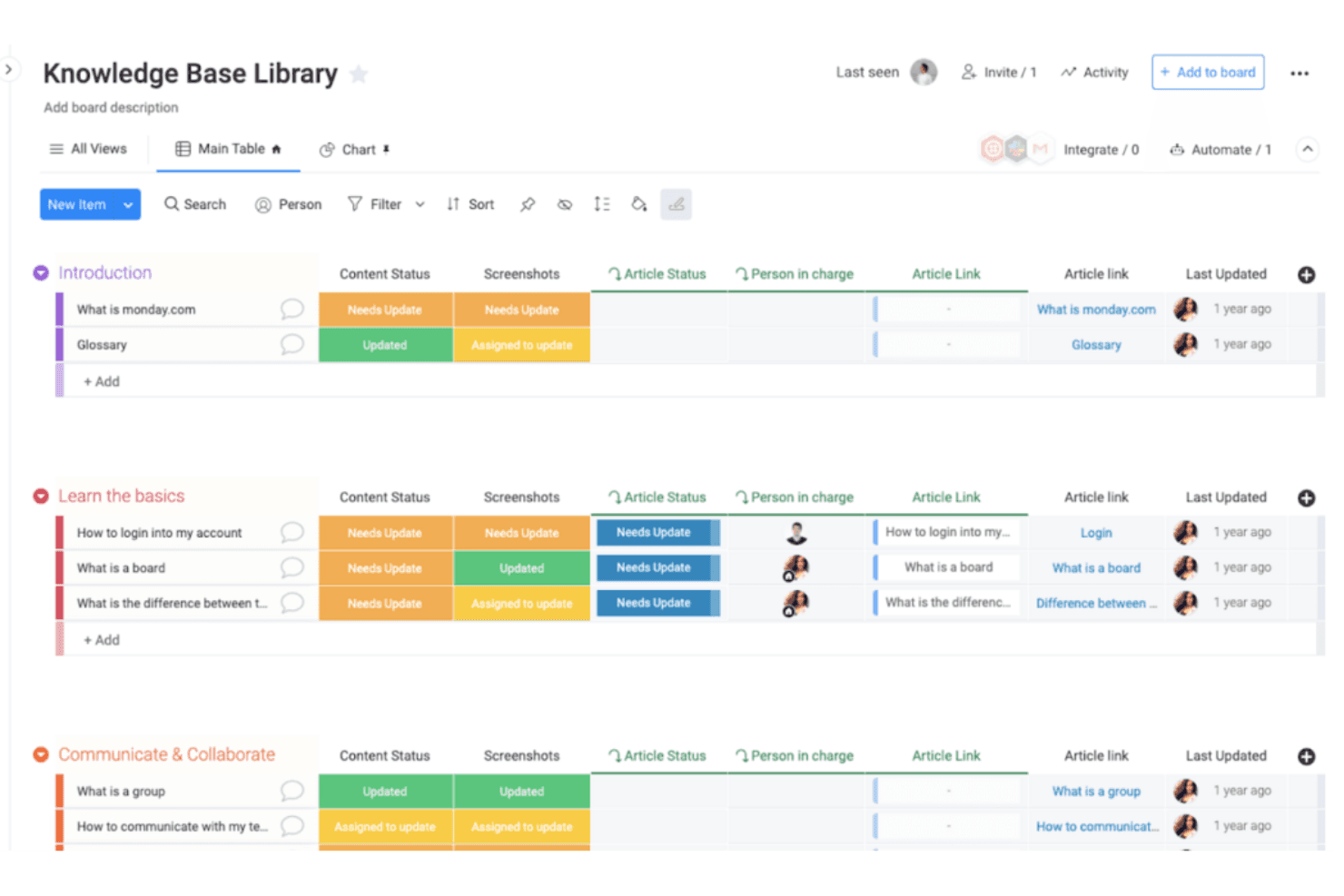
monday AI Workspace organizes knowledge base content by article status, ownership, links, and update progress across teams. monday AI Workspace is a work management platform that embeds AI agents, a Sidekick assistant, and generative AI tools directly into team workflows to surface, update, and act on shared organizational knowledge across boards and docs.
Who Is monday AI Workspace Best For?
It's a strong fit for operations and project teams at mid-size to large organizations that manage work across multiple departments and need AI embedded in their existing workflows.
Why I Picked monday AI Workspace
I picked monday AI Workspace because of how it connects AI directly to live organizational data across boards and docs, making it one of the few tools where knowledge isn't stored separately from work. I like that the Sidekick assistant pulls context from active projects, ticket histories, and company policies to answer questions in real time. When my team connects Claude or Copilot to our workspace, those AI assistants can read board data and take action without anyone switching apps.
monday AI Workspace Key Features
- AI-powered dashboards: Build live, visual dashboards that update automatically from board and project data.
- Collaborative document editing: Create and edit docs in real time with team members directly inside your workspace.
- Role-based access controls: Control who can view or edit boards, docs, and specific data using granular user permissions.
- Multi-channel integrations: Connect the platform to tools like Slack, Google Drive, and email for streamlined workflows.
monday AI Workspace Integrations
monday AI Workspace offers hundreds of native integrations, including Slack, Google Workspace, Microsoft 365, Salesforce, Jira, GitHub, Zoom, Dropbox, HubSpot, and Zendesk. It also supports Zapier and provides an API for custom integrations.
Pros and Cons
Pros:
- Multiple AI models supported within one workspace
- Knowledge connects directly to live project data
- AI Sidekick searches across all workspace boards
Cons:
- Limited structured HR content ingestion features
- Not purpose-built for HR policy content
Learn more about monday AI Workspace: Best for AI-driven knowledge health monitoring
- Free demo + 14-day free trial available
- Pricing upon request
Visit WebsiteCustomer Rating:4.8/5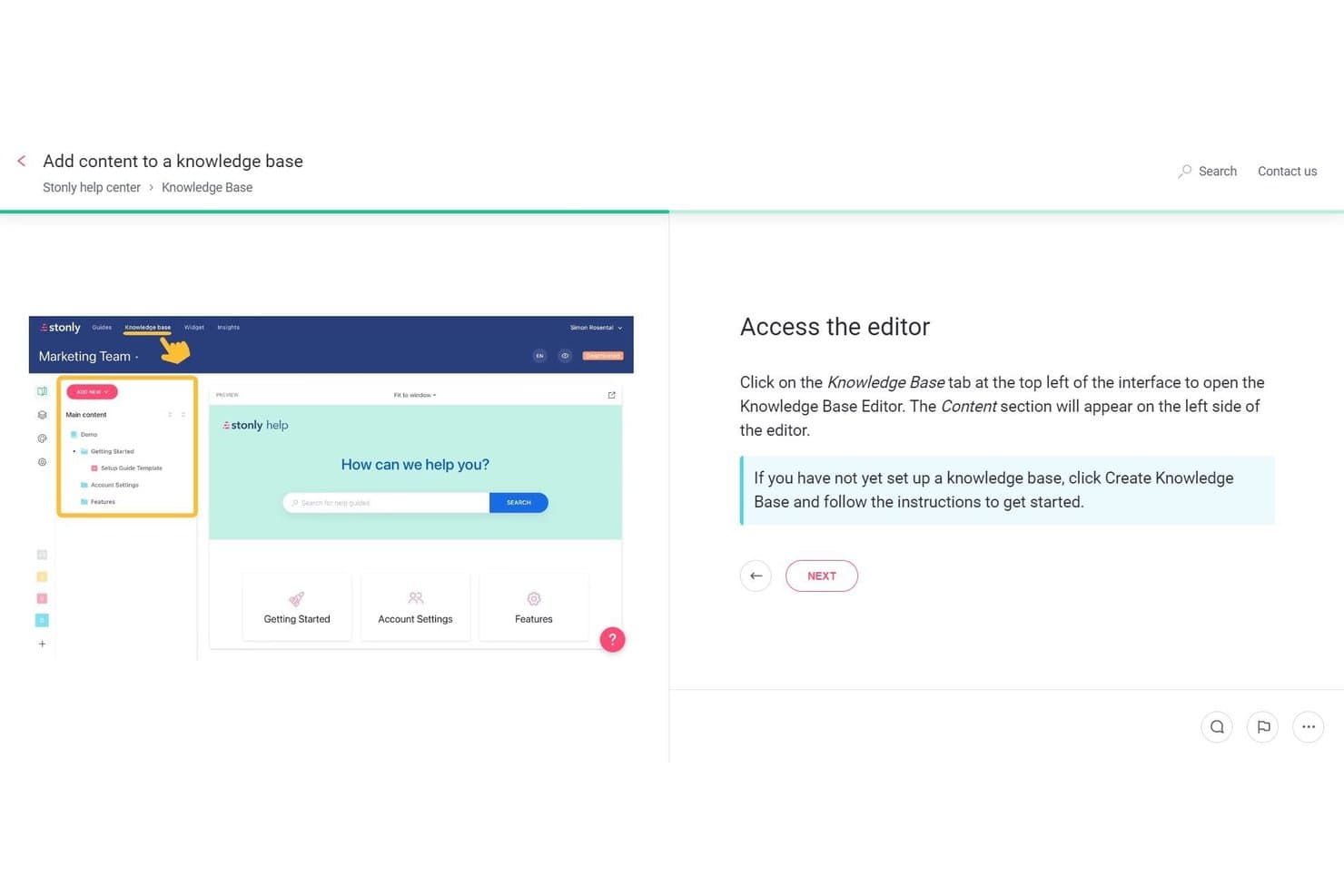
Stonly lets users build and organize knowledge base content visually. Stonly is an AI knowledge base platform built around structured, step-by-step content, offering semantic search, generative AI answers, interactive decision trees, and autonomous Knowledge Agents that monitor, audit, and draft updates across your knowledge content.
Who Is Stonly Best For?
Stonly is a strong fit for teams managing large volumes of structured knowledge content who need AI to continuously monitor, flag, and draft updates across their knowledge base.
Why I Picked Stonly
Stonly earns its spot on my shortlist because of its Knowledge Agents, which I think are the most capable AI-driven knowledge health monitoring system I've seen in this category. These agents run continuously, flagging broken links, duplicate content, and coverage gaps, then drafting suggested updates for human review before anything goes live. The Knowledge Health Score gives you a live audit of your entire knowledge base, so stale or conflicting content gets caught automatically rather than discovered by a frustrated user.
Stonly Key Features
- Guided Answers: An intent-detection layer that identifies the purpose behind a search query and launches the most relevant interactive decision tree directly from search results.
- Business Process Agents: Scripted AI agents that handle multi-step resolution workflows end-to-end across email, chat, and integrated ticketing platforms like Zendesk and ServiceNow.
- Content segmentation: A targeting feature that delivers different knowledge content to different user groups based on your own user data, available from the Small Business plan and above.
- Full-path analytics: Tracks how users move through individual guides step by step, surfacing where people drop off or search without finding answers.
Stonly Integrations
Stonly offers native integrations with SharePoint, Confluence, Google Drive, Google Sheets, Notion, Slack, Microsoft Teams, Zendesk, Salesforce, and ServiceNow. It also supports Zapier and API-based custom integrations.
Pros and Cons
Pros:
- Multilingual support for global knowledge delivery
- Structured, step-by-step guides reduce AI errors
- AI Knowledge Agents automate content health monitoring
Cons:
- Manual guide creation can be time-consuming
- No native HRIS or employee data sync
Learn more about Stonly: Best for remote team document sharing
- 14-day free trial + free demo available
- From $10/user/month (billed annually)
Visit WebsiteCustomer Rating:4.7/5
Slite helps remote teams share documents for step-by-step organization. Slite is a collaborative documentation tool with flexible formats designed for remote teams needing to share and organize information efficiently. Its main users are distributed teams looking for effective ways to manage and access documents.
Why I picked Slite: Slite goes beyond static document sharing, turning scattered notes and documents into structured, searchable, connected knowledge. The platform uses AI to suggest ways to categorize content, identify overlaps or missing information, and ensure each document fits into a bigger knowledge framework.
Standout features & integrations:
Features include an intuitive interface that simplifies navigation, real-time collaboration that allows your team to work together, and a document organization system that keeps everything in order.
Integrations include Slack, Google Drive, Trello, Asana, GitHub, Dropbox, Microsoft Teams, Zapier, Jira, and Confluence.
Pros and Cons
Pros:
- AI-powered document organization
- Intuitive interface enhances user experience
- AI-assisted search that retrieves answers semantically, not just through keywords
Cons:
- Limited advanced customization options
- Initial setup may require time
Learn more about Slite: Best for HR team knowledge management
- Free demo available
- Pricing upon request
Visit WebsiteCustomer Rating:4.7/5
HR Cloud simplifies HR tasks with AI analytics, onboarding tools, and workflows. HR Cloud is a comprehensive HR management platform designed to support HR processes for small to medium-sized businesses. It serves HR professionals by offering solutions for onboarding, employee engagement, and performance management.
Why I picked HR Cloud: It features AI-driven analytics and intelligent support agents that provide insights into employee performance and engagement. The platform's onboarding automation tools help you reduce manual tasks, improving efficiency. Its customizable workflows allow you to tailor processes to fit your team's needs.
Standout features & integrations:
Features include customizable workflows that adapt to your team's needs, onboarding automation that reduces manual tasks, and analytics that provide insights into performance and engagement.
Integrations include Slack, Microsoft Teams, Google Workspace, ADP, OneLogin, Okta, Workday, Salesforce, and Zapier.
Pros and Cons
Pros:
- Onboarding automation reduces manual tasks
- Customizable workflows for tailored processes
- AI-driven insights into performance
Cons:
- Limited advanced customization options
- May require time for initial setup
Learn more about HR Cloud: Best for automated content upkeep
- Free demo available
- Pricing upon request
Visit WebsiteCustomer Rating:4.6/5
Bloomfire offers “self-healing’ AI features that automatically pull outdated content and workflows. Bloomfire is an AI-driven knowledge-management platform built to help teams keep information accurate, accessible, and continuously improving. It’s especially useful for organizations that want a living, evolving knowledge base without the manual burden of constant content audits.
Why I picked Bloomfire: Bloomfire stands out because of its self-healing AI, which identifies outdated articles, stale workflows, and duplicated content, then automatically pulls or flags them for review. This gives teams the confidence that what they’re searching, referencing, and sharing is always current.
Standout features & integrations:
Features include content tagging and categorization that improve organization, an intuitive interface that supports user engagement, and customizable dashboards while providing insights and metrics on content performance.
Integrations include Slack, Salesforce, Microsoft Teams, Google Drive, Dropbox, Box, OneDrive, Yammer, SharePoint, and Zendesk.
Pros and Cons
Pros:
- Customizable dashboards for personalized views
- Intuitive interface for easy navigation
- AI-powered search enhances information retrieval
Cons:
- Initial setup can be time-consuming
- Limited offline access
Learn more about Bloomfire: 10Best for workflow integrations
Tettra
- 30-day free trial
- From $8/user/month (billed annually)
Visit WebsiteCustomer Rating:4.4/5
Tettra is a knowledge base tool for teams to organize and share information efficiently. Tettra is a knowledge base software tool tailored for teams that need to organize and share internal information efficiently. It's widely used by companies seeking a tool that works with existing workflows to ensure quick access to company knowledge.
Why I picked Tettra: It provides AI-driven suggestions to keep your knowledge base updated and relevant. The tool's question and answer feature helps your team clarify doubts quickly. Tettra's integration with existing workflows makes it easy to incorporate into your daily operations.
Standout features & integrations:
Features include a question and answer system that encourages team interaction, a content verification process that ensures accuracy, and an intuitive interface that simplifies navigation.
Integrations include Slack, Google Workspace, GitHub, and Zapier.
Pros and Cons
Pros:
- Easy integration with workflows
- Encourages team collaboration
- AI-driven content suggestions
Cons:
- Can be overwhelming for new users
- Limited customization options
Learn more about Tettra:
Diğer Yapay Zekâ Bilgi Bankası Araçları
İşte kısa listeme giremeyen ancak yine de incelemeye değer bazı ek yapay zekâ bilgi bankası aracı seçenekleri:
- 11GuruBest for internal AI chat features
- 12GleanBest for enterprise-grade search capabilities
- 13CapacityBest for AI-driven support automation
- 14Freddy AIBest for AI-driven customer interaction
- 15HelpjuiceBest for scalable knowledge bases
- 16GurubaseBest for AI-enhanced data insights
- 17HaystackBest for intranet-anchored HR knowledge delivery
- 18KnowmaxBest for telecom industry knowledge sharing
- 19HR AcuityBest for HR incident management
- 20monday serviceBest for customizable service management
How I Evaluate AI Knowledge Base Tools
Any tool on this list needs to go beyond keyword search with a chatbot label—I look for AI that actually resolves employee questions about PTO policies, benefits eligibility, or onboarding steps without routing to an HR generalist. I split my evaluation into core functionality every tool must have to qualify, and differentiating factors that separate good options from great ones.
Core Functionality (Table Stakes For This List)
When I'm selecting tools for my list, I rank each one on a scale from 0 (does not offer the functionality) to 5 (excels in this area) for each core functionality listed below. Then, I calculate the tool's total score into a percentage. Each tool needs to achieve a minimum total score of 65% to be considered for inclusion.
- AI-Powered Semantic Search: I check whether search understands natural questions like "how many sick days do I have left" rather than requiring employees to guess the right document title or keyword.
- Generative AI Answers: Each tool should synthesize a direct, cited answer from KB content—not just link to a 40-page handbook when someone asks about parental leave eligibility.
- HR Content Ingestion: I evaluate how well a platform pulls in policies, SOPs, and benefits docs from sources like Google Drive, SharePoint, or an HRIS without requiring manual reformatting.
- Permissions and Access Control: HR content often includes sensitive material, so I look for group- or role-based restrictions that limit who sees compensation bands, disciplinary procedures, or region-specific policies.
- Employee-Facing Deployment: The tool should meet employees where they already work—through Slack, Microsoft Teams, an HRIS portal, or an embedded widget—rather than requiring them to visit a separate site.
- AI Content Management: I look for AI that flags stale policies, detects duplicates, or surfaces content gaps, like identifying that your remote work policy hasn't been updated since your hybrid model changed.
Once I have a list of tools that meet this criteria, I consider what sets each platform apart.
Differentiating Factors (What Sets Vendors Apart)
Here's how I compare and contrast different vendors:
Standout Features
Conversational analytics is a big differentiator—I look for dashboards that reveal what employees ask most often and where the AI fails to find an answer, helping HR teams spot policy gaps before they become repeat tickets. Personalized answer context matters too, especially for global teams where a benefits question should return different results based on the employee's location or role. I also evaluate how well a tool escalates to HR case management when AI confidence is low, preserving the full conversation so nothing gets lost.
Beyond Features
AI governance is something I weigh heavily—HR knowledge bases handle sensitive topics like harassment policies and termination procedures, so I check for guardrails like confidence scoring, source-pinned answers, and admin controls that prevent the AI from generating unsanctioned responses. Compliance and data security also carry real weight, particularly SOC 2 Type II certification and data residency options for organizations with employees across multiple regions. Finally, I evaluate HRIS integration depth, since syncing employee attributes from tools like Workday or BambooHR is what enables personalized, role-aware answers at scale.
Yapay Zekâ Bilgi Bankası Araçları Nasıl Seçilir?
Uzun özellik listeleri ve karmaşık fiyatlandırma yapıları içinde kaybolmak kolaydır. Kendinize özgü yazılım seçme sürecinizde ilerlerken odağınızı korumanıza yardımcı olmak için göz önünde bulundurmanız gereken faktörlerin bir kontrol listesini aşağıda bulabilirsiniz:
| Faktör | Dikkat Edilmesi Gerekenler |
| Ölçeklenebilirlik | Araç ekibinizle birlikte büyüyebilir mi? Performansı etkilemeden artan veri hacimlerini ve kullanıcı sayısını destekleyip desteklemediğini kontrol edin. |
| Entegrasyonlar | Mevcut yazılım yığınınıza bağlanabiliyor mu? Sorunsuz iş akışları sağlamak için Slack, Salesforce ve Google Workspace gibi araçlarla uyumluluk arayın. |
| Özelleştirilebilirlik | Aracı süreçlerinize uyacak şekilde uyarlayabilir misiniz? Ekibinizin ihtiyaçlarına uygun iş akışları ve kullanıcı rolleri için esnek seçenekler sunduğundan emin olun. |
| Kullanım kolaylığı | Araç kullanımı sezgisel mi? Ekibinizin hızlı bir şekilde çalışmaya başlayabilmesi için minimum düzeyde eğitim gerektirip gerektirmediğini görmek amacıyla arayüzü test edin. |
| Uygulama ve işe alıştırma | Kurulum ne kadar sürüyor? Dağıtım için gereken kaynakları ve işe alıştırma sırasında desteğin mevcut olup olmadığını değerlendirin. |
| Maliyet | Fiyatlandırma bütçenize uygun mu? Maliyeti sunulan özelliklerle karşılaştırın ve gizli ücretlere veya uzun vadeli sözleşmelere dikkat edin. |
| Güvenlik önlemleri | Verileriniz korunuyor mu? Hassas bilgileri güvence altına almak için şifreleme, erişim denetimleri ve veri koruma standartlarına uyumluluk arayın. |
| Desteğin kullanılabilirliği | Yardıma ihtiyaç duyduğunuzda desteğe kolayca ulaşabiliyor musunuz? 7/24 destek seçeneklerini ve sağlayıcının yardım masasının yanıt verme hızını kontrol edin. |
Yapay Zekâ Bilgi Tabanı Araçları Nedir?
Yapay zekâ destekli bilgi yönetimi araçları, bilgileri geleneksel sistemlerden daha akıllı bir şekilde düzenlemek, yönetmek ve erişilebilir hâle getirmek için yapay zekâ kullanan dijital platformlardır. Geleneksel bilgi tabanları, ilgili bilgileri bulmak için büyük ölçüde manuel etiketlemeye, katı klasör yapılarına ve tam anahtar kelime eşleşmesine dayanır. Bu da bilgilerin nerede bulunduğunu önceden bilmiyorsanız yanıtları bulmayı çoğu zaman zorlaştırır.
Yapay zekâ bilgi tabanı araçları, doğal dil işleme, anlamsal arama ve tahmine dayalı öneriler kullanarak bu sorunları çözer. Kullanıcılar tam bir ifadeyi aramak yerine sorularını doğal bir şekilde sorabilir ve ifadeler belgelerdeki metinden farklı olsa bile doğru sonuçlar alabilir. Bu araçlar ayrıca güncelliğini yitirmiş bilgileri işaretleyerek ve eksiklikleri belirleyerek içeriğin güncel tutulmasına yardımcı olur.
Müşteri desteği, operasyonlar, insan kaynakları ve ürün ekipleri; bilgiye erişimi hızlandırmak, standart işletim prosedürleri için tek bir doğruluk kaynağı oluşturmak, daha iyi karar almayı desteklemek ve soruları yanıtlamak için hızlı bir başvuru noktası sağlamak amacıyla kurum içi bilgi tabanlarına güvenir. Bilgilerin bakımını kolaylaştıran ve erişimi daha da hızlandıran yapay zekâ bilgi tabanları, üretkenliği artırır ve ekiplerin daha net bir şekilde çalışmasına yardımcı olur.
Özellikler
Yapay zekâ bilgi tabanı araçlarını seçerken aşağıdaki temel özelliklere dikkat edin:
- Yapay zekâ destekli arama: Bağlamı ve amacı anlayan akıllı arama özellikleri sayesinde doğru bilgilere hızla ulaşın.
- Doğal dil işleme: Günlük dildeki sorguları yorumlayıp yanıtlayarak kullanıcı etkileşimini geliştirin.
- Tahmine dayalı analiz: Kalıpları ve eğilimleri analiz ederek kullanıcı ihtiyaçlarını öngörün ve zamanında çözümler sunun.
- Özelleştirilebilir şablonlar: Esnek tasarım seçenekleriyle bilgi tabanını markanıza ve iş akışı ihtiyaçlarınıza uyarlayın.
- Gerçek zamanlı iş birliği: Ekiplerin belgeler ve güncellemeler üzerinde aynı anda birlikte çalışmasına olanak tanıyarak verimliliği artırın.
- Veri senkronizasyonu: Tutarlılığı sağlamak için bilgileri tüm platformlarda ve cihazlarda güncel tutun.
- İçerik kategorilendirme: Kolay erişim için yapay zekâ destekli etiketleme ve kategorilendirme ile bilgileri mantıksal biçimde düzenleyin.
- Entegrasyon olanakları: İş akışı verimliliğini artırmak için Slack ve Salesforce gibi mevcut araçlara sorunsuz şekilde bağlanın.
- Gelişmiş analiz: Stratejileri geliştirmek ve sonuçları iyileştirmek için içerik performansı ve kullanıcı etkileşimi hakkında içgörüler elde edin.
- Otomatik iş akışları: Rutin süreçleri yapay zekâ destekli otomasyonla gerçekleştirerek manuel görevleri azaltın ve verimliliği artırın.
Faydalar
Yapay zekâ bilgi tabanı araçlarını kullanıma almak ekibiniz ve işletmeniz için çeşitli faydalar sağlar. Yararlanmayı bekleyebileceğiniz bazı faydalar şunlardır:
- Geliştirilmiş verimlilik: Yapay zekâ destekli arama ve otomasyon, bilgi bulmak ve tekrarlayan görevleri gerçekleştirmek için harcanan zamanı azaltır.
- Geliştirilmiş iş birliği: Gerçek zamanlı iş birliği özellikleri, ekibinizin uzaktan çalışırken bile daha etkili bir şekilde birlikte çalışmasına olanak tanır.
- Doğru yanıtlar: Doğal dil işleme, sorguların anlaşılmasını ve doğru şekilde yanıtlanmasını sağlayarak destek kalitesini artırır.
- Bilgiye dayalı karar alma: Tahmine dayalı analiz, eğilimler ve kullanıcı ihtiyaçları hakkında içgörüler sunarak daha iyi işletme kararları almanıza yardımcı olur.
- Tutarlı bilgiler: Veri senkronizasyonu, bilgi tabanınızı tüm platformlarda güncel tutarak herkesin aynı bilgilere erişmesini sağlar.
- Özelleştirilebilir çözümler: Özelleştirilebilir şablonlar ve iş akışlarıyla platformu özel ihtiyaçlarınıza uyarlayın.
- Artan etkileşim: Gelişmiş analiz, kullanıcı davranışını anlamanıza ve içerik stratejilerini geliştirmenize yardımcı olarak etkileşimi artırır.
Maliyetler ve Fiyatlandırma
Yapay zekâ bilgi tabanı araçlarını seçmek, mevcut çeşitli fiyatlandırma modellerini ve planları anlamayı gerektirir. Maliyetler özelliklere, ekip büyüklüğüne, ek özelliklere ve diğer unsurlara göre değişir. Aşağıdaki tabloda yaygın planlar, ortalama fiyatları ve yapay zekâ bilgi tabanı aracı çözümlerinde genellikle bulunan özellikler özetlenmiştir:
Yapay Zekâ Bilgi Tabanı Araçları için Plan Karşılaştırma Tablosu
| Plan Türü | Ortalama Fiyat | Yaygın Özellikler |
| Ücretsiz Plan | $0 | Temel arama işlevi, sınırlı depolama ve topluluk desteği. |
| Kişisel Plan | $5-$15/kullanıcı/ay | Gelişmiş arama, temel analiz, özelleştirme seçenekleri ve e-posta desteği. |
| İşletme Planı | $20-$50/kullanıcı/ay | Yapay zekâ destekli içgörüler, gelişmiş iş birliği araçları, entegrasyon özellikleri ve öncelikli destek. |
| Kurumsal Plan | $60-$100/kullanıcı/ay | Tam özelleştirme, gelişmiş güvenlik özellikleri, özel hesap yöneticisi ve 7/24 üst düzey destek. |
Yapay Zekâ Bilgi Bankası Araçları Hakkında SSS
Yapay zekâ bilgi bankası araçları hakkında sık sorulan bazı soruların yanıtları:
Yapay zekâ bilgi bankası araçları mevcut yazılımlarla entegre olabilir mi?
Evet, çoğu yapay zekâ bilgi bankası aracı Slack, Salesforce ve Google Workspace gibi popüler yazılımlarla entegrasyon özellikleri sunar. Bu entegrasyonlar, bilgi bankanızı ekibinizin hâlihazırda kullandığı araçlara bağlayarak iş akışlarınızı sorunsuz bir şekilde sürdürmenize yardımcı olur. Satın almadan önce aracın ihtiyaç duyduğunuz belirli entegrasyonları destekleyip desteklemediğini kontrol edin. Bazı platformlar özel entegrasyonlar için API erişimi de sunabilir; benzersiz gereksinimleriniz varsa bu özellik yararlı olabilir. Kurulum kolaylığını ve bu entegrasyonlarla ilişkili olası maliyetleri değerlendirdiğinizden emin olun.
Yapay zekâ bilgi bankası araçları veri güvenliğini nasıl artırır?
Yapay zekâ bilgi bankası araçları; şifreleme, erişim denetimleri ve veri koruma standartlarına uyumluluk gibi özellikler sunarak veri güvenliğini artırır. Bir araç seçerken, Avrupa’da faaliyet gösteriyorsanız GDPR gibi düzenlemelere uyduğundan emin olun. Yalnızca yetkili ekip üyelerinin hassas bilgilere erişebilmesi için kullanıcı izinleri belirlemenize olanak tanıyan seçenekleri arayın. Düzenli güvenlik güncellemeleri ve denetimleri de dikkate alınması gereken önemli faktörlerdir; bunlar aracın olası tehditlere karşı güvenli kalmasını sağlar.
Yapay zekâ bilgi bankası araçları büyüyen ekipler için ölçeklenebilir mi?
Evet, yapay zekâ bilgi bankası araçları genellikle ölçeklenebilirdir ve ekibinizle birlikte büyüyebilir. İşletmeniz genişledikçe bu araçlar, performanstan ödün vermeden daha fazla kullanıcıyı ve artan veri hacimlerini destekleyebilir. Seçenekleri değerlendirirken fiyatlandırma yapısının kolay ölçeklendirmeye olanak tanıyıp tanımadığını kontrol edin. Bazı araçlar, gerektiğinde kullanıcı ve özellik eklemenize olanak tanıyan kademeli planlar sunar. Ayrıca aracın karmaşık veri yapılarını ve iş akışlarını yönetme becerisini de göz önünde bulundurun; kuruluşunuz büyüdükçe bunlar daha önemli hâle gelebilir.
Yapay zekâ bilgi bankası araçları kapsamlı bir eğitim gerektirir mi?
Hayır, çoğu yapay zekâ bilgi bankası aracı kullanıcı dostu olacak şekilde tasarlanmıştır ve çok az eğitim gerektirir. Bununla birlikte, aracın özelliklerinden en iyi şekilde yararlanabilmeleri için ekibinize başlangıçta bazı yönlendirmeler sağlamak önemlidir. Eğitim kaynakları olarak eğitimler, web seminerleri ve ürün tanıtımları sunan sağlayıcıları arayın. Bazı satıcılar, işe alıştırma ve sorun giderme konularında yardımcı olmak için müşteri desteği de sağlar. Ekibinizi aracı keşfetmeye ve denemeye teşvik etmek, öğrenme sürecini hızlandırabilir ve benimsenmeyi artırabilir.
Yapay zekâ bilgi bankası aracı satıcılarından ne tür bir destek bekleyebilirim?
Destek, satıcıya göre değişir; ancak genellikle e-posta, sohbet ve telefon desteği gibi seçenekler sunulur. Bazı satıcılar 7/24 destek sağlarken diğerleri sınırlı saatlerde hizmet verebilir. Özellikle işe alıştırma veya sorun çözümü gibi kritik zamanlarda alacağınız destek düzeyini anlamanız önemlidir. Satıcının özel bir hesap yöneticisine veya SSS ve kılavuzlar içeren kapsamlı bir yardım merkezine erişim sağlayıp sağlamadığını kontrol edin. Topluluk forumları da deneyimleri ve çözümleri diğer kullanıcılarla paylaşmak için değerli bir kaynak olabilir.
Microsoft Copilot, yapay zekâ bilgi bankası aracıyla aynı şey midir?
Hayır. Copilot bir bilgi bankası aracı değildir. Belgeleri depolamaz, düzenlemez veya yönetmez. Bunun yerine Microsoft 365’teki mevcut dosyalarınızın üzerinde çalışan bir yapay zekâ asistanı görevi görür. Copilot, Microsoft 365 verilerinizde (SharePoint, OneDrive, Teams) arama yapabildiğinden bu, bilgileri koruyup yapılandırmıyor olsa da onun bir bilgi merkezi gibi görünmesini sağlar.
Gerçek bir bilgi bankası sistemi:
\u003cul\u003e
\u003cli\u003eBelgeleri yapılandırılmış merkezler hâlinde düzenler\u003c/li\u003e
\u003cli\u003eİçerik sürümlemeyi ve yönetişimi sağlar\u003c/li\u003e
\u003cli\u003eAnlamsal arama ve konu sınıflandırması sunar\u003c/li\u003e
\u003cli\u003eGüncelliğini yitirmiş bilgilerin doğrulanmasına ve güncellenmesine yardımcı olur\u003c/li\u003e
\u003cli\u003ePaylaşılan bilgilerin korunmasına yönelik iş akışlarını destekler\u003c/li\u003e
\u003c/ul\u003e
Copilot bunların hiçbirini yönetmez — yalnızca hâlihazırda sahip olduğunuz dosyaları okur ve yorumlar. Birçok ekip, bu bilgi bankasındaki içeriği en iyi hâle getirmek için Copilot’u yapılandırılmış bir yapay zekâ bilgi bankası aracıyla birlikte kullanır. Bilgileri hızla ortaya çıkarmak, uzun belgeleri özetlemek ve depolanan içeriğinize dayalı soruları yanıtlamak için oldukça kullanışlıdır. Özel bir bilgi bankasının yerini almasa da bilgiye erişimi kolaylaştırır.