

Birden fazla mülakat programını aynı anda yönetmek, her İK ekibi için baş ağrıtıcı olabilir. Muhtemelen karşılıklı e-postalarla, saat dilimi karmaşasıyla ve son dakika iptalleriyle uğraşıyorsunuz. Bu, yönetilmesi zor bir süreçtir ve mülakat planlama yazılımı tam da bu noktada devreye girer.
Deneyimlerime göre bu araçlar, planlama sürecini otomatikleştirerek zamandan tasarruf etmenizi ve stresi azaltmanızı sağlayabilir. Adaylar ve mülakatçılarla koordinasyonu verimli bir şekilde yürütmenize yardımcı olarak herkesin aynı bilgiye sahip olmasını sağlarlar.
Tarafsız bir en iyi çözümler listesi sunmak için çeşitli seçenekleri test edip inceledim. Özellikler, kullanılabilirlik ve her aracın ekibinize sundukları hakkında bilgiler bulacaksınız. Mülakat planlamasını endişe etmeniz gereken bir konu olmaktan çıkaralım.
Why Trust Our Software Recommendations
6,700+
Reviews
20
Industry experts
16+
Evaluation factors
14
Years
Our team has been testing and reviewing software since 2012. As HR experts ourselves, we know how difficult—and important—it is to choose the right software.
For this guide, we evaluated tools using hands-on testing and independent research, scoring tools using our selection criteria. We also draw on insights from industry thought leaders and practicing HR experts.
Our reviews reflect our human editorial judgment, not a sales pitch.
Expert reviewers:
- Phil GrayCOO
 Kim BehnkeHR Tech Editor & Analyst
 Josh BarkerPeople Ops Manager

Karşılaştırma Tablosu: Mülakat Planlama Yazılımları
Bu karşılaştırma tablosu, en iyi mülakat planlama yazılımı seçimlerimin fiyatlandırma ayrıntılarını özetlemektedir.
Sorted by: Default
| Tool | Starting Price | Website | |
|---|---|---|---|
Best for interview scheduling at enterprise scale | 4.4 out of 5 | Pricing upon request Free demo available | Website |
Best for interviewer coverage and training | 4.4 out of 5 | $400/month Free demo available | Website |
Best for AI-powered interview coordination | 4.0 out of 5 | Pricing upon request Free demo available | Website |
Best for candidate self-scheduling | 4.4 out of 5 | Pricing upon request Free demo available | Website |
Best for flexibility in interview types | 4.7 out of 5 | Price upon request Free demo available | Website |
Best for conversational AI scheduling | Not rated | Pricing upon request Free demo available | Website |
Best for custom recruitment pipelines | 4.6 out of 5 | $9/user/month Free plan + 14-day trial available | Book Demo |
Best for hourly SMB hiring in one place | 4.2 out of 5 | $99/month Free plan + 30-day free trial + free demo available | Website |
Best for easy website embedding | 4.6 out of 5 | $12/user/month Free plan + 30-day free trial + free demo available | Website |
Best for a hands-off, automated approach | 4.7 out of 5 | Pricing upon request Free demo available | Website |


En İyi Mülakat Planlama Yazılımı Sistemleri
İşte en iyi 10 mülakat planlama yazılımının her biri hakkında kısa bir açıklama. Özetlerimde ayrıca benzersiz kullanım alanları, temel özellikler ve önemli artılar & eksiler vurgulanmaktadır. Listenin sonunda ek bonus seçenekleri bulmak için okumaya devam edin.
 Best for interview scheduling at enterprise scale
- Free demo available
- Pricing upon request
Visit WebsiteCustomer Rating:4.4/5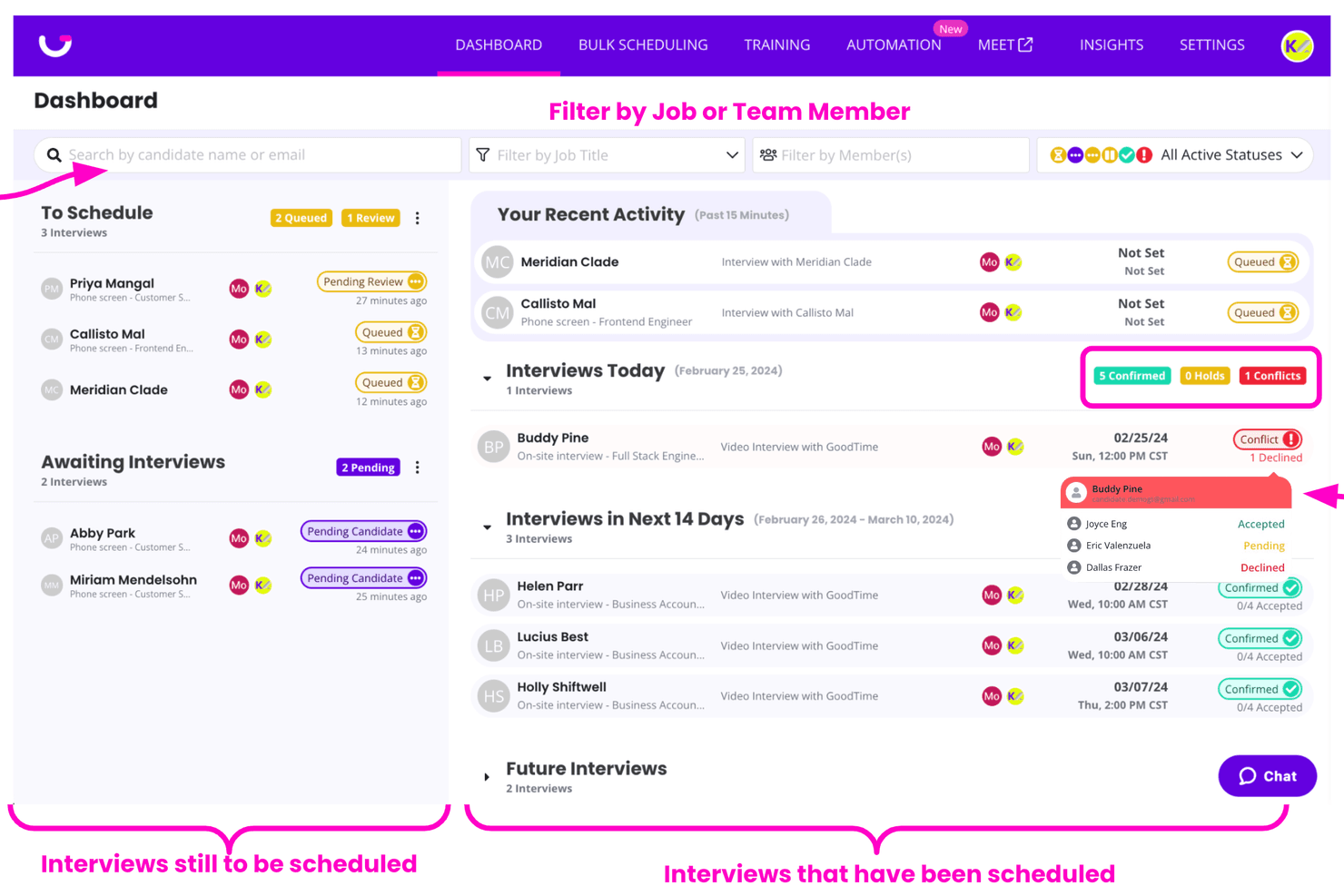
GoodTime dashboards filter candidates and track interview statuses. GoodTime is an interview scheduling platform designed for enterprise talent acquisition teams. It helps coordinate interviews across departments, locations, and time zones while managing interviewer availability, candidate preferences, and scheduling changes.
Who Is GoodTime Best For?
GoodTime is best suited for enterprise talent acquisition teams that manage high volumes of interviews and complex scheduling requirements across multiple departments, locations, or time zones.
Why I Picked GoodTime
I picked GoodTime for its automated interview scheduling capabilities and support for complex enterprise hiring workflows. The platform helps coordinate multi-day interview panels, manage interviewer availability, accommodate candidate preferences, and handle scheduling changes across time zones. GoodTime also features Cori, an AI agent that helps select interviewers, resolve scheduling conflicts, find replacements for cancellations, and identify potential bottlenecks. Teams can configure and monitor these actions while managing interview coordination from a centralized platform.
GoodTime Key Features
- Candidate self-scheduling: Candidates can schedule and reschedule interviews through a branded candidate experience.
- Intelligent interview coordination: Cori coordinates complex interviews based on availability, time zones, skills, preferences, and interviewer workloads.
- Automated communication workflows: Email, SMS, and WhatsApp updates keep candidates and interviewers informed throughout the process.
- Hiring insights and analytics: Real-time dashboards surface scheduling activity, bottlenecks, hiring progress, and opportunities to improve.
GoodTime Integrations
Integrations include Workday, Greenhouse, Ashby, SAP SuccessFactors, Lever, iCIMS, SmartRecruiters, Jobvite, Google Calendar, Microsoft 365, Zoom, and other tools used across the hiring process.
Pros and Cons
Pros:
- Supports branded, self-service candidate scheduling
- Provides configurable AI actions with user oversight
- Automates interview scheduling across enterprise teams
Cons:
- Complex workflows may require additional implementation planning
- Advanced features may take time to learn
Learn more about GoodTime: Best for interviewer coverage and training
- Free demo available
- From $400/month
Visit WebsiteCustomer Rating:4.4/5
Ashby organizes candidates by pipeline stage for streamlined hiring. Ashby is an all-in-one recruiting platform that combines ATS, candidate sourcing and CRM, structured interview planning, scheduling automation, and analytics into a single tool.
Who Is Ashby Best For?
Ashby suits scaling companies that need a single platform to manage structured interview loops, interviewer training pipelines, and recruiting analytics without stitching together separate tools.
Why I Picked Ashby
I picked Ashby as one of the best because its automated interviewer training pipeline is something I haven't seen built this natively into a scheduling tool. It tracks shadow and reverse-shadow interviews, then automatically advances trainees into qualified interviewer pools once they hit the required milestones. Pair that with interviewer load limits and the Auto Replace Declined Interviewer feature, and you get real coverage control across your entire interview panel without constant manual oversight.
Ashby Key Features
- Direct booking links: Candidates select their own interview time from a live view of interviewer calendar availability, without any back-and-forth.
- Candidate availability links: For multi-stage panels, candidates submit their preferred times so coordinators can schedule across multiple interview events.
- Video conferencing auto-generation: Ashby generates a unique Google Meet, Microsoft Teams, or Zoom link for each calendar invite automatically.
- Scheduling requests and coordinator queues: Scheduling tasks can be routed to specific coordinators or shared queues and tracked through a central Interviews Dashboard.
Ashby Integrations
Ashby offers 250+ out-of-the-box integrations, including native Google Workspace, Microsoft 365, Slack, and Workday connections, plus Google Meet, Microsoft Teams, and Zoom for interview links. It also supports a public API, webhooks, and Zapier.
Pros and Cons
Pros:
- Structured loops pair interviews with feedback forms
- Direct booking cuts routine scheduling exchanges
- Automated interviewer training tracks qualification milestones
Cons:
- Scheduling workflows take time to configure
- Panel availability still needs manual matching
Learn more about Ashby: Best for AI-powered interview coordination
- Free demo available
- Pricing upon request
Visit WebsiteCustomer Rating:4/5
candidate.fyi interview request dashboard showing scheduling status and hiring team ownership. candidate.fyi is an interview scheduling platform designed for talent teams that need automated scheduling, custom workflows, and integrations with ATS and calendar systems.
Who Is candidate.fyi Best For?
Talent acquisition teams at mid-sized to large organizations that need to coordinate high volumes of interviews across multiple departments and locations.
Why I Picked candidate.fyi
I picked candidate.fyi as one of the best because its AI-powered escalation helps handle complex scheduling conflicts that manual tools often miss. When interviewers change last-minute or time zones overlap, the system can suggest alternative interviewers and times automatically. I also like how it flags bottlenecks and escalates unresolved cases to recruiters, helping ensure scheduling issues are addressed promptly.
candidate.fyi Key Features
- AI-powered coordination agent: Automatically schedules, reschedules, and resolves conflicts.
- Dynamic interviewer selection: Matches the right interviewers based on availability, skills, and preferences.
- Real-time issue detection & escalation: Flags and resolves bottlenecks before they impact candidates.
- End-to-end coordination automation: Handles multi-stage, panel, and global scheduling without manual intervention.
candidate.fyi Integrations
candidate.fyi offers native integrations with Greenhouse, Lever, Workday, iCIMS, UKG, Google Calendar, and Microsoft Outlook. An API is available for custom integrations.
Pros and Cons
Pros:
- Supports recruiting teams at scale
- Handles panel and multi-stage scheduling
- AI agent automates interviewer coordination workflows
Cons:
- Requires setup for workflow automation
- May exceed needs of smaller teams
Learn more about candidate.fyi: Best for candidate self-scheduling
- Free demo available
- Pricing upon request
Visit WebsiteCustomer Rating:4.4/5
The calendar view in Greenhouse's scheduling tool allows recruiters to efficiently plan and manage interview slots. Greenhouse is an interview scheduling platform built for hiring teams who need to coordinate interviews, automate workflows, and improve candidate experience across fast-growing organizations.
Who Is Greenhouse Best For?
Greenhouse is a strong fit for mid-size to enterprise companies with dedicated recruiting teams managing high volumes of interviews across multiple departments.
Why I Picked Greenhouse
I picked Greenhouse as one of the best because of how well it handles candidate self-scheduling within a fully structured hiring workflow. Candidates receive a link to book their own interview slot based on real-time interviewer availability, which cuts out the back-and-forth that slows down high-volume hiring. I also like that self-scheduling ties directly into Greenhouse's interview kits, so once a candidate books their slot, interviewers already have their prep materials, scorecards, and role-specific questions ready to go. Automated reminders then go out to both sides, so no one shows up unprepared or misses the meeting entirely.
Greenhouse Key Features
- Structured interview kits: Build role-specific prep kits with scorecards and interview questions that interviewers receive before each scheduled interview.
- Anonymized take-home tests: Send candidates standardized assessments with anonymized results to support consistent, bias-reduced evaluation.
- Automated candidate communication: Set up custom email rules to notify candidates of next steps, decisions, and status updates at defined points in the hiring process.
- 40+ pre-built reports: Access a library of pre-built and custom reports to track hiring performance, pipeline health, and interviewer activity.
Greenhouse Integrations
Integrations include Checkr, Criteria Corp, Findem, HireRight, BrightHire, Pave, Grayscale, Aboard, Accurate ACE, and Adway Social Recruiting Technology.
Pros and Cons
Pros:
- Scalable for handling large application volumes
- Comprehensive reports and analytics
- Good candidate experience
Cons:
- Setup can be complex
- Customization can be limited for certain features
 Best for flexibility in interview types
- Free demo available
- Price upon request
Visit WebsiteCustomer Rating:4.7/5
VidCruiter allows you to automate notification text messages at different milestones throughout the interview process. VidCruiter is an interview scheduling platform designed for hiring teams in organizations that need to coordinate complex interview processes and streamline candidate communications.
Who Is VidCruiter Best For?
VidCruiter suits mid-to-large organizations with high-volume hiring needs that require structured, multi-format interview workflows.
Why I Picked VidCruiter
I picked VidCruiter as one of the best because of how much flexibility it gives candidates and hiring teams in interview format. A useful feature is that candidates can choose their interview type at the point of scheduling—selecting between video or in-person—rather than having that decision made for them. That kind of format flexibility is rare in scheduling tools. I also like that VidCruiter supports a wide range of interview structures out of the box, from one-on-one and panel interviews to round-robin, group, MMI, and hybrid formats, all managed through the same scheduling workflow. For teams running multi-stage hiring processes where different roles or departments require different interview setups, that coverage makes a real operational difference.
VidCruiter Key Features
- Candidate self-scheduling: Candidates pick their own interview time slot from pre-set availability windows, removing back-and-forth coordination between recruiters and candidates.
- Automated SMS and email notifications: VidCruiter sends interview confirmations, reminders, and follow-ups to both candidates and interviewers automatically, including attachments like interview guides or directions.
- Configurable rescheduling rules: Recruiters can set exactly how many times a candidate can reschedule and how close to the interview date, with automatic notifications sent to all parties when changes are made.
- Timezone automation: The platform detects and adjusts for time zone differences automatically, so candidates and interviewers always see the correct local time for their scheduled interview.
VidCruiter Integrations
Integrations include Workday, Dayforce, ADP, Oracle, UKG, SAP SuccessFactors, SmartRecruiters, Icims, PageUp, and Lever.
Pros and Cons
Pros:
- Customized templates for video interviews
- Great customer support
- Clickable links without login
Cons:
- Complicated to master various tool commands
- Note-taking during interviews is a hassle
Learn more about VidCruiter:
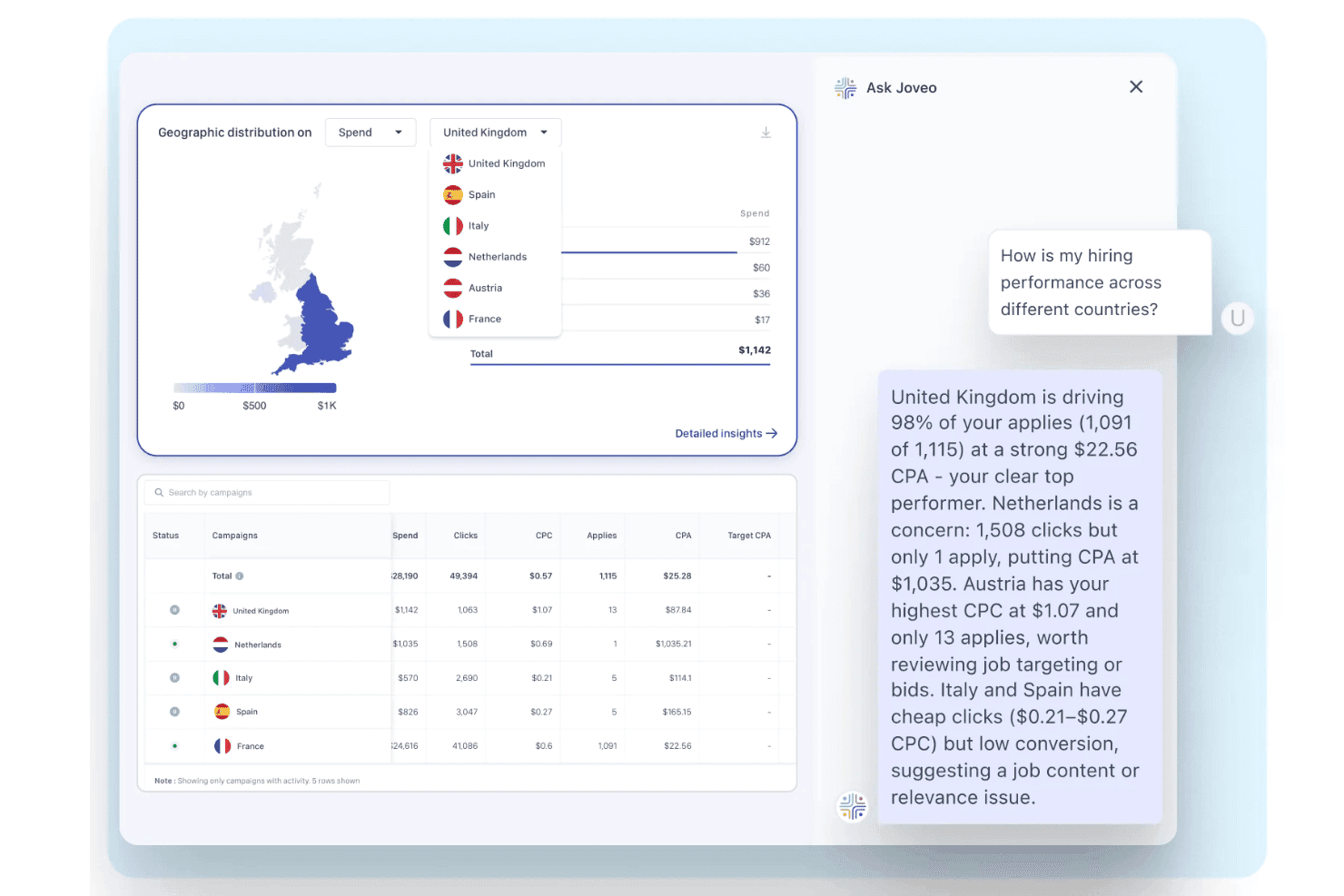
Joveo provides a candidate relationship management dashboard with AI-powered hiring insights, campaign analytics, and geographic recruitment performance. Joveo is a recruitment marketing platform with a built-in AI interview scheduling module that automates candidate self-scheduling, multi-round coordination, and calendar sync across email, SMS, WhatsApp, and web.
Who Is Joveo Best For?
Joveo is a strong fit for enterprise talent acquisition teams, staffing agencies, and RPOs managing high volumes of interviews across multiple roles and locations simultaneously.
Why I Picked Joveo
I picked Joveo as one of the best because its conversational AI guides candidates through self-scheduling across SMS, WhatsApp, email, and web without recruiter involvement. What I find especially impressive is how it handles sequential and parallel multi-round interviews automatically, resolving conflicts and distributing load across interviewers by availability and workload. In practice, my team can move a candidate from application to scheduled interview in under a minute, even for panel roles.
Joveo Key Features
- ATS ecosystem integrations: Connects natively with over 100 ATS platforms to sync candidate data and interview stages.
- Automated notifications and reminders: Sends branded confirmations, updates, and reminders to candidates and interviewers by email, SMS, or WhatsApp.
- Load-balanced interviewer assignment: Distributes interviews based on interviewer availability and workload to avoid calendar conflicts.
- Scheduling analytics dashboard: Offers reports on interview scheduling efficiency, decline rates, and candidate progression across your funnel.
Joveo Integrations
Joveo offers native integrations with over 100 ATS platforms, including iCIMS, Greenhouse, Workday, Bullhorn, SuccessFactors, Oracle, and Cornerstone. It also provides native calendar integrations with Google, Outlook, iCloud, Office 365, and Exchange, and has an API for custom integrations.
Pros and Cons
Pros:
- Supports sequential and parallel multi-round scheduling
- Handles high-volume hiring across channels
- Schedules interviews without recruiter involvement
Cons:
- Reporting tools may lack depth for SMBs
- Built primarily for enterprise-scale hiring teams
Learn more about Joveo: Best for custom recruitment pipelines
- Free plan + 14-day trial available
- From $9/user/month (billed annually)
Visit WebsiteCustomer Rating:4.6/5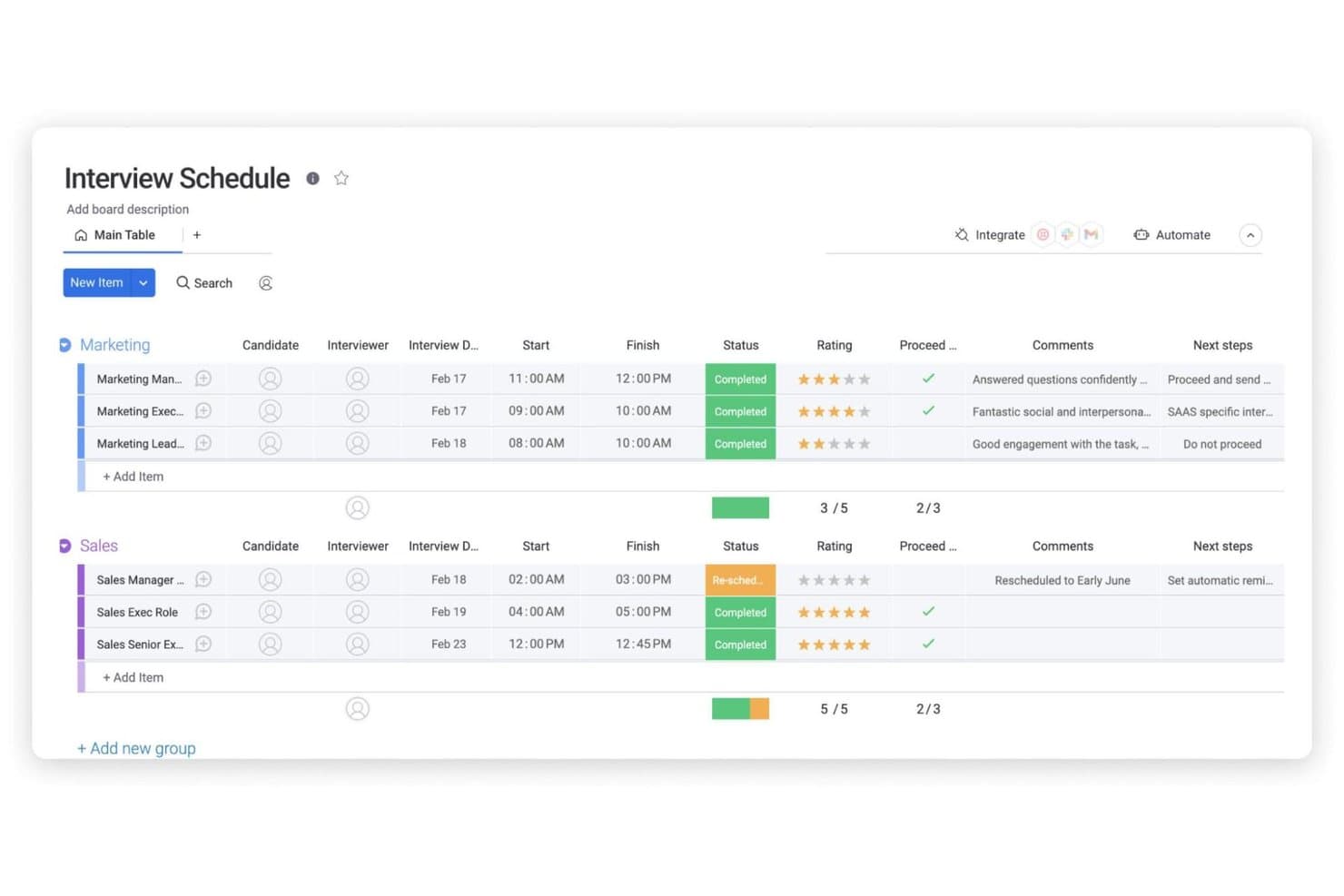
monday AI Workspace offers a structured interview schedule board template. monday AI Workspace is a work management platform with built-in AI agents that handle recruitment workflows, including interview scheduling, candidate pipeline tracking, calendar sync, and hiring team coordination.
Who Is monday AI Workspace Best For?
It's a strong fit for mid-sized to large recruiting teams that want to manage their entire hiring pipeline in one customizable workspace.
Why I Picked monday AI Workspace
I've included monday AI Workspace in my top picks because its boards can be shaped around any hiring process you run, not a generic template that forces you to adapt. I particularly like the AI Scheduling Agent, which syncs with your team's calendar in real time and autonomously handles reschedules and no-shows. The Coordinator Agent adds another layer by pinging hiring managers who haven't submitted feedback, keeping every open role moving without manual follow-up.
monday AI Workspace Key Features
- Panel interview templates: Set up structured interview panels with pre-assigned roles and custom workflows for each stage.
- Bi-directional calendar sync: Connect Google Calendar, Outlook, or Microsoft Teams for live scheduling and conflict prevention.
- Integrated workflow automations: Trigger follow-up tasks, status changes, and notifications automatically as candidates move through stages.
- Workflow analytics dashboards: Visualize hiring funnel metrics, bottlenecks, and interview scheduling activity in real time.
monday AI Workspace Integrations
monday AI Workspace offers hundreds of native integrations, including Google Calendar, Outlook, Microsoft Teams, Slack, HubSpot, Salesforce, and Zoom. It also supports Zapier and provides an API for custom integrations.
Pros and Cons
Pros:
- Real-time calendar sync across teams
- Customizable interview pipeline templates
- AI agents automate team communication
Cons:
- Limited ATS integration support
- No candidate self-scheduling option
Learn more about monday AI Workspace: Best for hourly SMB hiring in one place
- Free plan + 30-day free trial + free demo available
- From $99/month (billed annually)
Visit WebsiteCustomer Rating:4.2/5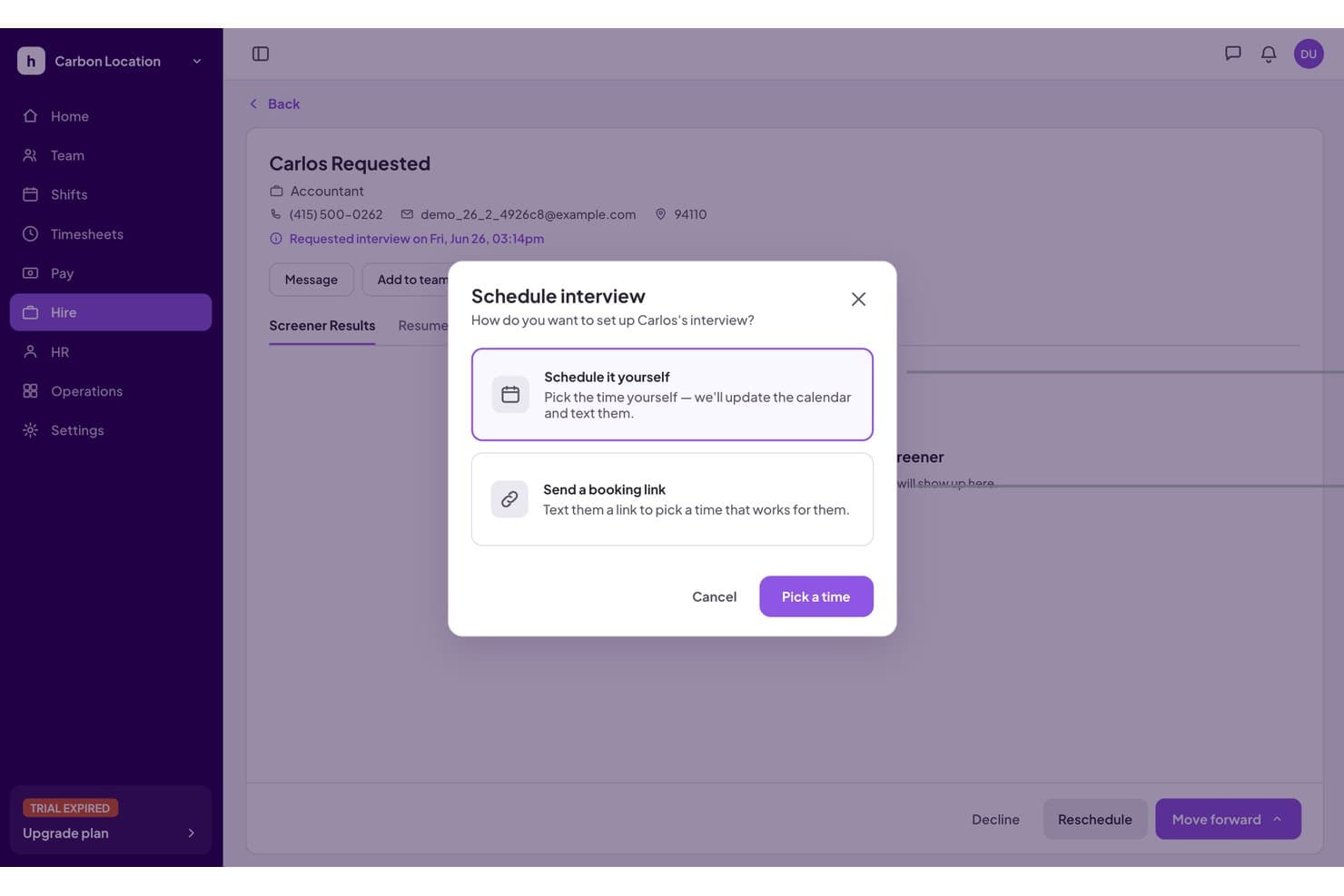
Homebase lets users schedule interviews directly from the hiring dashboard. Homebase is an all-in-one workforce management platform for small businesses that bundles hourly hiring, AI candidate screening, interview self-scheduling, onboarding, shift scheduling, and payroll into a single system.
Who Is Homebase Best For?
Homebase fits small business owners in hourly industries—restaurants, retail, and salons—who want hiring, interview scheduling, and workforce management in a single platform.
Why I Picked Homebase
I picked Homebase as one of the best because it's the only tool on my list that folds interview scheduling directly into hourly workforce management. When a candidate qualifies as a Top Match, Homebase's AI Hiring Assistant auto-invites them to self-book on the hiring manager's real-time calendar, skipping the back-and-forth entirely. Once hired, that same person flows straight into onboarding, shift scheduling, and payroll with no re-entry required.
Homebase Key Features
- AI candidate screening: Homebase's AI reviews applications in real time, summarizes candidate profiles, and flags top matches for interview invitations.
- Multi-board job posting: Post a single job to Indeed, ZipRecruiter, Facebook Jobs, Craigslist, and Google from one place.
- Google Calendar availability sync: Hiring managers connect Google Calendar so candidate self-booking reflects their real-time busy times.
- Built-in onboarding flow: Newly hired candidates move automatically into digital onboarding documents without any manual data re-entry.
Homebase Integrations
Homebase offers native integrations with Google Calendar, Indeed, ZipRecruiter, Gusto, ADP RUN, and QuickBooks Online. Google Calendar is the key interview-scheduling connection; the others primarily support job distribution, payroll, and workforce management.
Pros and Cons
Pros:
- Hired applicants move straight to onboarding
- Interview invites use live manager availability
- AI matches top candidates for interviews
Cons:
- Lacks external ATS or HRIS integrations
- No support for panel interview scheduling
 Best for easy website embedding
- Free plan + 30-day free trial + free demo available
- From $12/user/month
Visit WebsiteCustomer Rating:4.6/5
Integrate Instagram and Setmore’s interview booking functionality to welcome candidates with a sneak peek of their potential future organization. Setmore gives hiring teams and recruiters a simple way to manage interview scheduling, automate reminders, and coordinate calendars, helping reduce no-shows and streamline candidate communications.
Who Is Setmore Best For?
Setmore is a good fit for small to mid-sized businesses and independent recruiters who need a straightforward scheduling tool without a steep learning curve.
Why I Picked Setmore
Setmore earns its spot as one of the best on my shortlist because of how easy it is to embed a booking form directly into your careers site or company website. I like that the website plugin works across WordPress, Wix, Squarespace, and several other builders—you drop in a "Book Now" button and candidates can self-schedule interviews without any back-and-forth. The booking page itself is customizable, so I can list specific interview types, set availability by staff member, and display it in multiple languages for global hiring. Automatic email confirmations and reminders are sent to both the interviewer and the candidate as soon as a slot is booked.
Setmore Key Features
- Two-way calendar sync: Connect Google or Microsoft Outlook calendars to keep interviewer availability accurate in real time.
- Video meeting links: Automatically generate and attach Zoom or Teleport video links to confirmed interview bookings.
- Class and group booking: Schedule panel or group interviews by opening a single time slot to multiple candidates simultaneously.
- Staff management: Add individual team members with separate availability, profiles, and booking pages for different interviewers.
Setmore Integrations
Integrations include Google Calendar, Zoom, Slack, Salesforce, HubSpot, WordPress, Mailchimp, QuickBooks, PayPal, and Stripe.
Pros and Cons
Pros:
- Supports website builders
- Easy integration with social media
- Completely free for up to 4 users
Cons:
- No integrations with ATS systems
- Occasional crashes
Learn more about Setmore: Best for a hands-off, automated approach
- Free demo available
- Pricing upon request
Visit WebsiteCustomer Rating:4.7/5
MyInterview automates the recruitment process, from screening and shortlisting to video interviewing and scheduling. myInterview is a unique platform that uses innovative tools to refine the recruitment process. This platform not only simplifies interview scheduling but also enhances the evaluation of candidates through its integrated video interviewing capabilities, making it a holistic tool for modern hiring needs.
Why I picked myInterview: One of the key features that makes myInterview stand out is its AI virtual TA specialist, Taira. This AI assistant can analyze resumes and other information, pre-screen them with an automated chat, and shortlist them based on how they align with the job posting. This assistant also has features to evaluate the candidate's soft skills, personality, language, and other qualities.
Taira then handles the scheduling of interviews through a conversational chat. myInterview recognizes the tedious nature of the back-and-forth between candidates and recruiters and seeks to make this process easier. This automated feature can also handle re-scheduling and following up with no-shows.
myInterview Standout Features and Integrations
Features include collaborative review and annotation of candidate profiles, video interviewing, live interviewing, multi-language candidate experience, text responses, multiple choice responses, Kanban boards for candidate management, customized workflows, and automated shortlisting.
Integrations include SmartRecruiters, SAP, monday.com, Worday, JazzHR, Greenhouse, PageUp, Pinpoint, Zapier, and more. An API is also available for custom integrations.
Pros and Cons
Pros:
- Candidate management workflows
- AI-driven pre-screening capabilities
- Automated scheduling and re-scheduling
Cons:
- Limited customization options
- No mobile app
Learn more about myInterview:
Diğer Mülakat Planlama Yazılımları
En iyi mülakat planlama yazılımları listesine giremeyen, ancak değerlendirmeye değer birkaç seçenek daha bulunuyor. Bunların her biri için kapsamlı bir incelemeye yerim olmadı, ancak yine de göz önünde bulundurulmaya değerler:
- 11JobmaBest for conducting video interviews
- 12HireVueBest for technical & IT recruiters
- 13Mitratech TalentReefBest for hiring hourly staff & contractors
- 14JobviteBest for companies without an existing ATS
- 15Unnanu HireBest with integrated offers and onboarding tools
- 16ParadoxBest interview scheduling software for AI-powered conversational engagements
- 17RoosterBest interview scheduling software for global recruiting and multi-language support
- 18Scheduling Bot by SenseBest interview scheduling software for text-focussed interactions
- 19TurboHireBest interview scheduling software for SMBs with candidate sourcing challenges
- 20InterviewstreamBest interview scheduling software for gathering actionable insights on interviewing routines
How I Evaluate Interview Scheduling Software
I split my evaluation into two layers—baseline functionality a tool must have, like candidate self-scheduling and ATS sync, and the differentiators that separate a good tool from the right one for your team.
Core Functionality (Table Stakes For This List)
When I'm selecting tools for my list, I rank each one on a scale from 0 (does not offer the functionality) to 5 (excels in this area) for each core functionality listed below. Then, I calculate the tool's total score into a percentage. Each tool needs to achieve a minimum total score of 65% to be considered for inclusion.
- Candidate Self-Scheduling: I check whether candidates can pick their own interview slots from live availability rather than waiting for a recruiter to manually propose times over email.
- Calendar Integration & Sync: Real-time, bi-directional sync with Google Calendar, Outlook, or Office 365 matters here, especially for preventing double-bookings across busy interviewer schedules.
- Panel & Multi-Stage Scheduling: I evaluate how well a tool coordinates multi-interviewer panels and sequential rounds, since manually cross-referencing five calendars for a final-round loop is where scheduling breaks down.
- ATS/HRIS Integration: Native connections with platforms like Greenhouse, Lever, Workday, or iCIMS keep candidate data and interview stages in sync without manual re-entry between systems.
- Automated Notifications & Reminders: I look for configurable confirmations, reminders, and reschedule links sent to both candidates and interviewers, since no-shows and last-minute confusion waste everyone's time.
- Interviewer Load Balancing: Tools that distribute interviews based on availability, skills, or workload help prevent the same handful of interviewers from getting overloaded every hiring sprint.
Once I have a list of tools that meet the criteria, I consider what sets each platform apart.
Differentiating Factors (What Sets Vendors Apart)
Here's how I compare and contrast different vendors:
Standout Features
AI-powered scheduling is a big differentiator. Tools that suggest optimal interview times or auto-resolve conflicts based on historical patterns save recruiters real hours during peak hiring. I also look at scheduling analytics, since dashboards tracking time-to-schedule, interviewer decline rates, and bottlenecks give TA leaders the data they need to improve hiring operations. For teams running campus recruiting events or seasonal hiring pushes, high-volume scheduling with bulk invites and open slot management is worth evaluating closely.
Beyond Features
Integration depth matters. I evaluate whether a tool connects natively with the ATS and HRIS platforms your team already relies on, since a scheduling tool that lives outside your core recruiting workflow creates more manual work than it solves. Security and compliance are equally important—candidate data is sensitive, so I check for SOC 2 certification, GDPR readiness, and role-based access controls. Pricing transparency also shapes my recommendations, particularly whether costs scale predictably as your hiring volume grows rather than spiking at the tier boundary.
Mülakat Planlama Yazılımı Nasıl Seçilir?
Uzun özellik listeleri ve karmaşık fiyatlandırma yapıları arasında kaybolmak kolaydır. Kendinize özgü yazılım seçim süreciniz üzerinde çalışırken odağınızı korumanıza yardımcı olmak için aklınızda bulundurmanız gereken faktörleri içeren bir kontrol listesi hazırladım:
| Faktör | Dikkat Edilmesi Gerekenler |
|---|---|
| FaktörÖlçeklenebilirlik | Dikkat Edilmesi GerekenlerYazılım ekibinizle birlikte büyüyor mu? Gelecekteki ihtiyaçları düşünün ve aracın daha fazla kullanıcı ile veriyi işleyebildiğinden emin olun. |
| FaktörEntegrasyonlar | Dikkat Edilmesi GerekenlerYazılımın e-posta veya İK sistemleri gibi mevcut araçlarınıza bağlanıp bağlanmadığını kontrol edin. Manuel çalışmayı önlemek için kolay entegrasyonlar arayın. |
| FaktörÖzelleştirilebilirlik | Dikkat Edilmesi GerekenlerAracı süreçlerinize uyacak şekilde uyarlayabiliyor musunuz? Aracın iş akışınıza özgü ihtiyaçlarınıza uyum sağlayıp sağlamadığını veya katı bir yapıya sahip olup olmadığını değerlendirin. |
| FaktörKullanım kolaylığı | Dikkat Edilmesi GerekenlerArayüz kullanıcı dostu mu? Ekip üyelerinin kapsamlı bir eğitim almadan aracı hızlıca kullanmaya başlayabildiğinden emin olun. |
| FaktörUygulama ve işe alışma | Dikkat Edilmesi GerekenlerBaşlamak ne kadar sürecek? Kurulum ve eğitim için gereken zamanı ve kaynakları değerlendirin. |
| FaktörMaliyet | Dikkat Edilmesi GerekenlerFiyatlandırma planlarını ve bunlara nelerin dahil olduğunu karşılaştırın. Gizli ücretlere dikkat edin ve önce test etmek için ücretsiz deneme seçeneği olup olmadığını kontrol edin. |
| FaktörGüvenlik önlemleri | Dikkat Edilmesi GerekenlerVerilerinizi hangi önlemler koruyor? Şifreleme, erişim denetimleri ve veri koruma düzenlemelerine uygunluk gibi özellikleri arayın. |
| FaktörDestek erişilebilirliği | Dikkat Edilmesi GerekenlerSağlayıcı ne tür bir destek sunuyor? İhtiyaç duyduğunuzda yardım alabilmek için 7/24 erişimi, yanıt sürelerini ve mevcut destek kanallarını değerlendirin. |
Mülakat Planlama Yazılımı Nedir?
Mülakat planlama yazılımı, adaylar ve mülakat yapan kişiler arasındaki mülakatları koordine etme sürecini otomatikleştiren bir araçtır. İK profesyonelleri ve işe alım uzmanları, zamandan tasarruf etmek ve planlama çakışmalarını azaltmak için genellikle bu araçları kullanır. Takvim senkronizasyonu, otomatik hatırlatıcılar ve saat dilimi koordinasyonu, verimli planlama ve iletişime yardımcı olur. Genel olarak bu araçlar, mülakat sürecini ilgili herkes için daha sorunsuz ve düzenli hâle getirir.
Özellikler
Mülakat planlama yazılımı seçerken aşağıdaki temel özelliklere dikkat edin:
- Takvim senkronizasyonu: Mülakat programlarını otomatik olarak güncellemek ve yönetmek için takvimlerle entegre olur.
- Otomatik hatırlatıcılar: Katılmama durumlarını azaltmak ve herkesi bilgilendirmek için adaylara ve mülakat yapan kişilere bildirim gönderir.
- Saat dilimi koordinasyonu: Karışıklığı önlemek ve doğruluğu sağlamak için farklı saat dilimlerine yönelik planlamayı otomatik olarak ayarlar.
- Görüntülü mülakat entegrasyonu: Sorunsuz sanal mülakatlar için görüntülü konferans araçlarına bağlanır.
- Özelleştirilebilir iş akışları: Kullanıcıların planlama sürecini kendi özel ihtiyaçlarına ve tercihlerine göre uyarlamasına olanak tanır.
- Adayların kendi programlarını oluşturması: Adayların uygun zaman aralıklarını seçmesini sağlayarak karşılıklı iletişim ihtiyacını azaltır.
- ATS sistemleriyle entegrasyon: Daha düzenli bir işe alım süreci için aday takip sistemlerine bağlanır.
- Mobil erişim: Her yerden planlama yapabilmek için mobil uygulama sunarak esnekliği ve erişilebilirliği artırır.
- Veri güvenliği: Şifreleme ve veri düzenlemelerine uygunluk yoluyla hassas bilgilerin korunmasını sağlar.
- Kullanıcı dostu arayüz: Gezinmeyi kolaylaştıran ve öğrenme sürecini kısaltan sezgisel bir tasarım sunar.
Avantajlar
Mülakat planlama yazılımını uygulamak, ekibiniz ve işletmeniz için çeşitli avantajlar sağlar. Yararlanabileceğiniz avantajlardan bazıları şunlardır:
- Zamandan tasarruf: Planlama görevlerini otomatikleştirerek İK profesyonellerinin diğer sorumluluklarına odaklanması için zaman kazandırır.
- Azaltılmış planlama çakışmaları: Takvim senkronizasyonu ve saat dilimi koordinasyonu, aynı zaman dilimine birden fazla randevu verilmesini ve iletişim hatalarını önlemeye yardımcı olur.
- Geliştirilmiş aday deneyimi: Otomatik hatırlatıcılar ve kendi programını oluşturma seçenekleri, süreci adaylar için daha kolay hâle getirir.
- Geliştirilmiş organizasyon: Mülakatla ilgili tüm etkinlikleri yönetmek için merkezi bir platform sunarak her şeyi tek bir yerde tutar.
- Artırılmış esneklik: Mobil erişim, kullanıcıların her yerden ve her zaman mülakat planlamasına ve yönetmesine olanak tanır.
- Daha iyi iş birliği: ATS sistemleriyle ve diğer araçlarla entegrasyon, ekip çalışmasını destekler ve herkesin bilgilenmesini sağlar.
- Veri koruması: Veri güvenliği özellikleri sayesinde hassas bilgilerin güvende olmasını sağlayarak güveni ve uyumluluğu korur.
Maliyetler ve Fiyatlandırma
Mülakat planlama yazılımı seçmek, mevcut çeşitli fiyatlandırma modellerinin ve planların anlaşılmasını gerektirir. Maliyetler özelliklere, ekip büyüklüğüne, eklentilere ve daha fazlasına göre değişir. Aşağıdaki tablo, mülakat planlama yazılımı çözümlerinde yaygın olarak sunulan planları, ortalama fiyatlarını ve tipik özellikleri özetlemektedir:
Mülakat Planlama Yazılımı İçin Plan Karşılaştırma Tablosu
| Plan Türü | Ortalama Fiyat | Yaygın Özellikler |
|---|---|---|
| Plan TürüÜcretsiz Plan | Ortalama Fiyat$0 | Yaygın ÖzelliklerTemel planlama, sınırlı takvim senkronizasyonu ve temel hatırlatıcılar. |
| Plan TürüKişisel Plan | Ortalama Fiyat$5-$15/kullanıcı/ay | Yaygın ÖzelliklerGelişmiş planlama, sınırsız takvim senkronizasyonu, otomatik hatırlatıcılar ve temel entegrasyonlar. |
| Plan Türüİşletme Planı | Ortalama Fiyat$20-$40/kullanıcı/ay | Yaygın ÖzelliklerEkip iş birliği, özel iş akışları, görüntülü mülakat entegrasyonu ve ayrıntılı analizler. |
| Plan TürüKurumsal Plan | Ortalama Fiyat$50+/kullanıcı/ay | Yaygın ÖzelliklerTam entegrasyonlar, gelişmiş güvenlik, özel destek ve özelleştirilebilir raporlama. |
Mülakat Planlama Yazılımı: Sıkça Sorulan Sorular
Mülakat planlama yazılımıyla ilgili sıkça sorulan bazı sorular ve yanıtlar aşağıda yer almaktadır: