

Kamu kurumları performans yönetimi yazılımları, kurumlara hedefleri takip etme, sonuçları ölçme ve ekipleri sorumlu tutma araçları sunar. Karmaşık iş akışlarını yönetmenin, uyumluluk gerekliliklerini karşılamanın veya şeffaflığı artırmanın yeni yollarını araştırıyorsanız doğru yazılım gerçek bir fark yaratabilir.
Stratejinizi uyumlu hâle getirmenize, ilerlemeyi izlemenize ve değişen kamu sektörü önceliklerine yanıt vermenize gerçekten yardımcı olan kamu odaklı çözümleri göstereceğim; böylece kurumunuzun ihtiyaçları için 2026'da en iyi sistemi seçebilirsiniz.
Why Trust Our Software Recommendations
6,700+
Reviews
20
Industry experts
16+
Evaluation factors
14
Years
Our team has been testing and reviewing software since 2012. As HR experts ourselves, we know how difficult—and important—it is to choose the right software.
For this guide, we evaluated tools using hands-on testing and independent research, scoring tools using our selection criteria. We also draw on insights from industry thought leaders and practicing HR experts.
Our reviews reflect our human editorial judgment, not a sales pitch.
Expert reviewers:
- Phil GrayCOO
 Kim BehnkeHR Tech Editor & Analyst
 Josh BarkerPeople Ops Manager

Kamu Kurumları Performans Yönetimi Yazılımları Karşılaştırma Tablosu
Aşağıdaki tabloda, en iyi kamu kurumları performans yönetimi yazılımı seçimlerimin fiyatlandırma ayrıntıları karşılaştırılmaktadır.
Sorted by: Default
| Tool | Starting Price | Website | |
|---|---|---|---|
Best for configurable audit controls | Not rated | Pricing upon request Free demo available | Website |
Best for transparent public-facing dashboards | Not rated | Pricing upon request Free demo available | Website |
Best for strategic plan and KPI alignment | Not rated | Pricing upon request Free demo available | Website |
Best for higher education government roles | Not rated | Pricing upon request Free demo available | Website |
Best for multi-rater review flexibility | 4.8 out of 5 | $5/user/month Free demo available | Website |
Best for FedRAMP-authorized HR workflows | 4.3 out of 5 | Pricing upon request Free demo available | Website |
Best for large-scale public sector integrations | Not rated | Pricing upon request 30-day free trial | Website |
Best for agency-wide competency frameworks | Not rated | Pricing upon request Free demo available | Website |
Best for budget-to-performance alignment | Not rated | Pricing upon request Free demo available | Website |
Best for civil service compliance tracking | Not rated | Pricing upon request Free demo available | Website |


En İyi Kamu Kurumları Performans Yönetimi Yazılımı İncelemeleri
Aşağıda, kısa listeme giren en iyi kamu kurumları performans yönetimi yazılımlarının ayrıntılı özetlerini bulabilirsiniz. İncelemelerim, sizin için en uygun seçeneği bulmanıza yardımcı olmak amacıyla her platformun özelliklerine, en uygun kullanım alanlarına ve entegrasyonlarına ayrıntılı bir bakış sunmaktadır.
 Best for configurable audit controls
- Free demo available
- Pricing upon request
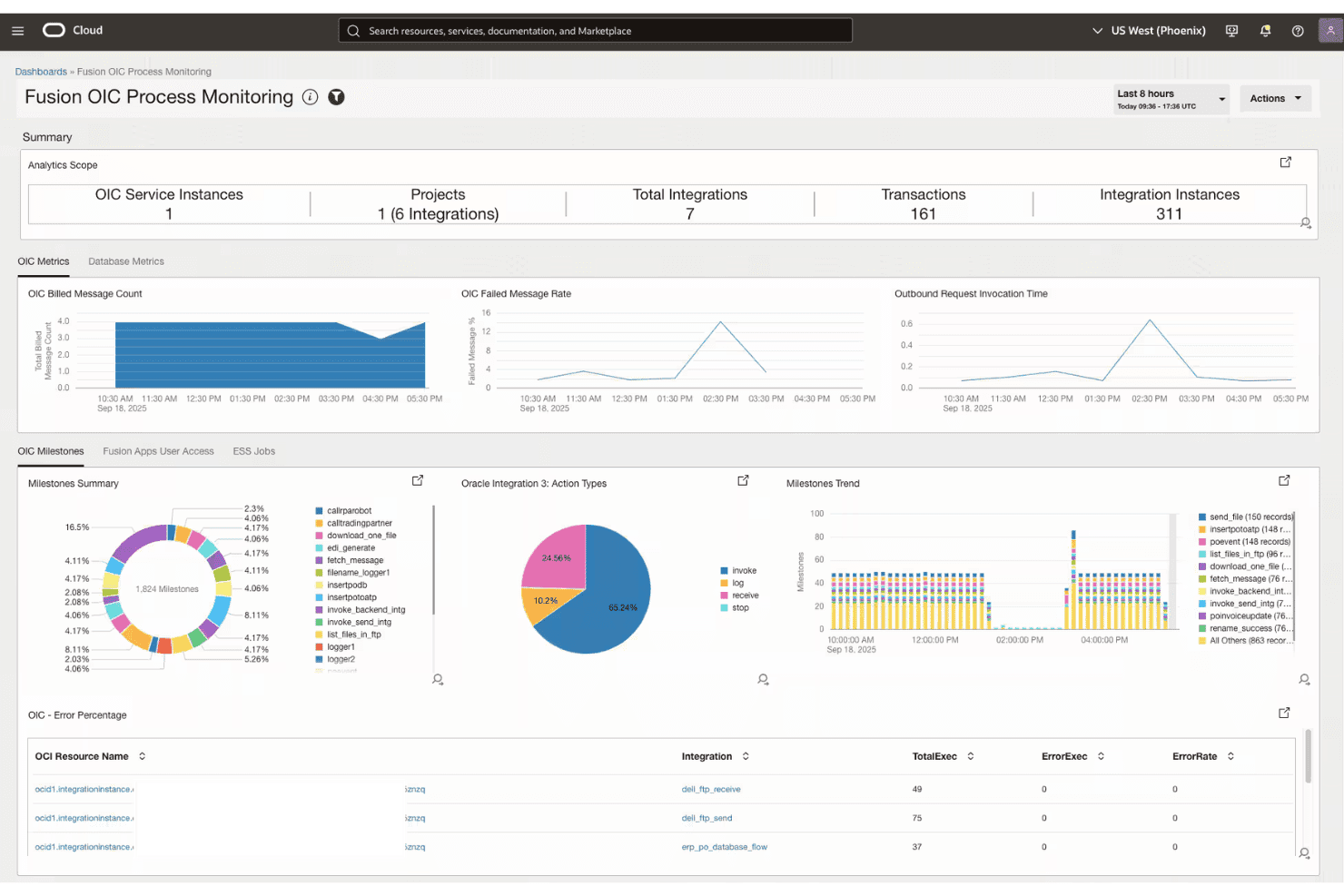
Oracle Fusion Cloud HCM offers an OIC Process Monitoring dashboard displaying integration metrics, milestones, and error rates across connected services. Oracle Fusion Cloud HCM is an enterprise cloud HCM suite that covers performance management, goal alignment, competency tracking, compliance controls, and workforce modeling across large, multi-agency government organizations.
Who Is Oracle Fusion Cloud HCM Best For?
It's a strong fit for large federal and enterprise government agencies that need a unified HCM platform to manage workforce performance across multiple departments or jurisdictions.
Why I Picked Oracle Fusion Cloud HCM
Oracle Fusion Cloud HCM earns its spot on my shortlist because of its Advanced HCM Controls module, which monitors payroll runs, compensation changes, and timecard transactions in real time. I particularly like the Access Certification Advisor, which explains security risks in plain language rather than raw logs. That granularity, backed by FedRAMP authorization, means my team can trace every access event and approval without relying on a separate compliance tool.
Oracle Fusion Cloud HCM Key Features
- Skills module: Uses AI to update and map skills across job roles, positions, and career pathways.
- Configurable review cycles: Lets agencies set up custom performance appraisal schedules and tailored evaluation forms.
- Workforce modeling: Enables scenario planning and organizational change modeling for large, multi-unit organizations.
- Opportunity marketplace: Matches employees to internal projects, gigs, or roles that align with their competencies and goals.
Oracle Fusion Cloud HCM Integrations
Oracle Fusion Cloud HCM offers native integrations with Oracle Fusion Cloud ERP, Oracle Health, and Oracle Supply Chain & Manufacturing, and provides APIs and Oracle Integration Cloud for connecting with third-party systems.
Pros and Cons
Pros:
- AI-updated skills mapped to government job classifications
- Real-time monitoring of payroll and compensation changes
- FedRAMP-authorized for federal agency deployments
Cons:
- No dedicated PIP or progressive discipline module
- Heavy configuration required before deployment
Learn more about Oracle Fusion Cloud HCM: Best for transparent public-facing dashboards
- Free demo available
- Pricing upon request
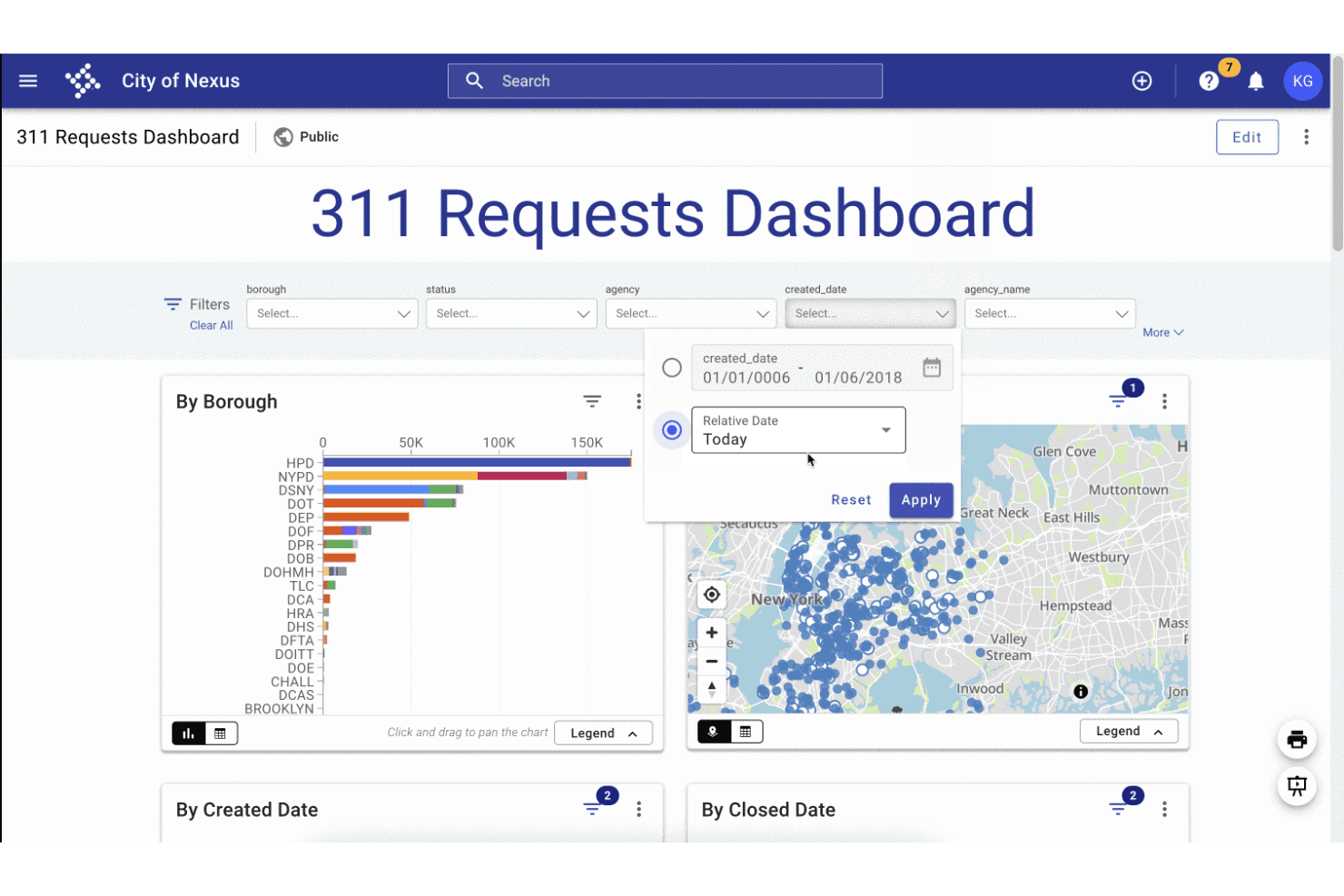
Tyler Technologies' 311 Requests Dashboard offers interactive filters, a borough bar chart, and a geographic map view for tracking city service requests. Tyler Technologies Performance Insights is a government analytics platform that tracks KPIs, configures performance targets, and publishes operational data through internal and public-facing dashboards.
Who Is Tyler Technologies Best For?
It's a strong fit for city, county, and state government agencies that need to track departmental KPIs and share performance data with the public.
Why I Picked Tyler Technologies
I've included Tyler Technologies on my list because its public-facing dashboard capability is genuinely built for government transparency, not bolted on as an afterthought. I particularly like how agencies can combine KPI measures, geo dashboards, and narrative stories (mixing text, images, and video) into a single published web page. That means a city can show residents exactly how departments are tracking against stated goals, all in one place.
Tyler Technologies Key Features
- Geo dashboards: Visualize performance metrics and outcomes using location-based maps and heatmaps.
- Threshold alerts: Set specific KPI thresholds to trigger automatic notifications for early issue detection.
- API data ingestion: Connect to external systems and automate the import of government datasets with the built-in API manager.
- Role-based user permissions: Grant different access and editing rights for internal staff and stakeholders across departments.
Tyler Technologies Integrations
Tyler Technologies Performance Insights offers native integrations across the Tyler ecosystem, including Enterprise Data Platform, Open Data Platform, and Finance Insights. An API is available for custom integrations and on-premises data ingestion.
Pros and Cons
Pros:
- Supports multi-department goal tracking at scale
- Embeds narrative context alongside KPI data
- Citizen-facing dashboards built specifically for government
Cons:
- Limited to agencies already in the Tyler ecosystem
- No employee-level appraisal or review workflows
Learn more about Tyler Technologies: Best for strategic plan and KPI alignment
- Free demo available
- Pricing upon request
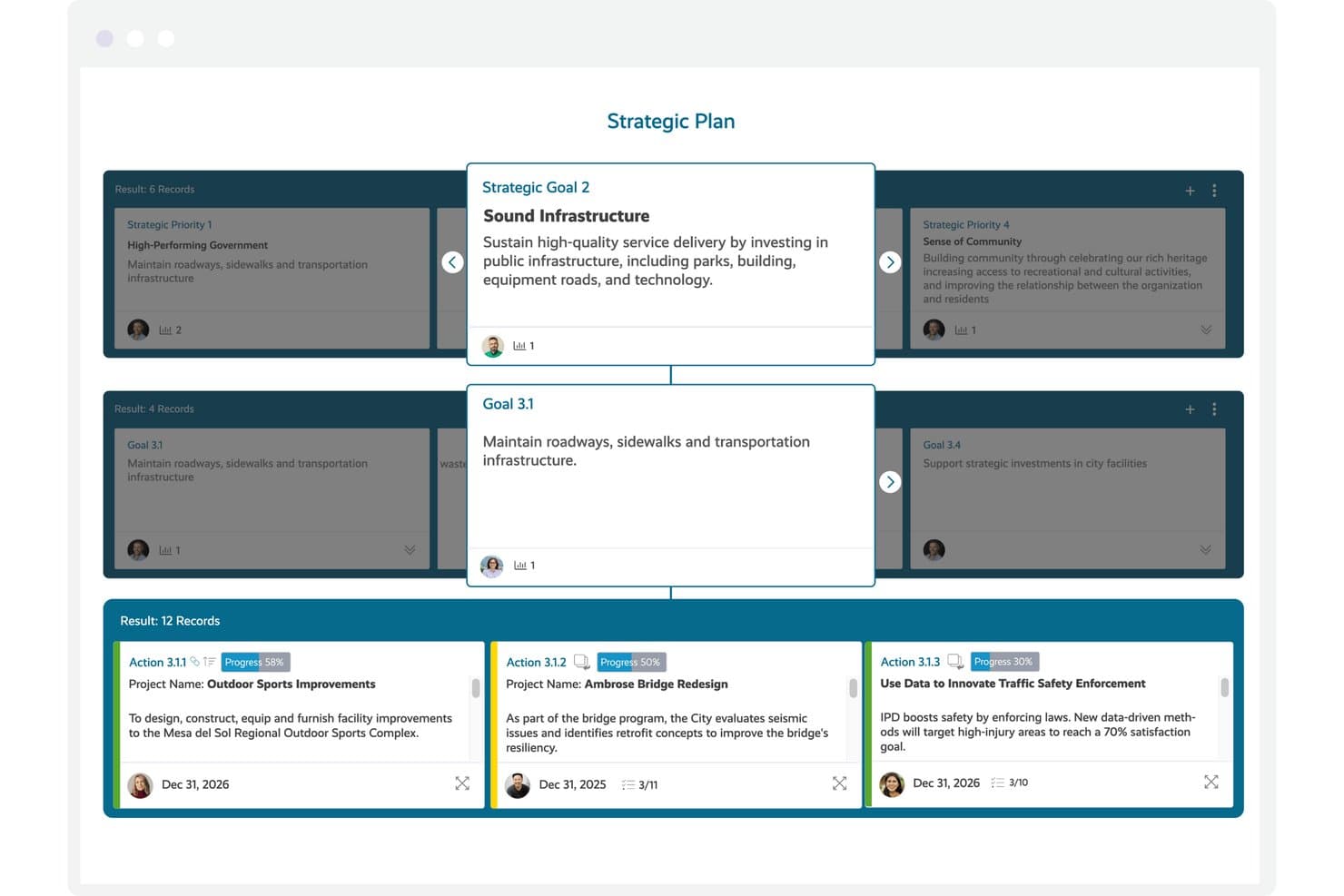
Envisio offers a hierarchical strategic plan view linking goals, sub-goals, and actions with progress tracking for government performance management. Envisio is a government-focused strategic planning and performance management platform that lets public sector organizations manage multiple plans, track KPIs, and report progress to elected officials and the public through configurable dashboards.
Who Is Envisio Best For?
Envisio is a strong fit for municipal and county governments that run multiple concurrent strategic plans across departments and need a single place to track and report on all of them.
Why I Picked Envisio
Envisio earns its spot on my shortlist because of how it handles plan-to-KPI linkage at scale. I can connect dozens of performance measures directly to strategic priorities across multiple concurrent plans, which is rare in this space. The multi-plan management feature means a single city can track its strategic plan, climate action plan, and public safety plan simultaneously, each with its own KPIs and reporting cadence.
Envisio Key Features
- Public-facing dashboards: Let you publish plan progress and KPIs to citizens through accessible, ADA-compliant online dashboards.
- Automated data ingestion: Pull KPI and metrics data automatically from systems like ERP, GIS, HR, and financial software.
- Multi-audience reporting: Generate presentation-ready reports for councils, department heads, or citizens with permission-based data visibility.
- Budget-to-performance linking: Tie performance measures directly to budget line items to support performance-based and priority-driven budgeting.
Envisio Integrations
Envisio offers native integrations with Microsoft Teams, Questica, and Polco Track, supports calendar sync with Google Calendar, Outlook, and Apple Mail, and provides an OpenAPI for custom integrations and automated data collection.
Pros and Cons
Pros:
- Budget-to-performance linking is natively supported
- Public-facing dashboards built for citizen transparency
- Cascades goals across multiple concurrent strategic plans
Cons:
- Reporting setup can require significant admin configuration
- No employee-level performance appraisal functionality
Learn more about Envisio: Best for higher education government roles
- Free demo available
- Pricing upon request
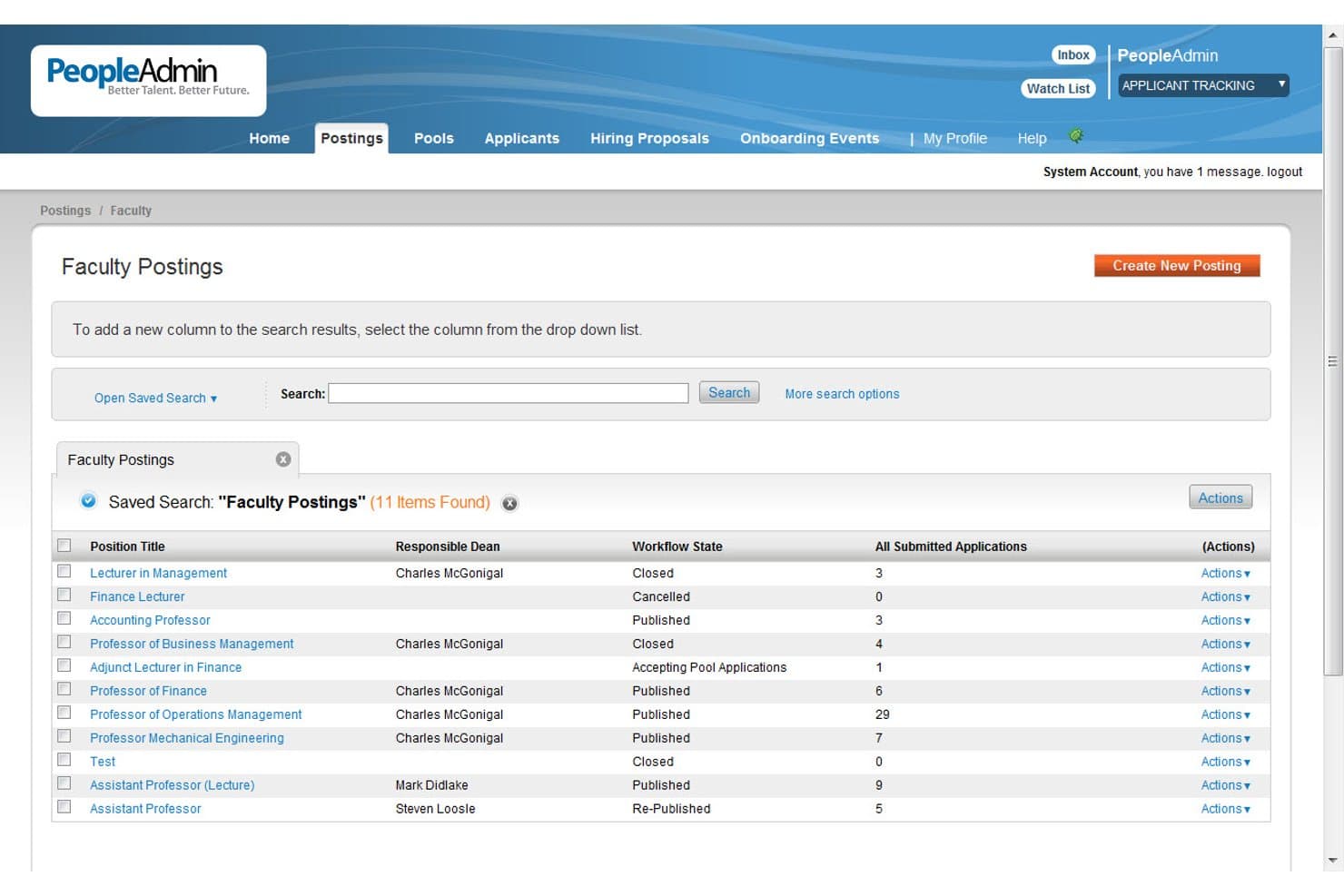
PeopleAdmin offers a Faculty Postings management interface displaying job listings, workflow states, and submitted application counts for academic positions. PeopleAdmin is a talent management platform built for higher education and government organizations, covering performance reviews, goal tracking, competency evaluation, succession planning, and compliance documentation.
Who Is PeopleAdmin Best For?
PeopleAdmin suits HR teams and workforce administrators at higher education institutions and government agencies managing structured, compliance-driven performance processes.
Why I Picked PeopleAdmin
I picked PeopleAdmin as one of the best because its performance module is built around the workflows higher education and government HR teams actually use. The 9-box talent model surfaces performance and potential data in a format that supports succession planning conversations, which is genuinely useful in structured, hierarchy-driven agencies. I also like the DE&I bias detection built into review scoring, which flags discrepancies like gender bias before they become a compliance issue.
PeopleAdmin Key Features
- Customizable review cycles: Configure appraisal timelines and workflows to match government agency requirements.
- Role-based access controls: Set permissions for HR, managers, and staff to ensure secure and compliant process oversight.
- Integrated audit trails: Maintain a record of approvals, actions, and edits for compliance and public accountability.
- Document attachment and storage: Attach supporting documents to reviews for accurate, centralized personnel records.
PeopleAdmin Integrations
PeopleAdmin offers native integrations with Banner, ORCiD, JobTarget, SchoolSpring, and I-9 verification systems. It also provides native connections to HRIS and ERP platforms, and an API is available for custom integrations.
Pros and Cons
Pros:
- Configurable audit trails support EEO and compliance documentation
- Civil service recruiting and search committee management included
- Built for higher education and government HR workflows
Cons:
- Reporting tools lack depth for applicant flow analysis
- Admin customizations often require vendor support involvement
Learn more about PeopleAdmin: Best for multi-rater review flexibility
- Free demo available
- From $5/user/month (billed annually)
Visit WebsiteCustomer Rating:4.8/5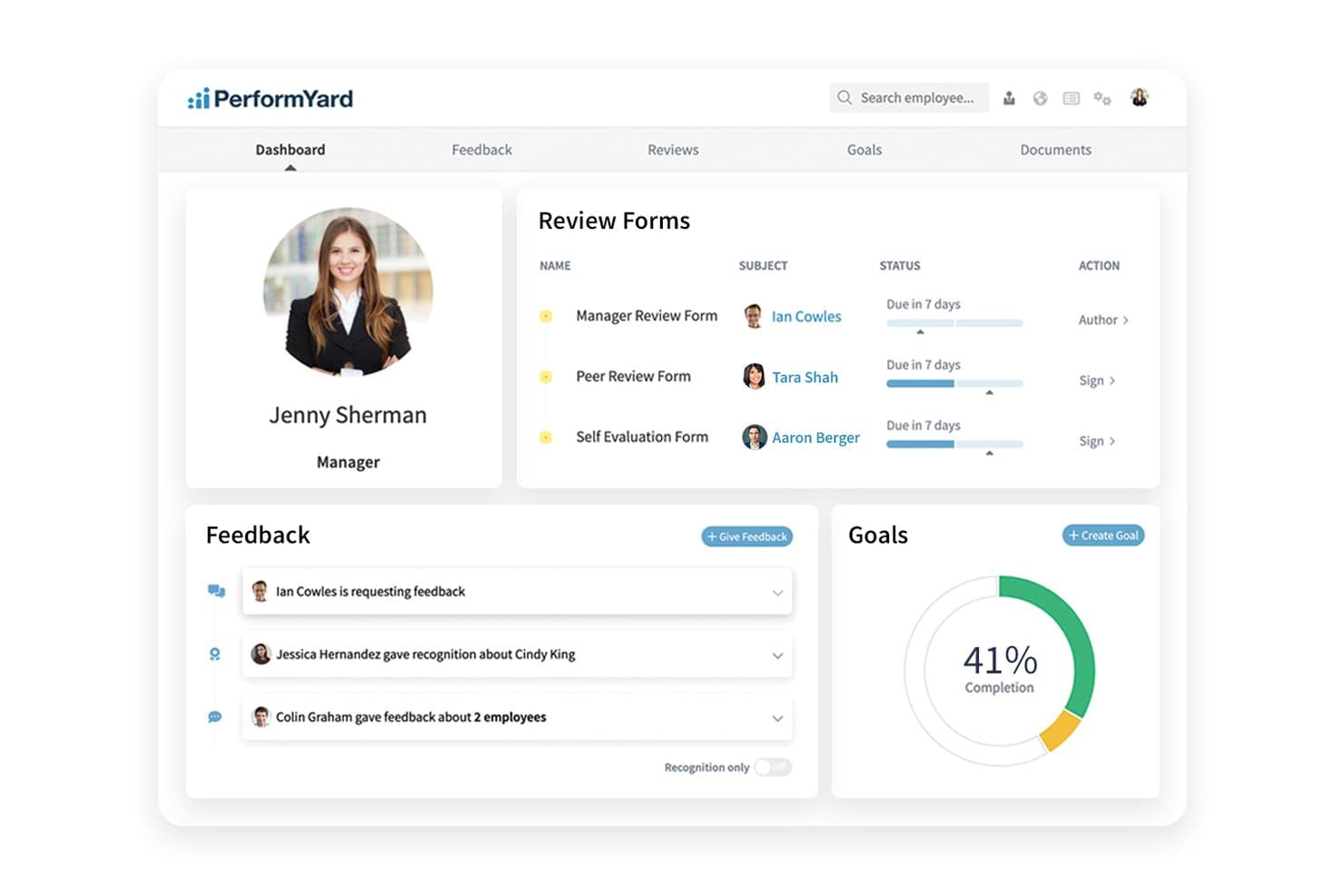
PerformYard offers a centralized dashboard for managers to track review forms, feedback, and goal completion in one place. PerformYard is a performance management platform built for public sector agencies that covers configurable review cycles, cascading goal management, 360-degree multi-rater feedback, continuous feedback, and employee engagement surveys.
Who Is PerformYard Best For?
It's a strong fit for mid-sized public sector agencies whose HR teams need to run structured, multi-stakeholder review processes across complex departmental hierarchies.
Why I Picked PerformYard
PerformYard earns its spot on my shortlist because of how much control it gives HR over reviewer relationships in a 360 cycle. I can configure peer nominations, let employees request feedback directly, or have managers define the reviewer pool, all within the same review cycle. That level of configurability matters in government agencies where org charts are layered and multi-stakeholder input is often mandated, not optional.
PerformYard Key Features
- Configurable review forms: Build custom appraisal templates to match government evaluation requirements.
- Goal cascading: Align individual, team, and agency objectives through linked goal-setting workflows.
- Automated sign-off workflows: Route and track approvals, sign-offs, and completion status with clear audit trails.
- HRIS and SSO integrations: Sync employee data and manage secure access using integrations with major HRIS and SAML-based SSO platforms.
PerformYard Integrations
PerformYard offers native integrations with ADP, BambooHR, Gusto, Rippling, UKG, Workday, Paylocity, Slack, and Microsoft Teams, supports SAML-based SSO including Google Workspace, Office 365, Okta, and OneLogin, and provides an API for custom integrations.
Pros and Cons
Pros:
- Supports anonymous peer feedback collection
- Dedicated customer success manager included
- Highly configurable multi-rater review cycle setup
Cons:
- No structured PIP or discipline module
- No FedRAMP or StateRAMP certification available
Learn more about PerformYard: Best for FedRAMP-authorized HR workflows
- Free demo available
- Pricing upon request
Visit WebsiteCustomer Rating:4.3/5
Workday offers a government budget planning dashboard with pending funding levels, requests tracking, and revenue reporting for public sector performance management. Workday is a cloud-based HCM and performance management platform built for U.S. federal agencies, combining skills-based talent management, PAR processing, competency tracking, and workforce analytics in a FedRAMP-authorized environment.
Who Is Workday Best For?
Workday is a strong fit for U.S. federal agencies and large government organizations that need FedRAMP-authorized HR and performance management at an enterprise scale.
Why I Picked Workday
I picked Workday as one of the best because its FedRAMP Moderate authorization is woven into the platform itself, with always-on audit controls and FIPS 140-3 compliant security. The built-in PAR processing keeps personnel actions and payroll aligned without workarounds, which matters a lot when agencies are managing large-scale review cycles. I also appreciate how the AI-powered Skills Cloud maps competencies against government job classifications, giving talent reviews a structured foundation.
Workday Key Features
- Configurable talent dashboards: Give HR teams a unified view of workforce data, turnover, and skill gaps by role or department.
- Multi-rater feedback collection: Enable structured peer, manager, and self-assessments for a rounded performance review process.
- Competency tracking by job classification: Allow agencies to map required competencies to specific federal job profiles and monitor development.
- Audit-ready documentation workflows: Maintain records, approvals, and audit logs that align with civil service and public records requirements.
Workday Integrations
Workday offers native integrations with Slack, Salesforce, Microsoft 365, Outlook, ADP, Udemy Business, Achievers, Workhuman, BetterUp, and HireRight, and provides an API for custom integrations.
Pros and Cons
Pros:
- PAR processing supports federal personnel actions natively
- AI-powered Skills Cloud maps federal competencies
- FedRAMP Moderate authorization built into the platform
Cons:
- Implementation timelines can extend for large agencies
- No transparent pricing for government buyers
Learn more about Workday: Best for large-scale public sector integrations
- 30-day free trial
- Pricing upon request

SAP HCM offers a detailed annual performance review form with goal tracking, manager and employee ratings, gap analysis, and a structured route map workflow. SAP SuccessFactors HCM is a cloud-based human capital management suite with modules for performance reviews, cascading goal management, competency tracking, and compliance-grade audit workflows built for large, complex workforce structures.
Who Is SAP HCM Best For?
It's a strong fit for large federal and national government agencies that already operate within the SAP ecosystem and need enterprise-scale HR compliance.
Why I Picked SAP HCM
SAP HCM earns its spot on my shortlist because of how deeply it connects with SAP S/4HANA, letting agencies sync workforce cost allocations and performance data across HR and Finance in real time. I particularly like the cascading goal module, which maps directly from agency mission down to individual employee objectives. The FedRAMP and DoD IL4 compliance via SAP NS2 makes it one of the few platforms I'd trust with sensitive federal workforce data.
SAP HCM Key Features
- Configurable 360-degree feedback: Collect and manage multi-rater input including peer, manager, and self-assessments across hierarchical government structures.
- Competency framework management: Define, assign, and track job-specific competencies linked to public sector roles and position descriptions.
- Audit-ready approval workflows: Maintain documentation trails with customizable approvals to satisfy union, civil service, and public records mandates.
- Role-based access controls: Restrict sensitive HR and performance data by user role to support compliance with FOIA and open records laws.
SAP HCM Integrations
SAP HCM offers native integrations with SAP S/4HANA and SmartRecruiters, and provides access to pre-built APIs through the SAP API Business Hub for custom integrations.
Pros and Cons
Pros:
- Mission-to-employee cascading goals built in natively
- Highly configurable civil service appraisal cycles
- FedRAMP and DoD IL4 compliance supported
Cons:
- No dedicated progressive discipline workflow module
- Long implementation timelines
Learn more about SAP HCM: Best for agency-wide competency frameworks
- Free demo available
- Pricing upon request

Cornerstone Performance offers an Engagement Campaign Dashboard with score tracking, response rates, and trend charts for government performance management. Cornerstone Performance is a performance management platform for enterprise and public sector organizations, with configurable appraisal cycles, competency frameworks, cascading goal management, continuous feedback, and succession planning.
Who Is Cornerstone Performance Best For?
It's a strong fit for federal and state government agencies that need a FedRAMP-authorized platform to manage structured talent processes across large, distributed workforces.
Why I Picked Cornerstone Performance
I picked Cornerstone Performance because its Skills Graph ties directly into government job classifications, letting agencies map competencies to position descriptions at scale. I particularly like how AI-powered skills evaluation identifies gaps across an entire workforce, not just individual employees. The platform's competency frameworks cascade from agency level down to individual roles, so every development plan connects to a defined organizational structure.
Cornerstone Performance Key Features
- Configurable appraisal workflows: Set up agency-specific review cycles, rating scales, and evaluation forms tailored for public sector needs.
- FedRAMP Moderate and IL4 security: Meets strict government security standards with advanced encryption and data protection.
- Multi-rater feedback: Collects supervisor, peer, and self-assessment input for performance evaluations.
- Audit-ready documentation: Maintains approval workflows, e-signatures, and audit trails to support compliance and personnel actions.
Cornerstone Performance Integrations
Cornerstone Performance offers native integrations with Workday, Salesforce, Microsoft Teams, and Talepsin, and is available on the ADP Marketplace. An API is available for custom integrations.
Pros and Cons
Pros:
- Agency-to-employee goal cascading
- Competency frameworks map to job classifications
- FedRAMP and DISA IL4 authorized
Cons:
- Configuration requires lengthy implementation
- No discipline workflow module
Learn more about Cornerstone Performance: Best for budget-to-performance alignment
- Free demo available
- Pricing upon request

OpenGov offers a performance management dashboard displaying objective tracking, bar charts, and goal progress metrics for city housing initiatives. OpenGov Performance Management is a cloud-based platform for state and local governments that connects strategic goals and KPIs to budget data through configurable dashboards, data visualizations, and digital publications.
Who Is OpenGov Best For?
OpenGov is a strong fit for finance directors and budget managers in U.S. cities, counties, and special districts managing complex, multi-department budgets.
Why I Picked OpenGov
OpenGov earns its spot on my shortlist because it's the only tool I've seen that directly ties department-level KPIs to budget line items in a single view. I like how goal scoring lets teams rank and prioritize objectives before budgets are finalized. The AI-enabled storytelling feature also helps translate raw financial and performance data into clear narratives for council members and the public.
OpenGov Key Features
- Digital publication builder: Create interactive budget books and public-facing reports with drag-and-drop tools.
- Configurable dashboards: Build live dashboards visualizing strategic goals, KPIs, and real-time performance data.
- Tailored forms: Collect input and survey responses from internal teams and stakeholders with customizable online forms.
- Approval workflows: Set up multi-step approval processes for reviews, updates, and data submissions.
OpenGov Integrations
OpenGov offers native integrations with ERP systems including Tyler Munis, Oracle, Workday, and SAP, and supports connections with its own OpenGov Financial Management and Asset Management platforms. An API is available for custom integrations.
Pros and Cons
Pros:
- Built specifically for government jurisdictions
- Public-facing dashboards for citizen transparency
- Links KPIs directly to budget line items
Cons:
- Reporting setup requires significant admin time
- No employee-level HR appraisal tools
Learn more about OpenGov: Best for civil service compliance tracking
- Free demo available
- Pricing upon request
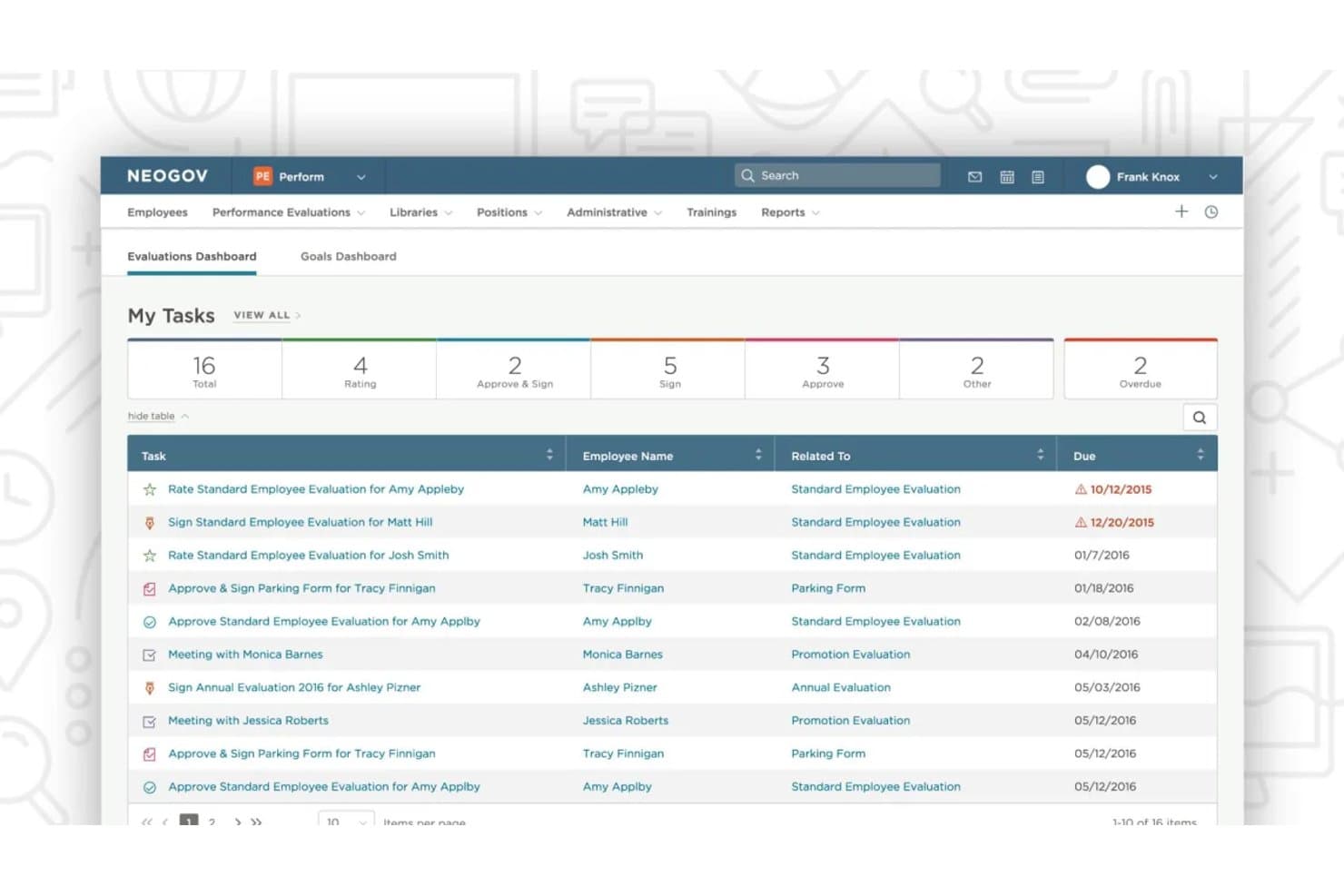
NEOGOV Perform offers an Evaluations Dashboard with a task management view showing employee evaluation assignments, due dates, and task statuses for performance management workflows. NEOGOV Perform is a government-specific performance management system that handles configurable appraisal cycles, automated evaluation workflows, goal tracking, continuous feedback, and performance improvement plans for public sector agencies.
Who Is NEOGOV Perform Best For?
NEOGOV Perform is a strong fit for HR teams in city, county, and state government agencies that operate under civil service rules, union agreements, or multi-layer approval structures.
Why I Picked NEOGOV Perform
NEOGOV Perform earns its spot on my shortlist because it handles civil service compliance in ways that generic performance tools simply don't. I like that every evaluation and approval generates an unalterable audit trail, so personnel decisions hold up against grievances, appeals, or public records requests. It also routes evaluations through multi-layer approval chains natively, which matters when union contracts or civil service rules dictate who signs off and in what order.
NEOGOV Perform Key Features
- Automated evaluation scheduling: Auto-schedules annual, probationary, and custom review cycles based on employee type and status.
- Goal tracking and alignment: Lets you set, track, and update individual and team goals within the platform for ongoing alignment.
- Audit-ready reporting: Generates compliance-ready reports and logs for all review activity, accessible on demand for audits or public records.
- Integration with NEOGOV Learn: Connects completed evaluations to targeted training assignments to support ongoing development.
NEOGOV Perform Integrations
NEOGOV Perform integrates natively with NEOGOV’s internal module suite, including Insight, Onboard, Learn, and eForms.
Pros and Cons
Pros:
- Auto-schedules probationary and annual review cycles
- Unalterable audit trail for every evaluation
- Built exclusively for public sector agencies
Cons:
- Goal cascading lacks agency-wide mission tagging
- Competency framework depth is relatively limited
Learn more about NEOGOV Perform:
Diğer Kamu Kurumları Performans Yönetimi Yazılımları
Kısa listeme girmeyen ancak yine de göz atmaya değer bazı ek kamu kurumları performans yönetimi yazılımı seçenekleri şunlardır:
- 11UKGBest for union rules and records automation
- 12AchieveItBest for cross-department performance visibility
- 13ClearCoBest for automated workflow-driven appraisals
- 14CegidBest for multilingual appraisal process support
- 15Access PeopleHRBest for rapid self-service review setup
- 16TalentGuardBest for skills gap and career path analysis
- 17ClayHRBest for customizable performance feedback cycles
How I Evaluate Government Performance Management Software
I evaluate tools in two layers: core civil service compliance every platform must meet, and differentiators—like FedRAMP posture or strategic plan linking—that set one apart for agencies.
Core Functionality (Table Stakes For This List)
When I'm selecting tools for my list, I rank each one on a scale from 0 (does not offer the functionality) to 5 (excels in this area) for each core functionality listed below. Then, I calculate the tool's total score into a percentage. Each tool needs to achieve a minimum total score of 65% to be considered for inclusion.
- Structured Performance Reviews: I look for configurable appraisal forms and cycles that fit civil service rating scales, not just generic corporate review templates.
- Goal & Mission Alignment: Cascading goals should link employee objectives to department and agency-level missions, like tying a clerk's targets to a city's strategic plan.
- Competency Management: I check whether competency frameworks map to government job classifications and position descriptions used in merit-based hiring systems.
- Compliance & Audit Trails: Approval workflows and audit logs need to hold up to public records requests, union grievance reviews, and civil service oversight.
- Multi-Rater Feedback: I evaluate whether 360 reviews support hierarchical routing across agency layers, like collecting peer, supervisor, and direct report input.
- Performance Improvement Plans: PIP workflows should include milestone tracking, corrective action documentation, and outputs that are ready for disciplinary proceedings.
Once I have a list of tools that meet the criteria, I consider what sets each platform apart.
Differentiating Factors (What Sets Vendors Apart)
Here's how I compare and contrast different vendors:
Standout Features
Budget-to-performance linking is a major differentiator—I look for platforms that tie KPIs directly to budget line items so agencies can justify spending during appropriation cycles. Public-facing dashboards matter too, especially when a council or board wants constituents to track strategic plan progress in real time. I also check for automated data ingestion from ERP, 311, and financial systems, since manual KPI entry breaks down fast across large agencies.
Beyond Features
Security certifications like FedRAMP and StateRAMP matter a lot—I check whether a vendor's hosting environment actually meets the data residency and access control standards your agency requires. Procurement fit is another big factor, since availability on cooperative purchasing vehicles like GSA or NASPO ValuePoint can cut months off your buying timeline. I also evaluate reporting flexibility, specifically whether the platform can produce council-ready reports and community scorecards without custom development work.
Kamu Kurumları Performans Yönetimi Yazılımı Nasıl Seçilir?
Uzun özellik listeleri ve karmaşık fiyatlandırma yapılarına kendinizi kaptırmanız kolaydır. Kendinize özgü yazılım seçimi sürecinizde ilerlerken odağınızı korumanıza yardımcı olmak için göz önünde bulundurmanız gereken faktörleri içeren bir kontrol listesi hazırladım:
| Faktör | Göz Önünde Bulundurulması Gerekenler |
|---|---|
| FaktörÖlçeklenebilirlik | Göz Önünde Bulundurulması GerekenlerAraç, tamamen yeniden uygulama veya iş akışlarınızda büyük değişiklikler gerektirmeden kurumun büyümesini, yeni departmanları veya bölgesel genişlemeyi destekleyebilir mi? |
| FaktörEntegrasyonlar | Göz Önünde Bulundurulması GerekenlerSağlayıcı, tutarlı veri akışı sağlamak ve manuel veri girişini ve veri silolarını önlemek için HRIS, bordro, ERP ve finans sistemlerinize bağlantıları destekliyor mu? |
| FaktörÖzelleştirilebilirlik | Göz Önünde Bulundurulması GerekenlerDeğerlendirme şablonlarını, iş akışı kurallarını ve raporlama görünümlerini, sağlayıcının müdahalesi olmadan sendika kurallarına veya yerel kamu hizmeti gereksinimlerine uyacak şekilde değiştirebilir misiniz? |
| FaktörKullanım kolaylığı | Göz Önünde Bulundurulması GerekenlerYöneticiler ve personel, kapsamlı bir eğitim almadan aracı gerçekten kullanır mı? Jargonla bunaltan veya temel işlemleri üç tıklama gerisine gizleyen arayüzlere dikkat edin. |
| FaktörUygulama ve işe alıştırma | Göz Önünde Bulundurulması GerekenlerSağlayıcı kurulum sırasında ne kadar destek sunuyor? Yalnızca genel eğitimler değil, net proje takvimleri ve kuruma özel işe alıştırma rehberliği talep edin. |
| FaktörMaliyet | Göz Önünde Bulundurulması GerekenlerEntegrasyonlar, kullanıcı lisansları veya ek raporlama özellikleri için gizli ücretler var mı? Sözleşmenize nelerin dahil olduğunu ve fiyatlandırmanın yıllık bütçe döngünüze uyup uymadığını doğrulayın. |
| FaktörGüvenlik önlemleri | Göz Önünde Bulundurulması GerekenlerSistem, FedRAMP veya StateRAMP gibi kurumunuzun güvenlik standartlarını karşılıyor ve erişim kontrolleri ile denetim izlerine ilişkin açık belgeler sunuyor mu? |
| FaktörUyumluluk gereklilikleri | Göz Önünde Bulundurulması GerekenlerAraç, kamu kayıtları, sendika sözleşmeleri ve denetime hazırlık için gereken belgeleri ve iş akışı kurallarını destekleyebilir mi? Garantili saklama ve dışa aktarma seçeneklerini kontrol edin. |
Kamu Kurumları Performans Yönetimi Yazılımları Nedir?
Devlet performans yönetimi yazılımları, kamu sektörü kurumlarının çalışan değerlendirmelerini yönetmesine, yetkinlikleri izlemesine, performans sorunlarını belgelemesine ve bireysel hedefleri kurumun misyonlarıyla uyumlu hâle getirmesine yardımcı olan özel platformlardır. Bu sistemler kamu personeli mevzuatına uyumu destekler, yapılandırılmış değerlendirme süreçlerini mümkün kılar ve kamu operasyonlarında hesap verebilirlik ile şeffaflık için gereken hedef belirleme ve kayıt tutma araçlarını sunar.
Devlet Performans Yönetimi Yazılımlarının Özellikleri
Devlet performans yönetimi yazılımı seçerken aşağıdaki temel özelliklere dikkat edin:
- Yapılandırılmış performans değerlendirmeleri: Kamu sektörü değerlendirme standartlarına ve takvimlerine uygun, yapılandırılabilir değerlendirme dönemleri, formları ve iş akışları oluşturun ve planlayın.
- Hedef ve misyon uyumu: Çalışan hedeflerini kuruluşunuzun daha geniş kapsamlı misyonu ve stratejik planıyla ilişkilendirmek için kurum, departman ve bireysel hedefleri kademeli olarak birbirine bağlayın.
- Yetkinlik yönetimi: Kamu görev sınıflandırmaları ve pozisyon tanımlarıyla bağlantılı gerekli becerileri, sertifikaları ve nitelikleri izleyin.
- Çoklu değerlendirici geri bildirimi: Performansın bütünsel bir görünümünü elde etmek için yöneticiler, çalışma arkadaşları ve öz değerlendirmeler dâhil olmak üzere kurum hiyerarşileri genelinde 360 derece geri bildirimi kolaylaştırın.
- Uyumluluk ve denetim izleri: Kamu personeli, sendika ve kamu kayıtları mevzuatına uyum için kritik olan belgeleri, onay iş akışlarını ve kolayca dışa aktarılabilen denetim kayıtlarını muhafaza edin.
- Performans iyileştirme planları: Performansı yetersiz çalışanlar için kilometre taşı takibi, düzeltici eylem belgeleri ve ilerleme izleme özelliklerine sahip yapılandırılmış PIP iş akışları oluşturun ve takip edin.
- Otomatik veri entegrasyonu: Çalışan verilerini senkronize etmek ve performans yönetimi süreçlerini kolaylaştırmak için İK bilgi sistemleri, bordro, ERP ve diğer kurum sistemlerine bağlanın.
- Kamuya açık panolar: Şeffaflığı ve hesap verebilirliği desteklemek amacıyla seçili performans ölçümlerini veya stratejik hedeflere yönelik ilerlemeyi paydaşlara ya da vatandaşlara gösterin.
- Özelleştirilebilir raporlama: Kapsamlı manuel kurulum gerektirmeden meclis sunumları, denetim amaçları veya kurum içi kullanım için çeşitli standart ya da özel raporlar oluşturun.
- Role dayalı erişim denetimleri: Hassas performans verilerinin yalnızca yetkili roller tarafından görüntülenebilmesini sağlamak, güvenlik ve uyumluluğu desteklemek için izinleri belirleyin ve yönetin.
Devlet Performans Yönetimi Yazılımlarının Faydaları
Devlet performans yönetimi yazılımını uygulamak, ekibiniz ve kuruluşunuz için çeşitli faydalar sağlar. Yararlanabileceğiniz bazı faydalar şunlardır:
- Standartlaştırılmış değerlendirmeler: Kamu personeli mevzuatıyla uyumlu şablonlar ve iş akışlarıyla çalışan değerlendirmelerini basitleştirin; böylece her kurum açık ve tutarlı ölçütlerle faaliyet gösterir.
- Geliştirilmiş hedef uyumu: Kademeli hedef belirleme özellikleri aracılığıyla çalışan, departman ve kurum hedeflerini daha geniş kapsamlı misyonlar ve kamu hizmeti sonuçlarıyla ilişkilendirin.
- Daha iyi uyumluluk: Sendika, kamu personeli ve açık kayıt gereklilikleri için gereken belgeleri, denetim izlerini ve kayıt tutma işlemlerini otomatikleştirin.
- Daha derin performans içgörüleri: İş gücünüz genelinde çalışanların güçlü yönlerini ve eksiklerini anlamak için 360 derece geri bildirime ve özelleştirilebilir raporlara erişin.
- Daha hızlı disiplin işlemleri: Performans iyileştirme planlarını ve aşamalı disiplin süreçlerini yapılandırılmış, izlenebilir iş akışlarıyla belgeleyin ve yönetin.
- Sorunsuz veri entegrasyonu: Performans yönetimini İK bilgi sistemleri, bordro, ERP ve diğer devlet sistemleriyle senkronize ederek manuel veri girişini ve hataları azaltın.
- Şeffaf paydaş iletişimi: Meclis üyelerini, yöneticileri ve vatandaşları bilgilendirmek için ilerlemeyi ve temel performans göstergelerini kamuya açık panolar aracılığıyla paylaşın.
Devlet Performans Yönetimi Yazılımlarının Maliyetleri ve Fiyatlandırması
Devlet performans yönetimi yazılımı seçmek, mevcut çeşitli fiyatlandırma modellerinin ve planların anlaşılmasını gerektirir. Maliyetler özelliklere, ekip büyüklüğüne, eklentilere ve diğer unsurlara göre değişir. Aşağıdaki tablo, devlet performans yönetimi yazılımı çözümlerinde yaygın planları, bunların ortalama fiyatlarını ve genellikle dâhil edilen özellikleri özetlemektedir:
Devlet Performans Yönetimi Yazılımları için Plan Karşılaştırma Tablosu
| Plan Türü | Ortalama Fiyat | Yaygın Özellikler |
|---|---|---|
| Plan TürüÜcretsiz Plan | Ortalama Fiyat$0 | Yaygın ÖzelliklerTemel performans değerlendirme araçları, sınırlı kullanıcı kontenjanı ve basit hedef belirleme. |
| Plan TürüBireysel Plan | Ortalama Fiyat$10-$20/kullanıcı/ay | Yaygın ÖzelliklerBireysel kullanıcı erişimi, özel hedef takibi, kişisel panolar ve temel raporlama. |
| Plan Türüİşletme Planı | Ortalama Fiyat$25-$50/kullanıcı/ay | Yaygın ÖzelliklerEkip düzeyinde değerlendirmeler, çoklu değerlendirici geri bildirimi, uyumluluk takibi, gelişmiş entegrasyonlar ve özel değerlendirme iş akışları. |
| Plan TürüKurumsal Plan | Ortalama Fiyat$60-$120/kullanıcı/ay | Yaygın ÖzelliklerKurum genelinde kullanıma sunma, tam uyumluluk desteği, gelişmiş denetim izleri, veri entegrasyonları, kamuya açık panolar ve öncelikli kullanıma alma. |
Kamu Performans Yönetimi Yazılımı SSS
Kamu performans yönetimi yazılımı hakkındaki yaygın soruların bazı yanıtlarını aşağıda bulabilirsiniz:
Kamu performans yönetimi yazılımı uyumluluk gerekliliklerini nasıl destekler?
Kamu performans yönetimi yazılımı; belgeleri takip ederek, onay iş akışlarını yöneterek ve ayrıntılı denetim izlerini koruyarak uyumluluğu destekler. Kamu kurumları için bu düzeyde proje takibi; kamu hizmeti, sendika ve kamu kayıtları gerekliliklerini karşılamanın yanı sıra veri saklama ve kamuya açıklık standartlarını korumak açısından da büyük önem taşır. Yerleşik siber güvenlik kontrolleri, denetim kontrollerinden geçerken hassas kurum kayıtlarının tamamen korunmasını da sağlar.
Bu platformlar mevcut kamu HR veya ERP sistemleriyle entegre olabilir mi?
Evet, birçok platform; HRIS, bordro, ERP ve finansal raporlama sistemleriyle veri senkronizasyonu sağlamak için önceden oluşturulmuş bağlayıcılar veya API'ler sunar. Bu araçların entegre edilmesi, yöneticilere operasyon genelinde gerçek zamanlı içgörüler sağlar ve manuel veri girişini ortadan kaldırır. Bu kesintisiz bağlantı, karar vericilerin departmanlar genelinde veriye dayalı kararlar almak için raporlama ve analizlere güvenmesini sağlar.
Kurumlar bu araçları değerlendirirken nelere öncelik vermelidir?
Ölçeklenebilirliğe, güvenlik sertifikalarına, izin süreçleri gibi iş akışlarını basitleştirme becerisine ve benzer büyüklükteki kurumlarla çalışma deneyimine sahip tedarikçilere öncelik verin. Finansal kaynakları doğrudan yüksek öncelikli stratejik girişimlerle uyumlu hâle getirmek için risk yönetimi yeteneklerini, tedarik seçeneklerini ve aracın performansa dayalı bütçelemeyi ne ölçüde desteklediğini değerlendirmek de kritik öneme sahiptir.
Kamuya açık performans panoları için seçenekler var mı?
Evet, bazı çözümler kurumun ilerlemesini, performans verilerini ve KPI'ları toplumla paylaşan yapılandırılabilir, kamuya açık panolar sunar. Açıkça ölçülebilir sonuçların doğrudan vatandaşlara sunulması, temel vatandaş hizmetlerinin iyileştirilmesine yardımcı olur, şeffaflığı teşvik eder ve açık yönetime yönelik artan talepleri karşılar.
Performans iyileştirme planları bu sistemlerde nasıl çalışır?
Performans iyileştirme planları, yasal sürecin gereklerine uyumu sağlayan otomatik kilometre taşları ve hatırlatıcılarla adım adım oluşturulabilir, takip edilebilir ve belgelenebilir. Yapılandırılmış performans ölçümünün bu iş akışlarına dâhil edilmesi, bireysel ilerlemenin daha büyük kurumsal hedefler ve stratejik amaçlarla doğrudan uyumlu olmasını sağlar.
Kamu Performans Yönetimi Yazılımı SSS'leri
Kamu performans yönetimi yazılımı hakkında sık sorulan soruların bazı yanıtları:
Kamu performans yönetimi yazılımı uyumluluk gereksinimlerini nasıl destekler?
Kamu performans yönetimi yazılımı; belgeleri takip ederek, onay iş akışlarını yöneterek ve ayrıntılı denetim izleri oluşturarak uyumluluğu destekler. Kamu kurumları için bu düzeyde proje takibi; kamu hizmeti, sendika ve kamu kayıtları gereksinimlerini karşılamanın yanı sıra veri saklama ve kamu şeffaflığı standartlarını korumak açısından da büyük önem taşır. Yerleşik siber güvenlik kontrolleri, hassas kurum kayıtlarının denetim kontrollerinden geçerken tamamen korunmasını da sağlar.
Bu platformlar mevcut kamu İK veya ERP sistemleriyle entegre olabilir mi?
Evet, birçok platform; İKYS, bordro, ERP ve finansal raporlama sistemleriyle veri senkronizasyonu sağlamak için önceden oluşturulmuş bağlayıcılar veya API’ler sunar. Bu araçların entegre edilmesi, yöneticilere operasyon genelinde gerçek zamanlı içgörüler sağlar ve manuel veri girişini ortadan kaldırır. Bu sorunsuz bağlantı, karar vericilerin departmanlar genelinde veriye dayalı kararlar almak için raporlama ve analizlere güvenmesine olanak tanır.
Kurumlar bu araçları değerlendirirken nelere öncelik vermelidir?
Ölçeklenebilirliğe, güvenlik sertifikalarına, izin verme gibi iş akışı süreçlerini basitleştirme becerisine ve benzer büyüklükteki kurumlarla çalışma deneyimine sahip tedarikçilere öncelik verin. Finansal kaynakları doğrudan yüksek öncelikli stratejik girişimlerle uyumlu hâle getirmek için risk yönetimi yeteneklerini, tedarik seçeneklerini ve aracın performansa dayalı bütçelemeyi ne ölçüde desteklediğini değerlendirmek de kritik öneme sahiptir.
Kamuya açık performans panoları için seçenekler var mı?
Evet, bazı çözümler kurumun ilerlemesini, performans verilerini ve KPI’larını toplumla paylaşan, yapılandırılabilir ve kamuya açık panolar sunar. Açıkça ölçülebilir sonuçları doğrudan vatandaşlara sunmak, temel vatandaş hizmetlerinin iyileştirilmesine yardımcı olur, şeffaflığı destekler ve açık yönetime yönelik artan talepleri karşılar.
Performans iyileştirme planları bu sistemlerde nasıl çalışır?
Performans iyileştirme planları; yasal süreç gerekliliklerine uyumu sağlayan otomatik kilometre taşları ve hatırlatıcılarla adım adım oluşturulabilir, izlenebilir ve belgelendirilebilir. Yapılandırılmış performans ölçümünü bu iş akışlarına dâhil etmek, bireysel ilerlemenin daha geniş kurumsal hedefler ve stratejik amaçlarla doğrudan uyumlu olmasını sağlar.