

Las 10 mejores herramientas de IA analizadas en 2026

10 Lista de las mejores herramientas de IA


La IA ya no es algo deseable, sino opcional. Se está convirtiendo en una parte fundamental de la forma en que los equipos innovan, toman decisiones y siguen siendo competitivos. He estado probando y revisando software moderno, y he comprobado qué herramientas de IA realmente marcan la diferencia y cuáles se quedan cortas.
Este artículo analiza las mejores herramientas de IA en categorías como escritura, automatización, análisis y colaboración, para ofrecerte una visión clara de lo que hay disponible y de qué herramientas merece la pena adoptar. Veamos las capacidades de IA que pueden ayudarte a mantenerte por delante.
Por qué confiar en nuestras reseñas de software
Nuestro equipo lleva probando y evaluando software desde 2012. Como expertos en RR. HH., sabemos lo difícil —y lo importante— que es elegir el software adecuado.
Para esta guía, evaluamos las herramientas mediante pruebas prácticas e investigación independiente, puntuando las herramientas según nuestros criterios de selección. También nos basamos en la experiencia de líderes de opinión del sector y de profesionales de RR. HH. en activo.
Nuestras reseñas reflejan nuestro criterio editorial humano, no un discurso de ventas.
Revisores expertos:
Tabla comparativa de herramientas de IA
Esta tabla comparativa resume los detalles de precios de mi selección de las mejores herramientas de IA:
| Tool | Best For | Trial Info | Price | ||
|---|---|---|---|---|---|
| 1 | Mejor opción para RRHH global y nómina impulsados por IA | Demostración gratuita disponible | Desde $5/empleado/mes | Website | |
| 2 | Mejor para la identificación de riesgos de proyectos mediante IA | Prueba gratuita de 14 días | Desde $9/usuario/mes (facturado anualmente) | Website | |
| 3 | Ideal para el descubrimiento de conocimiento mediante IA | Demostración gratuita disponible | Precios bajo solicitud | Website | |
| 4 | La mejor para la automatización integral del reclutamiento con IA | Demostración gratuita disponible | Precio previa solicitud | Website | |
| 5 | Mejor para automatización de políticas de gobernanza de IA | Demostración gratuita disponible | Precios bajo solicitud | Website | |
| 6 | Mejor con integraciones de datos en tiempo real | Plan gratuito disponible | Desde $32/mes (facturado anualmente) | Website | |
| 7 | Ideal para respuestas humanas y no predefinidas basadas en IA | Prueba gratuita de 7 días + plan gratuito disponible | Desde $24.17/mes (facturado anualmente) | Website | |
| 8 | Mejor para asistencia en documentos de oficina | Plan gratuito disponible | Desde $21/usuario/mes (facturado anualmente) | Website | |
| 9 | Ideal para integrar IA en flujos de trabajo creativos | Prueba gratuita de 7 días disponible | Desde $9.99/mes | Website | |
| 10 | Ideal para IA en entrevistas por video | Demostración gratuita disponible | Precio a consultar | Website |


Análisis de las mejores herramientas de IA
A continuación encontrarás mis resúmenes detallados de las mejores herramientas de IA que han llegado a mi lista. Mis análisis ofrecen una visión detallada de las características principales, las ventajas & desventajas, las integraciones y los casos de uso ideales de cada herramienta para ayudarte a encontrar la más adecuada para ti.

Deel HR
Mejor opción para RRHH global y nómina impulsados por IA
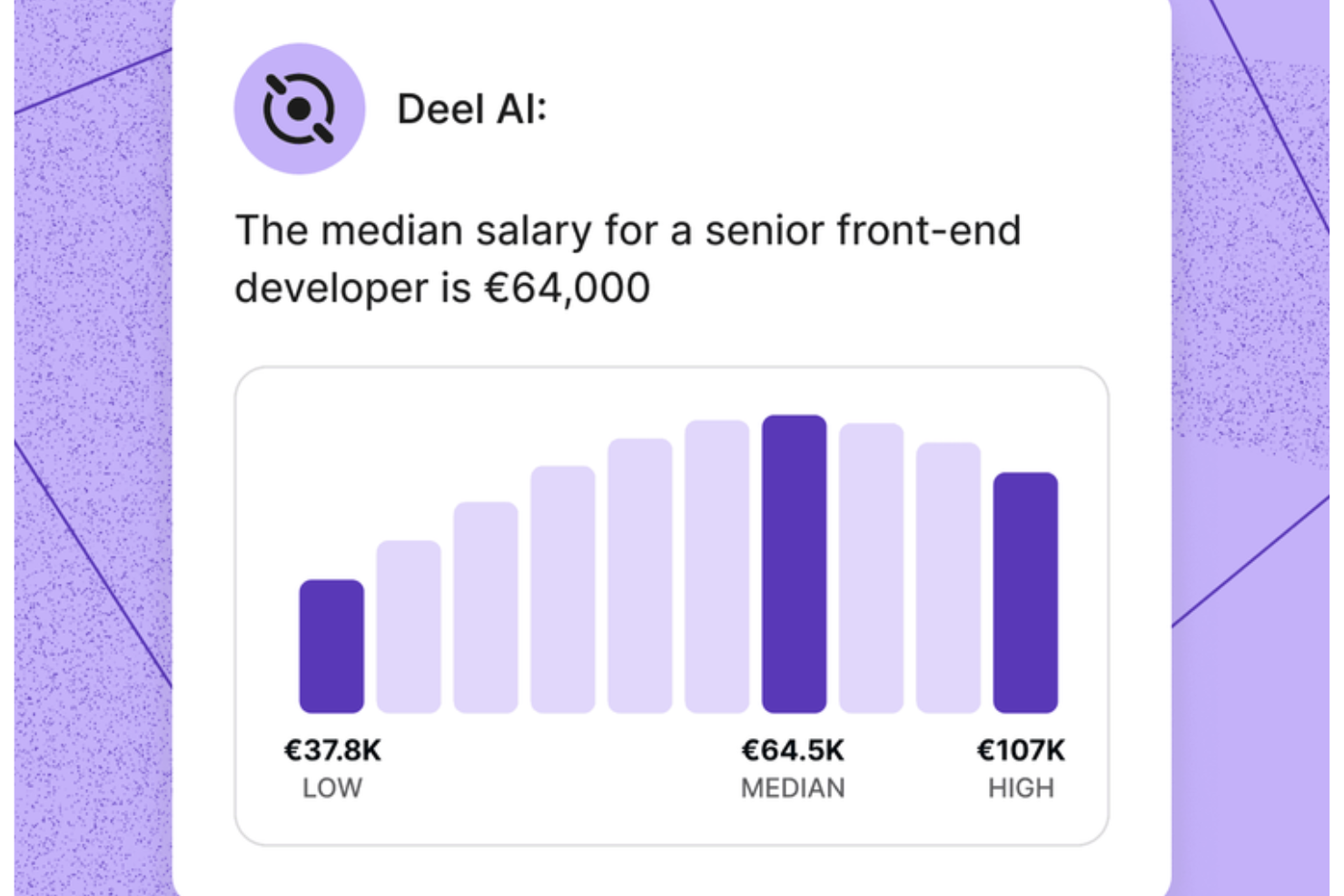
Tu equipo de RRHH cuenta con un experto siempre disponible cuando usas Deel AI, proporcionándote claridad instantánea sobre cuestiones de plantilla y cumplimiento global sin ralentizar tus flujos de trabajo. Si gestionas un equipo distribuido o en rápido crecimiento, la herramienta te ayuda a navegar la complejidad de RRHH combinando tus datos internos con el asesoramiento de expertos en más de 150 países.
Por Qué Elegí Deel
Elegí Deel porque te ofrece una herramienta de IA que responde con orientación accionable en temas de RRHH y legales, basada en los datos reales de tu plantilla. La capa contextual de IA reconoce en qué parte de la plataforma te encuentras y muestra resúmenes, detalles clave o consideraciones de cumplimiento sin necesidad de búsquedas adicionales. También valoro que la herramienta se nutre del Knowledge Hub globalmente validado de Deel, lo que te permite preguntar sobre nóminas, normativas, políticas o información de tu equipo y obtener respuestas inmediatas. Para equipos que buscan una herramienta de IA capaz de abordar preguntas específicas sobre RRHH y cumplimiento global con precisión fiable, esta destaca.
Funciones Clave de Deel
Además de la asistencia de IA que mencioné arriba, Deel ofrece varias otras funciones clave:
- Procesamiento Automático de Nómina: Esta función permite a tu equipo gestionar la nómina en varios países con cálculos automatizados de salarios e impuestos.
- Generación de Contratos Localizados: Puedes crear contratos adaptados a las leyes locales, garantizando el cumplimiento de las normativas laborales de cada región.
- Portales de Autoservicio para Empleados: Los empleados pueden acceder a su información de nómina y gestionar sus datos personales, mejorando la transparencia y la implicación.
- Incorporación de Contratistas: Deel ofrece flujos de trabajo de incorporación personalizables, agilizando el proceso de contratación y asegurando el cumplimiento de las regulaciones locales.
Integraciones de Deel
Deel se integra con plataformas populares como QuickBooks, Xero, Greenhouse, BambooHR, NetSuite, Workday, Gusto, Lever, Slack y SAP SuccessFactors.
Pros and Cons
Pros:
- Ofrece orientación en contextos laborales de más de 150 países
- Muestra información organizativa y resúmenes directamente desde los datos de tu equipo
- La IA responde a preguntas sobre talento y plantilla usando datos de expertos
Cons:
- La orientación de IA puede requerir revisión humana en escenarios legales complejos
- Fuerte dependencia del Knowledge Hub propietario para la precisión
New Product Updates from Deel HR

Deel Expands Stablecoin Wallet to 80+ Countries
Deel expands its Stablecoin Wallet to 80+ countries with dollar-backed balances and optional rewards. This gives eligible contractors more ways to hold and manage earnings inside Deel. For more information, visit Deel’s official site.
 .
.
Mejor para la identificación de riesgos de proyectos mediante IA
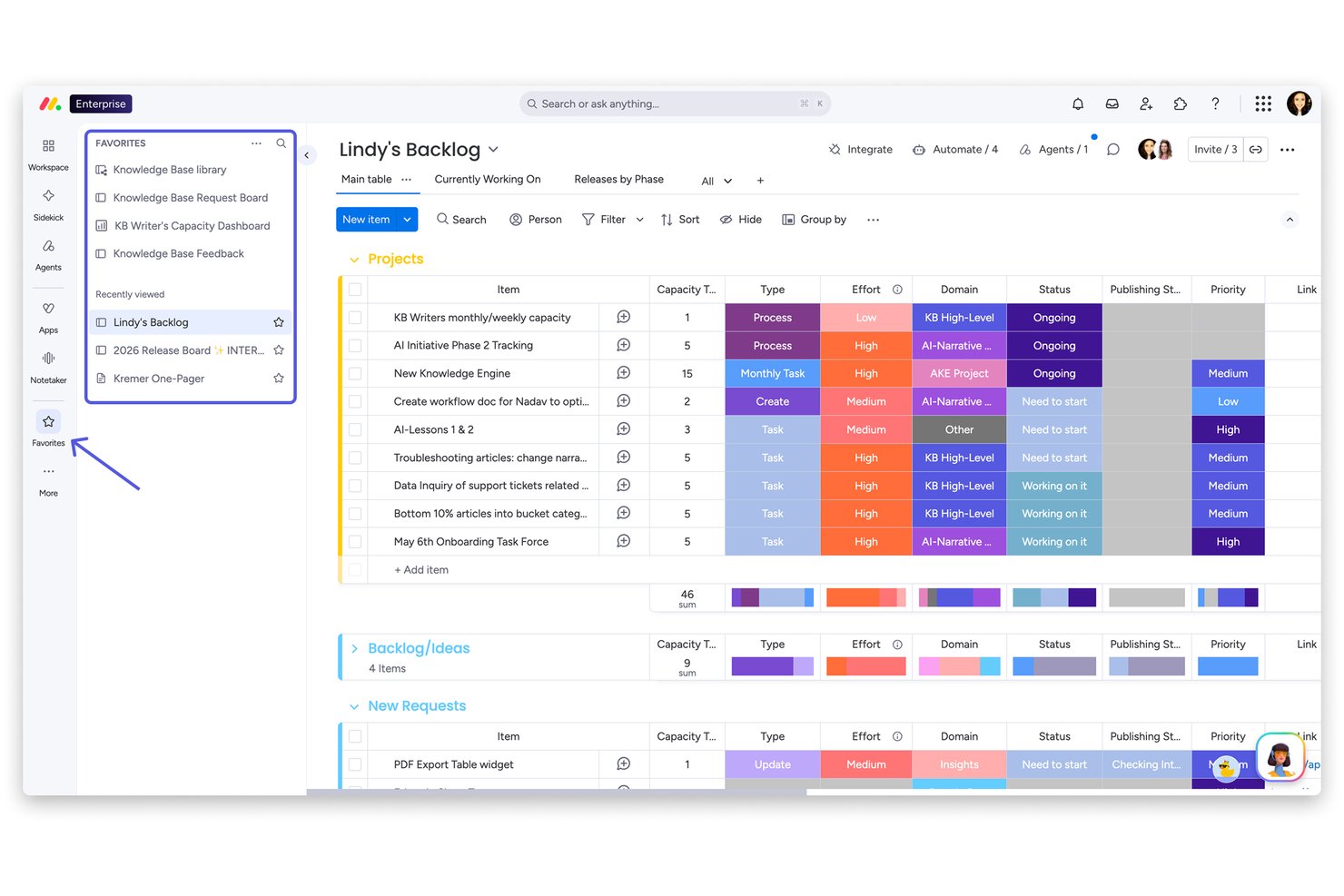
monday AI Workspace es una plataforma nativa de gestión de trabajo con IA que incorpora agentes de IA, automatización de flujos de trabajo y análisis predictivo de proyectos en la gestión de tareas, el seguimiento de portafolios y la colaboración en equipo.
¿Para quién es mejor monday AI Workspace?
Es ideal para equipos de tamaño medio a empresarial que gestionan varios proyectos simultáneamente y necesitan visibilidad a nivel de portafolio y monitoreo proactivo de riesgos.
Por qué elegí monday AI Workspace
Elegí monday AI Workspace como uno de los mejores porque su función de 'Portfolio Risk Insights' realmente marca la diferencia: la IA examina diariamente todos los tableros de proyectos vinculados y genera una lista priorizada de riesgos ordenados por gravedad. Cuando surge un riesgo, puedo notificar al responsable del proyecto directamente desde la vista, y la IA completa previamente una actualización que resume la incidencia con enlaces a las tareas relevantes. La barra de resumen también rastrea tendencias de riesgo en todo el portafolio de un vistazo.
Principales características de monday AI Workspace
- Constructor de flujos de trabajo con IA: Crea y personaliza procesos automatizados usando bloques lógicos de IA y instrucciones en lenguaje natural.
- Columnas de datos inteligentes con IA: Añade columnas inteligentes a los tableros que resumen, analizan o extraen automáticamente texto de los datos de proyectos.
- Asistente Sidekick AI: Obtén respuestas de IA en la aplicación, sugerencias de tareas y consejos de configuración de tableros directamente desde un asistente conversacional.
- Marketplace de integraciones nativas: Conéctate con herramientas como Slack, HubSpot y Google Drive usando integraciones preconfiguradas y listas para desplegarse.
Integraciones de monday AI Workspace
monday AI Workspace ofrece integraciones nativas con Slack, Salesforce, HubSpot, Google Drive, Zendesk, GitHub y Active Directory. También es compatible con Zapier y proporciona una API para integraciones personalizadas.
Pros and Cons
Pros:
- La IA señala de manera proactiva los proyectos en riesgo
- Varios agentes de IA asisten en la gestión de tareas
- La vista de portafolio evidencia problemáticas entre proyectos
Cons:
- No ofrece funciones de análisis de IA específicas para RR. HH.
- Carece de capacidades de emparejamiento de talento con IA
New Product Updates from monday AI Workspace
monday AI Workspace Adds Human Approval Routing
monday AI Workspace adds a human-in-the-loop approval block to AI Workflows, sending approval requests and routing workflow paths based on responses. For more information, visit monday AI Workspace's official site.
Coveo
Ideal para el descubrimiento de conocimiento mediante IA
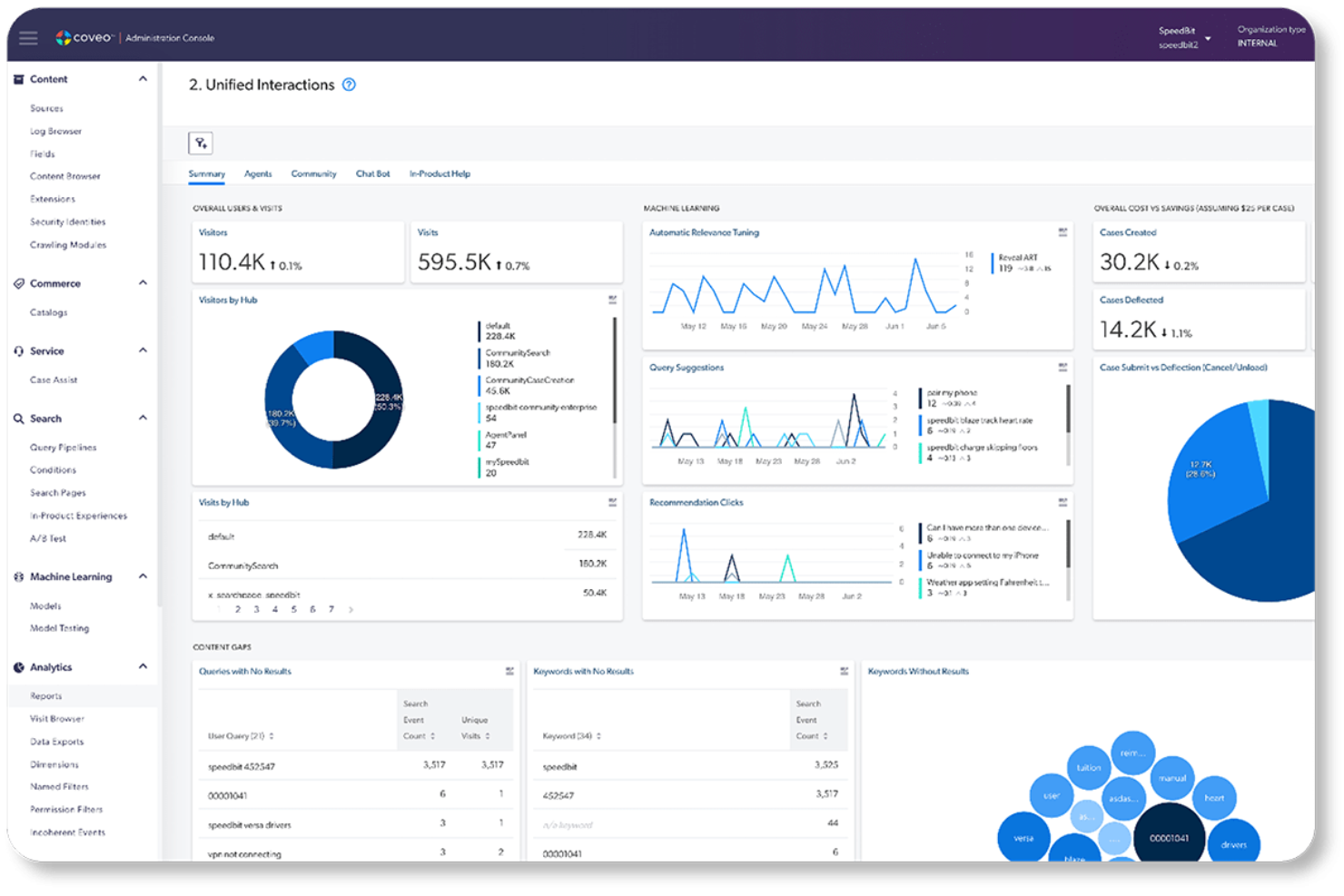
Coveo es una plataforma empresarial de búsqueda y relevancia impulsada por IA que unifica el conocimiento de los sistemas empresariales y ofrece resultados de búsqueda personalizados, recomendaciones de contenido y respuestas de IA generativa en entornos de servicio, comercio y trabajo.
¿Para quién es más adecuado Coveo?
Coveo es una opción ideal para grandes empresas de sectores como la alta tecnología, los servicios financieros y la atención sanitaria que gestionan ecosistemas de conocimiento complejos y fragmentados en múltiples sistemas y canales.
Por qué elegí Coveo
Coveo ocupa un lugar en mi lista de favoritos por la forma en que gestiona el descubrimiento de conocimiento en sistemas empresariales fragmentados. Me gusta especialmente el Ajuste Automático de la Relevancia, que aprende del comportamiento real de los usuarios para mejorar continuamente los resultados sin ninguna intervención manual. La API de Recuperación de Pasajes también destaca, ya que muestra el extracto exacto que necesita el usuario en lugar de limitarse a señalar el documento de origen.
Características principales de Coveo
- Índice de búsqueda unificado: Centraliza el contenido de múltiples fuentes, lo que facilita el descubrimiento del conocimiento empresarial.
- Conectores empresariales prediseñados: Se integra con sistemas como Salesforce, ServiceNow y Office 365 para ofrecer experiencias de búsqueda fluidas.
- Experiencia de navegación dinámica: Ajusta los filtros y la navegación según el comportamiento del usuario para facilitar un descubrimiento de contenido más inteligente.
- Gestión de la canalización de consultas: Permite a los administradores diseñar, probar y optimizar la lógica de búsqueda y las estrategias de clasificación mediante una interfaz visual.
Integraciones de Coveo
Coveo ofrece integraciones nativas con Salesforce, ServiceNow, Zendesk, Microsoft 365, Google Drive, Dropbox, SAP, Sitecore, Amazon S3 y Jira. También hay disponible una API para integraciones personalizadas.
Pros and Cons
Pros:
- El ajuste de relevancia mediante autoaprendizaje no requiere actualizaciones manuales
- Unifica el descubrimiento de conocimiento en sistemas empresariales fragmentados
- Las respuestas de IA generativa muestran extractos de contenido precisos
Cons:
- La configuración inicial requiere una participación considerable del equipo de TI
- La configuración de la canalización de consultas resulta abrumadora para los administradores no técnicos
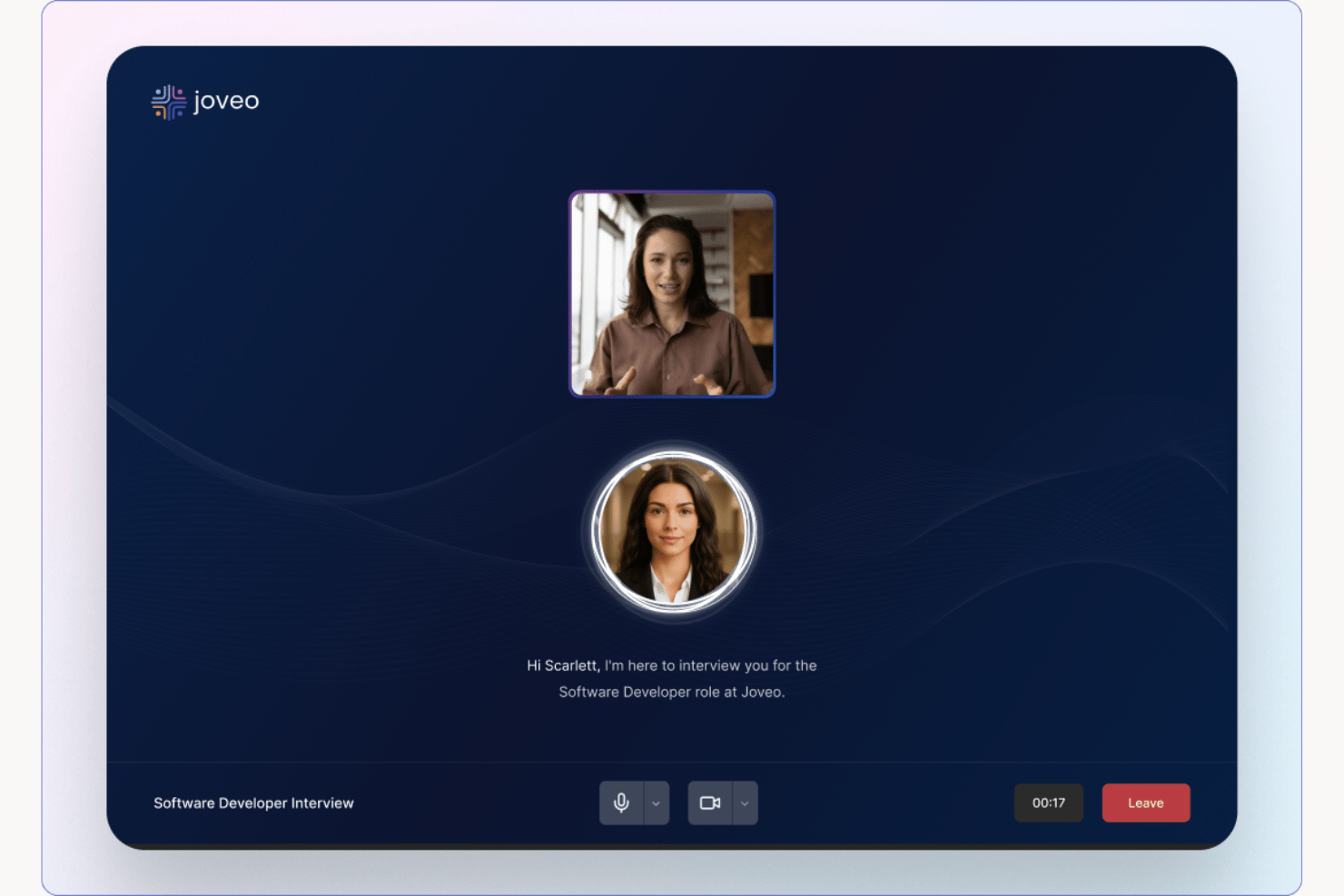
Joveo es una plataforma de reclutamiento con IA que combina publicidad programática de ofertas de empleo, sitios de carreras impulsados por IA, selección conversacional de candidatos, programación de entrevistas y analítica de contratación en un solo sistema.
¿Para quién es mejor Joveo?
Joveo es ideal para equipos de adquisición de talento en empresas medianas y grandes, agencias de personal y organizaciones de externalización de procesos de reclutamiento (RPO) que gestionan contrataciones de alto volumen a través de múltiples canales.
Por qué elegí Joveo
Joveo se gana su lugar como uno de los mejores en mi lista corta porque cubre todo el embudo de reclutamiento en una única plataforma impulsada por IA, desde la publicación de anuncios hasta las entrevistas con candidatos. Me gusta especialmente la capacidad de MOJO Pro para reasignar el gasto de anuncios laborales entre cientos de publicaciones en tiempo real, reduciendo el presupuesto desperdiciado sin trabajo manual. El sistema de selección conversacional con IA responde preguntas de candidatos, ofrece apoyo en la aplicación y agenda entrevistas automáticamente, así mi equipo no tiene que gestionar manualmente cada interacción.
Características clave de Joveo
- Constructor de sitios de carreras con IA: Genera instantáneamente páginas de carreras con marca y páginas de destino usando prompts generativos de IA.
- Gestor de campañas de talento: Lanza y sigue campañas multicanal vía web, correo electrónico y SMS desde un solo panel.
- Asistente de chat para analítica: Chatea directamente con tus datos de reclutamiento para descubrir ideas y tendencias de desempeño.
- Más de 100 integraciones ATS: Conexión con los principales sistemas de seguimiento de candidatos como Workday, iCIMS y Greenhouse.
Integraciones de Joveo
Joveo ofrece integraciones nativas con las principales plataformas ATS, incluyendo Workday, Greenhouse, SmartRecruiters e iCIMS. Hay una API disponible para integraciones personalizadas.
Pros and Cons
Pros:
- La IA reasigna dinámicamente el gasto de anuncios laborales automáticamente
- Todo el embudo cubierto en una sola plataforma
- La IA conversacional gestiona la selección y la programación
Cons:
- Las opciones de personalización en informes son limitadas
- La configuración requiere un tiempo de implementación considerable

Mejor para automatización de políticas de gobernanza de IA
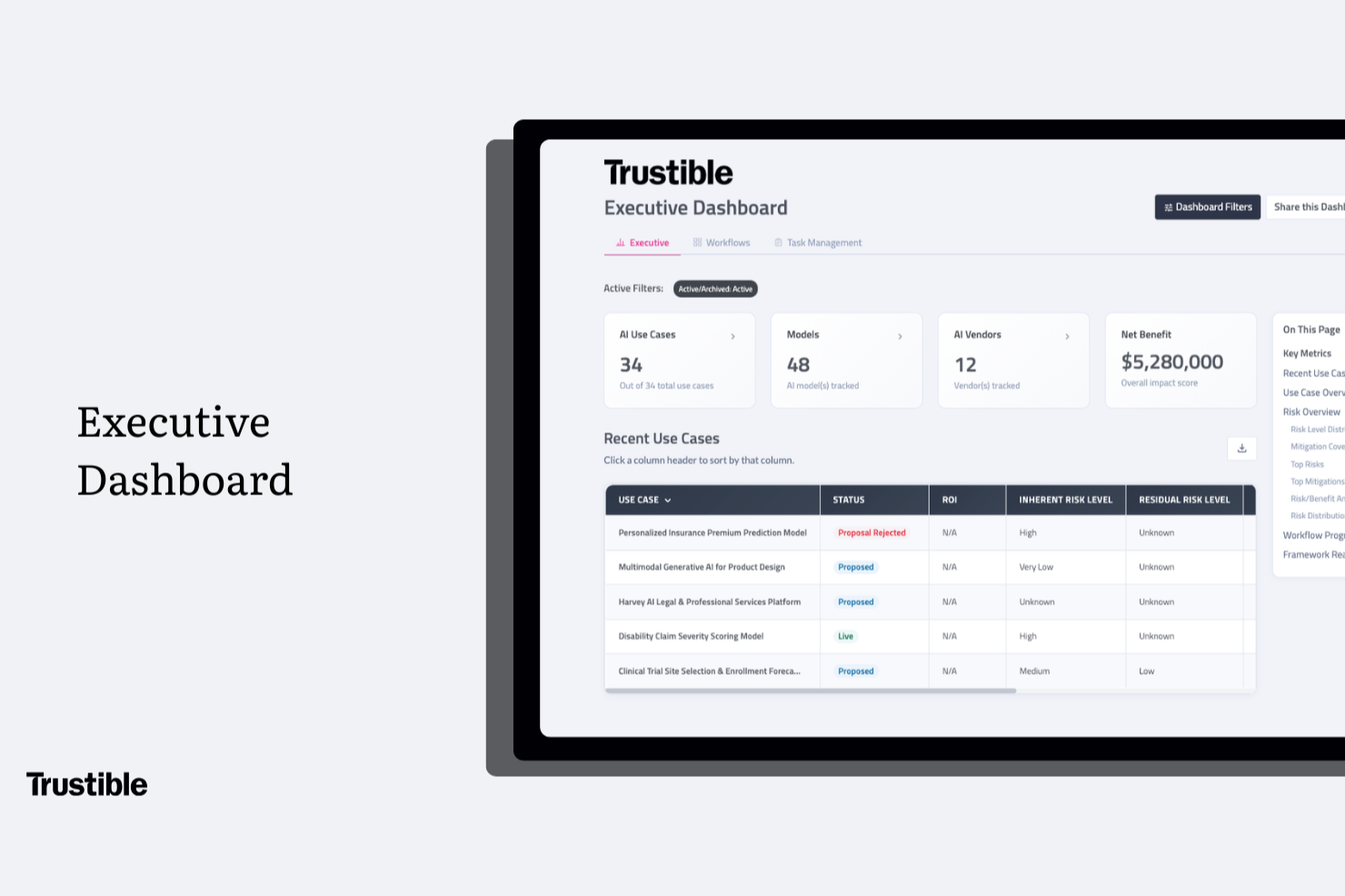
Trustible es una plataforma de gobernanza de IA diseñada específicamente para abarcar el inventario de casos de uso, la evaluación de riesgos, los análisis de impacto y el mapeo de cumplimiento normativo en marcos como la Ley de IA de la UE y el NIST AI RMF.
¿Para quién es mejor Trustible?
Trustible es una excelente opción para responsables de cumplimiento, gestores de riesgos y líderes de gobernanza de IA en empresas medianas y grandes de sectores regulados.
Por qué elegí Trustible
Elegí Trustible como la mejor herramienta para la automatización de políticas de gobernanza de IA porque su motor de admisión basado en reglas puntúa automáticamente cada solicitud de caso de uso de IA, la clasifica según su riesgo y la dirige al revisor adecuado sin necesidad de clasificación manual. Los casos de bajo riesgo pueden aprobarse automáticamente en minutos, mientras que los de alto riesgo pasan a una cola de revisión estructurada con contexto precargado. También destaco que las taxonomías de riesgo subyacentes y las bibliotecas de mitigación son mantenidas por los propios expertos en gobernanza de Trustible, lo cual garantiza que las políticas que guían esas decisiones automáticas se mantengan actualizadas conforme cambian las regulaciones.
Características clave de Trustible
- Inventario de IA centralizado: Mantén un solo registro de todos los casos de uso, modelos, agentes y proveedores de IA en tu organización.
- Supervisión post-despliegue: Programa revisiones periódicas y flujos de trabajo de certificación para monitorear los sistemas de IA después de su puesta en marcha.
- Exportación de evidencia lista para auditorías: Genera registros de gobernanza con sello de tiempo y exporta paquetes de cumplimiento en PDF o Excel bajo demanda.
- Paneles ejecutivos de cumplimiento: Visualiza informes listos para la dirección ejecutiva con puntuaciones de preparación para marcos regulatorios, cobertura de controles y distribución del riesgo a nivel de portafolio.
Integraciones de Trustible
El nivel Enterprise de Trustible incluye integraciones con las pilas existentes de IA y GRC, aunque las integraciones nativas específicas no están claramente documentadas en el sitio web del proveedor. Durante la implementación, el equipo de Trustible conecta tus sistemas como parte del proceso de incorporación. El soporte para Zapier y API tampoco está claramente documentado.
Pros and Cons
Pros:
- Mapea controles a través de más de 10 marcos regulatorios
- Flujos de trabajo agénticos que auto-trían casos de bajo riesgo
- Taxonomías de riesgos y mitigación de IA curadas por expertos
Cons:
- Sin integraciones nativas listadas públicamente
- Para conocer los precios es necesario contactar al equipo de ventas

Chatbase
Mejor con integraciones de datos en tiempo real
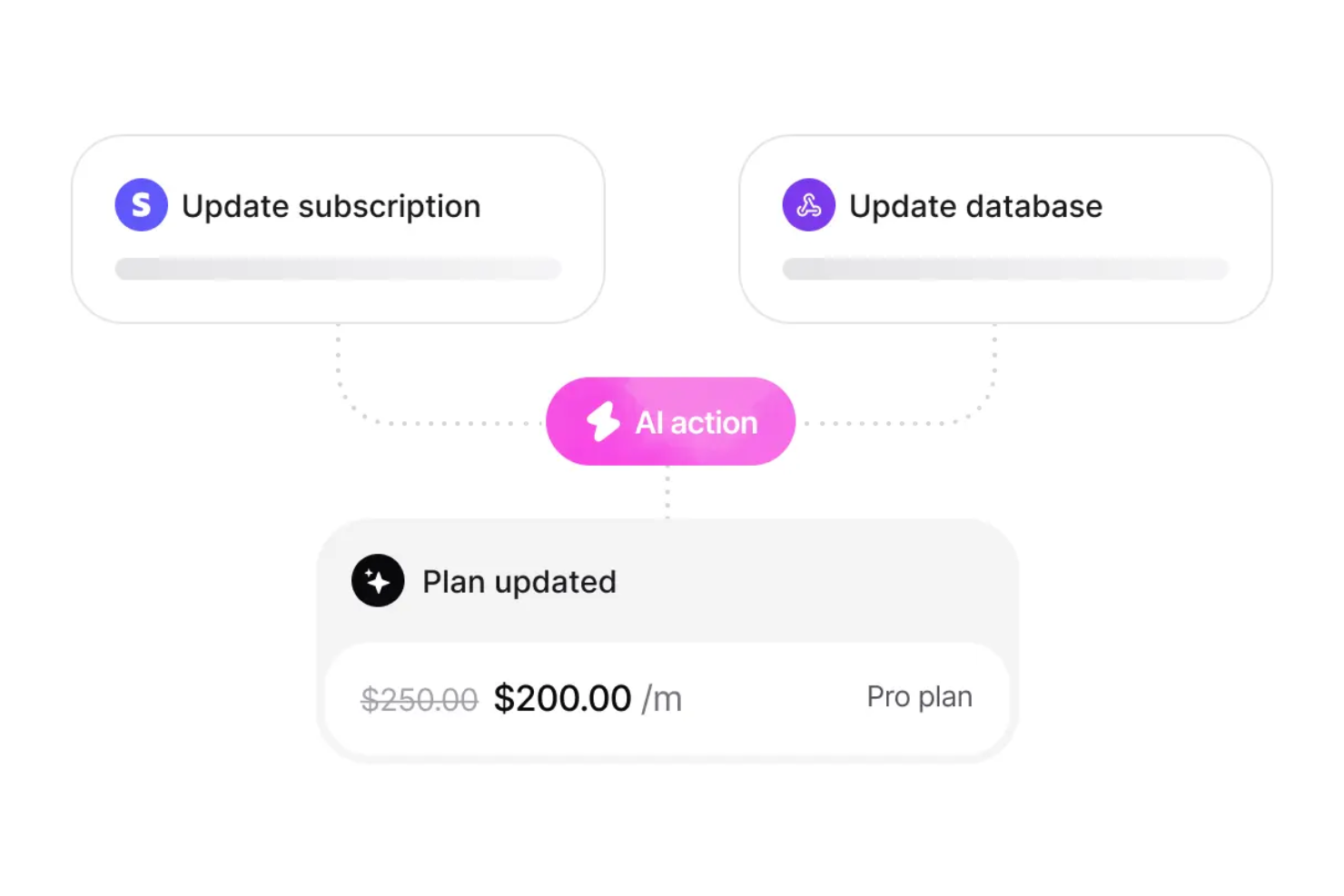
Chatbase es una plataforma de chatbots con IA que te permite crear, entrenar y desplegar chatbots personalizados usando tus propios datos, con funciones para integraciones en tiempo real, soporte multilingüe y controles avanzados de seguridad.
¿Para quién es ideal Chatbase?
Chatbase es adecuado para equipos y empresas que necesitan desplegar chatbots de IA utilizando sus propios datos a través de múltiples canales e idiomas.
Por qué elegí Chatbase
Elegí Chatbase como uno de los mejores porque puedo conectar mis chatbots directamente a bases de datos y APIs en vivo, permitiéndoles responder preguntas con información al minuto. Mi equipo utiliza Chatbase para crear bots que extraen datos en tiempo real de sistemas internos, así los usuarios siempre obtienen respuestas actualizadas. También me gusta que puedo configurar disparadores y acciones personalizadas basadas en cambios de datos en tiempo real, algo que no he encontrado en la mayoría de otras plataformas de chatbots con IA.
Funciones clave de Chatbase
- Constructor de chatbots sin código: Crea y personaliza chatbots usando una interfaz de arrastrar y soltar, sin necesidad de programar.
- Soporte multilingüe: Despliega chatbots que pueden interactuar en varios idiomas para audiencias globales.
- Carga de bases de conocimiento personalizadas: Importa documentos, PDFs y contenido web para entrenar tu chatbot con datos específicos.
- Panel avanzado de analíticas: Monitorea el rendimiento del chatbot y las interacciones de los usuarios con herramientas analíticas y de reportes detallados.
Integraciones de Chatbase
Chatbase ofrece integraciones nativas con Zendesk, Notion, Slack, Stripe, Salesforce, Cal.com, Calendly, WhatsApp, Messenger, Make y Zapier. Hay una API disponible para integraciones personalizadas.
Pros and Cons
Pros:
- Ofrece características de cumplimiento GDPR y SOC 2
- Carga de bases de conocimiento personalizadas para entrenamiento
- Constructor visual de chatbots sin código incluido
Cons:
- Retrasos ocasionales en la sincronización de datos en tiempo real
- No cuenta con asistente de voz incorporado
Tidio
Ideal para respuestas humanas y no predefinidas basadas en IA
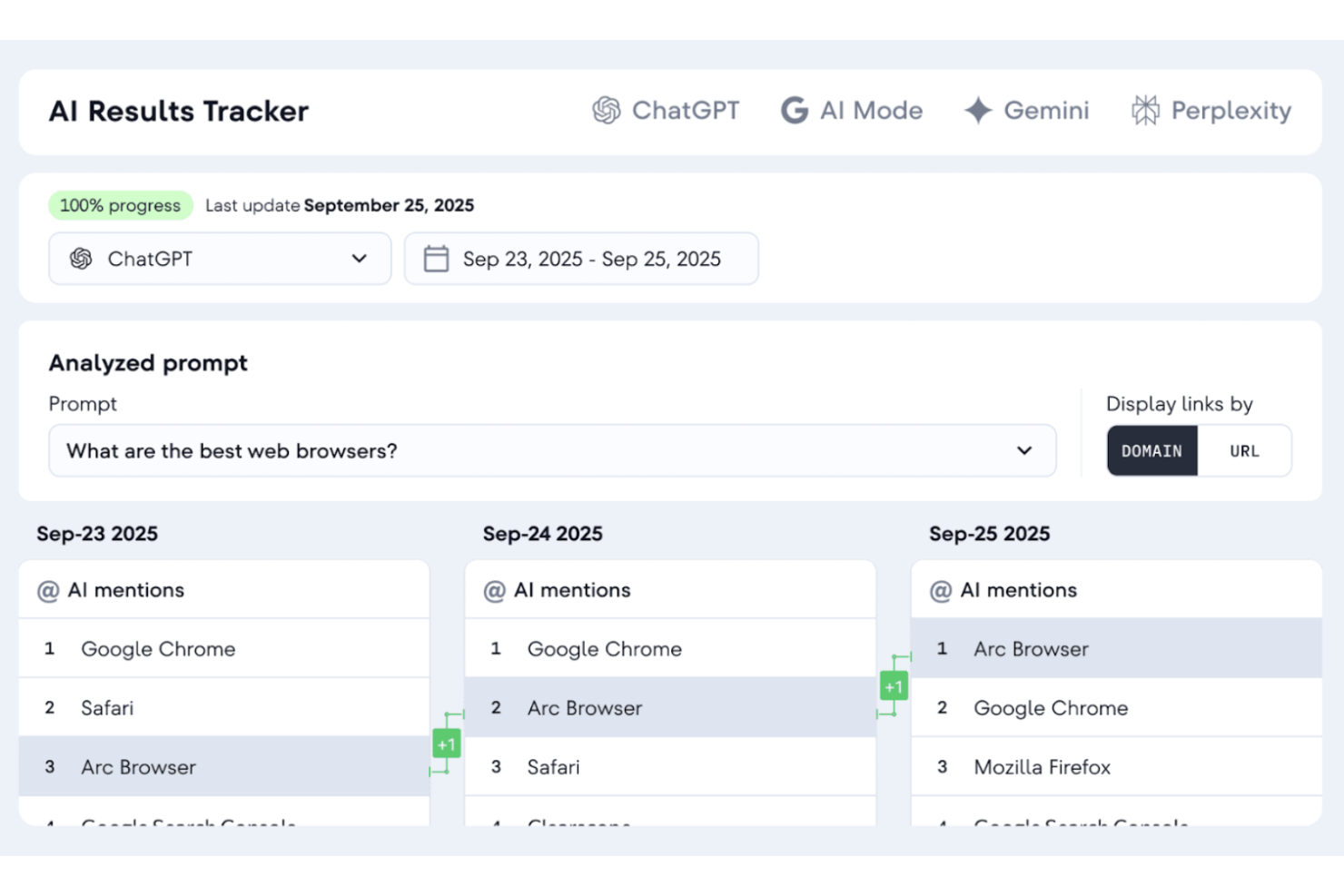
Tidio es una plataforma versátil de atención al cliente impulsada por IA, diseñada para mejorar la interacción de tu equipo con los clientes. Está orientada a pequeñas y medianas empresas en sectores como el comercio electrónico y finanzas, ayudándote a automatizar interacciones y agilizar los procesos de soporte. Al integrar chatbots con IA y funciones de chat en vivo, Tidio permite a tu empresa gestionar eficazmente las consultas de los clientes, reducir tareas de soporte de bajo nivel y mejorar la satisfacción general del cliente.
Por qué elegí Tidio
Elegí Tidio por su capacidad única de automatizar las interacciones de atención al cliente gracias a su Agente IA Lyro. Esta función ofrece respuestas humanas y no predefinidas a las consultas más comunes de los clientes, lo que ayuda a reducir la carga de trabajo de tu equipo de soporte. Además, las herramientas de IA de Tidio como Flows permiten automatizar tareas estructuradas, como la calificación de prospectos y los recordatorios de carrito abandonado, mejorando aún más tus acciones de fidelización. Estas características hacen de Tidio una herramienta valiosa para empresas que buscan optimizar su atención al cliente con soluciones basadas en IA.
Funciones clave de Tidio
Además de sus capacidades de automatización mediante IA, Tidio ofrece varias funciones adicionales que pueden beneficiar a tu equipo:
- Chat en vivo: Interactúa con los clientes en tiempo real para brindar asistencia inmediata y mejorar la experiencia de usuario.
- Sistema de tickets: Gestiona y prioriza las consultas de los clientes de manera eficiente a través de un proceso de soporte estructurado.
- Herramientas de automatización proactiva: Automatiza mensajes de seguimiento e interacciones para mantener a tu audiencia informada y conectada.
- Análisis y seguimiento: Obtén información sobre las interacciones y el desempeño del soporte para tomar decisiones basadas en datos.
Integraciones de Tidio
Las integraciones incluyen Salesforce, Zendesk, Shopify, WhatsApp, WordPress, Instagram, Messenger, Zapier e Intercom.
Pros and Cons
Pros:
- El chatbot de IA resuelve automáticamente consultas rutinarias
- Soporta más de 120 integraciones, incluyendo Shopify y HubSpot
- La bandeja multicanal centraliza chat, email y redes sociales
Cons:
- Se aplican límites de uso de IA en los planes más bajos
- La versión gratuita pierde efectividad por sus limitaciones de funciones

Mejor para asistencia en documentos de oficina

Microsoft Copilot es un asistente de IA integrado en Microsoft 365, diseñado para ayudar a los usuarios con la creación, edición y análisis de datos en documentos. Apoya a profesionales y equipos en sus tareas diarias de oficina.
Por qué elegí Microsoft Copilot: Está adaptado para la asistencia en documentos de oficina, proporcionando funciones como sugerencias inteligentes de texto y análisis automatizado de datos. Estas funcionalidades de IA te ayudan a redactar documentos y analizar hojas de cálculo más rápido. La integración de Copilot con las aplicaciones de Microsoft 365 lo convierte en una opción natural para las empresas que ya usan estas herramientas. Puedes confiar en él para agilizar tu flujo de trabajo y reducir tareas manuales.
Características destacadas e integraciones:
Características incluyen colaboración en tiempo real, revisión avanzada de gramática y automatización de tareas. Puedes trabajar con tu equipo en documentos de forma simultánea, y la herramienta también te ayuda a automatizar tareas repetitivas.
Integraciones incluyen Microsoft Word, Microsoft Excel, Microsoft PowerPoint, Microsoft Outlook, Microsoft Teams, OneDrive, SharePoint, Dynamics 365, Azure y Power BI.
Pros and Cons
Pros:
- Integración total con Microsoft 365
- Automatiza tareas de oficina repetitivas
- Ofrece sugerencias inteligentes de texto
Cons:
- Limitado al ecosistema de Microsoft
- Puede carecer de profundo análisis y matices en tareas complejas

Ideal para integrar IA en flujos de trabajo creativos

Para las empresas que buscan mejorar sus flujos de trabajo creativos, Adobe Firefly ofrece una solución atractiva. Diseñado para agilizar la producción de contenido, Firefly resulta especialmente atractivo para las empresas que desean escalar su producción creativa sin sacrificar la calidad ni el cumplimiento de la marca. Al aprovechar la IA generativa, aborda desafíos en la ideación, edición y producción a gran escala, convirtiéndose en una herramienta valiosa para los equipos de marketing, recursos humanos y ventas.
Por qué elegí Adobe Firefly
Elegí Adobe Firefly por su capacidad única de integrar IA generativa directamente en los flujos de trabajo creativos existentes, especialmente a través de herramientas como Adobe Photoshop e Illustrator. Esta integración permite a tu equipo acelerar la producción de contenido automatizando tareas de ideación y edición en masa, mientras mantiene la coherencia de la marca usando modelos de IA personalizados. La integración fluida de Firefly con el ecosistema de Adobe garantiza que tu equipo creativo pueda centrarse en el trabajo estratégico, mejorando tanto la productividad como la creatividad.
Funciones clave de Adobe Firefly
Además de su integración con el ecosistema de Adobe, Firefly ofrece varias funciones clave:
- Producción de contenido: Optimiza la ideación y la edición en masa, asegurando contenido de alta calidad que cumpla con la marca.
- Modelos personalizados: Permite a las empresas entrenar la IA con sus activos de marca, manteniendo una identidad visual coherente.
- Controles administrativos: Proporciona herramientas para gestionar el acceso de los usuarios y asegurar el cumplimiento de las políticas de marca.
- Licencias por suscripción: Ofrece opciones de licencia flexibles que incluyen indemnización de propiedad intelectual y derechos completos sobre el contenido generado.
Integraciones de Adobe Firefly
Las integraciones incluyen Adobe Photoshop, Adobe Illustrator, Adobe Express, Adobe Creative Cloud, Adobe Experience Manager, Adobe Stock, Adobe Acrobat, Adobe Premiere Pro, Adobe After Effects y Adobe InDesign.
Pros and Cons
Pros:
- Edición de video generativa basada en instrucciones
- Herramientas de control del movimiento de cámara
- Sustitución de fondos impulsada por IA
Cons:
- Salidas de video limitadas a cinco segundos
- Se requiere suscripción para acceder a todas las funciones
HireVue
Ideal para IA en entrevistas por video
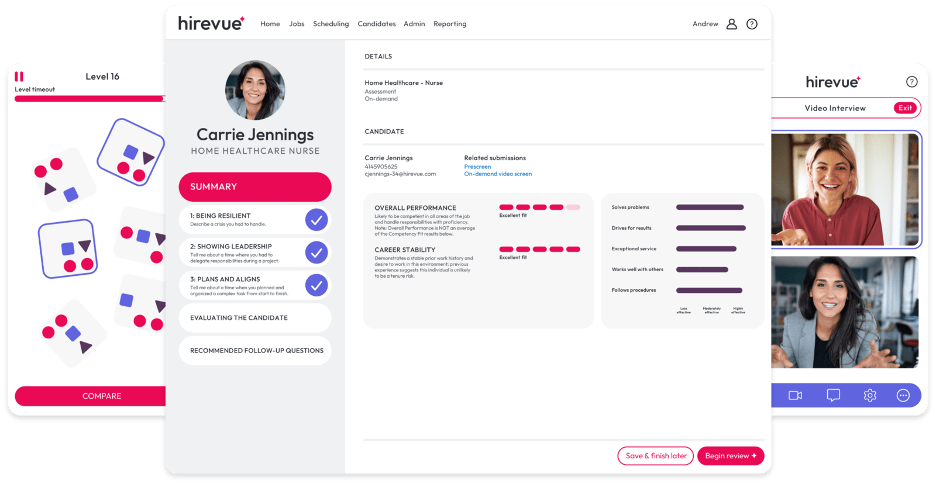
Hirevue es una plataforma de entrevistas digitales que utiliza IA para optimizar el proceso de selección para reclutadores y profesionales de recursos humanos. Se centra en entrevistas y evaluaciones por video, aportando valiosos conocimientos sobre la idoneidad de los candidatos.
Por qué elegí Hirevue: Se especializa en entrevistas por video con IA, ofreciendo funciones como evaluaciones de candidatos impulsadas por IA y programación automática de entrevistas. La plataforma analiza las respuestas de los candidatos para identificar rasgos y habilidades clave. La capacidad de Hirevue para automatizar y mejorar el proceso de entrevistas lo distingue de los métodos tradicionales.
Funciones e integraciones destacadas:
Funciones que incluyen plantillas de entrevistas personalizables, herramientas de evaluación de candidatos y análisis en tiempo real. Puede adaptar las entrevistas para que coincidan con las necesidades de su empresa. Las herramientas de evaluación proporcionan información sobre el desempeño del candidato, ayudándole a tomar decisiones de contratación informadas.
Integraciones incluyen Workday, Greenhouse, iCIMS, SAP SuccessFactors, Oracle Taleo, ADP, Lever, SmartRecruiters, BambooHR y Jobvite.
Pros and Cons
Pros:
- Admite reclutamiento global con evaluaciones en video multilingües
- Brinda información sobre los candidatos basada en IA
- Automatiza la programación de entrevistas
Cons:
- Costoso para organizaciones pequeñas
- Personalización limitada para industrias específicas
Otras herramientas de IA
Estas son algunas opciones adicionales de herramientas de IA que no han entrado en mi lista, pero que merece la pena conocer:
- Eightfold AI
Ideal para emparejamiento de talento con IA
- Paradox
Ideal para chatbots de reclutamiento
- Degreed
Ideal para rutas de aprendizaje impulsadas por IA
- Leapsome
Ideal para IA de gestión del desempeño
- Trupeer
Ideal para la generación de guiones con IA
- Carly AI
Mejor para transformar la comunicación en eventos


Cómo Evalúo las Herramientas de IA
Cada herramienta en esta lista tiene que ofrecer inteligencia artificial que realmente marque la diferencia—ya sea identificando riesgos de rotación antes de que se conviertan en renuncias o recortando días en tu ciclo de contratación mediante la selección inteligente de candidatos. Divido mi evaluación en funcionalidades básicas que toda herramienta debe tener para calificar y factores diferenciadores que separan las buenas opciones de las excelentes.
Funcionalidades Básicas (Requisitos Mínimos para Esta Lista)
Cuando selecciono herramientas para mi lista, califico cada una en una escala de 0 (no ofrece la funcionalidad) a 5 (sobresale en este área) para cada funcionalidad básica que se indica a continuación. Luego, calculo la puntuación total de la herramienta como un porcentaje. Cada herramienta debe alcanzar un puntaje total mínimo del 65% para ser considerada para su inclusión.
- Emparejamiento de Talento Impulsado por IA: Busco puntuaciones de candidatos impulsadas por aprendizaje automático que vayan más allá de la coincidencia por palabras clave—las herramientas deben inferir habilidades a partir del contexto y clasificar a los postulantes según criterios del rol.
- Análisis Predictivo de Personas: La herramienta debe prever resultados reales de RRHH como riesgo de fuga o necesidades de plantilla, no solo mostrar paneles históricos con una etiqueta de "IA".
- Creación de Contenido Generativo con IA: Verifico si la herramienta genera contenido de RRHH útil (descripciones de puestos, cartas de oferta, borradores de políticas) y permite editar el tono y el contexto.
- Asistente Conversacional de IA: Un buen asistente de IA responde preguntas como "¿Cuántos días de PTO me quedan?" consultando datos en tiempo real, no solo enlazando a una página de preguntas frecuentes estática.
- Automatización Inteligente de Flujos de Trabajo: Evalúo si las automatizaciones se adaptan según los datos de entrada—como asignar tareas de incorporación según el departamento y el cargo—en lugar de seguir reglas rígidas de si/entonces.
- Detección de Sesgos y Controles de Equidad: Las herramientas deben señalar lenguaje sesgado en publicaciones de empleo o patrones de puntuación en evaluaciones y proporcionar registros auditables que los equipos de RRHH puedan revisar verdaderamente.
Una vez que tengo una lista de herramientas que cumplen con estos criterios, considero qué distingue a cada plataforma.
Factores Diferenciadores (Lo que Distingue a los Proveedores)
Así es como comparo y contrasto diferentes proveedores:
Funciones Sobresalientes
Las salidas de IA explicables son muy importantes aquí—cuando una herramienta marca a alguien como riesgo de fuga o descarta a un candidato, los equipos de RRHH necesitan entender el porqué. También busco motores de inteligencia de habilidades que mapeen las capacidades de los empleados y recomienden trayectorias de movilidad interna, evitando la necesidad de contratar externamente cuando ya existe la persona adecuada. El análisis de sentimiento es otro diferenciador, especialmente las herramientas que analizan encuestas rápidas y comentarios abiertos para detectar caídas de compromiso antes de que se reflejen en la rotación.
Más Allá de las Funcionalidades
El cumplimiento y la gobernanza responsable de la IA tienen un peso importante en mi evaluación—verifico si los proveedores documentan auditorías de sesgos y cumplen con regulaciones como la Ley de IA de la UE o la Ley Local 144 de NYC. Las integraciones con sistemas de información de RRHH también son relevantes porque una herramienta de IA que no se conecta con tu instancia de Workday, BambooHR o ADP crea silos de datos que afectan cada uno de los insights que genera. También considero la postura en privacidad de datos, particularmente si los datos de empleados se utilizan para entrenar modelos de base y si existen opciones regionales de residencia de datos.
Cómo elegir herramientas de IA
Es fácil perderse entre largas listas de funciones y estructuras de precios complejas. Para ayudarte a mantener la concentración mientras llevas a cabo tu proceso único de selección de software, aquí tienes una lista de factores que debes tener en cuenta:
| Factor | Qué debes tener en cuenta |
| Escalabilidad | ¿Puede la herramienta crecer al ritmo de tus necesidades? Busca soluciones que gestionen un aumento de datos y usuarios sin perder rendimiento. Comprueba las opciones de escalabilidad. |
| Integraciones | ¿Funciona con tus sistemas actuales? Asegúrate de que sea compatible con tus herramientas actuales para evitar interrupciones y maximizar la eficiencia. |
| Personalización | ¿Puedes adaptarla a tus procesos? Busca flexibilidad en los ajustes y las configuraciones para adaptarla a tus flujos de trabajo específicos. |
| Facilidad de uso | ¿Es fácil de usar para tu equipo? Prueba la interfaz y la navegación. Una curva de aprendizaje pronunciada puede dificultar su adopción. |
| Implementación e incorporación | ¿Con qué rapidez puedes empezar? Evalúa los recursos y el soporte disponibles para una transición fluida, como la formación y la asistencia de configuración. |
| Coste | ¿Se ajusta a tu presupuesto? Compara los planes de precios con tu presupuesto y considera el coste total, incluidas posibles tarifas ocultas. |
| Medidas de seguridad | ¿Existen medidas de protección de datos? Comprueba que haya cifrado, controles de acceso y cumplimiento de la normativa de protección de datos para proteger la información confidencial. |
| Disponibilidad del soporte | ¿Contarás con ayuda fiable cuando la necesites? Busca opciones de soporte las 24 horas del día, los 7 días de la semana, y evalúa la calidad del servicio de atención al cliente ofrecido. |
¿Qué son las herramientas de IA?
Las herramientas de IA son aplicaciones de software que utilizan inteligencia artificial, incluido el aprendizaje automático, el procesamiento del lenguaje natural, el análisis predictivo y la automatización, para realizar tareas que normalmente requieren el esfuerzo humano. Ayudan a los equipos a analizar datos, generar contenido, tomar decisiones y completar el trabajo rutinario de forma más rápida y precisa.
A diferencia del software tradicional, que sigue reglas fijas, las herramientas de IA aprenden de los datos. Esto les permite adaptarse con el tiempo, identificar patrones y mejorar la calidad de sus recomendaciones o resultados. Las utilizan profesionales de muchos ámbitos, como recursos humanos, marketing, ingeniería, operaciones, atención al cliente y dirección ejecutiva, porque permiten aumentar la eficiencia y descubrir información que sería difícil detectar manualmente.
Entre los tipos habituales de herramientas de IA se incluyen:
- Herramientas de IA generativa (por ejemplo, ChatGPT y Claude) que crean texto, imágenes o vídeos
- Asistentes de IA (por ejemplo, Copilot y Gemini) que ayudan con la redacción, la investigación y las tareas de oficina
- Herramientas de análisis y generación de información que descubren patrones en grandes conjuntos de datos
- Herramientas de IA para contratación y recursos humanos que evalúan a los candidatos y ayudan a gestionar el rendimiento
- Herramientas de automatización y gestión de flujos de trabajo que se encargan de tareas repetitivas o activan acciones en distintos sistemas
En conjunto, estas herramientas ayudan a las organizaciones a optimizar sus operaciones, personalizar las experiencias, mejorar la toma de decisiones y ampliar el trabajo que tradicionalmente requería grandes cantidades de tiempo y esfuerzo manual. A medida que la IA se integra cada vez más en el software de uso diario, estas herramientas se consideran cada vez más componentes esenciales de las pilas tecnológicas modernas de los entornos de trabajo.
Características de las herramientas de IA
Al seleccionar herramientas de IA, presta atención a las siguientes características clave:
- Procesamiento del lenguaje natural: Permite que las herramientas comprendan y respondan al lenguaje humano, lo que hace que las conversaciones con un bot de IA o una herramienta de redacción sean más intuitivas y útiles.
- Análisis predictivo: Utiliza datos y aprendizaje automático para predecir tendencias, mejorar la planificación y ayudar en la toma de decisiones relacionadas con el contenido, el marketing y las operaciones.
- Capacidades de aprendizaje automático: Permiten que la IA mejore su precisión y rendimiento a medida que procesa más datos, ya sean textos, audios o imágenes.
- Gestión automatizada de tareas: La IA puede realizar acciones como transcribir notas o generar resúmenes a partir de pódcast y grabaciones de reuniones con IA, lo que ayuda a los equipos a ahorrar tiempo.
- Visualización de datos: Crea informes y gráficos visuales que ayudan a los usuarios a interpretar los resultados más rápidamente sin tener que revisar datos sin procesar ni documentos de texto.
- Análisis de sentimientos: Ayuda a identificar el tono emocional en los comentarios de los clientes, las reseñas o el contenido de las redes sociales, lo que permite a los equipos reaccionar con rapidez y de forma adecuada.
- Modelos de IA personalizables: Ofrecen a las empresas flexibilidad para adaptar las funciones a usos específicos, ya necesiten edición de imágenes de alta calidad, conversión de texto a voz o generación automatizada de contenido.
- Información en tiempo real: Proporciona comentarios inmediatos durante tareas como la transcripción en directo, el seguimiento del rendimiento o los resúmenes de reuniones elaborados por asistentes.
- Compatibilidad con integraciones: Garantiza que las herramientas funcionen correctamente con plataformas como Google AI, Google Gemini, Adobe u otros servicios que tu equipo ya utilice para gestionar flujos de trabajo o publicar páginas web.
- Medidas de seguridad: Protege la información privada y los datos de las reuniones mediante cifrado, controles de acceso y estándares de cumplimiento.
- Capacidades creativas: Algunas herramientas de IA incluyen funciones adicionales, como generadores de imágenes con IA, edición de vídeo o la posibilidad de generar imágenes mediante plataformas, que resultan útiles para los equipos que producen contenido visual además de su trabajo basado en texto.
Ventajas de las herramientas de IA
La implementación de herramientas de IA ofrece varias ventajas para tu equipo y tu empresa. Estas son algunas de las que puedes esperar:
- Mayor eficiencia: Una IA potente puede automatizar tareas repetitivas, ayudando a tu equipo a ahorrar tiempo y centrarse en trabajos de mayor valor. Las herramientas de productividad y las funciones de gestión de tareas hacen que los flujos de trabajo diarios sean más rápidos y eficaces.
- Mejor toma de decisiones: Los sistemas de IA basados en datos en tiempo real y análisis predictivos te ayudan a tomar decisiones más inteligentes con mayor precisión. Tanto si evalúas campañas como si optimizas operaciones, la IA te proporciona información más clara.
- Comunicación mejorada: La tecnología de redacción mediante IA y de lenguaje natural ayuda con la atención al cliente, la creación de contenido y las respuestas automatizadas. Esto hace que la comunicación sea más rápida y coherente en las redes sociales, las interfaces de chat y la mensajería interna.
- Experiencias personalizadas: La generación de contenido mediante IA y los modelos personalizables te permiten adaptar los mensajes, las ofertas y los recorridos de los usuarios en función de las preferencias individuales. Esto da lugar a interacciones más relevantes y a una mayor participación.
- Mejor comprensión de los datos: Las herramientas de visualización convierten la información compleja en informes y paneles claros, lo que permite a los equipos interpretar el rendimiento, las tendencias y los datos de los motores de búsqueda sin necesidad de realizar análisis exhaustivos.
- Reducción de sesgos: Los procesos de toma de decisiones basados en IA pueden ayudar a reducir los juicios subjetivos de las personas en tareas como la contratación, el servicio de atención al cliente o la moderación de contenido, promoviendo resultados más justos.
- Ahorro de costes: La automatización de los flujos de trabajo, la producción de contenido y los procesos rutinarios ayuda a reducir los costes laborales y mejora la calidad de los resultados. Los últimos avances en IA, como la edición de imágenes y los generadores de vídeo mediante IA, también reducen la necesidad de utilizar herramientas externas o recurrir a servicios creativos externos.
Costes y precios de las herramientas de IA
Seleccionar herramientas de IA requiere comprender los distintos modelos de precios y planes disponibles. Los costes varían en función de las funciones, el tamaño del equipo, los complementos y otros factores. La siguiente tabla resume los planes habituales, sus precios medios y las funciones que suelen incluir las soluciones de herramientas de IA:
Tabla comparativa de planes para herramientas de IA
| Tipo de plan | Precio medio | Funciones habituales |
| Plan gratuito | $0 | Automatización básica, análisis de datos limitado e integraciones esenciales. |
| Plan personal | $5-$300/usuario/mes | Análisis avanzado, ajustes personalizables y asistencia prioritaria. |
| Plan para empresas | $30-$600/usuario/mes | Informes completos, herramientas de colaboración en equipo y opciones de seguridad mejoradas. |
| Plan empresarial | Precios personalizados | Personalización completa, gestión de cuentas específica y seguridad de nivel empresarial. |
Preguntas frecuentes sobre herramientas de IA
Estas son algunas respuestas a preguntas frecuentes sobre las herramientas de IA:
¿Qué problemas de compatibilidad pueden tener las herramientas de IA con mi conjunto de tecnologías?
Al incorporar herramientas de IA a tu flujo de trabajo, es importante confirmar que funcionan con tus sistemas y automatizaciones actuales. Algunas aplicaciones y plataformas de IA se conectan fácilmente mediante API, pero el software antiguo o las configuraciones personalizadas pueden requerir un mayor esfuerzo técnico. Antes de adoptar un producto de IA, revisa los requisitos de integración, los formatos de datos y si la herramienta admite conexiones sin código o requiere la asistencia de un desarrollador. Esto es especialmente importante para los equipos que utilizan agentes de IA, LLM o modelos de lenguaje de gran tamaño en varias plataformas.
¿Pueden las herramientas de IA gestionar datos confidenciales de forma segura?
Sí, muchas plataformas de IA incluyen funciones de seguridad para proteger la información confidencial, como cifrado, controles de acceso y estándares de cumplimiento como el RGPD. Al evaluar soluciones de IA generativa o chatbots de IA, solicita documentación sobre la conservación de datos, las políticas de privacidad y las certificaciones. Confirma siempre si algún nivel gratuito de IA o servicio basado en la nube cumple las necesidades de seguridad de tu organización antes de implementarlo.
¿Qué debo tener en cuenta al evaluar el ROI de las herramientas de IA?
Para medir el ROI, analiza el valor obtenido al automatizar tareas repetitivas y mejorar la productividad. Realiza un seguimiento de cómo la IA reduce las tareas manuales, agiliza la redacción o los flujos de trabajo de contenidos y ayuda en áreas como el SEO, la investigación y la toma de decisiones. Ten en cuenta tanto el ahorro de tiempo como la calidad de los resultados. Los casos prácticos y los comentarios de los clientes pueden ayudarte a comprender cómo utilizan las herramientas de IA equipos similares para mejorar el rendimiento y reducir los costes operativos.
¿Cuáles son las preocupaciones o limitaciones habituales de las herramientas de IA?
Las herramientas de IA son potentes, pero tienen limitaciones que los compradores deben comprender antes de adoptarlas. Uno de los principales desafíos son los problemas de precisión, ya que la IA puede generar resultados incorrectos o incompletos y presentarlos con seguridad. Muchas herramientas también plantean consideraciones sobre la privacidad y la seguridad de los datos, especialmente cuando requieren acceso a archivos internos, mensajes o información de clientes. Las organizaciones deben confirmar cómo se almacenan, procesan y protegen los datos.
También pueden surgir carencias de integración, sesgos en los resultados y necesidades de supervisión continua, ya que los equipos deben revisar periódicamente el trabajo generado por la IA para comprobar su calidad y equidad. Además, las herramientas de IA pueden introducir costes ocultos mediante precios basados en el uso o complementos. Comprender estas limitaciones te ayuda a evaluar dónde encaja la IA en tu flujo de trabajo y qué medidas de protección puedes necesitar.