

10 mejores programas de RSC para el impacto social en 2026

10 Selección de los mejores programas de RSC


Adentrarse en el mundo de la responsabilidad social corporativa puede resultar abrumador. Como profesional de RR. HH., tienes la responsabilidad de alinear los esfuerzos de tu equipo con los valores de la empresa y su impacto en la sociedad. Ahí es donde entra en juego el software de RSC: te ayuda a gestionar estas iniciativas de forma eficaz.
Según mi experiencia, encontrar la herramienta adecuada puede marcar la diferencia. He probado y analizado de forma independiente varias opciones para ofrecerte las mejores selecciones. Encontrarás información práctica adaptada a tus necesidades, que te ayudará a superar los desafíos habituales a los que te enfrentas.
Encontrarás un análisis directo e imparcial de las principales soluciones de software de RSC. Tanto si acabas de iniciarte en la RSC como si buscas actualizar tus herramientas, esta lista te ayudará a tomar decisiones informadas.
Por qué confiar en nuestras reseñas de software
Nuestro equipo lleva probando y evaluando software desde 2012. Como expertos en RR. HH., sabemos lo difícil —y lo importante— que es elegir el software adecuado.
Para esta guía, evaluamos las herramientas mediante pruebas prácticas e investigación independiente, puntuando las herramientas según nuestros criterios de selección. También nos basamos en la experiencia de líderes de opinión del sector y de profesionales de RR. HH. en activo.
Nuestras reseñas reflejan nuestro criterio editorial humano, no un discurso de ventas.
Resumen de los mejores programas de RSC
Este cuadro comparativo resume los detalles de precios de mis principales selecciones de software de RSC para ayudarte a encontrar la mejor opción según tu presupuesto y las necesidades de tu empresa.
| Tool | Best For | Trial Info | Price | ||
|---|---|---|---|---|---|
| 1 | Ideal para donaciones corporativas | Demo gratuita disponible | Precio a consultar | Website | |
| 2 | Ideal para donación compartida | Demo gratuita + plan gratuito disponible | Desde $195/mes | Website | |
| 3 | Ideal para la gestión de riesgos en la cadena de suministro | Demostración gratuita disponible | Precio a consultar | Website | |
| 4 | Ideal para microacciones | Demostración gratuita disponible | Precio a consultar | Website | |
| 5 | Ideal para organizaciones multilingües | Demostración gratuita disponible | Precios a consultar | Website | |
| 6 | Ideal para campañas de impacto social | Demo gratis + plan gratuito disponible | Desde $99/mes | Website | |
| 7 | Mejor para la gestión de sostenibilidad | Demo gratuita disponible | Precio a consultar | Website | |
| 8 | Mejor para desafíos sociales | Demo gratuita disponible | Precio a consultar | Website | |
| 9 | Ideal para voluntariado local | Demostración gratuita disponible | Precios bajo consulta | Website | |
| 10 | Ideal para la gestión de voluntariado | Demostración gratuita disponible | Precio a consultar | Website |
Análisis de los mejores programas de RSC
Este es mi análisis del mejor software de RSC disponible, con breves descripciones de sus principales funciones y explicaciones de por qué los he incluido en esta lista:

Ideal para donaciones corporativas
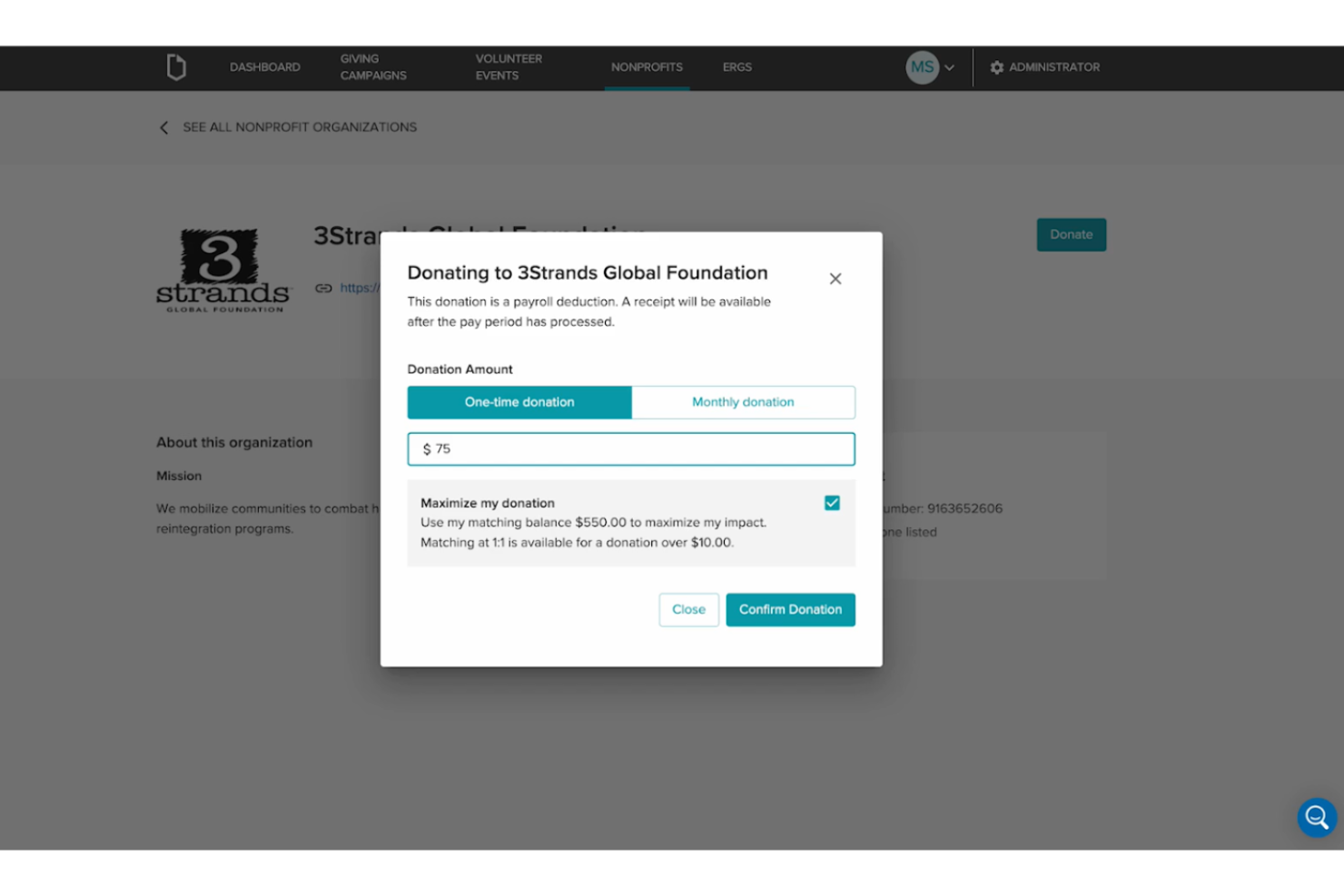
Submittable se destaca cuando los programas de donaciones en el lugar de trabajo y subvenciones necesitan visibilidad, escalabilidad y responsabilidad. Recomiendo esta opción cuando quieres crear campañas de donaciones de alto volumen y con marca, que gestionen todo desde la recepción hasta los informes en un solo lugar.
Lo que me gusta de Submittable es que puedes gestionar subvenciones, donaciones y programas de donación de empleados en conjunto, lo cual facilita a los equipos de RRHH y RSC lanzar, hacer seguimiento y celebrar el impacto de las iniciativas de donaciones corporativas.
Lo mejor de Submittable para
- Empresas que gestionan programas de donaciones o subvenciones a gran escala
- Equipos de RRHH y RSC que necesitan un seguimiento unificado para donaciones y voluntariado
No es ideal Submittable para
- Pequeñas empresas con necesidades básicas de RSC
- Equipos que buscan flujos de trabajo de donaciones altamente personalizados o completamente a medida
Lo que diferencia a Submittable
Submittable está diseñado para empresas que desean un enfoque unificado en la gestión de subvenciones, donaciones y donaciones de empleados. A diferencia de los generadores de formularios genéricos o los rastreadores de proyectos, Submittable espera que los equipos operen programas de responsabilidad social corporativa estructurados de principio a fin en un solo lugar.
Considero que esto funciona bien para grupos que necesitan procesos sólidos e informes centralizados en varias iniciativas de RSC, en lugar de donaciones improvisadas.
Compromisos al usar Submittable
Submittable está optimizado para programas estandarizados y flujos de trabajo integrados, pero se pierde la flexibilidad de personalizar profundamente los procesos de donación o crear automatizaciones complejas fuera de su marco.
Pros and Cons
Pros:
- Amplia biblioteca de tutoriales en línea
- Departamento de atención al cliente proactivo
- Buena variedad de plantillas de informes
Cons:
- Las opciones de traducción tienen un costo adicional
- La plataforma podría ser más intuitiva

Millie
Ideal para donación compartida
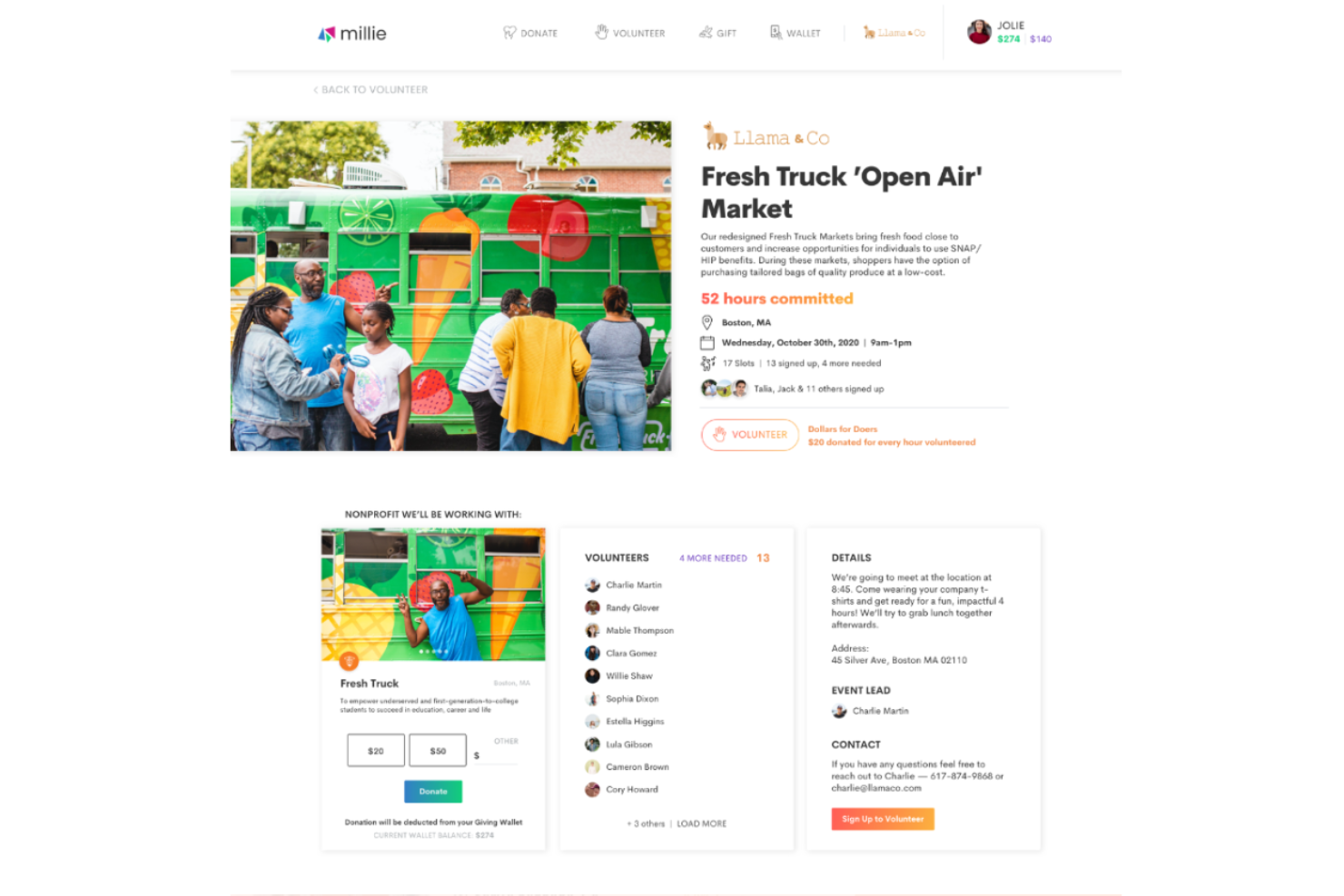
Millie se gana su lugar por la forma directa en que aborda los programas de donación compartida, algo que muchas herramientas de RSC suelen tratar como una ocurrencia tardía. He visto empresas utilizar Millie para gestionar donaciones emparejadas, hacer seguimiento de donativos y motivar la participación en voluntariado desde un solo panel de control.
Lo que más me gusta es cómo las interacciones de los donantes y el seguimiento de las donaciones emparejadas están totalmente consolidados para los administradores. Esto es ideal cuando quieres centralizar y realmente promover la donación de los empleados, no solo apoyarla en segundo plano.
Mejor uso de Millie
- Empresas que gestionan programas de donación compartida y voluntariado
- Líderes de RR. HH. o RSC que buscan una gestión sencilla de donaciones de empleados
Cuándo Millie no es ideal
- Organizaciones que buscan una gestión amplia de ESG o seguimiento de cumplimiento
- Equipos que necesitan gestión de subvenciones o informes complejos
Qué diferencia a Millie
Millie destaca por poner la donación de empleados y la donación compartida en el centro de su flujo de trabajo, en lugar de tratarlo como un complemento para suites más amplias de ESG o RR. HH. Comparado con plataformas como Benevity, Millie simplifica la configuración de programas y se enfoca menos en el cumplimiento o los datos globales de ESG. Es ideal cuando buscas involucramiento directo en campañas de donación, no tanto un seguimiento general de ESG.
Compromisos con Millie
Millie está optimizado para la gestión de donaciones, pero eso significa que perderás funcionalidad más profunda para informes sobre objetivos ESG o seguimiento de cumplimiento complejo. Si necesitas eso, notarás rápido sus limitaciones.
Pros and Cons
Pros:
- Mantiene a los empleados motivados con la gamificación
- Te ayuda a colaborar con diversas ONG
- Potentes funciones de reportes
Cons:
- Puede ser difícil sincronizar las horas de voluntariado en los reportes de nómina
- Las organizaciones globales pueden tener dificultades para encontrar ONG locales en algunas regiones

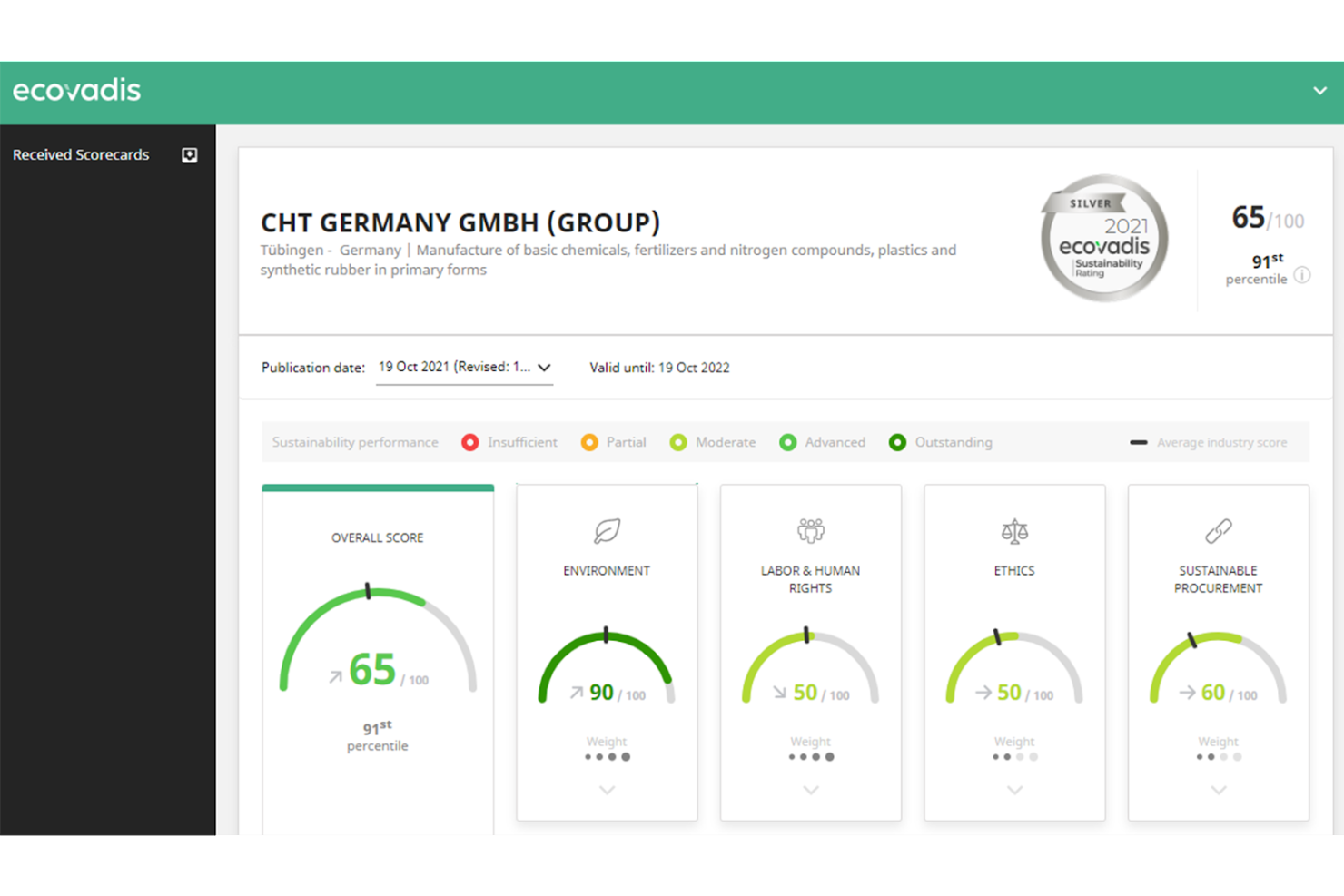
Ecovadis se destaca para mí por su enfoque en la evaluación de riesgos en la cadena de suministro y la RSE a gran escala. Lo que me gusta es cómo las organizaciones pueden evaluar la sostenibilidad de los proveedores usando un marco estándar, luego comparar y rastrear el riesgo de docenas o incluso miles de socios en un solo portal.
Esto funciona bien cuando necesitas reportar avances en RSE y ESG para una red de proveedores ampliada y deseas transparencia sin depender de hojas de cálculo.
Lo mejor de Ecovadis para
- Equipos de compras y sostenibilidad que gestionan riesgos de proveedores
- Empresas que necesitan evaluaciones estándar de RSE y ESG para sus proveedores
Ecovadis no es ideal para
- Pequeñas empresas con una base de proveedores sencilla
- Equipos que buscan iniciativas de RSE sin enfoque en la cadena de suministro
Lo que distingue a Ecovadis
Ecovadis está basado en la idea de que la sostenibilidad y el riesgo de los proveedores pueden estandarizarse y rastrearse a gran escala. A diferencia de herramientas como Salesforce o Coupa, que pueden ofrecer funciones de compras pero poco de evaluación estructurada de RSE para proveedores, Ecovadis pone la puntuación y la comparación de proveedores en el centro. En la práctica, esto funciona bien cuando tu flujo de trabajo requiere evaluaciones formalizadas de proveedores y validación externa.
Compromisos con Ecovadis
Ecovadis optimiza la puntuación consistente de los riesgos en la cadena de suministro, pero eso significa que se renuncia a funciones amplias de gestión de programas RSE fuera de la evaluación de proveedores. Si deseas organizar iniciativas internas de RSE, necesitarás otra herramienta para ello.
Pros and Cons
Pros:
- Los informes de puntuación estandarizados te ayudan a entender qué afecta tu sostenibilidad
- Puedes planificar acciones y recibir notificaciones sobre cuándo iniciarlas
- Permite subir fácilmente tus documentos para obtener la evaluación
Cons:
- La biblioteca de documentos puede resultar incómoda en ocasiones
- Traducciones limitadas para empresas internacionales


Benevity está en mi lista para programas de RSC que necesitan compromiso rápido y significativo a través de microacciones. Cuando veo empresas buscando formas de involucrar a empleados que no tienen tiempo para un voluntariado de un día completo, las actividades de Benevity, en formato breve, realmente logran resultados.
Aprecio cómo se pueden diseñar desafíos con objetivos específicos y seguir pequeñas contribuciones a gran escala. Las opciones de recompensa son versátiles, lo que mantiene a la gente participando de forma regular.
Lo Mejor de Benevity
- Empresas que gestionan campañas de microvoluntariado y donaciones de pequeña escala
- Organizaciones que necesitan opciones frecuentes y accesibles para la participación de empleados
Lo No Tan Bueno de Benevity
- Empresas que buscan funciones avanzadas de gestión de subvenciones
- Equipos enfocados en grandes eventos de voluntariado presencial
Qué Distingue a Benevity
Benevity está organizado para facilitar el acceso a la responsabilidad social corporativa de manera rápida y concreta. En lugar de una estructura basada en grandes eventos como la que verías en VolunteerMatch, invita a participar mediante acciones específicas y de pequeño formato en toda la plataforma. En la práctica, esto funciona mejor para empresas que desean mantener el compromiso frecuente y sin fricción, en vez de centrar los esfuerzos en algunos pocos proyectos importantes.
Compensaciones de Benevity
Benevity está optimizado para acciones accesibles a nivel micro, pero se pierde profundidad al intentar desarrollar programas de voluntariado más grandes y gestionados en profundidad con necesidades complejas de informes o logística.
Pros and Cons
Pros:
- Los empleados pueden registrar sus donaciones anuales y recibir certificados fiscales
- Informes visuales, personalizables y aptos para presentar a las partes interesadas
- Curva de aprendizaje suave
Cons:
- Crear programas de voluntariado de larga duración podría ser más sencillo
- Puede ser complicado configurar programas complejos de igualación de donaciones


Deed está en mi lista para organizaciones multilingües que necesitan escalar sus programas de responsabilidad social empresarial a través de distintas regiones. He notado que los equipos globales se benefician de la flexibilidad de Deed en el soporte de idiomas y de las campañas solidarias adaptadas culturalmente.
Lo que más me gusta es cómo permite localizar el voluntariado, las donaciones y el seguimiento de impacto para llegar a las personas en sus idiomas preferidos. Cuando tu plantilla está repartida por varios continentes, esto elimina barreras y ayuda a que todos participen.
Deed es ideal para
- Organizaciones multinacionales que llevan a cabo RSE en varios idiomas
- Empresas que priorizan campañas globales de voluntariado y donaciones
Deed no es recomendable para
- Pequeñas empresas con programas de RSE de una sola región
- Equipos que requieran análisis avanzados de impacto o comparativas de RSE
Qué diferencia a Deed
Deed adopta un enfoque global desde el principio, facilitando que las organizaciones involucren a sus empleados en todos los continentes. En lugar de asumir que todos trabajan desde una única sede (como ocurre con la mayoría de plataformas de RSE que conozco), espera que localices el impacto. A menudo veo que Deed se utiliza para apoyar donaciones y voluntariado en varios idiomas; esto funciona mejor cuando tienes una plantilla distribuida en distintas regiones y quieres que todos participen, independientemente del idioma que hablen.
Compensaciones de Deed
Deed está optimizado para una participación amplia y multinacional, pero se sacrifican los análisis avanzados y la comparación de datos, por lo que el análisis detallado de impacto de RSE es limitado.
Pros and Cons
Pros:
- La aplicación tiene una interfaz sencilla y limpia
- Convierte tus iniciativas de RSE en esfuerzos colaborativos
- Amplia biblioteca de recursos formativos
Cons:
- La comunicación de datos entre la app de escritorio y la versión móvil puede retrasarse ocasionalmente
- El panel de administración puede resultar abrumador para usuarios novatos

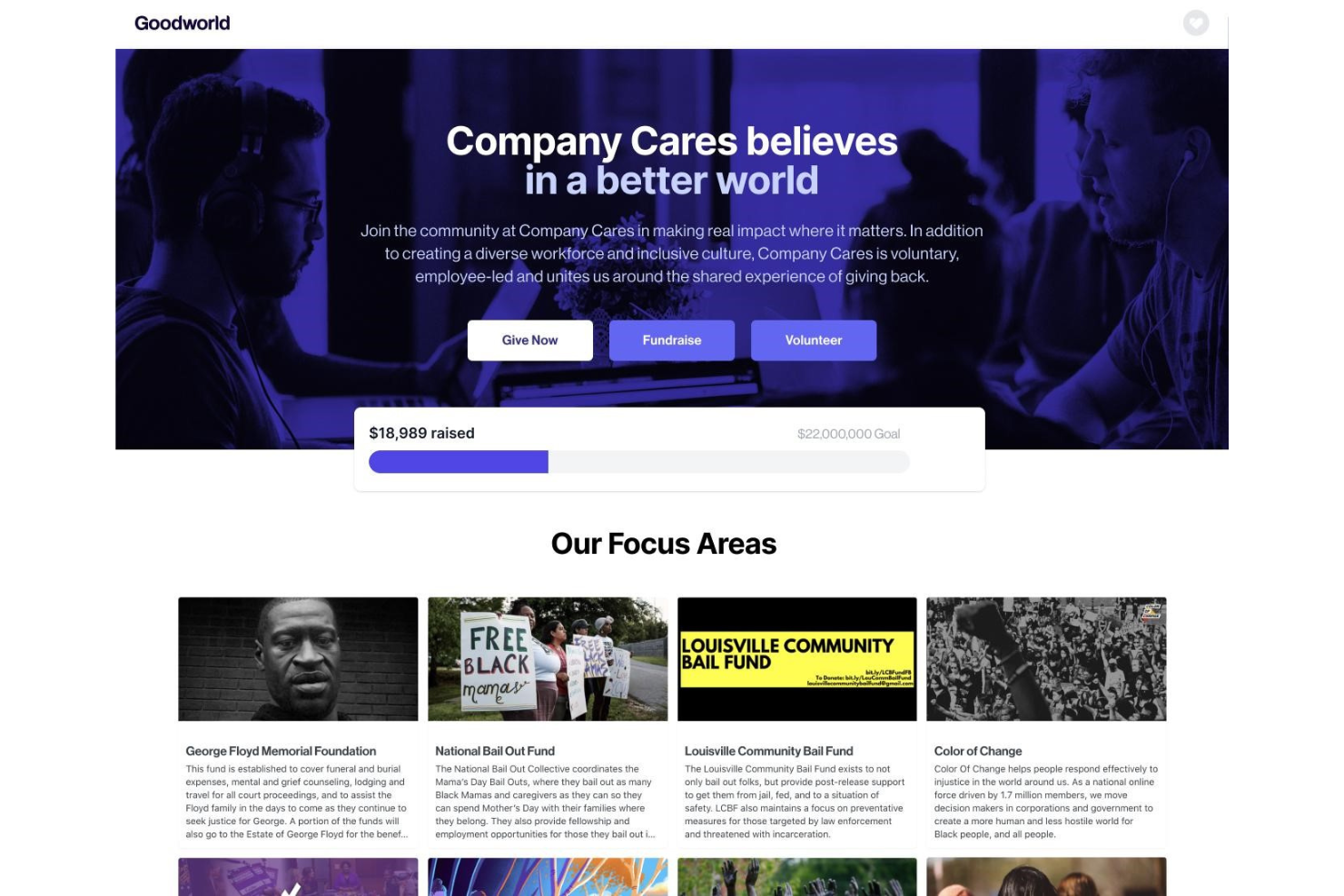
Goodworld tiene sentido para mí cuando los líderes de proyectos y los equipos de RR. HH. quieren activar campañas de impacto social sin perderse en donaciones o reportes manuales. Veo que el centro de gestión de campañas, el emparejamiento automático de donaciones y el seguimiento en vivo del impacto se utilizan realmente para vincular la donación de empleados, la recaudación de fondos y el voluntariado.
Goodworld es ideal para
- Líderes de RR. HH. y RSC que gestionan campañas de impacto social multicanal
- Empresas que priorizan el emparejamiento de donaciones, el voluntariado y los resultados medibles
Goodworld no es óptimo para
- Equipos que necesitan herramientas de compromiso de empleados más amplias fuera del impacto social
- Organizaciones con estructuras de programas RSC sumamente personalizados o complejos
Qué distingue a Goodworld
Goodworld está diseñado pensando en una RSC basada en campañas, a diferencia de herramientas como Benevity que adoptan un enfoque modular. Cuando uso Goodworld, noto que involucra a las personas haciendo que el emparejamiento de donaciones, las campañas y el voluntariado se sientan interconectados. Esto funciona mejor cuando quieres que tus esfuerzos de RSC sean visibles y orientados a la acción, no relegados como un programa de RR. HH. en segundo plano.
Compromisos con Goodworld
Goodworld optimiza el compromiso unificado y basado en campañas, por lo que renuncias a funciones de RR. HH. o de compromiso más amplias que se encuentran en plataformas de empleados más grandes. Si planeas gestionar otros programas relacionados con las personas desde un solo lugar, no es una buena opción.
Pros and Cons
Pros:
- Curva de aprendizaje suave
- Constructor de campañas mediante arrastrar y soltar
- Facilita la configuración de donaciones recurrentes
Cons:
- Puede ser un reto crear diseños que se vean bien en todos los dispositivos
- Los informes podrían ser más detallados

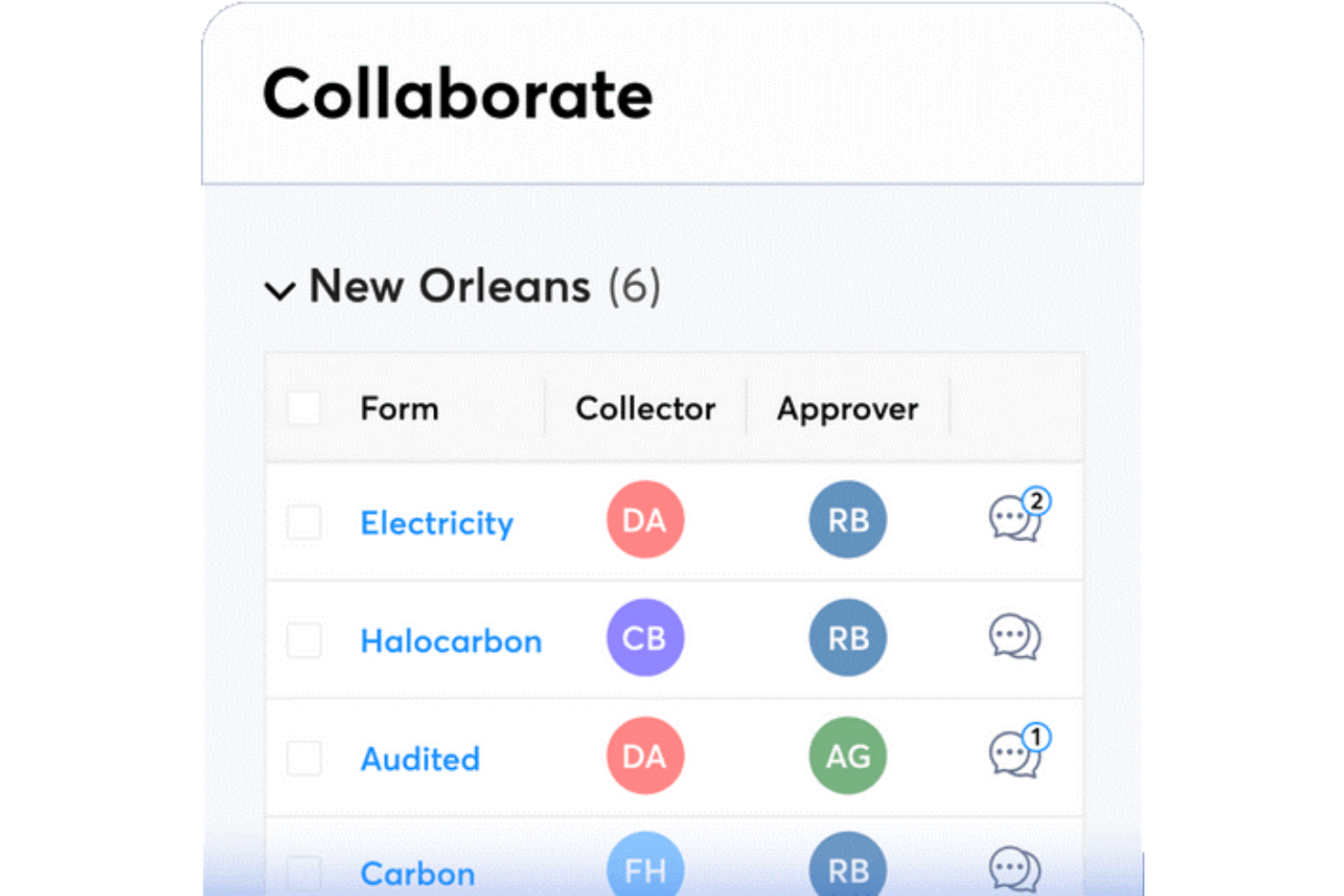
Metrio está en mi lista de candidatos porque es una de las únicas plataformas diseñadas específicamente para rastrear, gestionar e informar métricas de sostenibilidad junto con los datos principales de RSC. A menudo la recomiendo a organizaciones con necesidades de informes complejos que buscan mejorar la gestión del carbono, ESG e iniciativas sociales en un solo lugar. Lo que aprecio es la posibilidad de personalizar los paneles y las divulgaciones según los marcos específicos, por lo que no estás limitado a plantillas genéricas.
Mejor para
- Empresas que rastrean datos de ESG, carbono y RSC conjuntamente
- Organizaciones que priorizan informes de sostenibilidad y cumplimiento personalizables
No es ideal para
- Pequeñas empresas con necesidades básicas de informes de RSC
- Equipos que requieren herramientas integradas para la participación de empleados
Qué distingue a Metrio
Metrio adopta un enfoque orientado a los informes para los datos de sostenibilidad y RSC, de modo que puedes reunir métricas ambientales, sociales y de gobernanza en un solo lugar. A diferencia de los paneles genéricos en herramientas como Airtable o monday.com, Metrio espera que trabajes conforme a marcos y estándares del sector establecidos desde el principio.
En la práctica, esto tiene sentido cuando necesitas recopilar datos para divulgaciones reconocidas o informes de impacto.
Compromisos con Metrio
Metrio está optimizado para informes y cumplimiento genuinos, pero a cambio se sacrifica la flexibilidad en el seguimiento de proyectos impulsados por equipos. Si deseas gestionar programas de voluntariado o RSC liderados por empleados, echarás en falta funciones de flujo de trabajo dedicadas.
Pros and Cons
Pros:
- Implementación y puesta en marcha fácil
- Equipo de soporte útil
- Los informes tienen un aspecto excelente y pueden ser presentados a auditores o partes interesadas
Cons:
- La interfaz puede parecer anticuada a veces
- Crear informes complejos puede ser laborioso


GoodUp está en mi lista corta porque aborda una parte que la mayoría del software de RSC pasa por alto: convertir los desafíos sociales y las iniciativas impulsadas por empleados en programas estructurados y medibles dentro de tu empresa. Cuando he probado la plataforma, he visto cómo ayuda a los equipos a encontrar, lanzar y hacer seguimiento de nuevos proyectos vinculados a problemas del mundo real.
Lo que más me gusta es cómo puedes activar el compromiso usando plantillas de desafíos personalizables y ver el avance transparente hacia los objetivos de impacto social desde el primer día.
Lo mejor de GoodUp es para
- Organizaciones que lanzan iniciativas impulsadas por empleados o de impacto social
- Equipos de RSC que quieren compromiso a través de programas basados en desafíos
GoodUp no es ideal para
- Empresas que necesitan características avanzadas de gestión de subvenciones
- Equipos que buscan herramientas de RSC enfocadas en el seguimiento del cumplimiento
Lo que distingue a GoodUp
GoodUp adopta un enfoque basado en desafíos para la responsabilidad social corporativa, centrando todo en torno a objetivos concretos de impacto social e iniciativas lideradas por empleados. A diferencia de las plataformas de RSC que se enfocan en el cumplimiento o el seguimiento de donaciones, GoodUp se trata totalmente de la participación y el compromiso a través de programas colaborativos. En la práctica, esto encaja perfectamente con las empresas que buscan convertir las buenas intenciones en proyectos activos y medibles a los que la gente quiere sumarse.
Desventajas de GoodUp
GoodUp optimiza la participación práctica y la visibilidad, pero se pierden funciones avanzadas para la gestión de subvenciones o necesidades detalladas de cumplimiento. Si necesitas una administración profunda de programas, puedes notar la ausencia de esos controles.
Pros and Cons
Pros:
- Hace que sea fácil crear y compartir programas
- Excelente experiencia de incorporación
- Te ayuda a aumentar el compromiso de los usuarios con microacciones
Cons:
- Los administradores enfrentan una curva de aprendizaje
- Opciones de personalización limitadas

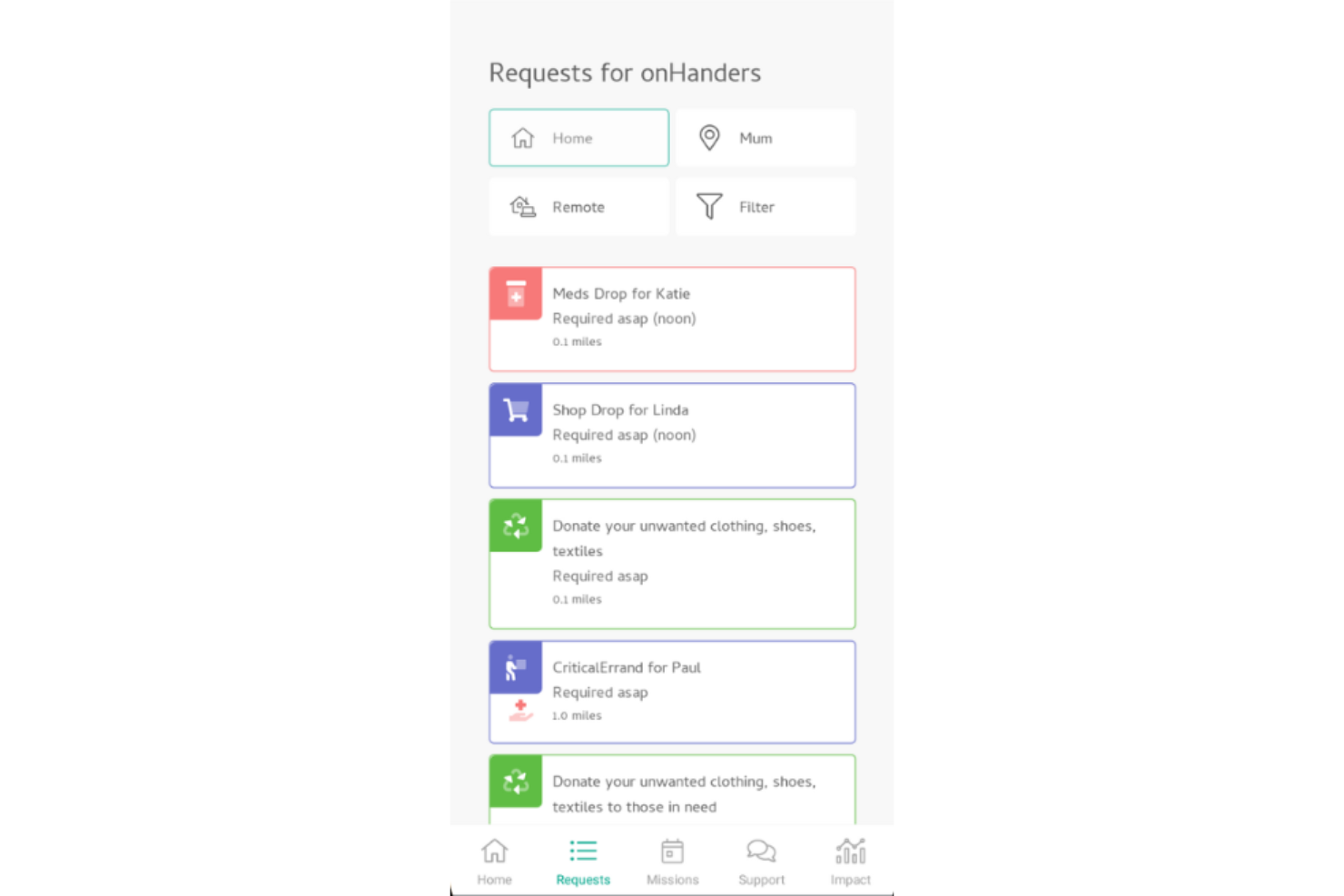
OnHand me llama la atención porque conecta directamente a las empresas y empleados con oportunidades de voluntariado hiperlocales. Cuando deseas que el trabajo de responsabilidad social corporativa (RSC) tenga un impacto real y visible en tus comunidades, esta es la herramienta en la que confío.
Lo que aprecio es cómo OnHand automatiza la vinculación de empleados con causas locales en función de intereses, horarios y habilidades. Es ideal para equipos que buscan una participación auténtica que vaya más allá de donaciones o eventos puntuales.
OnHand es ideal para
- Empresas que priorizan el voluntariado comunitario local y práctico
- Programas de RSC enfocados en un impacto comunitario real y medible
OnHand no es ideal para
- Equipos que buscan una red global y amplia de voluntariado
- Organizaciones que necesitan una gestión profunda de donaciones, aportes o subvenciones de empleados
Qué hace diferente a OnHand
OnHand está diseñado para conectar a los empleados con voluntariado local que sea rápido de iniciar y sencillo de unirse. A diferencia de plataformas como Benevity, que se centran en donaciones y contribuciones corporativas a gran escala, OnHand espera que las personas se involucren directamente en sus propias comunidades. En la práctica, esto se siente menos abstracto y más personal—especialmente para empresas que buscan un involucramiento local visible.
Compensaciones de OnHand
Obtienes una experiencia de voluntariado local mucho más rica, pero ese enfoque significa perder alcance global y gestión avanzada de organizaciones benéficas. Si tu estrategia de RSC se basa en apoyar causas internacionales, OnHand no cubrirá todas tus necesidades.
Pros and Cons
Pros:
- Aplicación móvil útil
- Ofrece una amplia variedad de causas sociales
- Curva de aprendizaje suave
Cons:
- Algunas causas predeterminadas no tienen un objetivo claro
- Sin función de búsqueda de programas

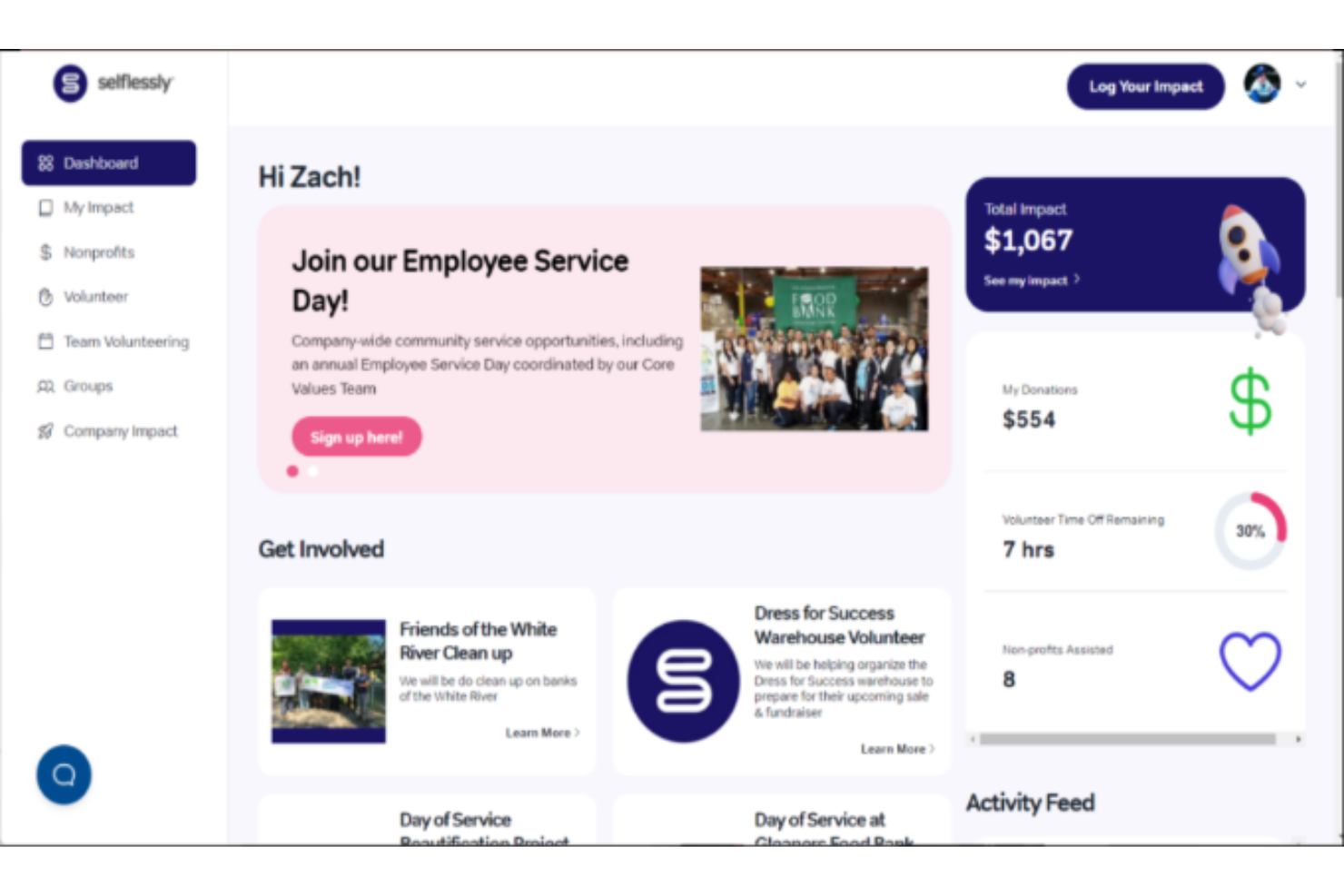
Selflessly destaca para mí en la gestión de voluntariado porque combina seguimiento, reconocimiento y compromiso de una manera que rara vez veo en otros lugares. Cuando trabajo con equipos de RRHH construyendo programas de RSC, esta es una de las pocas herramientas que realmente hace que la gestión del voluntariado en toda la empresa sea intuitiva—desde la publicación de oportunidades hasta los informes de impacto automatizados.
Lo que más me gusta es cómo Selflessly gestiona los registros coordinados de grupos y el registro de horas, así no tienes que juntar hojas de cálculo ni buscar actualizaciones de diferentes equipos. Usualmente lo recomiendo cuando las empresas quieren dar al voluntariado un papel central en su programa de RSC, y no tratarlo como algo secundario.
Mejor uso de Selflessly
- Equipos de RRHH y RSC que llevan programas de voluntariado continuos
- Empresas que desean el registro automatizado de voluntariado y registros grupales
Para qué no es ideal Selflessly
- Organizaciones que se centran principalmente en el emparejamiento de donaciones
- Equipos que necesitan reportes complejos y personalizados en todos los pilares de RSC
Qué distingue a Selflessly
Selflessly está diseñado para que el voluntariado sea fácil de coordinar, registrar y reconocer. A diferencia de plataformas integrales de RSC como Benevity, Selflessly pone el foco en el voluntariado sobre todo lo demás, anticipando que buscas una manera ágil de organizar, promover y reportar eventos de voluntariado. En la práctica, esto lo hace ideal para equipos de RRHH y RSC que quieren menos complicaciones al lanzar y administrar programas de voluntariado para empleados.
Compromisos en Selflessly
Selflessly está optimizado para el voluntariado, por lo que no tiene la misma profundidad en gestión de donaciones ni reportes más amplios de RSC. Si buscas centralizar todas las iniciativas de RSC en una sola herramienta, puede que necesites otra solución para esas necesidades.
Pros and Cons
Pros:
- Excelente para registrar el impacto de tu equipo
- Permite crear campañas automatizadas de emparejamiento de donaciones con facilidad
- Fácil de navegar y usar
Cons:
- Los filtros de búsqueda podrían ser más detallados
- Algunas organizaciones benéficas aparecen con diferentes nombres, lo que dificulta encontrarlas
Otros programas de RSC
Estas son otras excelentes herramientas de RSC que analicé para este artículo. Aunque no las incluí en mi lista principal, deberías echarles un vistazo:
- Chezuba
Ideal para organizaciones globales
- Salesforce Philanthropy Cloud
Ideal para recomendaciones basadas en la ubicación
- Pachama
Ideal para programas de conservación forestal


Cómo Evalúo el Software de RSC
Divido mi evaluación en dos capas: la funcionalidad principal que toda herramienta de RSC debe tener—como voluntariado, donaciones con igualación y reportes de impacto—y los diferenciadores que distinguen unas plataformas de otras.
Funcionalidad Básica (Requisitos Indispensables Para Esta Lista)
Cuando selecciono herramientas para mi lista, califico cada una en una escala del 0 (no ofrece la funcionalidad) al 5 (destaca en esta área) para cada funcionalidad principal que se detalla a continuación. Luego, calculo la puntuación total de la herramienta en porcentaje. Cada una debe lograr una puntuación mínima total del 65% para ser considerada en la inclusión.
- Gestión de Voluntariado de Empleados: Busco creación de eventos, flujos de inscripción y seguimiento de horas que permitan a los equipos de RRHH organizar jornadas de voluntariado a nivel empresarial o programas continuos basados en habilidades.
- Donaciones y Regalos con Igualación: Ya sea mediante deducciones de nómina o donaciones puntuales, evalúo qué tan bien gestiona cada plataforma las contribuciones de los empleados y automatiza la igualación corporativa.
- Base de Datos de ONGs y Evaluación: Una plataforma sólida de RSC proporciona a los empleados acceso a un directorio verificado de ONGs elegibles, de modo que los equipos de RRHH no tengan que verificar manualmente cada organización.
- Reportes de Impacto y Analítica: Reviso si hay tableros que rastrean tasas de participación, donación total y horas de voluntariado—especialmente aquellos alineados con marcos ESG o SDG.
- Gestión de Subvenciones: Para los equipos que gestionan fondos de inversión comunitaria, analizo la recepción de solicitudes, flujos de revisión, seguimiento de desembolsos y funciones para supervisar el presupuesto.
- Integraciones con HRIS y Nómina: Conectarse a plataformas como Workday, BambooHR o ADP para sincronizar datos de empleados es fundamental, así que evalúo la biblioteca de integraciones nativas de cada herramienta.
Una vez que tengo una lista de herramientas que cumplen este criterio, considero qué distingue a cada plataforma.
Factores Diferenciadores (Qué Distingue a los Proveedores)
Así es como comparo y contrasto diferentes proveedores:
Características Destacadas
El voluntariado basado en habilidades es un gran diferenciador. Busco plataformas que asignen empleados a proyectos de ONGs según su experiencia, no solo por disponibilidad. Las funciones de gamificación, como rankings y medallas, también ayudan a los equipos de RRHH a impulsar la participación sin necesidad de insistir constantemente. Para organizaciones con equipos distribuidos, evalúo el soporte multilingüe y las donaciones en múltiples monedas, ya que organizar una semana global de voluntariado pierde impacto si la mitad del equipo no puede usar la plataforma en su idioma preferido.
Más Allá de las Características
La transparencia de precios es muy importante en este ámbito. Reviso si los proveedores cobran por empleado, por transacción o una tarifa plana—y si los costes de desembolso o igualación están claros desde el principio. También evalúo cuidadosamente la alineación con ESG y el cumplimiento, sobre todo para equipos que necesitan vincular la actividad de RSC a marcos como GRI o SASB en sus reportes anuales. Considero también el soporte durante la integración, ya que lanzar un programa de donaciones a nivel empresarial exige mucho más que enviar un enlace de acceso. Plantillas de campañas predefinidas y estrategas de RSC dedicados pueden marcar la diferencia durante la implementación.
Cómo elegir un software de RSC
Es fácil perderse entre largas listas de funciones y estructuras de precios complejas. Para ayudarte a mantener la concentración mientras avanzas en tu proceso específico de selección de software, aquí tienes una lista de factores que debes tener en cuenta:
| Factor | Qué debes tener en cuenta |
|---|---|
| Escalabilidad | ¿Puede el software crecer junto con tu empresa? Asegúrate de que pueda gestionar un aumento de los datos y de los usuarios a medida que se amplíen tus iniciativas de RSC. |
| Integraciones | ¿Se integra con tus sistemas actuales, como las herramientas de RR. HH., finanzas y gestión de proyectos? Comprueba que el flujo de datos sea fluido. |
| Capacidad de personalización | ¿Puedes adaptar el software para que se ajuste a tus necesidades específicas de RSC? Busca flexibilidad en los informes y los flujos de trabajo. |
| Facilidad de uso | ¿El software es intuitivo para tu equipo? Prueba la interfaz de usuario con posibles usuarios para asegurarte de que sea clara y eficiente. |
| Implementación e incorporación | ¿Cuánto tiempo tardarás en ponerlo en funcionamiento? Ten en cuenta los recursos necesarios para la formación y la disponibilidad de asistencia durante la configuración. |
| Coste | ¿Es transparente la estructura de precios? Compárala con tu presupuesto y considera el coste total de propiedad, incluidas las tarifas ocultas o los contratos a largo plazo. |
| Medidas de seguridad | ¿Cumple el software la normativa de protección de datos? Verifica los estándares de cifrado y los controles de acceso para proteger la información confidencial. |
| Disponibilidad de asistencia | ¿Qué tipo de asistencia ofrece el proveedor? Asegúrate de que haya ayuda oportuna disponible a través de canales como el chat, el teléfono o el correo electrónico cuando necesites ayuda. |
¿Qué es el software de RSC?
El software de CSR es una herramienta diseñada para ayudar a las organizaciones a gestionar sus iniciativas de responsabilidad social corporativa. Los profesionales de recursos humanos, sostenibilidad y cumplimiento normativo suelen utilizar estas herramientas para alinear las prácticas empresariales con los objetivos sociales y medioambientales. El seguimiento del impacto social, la gestión de iniciativas de sostenibilidad y la participación de las partes interesadas ayudan a alinear los valores de la empresa y a informar sobre las actividades de CSR. En general, estas herramientas simplifican la gestión de los esfuerzos de CSR, lo que facilita lograr y demostrar un impacto social positivo.
Características
Al seleccionar un software de CSR, presta atención a las siguientes características clave:
- Seguimiento del impacto social: Permite medir e informar sobre las contribuciones y los resultados sociales de tu empresa.
- Gestión de la sostenibilidad: Ayuda a organizar y supervisar eficazmente los objetivos e iniciativas de sostenibilidad.
- Participación de las partes interesadas: Facilita la comunicación y la colaboración con las partes interesadas para alinearse con los objetivos de CSR.
- Informes personalizables: Ofrece flexibilidad para crear informes adaptados a métricas y objetivos específicos de CSR.
- Capacidades de integración: Garantiza un flujo de datos fluido entre el software de CSR y otros sistemas empresariales, como los de recursos humanos y finanzas.
- Análisis en tiempo real: Proporciona información actualizada sobre el rendimiento de CSR, lo que permite tomar decisiones oportunas.
- Seguimiento del cumplimiento normativo: Automatiza el cumplimiento de las normativas pertinentes, reduciendo el riesgo y la carga administrativa.
- Interfaz fácil de usar: Garantiza la facilidad de uso y minimiza la curva de aprendizaje para los nuevos usuarios.
- Recursos de formación: Incluye acceso a tutoriales, seminarios web y asistencia para ayudar con la incorporación y el uso continuo.
- Medidas de seguridad: Protege los datos confidenciales mediante cifrado y controles de acceso, garantizando el cumplimiento de las normas de protección de datos.
Beneficios
La implementación de un software de CSR proporciona varios beneficios para tu equipo y tu empresa. Estos son algunos de los que puedes esperar:
- Mejora del impacto social: Realiza un seguimiento y mide las contribuciones sociales de tu empresa, ayudándote a mejorar tu impacto positivo.
- Gestión eficiente de la sostenibilidad: Organiza y supervisa los objetivos de sostenibilidad, facilitando su consecución.
- Mayor colaboración con las partes interesadas: Facilita la comunicación con las partes interesadas, garantizando que todos estén alineados con los objetivos de CSR.
- Informes personalizables: Permite crear informes adaptados, proporcionando información específica sobre tus esfuerzos de CSR.
- Integración de datos: Garantiza un flujo de datos fluido entre CSR y otros sistemas empresariales, reduciendo la introducción manual de datos.
- Toma de decisiones oportuna: Los análisis en tiempo real proporcionan información actualizada y te ayudan a tomar decisiones fundamentadas con rapidez.
- Cumplimiento normativo: Automatiza el seguimiento de los requisitos de cumplimiento, reduciendo el riesgo y garantizando el cumplimiento de las normas.
Costes & precios
Seleccionar un software de CSR requiere comprender los diversos modelos de precios y planes disponibles. Los costes varían en función de las características, el tamaño del equipo, los complementos y otros factores. La tabla siguiente resume los planes habituales, sus precios medios y las características típicas incluidas en las soluciones de software de CSR:
Tabla comparativa de planes de software de CSR
| Tipo de plan | Precio medio | Características habituales |
|---|---|---|
| Plan gratuito | $0 | Informes básicos, acceso limitado de usuarios y asistencia básica. |
| Plan personal | $5-$25/user/month | Informes mejorados, interfaz fácil de usar e integración con otras herramientas. |
| Plan empresarial | $30-$75/user/month | Paneles personalizables, análisis avanzados y asistencia prioritaria al cliente. |
| Plan corporativo | $100+/user/month | Acceso a todas las funciones, gestor de cuenta dedicado y seguimiento personalizable del cumplimiento normativo. |
Preguntas frecuentes
¿Quieres obtener más información sobre la responsabilidad social corporativa? Estas son algunas preguntas populares sobre este tema:
¿El software de CSR puede integrarse con los sistemas empresariales existentes?
Sí, la mayoría del software de CSR puede integrarse con los sistemas empresariales existentes, como las herramientas de RR. HH., finanzas y gestión de proyectos. Las capacidades de integración son cruciales para garantizar que los datos fluyan correctamente entre los sistemas, reducir la introducción manual de datos y mejorar la eficiencia general. Al evaluar el software, comprueba si admite las integraciones específicas que tu empresa necesita para maximizar su eficacia.
¿Con qué frecuencia deberías actualizar tu software de CSR?
Debes actualizar tu software de CSR con regularidad para garantizar que siga siendo eficaz y seguro. Muchos proveedores publican actualizaciones periódicamente para corregir errores, añadir nuevas funciones y mejorar la seguridad. Mantenerte al día con estas actualizaciones te ayuda a mantener unas operaciones fluidas y aprovechar las últimas mejoras. Las actualizaciones periódicas también garantizan el cumplimiento de cualquier nueva normativa o estándar en el ámbito de la CSR.
Lo siguiente:
Si estás investigando software de CSR, conecta con un asesor de SoftwareSelect para obtener recomendaciones gratuitas.
Rellenas un formulario y tienes una breve conversación en la que se profundiza en los detalles específicos de tus necesidades. Después, recibirás una lista reducida de software para revisar. Incluso te ayudarán durante todo el proceso de compra, incluidas las negociaciones de precios.