

Los 10 mejores sistemas de gestión de recursos humanos para pequeñas empresas para gestionar el crecimiento en 2026

10 Los mejores HRMS para pequeñas empresas


Gestionar los recursos humanos en una pequeña empresa no es tarea fácil, especialmente cuando tienes que compaginar varias funciones y responsabilidades. Puede que tengas dificultades con hojas de cálculo interminables, que pases horas procesando nóminas o que tengas que lidiar con errores en los datos de los empleados que podrían dar lugar a riesgos de incumplimiento. Además, elegir el software HRMS adecuado puede resultar abrumador, ya que hay muchas herramientas que prometen resolver tus problemas, pero ¿cuál lo hará realmente?
Las herramientas HRMS están diseñadas para simplificar funciones clave de recursos humanos, como la gestión de los datos de los empleados, la automatización de nóminas, la contratación y la administración de beneficios. Te ayudan a ahorrar tiempo, minimizar errores y crear una experiencia de recursos humanos más ágil para ti y tu equipo.
Basándome en mi experiencia como especialista en recursos humanos en un equipo pequeño, he creado esta lista de los mejores HRMS para pequeñas empresas. Mi objetivo es facilitarte la búsqueda de una solución que se adapte a tus necesidades específicas, para que puedas dedicar menos tiempo a los problemas de recursos humanos y más tiempo a gestionar tu empresa.
Por qué confiar en nuestras reseñas de software
Nuestro equipo lleva probando y evaluando software desde 2012. Como expertos en RR. HH., sabemos lo difícil —y lo importante— que es elegir el software adecuado.
Para esta guía, evaluamos las herramientas mediante pruebas prácticas e investigación independiente, puntuando las herramientas según nuestros criterios de selección. También nos basamos en la experiencia de líderes de opinión del sector y de profesionales de RR. HH. en activo.
Nuestras reseñas reflejan nuestro criterio editorial humano, no un discurso de ventas.
Revisores expertos:
Tabla comparativa de precios de HRMS para pequeñas empresas
Esta tabla compara los detalles de precios de mis principales selecciones de HRMS para pequeñas empresas.
| Tool | Best For | Trial Info | Price | ||
|---|---|---|---|---|---|
| 1 | Ideal para la coordinación entre nómina y beneficios | Demo gratuita disponible | Desde $49/mes + $6/mes por persona | Website | |
| 2 | Mejor con soporte experto 24/7 en recursos humanos y nómina | Demo gratuita disponible | Desde $8/usuario/mes + cuota base de $50/mes | Website | |
| 3 | La mejor HRMS gratuita todo en uno para pequeñas empresas | Demo gratuita disponible | Desde $5/empleado/mes | Website | |
| 4 | Ideal para procesos de RRHH flexibles | Demo gratuita disponible | Precio a consultar | Website | |
| 5 | Ideal para documentación centralizada de RRHH | Prueba gratuita de 14 días | Desde $22/usuario/mes | Website | |
| 6 | Ideal para automatización de nóminas e integraciones | Demo gratuita disponible | Precio a consultar | Website | |
| 7 | El mejor módulo de bienestar y comentarios de los empleados | Demostración gratuita disponible | Desde $8/usuario/mes | Website | |
| 8 | Mejor para automatización y flujos de trabajo simplificados | 7 días de prueba gratis | Desde $4.95/usuario/mes | Website | |
| 9 | Mejor para funciones de nómina específicas por industria | Demostración gratuita disponible | Precio bajo consulta | Website | |
| 10 | Mejor para subcontratación de RRHH y cumplimiento legal | Demo gratuita disponible | Precio bajo consulta | Website |


Análisis de los mejores HRMS para pequeñas empresas
A continuación encontrarás una breve descripción de cada HRMS para pequeñas empresas, en la que se muestra el caso de uso más adecuado para cada herramienta, algunas funciones destacadas y capturas de pantalla que ofrecen una visión general de la interfaz de usuario. Sigue leyendo para descubrir otras opciones adicionales al final de la lista.

Gusto
Ideal para la coordinación entre nómina y beneficios
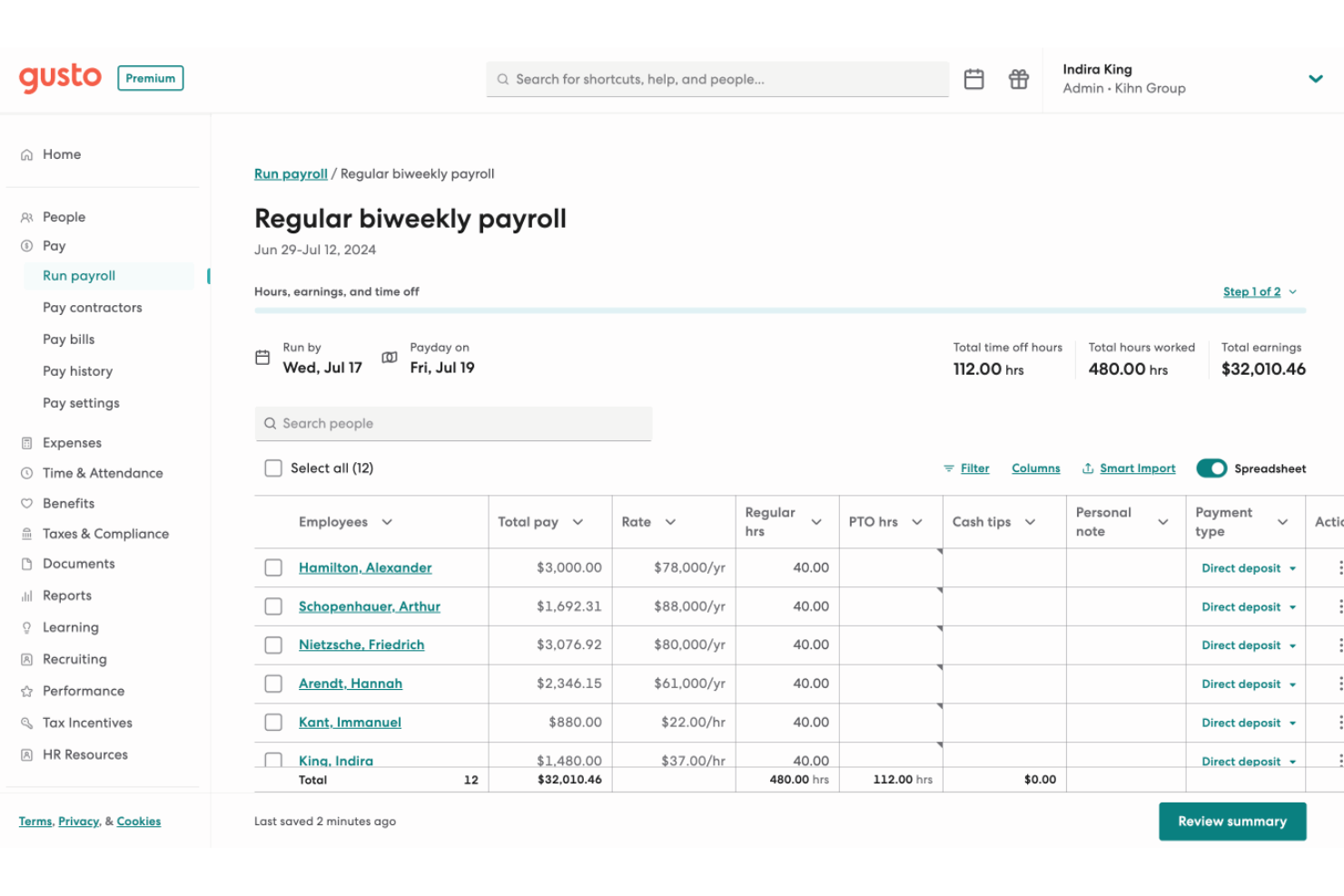
Gusto es una plataforma de HRMS para pequeñas empresas que reúne nómina, administración de beneficios, incorporación, herramientas de cumplimiento y gestión de empleados en un solo sistema.
¿Para quién es mejor Gusto?
Gusto es ideal para propietarios de pequeñas empresas y generalistas de RRHH que necesitan gestionar la nómina y los beneficios juntos sin contar con un equipo de RRHH dedicado.
Por qué elegí Gusto
Gusto se gana su lugar en mi lista porque la nómina y los beneficios están integrados en un solo flujo de trabajo. Cuando agregas una nueva contratación, la inscripción a los beneficios comienza dentro del proceso de incorporación: las deducciones médicas, dentales, de visión y de 401(k) se calculan y sincronizan con la nómina. Gusto también gestiona las renovaciones de inscripción abierta en la propia plataforma, enviando la documentación a las aseguradoras para que mi equipo no tenga que perseguir firmas ni controlar fechas límite. La función de división de cheque de pago y Gusto Wallet aportan flexibilidad, permitiendo a los empleados destinar partes de cada pago a cuentas de ahorro sin trabajo administrativo adicional.
Características clave de Gusto
- Sistema de seguimiento de candidatos: Publica vacantes y sigue a los candidatos a través del proceso de contratación dentro de Gusto, sin necesidad de una herramienta de reclutamiento aparte.
- Registro de tiempo móvil con geolocalización: Los empleados pueden fichar desde sus teléfonos, registrando la ubicación para verificar asistencia en el lugar de trabajo.
- Plantillas para evaluaciones de desempeño: Realiza revisiones estructuradas del desempeño utilizando plantillas integradas, enviando solicitudes de retroalimentación a los evaluadores adecuados en el momento oportuno.
- Encuestas de retroalimentación anónima: Recoge opiniones de los empleados mediante encuestas integradas que mantienen el anonimato de las respuestas para fomentar comentarios sinceros.
Integraciones de Gusto
Gusto ofrece más de 140 integraciones nativas, incluyendo QuickBooks, Xero, 15Five, 7Shifts, Asana, Bench, Betterment at Work, Box, ApplicantPro y Checkr. Hay una API disponible para integraciones personalizadas.
Pros and Cons
Pros:
- La nómina se puede procesar un número ilimitado de veces al mes sin tarifas adicionales.
- Nómina, beneficios y RRHH en una plataforma unificada.
- Ofrece auto-incorporación y almacenamiento en línea de formularios fiscales y recibos de pago para contratistas y empleados.
Cons:
- Las pequeñas y medianas empresas que necesiten cumplimiento avanzado o módulos de RRHH específicos de la industria pueden encontrar limitaciones en Gusto.
- Flexibilidad limitada para personalizar las retenciones fiscales o configuraciones de nómina no estándar.
New Product Updates from Gusto
Gusto Adds Solo Advisory Tools and Mobile Money Features
Gusto adds Solo S-Corp Advisory Tools and Gusto Money on Mobile for tax guidance, invoicing, and bill payments. These updates help accountants advise solopreneurs and let users manage business finances from their phones. For more information, visit Gusto’s official site.

Mejor con soporte experto 24/7 en recursos humanos y nómina
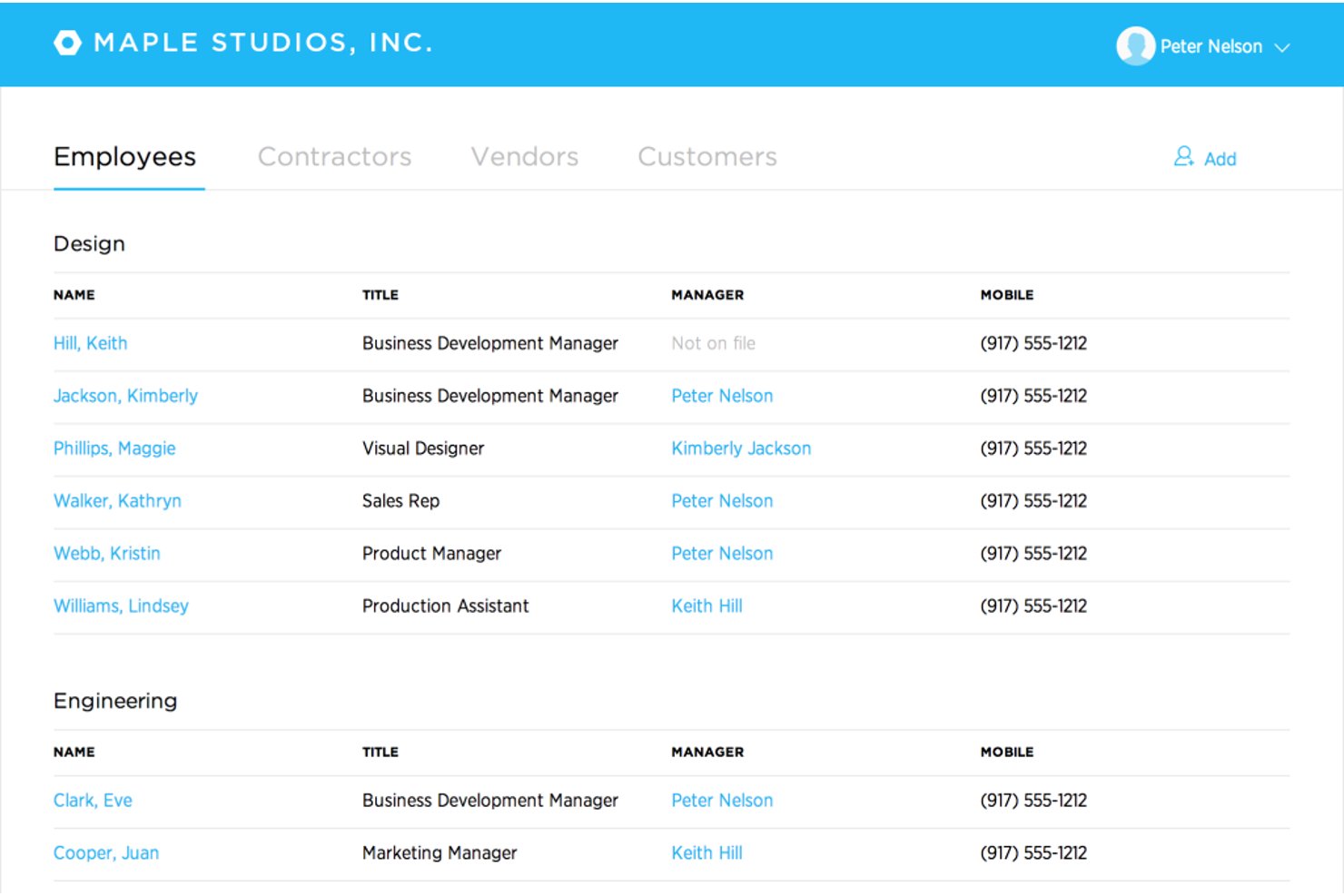
Justworks es un sistema de gestión de recursos humanos (HRMS) basado en la nube diseñado para pequeñas empresas, que combina nómina, administración de beneficios, gestión de recursos humanos, soporte de cumplimiento y declaraciones de impuestos automatizadas en una sola plataforma.
¿Para quién es mejor Justworks?
Pequeñas empresas y startups que necesitan una gestión simple y conforme de nómina y recursos humanos en varios estados o ubicaciones.
Por qué elegí Justworks
Elegí Justworks como uno de los mejores porque confío en su soporte experto 24/7 en recursos humanos y nómina para preguntas urgentes de cumplimiento y solución rápida de problemas. También valoro su nómina automatizada y la presentación de impuestos multiestatal para equipos distribuidos.
Funciones clave de Justworks
- Complemento de control de tiempo: El control de tiempo integrado se conecta directamente a la nómina para equipos por hora.
- Portal de autoservicio para empleados: Los miembros del equipo pueden gestionar sus propios documentos, beneficios y recibos de sueldo en línea.
- Administración de beneficios: Sistema centralizado para inscribir, actualizar y hacer seguimiento de los beneficios de todos los empleados.
- Almacenamiento de documentos: Repositorio seguro basado en la nube para políticas de la empresa y documentos de recursos humanos obligatorios.
Integraciones de Justworks
Las integraciones nativas no están claramente documentadas. Hay una API disponible para integraciones personalizadas.
Pros and Cons
Pros:
- Soporte en vivo 24/7 en recursos humanos y nómina
- El cumplimiento de nómina multiestatal está automatizado
- Ofrece acceso a beneficios de empleados de grandes grupos
Cons:
- Herramientas integradas de gestión del rendimiento limitadas
- Las opciones de flujos de trabajo personalizados son mínimas

Deel HR
La mejor HRMS gratuita todo en uno para pequeñas empresas
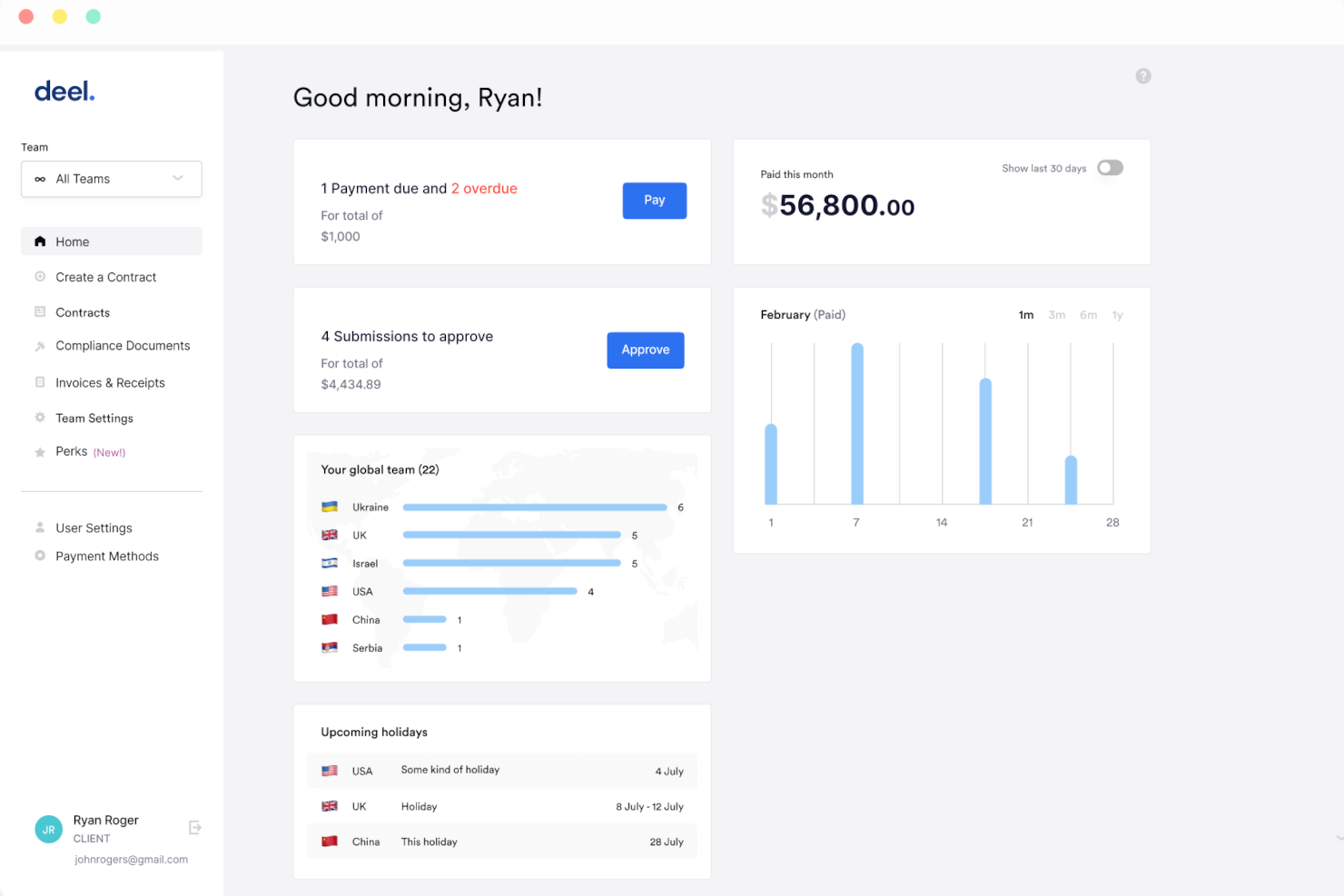
Deel HR es un sistema de gestión de recursos humanos para pequeñas empresas que cubre la incorporación de empleados, la gestión de documentos, el seguimiento de ausencias y la gestión del organigrama en una sola plataforma.
¿Para quién es mejor Deel HR?
Deel HR es una excelente opción para pequeñas empresas y startups que necesitan un sistema centralizado de RR. HH. gratuito para gestionar una fuerza laboral en crecimiento sin invertir en software de pago.
Por qué elegí Deel HR
Deel HR ocupa un lugar en mi lista porque es una de las pocas plataformas HRMS que ofrece un nivel central de recursos humanos realmente gratuito para pequeñas empresas. El plan gratuito no es una prueba limitada: incluye perfiles de empleados, seguimiento de ausencias, gestión de documentos y un organigrama, cubriendo las necesidades diarias de un equipo pequeño sin requerir una actualización de pago. Cuando estés listo para crecer, puedes añadir módulos como reclutamiento o gestión del desempeño como complementos de pago sin tener que reconstruir nada. Su diseño modular permite que mi equipo comience con lo que necesita ahora y agregue ciclos de compensación o planificación de personal más adelante, todo sobre la misma base de datos.
Características clave de Deel HR
- Planificación de la fuerza laboral: Predice la plantilla, modela escenarios y sigue los costos de contratación usando datos laborales en tiempo real en lugar de hojas de cálculo.
- Seguimiento de candidatos impulsado por IA: Busca candidatos automáticamente, gestiona entrevistas y traslada nuevas contrataciones directamente a la incorporación desde un solo flujo.
- Evaluaciones de desempeño 360°: Ejecuta ciclos de evaluación configurables con retroalimentación cuantitativa y cualitativa, OKR y calibración de evaluaciones en todo tu equipo.
- Reportes anónimos: Herramientas integradas para denuncias permiten a los empleados señalar inquietudes de forma segura, respaldando el cumplimiento y la cultura de comunicación abierta.
Integraciones de Deel HR
Deel HR ofrece integraciones nativas con Greenhouse, BambooHR, HiBob, Workday, Lever, Ashby y Personio. Hay una API disponible para integraciones personalizadas.
New Product Updates from Deel HR

Deel Expands Stablecoin Wallet to 80+ Countries
Deel expands its Stablecoin Wallet to 80+ countries with dollar-backed balances and optional rewards. This gives eligible contractors more ways to hold and manage earnings inside Deel. For more information, visit Deel’s official site.
 .
.
HiBob
Ideal para procesos de RRHH flexibles

HiBob es una plataforma de gestión de recursos humanos (RRHH) diseñada para pequeñas empresas, que ofrece funciones principales de RRHH, incorporación de empleados, seguimiento de ausencias, gestión del desempeño y flujos de trabajo personalizables.
¿Para quién es mejor HiBob?
HiBob es ideal para pequeñas y medianas empresas que necesitan procesos de RRHH adaptables para apoyar estructuras de equipo cambiantes y operaciones de personal en constante evolución.
Por qué elegí HiBob
HiBob se gana un lugar en mi lista corta por la flexibilidad de sus procesos de RRHH. Me encanta que puedas crear flujos de trabajo personalizados y cadenas de aprobación que se adapten realmente a la manera en que opera tu equipo, en vez de forzar los procesos a una estructura rígida. El entorno de pruebas es especialmente útil: puedes probar cambios en los ciclos de compensación, reglas de automatización o evaluaciones de desempeño antes de implementarlos, lo que reduce el riesgo asociado a los ajustes sobre la marcha en los procesos de RRHH. Su configuración modular permite empezar con los servicios principales de RRHH y agregar gestión de talento, nómina o planificación de fuerza laboral según las necesidades crezcan.
Características clave de HiBob
- Analítica de personas: Haz seguimiento del número de empleados, retención, ausentismo y crecimiento con informes en tiempo real que puedes programar y compartir directamente con la dirección.
- Flujos de trabajo de incorporación: Automatiza las tareas y secuencias de onboarding para que los nuevos empleados tengan una experiencia consistente y estructurada desde el primer día.
- Gestión de ausencias: Los empleados solicitan y los gerentes aprueban las ausencias directamente en la plataforma, con visibilidad sobre quién está presente y quién no.
- Encuestas a empleados: Realiza encuestas de ciclo de vida o de compromiso para recolectar comentarios en hitos clave y visualiza los resultados en un panel integrado.
Integraciones de HiBob
HiBob ofrece integraciones nativas con Slack, Microsoft Teams, Google Workspace, DocuSign, Greenhouse, Okta y Workable. Hay disponible una API para integraciones personalizadas.

Breathe HR es un sistema de gestión de recursos humanos para pequeñas empresas que reúne los registros de los empleados, la gestión de documentos, el seguimiento de ausencias y la gestión del rendimiento en una sola plataforma.
¿Para quién es mejor Breathe HR?
Breathe HR es ideal para pequeñas empresas con sede en el Reino Unido que necesitan una forma sencilla de gestionar la administración de RRHH sin contar con un equipo de recursos humanos dedicado.
Por qué elegí Breathe HR
Breathe HR se gana su lugar entre los mejores de mi lista por lo bien que gestiona la documentación centralizada de RRHH para equipos pequeños. Me encanta que puedas almacenar documentos ilimitados—contratos, políticas de cumplimiento, evaluaciones de desempeño—todo en un solo lugar conforme al RGPD, sin preocuparte por alcanzar un límite de almacenamiento. Lo que me resulta especialmente útil es la función de firma electrónica: puedes enviar un contrato directamente desde Breathe, añadir varios firmantes y obtener una auditoría automática con marcas de tiempo y direcciones IP registradas para cada firma. También hay una función de seguimiento de lectura que te muestra exactamente quién ha abierto y quién no un documento compartido de la empresa, para que puedas enviar recordatorios dirigidos sin tener que hacer seguimiento manual.
Características clave de Breathe HR
- Seguimiento de vacaciones y ausencias: Gestiona solicitudes de vacaciones, registros de enfermedad y saldos de permisos con un calendario compartido y flujos de trabajo de aprobación instantánea.
- Alertas de enfermedad: Establece umbrales personalizados del factor Bradford o límites de incidencias de baja, y Breathe te notifica automáticamente cuando un empleado los alcanza.
- Gestión del desempeño: Programa reuniones uno a uno, realiza evaluaciones de desempeño y asigna objetivos y tareas a los empleados directamente en la plataforma.
- Exportación de datos listos para nómina: Exporta los datos de RRHH en un formato listo para usar en nóminas para reducir la entrada manual de datos al procesar la nómina.
Integraciones de Breathe HR
Breathe HR ofrece integraciones nativas con Xero y Google Workspace. Hay una API disponible para integraciones personalizadas.

Ideal para automatización de nóminas e integraciones
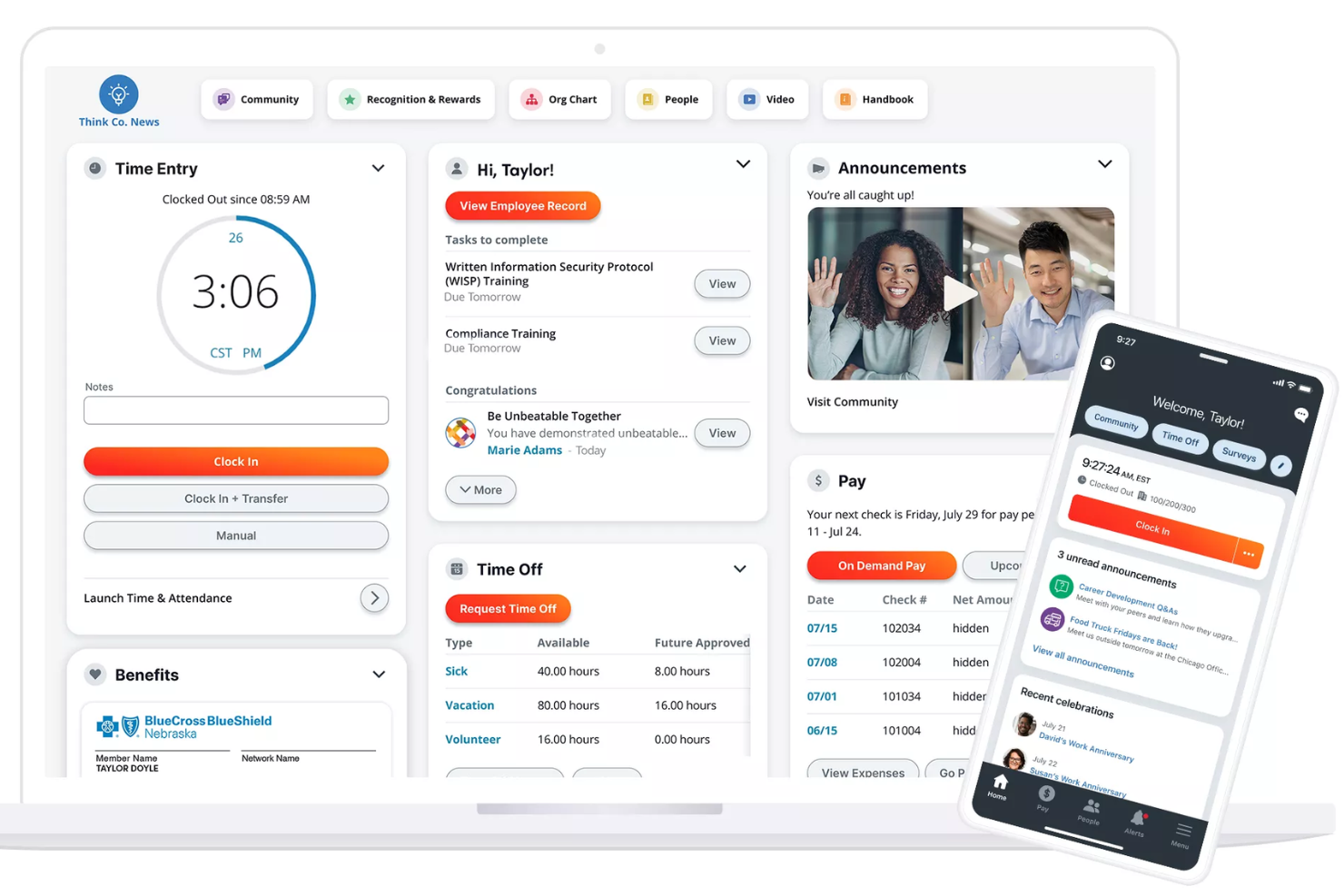
Paylocity es una plataforma HRMS para pequeñas empresas que combina procesamiento de nómina, gestión de recursos humanos, control de horario, administración de beneficios y herramientas de cumplimiento en un solo sistema.
¿Para quién es mejor Paylocity?
Paylocity es una buena opción para pequeñas y medianas empresas que necesitan una plataforma unificada de recursos humanos y nómina con capacidad para escalar.
Por qué elegí Paylocity
Paylocity se gana su lugar en mi lista por lo eficaz que es su automatización de nómina al manejar los detalles que suelen complicar a los equipos pequeños de RR.HH. Me gusta particularmente el Panel de Preparación de Nómina, que muestra tareas críticas antes del día de procesamiento y ejecuta más de 40 auditorías para señalar problemas como aumentos salariales inesperados antes de enviar. Las horas y asignaciones de mano de obra fluyen directamente desde Time & Labor hacia la nómina, así que no hay que reingresar datos manualmente entre sistemas. En cuanto a integraciones, Paylocity se conecta con plataformas ATS, proveedores de beneficios y 401(k), sistemas ERP y herramientas de identidad como Okta y Microsoft Entra, además de APIs abiertas para conexiones personalizadas.
Funciones clave de Paylocity
- Asistente para la elección de beneficios: La herramienta de Asistencia en la Decisión de Beneficios de Paylocity ofrece a los empleados recomendaciones personalizadas de planes según sus preferencias y situaciones individuales durante la inscripción abierta.
- Geolocalización fiscal: Paylocity audita la ubicación de cada empleado para verificar que estén pagando los impuestos correctos, con soporte de un equipo registrado como Agente de Reporte del IRS en los 50 estados.
- Pago bajo demanda: Los empleados pueden acceder a los salarios ya devengados antes del día de pago, ofreciendo así a las pequeñas empresas una herramienta de reclutamiento y retención sin afectar el flujo de efectivo de la nómina.
- Mapeo del libro mayor general: Configura ajustes de GL, crea asientos contables y genera informes personalizados directamente en la plataforma sin necesidad de contactar al soporte de Paylocity.
Integraciones de Paylocity
Paylocity ofrece integraciones nativas con ADP, QuickBooks, NetSuite, Okta, Microsoft Entra y varios proveedores de beneficios y 401(k). Hay una API disponible para integraciones personalizadas.
New Product Updates from Paylocity

Paylocity Expands Expense and Purchase Request Tools
Paylocity adds connected personal cards, smarter expense categorization, and a streamlined purchase request experience. This reduces manual entry and helps finance teams manage expenses and approvals more efficiently. For more information, visit Paylocity’s official site.
 .
.
El mejor módulo de bienestar y comentarios de los empleados
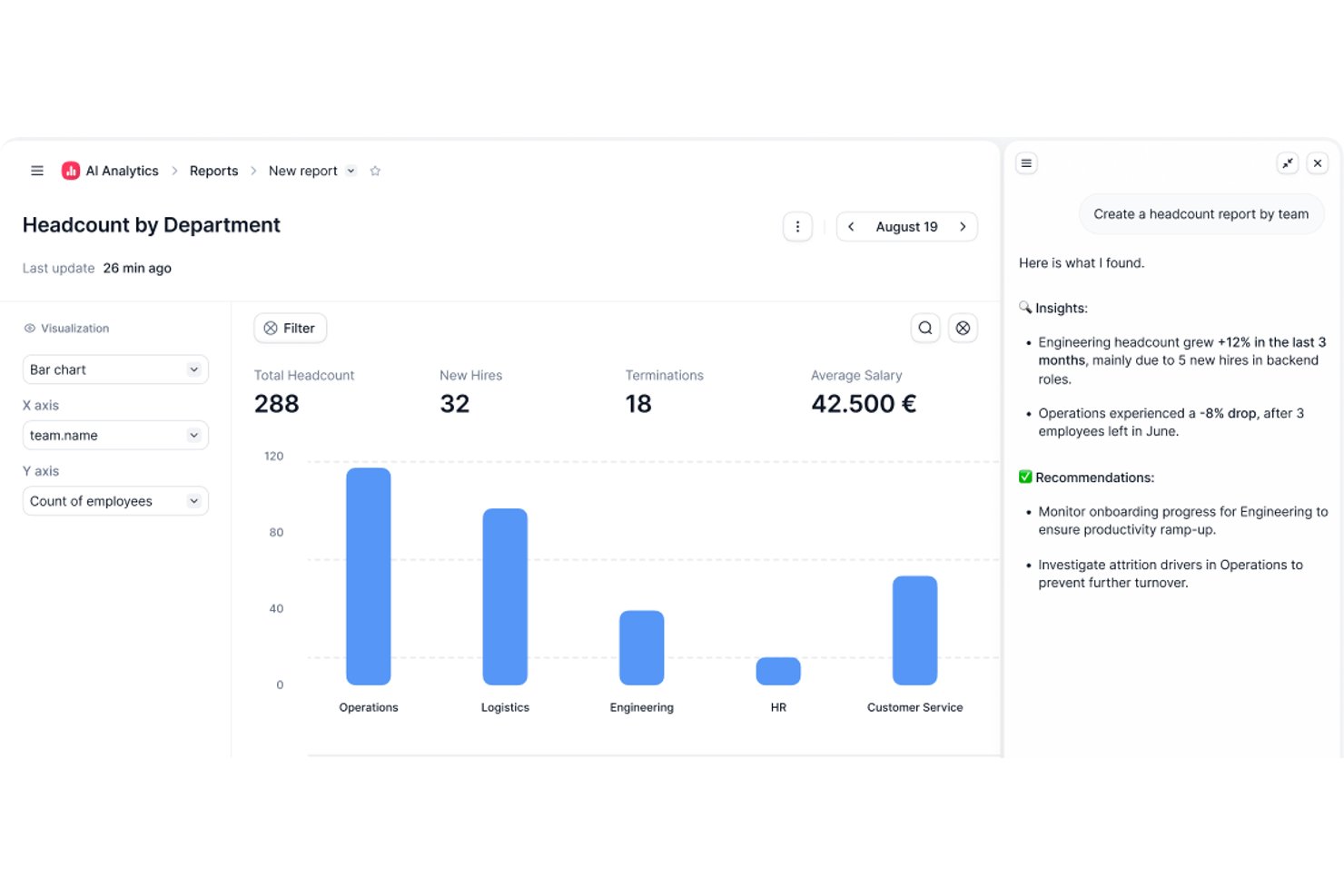
Factorial es un sistema de gestión de recursos humanos para pequeñas empresas que abarca los registros de empleados, el seguimiento de permisos, la nómina, la incorporación y la gestión del rendimiento en una sola plataforma.
¿Para quién es más adecuado Factorial?
Factorial es una buena opción para pequeñas y medianas empresas que buscan una plataforma de RR. HH. todo en uno para gestionar sus operaciones de personal sin contar con un equipo de RR. HH. dedicado.
Por qué elegí Factorial
Factorial ocupa un lugar en mi lista de opciones finalistas por lo bien que gestiona el bienestar y los comentarios de los empleados en equipos pequeños. Me gusta especialmente la función Pulso de empleados, que permite enviar controles diarios o programados de forma personalizada en los que los empleados comparten su estado de ánimo de manera anónima. Este tipo de señal periódica y sencilla resulta realmente útil cuando no se cuenta con un equipo dedicado a la participación de los empleados que supervise posibles casos de agotamiento o desmotivación. Además, el panel de control de información sobre la participación reúne las puntuaciones de eNPS y los resultados de las encuestas de clima laboral en una sola vista, de modo que puedo consultar las tasas de participación, el desglose entre promotores y detractores, y las tendencias de opinión sin tener que revisar informes separados. Las evaluaciones de rendimiento de 360° completan muy bien la propuesta, ya que permiten que compañeros, responsables y subordinados directos aporten su opinión sobre el mismo empleado.
Principales funciones de Factorial
- Flujos de trabajo de incorporación y desvinculación: Configura listas de tareas, asigna equipos y envía documentos para firmar como parte de un proceso estructurado de incorporación o desvinculación.
- Gestión de turnos: Crea y publica los horarios de turnos de los empleados, establece patrones de turnos y permite que los empleados consulten sus próximos turnos desde la aplicación móvil.
- Seguimiento de objetivos y OKR: Crea objetivos individuales o de equipo, vincúlalos con los objetivos de la empresa y realiza un seguimiento del progreso directamente desde la plataforma.
- Gestión documental: Almacena, organiza y comparte documentos de los empleados—como contratos y nóminas—con controles de acceso basados en roles para gestionar quién puede ver o editar cada archivo.
Integraciones de Factorial
Factorial ofrece integraciones nativas con Slack, Google Calendar, Microsoft Outlook y Zapier, además de una API para integraciones personalizadas.

Mejor para automatización y flujos de trabajo simplificados
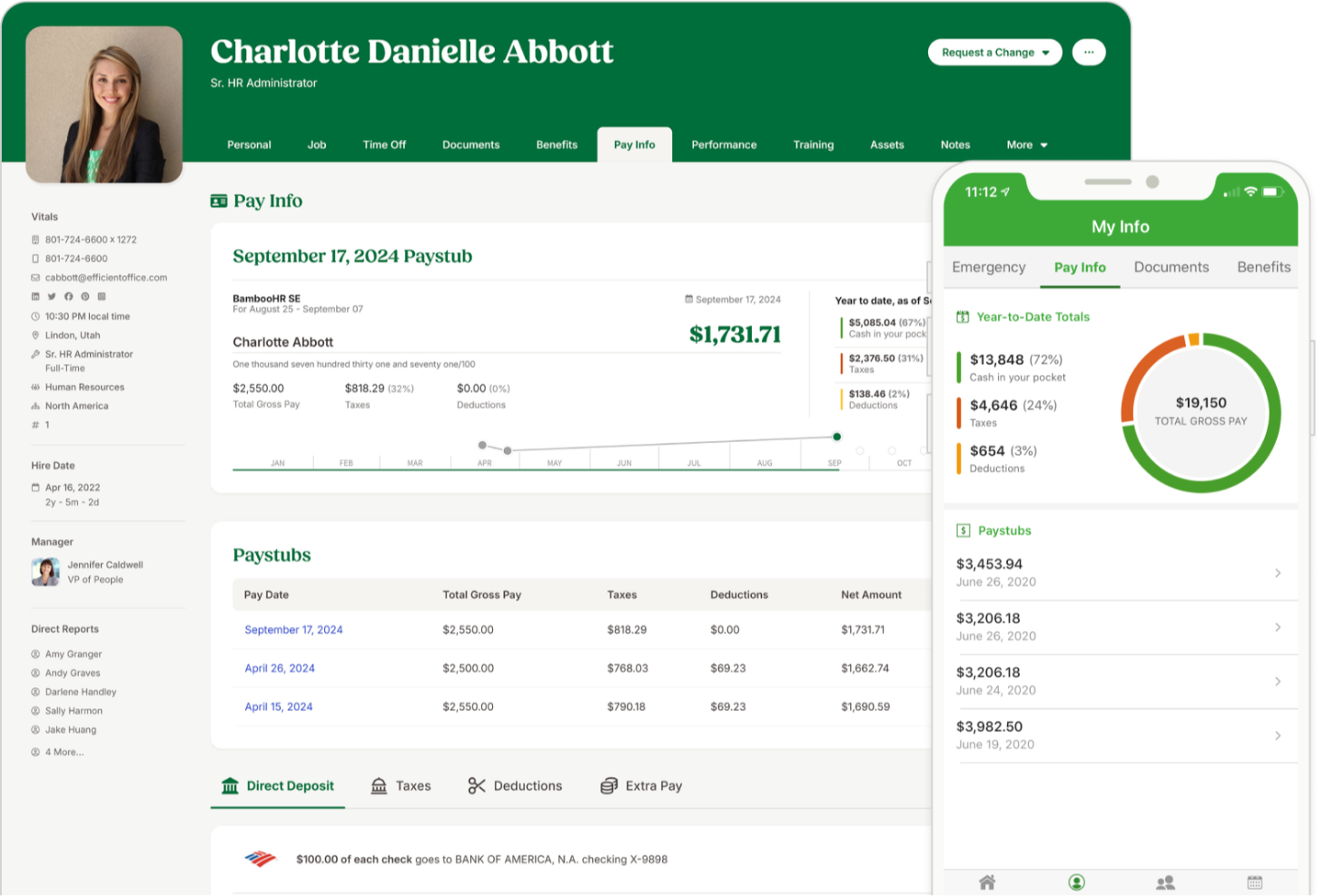
BambooHR es un sistema de gestión de recursos humanos para pequeñas empresas que integra registros de empleados, incorporación, seguimiento de ausencias, automatización de flujos de trabajo e informes en una sola plataforma.
¿Para quién es mejor BambooHR?
BambooHR es adecuado para pequeñas y medianas empresas que necesitan un sistema de recursos humanos dedicado sin la complejidad de un software de nivel empresarial.
Por qué elegí BambooHR
Elegí BambooHR como uno de los mejores por la eficacia con la que sus flujos de trabajo automatizados gestionan los cuellos de botella en aprobaciones que ralentizan a los pequeños equipos de recursos humanos. Cuando llega una solicitud de ausencia o promoción, BambooHR la dirige automáticamente al aprobador correcto—sin cadenas de correos electrónicos ni seguimiento manual. También me gustan las listas de verificación de incorporación automatizadas, que asignan tareas a los miembros internos adecuados en cuanto se agrega a un nuevo empleado, para que nada se pase por alto antes del primer día. Para una pequeña empresa donde una sola persona suele gestionar todo el área de recursos humanos, ese tipo de estructura incorporada marca una diferencia real en la operatividad.
Características clave de BambooHR
- Sistema de seguimiento de candidatos: Gestiona ofertas de empleo, revisa candidatos y mueve postulantes a través de un proceso de selección directamente en BambooHR.
- Portal de autoservicio para empleados: Los empleados pueden actualizar su propia información personal, consultar recibos de sueldo y solicitar tiempo libre sin pasar por recursos humanos.
- Gestión del desempeño: Realiza ciclos de evaluaciones, establece metas y recoge retroalimentación de pares dentro de la plataforma.
- Informes y paneles personalizados: Crea informes en tiempo real sobre datos laborales y visualiza tendencias usando paneles configurables.
Integraciones de BambooHR
BambooHR ofrece integraciones nativas con ADP, Paylocity, QuickBooks, Slack, Greenhouse, Checkr e Indeed. También proporciona una API para integraciones personalizadas.
New Product Updates from BambooHR®

BambooHR Adds Enrollment Waivers and Plan Year Continuity
BambooHR adds automatic enrollment waivers and plan year continuity for Benefits Administration. These updates help admins handle missed deadlines and prepare benefit renewals with less manual work. For more information, visit BambooHR’s official site.
 .
.
Paycor
Mejor para funciones de nómina específicas por industria
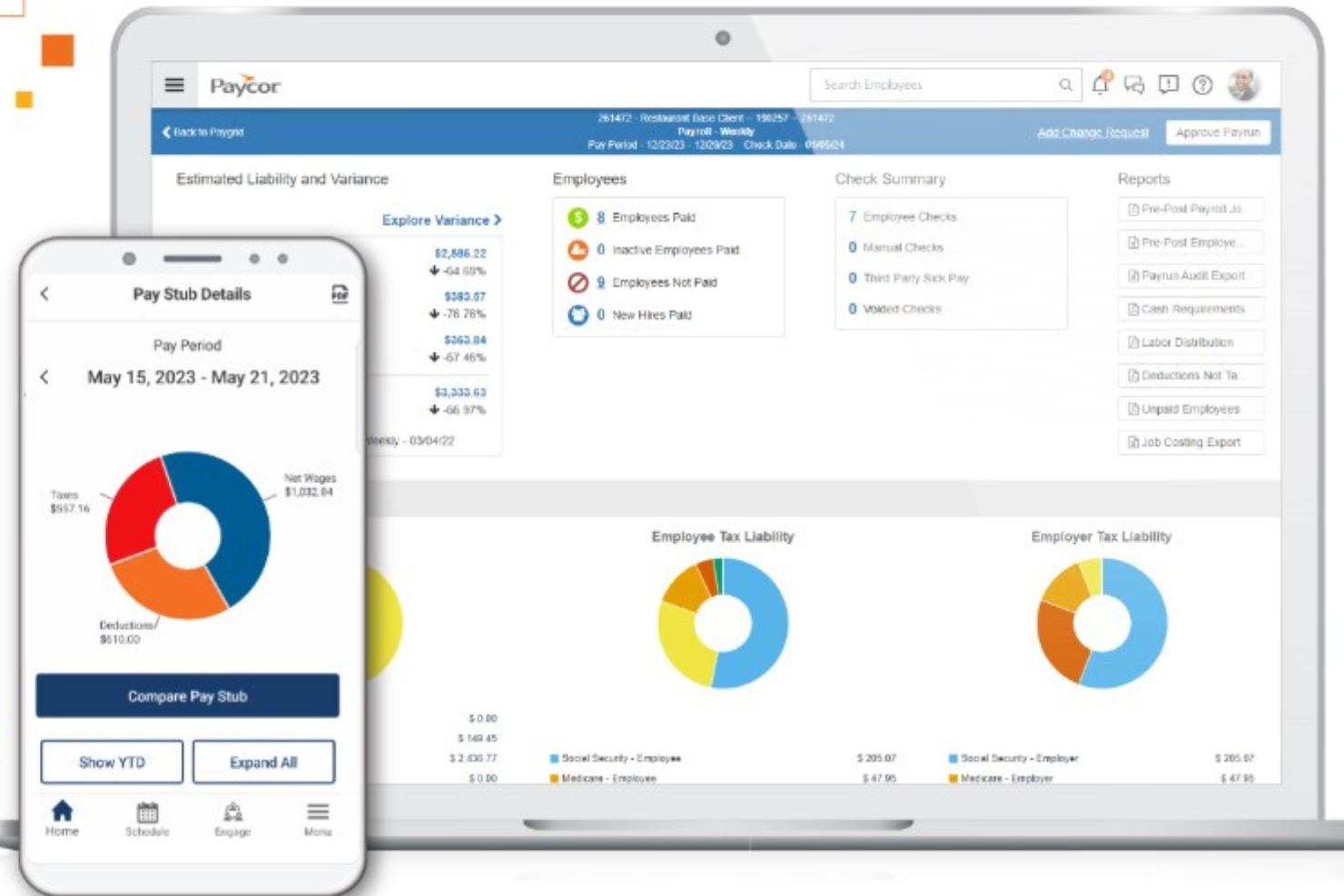
Paycor es una plataforma de HRMS para pequeñas empresas que reúne nómina, gestión de recursos humanos, control de asistencia, administración de beneficios y gestión del talento en un solo sistema.
¿Para quién es mejor Paycor?
Paycor es ideal para pequeñas empresas en industrias como la salud, manufactura y comercio minorista que requieren herramientas de nómina y recursos humanos adaptadas a las necesidades específicas de su fuerza laboral.
Por qué Paycor es una de las mejores opciones
Paycor es una de las mejores opciones porque integra lógica de nómina específica para cada industria directamente en el producto en lugar de tratar a cada empresa de la misma manera. Para los equipos de manufactura, eso significa que el cálculo automático de horas extras combinadas y de pago por pieza se gestiona de forma nativa, no a través de soluciones manuales. Para el sector de la salud, Paycor admite reportes PBJ (Payroll-Based Journal) y permite copiar y pegar turnos entre días mientras se filtra por certificaciones de enfermería. También me gusta que cada industria tenga su propio plan de implementación, por lo que el proceso de configuración lo lideran consultores que ya comprenden tu estructura de nómina antes de comenzar.
Funciones clave de Paycor
- Asesor de beneficios: Una herramienta de inscripción abierta que permite a los empleados seleccionar sus beneficios con soporte para la toma de decisiones integrado, al tiempo que proporciona a los equipos de RR. HH. capacidades de generación de informes y análisis comparativos.
- Encuestas de pulso: Una herramienta interna de retroalimentación de empleados que recopila respuestas y muestra perspectivas directamente en la plataforma.
- Software de reclutamiento: Una herramienta para el seguimiento y la comunicación con candidatos que te permite publicar puestos, enviar mensajes de texto a los candidatos y rastrear a los solicitantes en cada etapa del proceso de contratación.
- Informes y análisis: Informes predefinidos y configurables sobre rotación, conteo de personal y equidad salarial de género, todos extraídos de una única fuente de datos unificada.
Integraciones de Paycor
Paycor ofrece integraciones nativas con QuickBooks, JazzHR, 15Five, DailyPay, OrgChart, Timeero, Spark Hire, Mitratech AssureHire, Tilt y Procurify. Hay una API disponible para integraciones personalizadas.
TriNet
Mejor para subcontratación de RRHH y cumplimiento legal
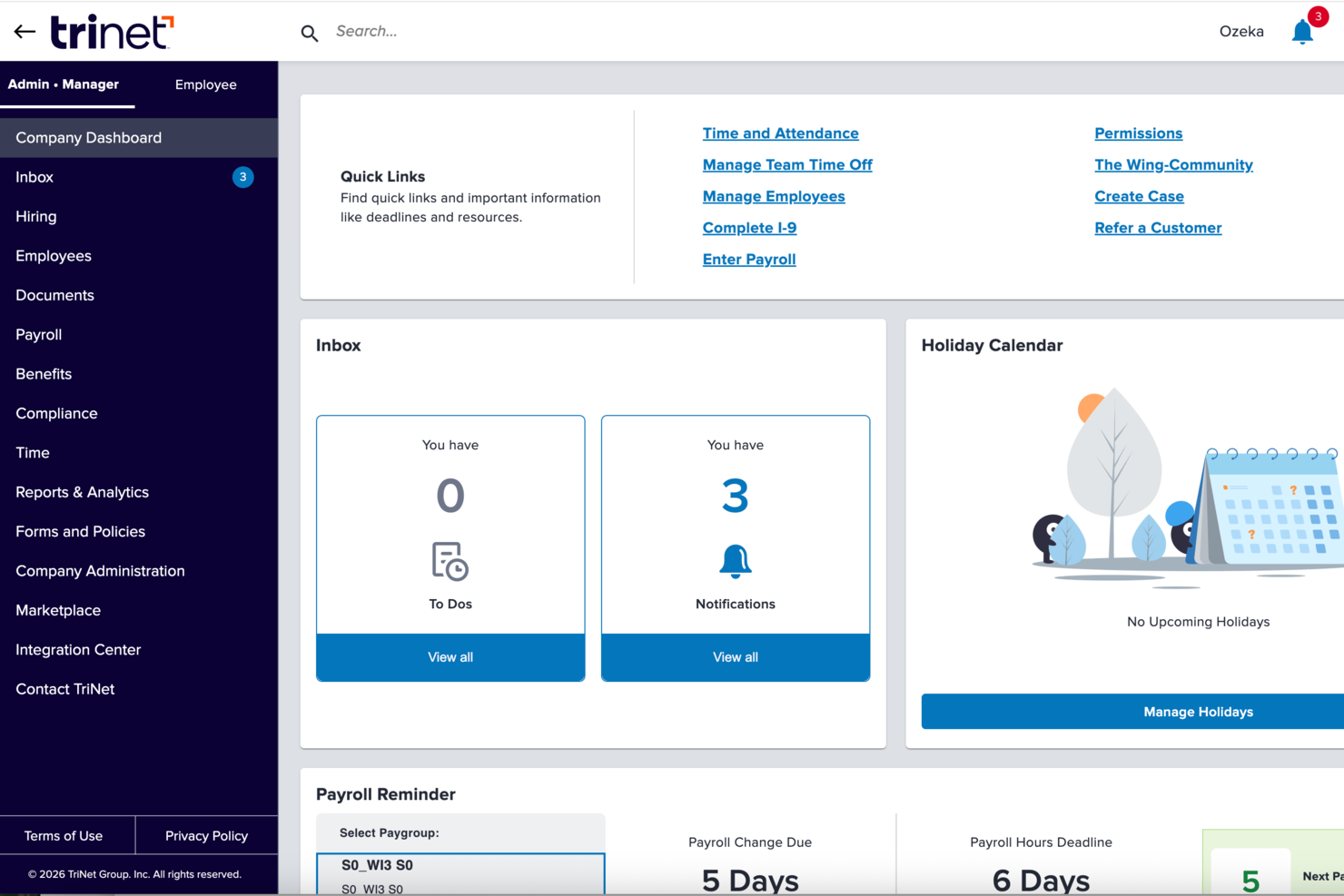
TriNet es una plataforma de gestión de RRHH para pequeñas empresas que combina nómina, administración de beneficios, subcontratación de recursos humanos, soporte en cumplimiento legal y herramientas de autoservicio para empleados.
¿Para quién es mejor TriNet?
TriNet es ideal para pequeñas empresas que no cuentan con un equipo de RRHH dedicado y necesitan apoyo externo para gestionar la nómina, los beneficios y el cumplimiento normativo.
Por qué elegí TriNet
TriNet se gana su lugar en mi lista por la forma en que gestiona la subcontratación de RRHH a través de su modelo PEO, lo que lo diferencia de las plataformas tradicionales de gestión de recursos humanos. En lugar de ofrecerte un software para gestionar RRHH por tu cuenta, TriNet opera como coempleador, lo que significa que su equipo asume la responsabilidad del procesamiento de nóminas, la administración de beneficios y el cumplimiento normativo junto contigo. Me gusta especialmente su monitoreo de cumplimiento multiestatal, que rastrea los cambios regulatorios en los 50 estados y señala cuáles aplican a tus ubicaciones. Para pequeñas empresas que contratan en varios estados, esto ofrece una capa de protección. La cobertura EPLI y el acceso a una línea directa legal a través del plan PEO destacan como características que no encontrarás en la mayoría de herramientas de gestión de RRHH.
Funciones clave de TriNet
- Incorporación digital y firmas electrónicas: Configura nuevas contrataciones con flujos de trabajo automatizados de incorporación y firma digital de documentos, reduciendo la carga administrativa y la entrada manual de datos.
- Seguimiento de tiempo y PTO: Registra las horas de los empleados, descansos y solicitudes de tiempo libre en tiempo real a través de la plataforma o la aplicación móvil.
- Herramientas de inscripción a beneficios: Los empleados pueden comparar planes lado a lado e inscribirse por un portal de autoservicio, con soporte para administración ACA y COBRA incluido.
- Reportes de nómina bajo demanda: Genera reportes detallados de nómina y visualizaciones de datos bajo demanda, con integración directa a herramientas contables como QuickBooks Online.
Integraciones de TriNet
TriNet ofrece integraciones nativas con Oracle Netsuite, Sage Intacct, Greenhouse, Lever, BambooHR, Lattice y más. TriNet también proporciona una API para integraciones personalizadas.
Pros and Cons
Pros:
- La aplicación móvil facilita el acceso en tiempo real a datos de RRHH
- Facilita el cumplimiento ante normativas cambiantes de RRHH
- Simplifica la contratación y retención con recursos expertos
Cons:
- Se reportan ciertas dificultades con el procesamiento de nómina
- Se requieren frecuentes solicitudes de soporte para tareas básicas
Otros HRMS para pymes
A continuación se incluye una lista de HRMS adicionales para pequeñas empresas que no llegaron a formar parte de mi lista de las 10 mejores opciones, pero que aún merece la pena conocer:
- Agendrix
Mejor HRMS para el control de horas del personal
- RemoFirst
Mejor HRMS para apoyar a equipos internacionales en expansión en más de 170 países
- Sloneek
Ideal para centralizar la gestión de empleados
- Lattice
Ideal para retroalimentación en tiempo real y gestión del desempeño
- HR Cloud
Ideal para un proceso de incorporación de empleados automatizado pero atractivo
- Eddy
Ideal para un directorio de empleados detallado
- Sage HR
Ideal para gestionar la programación de empleados
- Trinet
Mejor por su sólida aplicación móvil
- Insperity
Mejor software HRMS para pequeñas empresas en Estados Unidos
- Qandle
Crea políticas de empresa con un software de recursos humanos flexible


Análisis relacionados de software de recursos humanos
Si aún no has encontrado aquí lo que buscas, consulta estas otras herramientas relacionadas que hemos probado y evaluado:
- Software de recursos humanos
- Software de nóminas
- Software de contratación
- Servicios de empleador registrado
- Sistemas de seguimiento de candidatos
- Software de gestión de la plantilla
Cómo evalúo los HRMS para pequeñas empresas
Divido mi evaluación en requisitos básicos que todo HRMS para pequeñas empresas debe cumplir—como registros de empleados, seguimiento de PTO y sincronización de nóminas—y los diferenciadores que hacen destacar a las mejores herramientas.
Funcionalidad principal (Requisitos imprescindibles para esta lista)
Cuando selecciono las herramientas para mi lista, califico cada una en una escala del 0 (no ofrece la funcionalidad) al 5 (sobresale en esta área) para cada funcionalidad principal que aparece abajo. Luego, convierto la puntuación total de la herramienta en un porcentaje. Cada herramienta debe alcanzar una puntuación mínima total del 65% para ser considerada para su inclusión.
- Base de datos de empleados: Verifico si el sistema almacena historial laboral, contactos de emergencia, documentos y campos personalizados en un solo centro de búsqueda, en lugar de estar dispersos en hojas de cálculo.
- Onboarding y Offboarding: Cada herramienta debe permitir crear flujos de trabajo automatizados—como envío de cartas oferta, recopilación de firmas electrónicas y asignación de tareas para el Día 1—sin necesidad de realizar seguimientos manuales por correo electrónico.
- Vacaciones y asistencia: Evalúo cómo funcionan las solicitudes de PTO, políticas de acumulación y cadenas de aprobación, especialmente para equipos que gestionan distintos tipos de licencia en varias ubicaciones.
- Integración o procesamiento de nómina: Ya sea que la herramienta procese la nómina de forma nativa o se sincronice con proveedores como Gusto o QuickBooks, verifico qué tan fluido es el traspaso de horas, deducciones e información fiscal entre sistemas.
- Administración de beneficios: Los equipos pequeños también necesitan gestionar planes de salud y opciones de jubilación, por lo que busco flujos para el alta, integración con aseguradoras y detalles claros de los planes para los empleados.
- Cumplimiento normativo e informes: Evalúo si incluyen formularios de cumplimiento, registros de auditoría e informes—como la generación de reportes de plantilla o seguimiento de firmas de documentos entre tu personal.
Una vez tengo una lista de herramientas que cumplen los criterios, considero qué hace que cada plataforma sea diferente.
Factores diferenciadores (Qué distingue a cada proveedor)
Así es como comparo y contrasto los distintos proveedores:
Características destacadas
Un portal de autoservicio para empleados marca realmente la diferencia en equipos pequeños—cuando los trabajadores pueden actualizar su dirección, descargar recibos de nómina y solicitar sus vacaciones desde el teléfono, se reducen mucho las consultas rutinarias al área de RRHH. También reviso si la herramienta incluye evaluaciones de desempeño y seguimiento de objetivos, ya que la mayoría de pequeñas empresas superan rápido el feedback informal. Otro diferenciador que evalúo es la gestión de candidatos; las herramientas que permiten publicar ofertas, filtrar postulantes y convertirlos en empleados en un mismo sistema ahorran mucho trabajo de duplicación de datos.
Más allá de las funciones
La transparencia en los precios es clave para las pequeñas empresas, por lo que reviso si los proveedores ofrecen tarifas claras por empleado al mes y opciones de baja permanencia que permitan crecer a medida que contratas. La integración es igual de importante—tu HRMS necesita poder conectarse con herramientas como QuickBooks, Xero, Slack o Google Workspace sin desarrollo a medida. También evalúo el soporte para la puesta en marcha, especialmente si el proveedor cuenta con asistentes guiados o plantillas de migración de datos, ya que la mayoría de pequeños equipos provienen de hojas de cálculo y no pueden permitirse implementaciones de meses.
Cómo elegir un HRMS para una pyme
Un HRMS puede ayudarte a centralizar todas tus funciones esenciales de recursos humanos en un único sistema para maximizar la eficiencia. Para determinar qué HRMS se adapta mejor a las necesidades de tu pequeña empresa, primero debes identificar a los usuarios principales y documentar sus problemas específicos.
Mientras avanzas en tu propio proceso de selección de software, ten en cuenta los siguientes aspectos:
- Qué problema intentas resolver - Empieza por identificar los desafíos que intentas superar. Esto te ayudará a aclarar las características y funcionalidades que debe proporcionar el HRMS.
- Quién necesitará utilizarlo - Para evaluar el coste y los requisitos, considera quién utilizará el software y cuántas licencias necesitarás. En el caso de un HRMS, probablemente querrás que toda tu plantilla tenga acceso a nivel de empleado, con accesos especiales para tus administradores y responsables de RR. HH. Una vez que esto esté claro, también resulta útil clasificar las necesidades de tus distintos usuarios para identificar las prioridades principales de los usuarios avanzados, responsables y empleados, y asegurarte de que todas queden cubiertas.
- Con qué otras herramientas debe funcionar - Aclara qué herramientas vas a sustituir, cuáles se mantendrán y con qué herramientas necesitarás integrarlo, como software de gestión de la formación, aplicaciones de inicio de sesión único o sistemas operativos de trabajo como Microsoft 365 o Google Workspace. Tendrás que decidir si las herramientas deben integrarse entre sí o, como alternativa, si puedes sustituir varias herramientas por una única plataforma de RR. HH. todo en uno.
- Qué resultados son importantes - Revisa las capacidades que quieres obtener o mejorar y cómo medirás el éxito. Por ejemplo, puede que quieras incorporar funciones de autoservicio para empleados con el fin de reducir las solicitudes administrativas o digitalizar varios procesos de seguimiento basados en papel o Excel. Podrías comparar las funciones del software hasta el agotamiento, pero si no estás pensando en los resultados que quieres conseguir, podrías desperdiciar mucho tiempo valioso.
- Cómo funcionaría dentro de tu organización - Considera la selección del software junto con tus flujos de trabajo y sistemas actuales. Evalúa qué funciona bien y qué áreas están causando problemas que deben abordarse.
Recuerda que cada empresa es diferente; no des por hecho que un HRMS funcionará para tu organización solo porque sea popular.
¿Qué es un HRMS?
Los sistemas de gestión de recursos humanos (HRMS) son herramientas de software diseñadas para agilizar y automatizar diversas funciones de RR. HH., como la gestión de los datos de los empleados, el procesamiento de nóminas, la administración de beneficios y los procesos de selección. Proporcionan una plataforma centralizada para almacenar y acceder a la información de los empleados, simplificar las tareas de RR. HH. y mejorar la toma de decisiones.
Este software ayuda a las pequeñas empresas a gestionar eficazmente una plantilla reducida, garantizar el cumplimiento de la legislación laboral y reducir la carga de trabajo manual sin que suponga un gran coste. Al utilizar un HRMS, las pequeñas empresas pueden centrarse más en el crecimiento estratégico y menos en las tareas administrativas.
Características de un HRMS
Elegir el sistema de gestión de recursos humanos (HRMS) adecuado es fundamental para las pequeñas empresas que desean mantener el cumplimiento normativo, mejorar la gestión de los empleados y centrarse en el crecimiento. El papel de RR. HH. en las pequeñas empresas y las grandes organizaciones depende en gran medida de la eficiencia de los sistemas HRIS, que garantizan unas operaciones y una gestión de datos optimizadas.
Un HRMS eficaz puede agilizar diversas tareas de RR. HH. y garantizar que las empresas funcionen de forma fluida y eficiente. Estas son diez características esenciales que debes tener en cuenta:
- Gestión de la base de datos de empleados: Tu HRMS funcionará como una base de datos centralizada para almacenar toda la información de tus empleados. Esto garantiza que todos los datos de los empleados estén organizados y sean fácilmente accesibles, facilitando el cumplimiento de las normativas de conservación de registros.
- Gestión de nóminas: Automatizar las nóminas reduce los errores y la necesidad de introducir datos manualmente, lo que hace que el proceso de nóminas consuma mucho menos tiempo.
- Seguimiento del tiempo y la asistencia: Esta función ayuda a las organizaciones a realizar un seguimiento de las horas de los empleados, gestionar los costes laborales y cumplir las leyes laborales relativas a las horas extraordinarias y al número de días consecutivos trabajados.
- Administración de beneficios: Una administración eficiente de los beneficios ayuda a atraer y retener el talento, contribuyendo al crecimiento general de la empresa. Además, al vincular directamente los costes mensuales de los beneficios con tu módulo de nóminas, reducirás la introducción manual de datos.
- Gestión del rendimiento: Esta función hace referencia a las herramientas para establecer objetivos y evaluar el rendimiento de los empleados. Las evaluaciones periódicas del rendimiento ayudan a mejorar la productividad e identificar áreas de desarrollo, impulsando el éxito empresarial.
- Contratación y seguimiento de candidatos: Una contratación y un seguimiento de candidatos eficientes garantizan que la empresa atraiga rápidamente al mejor talento. Muchos sistemas aprovechan ahora funciones basadas en IA que hacen que las comparaciones entre las habilidades de los candidatos y las descripciones de los puestos sean mucho más eficientes y equitativas.
- Gestión del cumplimiento: Los sistemas HRMS incluyen herramientas para supervisar y garantizar el cumplimiento legal. Esta función ayuda a evitar sanciones y problemas legales, manteniendo el buen funcionamiento de la empresa.
- Portal de autoservicio para empleados: Esta importante función permite a los empleados acceder a su propia información de RR. HH. y gestionarla, como sus datos de contacto, datos bancarios e información sobre beneficios. Dar a los empleados la posibilidad de gestionar sus propios datos aumenta su implicación y reduce la carga administrativa.
- Informes y análisis: Los sistemas HRMS ofrecen informes integrados y plantillas de análisis para ayudar a los equipos a tomar decisiones fundamentadas, optimizar las estrategias de RR. HH. y respaldar el crecimiento empresarial.
- Formación y desarrollo: Esto hace referencia a las herramientas para alojar y supervisar programas internos de formación de empleados, que a menudo incluyen un sistema interno de gestión del aprendizaje (LMS). Para una pequeña empresa, invertir en el desarrollo de los empleados fomenta una plantilla cualificada, lo que sienta las bases para la expansión empresarial con el tiempo.
Para las empresas que buscan más opciones de personalización, explorar un software avanzado de RR. HH. puede proporcionar una gama más amplia de funciones adaptables a tus necesidades.
Ayuda a tu pequeña empresa a crecer con soluciones HRMS
Hacer crecer una pequeña empresa es complicado porque sus propietarios tienen que estar pendientes de muchas cosas. Sin embargo, las soluciones HRMS y otros programas de RR. HH. diseñados para pequeñas empresas facilitan el proceso. Muchos de ellos te ayudan a automatizar las tareas repetitivas de RR. HH., para que puedas centrarte en otros aspectos de tu negocio. Además, te ayudan a ahorrar tiempo en la contratación, la gestión del talento, la incorporación y la gestión de la plantilla.
Pero lo más importante es que el software HRMS puede ayudarte a ti y a tu equipo a entender cómo crecer. Mary Karamanos, vicepresidenta sénior de Recursos Humanos de BDC, afirmó “Un error común que cometen las empresas en crecimiento es no dedicar suficiente tiempo a planificar sus necesidades de RR. HH. […] La buena noticia es que las pequeñas empresas suelen atraer a los mejores empleados porque a menudo pueden ofrecer responsabilidades desafiantes, buenas oportunidades de aprendizaje y crecimiento personal.”