

Les 10 meilleurs logiciels de gestion des ressources en 2026

Sélection des meilleurs logiciels de gestion des ressources


Les logiciels de gestion des ressources vous aident à attribuer, suivre et optimiser la manière dont votre équipe utilise son temps, ses compétences et ses outils sur différents projets. Si vous rencontrez des problèmes de surcharge, de conflits d’horaires ou de sous-utilisation des talents, il est essentiel de trouver la bonne solution pour mener les projets à bien et maintenir la satisfaction des équipes. Dans ce guide, vous trouverez une comparaison concise des meilleurs outils de gestion des ressources, des éléments qui rendent chacun d’eux unique et de la manière dont ils peuvent s’intégrer à votre flux de travail réel. À la fin, vous saurez exactement quels produits méritent de figurer dans votre sélection et pourquoi.
Pourquoi faire confiance à nos avis sur les logiciels
Notre équipe teste et évalue des logiciels depuis 2012. En tant qu’experts RH nous-mêmes, nous savons à quel point il est difficile — et important — de choisir le bon logiciel.
Pour ce guide, nous avons évalué les outils grâce à des tests pratiques et une recherche indépendante, en notant les outils selon nos critères de sélection. Nous nous appuyons également sur les enseignements de leaders d’opinion du secteur et de professionnels des RH en activité.
Nos avis reflètent notre jugement éditorial humain, et non un argumentaire de vente.
Réviseurs experts:
Tableau comparatif des logiciels de gestion des ressources
Ce tableau comparatif récapitule les informations tarifaires relatives à ma sélection des meilleurs logiciels de gestion des ressources.
| Tool | Best For | Trial Info | Price | ||
|---|---|---|---|---|---|
| 1 | Idéal pour la planification des ressources et des finances d'une agence | Démo gratuite disponible | Tarification sur demande | Website | |
| 2 | Idéal pour la planification rapide des équipes à grande échelle | Essai gratuit de 30 jours | À partir de $5/utilisateur/mois | Website | |
| 3 | Idéal pour relier budgets et allocation des ressources | Essai gratuit de 14 jours + démo gratuite disponible | À partir de $10/utilisateur/mois (facturation annuelle) | Website | |
| 4 | Idéal pour associer le suivi de projet à la facturation | Essai gratuit de 14 jours + démonstration gratuite | À partir de $19.90/utilisateur/mois (facturation annuelle) | Website | |
| 5 | Idéal pour l'optimisation d'environnements multi-projets | Essai gratuit de 30 jours + démo gratuite | À partir de 22,5 €/utilisateur/mois (facturé annuellement) | Website | |
| 6 | Idéal pour la visualisation en temps réel de la chronologie des projets | Essai gratuit de 30 jours | À partir de 7 $/utilisateur/mois | Website | |
| 7 | Idéal pour la planification visuelle d'équipes mondiales | Essai gratuit de 14 jours | À partir de $5.27/ressource/an (facturé annuellement) | Website | |
| 8 | Idéal pour aligner les ressources sur les objectifs de revenus | Démo gratuite | Tarification sur demande | Website | |
| 9 | Idéal pour la planification de scénarios en temps réel | Essai gratuit de 30 jours | À partir de 7 $/utilisateur/mois | Website | |
| 10 | Idéal pour l'équilibrage de charge piloté par l'IA | Démo gratuite | Tarification sur demande | Website |


Avis sur les meilleurs logiciels de gestion des ressources
Vous trouverez ci-dessous mes synthèses détaillées des meilleurs logiciels de gestion des ressources retenus dans ma sélection. Mes avis présentent une analyse approfondie des fonctionnalités, des intégrations et des cas d’utilisation les plus adaptés à chaque plateforme afin de vous aider à trouver celle qui vous convient le mieux.

Idéal pour la planification des ressources et des finances d'une agence
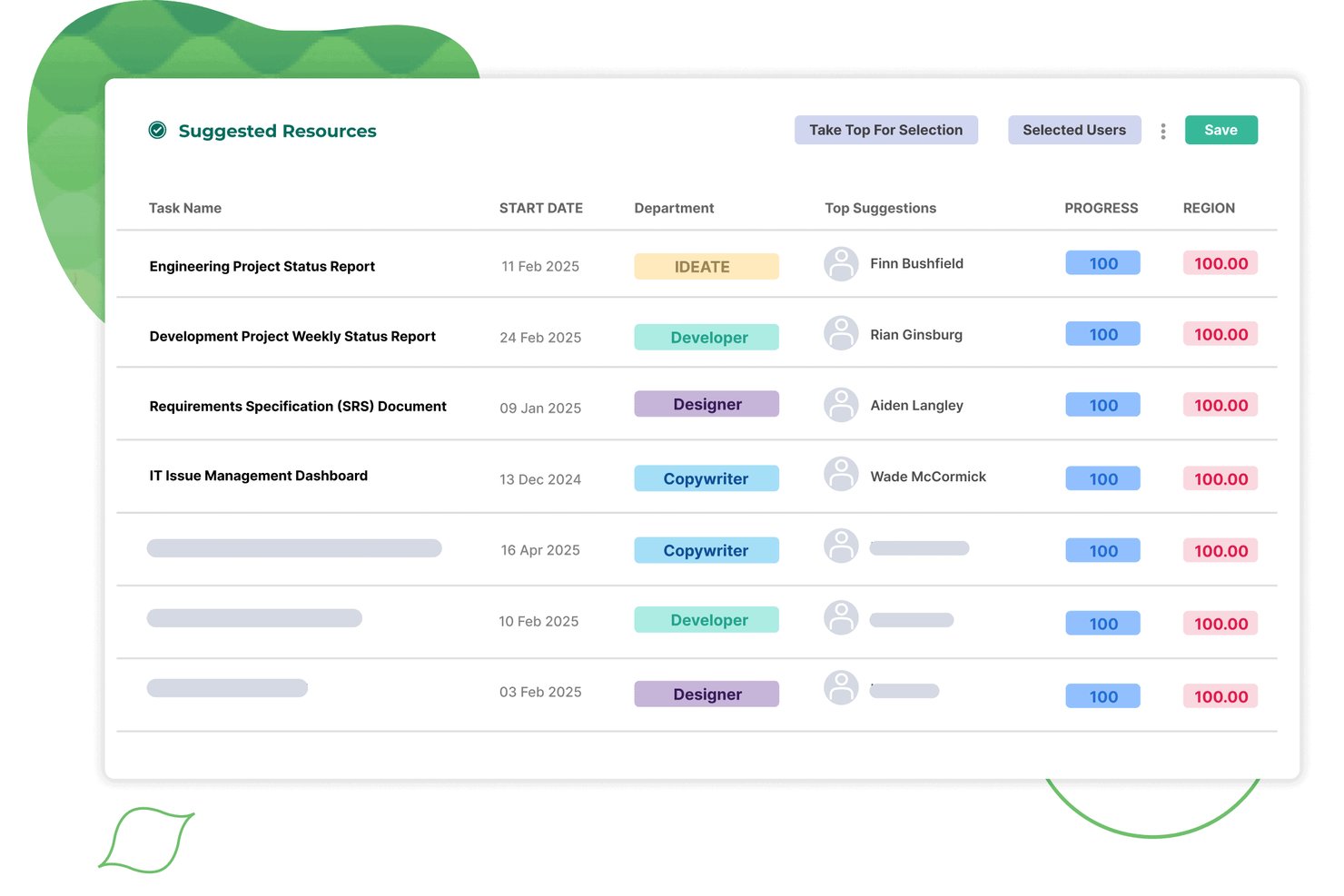
Screendragon est une plateforme de gestion des ressources conçue pour les équipes d'agences et de services aux clients. Elle combine la planification des capacités, l'affectation des ressources, le suivi de l'utilisation, les feuilles de temps intégrées et la prévision de la demande au sein d'un même système.
À qui Screendragon convient-il le mieux ?
Screendragon convient particulièrement aux équipes d'agences et de services aux clients de taille moyenne à grande qui ont besoin de planifier les ressources, de suivre leur utilisation et d'établir des prévisions financières au sein d'une plateforme connectée.
Pourquoi ai-je choisi Screendragon ?
Screendragon figure dans ma sélection parce qu'il relie directement la planification des ressources aux résultats financiers, ce que la plupart des outils de gestion des ressources ne font pas. J'apprécie la façon dont la planification en un clic transforme un plan de projet en un plan complet des ressources, avec une affectation automatique par ensemble de compétences et un suivi de l'utilisation en temps réel lié aux prévisions de revenus. En pratique, cela signifie que les équipes d'agence peuvent repérer un déficit de capacité et en modéliser l'impact financier sans changer d'outil.
Fonctionnalités clés de Screendragon
- Feuilles de temps intégrées : Les feuilles de temps sont directement reliées aux plans de projet et aux réservations de ressources en temps réel, et enregistrent à la fois le temps facturable et le temps hors projet, comme les congés et la formation.
- Affectation des ressources assistée par l'IA : Les agents d'IA intégrés automatisent l'affectation des tâches, optimisent les décisions relatives aux ressources et consignent chaque action dans une piste d'audit complète.
- Prévision des capacités connectée au pipeline : Les vues des capacités futures intègrent les données du pipeline afin de faire apparaître les écarts de demande avant la confirmation des projets.
- Tableaux de bord KPI personnalisables : Les planificateurs peuvent créer des tableaux de bord personnalisés qui agrègent automatiquement les données du portefeuille et planifient l'envoi direct des rapports aux parties prenantes.
Intégrations de Screendragon
Screendragon propose des intégrations natives avec Microsoft Power BI, Jira Software, Slack, Microsoft Teams, NetSuite, SAP, Salesforce, Microsoft Dynamics 365 et PeopleSoft. Son connecteur API universel et son portail pour développeurs prennent en charge les intégrations personnalisées.
Pros and Cons
Pros:
- Affectation des ressources en un clic selon les compétences
- Prévisions de l'utilisation et des revenus dans une même vue
- Tableaux de bord KPI personnalisés pour les planificateurs de ressources
Cons:
- Conçu pour les organisations de plus de 30 utilisateurs
- Ne prend pas en charge la planification de scénarios d'effectifs et de recrutements
New Product Updates from Screendragon
Screendragon Unveils New AI Hub
Screendragon introduced AI Hub, a new capability that lets teams build and manage AI agents directly within workflows. The update helps marketing teams automate tasks, maintain governance controls, and scale AI-driven operations more efficiently. For more information, visit Screendragon's official site.

Idéal pour la planification rapide des équipes à grande échelle
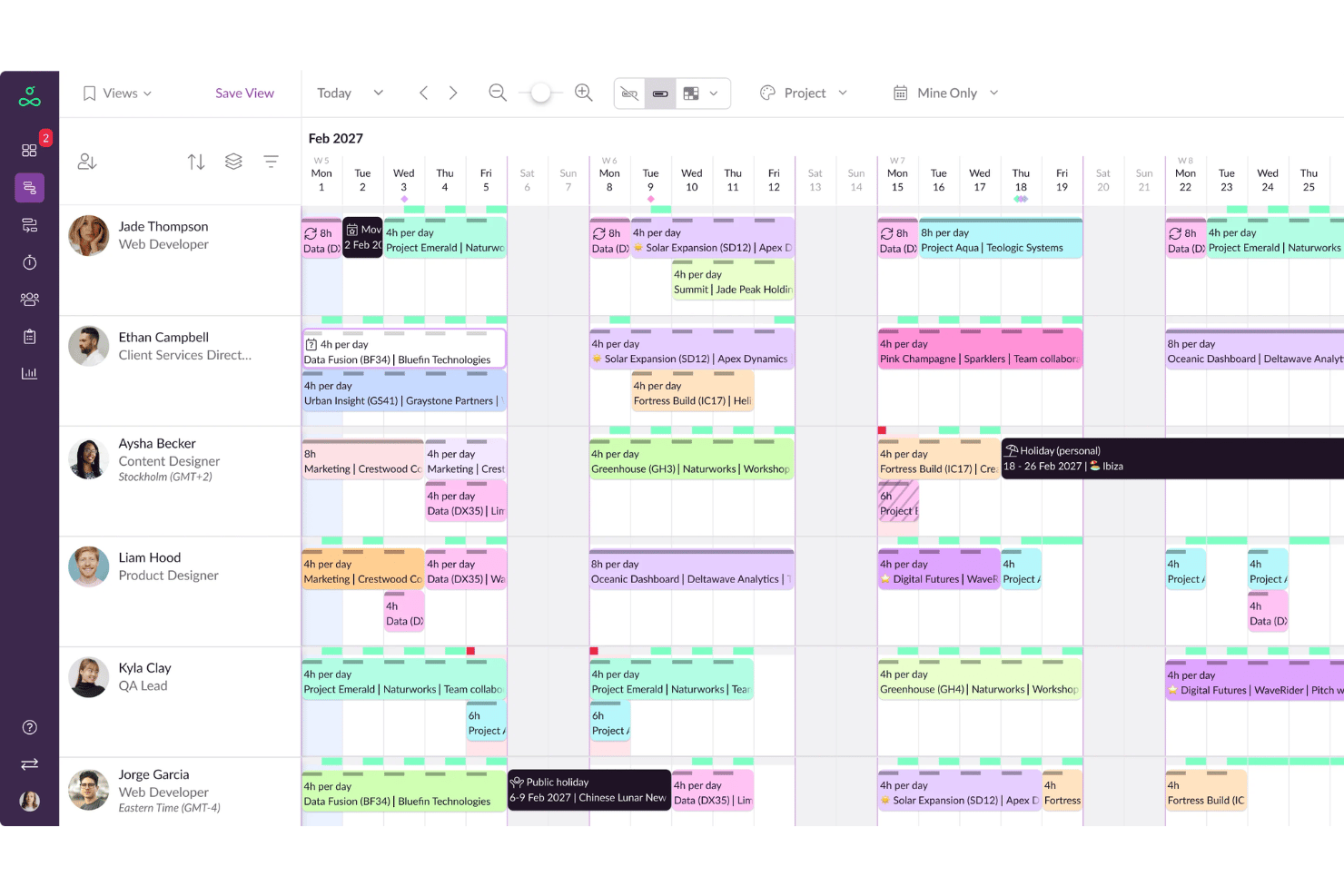
Resource Guru est une plateforme dédiée à la planification des ressources et à la gestion de capacité, dotée d'une planification par glisser-déposer, d'un suivi des disponibilités, d'une gestion des congés, de rapports d'utilisation et de feuilles de temps.
Pour qui Resource Guru est-il le mieux adapté ?
C'est un excellent choix pour les agences, cabinets de conseil et équipes de services informatiques qui ont besoin d'une visibilité claire sur les disponibilités de chacun, à travers plusieurs projets simultanés.
Pourquoi ai-je choisi Resource Guru
Resource Guru mérite sa place dans ma sélection grâce à la rapidité du planning pour les grandes équipes. J'apprécie la gestion des conflits en temps réel, qui signale instantanément toute surréservation lors de l'attribution d'une tâche, plutôt qu'après coup. La fonctionnalité de liste d'attente le distingue : lorsqu'une ressource atteint sa capacité maximale, les réservations suivantes sont automatiquement mises en file d'attente, évitant ainsi les conflits de planning silencieux.
Principales fonctionnalités de Resource Guru
- Diagrammes de Gantt au niveau du projet : Visualisez les calendriers et dépendances des projets pour un suivi simplifié.
- Champs de disponibilité personnalisés : Définissez des schémas de travail ou rôles uniques pour les personnes et les ressources.
- Feuilles de temps intégrées : Saisissez et consultez les heures travaillées directement dans l'interface de planification.
- Module de gestion des congés : Suivez les congés payés, jours fériés et arrêts maladie pour une planification de capacité précise.
Intégrations de Resource Guru
Resource Guru propose des intégrations natives avec Google Calendar, Outlook Calendar, Slack, Microsoft Teams et Trello. Il se connecte à Salesforce, Workday, Basecamp, QuickBooks, Google Sheets et Zapier. Une API est disponible pour des intégrations personnalisées.
Pros and Cons
Pros:
- Excellent pour le suivi de la disponibilité entre départements
- Alertes instantanées en cas de double réservation
- Types de ressources flexibles, y compris équipements et salles
Cons:
- Peu de suivi natif des compétences ou aptitudes
- Les rapports sont basiques comparés aux outils d'entreprise
New Product Updates from Resource Guru

Resource Guru Adds More Control Over Calendar Sync
Resource Guru adds more control over Google and Outlook Calendar sync, including source calendar selection and destination calendar options. These updates help users manage external events and Resource Guru bookings with less clutter. For more information, visit Resource Guru’s official site.
 .
.
Idéal pour relier budgets et allocation des ressources
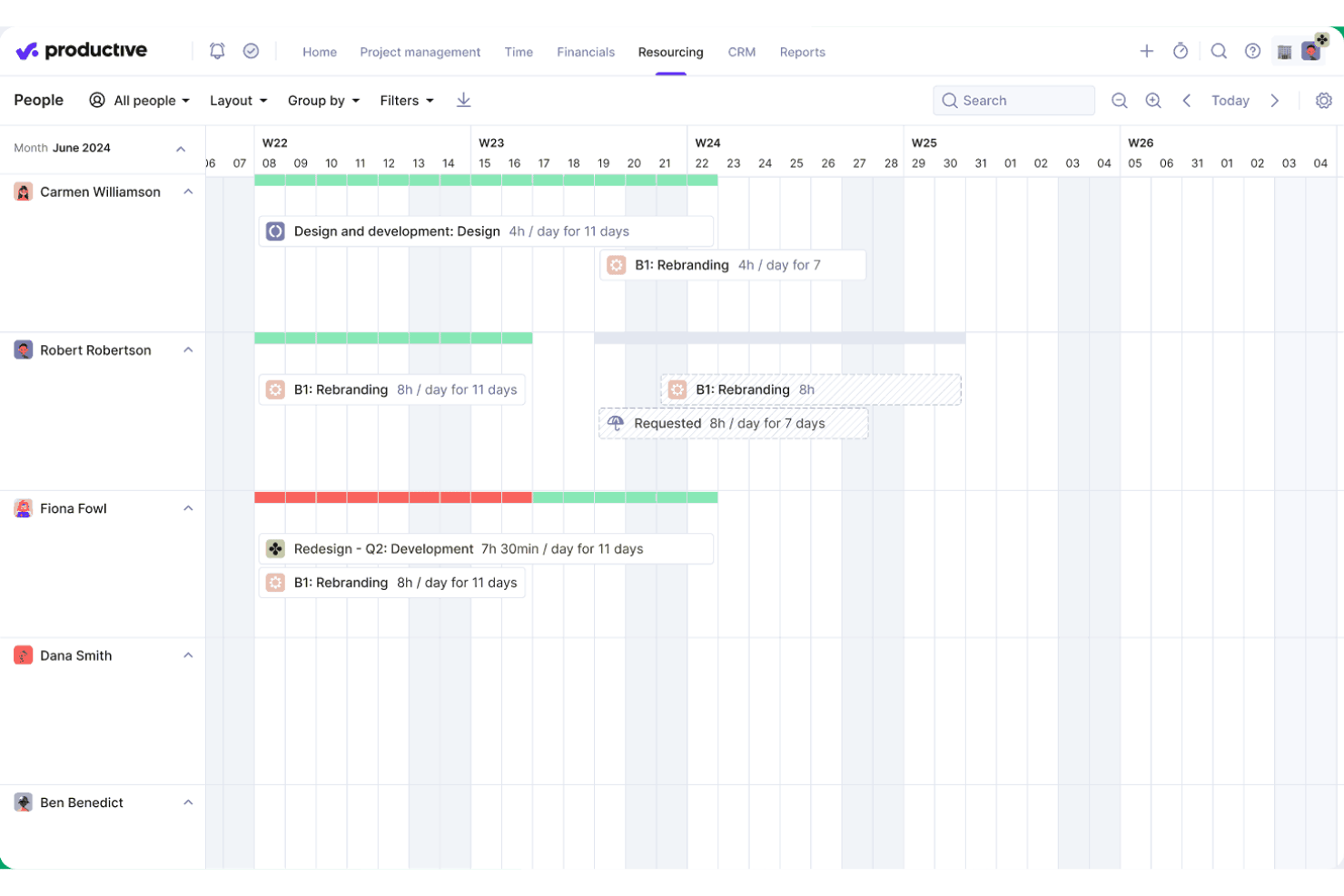
Productive est une plateforme axée sur les agences qui réunit la planification des ressources, la gestion de projet, le suivi du temps, la budgétisation et les rapports sur l’utilisation dans un seul et même système.
À qui s’adresse Productive ?
Productive convient particulièrement aux agences et aux entreprises de services professionnels qui doivent gérer du personnel facturable sur plusieurs projets clients simultanément.
Pourquoi ai-je choisi Productive
J’ai inclus Productive dans mes meilleurs choix car aucun autre outil que j’ai utilisé ne relie aussi directement les heures planifiées des équipes aux données budgétaires et de rentabilité en temps réel. Lorsque mon équipe attribue quelqu’un à un projet dans le Planificateur de ressources, cette allocation met immédiatement à jour nos prévisions de coûts et de marges. Le Générateur de scénarios nous permet ensuite de modéliser différentes configurations d’équipes avant de les valider, afin de visualiser l’impact budgétaire de chaque option côte à côte.
Principales fonctionnalités de Productive
- Demandes de ressources pilotées par l’IA : suggère automatiquement les membres d’équipe les plus adaptés aux futurs projets en fonction des compétences et de la disponibilité.
- Base de données des compétences : vous permet de maintenir un inventaire structuré des compétences, certifications et niveaux de maîtrise du personnel.
- Suivi intégré des absences : les demandes de congés payés et de vacances approuvées sont immédiatement synchronisées avec les vues de planification des ressources.
- Rapports avancés et analyses personnalisables : fournit des analyses détaillées et personnalisables sur l’utilisation des équipes, la capacité et les métriques projets.
Intégrations de Productive
Productive offre des intégrations natives avec Jira, HubSpot, Xero, QuickBooks, Sage, BambooHR, hiBob, Personio, Slack et Google Agenda. Il prend également en charge Zapier et propose une API pour des intégrations personnalisées.
Pros and Cons
Pros:
- Suivi en temps réel de l’impact budgétaire des projets
- Modélisation de scénarios pour l’allocation du personnel
- Matrice de compétences pour la gestion des talents
Cons:
- Conçu principalement pour les processus des agences
- Planification de la main-d’œuvre limitée hors projets facturables
New Product Updates from Productive
Productive Adds Voice Dictation, Slack Connector, Proposals, and Overtime
Productive adds voice dictation, a Slack Connector, proposal controls, and overtime tracking. These updates support faster AI interactions, client proposals, and time management. For more information, visit Productive’s official site.

Scoro
Idéal pour associer le suivi de projet à la facturation
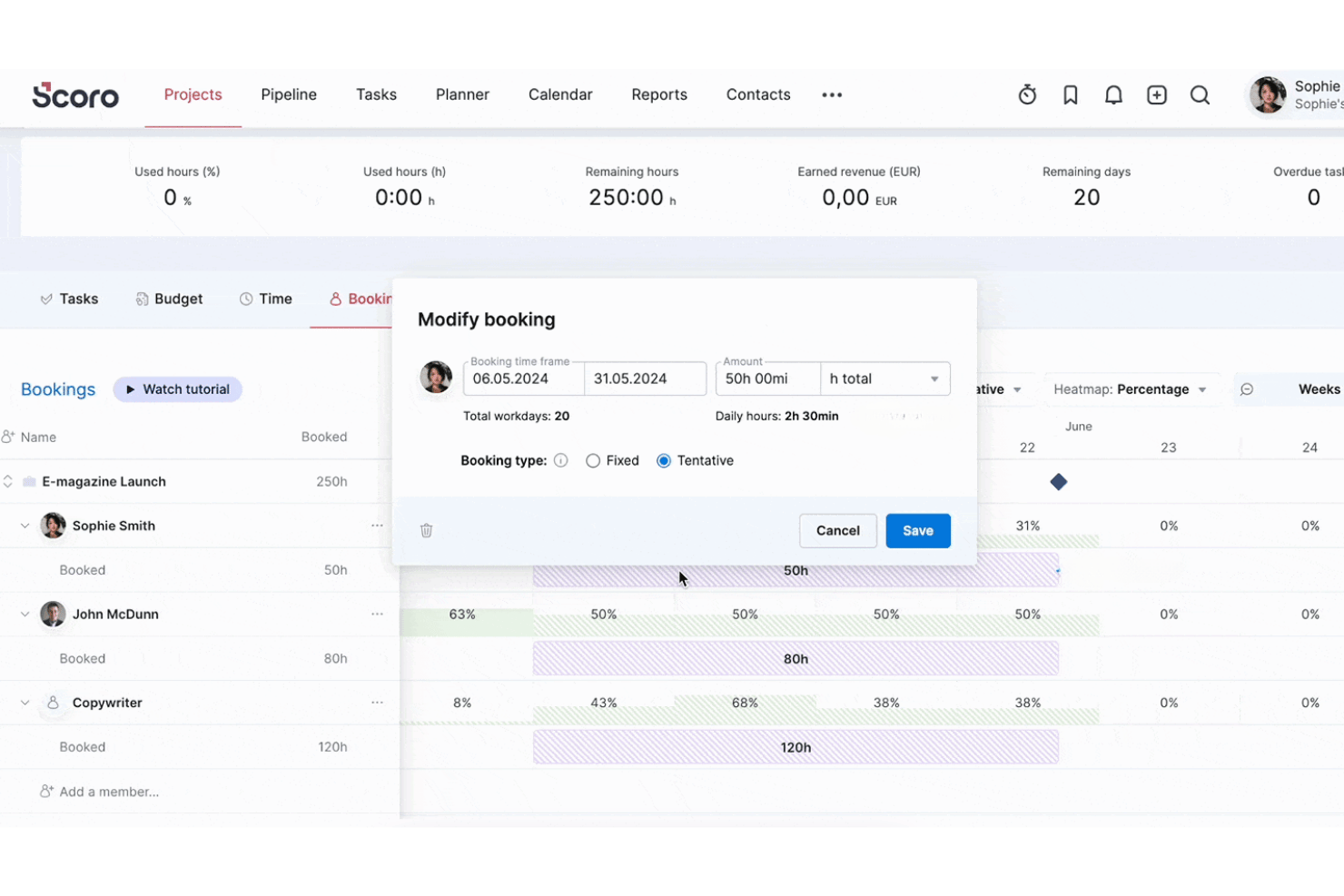
Scoro est une plateforme d'automatisation des services professionnels qui regroupe la planification des ressources, la prévision des capacités, le suivi du temps, la gestion de projet et la facturation dans un système unique et connecté.
Pour qui Scoro est-il le mieux adapté ?
Scoro convient particulièrement aux agences, cabinets de conseil et autres entreprises de services axées sur les projets qui ont besoin de gérer les ressources et les finances des projets au même endroit.
Pourquoi j'ai choisi Scoro
J'ai inclus Scoro dans ma sélection car c'est l'un des rares outils de gestion des ressources qui relie directement la planification des ressources à la facturation. Lorsque je planifie un membre de l'équipe dans le Planner, ce temps est directement intégré à la facturation, que le projet soit facturé au forfait, en régie ou sur la base d'un abonnement. J'apprécie également le fait que les prévisions de coûts et de marges bénéficiaires s'actualisent en temps réel à mesure que les réservations changent, ce qui permet de visualiser l'impact sur la marge avant d'engager une ressource sur un projet.
Fonctionnalités clés de Scoro
- Planification des ressources par rôle : Attribuez des membres d'équipe à des rôles et suivez leur disponibilité et leur charge de travail sur plusieurs projets.
- Tableau de bord de suivi de l'utilisation : Surveillez les heures facturables et non facturables, avec des filtres intégrés par équipe, rôle et période.
- Gestion des congés et des absences : Suivez les absences et congés du personnel pour garantir la précision de la planification.
- Diagrammes de Gantt de projet intégrés : Visualisez toutes les tâches et dépendances sous forme de chronologie pour une meilleure coordination des projets.
Intégrations Scoro
Scoro propose des intégrations natives avec Google Calendar, Apple Calendar, MS Exchange, Google Drive, Dropbox, HubSpot, Salesforce, QuickBooks, Xero, Exact Online, Expensify et Stripe. Il se connecte également à Zapier et propose une API pour des intégrations personnalisées.
Pros and Cons
Pros:
- Connexion directe entre la planification des ressources et la facturation de projet
- Outils de prévision des marges et bénéfices en temps réel
- Cartes thermiques intégrées d'utilisation et de charge de travail
Cons:
- Pas de matrice structurée des compétences ou des aptitudes
- Absence de fonctionnalités d'analyse RH ou de gestion des effectifs
New Product Updates from Scoro

Scoro Adds Time Mobile App and ELI Improvements
Scoro adds the Scoro Time mobile app for iOS/Android to track time anywhere and expands ELI with attachments, smarter filtering, and trigger-based actions. For more information, visit Scoro's official site.

Epicflow
Idéal pour l'optimisation d'environnements multi-projets
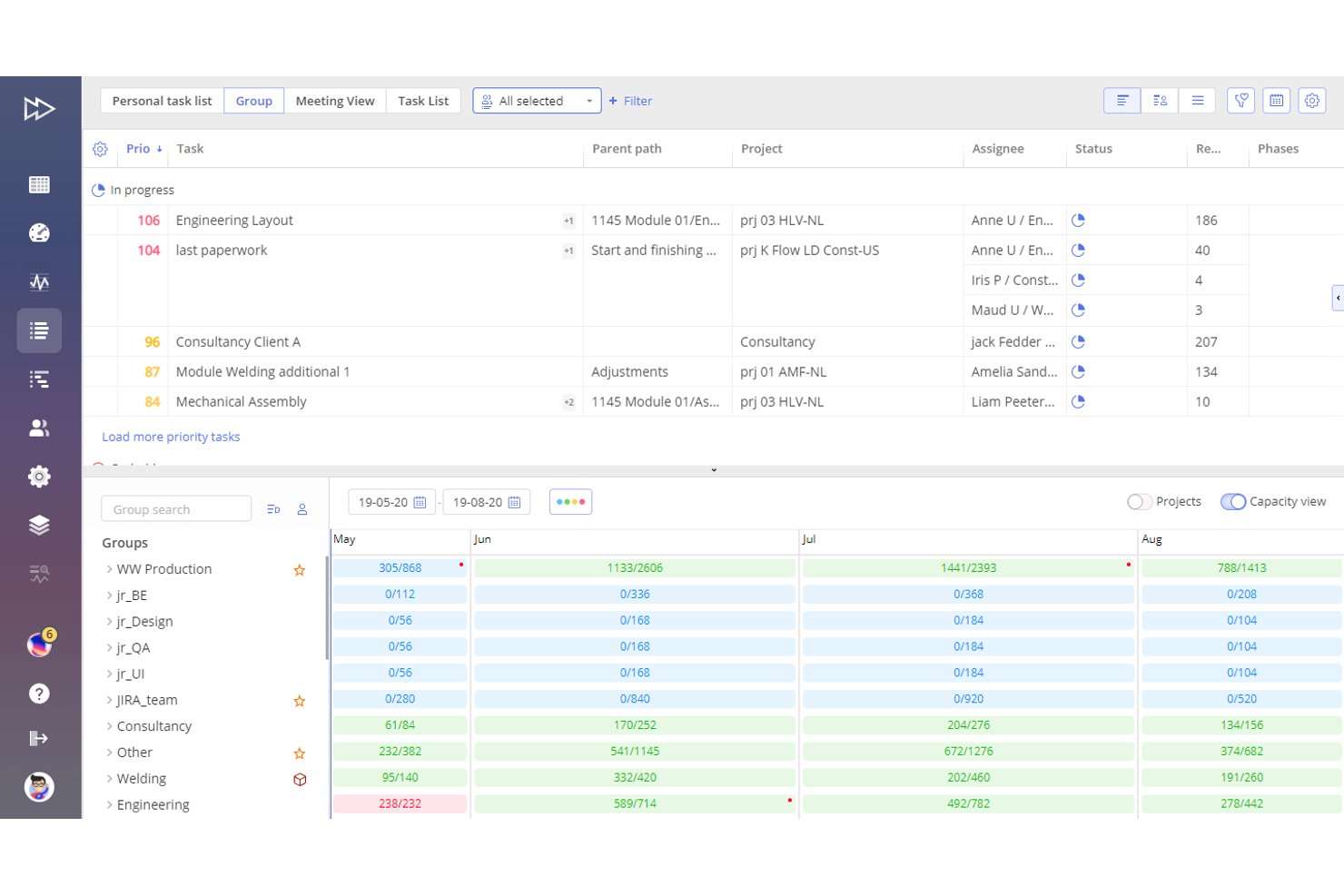
Epicflow est une plateforme de gestion des ressources et d'optimisation de portefeuille alimentée par l'IA, basée sur la Théorie des Contraintes, qui combine la planification multi-projets, l'équilibrage des charges de travail, la planification des capacités et l'allocation des ressources en fonction des compétences.
Pour qui Epicflow est-il le mieux adapté ?
Epicflow est particulièrement adapté aux gestionnaires de portefeuille et responsables PMO dans les secteurs de l'ingénierie, de la défense et de la fabrication qui gèrent un grand nombre de projets interconnectés partageant des ressources spécialisées.
Pourquoi j'ai choisi Epicflow
J'ai choisi Epicflow comme l'un des meilleurs outils car aucun autre ne gère les projets qui se chevauchent dans un même pool de ressources aussi efficacement. L'analyse 'What-If' me permet de simuler l'impact en aval d'un changement de priorité d'un projet avant de m'engager dans cette modification, ce qui est crucial lorsqu'un ingénieur clé est déjà mobilisé sur quatre flux de travail actifs. Le graphique de charge future (Future Load Graph) met ensuite en évidence les goulets d'étranglement de capacité plusieurs semaines à l'avance, ce qui me permet de rééquilibrer les affectations avant que cela ne pose des risques de livraison.
Fonctionnalités clés d'Epicflow
- Assistant IA Epica : Un outil d’IA intégré qui fournit des analyses, des alertes, des notifications et des guides de processus étape par étape.
- Liste des tâches avec auto-priorisation : Crée et ajuste automatiquement une liste de tâches priorisées basée sur les données projet en temps réel et les contraintes de ressources.
- Gestion des compétences et des attributs : Permet d’associer les tâches aux ressources à l’aide d’une base structurée de compétences, d’aptitudes et d’attributs.
- Intégration avec les outils de gestion de projet et ERP : Se connecte à Jira, SAP, MS Project, Oracle Primavera et d’autres plateformes via des API et l’import/export CSV.
Intégrations d’Epicflow
Epicflow propose des intégrations natives avec Jira, Microsoft Project, SAP, Oracle Primavera et Workfront, et fournit une API pour des intégrations personnalisées. L’importation et l’exportation en format CSV sont également prises en charge.
Pros and Cons
Pros:
- Gère les projets qui se chevauchent avec des ressources partagées
- Prévision avancée des charges de travail et détection des goulets d’étranglement
- Auto-priorisation des tâches selon la demande du portefeuille
Cons:
- Pas de suivi intégré des congés ou absences
- Connectivité limitée avec des systèmes RH ou paie

Float
Idéal pour la visualisation en temps réel de la chronologie des projets
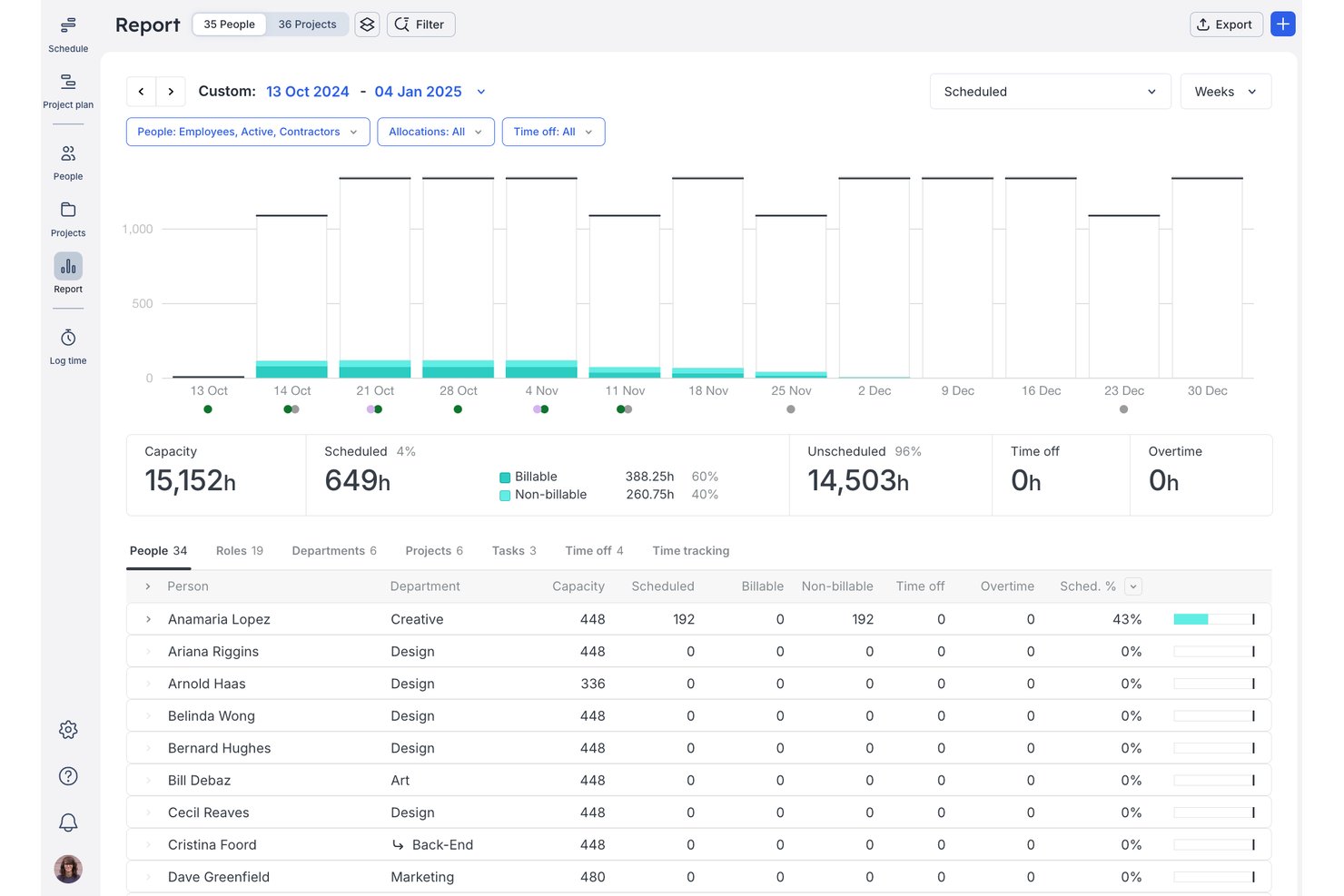
Float est une plateforme de gestion des ressources pour les équipes de services professionnels qui combine la planification visuelle, la gestion de la capacité, le suivi du temps et les rapports d'utilisation.
À qui s'adresse Float ?
Float convient aux agences et cabinets de conseil de petite à moyenne taille, où les responsables opérationnels ont besoin d'une vue claire et en temps réel de qui travaille sur quoi à travers plusieurs projets clients.
Pourquoi j'ai choisi Float
J'ai choisi Float parmi les meilleurs, car sa chronologie en direct, avec glisser-déposer, vous offre une vue constamment actualisée de chaque personne, projet et allocation au même endroit. Les barres de capacité codées par couleur signalent immédiatement les membres surchargés dès que vous modifiez une réservation. Smart Assign met ensuite en avant les personnes réellement disponibles selon les compétences, les rôles et la capacité restante, ce qui vous évite de tâtonner lors de l'affectation d'un nouveau projet.
Fonctionnalités clés de Float
- Gestion de projets multi-devises : Attribuez des budgets et des tarifs dans jusqu'à cinq devises pour les projets internationaux.
- Feuilles de temps préremplies et enregistrées automatiquement : Saisissez les heures réelles travaillées et comparez-les aux allocations prévues.
- Paramètres d'autorisations basés sur les rôles : Contrôlez l'accès aux informations projets et à la gestion des plannings selon le rôle utilisateur.
- Applications iOS et Android : Gérez les plannings, effectuez des mises à jour et consultez les allocations d'équipe depuis des appareils mobiles.
Intégrations Float
Float propose des intégrations natives avec Asana, Jira, Trello, Google Agenda, Outlook Calendar, Slack, ClickUp, Teamwork, Basecamp et Linear, et se connecte à Zapier, avec une API pour les intégrations personnalisées.
Pros and Cons
Pros:
- Tableau de planification en temps réel avec glisser-déposer
- Vue codée par couleur de la capacité et de la disponibilité de l'équipe
- Smart Assign automatise les suggestions d'affectation de projet
Cons:
- Pas de gestion RH ou de dossiers salariés intégrés
- Ne permet pas de suivre les compétences ni les certifications des membres

Ganttic
Idéal pour la planification visuelle d'équipes mondiales
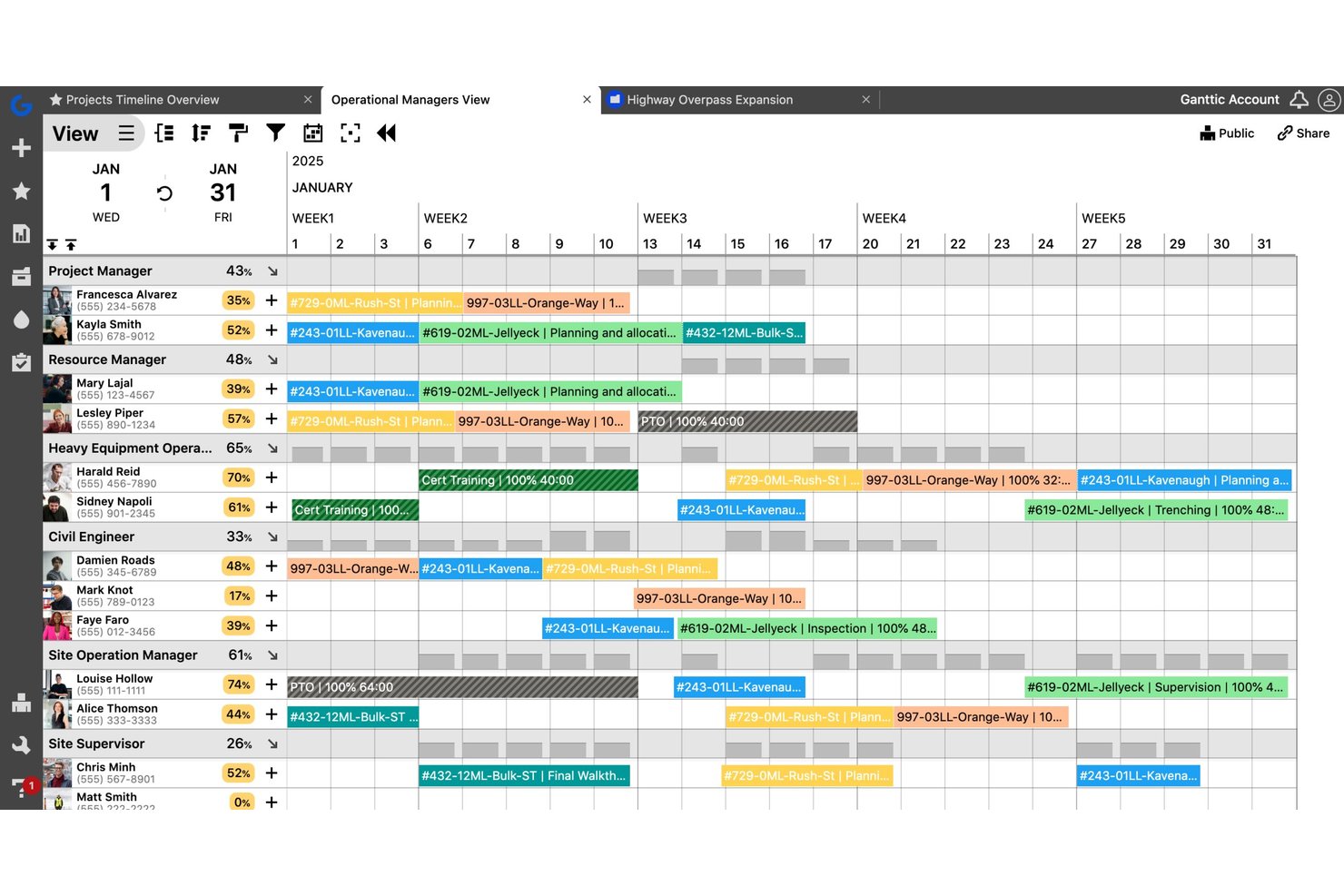
Ganttic est un outil de planification des ressources visuel qui permet aux équipes de programmer des personnes, du matériel et des installations entre différents projets grâce à des diagrammes de Gantt par glisser-déposer, le suivi de la capacité et des rapports d'utilisation.
Pour qui Ganttic est-il le mieux adapté ?
Ganttic convient aux chefs de projet et aux équipes opérationnelles dans des secteurs comme l'ingénierie, la construction et les médias, qui doivent coordonner plusieurs projets simultanés sur des ressources partagées.
Pourquoi j'ai choisi Ganttic
J'ai sélectionné Ganttic parmi les meilleurs en raison de la façon dont sa vue de Gantt à double perspective fonctionne en pratique. Je peux passer d'une vue centrée sur la ressource à une vue centrée sur le projet dans la même interface, ce qui est réellement utile pour coordonner des équipes à travers différents fuseaux horaires. La possibilité de filtrer et de regrouper les ressources selon des champs personnalisés, comme la région ou le département, facilite l'organisation de la planification globale sans devoir créer des plannings distincts pour chaque lieu.
Principales fonctionnalités de Ganttic
- Suivi automatisé de l'utilisation : Suivez automatiquement la charge de travail et le niveau d'utilisation des ressources sur l'ensemble des projets et des équipes.
- Planification de tâches multi-ressources et simultanées : Attribuez plusieurs personnes ou équipements à une même tâche tout en évitant les doubles réservations.
- Champs de données personnalisés pour les ressources : Ajoutez des champs uniques aux ressources, projets et tâches pour répondre à des besoins de flux de travail spécifiques.
- API et options d'intégration : Connectez-vous à Google Calendar, Outlook, Slack et plus encore grâce aux connecteurs intégrés ou à l'API publique.
Intégrations Ganttic
Ganttic propose des intégrations natives avec Google Calendar, Microsoft Outlook et OneLogin. Il se connecte à Zapier et fournit une API pour des intégrations personnalisées.
Pros and Cons
Pros:
- Interface visuelle de planification type Gantt pour les ressources
- Champs de données personnalisés flexibles pour les ressources
- Gère la planification des personnes et du matériel en même temps
Cons:
- Pas de suivi natif des compétences ou qualifications
- Flux d'approbation et de demande limités

Parallax
Idéal pour aligner les ressources sur les objectifs de revenus
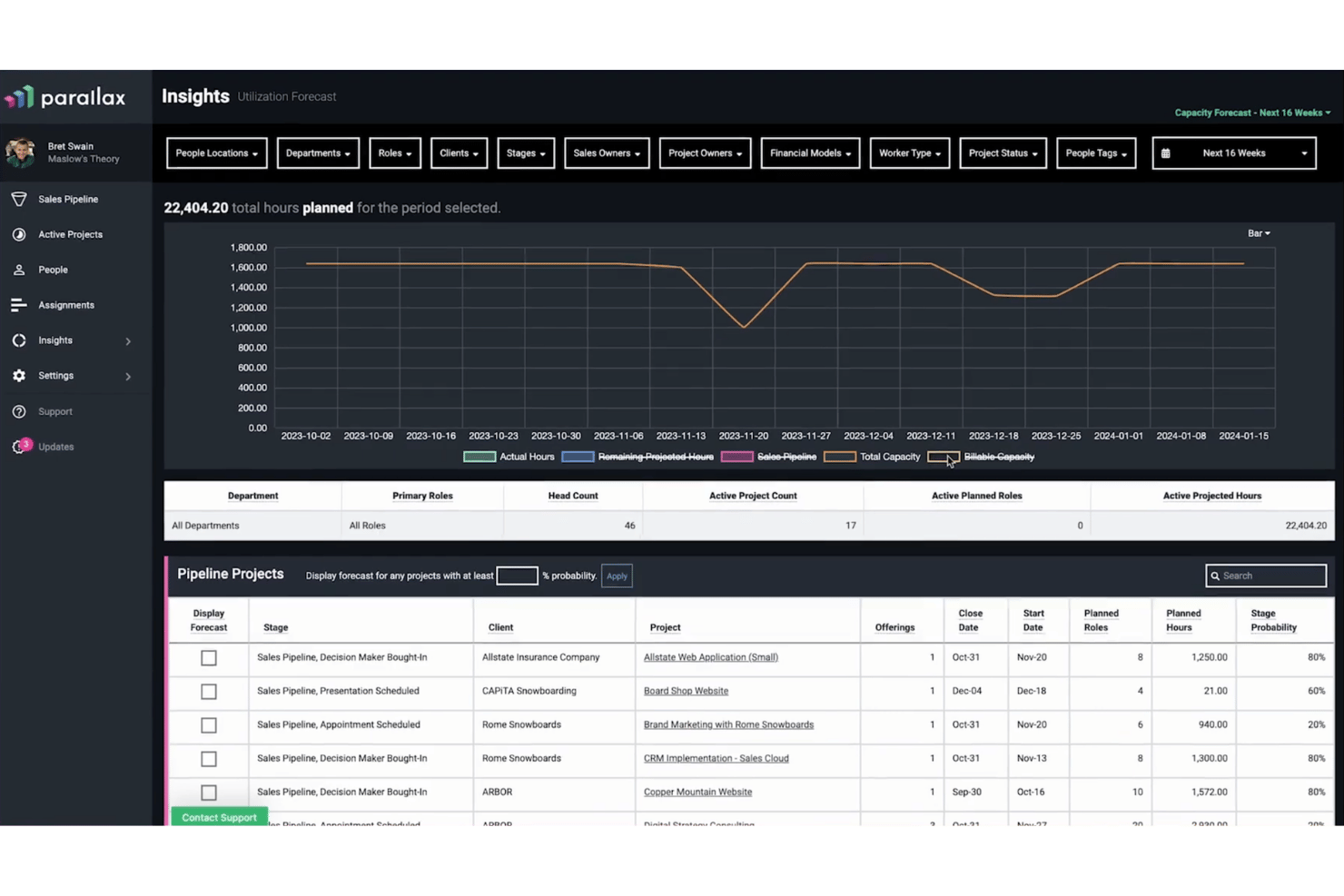
Parallax est une plateforme de gestion des ressources et de prévision conçue pour les entreprises de services professionnels, combinant la planification de la capacité, le suivi de l'utilisation, la prévision des besoins en personnel et la visibilité financière des projets en un seul endroit.
À qui s'adresse Parallax ?
Parallax convient particulièrement aux agences numériques et aux cabinets de conseil en logiciels qui doivent relier les décisions en matière de staffing directement aux marges des projets et aux objectifs de revenus.
Pourquoi j'ai choisi Parallax
J'ai inclus Parallax dans mes meilleurs choix car c'est l'un des rares outils de gestion des ressources qui relie directement les décisions d’effectif aux résultats de revenus. J'apprécie particulièrement la fonctionnalité de Contrôle de la Marge, qui surveille les marges des projets en temps réel et signale les problèmes avant qu'ils ne s'aggravent. Combiné à Staffing Foresight, qui exploite les données du pipeline CRM avec la charge des projets actifs pour offrir à mon équipe une vue prospective de la capacité et des revenus au même endroit.
Principales fonctionnalités de Parallax
- Planificateur visuel des effectifs : Visualisez la capacité de l'équipe et les charges de travail sur plusieurs horizons grâce à des visualisations codées par couleur.
- Filtrage par rôle et compétence : Filtrez les vues de l’effectif par rôle projet, compétence ou équipe pour un ajustement précis des ressources.
- Feuilles de temps intégrées : Enregistrez les heures travaillées directement dans Parallax ou via des intégrations comme Harvest ou Jira.
- Prévision du pipeline : Fusionnez les données du pipeline CRM avec les projets actifs pour anticiper la demande, la capacité et les revenus.
Intégrations Parallax
Parallax propose des intégrations natives avec Harvest, HubSpot, Asana, Jira, Microsoft Teams, Slack, NetSuite et Salesforce Platform. Une API est disponible pour des intégrations personnalisées.
Pros and Cons
Pros:
- Suit l’utilisation et la capacité en temps réel
- Connecte la demande prévisionnelle aux plans de staffing
- Visualise la disponibilité de l'équipe des mois à l'avance
Cons:
- Profondeur limitée pour le suivi de la matrice de compétences
- L’export de rapports personnalisés n'est pas pris en charge

Runn
Idéal pour la planification de scénarios en temps réel
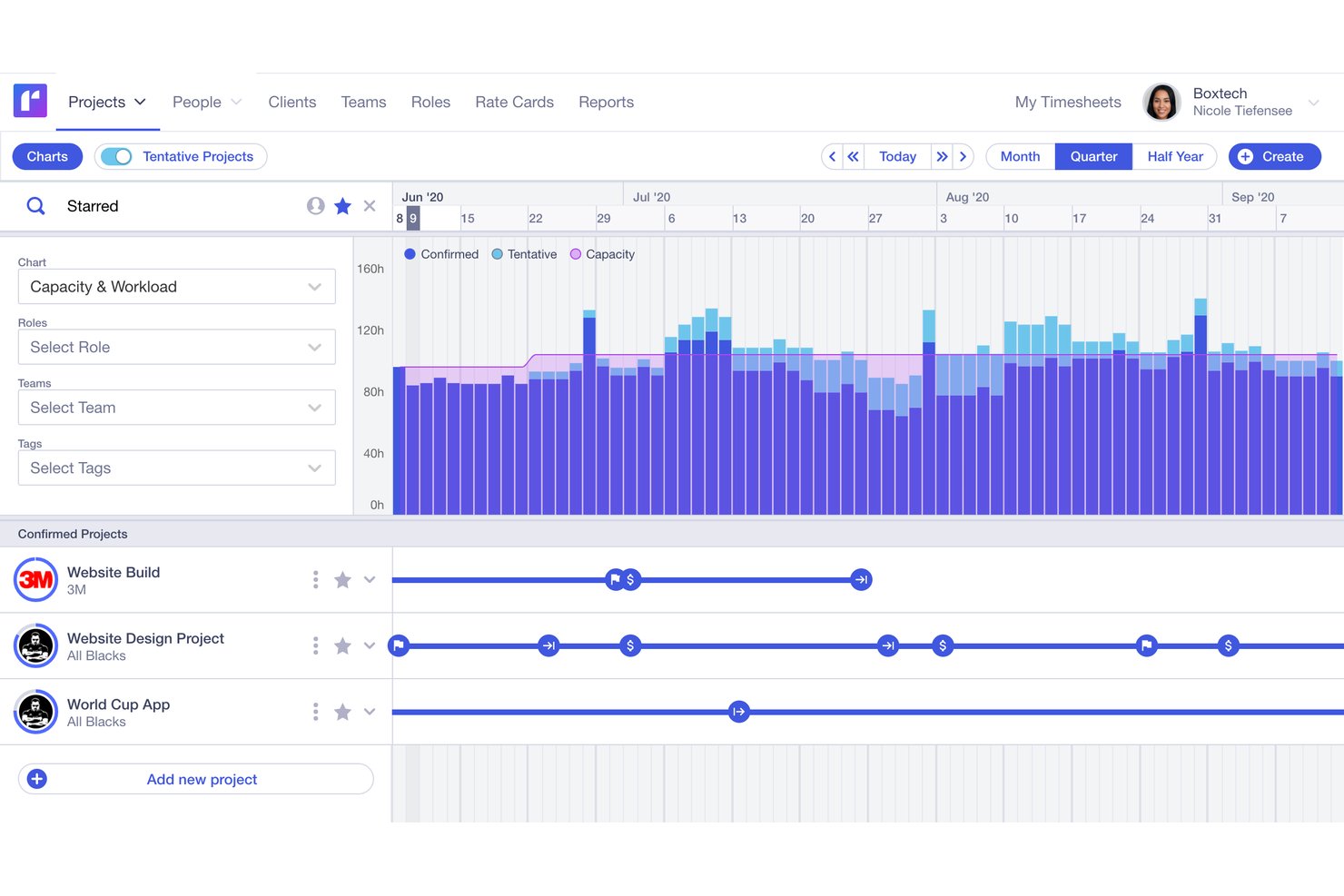
Runn est une plateforme de gestion des ressources qui intègre la planification visuelle, la prévision de la capacité, le reporting sur l'utilisation, le suivi des feuilles de temps et les finances des projets dans un seul outil de planification.
Pour qui Runn est-il le mieux adapté ?
Runn convient particulièrement aux sociétés de services professionnels, aux agences de conseil et aux équipes informatiques qui doivent gérer des effectifs organisés en mode projet sur plusieurs missions simultanées.
Pourquoi j'ai choisi Runn
J'ai sélectionné Runn dans ma liste grâce à sa gestion de la planification en temps réel basée sur des scénarios hypothétiques. Je peux construire plusieurs scénarios sauvegardés côte à côte, échanger des ressources entre des projets provisoires pour voir comment la capacité varie avant de m'engager sur un plan. La combinaison de ressources fictives et de graphiques de capacité en direct permet à mon équipe de simuler une nouvelle mission client par rapport à la charge actuelle, sans modifier le planning réel.
Fonctionnalités clés de Runn
- Planification multi-vues : Passez d'une vue mensuelle à trimestrielle ou semestrielle pour planifier sur différents horizons temporels.
- Marketplace d'intégrations : Connectez-vous à des systèmes RH comme BambooHR et à des outils de suivi du temps comme Harvest grâce aux intégrations natives.
- Tableaux de bord de reporting personnalisés : Créez des tableaux de bord privés avec un filtrage avancé et exportez les données de projet pour analyse complémentaire.
- Suivi des finances de projet : Gérez les budgets, les grilles tarifaires et comparez les prévisionnels aux réels directement dans l'outil.
Intégrations de Runn
Runn propose des intégrations natives avec BambooHR, HiBob, Humaans, ADP Workforce Now, Workday, Jira, Harvest et Clockify, et se connecte à Zapier. Une API est disponible pour des intégrations personnalisées.
Pros and Cons
Pros:
- Planification de scénarios en temps réel pour les ressources de projet
- Planification visuelle sur plusieurs horizons temporels
- Ressources fictives pour la planification du pipeline et des recrutements
Cons:
- Les rapports personnalisés sont difficiles à configurer
- Aucune application mobile dédiée disponible

Mosaic
Idéal pour l'équilibrage de charge piloté par l'IA
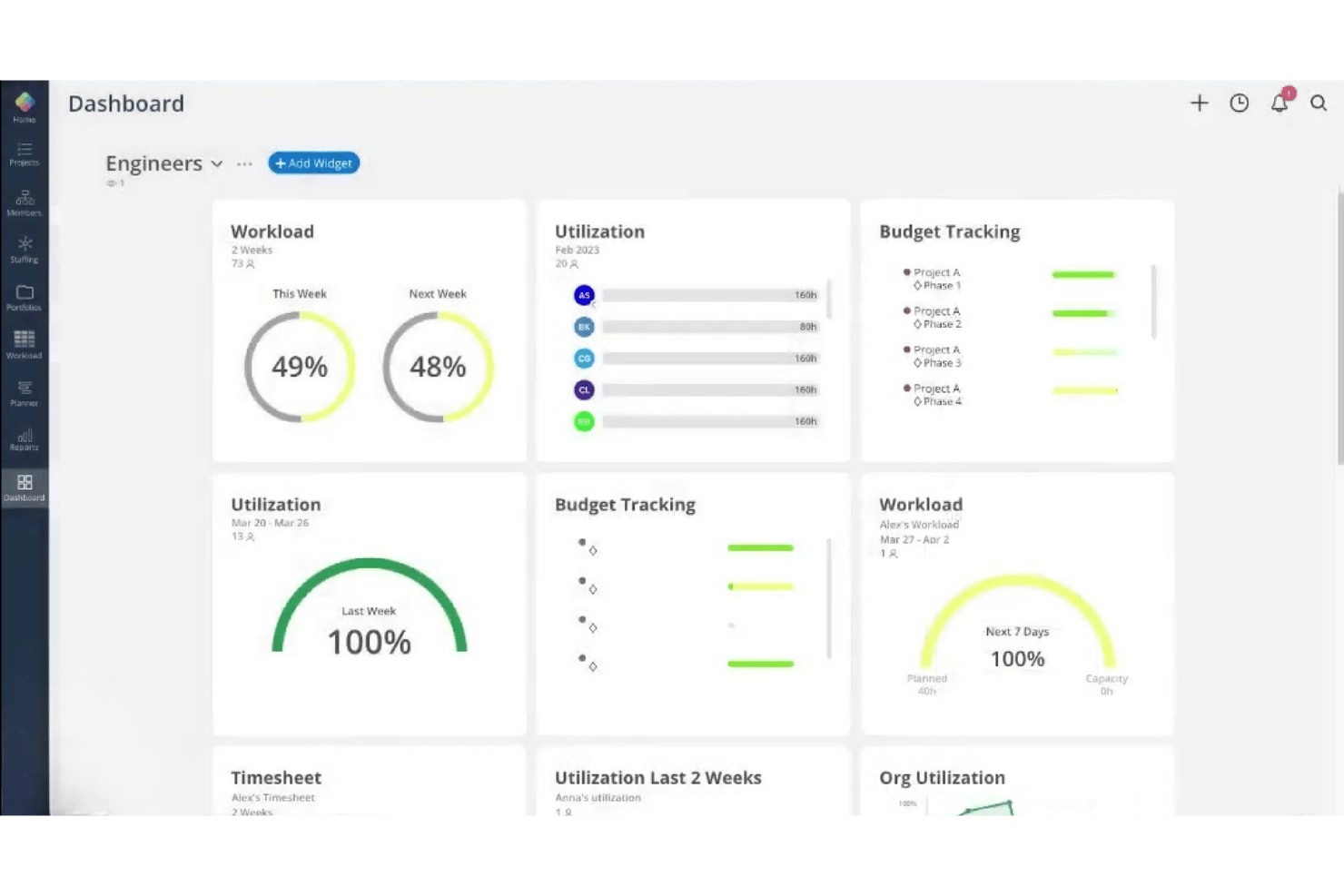
Mosaic est une plateforme de gestion des ressources alimentée par l'IA, conçue pour les équipes travaillant par projet. Elle regroupe l'affectation des ressources, la planification de la capacité, la prévision de la charge de travail, le reporting de l'utilisation et le suivi du temps en un seul endroit.
À qui s'adresse Mosaic ?
Mosaic convient parfaitement aux entreprises de taille petite à moyenne œuvrant dans l'architecture, l'ingénierie et les services créatifs, qui ont besoin de gérer la capacité de leur équipe sur plusieurs projets simultanés.
Pourquoi ai-je choisi Mosaic
J'ai choisi Mosaic parmi les meilleurs car son assistant IA, Chello, surveille activement la charge de travail des projets et anticipe les risques avant qu'ils ne deviennent des problèmes. J'apprécie qu'il signale automatiquement les dérives de délais et relance en cas de mises à jour manquantes, ce qui m'évite de vérifier manuellement chaque fil de projet. La fonctionnalité de replanification automatique ajuste les plans de travail en temps réel lorsque les priorités changent, maintenant ainsi l'équilibre de la charge de travail de toute l'équipe.
Fonctionnalités clés de Mosaic
- Affectation aux projets par rôle : Assignez les membres de l'équipe à des rôles spécifiques sur les projets, selon leurs compétences et leur capacité.
- Vue Gantt et Kanban : Choisissez entre plusieurs représentations visuelles des projets pour gérer les plannings et l'avancement des tâches.
- Rapports d'utilisation et de rentabilité : Suivez les taux d'utilisation des employés ainsi que les indicateurs de rentabilité des projets via des tableaux de bord.
- Suivi du temps intégré : Enregistrez les heures travaillées et gérez les feuilles de temps sur la même plateforme que la planification des ressources et des projets.
Intégrations de Mosaic
Mosaic offre des intégrations natives avec Asana, Jira, Slack, Microsoft 365, Microsoft Outlook, Dropbox Business, Gmail, QuickBooks, Deltek Vision, Deltek Ajera et Deltek Vantagepoint. Une API est disponible pour les intégrations sur mesure.
Pros and Cons
Pros:
- Assistant IA qui gère proactivement la charge des équipes
- Replanification automatisée lorsque les priorités des projets changent
- Tableaux de bord visuels pour le suivi de l'utilisation et la prévision
Cons:
- Matrice de compétences limitée pour l'allocation des talents
- Non adapté à la planification RH axée sur les effectifs
Autres logiciels de gestion des ressources
Voici quelques autres options de logiciels de gestion des ressources qui n’ont pas été retenues dans ma sélection, mais qui méritent tout de même votre attention :
- Kantata
Idéal pour gérer des livrables clients complexes
- Saviom
Idéal pour une personnalisation avancée au niveau entreprise
- Hub Planner by Milient
Idéal pour la gestion des feuilles de temps et les flux d’approbation
- Wrike
Idéal pour des vues de charge de travail personnalisables
- Celoxis
Idéal pour la planification et le suivi intégrés des capacités
- Teamwork.com
Idéal pour la collaboration des agences avec leurs clients
- Accelo
Idéal pour une gestion unifiée du travail client
- ClickTime
Idéal pour suivre les heures facturables des ressources
- Birdview PSA
Idéal pour obtenir des informations sur les ressources du portefeuille de projets
- Resource Management by Smartsheet
Idéal pour les modèles de planning prédéfinis


Comment j’évalue les logiciels de gestion des ressources
Je divise mon évaluation en deux : les fonctionnalités de base que chaque outil doit absolument maîtriser — comme la planification de la capacité et le reporting d’utilisation — et les éléments différenciateurs qui rendent une plateforme plus intéressante qu’une autre.
Fonctionnalités essentielles (indispensables pour figurer dans cette liste)
Lorsque je sélectionne des outils pour ma liste, j’attribue à chacun une note de 0 (ne propose pas la fonctionnalité) à 5 (excellent dans ce domaine) pour chaque fonctionnalité essentielle listée ci-dessous. Ensuite, je calcule le score total de l’outil en pourcentage. Chaque outil doit obtenir un score total minimum de 65% pour être pris en considération.
- Allocation et planification des ressources : Je cherche des planificateurs visuels à glisser-déposer qui signalent les conflits lorsque deux projets sollicitent la même personne lors d’un même sprint.
- Planification de la capacité : Chaque outil doit afficher la capacité en temps réel par rapport à la demande à venir, afin de détecter un excédent d’effectif ou un manque d’effectif plusieurs semaines à l’avance.
- Suivi des compétences et des expertises : Je vérifie si l’on peut rechercher par certification, niveau de compétence ou type de rôle afin d’associer la bonne personne aux besoins des projets à venir.
- Reporting sur l’utilisation : Les tableaux de bord doivent ventiler les heures facturables et non facturables par équipe ou par individu afin que les managers puissent agir sur les tendances d’utilisation, et non seulement les consulter.
- Suivi du temps et de la disponibilité : J’évalue si la saisie des temps intègre les congés, les jours fériés et la synchronisation des calendriers afin de refléter la véritable disponibilité, et non les seules heures planifiées.
- Prévision de la demande : La plateforme doit permettre de modéliser les projets à venir avec des allocations provisoires afin que les décisions d’embauche anticipent la demande réelle.
Une fois que j’ai une liste d’outils répondant aux critères, j’examine ce qui distingue chaque plateforme.
Facteurs de différenciation (ce qui distingue les éditeurs)
Voici comment je compare et différencie les éditeurs :
Fonctionnalités remarquables
Les cartes thermiques de capacité sont importantes car elles permettent de repérer en un coup d’œil les membres d’équipe surchargés ou inactifs, bien plus rapidement qu’en parcourant des lignes de données. Je recherche aussi des bacs à sable pour la simulation de scénarios, afin de modéliser l’impact d’une affaire potentielle sur le staffing sans modifier les plannings réels. La prévision financière complète cet ensemble en reliant directement les décisions de staffing aux projections de revenus et de marges, pour savoir si déplacer un développeur d’un projet à un autre est réellement judicieux sur le plan financier.
Au-delà des fonctionnalités
L’intégration au système d’information est cruciale — je vérifie si la plateforme synchronise dans les deux sens avec des outils comme Asana, Jira ou monday.com, ainsi qu’avec des systèmes comptables comme QuickBooks ou Xero. La structure tarifaire est également importante, en particulier si les parties prenantes non facturables comme les dirigeants sont comptées comme sièges payants, ce qui peut faire grimper les coûts quand l’équipe s’agrandit. J’évalue aussi le reporting et la visibilité pour les dirigeants, car des rapports préétablis sur l’utilisation et la rentabilité évitent de devoir créer des tableaux de bord à chaque demande de la direction.
Comment choisir un logiciel de gestion des ressources
Il est facile de se perdre dans de longues listes de fonctionnalités et des structures tarifaires complexes. Pour vous aider à rester concentré pendant votre processus unique de sélection d’un logiciel, voici une liste des facteurs à prendre en compte :
| Facteur | Points à prendre en compte |
|---|---|
| Évolutivité | Le logiciel continuera-t-il à répondre à vos besoins lorsque vos effectifs, votre volume de projets ou vos régions s’étendront au fil du temps ? |
| Intégrations | La solution se synchronise-t-elle correctement avec vos plateformes de gestion de projets, de finance, de SIRH et de calendrier ? |
| Personnalisation | Pouvez-vous adapter les flux de travail, les rôles ou les vues à la structure de votre organisation, plutôt que de vous limiter aux paramètres par défaut ? |
| Facilité d’utilisation | Les responsables d’équipe et les utilisateurs non techniques comprendront-ils immédiatement comment créer des plannings et générer des rapports ? |
| Mise en œuvre et intégration | Combien de temps faut-il entre l’inscription et la planification de votre premier service, et quelle formation est proposée ? |
| Coût | Des frais cachés sont-ils facturés pour les modules complémentaires, ou le prix augmentera-t-il fortement si vous ajoutez de nouveaux services ? |
| Mesures de sécurité | La solution répondra-t-elle aux exigences de confidentialité des données de votre secteur et vous permettra-t-elle de contrôler les personnes ayant accès aux informations sensibles ? |
| Besoins internes en ressources | Disposez-vous des capacités internes nécessaires en informatique ou en administration pour gérer la configuration, les autorisations des utilisateurs et l’assistance continue ? |
Qu’est-ce qu’un logiciel de gestion des ressources ?
Un logiciel de gestion des ressources est une plateforme numérique qui aide les organisations à affecter des personnes à des projets, à suivre les disponibilités et à équilibrer les charges de travail en fonction des compétences et de la demande. Ces outils offrent aux équipes des ressources humaines et des opérations une visibilité en temps réel sur la capacité, les taux d’utilisation et les conflits de planning, afin qu’elles puissent anticiper et éviter de surcharger ou de sous-utiliser le personnel.
Fonctionnalités des logiciels de gestion des ressources
Lors du choix d’un logiciel de gestion des ressources, soyez attentif aux fonctionnalités clés suivantes :
- Planification des ressources : affectez des personnes à des projets, des tâches ou des équipes à l’aide d’outils visuels tels que des calendriers ou des interfaces glisser-déposer, afin d’ajuster rapidement les plans en fonction de l’évolution des besoins.
- Planification de la capacité : suivez la capacité des équipes et des individus par rapport aux exigences des projets afin d’éviter la surallocation et d’identifier les besoins éventuels en aide supplémentaire ou en recrutement.
- Suivi des compétences : conservez des profils consultables présentant les compétences, les certifications et l’expérience de chaque personne, afin de trouver facilement le profil le mieux adapté à chaque mission.
- Rapports d’utilisation : surveillez les heures facturables et non facturables, repérez les membres de l’équipe sous-utilisés et analysez l’équilibre de la charge de travail à l’aide de tableaux de bord et de rapports détaillés.
- Suivi du temps et des disponibilités : enregistrez les heures travaillées, les congés, les jours fériés et les autres types d’absence pour obtenir une vision exacte des périodes pendant lesquelles les employés sont disponibles pour des missions.
- Prévision de la demande : modélisez les futurs projets ou les besoins de l’entreprise afin de disposer à l’avance des effectifs et de la combinaison de compétences adéquats.
- Détection des conflits : recevez des alertes automatiques lorsque deux projets sollicitent la même ressource, afin de résoudre de manière proactive les conflits de réservation.
- Autorisations personnalisables : définissez les niveaux d’accès et la visibilité par rôle ou par service afin de protéger les informations sensibles et de prendre en charge différents circuits d’approbation.
- Rapports et analyses : exportez ou visualisez des informations clés sur les tendances liées aux ressources, afin d’aider les responsables des ressources humaines et des opérations à prendre des décisions éclairées et à communiquer clairement avec les parties prenantes.
Fonctionnalités d’IA courantes des logiciels de gestion des ressources
Au-delà des fonctionnalités standard des logiciels de gestion des ressources présentées ci-dessus, bon nombre de ces solutions intègrent l’IA avec des fonctionnalités telles que :
- Affectation automatisée des ressources : l’IA analyse les exigences des projets, les compétences et les disponibilités afin de suggérer les membres de l’équipe les mieux adaptés à chaque mission, réduisant ainsi les efforts de planification manuelle.
- Prévision prédictive de la capacité : les modèles d’apprentissage automatique anticipent les pics ou les pénuries de charge de travail à venir en analysant les données historiques, ce qui vous aide à planifier à l’avance les recrutements ou les réaffectations.
- Résolution intelligente des conflits : l’IA détecte les conflits potentiels de planification et recommande des ajustements optimaux, afin de résoudre les problèmes avant qu’ils n’affectent les échéances des projets.
- Analyse des écarts de compétences : l’IA compare les besoins actuels et futurs des projets à l’inventaire des compétences de vos effectifs, met en évidence les lacunes et suggère des formations ciblées ou des recrutements.
- Prévision des tendances d’utilisation : les algorithmes prévoient les taux d’utilisation en fonction des tendances passées, ce qui permet d’équilibrer proactivement la charge de travail et de réduire les risques d’épuisement professionnel ou de périodes sans affectation.
Avantages des logiciels de gestion des ressources
La mise en œuvre d’un logiciel de gestion des ressources offre plusieurs avantages à votre équipe et à votre entreprise. Voici quelques-uns des bénéfices auxquels vous pouvez vous attendre :
- Amélioration de l’affectation des projets : affectez les employés aux projets appropriés en fonction de leurs compétences, de leur disponibilité et des besoins de l’entreprise, afin de réduire les inadéquations et les temps d’inactivité.
- Meilleur équilibre de la charge de travail : la planification visuelle et les alertes de conflit en temps réel contribuent à éviter la surallocation, l’épuisement professionnel et les périodes excessives sans affectation au sein de vos effectifs.
- Prévision précise de la capacité : utilisez des outils de planification de la capacité et de modélisation de la demande pour aligner les niveaux d’effectifs sur les futurs projets.
- Meilleure visibilité pour les ressources humaines et les dirigeants : les tableaux de bord et les rapports d’utilisation donnent aux équipes des ressources humaines, aux responsables et aux dirigeants un accès rapide aux données pour prendre de meilleures décisions.
- Simplification de la conformité et des approbations : les autorisations intégrées, le suivi du temps et les pistes d’audit simplifient la conformité, les approbations et la gestion des congés.
- Décisions fondées sur les données : les analyses et les rapports personnalisés mettent en évidence les tendances et les lacunes, afin de faciliter l’adaptation agile de vos stratégies de gestion des ressources.
- Intégration et mise en œuvre plus rapides : les capacités d’intégration et les flux de travail flexibles aident les équipes à passer rapidement des feuilles de calcul à une gestion numérique des ressources entièrement suivie.
Coûts et tarifs des logiciels de gestion des ressources
Le choix d’un logiciel de gestion des ressources nécessite de comprendre les différents modèles tarifaires et forfaits disponibles. Les coûts varient en fonction des fonctionnalités, de la taille de l’équipe, des modules complémentaires et d’autres facteurs. Le tableau ci-dessous résume les forfaits courants, leurs prix moyens et les fonctionnalités généralement incluses dans les solutions logicielles de gestion des ressources :
Tableau comparatif des forfaits de logiciels de gestion des ressources
| Type de forfait | Prix moyen | Fonctionnalités courantes |
|---|---|---|
| Forfait gratuit | $0 | Planification de base, nombre limité d'utilisateurs, vues simples de l'utilisation et assistance standard. |
| Forfait personnel | $5-$20/utilisateur/mois | Suivi individuel du travail, allocation de ressources de base, tableau de bord pour un seul utilisateur et outils de création de rapports de base. |
| Forfait professionnel | $15-$40/utilisateur/mois | Planification des équipes, outils de planification de la capacité, suivi des compétences, intégrations et fonctionnalités avancées de création de rapports. |
| Forfait Entreprise | $40-$80/utilisateur/mois | Autorisations personnalisées, analyses avancées, assistance prioritaire, accès à l'API et options de sécurité de niveau entreprise. |


FAQ sur les logiciels de gestion des ressources
Voici quelques réponses aux questions courantes sur les logiciels de gestion des ressources :
En quoi un logiciel de gestion des ressources diffère-t-il d'un logiciel de gestion de projet ?
Les logiciels de gestion des ressources se concentrent sur l’affectation des personnes, le suivi des disponibilités et la gestion de la charge de travail, tandis que les logiciels de gestion de projet couvrent une planification plus globale des projets, la gestion des tâches et les échéances. Les logiciels dédiés à la planification des ressources facilitent également la gestion du portefeuille de projets en évitant les conflits de ressources. De nombreuses organisations utilisent les deux conjointement afin d’obtenir une visibilité complète sur leurs opérations.
Les logiciels de gestion des ressources peuvent-ils contribuer à réduire l'épuisement professionnel des employés ?
Oui, les logiciels dédiés à la planification des ressources offrent une visibilité sur les charges de travail grâce à une vue claire de celles-ci, mettent en évidence la surallocation et permettent une gestion proactive de la capacité. L’utilisation d’un outil de planification dédié aide votre équipe à maintenir des charges de travail équilibrées, améliorant ainsi l’utilisation des ressources tout en réduisant les risques d’épuisement professionnel et de rotation du personnel.
Quels types d'équipes tirent le meilleur parti des logiciels de gestion des ressources ?
Les équipes travaillant sur des projets, les agences créatives, les cabinets de conseil et les services informatiques qui gèrent plusieurs projets, échéances et budgets de projet en tirent une grande valeur. Ces équipes s’appuient sur un planificateur de ressources pour optimiser les affectations, améliorer l’utilisation facturable et gérer les prévisions de ressources parallèlement aux besoins plus larges en matière de capacité.
Est-il difficile de mettre en œuvre un logiciel de gestion des ressources ?
La mise en œuvre dépend généralement de vos processus actuels et de la taille de votre équipe. De nombreux fournisseurs proposent une assistance à la migration, des formations et des intégrations qui peuvent faciliter la transition depuis des feuilles de calcul ou des outils existants, tout en garantissant l’évolutivité à mesure que votre entreprise se développe.
Les logiciels de gestion des ressources s'intègrent-ils aux systèmes RH ou de paie ?
Oui, de nombreuses solutions s’intègrent aux outils de SIRH, de paie et de suivi du temps. Il est ainsi facile d’importer les données des employés, de synchroniser les soldes de congés et de maintenir une planification des ressources précise et à jour.
Puis-je personnaliser les autorisations pour différents rôles d'utilisateur ?
Oui, la plupart des plateformes de gestion des ressources vous permettent de contrôler les personnes autorisées à consulter, modifier ou gérer les données selon le service, la fonction ou l’ancienneté. Cela protège les informations sensibles de l’entreprise et correspond aux flux de validation du monde réel.