

Il software per l'elaborazione delle paghe a codice sorgente aperto offre funzionalità per le paghe basate su codice sorgente che è possibile esaminare e, a seconda della licenza, modificare o ospitare autonomamente. Le opzioni spaziano dai moduli per le paghe inclusi nelle piattaforme HR ed ERP agli strumenti che collegano le paghe ai dati di rilevazione delle ore o integrano le funzionalità per le paghe in un altro prodotto. Prima di decidere se uno strumento è adatto ai tuoi flussi di lavoro HR e alle tue risorse tecniche, confronta le sue funzionalità per le paghe, il supporto alla conformità normativa locale, le integrazioni e i requisiti di configurazione.
Perché fidarsi delle nostre recensioni sui software
6,700+
Reviews
20
Industry experts
16+
Evaluation factors
14
Years reviewing software
Il nostro team testa e recensisce software dal 2012. In quanto esperti HR noi stessi, sappiamo quanto sia difficile — e importante — scegliere il software giusto.
Per questa guida, abbiamo valutato gli strumenti attraverso test pratici e ricerche indipendenti, assegnando un punteggio agli strumenti in base ai nostri criteri di selezione. Ci basiamo inoltre sulle competenze di leader di pensiero del settore e di professionisti HR attivi.
Le nostre recensioni riflettono il nostro giudizio editoriale umano, non un discorso di vendita.
Revisori esperti:
- Phil GrayCOO
 Kim BehnkeRedattrice e analista HR Tech
 Josh BarkerPeople Ops Manager

Tabella comparativa: software per le paghe a codice sorgente aperto
Confronta fianco a fianco prezzi e specifiche dei software per le paghe a codice sorgente aperto inclusi nella mia selezione.
Score legend (out of 5)
- Excellent4.5–5
- Good4–4.4
- Average3–3.9
- Below average2–2.9
- Poor1–1.9
Sorted by: Default
| Tool | Starting Price | Website | |||||||
|---|---|---|---|---|---|---|---|---|---|
Best for linking payroll with ERP accounting | 4.0 out of 5 | 4 | 4 | 5 | 4 | 3 | 4 | Pricing upon request Free plan available | Website |
Best for salary workflows in a connected ERP | 3.2 out of 5 | 4 | 3 | 5 | 3 | 1 | 3 | Free Free open-source framework | Website |
Best for DIY payroll around a self-hosted ERP | 3.0 out of 5 | 5 | 1 | 5 | 2 | 1 | 4 | Free software Free plan + free demo available | Website |
Best for self-hosting with setup support | 3.2 out of 5 | 3 | 3 | 4 | 4 | 2 | 3 | Pricing upon request Free demo available | Website |
Best for payroll tied to wider ERP operations | 3.7 out of 5 | 5 | 3 | 5 | 3 | 2 | 4 | Free Free open-source framework | Website |
Best for workforce costs in a wider ERP | 3.2 out of 5 | 3 | 3 | 4 | 3 | 2 | 4 | Free Free plan + free demo available | Website |
Best for India-specific payroll compliance | 4.2 out of 5 | 4 | 4 | 5 | 4 | 4 | 4 | $5/month Free plan + 14-day free trial available | Website |
Best for embedding payroll in your product | 3.8 out of 5 | 4 | 4 | 4 | 4 | 3 | 4 | Free framework Free open-source framework | Website |
Best for free, unlimited-user self-hosted HR | 3.8 out of 5 | 4 | 4 | 4 | 4 | 4 | 3 | $7/user/month Free plan + 30-day free trial available | Website |
Best for payroll tied to staff schedules | 3.2 out of 5 | 3 | 4 | 1 | 3 | 4 | 4 | $50/month 30-day free trial + free demo available | Website |


Recensioni dei software per le paghe a codice sorgente aperto
Di seguito sono riportati i miei riepiloghi dei migliori software per le paghe a codice sorgente aperto inclusi nella mia selezione. Le mie recensioni analizzano le funzionalità per le paghe, il supporto alla conformità normativa e i requisiti di configurazione di ciascuna opzione software, per aiutarti a trovare quella più adatta.
 Best for linking payroll with ERP accounting
- Free plan available
- Pricing upon request
Visit WebsiteCustomer Rating:4.2/5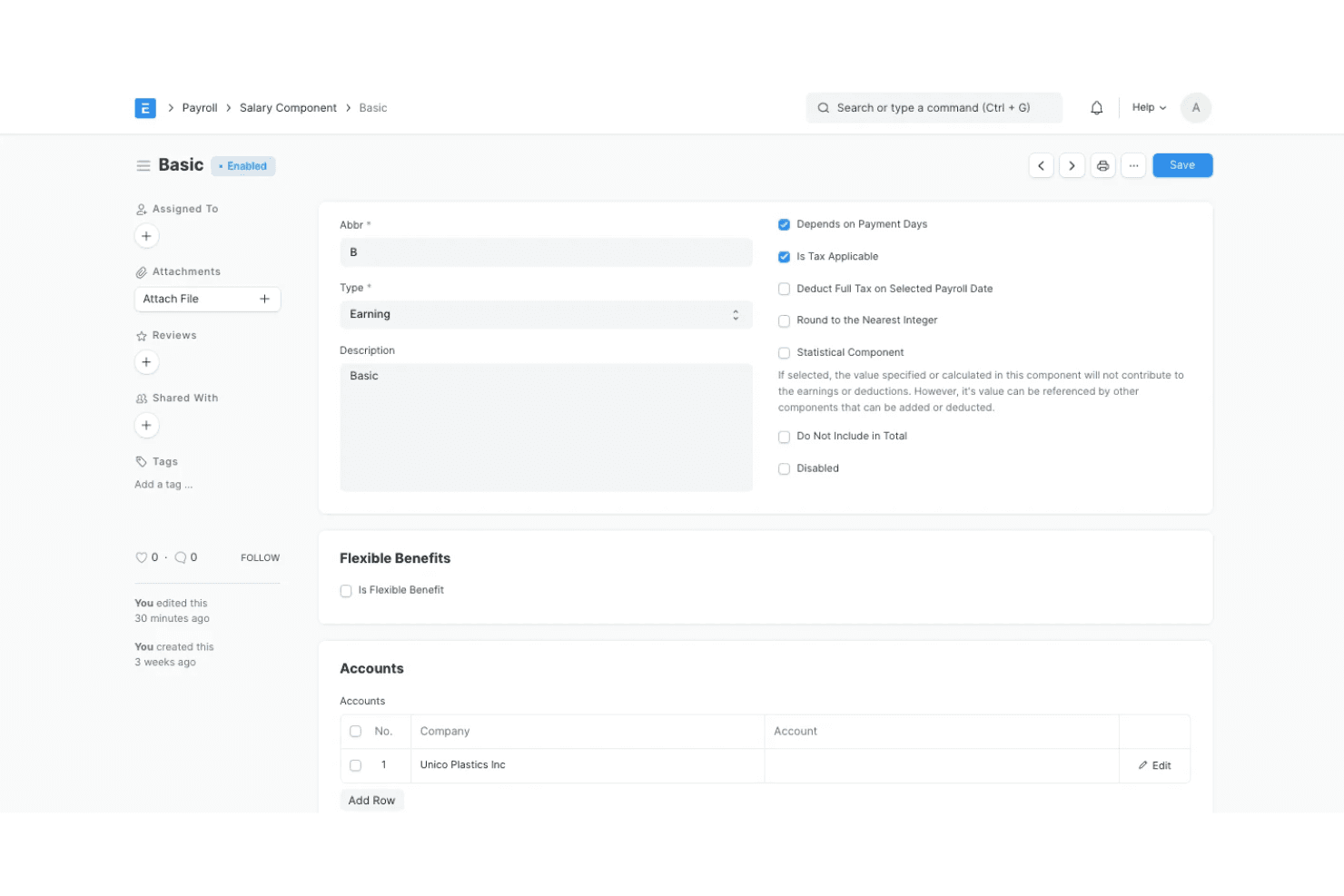
ERPNext's Payroll module lets you configure salary components such as Basic pay, including tax and account settings. ERPNext is an open-source ERP platform that, when used with the separate Frappe HR application, covers payroll processing, salary structure configuration, tax slab setup, bulk payroll processing, and direct accounting integration across HR, finance, and operations modules.
Who Is ERPNext Best For?
ERPNext is a strong fit for small businesses and IT teams that want to manage payroll, accounting, and HR within a single open-source platform they can fully control.
Why I Picked ERPNext
I picked ERPNext because it connects payroll processing directly with its accounting module. When you submit salary slips, ERPNext automatically creates the corresponding accrual journal entries, keeping payroll payable accounts up to date without manual reconciliation. I also like that you can configure salary structures with custom components and tax slabs, then process bulk payroll across branches or departments through a single payroll entry.
ERPNext Key Features
- Salary structure configuration: Define salary components, formulas, and tax slabs, then assign structures to individual employees or groups.
- Timesheet-based payroll: Calculate employee pay from submitted timesheets using the hourly rate defined in the salary structure.
- Salary slip email delivery: Automatically email password-protected salary slip PDFs to each employee's preferred email address.
- Role-based payroll access: Control who can process payroll and post accounting entries using HR Manager and Accounts User role permissions.
ERPNext Integrations
ERPNext has 398 marketplace apps, including Google Sheets Data Sync, Banking, Biostar Biometric Integration, and WhatsApp Integration. Its RESTful API supports custom integrations.
Pros and Cons
Pros:
- Supports encrypted payslip delivery
- Processes department-specific payroll batches
- Automatically posts payroll accruals
Cons:
- Non-Indian tax rules vary
- Accounting mappings need validation
Learn more about ERPNext: Best for salary workflows in a connected ERP
- Free open-source framework
- Free (self-hosted)
Visit WebsiteCustomer Rating:4.1/5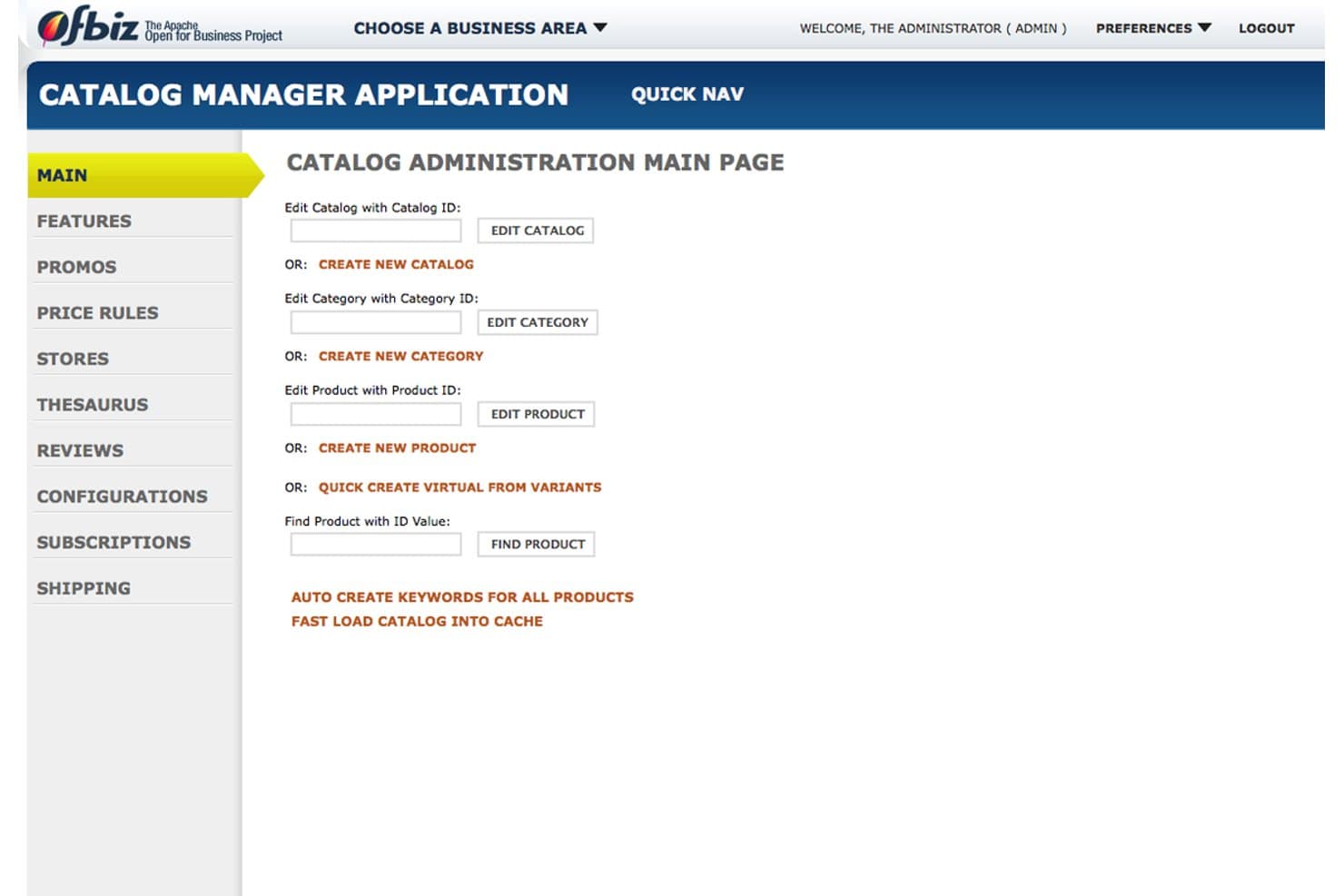
The Apache OFBiz Catalog Manager main page, for editing catalogs, categories and products. Apache OFBiz is an open-source, Java-based ERP framework with an HR module that handles salary calculations, pay grade management, payslip generation, and payroll invoice processing through an integrated accounting system.
Who Is Apache OFBiz Best For?
Apache OFBiz is a good fit for developer-led teams that need to build and maintain a self-hosted ERP with salary workflows closely connected to accounting and HR.
Why I Picked Apache OFBiz
I picked Apache OFBiz because its salary workflows operate within an integrated HR and accounting environment rather than as a separate application. You can define pay grades and salary steps linked to job position types, calculate salaries using direct amounts or grade-and-step structures, and process payroll invoices through the Accounting module's invoice lifecycle, from creation to general ledger posting and payment. I find this workflow particularly useful for teams that need payroll and general ledger records to remain synchronized without manual data transfers.
Apache OFBiz Key Features
- Pay grade and salary step configuration: Define pay grades and salary steps linked to job position types, with rates specified by year, month, week, or hour.
- HR and accounting module integration: Process payroll invoices through the Accounting module's invoice lifecycle, including creation, general ledger posting, and payment.
- Entity and service engine architecture: Build and extend custom business logic at the data model and service levels without being restricted by a fixed application structure.
- On-premises self-hosting: Deploy OFBiz on your own infrastructure across supported Windows or Unix-based environments to maintain control over payroll data.
Apache OFBiz Integrations
Apache OFBiz does not document native integrations with named external vendors. It provides APIs and connects HR salary workflows with its built-in Accounting module for custom integrations.
Pros and Cons
Pros:
- Processes integrated payroll invoices
- Supports flexible Java customization
- Configures graded salary steps
Cons:
- Payroll history uses invoices
- Statutory withholding setup undocumented
Learn more about Apache OFBiz: Best for DIY payroll around a self-hosted ERP
- Free plan + free demo available
- Free software (payroll add-on from €180)
Visit WebsiteCustomer Rating:4.5/5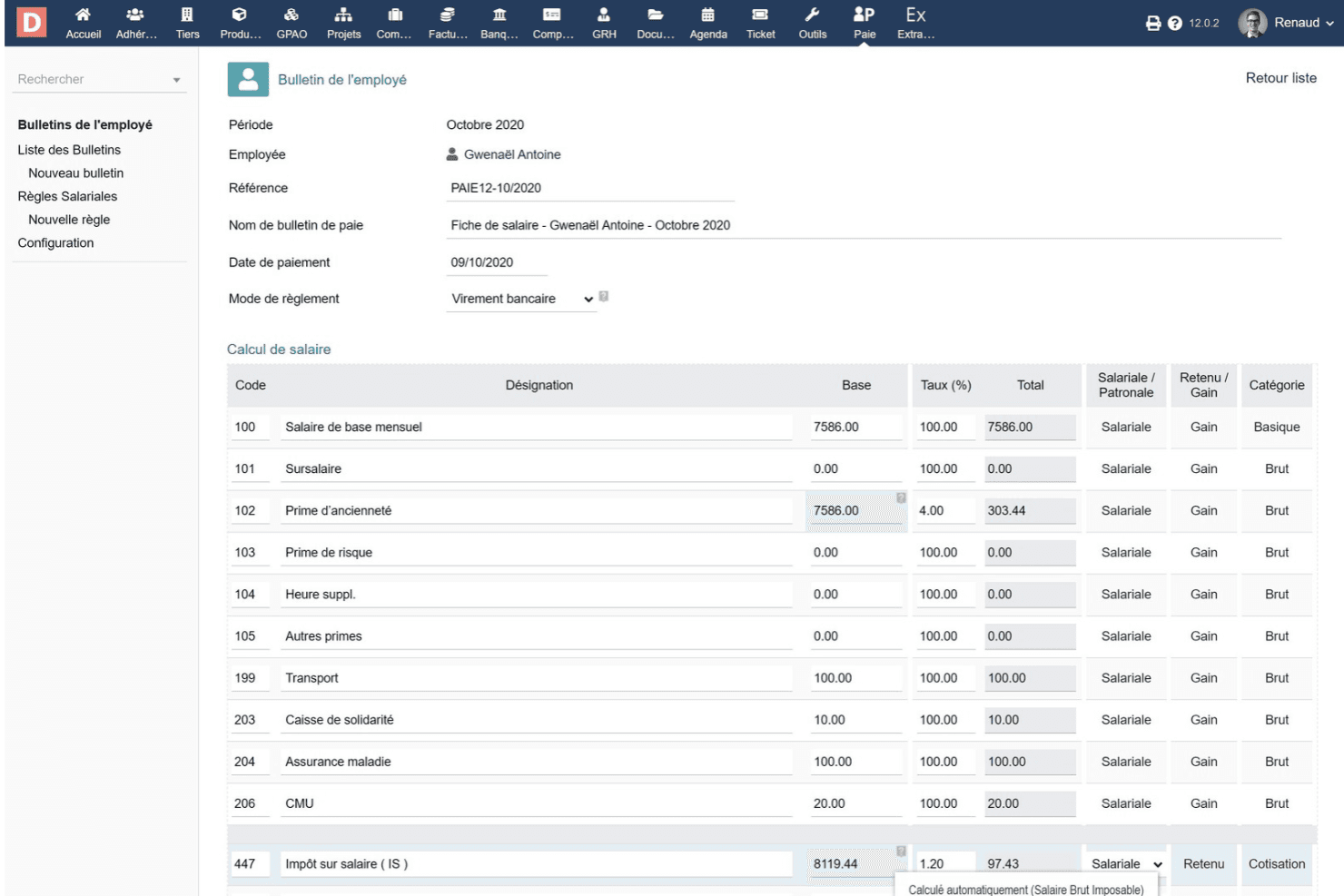
Dolibarr's payroll module generating an employee payslip with salary lines and social contributions. Dolibarr is an open-source ERP and CRM suite that covers HR, finance, billing, timesheets, and expense management. Its built-in Salaries module records salary payments, while full gross-to-net payroll calculations require a separately purchased add-on, such as Odoo Payroll for Dolibarr.
Who Is Dolibarr Best For?
Dolibarr is a good fit for technically inclined small business owners and developers who want a self-hosted, open-source ERP foundation that they can extend with custom payroll logic.
Why I Picked Dolibarr
I picked Dolibarr because it provides a self-hosted ERP environment that businesses can extend to accommodate their payroll requirements. The core Salaries module handles salary payment recording, while the separately purchased Odoo Payroll for Dolibarr add-on provides configurable gross-to-net calculations using custom salary rules, structures, and formula-based logic. This flexibility is useful for businesses with compensation arrangements that do not fit standard payroll structures, although the additional module cost and local compliance requirements must be considered.
Dolibarr Key Features
- Employee and user management: Create employee profiles, organize users into groups and hierarchies, and assign role-based permissions across the system.
- Leave request tracking: Employees submit leave requests through the platform, supervisors approve or decline them, and the system automatically updates leave balances.
- Timesheet recording: Record time by day, week, month, project, or task, and convert logged hours into monetary values using each employee's configured hourly rate.
- REST API and module builder: Access REST APIs through an embedded API explorer and use the low-code Module Builder to extend or customize the application without writing everything from scratch.
Dolibarr Integrations
Dolibarr offers native LDAP integration for user authentication and synchronization. Its REST API, triggers, hooks, and external modules support custom connections with HR, accounting, and payroll systems.
Pros and Cons
Pros:
- Extends payroll through add-ons
- Records employee salary payments
- Supports modular ERP customization
Cons:
- Add-on compliance needs validation
- Native payroll excludes calculations
Learn more about Dolibarr: Best for self-hosting with setup support
- Free demo available
- Pricing upon request
Visit WebsiteCustomer Rating:3/5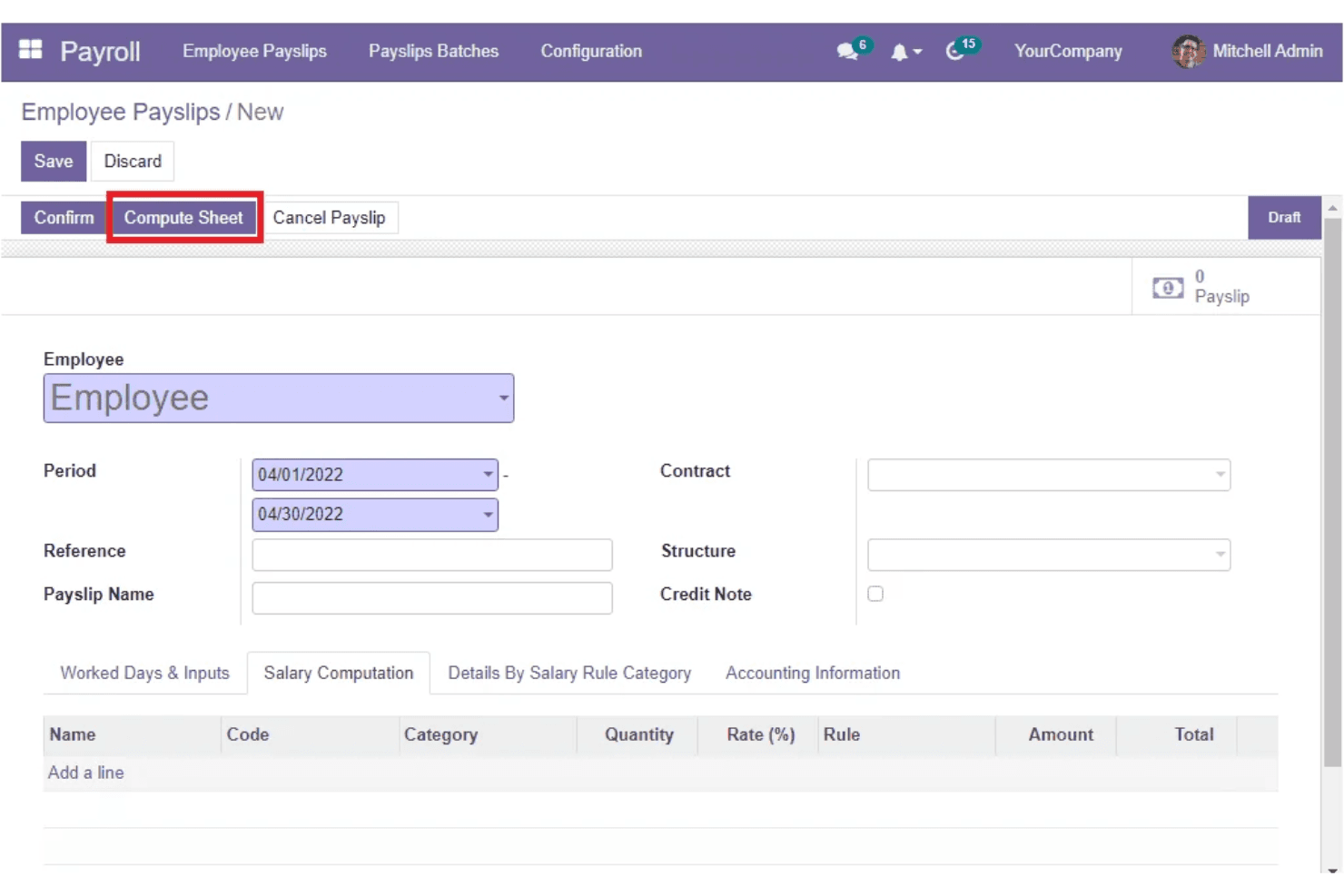
Payroll app screen for creating an employee payslip and computing the salary sheet. Open HRMS is an open-source HR and payroll management system built on Odoo that covers payroll processing, attendance, leave management, recruitment, appraisals, and employee records.
Who Is Open HRMS Best For?
Open HRMS is a strong fit for small businesses and IT teams that want a self-hosted, open-source HR and payroll system they can deploy on their own infrastructure and customize at the code level.
Why I Picked Open HRMS
I've included Open HRMS in my top picks because it's designed for teams that want to manage payroll on their own infrastructure without ongoing software licensing fees. I particularly like that it offers vendor-backed implementation packages, allowing organizations to access support when setting up Odoo. Its payroll module also handles salary structures, configurable deduction rules, and batch payslip generation, supporting gross-to-net payroll processing once an active employee contract is in place.
Open HRMS Key Features
- Payslip batch generation: Group employees under the same salary structure and generate their payslips together in a single batch.
- Biometric attendance integration: Connect fingerprint-reading and facial recognition devices to capture attendance data that feeds directly into payroll calculations.
- Employee loan management: Configure loan policies, manage approvals, and automatically deduct repayments from employee payslips.
- HR reporting suite: Generate reports covering attendance, leave, payroll, and expenses, with filtering and drill-down options for detailed analysis.
Open HRMS Integrations
Open HRMS has documented native integrations with biometric devices, including fingerprint-reading and facial recognition devices, for attendance tracking. Native third-party integrations and API availability are not clearly documented.
Pros and Cons
Pros:
- Includes vendor-backed implementation assistance
- Connects biometric attendance devices
- Generates batch employee payslips
Cons:
- Deployment guidance lacks detail
- Jurisdictional payroll modules vary
Learn more about Open HRMS: Best for payroll tied to wider ERP operations
- Free open-source framework
- Free (self-hosted)
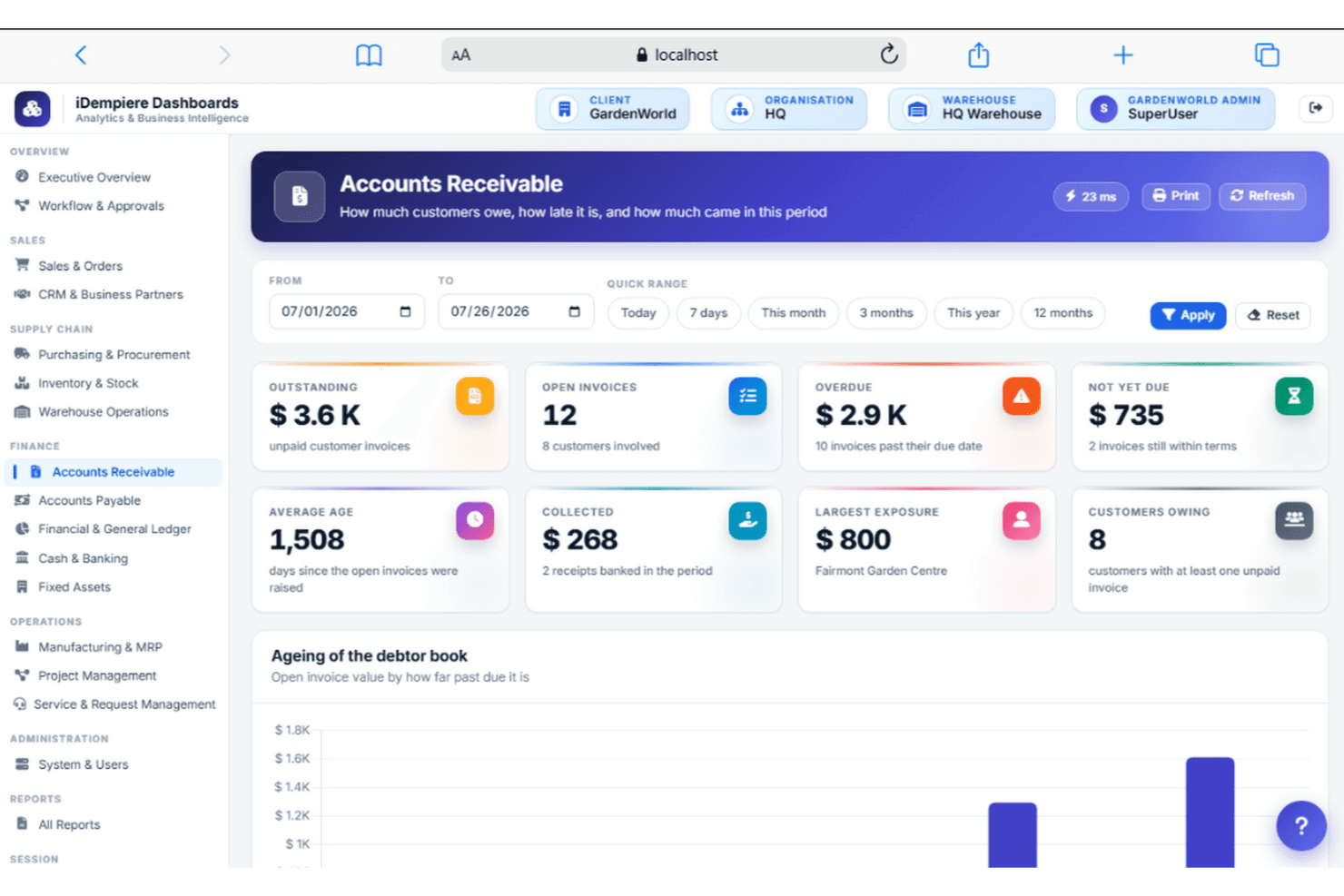
The iDempiere Accounts Receivable dashboard, showing outstanding invoices, overdue amounts and debtor ageing. iDempiere is an open-source ERP platform that connects payroll processing, HR, accounting, procurement, inventory, and manufacturing within a single self-hosted system.
Who Is iDempiere Best For?
iDempiere is a strong fit for IT teams and developers who need payroll integrated with a broader ERP system and have the technical expertise to configure and self-host it.
Why I Picked iDempiere
I picked iDempiere because its payroll functionality can operate within a comprehensive ERP platform that also handles accounting, procurement, and manufacturing. Through the CDSoftware Payroll plugin, payroll calculations connect directly with iDempiere's financial accounting system, allowing payroll and journal entries to remain synchronized without manual exports. I also like that the plugin supports multi-currency payroll attributes and employee loan management with accounting functionality, which is useful for organizations managing different compensation structures.
iDempiere Key Features
- Role-based access controls: Assign permissions at the organization, table, column, and record levels to restrict access to sensitive payroll information.
- REST and SOAP APIs: Connect iDempiere to external HR, finance, or reporting tools using built-in REST and optional SOAP/XML web services.
- Payroll report generation: Generate standard reports, including payment receipts, employee directories, work certificates, and assignment and deduction summaries.
- On-premises deployment: Self-host iDempiere on Linux, Windows, or macOS servers, maintaining control over where payroll data is stored.
iDempiere Integrations
Documented integrations include Snowflake, dbt, Tableau, 3CX, OpenEMR, Availity, and TriZetto. iDempiere also supports REST and SOAP/XML web services for custom payroll and ERP integrations.
Pros and Cons
Pros:
- Accommodates multicurrency payroll attributes
- Supports granular record permissions
- Connects payroll with accounting
Cons:
- Localization depends on extensions
- Payroll requires external plugins
Learn more about iDempiere: Best for workforce costs in a wider ERP
- Free plan + free demo available
- Free (self-hosted)
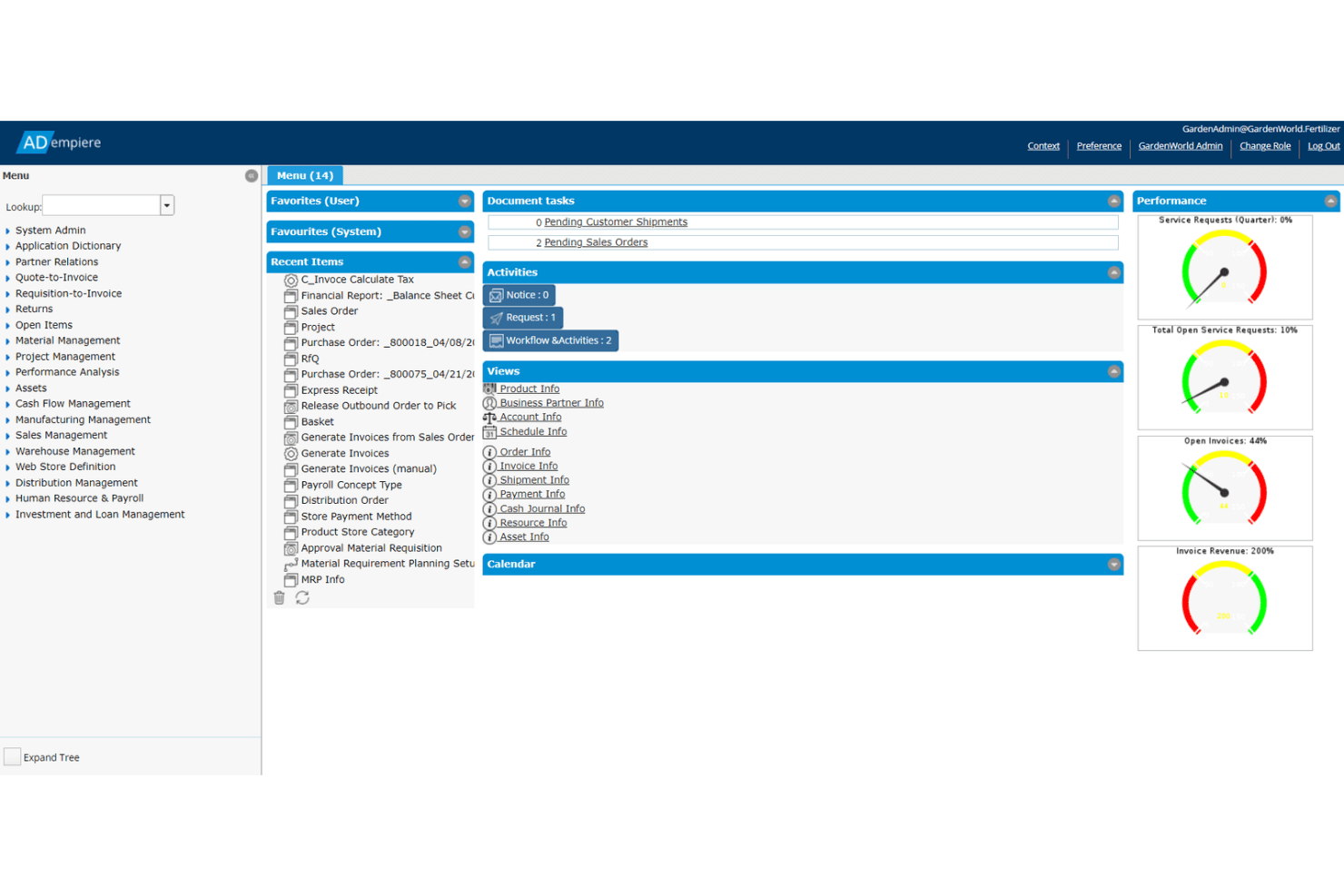
The ADempiere main dashboard with menu navigation, recent items, pending tasks and performance gauges. ADempiere is an open-source ERP with a built-in payroll module that handles payroll rules, calculations, payroll movement processing, and accounting integration through a self-hosted, GPL-2.0-licensed platform.
Who Is ADempiere Best For?
ADempiere works best for IT-led teams that need payroll integrated with a broader ERP and have the technical resources to configure and maintain a self-hosted, open-source system.
Why I Picked ADempiere
I picked ADempiere because it integrates payroll with a comprehensive ERP, allowing workforce costs to be managed alongside purchasing, accounting, and inventory in a single system. I find its payroll rules engine particularly useful because you can define custom payroll concepts, configure stop values for individual employees or payroll runs, and post final amounts through Accounts Payable without leaving the platform. The JSR 223 scripting API also allows teams to create custom calculation logic for payroll rules, which is helpful when standard deduction structures do not match an organization's pay policies.
ADempiere Key Features
- Payroll report generation: Generate salary-change, employee-dependent, employee-detail, and bank-account-detail reports directly from the payroll module.
- Payroll process selection criteria: Filter payroll runs by department, job type, employee status, salary structure, shift group, and more than a dozen other criteria.
- Accounts Payable posting: Post final payroll amounts through the built-in Accounts Payable model using ADempiere's standard accounting framework.
- JasperReports integration: Build and generate custom payroll report templates using JasperReports, which is embedded in ADempiere's reporting engine.
ADempiere Integrations
ADempiere does not clearly document native third-party integrations. Its payroll module connects internally with Accounts Payable, commission calculations, and payment selection within the ERP.
Pros and Cons
Pros:
- Customizes JasperReports payroll templates
- Filters detailed payroll runs
- Executes scripted payroll calculations
Cons:
- Payroll scripting needs maintenance
- Prebuilt compliance rules sparse
Learn more about ADempiere: Best for India-specific payroll compliance
- Free plan + 14-day free trial available
- From $5/month (hosting; software free)
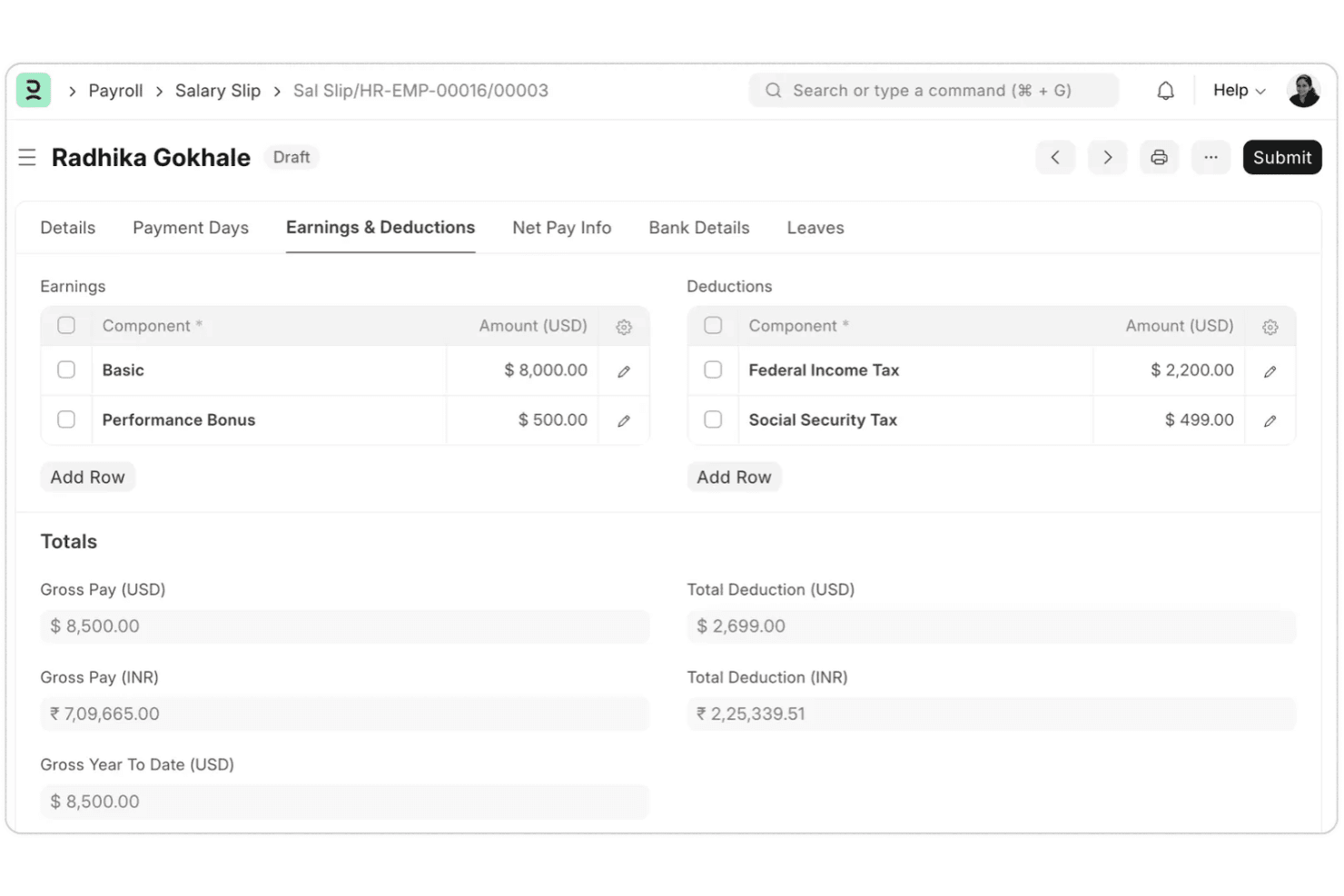
Frappe HR's salary slip screen lists earnings, deductions, and totals for an employee in draft status. Frappe HR is an open-source HR and payroll platform with dedicated modules for salary structures, statutory deductions, attendance, leave, expense claims, and employee lifecycle management.
Who Is Frappe HR Best For?
Frappe HR is a strong fit for India-based HR and payroll teams that need built-in statutory compliance support covering Provident Fund (PF), Employees' State Insurance (ESI), Professional Tax, and Labour Welfare Fund requirements across multiple states.
Why I Picked Frappe HR
I've included Frappe HR in my top picks because it offers built-in statutory compliance support for India's complex payroll deductions. The India Payroll module covers Professional Tax across more than 15 states, Labour Welfare Fund requirements across 14 states, ESI wage ceilings, and PF configuration, including voluntary contributions. I also like that employees can compare the old and new tax regimes, declare exemptions, and save their selected regime to their salary structure assignments.
Frappe HR Key Features
- Salary structure builder: Create rule-based salary structures with earnings, deductions, conditions, and formulas for different employee groups.
- Multi-currency payroll: Process payroll in a foreign currency and view gross and net totals in both that currency and your company's base currency.
- Timesheet-based payroll: Set hourly rates linked to project or task timesheets and process separate payroll entries for time-based compensation.
- Income tax declarations and proofs: Collect employee exemption declarations and supporting documents to incorporate into payroll tax calculations.
Frappe HR Integrations
Frappe HR has native integrations with ERPNext and Frappe Lending, along with REST API and webhook support for custom integrations.
Pros and Cons
Pros:
- Compares employee taxation regimes
- Configures voluntary PF contributions
- Supports Indian statutory deductions
Cons:
- Conditional formulas require configuration
- International tax localization limited
Learn more about Frappe HR: Best for embedding payroll in your product
- Free open-source framework
- Free framework (commercial regulations priced separately)
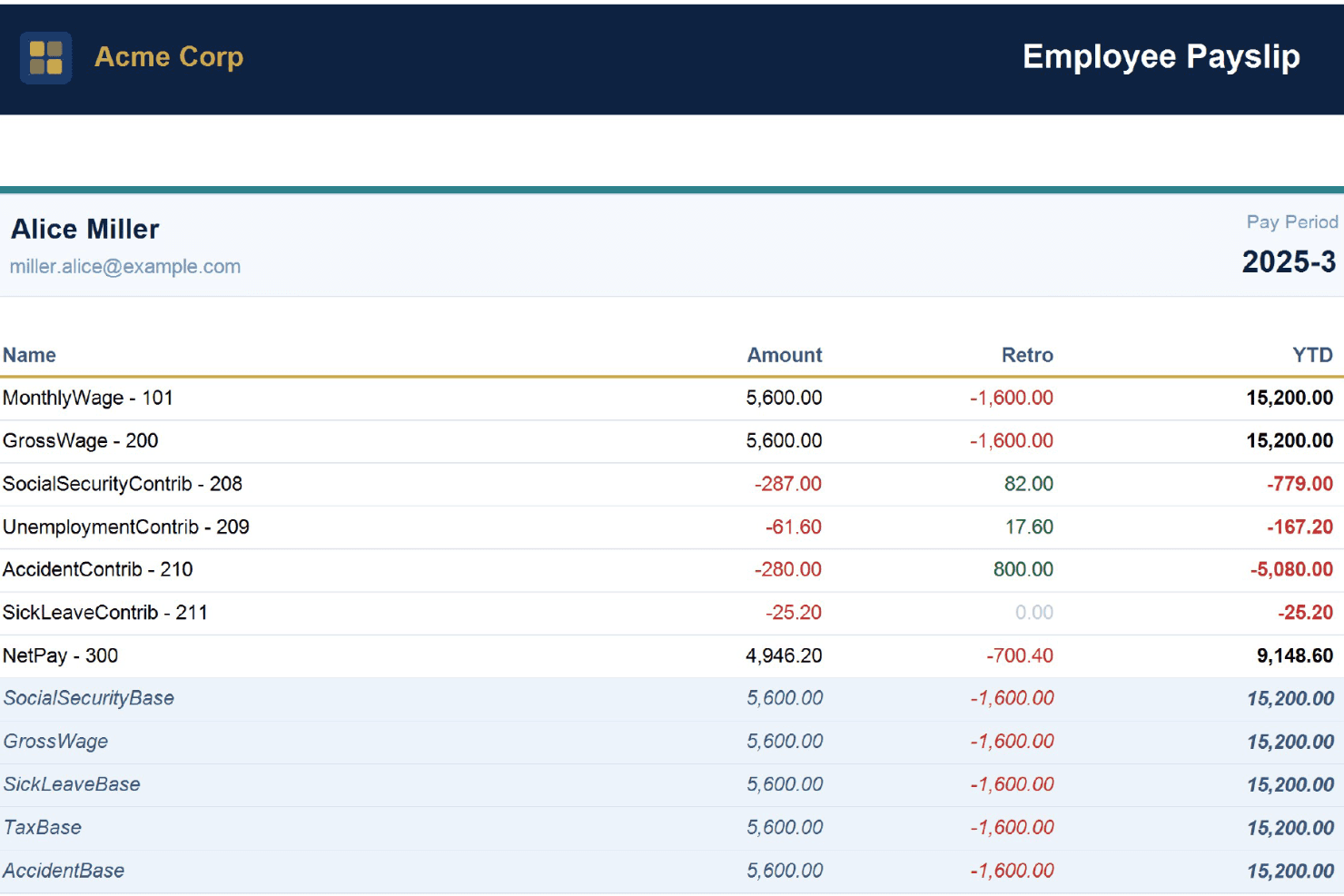
Sample employee payslip showing wages, statutory contributions, net pay and year-to-date totals. Payroll Engine is an open-source, self-hosted payroll framework built on .NET that handles gross-to-net calculations, retroactive payroll processing, multi-tenant regulation layers, forecasting, and report generation through a REST API and C# scripting model.
Who Is Payroll Engine Best For?
Payroll Engine is designed for developers and software teams that need to embed payroll processing logic directly into a custom application or platform.
Why I Picked Payroll Engine
I picked Payroll Engine because it's purpose-built for embedding payroll logic into custom products rather than operating as a standalone payroll application. I find its composable regulation layer model particularly useful because teams can combine country, company, and tenant-level rules, version them, and extend them with C# scripts or no-code actions to accommodate different pay structures. The retroactive payroll engine also handles past-dated corrections without requiring manual workarounds, which is valuable for product teams building payroll functionality into their platforms.
Payroll Engine Key Features
- Composable regulation layers: Combine country, company, and tenant-level payroll rules that can be versioned, inherited, and shared across tenants.
- Payroll forecasting: Run named what-if payroll scenarios against live regulations and employee data without affecting production results.
- Lifecycle test framework: Define JSON-based tests covering case input, payroll processing, and report output, with CI/CD pipeline support.
- Multi-format report output: Generate payslips and summaries using culture-specific templates and export them as XML, Excel, or PDF files.
Payroll Engine Integrations
Payroll Engine does not provide native integrations. It supports custom connectivity through its OpenAPI 3.1 REST API, webhooks, and .NET Client SDK.
Pros and Cons
Pros:
- Versions complex regulatory layers
- Handles retroactive payroll corrections
- Embeds payroll into applications
Cons:
- Compliance packs require licensing
- Requires custom application development
Learn more about Payroll Engine: Best for free, unlimited-user self-hosted HR
- Free plan + 30-day free trial available
- From $7/user/month
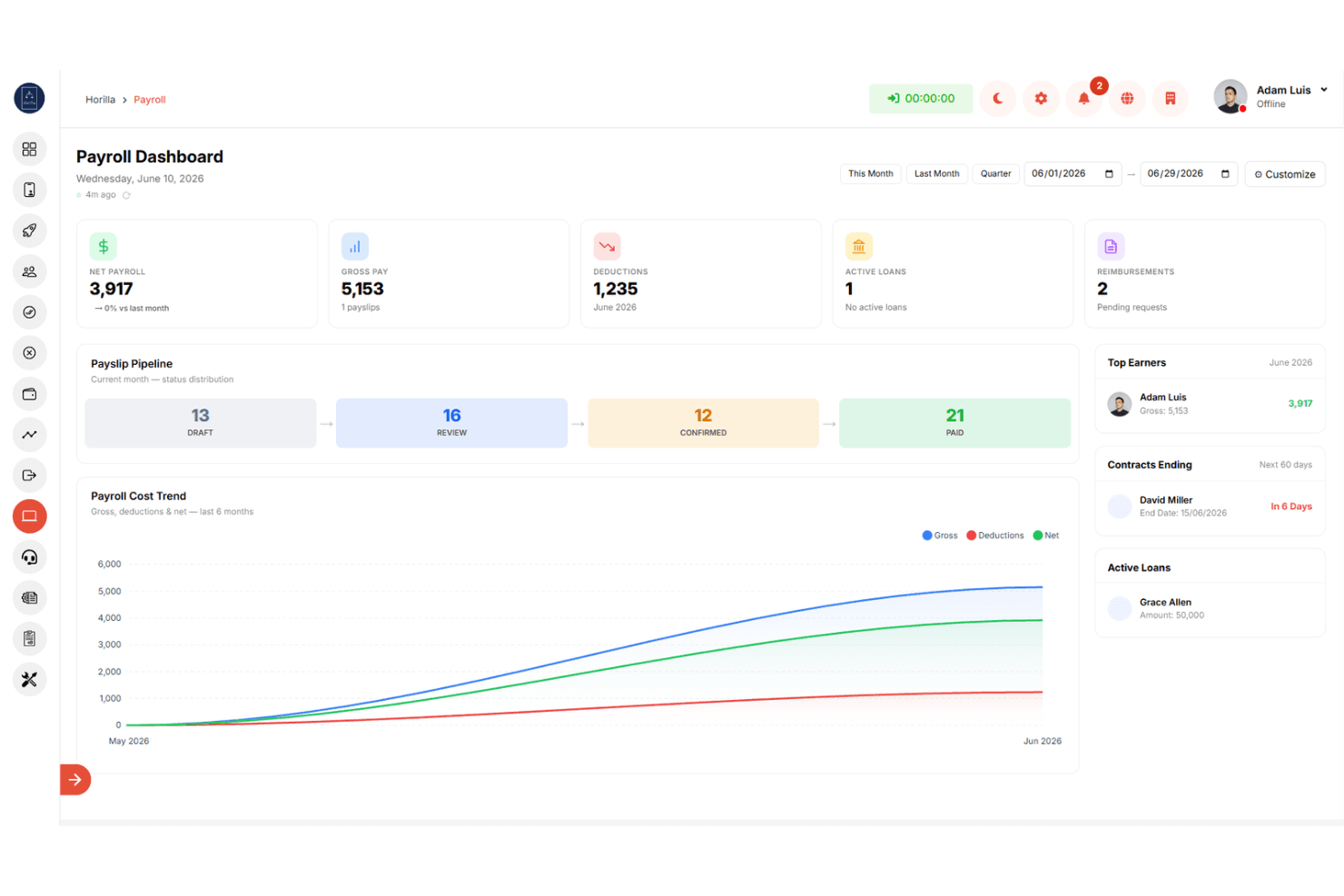
Horilla's payroll dashboard tracks net pay, deductions, payslip status and six-month cost trends in one view. Horilla is an open-source HR and payroll platform that covers the employee lifecycle, including payroll calculations, attendance tracking, leave management, recruitment, and onboarding, through a single self-hosted or cloud-deployed system.
Who Is Horilla Best For?
Horilla is a strong fit for small businesses and technical teams that want a comprehensive HR and payroll system without paying per-user licensing fees for its self-hosted open-source edition.
Why I Picked Horilla
I picked Horilla because it allows organizations to self-host an HR and payroll system for an unlimited number of users without ongoing software licensing fees. The payroll module handles gross-to-net calculations, statutory components such as PF and TDS, configurable tax brackets, and automatic loan recovery across pay cycles. I also like that attendance data flows directly into payroll, reducing the need for manual reconciliation when overtime or mid-month starts affect employee compensation.
Horilla Key Features
- Pay structure configuration: Create multiple salary structures and assign them by grade, department, or individual employee.
- Loan and advance tracking: Record employee loans and advances with automatic repayment schedules spread across future pay cycles.
- Payslip status workflow: Move payslips through draft, review, confirmed, and paid statuses, with bulk generation and CSV or PDF exports.
- Employee self-service portal: Allow employees to view their payslips, leave balances, attendance records, and submitted documents without requiring HR assistance.
Horilla Integrations
Horilla offers native integrations with LDAP, Google Drive, and WhatsApp, along with LinkedIn and Google Meet for HR workflows. Its REST API supports custom integrations through JWT authentication and Swagger/OpenAPI documentation. No accounting or ERP connectors are documented.
Pros and Cons
Pros:
- Tracks individual payslip statuses
- Automates employee loan recovery
- Offers unlimited self-hosted users
Cons:
- Payroll trend analysis limited
- Accounting connectors remain absent
Learn more about Horilla: 10Best for payroll tied to staff schedules
TimeTrex
- 30-day free trial + free demo available
- From $50/month
Visit WebsiteCustomer Rating:4.5/5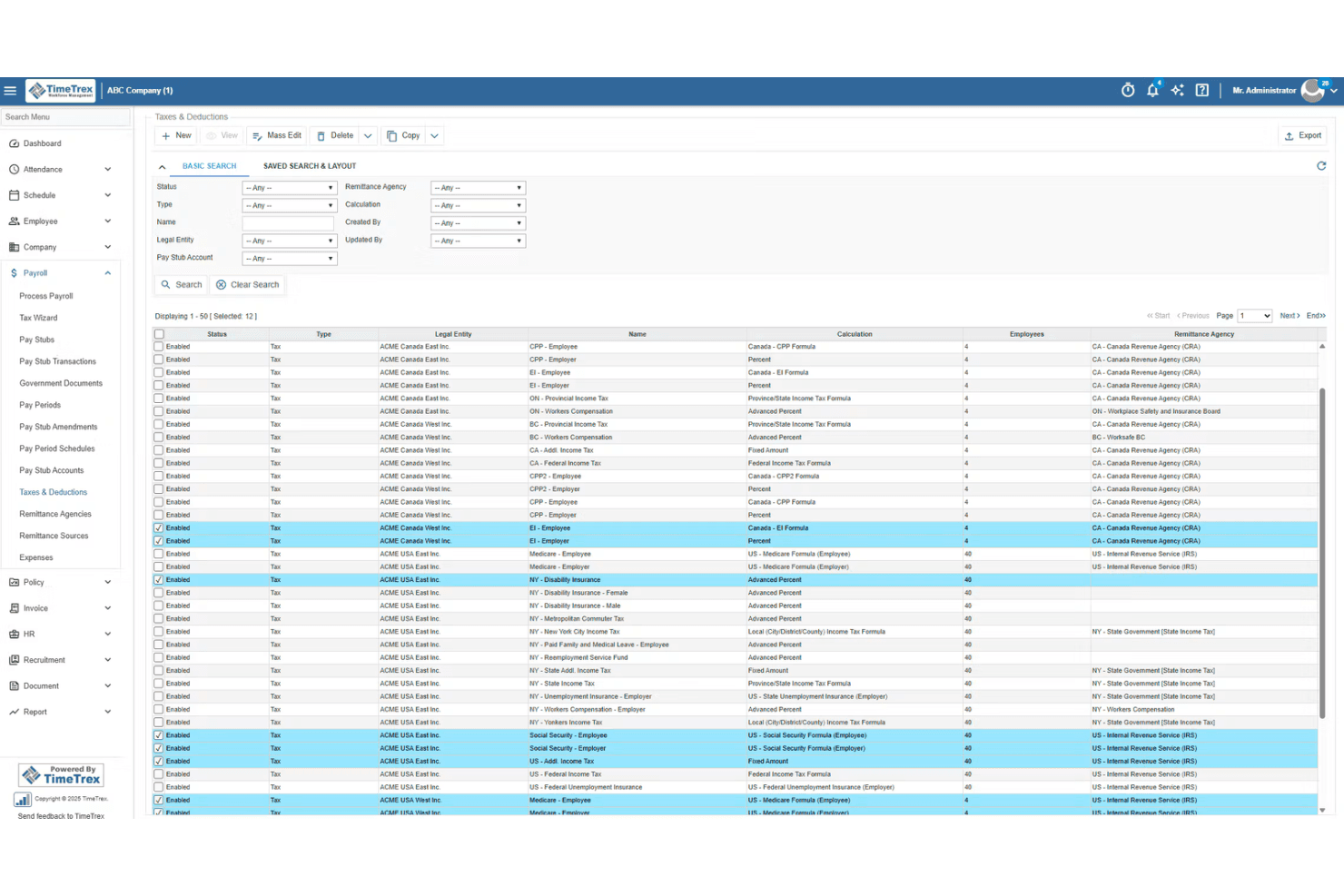
TimeTrex's Taxes & Deductions screen lists payroll tax entries by legal entity, calculation method, and remittance agency. TimeTrex is a workforce management platform with an on-premises deployment option that combines payroll processing, tax calculations, time and attendance tracking, and employee scheduling in a single system.
Who Is TimeTrex Best For?
TimeTrex is a strong fit for payroll managers who need time tracking and employee scheduling data to feed directly into payroll calculations.
Why I Picked TimeTrex
I've included TimeTrex in my top picks because its payroll engine connects directly with employee scheduling and time-tracking data. When a shift runs longer than planned or an employee clocks out early, that information feeds into payroll calculations without requiring manual data entry. I particularly like its automated scheduling capabilities and support for federal, state, and local payroll tax calculations. Its open-source Community Edition includes core scheduling and payroll functionality, although advanced features may vary by edition.
TimeTrex Key Features
- Payroll deductions management: Calculates and tracks deductions for benefits, taxes, and wage garnishments within each payroll run.
- Payroll tax calculations: Calculate federal, state, and local payroll taxes using configured tax rules, with jurisdiction-specific filing requirements needing separate verification.
- Employee self-service portal: Allows employees to access pay stubs, update personal information, and submit time-off requests directly.
- RESTful API and webhooks: Connects TimeTrex to external accounting, HR, and payroll systems through documented APIs and webhooks.
TimeTrex Integrations
TimeTrex offers integrations with Intuit QuickBooks, Sage, ADP, Paychex, Ceridian, the IRS, and the Canada Revenue Agency. It also provides a RESTful API, webhooks, and SDKs for custom connections.
Pros and Cons
Pros:
- Supports multi-state payroll calculations
- Identifies scheduling overtime risks
- Converts tracked shifts automatically
Cons:
- Deployment needs infrastructure management
- Advanced features vary by edition
Learn more about TimeTrex:
Altri software per le paghe a codice sorgente aperto
Ecco alcune opzioni aggiuntive che non sono entrate nella mia selezione, ma che vale comunque la pena prendere in considerazione:
- 11PHP PayrollBest for varied pay types and local rules
- 12webERPBest for ERP users adding employee records
- 13PayrollBest for India-specific compliance outputs
- 14OCA PayrollBest for date-based tax rule changes
- 15Coati PayrollBest for payroll-linked vacation accruals
- 16JantaHRBest for legally cited payroll rule changes
- 17CworkBest for accountant-assisted Thai payroll
- 18AccountedBest for Swedish bureau pay runs via API
- 19DeduktoBest for South African tax in AI workflows
- 20Euron Open HRMSBest for managing payroll within HR workflows
How I Evaluate Open Source Payroll Software
I split my evaluation into three parts. Core functionality carries the most weight—I look for tools that can calculate gross-to-net pay and support configurable tax and compliance rules. I also check for standout features like multi-country localization, then consider total cost of ownership beyond the software itself.
Core Functionality (Table Stakes for This List)
When I'm selecting tools for my list, I score each one on a scale from 0 (does not offer the functionality) to 5 (excels in this area) for each core functionality listed below. I then convert the total into a percentage to help assess each tool's overall fit, with extra weight on any functionalities I've deemed essential.
- Open-Source Codebase (Essential): I check whether the source code is published under a recognized open-source license and whether the project has active maintainers and contribution channels.
- Payroll Calculation Engine (Essential): Each tool needs to compute gross-to-net pay across deductions, withholdings, and varied pay types like overtime, bonuses, and multiple pay schedules.
- Tax and Compliance Configuration: I look for configurable tax rules and statutory contributions that HR teams can adapt to their jurisdictions without waiting on a vendor update.
- Payslip and Report Generation: Tools should produce formatted payslips and summary reports that payroll managers can share with employees or use during audits.
- Self-Hosting Capability: I evaluate how well-documented the deployment process is, whether the project offers containers or install scripts, and how much technical effort setup requires.
- Integration and Extensibility: APIs, modules, or plugins that connect payroll to time-tracking, HR, or accounting systems matter here, since payroll rarely operates in isolation.
Once I have a list of tools that meet the criteria, I consider what sets each platform apart.
Differentiating Factors (What Sets Vendors Apart)
Here's how I compare and contrast different vendors:
Standout Features
I look for a modular plugin architecture that lets you add country-specific tax packs without touching the core code. For example, ERPNext and iDempiere both use module systems, but I check how easy it is to swap in a new localization pack when you expand to another region. Audit trail and versioning capabilities also matter—detailed logs of every payroll change help during internal reviews and regulatory checks. I evaluate whether employee self-service portals give staff direct access to payslips and tax documents, which reduces routine requests for HR teams.
Beyond Features
I check how often a project's GitHub repository receives commits and how active its forums are, since a stagnant codebase means you'll wait longer for compliance patches. Total cost of ownership matters too—hosting, developer hours for customization, and paid support tiers can quickly offset the savings of a free license. I also evaluate how clearly each tool documents deployment, because a platform like ERPNext with detailed install guides gets teams running far faster than one with sparse documentation. Finally, open-source payroll shifts regulatory responsibility to you, so I look for projects where community-maintained tax updates are released and reviewed promptly.
Come scegliere un software per le paghe a codice sorgente aperto
Scegli un sistema mettendo in relazione la tua giurisdizione, le tue capacità tecniche e la responsabilità degli aggiornamenti delle regole sulle paghe con ciò che il progetto documenta e supporta.
| Se la tua priorità è… | Cerca… |
|---|---|
| Se la tua priorità è…Conformità normativa locale | Cerca…Copertura delle giurisdizioni dichiarata e aggiornamenti delle regole datati |
| Se la tua priorità è…Controllo sul codice e sui dati | Cerca…Una licenza riconosciuta e requisiti documentati per l'hosting autonomo |
| Se la tua priorità è…Modifiche alle paghe tracciabili | Cerca…Registri delle modifiche conservati e una procedura chiara per la revisione degli adeguamenti |
| Se la tua priorità è…Costi di gestione prevedibili | Cerca…Stime per hosting, manutenzione, personalizzazione e attività di conformità normativa |
Come valutare la tua selezione
- Richiedi prove della conformità normativa: chiedi un documento datato che elenchi le giurisdizioni supportate, le norme di legge coperte e chi si occupa degli aggiornamenti.
- Esegui tre casi di prova: usa dati anonimizzati per la retribuzione ordinaria, gli straordinari e un bonus una tantum; confronta i risultati dal lordo al netto con i calcoli verificati dal tuo specialista delle paghe.
- Esamina la licenza: conserva il testo della licenza del progetto e verifica che le modifiche, l'hosting e la distribuzione previsti siano conformi.
- Verifica l'impegno richiesto per la distribuzione: segui la guida all'installazione in un ambiente di prova, registra le ore di configurazione e annota eventuali dipendenze che richiedono supporto a pagamento o interventi specialistici.
- Definisci i criteri decisionali: scegli il controllo sul codice e la personalizzazione solo se puoi assegnare a qualcuno la responsabilità di esaminare le modifiche alle regole sulle paghe almeno ogni trimestre; in caso contrario, dai priorità a un progetto con responsabilità degli aggiornamenti chiaramente documentata.
Che cos'è un software per le paghe a codice sorgente aperto?
Il software per le paghe a codice sorgente aperto è un software il cui codice sorgente è pubblicamente disponibile con una licenza a codice aperto. A seconda della licenza e del sistema, puoi esaminarlo, modificarlo o ospitarlo autonomamente. Le funzionalità per le paghe variano, quindi verifica che lo strumento supporti i calcoli delle retribuzioni, le norme di conformità e la reportistica di cui la tua organizzazione ha bisogno.
Funzionalità
Ecco le principali funzionalità che cerco in un software per le paghe a codice sorgente aperto:
- Calcoli delle buste paga: Calcola la retribuzione lorda e netta applicando competenze, detrazioni e ritenute. Questo offre ai team addetti alle buste paga un metodo coerente per elaborare ogni ciclo di pagamento.
- Regole fiscali e di legge: Applica aliquote fiscali configurabili e i contributi richiesti per le giurisdizioni supportate. Verifica come vengono aggiornate le regole e chi è responsabile della revisione delle modifiche.
- Calendari e tipologie di pagamento: Supporta periodi di pagamento ricorrenti e competenze come straordinari, bonus e retribuzioni orarie o fisse. Queste opzioni contribuiscono a gestire diversi rapporti di lavoro.
- Registri delle buste paga dei dipendenti: Memorizza dettagli quali retribuzione, informazioni fiscali, preferenze di pagamento e detrazioni. Registri accurati forniscono le informazioni necessarie per i calcoli delle buste paga.
- Prospetti paga e accesso dei dipendenti: Genera prospetti paga dettagliati che mostrano competenze, detrazioni e retribuzione netta. Un portale per i dipendenti può consentire al personale di visualizzare o scaricare i propri documenti.
- Report sulle buste paga: Riassume i costi del personale, le detrazioni e i totali dei pagamenti per la revisione o la conservazione della documentazione. I report possono aiutare i team a riconciliare i cicli di pagamento e a prepararsi per gli audit.
- Dati di rilevazione delle presenze: Importa o registra le ore, gli straordinari e le assenze utilizzati nei calcoli delle retribuzioni. Verifica se il sistema si collega agli strumenti di rilevazione del tempo o se richiede l'inserimento manuale.
- Integrazioni ed estensibilità: Collega le buste paga ai sistemi delle risorse umane, di contabilità o di rilevazione del tempo tramite API, moduli o plugin. Questo aiuta i team a ridurre l'inserimento duplicato dei dati tra i sistemi.
- Cronologia delle modifiche: Registra gli aggiustamenti ai dati e ai calcoli delle buste paga, incluso chi ha effettuato ogni modifica quando questa funzione è supportata. La cronologia conservata aiuta i team a esaminare le correzioni e a indagare sulle discrepanze.
Vantaggi
Ecco alcuni vantaggi comuni che puoi aspettarti da un software open source per le buste paga:
- Controllo del codice e dei dati: Una licenza open source riconosciuta può consentire al tuo team di esaminare o modificare il codice e di ospitare autonomamente i dati delle buste paga.
- Flessibilità delle regole delle buste paga: Detrazioni, ritenute e tipologie di pagamento configurabili possono aiutarti ad adattare i calcoli alle esigenze delle buste paga della tua organizzazione.
- Configurazione specifica per la giurisdizione: I moduli di localizzazione o le regole configurabili possono supportare i requisiti locali, a condizione che il tuo team verifichi la copertura e mantenga aggiornamenti regolari.
- Flessibilità dei costi: Una licenza gratuita può ridurre i costi del software, consentendoti al contempo di scegliere quanto spendere per hosting, personalizzazione e assistenza.
- Tracciabilità delle buste paga: Quando la cronologia delle modifiche è supportata, i registri degli aggiustamenti possono aiutare il tuo team a esaminare le correzioni e a prepararsi per gli audit.
- Flussi di lavoro connessi: API, moduli o plugin possono collegare le buste paga ai sistemi delle risorse umane, di contabilità o di rilevazione del tempo quando il software supporta tali integrazioni.
Prezzi
Il software open source per le buste paga può essere gratuito da scaricare e ospitare autonomamente, ma implementazione, hosting, manutenzione e assistenza possono comportare costi aggiuntivi. I prezzi dipendono dal metodo di distribuzione, dai requisiti tecnici e dagli eventuali moduli o servizi a pagamento necessari.
Tabella di confronto dei piani per il software open source per le buste paga
| Tipo di piano | Prezzo tipico | Funzionalità comuni |
|---|---|---|
| Tipo di pianoPiano gratuito | Prezzo tipicoLicenza software da $0 | Funzionalità comuniFunzionalità principali, hosting autonomo e assistenza della comunità. La configurazione e la manutenzione sono generalmente gestite internamente. |
| Tipo di pianoPiano in hosting | Prezzo tipicoVaria in base al fornitore | Funzionalità comuniHosting gestito, backup, aggiornamenti del software e assistenza di base, a seconda del fornitore. |
| Tipo di pianoPiano aziendale | Prezzo tipicoAbbonamento o preventivo personalizzato | Funzionalità comuniAssistenza aggiuntiva, integrazioni, configurazione delle buste paga e moduli di conformità opzionali. |
| Tipo di pianoPiano per grandi aziende | Prezzo tipicoPrezzo personalizzato | Funzionalità comuniPersonalizzazione avanzata, assistenza all'implementazione, supporto dedicato e funzionalità per più entità, ove disponibili. |
Domande frequenti
Alcune risposte alle domande comuni sul software per le paghe a codice aperto:
Il software per le paghe a codice aperto può supportare più Paesi?
Alcuni sistemi per le paghe a codice aperto supportano più Paesi, ma la copertura dipende dal software e dai suoi moduli di localizzazione. Verificate che le imposte sul reddito, i contributi obbligatori, i formati di rendicontazione e le regole retributive di ciascun Paese siano documentati e aggiornati. Un sistema che supporta i calcoli delle paghe in un Paese non gestirà automaticamente i requisiti di un altro Paese. Prima di scegliere, verificate i calcoli di esempio per ogni giurisdizione in cui impiegate personale. Confermate chi aggiorna le regole, come vengono esaminati gli aggiornamenti e cosa accade quando una regola cambia tra una versione programmata e l’altra.
È necessario uno sviluppatore per gestire un software per le paghe a codice aperto?
Non sempre, ma sarà necessaria una persona con le competenze per installare, configurare e mantenere il sistema scelto. Alcuni progetti forniscono guide all’installazione o opzioni di distribuzione basate su container, mentre altri richiedono un lavoro tecnico più approfondito. Il vostro team ha inoltre bisogno di una persona responsabile delle regole retributive, degli aggiornamenti del software, dei backup e delle autorizzazioni di accesso. Testate l’installazione in un ambiente di prova e registrate il tempo e l’assistenza specialistica necessari. Questa prova offre un quadro più chiaro del carico di lavoro continuativo rispetto al solo prezzo della licenza.
Il software per le paghe a codice aperto presenta e versa automaticamente le imposte?
A volte, ma le funzionalità di calcolo delle paghe non garantiscono la presentazione automatica delle dichiarazioni fiscali o il pagamento delle imposte. Verificate nella documentazione del prodotto i formati specifici delle dichiarazioni, le procedure di invio e le funzioni di pagamento supportate nella vostra giurisdizione. Il vostro team potrebbe dover esportare i report, presentare i moduli tramite un portale governativo o organizzare separatamente i pagamenti. Prima di elaborare le paghe effettive, confrontate i calcoli del software con dati verificati da uno specialista delle paghe. Confermate inoltre chi monitora le modifiche normative e verifica gli aggiornamenti prima che incidano sulle retribuzioni dei dipendenti.
Come posso proteggere i dati dei dipendenti quando ospito autonomamente il software per le paghe?
Proteggete i dati delle paghe con accessi controllati, backup sicuri e un processo documentato di aggiornamento del software. Limitate l’accesso ai dipendenti che hanno bisogno delle informazioni sulle paghe e verificate le autorizzazioni quando una persona cambia ruolo o lascia l’organizzazione. Crittografate i dati durante il trasferimento e quando sono archiviati, se la vostra infrastruttura lo consente, e verificate regolarmente che i backup possano essere ripristinati. Conservate i registri degli accessi e delle modifiche, se il vostro sistema lo consente. La vostra organizzazione resta responsabile del rispetto dei requisiti applicabili in materia di privacy e sicurezza, quindi coinvolgete i team IT e di conformità prima della distribuzione.