

Gli strumenti di AI possono occuparsi di tutto, dall'esecuzione di attività ripetitive all'aiuto per comprendere meglio i propri dati, lasciandoti il tempo di concentrarti sul lavoro che richiede davvero la tua attenzione. Che tu lavori nel settore sanitario, nel marketing o nel business, oggi i professionisti possono contare su tantissime app di AI.
Nella mia esperienza di valutazione di diverse piattaforme di AI, ho visto quanto lo strumento giusto possa cambiare il flusso di lavoro quotidiano. Ho testato personalmente queste opzioni per offrirti una valutazione imparziale di ciò che offrono e degli ambiti in cui eccellono, dall'AI generativa e dagli strumenti di produttività alla sintesi degli appunti delle riunioni. È probabile che esista uno strumento adatto a qualsiasi attività specifica tu abbia in mente.
Perché fidarsi delle nostre recensioni sui software
6,700+
Reviews
20
Industry experts
16+
Evaluation factors
14
Years
Il nostro team testa e recensisce software dal 2012. In quanto esperti HR noi stessi, sappiamo quanto sia difficile — e importante — scegliere il software giusto.
Per questa guida, abbiamo valutato gli strumenti attraverso test pratici e ricerche indipendenti, assegnando un punteggio agli strumenti in base ai nostri criteri di selezione. Ci basiamo inoltre sulle competenze di leader di pensiero del settore e di professionisti HR attivi.
Le nostre recensioni riflettono il nostro giudizio editoriale umano, non un discorso di vendita.
Revisori esperti:
- Phil GrayCOO
 Kim BehnkeRedattrice e analista HR Tech
 Josh BarkerPeople Ops Manager

Tabella comparativa delle piattaforme di AI
Questa tabella comparativa riassume i dettagli dei prezzi delle migliori piattaforme di AI che ho selezionato:
| Tool | Best For | Trial Info | Price | ||
|---|---|---|---|---|---|
| 1 | Ideale per il rilevamento dei rischi di progetto assistito dall’AI | Piano gratuito disponibile | Da $9/utente/mese (fatturazione annuale) | Website | |
| 2 | Ideale per ITSM potenziato dall'IA | Prova gratuita di 14 giorni + demo gratuita disponibile | Da $19/agente/mese (fatturazione annuale) | Website | |
| 3 | Ideale per la progettazione di processi di workflow con drag-and-drop | Demo gratuita disponibile | $40/user/month | Website | |
| 4 | Ideale per l'analisi delle prestazioni supportata dall'IA | Demo gratuita disponibile | Prezzi su richiesta | Website | |
| 5 | Ideale per la gestione delle politiche di governance dell'IA | Demo gratuita disponibile | Prezzi su richiesta | Website | |
| 6 | Ideale per la governance unificata dei dati e dei modelli di IA | Edizione gratuita disponibile + prova gratuita di 14 giorni | A partire da $0.15/DBU | Website | |
| 7 | Ideale per la gestione collaborativa della posta in arrivo | È disponibile una prova gratuita di 30 giorni | A partire da $14/utente/mese (fatturato annualmente) | Website | |
| 8 | Ideale per creare agenti AI senza programmare | Piano gratuito disponibile | Da $32/mese (fatturati annualmente) | Website | |
| 9 | Ideale per l'integrazione della conoscenza aziendale | Versione di prova gratuita disponibile | Prezzi su richiesta | Website | |
| 10 | Ideale per lo screening dei precedenti potenziato dall’IA | Demo gratuita disponibile | A partire da $29.99/report | Website | |
| 11 | Ideale per governare l'IA durante l'intero ciclo di vita dell'apprendimento automatico | Prova gratuita di 14 giorni | A partire da $4.000/mese (con addebito annuale) | Website | |
| 12 | Ideale per l'implementazione dell'IA nei settori regolamentati | Prova gratuita di 21 giorni | A partire da $225,000/GPU/anno (fatturato annualmente) | Website | |
| 13 | Ideale per la gestione sicura delle riunioni del consiglio tramite AI | Demo gratuita disponibile | Prezzo su richiesta | Website | |
| 14 | Ideale per l'orchestrazione di agenti multi-modello su larga scala | Prova gratuita di 30 giorni | Da $21/utente/mese | Website | |
| 15 | Ideale per la governance della flotta di modelli su scala aziendale | Prova gratuita di 30 giorni disponibile | Da $0.165 per 1M token di input | Website |


Recensioni delle migliori piattaforme di AI
Di seguito trovi le mie sintesi dettagliate delle migliori piattaforme di AI entrate nella mia selezione. Le mie recensioni offrono una panoramica dettagliata delle funzionalità principali, dei pro e contro, delle integrazioni e degli scenari d’uso ideali di ogni strumento, per aiutarti a trovare quello più adatto a te.
 Ideale per il rilevamento dei rischi di progetto assistito dall’AI
- Piano gratuito disponibile
- Da $9/utente/mese (fatturazione annuale)
Visit WebsiteCustomer Rating:4.6/5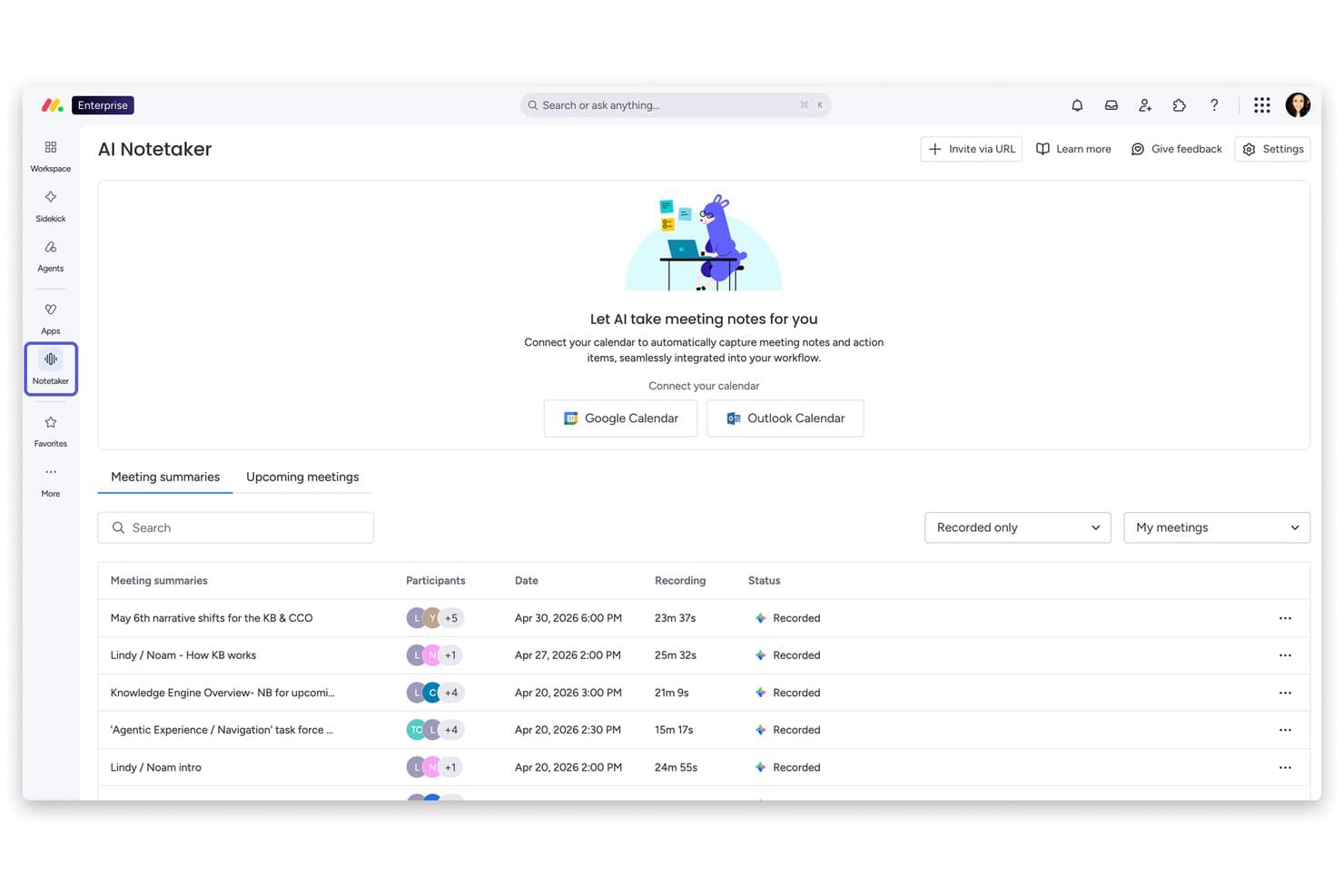
Monday AI Workspace offre una funzionalità di AI Notetaker che registra automaticamente, trascrive e riassume le riunioni con integrazione al calendario. Monday AI Workspace è una piattaforma di lavoro AI generica che combina agenti AI, strumenti di generazione automatica e analisi predittiva nella gestione di progetti, CRM, servizi e flussi di lavoro di sviluppo.
Per chi è ideale Monday AI Workspace?
È particolarmente adatta a team interfunzionali e responsabili operativi di aziende di medie e grandi dimensioni che gestiscono più progetti contemporaneamente.
Perché ho scelto Monday AI Workspace
Monday AI Workspace è entrato nella mia lista grazie alla funzionalità AI Risk Insights a livello di portfolio. Mi piace il fatto che non si limiti ad analizzare un solo progetto alla volta, ma esamini quotidianamente tutte le bacheche collegate, controllando nomi degli elementi, sezioni degli aggiornamenti e log delle attività per individuare i rischi prima che diventino blocchi. Questo tipo di visibilità proattiva e trasversale sui progetti è davvero difficile da trovare in una piattaforma di lavoro generalista.
Funzionalità principali di Monday AI Workspace
- Costruttore di flussi di lavoro AI: Automatizza processi e attività dei progetti con flussi di lavoro senza codice, guidati dall’AI.
- AI meeting notetaker: Registra e riassume le discussioni delle riunioni direttamente all’interno delle tue bacheche progetto.
- Assistente Sidekick AI: Genera contenuti legati ai progetti, risponde a domande e offre suggerimenti contestuali nello spazio di lavoro.
- Dashboard a livello di portfolio: Visualizza e gestisci più progetti tramite dashboard personalizzabili in tempo reale per monitorare avanzamento e metriche.
Integrazioni di Monday AI Workspace
Monday AI Workspace offre centinaia di integrazioni tramite le proprie soluzioni integrate e marketplace, incluse Slack, Salesforce, HubSpot, Google Workspace, Jira, GitHub, Microsoft Teams, Zoom, Zendesk e Trello. Supporta anche Zapier e fornisce una API per integrazioni personalizzate.
Pros and Cons
Pros:
- Il rilevamento AI dei rischi copre più progetti contemporaneamente
- Automazione dei flussi di lavoro senza codice con assistenza AI
- L’AI generativa copre molteplici attività di creazione contenuti
Cons:
- La complessità dell’impostazione cresce con le configurazioni AI avanzate
- Non è pensato per flussi di lavoro HR dedicati
Learn more about monday AI Workspace: Ideale per ITSM potenziato dall'IA
- Prova gratuita di 14 giorni + demo gratuita disponibile
- Da $19/agente/mese (fatturazione annuale)
Visit WebsiteCustomer Rating:4.6/5
Freshservice dispone di un assistente AI per suggerimenti conversazionali automatici. Freshservice è una piattaforma di gestione dei servizi IT (ITSM) potenziata dall'IA che gestisce la gestione degli incidenti, il tracciamento degli asset, l'automazione dei flussi di lavoro e la gestione dei servizi aziendali tra i team IT, HR, finanza e operazioni.
Per chi è ideale Freshservice?
Freshservice è particolarmente indicato per i team IT di medie e grandi aziende che necessitano di un service desk strutturato e scalabile con funzionalità AI integrate.
Perché ho scelto Freshservice
Freshservice è tra le mie scelte preferite perché apprezzo quanto l’automazione sia profondamente integrata nel suo cuore ITSM. Gestisce automaticamente l’instradamento intelligente dei ticket, assegnando le richieste in base alla disponibilità, al carico di lavoro e alle competenze degli agenti. Nel frattempo, l’automazione dei flussi di lavoro senza codice copre tutto, dall’approvazione alla risoluzione degli incidenti, senza bisogno di sviluppo personalizzato.
Caratteristiche principali di Freshservice
- Catalogo dei servizi: Permette agli utenti di consultare e richiedere servizi IT tramite un portale self-service configurabile, senza dover contattare direttamente il help desk.
- Gestione dei cambiamenti: Supporta approvazioni CAB strutturate con valutazione del rischio integrata e flussi di lavoro di consulenza sui cambiamenti.
- Freddy AI Copilot: Un assistente AI che aiuta gli agenti a redigere risposte, riassumere la cronologia dei ticket e suggerire soluzioni direttamente dalla visualizzazione del ticket.
- Gestione dei problemi: Collega incidenti ricorrenti a problematiche di fondo e traccia l’analisi della causa principale fino alla risoluzione.
Integrazioni di Freshservice
Freshservice offre oltre 1.200 integrazioni tramite marketplace, tra cui Microsoft Teams, Slack, Jira, Azure AD e TeamViewer, oltre ad app connettore per sincronizzare i dati con strumenti esterni tramite una interfaccia low-code. È disponibile su Zapier e offre un’API per integrazioni personalizzate.
Pros and Cons
Pros:
- Automazione dei flussi di lavoro senza codice per l’instradamento dei ticket
- Si estende oltre l’IT a HR e strutture
- Supporta il tracciamento degli asset fin dall'acquisto
Cons:
- Le opzioni di personalizzazione dei report sono ristrette
- Freddy AI ha una flessibilità di configurazione limitata
Learn more about Freshservice: Ideale per la progettazione di processi di workflow con drag-and-drop
- Demo gratuita disponibile
- $40/user/month
Visit WebsiteCustomer Rating:4.7/5
Creatio Studio ti permette di creare flussi di campagne con un editor drag-and-drop. Creatio Studio è una piattaforma AI no-code per creare applicazioni aziendali, automatizzare flussi di lavoro e progettare agenti AI utilizzando strumenti visivi drag-and-drop e prompt in linguaggio naturale.
Per chi è pensato Creatio Studio?
Creatio Studio è particolarmente adatto a organizzazioni di medie e grandi dimensioni che desiderano permettere ai team non tecnici di creare e automatizzare applicazioni aziendali senza dipendere dagli sviluppatori.
Perché ho scelto Creatio Studio
Creatio Studio si guadagna un posto nella mia selezione perché il suo Process Designer basato su BPMN 2.0 rende la progettazione dei workflow davvero visiva. Mi piace il fatto che sia possibile mappare flussi di approvazione multi-step, ramificazioni condizionali e gateway paralleli semplicemente trascinando gli elementi su una tela. Il Workflow Agent Designer estende ulteriormente queste possibilità, consentendo di integrare agenti AI direttamente nella logica dei processi senza scrivere una sola riga di codice.
Funzionalità principali di Creatio Studio
- Prompt Agent Designer: Uno strumento visivo per creare agenti AI definendo istruzioni, contesto e obiettivi tramite prompt in linguaggio naturale.
- Code Agent Designer: Un ambiente di sviluppo basato su codice per costruire agenti AI personalizzati quando è richiesta una logica più precisa o complessa.
- Costruttore di modelli ML: Un'interfaccia drag-and-drop per creare modelli di machine learning che alimentano previsioni e decisioni guidate dai dati all'interno delle tue app.
- Generazione di app tramite linguaggio naturale: Una funzionalità che permette di descrivere un'applicazione in testo semplice e lasciare che Creatio Studio ne generi automaticamente struttura, interfaccia e logica.
Integrazioni di Creatio Studio
Creatio Studio si integra con il resto del tuo stack tecnologico tramite oltre 700 app e template pronti all'uso disponibili su Creatio Marketplace, inclusi connettori per SAP HANA, DocuSign, Sage Intacct, SharePoint Office 365 e Formstack. La piattaforma offre funzionalità di integrazione native tramite strumenti .NET, REST, SOAP, OData e open API, ed è disponibile anche su Zapier.
Pros and Cons
Pros:
- L'AI è nativamente integrata negli oggetti dati
- Gli analisti aziendali possono sviluppare app in autonomia
- I workflow di settore coprono 19 comparti verticali
Cons:
- Prestazioni più lente con carichi di dati elevati
- Varietà limitata di template pronti all'uso
Learn more about Creatio AI Studio: Ideale per l'analisi delle prestazioni supportata dall'IA
- Demo gratuita disponibile
- Prezzi su richiesta
Visit WebsiteCustomer Rating:4.5/5
HiBob migliora il lavoro nell'ambito delle risorse umane organizzando i dati dei dipendenti, gli strumenti per il coinvolgimento e il monitoraggio delle prestazioni. HiBob è una piattaforma per le risorse umane progettata per soddisfare le esigenze delle aziende di medie dimensioni, offrendo strumenti per la gestione dei dipendenti, il coinvolgimento e il monitoraggio delle prestazioni. È pensata per i team HR che desiderano ottimizzare i propri processi grazie a informazioni basate sull'IA e all'automazione.
Perché ho scelto HiBob: Offre funzionalità personalizzate per le aziende di medie dimensioni, risultando ideale per i team in crescita. Grazie all'analisi basata sull'IA, puoi ottenere informazioni sulle prestazioni e sul coinvolgimento dei dipendenti. La piattaforma offre flussi di lavoro personalizzabili che si adattano alle esigenze specifiche della tua azienda. L'attenzione di HiBob alla semplificazione delle attività HR aiuta il tuo team a risparmiare tempo e migliorare l'efficienza.
Funzionalità e integrazioni principali:
Le funzionalità includono flussi di lavoro personalizzabili che consentono di adattare i processi alle esigenze della tua azienda. La piattaforma offre anche il monitoraggio delle prestazioni per aiutarti a controllare e migliorare la produttività dei dipendenti. Inoltre, HiBob fornisce strumenti per il coinvolgimento che aiutano a mantenere il team connesso e motivato.
Le integrazioni includono G Suite, Slack, Microsoft Teams, BambooHR, Greenhouse, Workable, Okta, OneLogin, Zoom e LinkedIn.
Pros and Cons
Pros:
- Pensato per aziende di medie dimensioni
- Flussi di lavoro personalizzabili
- Analisi basata sull'IA
Cons:
- Funzionalità avanzate limitate per le grandi aziende
- La configurazione iniziale potrebbe richiedere tempo
 Ideale per la gestione delle politiche di governance dell'IA
- Demo gratuita disponibile
- Prezzi su richiesta
Visit WebsiteCustomer Rating:5/5
Trustible offre ai dirigenti una dashboard centralizzata per monitorare casi d'uso IA, fornitori, rischi e impatto aziendale in tutta l'organizzazione. Trustible è particolarmente indicato per organizzazioni nei settori dei servizi finanziari, della sanità, delle assicurazioni e della difesa che devono affrontare un controllo normativo su come costruiscono, acquistano e implementano l'IA.
Perché ho scelto Trustible
Ho scelto Trustible come uno dei migliori per la sua capacità di collegare direttamente le politiche di governance ai flussi di lavoro operativi. Invece di gestire le politiche in documenti separati, Trustible le mappa direttamente su revisioni di ingresso, livelli di rischio e decisioni di approvazione che avvengono sulla piattaforma in tempo reale. Mi piace anche l'analisi delle lacune nei controlli alimentata dall'IA, che valuta le tue politiche interne rispetto agli articoli specifici dei framework e mostra esattamente dove manca la copertura.
Caratteristiche principali di Trustible
- Inventario centralizzato dell'IA: Monitora tutti i casi d'uso IA, modelli, agenti e fornitori utilizzati dalla tua organizzazione in un unico registro, con visibilità su proprietà e stato di governance in tutto il portafoglio.
- Motore di scoring del rischio basato su attributi: Valuta automaticamente ogni caso d'uso IA su cinque categorie di rischio (Prestazioni, Privacy dei dati, Cybersecurity, Etica e Legale) e assegna un livello di governance.
- Pacchetti di prove pronti per l'audit: Esporta registri di governance con data e ora, risultati delle valutazioni e decisioni di approvazione in formato PDF o Excel per la revisione normativa.
- Valutazioni di impatto strutturate: Attiva flussi di valutazione guidati per casi d'uso ad alto rischio, accompagnando i revisori nella valutazione dei danni, degli obblighi normativi e della documentazione di mitigazione.
Integrazioni Trustible
Le integrazioni native non sono chiaramente documentate. Trustible si integra direttamente con strumenti MLOps per aiutare a collegare i flussi di lavoro degli sviluppatori con i team di gestione del rischio, ma non sono elencati nomi di fornitori specifici. Il livello Enterprise aggiunge personalizzazioni e integrazioni aziendali nei sistemi esistenti, suggerendo che le integrazioni vengano configurate durante l'implementazione piuttosto che essere disponibili come connettori predefiniti. Un'API non è esplicitamente documentata sul sito della piattaforma.
Pros and Cons
Pros:
- Mappa i controlli su oltre 10 framework normativi
- Progettato per i team di governance, non per gli sviluppatori
- Smistamento automatico dei casi d'ingresso in base al rischio
Cons:
- Opzioni limitate di integrazione con terze parti disponibili
- Per il prezzo è necessario contattare il team commerciale
Learn more about Trustible: Ideale per la governance unificata dei dati e dei modelli di IA
- Edizione gratuita disponibile + prova gratuita di 14 giorni
- A partire da $0.15/DBU
Visit WebsiteCustomer Rating:4.5/5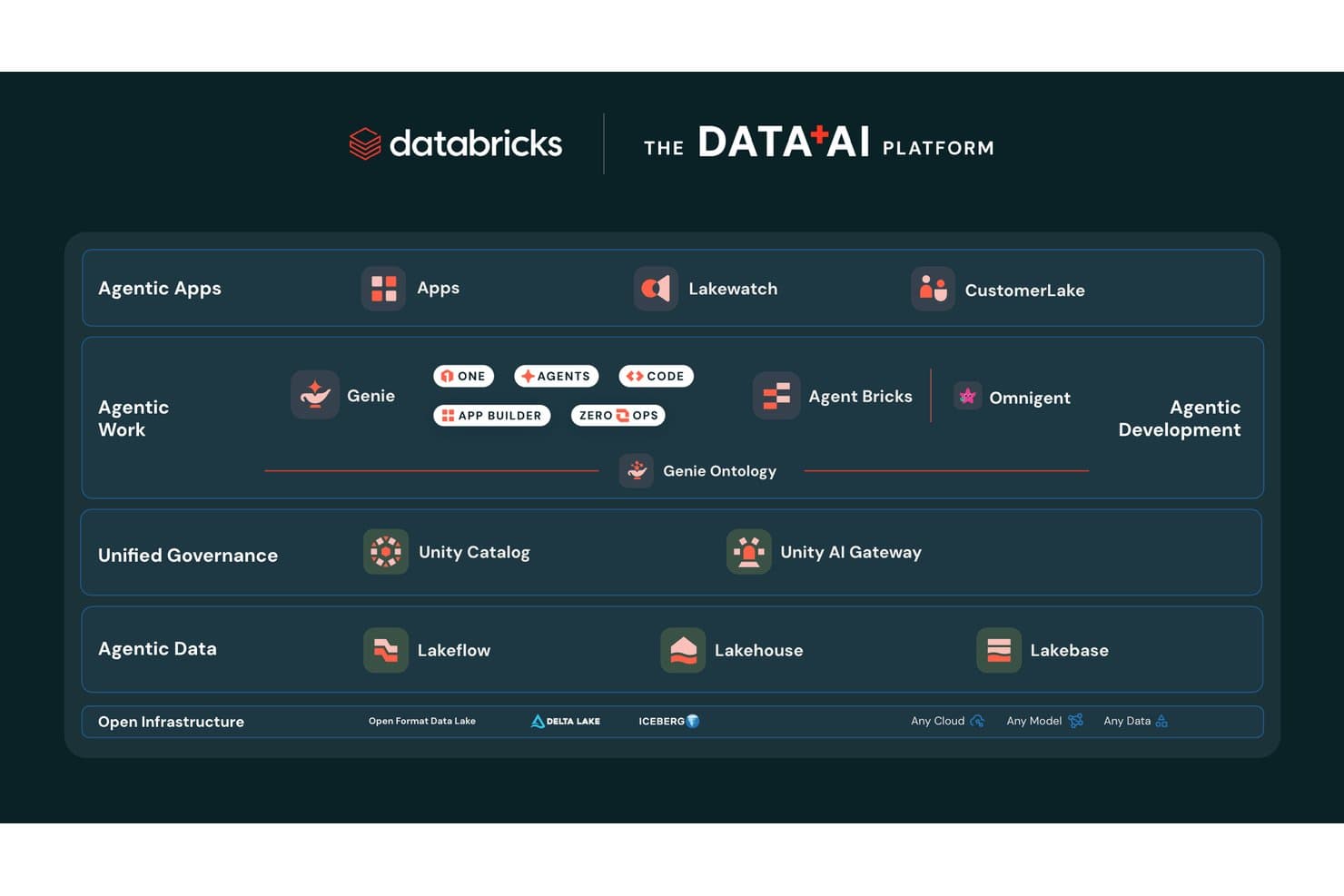
Databricks organizza la sua piattaforma Data+AI in livelli dedicati ad applicazioni agentiche, governance e infrastruttura. Databricks è una piattaforma unificata per dati e IA che combina l'addestramento dei modelli, la creazione di agenti, l'orchestrazione delle pipeline e la governance negli ambienti cloud.
Per chi è più adatto Databricks?
Databricks è una soluzione particolarmente adatta ai gruppi aziendali di data science e ingegneria che devono creare, governare e scalare modelli di IA in ambienti multi-cloud complessi.
Perché ho scelto Databricks
Databricks si è guadagnato un posto nella mia lista ristretta perché nessun'altra piattaforma eguaglia la sua profondità nella governance unificata di dati, modelli e agenti di IA contemporaneamente. Sono particolarmente colpito da Unity Catalog, che tiene traccia della derivazione a livello di colonna, dai dati grezzi fino ai risultati dei modelli, con classificazione automatica delle informazioni personali identificabili (PII) e registrazione integrata delle verifiche. Unity Gateway aggiunge un ulteriore livello per applicare limiti di frequenza, filtraggio dei contenuti e controlli dei costi a ogni modello utilizzato dal gruppo, che si tratti di GPT-4, Claude o di un Llama ottimizzato.
Funzionalità principali di Databricks
- API dei modelli di base: Accedi a LLM all'avanguardia di OpenAI, Anthropic, Meta, Google e fornitori a codice aperto, ospitati direttamente sull'infrastruttura Databricks con prezzi basati sul numero di token.
- Ambiente di sperimentazione dell'IA: Testa e confronta i modelli in un ambiente di convalida precedente alla distribuzione prima di inserirli nei flussi di lavoro di produzione.
- MLflow gestito: Tieni traccia degli esperimenti, crea versioni dei modelli e gestisci l'intero ciclo di vita dell'apprendimento automatico utilizzando un'estensione di livello aziendale di MLflow a codice aperto.
- Ambiente isolato di Databricks: Collabora all'analisi dei dati con gruppi interni o partner esterni senza esporre i dati sottostanti a nessuna delle due parti.
Integrazioni di Databricks
Databricks offre integrazioni native con Salesforce, SAP, MySQL, PostgreSQL, Snowflake, Amazon Redshift, Google BigQuery, Tableau, Power BI e dbt Cloud. Supporta inoltre MCP, Delta Sharing, API REST e oltre 6.000 connessioni del mercato e dei partner per flussi di lavoro personalizzati relativi a dati e IA.
Pros and Cons
Pros:
- Governance a livello di colonna per dati e risorse di IA
- Supporta l'IA multi-agente e l'orchestrazione dei modelli
- Nessun vincolo con un fornitore grazie all'accesso a modelli aperti
Cons:
- La fatturazione basata sulle DBU rende meno prevedibili i costi
- La configurazione iniziale richiede competenze tecniche avanzate
Learn more about Databricks: Ideale per la gestione collaborativa della posta in arrivo
- È disponibile una prova gratuita di 30 giorni
- A partire da $14/utente/mese (fatturato annualmente)
Visit WebsiteCustomer Rating:4.8/5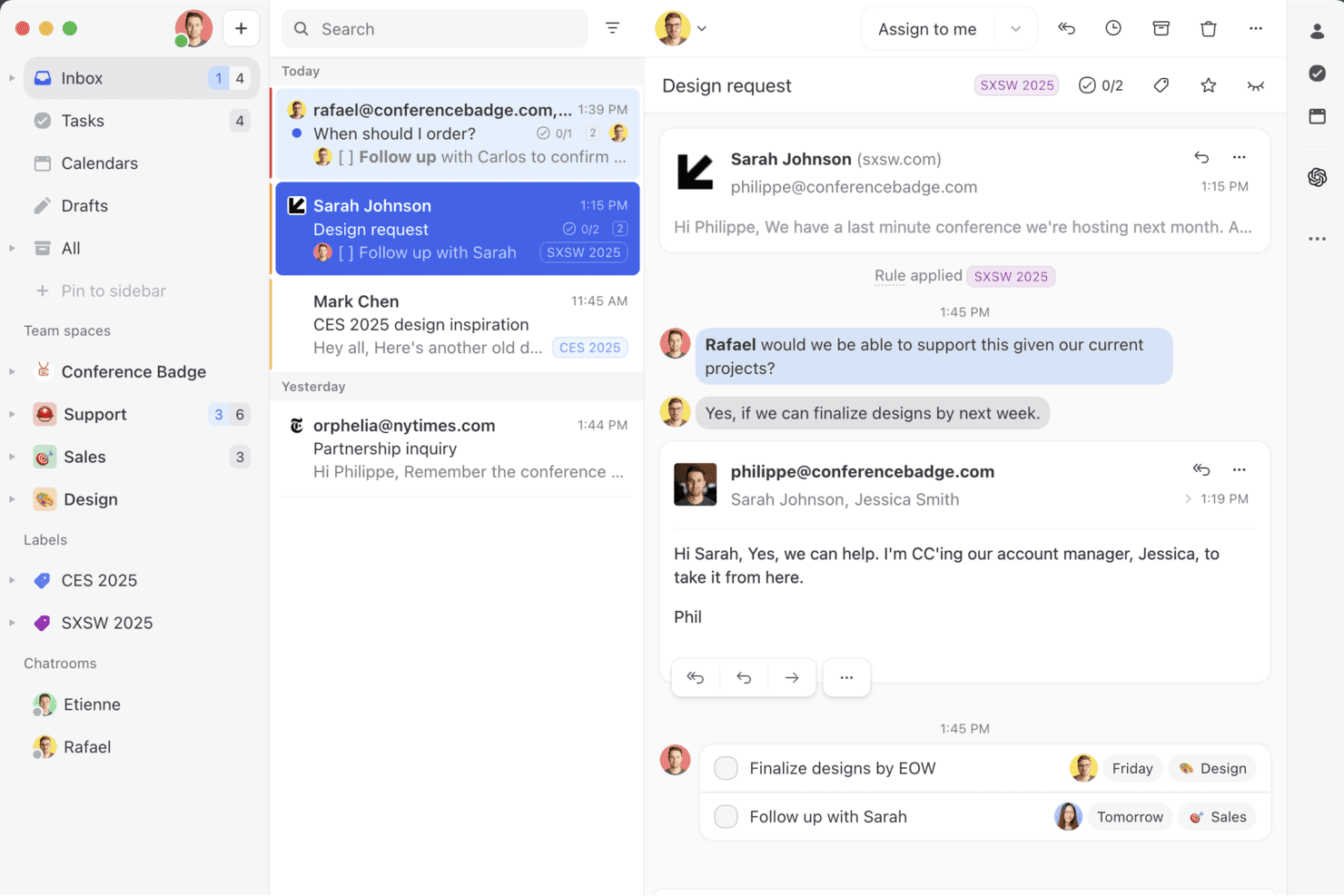
Missive riunisce posta in arrivo condivisa, commenti interni e collaborazione in tempo reale in un unico spazio di lavoro, così il tuo team può gestire insieme email, SMS e messaggi social, senza continui scambi avanti e indietro. Missive è una piattaforma di posta in arrivo collaborativa che riunisce i canali di posta elettronica, SMS e messaggistica social in uno spazio di lavoro condiviso per il team, con un assistente AI integrato per redigere bozze, creare riepiloghi e classificare le comunicazioni.
Per chi è più adatto Missive?
Missive è adatto ai team che si occupano dei clienti e delle operazioni e che hanno bisogno di una posta in arrivo condivisa, dove più persone possano collaborare sulle email, sui messaggi e sui thread di assistenza in entrata.
Perché ho scelto Missive
Missive è entrato nella mia rosa dei preferiti perché il suo assistente AI è integrato direttamente nella posta in arrivo condivisa, invece di essere aggiunto come elemento secondario. Mi ha colpito in particolare il modo in cui redige risposte consapevoli del contesto, leggendo l'intero thread della conversazione prima di generare qualsiasi contenuto: questo riduce notevolmente gli scambi avanti e indietro. Le regole di automazione basate sull'AI vanno oltre i semplici attivatori per parole chiave, rilevando tono e intento per instradare ed etichettare automaticamente i messaggi in entrata.
Caratteristiche principali di Missive
- Supporto per più modelli di AI: Passa dai modelli OpenAI, Anthropic Claude e Google Gemini, oppure collega la tua chiave API per controllare i costi e la scelta del modello.
- Istruzioni AI personalizzate: Salva e riutilizza modelli di istruzioni personalizzati per attività ricorrenti come la modifica del tono, la correzione grammaticale o la generazione di risposte.
- Server MCP di Missive: Collega strumenti AI esterni, come Claude o ChatGPT, per consultare le conversazioni, controllare i calendari e redigere risposte, mantenendo obbligatoria la revisione da parte di un operatore prima dell'invio.
- Controlli AI prima dell'invio: Esamina i messaggi in uscita con l'AI prima che vengano inviati, per individuare errori o segnalare problemi di tono.
Integrazioni di Missive
Missive offre integrazioni con OpenAI, Anthropic, Google Gemini, Notion, Linear, Stripe, Attio e ClickUp. Fornisce inoltre un'API REST con webhook per connessioni personalizzate, supporta Zapier e include il suo nuovo Server MCP nei piani Productive e Business (richiede l'attivazione da parte di un amministratore).
Pros and Cons
Pros:
- Posta in arrivo collaborativa con risposte native basate sull'AI
- Opzioni flessibili per un assistente AI basato su più modelli
- Le regole AI automatizzano la classificazione e l'etichettatura dei messaggi
Cons:
- Mancano automazioni e analisi specifiche per le risorse umane
- Nessun insight predittivo o modello della forza lavoro
Learn more about Missive: Ideale per creare agenti AI senza programmare
- Piano gratuito disponibile
- Da $32/mese (fatturati annualmente)
Visit WebsiteCustomer Rating:4.4/5
Homepage di Chatbase che mostra agenti AI per la creazione e la distribuzione di esperienze di supporto clienti, con un’interfaccia pulita e il pannello di integrazione delle fonti. Chatbase è una piattaforma di agenti AI dove puoi creare, addestrare e distribuire chatbot personalizzati sul tuo sito web, app di messaggistica e strumenti aziendali—senza scrivere una sola riga di codice.
Per chi è ideale Chatbase?
Chatbase è particolarmente adatto a piccole e medie imprese che vogliono offrire assistenza clienti o generazione lead tramite l’AI senza avere un team di sviluppo dedicato.
Perché ho scelto Chatbase
Chatbase è tra le mie scelte preferite perché collega direttamente i tuoi contenuti esistenti a un agente AI pronto all’uso. Puoi caricare PDF, documenti Word o file di testo e Chatbase addestra un chatbot su quel materiale—così il cliente riceve risposte provenienti direttamente dalla tua documentazione. Mi piace anche la funzione di scansione del sito web, in cui Chatbase si occupa di analizzare le tue URL automaticamente, così il chatbot resta aggiornato senza necessità di ricaricare manualmente i dati ogni volta che aggiorni i contenuti.
Funzionalità principali di Chatbase
- Supporto multi-LLM: Scegli tra modelli come GPT-4o, Claude, Gemini e Llama per alimentare il tuo chatbot in base alle tue esigenze di prestazioni o costi.
- Azioni AI: Collega il tuo chatbot a sistemi esterni in modo che possa eseguire attività come prenotare appuntamenti, verificare lo stato degli ordini o raccogliere informazioni sui lead durante la conversazione.
- Passaggio a operatore umano: Imposta regole di escalation che indirizzano automaticamente la conversazione a un operatore umano quando il chatbot raggiunge i limiti della sua conoscenza.
- Analisi delle conversazioni: Rivedi i log delle chat, le domande degli utenti e i tassi di risoluzione per identificare lacune nei dati di addestramento e migliorare nel tempo le risposte del chatbot.
Basandomi sulla homepage e sui risultati di ricerca, posso ora vedere le integrazioni verificate. La homepage elenca: Make, Zendesk, Notion, Slack, Stripe, Salesforce, Cal.com, Calendly, WhatsApp, Zapier e Messenger. Anche i contenuti del blog confermano Shopify e Instagram come integrazioni native. Posso inoltre verificare anche Instagram e le altre integrazioni di canale menzionate.
Integrazioni di Chatbase
Chatbase offre integrazioni native con Shopify, Zendesk, Salesforce, Stripe, Slack, WhatsApp, Messenger, Instagram, Notion, Cal.com, Calendly e Make. Si connette inoltre con Zapier e fornisce un’API per integrazioni personalizzate.
Pros and Cons
Pros:
- Supporta diverse opzioni di modelli AI
- Le Azioni AI avviano attività direttamente in chat
- Le segnalazioni suggeriscono automaticamente lacune nella knowledge base
Cons:
- Nessun builder visuale dei flussi di conversazione
- Occasionali allucinazioni al di fuori dei dati di addestramento
Learn more about Chatbase: Ideale per l'integrazione della conoscenza aziendale
- Versione di prova gratuita disponibile
- Prezzi su richiesta
Visit WebsiteCustomer Rating:4.7/5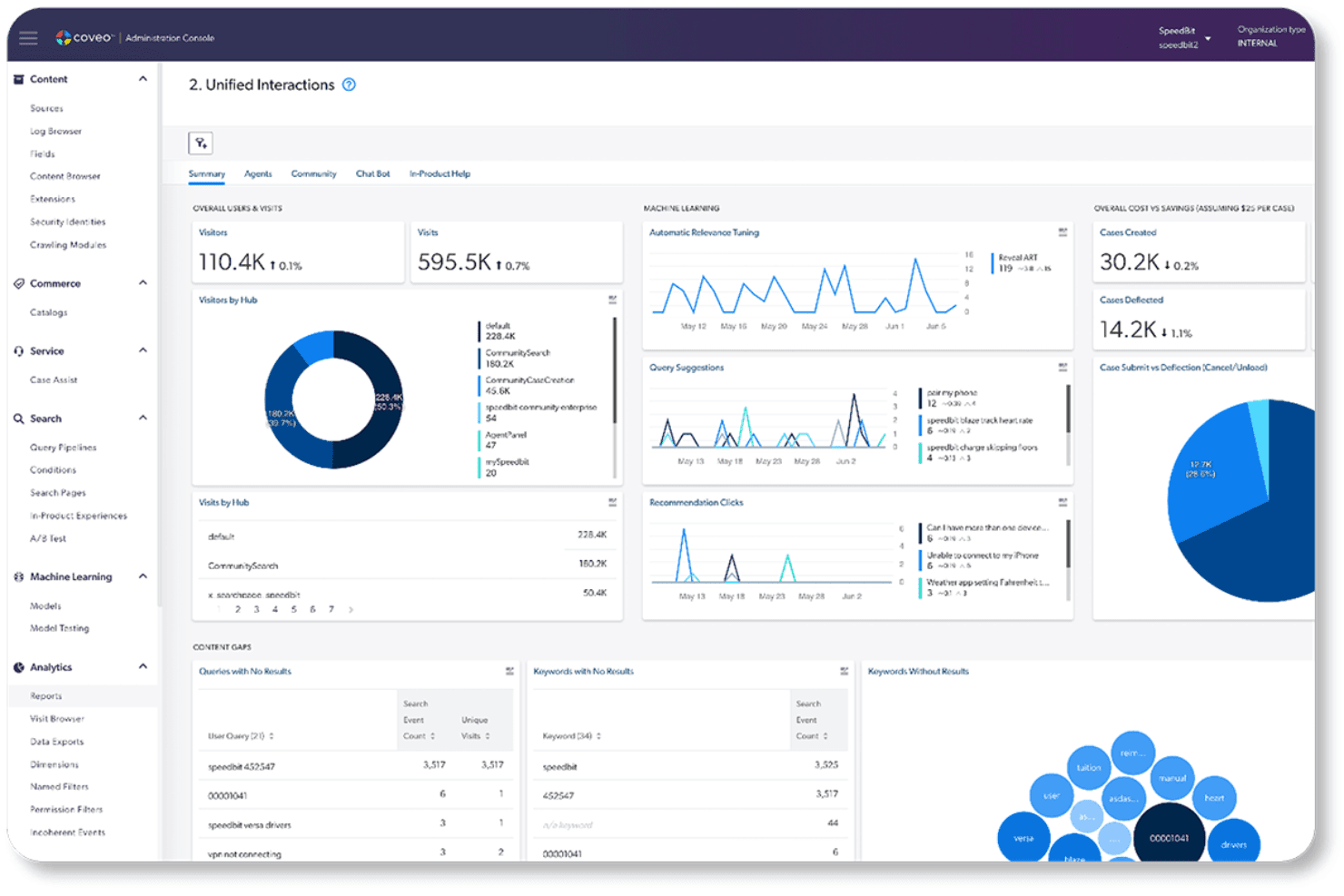
Coveo offre un pannello di controllo unificato delle interazioni con analisi che riguardano visitatori, informazioni sull'apprendimento automatico, riduzione dei casi e analisi delle lacune nei contenuti. Coveo è una piattaforma aziendale di ricerca basata sull'IA e di generazione di risposte che indicizza i contenuti presenti nei sistemi esistenti e offre ricerca basata sull'IA, risposte fondate sul recupero delle informazioni e consigli personalizzati tramite API e integrazioni predefinite.
Per chi è più adatto Coveo?
Coveo è adatto ai team di medie e grandi aziende che necessitano di ricerca basata sull'IA e risposte generative in ambienti di conoscenza complessi e distribuiti su più sistemi.
Perché ho scelto Coveo
Ho scelto Coveo perché nessun'altra piattaforma nella mia lista gestisce l'integrazione della conoscenza aziendale come fa questo strumento. Il suo indice ibrido unificato raccoglie contenuti da oltre 100 fonti, tra cui Salesforce, SAP e ServiceNow, e rende queste informazioni recuperabili tramite risposte generate dall'IA con citazioni delle fonti. Sono particolarmente colpito dall'API di recupero dei passaggi, che consente agli agenti IA di estrarre in tempo reale segmenti di testo precisi dall'indice unificato per basare le risposte su contenuti affidabili.
Caratteristiche principali di Coveo
- Navigazione dinamica: Regola automaticamente gli aspetti e i filtri per aiutare gli utenti a perfezionare i risultati della ricerca.
- Consigli personalizzati: Utilizza il comportamento e l'intento dell'utente per suggerire prodotti o contenuti pertinenti.
- Controlli degli accessi basati sui ruoli: Applica le autorizzazioni affinché gli utenti possano accedere solo ai contenuti autorizzati.
- Analisi della ricerca: Tiene traccia del comportamento di ricerca e delle conversioni tramite pannelli di controllo e strumenti di attribuzione.
Integrazioni di Coveo
Coveo offre oltre 30 connettori per centinaia di sistemi, tra cui Salesforce, SAP, Shopify, AWS, Sitecore, Adobe, ServiceNow, Zendesk e Agentforce. La sua API per le risposte, l'API di recupero dei passaggi e il kit di strumenti senza interfaccia supportano integrazioni personalizzate e l'inserimento della ricerca o del recupero delle informazioni nelle applicazioni.
Pros and Cons
Pros:
- Indice ibrido unificato che copre oltre 100 fonti di contenuti
- Leader nel Magic Quadrant di Gartner per la ricerca
- La sicurezza a livello di documento limita le risposte in base alle autorizzazioni
Cons:
- Nessuna formazione o implementazione di modelli personalizzati
- Costi imprevedibili su scala aziendale
Learn more about Coveo: 10Ideale per lo screening dei precedenti potenziato dall’IA
Checkr
- Demo gratuita disponibile
- A partire da $29.99/report
Visit WebsiteCustomer Rating:4.5/5
Checkr utilizza l’IA per rilevare rischi nel curriculum e segnalare anomalie sospette nei candidati. Per le organizzazioni che cercano una piattaforma guidata dall'IA per ottimizzare i processi di assunzione, Checkr rappresenta una soluzione interessante. Progettato per soddisfare le esigenze delle aziende moderne, Checkr utilizza l'IA per migliorare lo screening dei precedenti, garantendo decisioni di assunzione più rapide, accurate e conformi. Che operiate nel settore retail, sanitario o tecnologico, le capacità di IA di Checkr possono aiutarvi a trasformare dati complessi in informazioni utili, affrontando sfide come assunzioni inefficienti e incertezze normative.
Perché ho scelto Checkr
Ho scelto Checkr per le sue avanzate capacità di IA che ridefiniscono lo screening dei precedenti. Il classificatore di accuse della piattaforma categorizza automaticamente le accuse penali, semplificando la valutazione con regole personalizzate. Inoltre, il Name Matcher assicura un abbinamento preciso dei record identificando e associando vari formati di nomi al candidato corretto. Queste funzionalità non solo migliorano l’accuratezza dei report, ma affrontano anche problemi di conformità ed efficienza, rendendo Checkr una piattaforma di IA ideale per le esigenze di assunzione.
Funzionalità principali di Checkr
Oltre allo screening dei precedenti tramite IA, Checkr offre:
- Doc Inspector: Analizza i documenti caricati per verificarne l'autenticità, rilevando eventuali alterazioni che possano indicare falsificazione.
- Role Matcher: Verifica i titoli di lavoro dei candidati rispetto ai dati dei datori di lavoro, individuando discrepanze e ignorando errori minori.
- Aggiornamenti in tempo reale: Fornisce ai candidati aggiornamenti puntuali sullo stato dei loro controlli dei precedenti, migliorando la comunicazione.
- Strumenti di conformità: Mette a disposizione strumenti sempre aggiornati sulla normativa locale, abilitando processi di assunzione senza interruzioni.
Integrazioni di Checkr
Le integrazioni includono Workday, Greenhouse, BambooHR, Rippling, Lever, JazzHR, iCIMS, SmartRecruiters, Bullhorn e Planning Center. Checkr offre anche una API per integrazioni personalizzate.
Pros and Cons
Pros:
- Screening automatizzato dei precedenti riduce la verifica manuale e il lavoro amministrativo
- Interfaccia intuitiva per i candidati che semplifica il completamento dei requisiti di controllo dei precedenti
- Risultati rapidi nei controlli dei precedenti accelerano le decisioni di assunzione dei candidati
Cons:
- Alcuni controlli dei precedenti e delle esperienze lavorative potrebbero richiedere più tempo del previsto
- L’accesso alle funzionalità e i flussi di lavoro a volte non sono chiari per i nuovi utenti della piattaforma
Learn more about Checkr: 11Ideale per governare l'IA durante l'intero ciclo di vita dell'apprendimento automatico
Dataiku
- Prova gratuita di 14 giorni
- A partire da $4.000/mese (con addebito annuale)
Visit WebsiteCustomer Rating:4.6/5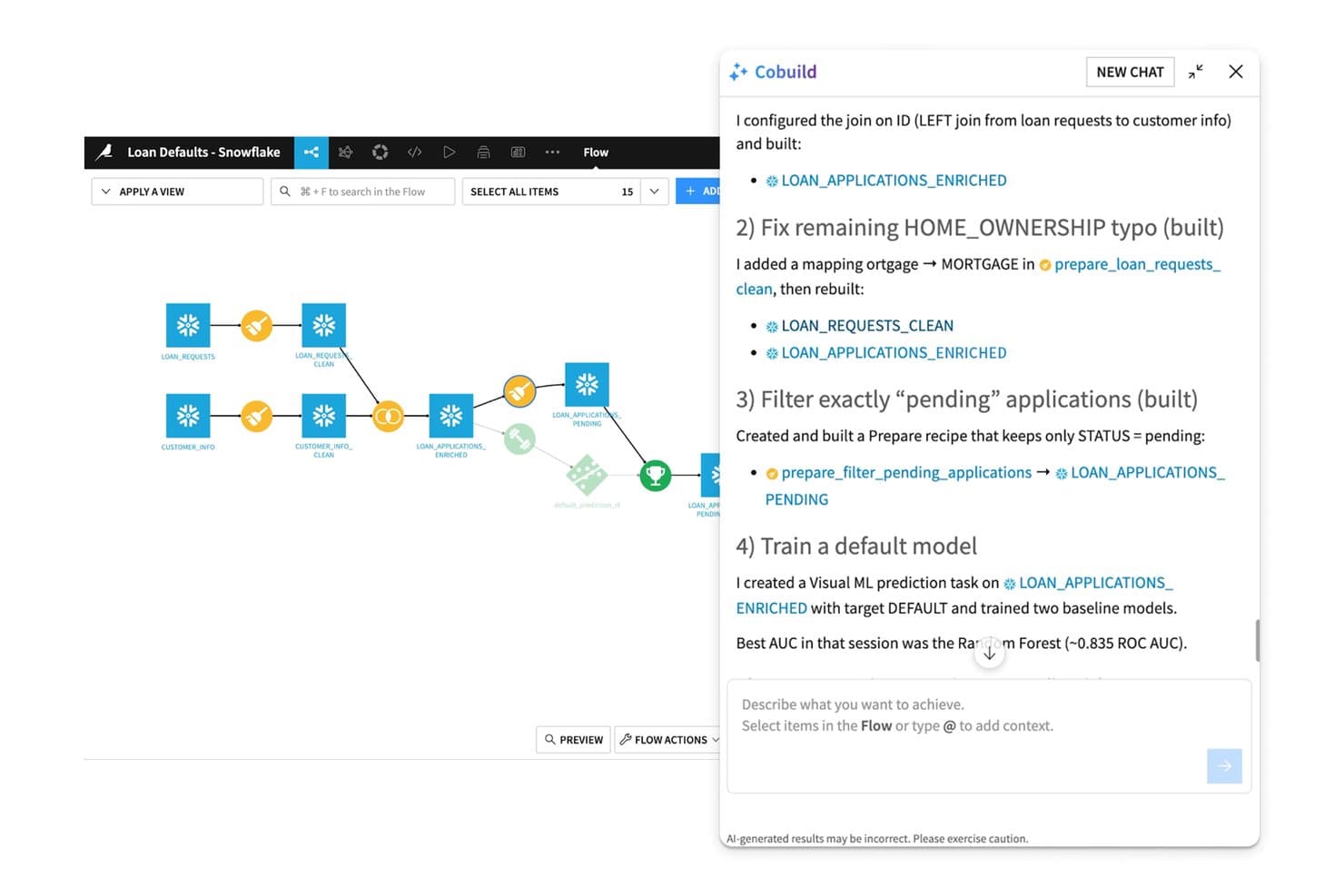
L'assistente IA Cobuild di Dataiku crea e perfeziona le pipeline di apprendimento automatico tramite conversazione. Dataiku è una piattaforma di IA aziendale che comprende preparazione dei dati, sviluppo di modelli di apprendimento automatico, AutoML, MLOps, orchestrazione multi-agente e accesso governato agli LLM attraverso un unico ambiente unificato.
Per chi è più adatto Dataiku?
Dataiku è particolarmente adatto ai team aziendali di data science e ingegneria dell'apprendimento automatico che necessitano di un unico ambiente governato per sviluppare, distribuire e monitorare l'IA su larga scala.
Perché ho scelto Dataiku
Dataiku è entrato nella mia rosa di candidati perché le sue funzionalità di governance sono integrate nel nucleo della piattaforma, anziché essere aggiunte in un secondo momento. Apprezzo in particolare la combinazione tra Inventario dell'IA e LLM Mesh: l'Inventario dell'IA tiene traccia di ogni modello, agente e set di dati tra i team, mentre LLM Mesh instrada le richieste tra fornitori come OpenAI, Anthropic e Bedrock attraverso un unico punto di accesso governato, con controlli sui costi e registri di audit. Questo significa che un team che utilizza la GenAI su larga scala può applicare le politiche di conformità senza rallentare la distribuzione.
Funzionalità principali di Dataiku
- AutoML e sviluppo personalizzato di modelli ML: Crea modelli utilizzando l'apprendimento automatico automatizzato oppure ambienti Python, R e SQL con codice completo all'interno dello stesso spazio di lavoro.
- Area visiva delle pipeline Dataiku Flow: Progetta, gestisci le versioni e ripristina visivamente le pipeline di dati e modelli utilizzando un generatore di ricette con trascinamento.
- Studio dei prompt: Uno spazio di lavoro dedicato alla progettazione, al test e all'iterazione dei prompt per gli LLM prima della loro distribuzione in produzione.
- Monitoraggio continuo dei modelli: Monitora deriva, distorsioni e degrado delle prestazioni dopo la distribuzione, con avvisi automatici e trigger per il riaddestramento.
Integrazioni di Dataiku
Dataiku offre oltre 20 integrazioni native con database SQL, tra cui Snowflake, Databricks, Google BigQuery, Amazon Redshift, PostgreSQL, Oracle e SAP HANA, oltre ad Amazon S3, SharePoint, MongoDB e Apache Iceberg. Si connette ai principali fornitori di LLM e supporta integrazioni personalizzate e CI/CD tramite la sua API Python.
Pros and Cons
Pros:
- Strumenti di governance integrati nel nucleo della piattaforma
- L'Inventario dell'IA e LLM Mesh consentono la conformità
- Gestisce l'intero ciclo di vita di ML e GenAI
Cons:
- Funzionalità di collaborazione limitate nei piani inferiori
- Il modulo di governance non è accessibile durante la prova
Learn more about Dataiku: 12Ideale per l'implementazione dell'IA nei settori regolamentati
H2O.ai
- Prova gratuita di 21 giorni
- A partire da $225,000/GPU/anno (fatturato annualmente)
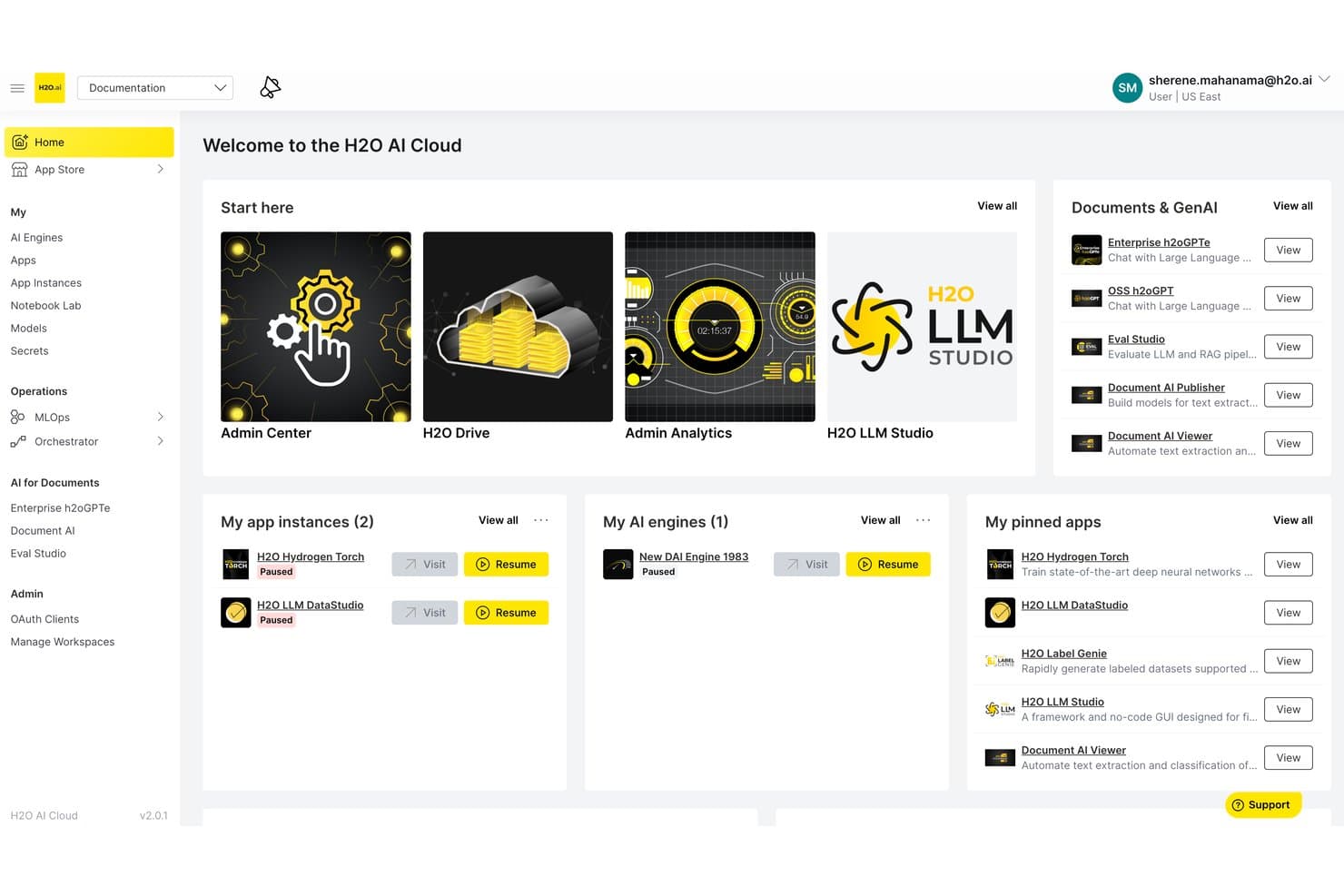
H2O.ai centralizza strumenti, applicazioni e motori di IA in un'unica dashboard cloud. H2O.ai è una piattaforma di IA aziendale che riunisce AutoML, IA generativa, messa a punto degli LLM e orchestrazione dell'IA agentica in un'unica architettura progettata per implementazioni isolate, in sede e nel cloud.
Per chi è più adatto H2O.ai?
H2O.ai è particolarmente adatto ai team aziendali di data science e IT di settori regolamentati come finanza, sanità e pubblica amministrazione, che necessitano di un'implementazione dell'IA isolata o in sede.
Perché ho scelto H2O.ai
H2O.ai si è guadagnato un posto nella mia lista ristretta perché nessun'altra piattaforma che ho valutato è paragonabile alla sua ampiezza di certificazioni di conformità per gli ambienti con dati sensibili: SOC 2 Type II, FedRAMP High, HIPAA e IRAP PROTECTED. L'ho scelto appositamente per i team di finanza, sanità e pubblica amministrazione che necessitano di un'implementazione dell'IA completamente isolata o in sede, in cui i dati non possono lasciare l'ambiente dell'organizzazione. Gli strumenti di instradamento intelligente dei modelli e di gestione del rischio dei modelli lo rendono pratico per flussi di lavoro di IA regolamentati e pronti per l'audit.
Funzionalità principali di H2O.ai
- Driverless AI AutoML: Un motore di apprendimento automatico automatizzato che gestisce l'ingegneria delle caratteristiche, la selezione dei modelli, la convalida e la documentazione con algoritmi accelerati dalle GPU.
- H2O LLM Studio: Un framework senza codice per la messa a punto che consente al team di addestrare LLM personalizzati su dati privati utilizzando metodi di allineamento come DPO e IPO.
- Instradamento intelligente dei modelli: Seleziona dinamicamente l'LLM più adatto per ogni richiesta in base ai requisiti di costo, latenza e precisione, tra modelli open source e di terze parti.
- H2O Wave: Un framework di sviluppo di applicazioni a basso contenuto di codice per creare e distribuire applicazioni personalizzate basate sull'IA all'interno dell'ambiente della propria organizzazione.
Integrazioni di H2O.ai
H2O.ai supporta oltre 200 integrazioni documentate, tra cui Microsoft SharePoint, Slack, Microsoft Teams, GitHub, AWS, Google Cloud Platform, Azure, Snowflake, Apache Spark e LangGraph. Le API REST e i client per Python, R, Java e Scala supportano integrazioni personalizzate.
Pros and Cons
Pros:
- Precisione delle prestazioni dell'IA agentica da record mondiale
- Conformità ai vertici della categoria per le implementazioni regolamentate
- Messa a punto senza il rischio di addestramento del fornitore sui dati
Cons:
- L'attenzione esclusiva alle aziende esclude i team più piccoli
- Privo di automazione e analisi specifiche per le risorse umane
Learn more about H2O.ai: Ideale per la gestione sicura delle riunioni del consiglio tramite AI
- Demo gratuita disponibile
- Prezzo su richiesta
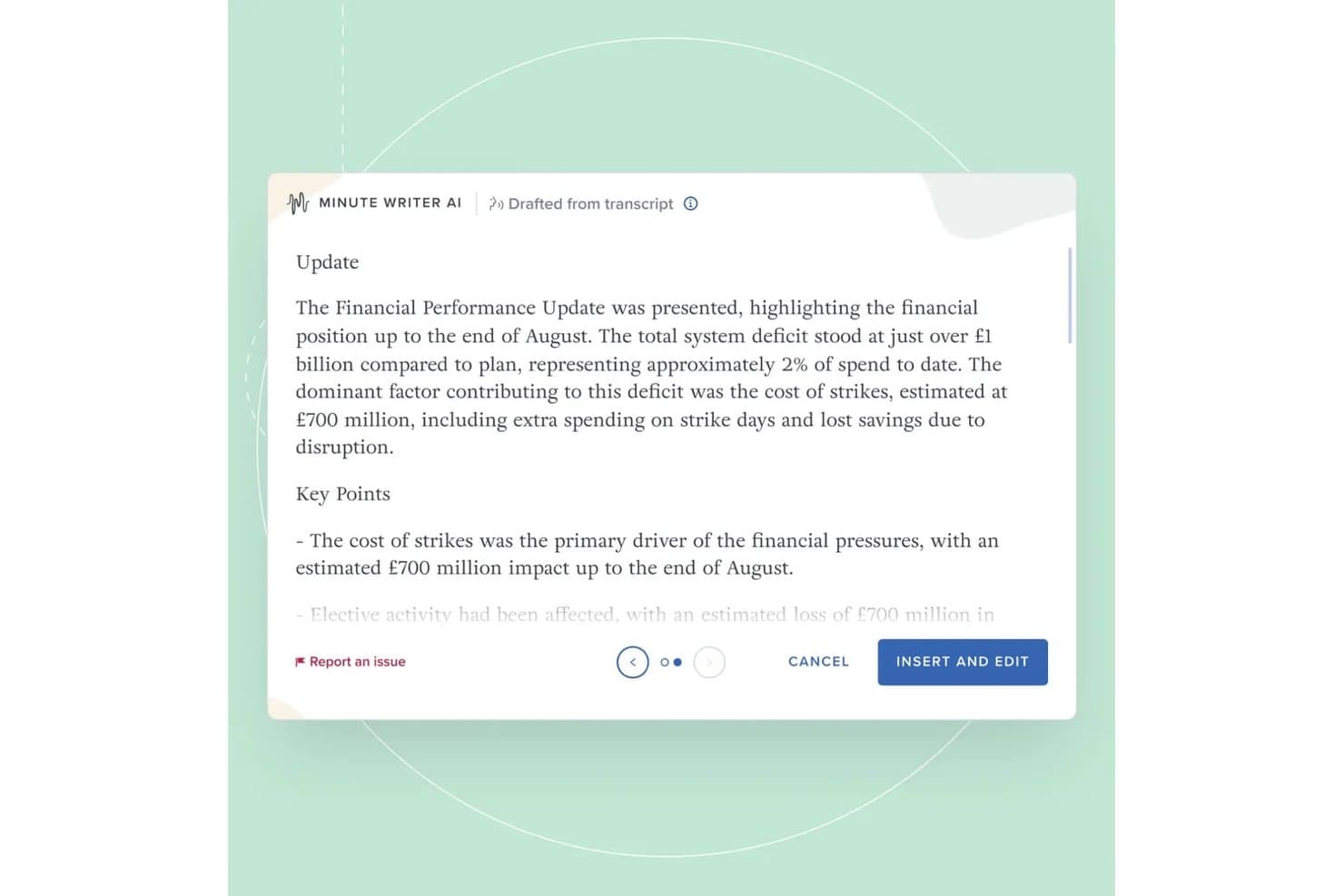
Il Minute Writer AI di Board Intelligence redige verbali strutturati dalle trascrizioni delle riunioni, riassumendo automaticamente gli aggiornamenti delle performance finanziarie con i punti chiave. Board Intelligence è una piattaforma di gestione del consiglio di amministrazione basata sull'intelligenza artificiale che combina redazione di report, generazione di verbali, preparazione delle riunioni, pianificazione dell'ordine del giorno e approfondimenti sulla governance durante l'intero ciclo del consiglio.
Per chi è ideale Board Intelligence?
Board Intelligence è adatto a segretari societari, direttori legali e team di governance di medie e grandi aziende che gestiscono cicli complessi di consigli e comitati.
Perché ho scelto Board Intelligence
Board Intelligence si è guadagnato un posto nella mia shortlist perché la sua IA è progettata specificamente per la governance e non adattata da strumenti generici. Apprezzo in particolare Minute Writer AI, che produce verbali strutturati direttamente dalle discussioni del consiglio, e IQ Insights, che evidenzia temi rilevanti per la governance in oltre 130 ambiti consiliari prima dell'inizio delle riunioni. Ciò che lo distingue davvero è la politica di zero conservazione dei dati, il che significa che i contenuti sensibili del consiglio non vengono mai conservati nel modello IA.
Caratteristiche principali di Board Intelligence
- Planner dell'ordine del giorno: Crea ordini del giorno per consigli e comitati allineati alle principali priorità aziendali.
- Briefing dei report: Richiedi documenti del consiglio utilizzando modelli standardizzati e flussi di lavoro di approvazione.
- Tracciamento delle azioni: Monitora e gestisci le attività assegnate durante le riunioni del consiglio da un'unica piattaforma.
- Sondaggi del consiglio: Esegui valutazioni dell'efficacia del consiglio utilizzando modelli di sondaggio progettati da esperti.
Integrazioni di Board Intelligence
Board Intelligence offre integrazioni native con Microsoft 365 (incluso Word), Microsoft Teams, Zoom e supporta l'accesso tramite provider SSO aziendali.
Pros and Cons
Pros:
- IA sicura con zero conservazione dei dati
- Redazione automatica dei verbali che fa risparmiare tempo amministrativo
- Avanzato costruttore di ordini del giorno per le riunioni del consiglio
Cons:
- Nessuna API per integrazioni personalizzate
- Analisi limitate fuori dai temi del consiglio
Learn more about Board Intelligence: Ideale per l'orchestrazione di agenti multi-modello su larga scala
- Prova gratuita di 30 giorni
- Da $21/utente/mese
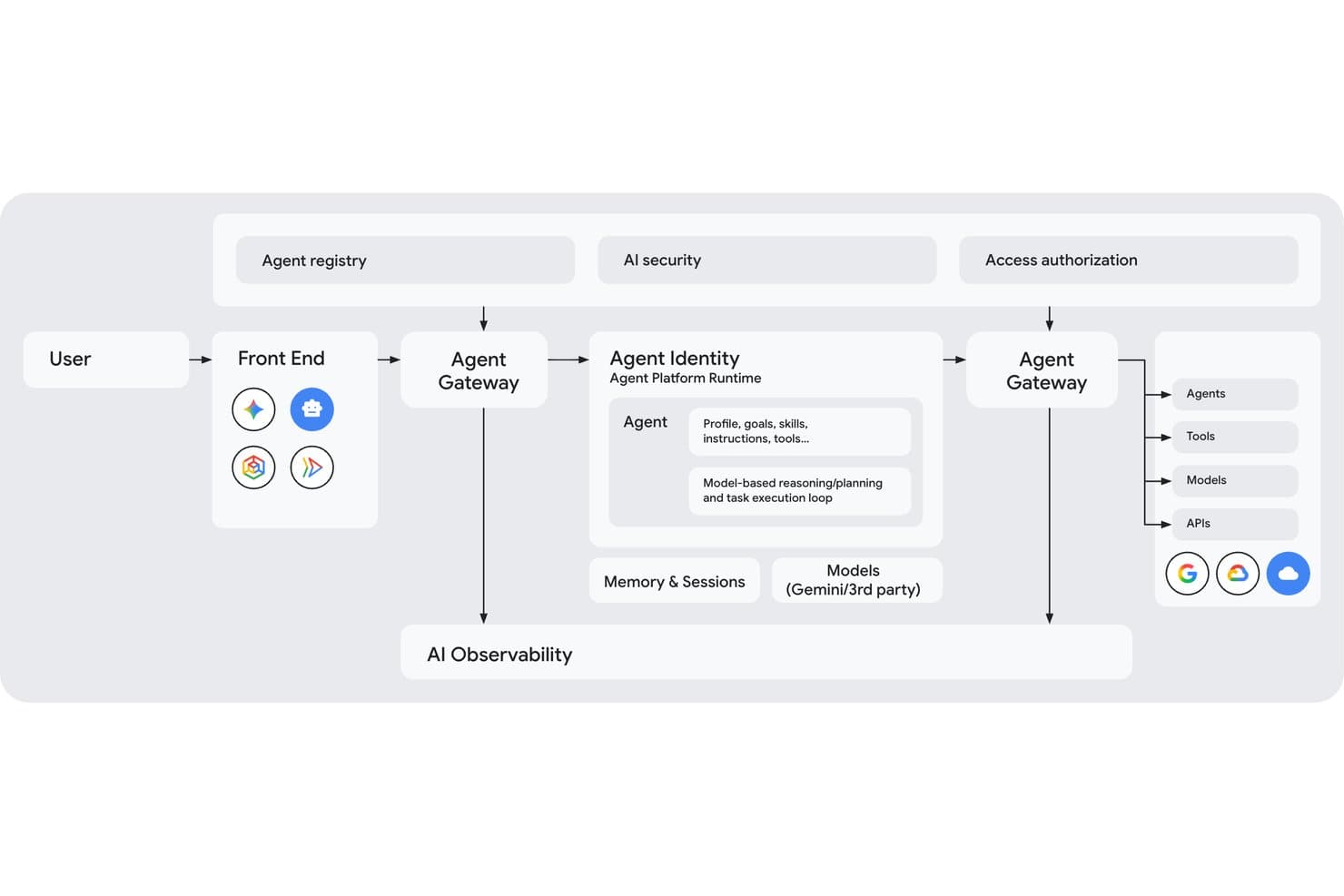
Gemini Enterprise Agent Platform rappresenta visivamente la sua architettura multi-agente completa. Gemini Enterprise Agent Platform è la piattaforma di intelligenza artificiale aziendale di Google Cloud che offre ai team l'accesso a oltre 200 modelli, all'orchestrazione multi-agente, all'addestramento e alla messa a punto di modelli personalizzati e a una suite completa per la governance e la gestione degli agenti di intelligenza artificiale su larga scala.
Per chi è più adatta Gemini Enterprise Agent Platform?
È particolarmente adatta ai team aziendali di ingegneria e data science che devono creare, orchestrare e gestire sistemi di intelligenza artificiale multi-agente complessi sull'infrastruttura Google Cloud.
Perché ho scelto Gemini Enterprise Agent Platform
Ho scelto Gemini Enterprise Agent Platform come una delle migliori perché la sua orchestrazione multi-agente basata su grafi consente ai team di ingegneria di coordinare reti di sotto-agenti specializzati attraverso flussi di lavoro complessi della durata di più giorni, in un modo che la maggior parte delle piattaforme semplicemente non è in grado di eguagliare. Gli oltre 200 modelli del Model Garden, tra cui Gemini, Claude, Grok e Llama, permettono ai team di indirizzare ogni attività verso il modello più adatto in base a costi, velocità o accuratezza. Inoltre, il sistema Agent Identity assegna a ogni agente un ID SPIFFE crittografico, offrendo ai team di sicurezza una reale tracciabilità di ogni azione eseguita.
Funzionalità principali di Gemini Enterprise Agent Platform
- Agent Studio: Un'interfaccia con poco codice, accessibile tramite browser, per progettare, testare e perfezionare gli agenti utilizzando linguaggio naturale, codice, immagini o video senza conoscenze approfondite di programmazione.
- Motore RAG: Collega le origini dati aziendali agli LLM tramite Vector Search, basando le risposte dei modelli sulle conoscenze proprietarie per ridurre le allucinazioni.
- Simulazione degli agenti: Genera conversazioni sintetiche per testare gli agenti rispetto a criteri prestabiliti di successo e sicurezza prima di qualsiasi distribuzione in produzione.
- Memory Bank: Conserva il contesto a lungo termine tra le sessioni degli agenti, consentendo interazioni personalizzate e coerenti nel tempo.
Integrazioni di Gemini Enterprise Agent Platform
Gemini Enterprise Agent Platform offre integrazioni native con Google Cloud e Google Workspace, tra cui BigQuery, Cloud Storage, Google Sheets, Gmail e Drive, oltre a Sana Self-Service Agent di Workday. Supporta Apigee, MCP, REST, gRPC, webhook e API per integrazioni personalizzate.
Pros and Cons
Pros:
- Ampiezza senza pari di modelli di intelligenza artificiale selezionati
- Governance di livello aziendale con Agent Identity SPIFFE
- Orchestrazione multi-agente complessa per flussi di lavoro avanzati
Cons:
- Sono state segnalate complessità dei prezzi e costi imprevedibili
- La documentazione e la ridenominazione del prodotto generano confusione
Learn more about Gemini Enterprise Agent Platform: Ideale per la governance della flotta di modelli su scala aziendale
- Prova gratuita di 30 giorni disponibile
- Da $0.165 per 1M token di input
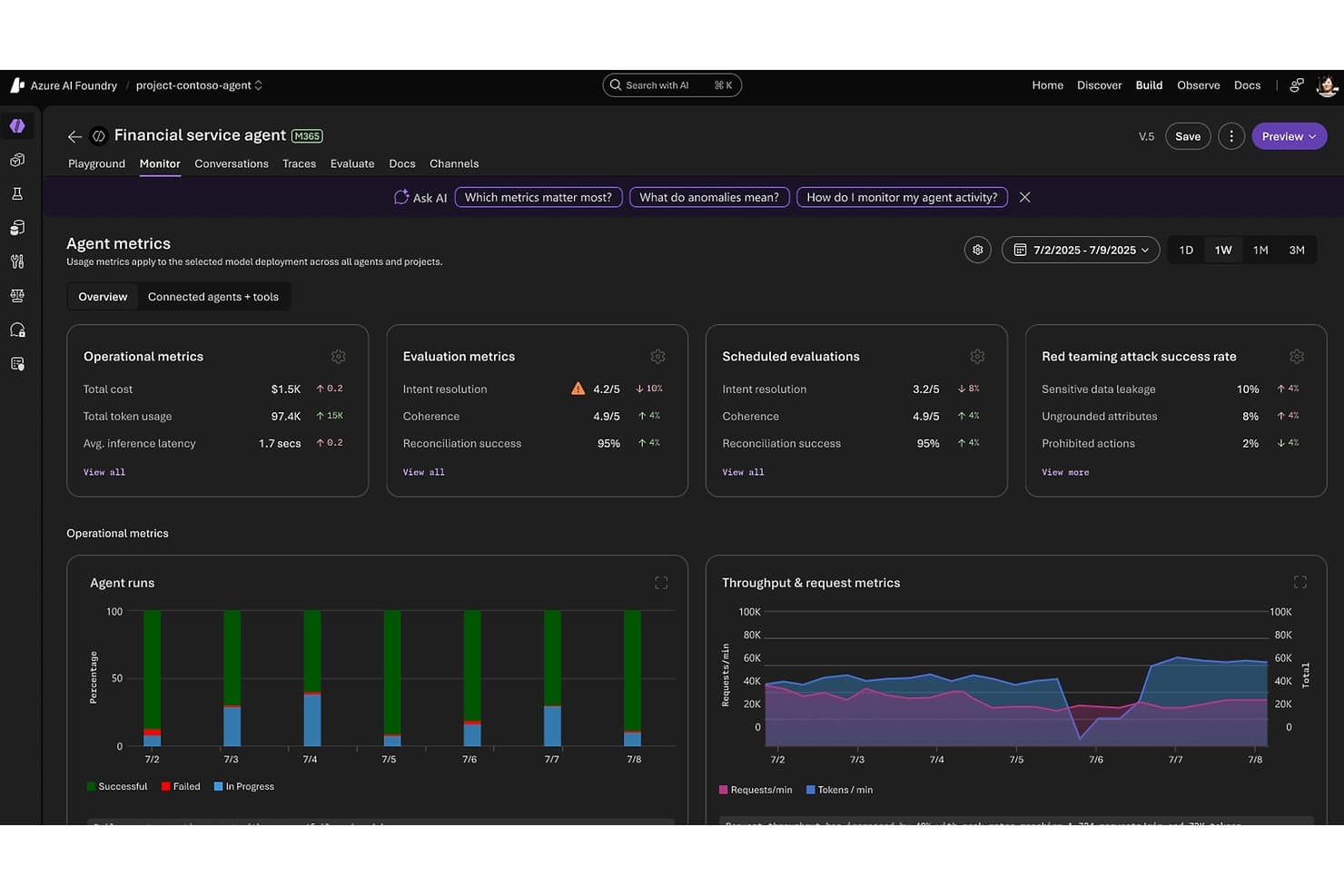
Microsoft Foundry monitora le metriche delle prestazioni degli agenti e le valutazioni della sicurezza. Microsoft Foundry è una piattaforma di AI aziendale di Microsoft che unifica l'accesso ai modelli, la creazione di agenti, l'automazione dei flussi di lavoro e la governance in un catalogo di oltre 11.000 modelli di fornitori come OpenAI, Anthropic, Meta e Mistral.
Per chi è più adatto Microsoft Foundry?
Microsoft Foundry è particolarmente adatto alle grandi aziende con un'infrastruttura Azure esistente che necessitano di un controllo centralizzato su più modelli di AI, squadre e carichi di lavoro su larga scala.
Perché ho scelto Microsoft Foundry
Microsoft Foundry è incluso nella mia rosa dei candidati perché nessun'altra piattaforma si avvicina alla sua governance a livello di flotta su scala aziendale. Il piano di controllo Foundry offre ai responsabili IT e dell'infrastruttura AI un pannello di controllo centralizzato per monitorare contemporaneamente la conformità, le anomalie dei costi e lo stato degli agenti in ogni progetto e squadra. Sono inoltre colpito dall'agente di test di sicurezza offensivo dell'AI, che analizza automaticamente le implementazioni alla ricerca di vulnerabilità, e dall'instradatore dei modelli, che riduce i costi di inferenza di circa il 50% instradando ogni richiesta verso il modello ottimale senza modifiche al codice.
Funzionalità principali di Microsoft Foundry
- Servizio agenti Foundry: Crea agenti autonomi in grado di ragionare, pianificare ed eseguire attività in più fasi utilizzando strumenti, memoria e modelli di orchestrazione multi-agente come il passaggio sequenziale e la chat di gruppo.
- Foundry IQ: Connette gli agenti alle fonti di dati aziendali, tra cui Snowflake, S3 e OneLake, utilizzando il ragionamento dinamico invece di ricerche statiche nei vettori per un RAG di nuova generazione.
- Messa a punto tramite portale, SDK o REST: Personalizza i modelli di base Azure OpenAI e a codice aperto sui tuoi dati organizzativi direttamente nell'interfaccia Foundry.
- Integrazione con Azure Logic Apps: Accedi a oltre 1.400 connettori predefiniti per automatizzare i flussi di lavoro tra app di terze parti, database e sistemi aziendali senza codice personalizzato.
Integrazioni di Microsoft Foundry
Microsoft Foundry offre integrazioni native nell'ecosistema Microsoft, tra cui Microsoft 365, Microsoft Fabric, Microsoft Copilot Studio, Power Automate, Microsoft Entra ID, Azure Machine Learning e Azure AI Search. Supporta inoltre oltre 1.400 connettori Azure Logic Apps, API REST, SDK e connessioni MCP/OpenAPI per integrazioni personalizzate.
Pros and Cons
Pros:
- Controllo centralizzato su oltre 11.000 modelli di AI
- Strumenti di governance e conformità di livello aziendale
- L'instradatore dei modelli riduce i costi complessivi di inferenza
Cons:
- Richiede un investimento in un'infrastruttura Azure esistente
- Nessuna funzionalità o connettore nativo specifico per le risorse umane
Learn more about Microsoft Foundry:
Altre piattaforme di AI
Ecco alcune ulteriori opzioni di piattaforme di AI che non sono entrate nella mia selezione, ma che vale comunque la pena prendere in considerazione:
- 16TidioIdeale per l'automazione delle interazioni con i clienti
- 17Leena AIIdeale per automazioni AI rivolte ai team HR
- 18DataRobotIdeale per l'automazione AI del machine learning
- 19Amazon BedrockIdeale per l'accesso a più modelli su infrastruttura AWS
- 20IBM watsonx.aiIdeale per l'IA aziendale con indennizzo integrato per la proprietà intellettuale
- 21Palantir AIPIdeale per agenti di IA basati su un'ontologia aziendale
Come valuto le piattaforme di IA
Divido la mia valutazione in funzionalità di base che ogni piattaforma deve possedere e fattori distintivi, come la capacità di uno strumento di basare i risultati dell'IA su dati proprietari o di gestire flussi di lavoro basati su agenti su larga scala.
Funzionalità principali (requisiti fondamentali per questo elenco)
Quando seleziono gli strumenti per il mio elenco, assegno a ciascuno un punteggio su una scala da 0 (non offre la funzionalità) a 5 (eccelle in questo ambito) per ogni funzionalità principale elencata di seguito. Calcolo quindi il punteggio totale dello strumento come percentuale, utilizzando il 75% come riferimento per valutarne l'idoneità complessiva per l'elenco.
- Interfacce di IA conversazionale: valuto se la piattaforma supporta interazioni multi-turno e sensibili al contesto, non solo risposte predefinite, e se tali assistenti possono connettersi a origini dati aziendali.
- Automazione intelligente dei flussi di lavoro: cerco processi decisionali basati sull'IA all'interno dei flussi di lavoro, non solo attivatori basati su regole: penso a processi interfunzionali in cui la piattaforma può instradare, inoltrare a un livello superiore o adattarsi in base al contesto.
- Analisi predittiva: verifico se le previsioni vanno oltre i pannelli di controllo statici, in particolare se le piattaforme offrono modelli di scenario o analisi dei rischi che supportano decisioni reali invece di limitarsi a riferire sulle prestazioni passate.
- IA generativa e modelli linguistici: valuto la flessibilità dei modelli, le opzioni di ancoraggio ai dati e se la piattaforma supporta la generazione con recupero aumentato (RAG) per basare i risultati sui dati e sulle conoscenze propri della tua organizzazione.
- IA responsabile e governance: esamino i registri di controllo, il rilevamento dei bias e i controlli di spiegabilità, verificando se è effettivamente possibile ricostruire il motivo per cui un modello ha preso una decisione, non solo il fatto che l'abbia presa.
Una volta ottenuto un elenco di strumenti che soddisfano i criteri, considero ciò che distingue ogni piattaforma.
Fattori distintivi (ciò che differenzia i fornitori)
Ecco come confronto i diversi fornitori:
Funzionalità distintive
L'ancoraggio alle conoscenze aziendali è l'ambito in cui noto le differenze più significative tra le piattaforme. Valuto se uno strumento può connettersi ai dati effettivi della tua organizzazione, tramite RAG, ricerca semantica o grafi della conoscenza, e restituire risultati che riflettano il tuo contesto, non solo la formazione generale. Strettamente correlata è la personalizzazione dei modelli di IA: la messa a punto e la gestione delle istruzioni determinano se una piattaforma si adatta ai tuoi flussi di lavoro o ti costringe ad adattarti a essa. Valuto anche lo sviluppo di IA a basso codice, poiché le piattaforme migliori consentono ai team delle risorse umane, sia tecnici sia non tecnici, di creare e iterare senza dipendere interamente dalle risorse di ingegneria.
Oltre le funzionalità
La trasparenza dei prezzi è più importante di quanto la maggior parte degli acquirenti si aspetti. Verifico se i costi basati su token, calcolo o utilizzo sono documentati chiaramente, perché i carichi di lavoro dell'IA possono aumentare rapidamente e i prezzi opachi creano un rischio reale per il budget. Presto inoltre molta attenzione alla sicurezza e alla conformità normativa: in particolare, verifico se una piattaforma offre opzioni di residenza dei dati, applica controlli degli accessi e si allinea a standard come SOC 2 o la legge dell'UE sull'IA, elementi imprescindibili per i team delle risorse umane che gestiscono dati sensibili sulla forza lavoro.
Qual è il miglior strumento di AI gratuito?
Il miglior strumento di AI gratuito dipende dall'attività specifica che devi automatizzare, ma ChatGPT, Claude, Gemini e Canva offrono i piani gratuiti più completi per le operazioni aziendali quotidiane. La maggior parte dei piani gratuiti dà accesso ai modelli principali e all'automazione di base, anche se in genere limita l'utilizzo giornaliero e restringe le integrazioni aziendali.
Ecco come si distinguono le migliori opzioni gratuite in base allo scenario d'uso:
| Strumento di AI gratuito | Ideale per | Funzionalità principali |
|---|---|---|
| Strumento di AI gratuitoChatGPT | Ideale perLa scelta migliore in generale per testi, scrittura e brainstorming | Funzionalità principaliRedazione di testi, programmazione leggera, navigazione sul web e accesso a GPT personalizzati |
| Strumento di AI gratuitoClaude | Ideale perIdeale per l'analisi di documenti lunghi e la scrittura sfumata | Funzionalità principaliRiassume file lunghi, legge PDF e fogli di calcolo e offre stili di scrittura naturali |
| Strumento di AI gratuitoCanva | Ideale perIdeale per creare rapidamente contenuti visivi e presentazioni | Funzionalità principaliMagic Write, modelli per presentazioni e modifica visiva di base |
| Strumento di AI gratuitoMicrosoft Copilot | Ideale perIdeale per la ricerca connessa al web | Funzionalità principaliRisultati di ricerca con citazioni, generazione di immagini e integrazione con il browser Edge |
| Strumento di AI gratuitoGemini | Ideale perIdeale per la ricerca in Google Workspace | Funzionalità principaliRicerca web in tempo reale, integrazione con Gmail e Docs e input multimodali |
Quando uno strumento di AI gratuito non è sufficiente?
Gli strumenti di AI gratuiti mostrano i loro limiti non appena hai bisogno di privacy dei dati, attivatori automatici per i flussi di lavoro o conformità normativa specifica del settore. Ecco i limiti degli strumenti di AI gratuiti:
| Se hai bisogno di… | I limiti degli strumenti di IA gratuiti dipendono dal fatto che… |
|---|---|
| Se hai bisogno di…Sicurezza e privacy dei dati | I limiti degli strumenti di IA gratuiti dipendono dal fatto che…I prompt gratuiti possono essere utilizzati per addestrare modelli pubblici e non garantiscono la conservazione zero dei dati. |
| Se hai bisogno di…Automazione dei flussi di lavoro | I limiti degli strumenti di IA gratuiti dipendono dal fatto che…Devi copiare e incollare manualmente i prompt tra le schede del browser. |
| Se hai bisogno di…Operazioni specializzate | I limiti degli strumenti di IA gratuiti dipendono dal fatto che…I modelli generici non dispongono di logiche di conformità specifiche per il settore o di simulazioni di ruolo. |
| Se hai bisogno di…Integrazione completa dello stack tecnologico | I limiti degli strumenti di IA gratuiti dipendono dal fatto che…Gli strumenti gratuiti restano isolati in una finestra separata del browser. |
D'altra parte, le piattaforme di IA a pagamento offrono ambienti privati per i dati con conservazione zero dei dati, agenti di IA a mani libere che eseguono flussi di lavoro composti da più passaggi e motori progettati appositamente per attività specializzate come la verifica dei precedenti, l'analisi della forza lavoro e la formazione dei dirigenti. Soprattutto, si sincronizzano bidirezionalmente tramite API con il tuo ATS, HRIS o sistema di assistenza esistente.
Come scegliere le piattaforme di IA
Per scegliere la piattaforma di IA giusta, definisci il problema operativo specifico che devi risolvere, quindi valuta gli strumenti in base agli standard di privacy dei dati, al livello di integrazione con il tuo stack tecnologico esistente e al costo totale effettivo.
Anziché lasciarti assorbire da lunghi elenchi di funzionalità o dall'enfasi del marketing dei fornitori, concentra il processo di selezione su questi sette fattori fondamentali:
| Fattore | Cosa considerare |
| Scalabilità | La piattaforma crescerà insieme alla tua azienda? Verifica se il suo ecosistema supporta volumi di dati e numeri di utenti crescenti senza compromettere le prestazioni o richiedere costosi aggiornamenti. |
| Integrazioni | Funziona con gli strumenti che già utilizzi? Verifica la compatibilità con il tuo stack tecnologico attuale, come i sistemi CRM o ERP, per evitare interruzioni e ulteriori costi di integrazione. |
| Personalizzazione | Puoi adattare la piattaforma alle tue esigenze? Cerca flessibilità nelle impostazioni e nei flussi di lavoro, in modo che siano in linea con i processi e gli obiettivi specifici del tuo team. |
| Facilità d'uso | L'interfaccia è intuitiva per il tuo team? Assicurati che non richieda una formazione approfondita, che potrebbe rallentare l'adozione e causare frustrazione tra gli utenti. |
| Implementazione e inserimento | Quanto rapidamente puoi iniziare a utilizzarla? Valuta il tempo e le risorse necessari per la configurazione, inclusi la migrazione dei dati e la formazione degli utenti, per evitare lunghi ritardi. |
| Costo | Il prezzo rientra nel tuo budget? Considera tutti i costi, inclusi i canoni di abbonamento, i possibili componenti aggiuntivi e gli impegni finanziari a lungo termine, per assicurarti che sia accessibile. |
| Misure di sicurezza | I tuoi dati e le tue operazioni sono protetti? Verifica la presenza di crittografia, la conformità alle normative sulla protezione dei dati e solidi controlli degli accessi per mantenere al sicuro le informazioni sensibili. |
Cosa sono le piattaforme di IA?
Le piattaforme di IA sono soluzioni software che utilizzano l'intelligenza artificiale per automatizzare le attività, analizzare i dati e generare informazioni utili. Forniscono l'infrastruttura di base—come funzionalità di apprendimento automatico, elaborazione del linguaggio naturale e analisi predittiva—che gli scienziati dei dati, gli analisti e i team tecnici utilizzano per creare, personalizzare e dimensionare flussi di lavoro basati sull'IA. Queste piattaforme aiutano le aziende a semplificare i processi, migliorare il processo decisionale e promuovere l'innovazione in tutte le operazioni.
Le piattaforme di IA si distinguono dagli strumenti di IA per la loro portata:
- Le piattaforme di IA offrono ambienti completi per la creazione e la gestione di sistemi di IA.
- Gli strumenti di IA sono applicazioni pronte all'uso progettate per svolgere una specifica attività basata sull'IA.
Se cerchi singoli strumenti di IA che aiutino con la scrittura, la ricerca, il design, la produttività e altro ancora, puoi consultare il nostro elenco di strumenti di IA in un articolo separato.
Funzionalità
Quando selezioni le piattaforme di IA, presta attenzione alle seguenti funzionalità chiave:
- Algoritmi di apprendimento automatico: Automatizzano l'analisi dei dati e migliorano il processo decisionale identificando modelli e tendenze.
- Elaborazione del linguaggio naturale: Comprende ed elabora il linguaggio umano per facilitare la comunicazione e automatizzare le attività.
- Analisi predittiva: Prevede i risultati futuri sulla base dei dati storici, aiutandoti a prendere decisioni aziendali informate.
- Flussi di lavoro personalizzabili: Adattano i processi alle esigenze specifiche del tuo team, migliorando l'efficienza e l'adattabilità.
- Elaborazione dei dati in tempo reale: Analizza i dati e agisce su di essi non appena vengono raccolti, fornendo informazioni e risposte tempestive.
- Funzionalità di integrazione: Si collegano agli strumenti e ai sistemi esistenti per garantire un ambiente tecnologico coerente.
- Approfondimenti basati sull'IA: Fornisce raccomandazioni operative e approfondimenti generati dall'IA sulla base dell'analisi dei dati per supportare la pianificazione strategica.
- Processo decisionale automatizzato: Utilizza la ricerca con IA per restituire automaticamente i dati e creare una logica basata su regole, semplificando le decisioni di routine e liberando tempo per attività più complesse.
- Misure di sicurezza: Protegge le informazioni sensibili e i flussi di comunicazione con la crittografia e i controlli di accesso per preservare l'integrità dei dati.
- Scalabilità: Supporta volumi di dati e numeri di utenti in crescita senza sacrificare le prestazioni o richiedere importanti aggiornamenti.
Vantaggi
L'implementazione di piattaforme di IA offre diversi vantaggi al tuo team e alla tua azienda. Eccone alcuni:
- Maggiore efficienza: Automatizza le attività di routine con l'IA, liberando tempo per attività più strategiche.
- Processo decisionale migliorato: Utilizza l'analisi predittiva per prendere decisioni informate basate su informazioni ricavate dai dati.
- Comunicazione migliore: Facilita una comunicazione più chiara grazie alle funzionalità di elaborazione del linguaggio naturale.
- Risparmio sui costi: Riduce i costi operativi automatizzando i processi e minimizzando il lavoro manuale.
- Scalabilità: Fa crescere le tue attività senza preoccuparti dei problemi di prestazioni, grazie a soluzioni di IA scalabili.
- Maggiore innovazione: Sfrutta gli approfondimenti basati sull'IA per esplorare nuove opportunità e favorire la crescita aziendale.
Costi e prezzi
La scelta delle piattaforme di IA richiede la comprensione dei vari modelli e piani tariffari disponibili. I costi variano in base alle funzionalità, alle dimensioni del team, ai componenti aggiuntivi e ad altri fattori. La tabella seguente riassume i piani più comuni, i relativi prezzi medi e le funzionalità tipicamente incluse nelle soluzioni di piattaforme di IA:
Tabella di confronto dei piani per le piattaforme di IA
| Tipo di piano | Prezzo medio | Funzionalità comuni |
| Piano gratuito | $0 | Analisi di base dei dati, funzionalità di IA limitate e accesso limitato alle integrazioni. |
| Piano personale | $5-$25/user/month | Funzionalità di IA avanzate, flussi di lavoro personalizzabili e accesso all'assistenza clienti. |
| Piano aziendale | $30-$100/user/month | Analisi avanzate, funzionalità di integrazione complete e servizi di assistenza prioritaria |
| Piano aziendale avanzato | $100+/user/month | Strumenti di IA completi, gestione dedicata dell'account e funzionalità di sicurezza avanzate. |
Domande frequenti sulle piattaforme di IA
Ecco alcune risposte alle domande più comuni sulle piattaforme di IA:
Quale strumento di IA è migliore di ChatGPT?
Sebbene ChatGPT funzioni bene per richieste conversazionali occasionali, gli strumenti dedicati lo superano in specifiche operazioni aziendali. Ad esempio, Claude supera ChatGPT nell’analisi di documenti lunghi e nel tono di scrittura naturale. Le piattaforme progettate appositamente, come monday AI Workspace, Freshservice e Tidio, sono migliori di ChatGPT per i flussi di lavoro aziendali automatizzati.
Parere dell’esperto: usa ChatGPT per il brainstorming generale e la stesura rapida quotidiana. Passa a Claude quando la qualità dell’output e la gestione dei documenti sono fondamentali, oppure scegli le piattaforme dedicate incluse nella mia selezione quando hai bisogno di flussi di lavoro automatizzati, una rigorosa tutela della privacy dei dati o l’esecuzione di attività specifiche per il tuo settore.
Come valuto la scalabilità di una piattaforma di IA?
Per valutare la scalabilità, considera come la piattaforma gestisce l’aumento dei volumi di dati e del numero di utenti. Cerca funzionalità come il calcolo distribuito e il bilanciamento del carico. Chiedi ai fornitori casi di studio o esempi di come la loro piattaforma supporta le aziende in crescita. Assicurati che non richieda aggiornamenti costosi con l’espansione del tuo team.
Le piattaforme di IA possono integrarsi con i software esistenti?
Sì, la maggior parte delle piattaforme di IA offre funzionalità di integrazione con software diffusi, come i sistemi CRM ed ERP. Controlla l’elenco delle integrazioni supportate dal fornitore. Potrebbe essere necessario utilizzare API o strumenti di terze parti per le integrazioni personalizzate. Assicurati che il processo di integrazione della piattaforma sia compatibile con la tua infrastruttura IT per evitare interruzioni.
Che tipo di assistenza dovrei aspettarmi dal fornitore di una piattaforma di IA?
Aspettati un’assistenza multicanale, tra cui e-mail, chat e telefono. Cerca fornitori che offrano assistenza 24 ore su 24, 7 giorni su 7, soprattutto se il tuo team lavora in fusi orari diversi. Valuta i loro tempi di risposta e la loro competenza consultando le recensioni dei clienti. Alcuni fornitori mettono a disposizione account manager dedicati per un’assistenza personalizzata.
Come posso garantire la sicurezza dei dati con una piattaforma di IA?
Verifica che la piattaforma utilizzi la crittografia e sia conforme alle normative sulla protezione dei dati, come il GDPR. Controlla la presenza di funzionalità come i controlli degli accessi basati sui ruoli. Chiedi ai fornitori informazioni sui loro audit e sulle certificazioni di sicurezza. Assicurati che dispongano di protocolli per le violazioni dei dati e che garantiscano trasparenza sulle loro pratiche di sicurezza.