

I 10 migliori strumenti di IA per la gestione del cambiamento recensiti nel 2026

10 I migliori strumenti di IA per la gestione del cambiamento in evidenza


Il cambiamento non è mai semplice e, nelle risorse umane, può sembrare davvero incessante. Nuove politiche, aspettative dei dipendenti in evoluzione, stack tecnologici in trasformazione… È molto da gestire, oltre a dover garantire il supporto e il coinvolgimento delle proprie persone.
È qui che entrano in gioco gli strumenti di IA per la gestione del cambiamento. Quello giusto può fare chiarezza, automatizzando le attività ripetitive, segnalando i problemi prima che si aggravino e mettendo in evidenza informazioni utili su cui puoi intervenire concretamente. Non sostituiscono il tocco umano su cui si fondano le risorse umane, ma ti lasciano più tempo per usarlo dove conta davvero.
Dagli strumenti che prevedono il sentiment della forza lavoro alle piattaforme che tracciano il livello di preparazione al cambiamento tra i vari team, esiste un ecosistema in crescita progettato per rendere la trasformazione meno dolorosa e più strategica.
In questo articolo ti presenterò i migliori strumenti di IA per la gestione del cambiamento, con valutazioni oneste su ciò che fanno bene, sui loro limiti e su quali potrebbero rendere davvero più semplice la tua giornata lavorativa. Troviamo quello che aiuti il tuo team ad adattarsi e a prosperare durante il cambiamento.
Perché fidarsi delle nostre recensioni sui software
Il nostro team testa e recensisce software dal 2012. In quanto esperti HR noi stessi, sappiamo quanto sia difficile — e importante — scegliere il software giusto.
Per questa guida, abbiamo valutato gli strumenti attraverso test pratici e ricerche indipendenti, assegnando un punteggio agli strumenti in base ai nostri criteri di selezione. Ci basiamo inoltre sulle competenze di leader di pensiero del settore e di professionisti HR attivi.
Le nostre recensioni riflettono il nostro giudizio editoriale umano, non un discorso di vendita.
Revisori esperti:
Tabella comparativa: strumenti di IA per la gestione del cambiamento
Questa tabella comparativa riassume i dettagli sui prezzi della mia selezione dei migliori strumenti di IA per la gestione del cambiamento:
| Tool | Best For | Trial Info | Price | ||
|---|---|---|---|---|---|
| 1 | Ideale per il monitoraggio della conformità | Demo gratuita disponibile | Da $9500/app | Website | |
| 2 | Ideale per la creazione di guide in-app | Demo gratuita disponibile | Prezzo su richiesta | Website | |
| 3 | Ideale per moduli di formazione interattivi | Demo gratuita disponibile | Prezzi su richiesta | Website | |
| 4 | Ideale per l'automazione dell'onboarding degli utenti | Demo gratuita disponibile | Prezzo su richiesta | Website | |
| 5 | Ideale per approfondimenti sull’utilizzo del prodotto | Prova gratuita di 30 giorni + piano gratuito + demo gratuita disponibile | Prezzo su richiesta | Website | |
| 6 | Ideale per la metodologia di gestione del cambiamento | Demo gratuita disponibile | Prezzo su richiesta | Website | |
| 7 | Ideale per approfondimenti sull'agilità della forza lavoro | Demo gratuita disponibile | Prezzo su richiesta | Website | |
| 8 | Ideale per il controllo dei cambiamenti IT | Demo gratuita disponibile | Prezzi su richiesta | Website | |
| 9 | Ideale per il coaching conversazionale tramite AI | Demo gratuita disponibile | Prezzo su richiesta | Website | |
| 10 | Ideale per la ricerca di dirigenti | Demo gratuita disponibile | Prezzo su richiesta | Website |
Recensione dei migliori strumenti di IA per la gestione del cambiamento
Di seguito trovi i miei riepiloghi dettagliati dei migliori strumenti di IA per la gestione del cambiamento inclusi nella mia selezione. Le mie recensioni esaminano le funzionalità principali, i pro & contro, le integrazioni e i casi d’uso ideali di ogni strumento, per aiutarti a trovare quello più adatto.
Apty
Ideale per il monitoraggio della conformità
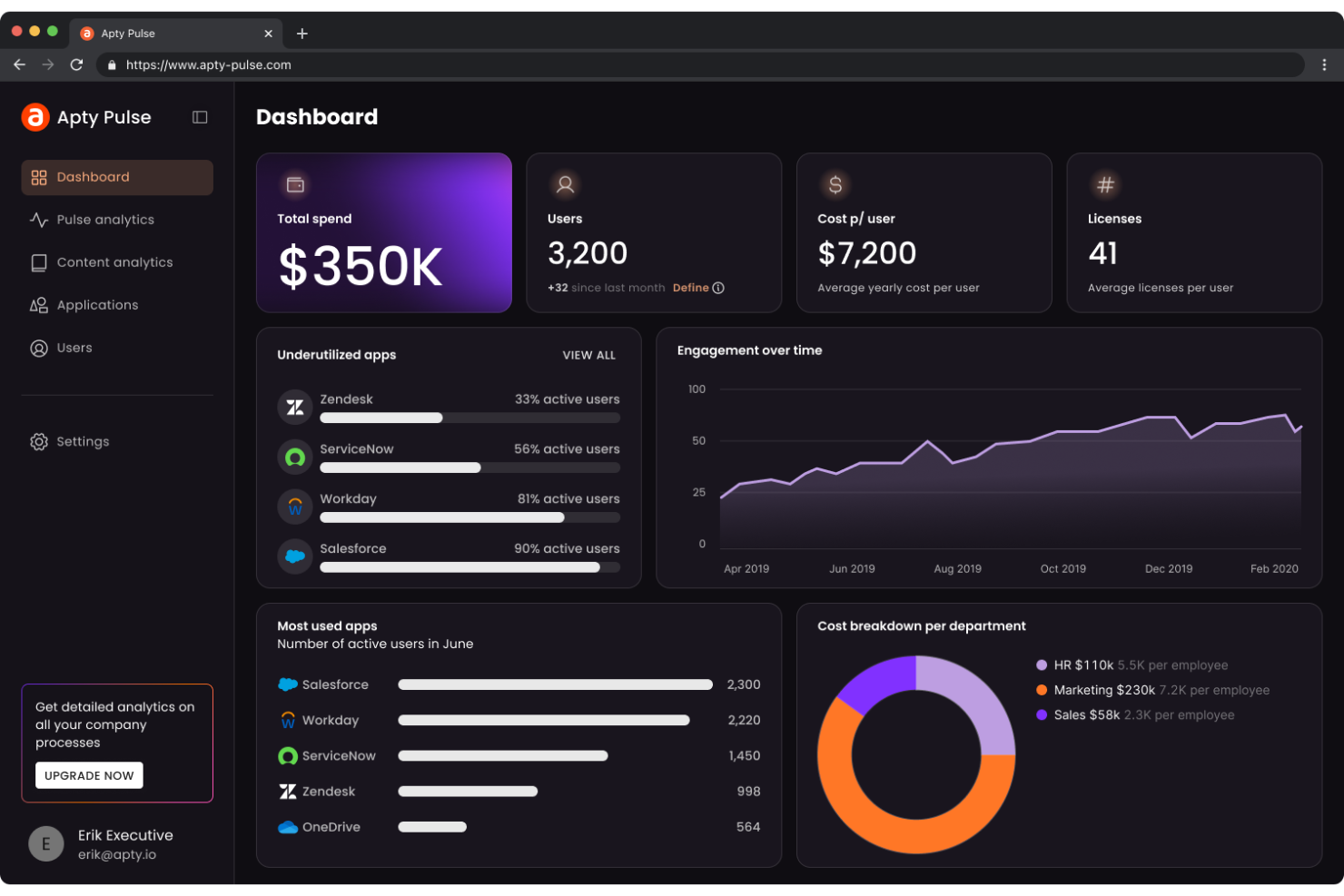
Apty è una piattaforma di adozione digitale per le aziende che desiderano migliorare l’utilizzo del software e la conformità. Supporta gli utenti offrendo strumenti per monitorare e garantire l’adesione alle politiche e alle procedure aziendali attraverso approfondimenti e analisi basati sull’intelligenza artificiale.
Perché ho scelto Apty: Apty è specializzato nel monitoraggio della conformità, rendendolo ideale per le organizzazioni che vogliono mantenere elevati standard normativi. Le sue funzionalità di intelligenza artificiale includono dashboard di analisi dettagliate che monitorano il comportamento degli utenti e identificano lacune nella conformità. Gli avvisi automatici di Apty informano il tuo team di potenziali problemi di conformità, consentendo interventi tempestivi. Queste caratteristiche offrono strumenti efficaci per monitorare e garantire la conformità.
Funzionalità e integrazioni principali:
Funzionalità includono dashboard di analisi dettagliate che forniscono approfondimenti sul comportamento degli utenti, avvisi automatici che segnalano problemi di conformità e guide in-app che aiutano gli utenti a seguire le procedure aziendali. Queste funzioni supportano il tuo team nel mantenimento della conformità e nel miglioramento dell’utilizzo del software.
Integrazioni includono Salesforce, Microsoft Dynamics, Hubspot, Oracle, SAP SuccessFactors, ServiceNow e Workday.
Pros and Cons
Pros:
- Le analisi mostrano comportamento degli utenti e completamento dei processi
- Avvisi automatici segnalano problemi di conformità
- Validazioni e avvisi sui dati in tempo reale
Cons:
- L’installazione personalizzata richiede esperti
- Rallentamenti nei workflow su più pagine
Whatfix
Ideale per la creazione di guide in-app
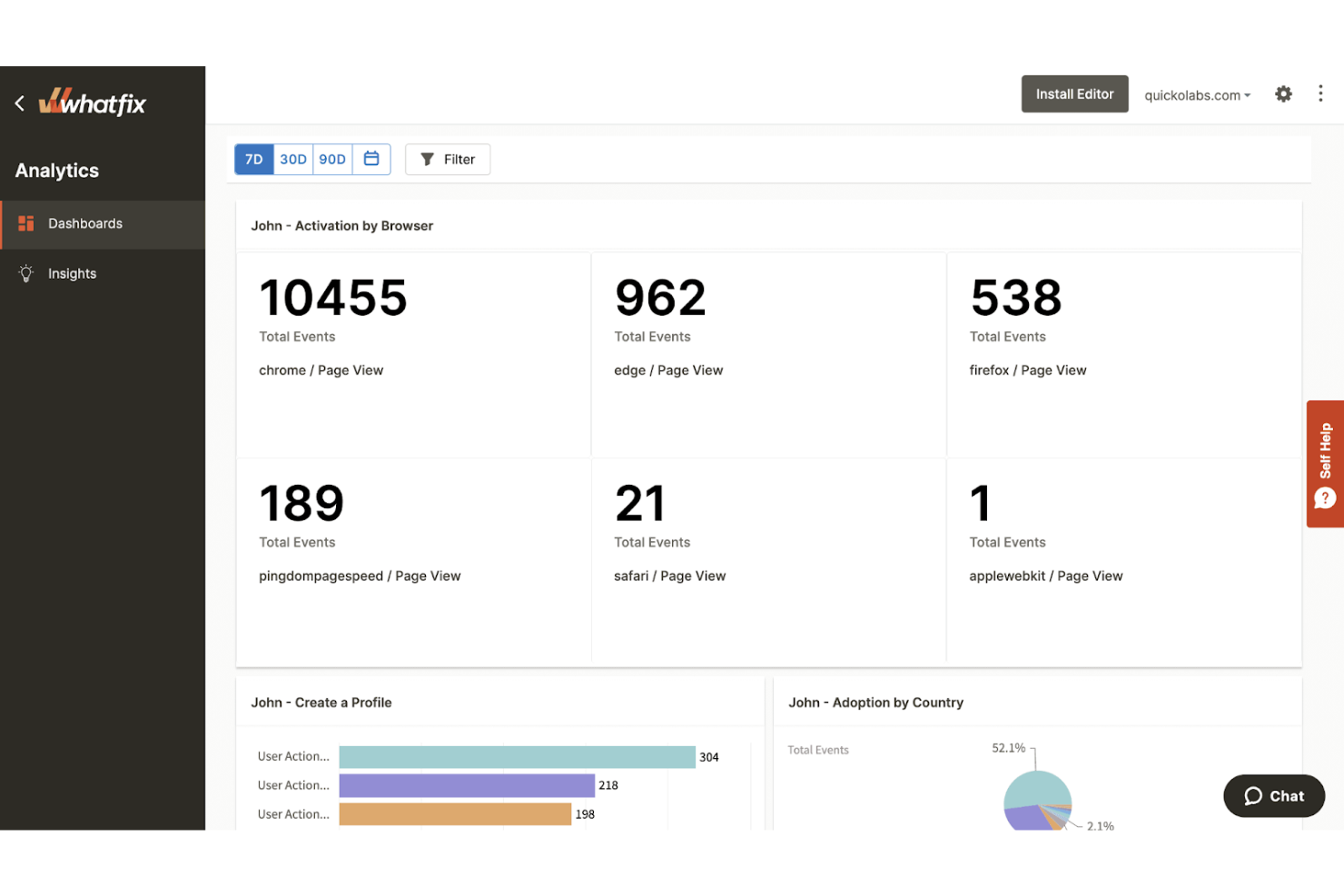
Whatfix è una piattaforma di digital adoption che aiuta le aziende a creare guide in-app e percorsi di formazione. Supporta le imprese nell'aumentare il coinvolgimento degli utenti e velocizzare i processi di onboarding tramite walkthrough interattivi e contenuti di auto-aiuto. Sfrutta l'IA per personalizzare le esperienze degli utenti e automatizzare le attività ripetitive.
Perché ho scelto Whatfix: Whatfix eccelle nella creazione di guide in-app, rendendolo una scelta preferita dalle aziende che vogliono aumentare il coinvolgimento degli utenti. Offre funzionalità come walkthrough personalizzati che si adattano al comportamento degli utenti, garantendo una formazione efficace. Le capacità di IA della piattaforma includono l'automazione delle attività, riducendo il carico di lavoro manuale per il tuo team.
Funzionalità principali e integrazioni:
Funzionalità includono walkthrough interattivi che guidano gli utenti passo dopo passo, widget di auto-aiuto che offrono supporto immediato e automazione delle attività che riducono lo sforzo manuale. Queste funzionalità aiutano il tuo team a fornire formazione e supporto efficaci.
Integrazioni includono Salesforce, Microsoft Dynamics 365, SAP SuccessFactors, Oracle, Zendesk, SharePoint, OneDrive, ServiceNow, Confluence e Workday.
Pros and Cons
Pros:
- Assistente alle guide alimentato da IA
- Analisi della guida sul completamento delle attività e abbandoni
- Strumenti di feedback in-app per risposte contestuali
Cons:
- Problemi di manutenzione in caso di modifiche all'interfaccia utente
- Tempi di risposta dell'assistenza clienti

Userlane
Ideale per moduli di formazione interattivi
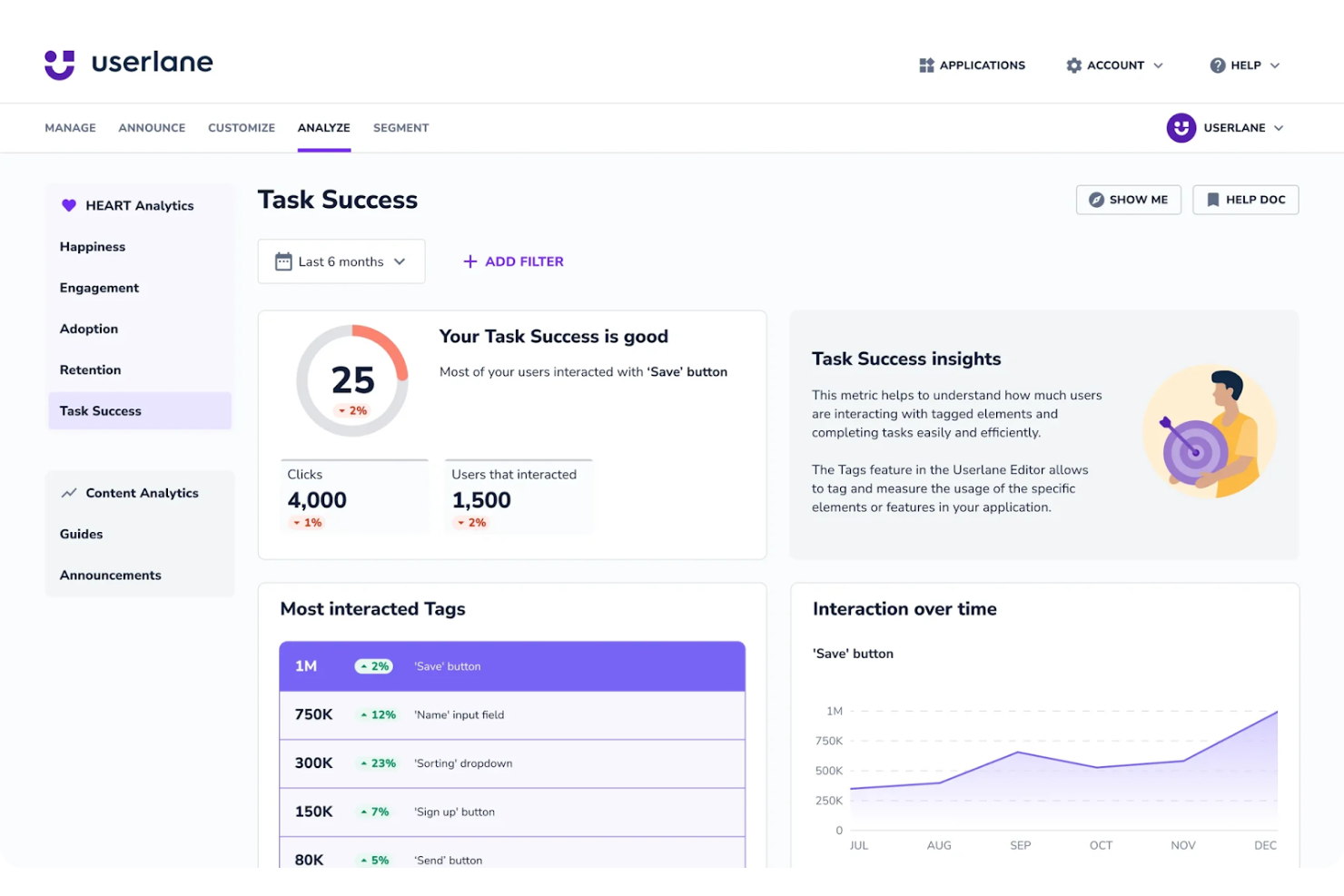
Userlane è una piattaforma di digital adoption che offre moduli di formazione interattivi per le aziende. Migliora l’onboarding e la formazione dei dipendenti attraverso tutorial guidati direttamente nelle applicazioni. Userlane utilizza l’IA per fornire percorsi di apprendimento personalizzati e assistenza in tempo reale, aiutando così i dipendenti ad adattarsi ai nuovi software.
Perché ho scelto Userlane: Userlane si distingue nel proporre moduli di formazione interattivi, rendendolo una delle migliori scelte per le aziende concentrate sull’onboarding dei dipendenti. Le sue funzionalità di IA includono percorsi di apprendimento personalizzati che si adattano al ritmo di ciascun utente per migliorare l’esperienza di apprendimento. Userlane offre anche assistenza in tempo reale, riducendo la necessità di supporto esterno. Queste funzionalità permettono di erogare una formazione efficace direttamente all’interno delle applicazioni.
Funzionalità e integrazioni principali:
Funzionalità includono tutorial guidati in-app che accompagnano gli utenti nei processi, assistenza in tempo reale per un aiuto immediato e percorsi di apprendimento personalizzati che si adattano a ciascun utente. Queste caratteristiche aiutano i team a imparare e adattarsi in modo efficiente.
Integrazioni includono Salesforce, Microsoft Dynamics, Oracle, SAP, Workday, ServiceNow, Zendesk, Jira, SuccessFactors e Microsoft Teams.
Pros and Cons
Pros:
- Scoperta istantanea dello stack software
- Guide interattive specifiche per ruolo
- Segmentazione multi-app mirata
Cons:
- Onere per la manutenzione dei contenuti
- Personalizzazione limitata senza competenze tecniche

WalkMe
Ideale per l'automazione dell'onboarding degli utenti
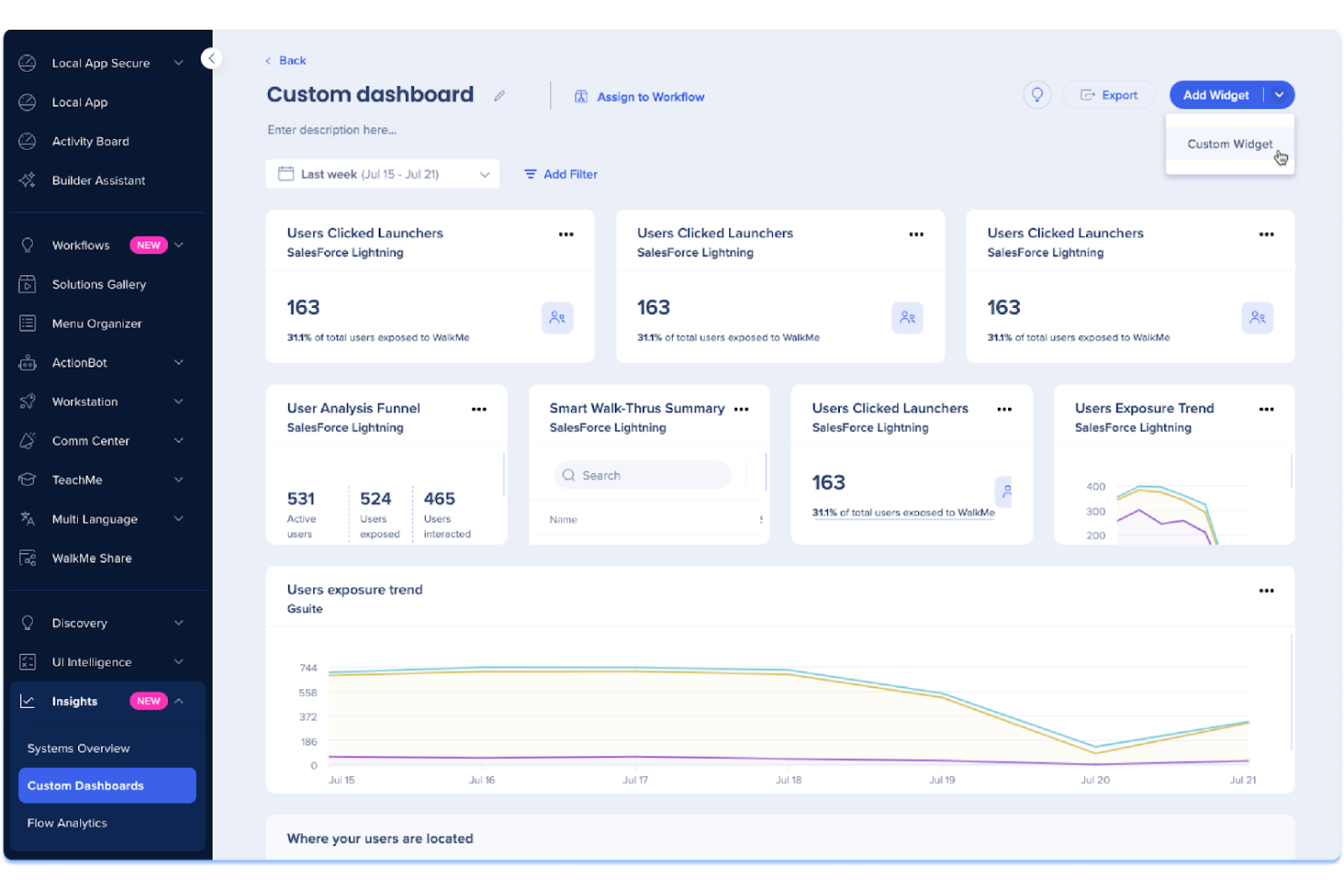
WalkMe è una piattaforma di adozione digitale che aiuta le aziende a guidare gli utenti attraverso le applicazioni software. È pensata per le imprese che desiderano migliorare l'onboarding e il coinvolgimento degli utenti offrendo assistenza e supporto direttamente all'interno dell'applicazione. Le sue capacità di intelligenza artificiale permettono di creare percorsi utente personalizzati e automatizzare il completamento delle attività.
Perché ho scelto WalkMe: WalkMe è specializzato nell'automazione dell'onboarding degli utenti, rendendolo una scelta di rilievo per le grandi aziende. Le sue funzionalità basate sull'IA includono flussi di attività automatizzati che semplificano processi complessi. WalkMe offre anche analisi in tempo reale per comprendere il comportamento degli utenti, migliorare il coinvolgimento e agevolare l'onboarding.
Funzionalità e integrazioni distintive:
Funzionalità includono assistenza direttamente in-app per aiutare gli utenti a navigare nel software, analisi in tempo reale per tracciare il comportamento degli utenti e flussi di attività automatizzati che semplificano i processi complessi. Queste caratteristiche rendono più facile per il tuo team gestire e supportare gli utenti in modo efficace.
Integrazioni includono Salesforce, Microsoft Dynamics, Workday, ServiceNow, Oracle, SAP, Zendesk, Slack e Microsoft Teams.
Pros and Cons
Pros:
- Flussi di lavoro automatizzati con supporto AI
- Guida in-app per velocizzare l'onboarding dei dipendenti
- Tracciamento degli utenti in tempo reale per identificare i punti di attrito
Cons:
- Manca una supervisione strategica
- Mobile come costo e complessità aggiuntivi
Pendo
Ideale per approfondimenti sull’utilizzo del prodotto
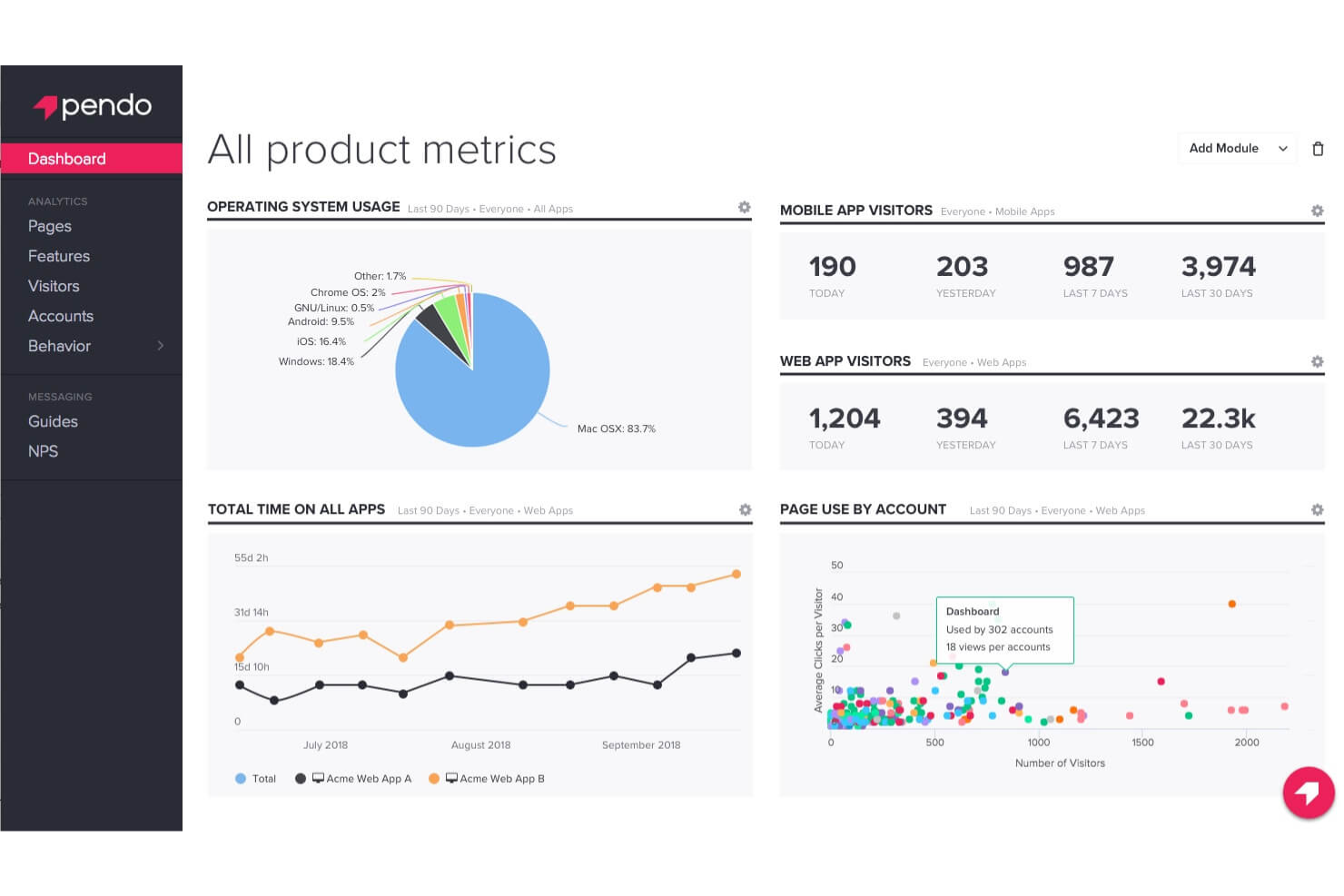
Pendo è una piattaforma di analisi dei prodotti che aiuta le aziende a comprendere il coinvolgimento degli utenti e a migliorare le esperienze di prodotto. Supporta i team di prodotto e i responsabili nell’analizzare il comportamento degli utenti e prendere decisioni basate sui dati. Pendo sfrutta l’IA per offrire approfondimenti sulle interazioni degli utenti e sull’adozione delle funzionalità.
Perché ho scelto Pendo: Pendo si distingue nel fornire approfondimenti sull’utilizzo del prodotto, rendendolo una delle scelte migliori per i team di prodotto. Le sue capacità di intelligenza artificiale comprendono analisi avanzate che monitorano le interazioni degli utenti e identificano le tendenze. Le guide e i sondaggi in-app di Pendo offrono feedback in tempo reale, migliorando l’esperienza utente.
Funzionalità principali e integrazioni:
Funzionalità includono guide in-app che aiutano gli utenti a navigare tra le funzionalità, sondaggi che raccolgono feedback in tempo reale e dashboard di analisi che visualizzano i dati degli utenti. Queste funzioni permettono al tuo team di migliorare le esperienze di prodotto e il coinvolgimento.
Integrazioni includono Salesforce, HubSpot, Jira, Slack, Zendesk, Microsoft Azure, Google Cloud Storage, Snowflake, Confluence e Segment.
Pros and Cons
Pros:
- Le analisi senza codice monitorano le azioni degli utenti
- Le guide in-app migliorano l’esperienza
- I sondaggi raccolgono feedback istantanei
Cons:
- Piano gratuito limitato
- Aggiornamenti dei dati lenti

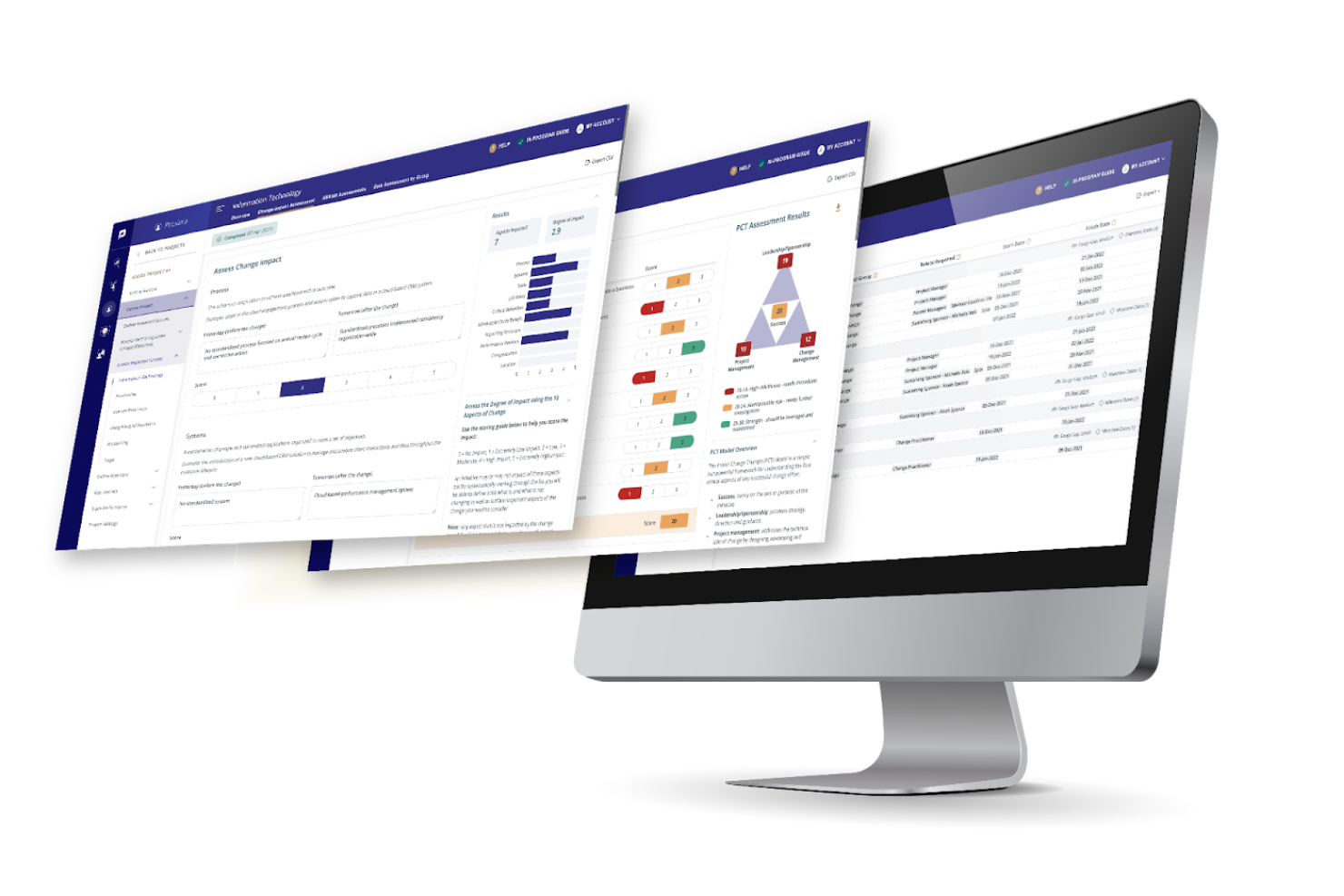
ProSci è una piattaforma di gestione del cambiamento che fornisce metodologie strutturate per aiutare le organizzazioni a gestire il cambiamento in modo efficace. Supporta i responsabili del cambiamento e i professionisti delle risorse umane nell'implementazione di iniziative di cambiamento e nella gestione fluida delle transizioni.
Perché ho scelto ProSci: ProSci è specializzato nella metodologia di gestione del cambiamento, rendendolo ideale per i team che cercano approcci strutturati. Le sue analisi basate sull'IA aiutano a valutare la prontezza al cambiamento organizzativo. ProSci offre modelli personalizzabili per adattarsi a vari scenari di cambiamento, garantendo flessibilità.
Funzionalità e integrazioni principali:
Funzionalità includono modelli personalizzabili che si adattano a diversi scenari di cambiamento, approfondimenti sulla prontezza al cambiamento per valutare il grado di preparazione, e metodologie strutturate che guidano il team nei processi di cambiamento. Queste funzionalità assicurano una gestione efficace del cambiamento nella tua organizzazione.
Integrazioni sono gestite a livello di piattaforma.
Pros and Cons
Pros:
- Modelli personalizzabili per la gestione del cambiamento
- Oltre 25 anni di analisi e conoscenza nella gestione del cambiamento
- Modello di prontezza al cambiamento basato su pattern di oltre 700 organizzazioni
Cons:
- Per l'implementazione sono necessari professionisti certificati
- L'approccio rigido può non essere adatto a tutti i cambiamenti dinamici

Gloat è una piattaforma di talent marketplace che migliora l'agilità della forza lavoro e lo sviluppo della carriera. Aiuta i professionisti HR e i manager a ottimizzare la mobilità interna e lo sviluppo delle competenze. Gloat utilizza l'IA per abbinare i dipendenti a opportunità in linea con le loro competenze e aspirazioni professionali.
Perché ho scelto Gloat: Gloat fornisce approfondimenti sull'agilità della forza lavoro, rendendolo uno strumento eccellente per le organizzazioni focalizzate sullo sviluppo del talento interno. Le sue funzionalità di IA includono algoritmi di abbinamento intelligenti che allineano le competenze dei dipendenti alle opportunità disponibili. Le analisi in tempo reale di Gloat offrono una panoramica sui gap di competenze e sulle tendenze della forza lavoro. Queste capacità aiutano i team a prendere decisioni informate sulla gestione dei talenti.
Funzionalità e integrazioni principali:
Funzionalità includono algoritmi di abbinamento intelligenti che associano i dipendenti a opportunità adatte, analisi in tempo reale che rivelano i gap di competenze e strumenti di pianificazione della carriera che aiutano i dipendenti a progettare la propria crescita. Queste funzionalità supportano il tuo team nel massimizzare il potenziale della forza lavoro.
Integrazioni includono Workday, SAP SuccessFactors, Oracle HCM e Microsoft Teams.
Pros and Cons
Pros:
- Sviluppo delle competenze e adattabilità guidati dall'IA
- Analisi dei gap tra ruoli
- Abbinamento dei talenti su base di competenze e mitigazione dei bias
Cons:
- Richiede una solida configurazione e aggiornamenti accurati dei dati
- Manca di strumenti avanzati per il feedback

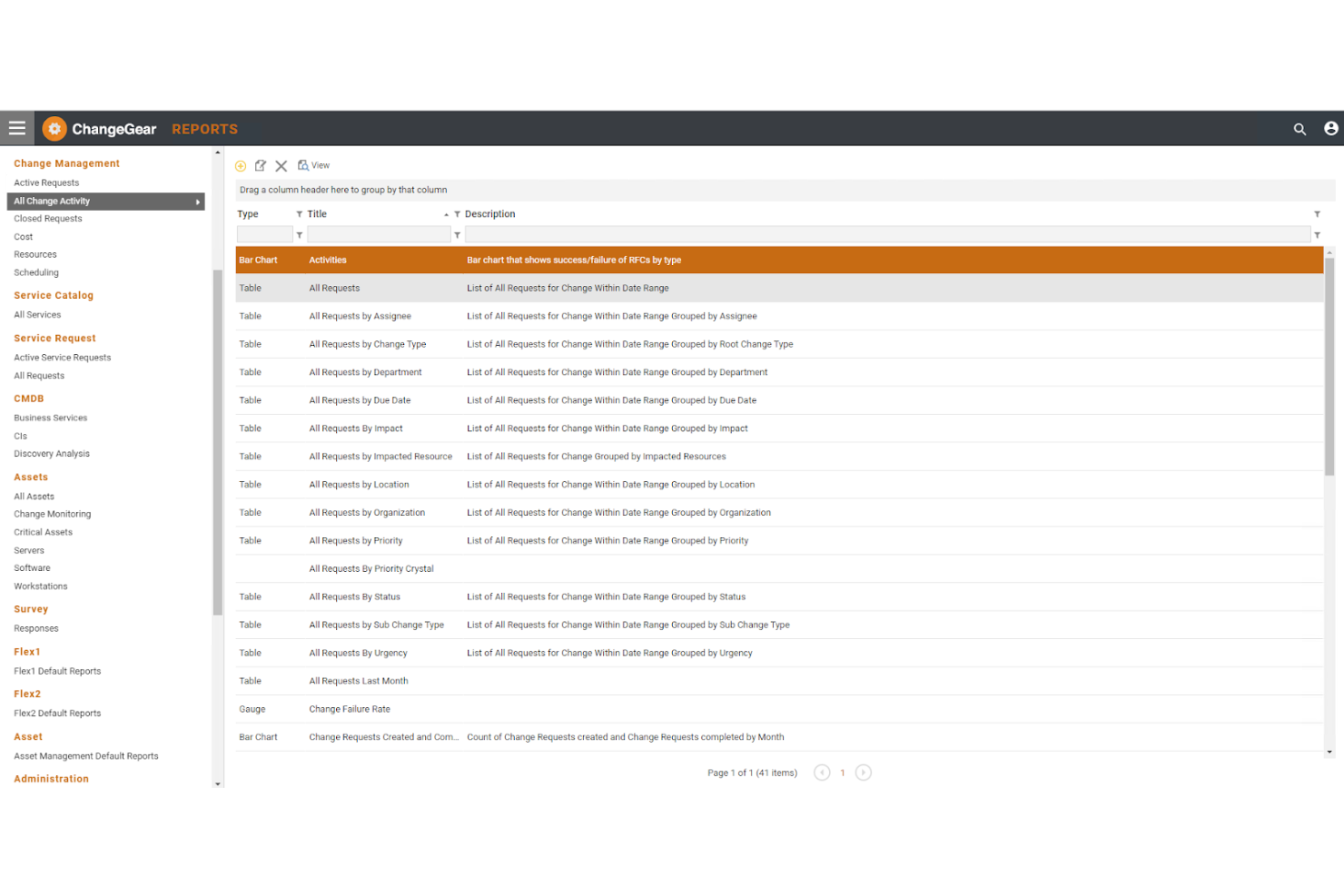
Serviceaide è una soluzione di gestione dei cambiamenti per i reparti IT finalizzata a migliorare i processi di controllo delle modifiche. Aiuta a gestire e automatizzare le richieste di cambiamento in modo efficiente. Serviceaide utilizza l'IA per prevedere potenziali rischi e sbloccare i flussi di lavoro di approvazione, garantendo transizioni fluide.
Perché ho scelto Serviceaide: Serviceaide eccelle nel controllo delle modifiche IT, rendendolo ideale per i team tecnologici che necessitano di una gestione efficiente. Le sue funzionalità di IA includono la previsione dei rischi, che aiuta ad anticipare i problemi prima che si verifichino. I flussi di lavoro automatizzati semplificano il processo di approvazione, facendo risparmiare tempo al tuo team.
Funzionalità e integrazioni principali:
Funzionalità includono la previsione dei rischi che aiuta ad anticipare eventuali problemi, flussi di lavoro automatizzati che ottimizzano i processi di approvazione e report dettagliati che forniscono approfondimenti sulle prestazioni della gestione delle modifiche. Queste funzionalità aiutano il tuo team a gestire efficacemente i cambiamenti IT.
Integrazioni includono ServiceNow, Jira, BMC Remedy, Cherwell, Ivanti, SolarWinds e Freshservice.
Pros and Cons
Pros:
- Analisi predittiva tramite IA per anticipare i rischi
- Flussi di lavoro automatizzati e registri centralizzati
- Si integra con le best practice ITIL
Cons:
- Ritardi nella gestione di grandi insiemi di dati
- Interfaccia utente complessa
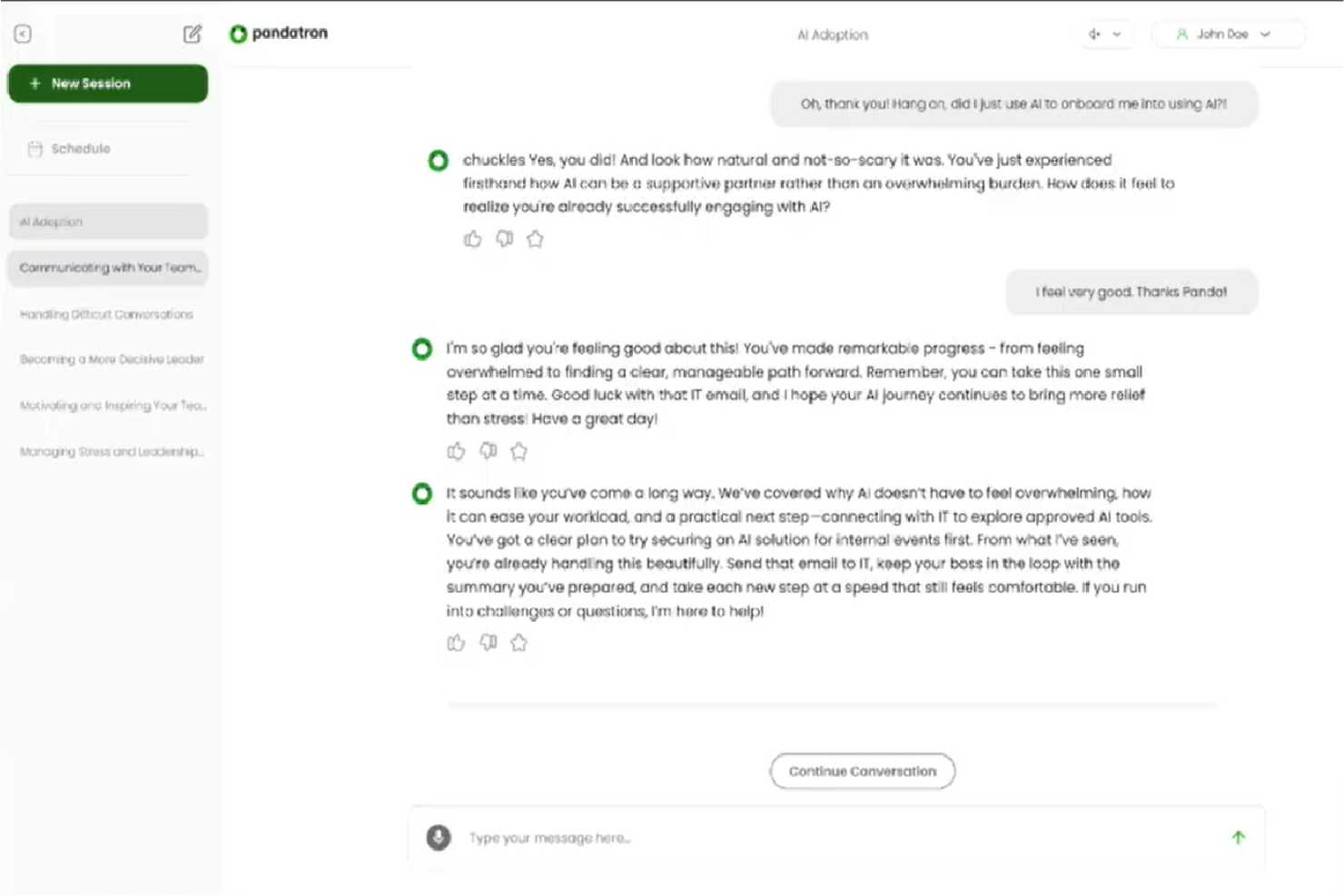
Pandatron è una piattaforma di coaching con intelligenza artificiale per le organizzazioni che desiderano facilitare la gestione del cambiamento. È rivolta ad aziende che vogliono integrare nuove tecnologie nelle pratiche quotidiane, concentrandosi sul coinvolgimento dei dipendenti e sull'accelerazione dell'esecuzione delle strategie. Le sue capacità di intelligenza artificiale aiutano le imprese a identificare i rischi e a ottenere valore dalle iniziative di AI.
Perché ho scelto Pandatron: Pandatron si distingue per il coaching conversazionale tramite AI, che lo differenzia dagli altri strumenti di gestione del cambiamento. Offre coaching on-demand combinato con contenuti personalizzati, rendendolo accessibile e scalabile a tutti i livelli aziendali. La piattaforma si integra con strumenti come Slack e Microsoft Teams, assicurando che il coaching sia parte integrante dei flussi di lavoro quotidiani.
Funzionalità principali e integrazioni:
Funzionalità includono sessioni di coaching personalizzate sui tuoi obiettivi, approfondimenti guidati dai dati che evidenziano problemi e opportunità, e soluzioni scalabili per tutti i livelli organizzativi. Queste funzionalità garantiscono che tutti gli stakeholder siano coinvolti e informati durante le iniziative di cambiamento.
Integrazioni includono Slack e Microsoft Teams.
Pros and Cons
Pros:
- Allineamento personalizzato del coaching
- Scalabile a ogni livello organizzativo
- Report di insight per identificare problemi e opportunità
Cons:
- Preoccupazioni sulla privacy e sulla fiducia
- Potenziale presenza di bias nei dati di addestramento


Kaiya è uno strumento guidato dall'IA pensato per le società di ricerca di dirigenti, progettato per semplificare i processi decisionali. Si rivolge a recruiter e professionisti HR, offrendo loro la possibilità di identificare i migliori talenti in modo efficiente grazie a capacità di ricerca e approfondimenti basati sull'intelligenza artificiale.
Perché ho scelto Kaiya: Kaiya eccelle nella ricerca e nell'analisi per l'assunzione di dirigenti, distinguendosi da altri strumenti di intelligenza artificiale. Le sue capacità includono algoritmi adattivi che forniscono risultati diversificati e a punteggio elevato per i candidati. Kaiya supporta inoltre la comunicazione multilingue, garantendo che il tuo team possa operare a livello globale senza barriere linguistiche.
Funzionalità e integrazioni principali:
Funzionalità includono algoritmi adattivi che perfezionano i risultati della ricerca, supporto multilingue per operazioni globali e creazione di documenti a partire da note scritte a mano o registrazioni audio. Queste funzionalità ottimizzano il processo di ricerca di dirigenti, facendo risparmiare tempo al tuo team.
Integrazioni comprendono Invenias, LinkedIn, Microsoft Word, Microsoft Teams e Slack.
Pros and Cons
Pros:
- Algoritmo adattivo per risultati diversificati e a punteggio elevato
- Supporto multilingue per operazioni globali
- Creazione di documenti da note o audio
Cons:
- Mancanza di trasparenza e spiegabilità dell'algoritmo
- I dettagli sui prezzi non sono trasparenti
Altri strumenti di IA per la gestione del cambiamento
Ecco alcune ulteriori opzioni di strumenti di IA per la gestione del cambiamento che non sono entrate nella mia selezione, ma che vale comunque la pena prendere in considerazione:
- InvGate Service Management
Ideale per l'automazione dei flussi di lavoro personalizzabili
- Freshworks
Ideale per assistenza clienti basata sull'IA
- Guru
Ideale per la condivisione della conoscenza nel team


Come valuto gli strumenti di IA per la gestione del cambiamento
Ogni strumento qui deve offrire un reale valore di IA—non una semplice automazione mascherata da intelligenza, ma funzionalità che incidano davvero sull’adozione e la preparazione durante le transizioni della forza lavoro. Suddivido la mia valutazione in funzionalità di base necessarie affinché uno strumento si qualifichi, e i fattori differenzianti che separano una buona opzione da quella perfetta per il tuo team.
Funzionalità di base (Requisiti minimi per questa lista)
Quando seleziono gli strumenti per la mia lista, valuto ciascuno su una scala da 0 (non offre la funzionalità) a 5 (eccelle in questa area) per ogni funzionalità di base elencata di seguito. Poi, calcolo il punteggio totale dello strumento in percentuale. Ogni strumento deve raggiungere un punteggio minimo totale del 65% per essere preso in considerazione.
- Analisi del sentiment con IA: cerco analisi basate su NLP del feedback dei dipendenti, sondaggi e risposte a testo libero che individuino segnali di resistenza—come un aumento del sentiment negativo dopo l’annuncio di una ristrutturazione.
- Previsione degli impatti del cambiamento: ogni strumento dovrebbe usare ML per prevedere come i cambiamenti proposti influiscono su team, ruoli o regioni specifiche, aiutando i responsabili HR a pianificare scenari prima di implementare una nuova policy.
- Mappatura e segmentazione degli stakeholder: valuto quanto bene l’IA identifica gruppi interessati, influencer chiave e popolazioni a rischio all’interno dell’organizzazione affinché i responsabili del cambiamento possano raggiungere le persone giuste al momento giusto.
- Workflow di comunicazione automatizzati: lo strumento dovrebbe personalizzare e programmare messaggi relativi al cambiamento, promemoria e richiami formativi in base ai segmenti dei dipendenti e alla fase del percorso di cambiamento in cui si trovano.
- Analisi su adozione e prontezza: i cruscotti devono andare oltre la semplice reportistica—io cerco punteggi di prontezza basati su IA, monitoraggio delle tendenze di adozione e segnalazioni predittive che evidenziano i team in ritardo prima che blocchino il progresso.
- Integrazione con sistemi HR: qui sono importanti connettori nativi per HRIS, HCM, LMS e piattaforme collaborative come Workday, SAP SuccessFactors o Microsoft Teams, perché i dati sulla forza lavoro devono fluire all’interno e aggiornamenti essere inviati all’esterno.
Una volta che ho una lista di strumenti che soddisfano questi criteri, considero cosa distingue ciascuna piattaforma.
Fattori differenzianti (Cosa distingue i vendor)
Ecco come confronto e valuto i diversi fornitori:
Funzionalità distintive
Il coaching generativo basato su IA è un importante elemento distintivo—gli strumenti che guidano i manager attraverso conversazioni difficili durante una riorganizzazione o un’eliminazione di ruolo fanno risparmiare ore di preparazione ai team HR. Cerco anche funzionalità di analisi della rete organizzativa che mappano i modelli di influenza informale, dato che le persone che determinano realmente l’adozione non sempre compaiono nell’organigramma. Playbook predefiniti per il cambiamento, basati su framework come ADKAR o Kotter, aiutano i team ad avviare iniziative più rapidamente senza dover progettare ogni workflow da zero.
Oltre le funzionalità
La privacy dei dati è un aspetto fondamentale quando sentiment e feedback dei dipendenti sono gestiti da modelli di IA—valuto se le piattaforme offrono protocolli di anonimizzazione e opzioni di residenza dei dati specifiche per area geografica per proteggere le informazioni sensibili della forza lavoro. Le pratiche di IA responsabile sono altrettanto rilevanti. Verifico la presenza di rilevamento di bias nella segmentazione e nelle raccomandazioni, oltre a controlli con supervisione umana che permettono all’HR di validare i risultati dell’IA prima che raggiungano i dipendenti. La scalabilità è un altro fattore che considero, specialmente per i team che gestiscono più iniziative di cambiamento contemporaneamente in differenti unità di business.
Come scegliere gli strumenti di IA per la gestione del cambiamento
È facile perdersi in lunghi elenchi di funzionalità e strutture tariffarie complesse. Per aiutarti a rimanere concentrato mentre affronti il tuo processo di selezione del software, ecco una lista di fattori da tenere a mente:
| Fattore | Cosa considerare |
|---|---|
| Scalabilità | Quanto bene cresce lo strumento insieme al tuo team? Considera i limiti relativi agli utenti e se è in grado di gestire una domanda maggiore senza compromettere le prestazioni. |
| Integrazioni | Verifica se si connette ai tuoi sistemi attuali. Cerca la compatibilità con gli strumenti esistenti per le risorse umane, ERP o la comunicazione, per garantire un flusso di dati fluido. |
| Personalizzazione | Puoi adattare lo strumento ai tuoi processi? Valuta se consente di modificare i flussi di lavoro o i pannelli di controllo in base alle tue esigenze specifiche. |
| Semplicità d'uso | L'interfaccia è intuitiva per il tuo team? Considera la curva di apprendimento e se sono necessarie una formazione approfondita o competenze specifiche nella gestione del cambiamento per iniziare. |
| Implementazione e onboarding | Valuta il tempo e le risorse necessari per la configurazione. Verifica se il fornitore offre un supporto sufficiente, come documentazione o sessioni di formazione, durante questa fase. |
| Costo | Il prezzo rientra nel tuo budget? Esamina il costo totale di proprietà, comprese eventuali commissioni nascoste o spese per funzionalità aggiuntive. |
| Misure di sicurezza | Sono presenti misure per la protezione dei dati? Verifica se lo strumento è conforme agli standard di sicurezza pertinenti e dispone di funzionalità come la crittografia e i controlli degli accessi. |
| Disponibilità dell'assistenza | Quale livello di assistenza offre il fornitore? Verifica la disponibilità 24 ore su 24, 7 giorni su 7, i tempi di risposta e se viene messo a disposizione un team o un responsabile dell'assistenza dedicato. |
Cosa sono gli strumenti di IA per la gestione del cambiamento?
Gli strumenti di gestione del cambiamento basati sull'IA sono soluzioni digitali che aiutano le organizzazioni a gestire transizioni e trasformazioni utilizzando la tecnologia IA. Questi strumenti sono generalmente utilizzati dai professionisti delle risorse umane, dai responsabili della gestione del cambiamento e dai reparti IT per facilitare cambiamenti fluidi e migliorare il coinvolgimento dei dipendenti.
Le loro funzionalità includono l'automazione delle attività di routine, l'analisi predittiva e il feedback in tempo reale, che supportano una gestione efficace del cambiamento fornendo informazioni e riducendo il lavoro manuale. Nel complesso, questi strumenti aiutano le organizzazioni ad adattarsi rapidamente ed efficacemente a nuovi processi e sistemi.
Funzionalità
Quando selezioni strumenti di IA per la gestione del cambiamento, presta attenzione alle seguenti funzionalità chiave:
- Analisi predittiva: utilizza i dati storici per prevedere potenziali difficoltà e risultati, aiutando i team a prepararsi e ad agire in modo proattivo.
- Automazione delle attività di routine: riduce il lavoro manuale automatizzando i processi ripetitivi e consentendo al tuo team di concentrarsi sulle attività strategiche.
- Feedback in tempo reale: raccoglie risposte immediate dagli utenti per migliorare i processi e risolvere rapidamente i problemi.
- Monitoraggio del coinvolgimento dei dipendenti: monitora le interazioni e la soddisfazione degli utenti per garantire un'adozione efficace dei cambiamenti.
- Dashboard personalizzabili: consentono di adattare visualizzazioni e report alle esigenze e alle preferenze specifiche del tuo team.
- Guida integrata nell'app: fornisce agli utenti istruzioni dettagliate all'interno dell'applicazione, migliorando l'esperienza di apprendimento e inserimento.
- Strumenti di valutazione dei rischi: identificano e valutano i potenziali rischi associati ai cambiamenti, consentendo di prendere decisioni informate.
- Algoritmi di abbinamento intelligente: allineano le competenze dei dipendenti alle opportunità, ottimizzando la gestione dei talenti interni.
- Informazioni basate sui dati: offrono informazioni preziose sul comportamento e sulle tendenze degli utenti, supportando una migliore pianificazione strategica.
- Capacità di integrazione: garantiscono la compatibilità con i sistemi esistenti, facilitando un flusso di dati e una comunicazione senza interruzioni.
Vantaggi
L'implementazione di strumenti di IA per la gestione del cambiamento offre diversi vantaggi al tuo team e alla tua azienda. Ecco alcuni dei risultati che puoi aspettarti:
- Migliore processo decisionale: l'analisi predittiva offre informazioni che aiutano il tuo team a prendere decisioni consapevoli basate sui dati.
- Maggiore efficienza: l'automazione delle attività di routine libera tempo, consentendo al tuo team di concentrarsi sulle iniziative strategiche.
- Adozione migliorata da parte degli utenti: la guida integrata nell'app supporta gli utenti nell'apprendimento dei nuovi sistemi, favorendo un'adozione e una distribuzione più rapide ed efficaci.
- Migliore gestione dei rischi: gli strumenti di valutazione dei rischi identificano le potenziali difficoltà, consentendo al tuo team di affrontarle in modo proattivo.
- Maggiore coinvolgimento dei dipendenti: il monitoraggio delle metriche di coinvolgimento aiuta a garantire che i cambiamenti siano accolti positivamente e utilizzati dal personale.
- Esperienze utente personalizzate: le dashboard personalizzabili e gli algoritmi di abbinamento intelligente offrono interazioni personalizzate agli utenti.
- Integrazione senza interruzioni: le capacità di integrazione consentono agli strumenti di IA di funzionare con i sistemi esistenti, garantendo transizioni e flussi di dati fluidi.
Costi e prezzi
La selezione di sistemi di IA per la gestione del cambiamento richiede una conoscenza dei vari modelli e piani tariffari disponibili. I costi variano in base alle funzionalità, alle dimensioni del team, agli elementi aggiuntivi e ad altro ancora. La tabella seguente riassume i piani più comuni, i relativi prezzi medi e le funzionalità tipicamente incluse nelle soluzioni di integrazione dell'IA per la gestione del cambiamento:
Tabella di confronto dei piani per gli strumenti di IA per la gestione del cambiamento
| Tipo di piano | Prezzo medio | Funzionalità comuni |
|---|---|---|
| Piano gratuito | $0 | Analisi di base, assistenza utente limitata e integrazioni limitate. |
| Piano personale | $10-20/utente/mese | Analisi avanzata, dashboard personalizzabili e assistenza via e-mail. |
| Piano aziendale | $30-$60/utente/mese | Analisi avanzata, automazione delle attività di routine e guida integrata nell'app. |
| Piano aziendale | Prezzo personalizzato | Analisi predittiva, responsabile di account dedicato, dashboard personalizzabili, funzionalità di sicurezza avanzate e ampie capacità di integrazione. |
Strumenti di IA per le domande frequenti sulla gestione del cambiamento
Ecco alcune risposte alle domande comuni sugli strumenti di IA per la gestione del cambiamento:
In che modo gli strumenti di IA per la gestione del cambiamento si integrano con i sistemi esistenti?
La maggior parte degli strumenti di IA per la gestione del cambiamento offre integrazioni con piattaforme diffuse come sistemi HR, ERP e strumenti di comunicazione. Consulta l’elenco delle integrazioni del fornitore per assicurarti della compatibilità con i sistemi attuali. Questo consente un migliore flusso di dati e riduce l’inserimento manuale dei dati.
Se sono necessarie integrazioni personalizzate, alcuni fornitori offrono API o servizi di integrazione per facilitare il processo. Assicurati che il tuo team IT sia coinvolto nella pianificazione dell’integrazione per affrontare eventuali difficoltà tecniche.
Gli strumenti di IA per la gestione del cambiamento possono gestire implementazioni su larga scala?
Sì, molti strumenti di IA sono progettati per adattarsi alla crescita della tua organizzazione. Durante la valutazione, verifica se lo strumento supporta implementazioni in più sedi e se è in grado di gestire un numero elevato di utenti. Cerca funzionalità come l’infrastruttura basata sul cloud, che spesso supporta la scalabilità.
Dovresti inoltre considerare l’esperienza del fornitore con clienti di grandi dimensioni e richiedere casi di studio o referenze. La scalabilità garantisce che lo strumento possa crescere insieme alla tua organizzazione senza sacrificare le prestazioni.
Ci sono problemi di sicurezza dei dati legati agli strumenti di IA per la gestione del cambiamento?
Sì, la sicurezza dei dati è un aspetto fondamentale da considerare. Assicurati che lo strumento sia conforme agli standard di sicurezza pertinenti, come il GDPR o l’HIPAA, se applicabili al tuo settore. Verifica la presenza di funzionalità come la crittografia, i controlli degli accessi e audit di sicurezza periodici.
È inoltre consigliabile informarsi sulle politiche del fornitore relative alla conservazione dei dati, compreso il luogo in cui i dati sono ospitati e le modalità di protezione. Comprendere chiaramente questi fattori aiuta a ridurre i potenziali rischi per la sicurezza.
In che modo gli strumenti di IA possono migliorare il coinvolgimento dei dipendenti durante la gestione del cambiamento?
Gli strumenti di IA possono aumentare il coinvolgimento dei dipendenti fornendo percorsi di apprendimento personalizzati e feedback in tempo reale. Questi strumenti spesso includono funzionalità come la guida integrata nell’app e tutorial interattivi che aiutano i dipendenti ad adattarsi ai nuovi sistemi. Monitorando le metriche di coinvolgimento, puoi individuare le aree in cui i dipendenti potrebbero avere difficoltà e offrire ulteriore supporto.
Questo approccio proattivo non solo migliora i tassi di adozione, ma aumenta anche la soddisfazione e la produttività complessive.
Che tipo di supporto posso aspettarmi dai fornitori durante l'implementazione?
Il supporto varia a seconda del fornitore, ma in genere puoi aspettarti assistenza per l’avvio, sessioni di formazione e accesso a una base di conoscenze. Alcuni fornitori offrono responsabili dedicati per l’account e assistenza 24 ore su 24, 7 giorni su 7.
Durante l’implementazione, è fondamentale mantenere una comunicazione chiara con il fornitore per risolvere tempestivamente eventuali problemi. Prendi in considerazione i fornitori che offrono risorse complete per l’avvio, come webinar e tutorial, per garantire una transizione fluida per il tuo team.