

I 10 migliori software per la gestione dei casi HR: recensioni del 2026

10 Miglior software per la gestione dei casi HR


Trovare il miglior software per la gestione dei casi HR può sembrare un'impresa scoraggiante, viste le numerose opzioni disponibili sul mercato. Serve un sistema che non solo tenga traccia e documenti le richieste, i reclami e le indagini dei dipendenti, ma che garantisca anche una risoluzione dei casi tempestiva, coerente e conforme alle normative. Lo strumento giusto può aiutare i team HR a ridurre il lavoro manuale, migliorare i tempi di risposta e mantenere registri accurati, ma come si sceglie quello più adatto alla propria organizzazione?
In qualità di specialista HR con esperienza pratica nell'utilizzo di diversi strumenti per la gestione dei casi, ho valutato le migliori soluzioni per aiutarti a prendere una decisione informata. In questo articolo analizzerò i migliori software per la gestione dei casi HR sulla base di fattori chiave come facilità d'uso, capacità di automazione, funzionalità di conformità e integrazioni. Che si tratti di una piccola impresa o di una grande azienda, troverai una soluzione in grado di soddisfare le tue esigenze HR.
Perché fidarsi delle nostre recensioni sui software
Il nostro team testa e recensisce software dal 2012. In quanto esperti HR noi stessi, sappiamo quanto sia difficile — e importante — scegliere il software giusto.
Per questa guida, abbiamo valutato gli strumenti attraverso test pratici e ricerche indipendenti, assegnando un punteggio agli strumenti in base ai nostri criteri di selezione. Ci basiamo inoltre sulle competenze di leader di pensiero del settore e di professionisti HR attivi.
Le nostre recensioni riflettono il nostro giudizio editoriale umano, non un discorso di vendita.
Revisori esperti:
Tabella comparativa dei software per la gestione dei casi HR
Questa tabella comparativa riassume i dettagli dei prezzi delle mie migliori selezioni di software per la gestione dei casi HR:
| Tool | Best For | Trial Info | Price | ||
|---|---|---|---|---|---|
| 1 | Ideale per gestire casi HR in team globali | Demo gratuita disponibile | A partire da $5/dipendente/mese | Website | |
| 2 | Ideale per indagini e prevenzione della cattiva condotta | Demo gratuita disponibile | Prezzi su richiesta | Website | |
| 3 | Ideale per la gestione end-to-end dei casi HR | Demo gratuita disponibile | Prezzi su richiesta | Website | |
| 4 | Ideale per una visibilità completa sul carico di casi | Demo gratuita disponibile | Prezzi su richiesta | Website | |
| 5 | Ideale per standardizzare la documentazione dei dipendenti | Demo gratuita disponibile | Prezzo su richiesta | Website | |
| 6 | Ideale per la raccolta dei casi tramite più canali | Demo gratuita disponibile | Prezzo su richiesta | Website | |
| 7 | Ideale per l'instradamento automatico dei casi | Demo gratuita disponibile | Prezzo su richiesta | Website | |
| 8 | Ideale per grandi volumi di problematiche dei dipendenti | Demo gratuita disponibile | Prezzo su richiesta | Website | |
| 9 | Ideale per il self-service automatizzato | Not available | Prezzo su richiesta | Website | |
| 10 | Ideale per la funzionalità di AI conversazionale | Demo gratuita disponibile | Prezzi su richiesta | Website |

Recensioni dei migliori software per la gestione dei casi HR
Ecco i miei riepiloghi dettagliati dei migliori software per la gestione dei casi HR inclusi nella mia lista dei 10 migliori, con le loro principali funzionalità, integrazioni e i casi d’uso ideali per ciascun sistema, per aiutarti a trovare lo strumento più adatto a te.

Deel HR
Ideale per gestire casi HR in team globali

Deel HR aiuta i team HR e i leader aziendali a gestire questioni legate ai dipendenti, rischi di conformità e documentazione in più paesi da un'unica piattaforma.
Per chi è ideale Deel HR?
Deel HR è particolarmente adatto ai team HR che gestiscono dipendenti e collaboratori in diversi paesi e hanno bisogno di un modo centralizzato per occuparsi della conformità e delle operazioni relative alle persone.
Perché ho scelto Deel HR
Deel HR si guadagna il suo posto tra i migliori nella mia lista perché apprezzo il fatto che sia stato progettato per team globali fin dall'inizio e non adattato successivamente per l'uso internazionale. Quando il mio team gestisce dipendenti in più paesi, le regole di conformità specifiche per paese, i contratti localizzati e gli avvisi sulle modifiche della normativa locale sono tutti integrati direttamente nei flussi di lavoro HRIS: non devo più rincorrere aggiornamenti legali manualmente. Mi piace anche la funzione di segnalazione anonima, che offre ai dipendenti un canale interno per la denuncia di comportamenti scorretti senza timore di ritorsioni: una caratteristica difficile da trovare in un'unica piattaforma HR. Inoltre, il fatto che il processo di offboarding conforme sia incluso mi consente di chiudere i casi dei dipendenti con la giusta documentazione e procedura a prescindere dal paese in cui si trovano.
Funzionalità principali di Deel HR
- Pianificazione della forza lavoro: Prevedi ruoli, costi e crescita dell'organico utilizzando dati aggiornati sulla forza lavoro e sulle assunzioni invece dei fogli di calcolo.
- Gestione delle performance: Conduci valutazioni, stabilisci obiettivi e crea percorsi di apprendimento e sviluppo all'interno dello stesso sistema HRIS.
- HRIS modulare: Inizia con le funzionalità HR di base e aggiungi moduli come ATS, Engage o Compensation man mano che il team cresce.
- Integrazione con Slack e Microsoft Teams: Approva richieste, inoltra assenze e completa attività HR direttamente su Slack o Teams.
Integrazioni Deel HR
Le integrazioni includono FaceUp, Snowflake, DefensX, Microsoft Finance, Kintsugi, ReFresh OS, Revo.ai, Keeper, Human Interest ed Everyminute.
Pros and Cons
Pros:
- Forte attenzione alla conformità internazionale
- Centralizzazione della gestione documentale
- Possibilità di impostare policy e creare manuali aziendali
Cons:
- Mancano funzionalità tradizionali di gestione casi HR
- Non ideale per team non distribuiti
New Product Updates from Deel HR

Deel Expands Stablecoin Wallet to 80+ Countries
Deel expands its Stablecoin Wallet to 80+ countries with dollar-backed balances and optional rewards. This gives eligible contractors more ways to hold and manage earnings inside Deel. For more information, visit Deel’s official site.
 .
.
Ideale per indagini e prevenzione della cattiva condotta
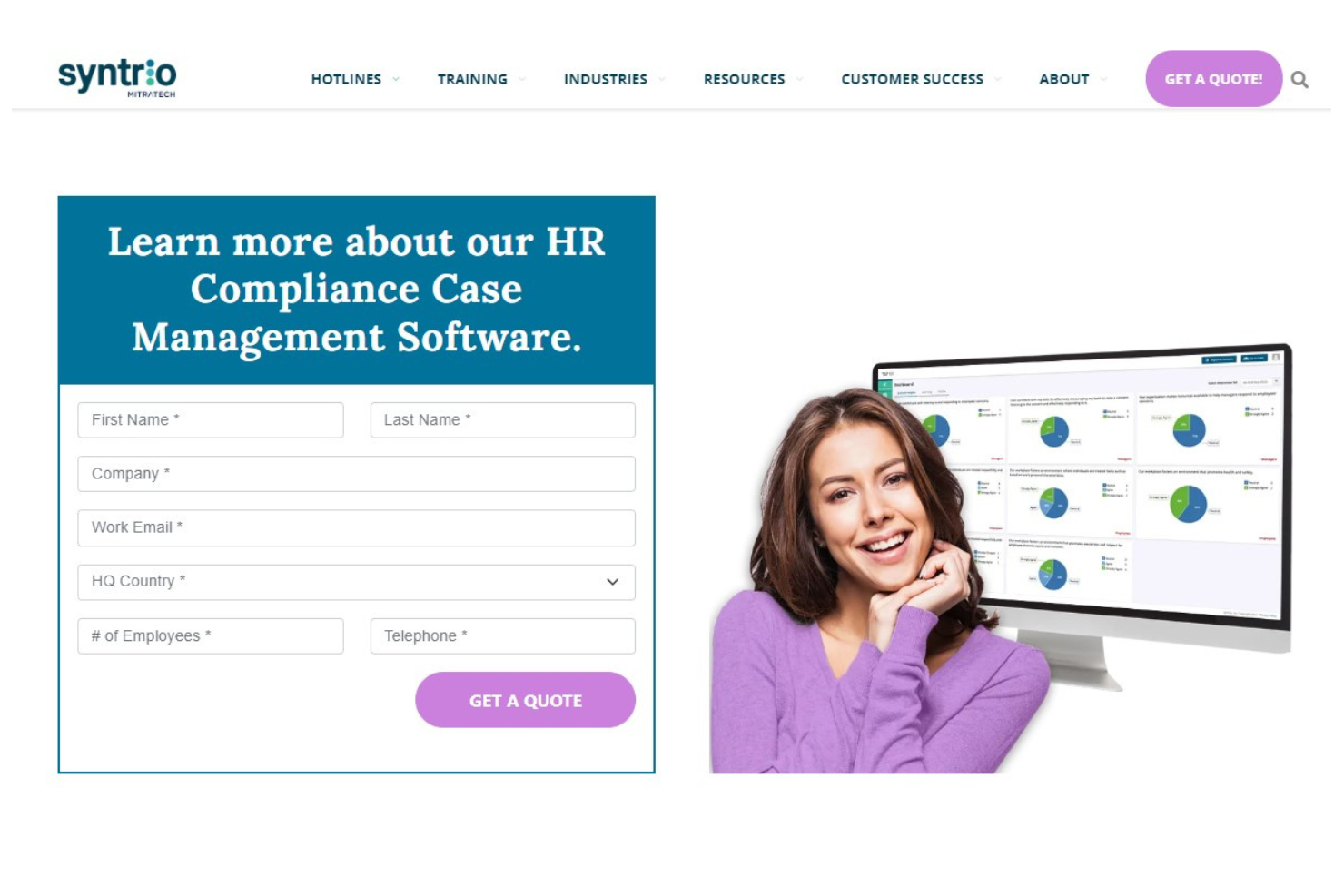
Mitratech fornisce alle risorse umane e ai professionisti della conformità una piattaforma per gestire gli incidenti sul luogo di lavoro, monitorare le indagini e affrontare questioni relative a rischi e cattiva condotta in organizzazioni di tutte le dimensioni.
Per chi è più adatto Mitratech?
Mitratech è particolarmente adatto per organizzazioni incentrate sulla conformità che necessitano di flussi di lavoro strutturati per gestire casi di cattiva condotta dei dipendenti, violazioni etiche e indagini sul posto di lavoro.
Perché ho scelto Mitratech
Mitratech è una delle migliori scelte della mia selezione perché il suo sistema di gestione dei casi collega strettamente la segnalazione anonima a flussi di lavoro investigativi strutturati. Quando un dipendente invia una segnalazione tramite la linea etica—che sia per telefono, web o chat—il report arriva direttamente in un sistema di gestione dei casi (CMS) sicuro, dove può essere tracciato dall'acquisizione fino alla risoluzione. Mitratech abbina questa funzione a Hotline Learning for Investigations, un modulo formativo che fornisce a manager e investigatori le migliori pratiche per condurre indagini eque e legalmente solide. Questa combinazione di segnalazione, monitoraggio dei casi e formazione per investigatori in un unico luogo lo rende particolarmente utile per i team che intendono fermare la cattiva condotta prima che si aggravi.
Caratteristiche principali di Mitratech
- Comunicazione anonima bidirezionale: Segnalanti e investigatori possono scambiarsi messaggi e allegare materiali di supporto senza rivelare le rispettive identità.
- Gestione di rischio e priorità: Assegna livelli di rischio, stato di priorità e responsabile del caso direttamente all'interno del sistema di gestione dei casi.
- Creazione di audit trail: Registra automaticamente l'attività dei casi per costruire una documentazione utile al controllo interno e alle revisioni di conformità.
- Accesso multilingue alla hotline: Permette di inviare segnalazioni in oltre 140 lingue tramite numero verde o moduli web localizzati senza costi aggiuntivi.
Integrazioni Mitratech
Le integrazioni native non sono attualmente disponibili.
Pros and Cons
Pros:
- Hotline etiche e gestione dei casi integrate
- Estese librerie di formazione
- Supporta più lingue
Cons:
- Potrebbe offrire funzionalità di gestione documentale più robuste
- Integrazioni native limitate

Ideale per la gestione end-to-end dei casi HR

HR Acuity offre ai team delle risorse umane di organizzazioni di medie e grandi dimensioni una piattaforma dedicata per documentare, monitorare e risolvere le questioni legate alle relazioni con i dipendenti, mantenendo la conformità e riducendo i rischi organizzativi.
Per chi è ideale HR Acuity?
HR Acuity è particolarmente adatto ai team di relazioni con i dipendenti di aziende medio-grandi che necessitano di un sistema strutturato e verificabile per gestire indagini sul luogo di lavoro e casi HR sensibili.
Perché ho scelto HR Acuity
HR Acuity si guadagna un posto tra i migliori della mia lista perché copre l'intero ciclo di vita di un caso di relazioni con i dipendenti—dal momento della segnalazione fino al supporto successivo alla risoluzione. Apprezzo particolarmente la metodologia d'indagine integrata, che guida gli investigatori in ogni fase tramite guide per il colloquio configurabili e genera automaticamente report pronti per i tribunali. Il mio team può anche utilizzare l'assistente olivER AI per individuare modelli di rischio e suggerire i prossimi passi durante l'indagine, riducendo il tempo perso nei soliti scambi che rallentano le indagini. La funzione di benchmarking è una caratteristica che non ho visto altrove con la stessa efficacia: consente di confrontare le metriche dei casi della propria organizzazione con quelle di aziende simili, aggiungendo così un reale contesto ai dati interni.
Funzionalità principali di HR Acuity
- Linea diretta anonima per i dipendenti: I dipendenti possono segnalare problemi sul posto di lavoro tramite una linea telefonica guidata o un portale online, con la possibilità di rimanere anonimi.
- managER per responsabili: Offre ai manager accesso diretto alle policy aziendali, suggerimenti per la consulenza e una guida passo passo per documentare e rispondere alle problematiche dei dipendenti.
- Controlli per il blocco legale e la riservatezza avvocato-cliente: Permette di applicare un blocco legale a casi, profili o sedi specifiche per impedire che i dati vengano modificati o eliminati, e di segnalare le comunicazioni per la revisione della riservatezza avvocato-cliente.
- Messaggistica bidirezionale sui casi: Consente ai team HR di comunicare direttamente con i dipendenti all'interno del fascicolo di un caso, mantenendo tutta la corrispondenza fuori dalle caselle di posta personali e collegata al record pertinente.
Integrazioni di HR Acuity
Le integrazioni includono Workday, UKG, SAP SuccessFactors, ServiceNow, ADP, Oracle, Microsoft Teams, ed è disponibile un'API per integrazioni personalizzate.
Pros and Cons
Pros:
- Capacità di gestione dei casi completa
- Modelli integrati e processi standardizzati
- Strumenti avanzati di analisi e reportistica
Cons:
- Alcuni utenti potrebbero trovare la configurazione iniziale complessa
- Potrebbe essere migliorato con funzionalità per i colloqui di uscita

Ideale per una visibilità completa sul carico di casi
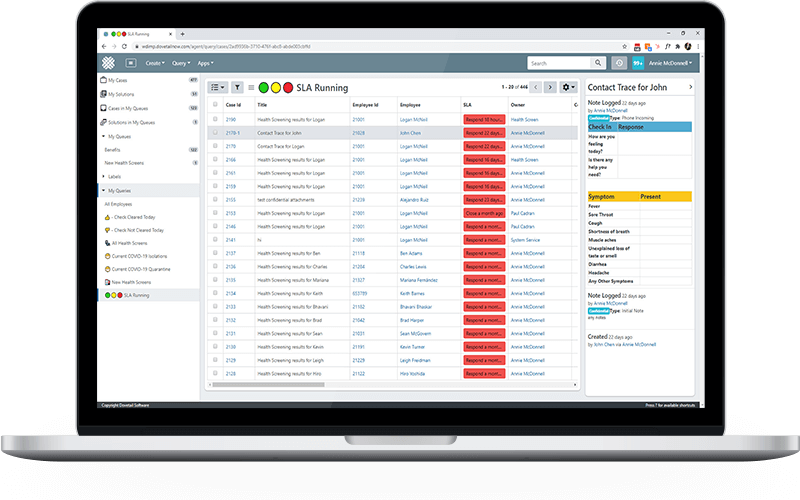
Dovetail Software offre ai team HR di organizzazioni di medie e grandi dimensioni una piattaforma centralizzata per tracciare, gestire e risolvere le problematiche dei dipendenti, mantenendo la conformità e migliorando i processi di risoluzione dei casi.
Per chi è ideale Dovetail Software?
Dovetail Software è particolarmente adatto ai team HR di aziende di medie e grandi dimensioni che necessitano di processi strutturati e verificabili per la gestione dei casi di relazioni con i dipendenti e delle indagini interne sul posto di lavoro.
Perché ho scelto Dovetail Software
Dovetail Software si guadagna un posto nella mia shortlist perché la sua HR Home Console fornisce una visibilità completa del carico casi a tutto il team HR. I dati dei casi sono automaticamente segmentati per profilo HR e per fase del ciclo di vita del caso, così i responsabili di team possono vedere a colpo d'occhio quali casi sono aperti, in escalation o prossimi al superamento dei SLA—senza dover cercare in caselle di posta condivise o fogli di calcolo. La funzione di prioritizzazione dei SLA è particolarmente utile: i casi si ordinano automaticamente sulla console in base agli indicatori di performance del team, permettendo ai membri HR di lavorare dall'alto verso il basso invece di dover indovinare da dove iniziare. Inoltre, la timeline di audit registra cronologicamente ogni interazione—chi ha fatto cosa, quando, e cosa è cambiato—offrendo ai leader HR una traccia chiara e difendibile quando i casi vengono contestati.
Caratteristiche principali di Dovetail Software
- Automazione dei flussi di lavoro: Configura notifiche automatiche e workflow di escalation che si attivano in punti definiti del ciclo di vita del caso.
- Tracciamento dei casi di relazioni con i dipendenti: Documenta e gestisci conflitti, reclami, azioni disciplinari e casi di molestie sul luogo di lavoro in un database centralizzato.
- Integrazione HCM: Importa i dati dei dipendenti direttamente dal tuo HRIS nella schermata del caso, così i membri HR hanno il contesto completo senza dover cambiare sistema.
- Reportistica e analisi: Genera dashboard intelligenti in tempo reale e report ad hoc per identificare trend dei casi per dipartimento, tipologia di problema o responsabile.
Integrazioni Dovetail Software
Le integrazioni includono Workday e XpertHR; è disponibile un'API per integrazioni personalizzate.
Pros and Cons
Pros:
- Workflow e template personalizzabili
- Tracciabilità completa e conformità GDPR
- Visibilità completa sul carico di casi
Cons:
- Nessuna prova gratuita per testare la piattaforma
- L'esperienza mobile è meno avanzata rispetto alla versione desktop

Ideale per standardizzare la documentazione dei dipendenti

ServiceNow offre ai team HR delle grandi organizzazioni una piattaforma centralizzata per gestire le richieste dei dipendenti, automatizzare i flussi di lavoro e monitorare la conformità, aiutandoti a risolvere problematiche e rischi sul posto di lavoro con maggiore coerenza e trasparenza.
Per chi è ideale ServiceNow?
ServiceNow è particolarmente adatto ai team HR aziendali che necessitano di un sistema scalabile e strutturato per gestire grandi volumi di richieste dei dipendenti tra diversi reparti o sedi.
Perché ho scelto ServiceNow
ServiceNow si è guadagnato un posto nella mia selezione grazie all'efficacia con cui la sua funzionalità di Gestione dei Casi e della Conoscenza gestisce la documentazione delle pratiche HR. Mi piace il fatto che standardizzi il modo in cui vengono registrate e gestite le interazioni HR—ogni caso segue una struttura coerente, il che significa che il mio team non deve reinventare la ruota ogni volta che si presenta una questione delicata. Il componente aggiuntivo Employee Document Management va oltre, offrendo all’HR una visione sicura e unificata dei documenti dei dipendenti dal momento dell’assunzione al pensionamento, evitando che nulla vada perso tra email o drive condivisi. Mi affido anche alla funzionalità Employee Relations per gestire i casi sensibili con l'attenzione e la coerenza necessarie a tutelare sia il dipendente che l'organizzazione.
Caratteristiche principali di ServiceNow
- Now Assist per HRSD: un modulo di intelligenza artificiale generativa integrato nella piattaforma che aiuta gli operatori HR a redigere risposte, sintetizzare i casi e individuare rapidamente articoli di riferimento durante la gestione dei casi.
- Virtual Agent: un chatbot alimentato da IA che gestisce richieste e domande comuni dei dipendenti in linguaggio naturale, senza bisogno di coinvolgere un operatore HR.
- Gestione del percorso del dipendente: uno strumento di creazione flussi di lavoro che mappa e automatizza eventi complessi del ciclo di vita dei dipendenti, come onboarding o transizioni di ruolo, tra diversi reparti.
- Performance Analytics: uno strumento di reportistica in tempo reale che monitora i volumi dei casi, la conformità agli SLA e le tendenze nei servizi HR, aiutando i team a individuare le criticità e a ottimizzare le risorse.
Integrazioni di ServiceNow
Le integrazioni includono Microsoft Teams, Workday, SAP, Salesforce, Slack, Okta, Active Directory, Google Workspace, Jira e Docusign.
Pros and Cons
Pros:
- Knowledge base centralizzata per le informazioni HR
- Flussi di lavoro personalizzabili per rispondere alle esigenze dell'organizzazione
- Il portale self-service riduce il carico di lavoro dell'HR
Cons:
- La personalizzazione può richiedere competenze tecniche
- Alcune integrazioni possono essere complicate da configurare

Case IQ
Ideale per la raccolta dei casi tramite più canali
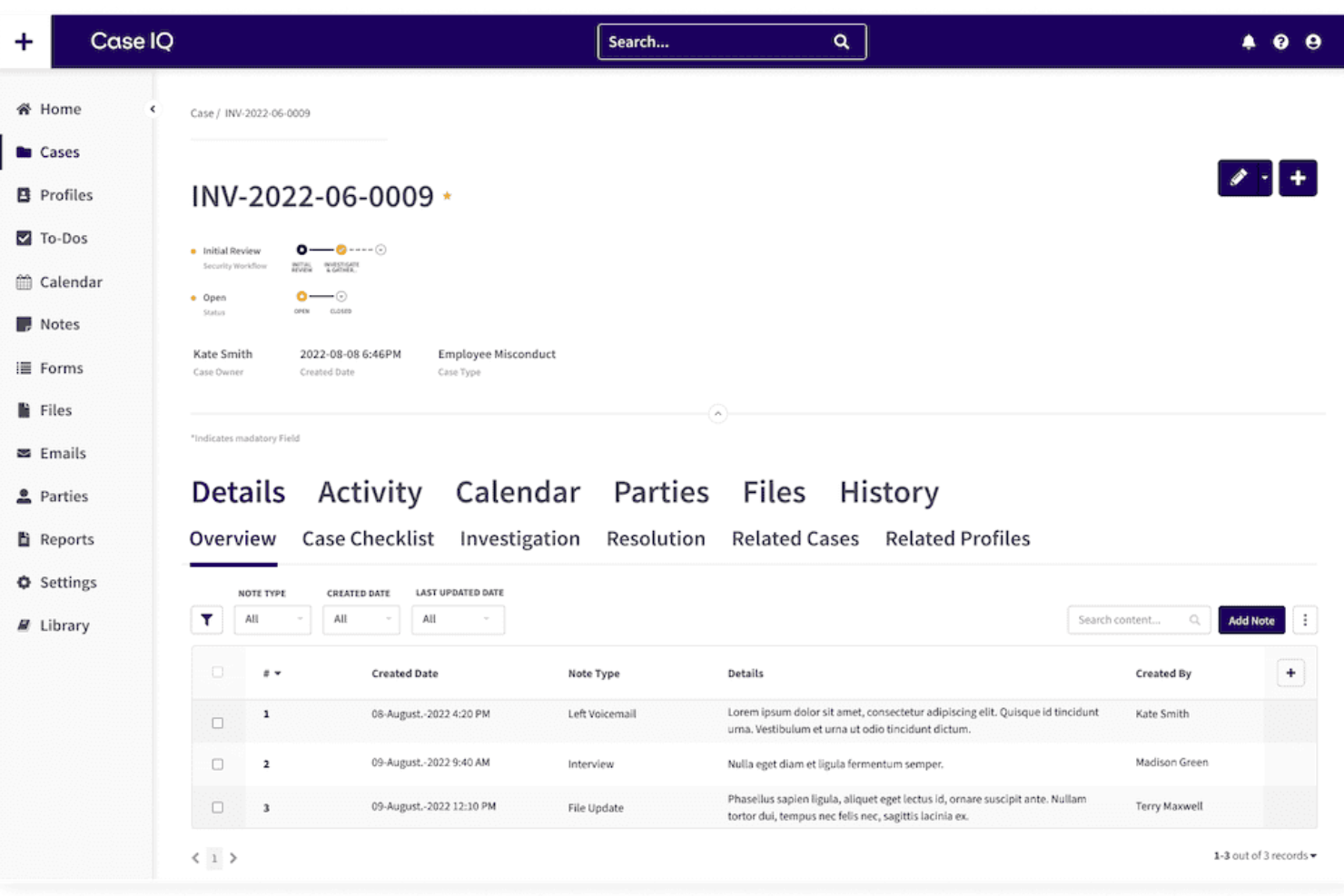
Case IQ è una piattaforma di gestione dei casi HR per le organizzazioni che devono indagare, monitorare e risolvere problematiche sul posto di lavoro garantendo conformità e riservatezza.
Per chi è ideale Case IQ?
Case IQ è particolarmente adatto ad aziende di medie e grandi dimensioni che operano in settori regolamentati e necessitano di un sistema strutturato e verificabile per gestire indagini sul luogo di lavoro e casi relativi alle relazioni con i dipendenti.
Perché ho scelto Case IQ
Ho selezionato Case IQ come uno dei migliori per la capacità di gestire la raccolta dei casi attraverso diversi canali senza perdere la struttura necessaria per un'indagine adeguata. I dipendenti possono inviare segnalazioni tramite modulo web, email, telefono o una linea diretta anonima, e ogni segnalazione confluisce nella stessa coda centralizzata dei casi con una raccolta dati coerente. Apprezzo inoltre i moduli di raccolta configurabili, che consentono di personalizzare i campi e le domande in base al tipo di caso; così una segnalazione di illecito HR raccoglie informazioni diverse da un incidente sulla sicurezza fin dall'inizio. Questa precisione nella raccolta riduce il numero di passaggi intermedi e produce fascicoli dei casi più chiari quando inizia l'indagine.
Funzionalità principali di Case IQ
- Assistente AI Clairia: Uno strumento di chat AI integrato che fornisce approfondimenti rilevanti per il caso facendo riferimento alle politiche dell'organizzazione e ai dettagli esistenti durante un'indagine.
- Segnalazione di collegamenti tra casi: Rileva automaticamente i collegamenti tra i casi, cosicché gli investigatori possono individuare schemi o incidenti correlati tra diverse segnalazioni.
- Liste di controllo degli accessi (ACL): Permette di assegnare permessi personalizzati, ruoli e flag di accesso a livello di caso, affinché ciascun utente possa vedere solo i dati rilevanti per il proprio ruolo.
- Dashboard di reportistica in tempo reale: Dashboard personalizzate con oltre 75 tipi di grafici per monitorare il carico di lavoro dei casi, gli indicatori chiave di performance e le tendenze emergenti degli incidenti.
Integrazioni Case IQ
Le integrazioni includono Workday, SAP SuccessFactors, BambooHR, Okta e Azure Active Directory; un'API consente integrazioni personalizzate.
Pros and Cons
Pros:
- Le opzioni di raccolta da più canali aumentano la flessibilità di segnalazione
- L'analisi avanzata fornisce suggerimenti operativi
- I flussi di lavoro personalizzabili ottimizzano la gestione dei casi
Cons:
- Gli utenti segnalano occasionali lentezze nel caricamento
- Mancano integrazioni native

Ideale per l'instradamento automatico dei casi
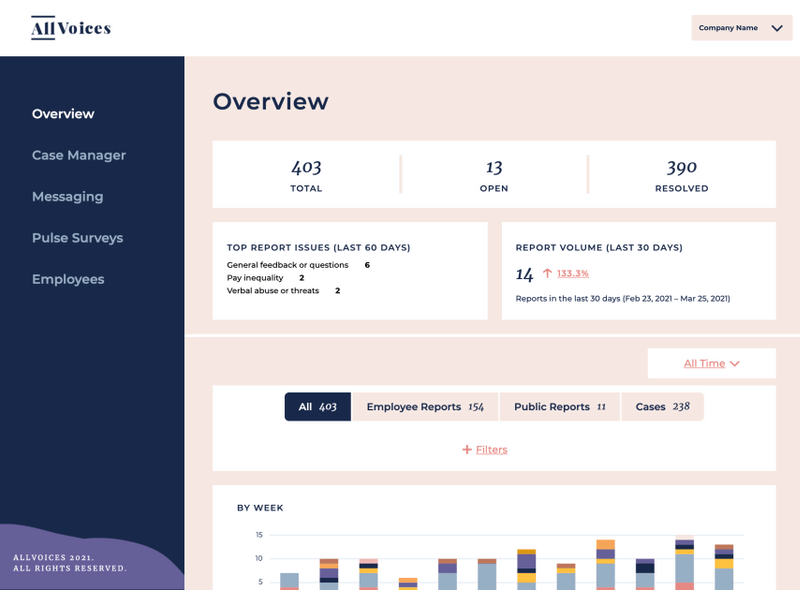
AllVoices è una piattaforma di gestione dei casi progettata per i team HR e i responsabili delle risorse umane che devono tracciare, indagare e risolvere problemi sul posto di lavoro, supportando al contempo la segnalazione anonima dei dipendenti e la conformità normativa.
Per chi è ideale AllVoices?
AllVoices è adatto a team HR di medie e grandi dimensioni che gestiscono un elevato numero di casi di relazioni con i dipendenti e necessitano di flussi di lavoro strutturati per la raccolta, l'indagine e la risoluzione.
Perché ho scelto AllVoices
Ho inserito AllVoices nella mia selezione grazie al modo in cui gestisce l'instradamento automatico dei casi, un elemento che cambia realmente la velocità con cui i team HR possono rispondere alle segnalazioni in arrivo. Quando arriva un caso, AllVoices lo indirizza all'investigatore o al team giusto in base al tipo di caso, categoria o altre regole configurabili, così nessun caso resta in attesa per una selezione manuale. Apprezzo anche la funzione di messaggistica bidirezionale anonima, che consente ai dipendenti di seguire l'iter della loro segnalazione senza rivelare la propria identità, mantenendo aperta la comunicazione durante tutta l'indagine. Questa combinazione di instradamento intelligente e comunicazione protetta lo rende uno degli strumenti più attenti che abbia visto per la gestione di questioni delicate in azienda.
Funzionalità principali di AllVoices
- Documentazione centralizzata dei casi: Archivia tutte le note sui casi, le tempistiche, le decisioni e gli esiti in un'unica posizione sicura, pronta per eventuali audit.
- Rilevamento delle tendenze e report: Evidenzia schemi ricorrenti nei dati dei casi, come problemi ripetuti in un reparto o un aumento di determinati tipi di segnalazione.
- Moduli di raccolta personalizzabili: Permette ai team HR di controllare le domande poste durante la raccolta dei casi, per acquisire informazioni coerenti e strutturate fin dall'inizio.
- Modelli per le indagini: Fornisce modelli predefiniti per le indagini e i processi di miglioramento delle performance, guidando i team in ogni fase.
Integrazioni di AllVoices
Le integrazioni includono Workday, BambooHR, Zenefits, Namely e Rippling.
Pros and Cons
Pros:
- Dashboard visiva e centralizzata che facilita il monitoraggio dei casi
- La messaggistica bidirezionale mantiene attiva la comunicazione con i segnalanti
- Modelli e flussi di lavoro integrati semplificano il processo di raccolta dei casi
Cons:
- Personalizzazione delle categorie migliorabile
- Ritardi occasionali nei tempi di caricamento della dashboard

Ciphr
Ideale per grandi volumi di problematiche dei dipendenti

CIPHR è una piattaforma software HR per organizzazioni che gestiscono, monitorano e risolvono problematiche dei dipendenti, aiutando i team delle risorse umane di aziende di medie e grandi dimensioni a gestire casi complessi e sfide di conformità normativa.
Per Chi È Meglio CIPHR?
CIPHR è particolarmente adatto per organizzazioni di medie e grandi dimensioni con team HR che gestiscono regolarmente un elevato numero di casi di relazioni con i dipendenti e necessitano di flussi di lavoro strutturati.
Perché Ho Scelto CIPHR
Ho scelto CIPHR tra i migliori perché gestisce grandi volumi di casi complessi di relazioni con i dipendenti senza che nulla vada perso. Ciò che apprezzo di più è il sistema di workflow definito: ogni tipo di caso segue un percorso strutturato con alert e promemoria automatici, così utenti HR, manager e dipendenti sanno esattamente a che punto si trova un caso e cosa deve succedere dopo. Trovo inoltre molto utili i controlli di accesso basati sui ruoli: puoi impostare proprietari di default, assegnare collaboratori e limitare la visibilità sui casi sensibili, aspetto fondamentale quando si gestiscono reclami o provvedimenti disciplinari su larga scala. In più, ogni caso crea una cronologia ricercabile e verificabile con tutte le comunicazioni e i documenti archiviati, una vera risorsa nel caso un caso venga portato davanti a un tribunale.
Caratteristiche Principali di CIPHR
- Workflow configurabili: Crea percorsi di workflow specifici per ogni caso con promemoria automatici e passaggi di verifica per mantenere i processi HR sotto controllo.
- Dashboard di analisi preimpostate: Accedi a dashboard pronte all'uso su dati di assenze, DEI e informazioni sull'organizzazione, con filtri personalizzabili per report mirati.
- Portale self-service per i dipendenti: Consenti a dipendenti e manager di visualizzare, richiedere e gestire direttamente le proprie informazioni HR, riducendo la burocrazia.
- Riepiloghi generati dall’IA: Genera automaticamente i riepiloghi dei casi ed esegui analisi sui dati HR per ridurre il tempo dedicato alla documentazione manuale.
Integrazioni CIPHR
Le integrazioni includono Microsoft, AWS, HMRC, Marshalls e Ciphr LMS. È inoltre disponibile un'API per integrazioni personalizzate.
Pros and Cons
Pros:
- Archiviazione sicura e centralizzata dei documenti dei casi
- Supporta la conformità al GDPR grazie a una documentazione dettagliata
- Gestisce casi complessi e ad alto volume
Cons:
- Mancano integrazioni native
- Mancano funzionalità per segnalazioni anonime di incidenti


Ivanti Neurons for HR si rivolge ai team delle risorse umane in organizzazioni di medie e grandi dimensioni che gestiscono problemi dei dipendenti, monitorano i casi e riducono i rischi con flussi di lavoro automatizzati e documentazione sicura dei casi.
Per chi è Ivanti Neurons for HR?
Ivanti Neurons for HR è particolarmente adatto ai team HR aziendali che necessitano di un metodo strutturato e scalabile per gestire grandi volumi di richieste e casi dei dipendenti.
Perché ho scelto Ivanti Neurons for HR
Ivanti Neurons for HR merita il suo posto nella mia lista perché gestisce molto bene il self-service automatizzato per la gestione dei casi HR. Mi piace il fatto che i dipendenti possano risolvere la maggior parte delle richieste autonomamente tramite il portale self-service, riducendo il numero di casi che il personale HR deve gestire direttamente. La knowledge base filtra i contenuti in base allo stato del dipendente, alla geografia e al ruolo, così i dipendenti non devono perdere tempo tra informazioni irrilevanti per trovare le risposte. Utilizzo anche la funzione di Limited Access con un solo clic per proteggere i casi sensibili, una soluzione che non ho visto gestita così bene in altri strumenti per la gestione dei casi HR.
Caratteristiche principali di Ivanti Neurons for HR
- Assegnazione e instradamento dei casi: Instrada automaticamente i casi HR in arrivo al team o individuo giusto in base a regole predefinite.
- Gestione sicura dei documenti: Permette di allegare e archiviare documenti HR sensibili direttamente all'interno di una scheda caso, con controlli di accesso.
- Tracciamento dei log di audit: Registra ogni azione su un caso, creando una traccia temporale per la conformità e la revisione.
- Dashboard analitica HR: Mostra il volume dei casi, i tempi di risoluzione e le tendenze per aiutare i team HR a monitorare il carico di lavoro e le prestazioni.
Integrazioni di Ivanti Neurons for HR
Le integrazioni non sono elencate.
Pros and Cons
Pros:
- Solidi controlli di accesso basati sui ruoli per la privacy
- Opzioni di configurazione flessibili
- Ottime funzionalità di reportistica per monitorare i tempi di risoluzione dei casi
Cons:
- Interfaccia utente datata e poco intuitiva
- Problemi di performance nella gestione di grandi quantità di dati


Leena AI è una piattaforma di gestione dei casi HR per team e organizzazioni delle risorse umane, che automatizza la risoluzione delle problematiche dei dipendenti, centralizza il monitoraggio dei casi e migliora i tempi di risposta alle questioni sul posto di lavoro.
Per Chi è Ideale Leena AI?
Leena AI è particolarmente adatta per aziende di medie e grandi dimensioni con un alto volume di richieste da parte dei dipendenti che hanno bisogno di automazione basata su AI per gestire l'accoglienza e la risoluzione dei casi HR su larga scala.
Perché Ho Scelto Leena AI
Ho scelto Leena AI tra le migliori perché la sua AI conversazionale è veramente centrale nel modo in cui funziona la gestione dei casi HR sulla piattaforma, non è solo una funzionalità accessoria. L'assistente virtuale comprende il linguaggio naturale dei dipendenti e risolve automaticamente la maggior parte delle richieste in arrivo prima che raggiungano un agente HR. Apprezzo anche la funzione dei commenti intelligenti, in cui gli agenti possono contrassegnare specifiche risposte durante la risoluzione del caso e queste risposte vengono automaticamente aggiunte alla knowledge base, facendo sì che l'AI migliori a ogni interazione.
Caratteristiche Principali di Leena AI
- Invio ticket su più canali: I dipendenti possono aprire casi HR direttamente da Microsoft Teams, Slack o WhatsApp senza cambiare piattaforma.
- Dashboard unificata per gli agenti: Gli agenti HR gestiscono tutte le richieste provenienti da ogni canale in una vista centralizzata dell'helpdesk.
- Analytics e monitoraggio KPI: È possibile monitorare il volume dei casi, il tempo medio di risoluzione, le performance degli agenti e i tassi di deviazione dei ticket da un'unica panoramica di reportistica.
- Smistamento ticket basato sui ruoli: I casi vengono assegnati automaticamente all'agente HR o al dipartimento corretto, in base a regole predefinite e al tipo di caso.
Integrazioni di Leena AI
Le integrazioni includono Workday, UKG Pro, SAP SuccessFactors, BambooHR, ServiceNow, Jira, Salesforce, Slack, Microsoft Teams e Google Workspace.
Pros and Cons
Pros:
- Funziona su più piattaforme
- Aiuta i dipendenti a risolvere le problematiche rapidamente
- La piattaforma è altamente personalizzabile
Cons:
- La configurazione iniziale può richiedere tempo
- Non è ideale per casi HR complessi legati a conformità e condotta scorretta
Altri software per la gestione dei casi HR
Ecco alcuni altri sistemi per la gestione dei casi HR che non sono entrati nella mia lista dei 10 migliori, ma che vale comunque la pena consultare:
- UKG People Assist
Ideale per risposte rapide alle richieste
- Workpro
Ideale per flussi di lavoro strutturati dei casi
- ERTrack
Ideale per la gestione dei casi nelle relazioni con i dipendenti


Recensioni correlate sui software HR
Se non hai ancora trovato ciò che stai cercando, dai un'occhiata a questi altri strumenti correlati che abbiamo testato e valutato:
- Software HR
- Software per le buste paga
- Software per la selezione del personale
- Servizi di datore di lavoro registrato
- Sistemi di tracciamento dei candidati
- Software per la gestione della forza lavoro
Come Valuto i Software di Gestione dei Casi HR
Divido la mia valutazione in requisiti fondamentali — presa in carico dei casi, tracciabilità, controlli di accesso — e fattori differenzianti che contano quando i team gestiscono indagini e reclami dei dipendenti su larga scala.
Funzionalità di Base (Requisiti Indispensabili per Questa Lista)
Quando seleziono gli strumenti per la mia lista, valuto ciascuno su una scala da 0 (non offre la funzionalità) a 5 (eccelle in quest'area) per ogni funzionalità di base elencata di seguito. Poi, converto il punteggio totale in percentuale. Ogni strumento deve raggiungere un punteggio totale minimo del 65% per essere considerato per l'inclusione.
- Presa in Carico & Tracciamento dei Casi: Cerco molteplici canali di presa in carico e verifico se i casi possono essere categorizzati per tipo — reclamo, richiesta di accomodamento, violazione della policy — e tracciati in ogni fase fino alla risoluzione.
- Riservatezza & Controlli di Accesso: I casi sensibili come le denunce di molestie richiedono una visibilità ristretta, quindi valuto la gestione dettagliata delle autorizzazioni basate sui ruoli e delle restrizioni di accesso a livello di caso.
- Assegnazione dei Casi & Automazione del Workflow: Controllo se una soluzione può assegnare automaticamente i casi in base a tipo o regione, attivare escalation quando gli SLA stanno per scadere e gestire casi attraverso flussi di approvazione a più step.
- Tracciabilità & Documentazione: Ogni azione su un caso — riassegnazione, aggiunta di una nota, cambio di stato — dovrebbe essere registrata con timbri temporali, fondamentale quando i team HR hanno bisogno di documentazione difendibile in procedimenti legali o audit di conformità.
- Portale Self-Service per i Dipendenti: Valuto se i dipendenti possono inviare casi, allegare documenti e verificare lo stato della risoluzione autonomamente invece di inseguire l’HR via email o chat.
- Reportistica & Analisi: I dashboard dovrebbero mostrare il volume dei casi, il tempo medio di risoluzione e le tendenze per categoria, così i responsabili HR possono individuare problematiche ricorrenti tra reparti o sedi.
Una volta stilata la lista degli strumenti che soddisfano questi criteri, considero cosa distingue ciascuna piattaforma.
Fattori di Differenziazione (Cosa Distingue i Fornitori)
Ecco come confronto e metto a confronto i diversi fornitori:
Funzionalità Distintive
La segnalazione anonima è importante quando i dipendenti devono sollevare preoccupazioni su molestie o ritorsioni senza rivelare la propria identità. Cerco piattaforme che offrano canali davvero anonimi, non solo riservati. Gli strumenti per la gestione delle indagini sono un altro elemento distintivo, soprattutto quando i team HR gestiscono casi formali che richiedono il tracciamento delle prove, interviste ai testimoni e risultati strutturati. Valuto anche se uno strumento utilizza l'IA per segnalare schemi, come reclami ripetuti legati a un determinato manager, che aiutano i team delle relazioni con i dipendenti ad agire in modo proattivo.
Oltre le Funzionalità
Le integrazioni HRIS sono fondamentali. Se uno strumento non può sincronizzarsi con la tua piattaforma esistente — Workday, SAP SuccessFactors, BambooHR — il team finisce per incrociare manualmente i dati dei dipendenti durante i casi attivi. Valuto anche certificazioni di conformità come SOC 2 Type II e opzioni di residenza dei dati, dato che i dati dei casi HR spesso includono informazioni protette soggette a normative regionali. Anche l’aderenza al settore è importante. Una piattaforma creata per settori regolamentati come sanità o finanza offrirà di solito workflow preconfigurati e tassonomie di caso che gli strumenti generici non hanno.
Come scegliere un software per la gestione dei casi HR
Il software per la gestione dei casi HR può aiutarti a organizzare le richieste HR e l'erogazione dei servizi, assicurandoti che nulla venga trascurato. Per individuare il miglior software per la gestione dei casi HR in base alle tue esigenze, devi prima identificare gli utenti principali e documentare le loro difficoltà specifiche.
Mentre definisci il tuo esclusivo processo di selezione del software, tieni presenti i seguenti punti:
- Quale problema stai cercando di risolvere - Inizia identificando le difficoltà che stai cercando di superare. Questo ti aiuterà a chiarire le caratteristiche e le funzionalità che il software di gestione dei casi HR deve offrire.
- Chi dovrà utilizzarlo - Per valutare costi e requisiti, considera chi utilizzerà il software e di quante licenze avrai bisogno. Dovrai valutare se avranno bisogno di accedere soltanto i professionisti senior delle risorse umane o l'intero reparto. Una volta chiarito questo aspetto, è inoltre utile classificare le esigenze dei diversi utenti per identificare le priorità principali relative agli utenti esperti del software HR, ai manager e ai dipendenti, assicurandoti che siano tutte soddisfatte.
- Con quali altri strumenti deve funzionare - Chiarisci quali strumenti stai sostituendo, quali manterrai e con quali dovrai integrarlo, come il tuo sistema di gestione delle risorse umane o il software IT. Dovrai decidere se gli strumenti devono integrarsi tra loro o, in alternativa, se puoi sostituire più strumenti con una piattaforma integrata per la gestione dei casi HR.
- Quali risultati sono importanti - Esamina le funzionalità che vuoi ottenere o migliorare e come misurerai il successo. Ad esempio, potresti voler acquisire la capacità di assegnare la priorità alle richieste HR in base all'urgenza o di inoltrare le richieste a diversi membri del tuo team HR. Potresti confrontare i software di gestione dei casi HR fino allo sfinimento, ma se non stai pensando ai risultati che vuoi raggiungere, potresti sprecare molto tempo prezioso.
- Come funzionerebbe all'interno della tua organizzazione - Considera la scelta del software insieme ai flussi di lavoro e ai sistemi esistenti. Valuta cosa funziona bene e quali aree problematiche devono essere affrontate.
Ricorda: ogni azienda è diversa — non dare per scontato che un sistema di gestione dei casi HR sia adatto alla tua organizzazione solo perché è popolare.
Funzionalità del software di gestione dei casi HR
Per aiutarmi a confrontare ogni sistema di gestione dei casi con gli altri, ho creato questo elenco delle funzionalità principali che mi aspetto siano incluse in ciascun sistema:
- Pannelli di controllo: Una panoramica facile da usare che mantiene i dirigenti concentrati sui casi più urgenti e consente anche di utilizzare un portale autonomo per i dipendenti.
- Strumenti di gestione dei casi: Funzionalità che consentono agli addetti di monitorare e gestire i progressi verso la risoluzione dei casi, incluso l'inoltro a un livello superiore.
- Base di conoscenza: Una risorsa che fornisce informazioni basate sui dati dei dipendenti, integrata con gli strumenti di gestione dei casi.
- Personalizzazione: Contenuti altamente pertinenti per i singoli utenti, allo scopo di aumentare il coinvolgimento dei dipendenti all'interno dell'organizzazione.
- Reportistica: Report utili e orientati all'azione che suggeriscono le misure necessarie per ottenere miglioramenti.
- Gestione degli SLA: Notifiche automatizzate in tempo reale e codifica a colori per garantire che i casi rispettino le tempistiche previste.
- Gestione dei processi aziendali: Automazione dei processi manuali di gestione dei casi per ridurre il tempo dedicato dai dirigenti a ciascun caso.
- Gestione delle email: La possibilità di configurare facilmente modelli per i messaggi e-mail standard relativi alle richieste comuni dei dipendenti.
- Analisi dei sondaggi: Informazioni sull'efficacia del sistema nella risoluzione dei casi.
- Collaborazione riservata: La possibilità di collaborare con altri reparti per raccogliere informazioni, rispettando al contempo la privacy dei dipendenti.
Che cos'è il software di gestione dei casi HR?
Il software di gestione dei casi HR è uno strumento specializzato progettato per gestire e risolvere le problematiche relative ai dipendenti all'interno delle organizzazioni. Semplifica il processo di gestione di vari casi HR, come richieste di informazioni, reclami e domande, fornendo una piattaforma centralizzata per monitorare, documentare e affrontare tali problematiche.
Gli strumenti di gestione dei casi HR facilitano l'automazione efficiente dei flussi di lavoro e la definizione delle priorità dei casi, oltre a mantenere un registro completo di tutte le interazioni HR. Il loro scopo è migliorare l'efficienza operativa delle risorse umane, garantire risposte tempestive e coerenti alle esigenze dei dipendenti e mantenere la conformità alle politiche organizzative e agli standard legali.
Domande frequenti sul software per la gestione dei casi HR
Hai ancora dubbi sul software per la gestione dei casi HR e sul suo funzionamento? Dai un’occhiata alle risposte ad alcune domande frequenti su questo argomento:
Che cos'è la gestione dei casi HR?
La gestione dei casi HR (o gestione dei casi dei dipendenti) è il processo di gestione delle richieste e delle domande dei dipendenti o di qualsiasi problema relativo ai dipendenti che possa sorgere. Le richieste possono provenire da dipendenti già in organico, nuovi assunti, manager e partner HR.
Al giorno d’oggi, la gestione dei casi HR viene generalmente gestita utilizzando soluzioni HR personalizzate. Queste possono offrire funzionalità come dashboard, accordi sul livello di servizio, strumenti di collaborazione, flussi di lavoro e automazione per aiutare a risolvere i casi.
Che cosa fa il software per la gestione dei casi HR?
Il software per la gestione dei casi HR aiuta i responsabili delle risorse umane a risolvere problemi complessi relativi ai singoli dipendenti. Questi strumenti facilitano l’invio, la revisione e la risposta a richieste specifiche, oltre a supportare la risoluzione di questioni più complesse relative ai dipendenti.
Un buon sistema di gestione dei casi per le risorse umane offre un processo coerente e ripetibile che garantisce che ogni dipendente venga trattato correttamente ed equamente, indipendentemente dalla complessità dei problemi coinvolti.
Altre recensioni di software HR
Ecco altri tipi di software per le risorse umane che possono contribuire a fornire servizi migliori ai tuoi dipendenti: