

I 10 migliori software per le risorse umane per piccole imprese, recensiti per il 2026

10 Elenco dei migliori software HR per piccole imprese


I migliori software HR per piccole imprese aiutano a semplificare le assunzioni, l’inserimento, le buste paga e la conformità, così puoi dedicare meno tempo all’amministrazione e più tempo a supportare le tue persone.
Quando devi ricoprire più ruoli con risorse limitate, è facile che attività HR importanti passino inosservate, causando scadenze mancate, rischi di non conformità o esperienze negative per i dipendenti.
Dal monitoraggio dei candidati alla gestione delle ferie, delle valutazioni delle prestazioni e dei dati sulla forza lavoro, sistemi non integrati e processi manuali possono rallentarti e causare errori costosi. La piattaforma giusta centralizza questi flussi di lavoro, automatizza le attività ripetitive e offre visibilità in tempo reale sulle esigenze e sulle prestazioni del tuo team.
Dopo oltre 10 anni di lavoro con le PMI e di valutazione pratica di decine di strumenti HR, ho selezionato un elenco di soluzioni intuitive, convenienti e progettate per crescere insieme al tuo team in espansione.
In questa guida troverai strumenti che non solo semplificano la gestione del personale, ma ti aiutano anche a prendere decisioni migliori sui talenti e a migliorare il coinvolgimento dei dipendenti.
Perché fidarsi delle nostre recensioni sui software
Il nostro team testa e recensisce software dal 2012. In quanto esperti HR noi stessi, sappiamo quanto sia difficile — e importante — scegliere il software giusto.
Per questa guida, abbiamo valutato gli strumenti attraverso test pratici e ricerche indipendenti, assegnando un punteggio agli strumenti in base ai nostri criteri di selezione. Ci basiamo inoltre sulle competenze di leader di pensiero del settore e di professionisti HR attivi.
Le nostre recensioni riflettono il nostro giudizio editoriale umano, non un discorso di vendita.
Revisori esperti:
Tabella comparativa delle piattaforme HR per piccole imprese
Questa tabella comparativa riassume i dettagli dei prezzi delle mie migliori selezioni di software HR:
| Tool | Best For | Trial Info | Price | ||
|---|---|---|---|---|---|
| 1 | Ideale per strumenti basati su AI | Demo gratuita disponibile | Prezzi su richiesta | Website | |
| 2 | Ideale per accesso ai benefit dipendenti | Demo gratuita disponibile | Da $8/dipendente/mese + $50/mese quota base | Website | |
| 3 | Ideale per ampi bacini di candidati | Demo gratuita disponibile | Prezzo su richiesta | Website | |
| 4 | Ideale per l'automazione HR nelle piccole imprese del Regno Unito | Prova gratuita di 14 giorni | Da $22/utente/mese | Website | |
| 5 | Ideale per budget sanitari personalizzati | Demo gratuita disponibile | A partire da 45 $/utente/mese | Website | |
| 6 | La migliore soluzione globale tutto-in-uno per le PMI | Demo gratuita disponibile | A partire da $5/dipendente/mese | Website | |
| 7 | Ideale per le funzioni HR principali | Demo gratuita disponibile | Prezzi su richiesta | Website | |
| 8 | Ideale per opzioni di pagamento globale delle buste paga | Demo gratuita disponibile | Da $199/utente/mese | Website | |
| 9 | Ideale per strumenti di coinvolgimento dei dipendenti | Demo gratuita disponibile | Prezzo su richiesta | Website | |
| 10 | Ideale per il coinvolgimento e la soddisfazione dei dipendenti | Prova gratuita disponibile | Prezzo su richiesta | Website |

Recensioni dei migliori software HR per piccole imprese
Qui troverai le mie panoramiche dei 10 migliori software HR che ho selezionato specificamente per piccole e medie imprese. Nella mia ricerca ho tenuto presenti le principali sfide HR delle PMI, come assumere e trattenere i migliori talenti, garantire la conformità legale e promuovere lo sviluppo professionale. Ho illustrato il caso d’uso ideale di ciascun fornitore, le funzionalità principali e le informazioni sui prezzi.

UKG
Ideale per strumenti basati su AI
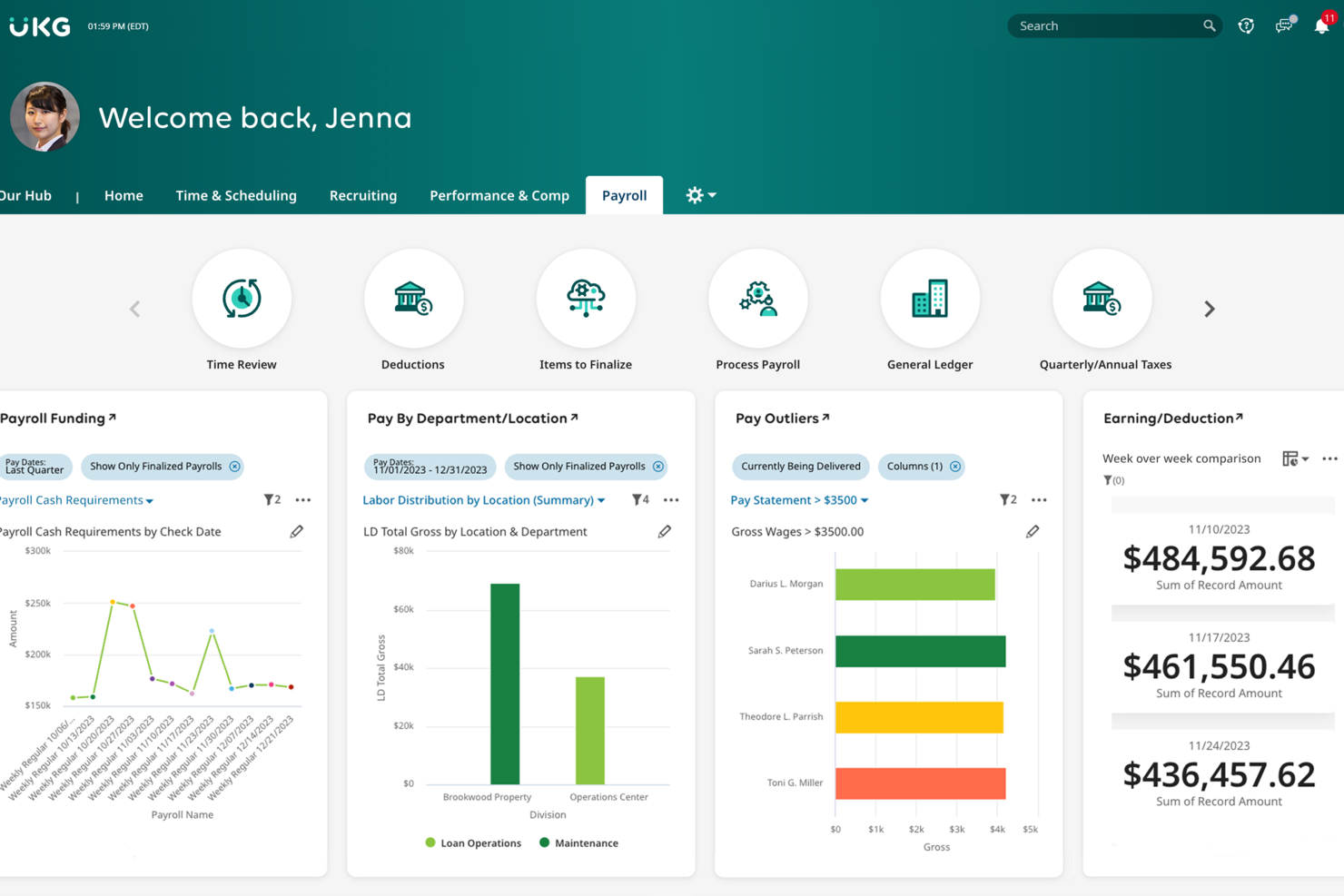
UKG offre alle piccole imprese una piattaforma HR unificata per gestire paghe, rilevamento delle presenze e dati dei dipendenti, aiutando titolari e team HR a gestire la conformità e le esigenze della forza lavoro durante la crescita.
Per chi è ideale UKG?
UKG è particolarmente adatto alle piccole imprese che necessitano di una piattaforma HR scalabile per gestire le operazioni relative al personale, incluse paghe, pianificazione turni e conformità, mentre la forza lavoro aumenta.
Perché ho scelto UKG
UKG Bryte AI è uno dei motivi principali per cui ho incluso UKG tra le mie scelte migliori. Adoro la funzione di reportistica conversazionale che consente al mio team di porre domande HR in linguaggio naturale e ricevere risposte immediate, senza dover estrarre manualmente i report o attendere un analista. Anche lo strumento job genius si distingue per le assunzioni nelle piccole imprese: genera descrizioni di lavoro e domande per colloqui curate in base al ruolo e alle competenze, riducendo il time-to-hire quando si lavora senza un recruiter dedicato. Il livello AI agentico gestisce la previsione della domanda e l’ottimizzazione dei turni, utile per la gestione dei turni con un team ristretto.
Caratteristiche principali di UKG
- Gestione delle paghe: Esegui i pagamenti con calcoli fiscali integrati, verifiche di conformità e supporto per il deposito diretto sia per i dipendenti orari che per quelli salariati.
- Portale self-service per i dipendenti: Consenti ai dipendenti di visualizzare buste paga, richiedere permessi e aggiornare i dati personali senza intervento dell’HR.
- Rilevazione presenze e orari: Traccia le ore, le pause e gli straordinari dei dipendenti con strumenti di timbratura che si sincronizzano direttamente con la gestione delle paghe.
- Flussi di lavoro per l’onboarding: Crea checklist strutturate per l’onboarding e raccolta documenti da completare prima del primo giorno di lavoro.
Integrazioni UKG
Le integrazioni includono ADP, SAP SuccessFactors, Oracle, Workday, Microsoft Teams, Okta, QuickBooks, Salesforce, Ceridian e Google Workspace.
Pros and Cons
Pros:
- Gli strumenti AI assistono nel recruiting, nella pianificazione e nelle attività HR quotidiane
- L’app mobile supporta timbrature, richieste di permessi e aggiornamenti dei dipendenti
- Evidenzia tempestivamente rischi di conformità o problematiche di organico.
Cons:
- I prezzi sono su preventivo e non vengono pubblicati livelli tariffari trasparenti
- Le analisi avanzate possono richiedere configurazione o formazione aggiuntive

Ideale per accesso ai benefit dipendenti
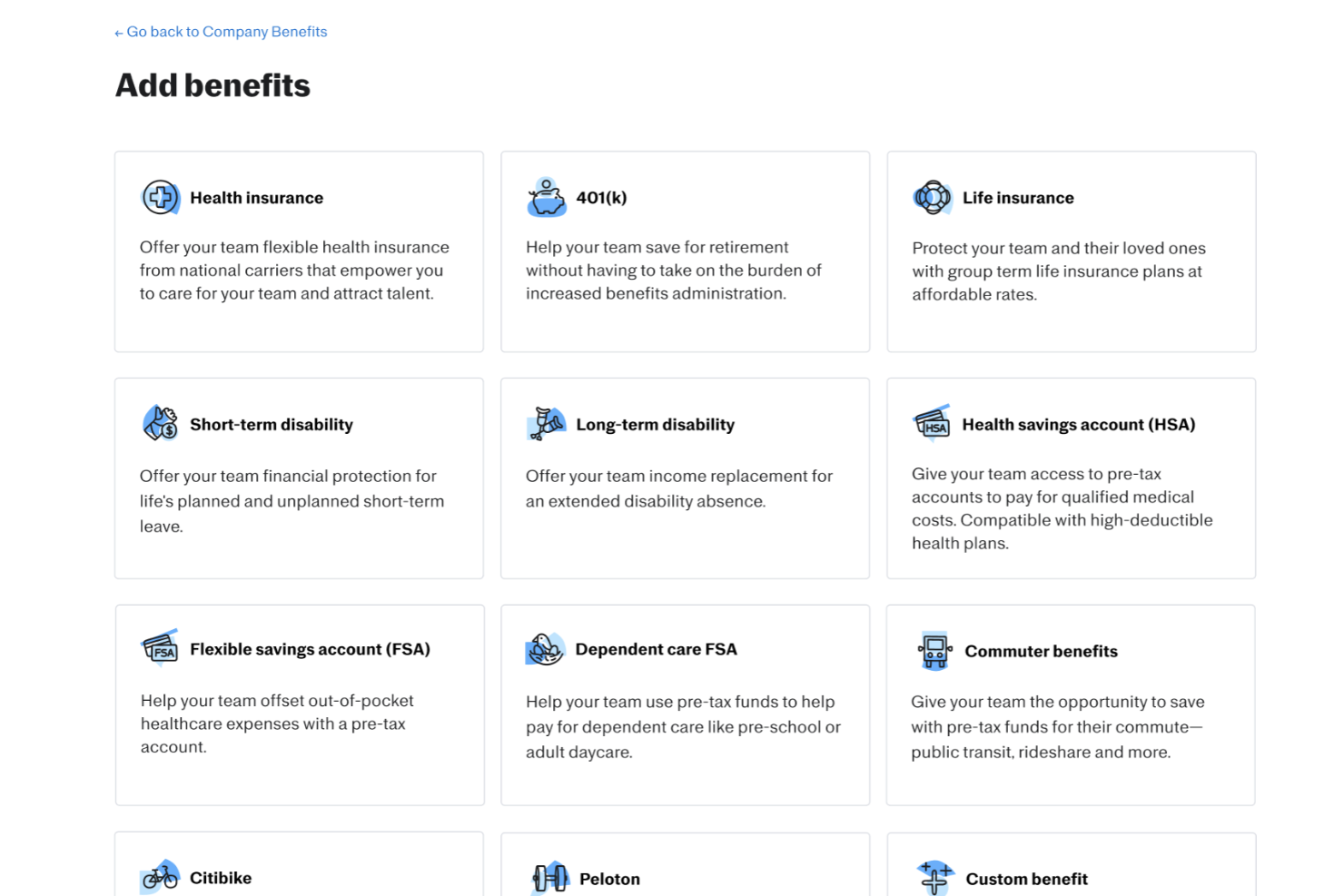
Justworks è una piattaforma HR tutto-in-uno progettata per le piccole imprese che desiderano semplificare la gestione di paghe, benefit e conformità normativa mentre supportano un team in crescita.
Per chi è più adatto Justworks?
Justworks è la soluzione ideale per le piccole imprese che vogliono offrire benefit competitivi ai dipendenti senza il carico amministrativo di gestirli internamente.
Perché ho scelto Justworks
Justworks si guadagna un posto nella mia lista perché consente di offrire accesso ai benefit ai dipendenti anche nelle piccole aziende che normalmente non possono competere con i pacchetti benefit dei grandi gruppi. Tramite il suo modello PEO (professional employer organization), Justworks raggruppa più piccole imprese per consentire loro di accedere a tariffe assicurative di gruppo per salute, odontoiatria e vista. Mi piace anche il fatto che i dipendenti possano gestire direttamente le proprie scelte di benefit dalla piattaforma, riducendo così i passaggi con l’ufficio HR. L’accesso self-service fa davvero la differenza quando si guida un team snello.
Funzionalità chiave di Justworks
- Gestione paghe: Esegui il pagamento degli stipendi a dipendenti e collaboratori, con calcoli e dichiarazioni fiscali automatiche gestite per tuo conto.
- Supporto alla conformità: Accedi a strumenti HR integrati per la conformità alle normative federali e statali, inclusa la reportistica COBRA e ACA.
- Monitoraggio presenze e orari: Rileva le ore lavorate dai dipendenti, gestisci le richieste di ferie e sincronizza i dati delle presenze direttamente con le paghe.
- Onboarding dei dipendenti: Gestisci le nuove assunzioni con pratiche digitali, iscrizione al versamento diretto e registrazione ai benefit in un unico posto.
Integrazioni di Justworks
Le integrazioni includono Greenhouse, Ramp, Vouch, Lever, Brex, Electric, JazzHR, Trainual, Leapsome e Xero.
Pros and Cons
Pros:
- Procedura onboarding semplice e lineare per i nuovi assunti
- Prezzi trasparenti per i piani Payroll o PEO, con possibilità di aggiunte
- Centralizza la gestione di paghe, HR e assicurazioni sanitarie
Cons:
- Gli strumenti di reportistica offrono approfondimenti aziendali limitati
- Meno funzionalità HR avanzate rispetto alle piattaforme enterprise più grandi
Ideale per ampi bacini di candidati
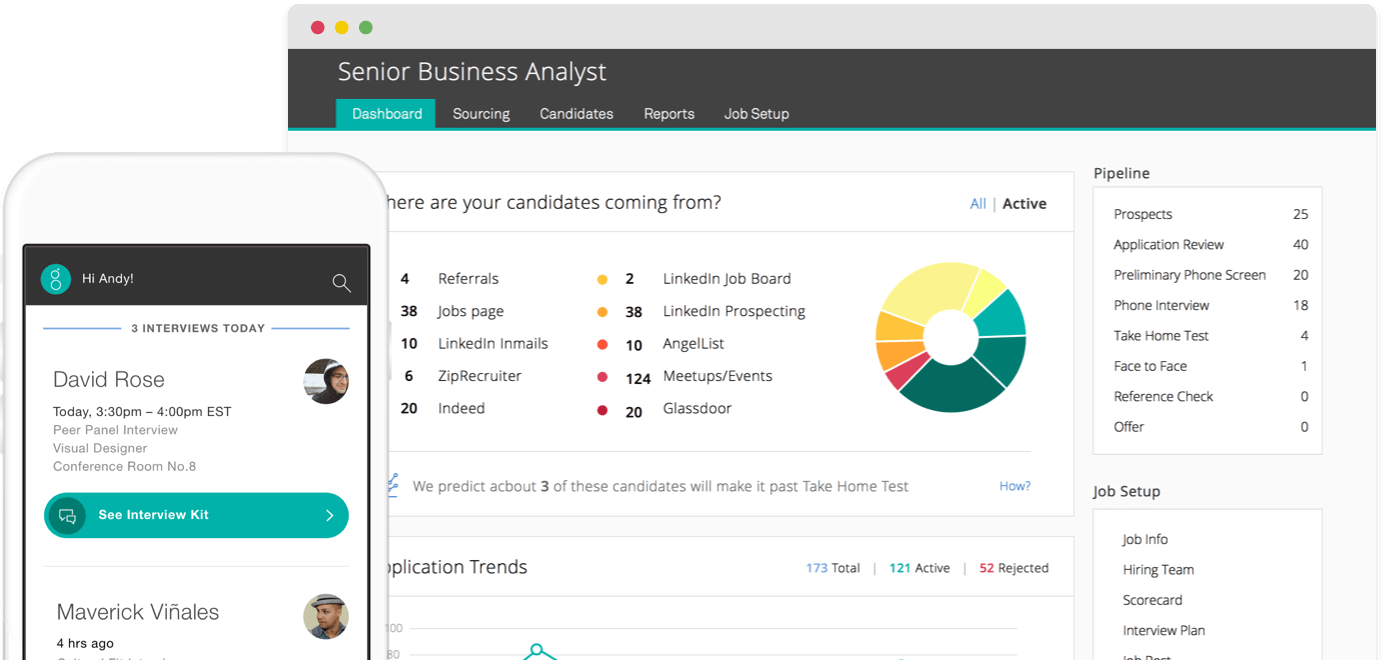
Greenhouse offre alle piccole imprese un modo strutturato per gestire le assunzioni, aiutando i team a organizzare i flussi dei candidati, collaborare nei colloqui e prendere decisioni supportate dai dati per migliorare il processo di selezione.
Per chi è ideale Greenhouse?
Greenhouse è particolarmente adatto alle piccole imprese con esigenze di assunzione attive che desiderano un processo di selezione strutturato e ripetibile per gestire più posizioni e candidati contemporaneamente.
Perché ho scelto Greenhouse
Greenhouse si è guadagnato un posto nella mia shortlist per come gestisce bene grandi volumi di candidati senza che nulla venga trascurato. Mi piacciono i kit strutturati per i colloqui e le schede di valutazione, che tengono tutti i membri del team di selezione allineati su ciò che stanno valutando—particolarmente utile quando si esaminano decine di candidati per una sola posizione. La visualizzazione della pipeline dei candidati offre al mio team una panoramica chiara di dove si trovano tutti i candidati nelle diverse posizioni aperte. Utilizzo inoltre gli strumenti di sourcing per tracciare da dove provengono i candidati, così possiamo concentrare gli sforzi sui canali che producono realmente assunzioni di qualità.
Caratteristiche principali di Greenhouse
- Pubblicazione annunci di lavoro: Pubblica posizioni aperte su più job board contemporaneamente da un'unica interfaccia.
- Gestione delle offerte: Crea, invia e monitora le offerte di lavoro direttamente all'interno della piattaforma senza cambiare strumenti.
- Workflow di onboarding: Imposta liste di attività pre-assuntive e documenti di assunzione prima del primo giorno di lavoro del candidato.
- Dashboard di reportistica: Monitora indicatori di selezione come il tempo di copertura delle posizioni e il tasso di conversione per fase su tutte le ricerche attive.
Integrazioni di Greenhouse
Le integrazioni includono Checkr, Criteria Corp, Findem, HireRight, BrightHire, Pave, Grayscale, Aboard, Accurate ACE e AmazingHiring.
Pros and Cons
Pros:
- Consente la pubblicazione su più di 1.000 job board
- Il processo di colloquio strutturato aiuta a valutare in modo coerente
- I workflow di onboarding permettono di assegnare compiti dipendenti
Cons:
- La personalizzazione di report e analisi è talvolta limitata
- L'interfaccia può risultare complessa per team molto piccoli o per chi non è specialista HR
New Product Updates from Greenhouse

Greenhouse Opens Candidate Insights and Talent Matching Assistants to Beta
Greenhouse opens Candidate Insights and Talent Matching assistants to beta for candidate questions and natural-language search. This helps recruiters review candidates and build searches faster. For more information, visit Greenhouse’s official site.
 .
.
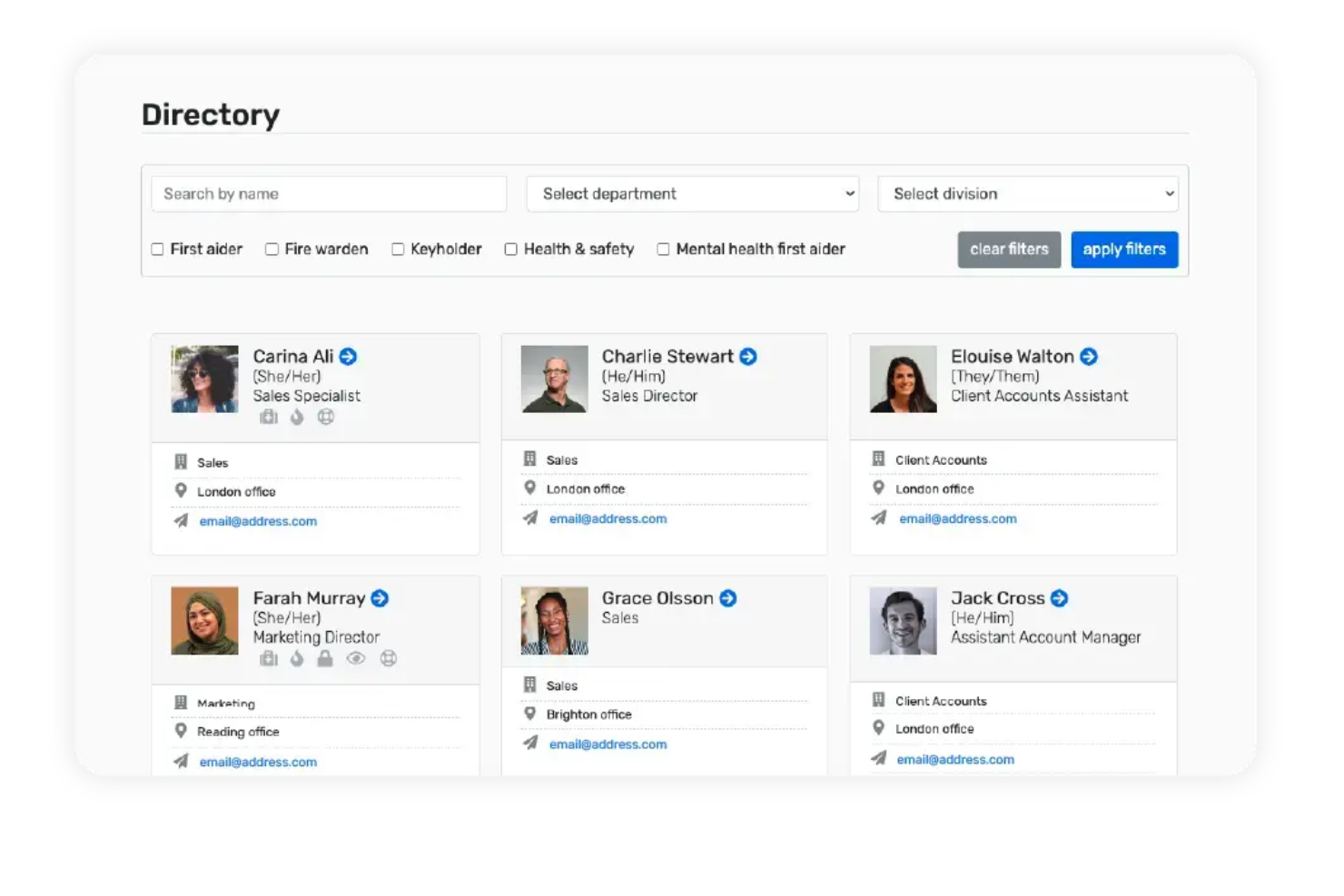
Breathe HR offre alle piccole imprese un modo semplice per gestire i registri dei dipendenti, monitorare le assenze e gestire l'amministrazione delle risorse umane in un unico posto, rendendo più facile per i team senza un reparto HR dedicato rimanere organizzati e conformi.
Per chi è più adatto Breathe HR?
Breathe HR è ideale per piccole e medie imprese con sede nel Regno Unito che hanno bisogno di una piattaforma HR semplice, senza la complessità dei sistemi a livello aziendale.
Perché ho scelto Breathe HR
Ho scelto Breathe HR tra i migliori perché è una delle poche piattaforme HR progettate specificamente per le PMI del Regno Unito, con automazioni integrate nei flussi di lavoro su cui i piccoli team investono realmente più tempo. Mi piace in particolare il processo automatizzato di approvazione delle ferie: i dipendenti inviano le richieste attraverso il People Portal, i manager vengono notificati immediatamente e i saldi delle ferie si aggiornano automaticamente, così il mio team non deve inseguire nessuno per avere conferme. Anche gli strumenti di onboarding automatico meritano una menzione: è possibile inviare contratti per la firma elettronica, condividere documenti chiave e avviare checklist di attività per i nuovi assunti senza dover coordinare manualmente ogni passaggio. Inoltre, il monitoraggio delle assenze di Breathe HR segnala automaticamente i modelli ricorrenti utilizzando il calcolatore del Fattore Bradford, che è davvero utile per i manager del Regno Unito che devono gestire le assenze per malattia in conformità alla legislazione del lavoro britannica.
Caratteristiche principali di Breathe HR
- Portale self-service per i dipendenti: I dipendenti possono visualizzare e aggiornare i propri registri, richiedere permessi, segnalare assenze per malattia e assegnare riconoscimenti direttamente tramite il People Portal da qualsiasi dispositivo.
- Strumenti di gestione delle performance: Imposta obiettivi, pianifica incontri individuali e gestisci valutazioni annuali per i singoli membri del team all'interno della piattaforma.
- Reportistica e analisi HR: Genera report su tendenze della forza lavoro, coinvolgimento e dati di conformità per supportare decisioni strategiche basate sui dati.
- Gestione multi-sede: Gestisci i dipendenti in diversi uffici, reparti o regioni da un unico account.
Integrazioni di Breathe HR
Le integrazioni includono Xero e Breathe Rota; è disponibile un'API per integrazioni personalizzate.
Thatch
Ideale per budget sanitari personalizzati

Thatch è una piattaforma moderna per i benefit sanitari che offre esperienze sanitarie personalizzate tramite un ICHRA. Consente alle aziende di stanziare un budget per l'assistenza sanitaria e offre ai dipendenti la libertà di utilizzarlo nel modo più adatto alle loro esigenze. Thatch offre inoltre benefit sanitari alle startup senza la necessità di assumere una risorsa HR, impostando un budget, inserendo rapidamente i nuovi assunti e gestendo conformità e amministrazione.
Perché ho scelto Thatch: Ho scelto Thatch per la sua attenzione ai budget sanitari personalizzati, fondamentali per soddisfare le diverse esigenze dei dipendenti senza la complessità della gestione tradizionale dei benefit. Thatch consente ai datori di lavoro di impostare un budget sanitario che i dipendenti possono destinare in base alle proprie esigenze specifiche. Questa flessibilità è particolarmente vantaggiosa per le piccole imprese che necessitano di soluzioni convenienti e semplici per attrarre e trattenere i talenti.
Funzionalità e integrazioni principali di Thatch:
Le funzionalità includono un sistema di assistenza basato sull'IA che offre supporto 24 ore su 24, aiutando i dipendenti a orientarsi tra le opzioni sanitarie e garantendo la conformità. Thatch fornisce inoltre una carta di debito Visa che i dipendenti possono utilizzare per le spese sanitarie e dispone di strumenti di reportistica che offrono ai datori di lavoro informazioni sui modelli di utilizzo e sull'impiego dei benefit.
Le integrazioni includono Gusto, Justworks, Zenefits e Quickbooks. Altre integrazioni sono possibili con l'aiuto del team di Thatch.

Deel HR
La migliore soluzione globale tutto-in-uno per le PMI

Deel HR offre alle piccole imprese una piattaforma unica per gestire risorse umane, paghe e conformità sia per i team locali che internazionali, aiutando fondatori e responsabili HR a gestire assunzioni, onboarding e operazioni del personale durante la crescita.
Per Chi è Ideale Deel HR?
Deel HR è particolarmente adatto a piccole imprese con team remoti o distribuiti che devono assumere, pagare e gestire personale in diversi paesi fin dall'inizio.
Perché Ho Scelto Deel HR
Deel HR merita il suo posto tra i migliori della mia lista perché è l'unica piattaforma HR che ho visto coprire davvero l'intero stack di operazioni del personale per le piccole imprese con team globali. Mi piace molto la base modulare dell'HRIS: il mio team può partire con le funzioni HR principali e attivare moduli come ATS, Compensation o Workforce Planning man mano che l'azienda cresce, senza dover ricostruire nulla. La conformità integrata e specifica per ogni paese in oltre 150 paesi è ciò che la distingue veramente; contratti localizzati, regole per le ferie e dichiarazioni fiscali vengono gestiti automaticamente invece di richiedere uno strumento separato o un consulente legale.
Funzionalità Chiave di Deel HR
- ATS con intelligenza artificiale: Cerca automaticamente candidati, gestisci i colloqui e trasferisci i nuovi assunti direttamente all'onboarding all'interno di un unico flusso di reclutamento.
- Strumenti per la gestione delle performance: Gestisci cicli di valutazione, imposta obiettivi e crea percorsi di apprendimento e sviluppo per i dipendenti nella stessa piattaforma.
- Segnalazioni anonime: Offri ai dipendenti uno strumento integrato di whistleblowing per segnalare problematiche, con flussi di offboarding conformi per ridurre il rischio legale.
- Pianificazione della forza lavoro e delle retribuzioni: Modella scenari di organico, prevedi i costi utilizzando dati di assunzione in tempo reale e gestisci cicli di revisione delle retribuzioni in base a ruolo, performance e località.
Integrazioni Deel HR
Le integrazioni includono FaceUp, Snowflake, Microsoft Finance, Kintsugi, ReFresh OS, Revo.ai, Keeper, Human Interest, Everyminute e Acumatica.
Pros and Cons
Pros:
- Soluzione HR + payroll efficace per team che assumono all’estero
- Molteplici opzioni di pagamento riducono le commissioni sui trasferimenti internazionali
- I dipendenti gestiscono autonomamente i loro dati personali e metodi di pagamento
Cons:
- Alcuni moduli sono più recenti e meno personalizzabili
- Gli strumenti di reportistica non dispongono di analisi avanzate per approfondimenti dettagliati
New Product Updates from Deel HR

Deel Expands Stablecoin Wallet to 80+ Countries
Deel expands its Stablecoin Wallet to 80+ countries with dollar-backed balances and optional rewards. This gives eligible contractors more ways to hold and manage earnings inside Deel. For more information, visit Deel’s official site.
 .
.
HiBob
Ideale per le funzioni HR principali

HiBob è una piattaforma HR moderna progettata per le piccole imprese che desiderano centralizzare i dati dei dipendenti, automatizzare i processi HR e creare un'esperienza lavorativa più coinvolgente per i propri team.
Per chi è ideale HiBob?
HiBob è perfetto per le piccole e medie imprese che necessitano di una piattaforma HR dedicata per gestire le operazioni delle risorse umane mentre i team crescono.
Perché ho scelto HiBob
Ho scelto HiBob tra i migliori perché il suo modulo HR principale copre tutto ciò di cui ha bisogno un team HR di una piccola azienda nelle attività quotidiane. Apprezzo in particolare i workflow automatizzati, che permettono di creare elenchi di attività per eventi come l'onboarding e l'offboarding, assegnarli alle persone giuste e impostare promemoria affinché nulla venga dimenticato. La funzione eSign fa davvero risparmiare tempo—l'ho utilizzata per inviare contratti ai dipendenti già precompilati, che prelevano i dati direttamente dai profili dei dipendenti, eliminando completamente l'inserimento manuale dei dati. Le dashboard People Analytics ti offrono una visione in tempo reale di organico, turnover e assenteismo senza bisogno di esportare nulla in un foglio di calcolo.
Funzionalità principali di HiBob
- Gestione delle assenze: Richiedi, approva e monitora ferie, giorni di malattia e permessi direttamente dalla piattaforma, con visibilità su chi è presente o assente.
- Sondaggi tra i dipendenti: Somministra sondaggi di coinvolgimento o di ciclo di vita nei momenti chiave e visualizza i risultati in una dashboard integrata per monitorare la soddisfazione dei dipendenti nel tempo.
- Gestione delle performance: Configura valutazioni delle performance a 360 gradi, assegna obiettivi individuali e allineali a quelli del team o dell'azienda.
- Gestione della retribuzione: Gestisci revisioni salariali, bonus e cicli di assegnazione di equity con workflow strutturati e configurabili.
Integrazioni HiBob
Le integrazioni includono Slack, Google Workspace, Microsoft Teams, Greenhouse, Workday, Xero, QuickBooks, SAP SuccessFactors, ADP e altro.

Ideale per opzioni di pagamento globale delle buste paga
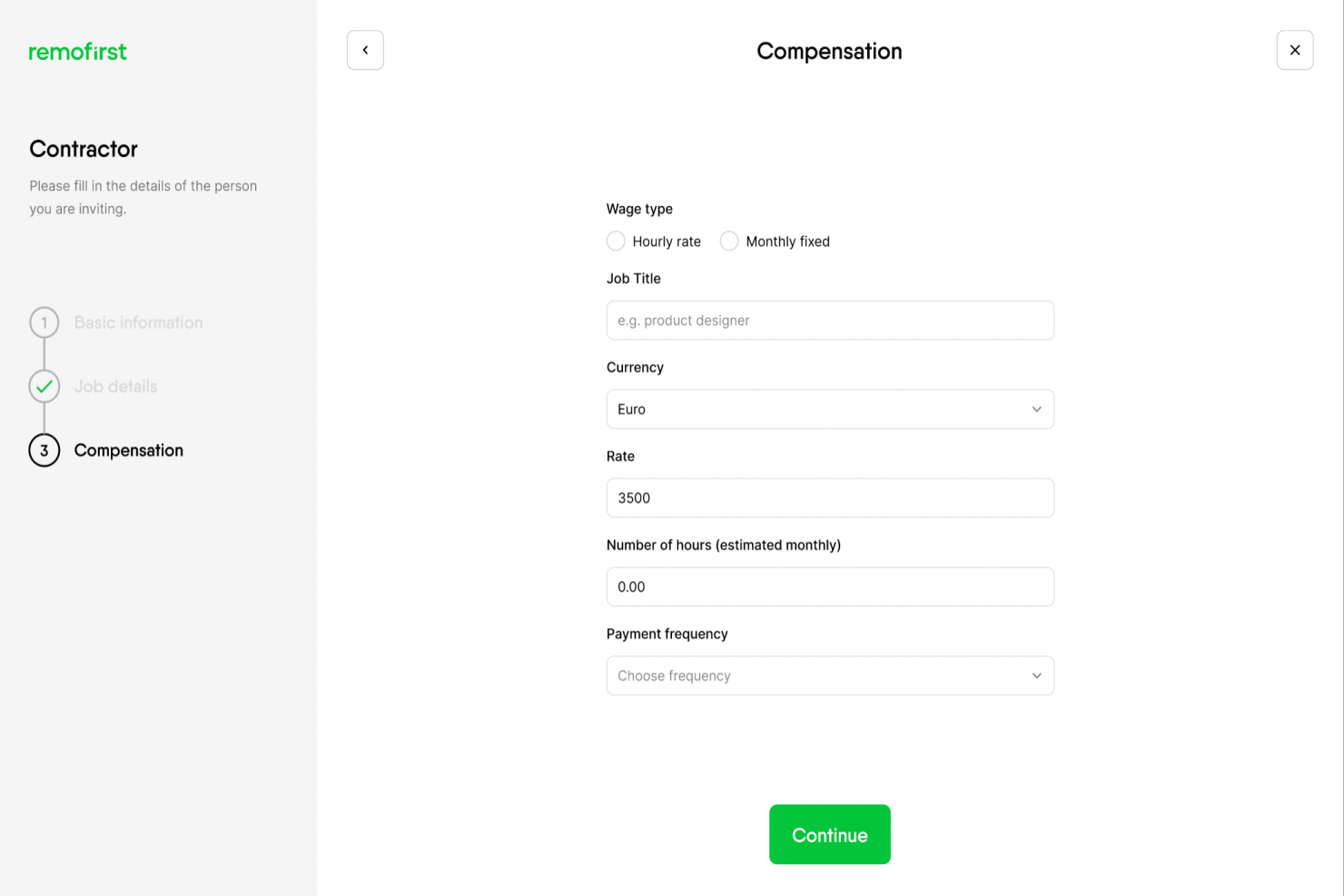
RemoFirst aiuta le piccole imprese a gestire assunzioni internazionali, buste paga e conformità, così puoi costruire e pagare un team globale senza dover creare entità locali.
Per chi è più indicato RemoFirst?
RemoFirst è adatto alle piccole imprese che assumono dipendenti o collaboratori da remoto in diversi paesi e che hanno bisogno di un modo semplice per rimanere conformi.
Perché ho scelto RemoFirst
Ho selezionato RemoFirst per la mia lista perché gestisce molto bene il pagamento dei salari a livello globale in una vasta gamma di paesi. Mi piace il fatto che offra la gestione delle buste paga in oltre 180 paesi, così il mio team può assumere in nuovi mercati senza affannarsi a capire le norme fiscali o i metodi di pagamento locali. RemoFirst offre anche servizi di employer of record (EOR), il che significa che posso integrare dipendenti a tempo pieno in paesi dove non abbiamo una entità legale. La gestione della conformità integrata mantiene contratti e dichiarazioni in linea con le leggi locali sul lavoro.
Caratteristiche principali di RemoFirst
- Gestione dei collaboratori: integra, gestisci e paga collaboratori internazionali con contratti conformi alle normative locali.
- Amministrazione dei benefit: imposta e gestisci assicurazione sanitaria e altri benefit per i dipendenti globali direttamente dalla piattaforma.
- Gestione delle spese: i dipendenti possono inviare note spese attraverso la piattaforma per la revisione e il rimborso insieme alla busta paga regolare.
- Portale self-service per i dipendenti: i membri del team possono accedere a cedolini paga, contratti e documenti personali tramite un portale dedicato.
Integrazioni di RemoFirst
Le integrazioni includono BambooHR, ADP Workforce Now e GoCardless.

Ideale per strumenti di coinvolgimento dei dipendenti
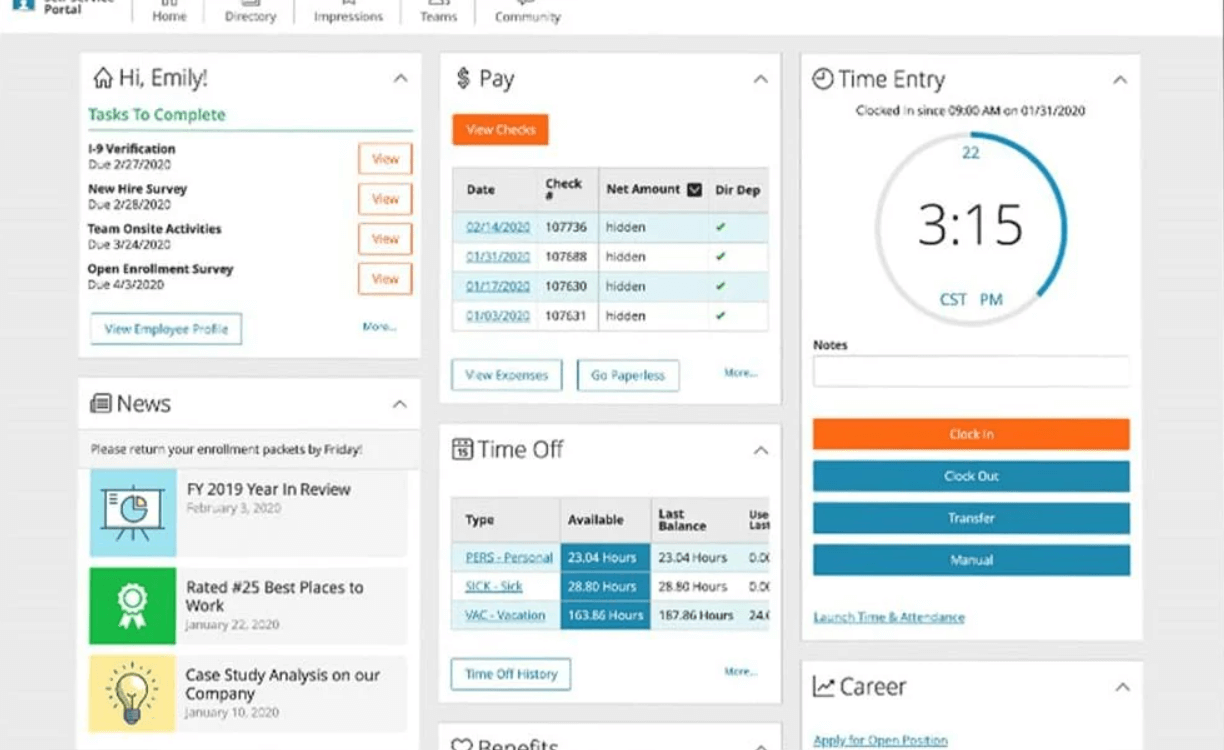
Paylocity offre alle piccole imprese una piattaforma unica per gestire paghe, risorse umane e coinvolgimento dei dipendenti, aiutando i team a gestire tutto, dall'onboarding alle prestazioni fino alla conformità, in un unico posto.
Per Chi è Meglio Paylocity?
Paylocity è ideale per piccole e medie imprese che desiderano andare oltre la semplice amministrazione HR e investire nel mantenere i dipendenti coinvolti e connessi.
Perché Ho Scelto Paylocity
Paylocity è una delle mie scelte principali perché apprezzo come consideri l'esperienza dei dipendenti una parte centrale delle risorse umane, e non un'aggiunta secondaria. La funzione Community funziona come un hub sociale interno in cui i dipendenti possono pubblicare aggiornamenti, reagire agli annunci della direzione e collaborare in canali di gruppo—tutto dall'app mobile. Mi piace anche lo strumento Employee Voice, che utilizza sondaggi brevi costruiti da data scientist per far emergere segnali di coinvolgimento legati al rischio di abbandono. Per le piccole imprese che cercano di trattenere i talenti, avere un ciclo di feedback integrato direttamente nella piattaforma HR è utile.
Caratteristiche Principali di Paylocity
- Elaborazione delle paghe: Effettua le buste paga con calcoli automatici delle tasse, bonifici diretti e supporto alla conformità in più stati.
- Gestione dei benefit: Gestisci le iscrizioni ai benefit, le connessioni con i fornitori e le scelte dei dipendenti da una singola dashboard.
- Monitoraggio orari e presenze: Tieni traccia delle ore di lavoro, gestisci i turni e sincronizza i dati delle presenze direttamente con la paga.
- Gestione delle prestazioni: Imposta obiettivi, organizza cicli di valutazione e raccogli feedback dai colleghi attraverso un modulo strutturato.
Integrazioni di Paylocity
Le integrazioni includono Microsoft Entra, Google Workspace e Okta.
New Product Updates from Paylocity

Paylocity Expands Expense and Purchase Request Tools
Paylocity adds connected personal cards, smarter expense categorization, and a streamlined purchase request experience. This reduces manual entry and helps finance teams manage expenses and approvals more efficiently. For more information, visit Paylocity’s official site.
 .
.
BambooHR®
Ideale per il coinvolgimento e la soddisfazione dei dipendenti

BambooHR è una piattaforma HR tutto-in-uno per le piccole imprese che desiderano semplificare la gestione dei dipendenti, automatizzare le attività HR e migliorare l'esperienza lavorativa dei propri team.
Per chi è più adatto BambooHR?
BambooHR è adatto alle piccole e medie imprese che necessitano di una piattaforma HR dedicata, in grado di coprire l'intero ciclo di vita dei dipendenti senza richiedere un ampio team HR per la gestione.
Perché ho scelto BambooHR
BambooHR si è guadagnato un posto tra le migliori soluzioni della mia lista perché considera il coinvolgimento dei dipendenti una metrica misurabile e monitorabile, non semplicemente un elemento piacevole da avere. Apprezzo in particolare la funzionalità Benessere dei dipendenti, che utilizza sondaggi anonimi periodici basati su una scala Likert a sei punti per eliminare le risposte neutrali e mostrare come si sentono le persone. La mappa di calore dei report mi consente di individuare le tendenze per reparto o gruppo demografico, così posso distinguere un problema culturale persistente da un'anomalia isolata. Per le piccole imprese, dove un singolo team disimpegnato può avere un impatto sproporzionato, questa visibilità è utile.
Funzionalità principali di BambooHR
- Sistema di tracciamento dei candidati (ATS): Pubblica offerte di lavoro su portali come Indeed e ZipRecruiter, gestisci i candidati e invia e-mail automatiche e personalizzate in ogni fase del processo di assunzione.
- Liste di controllo per l'inserimento dei nuovi assunti: Crea liste di attività personalizzabili per l'inserimento, con promemoria automatici che mantengono allineati il team HR e i team interni prima e dopo il primo giorno di lavoro del nuovo assunto.
- Valutazioni a 360°: Esegui valutazioni personali, dal responsabile al dipendente, tra colleghi e a più livelli gerarchici, con cicli di valutazione personalizzabili o modelli predefiniti.
- Monitoraggio degli obiettivi e degli incontri individuali: Crea, monitora e condividi gli obiettivi individuali e di team e pianifica incontri individuali periodici direttamente all'interno della piattaforma.
Integrazioni di BambooHR
Le integrazioni includono Checkr, Slack, Greenhouse, Indeed, NetSuite, Okta, QuickBooks, Lattice, Deputy e Namely.
Pros and Cons
Pros:
- I sondaggi anonimi aiutano a monitorare le tendenze relative al coinvolgimento
- Gli strumenti per la definizione degli obiettivi si collegano alle valutazioni delle prestazioni pianificate
- Il modulo paghe aggiuntivo evita di dover cambiare sistema con la crescita del team
Cons:
- Per accedere a metriche avanzate, gli strumenti di reportistica richiedono piani di livello superiore
- Nessuno strumento nativo per la programmazione o la pianificazione dei turni
New Product Updates from BambooHR®

BambooHR Adds Employee Navigator Integration
BambooHR adds an Employee Navigator integration that syncs employee demographic data and sends benefit deductions into BambooHR Payroll runs to cut duplicate entry and keep records aligned. For more information, visit BambooHR's official site.
 .
.Altre soluzioni HR per piccole imprese
Nessuno degli strumenti indicati sopra è adatto alla tua organizzazione? Ecco allora alcune opzioni che non sono entrate nella nostra lista principale, ma che potrebbero essere una buona scelta per l’impresa giusta. Puoi anche consultare il nostro articolo sui migliori strumenti HR in assoluto per ulteriori consigli.
- Factorial
Ideale per collegare i calendari del team e pianificare gli impegni
- Leapsome
Ideale per una strategia HR supportata dall'intelligenza artificiale
- Paycor
Ideale per piani base ricchi di funzionalità
- Gusto
Ideale per l'autonomia dei dipendenti
- Workable HR
Ideale per flussi di onboarding personalizzabili
- TriNet
Ideale per un approccio che combina piattaforma e servizio
- Agendrix
Ideale per gestire entrate/uscite
- Pebl
Ideale per la conformità nelle assunzioni internazionali
- Paychex Flex
Ideale per paghe e benefit integrati
- Bambee
Ideale per il monitoraggio automatico della conformità
- Sloneek
Ideale per il monitoraggio di tempo e assenze
- Mitratech Perform
Ideale per lo sviluppo dei talenti e la gestione delle prestazioni
- Vacation Tracker
Ideale per la gestione personalizzata delle assenze
- Lattice
Ideale per gestione di prestazioni e retribuzioni in un'unica soluzione
- GoCo
Miglior servizio clienti HRIS dedicato
- Eddy
Ideale per aziende locali con lavoratori senza postazione fissa
- Fingercheck
Ideale per l'automazione dei flussi di lavoro e approvazioni
- Workleap
Ideale per ottenere insight sull'engagement dei dipendenti
- ChartHop
Ideale per organigrammi dinamici
- Kallidus Sapling
Ideale per la scalabilità
- Arcoro
Ideale per piccole aziende di costruzioni
- HR.my
Miglior software HR completamente gratuito
- CuteHR
Ideale per la gestione di team da remoto
- SnapHRM
La migliore soluzione gratuita per meno di cinque dipendenti
- Rippling
Ideale per la gestione completa delle paghe
- Motivosity
Ideale per il riconoscimento dei dipendenti
- monday AI Workspace
Ideale per dashboard dati personalizzati
- iSpring LMS
Ideale per la formazione dei dipendenti
- Connecteam
Ideale per la gestione dei dipendenti senza scrivania
- Oyster HR
Ideale per dipendenti o collaboratori internazionali


Recensioni correlate sui software HR
Se non hai ancora trovato quello che cerchi, dai un’occhiata a questi altri strumenti correlati che abbiamo testato e valutato:
- Software HR
- Software per le buste paga
- Software per il recruiting
- Servizi di datore di lavoro ufficiale
- Sistemi di monitoraggio dei candidati
- Software per la gestione della forza lavoro
Come Valuto il Software HR per Piccole Imprese
Valuto ogni strumento su due livelli: le funzionalità di base—come i registri dei dipendenti e il monitoraggio delle ferie—che ogni strumento deve avere, e i fattori distintivi che rendono una piattaforma la scelta giusta per un piccolo team.
Funzionalità di Base (Requisiti Fondamentali per Questo Elenco)
Quando seleziono gli strumenti per il mio elenco, valuto ognuno su una scala da 0 (non offre la funzionalità) a 5 (eccelle in quest'area) per ciascuna funzione di base elencata di seguito. Poi calcolo il punteggio totale dello strumento convertendolo in percentuale. Ogni strumento deve ottenere un punteggio minimo totale del 65% per essere considerato per l'inclusione.
- Gestione dei Registri dei Dipendenti: Verifico se la piattaforma centralizza i profili dei dipendenti, i documenti e i dati dell'organigramma in modo che un/un'addetto/a HR unico/a possa trovare un contratto o un contatto di emergenza in pochi secondi.
- Flussi di Lavoro di Onboarding & Offboarding: Ogni strumento dovrebbe permettere di costruire checklist di attività e raccogliere documenti firmati dai nuovi assunti senza rincorrerli via email.
- Monitoraggio delle Ferie e del PTO: Cerco monitoraggio delle ferie maturate, flussi di approvazione e visibilità del calendario—elementi cruciali quando un team di 20 persone deve evitare conflitti di programmazione nei periodi di punta.
- Gestione o Integrazione delle Paghe: Che una piattaforma elabori le paghe nativamente o si sincronizzi con fornitori come Gusto o ADP, valuto quanto facilmente i dati di ore lavorate e retribuzioni fluiscano tra i sistemi.
- Gestione dei Benefici: Anche i piccoli team necessitano di iscrizione digitale e monitoraggio dei piani, quindi verifico se lo strumento gestisce i periodi di iscrizione e i cambiamenti dovuti a eventi della vita senza soluzioni manuali.
- Conformità & Reportistica: Valuto la libreria di moduli di conformità di ogni strumento e la capacità di generare report che aiutino responsabili d’ufficio e fondatori a restare al passo con audit e aggiornamenti normativi.
Una volta che ho un elenco di strumenti che soddisfano i criteri, considero cosa distingue ogni piattaforma.
Fattori Differenzianti (Cosa Rende un Fornitore Unico)
Ecco come comparo e metto a confronto i diversi fornitori:
Funzionalità Distintive
Un portale self-service per i dipendenti fa davvero la differenza per i piccoli team. Quando il personale può aggiornare il proprio indirizzo o scaricare i moduli fiscali in autonomia, si libera l’addetto/a HR da attività ripetitive. Valuto anche se lo strumento include un’app mobile, visto che lavoratori senza scrivania nel retail o nei servizi sul campo devono timbrare e controllare i turni dal telefono. Anche la presenza di un sistema integrato di tracciamento dei candidati è una caratteristica che cerco, soprattutto per i team in crescita che vogliono pubblicare offerte di lavoro e portare i candidati in onboarding senza cambiare piattaforma.
Oltre le Funzionalità
La trasparenza nei prezzi è fondamentale per le piccole imprese, quindi verifico se ogni fornitore propone piani chiari per dipendente al mese e permette di aggiungere moduli come paghe o benefici man mano che aumenta l’organico. Anche il supporto alle integrazioni è importante—analizzo quanto bene ogni strumento si collega a piattaforme contabili come QuickBooks o Xero e a strumenti di comunicazione come Slack. Considero anche il supporto all’onboarding, poiché un responsabile d’ufficio che configura per la prima volta un software HR ha bisogno di wizard guidati o assistenza alla migrazione, non solo di un articolo della knowledge base.
Per i professionisti delle risorse umane, si tratta di ridurre il lavoro manuale… Più automazione e integrazione dei flussi di lavoro riesci a ottenere, meglio è.
Come scegliere il software HR per le piccole imprese
Come illustrato, il software HR può aiutare le piccole imprese ad affrontare numerose sfide nella gestione dei talenti e a migliorare molti processi.
Per avere ben chiaro ciò di cui hai bisogno mentre definisci il tuo processo di selezione del software HR, tieni a mente i seguenti punti:
Ricorda: ogni azienda è diversa — non dare per scontato che un sistema HR sia adatto alla tua piccola impresa solo perché è popolare.
| Fattore | Cosa considerare |
|---|---|
| Sfide HR | - Immissione manuale elevata dei dati - Attività ripetitive e dispendiose in termini di tempo - Conformità difficile da monitorare - Elevato volume di richieste amministrative da parte dei dipendenti - Reclutamento inefficiente |
| Risultati desiderati e metriche di successo | - Maggiore efficienza e produttività - Meno attività ripetitive grazie all'automazione dei flussi di lavoro - Dati sulla conformità accurati e in tempo reale - Meno richieste amministrative grazie all'autonomia - Riduzione del tempo necessario per l'assunzione e migliore qualità dei candidati |
| Utenti principali | - Chi deve avere accesso: l'intero team HR o solo alcuni utenti? - Quante licenze? - Stabilire le priorità per le esigenze degli utenti HR avanzati, dei manager e dei dipendenti |
| Budget | - Organico attuale e proiezioni a 5–10 anni - Stimare il costo per dipendente al mese - Valutare il potenziale ROI |
| Esigenze di integrazione | - Sostituirà gli strumenti esistenti o si integrerà con essi? - Integrazioni necessarie: contabilità, paghe, monitoraggio delle ore, comunicazioni interne - Disponibilità e personalizzazione delle API |
| Opportunità di consolidamento | - È possibile sostituire più strumenti con un'unica piattaforma? - Potenziale riduzione dei costi SaaS mensili |
| Requisiti tecnici | - Compatibilità con i flussi di lavoro e i sistemi attuali - Supporto per le aree problematiche |
| Integrazione della sicurezza e dell'area di lavoro | - Supporto per le funzionalità di sicurezza (ad esempio, 2FA) - Integrazione con strumenti aziendali come Microsoft SharePoint o Google Workspace |

Come implementare il software HR
Dopo aver selezionato il sistema HR ideale per la tua organizzazione, il passaggio successivo consiste nell'elaborare un solido piano di implementazione per integrare il software nei flussi di lavoro attuali e fornire al tuo team le conoscenze necessarie per utilizzarlo efficacemente.
Il tuo piano di implementazione dovrebbe includere i seguenti componenti chiave:
- Definire una strategia e una tempistica chiare per l'implementazione
- Coinvolgere le parti interessate e raccogliere il loro contributo
- Sviluppare un piano di comunicazione con una chiara attribuzione delle responsabilità
- Introdurre il sistema in fasi per rendere più agevole la transizione
- Fornire sessioni di formazione interna e supporto continuo
- Favorire l'adozione da parte degli utenti per superare la resistenza al cambiamento
- Preparare e ripulire i dati prima di migrarli nel nuovo sistema
- Eseguire scenari di test per i processi critici, come più simulazioni delle paghe o una simulazione del ciclo di valutazione delle prestazioni
- Avviare ufficialmente il sistema, rispondere a eventuali domande o dubbi e garantire una manutenzione regolare
Se cerchi indicazioni dettagliate, la nostra guida completa sull'implementazione del software HR è un'ottima risorsa. Include anche una lista di controllo per l'implementazione del software HR per semplificare il processo!

È inoltre essenziale riunire un team di implementazione eterogeneo. Assicurati che includa rappresentanti dei principali gruppi di portatori di interesse e degli utenti finali, così da tenere conto delle esigenze di tutti.
Mantieni semplice il processo di implementazione per evitare complicazioni inutili.
Tendenze dei software HR per le piccole imprese
Le piccole imprese di successo rimangono al passo con i tempi, e lo stesso deve fare il software che le sostiene! I software HR si evolvono continuamente per stare al passo con la natura mutevole della gestione di una piccola impresa.
Ecco alcune delle tendenze che sto osservando (e prevedendo) in questi strumenti:
Integrazione con l'intelligenza artificiale e l'apprendimento automatico
Si osserva una chiara tendenza a sfruttare l'intelligenza artificiale e l'apprendimento automatico per automatizzare e migliorare i processi decisionali.
Ciò include strumenti di selezione dei candidati basati sull'intelligenza artificiale a supporto del processo di assunzione, analisi predittive delle prestazioni dei dipendenti e sistemi automatizzati per l'elaborazione delle paghe. Queste funzionalità si stanno evolvendo rapidamente e i software sono sempre più in grado di gestire attività complesse con un intervento umano minimo, suggerendo un passaggio verso una gestione delle risorse umane più predittiva e personalizzata.
Maggiore sicurezza e privacy dei dati
Con la crescente digitalizzazione dei processi HR, le funzionalità di sicurezza e privacy dei dati sono diventate fondamentali.
Gli aggiornamenti più recenti mostrano una forte attenzione ai metodi avanzati di crittografia, alle soluzioni sicure per l'archiviazione dei dati e alla conformità alle normative globali sulla protezione dei dati.
Questa tendenza risponde alla crescente preoccupazione per la sicurezza dei dati personali sulle piattaforme digitali.
Accessibilità da dispositivi mobili
La spinta verso l'accessibilità da dispositivi mobili continua a essere una tendenza fondamentale. I software HR stanno diventando sempre più adatti all'uso da dispositivi mobili, grazie ad app HR o interfacce web ottimizzate per i dispositivi mobili che consentono a manager e dipendenti di accedere alle informazioni e svolgere attività ovunque si trovino.
Questa tendenza risponde all'aumento delle forze lavoro mobili e alla necessità di flessibilità nell'accesso ai servizi HR.
Queste tendenze emergenti nei software HR non sono semplicemente progressi tecnologici: sono strumenti strategici che affrontano i principali problemi e le esigenze dei professionisti HR nelle piccole imprese.
Adottare queste tendenze può semplificare le operazioni, migliorare l'efficienza e favorire una forza lavoro più coinvolta e conforme alle normative.
Queste tendenze dimostrano un passaggio significativo verso soluzioni software HR più intelligenti, flessibili e sicure, che aiutano le piccole imprese a rimanere adattabili, agili e pronte per la crescita futura.

Che cos'è un software HR per le piccole imprese?
Il software per le risorse umane per le piccole imprese è uno strumento che aiuta a gestire processi essenziali delle operazioni relative al personale, come assunzioni, inserimento, buste paga e monitoraggio delle prestazioni. Semplifica le attività amministrative, riduce il lavoro manuale e contribuisce a garantire la conformità alle leggi sul lavoro. Centralizzando le funzioni HR, consente alle piccole imprese di risparmiare tempo, migliorare l'esperienza dei dipendenti e concentrarsi sulla crescita. Una piattaforma HRMS è un tipo di software HR che riunisce molte di queste funzioni in un unico sistema.
Funzionalità principali del software HR per le piccole imprese
Quando selezioni un software HR per le piccole imprese, presta attenzione alle seguenti funzionalità principali:
- Gestione del database dei dipendenti: Mantieni tutte le informazioni sui dipendenti organizzate e facilmente accessibili. Il software HR centralizza dati come recapiti, qualifiche professionali e cronologia lavorativa, offrendoti una visibilità immediata sul tuo team e aiutandoti a prendere decisioni più rapidamente.
- Elaborazione delle buste paga: Automatizza l'elaborazione delle paghe, i calcoli fiscali e le detrazioni, così il tuo personale viene pagato correttamente e puntualmente, senza calcoli manuali notturni o errori costosi.
- Monitoraggio delle presenze e del tempo: Tieni facilmente traccia delle ore lavorate, degli straordinari e delle ferie retribuite. Il software HR ti aiuta a prevenire le frodi sulle ore lavorate, ridurre il lavoro amministrativo e mantenere registri accurati senza dover rincorrere i fogli presenze cartacei.
- Selezione e inserimento: Gestisci gli annunci di lavoro, monitora i candidati e crea esperienze di inserimento fluide che aiutino i nuovi assunti a sentirsi accolti e a partire con il piede giusto fin dal primo giorno.
- Amministrazione dei benefit: Semplifica la configurazione e la gestione di benefit come l'assicurazione sanitaria e i piani pensionistici. Il software si occupa del lavoro più impegnativo, così puoi offrire vantaggi competitivi senza essere sommerso dalla burocrazia.
- Gestione della conformità: Rispetta le leggi sul lavoro e le normative sulla privacy dei dati. Il software HR ti avvisa dei potenziali rischi di non conformità e contribuisce a garantire che i tuoi processi soddisfino gli standard legali.
- Gestione delle prestazioni: Monitora gli obiettivi, programma le valutazioni e sostieni la crescita dei dipendenti con strumenti strutturati per il feedback. Incoraggia una comunicazione efficace e mantieni lo sviluppo sulla buona strada durante tutto l'anno.
- Portale self-service: Dai ai dipendenti la possibilità di aggiornare le informazioni personali, consultare i cedolini e richiedere ferie, riducendo le attività amministrative ripetitive e responsabilizzando il tuo team.
- Gestione dei documenti: Archivia e condividi in modo sicuro documenti HR, contratti e policy. Tutto è facile da trovare, ordinato e aggiornato.
- Report e analisi: Genera dati utili su buste paga, presenze, prestazioni e altro ancora. Individua tempestivamente le tendenze, prendi decisioni basate sui dati e mantieni le operazioni HR efficienti.
Funzionalità comuni di intelligenza artificiale del software HR per le piccole imprese
Molti strumenti HR stanno integrando funzionalità di intelligenza artificiale per migliorare l'esperienza del cliente, ad esempio:
- Rilevamento automatizzato dei problemi nelle buste paga: L'AI analizza i dati delle buste paga alla ricerca di anomalie o errori prima che diventino problemi, individuando immediatamente situazioni come calcoli errati o voci duplicate.
- Verifica automatizzata dei documenti: L'AI esamina e convalida i documenti dei dipendenti in modo rapido e accurato, risparmiando ore di controlli manuali e riducendo il rischio di errori o frodi.
- Monitoraggio intelligente della conformità: L'AI tiene traccia dei cambiamenti nelle leggi sul lavoro, nelle norme fiscali e nei regolamenti HR, notificandoti gli aggiornamenti affinché tu possa rimanere conforme ed evitare sanzioni costose.
- Analisi predittiva per la pianificazione della forza lavoro: L'AI prevede il fabbisogno di assunzioni, i parametri di riferimento salariali e i rischi di turnover, così puoi anticipare le difficoltà di organico e prendere decisioni strategiche migliori a lungo termine.
- Assistenza ai dipendenti tramite chatbot: Grazie ai chatbot basati sull'AI, il tuo team riceve risposte immediate alle domande HR 24 ore su 24, 7 giorni su 7, senza dover più aspettare assistenza per buste paga, benefit o ferie.
Vantaggi del software HR per le piccole imprese
Nella mia esperienza, investire in un software HR renderà le funzioni relative alle risorse umane più efficienti ed efficaci.
Le moderne soluzioni HR possono ridurre il carico amministrativo, creare una migliore esperienza per i dipendenti e aiutarti a individuare informazioni utili per una gestione più efficace dei talenti.
Scegliendo il miglior software HR per le tue esigenze, puoi aspettarti di ottenere i seguenti vantaggi:
Maggiore efficienza
Il software HR automatizza le attività di routine, liberando tempo per il personale HR, che può concentrarsi su iniziative strategiche.
Questa automazione riduce il tempo dedicato alle attività amministrative, consentendo al personale HR di concentrarsi su attività a maggiore valore aggiunto.
Uno studio ha rilevato che l'implementazione di un nuovo HRIS ha permesso a una SMB di risparmiare $175k in un anno.
Gestione semplificata dei dati
Centralizzando i dati delle risorse umane, il software per la gestione delle risorse umane garantisce che tutte le informazioni sui dipendenti siano archiviate in un unico luogo, rendendole facilmente accessibili.
Ciò garantisce che tutti i registri dei dipendenti siano aggiornati e possano essere consultati o modificati solo dal personale autorizzato, riducendo il rischio di discrepanze e perdite di dati.
Processo decisionale migliorato
Grazie all'accesso a dati e analisi in tempo reale, il software per le risorse umane fornisce informazioni utili per prendere decisioni consapevoli. Ciò consente alle aziende di prendere decisioni strategiche in materia di risorse umane basate su informazioni accurate e aggiornate.
Conformità migliorata
Tenendo traccia delle modifiche alle leggi e ai regolamenti sul lavoro, il software per le risorse umane aiuta a garantire che le aziende rimangano conformi. Ciò riduce il rischio di problemi legali e sanzioni associati alla mancata conformità.
Migliore esperienza dei dipendenti
La maggior parte delle piattaforme per le risorse umane offre portali self-service che consentono ai dipendenti di gestire le proprie informazioni personali, inviare richieste di permesso, accedere agli strumenti digitali per la gestione dei documenti e consultare online le informazioni relative alla busta paga e ai benefit.
Questo livello di autonomia migliora l'esperienza complessiva dei dipendenti, portando a livelli più elevati di coinvolgimento e soddisfazione.
Il software per le risorse umane destinato alle piccole imprese può aiutarti a gestire le tue funzioni HR in modo più efficiente ed efficace. Dal miglioramento della conformità e del processo decisionale al potenziamento dell'esperienza dei dipendenti, i vantaggi sono evidenti.
Per le piccole imprese che desiderano ottimizzare i propri processi HR e concentrarsi sulla crescita, investire in un software per le risorse umane è un passo nella giusta direzione. Scopri di più nel nostro articolo sui vantaggi del software per la gestione delle risorse umane.
L’implementazione di tecnologie migliori può cambiare l’intero ambiente di lavoro. Quando le persone non sono frustrate da sistemi che non funzionano, sono più propense a partecipare e ad avere un atteggiamento positivo nei confronti del proprio ambiente di lavoro.
Costi e prezzi dei software per le risorse umane per piccole imprese
Le soluzioni software per le risorse umane offrono diverse opzioni di prezzo per soddisfare le esigenze diversificate delle piccole imprese.
Questi piani vanno generalmente dalle versioni gratuite di base ai pacchetti più avanzati con funzionalità aggiuntive.
Comprendere le caratteristiche specifiche di ciascun piano ti aiuterà a scegliere l'opzione più adatta alle esigenze e al budget della tua azienda.
Tabella comparativa dei piani per il software HR
| Tipo di piano | Prezzo medio | Funzionalità comuni |
|---|---|---|
| Gratuito | $0 | Self-service per i dipendenti, report di base e accesso per un numero limitato di utenti |
| Base | $4-7 per utente/mese | Self-service per i dipendenti, elaborazione delle buste paga, report di base e assistenza via email |
| Standard | $8-12 per utente/mese | Funzionalità di base, oltre a monitoraggio delle presenze e degli orari, gestione delle prestazioni e assistenza via chat |
| Premium | $15-30 per utente/mese | Funzionalità standard, oltre a report avanzati, analisi HR, assistenza prioritaria e integrazioni personalizzate |
Quando scegli il piano migliore per te, considera le tue esigenze attuali e future. Per ora potrebbe essere sufficiente un piano gratuito o di base, ma se la tua azienda è pronta a crescere, un piano standard o premium potrebbe essere più adatto alle funzionalità HR di cui hai bisogno.
Se il costo è il fattore più importante per te, questo articolo analizza nel dettaglio i costi del software HR e spiega come decidere quale sia la soluzione migliore per la tua azienda.

Domande frequenti
Ecco alcune risposte alle domande più frequenti che riceviamo sul software HR per le piccole imprese:
Qual è il miglior software HR per le piccole imprese?
La verità è che non esiste una soluzione complessiva che sia la più adatta a tutte le imprese. Poiché non esistono due soluzioni uguali, la migliore è quella in grado di soddisfare i tuoi requisiti specifici.
Quanto sono scalabili le soluzioni software HR per le imprese in crescita?
Molte soluzioni software HR sono progettate tenendo conto della scalabilità, il che le rende ideali per le imprese in crescita. Spesso consentono di aggiungere facilmente nuovi utenti, funzionalità o moduli man mano che l’azienda si espande. Questa flessibilità garantisce che, con l’evolversi dell’impresa, il sistema possa crescere insieme a te, adattandosi alle nuove sfide senza richiedere una revisione completa del sistema.
Quale tipo di assistenza clienti e formazione offrono le aziende di software HR?
Le aziende di software HR offrono generalmente assistenza clienti e formazione attraverso una combinazione di:
- Risorse online e contenuti autonomi (video, base di conoscenza, tutorial, ecc.)
- Assistenza in tempo reale (chat, telefono, video, ecc.) e supporto via e-mail
- Programmi di formazione e inserimento
- Contenuti di supporto generati dagli utenti (forum o community)
La quantità e la disponibilità di queste risorse possono variare da un fornitore all’altro e da un livello di piano all’altro. Trovare un fornitore di software HR con un’offerta di assistenza adeguata è particolarmente importante per le piccole imprese che potrebbero operare senza competenze interne in ambito HR.
In che modo i sistemi software HR gestiscono la sicurezza dei dati e la conformità?
Il software per le risorse umane protegge i dati sensibili dei dipendenti — come informazioni personali, stipendi, contratti e valutazioni delle prestazioni — utilizzando solide misure di sicurezza informatica, tra cui crittografia, firewall e autenticazione a più fattori. Le aziende di software HR effettuano inoltre regolari valutazioni dei rischi per contribuire a identificare e mitigare le potenziali vulnerabilità, mentre i piani di risposta agli incidenti garantiscono un’azione tempestiva in caso di violazione dei dati.
La maggior parte dei software per la gestione delle risorse umane è conforme alle normative globali sulla protezione dei dati — come GDPR, HIPAA e SOC 2 — per garantire il rispetto degli standard legali in materia di privacy e sicurezza dei dati. Le imprese dovrebbero inoltre valutare le pratiche di sicurezza dei dati di qualsiasi software o servizio HR di terze parti utilizzato, per assicurarsi che segua gli stessi rigorosi protocolli di sicurezza dei dati.
Questo articolo offre maggiori dettagli sulle migliori pratiche di gestione dei dati se desideri approfondire l’argomento.
Quali funzionalità del software HR sono indispensabili per le piccole imprese?
Avrai bisogno di funzionalità fondamentali come la gestione delle anagrafiche dei dipendenti, l’integrazione delle buste paga, il monitoraggio delle assenze, i flussi di lavoro per l’inserimento e la reportistica di base. Per i piccoli team, pannelli di controllo intuitivi e strumenti di automazione fanno risparmiare tempo. Cerca piattaforme che offrano opzioni autonome per i dipendenti.
Come scelgo il software HR giusto per un'azienda con meno di 50 dipendenti?
Inizia elencando le funzionalità indispensabili: pensa agli elementi essenziali come buste paga, gestione delle ferie e supporto alla conformità. Se desideri consolidare queste funzioni in un’unica piattaforma, confronta le opzioni HRMS per le piccole imprese. Cerca un software con prezzi semplici, configurazione intuitiva, buon supporto e le integrazioni giuste. Scegli uno strumento che possa crescere insieme a te, senza essere sovraccarico di funzionalità aggiuntive non necessarie.
Il software HR può integrarsi con gli strumenti di gestione paghe o contabilità che già utilizzo?
Sì, molte soluzioni software HR si integrano con i più diffusi programmi per la gestione paghe e la contabilità. Controlla l’elenco delle integrazioni prima dell’acquisto oppure chiedi al fornitore informazioni sulla compatibilità. Le integrazioni semplici aiutano a evitare l’inserimento manuale dei dati e a ridurre gli errori, facendoti risparmiare tempo e complicazioni.
Esistono software HR gratuiti o economici che siano davvero adatti alle piccole imprese?
Sì, diversi strumenti HR affidabili offrono piani gratuiti o convenienti pensati per le piccole imprese. Ad esempio, Zoho People dispone di un piano gratuito per un massimo di cinque utenti. Homebase offre un solido piano gratuito per la pianificazione di base e il monitoraggio delle ore. Freshteam di Freshworks propone un piano gratuito per le aziende con un massimo di 50 dipendenti. Questi strumenti coprono gli aspetti essenziali, come le anagrafiche dei dipendenti, la gestione delle ferie e il monitoraggio delle ore, consentendoti di iniziare a gestire le attività HR senza sostenere un costo iniziale elevato.
In che modo il software HR può aiutarmi a rispettare le leggi sul lavoro?
Il software HR può inviare promemoria sulle politiche, archiviare i moduli obbligatori e automatizzare la conservazione dei dati, aiutandoti a rispettare gli obblighi di legge. Alcuni strumenti offrono controlli di conformità integrati, inviano avvisi sulle scadenze e aggiornano i modelli quando cambiano le leggi. Questo riduce i rischi e ti aiuta a essere sempre pronto per le verifiche.