

I 10 migliori software di gestione dei consigli di amministrazione basati sull’IA recensiti nel 2026

10 Elenco dei migliori software di gestione dei consigli di amministrazione con IA


Gestire le riunioni e le decisioni del consiglio di amministrazione può essere complicato, soprattutto quando devi occuparti di diverse attività contemporaneamente. Hai bisogno di una soluzione che renda più semplice organizzare, collaborare e prendere decisioni informate. È qui che entra in gioco il software di gestione dei consigli di amministrazione con IA.
Questi strumenti utilizzano l'IA per aiutarti ad analizzare i dati, gestire i documenti e migliorare la comunicazione con il tuo team. In base alla mia esperienza, le funzionalità basate sull'IA possono farti risparmiare tempo e ridurre gli errori, rendendo il tuo lavoro meno stressante.
Ti guiderò alla scoperta dei migliori software di gestione dei consigli di amministrazione con IA, concentrandomi sulle loro funzionalità distintive. Scoprirai come questi strumenti possono affrontare le tue difficoltà specifiche e migliorare l'efficienza del tuo team. Analizziamo le migliori soluzioni, che possono trasformare il modo in cui gestisci le attività del consiglio.
Perché fidarsi delle nostre recensioni sui software
Il nostro team testa e recensisce software dal 2012. In quanto esperti HR noi stessi, sappiamo quanto sia difficile — e importante — scegliere il software giusto.
Per questa guida, abbiamo valutato gli strumenti attraverso test pratici e ricerche indipendenti, assegnando un punteggio agli strumenti in base ai nostri criteri di selezione. Ci basiamo inoltre sulle competenze di leader di pensiero del settore e di professionisti HR attivi.
Le nostre recensioni riflettono il nostro giudizio editoriale umano, non un discorso di vendita.
Revisori esperti:
Tabella comparativa dei software di gestione dei consigli di amministrazione con IA
Questa tabella comparativa riassume i dettagli dei prezzi delle mie migliori selezioni di software di gestione dei consigli di amministrazione con IA:
| Tool | Best For | Trial Info | Price | ||
|---|---|---|---|---|---|
| 1 | Ideale per intuizioni IA intuitive | Prova gratuita + demo gratuita disponibile | Prezzo su richiesta | Website | |
| 2 | Ideale per piccoli team con strumenti IA | Prova gratuita di 14 giorni disponibile | Da $20.99/utente/mese (fatturazione annuale) | Website | |
| 3 | Ideale per la gestione delle riunioni con l’IA | Demo gratuita disponibile | Prezzo su richiesta | Website | |
| 4 | Ideale per la conformità guidata dall’AI | Demo gratuita disponibile | Prezzi su richiesta | Website | |
| 5 | Ideale per soluzioni di IA adattabili | Demo gratuita disponibile | Prezzi su richiesta | Website | |
| 6 | Ideale per collaborazione sicura con IA | Prova gratuita di 21 giorni disponibile | Prezzi su richiesta | Website | |
| 7 | Ideale per analisi strategiche con IA | Demo gratuita disponibile | Prezzi su richiesta | Website | |
| 8 | Ideale per ordini del giorno del consiglio basati su IA | Prova gratuita di 30 giorni + demo gratuita disponibile | Da $165/consiglio/mese | Website | |
| 9 | Ideale per la gestione documentale basata su IA | Demo gratuita disponibile | Da $250/utente (fatturazione annuale) | Website | |
| 10 | Ideale per la governance supportata dall'IA | Demo gratuita disponibile | Da €149/mese | Website |
Recensione dei migliori software di gestione dei consigli di amministrazione con IA
Di seguito trovi i miei riepiloghi dettagliati dei migliori software di gestione dei consigli di amministrazione con IA inclusi nel mio elenco. Le mie recensioni offrono una panoramica dettagliata delle funzionalità principali, dei pro e dei contro, delle integrazioni e dei casi d’uso ideali di ogni strumento, per aiutarti a trovare quello più adatto a te.

OnBoard
Ideale per intuizioni IA intuitive
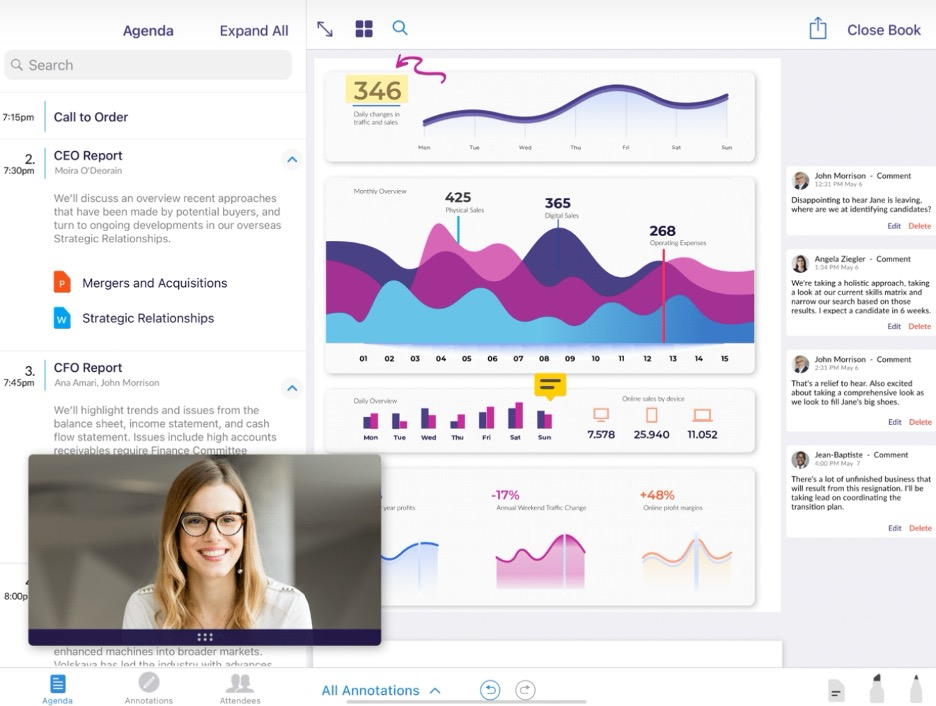
OnBoard è un portale cloud dedicato ai consigli di amministrazione che aiuta i team a gestire riunioni, libri dei verbali e strumenti di governance in modo più efficiente. Offre funzionalità di intelligenza artificiale come Agenda AI, Minutes AI e Book Builder AI per supportare la preparazione delle riunioni e le attività di follow-up.
Perché ho scelto OnBoard: Gli strumenti AI di OnBoard, tra cui Minutes AI, Agenda AI e Book Builder AI, lo rendono particolarmente adatto a fornire intuizioni intuitive nella fase di preparazione delle riunioni. Queste funzionalità aiutano a generare riepiloghi, bozze di ordini del giorno e a evidenziare le azioni da intraprendere, supportando gli stakeholder che necessitano di un contesto rapido e chiaro. La sintesi automatica e l'analisi guidata dall’IA offrono un prezioso orientamento alle discussioni mantenendo al tempo stesso esigenze e materiali ben organizzati e di facile consultazione.
Caratteristiche di spicco & integrazioni:
Funzionalità includono una libreria di governance ricercabile, strumenti per creare ordini del giorno, controlli basati sui ruoli, sintesi IA in tempo reale, annotazioni, votazione, firme elettroniche e opzioni di compliance quali SOC 2.
Integrazioni includono Microsoft 365, Zoom, Teams, Dropbox, Google Drive, Slack, Salesforce, Docusign, OneDrive e Box.
Pros and Cons
Pros:
- Creazione di agende tramite IA
- Gestione sicura dei dati
- Supporto agli standard di conformità
Cons:
- Controlli di notifica restrittivi
- Opzioni di personalizzazione limitate

Ideale per piccoli team con strumenti IA
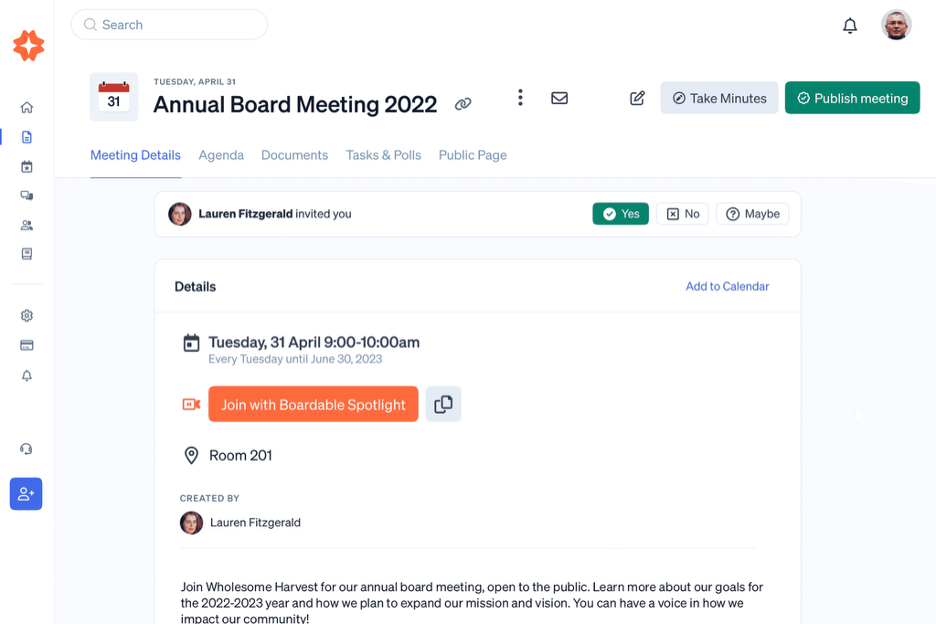
Boardable è una soluzione di gestione del consiglio pensata per organizzazioni di piccole e medie dimensioni che desiderano migliorare l'efficienza delle riunioni. Offre funzionalità IA per i verbali delle riunioni, riepiloghi delle videoconferenze e supporto alla creazione dell'ordine del giorno, aiutando i team a gestire incarichi di follow-up, questionari e attività da svolgere in un unico portale del consiglio.
Perché ho scelto Boardable: Boardable si distingue grazie a funzionalità come la pianificazione assistita dall'IA e i promemoria automatici, che assicurano che il tuo team rimanga sulla buona strada. I suoi strumenti IA intuitivi aiutano a gestire ordini del giorno e verbali, rendendolo ideale per piccoli team. Il software punta su una navigazione facile da usare, permettendoti di adattarti e gestire facilmente le tue attività di consiglio. Con Boardable puoi sfruttare le capacità dell'IA per incrementare la produttività generale.
Funzionalità e integrazioni distintive:
Funzionalità includono archiviazione centralizzata dei documenti, tracciamento delle attività, un generatore di ordini del giorno, sondaggi e videoconferenze integrate con trascrizione e riepilogo tramite IA.
Integrazioni includono Zoom, Slack, Microsoft Teams, Google Calendar, Outlook, Dropbox, Trello, Asana, OneDrive e Google Drive.
Pros and Cons
Pros:
- Pianificazione tramite IA semplice
- Interfaccia intuitiva
- Adatto a piccoli team
Cons:
- Interfaccia poco intuitiva
- Strumenti di collaborazione su documenti di base

Govenda
Ideale per la gestione delle riunioni con l’IA

Govenda è un software di gestione dei consigli di amministrazione progettato per direttori e dirigenti che desiderano migliorare i propri processi di gestione delle riunioni. Offre funzionalità di intelligenza artificiale per ottimizzare la gestione dei documenti, la stesura dei verbali e i flussi di lavoro dei comitati, aiutando i team a lavorare in modo più efficiente.
Perché ho scelto Govenda: Govenda offre la stesura dei verbali e la generazione delle trascrizioni supportate dall’intelligenza artificiale, semplificando la preparazione e la gestione delle riunioni. Le sue funzionalità di IA aiutano ad automatizzare la creazione dell’ordine del giorno e garantiscono che il team rimanga allineato grazie a notifiche intelligenti. L’attenzione della piattaforma verso una gestione efficiente delle riunioni la rende una scelta interessante per i dirigenti impegnati. Gli strumenti di IA di Govenda migliorano la collaborazione e il processo decisionale fornendo preziose informazioni.
Funzionalità principali & integrazioni:
Funzionalità includono votazione digitale, archiviazione sicura dei documenti e collaborazione in tempo reale. Puoi anche beneficiare delle funzionalità di gestione delle attività e monitoraggio della conformità. Il software offre dashboard personalizzabili per una migliore supervisione delle riunioni.
Integrazioni includono Microsoft Office 365, Google Workspace, Slack, Zoom, Box, Docusign, Salesforce, Dropbox, OneDrive e Adobe Sign.
Pros and Cons
Pros:
- Strumenti di stesura dei verbali con IA
- Gestione efficiente dei documenti
- Migliora la collaborazione nelle riunioni
Cons:
- Poche personalizzazioni visive o di flusso di lavoro
- La conversione dei file limita i formati


Diligent Boards è una piattaforma di gestione del consiglio di amministrazione rivolta alle organizzazioni che danno priorità alla conformità e alla governance. Le sue funzionalità AI supportano la creazione automatica di board book, la scansione dei rischi e la documentazione del ciclo di vita, aiutando le organizzazioni a mantenere un controllo strutturato su materiali sensibili del consiglio.
Perché ho scelto Diligent Boards: Diligent Boards si distingue per il monitoraggio della conformità e la valutazione dei rischi basati sull’AI, assicurando che la tua organizzazione rispetti gli standard normativi. Gli strumenti AI del software analizzano i documenti e individuano potenziali problemi di conformità, facilitando il compito del tuo team nel restare conforme. Le sue funzionalità AI intuitive facilitano inoltre la comunicazione e la condivisione sicura dei dati. Diligent Boards offre una soluzione completa per la governance, con strumenti AI che aiutano a mantenere la trasparenza.
Caratteristiche principali & integrazioni:
Caratteristiche includono Smart Book Builder, Smart Risk Scanner, archiviazione sicura dei documenti, voto elettronico, audit trail e materiali del consiglio riassunti dall’AI. Il software offre dashboard personalizzabili per accedere facilmente alle informazioni importanti.
Integrazioni includono Microsoft Office, Zoom, Slack, Docusign, Google Workspace, Salesforce, Box, OneDrive, Dropbox e Okta.
Pros and Cons
Pros:
- Forte attenzione alla conformità
- Canali di comunicazione sicuri
- Collaborazione su documenti in tempo reale
Cons:
- Mancano alcune funzionalità chiave per dispositivi mobili
- Procedura di configurazione complessa


BoardEffect è una piattaforma di gestione del consiglio di amministrazione progettata per organizzazioni non profit e istituzioni sanitarie, con un focus sulla governance e la gestione delle riunioni. Applica l'IA per migliorare la gestione dei documenti e semplificare le comunicazioni del consiglio.
Perché ho scelto BoardEffect: BoardEffect offre strumenti di IA adattabili che aiutano a ottimizzare le operazioni e i processi decisionali del consiglio. Il suo sistema di gestione documentale basato su IA assicura che il tuo team possa accedere e organizzare rapidamente le informazioni essenziali. L'attenzione della piattaforma sulla semplificazione della comunicazione favorisce una governance efficace e la preparazione delle riunioni. Con BoardEffect, puoi personalizzare le soluzioni di IA per soddisfare le esigenze uniche della tua organizzazione e migliorare le prestazioni complessive del consiglio.
Funzionalità distintive e integrazioni:
Funzionalità includono la creazione di ordini del giorno, il monitoraggio delle attività e la votazione sicura. È possibile sfruttare anche strumenti di collaborazione in tempo reale per una gestione efficiente delle riunioni. Il software offre una dashboard centralizzata per un facile accesso ai documenti chiave.
Integrazioni includono Microsoft Office 365, Google Workspace, Zoom, Slack, Dropbox, OneDrive, Box, Docusign, Salesforce e Adobe Sign.
Pros and Cons
Pros:
- Gestione documentale guidata da IA
- Soluzioni per il consiglio personalizzabili
- Migliora la comunicazione del consiglio
Cons:
- La navigazione tra i documenti è macchinosa
- Integrazioni limitate ne riducono la flessibilità

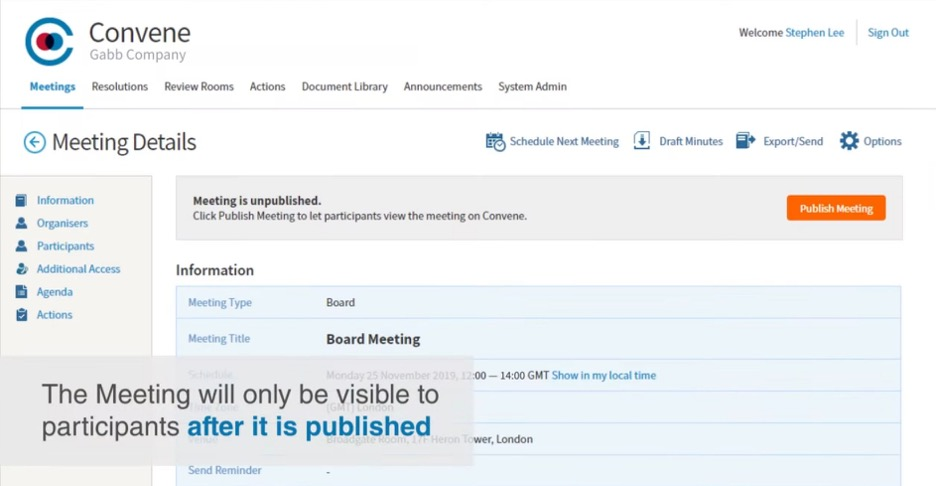
Convene è un software di gestione del consiglio progettato per le organizzazioni che danno priorità a una gestione delle riunioni sicura ed efficiente. Fornisce strumenti basati sull'IA per migliorare la collaborazione e unificare i processi del consiglio.
Perché ho scelto Convene: Convene offre funzionalità IA come aggiornamenti in tempo reale e notifiche intelligenti, che assicurano che il tuo team rimanga informato e coinvolto. Gli strumenti di comunicazione sicuri e guidati dall'IA della piattaforma facilitano discussioni riservate e la condivisione di documenti. Con la gestione delle agende potenziata dall'IA, puoi facilmente organizzare e dare priorità agli argomenti delle riunioni. L'attenzione di Convene su sicurezza e collaborazione lo rende una scelta preferita per le organizzazioni che trattano informazioni sensibili.
Funzionalità e integrazioni principali:
Funzionalità includono firme digitali, votazioni, strumenti di annotazione, riepiloghi delle riunioni generati dall'IA e strumenti di presentazione per sessioni interattive. Il software offre un archivio centralizzato per tutti i tuoi documenti.
Integrazioni includono Microsoft Teams, Zoom, Microsoft 365, Dropbox, Google Drive, Docusign, Adobe Sign, Slack, OneDrive e Box.
Pros and Cons
Pros:
- Solide caratteristiche di sicurezza
- Strumenti di collaborazione in tempo reale
- Gestione dell'agenda alimentata dall'IA
Cons:
- Richiesta formazione continua
- Integrazioni limitate; componenti aggiuntivi a pagamento


Board Intelligence è una piattaforma strategica di gestione del consiglio di amministrazione pensata per dirigenti e membri del board, focalizzata sul miglioramento delle decisioni e delle performance. Applica l'IA per offrire approfondimenti e analisi per una pianificazione strategica e una governance migliori.
Perché ho scelto Board Intelligence: Board Intelligence utilizza l'IA per fornire analisi strategiche che aiutano il tuo team a prendere decisioni informate. I suoi strumenti di IA offrono approfondimenti dettagliati sulle prestazioni del consiglio e sulle tendenze di governance, in linea con gli obiettivi strategici. L'attenzione della piattaforma alle decisioni basate sui dati favorisce il miglioramento delle performance organizzative. Grazie alle sue analisi guidate dall'IA, Board Intelligence supporta la pianificazione e l'esecuzione strategica del tuo team.
Funzionalità principali & integrazioni:
Funzionalità includono dashboard personalizzabili, monitoraggio delle prestazioni e generazione di report. Puoi utilizzare la sua interfaccia intuitiva per una facile navigazione e accesso ai dati. Il software offre inoltre strumenti per la pianificazione strategica e la gestione dei rischi.
Integrazioni includono Microsoft Office, Google Workspace, Slack, Zoom, Salesforce, Dropbox, OneDrive, Box, Docusign e Adobe Sign.
Pros and Cons
Pros:
- Approfondimenti strategici basati sull'intelligenza artificiale
- Supporta il processo decisionale basato sui dati
- Migliora le prestazioni del consiglio
Cons:
- Può richiedere formazione iniziale
- I dettagli sui prezzi non sono disponibili facilmente

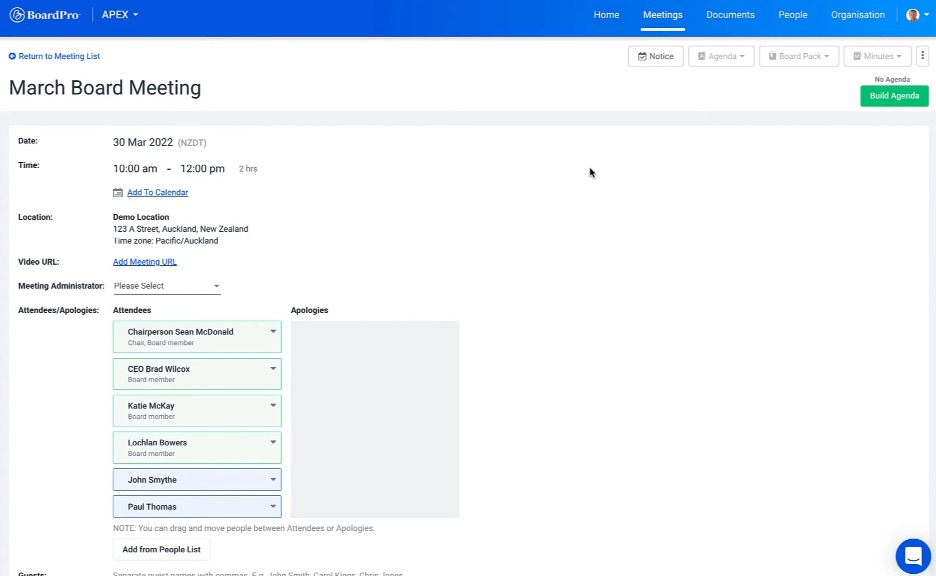
BoardPro è un software di gestione del consiglio progettato per organizzazioni di piccole e medie dimensioni, con l'obiettivo di semplificare i processi delle riunioni del consiglio. Sfrutta l'IA per automatizzare la creazione dell'ordine del giorno e facilitare la preparazione delle riunioni.
Perché ho scelto BoardPro: Le funzionalità basate sull'IA di BoardPro rendono la creazione dell'ordine del giorno semplice e veloce, permettendo al tuo team di concentrarsi sulle discussioni strategiche. I promemoria automatici e il monitoraggio delle attività garantiscono che i membri del consiglio rimangano informati e organizzati. Grazie agli approfondimenti guidati dall'IA, puoi prendere decisioni basate sui dati in linea con gli obiettivi della tua organizzazione. L'accento posto da BoardPro sulla semplificazione dei processi del consiglio lo rende uno strumento prezioso per una governance efficiente.
Caratteristiche e integrazioni principali:
Funzionalità includono verbali delle riunioni, gestione delle attività e creazione di pacchetti riunione. Puoi facilmente accedere ai registri delle riunioni passate e gestire i documenti in modo sicuro. Il software offre anche una dashboard centralizzata per aggiornamenti in tempo reale.
Integrazioni includono Microsoft Office 365, Google Workspace, Zoom, Slack, Dropbox, OneDrive, Box, Docusign, Salesforce e Adobe Sign.
Pros and Cons
Pros:
- Creazione dell'ordine del giorno tramite IA
- Monitoraggio efficiente delle attività
- Semplifica la preparazione delle riunioni
Cons:
- Le funzioni di ricerca e navigazione dei documenti possono essere incoerenti
- Modificare i documenti direttamente sulla piattaforma è limitato

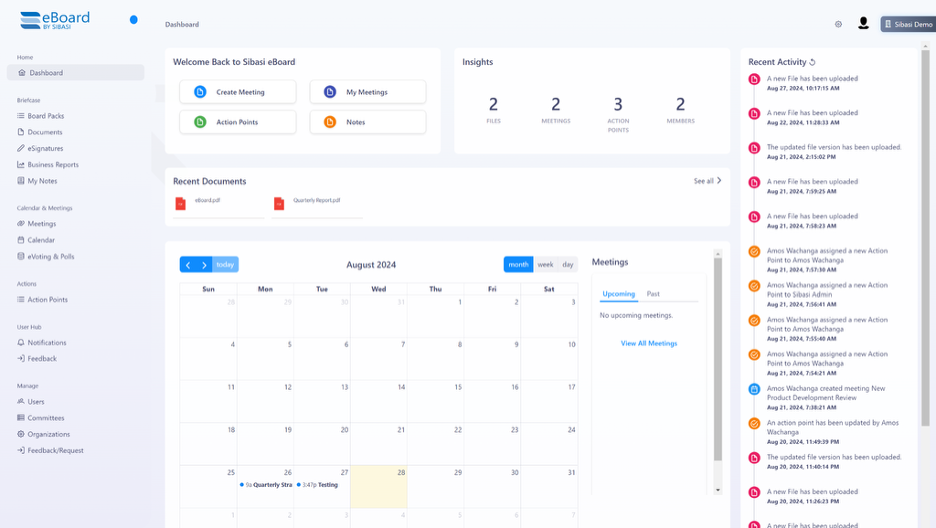
eBoard è una piattaforma digitale per la gestione dei consigli direttivi progettata per istituzioni educative e organizzazioni non-profit al fine di migliorare la governance e la gestione dei documenti. Applica l'intelligenza artificiale per automatizzare i flussi di lavoro documentali e migliorare l'accessibilità.
Perché ho scelto eBoard: Gli strumenti di gestione documentale di eBoard, basati sull'IA, offrono archiviazione e recupero automatici, rendendo più semplice per il tuo team accedere ai documenti critici. La piattaforma offre anche funzionalità di ricerca guidate dall'IA, che facilitano il processo di individuazione delle informazioni importanti. Con eBoard puoi gestire in modo efficiente i materiali del consiglio e garantire la conformità agli standard organizzativi. Il focus sulla gestione dei documenti lo rende uno strumento prezioso per le organizzazioni con elevate esigenze di archiviazione.
Caratteristiche principali & integrazioni:
Caratteristiche includono modelli di riunione personalizzabili, gestione delle agende e collaborazione in tempo reale. Puoi inoltre beneficiare del suo archivio documentale sicuro e delle funzionalità di voto. La piattaforma offre un accesso basato sui ruoli per aumentare la sicurezza.
Integrazioni includono Microsoft Teams, Google Meet, Zoom, SharePoint, Adobe e Docusign.
Pros and Cons
Pros:
- Gestione documentale guidata dall'IA
- Capacità di ricerca efficienti
- Migliora la conformità e l'archiviazione dei documenti
Cons:
- Alcune funzionalità richiedono moduli aggiuntivi
- I layout dei modelli sono rigidi

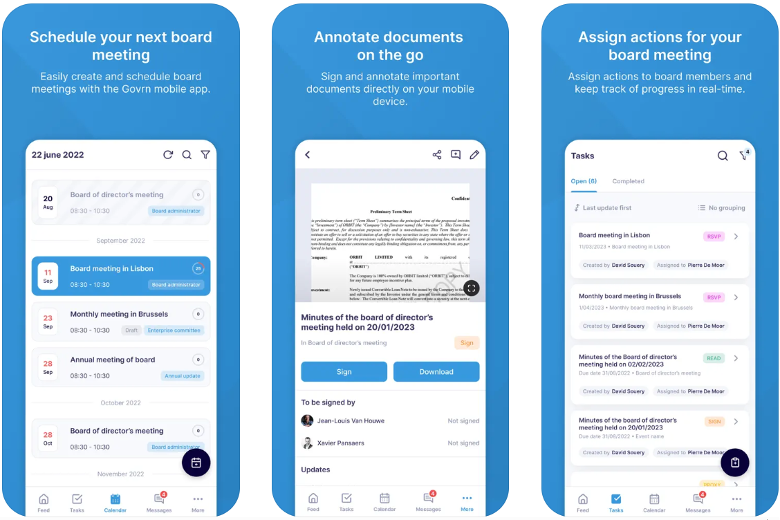
Govrn è una piattaforma di gestione dei consigli di amministrazione alimentata dall'IA, progettata per settori come servizi finanziari, sanità e immobiliare. Si concentra sul miglioramento del processo decisionale, sul tracciamento della conformità e sulla collaborazione in tempo reale.
Perché ho scelto Govrn: Govrn offre approfondimenti basati sull'IA e un monitoraggio della conformità per rafforzare gli standard di governance. I suoi strumenti basati sull'IA aiutano nell'organizzazione dei documenti e nel monitoraggio della conformità, rendendolo una scelta ideale per settori con requisiti normativi stringenti. La piattaforma offre funzionalità di collaborazione in tempo reale per favorire un coinvolgimento efficace del tuo team. La centralizzazione sicura dei documenti e il processo decisionale guidato dai dati distinguono Govrn nel panorama delle soluzioni per la gestione dei consigli di amministrazione.
Caratteristiche principali & integrazioni:
Funzionalità includono gestione dei compiti, comunicazione integrata e sicurezza di livello enterprise. Puoi usufruire del tracciamento del coinvolgimento in tempo reale e della pianificazione automatica delle riunioni. La piattaforma offre anche accesso basato sui ruoli per garantire la sicurezza dei dati.
Integrazioni includono Microsoft Office 365, Slack, Zoom, Google Workspace, Dropbox, Docusign, OneDrive, Box, Salesforce e Adobe Sign.
Pros and Cons
Pros:
- Monitoraggio della conformità alimentato dall'IA
- Strumenti di collaborazione in tempo reale
- Centralizzazione sicura dei documenti
Cons:
- L'automazione può non cogliere il contesto o le sfumature senza revisione manuale
- Troppe funzionalità possono risultare opprimenti per alcuni utenti
Altri software di gestione dei consigli di amministrazione con IA
Ecco alcune altre opzioni di software di gestione dei consigli di amministrazione con IA che non sono entrate nel mio elenco, ma che vale comunque la pena valutare:
- Zeck
Ideale per l'automazione delle attività tramite intelligenza artificiale
- Pervasent
Ideale per strumenti di conformità basati sull'IA
- Board Management
Ideale per la sicurezza dei dati basata sull'IA


Come valuto il software di gestione del consiglio di amministrazione con AI
Per i team di governance che compilano libri del consiglio o per i segretari societari che redigono verbali assistiti dall’AI, suddivido la mia valutazione in criteri indispensabili e i fattori differenzianti che distinguono uno strumento buono da uno eccellente.
Funzionalità di base (Requisiti minimi per questa lista)
Queste capacità fondamentali rappresentano i criteri di accettazione per l’inclusione nella mia lista di software di gestione dei consigli di amministrazione con AI:
- Intelligenza nelle riunioni AI: Valuto se la piattaforma può riassumere lunghi pacchetti del consiglio, trascrivere riunioni in tempo reale ed estrarre azioni da intraprendere—non solo cercare per parola chiave.
- Automazione dei libri del consiglio e delle agende: Qui sono importanti assemblaggio drag-and-drop, controllo delle versioni e aggiornamenti in tempo reale, soprattutto per i team che gestiscono cicli trimestrali tra comitati.
- Archivio sicuro dei documenti: Verifico la presenza di archiviazione crittografata con permessi basati sui ruoli, visto che amministratori e consulenti legali necessitano di diversi livelli di accesso a materiali sensibili.
- Strumenti di collaborazione per le riunioni: Annotazioni, votazione in-app e firme elettroniche dovrebbero avvenire direttamente all’interno del libro del consiglio anziché costringere gli amministratori a passare tra tool separati.
- Controlli di governance e conformità: Tracciabilità, politiche di conservazione e certificazioni come SOC 2 o ISO 27001 sono ciò che cerco per verificare che una piattaforma sia conforme ai requisiti normativi.
- Hub di comunicazione per amministratori: Messaggistica sicura, questionari D&O e sondaggi tra riunioni consentono alla governance di procedere senza ricorrere a thread email non crittografati.
Valuto ciascun fornitore su una scala da 0 (non offre la funzionalità) a 5 (eccelle in quest’area) per ogni criterio.
I fornitori devono raggiungere un punteggio medio minimo per essere presi in considerazione per la mia lista. Da lì, considero ciò che distingue ogni piattaforma.
Fattori differenzianti (Cosa distingue i fornitori)
Una volta selezionata la mia lista, ecco come confronto e valuto i diversi fornitori nello spazio del software di gestione dei consigli di amministrazione con AI:
Caratteristiche distintive
La gestione di entità e controllate si rivela fondamentale nella gestione di strutture giuridiche complesse o di più consigli, soprattutto per conglomerati e holding. Le capacità AI multilingue sono fondamentali per consigli che operano a livello internazionale, permettendo agli amministratori di interagire con materiali e verbali nella lingua preferita. Valuto anche l’automazione dei questionari D&O e dashboard delle competenze—queste funzionalità semplificano la conformità e la pianificazione della successione, particolarmente in settori altamente regolamentati.
Oltre le funzionalità
La postura in termini di sicurezza è estremamente importante—verifico la certificazione SOC 2 Type II, le opzioni di residenza dei dati e il supporto SSO tramite provider come Okta o Azure AD. L’integrazione con strumenti già utilizzati dagli amministratori, come Microsoft 365, Google Workspace e DocuSign, determina quanto fluidamente una piattaforma si inserisce nei flussi di lavoro esistenti. Valuto anche il supporto all’onboarding, perché spesso i membri del consiglio hanno familiarità tecnologica molto diversa, e una piattaforma che offre assistenza dedicata alla migrazione e formazione agli amministratori riduce le difficoltà nell’adozione.
Come scegliere un software di gestione dei consigli di amministrazione con IA
È facile perdersi in lunghi elenchi di funzionalità e strutture tariffarie complesse. Per aiutarti a rimanere concentrato mentre affronti il tuo processo di selezione del software, ecco un elenco dei fattori da tenere presenti:
| Fattore | Cosa considerare |
| Scalabilità | Il software crescerà insieme alla tua organizzazione? Verifica se è in grado di gestire un numero crescente di utenti o documenti senza problemi di prestazioni. |
| Integrazioni | Funziona con gli strumenti che utilizzi attualmente? Verifica la compatibilità con i software esistenti per garantire una perfetta integrazione del flusso di lavoro. |
| Personalizzazione | Puoi adattare il software alle tue esigenze? Cerca opzioni per personalizzare i flussi di lavoro, i cruscotti e le autorizzazioni degli utenti. |
| Facilità d'uso | È facile da usare? Valuta la curva di apprendimento per il tuo team e verifica se offre un'interfaccia intuitiva. |
| Implementazione e formazione iniziale | Quanto tempo occorrerà per iniziare? Considera il tempo e le risorse necessari per la configurazione e la formazione. Cerca guide o opzioni di assistenza. |
| Costo | Rientra nel tuo budget? Confronta i piani tariffari e fai attenzione ai costi nascosti. Considera il costo totale nel tempo, inclusi aggiornamenti e manutenzione. |
| Misure di sicurezza | In che modo protegge i tuoi dati? Assicurati che offra crittografia, controlli degli accessi e conformità alle normative sulla protezione dei dati. |
| Disponibilità dell'assistenza | L'aiuto è facilmente disponibile? Verifica la disponibilità di un'assistenza 24 ore su 24, 7 giorni su 7, i tempi di risposta e l'accesso a risorse come domande frequenti o chat dal vivo. |
Che cos'è un software di gestione dei consigli di amministrazione con IA?
Il software di gestione dei consigli di amministrazione basato sull'intelligenza artificiale è una piattaforma digitale che aiuta a gestire le riunioni del consiglio e i processi di governance utilizzando l'intelligenza artificiale. Dirigenti, membri del consiglio e amministratori utilizzano generalmente questi strumenti per migliorare il processo decisionale e l'efficienza delle riunioni. Gli approfondimenti basati sull'intelligenza artificiale, la creazione automatizzata degli ordini del giorno e le funzionalità di sicurezza dei dati aiutano a organizzare le riunioni, monitorare la conformità e garantire comunicazioni sicure. Nel complesso, questi strumenti offrono un modo strutturato ed efficiente per gestire le attività del consiglio e migliorare la governance organizzativa.
Funzionalità del software di gestione dei consigli di amministrazione basato sull'intelligenza artificiale
Quando selezioni un software di gestione del consiglio basato sull'intelligenza artificiale, presta attenzione alle seguenti funzionalità chiave:
- Approfondimenti basati sull'intelligenza artificiale: forniscono analisi dei dati e raccomandazioni per migliorare il processo decisionale e la pianificazione strategica.
- Creazione automatizzata dell'ordine del giorno: semplifica il processo di preparazione degli ordini del giorno delle riunioni, facendo risparmiare tempo e riducendo gli errori.
- Gestione sicura dei documenti: garantisce che i documenti sensibili siano archiviati e condivisi in modo sicuro, mantenendo la riservatezza.
- Collaborazione in tempo reale: consente ai membri del consiglio di lavorare insieme in modo efficiente, indipendentemente dalla loro posizione.
- Monitoraggio della conformità: controlla i requisiti normativi per aiutare la tua organizzazione a rispettare gli standard del settore.
- Commenti dinamici: facilitano il feedback immediato e la discussione sui documenti e sui punti all'ordine del giorno.
- Notifiche intelligenti: mantengono i membri del consiglio informati sugli aggiornamenti importanti e sulle scadenze.
- Automazione delle attività: semplifica le attività ripetitive, liberando tempo per le attività strategiche.
- Funzionalità di votazione e sondaggi: offrono un modo sicuro ed efficiente per raccogliere il contributo dei membri del consiglio e prendere decisioni.
- Pannelli di controllo personalizzabili: offrono visualizzazioni e approfondimenti personalizzati per soddisfare le esigenze specifiche della tua organizzazione.
Vantaggi del software di gestione dei consigli di amministrazione basato sull'intelligenza artificiale
L'implementazione di un software di gestione del consiglio basato sull'intelligenza artificiale offre diversi vantaggi al tuo team e alla tua azienda. Eccone alcuni:
- Miglioramento del processo decisionale: gli approfondimenti basati sull'intelligenza artificiale forniscono analisi dei dati che aiutano il tuo team a prendere decisioni strategiche informate.
- Risparmio di tempo: la creazione automatizzata dell'ordine del giorno e l'automazione delle attività riducono il tempo di preparazione, consentendo al tuo team di concentrarsi sulle attività ad alta priorità.
- Sicurezza avanzata: la gestione sicura dei documenti protegge le informazioni sensibili e garantisce la conformità alle normative.
- Migliore collaborazione: le funzionalità di collaborazione in tempo reale consentono un lavoro di squadra efficiente, anche per i membri del consiglio che lavorano da remoto.
- Maggiore conformità: il monitoraggio della conformità garantisce che la tua organizzazione rispetti gli standard del settore e riduce il rischio di problemi normativi.
- Comunicazione efficiente: le notifiche intelligenti mantengono tutti aggiornati sugli sviluppi importanti e sulle scadenze.
- Votazioni semplificate: le funzionalità di votazione e sondaggi offrono un modo rapido e sicuro per raccogliere opinioni e prendere decisioni.
Costi e prezzi del software di gestione dei consigli di amministrazione basato sull'intelligenza artificiale
La scelta di un software di gestione del consiglio basato sull'intelligenza artificiale richiede la comprensione dei vari modelli di prezzo e dei piani disponibili. I costi variano in base alle funzionalità, alle dimensioni del team, ai componenti aggiuntivi e ad altri fattori. La tabella seguente riassume i piani più comuni, i relativi prezzi medi e le funzionalità tipicamente incluse nelle soluzioni software di gestione del consiglio basate sull'intelligenza artificiale:
Tabella comparativa dei piani del software di gestione dei consigli di amministrazione basato sull'intelligenza artificiale
| Tipo di piano | Prezzo medio | Funzionalità comuni |
| Piano gratuito | $0/user/month | Gestione di base dell'ordine del giorno, condivisione dei documenti e strumenti di collaborazione limitati. |
| Piano personale | $29-$1,650/user/month | Gestione avanzata dei documenti, approfondimenti di base basati sull'intelligenza artificiale e automazione delle attività. |
| Piano aziendale | $29-$6,250/user/month | Funzionalità avanzate di intelligenza artificiale, collaborazione in tempo reale e funzionalità di votazione sicura. |
| Piano aziendale avanzato | $35 - $95,000/month | Pannelli di controllo personalizzabili, monitoraggio della conformità e servizi di assistenza dedicati. |
Domande frequenti sul software di gestione del consiglio di amministrazione basato sull'AI
Ecco alcune risposte alle domande frequenti sul software di gestione del consiglio di amministrazione basato sull’AI:
Quanto è sicuro il software di gestione del consiglio di amministrazione basato sull'AI?
Sì, il software di gestione del consiglio di amministrazione basato sull’AI è generalmente sicuro. Questi strumenti utilizzano la crittografia e i controlli degli accessi per proteggere i dati sensibili. Puoi migliorare la sicurezza scegliendo una piattaforma con certificazioni di conformità come SOC 2 o GDPR. Assicurati sempre che il tuo team utilizzi password sicure e segua le migliori pratiche per la sicurezza dei dati.
Il software di gestione del consiglio di amministrazione basato sull'AI può integrarsi con gli strumenti esistenti?
Sì, la maggior parte dei software di gestione del consiglio di amministrazione basati sull’AI può integrarsi con strumenti esistenti come Microsoft Office, Google Workspace e Slack. Verifica le capacità di integrazione del software prima dell’acquisto per assicurarti che sia compatibile con i tuoi sistemi attuali. Le integrazioni possono contribuire a unificare i flussi di lavoro e migliorare l’efficienza del tuo team.
La curva di apprendimento per i nuovi utenti è ripida?
No, molti strumenti di gestione del consiglio di amministrazione basati sull’AI sono progettati con interfacce intuitive che riducono al minimo la curva di apprendimento. Cerca piattaforme che offrano tutorial, video di formazione e tour interattivi del prodotto per aiutare il tuo team a iniziare rapidamente. Un processo di configurazione semplice può rendere l’inserimento dei nuovi utenti più fluido e veloce.
Come posso valutare il ROI del software di gestione del consiglio di amministrazione basato sull'AI?
Per valutare il ROI, considera il tempo risparmiato nelle attività manuali e il miglioramento del processo decisionale derivante dagli approfondimenti dell’AI. Calcola il risparmio sui costi ottenuto riducendo il tempo di preparazione delle riunioni e aumentando l’efficienza. Confronta questi vantaggi con il costo del software per determinare se offre un buon valore per la tua organizzazione.
Cosa devo considerare quando personalizzo il software di gestione del consiglio di amministrazione basato sull'AI?
Quando personalizzi il software, concentrati sull’allineamento con i flussi di lavoro e le esigenze di governance della tua organizzazione. Modifica i pannelli di controllo, le autorizzazioni degli utenti e le impostazioni delle notifiche in base alle esigenze del tuo team. Assicurati che il software offra una flessibilità sufficiente senza compromettere la sicurezza o le funzionalità. La personalizzazione dovrebbe migliorare i tuoi processi, non complicarli.