

Manatal Review: Pros, Cons, Features & Pricing
Manatal stands out with its user-friendly interface and robust candidate sourcing, making it a top choice for small to mid-sized businesses looking for straightforward recruitment solutions.

We review tools independently, and commissions help fund our testing. See our transparency policy, our methodology, or suggest a tool.
Manatal is an applicant tracking system built for recruiting teams that need AI-powered candidate scoring, pipeline management, and social media sourcing without a drawn-out implementation. I'd consider it a strong fit if you want more recruiting intelligence than Workable offers, but don't need the enterprise configuration depth of Greenhouse—particularly if you're scaling quickly and need your team up and running fast.
Manatal Evaluation Summary
4.8/5
- From $15/user/month (billed annually)
- 14-day free trial + free demo available
Why Trust Our Software Recommendations
6,700+
Reviews
20
Industry experts
16+
Evaluation factors
14
Years
Our team has been testing and reviewing software since 2012. As HR experts ourselves, we know how difficult—and important—it is to choose the right software.
For this guide, we evaluated tools using hands-on testing and independent research, scoring tools using our selection criteria. We also draw on insights from industry thought leaders and practicing HR experts.
Our reviews reflect our human editorial judgment, not a sales pitch.
Expert reviewers:
- Phil GrayCOO
 Kim BehnkeHR Tech Editor & Analyst
 Josh BarkerPeople Ops Manager

Manatal Overview
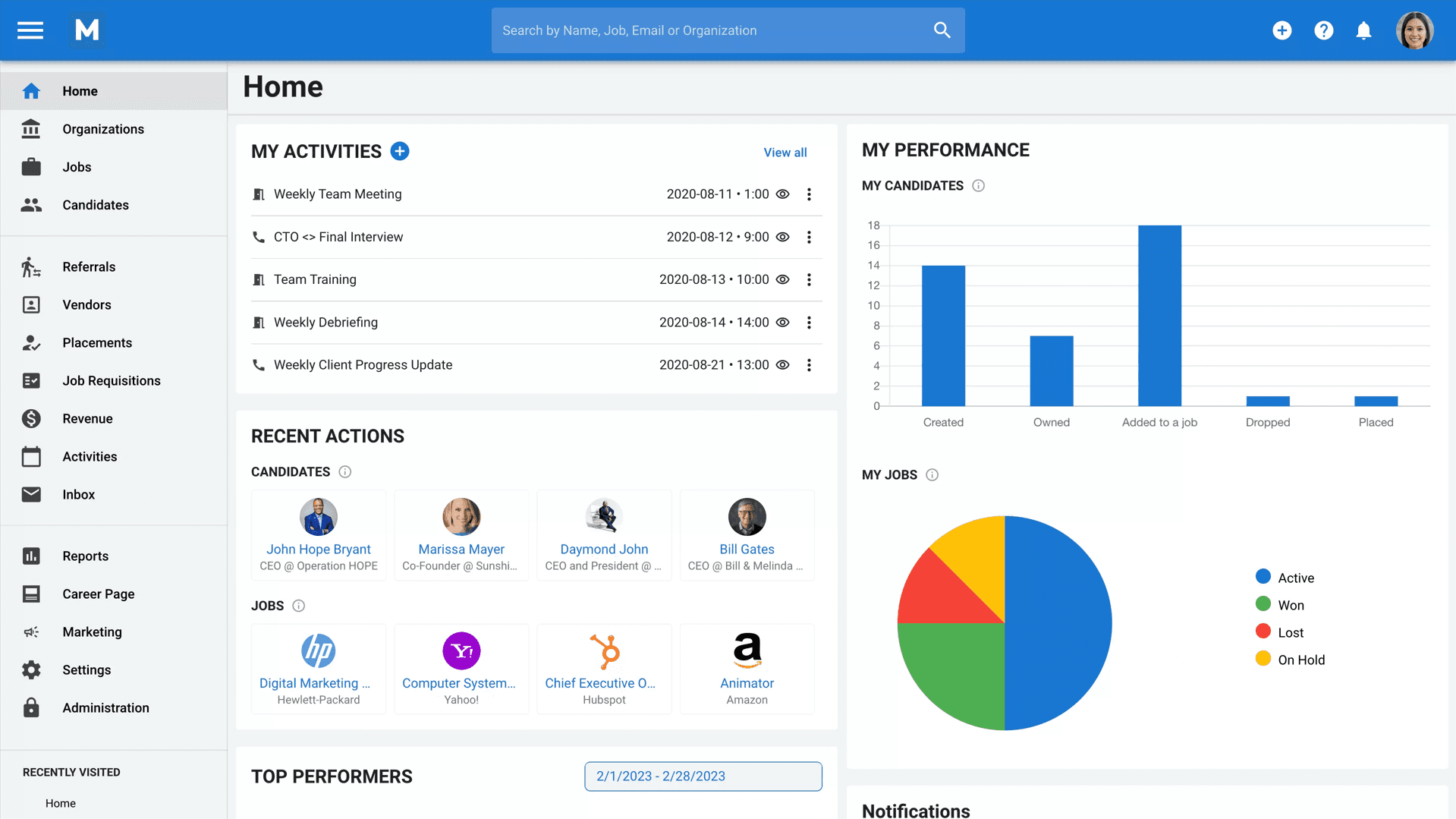
In my opinion, Manatal is a solid choice for small to mid-sized businesses that need a straightforward applicant tracking system. It excels in candidate sourcing and offers competitive pricing, making it accessible for teams with budget constraints.
However, it underperforms with limited customization and integration options compared to competitors. Manatal's user-friendly interface and efficient onboarding make it easy for teams to adopt quickly, but those needing deep integrations or extensive customization might find it lacking.
For businesses prioritizing quick setup and straightforward functionality, Manatal is worth considering.
Pros
- You’ll appreciate the efficient onboarding process.
- Your team can quickly source candidates with its robust tools.
- You can easily navigate the intuitive user interface.
Cons
- Your team may miss advanced reporting features.
- You could notice fewer integration opportunities.
- You might find limited customization options.


How We Test & Score Our Tools
We’ve spent years building, refining, and improving our software testing and scoring system. The rubric is designed to capture the nuances of software selection and what makes a tool effective, focusing on critical aspects of the decision-making process.
Below, you can see exactly how our testing and scoring works across seven criteria. It allows us to provide an unbiased evaluation of the software based on core functionality, standout features, ease of use, onboarding, customer support, integrations, customer reviews, and value for money.
Core Functionality (25% of final score)
The starting point of our evaluation is always the core functionality of the tool. Does it have the basic features and functions that a user would expect to see? Are any of those core features locked to higher-tiered pricing plans? At its core, we expect a tool to stand up against the baseline capabilities of its competitors.
Standout Features (25% of final score)
Next, we evaluate uncommon standout features that go above and beyond the core functionality typically found in tools of its kind. A high score reflects specialized or unique features that make the product faster, more efficient, or offer additional value to the user.
We also evaluate how easy it is to integrate with other tools typically found in the tech stack to expand the functionality and utility of the software. Tools offering plentiful native integrations, 3rd party connections, and API access to build custom integrations score best.
Ease of Use (10% of final score)
We consider how quick and easy it is to execute the tasks defined in the core functionality using the tool. High scoring software is well designed, intuitive to use, offers mobile apps, provides templates, and makes relatively complex tasks seem simple.
Onboarding (10% of final score)
We know how important rapid team adoption is for a new platform, so we evaluate how easy it is to learn and use a tool with minimal training. We evaluate how quickly a team member can get set up and start using the tool with no experience. High scoring solutions indicate little or no support is required.
Customer Support (10% of final score)
We review how quick and easy it is to get unstuck and find help by phone, live chat, or knowledge base. Tools and companies that provide real-time support score best, while chatbots score worst.
Customer Reviews (10% of final score)
Beyond our own testing and evaluation, we consider the net promoter score from current and past customers. We review their likelihood, given the option, to choose the tool again for the core functionality. A high scoring software reflects a high net promoter score from current or past customers.
Value for Money (10% of final score)
Lastly, in consideration of all the other criteria, we review the average price of entry level plans against the core features and consider the value of the other evaluation criteria. Software that delivers more, for less, will score higher.
Core Features
Candidate Management: You can easily track and manage applicants through each stage of the hiring process. This feature keeps your recruitment organized and efficient.
Job Posting: Post your job openings to multiple platforms with a few clicks. It saves your team time and broadens your reach for potential candidates.
Resume Parsing: Manatal automatically extracts relevant information from resumes, so you don't have to. This feature speeds up your screening process.
Collaborative Tools: Share candidate information and feedback with your team in real-time. It enhances team communication and decision-making.
Customizable Pipelines: Tailor your recruitment stages to fit your hiring process. This flexibility ensures your recruitment flow matches your team's needs.
Reporting and Analytics: Access basic reports to track your recruitment performance. It helps you make informed decisions and adjust strategies as needed.
Ease of Use
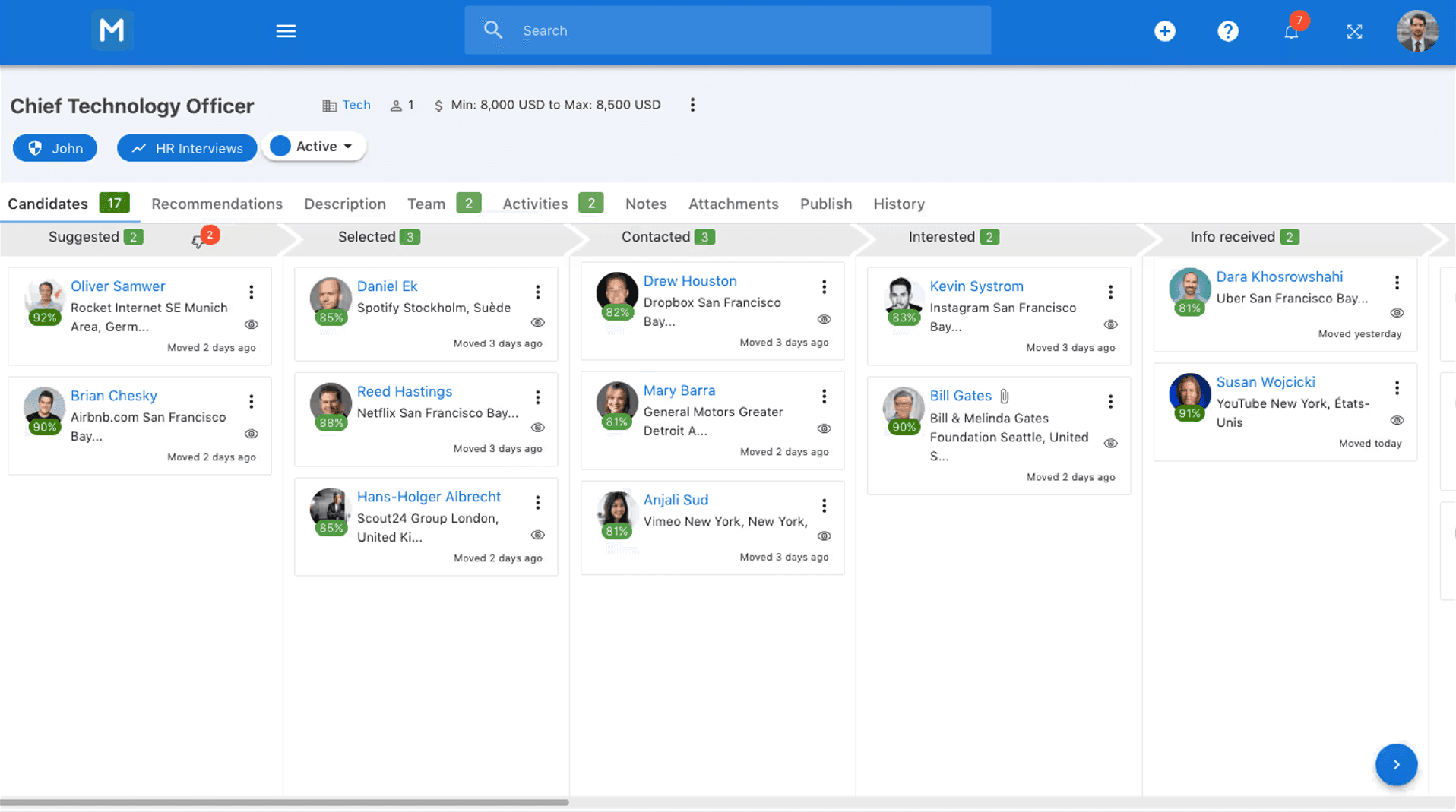
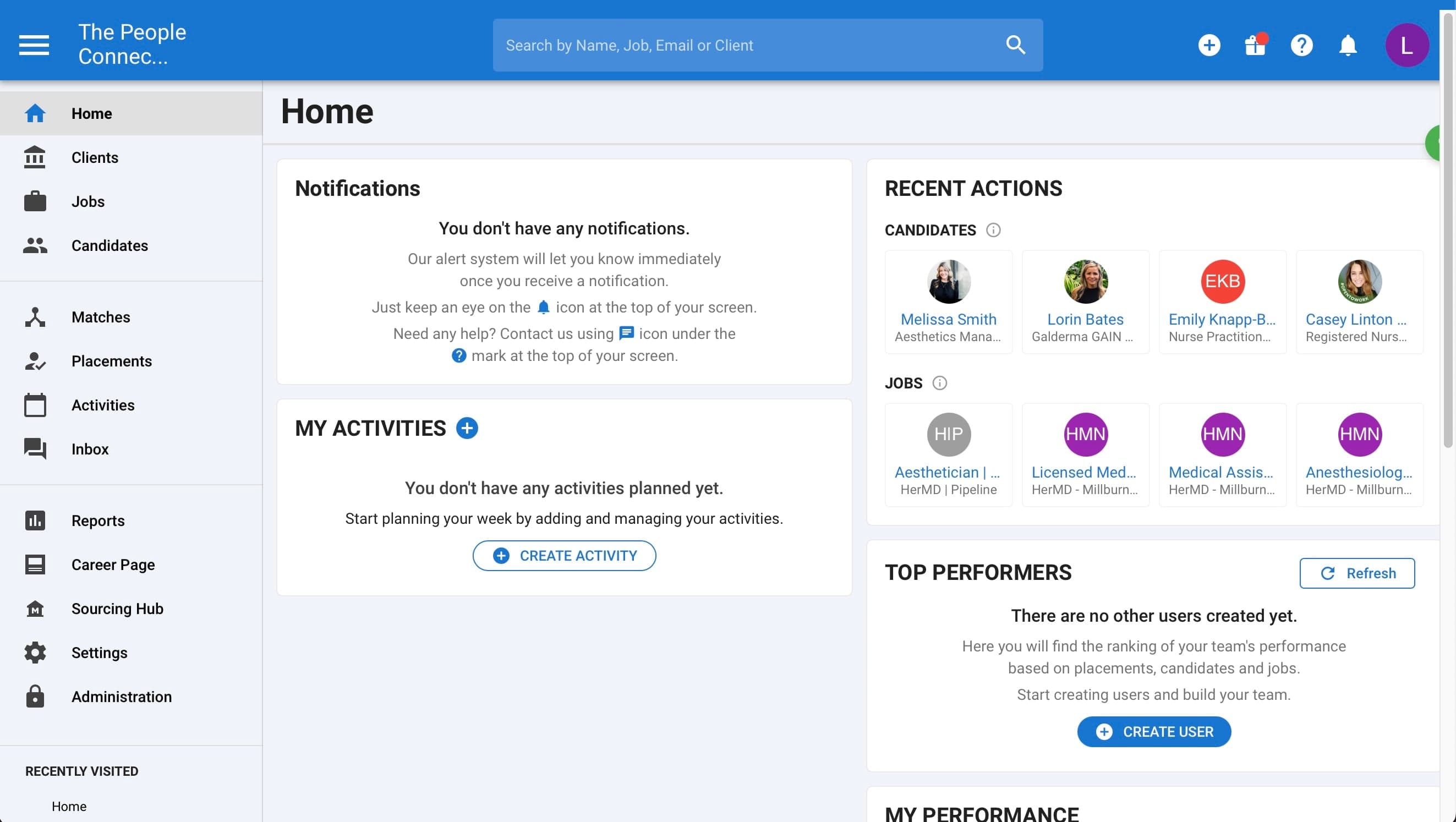
Manatal is generally easy to navigate, making it a solid choice for teams that prioritize straightforward operations. Its clean interface allows you to manage candidates without unnecessary complexity.
However, some users might find the customization options limited, which could be a hurdle if your team needs more tailored solutions.
While onboarding is efficient, the lack of deep integrations can make it challenging if you rely heavily on other tools. Overall, it's user-friendly but might not satisfy all advanced needs.
New Product Updates from Manatal
 Opens new window
Manatal Adds Candidate Login and Employee Portal to Career Pages
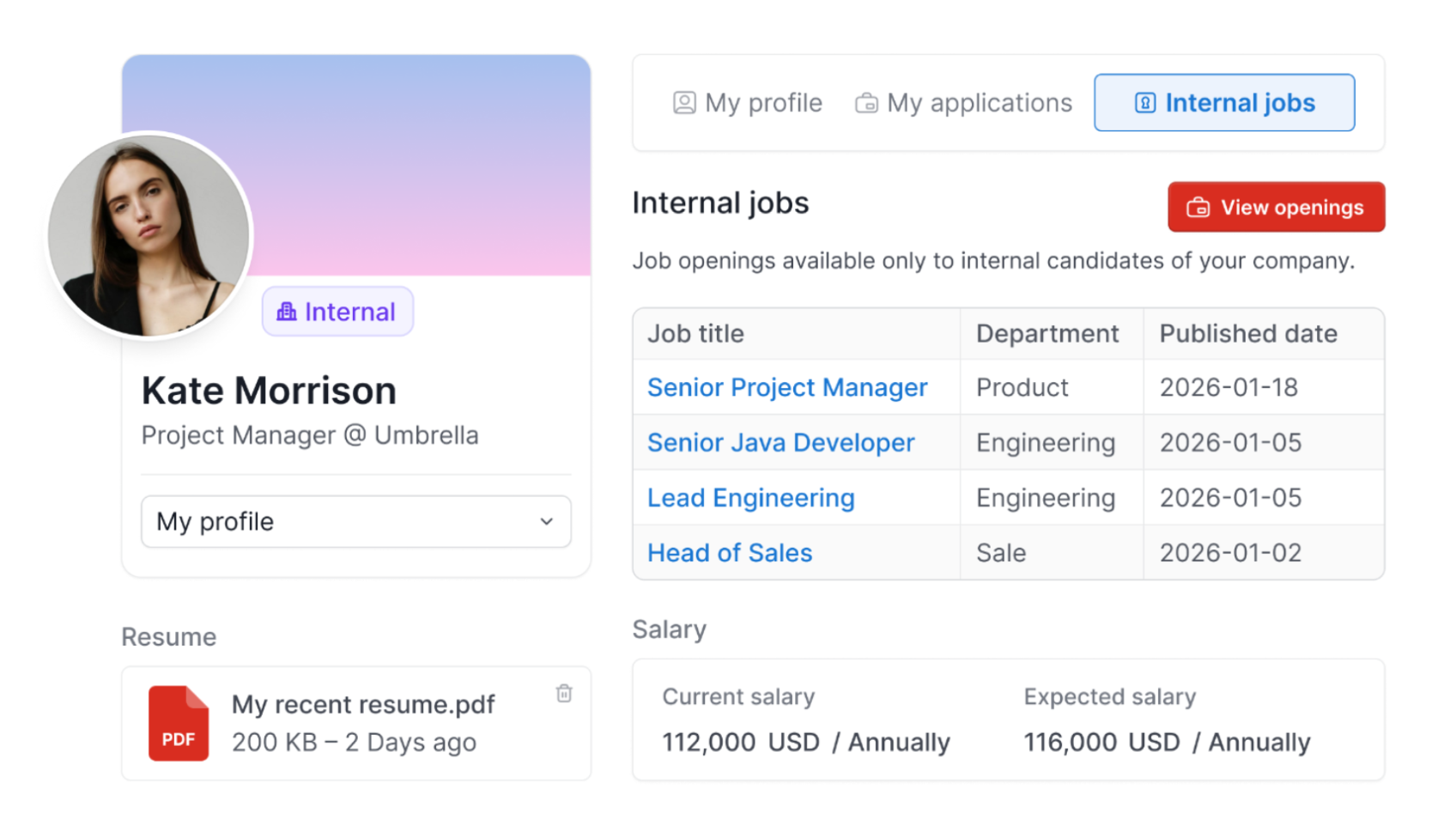
Manatal has added Candidate Login and Internal Employee Portal for Career Pages with reusable profiles, referral tracking, and internal job controls. These updates help candidates apply faster while giving teams more control over internal hiring processes. Highlights include:
- Candidate Login: Lets applicants create reusable profiles with passwordless magic links to complete future applications faster.
- Internal Employee Portal: Gives verified employees access to internal job openings and referral tracking.
- Internal Job Visibility: Allows teams to manage internal-only job posts that are hidden from external candidates.
Visit Manatal’s official site for more details.
 Opens new window
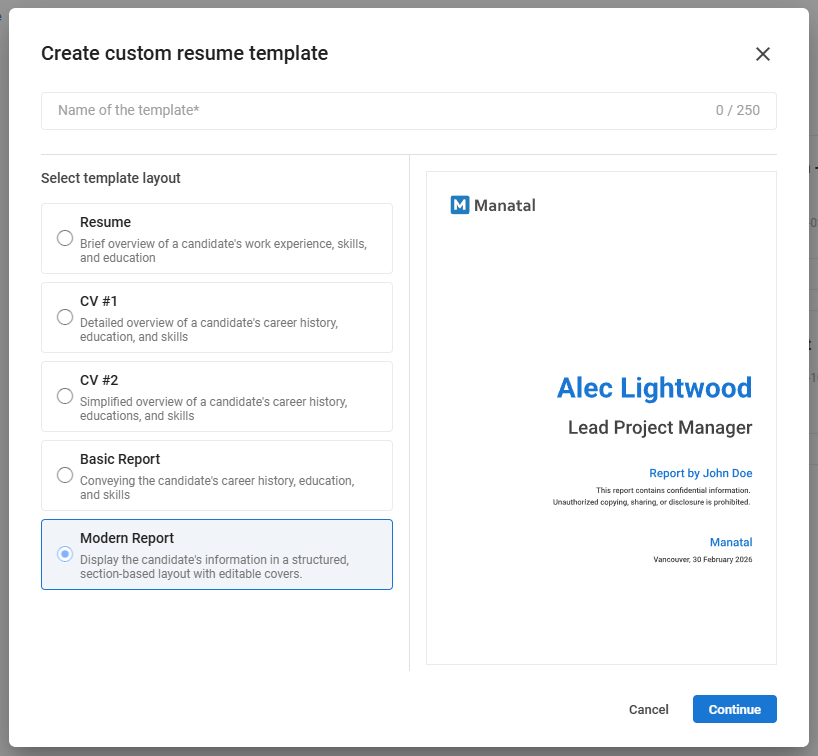
Manatal Adds Custom Branded Resume Templates
Manatal enhances its Custom Resumes feature to help recruiting teams create more polished and standardized candidate reports. The update introduces new branding, layout, and customization options for generating professional client-ready resumes and candidate profiles. Highlights include:
- Custom-Branded Resume Templates: Teams can create branded resume and candidate report templates featuring logos, titles, and recruiter details.
- Front and Back Cover Configuration: Resume exports now support customizable covers with disclaimers, branding, and privacy notices.
- Structured Candidate Report Layouts: Reports now include organized sections for role fit, motivation, salary, education, and languages.
- Flexible Content Sections: Recruiters can add custom full-width text fields for additional candidate information and notes.
- Client-Ready Resume Exports: Teams can generate polished PDF resumes and anonymized candidate reports using existing candidate data.
Visit Manatal’s official site for more details.
Manatal Specs
- API: Yes
- Application Tracking: Yes
- Behavioral Testing: Yes
- Budgeting: Yes
- Calendar Management: Yes
- Candidate Database: Yes
- Cognitive Testing: Yes
- Contact Management: Yes
- Custom Assessments: Yes
- Dashboard: Yes
- Dashboards: Yes
- Data Export: Yes
- Data Import: Yes
- Data Visualization: Yes
- Email Integration: Yes
- Employee Database: Yes
- Employee Onboarding: Yes
- External Integrations: Yes
- Feedback Management: Yes
- Forecasting: Yes
- Interview Scheduling: Yes
- Multi-Source Feedback: Yes
- Multi-User: Yes
- Notifications: Yes
- Personality Testing: Yes
- Psychometric Testing: No
- Scheduling: Yes
- Status Notifications: Yes
- Travel Management: No
Alternatives to Manatal


Manatal FAQs
What’s Next?
To remain up to date on all the latest in people management, subscribe to our newsletter for leaders and managers. You'll receive insights and offerings tailored to leaders and HR professionals straight to your inbox.