

10 beste AI-møteassistenter vurdert i 2026

10 Kortliste over de beste AI-møteassistentene


Det har blitt stadig vanskeligere å gjennomføre effektive møter når team må håndtere fulle kalendere, fjernsamarbeid og prosjekter i rask utvikling. Mange bruker mer tid på koordinering, notatskriving og oppfølging enn på å faktisk diskutere arbeidet. AI-møteassistenter kan hjelpe ved å håndtere oppgaver som transkribering, notater, uttrekking av oppfølgingspunkter og agendaadministrasjon, slik at teamet kan holde fokus på samtalen.
Jeg har testet og vurdert et bredt utvalg av verktøy for AI-møteassistenter for å finne ut hvilke som faktisk sparer tid, og hvilke som bare skaper mer støy. Verktøyene i denne veiledningen bidrar til tydeligere dokumentasjon, enklere oppfølging og mer effektive møterutiner i alle typer team og bransjer.
I denne artikkelen finner du mine beste anbefalinger, sammen med innsikt i funksjoner, styrker og ideelle bruksområder. Når du er ferdig, vil du ha en klar forståelse av hvilke AI-møteassistenter som kan forbedre måten du planlegger, gjennomfører og evaluerer møtene dine på.
Why Trust Our Software Recommendations
Our team has been testing and reviewing software since 2012. As HR experts ourselves, we know how difficult—and important—it is to choose the right software.
For this guide, we evaluated tools using hands-on testing and independent research, scoring tools using our selection criteria. We also draw on insights from industry thought leaders and practicing HR experts.
Our reviews reflect our human editorial judgment, not a sales pitch.
Expert reviewers:
Sammenligningstabell for AI-møteassistenter
Denne sammenligningstabellen oppsummerer prisopplysningene for mine beste utvalgte AI-møteassistenter:
| Tool | Best For | Trial Info | Price | ||
|---|---|---|---|---|---|
| 1 | Best for syncing action items to boards | Free plan available; 14-day free trial | From $9/user/month (billed annually) | Website | |
| 2 | Best for team feedback | Free plan available | From $7/user/month (billed annually) | Website | |
| 3 | Best for meeting insights | 14-day free trial + free demo available | From $19/user/month (billed annually) | Website | |
| 4 | Best for project scheduling | Free trial available | From $19/seat/month (billed annually) | Website | |
| 5 | Best for task automation | Free plan + free demo available | From $10/user/month (billed annually) | Website | |
| 6 | Best for real-time transcription | Free plan available | From $8.33/user/month (billed annually) | Website | |
| 7 | Best for noise cancellation | Free plan + trial available | From $8/user/month (billed annually) | Website | |
| 8 | Best for meeting analytics | Free plan available | From $15/month (billed annually) | Website | |
| 9 | Best for note-taking | Free plan available | From $15/user/month | Website | |
| 10 | Best for meeting summaries | Free plan available | From $10/user/month (billed annually) | Website |

Vurdering av de beste AI-møteassistentene
Nedenfor finner du mine detaljerte oppsummeringer av de beste verktøyene for AI-møteassistenter som kom med på kortlisten. I vurderingene mine får du en grundig gjennomgang av de viktigste funksjonene, fordelene & ulempene, integrasjonene og de ideelle bruksområdene for hvert verktøy, slik at du kan finne det som passer best for deg.

Best for syncing action items to boards
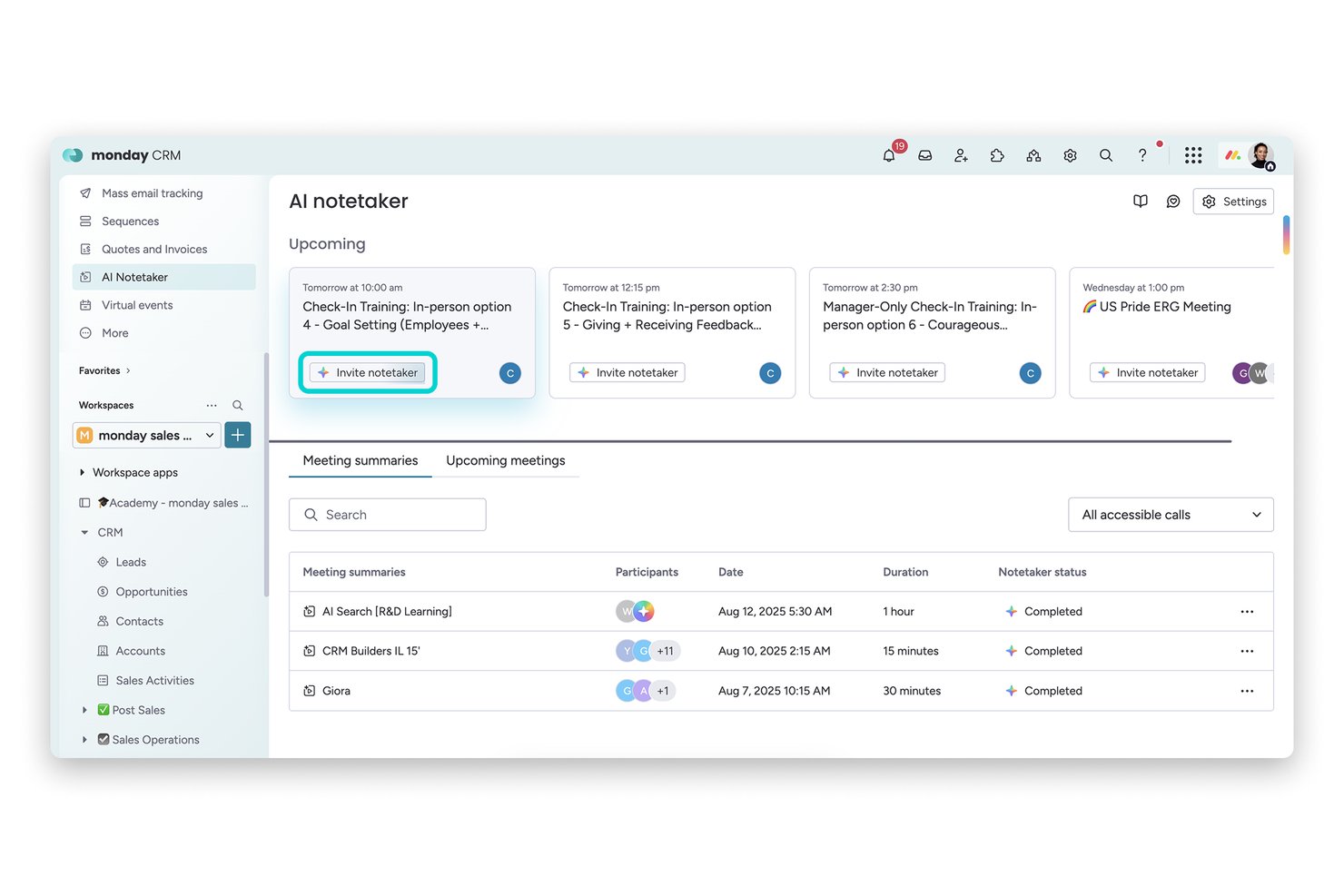
monday AI Workspace is a work management platform with a built-in AI meeting assistant that transcribes calls on Zoom, Teams, and Google Meet, generates summaries, and converts meeting action items directly into board tasks.
Who Is monday AI Workspace Best For?
It's a strong fit for project-driven teams that already run their work inside monday.com and want meeting action items to land directly in their boards.
Why I Picked monday AI Workspace
monday AI Workspace earns its spot on my shortlist because no other meeting assistant connects conversation to tracked work as directly. When AI Notetaker captures action items from a call, I can push them straight to any monday board as subitems in just a few clicks. I also like that the bot auto-joins scheduled meetings two minutes early, so nothing gets missed before the conversation even starts.
monday AI Workspace Key Features
- AI-powered meeting transcriptions: Transcribes Zoom, Teams, and Google Meet calls with speaker attribution in real time.
- AI-generated meeting summaries: Creates structured overviews of meeting content using built-in AI tools.
- Integrated board automations: Lets you automate workflow actions based on meeting outputs or changes to items.
- Multi-platform workspace templates: Provides customizable templates for different meeting and task types within the platform.
monday AI Workspace Integrations
monday AI Workspace offers over 200 native integrations, including Zoom, Microsoft Teams, Google Meet, Google Workspace, Slack, Salesforce, and Outlook. It also supports Zapier and provides an API for custom integrations.
Pros and Cons
Pros:
- AI-generated summaries available within workspace boards
- Auto-joins meetings and transcribes with speaker labels
- Syncs meeting tasks to monday boards instantly
Cons:
- Lacks conversation analytics or sentiment tracking
- No interview or HR-specific summary templates
New Product Updates from monday AI Workspace
monday AI Workspace Adds Human Approval Routing
monday AI Workspace adds a human-in-the-loop approval block to AI Workflows, sending approval requests and routing workflow paths based on responses. For more information, visit monday AI Workspace's official site.

Fellow
Best for team feedback
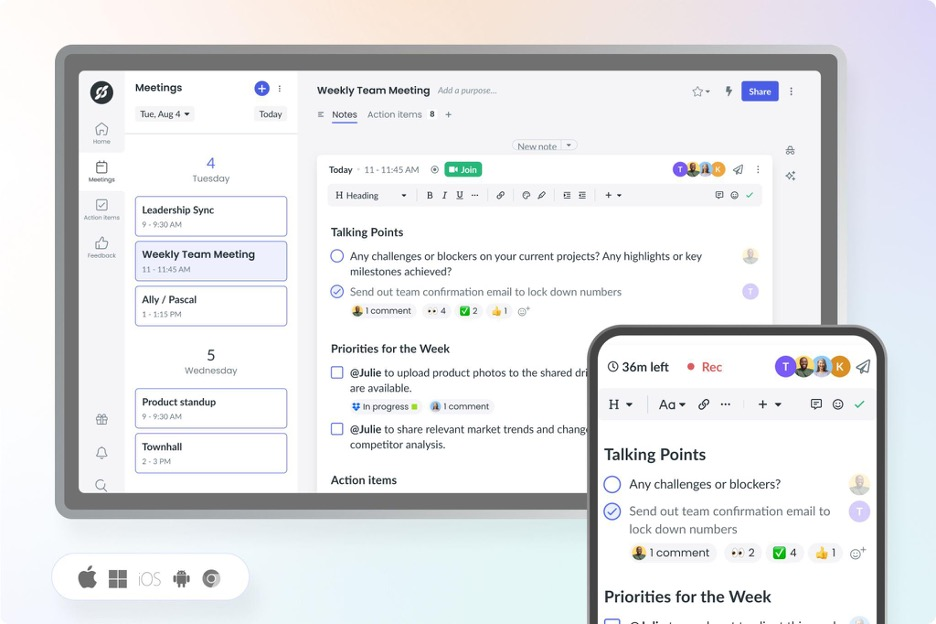
Fellow earns a spot here because it's built for feedback-driven cultures, not just meeting notes. Its feedback features tie in directly with AI meeting summaries, so teams can capture decisions and peer input right as they're made. I like that you can request feedback in context and pull insights into one place, which makes follow-ups much more actionable.
Fellow’s Best For
- Teams prioritizing feedback and action items from meetings
- Managers who want to connect meetings directly to performance reviews
Fellow’s Not Great For
- Those needing detailed automated transcriptions or voice-based AI actions
- Teams seeking a pure scheduling or calendar assistant
What Sets Fellow Apart
Fellow stands out by making feedback and meeting follow-up a central part of the workflow, not an afterthought. Unlike tools like Otter.ai that focus mainly on recording and transcribing, Fellow expects you to start and end meetings with defined outcomes and actionable feedback. This works best when you want meeting notes to connect directly to growth conversations and performance reviews.
Tradeoffs with Fellow
Fellow optimizes for feedback and meeting outcomes, but that emphasis means you lose out on full voice transcription and some AI-driven automation that other meeting assistants provide.
Pros and Cons
Pros:
- Meeting analytics with talk-time data
- Built-in team feedback and action tracking
- Collaborative agendas for structured meetings
Cons:
- Setup needed for workflow automation
- Limited offline functionality

Avoma
Best for meeting insights

Avoma makes my shortlist because it goes beyond basic transcription with meeting intelligence I haven't seen elsewhere. I recommend Avoma when you want to capture exact action items, sentiment, and speaker insights you can actually use after the call. What I like is how quickly teams can search and review specific topics or trends from recorded meetings—nothing gets lost in the shuffle.
Avoma’s Best For
- Sales, customer success, and recruiting teams needing meeting insights
- Teams that want searchable conversation records and sentiment analysis
Avoma’s Not Great For
- Organizations with strict data residency or privacy requirements
- Those prioritizing real-time meeting collaboration over post-call analysis
What sets Avoma apart
Avoma organizes meeting information around searchable highlights, action items, and topics so you don’t lose insights in lengthy call recordings. It expects you to reference conversations later, not just during live meetings. Unlike Google Meet’s built-in summaries or tools like Otter, Avoma gives you event-based navigation and speaker insights that make finding meaning fast, especially for teams reviewing high-stakes customer calls.
Tradeoffs with Avoma
Avoma optimizes for post-meeting analysis and insights, but that means you give up real-time editing and collaboration during meetings. Teams expecting dynamic in-call whiteboarding or simultaneous note-taking often still use a second tool.
Pros and Cons
Pros:
- Offers real-time transcription
- Includes AI call scoring and topic tracking
- Provides detailed meeting analytics
Cons:
- Requires internet connection
- Advanced analytics require paid add-ons

Motion
Best for project scheduling

Motion earns its spot here because it uniquely blends project scheduling with smart AI to automate meeting planning. When I tested its AI calendar assistant, I saw it dynamically rearrange tasks and meetings based on shifting project priorities.
What I appreciate most is how Motion keeps calendars, deadlines, and meetings in sync for teams that juggle frequent project-based meetings. It saves time by automatically finding and booking the best meeting slots around existing project work.
Motion’s Best For
- Teams with frequent project-based meetings needing dynamic scheduling
- Managers who want AI to automate calendar updates
Motion’s Not Great For
- Simple teams without shifting meeting priorities
- Organizations expecting detailed meeting transcripts and recording
What sets Motion apart
Motion stands out by using AI to constantly reorganize meetings and tasks in real time. Unlike traditional AI assistants that just summarize or record, Motion expects you to let the tool actively manage calendar conflicts and shifting priorities as project needs change. In practice, I see this working best when schedules are unpredictable and meetings compete with project deadlines.
Tradeoffs with Motion
Motion optimizes for adapting to shifting schedules, but you give up advanced meeting note-taking and recording. This means teams who need detailed meeting documentation should look elsewhere.
Pros and Cons
Pros:
- Supports multiple meeting platforms
- High transcription accuracy
- Converts notes to tasks
Cons:
- Limited customization in templates
- Limited offline functionality

Best for task automation

Fireflies.ai earns a spot on my list because its AI meeting assistant doesn’t just transcribe, but actively automates meeting outcomes. I like that you can instantly highlight action items and set automated follow-ups directly from transcripts, so nothing falls through the cracks after a call. This works best when your team is overwhelmed by manual note-taking or repetitive post-meeting tasks—Fireflies.ai turns those into click-and-go actions that save you real time.
Fireflies.ai’s Best For
- Teams wanting automated meeting summaries and follow-ups
- Managers who track action items from recurring calls
Fireflies.ai’s Not Great For
- Organizations needing highly secure, on-premise storage
- Teams with complex privacy or sensitive compliance demands
What sets Fireflies.ai apart
Fireflies.ai expects your meetings to generate actionable outcomes, not just notes. Unlike Otter.ai, which mainly focuses on transcription and data capture, Fireflies.ai leans into automating what happens after the call. In practice, this suits managers and project leads who want action items automatically surfaced and followed up, instead of moving tasks around after every meeting.
Tradeoffs with Fireflies.ai
Fireflies.ai optimizes for automation and fast follow-ups, but you lose some manual control over privacy and storage, which can be a dealbreaker if your process requires on-premise recording or tight data governance.
Pros and Cons
Pros:
- AI Apps for follow-up tasks
- Supports many recording workflows
- Automated action item creation
Cons:
- Can slow down with long recordings
- Accuracy varies with audio quality


Otter earns a spot on my list because its live transcription keeps up with fast-paced meetings without missing speaker changes or key details. This is the first tool I go to when real-time capture is essential, especially in environments where you can't afford to pause for notes or review recordings later.
What I appreciate is how it instantly generates searchable, shareable transcripts and highlights action items live as the conversation unfolds. If you're in meetings that move quickly or handle lots of speakers, Otter handles the workload reliably and gives you a full, accurate record right away.
Otter’s Best For
- Teams needing live, searchable meeting transcriptions
- Fast-paced meetings with multiple, quickly changing speakers
Otter’s Not Great For
- Sensitive conversations needing advanced privacy controls
- Teams requiring meeting summaries or advanced analytics
What sets Otter apart
Otter focuses on capturing conversations as they happen, making live transcription its core workflow. Instead of structured collaboration like you see with Google Workspace or meeting summaries like Fireflies, it expects teams to use transcripts as a single source of truth, often in high-velocity or multi-speaker meetings.
You get transcripts you can search and reference almost immediately, which helps when topics move fast.
Tradeoffs with Otter
Otter optimizes for speed and live accuracy, but you give up deep built-in meeting insights or summaries, so teams spend more time digging through transcripts for decisions or action items.
Pros and Cons
Pros:
- Syncs notes to major platforms
- Action item identification
- Voice command functionality
Cons:
- May struggle with accents
- Audio transcription may require some manual review


Krisp makes the cut for best AI meeting assistant because it uses advanced voice AI to remove background noise in real time, something I haven’t seen matched by other meeting tools. I usually recommend Krisp when teams or individuals work from noisy environments and can’t risk distractions bleeding into meetings.
What I really like is how Krisp’s noise cancellation can be toggled on for both input and output, so you never have to worry about what’s happening in your space or the other person’s. In practice, I’ve found meetings are just less stressful with it on, especially with kids, pets, or city noise nearby.
Krisp’s Best For
- Remote workers in noisy environments needing distraction-free calls
- Teams that join meetings from shared or unpredictable workspaces
Krisp’s Not Great For
- Users who want AI-driven note-taking and meeting summaries
- Teams that require built-in scheduling or collaboration tools
What Sets Krisp Apart
Krisp is focused on making remote meetings quieter by blocking background sounds before they reach the call. It assumes you value having a clean audio channel over capturing and processing meeting content. In practice, I’ve noticed this suits people who work from busy or unpredictable spaces, rather than teams who want deep collaboration tools bundled in. Unlike Otter.ai, Krisp doesn’t emphasize transcripts or searchable notes.
Tradeoffs with Krisp
Krisp optimizes for real-time audio clarity, but you sacrifice meeting notes and searchable content, so you’ll need a second tool if note capture is essential.
Pros and Cons
Pros:
- Minimal impact on system resources
- Works across multiple platforms
- Improves call clarity
Cons:
- Performance varies with device setup
- Limited features beyond audio processing


Read AI is on my shortlist because it gives meeting analytics you can act on, not just raw notes or transcripts. When I tested it, I found the automated sentiment and talk-time breakdowns actually change how teams review engagement and speaking balance. I like how you can spot when meetings drift off track, then use the analytics to coach teams and improve future sessions.
Read AI's Best For
- Teams that want actionable meeting analytics and insights
- Organizations focused on improving meeting engagement and participation
Read AI's Not Great For
- Anyone looking for full-featured AI note-taking or summaries
- Teams that rarely analyze or follow up on meeting data
What sets Read AI apart
Read AI takes a meeting analytics approach instead of just capturing transcripts or action items like Otter or Fireflies. It assumes you want to understand how meetings actually run, not just what gets said. In practice, I see the value when you want to fix common issues like team members dominating the agenda or overall disengagement. Unlike note-taking tools, it shows you where your meeting structure can improve.
Tradeoffs with Read AI
Read AI optimizes for analytics and meeting diagnostics, so you give up strong AI note-taking or summary-focused features. That means you may still need another tool to capture action items or provide detailed written recaps.
Pros and Cons
Pros:
- AI search across meetings and messages
- Automatic recaps and insights
- Engagement and participation analytics
Cons:
- Advanced features only on paid plans
- Setup may require onboarding
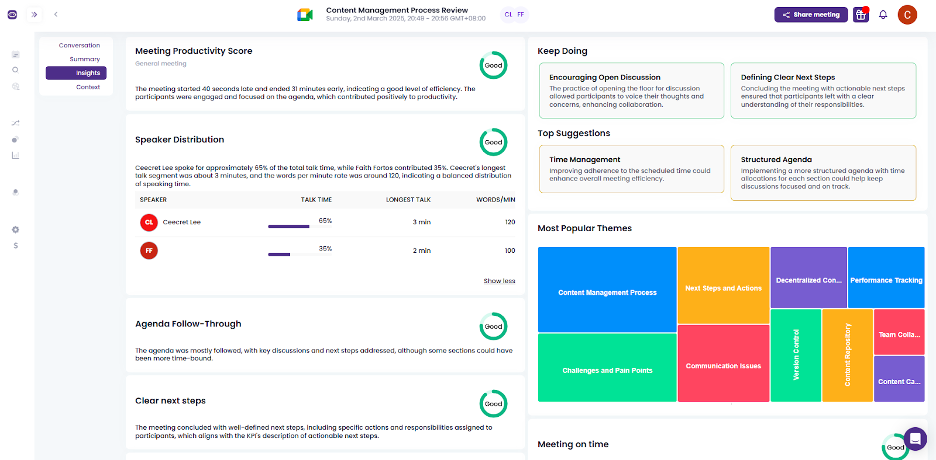
Meetgeek.ai earns a spot on my shortlist for its focus on automatic, structured meeting note-taking that stays accurate as conversations evolve. This isn’t just about live transcription—Meetgeek.ai generates shareable summaries, highlights decisions, and even picks up on action items as people talk.
What I like most is how you can search, review, and revisit notes instantly, which solves the "what did we agree on?" headache right away. It fits well when you need reliable, searchable meeting records for recurring team syncs and client calls.
Meetgeek.ai’s Best For
- Teams that need accurate, automatic meeting notes
- Organizations tracking decisions and action items across calls
Meetgeek.ai’s Not Great For
- Teams needing advanced video conferencing or collaboration features
- Groups that want full meeting management or scheduling
What sets Meetgeek.ai apart
Meetgeek.ai flips the script on meeting documentation by actively capturing and structuring key moments while conversations are happening. Unlike Otter.ai, which focuses mainly on transcription, Meetgeek.ai organizes highlights and action items in real time so you can reference outcomes quickly without trawling through full transcripts.
I see this working best when meetings move fast and decisions need to be recalled without extra manual cleanup.
Tradeoffs with Meetgeek.ai
Meetgeek.ai optimizes for automation and clarity in note capture, but that comes at the cost of broader meeting management features. If you want one platform for video calls, scheduling, and deep collaboration, you’ll need to pair this with another tool.
Pros and Cons
Pros:
- Browser-based recording option
- Automatic call-type summaries
- Detailed and searchable transcripts
Cons:
- Limited offline functionality
- Limited customization options


Sembly earns a spot on my list for how well it turns conversations into clear, smart summaries you can actually use. When meeting notes need to be accurate and shareable—no more messy transcriptions or missed details—I’ve found Sembly’s AI-generated summaries catch people up fast and with important context. What I appreciate most is how action items, speaker highlights, and key decisions are neatly organized so teams can follow up without chasing down recordings.
Sembly’s Best For
- Teams needing fast, actionable meeting summaries
- Organizations handling a high volume of virtual meetings
Sembly’s Not Great For
- Users needing in-depth voice analytics or sentiment analysis
- Teams preferring manual note-taking or highly formatted outputs
What sets Sembly apart
Sembly approaches meetings by automatically breaking conversations into usable summaries and turning long calls into short, action-focused recaps. Unlike tools like Otter.ai, which mostly emphasize transcription accuracy, Sembly highlights context, decisions, and next steps in a concise, digestible format. This works well if you want clarity without sifting through long transcripts.
Tradeoffs with Sembly
Sembly optimizes for quick, summary-focused outputs, but this means you lose detailed capturing of every spoken nuance. In practice, teams that need full verbatim transcripts or extensive analytics may feel limited.
Pros and Cons
Pros:
- Saves time on meeting reviews
- Generates actionable insights
- Offers keyword search functionality
Cons:
- Complexity in advanced features
- Limited customization options
Andre AI-møteassistenter
Her er noen flere alternativer for AI-møteassistenter som ikke kom med på kortlisten min, men som likevel er verdt å se nærmere på:
- Jamie
For bot-free note-taking
- Board Intelligence
With AI-driven board governance tools
- Cluely
For team collaboration
- Meeting.ai
For agenda management
- Gong
For sales team insights
- Tactiq
For real-time captions
- Notta
For language translation
- Bubbles
For asynchronous collaboration
- tl;dv
For timestamped meeting highlights
- Zoom AI Companion
For integrated video conferencing


How I Evaluate AI Meeting Assistants
Any tool can join a call and hit record, but I look for AI that gives HR teams something back—like walking out of a candidate debrief with a ready-made summary instead of scattered notes. I evaluate each tool on two levels: the core functionality it needs to qualify and the differentiating factors that set one option apart from the rest.
Core Functionality (Table Stakes For This List)
When I'm selecting tools for my list, I rank each one on a scale from 0 (does not offer the functionality) to 5 (excels in this area) for each core functionality listed below. Then, I calculate the tool's total score into a percentage. Each tool needs to achieve a minimum total score of 65% to be considered for inclusion.
- Automated Meeting Transcription: I evaluate transcript accuracy, speaker attribution, and language support—especially in fast-paced panel interviews where multiple voices overlap.
- AI-Generated Summaries: Good summaries should go beyond raw bullet points. I look for structured recaps tailored to the meeting type, like a candidate interview debrief or 1:1 check-in.
- Action Item Extraction: I check whether the tool picks up on next steps organically from conversation, like a hiring manager agreeing to send a take-home assignment by Friday.
- Video Conferencing Integrations: Each tool should connect natively with Zoom, Microsoft Teams, and Google Meet at a minimum, with smooth calendar-based auto-join.
- Searchable Meeting Repository: I look for organized storage where an HR team can search past transcripts by speaker, keyword, or date—useful when revisiting notes across a full interview loop.
- Conversation Intelligence & Analytics: Metrics like talk-time ratios, sentiment tracking, and topic trends help HR teams spot patterns across recurring meetings such as stay interviews or skip-levels.
Once I have a list of tools that meet this criteria, I consider what sets each platform apart.
Differentiating Factors (What Sets Vendors Apart)
Here's how I compare and contrast different vendors:
Standout Features
ATS and HRIS integrations matter a lot here. I look for tools that push interview notes or meeting summaries directly into platforms like Greenhouse or Workday, saving recruiters from manual copy-paste after every call. Bias detection and PII redaction are equally valuable—especially when documenting employee relations conversations where sensitive details need to stay protected. I also check for AI-generated interview scorecards that help hiring panels evaluate candidates consistently across a full loop.
Beyond Features
Compliance and data privacy top my list. HR meetings often touch sensitive topics like terminations or accommodation requests, so I check for SOC 2 Type II certification, configurable data residency, and consent management workflows. Security goes hand-in-hand here—role-based access controls matter when an employee relations specialist's recordings shouldn't be visible to the broader team. I also evaluate pricing structures to understand whether per-seat models work for a small recruiting team or if volume-based enterprise plans better fit an organization-wide rollout.
Slik velger du en AI-møteassistent
Det er lett å gå seg vill i lange funksjonslister og kompliserte prismodeller. For å hjelpe deg med å holde fokus når du går gjennom den unike prosessen med å velge programvare, har jeg laget en sjekkliste over faktorer du bør ha i bakhodet:
| Faktor | Hva du bør vurdere |
| Skalerbarhet | Kan verktøyet vokse med teamet ditt? Vurder hvor godt det håndterer flere brukere eller møter uten ytelsesproblemer. Se etter fleksible abonnementer som legger til rette for vekst. |
| Integrasjoner | Kan det kobles til de eksisterende verktøyene dine? Sjekk om det integreres med plattformene du allerede bruker, som Zoom, Slack eller Google Kalender, for å unngå forstyrrelser i arbeidsflyten. |
| Tilpasningsmuligheter | Kan du tilpasse verktøyet etter behovene dine? Se etter alternativer for å justere innstillinger, maler eller arbeidsflyter slik at de passer med teamets prosesser. |
| Brukervennlighet | Er det brukervennlig? Vurder grensesnittet og navigeringen. Et intuitivt verktøy reduserer opplæringstiden og hindringene for at teamet skal ta det i bruk. |
| Implementering og innføring | Hvor enkelt er det å komme i gang? Vurder ressursene og støtten som tilbys under oppsettet. Se etter opplæringsmateriell eller produktgjennomganger for å fremskynde innføringen. |
| Kostnad | Passer det inn i budsjettet ditt? Sammenlign prismodeller og se etter skjulte gebyrer. Sørg for at kostnaden står i forhold til verdien det tilfører teamet ditt. |
| Sikkerhetstiltak | Er det etablert databeskyttelse? Kontroller om verktøyet følger bransjestandarder for datakryptering og samsvar for å beskytte sensitiv møteinformasjon. |
| Tilgjengelig kundestøtte | Er hjelp tilgjengelig når det trengs? Sjekk hvor tilgjengelige støttekanaler som chat, e-post eller telefon er, og sørg for at de dekker teamets behov. |
Hva er en AI-møteassistent?
En AI-møteassistent er et verktøy som er utviklet for å bidra til å automatisere og forbedre håndteringen av møter. Disse verktøyene brukes ofte av fagpersoner innen roller som prosjektledelse, salg og HR, og gir verdi gjennom økt effektivitet og bedre organisering.
Funksjoner som transkripsjon i sanntid, automatisk notatskriving og oppgavefordeling hjelper brukerne med å registrere møtedetaljer nøyaktig og sørge for at oppfølgingshandlinger er tydelige. Samlet sett sparer disse verktøyene tid og reduserer det administrative arbeidet med å håndtere møter.
Funksjoner i en AI-møteassistent
Når du velger en AI-møteassistent, bør du se etter følgende viktige funksjoner:
- Transkripsjon i sanntid: Registrerer det som blir sagt under møter, slik at du får nøyaktig dokumentasjon umiddelbart.
- Automatisk notatskriving: Genererer detaljerte notater automatisk, noe som sparer tid og sørger for at ingenting blir oversett.
- Møtesammendrag: Gir korte oversikter over diskusjonene, slik at brukerne raskt kan forstå de viktigste punktene.
- Oppgavefordeling: Oppretter og tildeler automatisk oppgaver fra møtediskusjoner, slik at oppfølgingshandlinger er tydelige.
- Nøkkelordmerking: Gjør det mulig å merke viktige emner, slik at de er enkle å finne frem til og søke etter.
- Aktivering med talekommandoer: Gjør det mulig å styre verktøyet håndfritt, noe som forbedrer muligheten til å gjøre flere ting samtidig under møter.
- Språkoversettelse: Støtter flerspråklige team ved å oversette møter i sanntid.
- Sentimentanalyse: Evaluerer den følelsesmessige tonen i diskusjonene og gir innsikt i deltakernes engasjement.
- Integrasjonsmuligheter: Kobler seg til eksisterende verktøy som Zoom, Slack og Google Kalender for å opprettholde kontinuitet i arbeidsflyten.
- Sikkerhetstiltak: Beskytter sensitive data gjennom kryptering og samsvar med bransjestandarder.
Fordeler med en AI-møteassistent
Implementering av en AI-møteassistent gir flere fordeler for teamet og virksomheten din. Her er noen av fordelene du kan se frem til:
- Tidsbesparelser: Automatisk notatskriving og oppgavefordeling reduserer tiden som brukes på administrative oppgaver, slik at teamet kan konsentrere seg om viktigere arbeid.
- Forbedret nøyaktighet: Transkripsjon i sanntid sørger for at møtedetaljer registreres nøyaktig, noe som minimerer misforståelser.
- forbedret samarbeid: Integrasjonsmuligheter gir sømløs tilkobling til verktøy som Zoom og Slack, slik at teamets arbeidsflyt forblir intakt.
- Bedre organisering: Nøkkelordmerking og møtesammendrag bidrar til å holde informasjon organisert og lett tilgjengelig, noe som forbedrer produktiviteten.
- Økt tilgjengelighet: Språkoversettelse støtter flerspråklige team og gjør møtene inkluderende for alle deltakere.
- Handlingsrettet innsikt: Sentimentanalyse og møteanalyse gir verdifull innsikt i teamdynamikk og engasjementsnivåer.
Kostnader og priser for en AI-møteassistent
Når du velger en AI-møteassistent, må du forstå de ulike prismodellene og abonnementene som er tilgjengelige. Kostnadene varierer basert på funksjoner, teamstørrelse, tillegg og mer. Tabellen nedenfor oppsummerer vanlige abonnementer, gjennomsnittsprisene deres og typiske funksjoner som er inkludert i løsninger for AI-møteassistenter:
Sammenligningstabell for KI-møteassistent
| Plantype | Gjennomsnittspris | Vanlige funksjoner |
| Gratisabonnement | $0 | Grunnleggende transkripsjon, begrenset møtereferat og viktige integrasjoner. |
| Personlig abonnement | $7-$19.99/bruker/måned | Ubegrenset transkripsjon, møtesammendrag og grunnleggende integrasjoner. |
| Bedriftsabonnement | $29-$50/bruker/måned | Avansert analyse, oppgavetildeling og forbedrede integrasjoner. |
| Storbedriftsabonnement | $60-$100/bruker/måned | Tilpassbare funksjoner, dedikert kundestøtte og førsteklasses sikkerhetstiltak. |
Vanlige spørsmål om KI-møteassistenter
Her er noen svar på vanlige spørsmål om KI-møteassistenter:
Kan KI ta notater under et fysisk møte?
Ja, mange KI-møteassistenter kan ta notater under fysiske møter. De bruker ofte mobilapper til å ta opp lyd og transkribere den til notater. Denne funksjonen kan være nyttig under lange diskusjoner der manuell notatskriving kan føre til at viktige detaljer går tapt. Sørg for at appen støtter funksjonalitet for fysiske møter.
Hvilke risikoer er forbundet med KI-møteassistenter?
Bruk av KI-møteassistenter kan innebære risikoer som å hemme en åpen samtale. Noen deltakere kan føle seg ukomfortable når de vet at ordene deres blir transkribert eller tatt opp. Vurder å fastsette retningslinjer for hvordan og når disse verktøyene skal brukes, slik at miljøet forblir komfortabelt for alle deltakerne.
Er det trygt å bruke en KI-assistent?
KI-assistenter kan medføre sikkerhetsutfordringer, særlig når det gjelder personvern. De krever ofte tilgang til sensitiv informasjon som e-post og kalendere. Sørg for at verktøyet du velger, overholder personvernregler og har sterke sikkerhetstiltak for å beskytte dataene dine.
Hvordan håndterer KI-møteassistenter flere talere?
De fleste KI-møteassistenter kan identifisere og skille mellom flere talere ved hjelp av avanserte algoritmer. Denne funksjonen sikrer at transkripsjonene er nøyaktige, og at hver deltakers bidrag tilskrives riktig person. Før du velger et verktøy, bør du kontrollere hvor nøyaktig det er til å identifisere talere.
Kan KI-møteassistenter integreres med andre verktøy?
Ja, mange KI-møteassistenter tilbyr integrasjoner med plattformer som Zoom, Slack og Google Calendar. Disse integrasjonene bidrar til sømløse arbeidsflyter ved å synkronisere møtedata på tvers av verktøyene dine. Kontroller at den foretrukne KI-assistenten er kompatibel med den eksisterende programvarepakken din.
Tilbyr KI-møteassistenter språkoversettelse?
Noen KI-møteassistenter tilbyr språkoversettelse i sanntid, noe som er nyttig for flerspråklige team. Denne funksjonen kan forbedre kommunikasjonen ved å oversette talte ord til ulike språk under møter. Kontroller hvilke språk verktøyet støtter, for å sikre at det oppfyller behovene til teamet ditt.