

10 beste alternativer til Whatfix for digital innføring i 2026

Kortliste over Whatfix-alternativer


Et godt Whatfix-alternativ tilbyr fleksibel onboarding, veiledning i appen og funksjoner for brukeropplæring som tilpasses organisasjonens arbeidsflyter og teknologistakk. Hvis du leter etter de beste alternativene, trenger du sannsynligvis verktøy som støtter onboarding av kunder, onboarding av ansatte og opplæring av ansatte, med fokus på brukeropplevelse og brukervennlighet. Mange plattformer er brukervennlige og utviklet for SaaS-selskaper, oppstartsbedrifter og SMB-er, og tilbyr redigeringsverktøy uten kode for å lage opplevelser i appen med kontekstuell veiledning. De bidrar til å forbedre produktopplevelsen, samle inn tilbakemeldinger fra kunder og redusere avhengigheten av supportsaker, samtidig som de støtter produktledet vekst. Når du sammenligner alternativer, bør du vurdere faktorer som prismodell, antall brukere og støtte for effektiv utrulling av nye funksjoner.
Hva er Whatfix?
Whatfix er en plattform for digital adopsjon som hjelper organisasjoner med å lage veiledning i appen, onboardingflyter og opplæringsinnhold for programvarebrukere. Team bruker Whatfix til å utforme interaktive gjennomganger, verktøytips og oppgavelister som støtter ansatte eller kunder når de tar i bruk nye systemer. Ved å tilby sanntidshjelp i riktig kontekst forbedrer Whatfix opplevelsene i appen, forbedrer produktopplevelsen og hjelper team med å levere bedre onboarding og opplæring i stor skala.
Hvorfor du kan stole på våre programvareanbefalinger
Teamet vårt har testet og anmeldt programvare siden 2012. Vi er selv HR-eksperter, så vi vet hvor vanskelig og hvor viktig det er å velge riktig programvare.
I denne guiden har vi vurdert verktøyene gjennom praktisk testing og uavhengig research og gitt dem poeng ut fra våre utvelgelseskriterier. Vi bygger også på innsikt fra ledende eksperter i bransjen og erfarne HR-eksperter.
Anmeldelsene våre bygger på vår egen redaksjonelle vurdering. De er ikke et salgsargument.
Ekspertanmeldere:
Sammenligningstabell for Whatfix-alternativer
Denne sammenligningstabellen oppsummerer prisopplysningene for mine beste utvalgte Whatfix-alternativer.
| Tool | Best For | Trial Info | Price | ||
|---|---|---|---|---|---|
| 1 | Best for compliance-driven process guidance | Free demo available | Pricing upon request | Website | |
| 2 | Best for rapid onboarding flow creation | 14-day free trial | From $240/month (billed annually) | Website | |
| 3 | Best for no-code onboarding customization | Not available | Pricing upon request | Website | |
| 4 | Best for large-scale enterprise onboarding | Not available | Pricing upon request | Website | |
| 5 | Best for in-app product analytics | Free plan + 30-day free trial + free demo available | Pricing upon request | Website | |
| 6 | Best for customer success integration | Free demo available | Pricing upon request | Website | |
| 7 | Best for interactive walkthrough creation | Free demo available | Pricing upon request | Website | |
| 8 | Best for personalized onboarding experiences | 14-day free trial + free demo available | From $299/month (billed annually) | Website | |
| 9 | Best for multilingual user guidance | Free demo available | Pricing upon request | Website | |
| 10 | Best for SAP application training | Free demo available | Pricing upon request | Website |
Anmeldelser av Whatfix-alternativer
Nedenfor finner du mine detaljerte sammendrag av Whatfix-alternativene som kom med på kortlisten. Anmeldelsene mine gir en detaljert gjennomgang av funksjonene, de beste bruksområdene og integrasjonene til hver plattform, slik at du kan finne den som passer best for deg.
Apty
Best for compliance-driven process guidance
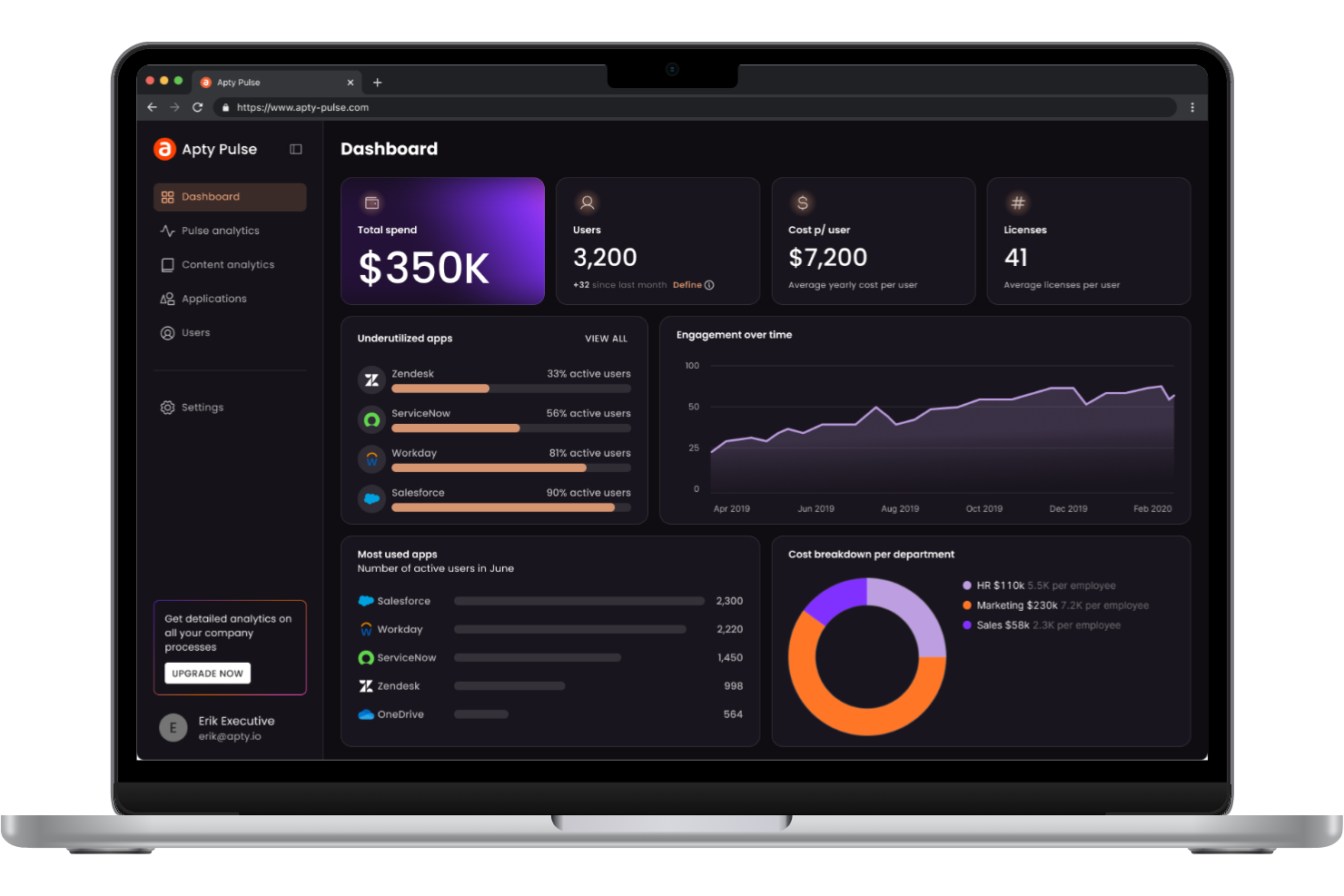
Apty is designed for organizations that need to ensure employees follow strict processes and compliance requirements within their software tools. This platform is especially relevant for HR, finance, and operations teams in regulated industries who need to guide users through complex workflows and document adherence. What makes Apty different from other Whatfix alternatives is its focus on compliance tracking, process validation, and real-time guidance that helps reduce risk and audit gaps.
Why Apty Is a Good Whatfix Alternative
If your organization needs to enforce compliance within digital processes, Apty offers targeted features that go beyond standard walkthroughs. I picked Apty because it lets you set up process validation rules and real-time compliance checks directly inside your business applications. You can track user actions, flag deviations, and generate audit-ready reports to support regulatory requirements. This makes Apty a strong choice for teams that need to document, monitor, and enforce compliance as part of their digital adoption strategy.
Apty Key Features
Some other features that make Apty a strong Whatfix alternative include:
- Customizable Tooltips: Add contextual help and instructions directly within your applications.
- Onboarding Flows: Design step-by-step onboarding experiences for new users or processes.
- Usage Analytics: Track how users interact with software and identify areas for improvement.
- Multi-Platform Support: Deploy guidance and tracking across web-based and desktop applications.
Apty Integrations
Native integrations are not currently listed.
Pros and Cons
Pros:
- Audit-ready reporting supports regulatory needs
- Real-time process validation flags user errors
- Compliance tracking is built into workflows
Cons:
- Onboarding setup may require vendor assistance
- Limited self-service documentation for admins
Userflow
Best for rapid onboarding flow creation
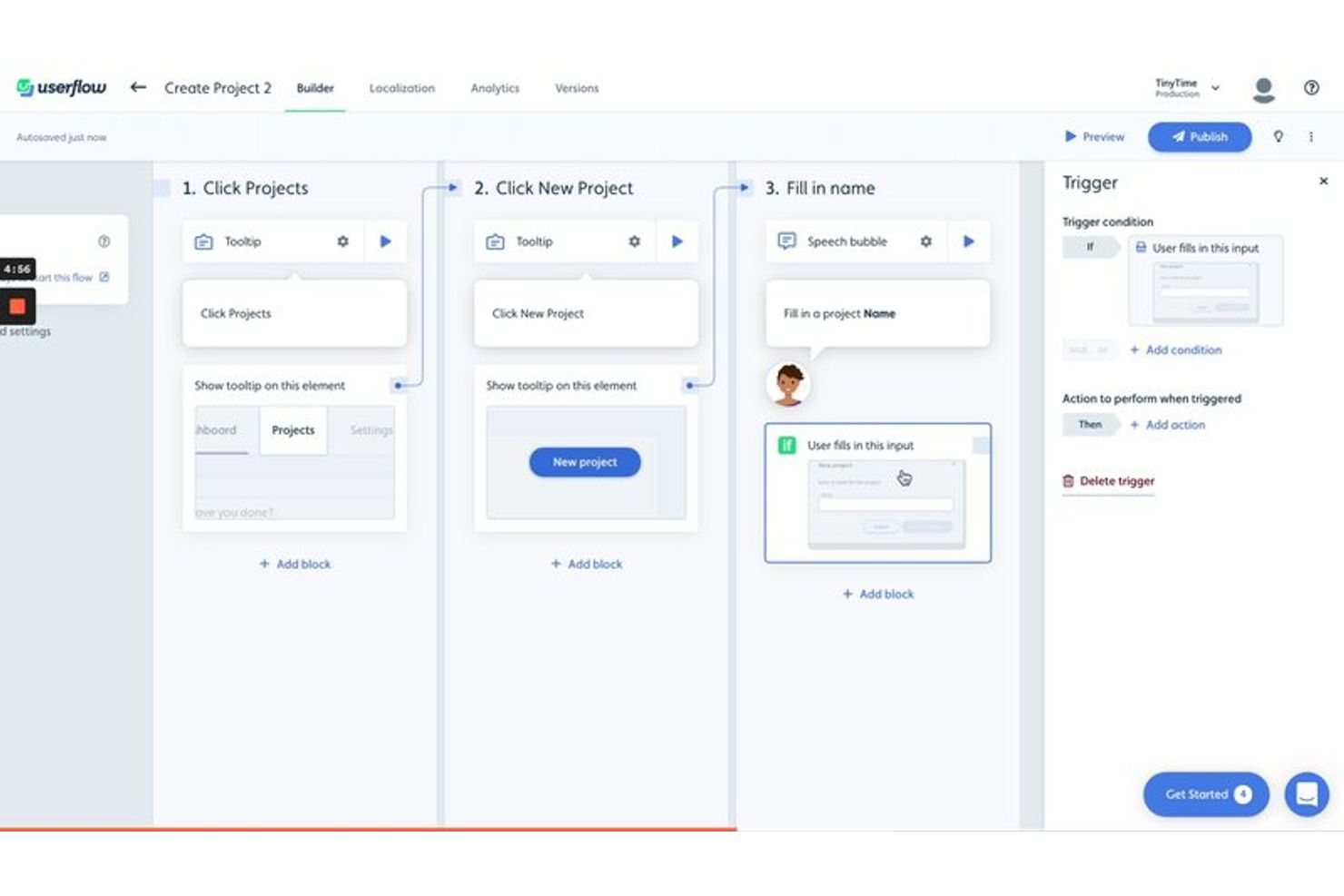
Userflow is designed for product teams and SaaS businesses that need to build onboarding flows quickly without relying on developers. If you want to launch in-app guides, checklists, and surveys in minutes, Userflow offers a no-code builder that stands out from other Whatfix alternatives. Its focus on rapid creation and iteration helps you respond to user feedback and product changes with minimal delay.
Why Userflow Is a Good Whatfix Alternative
When you need to create onboarding flows quickly, Userflow offers a distinct advantage over other Whatfix alternatives. I picked Userflow because its no-code builder lets you design and launch in-app tours, checklists, and surveys in just minutes. The platform also supports real-time editing and instant publishing, so you can iterate on your onboarding experience without waiting for developer resources. For teams that want to move fast and adapt onboarding to changing user needs, Userflow is a strong choice.
Userflow Key Features
Some other features that make Userflow appealing for teams, compared to whatfix alternatives, include:
- Multi-language Support: Create onboarding flows in multiple languages to reach a global user base.
- User Segmentation: Target specific user groups with tailored onboarding experiences.
- Custom Event Tracking: Track user actions and trigger flows based on custom events within your product.
- Integrations with Analytics Tools: Connect Userflow with platforms like Segment, Amplitude, and Mixpanel for deeper insights.
Userflow Integrations
Integrations include Salesforce, HubSpot, Segment, Mixpanel, Amplitude, Heap, RudderStack, Intercom, Zendesk, Zapier, and more.
Pros and Cons
Pros:
- Multi-language support for global user bases
- Real-time preview before publishing onboarding content
- No-code builder for instant onboarding flow updates
Cons:
- Fewer pre-built onboarding templates available
- Lacks built-in knowledge base functionality

Usetiful
Best for no-code onboarding customization
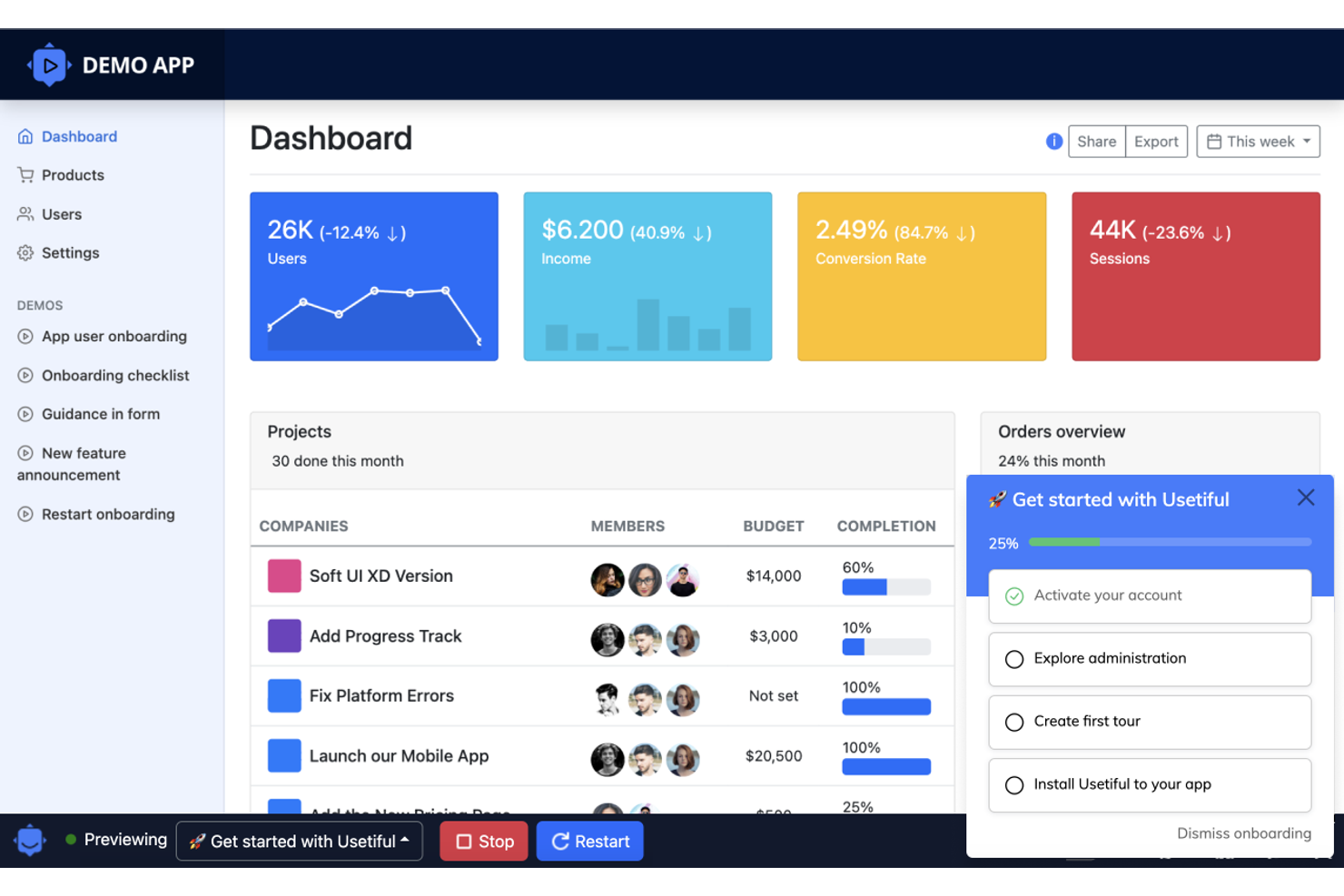
If you’re looking for a no-code way to build onboarding experiences, Usetiful is worth considering. This tool is designed for product managers and customer success teams who want to create product tours, checklists, and onboarding flows without relying on developers. Usetiful stands out from other Whatfix alternatives by letting you customize onboarding elements visually, so you can quickly adapt to changing user needs.
Why Usetiful Is a Good Whatfix Alternative
Unlike many onboarding tools that require technical resources, Usetiful lets you build and update onboarding flows without writing any code. I picked Usetiful because its visual editor allows you to create product tours, checklists, and pop-ups directly in your browser. You can quickly adjust onboarding steps as your product evolves, making it easy to keep guidance relevant for users. This no-code approach is especially helpful for teams that want to stay agile and responsive without waiting for developer support.
Usetiful Key Features
Some other features that make Usetiful a strong Whatfix alternative include:
- Multi-Language Support: Deliver onboarding content in several languages to reach a global user base.
- Progress Tracking: Track user progress through onboarding steps and display completion status.
- Smart Tips: Add contextual tooltips that appear based on user actions or page elements.
- User Segmentation: Target onboarding flows to specific user groups based on attributes or behavior.
Usetiful Integrations
Native integrations are not currently listed.
Pros and Cons
Pros:
- Provides contextual smart tips and tooltips
- Offers user segmentation for targeted tours
- Visual editor for building onboarding flows
Cons:
- Limited branding customization options
- Lacks built-in analytics dashboard
WalkMe
Best for large-scale enterprise onboarding
Whatfix is a digital adoption platform (DAP) that helps organizations create in-app guidance, onboarding flows, and training content for software users. Teams use Whatfix to design interactive walkthroughs, tooltips, and task lists that support employees or customers as they navigate new systems. By offering real-time, contextual help, Whatfix improves in-app experiences, improves product experience, and helps teams deliver better onboarding and training at scale, often complementing systems like an LMS for broader learning and development.
Why WalkMe Is a Good Whatfix Alternative
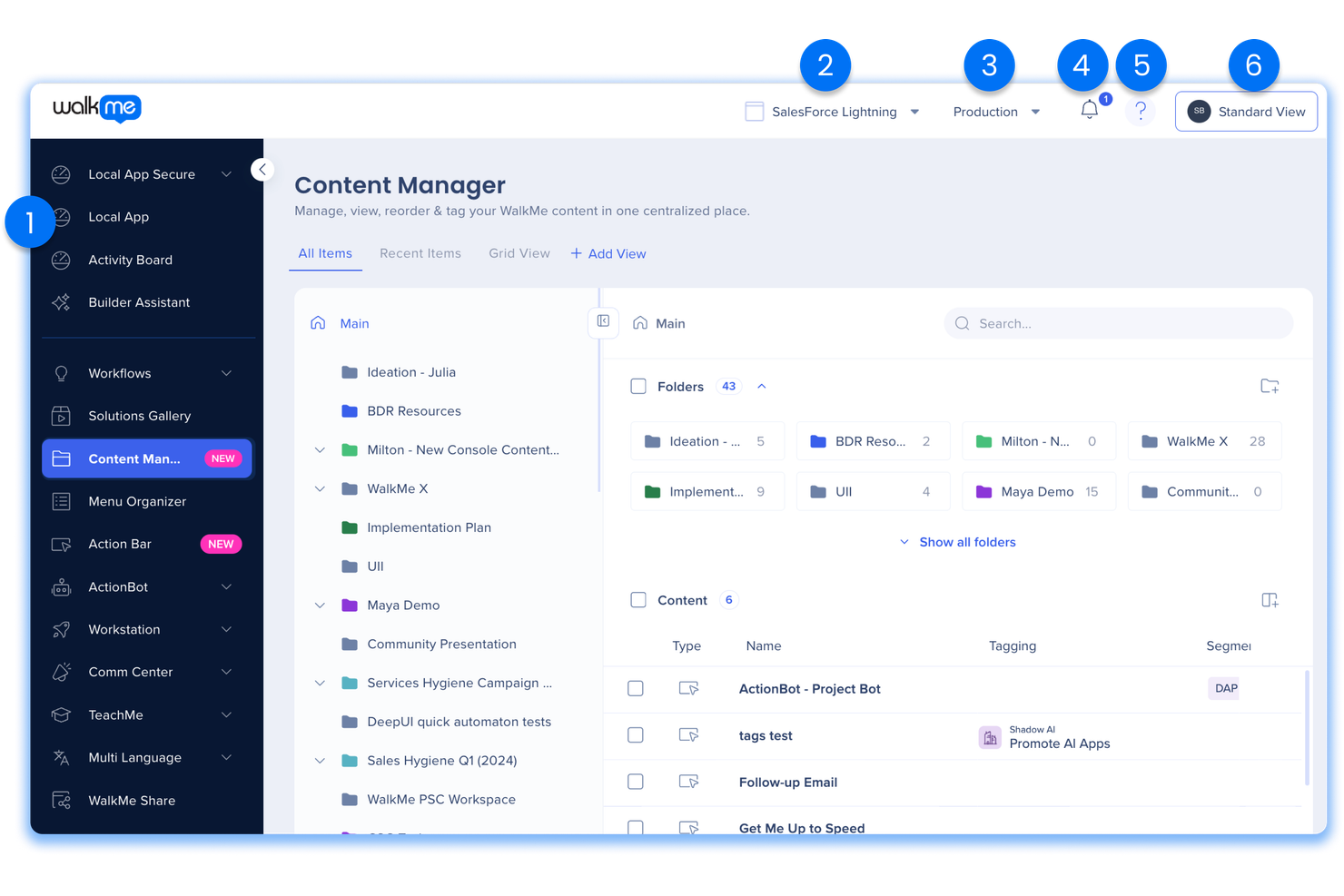
For large-scale enterprise onboarding, WalkMe brings unique strengths that set it apart from Whatfix. I picked WalkMe because its workflow automation lets you build complex, multi-step onboarding journeys that adapt to different user roles and permissions. Its analytics dashboard tracks user progress and identifies where employees get stuck, so you can target support where it’s needed most. These features make WalkMe a strong choice for organizations managing onboarding across multiple departments or global teams.
WalkMe Key Features
Some other features in WalkMe can help you address a range of onboarding and training needs:
- Smart Walk-Thrus: Create step-by-step, interactive guides that overlay directly on your enterprise applications.
- Resource Center: Offer users a centralized hub for help articles, videos, and support resources within the app.
- ShoutOuts: Send targeted pop-up messages to users to announce updates, deadlines, or important information.
- Segmentation: Deliver personalized guidance and content based on user attributes, roles, or behaviors.
WalkMe Integrations
Integrations include Salesforce, Workday, SAP, Microsoft Dynamics 365, ServiceNow, SuccessFactors, Oracle, Zendesk, Cornerstone, and more.
Pros and Cons
Pros:
- In-depth analytics for user behavior tracking
- Multi-application support across enterprise tools
- Advanced workflow automation for onboarding
Cons:
- Long-term contracts are typically required
- Customization often requires coding knowledge
Pendo
Best for in-app product analytics
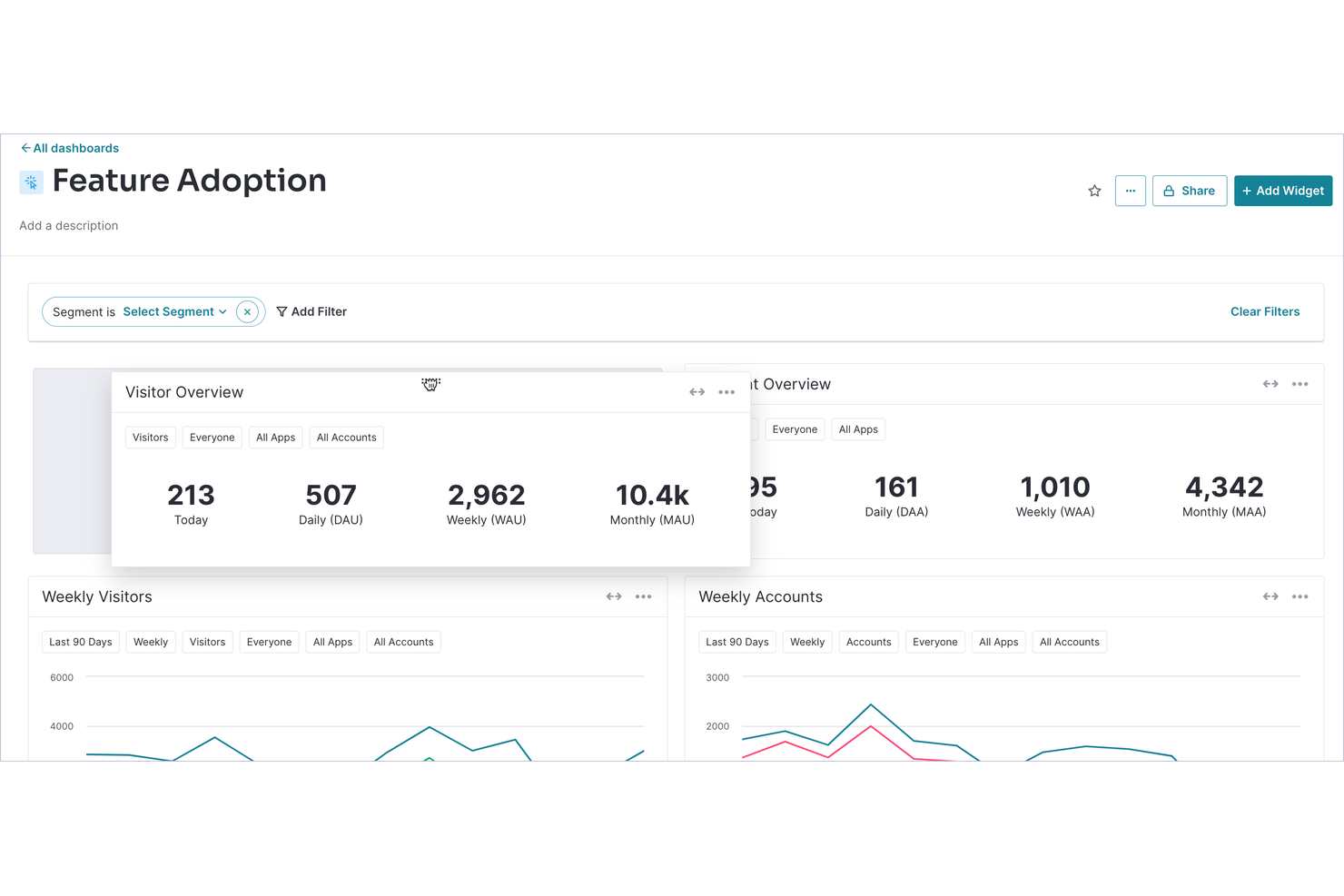
If you’re searching for a Whatfix alternative with a focus on in-app product analytics, Pendo is worth a close look. Product managers and UX teams use Pendo to track user behavior and launch targeted in-app guidance without relying on engineering resources. Its analytics-driven approach helps you identify friction points and optimize onboarding or feature adoption directly inside your product.
Why Pendo Is a Good Whatfix Alternative
Unlike many digital adoption tools, Pendo stands out for its in-app product analytics that go beyond basic user guidance. I picked Pendo because it lets you track detailed user behavior, segment users, and measure the impact of onboarding flows or feature launches directly within your product. Its analytics dashboard helps you pinpoint where users drop off or get stuck, so you can make data-driven improvements to your onboarding and training content. For teams that want to combine user guidance with actionable product insights, Pendo offers a strong alternative to Whatfix.
Pendo Key Features
Some other features in Pendo can help you deliver targeted onboarding and support at scale:
- In-app surveys: Collect user feedback directly within your product interface.
- Resource Center: Provide users with a centralized hub for help content and onboarding materials.
- Mobile app support: Extend analytics and guidance to your mobile applications.
- NPS tracking: Measure Net Promoter Score and monitor user sentiment over time.
Pendo Integrations
Integrations include HubSpot, Jira, Intercom, Marketo, Salesforce, Okta, Segment, Zendesk, Amazon S3, BigQuery, and more.
Pros and Cons
Pros:
- Resource Center centralizes help and onboarding
- Segmentation tools target specific user cohorts
- In-app analytics track feature adoption trends
Cons:
- Reporting exports have limited customization options
- Tagging elements sometimes misses dynamic content

Best for customer success integration
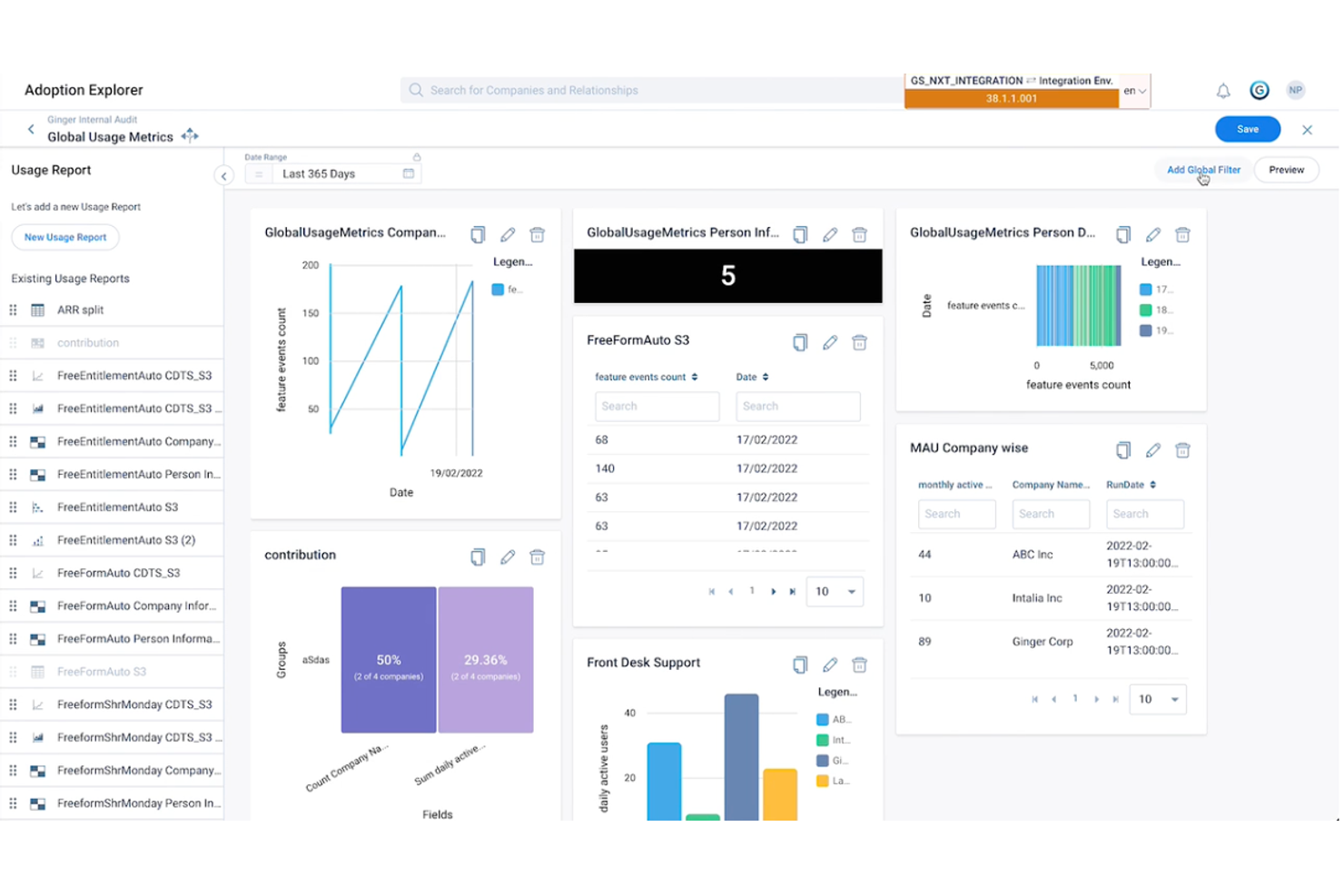
If you’re looking for a digital adoption platform that connects product usage with customer success, Gainsight is worth considering. This solution is designed for customer success teams and product managers who want to drive adoption while tracking customer health and engagement. Gainsight stands out from other Whatfix alternatives by tightly integrating product analytics with customer success workflows, making it easier to link user behavior to retention and growth strategies.
Why Gainsight Is a Good Whatfix Alternative
For organizations that want to connect digital adoption with customer success outcomes, Gainsight offers a unique approach. I picked Gainsight because it lets you link in-app user behavior directly to customer health scores and success metrics. The platform includes features like product usage analytics and automated playbooks that help customer success teams proactively address adoption challenges. If you need a solution that bridges the gap between product adoption and customer retention, Gainsight is a strong Whatfix alternative.
Gainsight Key Features
Some other features that make Gainsight appealing for teams seeking whatfix alternatives include:
- Journey Orchestration: Build and automate customer journeys across multiple touchpoints.
- In-app Surveys: Collect user feedback directly within your product interface.
- Resource Center: Provide users with a centralized hub for guides, announcements, and support materials.
- Audience Targeting: Deliver personalized experiences to specific user segments based on behavior or profile data.
Gainsight Integrations
Integrations include Champion, CloudEagle, Mixpanel, SearchUnify, TheLoops, Google Analytics, Fivetran, and more.
Pros and Cons
Pros:
- Includes in-app surveys for user feedback
- Offers automated customer journey orchestration
- Connects product usage data to customer health
Cons:
- Focuses heavily on customer success workflows
- Requires significant setup for full functionality

Best for interactive walkthrough creation

Lemon Learning gives teams a way to create interactive walkthroughs directly inside their web applications. This tool is especially useful for HR, IT, and operations leaders who need to onboard employees or roll out new software with step-by-step, in-app guidance. What sets Lemon Learning apart from other Whatfix alternatives is its focus on building custom, interactive tutorials that adapt to different user roles and workflows.
Why Lemon Learning Is a Good Whatfix Alternative
For teams that want to build interactive walkthroughs tailored to their own processes, Lemon Learning offers a flexible solution. I picked Lemon Learning because it lets you create step-by-step guides that launch directly within your web applications, so users get help exactly where they need it. You can customize walkthroughs for different user roles and update them as workflows change. This focus on interactive, in-app guidance makes Lemon Learning a strong choice for organizations looking for more control over onboarding and training experiences.
Lemon Learning Key Features
Some other features that make Lemon Learning a strong Whatfix alternative include:
- Browser Extension Deployment: Launch walkthroughs and guides through a browser extension for quick updates and rollouts.
- Multi-Language Support: Create and deliver content in several languages to support global teams.
- Analytics Dashboard: Monitor user engagement and walkthrough completion rates with built-in analytics.
- Content Versioning: Manage and update different versions of guides to match evolving processes or software changes.
Lemon Learning Integrations
Native integrations are not currently listed.
Pros and Cons
Pros:
- Offers analytics for tracking user engagement
- Supports multilingual content for global teams
- Walkthroughs can be deployed via browser extension
Cons:
- No public marketplace for prebuilt templates
- Pricing is not transparent on the website

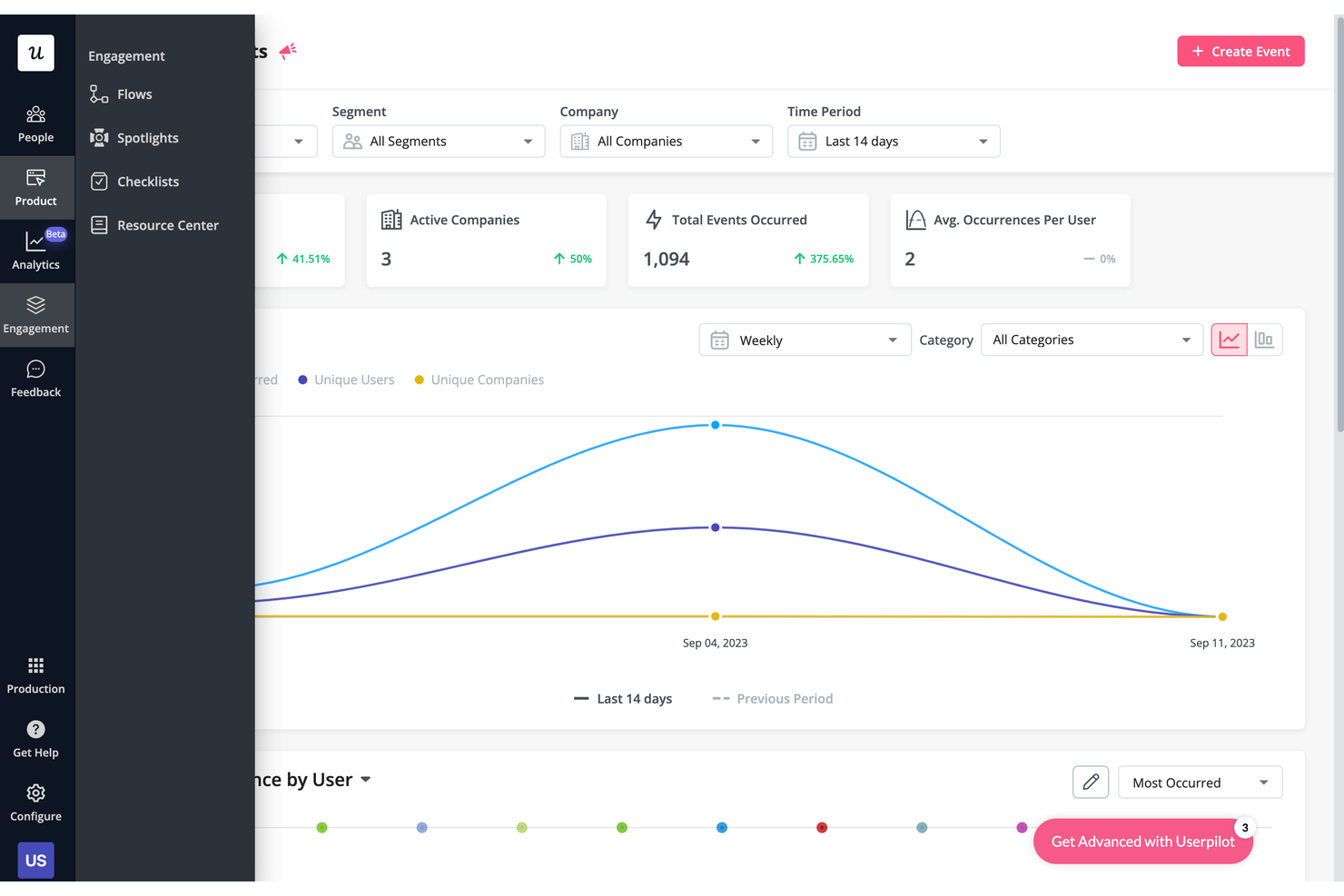
Userpilot stands out for SaaS product teams and customer success managers who want to deliver onboarding experiences tailored to each user’s needs. Unlike many Whatfix alternatives, Userpilot lets you trigger in-app flows, tooltips, and checklists based on user behavior and segments. This approach helps you guide users through complex products with onboarding that adapts as they interact with your platform.
Why Userpilot Is a Good Whatfix Alternative
For teams that want onboarding to feel personal and relevant, Userpilot offers a level of customization that sets it apart from other whatfix alternatives. I picked Userpilot because it lets you trigger onboarding flows, tooltips, and checklists based on real-time user actions and attributes. You can segment users by role, lifecycle stage, or custom events, then deliver targeted content that matches their journey. This makes Userpilot a strong choice if you need onboarding that adapts to each user’s unique experience.
Userpilot Key Features
Some other features that make Userpilot a strong option for Whatfix alternatives include:
- A/B Testing: Run experiments on onboarding flows to compare performance and optimize user engagement.
- Resource Center Widget: Add a customizable in-app help center for users to access guides, FAQs, and support.
- NPS Survey Tool: Collect Net Promoter Score feedback directly within your product to measure user satisfaction.
- Chrome Extension Builder: Build and edit onboarding flows directly on your live app using a Chrome extension.
Userpilot Integrations
Integrations include HubSpot, Salesforce, Segment, Google Tag Manager, Zendesk, Google Analytics, Intercom, Amplitude, Mixpanel, and more.
Pros and Cons
Pros:
- Resource center widget for self-serve support
- In-app NPS and survey collection tools
- Behavior-based triggers for onboarding flow delivery
Cons:
- Lacks built-in knowledge base authoring
- Limited localization options for non-English users

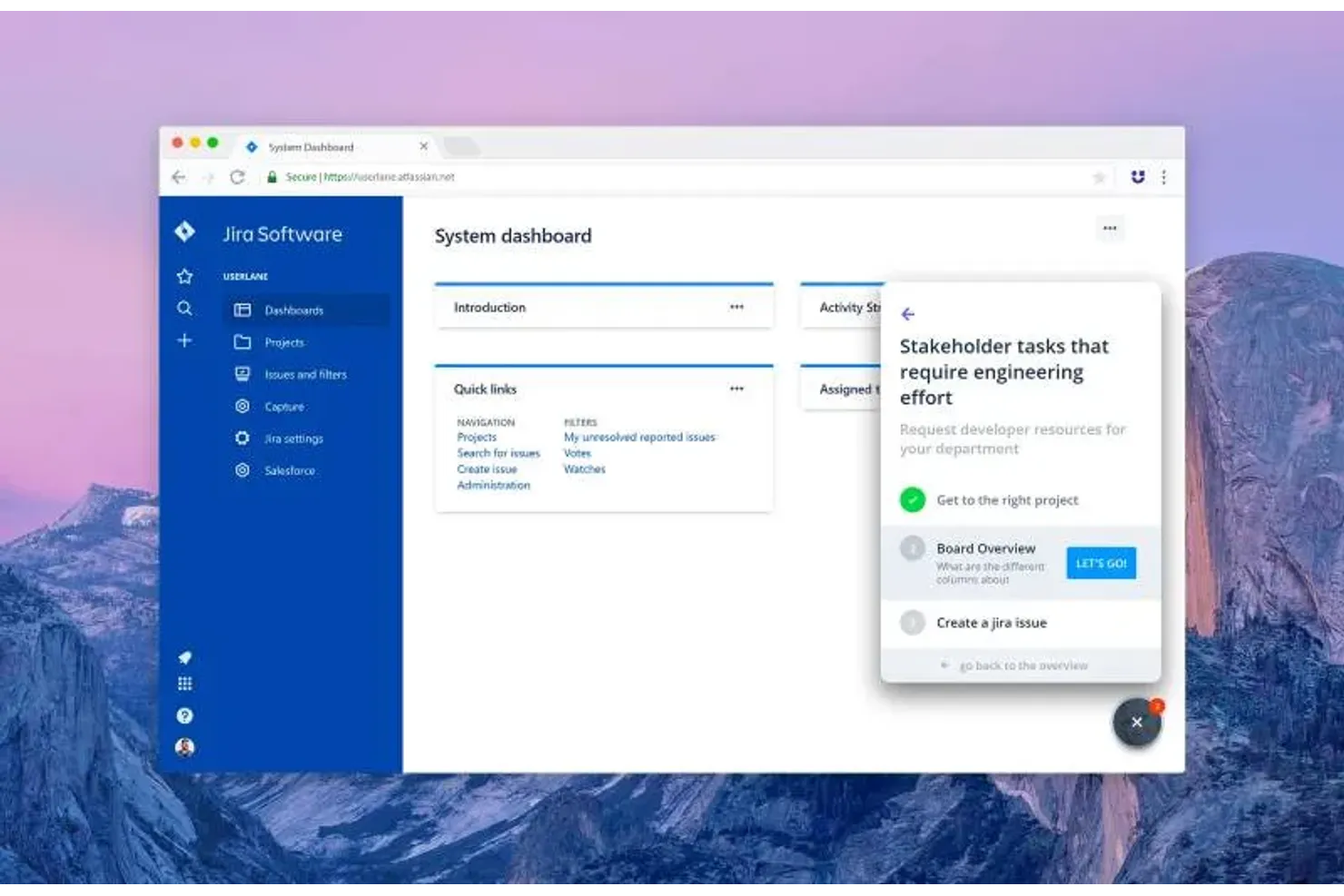
If you need a Whatfix alternative that excels at multilingual user guidance, Userlane is designed for you. HR teams, IT leaders, and global organizations use Userlane to create interactive, language-adaptive walkthroughs for software onboarding and support. Its focus on real-time, in-app translation helps you deliver consistent training and support experiences to users across different regions.
Why Userlane Is a Good Whatfix Alternative
For organizations that need to support users in multiple languages, Userlane offers a unique approach to digital adoption. I picked Userlane because it lets you create interactive guides that automatically adapt to the user’s preferred language, making onboarding and support accessible for global teams. Its real-time translation capabilities and language management tools help you maintain consistent messaging across regions without duplicating content. If multilingual guidance is a priority, Userlane stands out as a strong Whatfix alternative.
Userlane Key Features
In addition to its multilingual capabilities, Userlane offers several other features that support digital adoption and user onboarding:
- Step-by-step interactive guides: Build custom walkthroughs that guide users through processes directly within your application.
- Analytics dashboard: Track user engagement and completion rates for each guide.
- Role-based content delivery: Target specific guides to different user groups based on their roles or permissions.
- Contextual tooltips: Display helpful hints and explanations at key points in your software interface.
Userlane Integrations
Integrations include SharePoint, Confluence, Zendesk, and KnowledgeOwl.
Pros and Cons
Pros:
- Contextual tooltips support in-app learning
- Role-based content targets specific user groups
- Multilingual guides adapt to user's language settings
Cons:
- No visible browser extension for guide creation
- Limited public documentation on integration setup


OnScreen is purpose-built for teams that need to train users on SAP applications with in-app, step-by-step guidance. This tool is especially useful for manufacturing, supply chain, and enterprise IT teams that rely on SAP for daily operations and need to reduce training time and errors. Unlike other whatfix alternatives, OnScreen specializes in overlaying instructions directly within SAP screens, making process adoption and user onboarding much more targeted and efficient.
Why OnScreen Is a Good Whatfix Alternative
For organizations focused on SAP application training, OnScreen offers a level of in-app guidance that’s purpose-built for SAP environments. I picked OnScreen because it lets you create step-by-step walkthroughs that overlay directly onto SAP screens, so users get real-time help exactly where they need it. The tool also supports role-based content delivery, ensuring that each user sees only the instructions relevant to their job function. This targeted approach helps reduce training time and mistakes for teams working in complex SAP workflows.
OnScreen Key Features
Some other features that make OnScreen a strong Whatfix alternative include:
- Multi-language Support: Deliver in-app guidance in several languages for global teams.
- Analytics Dashboard: Monitor user engagement and completion rates for each walkthrough.
- Template Library: Access pre-built templates to speed up guide creation.
- Collaboration Tools: Allow multiple team members to co-author and review training content.
OnScreen Integrations
Native integrations are not currently listed.
Pros and Cons
Pros:
- Analytics dashboard tracks walkthrough engagement
- Multi-language support for global SAP teams
- SAP overlay guidance is highly contextual
Cons:
- Advanced analytics features require higher-tier plans
- Walkthroughs focus mainly on SAP environments
Andre Whatfix-alternativer
Her er noen andre Whatfix-alternativer som ikke kom med på kortlisten min, men som likevel er verdt å undersøke:
- Oracle University
For certified software training programs
- Nexthink Adopt
For employee digital experience insights
- Newired
For regulated industry onboarding
- Product Fruits
For feedback-driven product tours
- Guidde
For AI-powered video documentation
- Appcues
For targeted user segmentation
- ClickLearn
For automated training content creation
- uPerform
For just-in-time learning delivery
- SAP Enable Now
For SAP ecosystem integration
- Chameleon
For customizing in-app messaging


How I Evaluate Whatfix Alternatives
I split my evaluation into baseline criteria—like in-app guidance and HRIS compatibility—and differentiators that separate the tools worth recommending from the rest.
Core Functionality (Table Stakes For This List)
When I'm selecting tools for my list, I rank each one on a scale from 0 (does not offer the functionality) to 5 (excels in this area) for each core functionality listed below. Then, I calculate the tool's total score into a percentage. Each tool needs to achieve a minimum total score of 65% to be considered for inclusion.
- In-App Guidance: I look for interactive walkthroughs and tooltips that can guide an employee through multi-step tasks like submitting a PTO request or updating tax withholdings.
- Self-Service Support: Each tool should offer an in-app resource center where employees can search help content without filing a ticket or leaving their HR platform.
- HR Platform Compatibility: I check whether the tool works across widely used systems like Workday, SAP SuccessFactors, BambooHR, and ADP—not just one or two.
- No-Code Content Authoring: HR teams need to build and update guidance on their own, so I evaluate how accessible the editor is for non-technical content creators.
- User Segmentation: Targeting matters—I look at whether you can scope content by role, department, or location so new hires see different flows than tenured staff.
- Usage Analytics: Dashboards should show completion rates, drop-off points, and adoption trends so HR ops managers can pinpoint where employees get stuck.
Once I have a list of tools that meet this criteria, I consider what sets each platform apart.
Differentiating Factors (What Sets Vendors Apart)
Here's how I compare and contrast different vendors:
Standout Features
Multi-language localization matters when your workforce spans multiple regions—open enrollment guides and onboarding flows need to reach every employee in their preferred language. I also evaluate whether a platform offers AI-powered content generation, which can turn existing HR documentation into ready-to-publish walkthroughs. For organizations with frontline or deskless staff, mobile app guidance is a real differentiator since these employees often interact with HR tools exclusively on their phones.
Beyond Features
HRIS and HCM integrations are one of the first things I check—a tool that connects natively with your existing systems, like Workday or ADP, saves weeks of setup compared to custom API work. Compliance also weighs heavily, especially when employee data flows through walkthroughs tied to benefits enrollment or payroll. I look for SOC 2 Type II and GDPR compliance at a minimum. Implementation speed matters too; platforms that offer pre-built HR content templates can get your first onboarding flow live in days rather than months.
Hvorfor se etter et Whatfix-alternativ?
Selv om Whatfix er et godt valg blant Whatfix-alternativer, er det flere grunner til at noen brukere ser etter alternative løsninger. Du ser kanskje etter et Whatfix-alternativ fordi …
- Du trenger dypere SAP- eller ERP-integrasjon
- Du ønsker mer avansert analyse og rapportering
- Du trenger støtte for flere språk for globale team
- Du foretrekker mer transparente eller fleksible priser
- Du trenger funksjoner som er tilpasset regulerte bransjer
- Du ønsker flere tilpasningsmuligheter for veiledning i appen
Hvis noe av dette høres kjent ut, har du kommet til rett sted. Listen min inneholder flere Whatfix-alternativer som passer bedre for team som møter disse utfordringene med Whatfix og ser etter alternative løsninger.
Viktige funksjoner i Whatfix
Her er noen av de viktigste funksjonene i Whatfix, slik at du kan sette tilbudene fra alternative løsninger opp mot hverandre og sammenligne dem:
- Interaktive gjennomganger i appen
- Kontekstuelle oppgavelister for brukere
- Innholdsoppretting i flere formater (videoer, PDF-filer, lysbildefremvisninger)
- Sanntidsanalyse og rapportering av brukere
- Rollebasert innholdssegmentering
- Automatiserte introduksjonsforløp
- Integrasjon med populære CRM- og ERP-systemer
- Støtte for flere språk
- Selvhjelpsmoduler og kunnskapsbaser
- SCORM-kompatibel innholdseksport