

10 beste EPM-programvarer i 2026 for økonomisk prognostisering

10 Liste over den beste programvaren for virksomhetsstyring


Den beste EPM-programvaren hjelper deg med å effektivisere strategisk planlegging, automatisere resultatoppfølging og erstatte spredte regneark med én felles kilde til sannhet.
Når budsjetter, prognoser og resultatdata ligger i systemer som ikke er koblet sammen, går beslutningstakingen saktere og oversikten blir dårligere. Den rette plattformen for virksomhetsstyring samler økonomisk planlegging, operative mål og rapportering på ett sted – slik at ledere kan ta raskere og mer velbegrunnede beslutninger.
Med utgangspunkt i min erfaring med å evaluere dusinvis av plattformer for virksomheter og HR, har jeg satt sammen en liste over den beste EPM-programvaren som er tilgjengelig i dag. I denne veiledningen finner du løsninger som reduserer manuell rapportering, gir bedre innsikt i sanntid og hjelper organisasjoner med å planlegge, overvåke og optimalisere resultater i stor skala.
Hva er EPM-programvare?
EPM-programvare er programvare for virksomhetsstyring som hjelper organisasjoner med å planlegge, budsjettere, utarbeide prognoser og analysere virksomhetens resultater på én samlet plattform. Den brukes vanligvis av økonomi-, drifts- og lederteam for å samordne økonomistrategien med virksomhetens mål.
Ved å sentralisere viktige prosesser erstatter EPM-programvare feilutsatte regneark og fragmenterte verktøy – og hjelper ledere med å forbedre nøyaktigheten, redusere manuelt arbeid og ta bedre og raskere beslutninger basert på sanntidsdata.
Hvorfor du kan stole på våre programvareanbefalinger
Teamet vårt har testet og anmeldt programvare siden 2012. Vi er selv HR-eksperter, så vi vet hvor vanskelig og hvor viktig det er å velge riktig programvare.
I denne guiden har vi vurdert verktøyene gjennom praktisk testing og uavhengig research og gitt dem poeng ut fra våre utvelgelseskriterier. Vi bygger også på innsikt fra ledende eksperter i bransjen og erfarne HR-eksperter.
Anmeldelsene våre bygger på vår egen redaksjonelle vurdering. De er ikke et salgsargument.
Ekspertanmeldere:
Sammenligningstabell for EPM-programvare
Denne sammenligningstabellen oppsummerer prisdetaljene for mine beste utvalgte EPM-programmer:
| Tool | Best For | Trial Info | Price | ||
|---|---|---|---|---|---|
| 1 | Best for automating administrative tasks | Free demo available | Pricing upon request | Website | |
| 2 | Best EPM software for manufacturing operations | Free demo available | Pricing upon request | Website | |
| 3 | Best for AI-supported planning and forecasting | Free demo available | Pricing upon request | Website | |
| 4 | Best versioning and scenario analysis | Free demo available | Pricing upon request | Website | |
| 5 | Best for enterprise project portfolio management | 30-day free trial | Pricing upon request | Website | |
| 6 | Best EPM software for retail analytics | Free demo available | Pricing upon request | Website | |
| 7 | Best for financial close solutions | 30-day free trial | From $1000/month | Website | |
| 8 | Best user-friendly modeling tool | Free demo available | Pricing upon request | Website | |
| 9 | Best for Microsoft SharePoint integration | 30-day free trial | From $6/user/month | Website | |
| 10 | Best EPM software for finance teams | Free demo available | Price upon request | Website |
Oversikt over de 10 beste EPM-programmene
Her er en kort beskrivelse av hver av EPM-løsningene på listen min. Jeg har forklart hva hvert system gjør best, og inkludert skjermbilder for å vise noen av de viktigste funksjonene.

Vena
Best for automating administrative tasks

Vena is best suited for mid-sized to enterprise finance teams that rely heavily on Excel but need more structure around financial forecasting and planning. It combines familiar spreadsheet-based workflows with centralized controls, making it easier to manage budgets, forecasts, and approvals without adding administrative overhead. If your team wants to scale forecasting processes without abandoning Excel, Vena is a strong fit.
Why I Picked Vena
I picked Vena because it reduces the manual admin work that usually slows down financial forecasting. You can automate recurring planning and forecasting workflows using Excel-based templates that feed into a centralized system, so your team spends less time chasing files and more time analyzing results.
Built-in workflow automation routes tasks, approvals, and submissions automatically, which helps prevent missed deadlines during forecast cycles, and I also like that Vena enforces version control behind the scenes, ensuring everyone works from the same data without requiring finance to manage file cleanup manually. For finance teams that live in Excel, this approach removes friction without forcing a major process overhaul.
Vena Key Features
Here are some key features worth highlighting:
- Workflow Automation: Automates task assignments, approvals, and reminders across budgeting and forecasting cycles.
- Centralized Version Control: Maintains a single source of truth while letting teams work in Excel.
- Workforce Planning Models: Connects headcount, compensation, and hiring plans directly to forecasts.
- Capital and Revenue Planning: Links operational drivers to financial projections for more accurate forecasting.
Vena Integrations
Integrations include Microsoft Excel, Microsoft 365, Microsoft Teams, Power BI, Workday, ADP, Salesforce, NetSuite, and Single Sign-On (SSO) providers.
Pros and Cons
Pros:
- Automates finance workflows
- Offers centralized version control
- Has a wide variety of financial templates
Cons:
- Not available for Mac users
- Limited training support
New Product Updates from Vena
Vena Adds Analytics Agent and Expands MCP Capabilities
Vena adds an Analytics Agent in open beta and expands Vena MCP for governed financial data access across enterprise AI tools. These updates support deeper financial analysis, recurring AI workflows, and controlled use of Vena data outside finance. For more information, visit Vena’s official site.
 .
.
Best EPM software for manufacturing operations

OneStream XF is built for large, complex organizations—especially manufacturers—that need tight control over financial forecasting, planning, and reporting in one platform.
Why I Picked OneStream XF
I picked OneStream XF because it gives manufacturing-focused finance teams deeper forecasting control without relying on disconnected tools. You can build driver-based forecasts using operational inputs like production volumes, cost centers, and plant-level data, which helps align financial forecasts with real operational activity.
Its unified data model ensures your forecasts, actuals, and consolidations all come from the same source, reducing reconciliation work at month-end. I also like that you can drill from high-level forecasts down to individual entities, plants, or product lines, which is especially useful for identifying margin or cost variances. For manufacturers managing complexity across geographies and business units, this level of visibility is hard to match.
OneStream XF Key Features
Here are some key features worth highlighting:
- Unified Financial Platform: Combines forecasting, budgeting, consolidation, and reporting in a single data model.
- Driver-Based Forecasting: Build forecasts using operational drivers like volumes, rates, and cost structures.
- Multi-Dimensional Analysis: Analyze forecasts by entity, product, plant, geography, or customer.
- Marketplace Solutions: Extend forecasting and reporting capabilities with pre-built finance and operational apps.
OneStream XF Integrations
Integrations include SAP, Oracle ERP, Microsoft Dynamics, Workday, NetSuite, Salesforce, SQL Server, Snowflake, and Active Directory.
Pros and Cons
Pros:
- Deep drill-down analysis across plants, products, and regions
- Single data model reduces reconciliation
- Strong forecasting for manufacturing and multi-entity organizations
Cons:
- Their standard documentation could be more detailed
- Dashboard comes across as a bit busy

Jedox
Best for AI-supported planning and forecasting

Jedox is best suited for mid-sized to enterprise finance teams that need advanced planning and forecasting built directly on familiar spreadsheet workflows.
Why I Picked Jedox
I picked Jedox because it lets you build advanced financial forecasts without forcing your team to abandon Excel. You can connect live data models directly to Excel using its native add-in, so forecasts stay accurate while still feeling familiar.
Its AI-assisted forecasting helps you generate predictive scenarios based on historical trends, which is especially useful when planning across multiple business units, and I also like that Jedox centralizes planning data across finance, sales, and operations, reducing version-control issues during forecasting cycles. For teams managing complex, multi-dimensional forecasts, Jedox offers flexibility that simpler tools can’t match.
Jedox Key Features
Here are some key features worth highlighting:
- Excel-Based Planning Add-In: Build and update forecasts directly in Excel with live, centralized data.
- AI-Assisted Forecasting: Generate predictive forecasts using machine learning based on historical data.
- Multi-Dimensional Data Modeling: Model scenarios across departments, regions, and time periods.
- Workflow-Driven Planning Cycles: Coordinate budget approvals and forecast submissions with structured workflows.
Jedox Integrations
Integrations include Microsoft Excel, Microsoft Power BI, SAP (including SAP S/4HANA), Salesforce, Microsoft Dynamics 365, Oracle databases, Google Sheets, Microsoft SQL Server, and Snowflake.
Pros and Cons
Pros:
- Handles complex, multi-entity financial models well
- AI forecasting supports scenario and predictive planning
- You can connect Excel files to their database natively
Cons:
- The help documentation is hard to navigate
- Predictive analyses may load slowly since all data is stored in memory

Best versioning and scenario analysis

Workday Adaptive Planning helps finance and operations teams replace error-prone spreadsheets with a planning platform built for real-time budgeting, rolling forecasting, and collaborative financial modeling.
Why I Picked Workday Adaptive Planning
I picked Workday Adaptive Planning because it gives your finance team the tools to build driver-based forecasts and budgets with actuals flowing in from systems you already use, so you spend less time reconciling spreadsheets and more time analysing performance.
Its scenario analysis lets you test assumptions and see impacts instantly, which helps when you’re managing workforce, revenue, or cost plans across multiple business units. The built-in collaboration features mean your team can work on plans at the same time without version control headaches.
I also like that dashboards and reports update in real time, letting you cut monthly close cycles and give leaders timely insights. Plus, with customizable models and flexible budgeting approaches, it adapts to how your organisation plans rather than forcing you into a rigid structure.
Workday Adaptive Planning Key Features
Here are some key features worth highlighting:
- Driver-Based Planning: Build budgets and forecasts linked to key operational metrics like headcount or sales volume.
- Scenario Analysis: Compare “what-if” cases to assess financial impacts before decisions are made.
- Real-Time Reporting: Interactive dashboards and reports that reflect up-to-date data.
- Workforce Planning: Plan headcount, compensation costs, and staffing scenarios within the same platform.
Workday Adaptive Planning Integrations
Integrations include Microsoft Excel, Microsoft 365, Salesforce Sales Cloud, Dynamics 365, Oracle NetSuite, Sage Intacct, SAP ERP, and more via its integration framework.
Pros and Cons
Pros:
- Formulae creation is accessible and intuitive
- Excellent scenario analysis and change comparison tools
- Flexible dimensions, attributes, and timeframes for planning
- Easy to create and share various reports
Cons:
- No way to preserve previous forecasts if actuals are restated/adjusted
- No corporate consolidation (multiple organizations/HQ partners in one group)
- There aren’t any web reports within the dashboards

Best for enterprise project portfolio management

Planview Enterprise One is a comprehensive enterprise project portfolio management (PPM) system with a sleek, modern take on reporting and analytics modules that make visualizations endlessly accessible and digestible.
Tap into their solutions for strategic planning, program management, road mapping, investment prioritization, and financial planning.
Planview’s PPM-oriented strengths include excellent stakeholder engagement features and trade-off analysis for shifting priority navigation.
Pricing details for Planview are available upon request. They also offer a free 30-day trial.
Pros and Cons
Pros:
- Strong investment and capacity planning capabilities
- Easy to configure data entry screens with drop-down lists and unique fields
- Very affordable per-user/per-month cost
- KPI analytics tiles are clear and customizable
Cons:
- Can’t chart resource availability based off of the project scope dates
- Timesheets would benefit from more user-friendliness
- Forecasting for teams vs resources features are a work in progress

Epicor
Best EPM software for retail analytics

Epicor ERP business intelligence and analytics boasts real-time, in-context data made accessible to customers, vendors, and inventory managers.
Their fully integrated retail management system comes with built-in best practices, data-driven customer loyalty guidance, competitor price comparisons, and other performance solutions.
Be sure to take advantage of their robust employee scheduling features and document management tools.
Epicor costs from $175/user/month and offers a free demo.
Pros and Cons
Pros:
- Top-notch database search feature (called Enterprise Search)
- Good quality dashboard and reports capabilities
- Highly customizable with a new REST API implemented in 2019
- Good supply chain management (SCM) functions
Cons:
- The order release process is not as user-friendly as it could be
- Somewhat cumbersome to implement and upgrade
- Additional integration with financial and HR applications welcomed

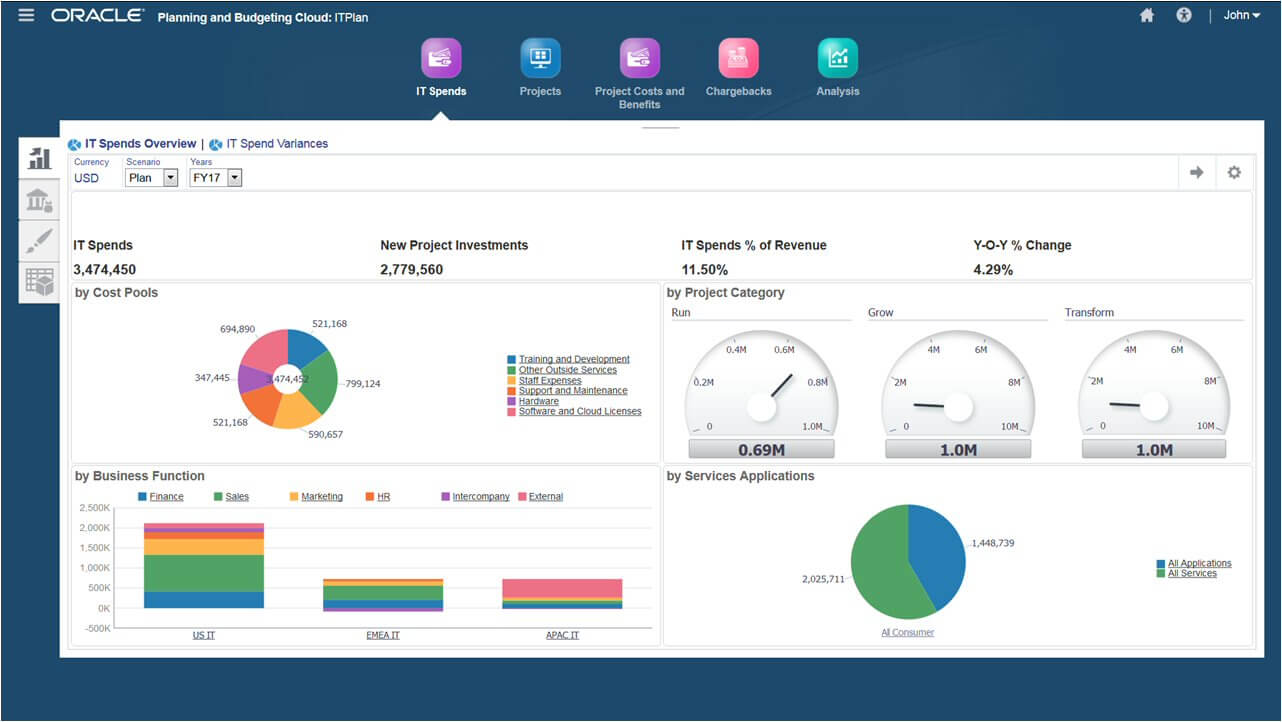
Oracle EPM Cloud helps you model and plan all aspects of corporate human resources, finance targets, sales departments, and your supply chain.
They are recognized as a leader in cloud financial close solutions thanks in part to their built-in global reporting requirement standards, automatic cash flow, and balance sheet calculations, and intelligent process automation (IPA).
Oracle offers smart insights and personalized recommendations using their comprehensive AI.
Oracle Cloud EPM costs from $1000/user/month and offers a 30-day free trial.
Pros and Cons
Pros:
- Good automated cash flow reporting and multi GAAP (generally accepted accounting principles) reporting
- Offers best practice configuration built right in
- Easily automate reconciliation processes
- Automating of XBRL (a.k.a. bar codes for reporting) tagging and taxonomies
Cons:
- Highest functionality requires additional Oracle Fusion apps such as Hyperion
- Smartview interface is a bit cumbersome
- Lacks some robust process automation (RPA)


Infor Dynamic Enterprise Performance Management (Infor d/EPM) merges intelligent business tools and financial planning capabilities to help you assess current and potential activities.
Their user-friendly modeling tool empowers managers to create, test, and deploy scenarios with machine learning insights, recommendations, and predictive analytics.
You’ll find yourself able to easily manage work-in-progress delivery costs, timelines, and project execution.
Infor d/EPM has enterprise pricing upon request and offers a free demo.
Pros and Cons
Pros:
- Unlimited versioning for what-if scenario planning
- Compelling AI-based predictive analytics
- Powerful and user-friendly modeling tool
- Unifies planning P&L, balance sheet, and cash flow
Cons:
- Time-consuming initial implementation and set-up
- Reports need some manual intervention for them to look presentation-worthy
- UI often incorporates too much text on each screen


IgniteTech’s EPM Live is a Microsoft SharePoint integrated enterprise work management solution designed to enhance your ability to track and manage all projects and associated costs.
EPM Live users can hone in on specific EPM processes, or access other IgniteTech modules which are also included in their EPM Live subscription.
You can also access all Ignite products under an Ignite Unlimited plan, which cover six key areas: customer experience management, digital engagement, sales and marketing enablement, functional process automation, information technology acceleration, and communications & remote engagement.
EPM Live costs from $6/user/month and offers a free 30-day trial. Enterprise plan pricing is available upon request.
Pros and Cons
Pros:
- Easy, native integration with any Microsoft program
- Fantastic cost and resource management features
- Built-in social collaboration tools assist team performance
- Comes with 70 ready-to-use functional extension modules
Cons:
- Requires MS SharePoint software at an additional cost
- Excessive clicks required for small things like closing a project or service request
- Minimum pricing plan is not suitable for large enterprises


Axiom Software by Syntellis (formerly Axiom EPM) is a sophisticated, flexible enterprise performance management solution used by companies to model scenarios, analyze financial results, and optimize organizational decision-making.
Their software supports strategic planning, budgeting, and forecasting, reporting and analytics, profitability, and cost management for complex data estates. Their cost management module boasts clear, evidence-based costing algorithms as well as profitability trends across business lines.
Their EPM system is well-suited for financial institutions, higher education, and complex healthcare organizations. They are currently used by companies like Atrium Health, Trinity Health, BankUnited, Byline Bank, and several US universities and colleges.
Axiom EPM has enterprise pricing upon request and offers a free demo.
Pros and Cons
Pros:
- Spreadsheet-style database is intuitive for anyone who has used Excel or Sheets
- Premium consulting package includes unique reports for any data set
- Myriad customization and possibilities for reporting templates
- Easy to set-up and adjust user security for data access
Cons:
- Interface is not as engaging and modern as some competitors
- Uses paid FTE (full time equivalent) metrics for reports rather than productive FTEs
- Can be challenging to drill-down to a single or specific charge
Annen programvare for virksomhetsstyring
Her er noen flere EPM-løsninger som ikke kom med på topplisten:
- Anaplan
EPM software for supply and demand planning
- Planful
For rolling forecasts
- SAP Analytics Cloud
For first-party feature scalability
- IBM Planning Analytics
For change management planning
- Insight Software
For first-party feature scalability


How I Evaluate EPM Software
I evaluate EPM tools in two layers: the baseline capabilities a tool must have—like configurable review cycles and goal tracking—and the differentiators that set the best options apart.
Core Functionality (Table Stakes For This List)
When I'm selecting tools for my list, I rank each one on a scale from 0 (does not offer the functionality) to 5 (excels in this area) for each core functionality listed below. Then, I calculate the tool's total score into a percentage. Each tool needs to achieve a minimum total score of 65% to be considered for inclusion.
- Performance Review Management: I check whether review cycles are configurable—can you run quarterly check-ins for sales teams and annual reviews for other departments from the same setup?
- Goal & OKR Tracking: Cascading goals matter here. I look for tools that let you align individual targets upward to team and company-level OKRs with visible progress tracking.
- 360-Degree Feedback: Multi-rater reviews should support peers, managers, and direct reports with anonymity controls. I evaluate how flexible the rater selection workflow is.
- Continuous Feedback & 1:1s: Real-time feedback and structured one-on-one agendas help managers coach in the moment. I look for tools that tie action items back to goals.
- Performance Analytics & Reporting: Dashboards should go beyond raw scores. I evaluate whether the tool offers calibration views, 9-box grids, and trend analysis across cycles.
- Development & Succession Planning: I look for tools that connect review outcomes to individual development plans and succession pipelines, not just store them separately.
Once I have a list of tools that meet the criteria, I consider what sets each platform apart.
Differentiating Factors (What Sets Vendors Apart)
Here's how I compare and contrast different vendors:
Standout Features
AI-powered insights are a big differentiator. I look for tools that detect rating bias across managers or suggest feedback language during review cycles. Compensation management is another area I evaluate closely—linking performance ratings directly to merit increase workflows saves HR teams from juggling spreadsheets alongside their review platform. I also check whether a tool includes a skills and competency library mapped to roles, since pre-built frameworks give teams a head start on building consistent evaluation criteria.
Beyond Features
HRIS integration depth matters a lot here. I check whether the tool syncs bidirectionally with platforms like BambooHR or Workday so employee data stays current without manual updates during review cycles. Scalability is another factor I evaluate—a 50-person company and a 2,000-person org with multiple entities need very different permission structures and language support. I also look at implementation resources, since launching your first review cycle on a new platform often requires dedicated onboarding guidance and manager training materials.
EPM-programvare: Viktige funksjoner
Her er kjernefunksjonene all god programvare for virksomhetsstyring bør ha:
- Integrert økonomisk planlegging: Koble budsjetter, prognoser og økonomiske modeller sammen i én sømløs plattform, slik at du raskt kan ta informerte beslutninger. Dette gir deg oversikt over helheten og lar deg justere planene i sanntid etter hvert som ting endrer seg.
- Resultatdashbord: Få tilgang til visualiseringer i sanntid og sentrale resultatindikatorer (KPI-er) i et sentralisert dashbord. Dette hjelper deg med å følge fremdriften, oppdage trender og dele innsikt med teamet ditt – uten å måtte lete gjennom regneark.
- Samordning av strategiske mål: Sørg for at alle avdelinger og team beveger seg i samme retning ved å samordne aktivitetene deres med organisasjonens viktigste mål. Dette holder alle fokuserte og ansvarlige, fra toppledelsen til prosjektlederne.
- Scenariomodellering: Test «hva hvis»-scenarier for å se hvordan ulike endringer – som markedsendringer eller budsjettjusteringer – kan påvirke resultatene. Du vil føle deg tryggere på neste steg fordi du allerede har sett hva som kan skje.
- Konsolidering og rapportering: Effektiviser prosessen med å samle inn data fra ulike forretningsenheter og land. Generer konsistente og nøyaktige rapporter raskere, noe som gjør det langt mindre stressende å avslutte regnskapet ved utgangen av kvartalet.
- Automatisering av arbeidsflyt: Automatiser repetitive oppgaver som godkjenninger, varsler eller datainnsamling. Dette holder alle på rett spor og sparer deg for de fryktede manuelle feilene.
- Rollebasert tilgangskontroll: Kontroller hvem som ser hva, slik at sensitiv informasjon bare er tilgjengelig for autoriserte brukere. Du kan enkelt endre tillatelser etter hvert som teamene utvikler seg eller nye prosjekter dukker opp.
- Revisjonsspor: Oppbevar detaljerte oversikter over endringer, beslutninger og godkjenninger. Dette hjelper ikke bare med etterlevelse, men er også svært nyttig når du må spore hvem som oppdaterte prognosen, eller hvorfor en justering ble gjort.
Vanlige AI-funksjoner i programvare for virksomhetsstyring
I tillegg til standardfunksjonene i programvare for virksomhetsstyring som er nevnt ovenfor, integrerer mange av disse løsningene AI med funksjoner som:
- Prediktiv analyse: Bruk AI til å forutsi fremtidige resultater ved å identifisere trender og mønstre i dataene dine. Det betyr at du kan forutse utfordringer og muligheter før de faktisk havner på skrivebordet ditt.
- Automatisk avviksdeteksjon: La AI automatisk varsle om uvanlige økninger eller fall i KPI-ene dine. Du oppdager potensielle problemer – som uventede kostnader eller inntektsmangler – før de kommer ut av kontroll.
- Naturlig språkbehandling for rapportering: Generer sammendrag for ledelsen eller tilpassede rapporter med bare noen få instruksjoner. AI omdanner data til et enkelt språk, slik at alle kan forstå historien bak tallene.
- Intelligente anbefalinger: Få proaktive forslag til hvordan du kan forbedre prosesser, omfordele ressurser eller justere strategier. AI går gjennom data raskere enn noen analytiker og gir deg innsikt du ellers kanskje ville gått glipp av.
- Datavask og berikelse: Bruk AI til å rydde opp i uryddige data og fylle ut manglende detaljer. Renere og mer pålitelige tall gir alle involverte et bedre grunnlag for trygge beslutninger.
Vanlige spørsmål
Hvorfor bør du bruke EPM-programvare?
Programvare for virksomhetsstyring (EPM) er avgjørende for forretningsprosessstyring (BPM) på høyt nivå. Hvis du ennå ikke bruker EPM-programvare, bør du vurdere å ta den i bruk i organisasjonen din.
Spør deg selv: Er de strategiske forretningsprosessene dine basert på nøyaktige og oppdaterte data om virksomhetens resultater? Hvordan kan du sikre at organisasjonen din utnytter data maksimalt for å støtte beslutningstaking på høyt nivå?
EPM-programvare håndterer prosesser på høyt nivå, som økonomiske prognoser og rapportering for netthandel. Mange løsninger gir også innsikt i effektiviteten i forsyningskjeden, utvikling av strategier og gjennomføring.
Hva er forskjellen mellom ERP- og EPM-programvare?
Kort sagt håndterer programvare for virksomhetsressursplanlegging (ERP) operative prosesser i en virksomhet. ERP-systemer fokuserer først og fremst på transaksjonsdata, og håndterer oftere:
- kundefordringer
- leverandørgjeld
- budsjettstyring
- likviditetsstyring
- økonomisk rapportering (faktisk resultat versus budsjettavvik)
- resultatregnskap
EPM-programvare har derimot som mål å effektivisere prosesser for virksomhetsstyring i en virksomhet. EPM-systemer fokuserer først og fremst på styringsdata, og håndterer oftere:
- analyse og modellering av "hva hvis"-scenarier
- avansert ledelsesinnsikt i virksomhetens resultater
- kompleks budsjettforvaltning
- kompleks virksomhetsplanlegging
- beslutningstaking basert på økonomiske og operasjonelle resultater
- dyptgående analyse av detaljerte operasjonelle planer
Ettersom EPM- og ERP-løsninger har mye til felles, berører mye av programvaren på denne listen begge deler. De beste EPM-systemene forble likevel hovedfokuset.
Hvilken EPM-programvare har du brukt?
Det er på tide at leserne kommer med sine innspill. Bruker du for tiden noen verktøy for virksomhetsstyring (CPM) som du ønsker å skryte av? Hva er ditt beste tips for styring av virksomhetens resultater? Finnes det et SaaS-verktøy for økonomisk planlegging som du ville ha lagt til på denne listen hvis du kunne? Si din mening i kommentarfeltet.
Andre ressurser
Ser du etter programvare som kan hjelpe deg med å holde oversikt over mer detaljerte transaksjonsdata? I så fall anbefaler jeg at du også tar en titt på listen vår over de beste ERP-systemene.
Hvis du er interessert i ERP-systemer, men har et stramt budsjett, har vi noe for deg også. Ta en titt på listen vår over de beste ERP-systemene for små bedrifter med et begrenset budsjett.