

10 beste helse- og sikkerhetsprogramvarer for 2026

Beste programvare for helse og sikkerhet – kortliste


Programvare for helse og sikkerhet hjelper teamet ditt med å håndtere risiko på arbeidsplassen, følge opp samsvar og opprettholde et tryggere miljø gjennom digitale verktøy og automatisering. Hvis du leter etter den beste programvaren for helse og sikkerhet, balanserer du sannsynligvis regulatoriske krav, de ansattes trivsel og behovet for pålitelig rapportering – samtidig som du støtter en sikkerhetskultur.
Denne veiledningen hjelper deg med å sammenligne de beste løsningene for 2026, slik at du kan finne det som passer best til organisasjonens unike behov og utfordringer.
Hvorfor du kan stole på våre programvareanbefalinger
Teamet vårt har testet og anmeldt programvare siden 2012. Vi er selv HR-eksperter, så vi vet hvor vanskelig og hvor viktig det er å velge riktig programvare.
I denne guiden har vi vurdert verktøyene gjennom praktisk testing og uavhengig research og gitt dem poeng ut fra våre utvelgelseskriterier. Vi bygger også på innsikt fra ledende eksperter i bransjen og erfarne HR-eksperter.
Anmeldelsene våre bygger på vår egen redaksjonelle vurdering. De er ikke et salgsargument.
Ekspertanmeldere:
Sammenligningstabell: Programvare for helse og sikkerhet
Denne sammenligningstabellen oppsummerer prisdetaljene for mine beste utvalgte programmer for helse og sikkerhet.
| Tool | Best For | Trial Info | Price | ||
|---|---|---|---|---|---|
| 1 | Best for rapid implementation timelines | Free trial upon request | From $3,600/year | Website | |
| 2 | Best for customizable inspection templates | Free plan available | From $24/user/month (billed annually) | Website | |
| 3 | Best for built-in training content libraries | Free demo available | Pricing upon request | Website | |
| 4 | Best for configurable compliance modules | Free demo available | From $44/user/month (billed annually) | Website | |
| 5 | Best for large enterprise scalability | Free demo | Pricing upon request | Website | |
| 6 | Best for regulatory audit readiness | Free demo available | Pricing upon request | Website | |
| 7 | Best for chemical management features | Free demo available | Pricing upon request | Website | |
| 8 | Best for automotive industry compliance | Free demo available | Pricing upon request | Website | |
| 9 | Best for mobile inspection capabilities | Free demo available | Pricing upon request | Website | |
| 10 | Best for advanced analytics dashboards | Free demo available | Pricing upon request | Website |
Anmeldelser av den beste programvaren for helse og sikkerhet
Nedenfor finner du mine detaljerte sammendrag av programvaren for helse og sikkerhet som kom med på kortlisten. Anmeldelsene mine gir et detaljert innblikk i funksjonene, de beste bruksområdene og integrasjonene til hver plattform, slik at du kan finne den beste løsningen for deg.

Best for rapid implementation timelines
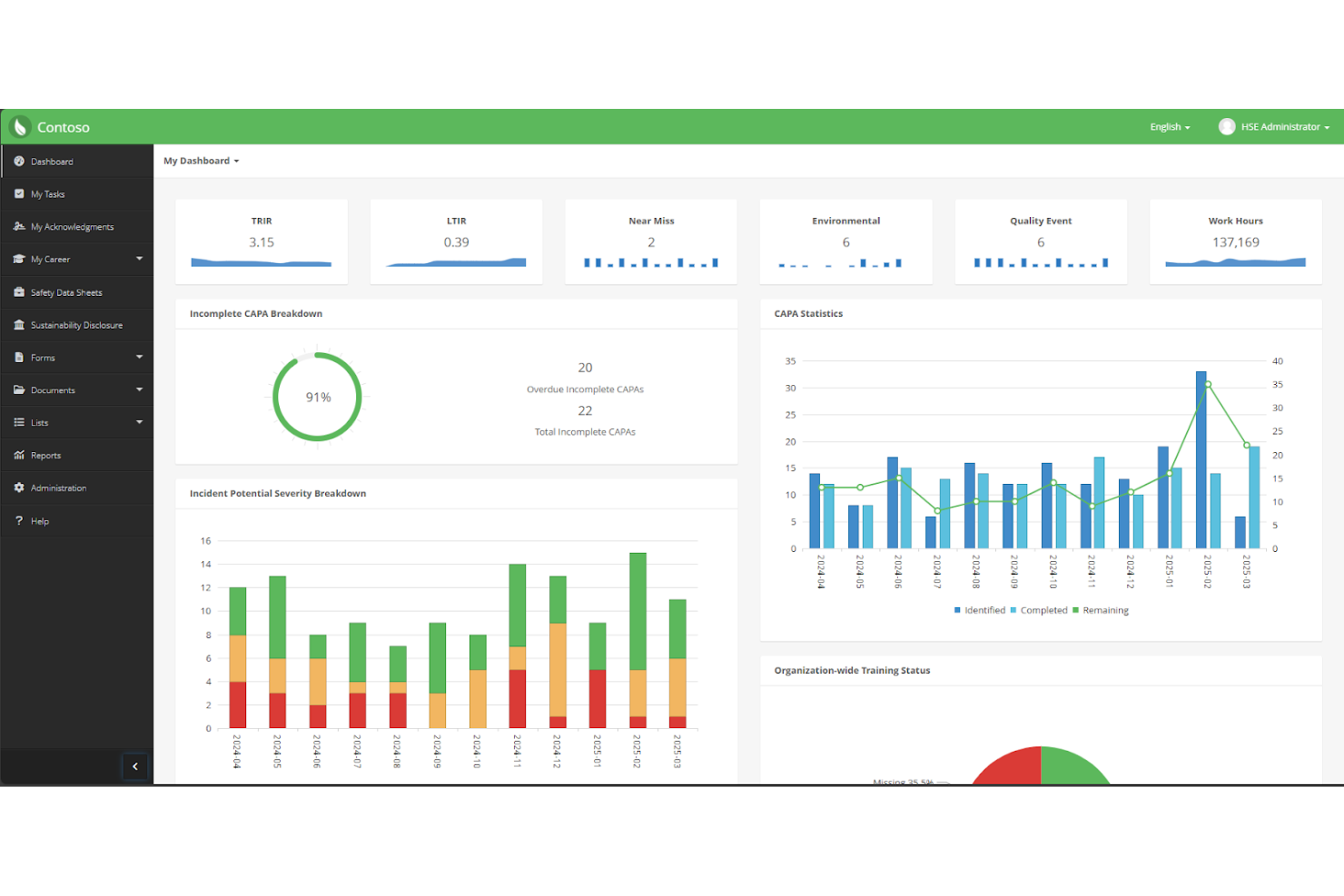
EHS Insight is built for organizations that need to get up and running with health and safety software quickly. Its pre-configured modules and guided onboarding help safety managers and compliance teams launch core processes without lengthy setup. This makes it a strong choice for businesses facing tight deadlines or rapid regulatory changes.
Why I Picked EHS Insight
When speed matters, EHS Insight stands out for its rapid implementation capabilities. The platform offers pre-built templates and workflows that let teams start tracking incidents, audits, and corrective actions almost immediately. I like that the onboarding process includes guided setup steps, which helps organizations avoid delays and confusion. For businesses that need to meet compliance requirements on a tight timeline, these features make EHS Insight a practical choice.
EHS Insight Key Features
In addition to its quick setup, I also found these features valuable for health and safety teams:
- Mobile Inspections: Conduct and document safety inspections directly from a mobile device.
- Document Management: Store, organize, and access safety policies and procedures in a centralized library.
- Training Tracking: Monitor employee training completion and certification status.
- Environmental Management: Track environmental metrics such as emissions, waste, and water usage.
EHS Insight Integrations
Native integrations are not currently listed.
Pros and Cons
Pros:
- Built-in certification management
- Automated email notifications for overdue tasks
- Pre-built modules support rapid deployment
Cons:
- Audit trail details can be difficult to export
- Slow dashboard loading times reported

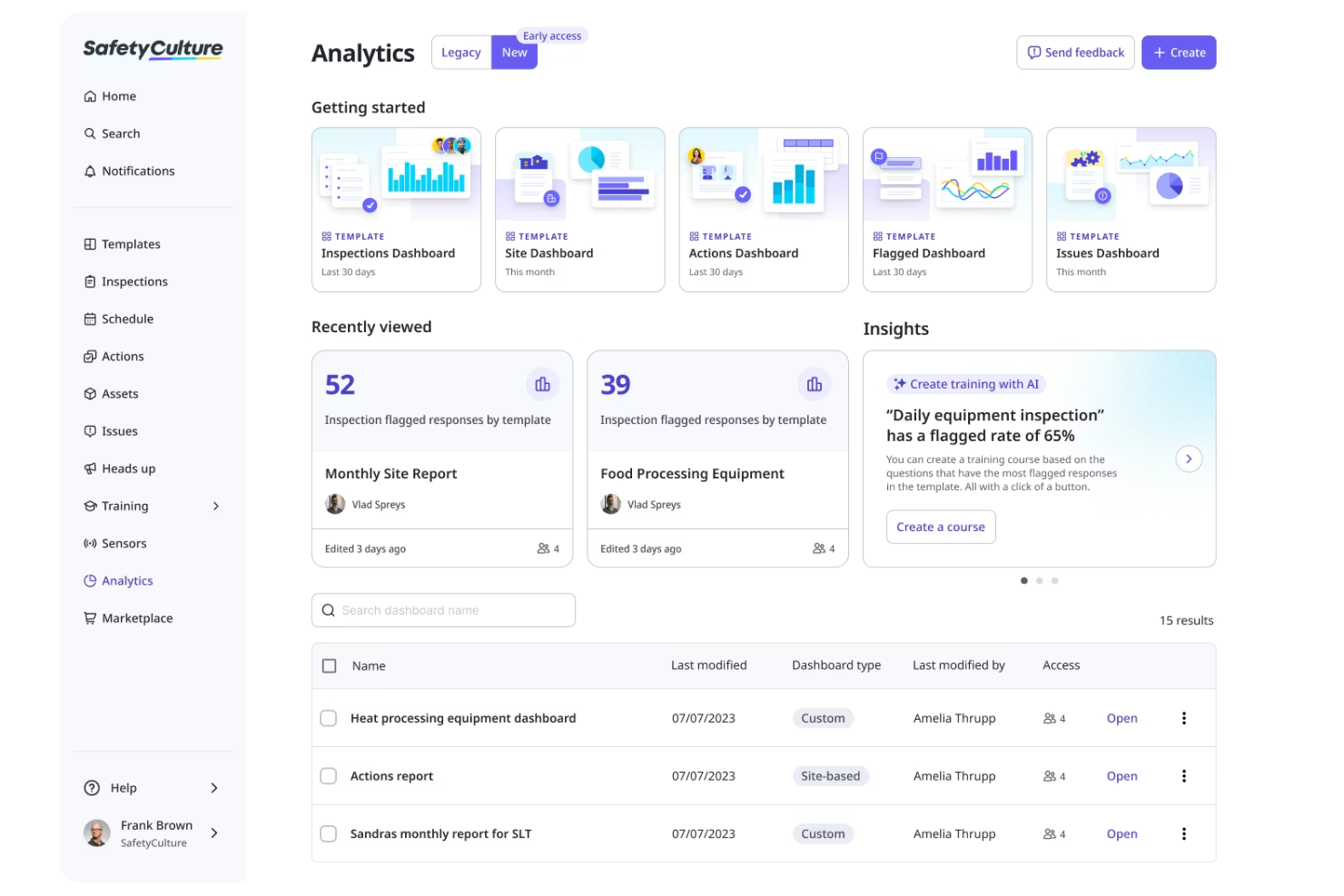
SafetyCulture is an EHS software built around customizable templates for health and safety checks. It’s especially useful for safety managers and operations teams in industries like construction, manufacturing, and hospitality who want to standardize and digitize inspections. With SafetyCulture, you can tailor checklists to your site’s needs and quickly adapt to changing compliance requirements.
Why I Picked SafetyCulture
What sets SafetyCulture apart for me is its focus on customizable inspection templates, which is essential for teams with unique or evolving safety requirements. You can build inspection checklists from scratch or modify existing templates to match your organization’s specific protocols and hazards.
I picked SafetyCulture because it lets you attach photos, assign corrective actions, and automate recurring inspections, all within the same workflow. This flexibility makes it a strong choice for organizations that need to adapt their safety processes quickly and consistently.
SafetyCulture Key Features
Some other features that make SafetyCulture valuable for health and safety teams include:
- Real-Time Analytics Dashboard: View inspection results and safety trends as data is collected.
- Automated Report Generation: Create and share detailed inspection reports instantly after completion.
- Asset Management Tools: Track equipment status, maintenance schedules, and asset history.
- Incident Reporting Module: Submit, track, and manage workplace incidents for better risk management directly from the platform.
SafetyCulture Integrations
Integrations include Tableau, Okta, SharePoint, Microsoft Teams, Power BI, Slack, Google Sheets, Dropbox, OneDrive, and Box.
Pros and Cons
Pros:
- Automated reports include photo and signature capture
- Mobile app works offline for remote sites
- Supports complex inspection workflows
Cons:
- Does not support anonymous submissions
- Lacks advanced asset maintenance features

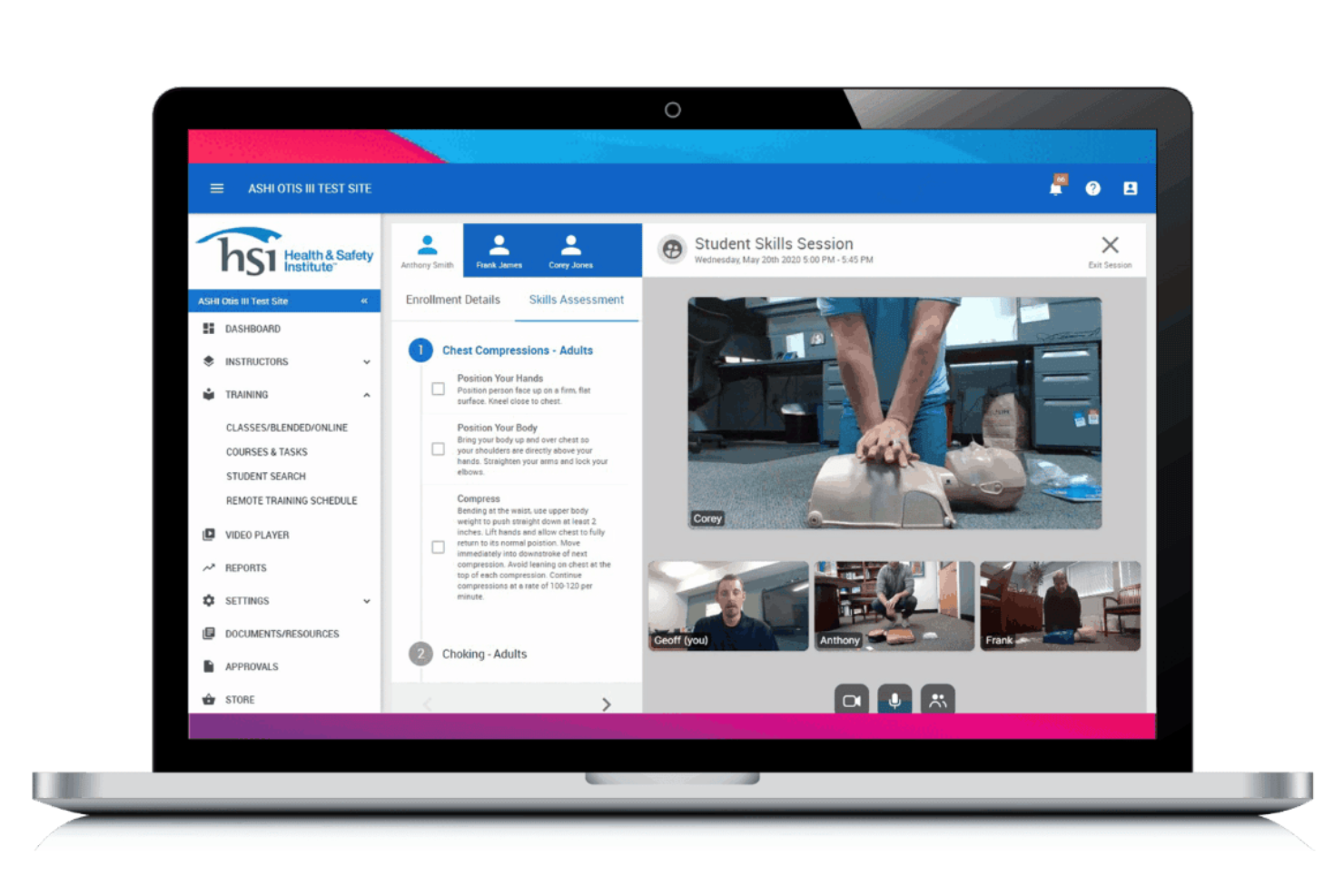
HSI offers a health and safety platform with a strong focus on built-in training content libraries. It’s a practical fit for organizations that need ready-to-use safety, compliance, and workforce training materials without building courses from scratch. Safety managers and HR teams can use HSI to deliver, track, and manage training across a wide range of regulatory topics.
Why I Picked HSI
What sets HSI apart is its extensive library of built-in training content, which is especially valuable for organizations that need to deliver safety and compliance training quickly. The platform includes hundreds of ready-made courses covering OSHA, DOT, and other regulatory requirements, so teams don’t have to create materials from scratch.
I appreciate that HSI also offers tools for tracking course completion and automating training assignments based on job roles. For businesses with ongoing training needs and limited instructional design resources, these features make HSI a strong fit.
HSI Key Features
Some other features that make HSI useful for health and safety teams include:
- Incident Management: Log, track, and investigate workplace incidents from a centralized dashboard.
- Custom Course Builder: Create and upload your own training materials alongside the built-in library.
- Automated Reminders: Send scheduled notifications to employees for upcoming or overdue training.
- Reporting and Analytics: Generate detailed reports on training progress, incidents, and compliance metrics.
HSI Integrations
Native integrations are not currently listed.
Pros and Cons
Pros:
- Automated training assignment by job role
- Built-in course authoring for custom content
- Library of OSHA-compliant training courses
Cons:
- Course library updates may lag new regulations
- Limited incident management workflows

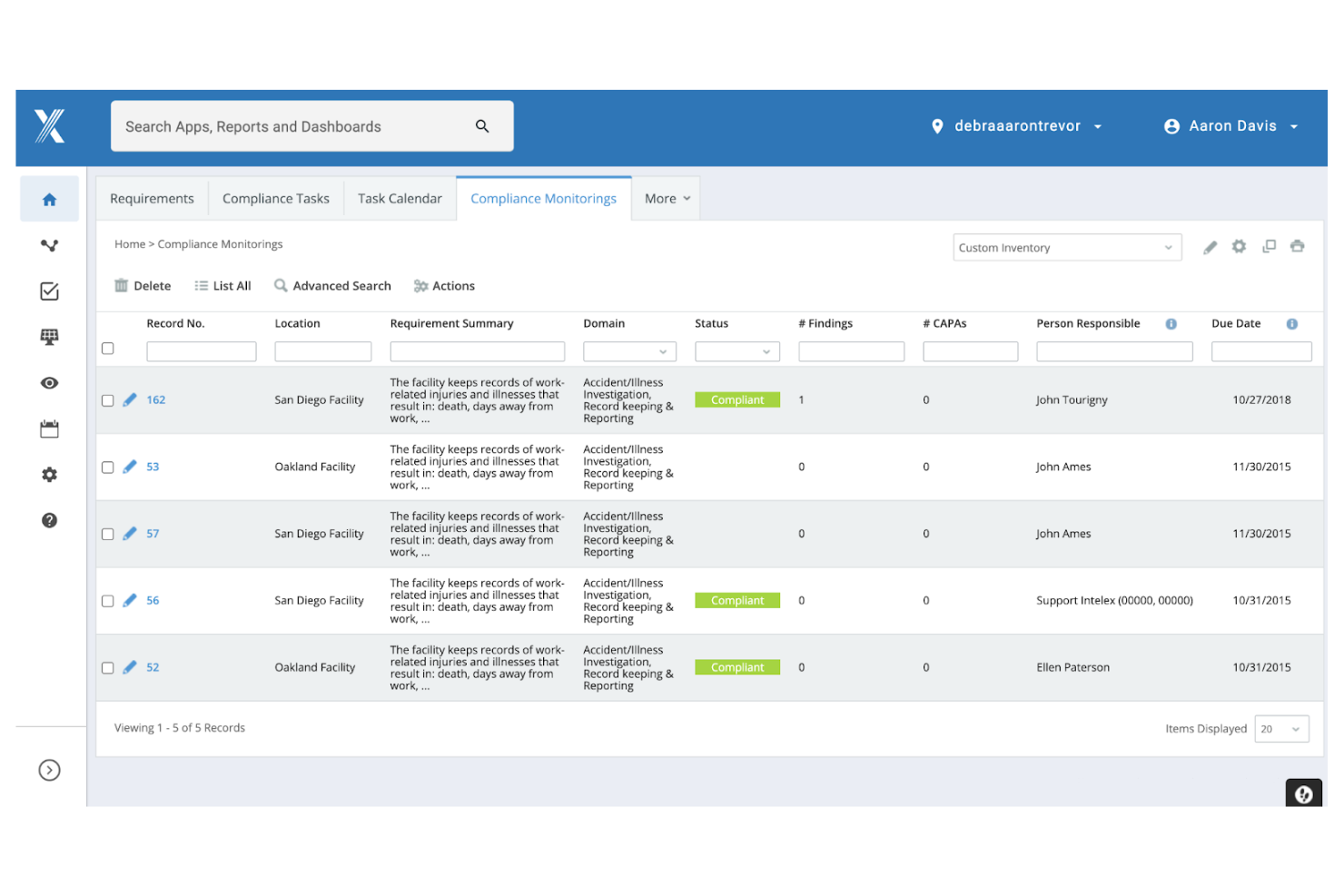
Intelex stands out for organizations that need highly configurable compliance management across multiple locations or business units. This platform is a strong fit for safety managers and compliance teams in industries with complex or evolving regulatory requirements. Its modular approach lets you tailor compliance workflows, reporting, and documentation to match your specific operational needs.
Why I Picked Intelex
What drew me to Intelex is its ability to let you configure compliance modules to fit your organization’s unique requirements. You can build custom workflows for incident reporting, audits, and corrective actions, which is especially useful for teams managing multiple regulatory frameworks.
I like that Intelex allows you to adapt forms, fields, and approval processes without heavy IT involvement. This flexibility makes it a strong choice for businesses that need to keep pace with changing compliance standards or operate across different jurisdictions.
Intelex Key Features
Some other Intelex features that support health and safety teams include:
- Document Control: Manage, track, and update safety policies and procedures in a centralized repository.
- Mobile App Access: Capture incidents, audits, and observations directly from the field using mobile devices.
- Real-Time Dashboards: Visualize compliance data and safety metrics with customizable dashboards.
- Automated Notifications: Set up alerts and reminders for tasks, deadlines, and compliance events.
Intelex Integrations
Native integrations are not currently listed.
Pros and Cons
Pros:
- Built-in document control for policy management
- Supports multi-site and multi-jurisdiction operations
- Highly configurable compliance and audit modules
Cons:
- Limited out-of-the-box reporting templates
- Initial setup requires IT involvement
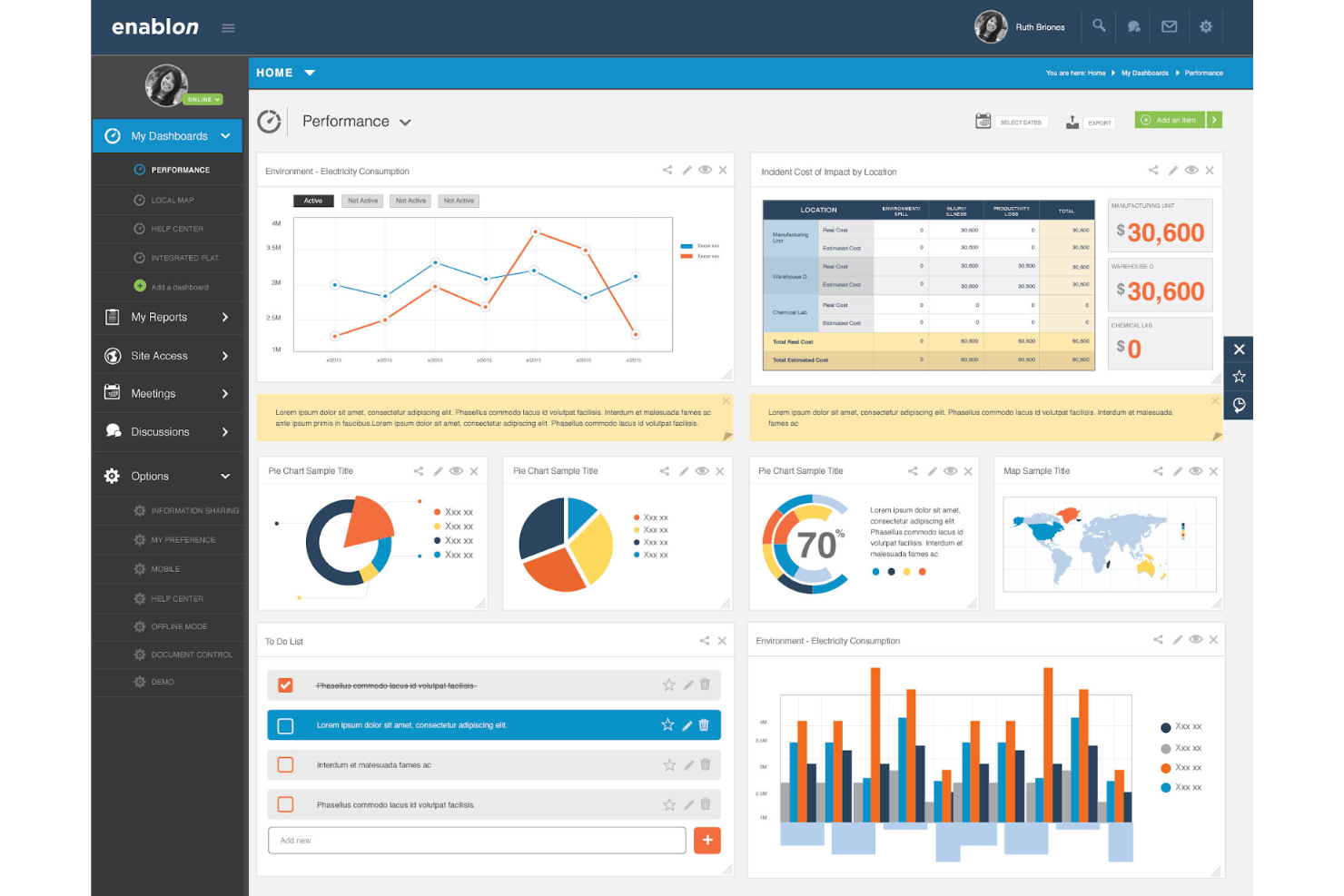
Enablon is built for large organizations that need to manage complex health and safety requirements across multiple sites and regions. It’s especially useful for enterprise EHS teams in industries like energy, utilities, and manufacturing that need advanced automation and reporting at scale. With Enablon, you can coordinate global compliance, standardize processes, and handle high volumes of safety data in one platform.
Why I Picked Enablon
When it comes to managing health and safety at scale, Enablon stands out for its ability to support large, complex organizations. The platform offers advanced workflow automation and centralized dashboards that help EHS leaders oversee compliance and risk across multiple sites. I picked Enablon because it allows you to standardize processes globally while still adapting to local requirements. For enterprises with distributed teams and high data volumes, these features make Enablon a strong choice for scalable health and safety management.
Enablon Key Features
Some other features that make Enablon valuable for health and safety teams include:
- Mobile Incident Reporting: Capture and submit incident details directly from mobile devices in the field.
- Audit Management: Schedule, conduct, and track audits with customizable checklists and automated follow-ups.
- Regulatory Content Library: Access up-to-date regulatory requirements and standards within the platform.
- Contractor Safety Management: Use specialized contractor management tools to monitor compliance and safety performance.
Enablon Integrations
Native integrations are not currently listed.
Pros and Cons
Pros:
- Built-in regulatory content for global standards
- Customizable audit and inspection workflows
- Advanced risk modeling for enterprise environments
Cons:
- Outdated user interface
- Implementation process can be lengthy
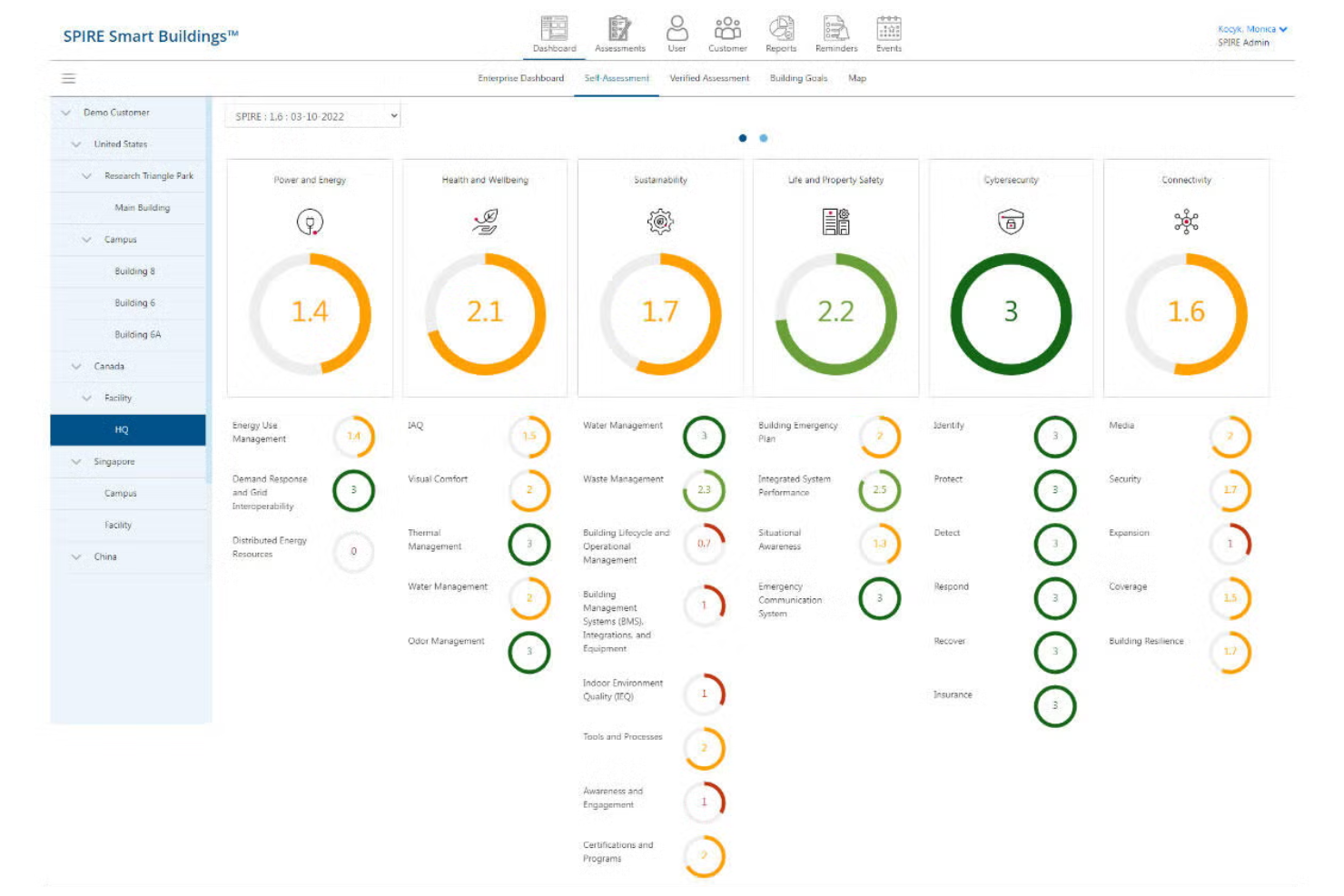
UL Solutions offers a health and safety platform designed for organizations that need to stay audit-ready and compliant with complex regulations. It’s a strong fit for compliance managers and EHS professionals in highly regulated industries like manufacturing, chemicals, and energy. With UL Solutions, you can centralize documentation, automate compliance tracking, and prepare for audits with confidence.
Why I Picked UL Solutions
Regulatory audit readiness is a top concern for many organizations, and UL Solutions addresses this need with targeted compliance management tools. The platform helps you maintain up-to-date records, automate regulatory reporting, and manage corrective actions tied to audit findings.
I appreciate how UL Solutions centralizes compliance documentation, making it easier to prepare for inspections and demonstrate adherence to standards. For teams that face frequent audits or operate in highly regulated sectors, these features make UL Solutions a strong fit.
UL Solutions Key Features
Some other features that make UL Solutions valuable for health and safety teams include:
- Risk Assessment Tools: Identify, evaluate, and prioritize workplace hazards using built-in risk matrices.
- Incident Management: Log, track, and analyze workplace incidents with configurable workflows.
- Training Tracking: Monitor employee training status and automate reminders for required certifications.
- Document Control: Manage, update, and distribute safety policies and procedures from a centralized repository.
UL Solutions Integrations
Native integrations are not currently listed.
Pros and Cons
Pros:
- Incident management with configurable workflows
- Built-in risk assessment and scoring tools
- Automated compliance calendar for regulatory deadlines
Cons:
- Basic reporting customization options
- Limited public user community or support forums

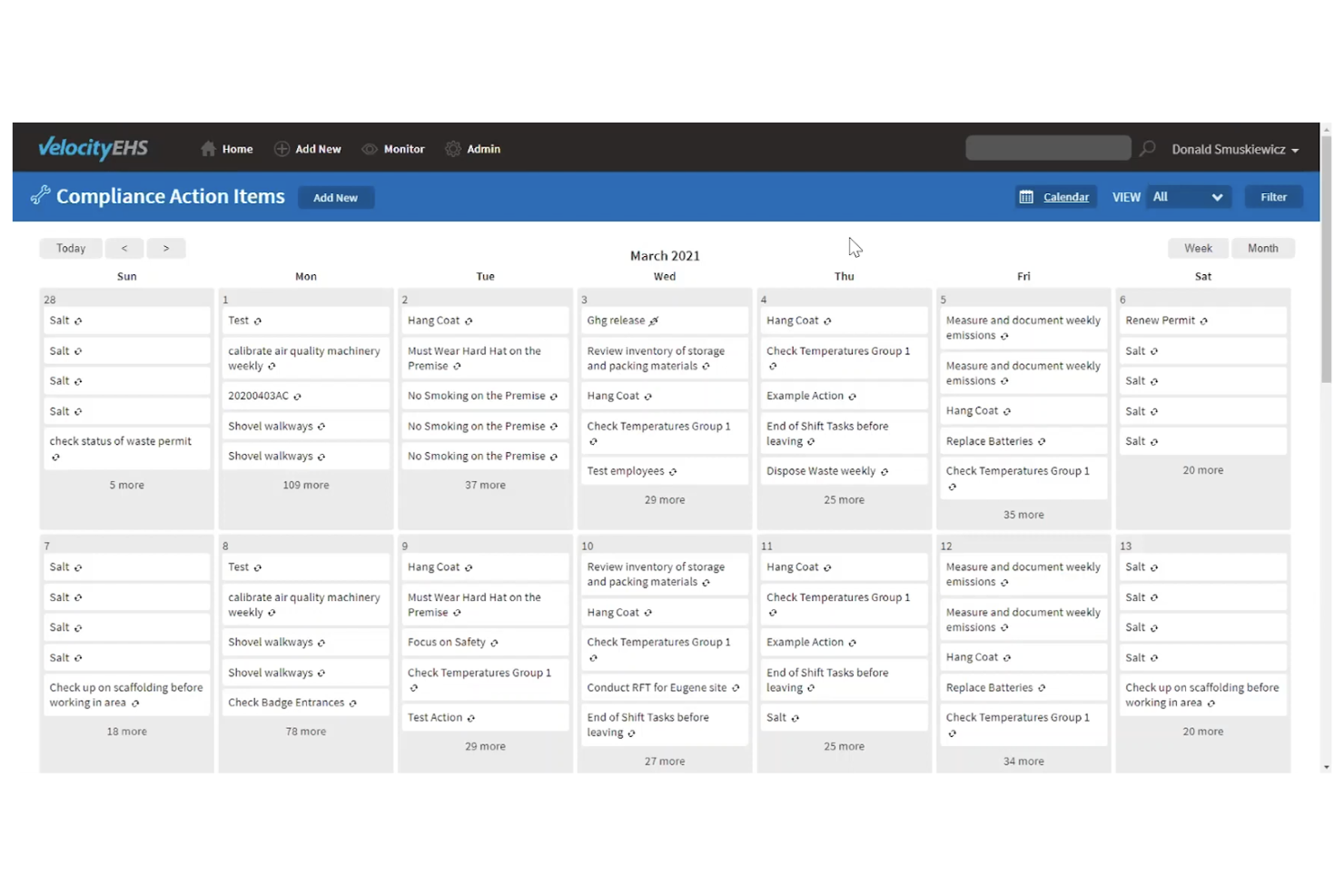
VelocityEHS offers specialized tools for chemical management and compliance. It suits manufacturers, laboratories, and teams handling hazardous materials with strict regulatory requirements. The platform supports SDS management, labeling, and regulatory reporting to help maintain safe, compliant operations.
Why I Picked VelocityEHS
What sets VelocityEHS apart is its deep focus on chemical management, which is a critical need for many health and safety teams. The platform’s chemical inventory tracking lets you maintain up-to-date records of hazardous substances across multiple locations.
I appreciate how its SDS management feature centralizes safety data sheets and makes them easily accessible for compliance and training. For organizations that need to meet strict chemical safety regulations, these specialized tools help reduce risk and simplify day-to-day management.
VelocityEHS Key Features
Some other features that make VelocityEHS useful for health and safety teams include:
- Incident Management: Log, track, and analyze workplace incidents to support investigations and corrective actions.
- Risk Assessment Tools: Conduct and document risk assessments for various workplace hazards.
- Audit and Inspection Management: Schedule, perform, and track audits and inspections to ensure ongoing compliance.
- Training Management: Assign, track, and document worker safety training and certifications.
VelocityEHS Integrations
Native integrations are not currently listed.
Pros and Cons
Pros:
- Built-in tools for GHS-compliant labeling
- Automated regulatory reporting for hazardous materials
- Extensive chemical inventory and SDS management
Cons:
- Limited customization for dashboard layouts
- Occasional delays in SDS database updates


KPA is designed for automotive businesses that need to manage industry-specific compliance and safety requirements. This platform helps dealerships, service centers, and related automotive operations address OSHA, EPA, and DOT regulations with targeted tools. Its specialized content and workflows support teams in tracking training, inspections, and incidents unique to the automotive sector.
Why I Picked KPA
What sets KPA apart is its focus on the automotive industry’s unique compliance needs. The platform offers pre-built safety training modules and inspection checklists tailored to dealerships, service centers, and auto retailers.
I appreciate that KPA includes regulatory content for OSHA, EPA, and DOT, which helps teams stay current with industry-specific requirements. This makes it a strong fit for automotive businesses that need to manage complex compliance and safety obligations in one place.
KPA Key Features
Some other features that make KPA useful for health and safety teams include:
- Incident Management: Log, track, and investigate workplace incidents from a centralized dashboard.
- Corrective Action Tracking: Assign and monitor follow-up tasks to address safety issues.
- Mobile App Access: Complete inspections, audits, and training from any mobile device.
- Custom Reporting Tools: Build and export reports on compliance activities and safety trends.
KPA Integrations
Native integrations are not currently listed.
Pros and Cons
Pros:
- Incident tracking includes root cause analysis
- Mobile app supports on-site safety inspections
- Automotive-specific training content for compliance
Cons:
- No public pricing or plan details available
- Reporting customization options are limited
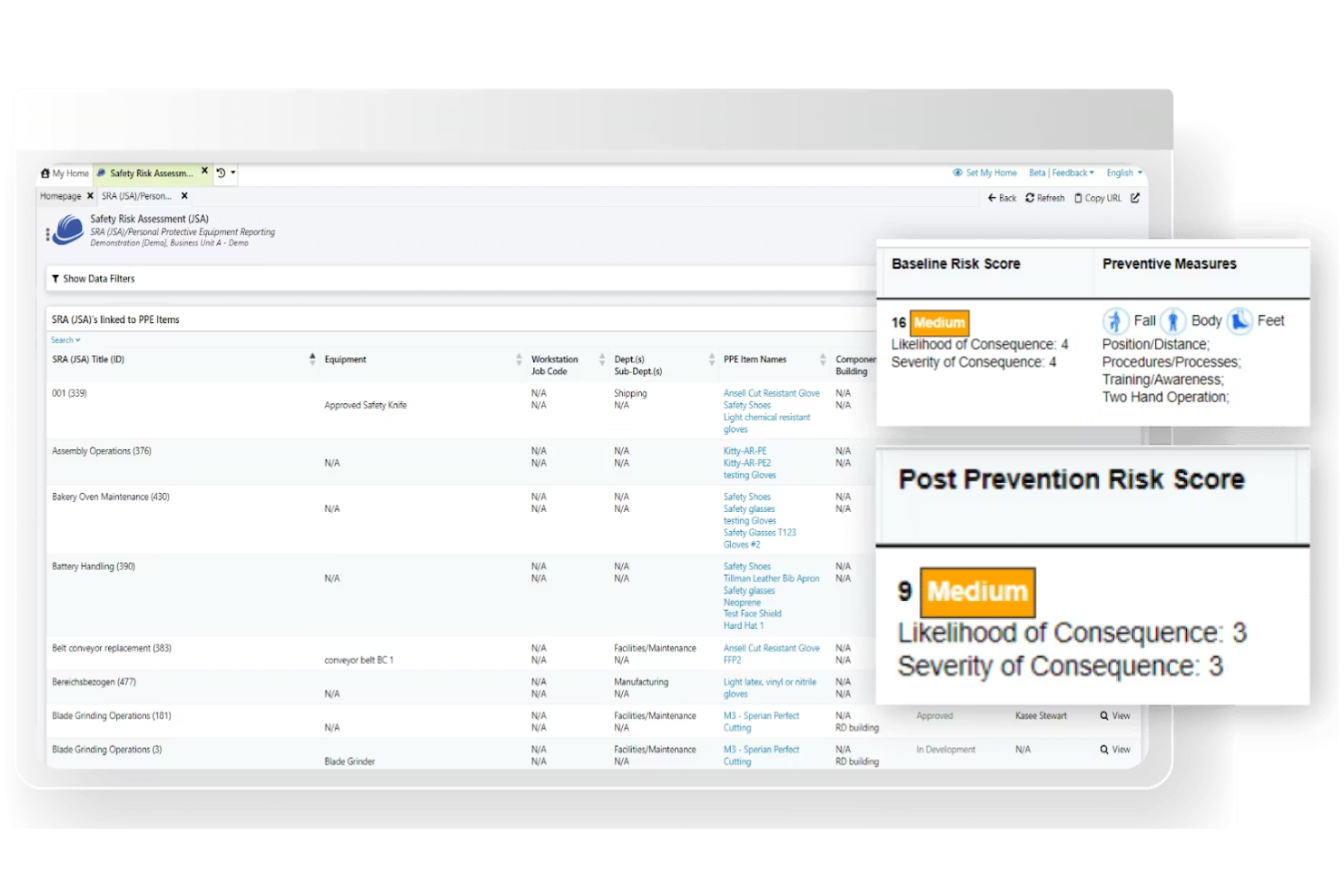
Benchmark Gensuite stands out for its mobile inspection capabilities, making it a strong choice for teams that need to conduct audits and inspections in the field. It’s especially useful for safety managers and operations leaders in industries like manufacturing, construction, and energy who need real-time data collection and reporting. With Benchmark Gensuite, you can capture inspection results on-site, assign follow-ups, and track corrective actions from any device.
Why I Picked Benchmark Gensuite
Mobile inspection capabilities are where Benchmark Gensuite really shines, especially for organizations with distributed worksites or field teams. The platform lets users conduct inspections directly from their mobile devices, attach photos, and log findings on the spot. I like that you can assign corrective actions immediately and track their resolution in real time, which helps keep safety processes moving.
For teams that need to document compliance and respond quickly to issues wherever they are, these features make Benchmark Gensuite a practical choice.
Benchmark Gensuite Key Features
In addition to its mobile inspection tools, Benchmark Gensuite offers several other features that support health and safety management:
- Incident Reporting: Capture and manage workplace incidents with configurable forms and workflows.
- Audit Management: Schedule, conduct, and track occupational health and safety audits across multiple locations from a centralized dashboard.
- Document Management: Store, organize, and control access to safety policies, procedures, and compliance documents.
- Training Management: Assign, track, and document employee training requirements and completions.
Benchmark Gensuite Integrations
Native integrations are not currently listed.
Pros and Cons
Pros:
- Built-in analytics for inspection trends
- Multi-language support for global teams
- Real-time corrective action tracking
Cons:
- Limited dashboard personalization options
- User interface updates can be inconsistent

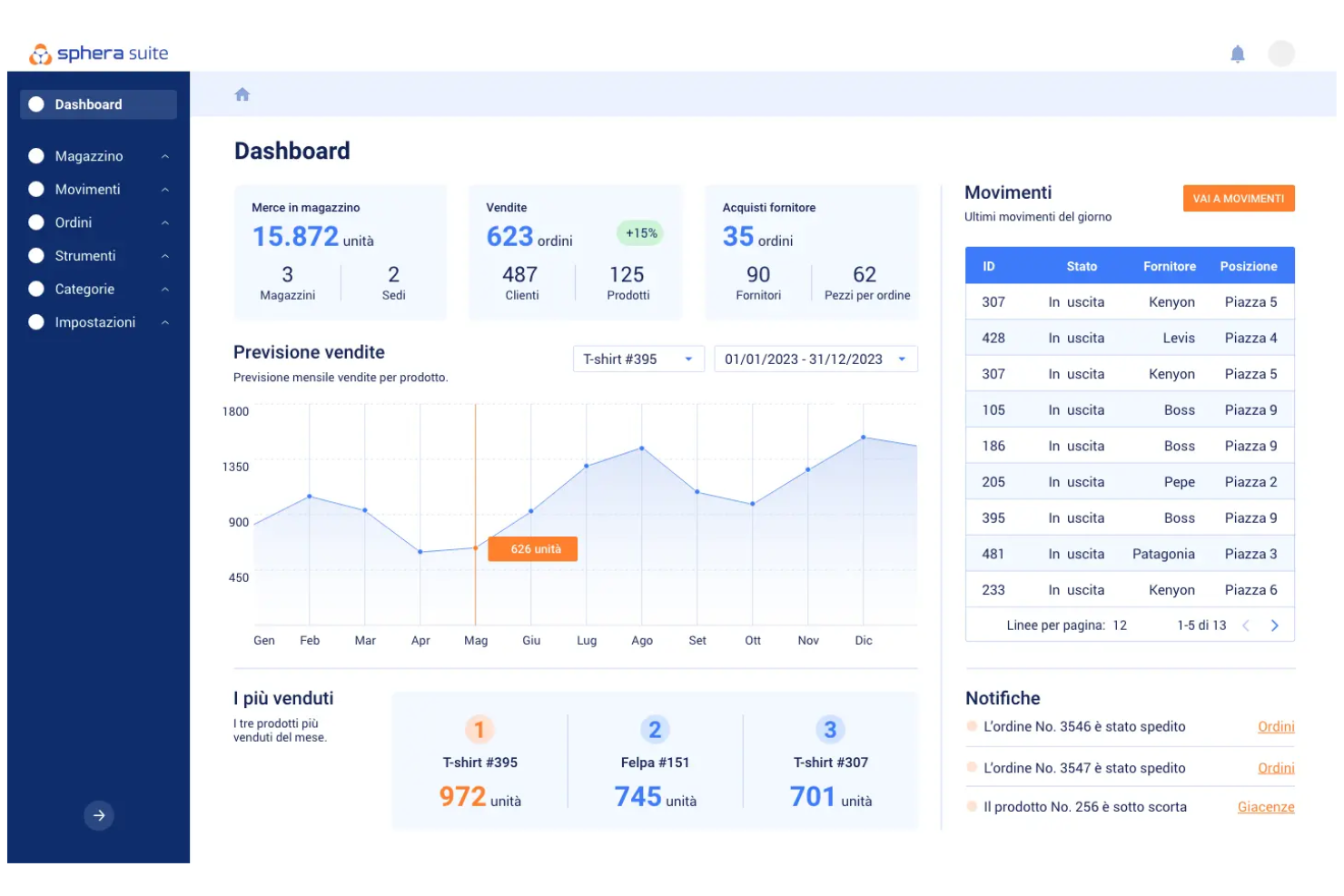
Sphera is designed for organizations that want deep visibility into health and safety performance through advanced analytics. It’s a strong fit for EHS leaders and data-driven teams in industries like chemicals, oil and gas, and manufacturing who need to track trends and uncover risks. With Sphera, you can visualize safety data, monitor KPIs, and make informed decisions using customizable dashboards.
Why I Picked Sphera
What drew me to Sphera is its focus on advanced analytics dashboards that help health and safety teams turn data into actionable insights. The platform offers customizable visualizations and real-time reporting, making it easier to spot trends and monitor key safety metrics across your organization.
I picked Sphera because it allows you to drill down into workplace health data and benchmark performance, which is especially valuable for organizations managing complex risk environments. For teams that want to move beyond basic compliance tracking and leverage analytics for proactive safety management, Sphera stands out as a strong option.
Sphera Key Features
Some other features that make Sphera useful for health and safety teams include:
- Incident Management Module: Log, track, and investigate workplace incidents from a centralized dashboard.
- Regulatory Compliance Tracking: Monitor and manage compliance with industry-specific regulations and standards.
- Mobile Data Collection: Capture safety observations and audit data directly from mobile devices in the field.
- Corrective Action Tracking: Assign, monitor, and document corrective actions to address identified risks or incidents.
Sphera Integrations
Native integrations are not currently listed.
Pros and Cons
Pros:
- Regulatory content updates for multiple industries
- Supports complex risk assessment methodologies
- Advanced dashboards for performance metrics
Cons:
- Some modules require separate licensing
- Occasional delays in customer support response
Annen programvare for helse og sikkerhet
Her er noen flere alternativer for programvare for helse og sikkerhet som ikke kom med på kortlisten min, men som likevel er verdt å undersøke:
- Vector Solutions
For workforce certification tracking
- Cority
For multi-site management
- Safetymint
For contractor safety oversight
- IsoMetrix
For ESG integration
- EcoOnline
For incident reporting automation
- Evotix
For employee engagement tools


How I Evaluate Health and Safety Software
I evaluate tools across two layers: baseline capabilities like incident reporting and OSHA recordkeeping that every platform must have, and the differentiators that set vendors apart.
Core Functionality (Table Stakes For This List)
When I'm selecting tools for my list, I rank each one on a scale from 0 (does not offer the functionality) to 5 (excels in this area) for each core functionality listed below. Then, I calculate the tool's total score as a percentage. Each tool needs to achieve a minimum total score of 65% to be considered for inclusion.
- Incident & Injury Reporting: I look for structured incident forms, investigation workflows, and root cause analysis tools that let HR teams capture details like photos or witness statements right from the field.
- Regulatory Compliance Management: Each tool should generate required logs and reports, such as OSHA 300/300A forms, and ideally support additional frameworks like ISO 45001 or regional equivalents.
- Training & Certification Tracking: I check whether the platform assigns courses by role, sends renewal reminders, and tracks completion so you're not manually chasing expired forklift or confined-space certifications.
- Risk Assessments & Audits: Strong tools offer configurable inspection checklists, risk scoring, and scheduling for recurring walkthroughs rather than relying on spreadsheet-based site audits.
- Corrective Action Management: I evaluate how each platform links corrective actions back to the originating incident or audit finding, with assignees, due dates, and escalation paths baked in.
- Safety Analytics & Dashboards: The platform should surface leading and lagging indicators like TRIR and incident trends in visual dashboards that HR and leadership can act on without pulling raw data.
Once I have a list of tools that meet the criteria, I consider what sets each platform apart.
Differentiating Factors (What Sets Vendors Apart)
Here's how I compare and contrast different vendors:
Standout Features
Mobile and offline access matters when your workforce spans warehouses, job sites, or remote locations where connectivity is unreliable. I also evaluate contractor and visitor management, since many workplace incidents involve third-party workers who need separate onboarding and credential verification before entering a site. Behaviour-based safety tools stand out too. Platforms that let supervisors log positive observations alongside near-misses help HR teams shift from reactive incident tracking to proactive culture building.
Beyond Features
HRIS integrations are a big deal here. If your safety platform doesn't sync employee records with systems like Workday, BambooHR, or ADP, you'll spend hours manually updating rosters and org structures. I also look at compliance and data security standards, since these tools store sensitive health information that demands SOC 2, role-based access, and audit trails. Industry-specific configurability rounds out my evaluation. A construction firm and a hospital have very different hazard profiles, so I check whether the platform offers tailored templates without requiring developer support.
Slik velger du programvare for helse og sikkerhet
Det er lett å gå seg vill i lange funksjonslister og kompliserte prisstrukturer. For å hjelpe deg med å holde fokus mens du går gjennom den unike prosessen med å velge programvare, er her en sjekkliste over faktorer du bør ha i bakhodet:
| Faktor | Hva bør du vurdere? |
|---|---|
| Skalerbarhet | Vil programvaren støtte organisasjonen din når den vokser, inkludert nye lokasjoner, team eller regulatoriske behov? Sjekk begrensninger på antall brukere og administrasjon av flere lokasjoner. |
| Integrasjoner | Kan verktøyet kobles til HR-systemet, lønnssystemet eller læringsplattformene dine? Bekreft at det finnes innebygde integrasjoner, og unngå å være avhengig av API-er eller manuell dataregistrering alene. |
| Tilpasningsmuligheter | Kan du tilpasse arbeidsflyter, skjemaer og rapportering slik at de samsvarer med organisasjonens prosesser og terminologi? Vurder hvor mye fleksibilitet du trenger for å oppfylle krav eller interne retningslinjer. |
| Brukervennlighet | Vil teamet ditt ta i bruk verktøyet raskt? Se etter tydelig navigasjon, minimalt behov for opplæring og tilgjengelighet for alle brukertyper, inkludert ansatte som arbeider ute i felt. |
| Implementering og innføring | Hvor lang tid vil det ta å komme i gang? Spør om støtte til migrering, opplæringsressurser og om leverandøren tilbyr veiledet innføring eller alternativer for selvbetjening. |
| Kostnad | Er prisnivåene transparente og forutsigbare? Ta med alle kostnader, inkludert oppsett, kundestøtte og eventuelle tillegg, for å unngå overraskelser etter kjøpet. |
| Sikkerhetstiltak | Oppfyller programvaren organisasjonens standarder for personvern og datasikkerhet? Se etter kryptering, tilgangskontroller og samsvar med regelverk som GDPR eller HIPAA. |
| Krav til samsvar | Vil verktøyet hjelpe deg med å oppfylle bransjespesifikke bestemmelser? Sjekk om det finnes innebygd oppfølging av samsvar, revisjonsspor og støtte for nødvendig dokumentasjon. |
Hva er programvare for helse og sikkerhet?
Programvare for helse og sikkerhet er en digital plattform som hjelper organisasjoner med å håndtere sikkerhet på arbeidsplassen, etterlevelse og risiko. Disse verktøyene samler oppgaver som hendelsesrapportering, opplæringsadministrasjon, sertifiseringssporing og lovpålagt dokumentasjon på ett sted.
Ved å bruke programvare for helse og sikkerhet kan HR-team og sikkerhetsledere opprettholde etterlevelsen, overvåke farer og bidra til et tryggere arbeidsmiljø for alle ansatte.
Funksjoner
Når du velger programvare for helse og sikkerhet, bør du se etter følgende nøkkelfunksjoner:
- Hendelsesrapportering: Gjør det mulig for ansatte å raskt registrere arbeidsulykker, nestenulykker eller farer, slik at det opprettes en digital oversikt for undersøkelser og oppfølging.
- Sertifiseringssporing: Overvåker ansattes lisenser, kvalifikasjoner og opplæringskrav, og sender varsler før utløpsdatoer for å bidra til å opprettholde etterlevelsen.
- Opplæringsadministrasjon: Tildeler, leverer og sporer gjennomføringen av sikkerhetskurs, slik at alle ansatte får nødvendig opplæring og oppfriskningskurs.
- Dokumentadministrasjon: Lagrer og organiserer sikkerhetspolicyer og prosedyrer på ett sentralt sted gjennom et søkbart arkiv.
- Verktøy for revisjon og etterlevelse: Støtter interne og eksterne revisjoner ved å generere rapporter, spore korrigerende tiltak og vedlikeholde dokumentasjon på etterlevelse.
- Mobil tilgang: Gjør det mulig for feltansatte og eksterne team å få tilgang til sikkerhetsressurser, gjennomføre opplæring og rapportere hendelser fra hvilken som helst enhet.
- Tilpassbare arbeidsflyter: Lar organisasjoner tilpasse skjemaer, godkjenningsprosesser og varsler slik at de samsvarer med deres unike sikkerhetsprotokoller.
- Analyser og dashbord: Gir sanntidsinnsikt i sikkerhetstrender, fremdrift i opplæringen og status for etterlevelse gjennom visuelle rapporter og dashbord.
- Verktøy for hendelsesundersøkelser: Forenkler analyse av grunnleggende årsaker og sporing av korrigerende tiltak for å bidra til å forhindre fremtidige hendelser.
- Rollebaserte tilgangskontroller: Begrenser sensitiv informasjon og systemfunksjoner til autoriserte brukere, og støtter personvern og lovpålagte krav.
Vanlige AI-funksjoner i programvare for helse og sikkerhet
I tillegg til standardfunksjonene i programvare for helse og sikkerhet som er nevnt ovenfor, tar mange av disse løsningene i bruk kunstig intelligens med funksjoner som:
- Prediktiv risikoanalyse: Bruker kunstig intelligens til å analysere EHS-ytelsesdata og identifisere mønstre, slik at organisasjoner kan redusere farer før de oppstår.
- Automatisert kategorisering av hendelser: Bruker naturlig språkbehandling på hendelsesrapporter og klassifiserer og prioriterer automatisk saker for raskere respons og løsning.
- Smart dokumentgjenkjenning: Utnytter kunstig intelligens til å skanne, hente ut og organisere informasjon fra sikkerhetsdokumenter, sertifikater og inspeksjonsskjemaer, noe som reduserer manuell dataregistrering.
- Sanntidsregistrering av farer: Integreres med sensorer eller videostrømmer for å identifisere utrygge forhold eller atferd i sanntid, og varsler sikkerhetsteam slik at de kan iverksette umiddelbare tiltak.
- KI-drevet overvåking av etterlevelse: Gjennomgår kontinuerlig dokumentasjonen av EHS-programmet ditt for å avdekke mangler og støtte proaktiv overholdelse av regelverket.
Fordeler
Implementering av programvare for helse- og sikkerhetsstyring gir flere fordeler for teamet og virksomheten din. Her er noen av fordelene du kan se frem til:
- Forbedret etterlevelse av regelverket: Automatiserte funksjoner for sporing, rapportering og dokumentasjon hjelper organisasjonen med å holde seg oppdatert på bransjeregler og revisjonskrav.
- Raskere respons på hendelser: Digital hendelsesrapportering og sanntidsvarsler gjør det mulig for teamet ditt å håndtere farer og ulykker raskt, noe som reduserer risiko og nedetid.
- Sentralisert sikkerhetsstyring: Én plattform for opplæring, sertifiseringer og dokumentasjon gjør det enklere å organisere, få tilgang til og oppdatere sikkerhetsinformasjon.
- Større ansvarlighet i arbeidsstyrken: Verktøy for sertifiseringssporing og opplæringsadministrasjon sikrer at ansatte gjennomfører obligatoriske kurs og opprettholder nødvendige kvalifikasjoner.
- Datadrevet beslutningstaking: Analyser og dashbord gir innsikt i sikkerhetstrender og hjelper deg med å prioritere initiativer for forebyggende tiltak.
- Forbedret introduksjon og opplæring: Innebygde opplæringsmoduler og ressurser for introduksjon støtter nyansatte og kontinuerlig utvikling av medarbeidere.
- Større åpenhet og oversikt: Rollebaserte tilgangskontroller og revisjonsspor gir ledere tydelig innsikt i sikkerhetsaktiviteter og etterlevelse i hele organisasjonen.
Kostnader og priser
Valg av helse- og sikkerhetsprogramvare krever en forståelse av de ulike prismodellene og abonnementene som er tilgjengelige. Kostnadene varierer basert på funksjoner, teamstørrelse, tillegg og mer. Tabellen nedenfor oppsummerer vanlige abonnementer, gjennomsnittsprisene deres og typiske funksjoner som er inkludert i helse- og sikkerhetsprogramvareløsninger:
Sammenligningstabell for helse- og sikkerhetsprogramvare
| Abonnementstype | Gjennomsnittspris | Vanlige funksjoner |
|---|---|---|
| Gratisabonnement | $0 | Grunnleggende hendelsesrapportering, begrenset dokumentlagring og tilgang for et lite antall brukere. |
| Personlig abonnement | $5-$15/bruker/måned | Sporing av individuelle sertifiseringer, grunnleggende opplæringsmoduler og enkel samsvarsrapportering. |
| Bedriftsabonnement | $20-$40/bruker/måned | Teambasert hendelseshåndtering, avansert opplæringsadministrasjon, analysedashbord og mobiltilgang. |
| Storbedriftsabonnement | $50-$100/bruker/måned | Tilpassede arbeidsflyter, integrasjoner med HRIS, avanserte sikkerhetskontroller, dedikert brukerstøtte og revisjonsverktøy. |
Vanlige spørsmål om helse- og sikkerhetsprogramvare
Her er noen svar på vanlige spørsmål om helse- og sikkerhetsprogramvare:
Hvordan bidrar helse- og sikkerhetsprogramvare til overholdelse av regelverk?
Helse- og sikkerhetsprogramvare bidrar til overholdelse av regelverk ved å sentralisere dokumentasjon, automatisere påminnelser om opplæring og generere rapporter som er klare for revisjon. Dette gjør det enklere å følge opp samsvarsaktiviteter, holde dokumentasjonen oppdatert og reagere raskt på inspeksjoner eller sikkerhetsrevisjoner.
Kan helse- og sikkerhetsprogramvare brukes av feltarbeidere eller eksterne team?
Ja, mange løsninger for helse- og sikkerhetsprogramvare tilbyr mobiltilgang og funksjonalitet uten nettforbindelse. Dette gjør det mulig for feltarbeidere og eksterne team å rapportere hendelser, gjennomføre opplæring og få tilgang til sikkerhetsdokumenter fra hvor som helst, selv uten internettilkobling.
Hva bør jeg vurdere når jeg går fra manuelle prosesser til helse- og sikkerhetsprogramvare?
Når du går fra manuelle prosesser, bør du vurdere alternativer for dataimport, opplæringsressurser og tilgjengeligheten av støtte under innføringen. Se etter brukervennlige løsninger som tilbyr maler, veiledet oppsett og kundestøtte for å hjelpe teamet med en smidig overgang og minimere forstyrrelser.
Hvor sikre er ansattdata i helse- og sikkerhetsprogramvare?
De fleste leverandører av helse- og sikkerhetsprogramvare bruker kryptering, tilgangskontroller og regelmessige sikkerhetsrevisjoner for å beskytte ansattdata. Gå alltid gjennom leverandørens sikkerhetssertifiseringer og samsvar med regelverk som GDPR eller HIPAA før du tar en beslutning.
Kan helse- og sikkerhetsprogramvare integreres med andre HR- eller forretningssystemer?
Ja, mange plattformer tilbyr integrasjoner med HRIS-, lønns- og læringsadministrasjonssystemer. Dette bidrar til å redusere dobbeltregistrering av data, sikre konsistens på tvers av plattformer og forenkle rapportering og oppfølging av samsvar.