

10 beste programvarer for booking av fleksible arbeidsplasser for virksomheter i 2026

Beste programvare for bestilling av fleksible kontorplasser for store virksomheter


Programvare for bestilling av fleksible kontorplasser for store virksomheter hjelper store organisasjoner med å administrere fleksible sitteplasser ved å la ansatte reservere plasser på forhånd eller underveis. Hvis du bygger en hybrid arbeidsplass eller en aktivitetsbasert arbeidsplass, kan riktig plattform utgjøre en stor forskjell – den hjelper deg med å forbedre arealforvaltningen, redusere stress knyttet til planlegging og holde alle tilkoblet. Denne listen viser deg de beste løsningene for store team, slik at du kan sammenligne ledende leverandører, se hvilke funksjoner som dekker behovene dine, og trygt velge riktig system for bestilling av fleksible kontorplasser på det dynamiske kontoret ditt.
Hvorfor du kan stole på våre programvareanbefalinger
Teamet vårt har testet og anmeldt programvare siden 2012. Vi er selv HR-eksperter, så vi vet hvor vanskelig og hvor viktig det er å velge riktig programvare.
I denne guiden har vi vurdert verktøyene gjennom praktisk testing og uavhengig research og gitt dem poeng ut fra våre utvelgelseskriterier. Vi bygger også på innsikt fra ledende eksperter i bransjen og erfarne HR-eksperter.
Anmeldelsene våre bygger på vår egen redaksjonelle vurdering. De er ikke et salgsargument.
Ekspertanmeldere:
Sammenligningstabell for programvare for bestilling av fleksible kontorplasser for store virksomheter
Denne sammenligningstabellen oppsummerer prisopplysningene for mine beste utvalgte programmer for bestilling av fleksible kontorplasser for store virksomheter:
| Tool | Best For | Trial Info | Price | ||
|---|---|---|---|---|---|
| 1 | Best for connected workplace operations on one map | Not available | From $3000/year | Website | |
| 2 | Best for integrated service request management | Free plan + free demo available | From $500/month | Website | |
| 3 | Best for customizable booking permissions | Free plan + free trial + free demo available | From $4/resource/month (billed annually) | Website | |
| 4 | Best for workplace experience analytics | 7-day free trial + free demo available | From $1.79/user/month (billed annually) | Website | |
| 5 | Best for sensor-based occupancy insights | Free demo available | Pricing upon request | Website | |
| 6 | Best for employee-first desk booking | Free trial + free demo available | From $5/user/month (billed annually) | Website | |
| 7 | Best for managing dynamic team seating | Free demo available | Pricing upon request | Website | |
| 8 | Best for AI-powered workplace scheduling | Free demo available | From $99/month | Website | |
| 9 | Best for interactive floor plan booking | Free trial available | From $5/bookable resource/month (billed annually) | Website | |
| 10 | Best for enterprise workplace management | Free demo available | Pricing upon request | Website |


Anmeldelser av programvare for bestilling av fleksible kontorplasser for store virksomheter
Nedenfor finner du mine detaljerte sammendrag av de beste programmene for bestilling av fleksible kontorplasser for store virksomheter som kom med på kortlisten min. Anmeldelsene mine gir en detaljert oversikt over funksjonene, integrasjonene og de beste bruksområdene for hver plattform, slik at du kan finne den som passer best for deg.
Tactic
Best for connected workplace operations on one map
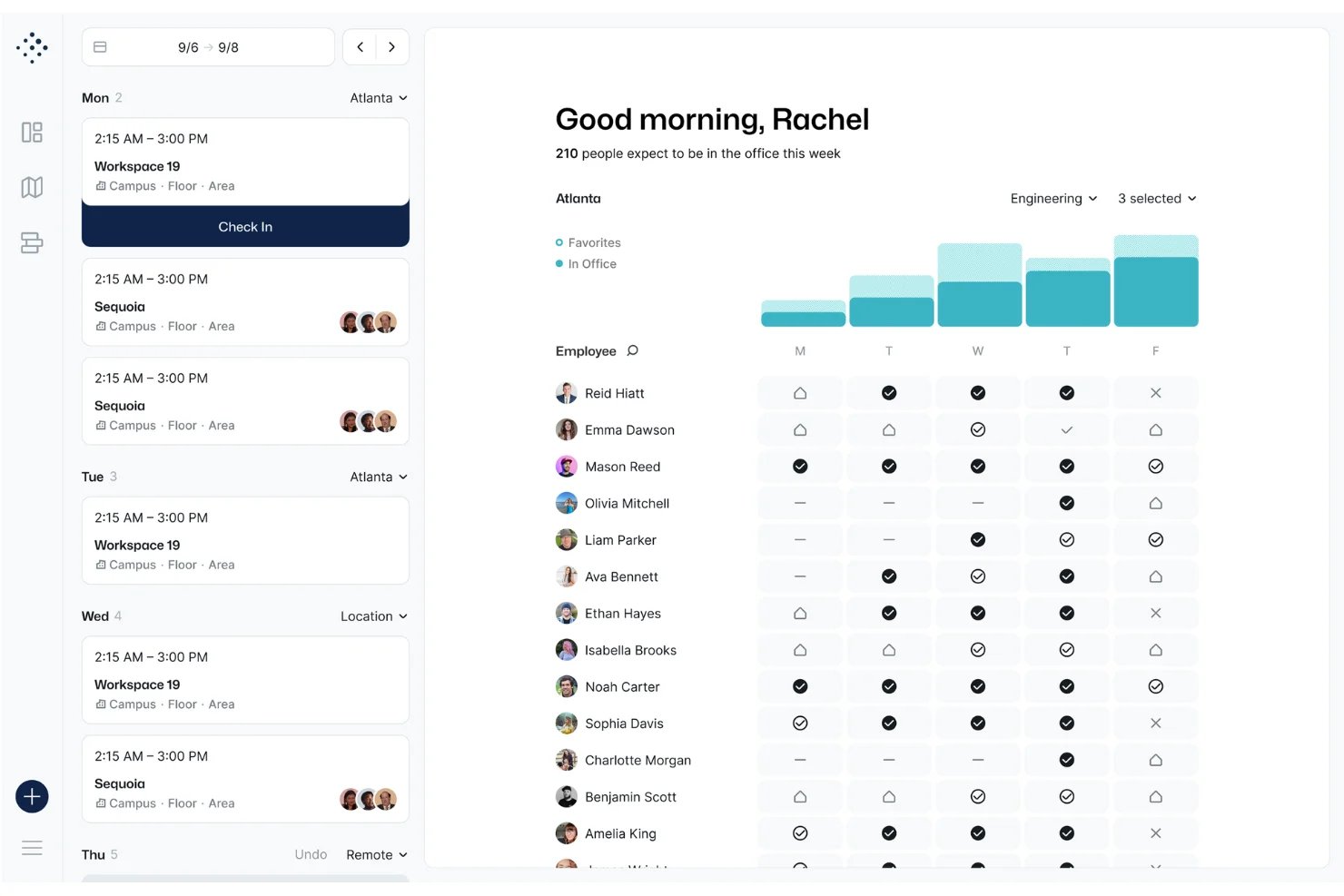
Tactic is a hybrid workplace management platform that combines interactive floor plan-based desk booking, room reservations, visitor management, and occupancy analytics with a built-in AI assistant for natural language booking across web, mobile, and collaboration tools.
Who Is Tactic Best For?
Tactic is a strong fit for workplace experience and facilities managers at midsize to enterprise organizations running hybrid work models across multiple office locations.
Why I Picked Tactic
Tactic earns its spot as one of the best on my shortlist because of how it centers all workplace operations on a single interactive live map. I love that I can see live desk availability, filter by team neighborhood, and locate where specific teammates are sitting without ever leaving the floor plan view. On top of that, Tessa AI handles booking through Slack or Teams in plain language, and auto-release kicks in automatically when someone skips a check-in, keeping the map accurate without any manual cleanup.
Tactic Key Features
- Admin-configurable booking windows: Lets workplace admins set advance windows and limits for desk reservations company-wide or by location.
- Role-based access controls: Manages who can book desks, rooms, or neighborhoods by role, department, or location.
- Automated desk check-in: Supports check-in via Wi-Fi, mobile app, QR code, and Slack or Teams prompt to confirm desk usage.
- Visual occupancy analytics dashboard: Shows desk utilization, booking trends, and peak occupancy stats in real time.
Tactic Integrations
Tactic offers native integrations with Slack, Microsoft Teams, Google Workspace, Outlook, and more, and it provides an API for custom integrations.
Pros and Cons
Pros:
- Broad native ecosystem for enterprise chat apps
- Multi-location management within a single platform
- Real-time spatial tracking on live floor maps
Cons:
- Advanced reporting locked behind higher-tier plans
- Lacks native advanced hardware sensor integrations
elia
Best for integrated service request management
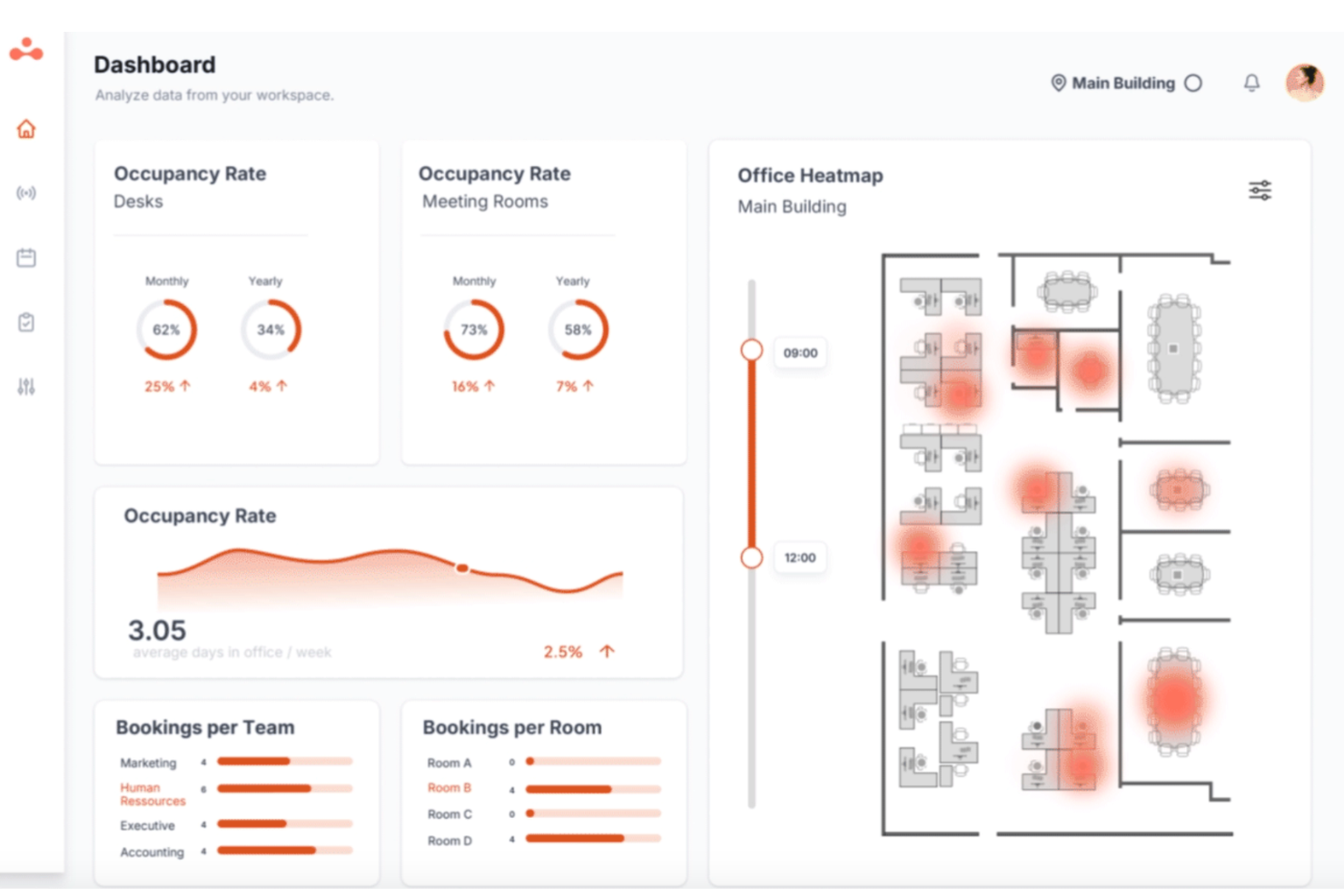
elia is an all-in-one workplace operations platform that brings together desk booking, meeting room reservations, interactive floor plans, visitor management, occupancy tracking, and service request management under a single interface.
Who Is elia Best For?
elia is a strong fit for mid-size to large organizations where facilities, IT, and HR teams share responsibility for managing a hybrid office environment.
Why I Picked elia
I picked elia as one of the best because its service request management is built directly into the floor plan, not bolted on as a separate module. When a team books a meeting room, any linked catering, IT setup, or maintenance requests automatically update if that booking changes. I also like that requests are tied to specific desks and zones, so facilities teams always know exactly where and when something is needed.
elia Key Features
- Interactive floor plans: Users can browse and book available desks and rooms on visual office maps, including filters for zone and location.
- Occupancy analytics dashboard: Facility teams can access real-time and historical data about desk usage and attendance trends.
- Native mobile app: Employees can book desks, check in, and manage reservations directly from their phones with QR code support.
- Microsoft 365 and Google Workspace integration: Sync bookings, calendar events, and user data with leading enterprise productivity platforms.
elia Integrations
elia offers native integrations with Microsoft 365, Google Workspace, Slack, Microsoft Teams, and Outlook. An API is available for custom integrations.
Pros and Cons
Pros:
- Visual floor plan builder with click-to-book
- Occupancy tracking leverages IoT sensor data
- Service request system integrated with bookings
Cons:
- No 3D wayfinding or interactive navigation
- HRIS integrations not natively available
anny
Best for customizable booking permissions
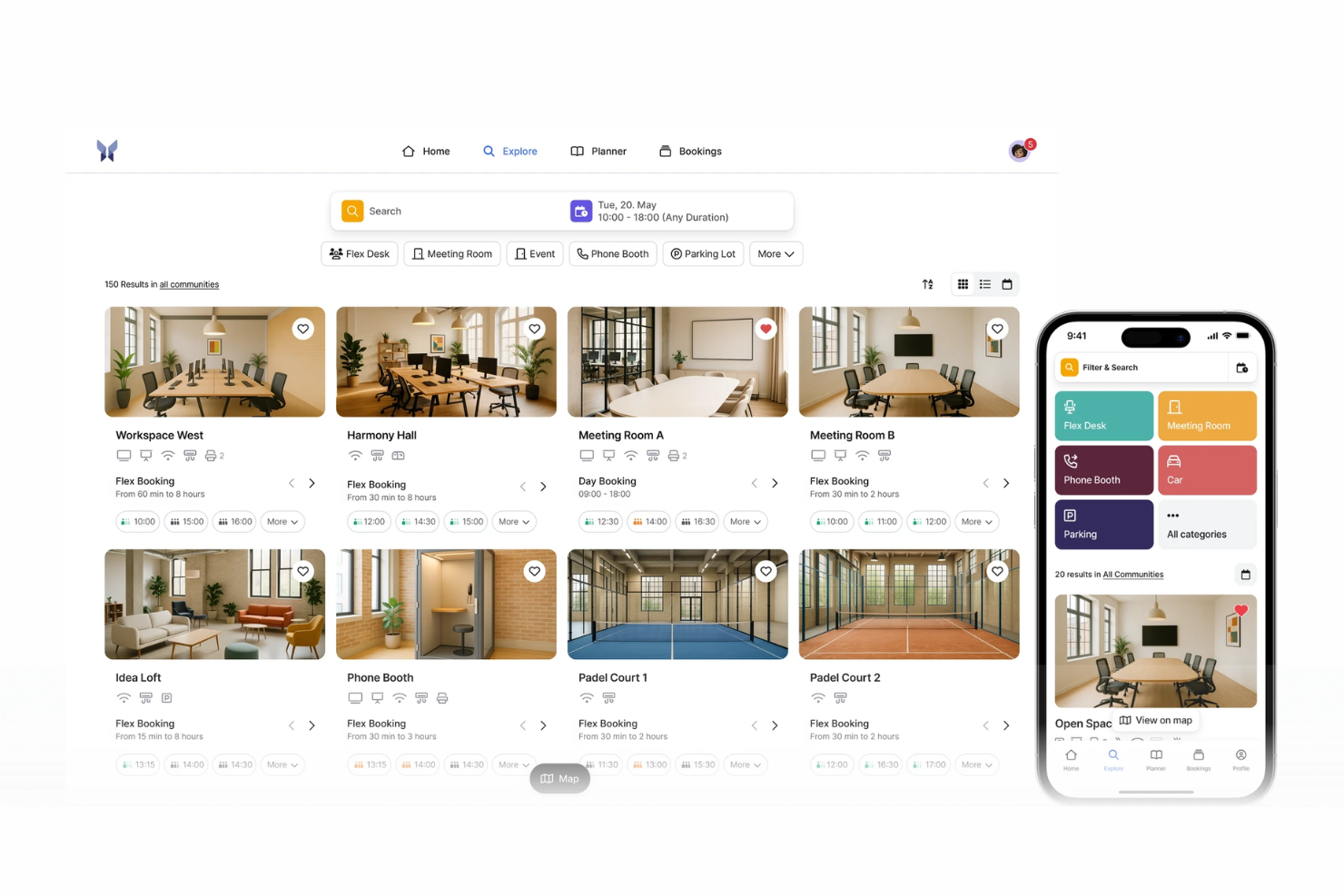
anny is an enterprise workspace booking platform that manages hot desking, room reservations, and office capacity planning with interactive 3D floor maps, SSO, community-based access controls, and a 29-language interface.
Who Is anny Best For?
anny is a good fit for enterprise organizations managing multi-location offices with complex access rules, mixed workspace types, and internationally distributed teams.
Why I Picked anny
anny earns its spot on my shortlist because of the granularity it gives admins over who can book what. Through its Communities feature, you can assign specific desks, floors, or resource types to defined groups, so the Legal team only sees their floor and the Engineering team only sees theirs. You can layer on booking contingents to cap how often a user or group can reserve a resource, giving you tight control without manual oversight.
anny Key Features
- SSO authentication: Connect anny to your existing identity provider so employees log in with their corporate credentials.
- Recurring bookings: Set repeating desk reservations on a daily or weekly basis, without re-booking each time.
- Multi-location management: Use a single admin account to manage bookable resources across multiple office sites.
- Mobile booking app: Reserve desks, check in, and view floor availability from a smartphone.
anny Integrations
anny offers native integrations with Microsoft 365, Outlook, MS Teams, Google Calendar, Google Workspace, Zoom, Personio, HRworks, Stripe, and PayPal, along with several smart lock integrations including Nuki, Salto KS, iLOQ, and dormakaba. It also connects with Make and n8n for no-code workflow automation and provides both an Admin API and a Customer API for custom integrations.
Pros and Cons
Pros:
- Built-in smart lock and access control
- Centralizes desks, rooms, and parking management
- 3D interactive maps for visual desk booking
Cons:
- Mobile app lacks some web features
- Setup requires custom workflows for complex maps

Best for workplace experience analytics
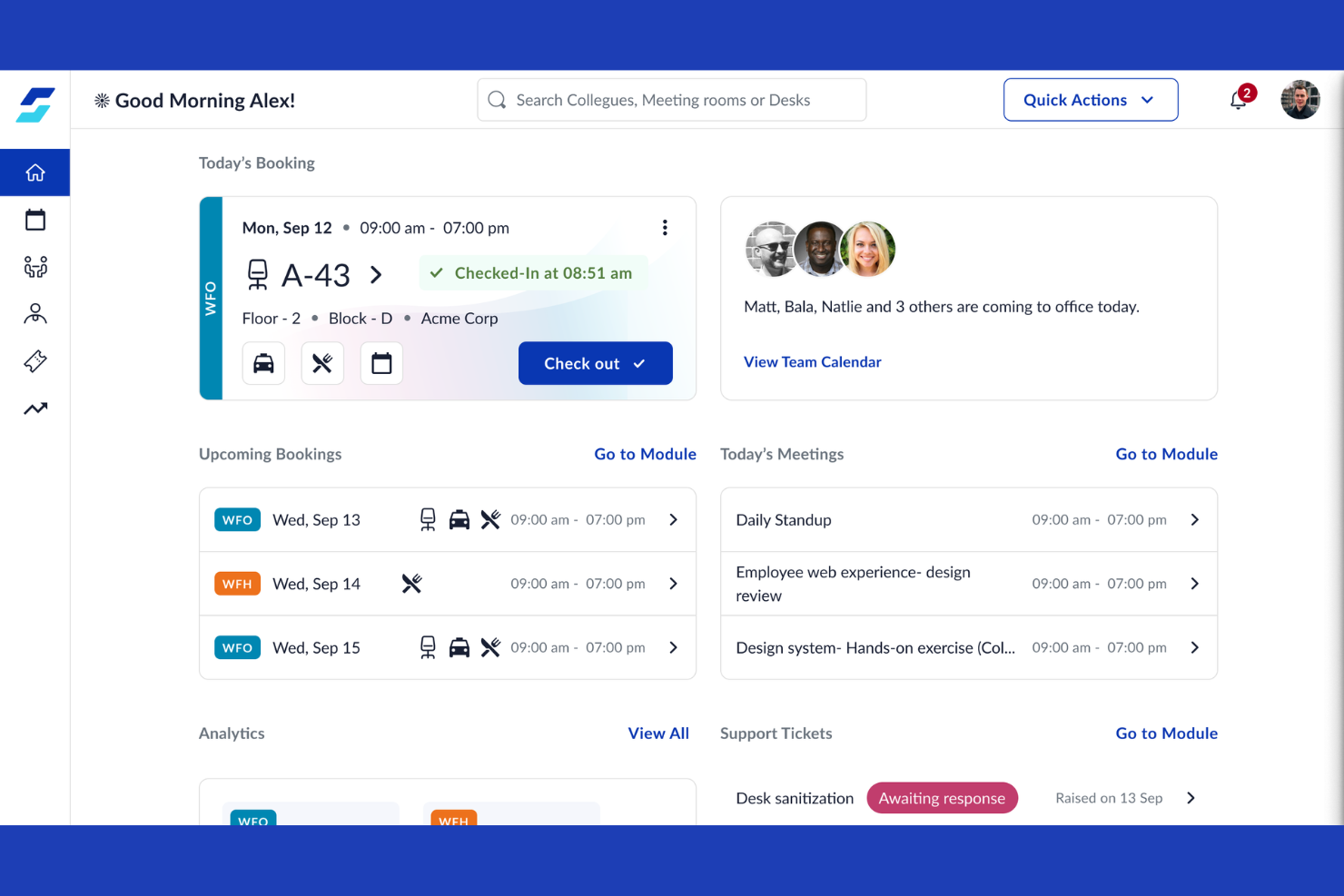
WorkInSync is enterprise desk booking software with automated scheduling, interactive floor plan views, and configurable approval workflows for managing hybrid workspaces and desk reservations.
Who Is WorkInSync Best For?
WorkInSync is ideal for facilities managers and workspace planners at large enterprises who need detailed analytics on desk and space utilization.
Why I Picked WorkInSync
I picked WorkInSync as one of the best because I rely on its advanced analytics and reporting to monitor real-time desk utilization, spot booking trends, and export custom space usage reports for large-location occupancy planning.
WorkInSync Key Features
- Interactive floor plans: View and select available desks directly from an office map.
- Mobile booking app: Reserve desks and manage bookings on the go.
- Approval workflow: Set up customizable approval steps for desk or space reservations.
- Contactless check-in options: Enable QR code-based or sensor-based desk check-ins.
WorkInSync Integrations
WorkInSync offers native integrations with Microsoft Teams, Microsoft Outlook, Microsoft Active Directory, Microsoft Intune, Google Workspace, Google Calendar, Okta, OneLogin, Cisco, and Oracle PeopleSoft.
Pros and Cons
Pros:
- Custom floor plans for office maps
- Auto check-in with Bluetooth sensors
- Real-time heatmaps of desk occupancy
Cons:
- Desk release may need manual intervention
- Overwhelming feature set for smaller teams
Best for sensor-based occupancy insights
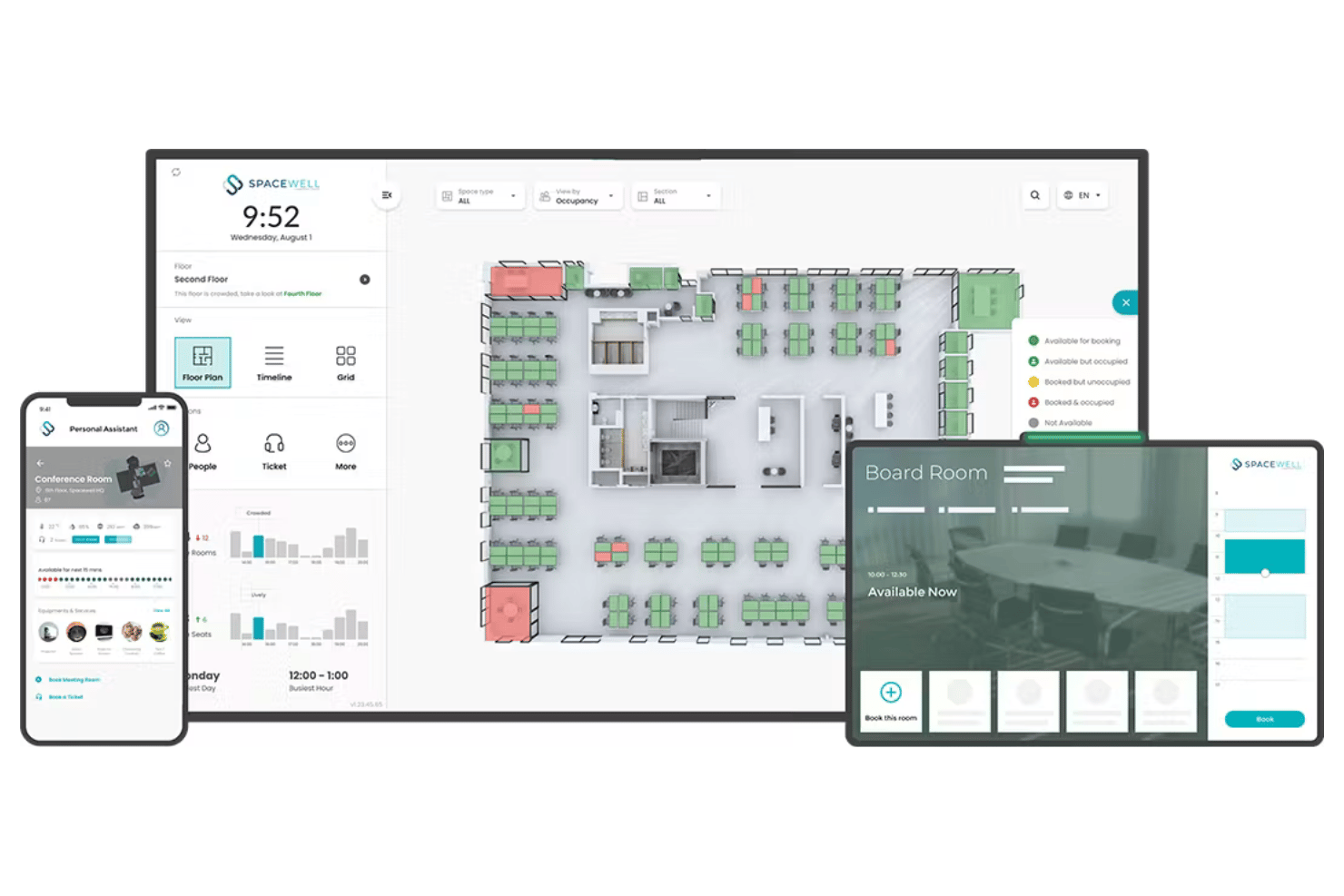
Spacewell is an enterprise hot desk booking platform that brings together real-time sensor data, interactive floor plans, occupancy analytics, and policy controls for managing large-scale flexible office environments.
Who Is Spacewell Best For?
Spacewell is a strong choice for facilities teams at large enterprises managing hybrid offices and multi-location real estate portfolios.
Why I Picked Spacewell
I picked Spacewell as one of the best because I see its sensor-based occupancy insights in action, translating real-time desk usage data into actionable office layouts. My team uses built-in sensor analytics to map actual attendance and eliminate guesswork from space planning.
Spacewell Key Features
- Interactive floor plan booking: Employees reserve desks or rooms directly from visual maps of each office location.
- Role-based booking controls: Admins set permissions, booking windows, and desk access based on job function.
- Multi-location management: Centralized administration for multiple sites, floors, and regions within one dashboard.
- Integration with Microsoft Teams and Outlook: Users can book desks and receive notifications inside existing communication platforms.
Spacewell Integrations
Spacewell offers native integrations with Outlook, Google Calendar, Microsoft Teams, Slack, Okta, Azure Active Directory, Workday, SAP SuccessFactors, and several IoT sensor brands. An open API is also available for custom integrations.
Pros and Cons
Pros:
- Role-based booking policy controls for enterprises
- Interactive booking from detailed floor maps
- Real-time occupancy insights with IoT sensors
Cons:
- Mobile app interface can feel cluttered
- Initial setup complexity for large environments

deskbird
Best for employee-first desk booking
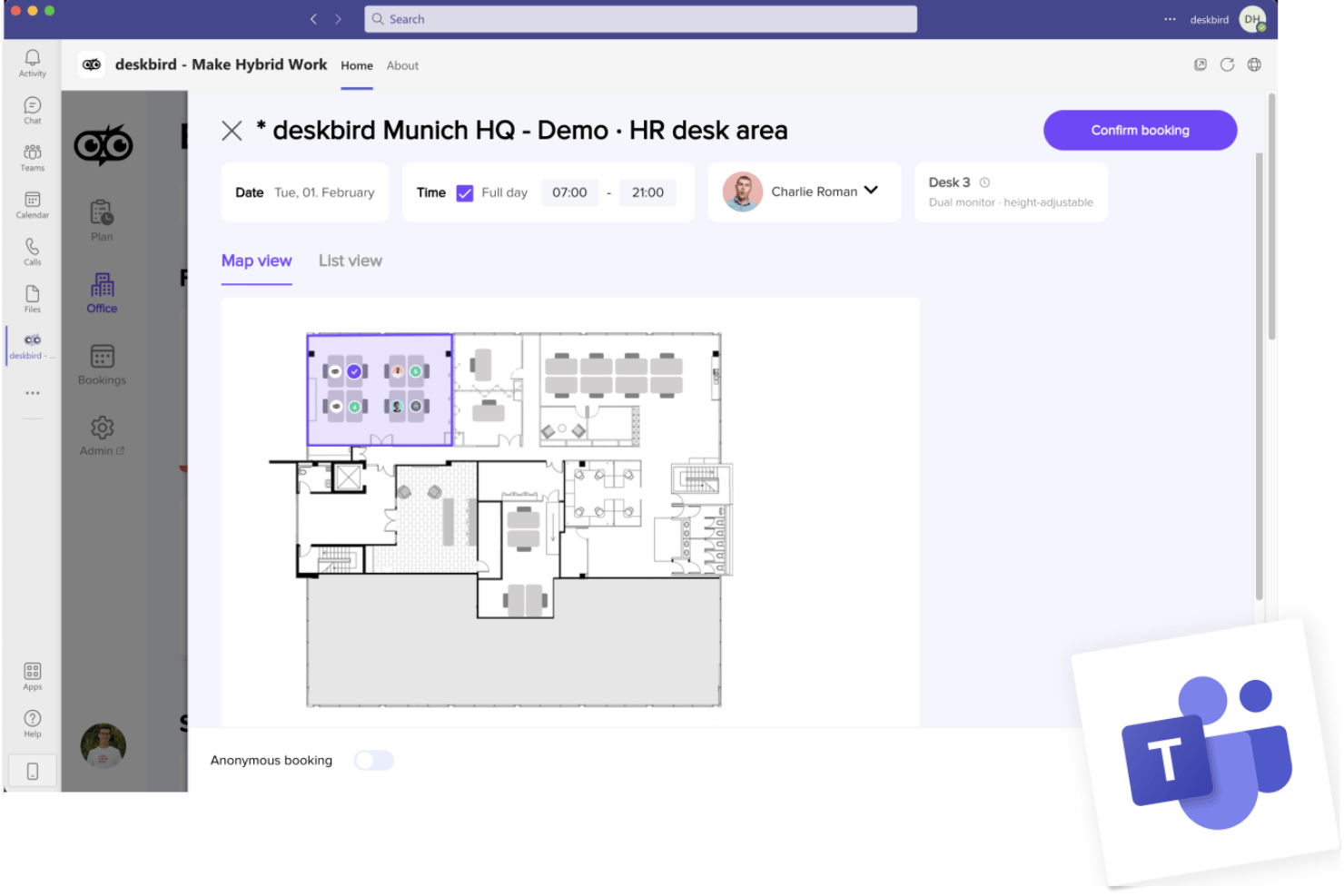
deskbird is an enterprise hot desk booking platform designed for hybrid workplaces, offering interactive floor plans, self-service desk reservations, real-time occupancy analytics, and scalable integration with collaboration and HR systems.
Who Is deskbird Best For?
Designed for large organizations with hybrid or flexible work models looking to manage desk bookings and space utilization across multiple locations.
Why I Picked deskbird
I picked deskbird as one of the best because it puts employee choice first with live interactive floor plans and quick booking from anywhere. I rely on it for point-and-click reservations, QR check-ins, and clear visibility across large hybrid offices.
deskbird Key Features
- Neighborhood zones: Set up work zones and control booking rules by department or team.
- Multi-location management: Configure and manage multiple offices, floors, and regions from a single admin interface.
- Role-based permissions: Set granular access controls for different user types, including guests, admins, and staff.
- Occupancy analytics dashboard: Track desk usage data and export custom reports for occupancy and attendance.
deskbird Integrations
deskbird offers native integrations with Google Workspace, Microsoft 365, Slack, Microsoft Teams, Okta, Azure Active Directory, Personio, Workday, SAP SuccessFactors, and has an API for custom integrations.
Pros and Cons
Pros:
- Customizable booking policies by location or team
- Supports QR-based desk check-in processes
- Interactive floor plans with real-time availability
Cons:
- Sensor integrations require custom setup
- No 3D floor plan visualizations

Robin
Best for managing dynamic team seating
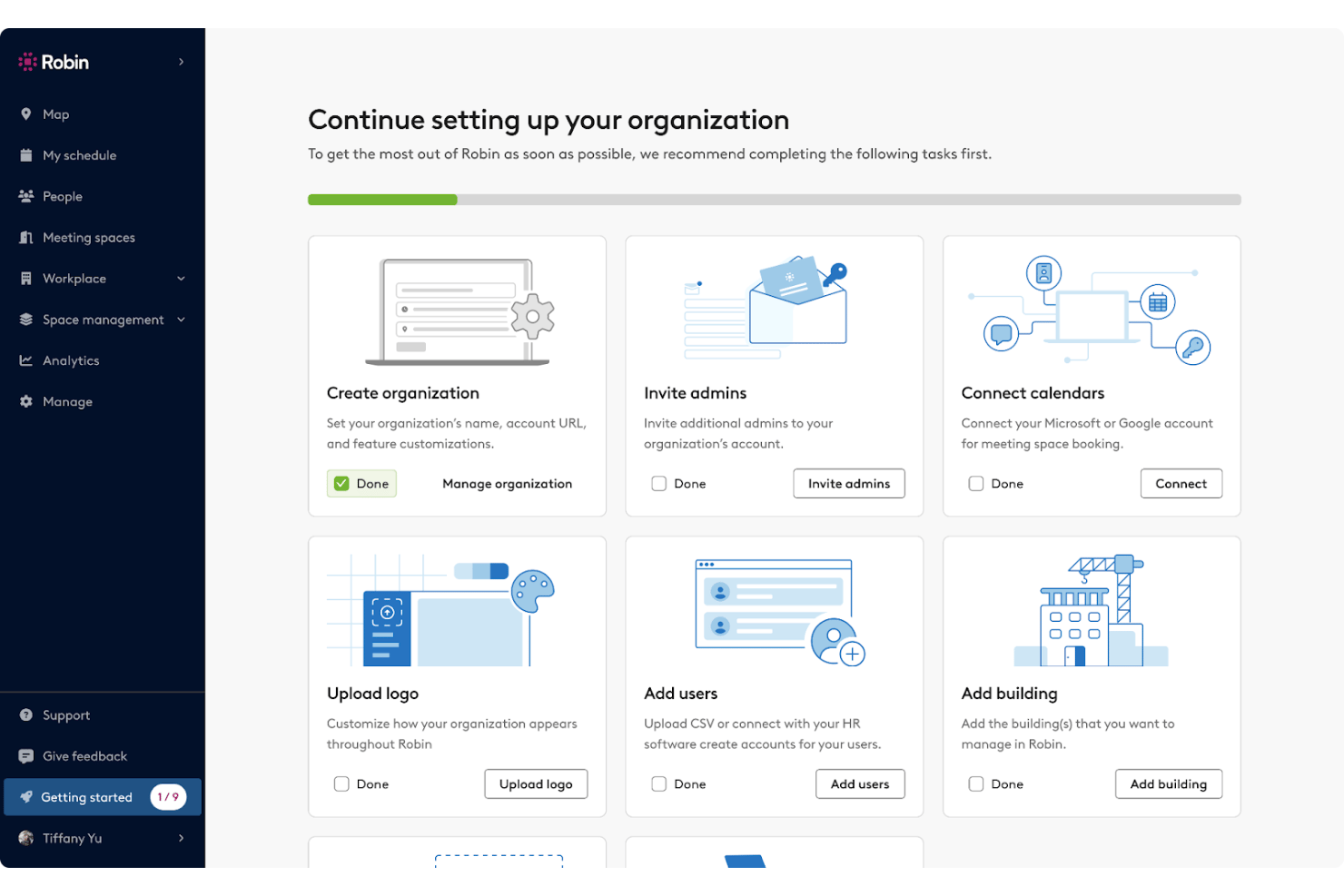
Robin is an enterprise hot desk booking software designed for managing distributed workspaces, offering interactive floor plans, advanced reservation rules, occupancy analytics, and robust integrations for organizations supporting flexible seating arrangements.
Who Is Robin Best For?
Workplace and facilities teams at large enterprises managing flexible, multi-location office environments.
Why I Picked Robin
I picked Robin as one of the best for enterprise hot desk booking because I can easily adjust team seating layouts in real time, assign neighborhoods, and let teams self-select spots using interactive floor plans that visually update as bookings change.
Robin Key Features
- Role-based access controls: Limit or grant booking permissions for users and groups based on role or department.
- Occupancy analytics dashboard: Track space usage trends, booking rates, and attendance data in real time.
- Calendar integrations: Sync desk bookings with Outlook and Google Calendar for unified scheduling.
- Sensor and badge system integrations: Connect with workplace hardware to monitor real occupancy and automate desk check-ins.
Robin Integrations
Robin offers native integrations with Google Workspace, Microsoft 365, Outlook, Slack, Microsoft Teams, Okta, Azure Active Directory, BambooHR, and Cisco Webex. An API is available for custom integrations.
Pros and Cons
Pros:
- Supports occupancy tracking with sensors and badges
- Advanced team and neighborhood seat assignments
- Interactive floor plans update in real time
Cons:
- Waitlist functionality not prominently featured
- Advanced reporting features require higher-tier plans
YAROOMS
Best for AI-powered workplace scheduling
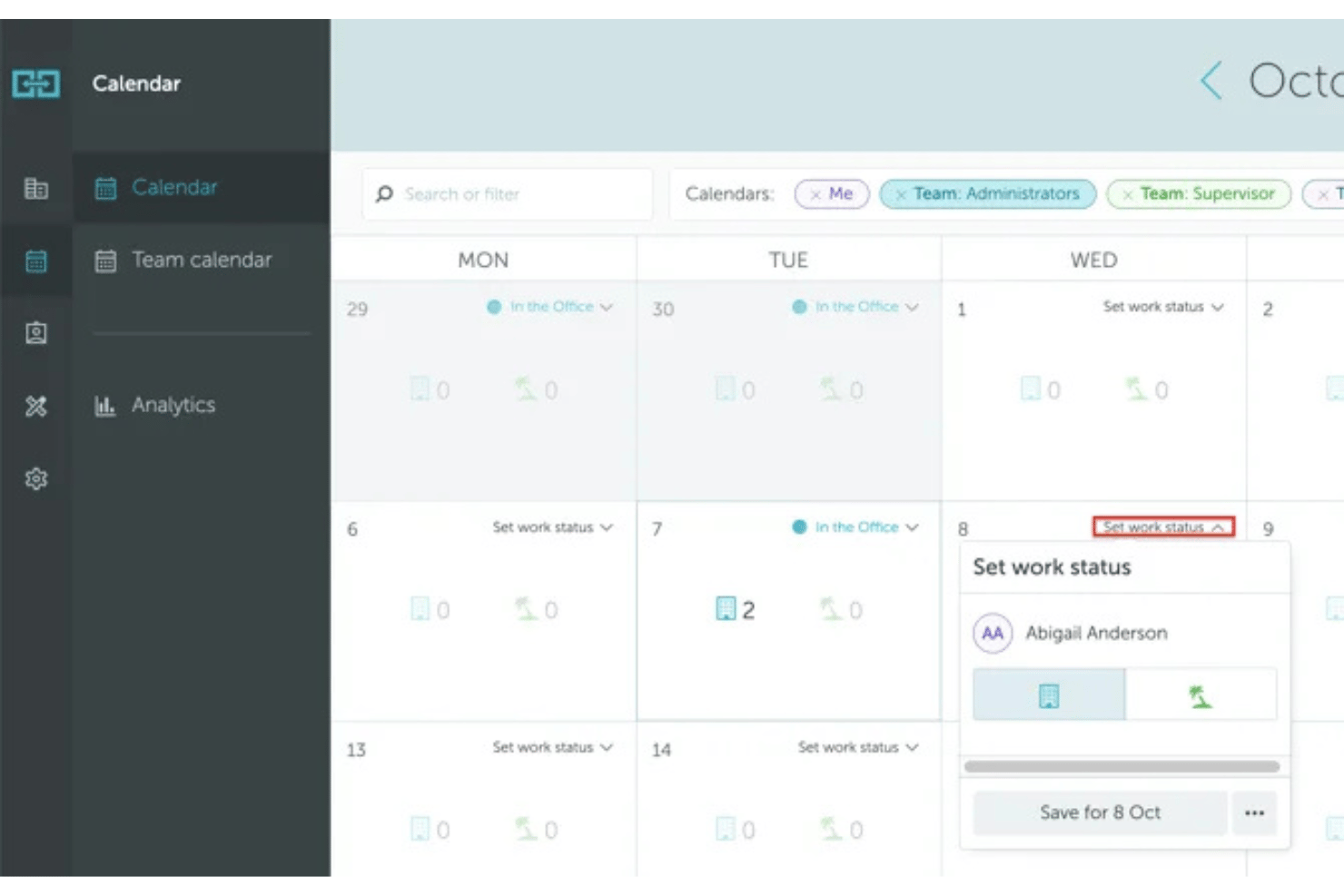
YAROOMS is an enterprise workplace management platform that combines desk booking, meeting room reservations, workplace policies, and occupancy analytics to support hybrid work across multiple office locations.
Who Is YAROOMS Best For?
Enterprises and large organizations managing flexible workspaces across multiple offices and regions.
Why I Picked YAROOMS
I picked YAROOMS because it combines desk booking and workplace management in one platform. I can create flexible booking policies, manage office resources across multiple locations, and monitor workspace utilization through built-in analytics.
YAROOMS Key Features
- Interactive floor plans: Users can view and book available desks directly from a visual office map.
- Role-based booking policies: Admins configure access, booking windows, and quotas by role or department.
- Calendar integrations: Connects with Outlook and Google Workspace for seamless booking and schedule sync.
- Occupancy analytics dashboard: Visualizes usage data and trends by floor, zone, or building.
YAROOMS Integrations
YAROOMS offers native integrations with Outlook, Google Workspace, Microsoft Teams, Slack, Okta, Azure Active Directory, Workday, and BambooHR, and provides an API for custom integrations.
Pros and Cons
Pros:
- Interactive floor plans for multi-location offices
- Built-in workplace occupancy analytics
- Advanced policy and permission management
Cons:
- Sensor integrations require specific hardware partners
- No 3D wayfinding or navigation features

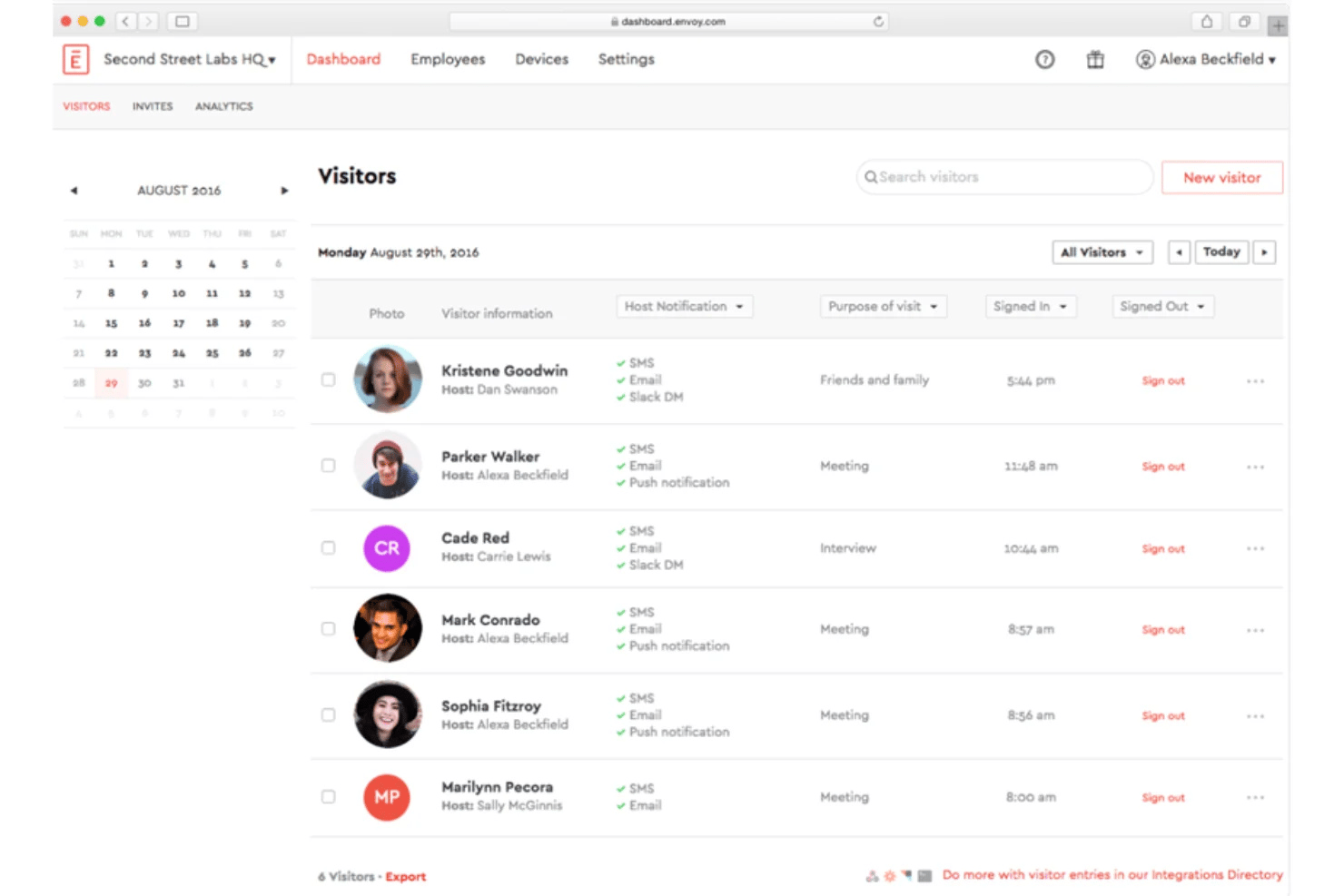
Envoy Workplace is an enterprise hot desk booking platform that enables organizations to manage desk reservations, interactive floor plans, workplace occupancy, and flexible office operations across multiple locations.
Who Is Envoy Workplace Best For?
Large organizations and facilities teams that need to coordinate desk bookings and occupancy data across multiple office locations.
Why I Picked Envoy Workplace
I picked Envoy Workplace as one of the best because its interactive floor plan booking lets my team visualize desk availability in real time, click directly on workspaces to book, and navigate multi-floor offices with detailed, customizable maps.
Envoy Workplace Key Features
- Granular booking policies: Set rules for desk access, time windows, and team or department restrictions.
- Occupancy analytics dashboard: Track real-time usage data and attendance patterns across all office locations.
- Enterprise calendar integration: Sync desk reservations with Google Workspace and Outlook calendars.
- Role-based permissions: Control admin and user access levels to customize who can book, manage, and view spaces.
Envoy Workplace Integrations
Envoy Workplace offers native integrations with Google Workspace, Microsoft 365, Slack, Microsoft Teams, Okta, Azure Active Directory, Workday, BambooHR, Rippling, ADP, and provides an API for custom integrations.
Pros and Cons
Pros:
- Occupancy analytics dashboard for multi-site offices
- Granular booking policies for different user groups
- Interactive floor plans with real-time desk status
Cons:
- Advanced features require higher-tier plans
- Initial setup for multi-location can be complex

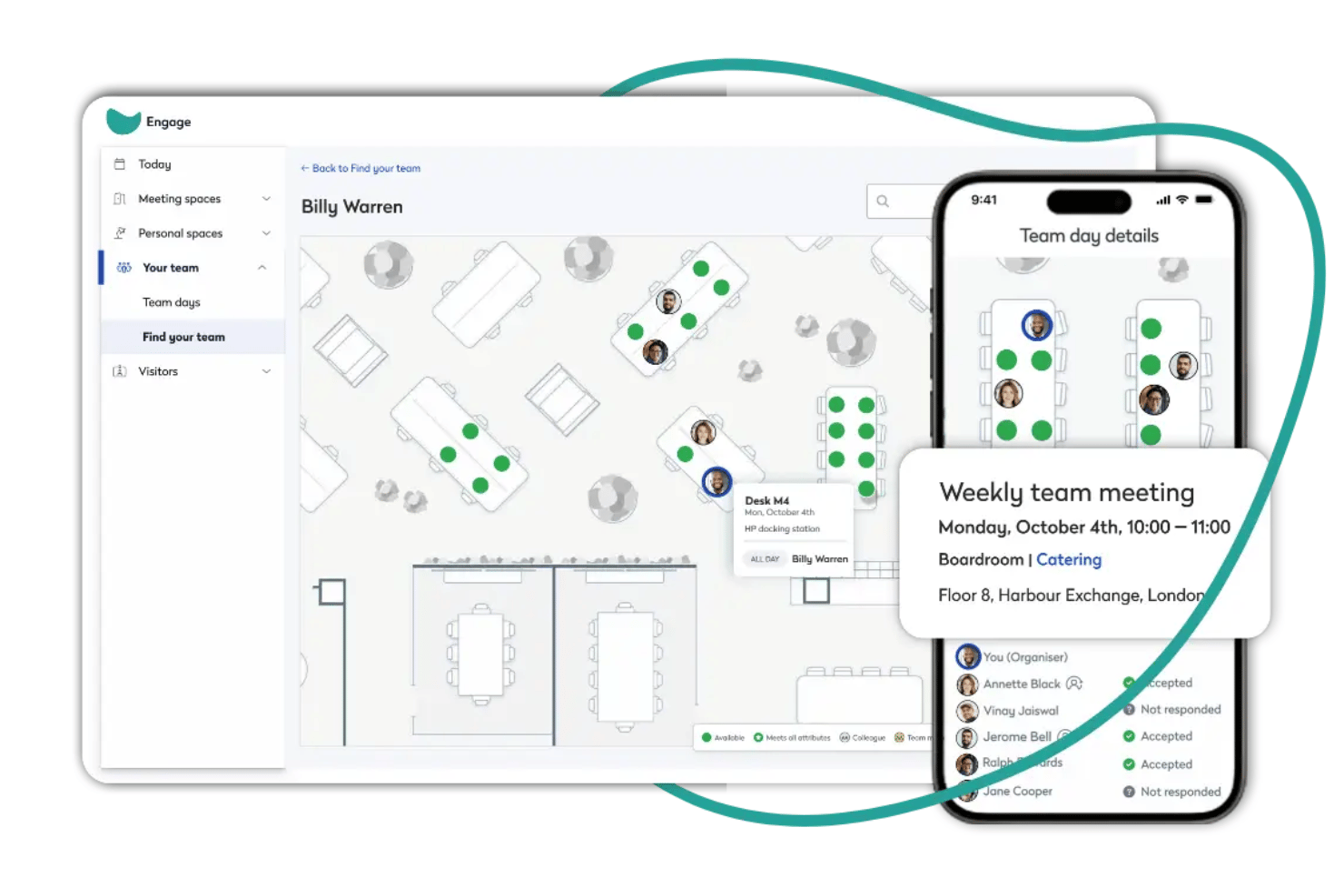
Eptura Workplace is an enterprise hot desk booking platform designed to manage desk reservations, interactive floor plans, policy controls, occupancy analytics, and large-scale workplace integrations across multiple locations.
Who Is Eptura Workplace Best For?
Eptura Workplace is a solid choice for enterprise facilities, HR, and real estate teams managing flexible workspaces across multiple locations.
Why I Picked Eptura Workplace
I picked Eptura Workplace because it lets me configure interactive floor plans, manage complex booking rules for multiple locations, and access deep utilization analytics for large organizations. It’s ideal for enterprise workplace management.
Eptura Workplace Key Features
- Neighborhood zoning: Assign specific desks to departments or teams using customizable workspace neighborhoods.
- Advanced access permissions: Set granular user roles and access levels for administrators, managers, and employees.
- Mobile desk check-in: Allow employees to check in to their reserved desk on arrival using the mobile app.
- Visitor management integration: Register and track workplace visitors directly within the same platform as desk bookings.
Eptura Workplace Integrations
Eptura Workplace offers native integrations with Microsoft 365, Google Workspace, Slack, Microsoft Teams, Okta, Azure Active Directory, and Workday. An API is available for custom integrations.
Pros and Cons
Pros:
- Handles multi-site enterprise deployments smoothly
- Supports advanced booking policy configuration
- Interactive floor plans update in real time
Cons:
- Custom reporting setup can be complex
- Desk sensors require separate system setup
Annen programvare for bestilling av fleksible kontorplasser for store virksomheter
Her er noen flere alternativer for programvare for bestilling av fleksible kontorplasser for store virksomheter som ikke kom med på kortlisten min, men som likevel er verdt å undersøke:
- Dibsido
For real-time desk availability updates
- Envoy
For neighbourhood-based seating assignments
- Smartway2
For team neighborhood booking
- Eptura
For automating workspace check-ins
- GoBright
For occupancy tracking with hardware
- Mapiq
For AI-powered workspace planning
- Zoom Workspace Reservation
For integrating with Zoom environments
- Skedda
For rules-based booking controls
- Archie
For coworking space management
- OfficeSpace
For custom space utilization analytics
- Kadence
For simplifying hybrid work scheduling
- Eden
For all-in-one workplace operations
- Microsoft Places
For Microsoft 365 workplaces
- Officely
For booking directly in Slack or Teams
- DeskFlex
For touchscreen-enabled booking
- OfficeSpace
For AI-driven space planning


How I Evaluate Enterprise Hot Desk Booking Software
I split evaluation into two layers: the booking and policy basics every tool must cover, and differentiators like occupancy analytics and IoT sensor support that matter at enterprise scale.
Core Functionality (Table Stakes for This List)
When I'm selecting tools for my list, I rank each one on a scale from 0 (does not offer the functionality) to 5 (excels in this area) for each core functionality listed below. Then, I calculate the tool's total score into a percentage. Each tool needs to achieve a minimum total score of 65% to be considered for inclusion.
- Desk Reservation System: I look for self-service booking where employees can search, reserve, modify, and cancel desks on their own—including recurring reservations, permanent desk assignments, desk hoteling, and check-in options.
- Interactive Floor Plans: Visual maps that show real-time availability and let people click to book matter a lot, especially for offices with multiple floors and zones.
- Booking Policies & Permissions: I evaluate how well admins can define rules like booking windows, desk neighborhoods, role-based access, and approval workflows across locations.
- Occupancy Analytics: Dashboards that track desk utilization, attendance trends, and peak usage help facilities teams make informed decisions about space planning.
- Enterprise Integrations: Connects with calendars, SSO providers, HRIS platforms, and collaboration tools to streamline workplace management and user provisioning.
- Multi-Location & Scalability: Tools should support per-site configuration across multiple offices and regions, with enterprise-grade SLAs and the ability to handle large employee populations.
Once I have a list of tools that meet the criteria, I consider what sets each platform apart.
Differentiating Factors (What Sets Vendors Apart)
Here's how I compare and contrast different vendors:
Standout Features
Team coordination features are a key differentiator. I also look for room scheduling, meeting room booking, and desk hoteling capabilities that help employees plan office days while keeping teams together. IoT sensor integration matters too, since it validates actual occupancy against bookings and auto-releases no-shows. AI-powered desk recommendations round things out by suggesting spots based on team schedules and past preferences, reducing friction across large campuses.
Beyond Features
Enterprise security is something I always evaluate—SOC 2 Type II certification and SSO/SAML support through providers like Okta or Azure AD are table stakes when you're syncing employee directories across locations. Implementation support also matters more than most buyers expect. Rolling out a booking platform to thousands of employees requires floor plan digitization, admin training, and change management resources to drive adoption.
Slik velger du programvare for bestilling av fleksible kontorplasser for store virksomheter
Det er lett å gå seg vill i lange funksjonslister og komplekse prismodeller. For å hjelpe deg med å holde fokus mens du går gjennom den unike prosessen med å velge programvare, får du her en sjekkliste over faktorer du bør ha i tankene:
| Faktor | Hva du bør vurdere |
|---|---|
| Skalerbarhet | Vil programvaren håndtere flere brukere, lokasjoner eller plassetyper hvis virksomheten din vokser? Kontroller brukerbegrensninger og prismodeller basert på volum. |
| Integrasjoner | Kan den kobles til eksisterende kalendersystemer, SSO- eller HR-systemer, som Microsoft 365 eller Google Workspace? Mangler kan forstyrre innføringen og nøyaktigheten i planleggingen. |
| Tilpasningsmuligheter | Kan bestillingsregler, plantegninger og brukertillatelser enkelt justeres slik at de passer retningslinjene og de stadig skiftende policyene på arbeidsplassen din? Unngå rigide systemer hvis fleksibilitet er avgjørende. |
| Brukervennlighet | Kan ansatte bestille, tildele på nytt eller sjekke plasser uten opplæring? Et komplisert grensesnitt øker brukernes frustrasjon og antallet henvendelser til brukerstøtten. |
| Implementering og introduksjon | Hvor raskt kan du ta systemet i bruk etter signering? Se etter verktøy for import, opplæringsressurser og støtte under utrullingen for å unngå overganger som varer i flere måneder. |
| Kostnad | Inkluderer totalkostnaden konfigurering, brukerstøtte og oppgraderinger? Bekreft om nivåbegrensninger eller tillegg vil øke prisen etter hvert som virksomheten skalerer. |
| Sikkerhetstiltak | Er verktøy for personvern, administratorkontroller og standarder for brukerautentisering (for eksempel SSO og MFA) egnet for risikoprofilen og kravene til regelverksetterlevelse i organisasjonen din? |
| Tilgjengelig brukerstøtte | Kan du kontakte brukerstøtten gjennom de kanalene og tidssonene du foretrekker? Vurder responstid og eventuelle ekstrakostnader for prioritert støtte eller global assistanse. |
Hva er programvare for bestilling av fleksible kontorplasser for store virksomheter?
Programvare for booking av fleksible arbeidsplasser for virksomheter er digitale plattformer som lar organisasjoner administrere, reservere og overvåke ikke-tildelte arbeidsplasser på tvers av flere lokasjoner. Disse løsningene hjelper HR-team med å støtte hybride arbeidsmodeller, følge med på belegget og håndheve bookingregler. De er avgjørende for å administrere store, distribuerte arbeidsstyrker og sikre effektiv bruk av kontorarealer i komplekse miljøer med kapasitets- og samsvarskrav i stadig utvikling.
Funksjoner
Her er de viktigste funksjonene all god programvare for booking av fleksible arbeidsplasser for virksomheter bør ha:
- System for reservasjon av arbeidsplasser: Lar ansatte reservere tilgjengelige arbeidsplasser på forhånd eller ved behov, og støtter både planlagte og spontane behov for arbeidsplasser.
- Interaktive plantegninger: Gir visuelle kart over kontorlokalene, slik at brukerne kan se og velge bestemte arbeidsplasser, rom eller soner.
- Mobil tilgang: Gjør det mulig for ansatte å booke, frigi eller endre reservasjoner fra smarttelefoner eller nettbrett mens de er på farten.
- Sporing av tilgjengelighet i sanntid: Viser oppdatert informasjon om belegget på arbeidsplassene, forhindrer dobbeltbookinger og hjelper team med å finne ledige arbeidsplasser på en effektiv måte.
- Bookingregler og retningslinjer: Lar administratorer angi tillatelser, bookingperioder, begrensninger og godkjenningsprosesser basert på behovene til avdelingen eller lokasjonen.
- Gruppe- og gjentakende bookinger: Støtter booking av blokker med arbeidsplasser for team og oppsett av gjentakende reservasjoner for faste arbeidsplaner eller møter.
- Analyse og rapportering: Leverer data om bruk av arbeidsplasser, beleggsutvikling og utbredelse for å informere om arealplanlegging og legge grunnlag for beslutninger om arbeidsplassen.
- Automatiserte varsler: Sender e-post-, SMS- eller varsler i appen om kommende bookinger, kanselleringer eller endringer i statusen til arbeidsplasser.
- Integrasjon med eksisterende systemer: Kobler seg til firmakalendere, kommunikasjonsapper, identitetsleverandører eller HR-systemer for å gi en sømløs brukeropplevelse.
- Verktøy for helse og sikkerhet: Håndterer krav til avstand, rengjøringsplaner og kapasitetsgrenser for å støtte samsvar på arbeidsplassen og de ansattes trivsel.
Fordeler
Implementering av programvare for booking av fleksible arbeidsplasser for virksomheter gir flere fordeler for teamet og virksomheten din. Her er noen av fordelene du kan se frem til:
- Effektiv utnyttelse av areal: Administrasjon av arbeidsplasser i sanntid sikrer at arbeidsplassene forblir fleksible, og hindrer at kontorområder blir underutnyttet eller overfylte.
- Bedre medarbeideropplevelse: Enkel booking av arbeidsplasser med visuelle plantegninger og mobil tilgang gir de ansatte mulighet til å velge når og hvor de jobber.
- Handlingsrettet innsikt i arbeidsplassen: Innebygd analyse og rapportering avdekker beleggsutvikling og hjelper HR-team med å ta gode beslutninger om arealplanlegging.
- Bedre samsvar og sikkerhet: Automatiserte bookingregler og helseverktøy støtter krav til avstand, kapasitetsgrenser og rengjøringsrutiner for tryggere miljøer.
- Enklere logistikk for hybridarbeid: Gruppebookinger og gjentakende reservasjoner gjør det enkelt for team å koordinere dager på kontoret og samarbeide effektivt.
- Mindre administrativt arbeid: Automatiserte varsler, integrasjoner og kontroll over retningslinjer minimerer tiden som brukes på å administrere plassering av ansatte og løse konflikter.
- Enklere introduksjon og støtte: Veiledede introduksjonsalternativer, maler og støtteressurser hjelper nye brukere med å komme raskt i gang og holder problemene på et minimum.
Kostnader og priser
Valg av programvare for booking av fleksible arbeidsplasser for virksomheter krever en forståelse av de ulike prismodellene og abonnementene som er tilgjengelige. Kostnadene varierer basert på funksjoner, teamstørrelse, tillegg og mer. Tabellen nedenfor oppsummerer vanlige abonnementer, gjennomsnittsprisene deres og typiske funksjoner som er inkludert i programvareløsninger for booking av fleksible arbeidsplasser for virksomheter:
Sammenligningstabell for programvare for booking av fleksible arbeidsplasser for virksomheter
| Abonnementstype | Gjennomsnittspris | Vanlige funksjoner |
|---|---|---|
| Gratisabonnement | $0 | Grunnleggende booking av arbeidsplasser, begrenset antall brukere, enkelt plantegningskart og støtte via e-post. |
| Personlig abonnement | $5–$10/bruker/måned | Booking for enkeltbrukere, mobil tilgang, kalenderintegrasjon og grunnleggende rapportering. |
| Bedriftsabonnement | $10–$25/bruker/måned | Teambookinger, administratorkontroller, detaljert analyse, mobilapp, gruppeplanlegging og standardstøtte. |
| Virksomhetsabonnement | $25–$50/bruker/måned | Ubegrenset antall brukere, avansert sikkerhet, API-tilgang, tilpassede arbeidsflyter, prioritert støtte og hjelp med introduksjon. |
Vanlige spørsmål
Her er noen svar på vanlige spørsmål om programvare for booking av fleksible pulter for virksomheter:
Kan programvare for booking av fleksible pulter støtte flere kontorlokasjoner?
Ja, de fleste programvareløsninger for booking av fleksible pulter for virksomheter lar deg administrere og booke pulter på tvers av flere kontorer eller regioner. Dette sentraliserer administrasjonen av arbeidsområder, legger til rette for effektiv utnyttelse av eiendom og hjelper organisasjoner med distribuerte team med å opprettholde enhetlighet og oversikt.
Hvordan bidrar programvare for booking av fleksible pulter til retningslinjer for hybridarbeid?
Virksomhetsløsninger gir ansatte fleksibilitet til å reservere arbeidsområder bare når de trenger å være på stedet, noe som gjør dem avgjørende for et vellykket hybridkontor. Administratorer kan også bruke denne programvaren for booking av arbeidsplasser til å opprette bookingregler, følge med på beleggsgrad, koordinere deling av pulter og sørge for at fleksible arbeidsplaner er godt dokumentert.
Hvilke typer integrasjoner bør jeg se etter?
Se etter integrasjoner med HRIS-systemet ditt, kalendersystemer (som Google eller Microsoft), autentiseringsverktøy som SSO og kommunikasjonsplattformer som Slack eller Teams. Disse integrasjonene forbedrer arbeidsflytene, øker bruken og gjør det mulig for teammedlemmer å administrere booking av møterom eller planlegging av rom fra verktøyene de allerede bruker.
Er personvern et problem med programvare for booking av pulter?
Ja, personvern er en viktig faktor, særlig for store organisasjoner. Du bør bekrefte at programvaren har sikkerhet på virksomhetsnivå, med sikker autentisering, tilgangskontroll, datakryptering og samsvar med relevante personvernstandarder som GDPR eller SOC 2.
Hvordan bidrar disse verktøyene til å håndtere krav til helse og sikkerhet?
Mange brukervennlige løsninger for booking av pulter lar administratorer opprette regler for avstand, begrense kontorkapasiteten, automatisere rengjøringsplaner og tilby logger for smittesporing for å støtte krav til helse på arbeidsplassen i tradisjonelle kontorer og delte coworking-områder innenfor den fleksible arbeidsplassen.
Hvilke ressurser for innføring og opplæring er vanligvis inkludert?
De fleste leverandører tilbyr videoopplæringer, trinnvise veiledninger, webinarer og produktomvisninger i appen som fungerer på stasjonære datamaskiner og Android-plattformer. Noen tilbyr kundestøtte via chat eller en dedikert spesialist for å gjøre overgangen fra en fast arbeidsplass så smidig som mulig.